




Gelöst: Harmony Adapter: beide Hub nicht mehr erreichbar
-
Moin !
Mein ioBroker läuft als Container unter Proxmox.
Nachdem es jahrelang kein Problem mit dem Harmony Adapter gab, sind meine beiden Hub nicht mehr erreichbar. Die diversen Beiträge hier im Forum zum Thema habe ich durchgearbeitet und nur der Tip, in den Adapter Einstellungen das Discovery Subnetz auf die HUB-IP zu setzen, war erfolgreich.
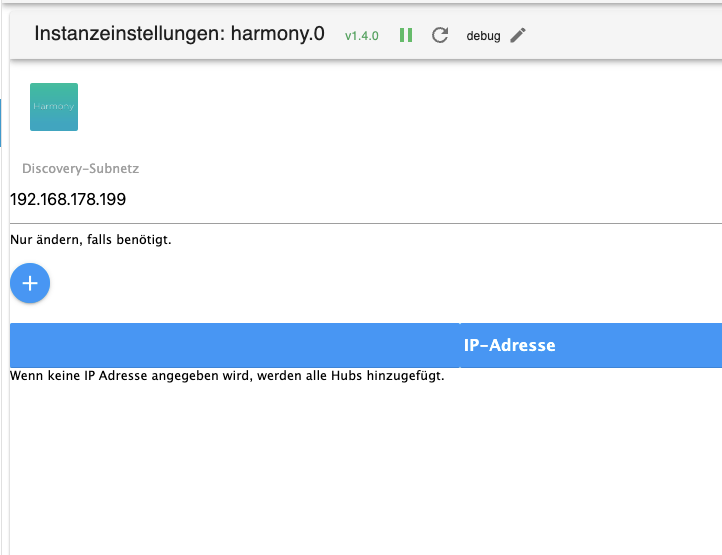
Aber so kann ich nur einen meiner Hubs verbinden.
So sollte es ja standardmäßig aussehen:
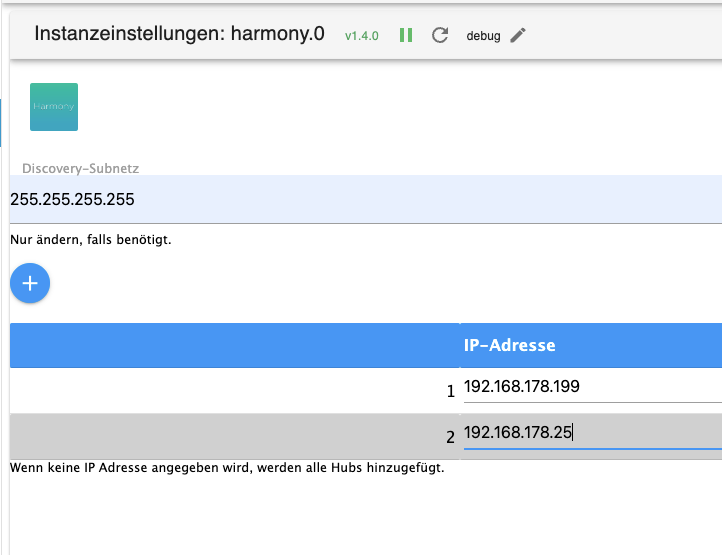
Hat jemand eine Idee was ich noch machen könnte ? Bin mit meinem Latein am Ende.Das habe ich bisher versucht: ioBroker Container restored, Proxmox Neustart, Hubs Neustart, Adapter deinstalliert/installiert, Ping auf die Hubs erfolgreich. Die Harmony FB funktioniert ganz normal.
Geändert habe ich vor dem Fehler irgendwann Proxmox mit einem Update. Sonst nix.Skript v.2024-05-22 *** BASE SYSTEM *** Static hostname: ioBrokerUbuntu2204 Icon name: computer-container Chassis: container Virtualization: lxc Operating System: Ubuntu 22.04.4 LTS Kernel: Linux 6.8.8-3-pve Architecture: x86-64 model name : Intel(R) Core(TM) i5-6500T CPU @ 2.50GHz Docker : false Virtualization : lxc Kernel : x86_64 Userland : 64 bit Systemuptime and Load: 14:35:48 up 3:01, 2 users, load average: 0.97, 0.84, 0.94 CPU threads: 4 *** Time and Time Zones *** Local time: Sun 2024-07-28 14:35:48 CEST Universal time: Sun 2024-07-28 12:35:48 UTC RTC time: n/a Time zone: Europe/Berlin (CEST, +0200) System clock synchronized: yes NTP service: inactive RTC in local TZ: no *** Users and Groups *** User that called 'iob diag': armin HOME=/home/armin GROUPS=armin adm sudo iobroker User that is running 'js-controller': iobroker HOME=/home/iobroker GROUPS=iobroker tty dialout audio video *** Display-Server-Setup *** Display-Server: false Desktop: Terminal: tty Boot Target: graphical.target *** MEMORY *** total used free shared buff/cache available Mem: 6.1G 2.3G 2.7G 0.0K 1.2G 3.9G Swap: 2.0G 0B 2.0G Total: 8.2G 2.3G 4.7G Active iob-Instances: 39 6144 M total memory 2263 M used memory 2327 M active memory 1006 M inactive memory 2666 M free memory 0 M buffer memory 1214 M swap cache 2048 M total swap 0 M used swap 2048 M free swap *** top - Table Of Processes *** top - 14:35:48 up 3:01, 2 users, load average: 0.97, 0.84, 0.94 Tasks: 68 total, 1 running, 67 sleeping, 0 stopped, 0 zombie %Cpu(s): 10.0 us, 3.3 sy, 0.0 ni, 86.7 id, 0.0 wa, 0.0 hi, 0.0 si, 0.0 st MiB Mem : 6144.0 total, 2666.5 free, 2262.4 used, 1215.1 buff/cache MiB Swap: 2048.0 total, 2048.0 free, 0.0 used. 3881.4 avail Mem *** FAILED SERVICES *** UNIT LOAD ACTIVE SUB DESCRIPTION * apparmor.service loaded failed failed Load AppArmor profiles * systemd-networkd-wait-online.service loaded failed failed Wait for Network to be Configured * systemd-sysusers.service loaded failed failed Create System Users LOAD = Reflects whether the unit definition was properly loaded. ACTIVE = The high-level unit activation state, i.e. generalization of SUB. SUB = The low-level unit activation state, values depend on unit type. 3 loaded units listed. *** FILESYSTEM *** Filesystem Type Size Used Avail Use% Mounted on /dev/loop4 ext4 15G 8.1G 5.9G 59% / none tmpfs 492K 4.0K 488K 1% /dev /dev/mapper/pve-root ext4 68G 19G 46G 29% /dev/ttyACM0 tmpfs tmpfs 12G 0 12G 0% /dev/shm tmpfs tmpfs 4.7G 124K 4.7G 1% /run tmpfs tmpfs 5.0M 0 5.0M 0% /run/lock tmpfs tmpfs 2.4G 0 2.4G 0% /run/user/1001 Messages concerning ext4 filesystem in dmesg: [Sun Jul 28 11:33:54 2024] EXT4-fs (dm-1): mounted filesystem 8e7ad3ea-b536-49e6-9f4b-3b4e93b06de9 ro with ordered data mode. Quota mode: none. [Sun Jul 28 11:33:55 2024] EXT4-fs (dm-1): re-mounted 8e7ad3ea-b536-49e6-9f4b-3b4e93b06de9 r/w. Quota mode: none. [Sun Jul 28 11:33:56 2024] EXT4-fs (sda1): mounted filesystem dad5ffae-f06d-4095-a413-c52a143dd26f r/w with ordered data mode. Quota mode: none. [Sun Jul 28 11:34:07 2024] EXT4-fs (loop0): mounted filesystem 063d23dc-6cd6-4ccb-9701-41c80a6875e3 r/w with ordered data mode. Quota mode: none. [Sun Jul 28 11:34:10 2024] EXT4-fs (loop1): mounted filesystem eb12dab0-3578-4c4b-8093-c51104024277 r/w with ordered data mode. Quota mode: none. [Sun Jul 28 11:34:13 2024] EXT4-fs (loop2): mounted filesystem cc99697e-ef98-4040-91f2-219597f2e8a6 r/w with ordered data mode. Quota mode: none. [Sun Jul 28 11:34:16 2024] EXT4-fs (loop3): mounted filesystem 85ba53a2-5473-421a-924d-407b37ebd2aa r/w with ordered data mode. Quota mode: none. [Sun Jul 28 11:34:19 2024] EXT4-fs (loop4): mounted filesystem 108d502f-ea19-47e3-b4f4-2d0c136518a7 r/w with ordered data mode. Quota mode: none. Show mounted filesystems: TARGET SOURCE FSTYPE OPTIONS / /dev/loop4 ext4 rw,relatime |-/run tmpfs tmpfs rw,nosuid,nodev,size=4900092k,nr_inodes=819200,mode=755,inode64 | |-/run/lock tmpfs tmpfs rw,nosuid,nodev,noexec,relatime,size=5120k,inode64 | |-/run/rpc_pipefs sunrpc rpc_pipefs ro,relatime | `-/run/user/1001 tmpfs tmpfs rw,nosuid,nodev,relatime,size=2450044k,nr_inodes=612511,mode=700,uid=1001,gid=1001,inode64 |-/dev none tmpfs rw,relatime,size=492k,mode=755,inode64 | |-/dev/shm tmpfs tmpfs rw,nosuid,nodev,inode64 | |-/dev/hugepages hugetlbfs hugetlbfs rw,relatime,pagesize=2M | |-/dev/mqueue mqueue mqueue rw,relatime | |-/dev/ttyACM0 /dev/mapper/pve-root[/var/lib/lxc/105/devices/ttyACM0] ext4 rw,relatime,errors=remount-ro | |-/dev/pts devpts devpts rw,nosuid,noexec,relatime,gid=5,mode=620,ptmxmode=666,max=1026 | |-/dev/ptmx devpts[/ptmx] devpts rw,nosuid,noexec,relatime,gid=5,mode=620,ptmxmode=666,max=1026 | |-/dev/lxc/console devpts[/0] devpts rw,nosuid,noexec,relatime,gid=5,mode=620,ptmxmode=666,max=1026 | |-/dev/console devpts[/0] devpts rw,nosuid,noexec,relatime,gid=5,mode=620,ptmxmode=666,max=1026 | |-/dev/lxc/tty1 devpts[/1] devpts rw,nosuid,noexec,relatime,gid=5,mode=620,ptmxmode=666,max=1026 | `-/dev/lxc/tty2 devpts[/2] devpts rw,nosuid,noexec,relatime,gid=5,mode=620,ptmxmode=666,max=1026 |-/proc proc proc rw,nosuid,nodev,noexec,relatime | |-/proc/sys proc[/sys] proc ro,relatime | | |-/proc/sys/kernel/random/boot_id none[/.lxc-boot-id] tmpfs ro,nosuid,nodev,noexec,relatime,size=492k,mode=755,inode64 | | `-/proc/sys/net proc[/sys/net] proc rw,nosuid,nodev,noexec,relatime | |-/proc/sysrq-trigger proc[/sysrq-trigger] proc ro,relatime | |-/proc/cpuinfo lxcfs[/proc/cpuinfo] fuse.lxcfs rw,nosuid,nodev,relatime,user_id=0,group_id=0,allow_other | |-/proc/diskstats lxcfs[/proc/diskstats] fuse.lxcfs rw,nosuid,nodev,relatime,user_id=0,group_id=0,allow_other | |-/proc/loadavg lxcfs[/proc/loadavg] fuse.lxcfs rw,nosuid,nodev,relatime,user_id=0,group_id=0,allow_other | |-/proc/meminfo lxcfs[/proc/meminfo] fuse.lxcfs rw,nosuid,nodev,relatime,user_id=0,group_id=0,allow_other | |-/proc/slabinfo lxcfs[/proc/slabinfo] fuse.lxcfs rw,nosuid,nodev,relatime,user_id=0,group_id=0,allow_other | |-/proc/stat lxcfs[/proc/stat] fuse.lxcfs rw,nosuid,nodev,relatime,user_id=0,group_id=0,allow_other | |-/proc/swaps lxcfs[/proc/swaps] fuse.lxcfs rw,nosuid,nodev,relatime,user_id=0,group_id=0,allow_other | `-/proc/uptime lxcfs[/proc/uptime] fuse.lxcfs rw,nosuid,nodev,relatime,user_id=0,group_id=0,allow_other `-/sys sysfs sysfs ro,nosuid,nodev,noexec,relatime |-/sys/fs/fuse/connections fusectl fusectl rw,nosuid,nodev,noexec,relatime |-/sys/devices/virtual/net sysfs[/devices/virtual/net] sysfs rw,nosuid,nodev,noexec,relatime |-/sys/kernel/debug debugfs debugfs rw,nosuid,nodev,noexec,relatime |-/sys/kernel/security securityfs securityfs rw,nosuid,nodev,noexec,relatime |-/sys/fs/pstore pstore pstore rw,nosuid,nodev,noexec,relatime |-/sys/fs/cgroup none cgroup2 rw,nosuid,nodev,noexec,relatime `-/sys/devices/system/cpu lxcfs[/sys/devices/system/cpu] fuse.lxcfs rw,nosuid,nodev,relatime,user_id=0,group_id=0,allow_other Files in neuralgic directories: /var: 1.5G /var/ 887M /var/log 885M /var/log/journal/d061452a64f8407f807c515d9e1a08b0 885M /var/log/journal 330M /var/cache Archived and active journals take up 884.8M in the file system. /opt/iobroker/backups: 682M /opt/iobroker/backups/ /opt/iobroker/iobroker-data: 2.0G /opt/iobroker/iobroker-data/ 1.1G /opt/iobroker/iobroker-data/iobroker-data 721M /opt/iobroker/iobroker-data/files 163M /opt/iobroker/iobroker-data/files/vis.0 138M /opt/iobroker/iobroker-data/files/javascript.admin The five largest files in iobroker-data are: 127M /opt/iobroker/iobroker-data/files/vis.0/Bambu_Studio_mac-v01.07.06.92.dmg 26M /opt/iobroker/iobroker-data/files/scenes.admin/static/js/main.8947f24d.js.map 24M /opt/iobroker/iobroker-data/files/web.admin/static/js/main.135279a0.js.map 24M /opt/iobroker/iobroker-data/files/echarts/static/js/main.2b7495c2.js.map 24M /opt/iobroker/iobroker-data/files/echarts.admin/chart/static/js/main.2b7495c2.js.map USB-Devices by-id: USB-Sticks - Avoid direct links to /dev/tty* in your adapter setups, please always prefer the links 'by-id': /dev/serial/by-id/usb-dresden_elektronik_ingenieurtechnik_GmbH_ConBee_II_DE2211340-if00 HINT: Your zigbee.0 COM-Port is NOT matching 'by-id'. Please check your setting: /dev/ttyACM0 *** NodeJS-Installation *** /usr/bin/nodejs v20.16.0 /usr/bin/node v20.16.0 /usr/bin/npm 10.8.1 /usr/bin/npx 10.8.1 /usr/bin/corepack 0.28.2 nodejs: Installed: 20.16.0-1nodesource1 Candidate: 20.16.0-1nodesource1 Version table: *** 20.16.0-1nodesource1 1001 500 https://deb.nodesource.com/node_20.x nodistro/main amd64 Packages 100 /var/lib/dpkg/status 20.15.1-1nodesource1 1001 500 https://deb.nodesource.com/node_20.x nodistro/main amd64 Packages 20.15.0-1nodesource1 1001 500 https://deb.nodesource.com/node_20.x nodistro/main amd64 Packages 20.14.0-1nodesource1 1001 500 https://deb.nodesource.com/node_20.x nodistro/main amd64 Packages 20.13.1-1nodesource1 1001 500 https://deb.nodesource.com/node_20.x nodistro/main amd64 Packages 20.13.0-1nodesource1 1001 500 https://deb.nodesource.com/node_20.x nodistro/main amd64 Packages 20.12.2-1nodesource1 1001 500 https://deb.nodesource.com/node_20.x nodistro/main amd64 Packages 20.12.1-1nodesource1 1001 500 https://deb.nodesource.com/node_20.x nodistro/main amd64 Packages 20.12.0-1nodesource1 1001 500 https://deb.nodesource.com/node_20.x nodistro/main amd64 Packages 20.11.1-1nodesource1 1001 500 https://deb.nodesource.com/node_20.x nodistro/main amd64 Packages 20.11.0-1nodesource1 1001 500 https://deb.nodesource.com/node_20.x nodistro/main amd64 Packages 20.10.0-1nodesource1 1001 500 https://deb.nodesource.com/node_20.x nodistro/main amd64 Packages 20.9.0-1nodesource1 1001 500 https://deb.nodesource.com/node_20.x nodistro/main amd64 Packages 20.8.1-1nodesource1 1001 500 https://deb.nodesource.com/node_20.x nodistro/main amd64 Packages 20.8.0-1nodesource1 1001 500 https://deb.nodesource.com/node_20.x nodistro/main amd64 Packages 20.7.0-1nodesource1 1001 500 https://deb.nodesource.com/node_20.x nodistro/main amd64 Packages 20.6.1-1nodesource1 1001 500 https://deb.nodesource.com/node_20.x nodistro/main amd64 Packages 20.6.0-1nodesource1 1001 500 https://deb.nodesource.com/node_20.x nodistro/main amd64 Packages 20.5.1-1nodesource1 1001 500 https://deb.nodesource.com/node_20.x nodistro/main amd64 Packages 20.5.0-1nodesource1 1001 500 https://deb.nodesource.com/node_20.x nodistro/main amd64 Packages 20.4.0-1nodesource1 1001 500 https://deb.nodesource.com/node_20.x nodistro/main amd64 Packages 20.3.1-1nodesource1 1001 500 https://deb.nodesource.com/node_20.x nodistro/main amd64 Packages 20.3.0-1nodesource1 1001 500 https://deb.nodesource.com/node_20.x nodistro/main amd64 Packages 20.2.0-1nodesource1 1001 500 https://deb.nodesource.com/node_20.x nodistro/main amd64 Packages 20.1.0-1nodesource1 1001 500 https://deb.nodesource.com/node_20.x nodistro/main amd64 Packages 20.0.0-1nodesource1 1001 500 https://deb.nodesource.com/node_20.x nodistro/main amd64 Packages 12.22.9~dfsg-1ubuntu3.6 500 500 http://archive.ubuntu.com/ubuntu jammy-updates/universe amd64 Packages 500 http://archive.ubuntu.com/ubuntu jammy-security/universe amd64 Packages 12.22.9~dfsg-1ubuntu3 500 500 http://archive.ubuntu.com/ubuntu jammy/universe amd64 Packages Temp directories causing npm8 problem: 0 No problems detected Errors in npm tree: *** ioBroker-Installation *** ioBroker Status iobroker is running on this host. Objects type: jsonl States type: jsonl Core adapters versions js-controller: 5.0.19 admin: 6.17.14 javascript: 8.3.1 nodejs modules from github: 1 | +-- samsungtv@0.0.0 (git+https://git@github.com/luca-saggese/samsungtv.git#7fc20107455414e2afb94022682e0787e8635550) Adapter State + system.adapter.admin.0 : admin : ioBrokerUbuntu2204 - enabled, port: 8081, bind: 0.0.0.0, run as: admin + system.adapter.alexa2.1 : alexa2 : ioBrokerUbuntu2204 - enabled + system.adapter.backitup.0 : backitup : ioBrokerUbuntu2204 - enabled + system.adapter.broadlink2.0 : broadlink2 : ioBrokerUbuntu2204 - enabled + system.adapter.cloud.0 : cloud : ioBrokerUbuntu2204 - enabled + system.adapter.denon.0 : denon : ioBrokerUbuntu2204 - enabled + system.adapter.discovery.0 : discovery : ioBrokerUbuntu2204 - enabled system.adapter.dwd.0 : dwd : ioBrokerUbuntu2204 - enabled + system.adapter.echarts.0 : echarts : ioBrokerUbuntu2204 - enabled + system.adapter.energiefluss.0 : energiefluss : ioBrokerUbuntu2204 - enabled + system.adapter.firetv.0 : firetv : ioBrokerUbuntu2204 - enabled system.adapter.flot.0 : flot : ioBrokerUbuntu2204 - disabled + system.adapter.fullybrowser.0 : fullybrowser : ioBrokerUbuntu2204 - enabled + system.adapter.harmony.0 : harmony : ioBrokerUbuntu2204 - enabled + system.adapter.history.0 : history : ioBrokerUbuntu2204 - enabled + system.adapter.hue.0 : hue : ioBrokerUbuntu2204 - enabled, port: 80 system.adapter.ical.0 : ical : ioBrokerUbuntu2204 - enabled system.adapter.icons-addictive-flavour-png.0: icons-addictive-flavour-png: ioBrokerUbuntu2204 - disabled system.adapter.icons-icons8.0 : icons-icons8 : ioBrokerUbuntu2204 - disabled system.adapter.icons-mfd-png.0 : icons-mfd-png : ioBrokerUbuntu2204 - disabled system.adapter.icons-open-icon-library-png.0: icons-open-icon-library-png: ioBrokerUbuntu2204 - disabled + system.adapter.influxdb.0 : influxdb : ioBrokerUbuntu2204 - enabled, port: 8086 + system.adapter.info.0 : info : ioBrokerUbuntu2204 - enabled + system.adapter.javascript.0 : javascript : ioBrokerUbuntu2204 - enabled + system.adapter.mqtt.0 : mqtt : ioBrokerUbuntu2204 - enabled, port: 1883, bind: 0.0.0.0 + system.adapter.node-red.0 : node-red : ioBrokerUbuntu2204 - enabled, port: 1880, bind: 0.0.0.0 + system.adapter.opendtu.0 : opendtu : ioBrokerUbuntu2204 - enabled system.adapter.openweathermap.0 : openweathermap : ioBrokerUbuntu2204 - enabled + system.adapter.ping.0 : ping : ioBrokerUbuntu2204 - enabled system.adapter.pvforecast.0 : pvforecast : ioBrokerUbuntu2204 - disabled + system.adapter.reolink.0 : reolink : ioBrokerUbuntu2204 - enabled + system.adapter.samsung.0 : samsung : ioBrokerUbuntu2204 - enabled + system.adapter.scenes.0 : scenes : ioBrokerUbuntu2204 - enabled + system.adapter.shelly.0 : shelly : ioBrokerUbuntu2204 - enabled, port: 1882, bind: 0.0.0.0 + system.adapter.shelly.1 : shelly : ioBrokerUbuntu2204 - enabled, port: 1882, bind: 0.0.0.0 + system.adapter.simple-api.0 : simple-api : ioBrokerUbuntu2204 - enabled, port: 8087, bind: 0.0.0.0, run as: admin + system.adapter.socketio.0 : socketio : ioBrokerUbuntu2204 - enabled, port: 8084, bind: 192.168.178.92, run as: admin + system.adapter.sonoff.0 : sonoff : ioBrokerUbuntu2204 - enabled, port: 1887, bind: 0.0.0.0 + system.adapter.tankerkoenig.0 : tankerkoenig : ioBrokerUbuntu2204 - enabled + system.adapter.telegram.0 : telegram : ioBrokerUbuntu2204 - enabled, port: 8443, bind: 0.0.0.0 + system.adapter.tr-064.0 : tr-064 : ioBrokerUbuntu2204 - enabled + system.adapter.trashschedule.0 : trashschedule : ioBrokerUbuntu2204 - enabled + system.adapter.upnp.0 : upnp : ioBrokerUbuntu2204 - enabled system.adapter.vis-colorpicker.0 : vis-colorpicker : ioBrokerUbuntu2204 - disabled system.adapter.vis-hqwidgets.0 : vis-hqwidgets : ioBrokerUbuntu2204 - disabled system.adapter.vis-icontwo.0 : vis-icontwo : ioBrokerUbuntu2204 - disabled + system.adapter.vis-inventwo.0 : vis-inventwo : ioBrokerUbuntu2204 - enabled system.adapter.vis-jqui-mfd.0 : vis-jqui-mfd : ioBrokerUbuntu2204 - disabled system.adapter.vis-materialdesign.0 : vis-materialdesign : ioBrokerUbuntu2204 - enabled system.adapter.vis-metro.0 : vis-metro : ioBrokerUbuntu2204 - disabled system.adapter.vis-players.0 : vis-players : ioBrokerUbuntu2204 - disabled system.adapter.vis-plumb.0 : vis-plumb : ioBrokerUbuntu2204 - disabled system.adapter.vis-timeandweather.0 : vis-timeandweather : ioBrokerUbuntu2204 - disabled system.adapter.vis-weather.0 : vis-weather : ioBrokerUbuntu2204 - disabled system.adapter.vis.0 : vis : ioBrokerUbuntu2204 - enabled + system.adapter.web.0 : web : ioBrokerUbuntu2204 - enabled, port: 8082, bind: 0.0.0.0, run as: admin + system.adapter.yeelight-2.0 : yeelight-2 : ioBrokerUbuntu2204 - enabled system.adapter.yr.0 : yr : ioBrokerUbuntu2204 - enabled + system.adapter.zigbee.0 : zigbee : ioBrokerUbuntu2204 - enabled, port: /dev/ttyACM0 + instance is alive Enabled adapters with bindings + system.adapter.admin.0 : admin : ioBrokerUbuntu2204 - enabled, port: 8081, bind: 0.0.0.0, run as: admin + system.adapter.hue.0 : hue : ioBrokerUbuntu2204 - enabled, port: 80 + system.adapter.influxdb.0 : influxdb : ioBrokerUbuntu2204 - enabled, port: 8086 + system.adapter.mqtt.0 : mqtt : ioBrokerUbuntu2204 - enabled, port: 1883, bind: 0.0.0.0 + system.adapter.node-red.0 : node-red : ioBrokerUbuntu2204 - enabled, port: 1880, bind: 0.0.0.0 + system.adapter.shelly.0 : shelly : ioBrokerUbuntu2204 - enabled, port: 1882, bind: 0.0.0.0 + system.adapter.shelly.1 : shelly : ioBrokerUbuntu2204 - enabled, port: 1882, bind: 0.0.0.0 + system.adapter.simple-api.0 : simple-api : ioBrokerUbuntu2204 - enabled, port: 8087, bind: 0.0.0.0, run as: admin + system.adapter.socketio.0 : socketio : ioBrokerUbuntu2204 - enabled, port: 8084, bind: 192.168.178.92, run as: admin + system.adapter.sonoff.0 : sonoff : ioBrokerUbuntu2204 - enabled, port: 1887, bind: 0.0.0.0 + system.adapter.telegram.0 : telegram : ioBrokerUbuntu2204 - enabled, port: 8443, bind: 0.0.0.0 + system.adapter.web.0 : web : ioBrokerUbuntu2204 - enabled, port: 8082, bind: 0.0.0.0, run as: admin + system.adapter.zigbee.0 : zigbee : ioBrokerUbuntu2204 - enabled, port: /dev/ttyACM0 ioBroker-Repositories stable : http://download.iobroker.net/sources-dist.json beta : http://download.iobroker.net/sources-dist-latest.json Active repo(s): stable Installed ioBroker-Instances Used repository: stable Adapter "admin" : 6.17.14 , installed 6.17.14 Adapter "alexa2" : 3.26.5 , installed 3.26.5 Adapter "backitup" : 2.11.0 , installed 2.11.0 Adapter "broadlink2" : 2.3.0 , installed 2.3.0 Adapter "cloud" : 5.0.1 , installed 5.0.1 Adapter "denon" : 1.15.5 , installed 1.15.5 Adapter "discovery" : 4.5.0 , installed 4.5.0 Adapter "dwd" : 2.8.5 , installed 2.8.5 Adapter "echarts" : 1.7.2 , installed 1.7.2 Adapter "energiefluss" : 3.6.0 , installed 3.6.0 Adapter "firetv" : 2.1.0 , installed 2.1.0 Adapter "flot" : 1.12.0 , installed 1.12.0 Adapter "fullybrowser" : 3.0.12 , installed 2.2.0 [Updatable] Adapter "harmony" : 1.4.0 , installed 1.4.0 Adapter "history" : 3.0.1 , installed 3.0.1 Adapter "hue" : 3.11.0 , installed 3.11.0 Adapter "ical" : 1.15.0 , installed 1.15.0 Adapter "icons-addictive-flavour-png": 0.1.0, installed 0.1.0 Adapter "icons-icons8" : 0.0.1 , installed 0.0.1 Adapter "icons-mfd-png": 1.2.1 , installed 1.2.1 Adapter "icons-open-icon-library-png": 0.1.2, installed 0.1.2 Adapter "influxdb" : 4.0.2 , installed 4.0.2 Adapter "javascript" : 8.3.1 , installed 8.3.1 Controller "js-controller": 5.0.19 , installed 5.0.19 Adapter "mqtt" : 5.2.0 , installed 5.2.0 Adapter "node-red" : 5.2.1 , installed 5.2.1 Adapter "opendtu" : 1.0.1 , installed 1.0.1 Adapter "openweathermap": 1.0.4 , installed 1.0.4 Adapter "ping" : 1.6.2 , installed 1.6.2 Adapter "pvforecast" : 3.0.0 , installed 2.9.1 [Updatable] Adapter "reolink" : 1.1.0 , installed 1.1.0 Adapter "rpi2" : 1.3.2 , installed 1.3.2 Adapter "samsung" : 0.6.0 , installed 0.6.0 Adapter "scenes" : 3.0.4 , installed 3.0.4 Adapter "shelly" : 7.0.0 , installed 7.0.0 Adapter "simple-api" : 2.8.0 , installed 2.8.0 Adapter "socketio" : 6.7.0 , installed 6.7.0 Adapter "sonoff" : 3.1.0 , installed 3.1.0 Adapter "tankerkoenig" : 3.4.0 , installed 2.1.1 [Updatable] Adapter "telegram" : 3.3.2 , installed 3.3.2 Adapter "tr-064" : 4.3.0 , installed 4.3.0 Adapter "trashschedule": 3.3.0 , installed 3.3.0 Adapter "upnp" : 1.0.21 , installed 1.0.21 Adapter "vis" : 1.5.6 , installed 1.5.6 Adapter "vis-colorpicker": 2.0.3 , installed 2.0.3 Adapter "vis-hqwidgets": 1.5.1 , installed 1.5.1 Adapter "vis-icontwo" : 1.5.0 , installed 1.5.0 Adapter "vis-inventwo" : 3.3.4 , installed 3.3.4 Adapter "vis-jqui-mfd" : 1.1.1 , installed 1.1.1 Adapter "vis-materialdesign": 0.5.9, installed 0.5.9 Adapter "vis-metro" : 1.2.0 , installed 1.2.0 Adapter "vis-players" : 0.1.6 , installed 0.1.6 Adapter "vis-plumb" : 1.0.2 , installed 1.0.2 Adapter "vis-timeandweather": 1.2.2, installed 1.2.2 Adapter "vis-weather" : 2.5.9 , installed 2.5.9 Adapter "web" : 6.2.5 , installed 6.2.5 Adapter "ws" : 2.6.1 , installed 2.6.1 Adapter "yeelight-2" : 1.4.0 , installed 1.4.0 Adapter "yr" : 5.3.0 , installed 5.3.0 Adapter "zigbee" : 1.10.3 , installed 1.10.3 Objects and States Please stand by - This may take a while Objects: 17644 States: 15568 *** OS-Repositories and Updates *** Hit:1 https://deb.nodesource.com/node_20.x nodistro InRelease Hit:2 http://archive.ubuntu.com/ubuntu jammy InRelease Hit:3 http://archive.ubuntu.com/ubuntu jammy-updates InRelease Hit:4 http://archive.ubuntu.com/ubuntu jammy-security InRelease Reading package lists... Pending Updates: 0 *** Listening Ports *** Active Internet connections (only servers) Proto Recv-Q Send-Q Local Address Foreign Address State User Inode PID/Program name tcp 0 0 0.0.0.0:111 0.0.0.0:* LISTEN 0 16024 1/init tcp 0 0 0.0.0.0:1880 0.0.0.0:* LISTEN 1000 18178 317/node-red tcp 0 0 0.0.0.0:1883 0.0.0.0:* LISTEN 1000 23848 476/io.mqtt.0 tcp 0 0 0.0.0.0:1882 0.0.0.0:* LISTEN 1000 25847 555/io.shelly.1 tcp 0 0 0.0.0.0:1884 0.0.0.0:* LISTEN 1000 23849 476/io.mqtt.0 tcp 0 0 0.0.0.0:1887 0.0.0.0:* LISTEN 1000 26155 620/io.sonoff.0 tcp 0 0 127.0.0.1:9000 0.0.0.0:* LISTEN 1000 16305 154/iobroker.js-con tcp 0 0 127.0.0.1:9001 0.0.0.0:* LISTEN 1000 17756 154/iobroker.js-con tcp 0 0 127.0.0.53:53 0.0.0.0:* LISTEN 106 19470 99/systemd-resolved tcp 0 0 127.0.0.1:25 0.0.0.0:* LISTEN 0 27869 860/master tcp 0 0 192.168.178.92:8084 0.0.0.0:* LISTEN 1000 31413 1471/io.socketio.0 tcp6 0 0 :::111 :::* LISTEN 0 16748 1/init tcp6 0 0 :::22 :::* LISTEN 0 18786 1/init tcp6 0 0 :::8000 :::* LISTEN 1000 59147 1711/io.upnp.0 tcp6 0 0 :::8081 :::* LISTEN 1000 18977 194/io.admin.0 tcp6 0 0 :::8082 :::* LISTEN 1000 26359 672/io.web.0 tcp6 0 0 :::8087 :::* LISTEN 1000 31297 1344/io.simple-api. tcp6 0 0 ::1:25 :::* LISTEN 0 27870 860/master tcp6 0 0 :::61991 :::* LISTEN 1000 928784 201464/io.harmony.0 udp 0 0 0.0.0.0:1900 0.0.0.0:* 1000 34473 1711/io.upnp.0 udp 0 0 0.0.0.0:35157 0.0.0.0:* 1000 23563 368/io.broadlink2.0 udp 0 0 192.168.178.92:5353 0.0.0.0:* 1000 24929 571/io.tr-064.0 udp 0 0 0.0.0.0:5683 0.0.0.0:* 1000 23010 539/io.shelly.0 udp 0 0 0.0.0.0:57445 0.0.0.0:* 1000 33139 1711/io.upnp.0 udp 0 0 0.0.0.0:61991 0.0.0.0:* 1000 928785 201464/io.harmony.0 udp 0 0 0.0.0.0:46679 0.0.0.0:* 1000 919298 368/io.broadlink2.0 udp 0 0 0.0.0.0:15001 0.0.0.0:* 1000 19382 368/io.broadlink2.0 udp 0 0 127.0.0.53:53 0.0.0.0:* 106 19469 99/systemd-resolved udp 0 0 0.0.0.0:111 0.0.0.0:* 0 16025 1/init udp6 0 0 :::111 :::* 0 16749 1/init *** Log File - Last 25 Lines *** 2024-07-28 14:34:51.830 - info: mqtt.0 (476) Client [ESP_Easy_0_383] connection closed: closed 2024-07-28 14:34:51.884 - info: mqtt.0 (476) Client [ESP_Easy_0_383] connected with secret 1722170091884_6004 2024-07-28 14:34:51.896 - info: mqtt.0 (476) Client [ESP_Easy_0_383] subscribes on "ESP_Easy/#" with regex /^ESP_Easy\..*/ 2024-07-28 14:34:51.896 - info: mqtt.0 (476) Client [ESP_Easy_0_383] subscribes on "ESP_Easy/#" with regex /^mqtt\.0\.ESP_Easy\..*/ 2024-07-28 14:34:52.096 - info: mqtt.0 (476) Client [ESP_Easy_0_383] publishOnSubscribe send all known states 2024-07-28 14:35:00.009 - info: host.ioBrokerUbuntu2204 instance system.adapter.dwd.0 started with pid 214794 2024-07-28 14:35:00.720 - info: dwd.0 (214794) starting. Version 2.8.5 in /opt/iobroker/node_modules/iobroker.dwd, node: v20.16.0, js-controller: 5.0.19 2024-07-28 14:35:01.140 - info: dwd.0 (214794) Terminated (ADAPTER_REQUESTED_TERMINATION): Without reason 2024-07-28 14:35:01.653 - info: host.ioBrokerUbuntu2204 instance system.adapter.dwd.0 terminated with code 11 (ADAPTER_REQUESTED_TERMINATION) 2024-07-28 14:35:13.036 - info: mqtt.0 (476) Client [ESP_Easy_0_383] connection closed: closed 2024-07-28 14:35:13.126 - info: mqtt.0 (476) Client [ESP_Easy_0_383] connected with secret 1722170113117_612 2024-07-28 14:35:13.137 - info: mqtt.0 (476) Client [ESP_Easy_0_383] subscribes on "ESP_Easy/#" with regex /^ESP_Easy\..*/ 2024-07-28 14:35:13.138 - info: mqtt.0 (476) Client [ESP_Easy_0_383] subscribes on "ESP_Easy/#" with regex /^mqtt\.0\.ESP_Easy\..*/ 2024-07-28 14:35:13.338 - info: mqtt.0 (476) Client [ESP_Easy_0_383] publishOnSubscribe send all known states 2024-07-28 14:35:39.079 - info: mqtt.0 (476) Client [ESP_Easy_0_383] connection closed: closed 2024-07-28 14:35:39.136 - info: mqtt.0 (476) Client [ESP_Easy_0_383] connected with secret 1722170139135_9375 2024-07-28 14:35:39.148 - info: mqtt.0 (476) Client [ESP_Easy_0_383] subscribes on "ESP_Easy/#" with regex /^ESP_Easy\..*/ 2024-07-28 14:35:39.148 - info: mqtt.0 (476) Client [ESP_Easy_0_383] subscribes on "ESP_Easy/#" with regex /^mqtt\.0\.ESP_Easy\..*/ 2024-07-28 14:35:39.350 - info: mqtt.0 (476) Client [ESP_Easy_0_383] publishOnSubscribe send all known states 2024-07-28 14:36:02.365 - warn: mqtt.0 (476) Client [ESP_Easy_0_383] Message 171 deleted after 11 retries 2024-07-28 14:36:07.792 - info: mqtt.0 (476) Client [ESP_Easy_0_383] connection closed: closed 2024-07-28 14:36:07.852 - info: mqtt.0 (476) Client [ESP_Easy_0_383] connected with secret 1722170167851_3833 2024-07-28 14:36:07.863 - info: mqtt.0 (476) Client [ESP_Easy_0_383] subscribes on "ESP_Easy/#" with regex /^ESP_Easy\..*/ 2024-07-28 14:36:07.863 - info: mqtt.0 (476) Client [ESP_Easy_0_383] subscribes on "ESP_Easy/#" with regex /^mqtt\.0\.ESP_Easy\..*/ 2024-07-28 14:36:08.064 - info: mqtt.0 (476) Client [ESP_Easy_0_383] publishOnSubscribe send all known states -
Moin !
Mein ioBroker läuft als Container unter Proxmox.
Nachdem es jahrelang kein Problem mit dem Harmony Adapter gab, sind meine beiden Hub nicht mehr erreichbar. Die diversen Beiträge hier im Forum zum Thema habe ich durchgearbeitet und nur der Tip, in den Adapter Einstellungen das Discovery Subnetz auf die HUB-IP zu setzen, war erfolgreich.
Aber so kann ich nur einen meiner Hubs verbinden.
So sollte es ja standardmäßig aussehen:
Hat jemand eine Idee was ich noch machen könnte ? Bin mit meinem Latein am Ende.Das habe ich bisher versucht: ioBroker Container restored, Proxmox Neustart, Hubs Neustart, Adapter deinstalliert/installiert, Ping auf die Hubs erfolgreich. Die Harmony FB funktioniert ganz normal.
Geändert habe ich vor dem Fehler irgendwann Proxmox mit einem Update. Sonst nix.Skript v.2024-05-22 *** BASE SYSTEM *** Static hostname: ioBrokerUbuntu2204 Icon name: computer-container Chassis: container Virtualization: lxc Operating System: Ubuntu 22.04.4 LTS Kernel: Linux 6.8.8-3-pve Architecture: x86-64 model name : Intel(R) Core(TM) i5-6500T CPU @ 2.50GHz Docker : false Virtualization : lxc Kernel : x86_64 Userland : 64 bit Systemuptime and Load: 14:35:48 up 3:01, 2 users, load average: 0.97, 0.84, 0.94 CPU threads: 4 *** Time and Time Zones *** Local time: Sun 2024-07-28 14:35:48 CEST Universal time: Sun 2024-07-28 12:35:48 UTC RTC time: n/a Time zone: Europe/Berlin (CEST, +0200) System clock synchronized: yes NTP service: inactive RTC in local TZ: no *** Users and Groups *** User that called 'iob diag': armin HOME=/home/armin GROUPS=armin adm sudo iobroker User that is running 'js-controller': iobroker HOME=/home/iobroker GROUPS=iobroker tty dialout audio video *** Display-Server-Setup *** Display-Server: false Desktop: Terminal: tty Boot Target: graphical.target *** MEMORY *** total used free shared buff/cache available Mem: 6.1G 2.3G 2.7G 0.0K 1.2G 3.9G Swap: 2.0G 0B 2.0G Total: 8.2G 2.3G 4.7G Active iob-Instances: 39 6144 M total memory 2263 M used memory 2327 M active memory 1006 M inactive memory 2666 M free memory 0 M buffer memory 1214 M swap cache 2048 M total swap 0 M used swap 2048 M free swap *** top - Table Of Processes *** top - 14:35:48 up 3:01, 2 users, load average: 0.97, 0.84, 0.94 Tasks: 68 total, 1 running, 67 sleeping, 0 stopped, 0 zombie %Cpu(s): 10.0 us, 3.3 sy, 0.0 ni, 86.7 id, 0.0 wa, 0.0 hi, 0.0 si, 0.0 st MiB Mem : 6144.0 total, 2666.5 free, 2262.4 used, 1215.1 buff/cache MiB Swap: 2048.0 total, 2048.0 free, 0.0 used. 3881.4 avail Mem *** FAILED SERVICES *** UNIT LOAD ACTIVE SUB DESCRIPTION * apparmor.service loaded failed failed Load AppArmor profiles * systemd-networkd-wait-online.service loaded failed failed Wait for Network to be Configured * systemd-sysusers.service loaded failed failed Create System Users LOAD = Reflects whether the unit definition was properly loaded. ACTIVE = The high-level unit activation state, i.e. generalization of SUB. SUB = The low-level unit activation state, values depend on unit type. 3 loaded units listed. *** FILESYSTEM *** Filesystem Type Size Used Avail Use% Mounted on /dev/loop4 ext4 15G 8.1G 5.9G 59% / none tmpfs 492K 4.0K 488K 1% /dev /dev/mapper/pve-root ext4 68G 19G 46G 29% /dev/ttyACM0 tmpfs tmpfs 12G 0 12G 0% /dev/shm tmpfs tmpfs 4.7G 124K 4.7G 1% /run tmpfs tmpfs 5.0M 0 5.0M 0% /run/lock tmpfs tmpfs 2.4G 0 2.4G 0% /run/user/1001 Messages concerning ext4 filesystem in dmesg: [Sun Jul 28 11:33:54 2024] EXT4-fs (dm-1): mounted filesystem 8e7ad3ea-b536-49e6-9f4b-3b4e93b06de9 ro with ordered data mode. Quota mode: none. [Sun Jul 28 11:33:55 2024] EXT4-fs (dm-1): re-mounted 8e7ad3ea-b536-49e6-9f4b-3b4e93b06de9 r/w. Quota mode: none. [Sun Jul 28 11:33:56 2024] EXT4-fs (sda1): mounted filesystem dad5ffae-f06d-4095-a413-c52a143dd26f r/w with ordered data mode. Quota mode: none. [Sun Jul 28 11:34:07 2024] EXT4-fs (loop0): mounted filesystem 063d23dc-6cd6-4ccb-9701-41c80a6875e3 r/w with ordered data mode. Quota mode: none. [Sun Jul 28 11:34:10 2024] EXT4-fs (loop1): mounted filesystem eb12dab0-3578-4c4b-8093-c51104024277 r/w with ordered data mode. Quota mode: none. [Sun Jul 28 11:34:13 2024] EXT4-fs (loop2): mounted filesystem cc99697e-ef98-4040-91f2-219597f2e8a6 r/w with ordered data mode. Quota mode: none. [Sun Jul 28 11:34:16 2024] EXT4-fs (loop3): mounted filesystem 85ba53a2-5473-421a-924d-407b37ebd2aa r/w with ordered data mode. Quota mode: none. [Sun Jul 28 11:34:19 2024] EXT4-fs (loop4): mounted filesystem 108d502f-ea19-47e3-b4f4-2d0c136518a7 r/w with ordered data mode. Quota mode: none. Show mounted filesystems: TARGET SOURCE FSTYPE OPTIONS / /dev/loop4 ext4 rw,relatime |-/run tmpfs tmpfs rw,nosuid,nodev,size=4900092k,nr_inodes=819200,mode=755,inode64 | |-/run/lock tmpfs tmpfs rw,nosuid,nodev,noexec,relatime,size=5120k,inode64 | |-/run/rpc_pipefs sunrpc rpc_pipefs ro,relatime | `-/run/user/1001 tmpfs tmpfs rw,nosuid,nodev,relatime,size=2450044k,nr_inodes=612511,mode=700,uid=1001,gid=1001,inode64 |-/dev none tmpfs rw,relatime,size=492k,mode=755,inode64 | |-/dev/shm tmpfs tmpfs rw,nosuid,nodev,inode64 | |-/dev/hugepages hugetlbfs hugetlbfs rw,relatime,pagesize=2M | |-/dev/mqueue mqueue mqueue rw,relatime | |-/dev/ttyACM0 /dev/mapper/pve-root[/var/lib/lxc/105/devices/ttyACM0] ext4 rw,relatime,errors=remount-ro | |-/dev/pts devpts devpts rw,nosuid,noexec,relatime,gid=5,mode=620,ptmxmode=666,max=1026 | |-/dev/ptmx devpts[/ptmx] devpts rw,nosuid,noexec,relatime,gid=5,mode=620,ptmxmode=666,max=1026 | |-/dev/lxc/console devpts[/0] devpts rw,nosuid,noexec,relatime,gid=5,mode=620,ptmxmode=666,max=1026 | |-/dev/console devpts[/0] devpts rw,nosuid,noexec,relatime,gid=5,mode=620,ptmxmode=666,max=1026 | |-/dev/lxc/tty1 devpts[/1] devpts rw,nosuid,noexec,relatime,gid=5,mode=620,ptmxmode=666,max=1026 | `-/dev/lxc/tty2 devpts[/2] devpts rw,nosuid,noexec,relatime,gid=5,mode=620,ptmxmode=666,max=1026 |-/proc proc proc rw,nosuid,nodev,noexec,relatime | |-/proc/sys proc[/sys] proc ro,relatime | | |-/proc/sys/kernel/random/boot_id none[/.lxc-boot-id] tmpfs ro,nosuid,nodev,noexec,relatime,size=492k,mode=755,inode64 | | `-/proc/sys/net proc[/sys/net] proc rw,nosuid,nodev,noexec,relatime | |-/proc/sysrq-trigger proc[/sysrq-trigger] proc ro,relatime | |-/proc/cpuinfo lxcfs[/proc/cpuinfo] fuse.lxcfs rw,nosuid,nodev,relatime,user_id=0,group_id=0,allow_other | |-/proc/diskstats lxcfs[/proc/diskstats] fuse.lxcfs rw,nosuid,nodev,relatime,user_id=0,group_id=0,allow_other | |-/proc/loadavg lxcfs[/proc/loadavg] fuse.lxcfs rw,nosuid,nodev,relatime,user_id=0,group_id=0,allow_other | |-/proc/meminfo lxcfs[/proc/meminfo] fuse.lxcfs rw,nosuid,nodev,relatime,user_id=0,group_id=0,allow_other | |-/proc/slabinfo lxcfs[/proc/slabinfo] fuse.lxcfs rw,nosuid,nodev,relatime,user_id=0,group_id=0,allow_other | |-/proc/stat lxcfs[/proc/stat] fuse.lxcfs rw,nosuid,nodev,relatime,user_id=0,group_id=0,allow_other | |-/proc/swaps lxcfs[/proc/swaps] fuse.lxcfs rw,nosuid,nodev,relatime,user_id=0,group_id=0,allow_other | `-/proc/uptime lxcfs[/proc/uptime] fuse.lxcfs rw,nosuid,nodev,relatime,user_id=0,group_id=0,allow_other `-/sys sysfs sysfs ro,nosuid,nodev,noexec,relatime |-/sys/fs/fuse/connections fusectl fusectl rw,nosuid,nodev,noexec,relatime |-/sys/devices/virtual/net sysfs[/devices/virtual/net] sysfs rw,nosuid,nodev,noexec,relatime |-/sys/kernel/debug debugfs debugfs rw,nosuid,nodev,noexec,relatime |-/sys/kernel/security securityfs securityfs rw,nosuid,nodev,noexec,relatime |-/sys/fs/pstore pstore pstore rw,nosuid,nodev,noexec,relatime |-/sys/fs/cgroup none cgroup2 rw,nosuid,nodev,noexec,relatime `-/sys/devices/system/cpu lxcfs[/sys/devices/system/cpu] fuse.lxcfs rw,nosuid,nodev,relatime,user_id=0,group_id=0,allow_other Files in neuralgic directories: /var: 1.5G /var/ 887M /var/log 885M /var/log/journal/d061452a64f8407f807c515d9e1a08b0 885M /var/log/journal 330M /var/cache Archived and active journals take up 884.8M in the file system. /opt/iobroker/backups: 682M /opt/iobroker/backups/ /opt/iobroker/iobroker-data: 2.0G /opt/iobroker/iobroker-data/ 1.1G /opt/iobroker/iobroker-data/iobroker-data 721M /opt/iobroker/iobroker-data/files 163M /opt/iobroker/iobroker-data/files/vis.0 138M /opt/iobroker/iobroker-data/files/javascript.admin The five largest files in iobroker-data are: 127M /opt/iobroker/iobroker-data/files/vis.0/Bambu_Studio_mac-v01.07.06.92.dmg 26M /opt/iobroker/iobroker-data/files/scenes.admin/static/js/main.8947f24d.js.map 24M /opt/iobroker/iobroker-data/files/web.admin/static/js/main.135279a0.js.map 24M /opt/iobroker/iobroker-data/files/echarts/static/js/main.2b7495c2.js.map 24M /opt/iobroker/iobroker-data/files/echarts.admin/chart/static/js/main.2b7495c2.js.map USB-Devices by-id: USB-Sticks - Avoid direct links to /dev/tty* in your adapter setups, please always prefer the links 'by-id': /dev/serial/by-id/usb-dresden_elektronik_ingenieurtechnik_GmbH_ConBee_II_DE2211340-if00 HINT: Your zigbee.0 COM-Port is NOT matching 'by-id'. Please check your setting: /dev/ttyACM0 *** NodeJS-Installation *** /usr/bin/nodejs v20.16.0 /usr/bin/node v20.16.0 /usr/bin/npm 10.8.1 /usr/bin/npx 10.8.1 /usr/bin/corepack 0.28.2 nodejs: Installed: 20.16.0-1nodesource1 Candidate: 20.16.0-1nodesource1 Version table: *** 20.16.0-1nodesource1 1001 500 https://deb.nodesource.com/node_20.x nodistro/main amd64 Packages 100 /var/lib/dpkg/status 20.15.1-1nodesource1 1001 500 https://deb.nodesource.com/node_20.x nodistro/main amd64 Packages 20.15.0-1nodesource1 1001 500 https://deb.nodesource.com/node_20.x nodistro/main amd64 Packages 20.14.0-1nodesource1 1001 500 https://deb.nodesource.com/node_20.x nodistro/main amd64 Packages 20.13.1-1nodesource1 1001 500 https://deb.nodesource.com/node_20.x nodistro/main amd64 Packages 20.13.0-1nodesource1 1001 500 https://deb.nodesource.com/node_20.x nodistro/main amd64 Packages 20.12.2-1nodesource1 1001 500 https://deb.nodesource.com/node_20.x nodistro/main amd64 Packages 20.12.1-1nodesource1 1001 500 https://deb.nodesource.com/node_20.x nodistro/main amd64 Packages 20.12.0-1nodesource1 1001 500 https://deb.nodesource.com/node_20.x nodistro/main amd64 Packages 20.11.1-1nodesource1 1001 500 https://deb.nodesource.com/node_20.x nodistro/main amd64 Packages 20.11.0-1nodesource1 1001 500 https://deb.nodesource.com/node_20.x nodistro/main amd64 Packages 20.10.0-1nodesource1 1001 500 https://deb.nodesource.com/node_20.x nodistro/main amd64 Packages 20.9.0-1nodesource1 1001 500 https://deb.nodesource.com/node_20.x nodistro/main amd64 Packages 20.8.1-1nodesource1 1001 500 https://deb.nodesource.com/node_20.x nodistro/main amd64 Packages 20.8.0-1nodesource1 1001 500 https://deb.nodesource.com/node_20.x nodistro/main amd64 Packages 20.7.0-1nodesource1 1001 500 https://deb.nodesource.com/node_20.x nodistro/main amd64 Packages 20.6.1-1nodesource1 1001 500 https://deb.nodesource.com/node_20.x nodistro/main amd64 Packages 20.6.0-1nodesource1 1001 500 https://deb.nodesource.com/node_20.x nodistro/main amd64 Packages 20.5.1-1nodesource1 1001 500 https://deb.nodesource.com/node_20.x nodistro/main amd64 Packages 20.5.0-1nodesource1 1001 500 https://deb.nodesource.com/node_20.x nodistro/main amd64 Packages 20.4.0-1nodesource1 1001 500 https://deb.nodesource.com/node_20.x nodistro/main amd64 Packages 20.3.1-1nodesource1 1001 500 https://deb.nodesource.com/node_20.x nodistro/main amd64 Packages 20.3.0-1nodesource1 1001 500 https://deb.nodesource.com/node_20.x nodistro/main amd64 Packages 20.2.0-1nodesource1 1001 500 https://deb.nodesource.com/node_20.x nodistro/main amd64 Packages 20.1.0-1nodesource1 1001 500 https://deb.nodesource.com/node_20.x nodistro/main amd64 Packages 20.0.0-1nodesource1 1001 500 https://deb.nodesource.com/node_20.x nodistro/main amd64 Packages 12.22.9~dfsg-1ubuntu3.6 500 500 http://archive.ubuntu.com/ubuntu jammy-updates/universe amd64 Packages 500 http://archive.ubuntu.com/ubuntu jammy-security/universe amd64 Packages 12.22.9~dfsg-1ubuntu3 500 500 http://archive.ubuntu.com/ubuntu jammy/universe amd64 Packages Temp directories causing npm8 problem: 0 No problems detected Errors in npm tree: *** ioBroker-Installation *** ioBroker Status iobroker is running on this host. Objects type: jsonl States type: jsonl Core adapters versions js-controller: 5.0.19 admin: 6.17.14 javascript: 8.3.1 nodejs modules from github: 1 | +-- samsungtv@0.0.0 (git+https://git@github.com/luca-saggese/samsungtv.git#7fc20107455414e2afb94022682e0787e8635550) Adapter State + system.adapter.admin.0 : admin : ioBrokerUbuntu2204 - enabled, port: 8081, bind: 0.0.0.0, run as: admin + system.adapter.alexa2.1 : alexa2 : ioBrokerUbuntu2204 - enabled + system.adapter.backitup.0 : backitup : ioBrokerUbuntu2204 - enabled + system.adapter.broadlink2.0 : broadlink2 : ioBrokerUbuntu2204 - enabled + system.adapter.cloud.0 : cloud : ioBrokerUbuntu2204 - enabled + system.adapter.denon.0 : denon : ioBrokerUbuntu2204 - enabled + system.adapter.discovery.0 : discovery : ioBrokerUbuntu2204 - enabled system.adapter.dwd.0 : dwd : ioBrokerUbuntu2204 - enabled + system.adapter.echarts.0 : echarts : ioBrokerUbuntu2204 - enabled + system.adapter.energiefluss.0 : energiefluss : ioBrokerUbuntu2204 - enabled + system.adapter.firetv.0 : firetv : ioBrokerUbuntu2204 - enabled system.adapter.flot.0 : flot : ioBrokerUbuntu2204 - disabled + system.adapter.fullybrowser.0 : fullybrowser : ioBrokerUbuntu2204 - enabled + system.adapter.harmony.0 : harmony : ioBrokerUbuntu2204 - enabled + system.adapter.history.0 : history : ioBrokerUbuntu2204 - enabled + system.adapter.hue.0 : hue : ioBrokerUbuntu2204 - enabled, port: 80 system.adapter.ical.0 : ical : ioBrokerUbuntu2204 - enabled system.adapter.icons-addictive-flavour-png.0: icons-addictive-flavour-png: ioBrokerUbuntu2204 - disabled system.adapter.icons-icons8.0 : icons-icons8 : ioBrokerUbuntu2204 - disabled system.adapter.icons-mfd-png.0 : icons-mfd-png : ioBrokerUbuntu2204 - disabled system.adapter.icons-open-icon-library-png.0: icons-open-icon-library-png: ioBrokerUbuntu2204 - disabled + system.adapter.influxdb.0 : influxdb : ioBrokerUbuntu2204 - enabled, port: 8086 + system.adapter.info.0 : info : ioBrokerUbuntu2204 - enabled + system.adapter.javascript.0 : javascript : ioBrokerUbuntu2204 - enabled + system.adapter.mqtt.0 : mqtt : ioBrokerUbuntu2204 - enabled, port: 1883, bind: 0.0.0.0 + system.adapter.node-red.0 : node-red : ioBrokerUbuntu2204 - enabled, port: 1880, bind: 0.0.0.0 + system.adapter.opendtu.0 : opendtu : ioBrokerUbuntu2204 - enabled system.adapter.openweathermap.0 : openweathermap : ioBrokerUbuntu2204 - enabled + system.adapter.ping.0 : ping : ioBrokerUbuntu2204 - enabled system.adapter.pvforecast.0 : pvforecast : ioBrokerUbuntu2204 - disabled + system.adapter.reolink.0 : reolink : ioBrokerUbuntu2204 - enabled + system.adapter.samsung.0 : samsung : ioBrokerUbuntu2204 - enabled + system.adapter.scenes.0 : scenes : ioBrokerUbuntu2204 - enabled + system.adapter.shelly.0 : shelly : ioBrokerUbuntu2204 - enabled, port: 1882, bind: 0.0.0.0 + system.adapter.shelly.1 : shelly : ioBrokerUbuntu2204 - enabled, port: 1882, bind: 0.0.0.0 + system.adapter.simple-api.0 : simple-api : ioBrokerUbuntu2204 - enabled, port: 8087, bind: 0.0.0.0, run as: admin + system.adapter.socketio.0 : socketio : ioBrokerUbuntu2204 - enabled, port: 8084, bind: 192.168.178.92, run as: admin + system.adapter.sonoff.0 : sonoff : ioBrokerUbuntu2204 - enabled, port: 1887, bind: 0.0.0.0 + system.adapter.tankerkoenig.0 : tankerkoenig : ioBrokerUbuntu2204 - enabled + system.adapter.telegram.0 : telegram : ioBrokerUbuntu2204 - enabled, port: 8443, bind: 0.0.0.0 + system.adapter.tr-064.0 : tr-064 : ioBrokerUbuntu2204 - enabled + system.adapter.trashschedule.0 : trashschedule : ioBrokerUbuntu2204 - enabled + system.adapter.upnp.0 : upnp : ioBrokerUbuntu2204 - enabled system.adapter.vis-colorpicker.0 : vis-colorpicker : ioBrokerUbuntu2204 - disabled system.adapter.vis-hqwidgets.0 : vis-hqwidgets : ioBrokerUbuntu2204 - disabled system.adapter.vis-icontwo.0 : vis-icontwo : ioBrokerUbuntu2204 - disabled + system.adapter.vis-inventwo.0 : vis-inventwo : ioBrokerUbuntu2204 - enabled system.adapter.vis-jqui-mfd.0 : vis-jqui-mfd : ioBrokerUbuntu2204 - disabled system.adapter.vis-materialdesign.0 : vis-materialdesign : ioBrokerUbuntu2204 - enabled system.adapter.vis-metro.0 : vis-metro : ioBrokerUbuntu2204 - disabled system.adapter.vis-players.0 : vis-players : ioBrokerUbuntu2204 - disabled system.adapter.vis-plumb.0 : vis-plumb : ioBrokerUbuntu2204 - disabled system.adapter.vis-timeandweather.0 : vis-timeandweather : ioBrokerUbuntu2204 - disabled system.adapter.vis-weather.0 : vis-weather : ioBrokerUbuntu2204 - disabled system.adapter.vis.0 : vis : ioBrokerUbuntu2204 - enabled + system.adapter.web.0 : web : ioBrokerUbuntu2204 - enabled, port: 8082, bind: 0.0.0.0, run as: admin + system.adapter.yeelight-2.0 : yeelight-2 : ioBrokerUbuntu2204 - enabled system.adapter.yr.0 : yr : ioBrokerUbuntu2204 - enabled + system.adapter.zigbee.0 : zigbee : ioBrokerUbuntu2204 - enabled, port: /dev/ttyACM0 + instance is alive Enabled adapters with bindings + system.adapter.admin.0 : admin : ioBrokerUbuntu2204 - enabled, port: 8081, bind: 0.0.0.0, run as: admin + system.adapter.hue.0 : hue : ioBrokerUbuntu2204 - enabled, port: 80 + system.adapter.influxdb.0 : influxdb : ioBrokerUbuntu2204 - enabled, port: 8086 + system.adapter.mqtt.0 : mqtt : ioBrokerUbuntu2204 - enabled, port: 1883, bind: 0.0.0.0 + system.adapter.node-red.0 : node-red : ioBrokerUbuntu2204 - enabled, port: 1880, bind: 0.0.0.0 + system.adapter.shelly.0 : shelly : ioBrokerUbuntu2204 - enabled, port: 1882, bind: 0.0.0.0 + system.adapter.shelly.1 : shelly : ioBrokerUbuntu2204 - enabled, port: 1882, bind: 0.0.0.0 + system.adapter.simple-api.0 : simple-api : ioBrokerUbuntu2204 - enabled, port: 8087, bind: 0.0.0.0, run as: admin + system.adapter.socketio.0 : socketio : ioBrokerUbuntu2204 - enabled, port: 8084, bind: 192.168.178.92, run as: admin + system.adapter.sonoff.0 : sonoff : ioBrokerUbuntu2204 - enabled, port: 1887, bind: 0.0.0.0 + system.adapter.telegram.0 : telegram : ioBrokerUbuntu2204 - enabled, port: 8443, bind: 0.0.0.0 + system.adapter.web.0 : web : ioBrokerUbuntu2204 - enabled, port: 8082, bind: 0.0.0.0, run as: admin + system.adapter.zigbee.0 : zigbee : ioBrokerUbuntu2204 - enabled, port: /dev/ttyACM0 ioBroker-Repositories stable : http://download.iobroker.net/sources-dist.json beta : http://download.iobroker.net/sources-dist-latest.json Active repo(s): stable Installed ioBroker-Instances Used repository: stable Adapter "admin" : 6.17.14 , installed 6.17.14 Adapter "alexa2" : 3.26.5 , installed 3.26.5 Adapter "backitup" : 2.11.0 , installed 2.11.0 Adapter "broadlink2" : 2.3.0 , installed 2.3.0 Adapter "cloud" : 5.0.1 , installed 5.0.1 Adapter "denon" : 1.15.5 , installed 1.15.5 Adapter "discovery" : 4.5.0 , installed 4.5.0 Adapter "dwd" : 2.8.5 , installed 2.8.5 Adapter "echarts" : 1.7.2 , installed 1.7.2 Adapter "energiefluss" : 3.6.0 , installed 3.6.0 Adapter "firetv" : 2.1.0 , installed 2.1.0 Adapter "flot" : 1.12.0 , installed 1.12.0 Adapter "fullybrowser" : 3.0.12 , installed 2.2.0 [Updatable] Adapter "harmony" : 1.4.0 , installed 1.4.0 Adapter "history" : 3.0.1 , installed 3.0.1 Adapter "hue" : 3.11.0 , installed 3.11.0 Adapter "ical" : 1.15.0 , installed 1.15.0 Adapter "icons-addictive-flavour-png": 0.1.0, installed 0.1.0 Adapter "icons-icons8" : 0.0.1 , installed 0.0.1 Adapter "icons-mfd-png": 1.2.1 , installed 1.2.1 Adapter "icons-open-icon-library-png": 0.1.2, installed 0.1.2 Adapter "influxdb" : 4.0.2 , installed 4.0.2 Adapter "javascript" : 8.3.1 , installed 8.3.1 Controller "js-controller": 5.0.19 , installed 5.0.19 Adapter "mqtt" : 5.2.0 , installed 5.2.0 Adapter "node-red" : 5.2.1 , installed 5.2.1 Adapter "opendtu" : 1.0.1 , installed 1.0.1 Adapter "openweathermap": 1.0.4 , installed 1.0.4 Adapter "ping" : 1.6.2 , installed 1.6.2 Adapter "pvforecast" : 3.0.0 , installed 2.9.1 [Updatable] Adapter "reolink" : 1.1.0 , installed 1.1.0 Adapter "rpi2" : 1.3.2 , installed 1.3.2 Adapter "samsung" : 0.6.0 , installed 0.6.0 Adapter "scenes" : 3.0.4 , installed 3.0.4 Adapter "shelly" : 7.0.0 , installed 7.0.0 Adapter "simple-api" : 2.8.0 , installed 2.8.0 Adapter "socketio" : 6.7.0 , installed 6.7.0 Adapter "sonoff" : 3.1.0 , installed 3.1.0 Adapter "tankerkoenig" : 3.4.0 , installed 2.1.1 [Updatable] Adapter "telegram" : 3.3.2 , installed 3.3.2 Adapter "tr-064" : 4.3.0 , installed 4.3.0 Adapter "trashschedule": 3.3.0 , installed 3.3.0 Adapter "upnp" : 1.0.21 , installed 1.0.21 Adapter "vis" : 1.5.6 , installed 1.5.6 Adapter "vis-colorpicker": 2.0.3 , installed 2.0.3 Adapter "vis-hqwidgets": 1.5.1 , installed 1.5.1 Adapter "vis-icontwo" : 1.5.0 , installed 1.5.0 Adapter "vis-inventwo" : 3.3.4 , installed 3.3.4 Adapter "vis-jqui-mfd" : 1.1.1 , installed 1.1.1 Adapter "vis-materialdesign": 0.5.9, installed 0.5.9 Adapter "vis-metro" : 1.2.0 , installed 1.2.0 Adapter "vis-players" : 0.1.6 , installed 0.1.6 Adapter "vis-plumb" : 1.0.2 , installed 1.0.2 Adapter "vis-timeandweather": 1.2.2, installed 1.2.2 Adapter "vis-weather" : 2.5.9 , installed 2.5.9 Adapter "web" : 6.2.5 , installed 6.2.5 Adapter "ws" : 2.6.1 , installed 2.6.1 Adapter "yeelight-2" : 1.4.0 , installed 1.4.0 Adapter "yr" : 5.3.0 , installed 5.3.0 Adapter "zigbee" : 1.10.3 , installed 1.10.3 Objects and States Please stand by - This may take a while Objects: 17644 States: 15568 *** OS-Repositories and Updates *** Hit:1 https://deb.nodesource.com/node_20.x nodistro InRelease Hit:2 http://archive.ubuntu.com/ubuntu jammy InRelease Hit:3 http://archive.ubuntu.com/ubuntu jammy-updates InRelease Hit:4 http://archive.ubuntu.com/ubuntu jammy-security InRelease Reading package lists... Pending Updates: 0 *** Listening Ports *** Active Internet connections (only servers) Proto Recv-Q Send-Q Local Address Foreign Address State User Inode PID/Program name tcp 0 0 0.0.0.0:111 0.0.0.0:* LISTEN 0 16024 1/init tcp 0 0 0.0.0.0:1880 0.0.0.0:* LISTEN 1000 18178 317/node-red tcp 0 0 0.0.0.0:1883 0.0.0.0:* LISTEN 1000 23848 476/io.mqtt.0 tcp 0 0 0.0.0.0:1882 0.0.0.0:* LISTEN 1000 25847 555/io.shelly.1 tcp 0 0 0.0.0.0:1884 0.0.0.0:* LISTEN 1000 23849 476/io.mqtt.0 tcp 0 0 0.0.0.0:1887 0.0.0.0:* LISTEN 1000 26155 620/io.sonoff.0 tcp 0 0 127.0.0.1:9000 0.0.0.0:* LISTEN 1000 16305 154/iobroker.js-con tcp 0 0 127.0.0.1:9001 0.0.0.0:* LISTEN 1000 17756 154/iobroker.js-con tcp 0 0 127.0.0.53:53 0.0.0.0:* LISTEN 106 19470 99/systemd-resolved tcp 0 0 127.0.0.1:25 0.0.0.0:* LISTEN 0 27869 860/master tcp 0 0 192.168.178.92:8084 0.0.0.0:* LISTEN 1000 31413 1471/io.socketio.0 tcp6 0 0 :::111 :::* LISTEN 0 16748 1/init tcp6 0 0 :::22 :::* LISTEN 0 18786 1/init tcp6 0 0 :::8000 :::* LISTEN 1000 59147 1711/io.upnp.0 tcp6 0 0 :::8081 :::* LISTEN 1000 18977 194/io.admin.0 tcp6 0 0 :::8082 :::* LISTEN 1000 26359 672/io.web.0 tcp6 0 0 :::8087 :::* LISTEN 1000 31297 1344/io.simple-api. tcp6 0 0 ::1:25 :::* LISTEN 0 27870 860/master tcp6 0 0 :::61991 :::* LISTEN 1000 928784 201464/io.harmony.0 udp 0 0 0.0.0.0:1900 0.0.0.0:* 1000 34473 1711/io.upnp.0 udp 0 0 0.0.0.0:35157 0.0.0.0:* 1000 23563 368/io.broadlink2.0 udp 0 0 192.168.178.92:5353 0.0.0.0:* 1000 24929 571/io.tr-064.0 udp 0 0 0.0.0.0:5683 0.0.0.0:* 1000 23010 539/io.shelly.0 udp 0 0 0.0.0.0:57445 0.0.0.0:* 1000 33139 1711/io.upnp.0 udp 0 0 0.0.0.0:61991 0.0.0.0:* 1000 928785 201464/io.harmony.0 udp 0 0 0.0.0.0:46679 0.0.0.0:* 1000 919298 368/io.broadlink2.0 udp 0 0 0.0.0.0:15001 0.0.0.0:* 1000 19382 368/io.broadlink2.0 udp 0 0 127.0.0.53:53 0.0.0.0:* 106 19469 99/systemd-resolved udp 0 0 0.0.0.0:111 0.0.0.0:* 0 16025 1/init udp6 0 0 :::111 :::* 0 16749 1/init *** Log File - Last 25 Lines *** 2024-07-28 14:34:51.830 - info: mqtt.0 (476) Client [ESP_Easy_0_383] connection closed: closed 2024-07-28 14:34:51.884 - info: mqtt.0 (476) Client [ESP_Easy_0_383] connected with secret 1722170091884_6004 2024-07-28 14:34:51.896 - info: mqtt.0 (476) Client [ESP_Easy_0_383] subscribes on "ESP_Easy/#" with regex /^ESP_Easy\..*/ 2024-07-28 14:34:51.896 - info: mqtt.0 (476) Client [ESP_Easy_0_383] subscribes on "ESP_Easy/#" with regex /^mqtt\.0\.ESP_Easy\..*/ 2024-07-28 14:34:52.096 - info: mqtt.0 (476) Client [ESP_Easy_0_383] publishOnSubscribe send all known states 2024-07-28 14:35:00.009 - info: host.ioBrokerUbuntu2204 instance system.adapter.dwd.0 started with pid 214794 2024-07-28 14:35:00.720 - info: dwd.0 (214794) starting. Version 2.8.5 in /opt/iobroker/node_modules/iobroker.dwd, node: v20.16.0, js-controller: 5.0.19 2024-07-28 14:35:01.140 - info: dwd.0 (214794) Terminated (ADAPTER_REQUESTED_TERMINATION): Without reason 2024-07-28 14:35:01.653 - info: host.ioBrokerUbuntu2204 instance system.adapter.dwd.0 terminated with code 11 (ADAPTER_REQUESTED_TERMINATION) 2024-07-28 14:35:13.036 - info: mqtt.0 (476) Client [ESP_Easy_0_383] connection closed: closed 2024-07-28 14:35:13.126 - info: mqtt.0 (476) Client [ESP_Easy_0_383] connected with secret 1722170113117_612 2024-07-28 14:35:13.137 - info: mqtt.0 (476) Client [ESP_Easy_0_383] subscribes on "ESP_Easy/#" with regex /^ESP_Easy\..*/ 2024-07-28 14:35:13.138 - info: mqtt.0 (476) Client [ESP_Easy_0_383] subscribes on "ESP_Easy/#" with regex /^mqtt\.0\.ESP_Easy\..*/ 2024-07-28 14:35:13.338 - info: mqtt.0 (476) Client [ESP_Easy_0_383] publishOnSubscribe send all known states 2024-07-28 14:35:39.079 - info: mqtt.0 (476) Client [ESP_Easy_0_383] connection closed: closed 2024-07-28 14:35:39.136 - info: mqtt.0 (476) Client [ESP_Easy_0_383] connected with secret 1722170139135_9375 2024-07-28 14:35:39.148 - info: mqtt.0 (476) Client [ESP_Easy_0_383] subscribes on "ESP_Easy/#" with regex /^ESP_Easy\..*/ 2024-07-28 14:35:39.148 - info: mqtt.0 (476) Client [ESP_Easy_0_383] subscribes on "ESP_Easy/#" with regex /^mqtt\.0\.ESP_Easy\..*/ 2024-07-28 14:35:39.350 - info: mqtt.0 (476) Client [ESP_Easy_0_383] publishOnSubscribe send all known states 2024-07-28 14:36:02.365 - warn: mqtt.0 (476) Client [ESP_Easy_0_383] Message 171 deleted after 11 retries 2024-07-28 14:36:07.792 - info: mqtt.0 (476) Client [ESP_Easy_0_383] connection closed: closed 2024-07-28 14:36:07.852 - info: mqtt.0 (476) Client [ESP_Easy_0_383] connected with secret 1722170167851_3833 2024-07-28 14:36:07.863 - info: mqtt.0 (476) Client [ESP_Easy_0_383] subscribes on "ESP_Easy/#" with regex /^ESP_Easy\..*/ 2024-07-28 14:36:07.863 - info: mqtt.0 (476) Client [ESP_Easy_0_383] subscribes on "ESP_Easy/#" with regex /^mqtt\.0\.ESP_Easy\..*/ 2024-07-28 14:36:08.064 - info: mqtt.0 (476) Client [ESP_Easy_0_383] publishOnSubscribe send all known states@hansmeier
Du kannt beim Subnetz mehrere Subnetze durch Komma getrennt eingeben. Schon mal probiert die beiden IP-Adressen der Hubs einzugeben? -
@hansmeier
Du kannt beim Subnetz mehrere Subnetze durch Komma getrennt eingeben. Schon mal probiert die beiden IP-Adressen der Hubs einzugeben?@mrjeschke Habe ich gerade noch mal versucht. Dann wird keiner der Hubs gefunden:
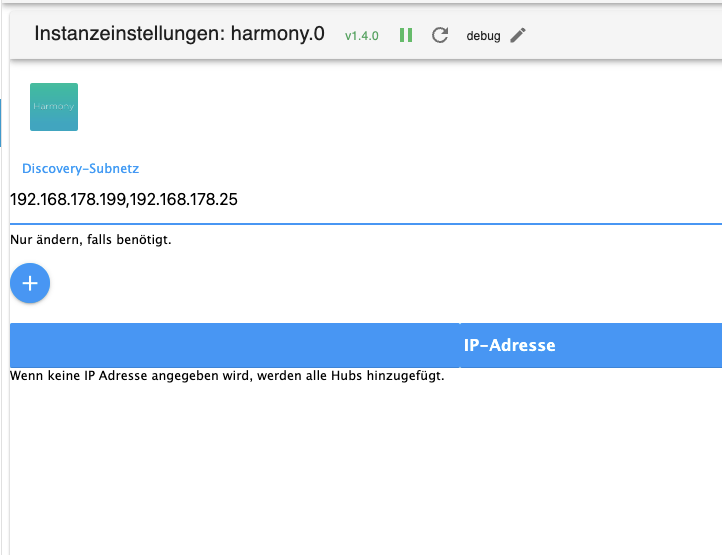
Debug Protokoll
harmony.0 2024-07-28 15:28:04.975 info [DISCOVER] Searching for Harmony Hubs on 192.168.178.199,192.168.178.25 harmony.0 2024-07-28 15:28:04.967 debug [START] Subnet: 192.168.178.199,192.168.178.25, Discovery interval: 10000 harmony.0 2024-07-28 15:28:04.958 info starting. Version 1.4.0 in /opt/iobroker/node_modules/iobroker.harmony, node: v20.16.0, js-controller: 5.0.19 harmony.0 2024-07-28 15:28:04.902 debug States connected to redis: 127.0.0.1:9000 harmony.0 2024-07-28 15:28:04.839 debug States create User PubSub Client harmony.0 2024-07-28 15:28:04.838 debug States create System PubSub Client harmony.0 2024-07-28 15:28:04.825 debug Redis States: Use Redis connection: 127.0.0.1:9000 harmony.0 2024-07-28 15:28:04.799 debug Objects connected to redis: 127.0.0.1:9001 harmony.0 2024-07-28 15:28:04.796 debug Objects client initialize lua scripts harmony.0 2024-07-28 15:28:04.752 debug Objects create User PubSub Client harmony.0 2024-07-28 15:28:04.751 debug Objects create System PubSub Client harmony.0 2024-07-28 15:28:04.750 debug Objects client ready ... initialize now harmony.0 2024-07-28 15:28:04.725 debug Redis Objects: Use Redis connection: 127.0.0.1:9001 -
@mrjeschke Habe ich gerade noch mal versucht. Dann wird keiner der Hubs gefunden:
Debug Protokoll
harmony.0 2024-07-28 15:28:04.975 info [DISCOVER] Searching for Harmony Hubs on 192.168.178.199,192.168.178.25 harmony.0 2024-07-28 15:28:04.967 debug [START] Subnet: 192.168.178.199,192.168.178.25, Discovery interval: 10000 harmony.0 2024-07-28 15:28:04.958 info starting. Version 1.4.0 in /opt/iobroker/node_modules/iobroker.harmony, node: v20.16.0, js-controller: 5.0.19 harmony.0 2024-07-28 15:28:04.902 debug States connected to redis: 127.0.0.1:9000 harmony.0 2024-07-28 15:28:04.839 debug States create User PubSub Client harmony.0 2024-07-28 15:28:04.838 debug States create System PubSub Client harmony.0 2024-07-28 15:28:04.825 debug Redis States: Use Redis connection: 127.0.0.1:9000 harmony.0 2024-07-28 15:28:04.799 debug Objects connected to redis: 127.0.0.1:9001 harmony.0 2024-07-28 15:28:04.796 debug Objects client initialize lua scripts harmony.0 2024-07-28 15:28:04.752 debug Objects create User PubSub Client harmony.0 2024-07-28 15:28:04.751 debug Objects create System PubSub Client harmony.0 2024-07-28 15:28:04.750 debug Objects client ready ... initialize now harmony.0 2024-07-28 15:28:04.725 debug Redis Objects: Use Redis connection: 127.0.0.1:9001@hansmeier sagte in Harmony Adapter: beide Hub nicht mehr erreichbar:
Dann wird keiner der Hubs gefunden:
das sind doch IPs!!!
keine Subnetzmasken! -
@hansmeier sagte in Harmony Adapter: beide Hub nicht mehr erreichbar:
Dann wird keiner der Hubs gefunden:
das sind doch IPs!!!
keine Subnetzmasken! -
@homoran Ja, das ist klar. Ist erst mal ein Workarround. So bekomme ich zumindest einen der Hubs zum laufen.
Mit dem Standard Subnetz 255.255.255.255 geht leider nix.
Ich denke, hier brauchts Netzwerk Kenner !?@hansmeier mit 4x 255 wird auch nichts gehen.
Mal mit 255.255.255.0
Probiert falls du mit Standard ein /24 er Netz meinst.
Edit: vermute aber das es in so einem oder ähnlichen Format eingegeben werden muss:
192.168.178.0/24
Sollte aber hoffentlich in der Beschreibung des Adapters stehen.
Edit2: ok gerade mal auf GitHub gelesen. Scheinbar werden hier „Subnets“ mit „IP-Adresse“ durcheinander geworfen oder verwechselt. Keine Ahnung was der letzte DEV da meint. Sieht für mich aber nach IP aus wodurch die Beschreibung in der Oberfläche irreführend wird.
-
Alle Versuche beide Harmony-Hubs wieder zu verbinden schlugen fehl. Da offensichtlich IP und Subnet im Adapter ein wenig durcheinander läuft, habe ich wirklich alle Varianten durch.
Als letztes habe ich dann die Latest Version v1.5.0 installiert, von der es heisst, dass sie "Multiple Subnets" unterstütz. Bei mir ist alles in einem Subnet.Ergebnis: ich kann wieder zwei Hubs mit dem Adapter verbinden, in dem die IP über Komma getrennt im Feld für das Subnet eingetragen wird.
Etwa so:
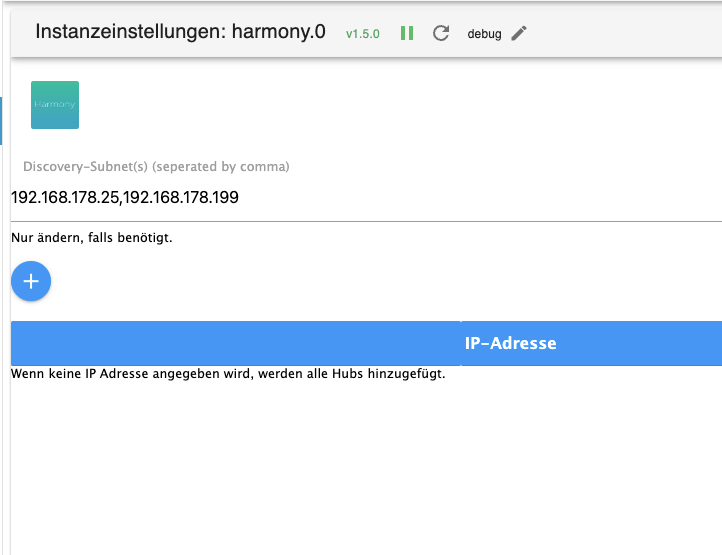
Mit der latest v1.5.0 ist mein Problem erst mal gelöst.
Danke an alle Unterstützer ! -
Alle Versuche beide Harmony-Hubs wieder zu verbinden schlugen fehl. Da offensichtlich IP und Subnet im Adapter ein wenig durcheinander läuft, habe ich wirklich alle Varianten durch.
Als letztes habe ich dann die Latest Version v1.5.0 installiert, von der es heisst, dass sie "Multiple Subnets" unterstütz. Bei mir ist alles in einem Subnet.Ergebnis: ich kann wieder zwei Hubs mit dem Adapter verbinden, in dem die IP über Komma getrennt im Feld für das Subnet eingetragen wird.
Etwa so:
Mit der latest v1.5.0 ist mein Problem erst mal gelöst.
Danke an alle Unterstützer !@hansmeier Hallo, dies kann ich bestätigen!
Bei mir läuft der Harmony Adapter auch seit Jahren einwandfrei. Vor ungefähr 8 oder 12 Wochen hat der Adapter von heute auf Morgen keine Verbindung mehr zum Hub gehabt. Natürlich habe ich die Einstellungen nicht verändert (der Adapter ist quasi auf Standard Einstellungen) Allerdings hatte ich noch keine Zeit mich darum zu kümmern.Jetzt nachdem ich hier mal drüber geflogen bin habe ich es ebenfalls probiert, die IP ganz oben bei Discovery-Subnet einzugeben und schon wird der Hub wieder gefunden.


Hey! Du scheinst an dieser Unterhaltung interessiert zu sein, hast aber noch kein Konto.
Hast du es satt, bei jedem Besuch durch die gleichen Beiträge zu scrollen? Wenn du dich für ein Konto anmeldest, kommst du immer genau dorthin zurück, wo du zuvor warst, und kannst dich über neue Antworten benachrichtigen lassen (entweder per E-Mail oder Push-Benachrichtigung). Du kannst auch Lesezeichen speichern und Beiträge positiv bewerten, um anderen Community-Mitgliedern deine Wertschätzung zu zeigen.
Mit deinem Input könnte dieser Beitrag noch besser werden 💗
Registrieren Anmelden378
Online33.0k
Benutzende83.7k
Themen1.3m
Beiträge