




ioBroker admin startet nicht mehr
-
Hallo zusammen,
gestern habe ich testweise in Objects in den Einstellungen "Settings telegram.0" eingeschaltet. Daraufhin hing sich der Raspberry auf, nach einem Kaltstart hat die Weboberfläche nicht geladen und Zigbee2Mqtt sowie der telegram Adapter liefen nicht richtig. Habe admin.1 installiert und darüber die Einstellungen in Objects revidiert, Zigbee2Mqtt und telegram scheinen wieder normal zu laufen.
admin.0 kommt aber weiterhin nicht hoch, auch nach update, upgrade und fix und wenn alle anderen Adapter deaktiviert sind. Folgendes kommt dabei im Log auf:host.smartberrypi 2024-04-02 17:08:36.952 info "system.adapter.admin.0" disabled host.smartberrypi 2024-04-02 17:08:25.512 info Restart adapter system.adapter.admin.0 because enabled host.smartberrypi 2024-04-02 17:08:25.511 error instance system.adapter.admin.0 terminated with code 1 (JS_CONTROLLER_STOPPED) host.smartberrypi 2024-04-02 17:08:25.510 error Caught by controller[0]: at processImmediate (node:internal/timers:478:21) host.smartberrypi 2024-04-02 17:08:25.509 error Caught by controller[0]: at Immediate.<anonymous> (/opt/iobroker/node_modules/iobroker.admin/main.js:517:35) host.smartberrypi 2024-04-02 17:08:25.508 error Caught by controller[0]: at JSON.parse (<anonymous>) host.smartberrypi 2024-04-02 17:08:25.506 error Caught by controller[0]: SyntaxError: Unexpected token O in JSON at position 0 host.smartberrypi 2024-04-02 17:08:25.361 info Updating repository "live-stable" under "http://iobroker.live/repo/sources-dist.json" admin.0 2024-04-02 17:08:23.851 warn Terminated (UNCAUGHT_EXCEPTION): Without reason admin.0 2024-04-02 17:08:23.843 info terminating admin.0 2024-04-02 17:08:23.833 info terminating https server on port 8081 admin.0 2024-04-02 17:08:23.724 error Unexpected token O in JSON at position 0 admin.0 2024-04-02 17:08:23.721 error SyntaxError: Unexpected token O in JSON at position 0 at JSON.parse (<anonymous>) at Immediate.<anonymous> (/opt/iobroker/node_modules/iobroker.admin/main.js:517:35) at processImmediate (node:internal/timers:478:21) admin.0 2024-04-02 17:08:23.719 error uncaught exception: Unexpected token O in JSON at position 0 admin.0 2024-04-02 17:08:23.646 info Request actual repository... admin.0 2024-04-02 17:08:22.347 info received all objects admin.0 2024-04-02 17:08:19.020 info requesting all objects admin.0 2024-04-02 17:08:18.917 info starting. Version 6.13.16 in /opt/iobroker/node_modules/iobroker.admin, node: v18.20.0, js-controller: 5.0.19 host.smartberrypi 2024-04-02 17:08:12.636 info instance system.adapter.admin.0 started with pid 6997 host.smartberrypi 2024-04-02 17:08:12.128 info "system.adapter.admin.0" enabledMeine Frage wäre jetzt erstmal, ob es einen Unterschied macht, ob ich mit admin.0 oder admin.1 laufe bzw etwas verloren geht, wenn ich admin.0 de- und neu installiere (um die backups konsistent zu halten). Beim ersten öffenen der Ansicht über admin.1 wurden manche Sachen nicht angezeigt, mittlerweile lädt aber scheinbar alles wie gewohnt...
Vielen Dank im voraus,
Roffi- Adaptername: admin.0
- js-controller Version: 5.0.19
- Admin Version: 6.13.16
- Hardwaresystem: Pi3 B
- Arbeitsspeicher: 1GB
- Festplattenart: SD-Karte
- Betriebssystem: Raspian
- Nodejs-Version: v18.20.0
- NPM-Version: 10.5.0
- Installationsart: Skript
iob diag:
Skript v.2023-10-10 *** BASE SYSTEM *** Static hostname: smartberrypi Icon name: computer Operating System: Debian GNU/Linux 11 (bullseye) Kernel: Linux 6.1.21-v8+ Architecture: arm64 Model : Raspberry Pi 3 Model B Rev 1.2 Docker : false Virtualization : none Kernel : aarch64 Userland : arm64 Systemuptime and Load: 16:50:36 up 2:02, 1 user, load average: 0.67, 0.36, 0.66 CPU threads: 4 *** RASPBERRY THROTTLING *** Current issues: No throttling issues detected. Previously detected issues: No throttling issues detected. *** Time and Time Zones *** Local time: Tue 2024-04-02 16:50:36 CEST Universal time: Tue 2024-04-02 14:50:36 UTC RTC time: n/a Time zone: Europe/Berlin (CEST, +0200) System clock synchronized: yes NTP service: active RTC in local TZ: no *** User and Groups *** roffi /home/roffi roffi adm dialout cdrom sudo audio video plugdev games users input render netdev docker gpio i2c spi iobroker *** X-Server-Setup *** X-Server: false Desktop: Terminal: tty Boot Target: multi-user.target *** MEMORY *** total used free shared buff/cache available Mem: 909M 445M 262M 0.0K 201M 400M Swap: 1.0G 160M 863M Total: 1.9G 605M 1.1G 909 M total memory 445 M used memory 420 M active memory 100 M inactive memory 262 M free memory 10 M buffer memory 191 M swap cache 1023 M total swap 160 M used swap 863 M free swap Raspberry only: oom events: 0 lifetime oom required: 0 Mbytes total time in oom handler: 0 ms max time spent in oom handler: 0 ms *** FAILED SERVICES *** UNIT LOAD ACTIVE SUB DESCRIPTION 0 loaded units listed. *** FILESYSTEM *** Filesystem Type Size Used Avail Use% Mounted on /dev/root ext4 29G 5.3G 23G 19% / devtmpfs devtmpfs 325M 0 325M 0% /dev tmpfs tmpfs 455M 0 455M 0% /dev/shm tmpfs tmpfs 182M 1.1M 181M 1% /run tmpfs tmpfs 5.0M 4.0K 5.0M 1% /run/lock /dev/mmcblk0p1 vfat 255M 31M 225M 13% /boot tmpfs tmpfs 91M 0 91M 0% /run/user/1000 Messages concerning ext4 filesystem in dmesg: [Tue Apr 2 14:47:48 2024] Kernel command line: coherent_pool=1M 8250.nr_uarts=0 snd_bcm2835.enable_headphones=0 snd_bcm2835.enable_headphones=1 snd_bcm2835.enable_hdmi=1 snd_bcm2835.enable_hdmi=0 video=Composite-1:720x480@60i vc_mem.mem_base=0x3ec00000 vc_mem.mem_size=0x40000000 console=ttyS0,115200 console=tty1 root=PARTUUID=4ad59149-02 rootfstype=ext4 fsck.repair=yes rootwait cfg80211.ieee80211_regdom=DE [Tue Apr 2 14:47:51 2024] EXT4-fs (mmcblk0p2): mounted filesystem with ordered data mode. Quota mode: none. [Tue Apr 2 14:47:51 2024] VFS: Mounted root (ext4 filesystem) readonly on device 179:2. [Tue Apr 2 14:47:57 2024] EXT4-fs (mmcblk0p2): re-mounted. Quota mode: none. Show mounted filesystems \(real ones only\): TARGET SOURCE FSTYPE OPTIONS / /dev/mmcblk0p2 ext4 rw,noatime `-/boot /dev/mmcblk0p1 vfat rw,relatime,fmask=0022,dmask=0022,codepage=437,iocharset=ascii,shortname=mixed,errors=remount-ro Files in neuralgic directories: /var: 1.9G /var/ 424M /var/lib 276M /var/lib/docker 274M /var/lib/docker/overlay2 213M /var/log Archived and active journals take up 200.0M in the file system. /opt/iobroker/backups: 117M /opt/iobroker/backups/ 4.0K /opt/iobroker/backups/redistmp /opt/iobroker/iobroker-data: 385M /opt/iobroker/iobroker-data/ 298M /opt/iobroker/iobroker-data/files 76M /opt/iobroker/iobroker-data/backup-objects 57M /opt/iobroker/iobroker-data/files/javascript.admin 45M /opt/iobroker/iobroker-data/files/devices.admin/static The five largest files in iobroker-data are: 35M /opt/iobroker/iobroker-data/files/devices.admin/static/js/main.24f2bb56.js.map 33M /opt/iobroker/iobroker-data/files/iot.admin/static/js/main.1797d034.js.map 22M /opt/iobroker/iobroker-data/files/web.admin/static/js/main.c05ba1d3.js.map 19M /opt/iobroker/iobroker-data/files/text2command.admin/static/js/main.02fc3820.js.map 11M /opt/iobroker/iobroker-data/objects.jsonl USB-Devices by-id: USB-Sticks - Avoid direct links to /dev/* in your adapter setups, please always prefer the links 'by-id': /dev/serial/by-id/usb-ITEAD_SONOFF_Zigbee_3.0_USB_Dongle_Plus_V2_20230829145936-if00 *** NodeJS-Installation *** /usr/bin/nodejs v18.20.0 /usr/bin/node v18.20.0 /usr/bin/npm 10.5.0 /usr/bin/npx 10.5.0 /usr/bin/corepack 0.25.2 nodejs: Installed: 18.20.0-1nodesource1 Candidate: 18.20.0-1nodesource1 Version table: *** 18.20.0-1nodesource1 1001 500 https://deb.nodesource.com/node_18.x nodistro/main arm64 Packages 100 /var/lib/dpkg/status 18.19.1-1nodesource1 1001 500 https://deb.nodesource.com/node_18.x nodistro/main arm64 Packages 18.19.0-1nodesource1 1001 500 https://deb.nodesource.com/node_18.x nodistro/main arm64 Packages 18.18.2-1nodesource1 1001 500 https://deb.nodesource.com/node_18.x nodistro/main arm64 Packages 18.18.1-1nodesource1 1001 500 https://deb.nodesource.com/node_18.x nodistro/main arm64 Packages 18.18.0-1nodesource1 1001 500 https://deb.nodesource.com/node_18.x nodistro/main arm64 Packages 18.17.1-1nodesource1 1001 500 https://deb.nodesource.com/node_18.x nodistro/main arm64 Packages 18.17.0-1nodesource1 1001 500 https://deb.nodesource.com/node_18.x nodistro/main arm64 Packages 18.16.1-1nodesource1 1001 500 https://deb.nodesource.com/node_18.x nodistro/main arm64 Packages 18.16.0-1nodesource1 1001 500 https://deb.nodesource.com/node_18.x nodistro/main arm64 Packages 18.15.0-1nodesource1 1001 500 https://deb.nodesource.com/node_18.x nodistro/main arm64 Packages 18.14.2-1nodesource1 1001 500 https://deb.nodesource.com/node_18.x nodistro/main arm64 Packages 18.14.1-1nodesource1 1001 500 https://deb.nodesource.com/node_18.x nodistro/main arm64 Packages 18.14.0-1nodesource1 1001 500 https://deb.nodesource.com/node_18.x nodistro/main arm64 Packages 18.13.0-1nodesource1 1001 500 https://deb.nodesource.com/node_18.x nodistro/main arm64 Packages 18.12.0-1nodesource1 1001 500 https://deb.nodesource.com/node_18.x nodistro/main arm64 Packages 18.11.0-1nodesource1 1001 500 https://deb.nodesource.com/node_18.x nodistro/main arm64 Packages 18.10.0-1nodesource1 1001 500 https://deb.nodesource.com/node_18.x nodistro/main arm64 Packages 18.9.1-1nodesource1 1001 500 https://deb.nodesource.com/node_18.x nodistro/main arm64 Packages 18.9.0-1nodesource1 1001 500 https://deb.nodesource.com/node_18.x nodistro/main arm64 Packages 18.8.0-1nodesource1 1001 500 https://deb.nodesource.com/node_18.x nodistro/main arm64 Packages 18.7.0-1nodesource1 1001 500 https://deb.nodesource.com/node_18.x nodistro/main arm64 Packages 18.6.0-1nodesource1 1001 500 https://deb.nodesource.com/node_18.x nodistro/main arm64 Packages 18.5.0-1nodesource1 1001 500 https://deb.nodesource.com/node_18.x nodistro/main arm64 Packages 18.4.0-1nodesource1 1001 500 https://deb.nodesource.com/node_18.x nodistro/main arm64 Packages 18.3.0-1nodesource1 1001 500 https://deb.nodesource.com/node_18.x nodistro/main arm64 Packages 18.2.0-1nodesource1 1001 500 https://deb.nodesource.com/node_18.x nodistro/main arm64 Packages 18.1.0-1nodesource1 1001 500 https://deb.nodesource.com/node_18.x nodistro/main arm64 Packages 18.0.0-1nodesource1 1001 500 https://deb.nodesource.com/node_18.x nodistro/main arm64 Packages 12.22.12~dfsg-1~deb11u4 500 500 http://deb.debian.org/debian bullseye/main arm64 Packages 500 http://security.debian.org/debian-security bullseye-security/main arm64 Packages Temp directories causing npm8 problem: 0 No problems detected Errors in npm tree: *** ioBroker-Installation *** ioBroker Status iobroker is running on this host. Objects type: jsonl States type: jsonl Core adapters versions js-controller: 5.0.19 admin: 6.13.16 javascript: 7.8.0 Adapters from github: 0 Adapter State system.adapter.accuweather.0 : accuweather : smartberrypi - disabled system.adapter.admin.0 : admin : smartberrypi - disabled, port: 8081, bind: 0.0.0.0 (SSL), run as: admin + system.adapter.admin.1 : admin : smartberrypi - enabled, port: 8081, bind: 0.0.0.0, run as: admin system.adapter.alexa2.0 : alexa2 : smartberrypi - disabled system.adapter.alias-manager.0 : alias-manager : smartberrypi - disabled system.adapter.backitup.0 : backitup : smartberrypi - disabled system.adapter.cloud.0 : cloud : smartberrypi - disabled system.adapter.countdown.0 : countdown : smartberrypi - disabled system.adapter.daswetter.0 : daswetter : smartberrypi - disabled system.adapter.devices.0 : devices : smartberrypi - disabled system.adapter.discovery.0 : discovery : smartberrypi - disabled system.adapter.drag-indicator.0 : drag-indicator : smartberrypi - disabled system.adapter.followthesun.0 : followthesun : smartberrypi - disabled system.adapter.ical.0 : ical : smartberrypi - disabled system.adapter.icons-addictive-flavour-png.0: icons-addictive-flavour-png: smartberrypi - disabled system.adapter.icons-icons8.0 : icons-icons8 : smartberrypi - disabled system.adapter.influxdb.0 : influxdb : smartberrypi - disabled, port: 8086 system.adapter.iot.0 : iot : smartberrypi - disabled system.adapter.jarvis.0 : jarvis : smartberrypi - disabled system.adapter.javascript.0 : javascript : smartberrypi - disabled system.adapter.link.0 : link : smartberrypi - disabled system.adapter.mqtt.0 : mqtt : smartberrypi - disabled, port: 1883, bind: 0.0.0.0 system.adapter.net-tools.0 : net-tools : smartberrypi - disabled system.adapter.nina.0 : nina : smartberrypi - disabled system.adapter.parcel.0 : parcel : smartberrypi - disabled system.adapter.pi-hole.0 : pi-hole : smartberrypi - disabled system.adapter.rpi2.0 : rpi2 : smartberrypi - disabled system.adapter.tankerkoenig.0 : tankerkoenig : smartberrypi - disabled system.adapter.telegram.0 : telegram : smartberrypi - disabled, port: 8443, bind: 0.0.0.0 system.adapter.text2command.0 : text2command : smartberrypi - disabled system.adapter.trashschedule.0 : trashschedule : smartberrypi - disabled system.adapter.vis-bars.0 : vis-bars : smartberrypi - disabled system.adapter.vis-fancyswitch.0 : vis-fancyswitch : smartberrypi - disabled system.adapter.vis-justgage.0 : vis-justgage : smartberrypi - disabled system.adapter.vis-rgraph.0 : vis-rgraph : smartberrypi - disabled system.adapter.vis-timeandweather.0 : vis-timeandweather : smartberrypi - disabled system.adapter.vis-weather.0 : vis-weather : smartberrypi - disabled system.adapter.vis.0 : vis : smartberrypi - disabled system.adapter.wallpanel.0 : wallpanel : smartberrypi - disabled system.adapter.web.0 : web : smartberrypi - disabled, port: 8082, bind: 0.0.0.0, run as: admin system.adapter.zigbee2mqtt.0 : zigbee2mqtt : smartberrypi - disabled + instance is alive Enabled adapters with bindings + system.adapter.admin.1 : admin : smartberrypi - enabled, port: 8081, bind: 0.0.0.0, run as: admin ioBroker-Repositories stable : http://download.iobroker.net/sources-dist.json beta : http://download.iobroker.net/sources-dist-latest.json live-stable : http://iobroker.live/repo/sources-dist.json Active repo(s): live-stable Installed ioBroker-Instances Used repository: live-stable Adapter "accuweather" : 1.3.2 , installed 1.3.2 Adapter "admin" : 6.13.16 , installed 6.13.16 Adapter "alexa2" : 3.26.4 , installed 3.26.4 Adapter "alias-manager": 1.2.6 , installed 1.2.6 Adapter "backitup" : 2.10.11 , installed 2.10.11 Adapter "cloud" : 5.0.1 , installed 5.0.1 Adapter "countdown" : 2.2.0 , installed 2.2.0 Adapter "daswetter" : 3.1.13 , installed 3.1.13 Adapter "devices" : 1.1.5 , installed 1.1.5 Adapter "discovery" : 4.4.0 , installed 4.4.0 Adapter "drag-indicator": 2.1.4 , installed 2.1.4 Adapter "followthesun" : 0.5.0 , installed 0.5.0 Adapter "ical" : 1.14.3 , installed 1.14.3 Adapter "icons-addictive-flavour-png": 0.1.0, installed 0.1.0 Adapter "icons-icons8" : 0.0.1 , installed 0.0.1 Adapter "influxdb" : 4.0.2 , installed 4.0.2 Adapter "iot" : 2.0.11 , installed 2.0.11 Adapter "jarvis" : 3.1.8 , installed 3.1.8 Adapter "javascript" : 7.8.0 , installed 7.8.0 Controller "js-controller": 5.0.19 , installed 5.0.19 Adapter "link" : 0.5.12 , installed 0.5.12 Adapter "mqtt" : 5.2.0 , installed 5.2.0 Adapter "net-tools" : 1.0.11 , installed 1.0.11 Adapter "nina" : 0.0.25 , installed 0.0.25 Adapter "pi-hole" : 1.3.6 , installed 1.3.6 Adapter "rpi2" : 1.3.2 , installed 1.3.2 Adapter "simple-api" : 2.7.2 , installed 2.7.2 Adapter "socketio" : 6.6.1 , installed 6.6.1 Adapter "tankerkoenig" : 3.3.7 , installed 3.3.7 Adapter "telegram" : 3.1.0 , installed 3.1.0 Adapter "text2command" : 3.0.3 , installed 3.0.3 Adapter "trashschedule": 3.2.0 , installed 3.2.0 Adapter "vis" : 1.5.4 , installed 1.5.4 Adapter "vis-bars" : 0.1.4 , installed 0.1.4 Adapter "vis-fancyswitch": 1.1.0 , installed 1.1.0 Adapter "vis-justgage" : 2.1.0 , installed 2.1.0 Adapter "vis-rgraph" : 0.0.2 , installed 0.0.2 Adapter "vis-timeandweather": 1.2.2, installed 1.2.2 Adapter "vis-weather" : 2.5.9 , installed 2.5.9 Adapter "wallpanel" : 0.3.11 , installed 0.3.11 Adapter "web" : 6.2.3 , installed 6.2.3 Adapter "ws" : 2.5.11 , installed 2.5.11 Adapter "zigbee2mqtt" : 2.13.5 , installed 2.13.5 Objects and States Please stand by - This may take a while Objects: 2318 States: 1238 *** OS-Repositories and Updates *** Hit:1 http://security.debian.org/debian-security bullseye-security InRelease Hit:2 http://deb.debian.org/debian bullseye InRelease Hit:3 http://deb.debian.org/debian bullseye-updates InRelease Hit:4 http://archive.raspberrypi.org/debian bullseye InRelease Hit:5 https://deb.nodesource.com/node_18.x nodistro InRelease Reading package lists... Pending Updates: 0 *** Listening Ports *** Active Internet connections (only servers) Proto Recv-Q Send-Q Local Address Foreign Address State User Inode PID/Program name tcp 0 0 127.0.0.1:9000 0.0.0.0:* LISTEN 1001 32579 5199/iobroker.js-co tcp 0 0 127.0.0.1:9001 0.0.0.0:* LISTEN 1001 33726 5199/iobroker.js-co tcp 0 0 127.0.0.1:39403 0.0.0.0:* LISTEN 0 13721 509/containerd tcp 0 0 0.0.0.0:22 0.0.0.0:* LISTEN 0 353 522/sshd: /usr/sbin tcp 0 0 0.0.0.0:8080 0.0.0.0:* LISTEN 0 16443 1263/docker-proxy tcp6 0 0 :::22 :::* LISTEN 0 355 522/sshd: /usr/sbin tcp6 0 0 :::8081 :::* LISTEN 1001 38153 5535/io.admin.1 udp 0 0 0.0.0.0:5353 0.0.0.0:* 108 15097 392/avahi-daemon: r udp 0 0 0.0.0.0:37616 0.0.0.0:* 108 15099 392/avahi-daemon: r udp 0 0 0.0.0.0:68 0.0.0.0:* 0 358 692/dhcpcd udp6 0 0 :::5353 :::* 108 15098 392/avahi-daemon: r udp6 0 0 :::34680 :::* 108 15100 392/avahi-daemon: r udp6 0 0 :::546 :::* 0 368 692/dhcpcd *** Log File - Last 25 Lines *** 2024-04-02 16:50:21.801 - info: admin.0 (5673) received all objects 2024-04-02 16:50:23.073 - info: admin.0 (5673) Request actual repository... 2024-04-02 16:50:23.166 - error: admin.0 (5673) uncaught exception: Unexpected token O in JSON at position 0 2024-04-02 16:50:23.168 - error: admin.0 (5673) SyntaxError: Unexpected token O in JSON at position 0 at JSON.parse (<anonymous>) at Immediate.<anonymous> (/opt/iobroker/node_modules/iobroker.admin/main.js:517:35) at processImmediate (node:internal/timers:478:21) 2024-04-02 16:50:23.171 - error: admin.0 (5673) Unexpected token O in JSON at position 0 2024-04-02 16:50:23.256 - info: admin.0 (5673) terminating https server on port 8081 2024-04-02 16:50:23.262 - info: admin.0 (5673) terminating 2024-04-02 16:50:23.267 - warn: admin.0 (5673) Terminated (UNCAUGHT_EXCEPTION): Without reason 2024-04-02 16:50:24.864 - info: host.smartberrypi Updating repository "live-stable" under "http://iobroker.live/repo/sources-dist.json" 2024-04-02 16:50:24.987 - error: host.smartberrypi Caught by controller[1]: SyntaxError: Unexpected token O in JSON at position 0 2024-04-02 16:50:24.988 - error: host.smartberrypi Caught by controller[1]: at JSON.parse (<anonymous>) 2024-04-02 16:50:24.989 - error: host.smartberrypi Caught by controller[1]: at Immediate.<anonymous> (/opt/iobroker/node_modules/iobroker.admin/main.js:517:35) 2024-04-02 16:50:24.990 - error: host.smartberrypi Caught by controller[1]: at processImmediate (node:internal/timers:478:21) 2024-04-02 16:50:24.991 - error: host.smartberrypi instance system.adapter.admin.0 terminated with code 1 (JS_CONTROLLER_STOPPED) 2024-04-02 16:50:24.991 - info: host.smartberrypi Restart adapter system.adapter.admin.0 because enabled 2024-04-02 16:50:42.585 - info: host.smartberrypi "system.adapter.admin.0" disabled 2024-04-02 16:51:01.402 - error: admin.0 (5815) adapter disabled 2024-04-02 16:51:01.482 - warn: admin.0 (5815) Terminated (NO_ADAPTER_CONFIG_FOUND): Without reason 2024-04-02 16:51:02.202 - error: host.smartberrypi instance system.adapter.admin.0 terminated with code 3 (NO_ADAPTER_CONFIG_FOUND) 2024-04-02 16:51:02.204 - info: host.smartberrypi Do not restart adapter system.adapter.admin.0 because disabled or deleted 2024-04-02 16:51:46.052 - info: admin.1 (5535) <== Disconnect system.user.admin from ::ffff:192.168.1.20 admin 2024-04-02 16:52:55.474 - info: admin.1 (5535) ==> Connected system.user.admin from ::ffff:192.168.1.20@roffi Und wenn Du JETZT nochmal ein
iob diagzeigst, dann sehen die Werte bzgl Speicher usw ganz anders aus.
Ein RPI3 verträgt nicht so viele Adapter wie Du da installiert hast ;)
Lehrling seit 1975 !!!
Beitrag geholfen ? dann gerne ein upvote rechts unten im Beitrag klicken ;)
https://forum.iobroker.net/topic/51555/hinweise-f%C3%BCr-gute-forenbeitr%C3%A4ge -
Hallo zusammen,
gestern habe ich testweise in Objects in den Einstellungen "Settings telegram.0" eingeschaltet. Daraufhin hing sich der Raspberry auf, nach einem Kaltstart hat die Weboberfläche nicht geladen und Zigbee2Mqtt sowie der telegram Adapter liefen nicht richtig. Habe admin.1 installiert und darüber die Einstellungen in Objects revidiert, Zigbee2Mqtt und telegram scheinen wieder normal zu laufen.
admin.0 kommt aber weiterhin nicht hoch, auch nach update, upgrade und fix und wenn alle anderen Adapter deaktiviert sind. Folgendes kommt dabei im Log auf:host.smartberrypi 2024-04-02 17:08:36.952 info "system.adapter.admin.0" disabled host.smartberrypi 2024-04-02 17:08:25.512 info Restart adapter system.adapter.admin.0 because enabled host.smartberrypi 2024-04-02 17:08:25.511 error instance system.adapter.admin.0 terminated with code 1 (JS_CONTROLLER_STOPPED) host.smartberrypi 2024-04-02 17:08:25.510 error Caught by controller[0]: at processImmediate (node:internal/timers:478:21) host.smartberrypi 2024-04-02 17:08:25.509 error Caught by controller[0]: at Immediate.<anonymous> (/opt/iobroker/node_modules/iobroker.admin/main.js:517:35) host.smartberrypi 2024-04-02 17:08:25.508 error Caught by controller[0]: at JSON.parse (<anonymous>) host.smartberrypi 2024-04-02 17:08:25.506 error Caught by controller[0]: SyntaxError: Unexpected token O in JSON at position 0 host.smartberrypi 2024-04-02 17:08:25.361 info Updating repository "live-stable" under "http://iobroker.live/repo/sources-dist.json" admin.0 2024-04-02 17:08:23.851 warn Terminated (UNCAUGHT_EXCEPTION): Without reason admin.0 2024-04-02 17:08:23.843 info terminating admin.0 2024-04-02 17:08:23.833 info terminating https server on port 8081 admin.0 2024-04-02 17:08:23.724 error Unexpected token O in JSON at position 0 admin.0 2024-04-02 17:08:23.721 error SyntaxError: Unexpected token O in JSON at position 0 at JSON.parse (<anonymous>) at Immediate.<anonymous> (/opt/iobroker/node_modules/iobroker.admin/main.js:517:35) at processImmediate (node:internal/timers:478:21) admin.0 2024-04-02 17:08:23.719 error uncaught exception: Unexpected token O in JSON at position 0 admin.0 2024-04-02 17:08:23.646 info Request actual repository... admin.0 2024-04-02 17:08:22.347 info received all objects admin.0 2024-04-02 17:08:19.020 info requesting all objects admin.0 2024-04-02 17:08:18.917 info starting. Version 6.13.16 in /opt/iobroker/node_modules/iobroker.admin, node: v18.20.0, js-controller: 5.0.19 host.smartberrypi 2024-04-02 17:08:12.636 info instance system.adapter.admin.0 started with pid 6997 host.smartberrypi 2024-04-02 17:08:12.128 info "system.adapter.admin.0" enabledMeine Frage wäre jetzt erstmal, ob es einen Unterschied macht, ob ich mit admin.0 oder admin.1 laufe bzw etwas verloren geht, wenn ich admin.0 de- und neu installiere (um die backups konsistent zu halten). Beim ersten öffenen der Ansicht über admin.1 wurden manche Sachen nicht angezeigt, mittlerweile lädt aber scheinbar alles wie gewohnt...
Vielen Dank im voraus,
Roffi- Adaptername: admin.0
- js-controller Version: 5.0.19
- Admin Version: 6.13.16
- Hardwaresystem: Pi3 B
- Arbeitsspeicher: 1GB
- Festplattenart: SD-Karte
- Betriebssystem: Raspian
- Nodejs-Version: v18.20.0
- NPM-Version: 10.5.0
- Installationsart: Skript
iob diag:
Skript v.2023-10-10 *** BASE SYSTEM *** Static hostname: smartberrypi Icon name: computer Operating System: Debian GNU/Linux 11 (bullseye) Kernel: Linux 6.1.21-v8+ Architecture: arm64 Model : Raspberry Pi 3 Model B Rev 1.2 Docker : false Virtualization : none Kernel : aarch64 Userland : arm64 Systemuptime and Load: 16:50:36 up 2:02, 1 user, load average: 0.67, 0.36, 0.66 CPU threads: 4 *** RASPBERRY THROTTLING *** Current issues: No throttling issues detected. Previously detected issues: No throttling issues detected. *** Time and Time Zones *** Local time: Tue 2024-04-02 16:50:36 CEST Universal time: Tue 2024-04-02 14:50:36 UTC RTC time: n/a Time zone: Europe/Berlin (CEST, +0200) System clock synchronized: yes NTP service: active RTC in local TZ: no *** User and Groups *** roffi /home/roffi roffi adm dialout cdrom sudo audio video plugdev games users input render netdev docker gpio i2c spi iobroker *** X-Server-Setup *** X-Server: false Desktop: Terminal: tty Boot Target: multi-user.target *** MEMORY *** total used free shared buff/cache available Mem: 909M 445M 262M 0.0K 201M 400M Swap: 1.0G 160M 863M Total: 1.9G 605M 1.1G 909 M total memory 445 M used memory 420 M active memory 100 M inactive memory 262 M free memory 10 M buffer memory 191 M swap cache 1023 M total swap 160 M used swap 863 M free swap Raspberry only: oom events: 0 lifetime oom required: 0 Mbytes total time in oom handler: 0 ms max time spent in oom handler: 0 ms *** FAILED SERVICES *** UNIT LOAD ACTIVE SUB DESCRIPTION 0 loaded units listed. *** FILESYSTEM *** Filesystem Type Size Used Avail Use% Mounted on /dev/root ext4 29G 5.3G 23G 19% / devtmpfs devtmpfs 325M 0 325M 0% /dev tmpfs tmpfs 455M 0 455M 0% /dev/shm tmpfs tmpfs 182M 1.1M 181M 1% /run tmpfs tmpfs 5.0M 4.0K 5.0M 1% /run/lock /dev/mmcblk0p1 vfat 255M 31M 225M 13% /boot tmpfs tmpfs 91M 0 91M 0% /run/user/1000 Messages concerning ext4 filesystem in dmesg: [Tue Apr 2 14:47:48 2024] Kernel command line: coherent_pool=1M 8250.nr_uarts=0 snd_bcm2835.enable_headphones=0 snd_bcm2835.enable_headphones=1 snd_bcm2835.enable_hdmi=1 snd_bcm2835.enable_hdmi=0 video=Composite-1:720x480@60i vc_mem.mem_base=0x3ec00000 vc_mem.mem_size=0x40000000 console=ttyS0,115200 console=tty1 root=PARTUUID=4ad59149-02 rootfstype=ext4 fsck.repair=yes rootwait cfg80211.ieee80211_regdom=DE [Tue Apr 2 14:47:51 2024] EXT4-fs (mmcblk0p2): mounted filesystem with ordered data mode. Quota mode: none. [Tue Apr 2 14:47:51 2024] VFS: Mounted root (ext4 filesystem) readonly on device 179:2. [Tue Apr 2 14:47:57 2024] EXT4-fs (mmcblk0p2): re-mounted. Quota mode: none. Show mounted filesystems \(real ones only\): TARGET SOURCE FSTYPE OPTIONS / /dev/mmcblk0p2 ext4 rw,noatime `-/boot /dev/mmcblk0p1 vfat rw,relatime,fmask=0022,dmask=0022,codepage=437,iocharset=ascii,shortname=mixed,errors=remount-ro Files in neuralgic directories: /var: 1.9G /var/ 424M /var/lib 276M /var/lib/docker 274M /var/lib/docker/overlay2 213M /var/log Archived and active journals take up 200.0M in the file system. /opt/iobroker/backups: 117M /opt/iobroker/backups/ 4.0K /opt/iobroker/backups/redistmp /opt/iobroker/iobroker-data: 385M /opt/iobroker/iobroker-data/ 298M /opt/iobroker/iobroker-data/files 76M /opt/iobroker/iobroker-data/backup-objects 57M /opt/iobroker/iobroker-data/files/javascript.admin 45M /opt/iobroker/iobroker-data/files/devices.admin/static The five largest files in iobroker-data are: 35M /opt/iobroker/iobroker-data/files/devices.admin/static/js/main.24f2bb56.js.map 33M /opt/iobroker/iobroker-data/files/iot.admin/static/js/main.1797d034.js.map 22M /opt/iobroker/iobroker-data/files/web.admin/static/js/main.c05ba1d3.js.map 19M /opt/iobroker/iobroker-data/files/text2command.admin/static/js/main.02fc3820.js.map 11M /opt/iobroker/iobroker-data/objects.jsonl USB-Devices by-id: USB-Sticks - Avoid direct links to /dev/* in your adapter setups, please always prefer the links 'by-id': /dev/serial/by-id/usb-ITEAD_SONOFF_Zigbee_3.0_USB_Dongle_Plus_V2_20230829145936-if00 *** NodeJS-Installation *** /usr/bin/nodejs v18.20.0 /usr/bin/node v18.20.0 /usr/bin/npm 10.5.0 /usr/bin/npx 10.5.0 /usr/bin/corepack 0.25.2 nodejs: Installed: 18.20.0-1nodesource1 Candidate: 18.20.0-1nodesource1 Version table: *** 18.20.0-1nodesource1 1001 500 https://deb.nodesource.com/node_18.x nodistro/main arm64 Packages 100 /var/lib/dpkg/status 18.19.1-1nodesource1 1001 500 https://deb.nodesource.com/node_18.x nodistro/main arm64 Packages 18.19.0-1nodesource1 1001 500 https://deb.nodesource.com/node_18.x nodistro/main arm64 Packages 18.18.2-1nodesource1 1001 500 https://deb.nodesource.com/node_18.x nodistro/main arm64 Packages 18.18.1-1nodesource1 1001 500 https://deb.nodesource.com/node_18.x nodistro/main arm64 Packages 18.18.0-1nodesource1 1001 500 https://deb.nodesource.com/node_18.x nodistro/main arm64 Packages 18.17.1-1nodesource1 1001 500 https://deb.nodesource.com/node_18.x nodistro/main arm64 Packages 18.17.0-1nodesource1 1001 500 https://deb.nodesource.com/node_18.x nodistro/main arm64 Packages 18.16.1-1nodesource1 1001 500 https://deb.nodesource.com/node_18.x nodistro/main arm64 Packages 18.16.0-1nodesource1 1001 500 https://deb.nodesource.com/node_18.x nodistro/main arm64 Packages 18.15.0-1nodesource1 1001 500 https://deb.nodesource.com/node_18.x nodistro/main arm64 Packages 18.14.2-1nodesource1 1001 500 https://deb.nodesource.com/node_18.x nodistro/main arm64 Packages 18.14.1-1nodesource1 1001 500 https://deb.nodesource.com/node_18.x nodistro/main arm64 Packages 18.14.0-1nodesource1 1001 500 https://deb.nodesource.com/node_18.x nodistro/main arm64 Packages 18.13.0-1nodesource1 1001 500 https://deb.nodesource.com/node_18.x nodistro/main arm64 Packages 18.12.0-1nodesource1 1001 500 https://deb.nodesource.com/node_18.x nodistro/main arm64 Packages 18.11.0-1nodesource1 1001 500 https://deb.nodesource.com/node_18.x nodistro/main arm64 Packages 18.10.0-1nodesource1 1001 500 https://deb.nodesource.com/node_18.x nodistro/main arm64 Packages 18.9.1-1nodesource1 1001 500 https://deb.nodesource.com/node_18.x nodistro/main arm64 Packages 18.9.0-1nodesource1 1001 500 https://deb.nodesource.com/node_18.x nodistro/main arm64 Packages 18.8.0-1nodesource1 1001 500 https://deb.nodesource.com/node_18.x nodistro/main arm64 Packages 18.7.0-1nodesource1 1001 500 https://deb.nodesource.com/node_18.x nodistro/main arm64 Packages 18.6.0-1nodesource1 1001 500 https://deb.nodesource.com/node_18.x nodistro/main arm64 Packages 18.5.0-1nodesource1 1001 500 https://deb.nodesource.com/node_18.x nodistro/main arm64 Packages 18.4.0-1nodesource1 1001 500 https://deb.nodesource.com/node_18.x nodistro/main arm64 Packages 18.3.0-1nodesource1 1001 500 https://deb.nodesource.com/node_18.x nodistro/main arm64 Packages 18.2.0-1nodesource1 1001 500 https://deb.nodesource.com/node_18.x nodistro/main arm64 Packages 18.1.0-1nodesource1 1001 500 https://deb.nodesource.com/node_18.x nodistro/main arm64 Packages 18.0.0-1nodesource1 1001 500 https://deb.nodesource.com/node_18.x nodistro/main arm64 Packages 12.22.12~dfsg-1~deb11u4 500 500 http://deb.debian.org/debian bullseye/main arm64 Packages 500 http://security.debian.org/debian-security bullseye-security/main arm64 Packages Temp directories causing npm8 problem: 0 No problems detected Errors in npm tree: *** ioBroker-Installation *** ioBroker Status iobroker is running on this host. Objects type: jsonl States type: jsonl Core adapters versions js-controller: 5.0.19 admin: 6.13.16 javascript: 7.8.0 Adapters from github: 0 Adapter State system.adapter.accuweather.0 : accuweather : smartberrypi - disabled system.adapter.admin.0 : admin : smartberrypi - disabled, port: 8081, bind: 0.0.0.0 (SSL), run as: admin + system.adapter.admin.1 : admin : smartberrypi - enabled, port: 8081, bind: 0.0.0.0, run as: admin system.adapter.alexa2.0 : alexa2 : smartberrypi - disabled system.adapter.alias-manager.0 : alias-manager : smartberrypi - disabled system.adapter.backitup.0 : backitup : smartberrypi - disabled system.adapter.cloud.0 : cloud : smartberrypi - disabled system.adapter.countdown.0 : countdown : smartberrypi - disabled system.adapter.daswetter.0 : daswetter : smartberrypi - disabled system.adapter.devices.0 : devices : smartberrypi - disabled system.adapter.discovery.0 : discovery : smartberrypi - disabled system.adapter.drag-indicator.0 : drag-indicator : smartberrypi - disabled system.adapter.followthesun.0 : followthesun : smartberrypi - disabled system.adapter.ical.0 : ical : smartberrypi - disabled system.adapter.icons-addictive-flavour-png.0: icons-addictive-flavour-png: smartberrypi - disabled system.adapter.icons-icons8.0 : icons-icons8 : smartberrypi - disabled system.adapter.influxdb.0 : influxdb : smartberrypi - disabled, port: 8086 system.adapter.iot.0 : iot : smartberrypi - disabled system.adapter.jarvis.0 : jarvis : smartberrypi - disabled system.adapter.javascript.0 : javascript : smartberrypi - disabled system.adapter.link.0 : link : smartberrypi - disabled system.adapter.mqtt.0 : mqtt : smartberrypi - disabled, port: 1883, bind: 0.0.0.0 system.adapter.net-tools.0 : net-tools : smartberrypi - disabled system.adapter.nina.0 : nina : smartberrypi - disabled system.adapter.parcel.0 : parcel : smartberrypi - disabled system.adapter.pi-hole.0 : pi-hole : smartberrypi - disabled system.adapter.rpi2.0 : rpi2 : smartberrypi - disabled system.adapter.tankerkoenig.0 : tankerkoenig : smartberrypi - disabled system.adapter.telegram.0 : telegram : smartberrypi - disabled, port: 8443, bind: 0.0.0.0 system.adapter.text2command.0 : text2command : smartberrypi - disabled system.adapter.trashschedule.0 : trashschedule : smartberrypi - disabled system.adapter.vis-bars.0 : vis-bars : smartberrypi - disabled system.adapter.vis-fancyswitch.0 : vis-fancyswitch : smartberrypi - disabled system.adapter.vis-justgage.0 : vis-justgage : smartberrypi - disabled system.adapter.vis-rgraph.0 : vis-rgraph : smartberrypi - disabled system.adapter.vis-timeandweather.0 : vis-timeandweather : smartberrypi - disabled system.adapter.vis-weather.0 : vis-weather : smartberrypi - disabled system.adapter.vis.0 : vis : smartberrypi - disabled system.adapter.wallpanel.0 : wallpanel : smartberrypi - disabled system.adapter.web.0 : web : smartberrypi - disabled, port: 8082, bind: 0.0.0.0, run as: admin system.adapter.zigbee2mqtt.0 : zigbee2mqtt : smartberrypi - disabled + instance is alive Enabled adapters with bindings + system.adapter.admin.1 : admin : smartberrypi - enabled, port: 8081, bind: 0.0.0.0, run as: admin ioBroker-Repositories stable : http://download.iobroker.net/sources-dist.json beta : http://download.iobroker.net/sources-dist-latest.json live-stable : http://iobroker.live/repo/sources-dist.json Active repo(s): live-stable Installed ioBroker-Instances Used repository: live-stable Adapter "accuweather" : 1.3.2 , installed 1.3.2 Adapter "admin" : 6.13.16 , installed 6.13.16 Adapter "alexa2" : 3.26.4 , installed 3.26.4 Adapter "alias-manager": 1.2.6 , installed 1.2.6 Adapter "backitup" : 2.10.11 , installed 2.10.11 Adapter "cloud" : 5.0.1 , installed 5.0.1 Adapter "countdown" : 2.2.0 , installed 2.2.0 Adapter "daswetter" : 3.1.13 , installed 3.1.13 Adapter "devices" : 1.1.5 , installed 1.1.5 Adapter "discovery" : 4.4.0 , installed 4.4.0 Adapter "drag-indicator": 2.1.4 , installed 2.1.4 Adapter "followthesun" : 0.5.0 , installed 0.5.0 Adapter "ical" : 1.14.3 , installed 1.14.3 Adapter "icons-addictive-flavour-png": 0.1.0, installed 0.1.0 Adapter "icons-icons8" : 0.0.1 , installed 0.0.1 Adapter "influxdb" : 4.0.2 , installed 4.0.2 Adapter "iot" : 2.0.11 , installed 2.0.11 Adapter "jarvis" : 3.1.8 , installed 3.1.8 Adapter "javascript" : 7.8.0 , installed 7.8.0 Controller "js-controller": 5.0.19 , installed 5.0.19 Adapter "link" : 0.5.12 , installed 0.5.12 Adapter "mqtt" : 5.2.0 , installed 5.2.0 Adapter "net-tools" : 1.0.11 , installed 1.0.11 Adapter "nina" : 0.0.25 , installed 0.0.25 Adapter "pi-hole" : 1.3.6 , installed 1.3.6 Adapter "rpi2" : 1.3.2 , installed 1.3.2 Adapter "simple-api" : 2.7.2 , installed 2.7.2 Adapter "socketio" : 6.6.1 , installed 6.6.1 Adapter "tankerkoenig" : 3.3.7 , installed 3.3.7 Adapter "telegram" : 3.1.0 , installed 3.1.0 Adapter "text2command" : 3.0.3 , installed 3.0.3 Adapter "trashschedule": 3.2.0 , installed 3.2.0 Adapter "vis" : 1.5.4 , installed 1.5.4 Adapter "vis-bars" : 0.1.4 , installed 0.1.4 Adapter "vis-fancyswitch": 1.1.0 , installed 1.1.0 Adapter "vis-justgage" : 2.1.0 , installed 2.1.0 Adapter "vis-rgraph" : 0.0.2 , installed 0.0.2 Adapter "vis-timeandweather": 1.2.2, installed 1.2.2 Adapter "vis-weather" : 2.5.9 , installed 2.5.9 Adapter "wallpanel" : 0.3.11 , installed 0.3.11 Adapter "web" : 6.2.3 , installed 6.2.3 Adapter "ws" : 2.5.11 , installed 2.5.11 Adapter "zigbee2mqtt" : 2.13.5 , installed 2.13.5 Objects and States Please stand by - This may take a while Objects: 2318 States: 1238 *** OS-Repositories and Updates *** Hit:1 http://security.debian.org/debian-security bullseye-security InRelease Hit:2 http://deb.debian.org/debian bullseye InRelease Hit:3 http://deb.debian.org/debian bullseye-updates InRelease Hit:4 http://archive.raspberrypi.org/debian bullseye InRelease Hit:5 https://deb.nodesource.com/node_18.x nodistro InRelease Reading package lists... Pending Updates: 0 *** Listening Ports *** Active Internet connections (only servers) Proto Recv-Q Send-Q Local Address Foreign Address State User Inode PID/Program name tcp 0 0 127.0.0.1:9000 0.0.0.0:* LISTEN 1001 32579 5199/iobroker.js-co tcp 0 0 127.0.0.1:9001 0.0.0.0:* LISTEN 1001 33726 5199/iobroker.js-co tcp 0 0 127.0.0.1:39403 0.0.0.0:* LISTEN 0 13721 509/containerd tcp 0 0 0.0.0.0:22 0.0.0.0:* LISTEN 0 353 522/sshd: /usr/sbin tcp 0 0 0.0.0.0:8080 0.0.0.0:* LISTEN 0 16443 1263/docker-proxy tcp6 0 0 :::22 :::* LISTEN 0 355 522/sshd: /usr/sbin tcp6 0 0 :::8081 :::* LISTEN 1001 38153 5535/io.admin.1 udp 0 0 0.0.0.0:5353 0.0.0.0:* 108 15097 392/avahi-daemon: r udp 0 0 0.0.0.0:37616 0.0.0.0:* 108 15099 392/avahi-daemon: r udp 0 0 0.0.0.0:68 0.0.0.0:* 0 358 692/dhcpcd udp6 0 0 :::5353 :::* 108 15098 392/avahi-daemon: r udp6 0 0 :::34680 :::* 108 15100 392/avahi-daemon: r udp6 0 0 :::546 :::* 0 368 692/dhcpcd *** Log File - Last 25 Lines *** 2024-04-02 16:50:21.801 - info: admin.0 (5673) received all objects 2024-04-02 16:50:23.073 - info: admin.0 (5673) Request actual repository... 2024-04-02 16:50:23.166 - error: admin.0 (5673) uncaught exception: Unexpected token O in JSON at position 0 2024-04-02 16:50:23.168 - error: admin.0 (5673) SyntaxError: Unexpected token O in JSON at position 0 at JSON.parse (<anonymous>) at Immediate.<anonymous> (/opt/iobroker/node_modules/iobroker.admin/main.js:517:35) at processImmediate (node:internal/timers:478:21) 2024-04-02 16:50:23.171 - error: admin.0 (5673) Unexpected token O in JSON at position 0 2024-04-02 16:50:23.256 - info: admin.0 (5673) terminating https server on port 8081 2024-04-02 16:50:23.262 - info: admin.0 (5673) terminating 2024-04-02 16:50:23.267 - warn: admin.0 (5673) Terminated (UNCAUGHT_EXCEPTION): Without reason 2024-04-02 16:50:24.864 - info: host.smartberrypi Updating repository "live-stable" under "http://iobroker.live/repo/sources-dist.json" 2024-04-02 16:50:24.987 - error: host.smartberrypi Caught by controller[1]: SyntaxError: Unexpected token O in JSON at position 0 2024-04-02 16:50:24.988 - error: host.smartberrypi Caught by controller[1]: at JSON.parse (<anonymous>) 2024-04-02 16:50:24.989 - error: host.smartberrypi Caught by controller[1]: at Immediate.<anonymous> (/opt/iobroker/node_modules/iobroker.admin/main.js:517:35) 2024-04-02 16:50:24.990 - error: host.smartberrypi Caught by controller[1]: at processImmediate (node:internal/timers:478:21) 2024-04-02 16:50:24.991 - error: host.smartberrypi instance system.adapter.admin.0 terminated with code 1 (JS_CONTROLLER_STOPPED) 2024-04-02 16:50:24.991 - info: host.smartberrypi Restart adapter system.adapter.admin.0 because enabled 2024-04-02 16:50:42.585 - info: host.smartberrypi "system.adapter.admin.0" disabled 2024-04-02 16:51:01.402 - error: admin.0 (5815) adapter disabled 2024-04-02 16:51:01.482 - warn: admin.0 (5815) Terminated (NO_ADAPTER_CONFIG_FOUND): Without reason 2024-04-02 16:51:02.202 - error: host.smartberrypi instance system.adapter.admin.0 terminated with code 3 (NO_ADAPTER_CONFIG_FOUND) 2024-04-02 16:51:02.204 - info: host.smartberrypi Do not restart adapter system.adapter.admin.0 because disabled or deleted 2024-04-02 16:51:46.052 - info: admin.1 (5535) <== Disconnect system.user.admin from ::ffff:192.168.1.20 admin 2024-04-02 16:52:55.474 - info: admin.1 (5535) ==> Connected system.user.admin from ::ffff:192.168.1.20@roffi
Nur zur Sicherheit:
Du hast offensichtlich beide admin Instanzen am selben Port (8081). Damit kann nur eine von beiden GLEICHZEITIG gestartet werden. Bist du dir dessen bewusst? Und dass admin.0 warum auch immer https sprechen soll ist auch bekannt?Entwicklung u Betreuung: envertech-pv, hoymiles-ms, ns-client, pid, snmp Adapter;
Support Repositoryverwaltung.Wer 'nen Kaffee spendieren will: https://paypal.me
-
@roffi Und wenn Du JETZT nochmal ein
iob diagzeigst, dann sehen die Werte bzgl Speicher usw ganz anders aus.
Ein RPI3 verträgt nicht so viele Adapter wie Du da installiert hast ;)
@djmarc75 Mit dem RAM wird es problematisch, wenn ich ein paar mehr der Instanzen aktiviere, das ist richtig. Hatte die installiert, bevor mir das aufgefallen ist. Werde demnächst auf einen stärkeren host wechseln, hab grade aber ein paar entfernt.
Der log ist aber in demselben Zustand entstanden, in dem auch das obige 'iob diag' erstellt wurde, entsprechend bezweifele ich, dass das Teil des Problems ist. Insbesondere, da das ganze jetzt auch seit ein paar Wochen stabil so lief. Jetzt ist wieder alles aktiv, was aktuell bei mir läuft, hier das neue 'iob diag':
Skript v.2023-10-10 *** BASE SYSTEM *** Static hostname: smartberrypi Icon name: computer Operating System: Debian GNU/Linux 11 (bullseye) Kernel: Linux 6.1.21-v8+ Architecture: arm64 Model : Raspberry Pi 3 Model B Rev 1.2 Docker : false Virtualization : none Kernel : aarch64 Userland : arm64 Systemuptime and Load: 19:24:49 up 4:37, 1 user, load average: 0.26, 0.26, 0.24 CPU threads: 4 *** RASPBERRY THROTTLING *** Current issues: No throttling issues detected. Previously detected issues: No throttling issues detected. *** Time and Time Zones *** Local time: Tue 2024-04-02 19:24:50 CEST Universal time: Tue 2024-04-02 17:24:50 UTC RTC time: n/a Time zone: Europe/Berlin (CEST, +0200) System clock synchronized: yes NTP service: active RTC in local TZ: no *** User and Groups *** roffi /home/roffi roffi adm dialout cdrom sudo audio video plugdev games users input render netdev docker gpio i2c spi iobroker *** X-Server-Setup *** X-Server: false Desktop: Terminal: tty Boot Target: multi-user.target *** MEMORY *** total used free shared buff/cache available Mem: 909M 539M 93M 0.0K 276M 307M Swap: 1.0G 326M 697M Total: 1.9G 865M 791M 909 M total memory 539 M used memory 430 M active memory 268 M inactive memory 93 M free memory 10 M buffer memory 265 M swap cache 1023 M total swap 326 M used swap 697 M free swap Raspberry only: oom events: 0 lifetime oom required: 0 Mbytes total time in oom handler: 0 ms max time spent in oom handler: 0 ms *** FAILED SERVICES *** UNIT LOAD ACTIVE SUB DESCRIPTION 0 loaded units listed. *** FILESYSTEM *** Filesystem Type Size Used Avail Use% Mounted on /dev/root ext4 29G 5.2G 23G 19% / devtmpfs devtmpfs 325M 0 325M 0% /dev tmpfs tmpfs 455M 0 455M 0% /dev/shm tmpfs tmpfs 182M 1.1M 181M 1% /run tmpfs tmpfs 5.0M 4.0K 5.0M 1% /run/lock /dev/mmcblk0p1 vfat 255M 31M 225M 13% /boot tmpfs tmpfs 91M 0 91M 0% /run/user/1000 Messages concerning ext4 filesystem in dmesg: [Tue Apr 2 14:47:48 2024] Kernel command line: coherent_pool=1M 8250.nr_uarts=0 snd_bcm2835.enable_headphones=0 snd_bcm2835.enable_headphones=1 snd_bcm2835.enable_hdmi=1 snd_bcm2835.enable_hdmi=0 video=Composite-1:720x480@60i vc_mem.mem_base=0x3ec00000 vc_mem.mem_size=0x40000000 console=ttyS0,115200 console=tty1 root=PARTUUID=4ad59149-02 rootfstype=ext4 fsck.repair=yes rootwait cfg80211.ieee80211_regdom=DE [Tue Apr 2 14:47:51 2024] EXT4-fs (mmcblk0p2): mounted filesystem with ordered data mode. Quota mode: none. [Tue Apr 2 14:47:51 2024] VFS: Mounted root (ext4 filesystem) readonly on device 179:2. [Tue Apr 2 14:47:57 2024] EXT4-fs (mmcblk0p2): re-mounted. Quota mode: none. Show mounted filesystems \(real ones only\): TARGET SOURCE FSTYPE OPTIONS / /dev/mmcblk0p2 ext4 rw,noatime `-/boot /dev/mmcblk0p1 vfat rw,relatime,fmask=0022,dmask=0022,codepage=437,iocharset=ascii,shortname=mixed,errors=remount-ro Files in neuralgic directories: /var: 1.9G /var/ 423M /var/lib 275M /var/lib/docker 274M /var/lib/docker/overlay2 213M /var/log Archived and active journals take up 200.0M in the file system. /opt/iobroker/backups: 117M /opt/iobroker/backups/ 4.0K /opt/iobroker/backups/redistmp /opt/iobroker/iobroker-data: 343M /opt/iobroker/iobroker-data/ 256M /opt/iobroker/iobroker-data/files 76M /opt/iobroker/iobroker-data/backup-objects 57M /opt/iobroker/iobroker-data/files/javascript.admin 45M /opt/iobroker/iobroker-data/files/devices.admin/static The five largest files in iobroker-data are: 35M /opt/iobroker/iobroker-data/files/devices.admin/static/js/main.24f2bb56.js.map 22M /opt/iobroker/iobroker-data/files/web.admin/static/js/main.c05ba1d3.js.map 19M /opt/iobroker/iobroker-data/files/text2command.admin/static/js/main.02fc3820.js.map 11M /opt/iobroker/iobroker-data/objects.jsonl 8.6M /opt/iobroker/iobroker-data/files/devices.admin/static/js/main.24f2bb56.js USB-Devices by-id: USB-Sticks - Avoid direct links to /dev/* in your adapter setups, please always prefer the links 'by-id': /dev/serial/by-id/usb-ITEAD_SONOFF_Zigbee_3.0_USB_Dongle_Plus_V2_20230829145936-if00 *** NodeJS-Installation *** /usr/bin/nodejs v18.20.0 /usr/bin/node v18.20.0 /usr/bin/npm 10.5.0 /usr/bin/npx 10.5.0 /usr/bin/corepack 0.25.2 nodejs: Installed: 18.20.0-1nodesource1 Candidate: 18.20.0-1nodesource1 Version table: *** 18.20.0-1nodesource1 1001 500 https://deb.nodesource.com/node_18.x nodistro/main arm64 Packages 100 /var/lib/dpkg/status 18.19.1-1nodesource1 1001 500 https://deb.nodesource.com/node_18.x nodistro/main arm64 Packages 18.19.0-1nodesource1 1001 500 https://deb.nodesource.com/node_18.x nodistro/main arm64 Packages 18.18.2-1nodesource1 1001 500 https://deb.nodesource.com/node_18.x nodistro/main arm64 Packages 18.18.1-1nodesource1 1001 500 https://deb.nodesource.com/node_18.x nodistro/main arm64 Packages 18.18.0-1nodesource1 1001 500 https://deb.nodesource.com/node_18.x nodistro/main arm64 Packages 18.17.1-1nodesource1 1001 500 https://deb.nodesource.com/node_18.x nodistro/main arm64 Packages 18.17.0-1nodesource1 1001 500 https://deb.nodesource.com/node_18.x nodistro/main arm64 Packages 18.16.1-1nodesource1 1001 500 https://deb.nodesource.com/node_18.x nodistro/main arm64 Packages 18.16.0-1nodesource1 1001 500 https://deb.nodesource.com/node_18.x nodistro/main arm64 Packages 18.15.0-1nodesource1 1001 500 https://deb.nodesource.com/node_18.x nodistro/main arm64 Packages 18.14.2-1nodesource1 1001 500 https://deb.nodesource.com/node_18.x nodistro/main arm64 Packages 18.14.1-1nodesource1 1001 500 https://deb.nodesource.com/node_18.x nodistro/main arm64 Packages 18.14.0-1nodesource1 1001 500 https://deb.nodesource.com/node_18.x nodistro/main arm64 Packages 18.13.0-1nodesource1 1001 500 https://deb.nodesource.com/node_18.x nodistro/main arm64 Packages 18.12.0-1nodesource1 1001 500 https://deb.nodesource.com/node_18.x nodistro/main arm64 Packages 18.11.0-1nodesource1 1001 500 https://deb.nodesource.com/node_18.x nodistro/main arm64 Packages 18.10.0-1nodesource1 1001 500 https://deb.nodesource.com/node_18.x nodistro/main arm64 Packages 18.9.1-1nodesource1 1001 500 https://deb.nodesource.com/node_18.x nodistro/main arm64 Packages 18.9.0-1nodesource1 1001 500 https://deb.nodesource.com/node_18.x nodistro/main arm64 Packages 18.8.0-1nodesource1 1001 500 https://deb.nodesource.com/node_18.x nodistro/main arm64 Packages 18.7.0-1nodesource1 1001 500 https://deb.nodesource.com/node_18.x nodistro/main arm64 Packages 18.6.0-1nodesource1 1001 500 https://deb.nodesource.com/node_18.x nodistro/main arm64 Packages 18.5.0-1nodesource1 1001 500 https://deb.nodesource.com/node_18.x nodistro/main arm64 Packages 18.4.0-1nodesource1 1001 500 https://deb.nodesource.com/node_18.x nodistro/main arm64 Packages 18.3.0-1nodesource1 1001 500 https://deb.nodesource.com/node_18.x nodistro/main arm64 Packages 18.2.0-1nodesource1 1001 500 https://deb.nodesource.com/node_18.x nodistro/main arm64 Packages 18.1.0-1nodesource1 1001 500 https://deb.nodesource.com/node_18.x nodistro/main arm64 Packages 18.0.0-1nodesource1 1001 500 https://deb.nodesource.com/node_18.x nodistro/main arm64 Packages 12.22.12~dfsg-1~deb11u4 500 500 http://deb.debian.org/debian bullseye/main arm64 Packages 500 http://security.debian.org/debian-security bullseye-security/main arm64 Packages Temp directories causing npm8 problem: 0 No problems detected Errors in npm tree: *** ioBroker-Installation *** ioBroker Status iobroker is running on this host. Objects type: jsonl States type: jsonl Core adapters versions js-controller: 5.0.19 admin: 6.13.16 javascript: 7.8.0 Adapters from github: 0 Adapter State system.adapter.accuweather.0 : accuweather : smartberrypi - disabled system.adapter.admin.0 : admin : smartberrypi - disabled, port: 8081, bind: 0.0.0.0 (SSL), run as: admin + system.adapter.admin.1 : admin : smartberrypi - enabled, port: 8081, bind: 0.0.0.0, run as: admin system.adapter.alexa2.0 : alexa2 : smartberrypi - disabled system.adapter.alias-manager.0 : alias-manager : smartberrypi - disabled + system.adapter.backitup.0 : backitup : smartberrypi - enabled system.adapter.cloud.0 : cloud : smartberrypi - disabled system.adapter.countdown.0 : countdown : smartberrypi - disabled system.adapter.daswetter.0 : daswetter : smartberrypi - disabled system.adapter.devices.0 : devices : smartberrypi - disabled system.adapter.discovery.0 : discovery : smartberrypi - disabled system.adapter.drag-indicator.0 : drag-indicator : smartberrypi - disabled system.adapter.followthesun.0 : followthesun : smartberrypi - disabled system.adapter.ical.0 : ical : smartberrypi - disabled system.adapter.icons-addictive-flavour-png.0: icons-addictive-flavour-png: smartberrypi - disabled system.adapter.icons-icons8.0 : icons-icons8 : smartberrypi - disabled system.adapter.influxdb.0 : influxdb : smartberrypi - disabled, port: 8086 system.adapter.jarvis.0 : jarvis : smartberrypi - disabled + system.adapter.javascript.0 : javascript : smartberrypi - enabled system.adapter.link.0 : link : smartberrypi - disabled + system.adapter.mqtt.0 : mqtt : smartberrypi - enabled, port: 1883, bind: 0.0.0.0 system.adapter.nina.0 : nina : smartberrypi - disabled system.adapter.parcel.0 : parcel : smartberrypi - disabled system.adapter.rpi2.0 : rpi2 : smartberrypi - disabled system.adapter.tankerkoenig.0 : tankerkoenig : smartberrypi - disabled + system.adapter.telegram.0 : telegram : smartberrypi - enabled, port: 8443, bind: 0.0.0.0 system.adapter.text2command.0 : text2command : smartberrypi - disabled system.adapter.trashschedule.0 : trashschedule : smartberrypi - disabled system.adapter.vis-bars.0 : vis-bars : smartberrypi - disabled system.adapter.vis-fancyswitch.0 : vis-fancyswitch : smartberrypi - disabled system.adapter.vis-justgage.0 : vis-justgage : smartberrypi - disabled system.adapter.vis-rgraph.0 : vis-rgraph : smartberrypi - disabled system.adapter.vis-timeandweather.0 : vis-timeandweather : smartberrypi - disabled system.adapter.vis-weather.0 : vis-weather : smartberrypi - disabled system.adapter.vis.0 : vis : smartberrypi - disabled system.adapter.wallpanel.0 : wallpanel : smartberrypi - disabled system.adapter.web.0 : web : smartberrypi - disabled, port: 8082, bind: 0.0.0.0, run as: admin + system.adapter.zigbee2mqtt.0 : zigbee2mqtt : smartberrypi - enabled + instance is alive Enabled adapters with bindings + system.adapter.admin.1 : admin : smartberrypi - enabled, port: 8081, bind: 0.0.0.0, run as: admin + system.adapter.mqtt.0 : mqtt : smartberrypi - enabled, port: 1883, bind: 0.0.0.0 + system.adapter.telegram.0 : telegram : smartberrypi - enabled, port: 8443, bind: 0.0.0.0 ioBroker-Repositories stable : http://download.iobroker.net/sources-dist.json beta : http://download.iobroker.net/sources-dist-latest.json live-stable : http://iobroker.live/repo/sources-dist.json Active repo(s): live-stable Installed ioBroker-Instances Used repository: live-stable Adapter "accuweather" : 1.3.2 , installed 1.3.2 Adapter "admin" : 6.13.16 , installed 6.13.16 Adapter "alexa2" : 3.26.4 , installed 3.26.4 Adapter "alias-manager": 1.2.6 , installed 1.2.6 Adapter "backitup" : 2.10.11 , installed 2.10.11 Adapter "cloud" : 5.0.1 , installed 5.0.1 Adapter "countdown" : 2.2.0 , installed 2.2.0 Adapter "daswetter" : 3.1.13 , installed 3.1.13 Adapter "devices" : 1.1.5 , installed 1.1.5 Adapter "discovery" : 4.4.0 , installed 4.4.0 Adapter "drag-indicator": 2.1.4 , installed 2.1.4 Adapter "followthesun" : 0.5.0 , installed 0.5.0 Adapter "ical" : 1.14.3 , installed 1.14.3 Adapter "icons-addictive-flavour-png": 0.1.0, installed 0.1.0 Adapter "icons-icons8" : 0.0.1 , installed 0.0.1 Adapter "influxdb" : 4.0.2 , installed 4.0.2 Adapter "jarvis" : 3.1.8 , installed 3.1.8 Adapter "javascript" : 7.8.0 , installed 7.8.0 Controller "js-controller": 5.0.19 , installed 5.0.19 Adapter "link" : 0.5.12 , installed 0.5.12 Adapter "mqtt" : 5.2.0 , installed 5.2.0 Adapter "nina" : 0.0.25 , installed 0.0.25 Adapter "rpi2" : 1.3.2 , installed 1.3.2 Adapter "simple-api" : 2.7.2 , installed 2.7.2 Adapter "socketio" : 6.6.1 , installed 6.6.1 Adapter "tankerkoenig" : 3.3.7 , installed 3.3.7 Adapter "telegram" : 3.1.0 , installed 3.1.0 Adapter "text2command" : 3.0.3 , installed 3.0.3 Adapter "trashschedule": 3.2.0 , installed 3.2.0 Adapter "vis" : 1.5.4 , installed 1.5.4 Adapter "vis-bars" : 0.1.4 , installed 0.1.4 Adapter "vis-fancyswitch": 1.1.0 , installed 1.1.0 Adapter "vis-justgage" : 2.1.0 , installed 2.1.0 Adapter "vis-rgraph" : 0.0.2 , installed 0.0.2 Adapter "vis-timeandweather": 1.2.2, installed 1.2.2 Adapter "vis-weather" : 2.5.9 , installed 2.5.9 Adapter "wallpanel" : 0.3.11 , installed 0.3.11 Adapter "web" : 6.2.3 , installed 6.2.3 Adapter "ws" : 2.5.11 , installed 2.5.11 Adapter "zigbee2mqtt" : 2.13.5 , installed 2.13.5 Objects and States Please stand by - This may take a while Objects: 2234 States: 1253 *** OS-Repositories and Updates *** Hit:1 http://deb.debian.org/debian bullseye InRelease Hit:2 http://deb.debian.org/debian bullseye-updates InRelease Hit:3 http://security.debian.org/debian-security bullseye-security InRelease Hit:4 http://archive.raspberrypi.org/debian bullseye InRelease Hit:5 https://deb.nodesource.com/node_18.x nodistro InRelease Reading package lists... Pending Updates: 0 *** Listening Ports *** Active Internet connections (only servers) Proto Recv-Q Send-Q Local Address Foreign Address State User Inode PID/Program name tcp 0 0 127.0.0.1:9000 0.0.0.0:* LISTEN 1001 32579 5199/iobroker.js-co tcp 0 0 127.0.0.1:9001 0.0.0.0:* LISTEN 1001 33726 5199/iobroker.js-co tcp 0 0 127.0.0.1:39403 0.0.0.0:* LISTEN 0 13721 509/containerd tcp 0 0 0.0.0.0:22 0.0.0.0:* LISTEN 0 353 522/sshd: /usr/sbin tcp 0 0 0.0.0.0:8080 0.0.0.0:* LISTEN 0 44988 7607/docker-proxy tcp 0 0 0.0.0.0:1885 0.0.0.0:* LISTEN 1001 47456 7755/io.zigbee2mqtt tcp 0 0 0.0.0.0:1883 0.0.0.0:* LISTEN 1001 45645 7531/io.mqtt.0 tcp6 0 0 :::22 :::* LISTEN 0 355 522/sshd: /usr/sbin tcp6 0 0 :::8081 :::* LISTEN 1001 38153 5535/io.admin.1 udp 0 0 0.0.0.0:5353 0.0.0.0:* 108 15097 392/avahi-daemon: r udp 0 0 0.0.0.0:37616 0.0.0.0:* 108 15099 392/avahi-daemon: r udp 0 0 0.0.0.0:68 0.0.0.0:* 0 358 692/dhcpcd udp6 0 0 :::5353 :::* 108 15098 392/avahi-daemon: r udp6 0 0 :::34680 :::* 108 15100 392/avahi-daemon: r udp6 0 0 :::546 :::* 0 368 692/dhcpcd *** Log File - Last 25 Lines *** 2024-04-02 19:15:09.233 - info: zigbee2mqtt.0 (7755) ================================================================================== 2024-04-02 19:15:09.430 - info: zigbee2mqtt.0 (7755) Statring DummyMQTT-Server on IP 0.0.0.0 and Port 1885 2024-04-02 19:15:10.963 - warn: zigbee2mqtt.0 (7755) Start try again in 1 seconds... 2024-04-02 19:15:11.972 - warn: zigbee2mqtt.0 (7755) Start try again in 1 seconds... 2024-04-02 19:15:12.980 - warn: zigbee2mqtt.0 (7755) Start try again in 1 seconds... 2024-04-02 19:15:13.986 - warn: zigbee2mqtt.0 (7755) Start try again in 1 seconds... 2024-04-02 19:15:14.995 - warn: zigbee2mqtt.0 (7755) Start try again in 1 seconds... 2024-04-02 19:15:16.002 - warn: zigbee2mqtt.0 (7755) Start try again in 1 seconds... 2024-04-02 19:15:17.013 - warn: zigbee2mqtt.0 (7755) Start try again in 1 seconds... 2024-04-02 19:15:18.021 - warn: zigbee2mqtt.0 (7755) Start try again in 1 seconds... 2024-04-02 19:15:19.031 - warn: zigbee2mqtt.0 (7755) Start try again in 1 seconds... 2024-04-02 19:15:20.039 - warn: zigbee2mqtt.0 (7755) Start try again in 1 seconds... 2024-04-02 19:15:21.049 - warn: zigbee2mqtt.0 (7755) Start try again in 1 seconds... 2024-04-02 19:15:22.056 - warn: zigbee2mqtt.0 (7755) Start try again in 1 seconds... 2024-04-02 19:15:23.064 - warn: zigbee2mqtt.0 (7755) Start try again in 1 seconds... 2024-04-02 19:15:24.076 - warn: zigbee2mqtt.0 (7755) Start try again in 1 seconds... 2024-04-02 19:15:25.088 - warn: zigbee2mqtt.0 (7755) Start try again in 1 seconds... 2024-04-02 19:15:26.096 - warn: zigbee2mqtt.0 (7755) Start try again in 1 seconds... 2024-04-02 19:15:27.156 - info: zigbee2mqtt.0 (7755) Connect to Zigbee2MQTT over websocket connection. 2024-04-02 19:15:27.224 - info: zigbee2mqtt.0 (7755) ============================ Zigbee2MQTT Information ============================= 2024-04-02 19:15:27.225 - info: zigbee2mqtt.0 (7755) || Zigbee2MQTT Version: 1.36.0 2024-04-02 19:15:27.226 - info: zigbee2mqtt.0 (7755) || Coordinator type: EZSP v8 Version: 6.10.3.0 build 297 Serial: /dev/ttyACM0 2024-04-02 19:15:27.227 - info: zigbee2mqtt.0 (7755) || Network panid 12024 channel: 11 ext_pan_id: 221 2024-04-02 19:15:27.228 - info: zigbee2mqtt.0 (7755) ================================================================================== 2024-04-02 19:27:35.309 - info: admin.1 (5535) <== Disconnect system.user.admin from ::ffff:192.168.1.20 admin -
@roffi
Nur zur Sicherheit:
Du hast offensichtlich beide admin Instanzen am selben Port (8081). Damit kann nur eine von beiden GLEICHZEITIG gestartet werden. Bist du dir dessen bewusst? Und dass admin.0 warum auch immer https sprechen soll ist auch bekannt?@mcm57 Ja, bin mir dessen bewusst. Wenn ich per ssh admin.1 ausschalte und admin.0 zu starten versuche, gibt es gleiche Einträge im log:
2024-04-02 19:34:26.219  - info: host.smartberrypi Restart adapter system.adapter.admin.0 because enabled
2024-04-02 19:34:56.393  - info: host.smartberrypi instance system.adapter.admin.0 started with pid 9100
2024-04-02 19:35:02.521  - info: admin.0 (9100) starting. Version 6.13.16 in /opt/iobroker/node_modules/iobroker.admin, node: v18.20.0, js-controller: 5.0.19
2024-04-02 19:35:02.628  - info: admin.0 (9100) requesting all objects
2024-04-02 19:35:06.019  - info: admin.0 (9100) received all objects
2024-04-02 19:35:07.390  - info: admin.0 (9100) Request actual repository...
2024-04-02 19:35:07.446  - error: admin.0 (9100) uncaught exception: Unexpected token O in JSON at position 0
2024-04-02 19:35:07.448  - error: admin.0 (9100) SyntaxError: Unexpected token O in JSON at position 0
    at JSON.parse (<anonymous>)
    at Immediate.<anonymous> (/opt/iobroker/node_modules/iobroker.admin/main.js:517:35)
    at processImmediate (node:internal/timers:478:21)
2024-04-02 19:35:07.451  - error: admin.0 (9100) Unexpected token O in JSON at position 0
2024-04-02 19:35:07.532  - info: admin.0 (9100) terminating https server on port 8081
2024-04-02 19:35:07.539  - info: admin.0 (9100) terminating
2024-04-02 19:35:07.545  - warn: admin.0 (9100) Terminated (UNCAUGHT_EXCEPTION): Without reason
2024-04-02 19:35:09.331  - info: host.smartberrypi Updating repository "live-stable" under "http://iobroker.live/repo/sources-dist.json"
2024-04-02 19:35:09.555  - error: host.smartberrypi Caught by controller[0]: SyntaxError: Unexpected token O in JSON at position 0
2024-04-02 19:35:09.556  - error: host.smartberrypi Caught by controller[0]:     at JSON.parse (<anonymous>)
2024-04-02 19:35:09.561  - error: host.smartberrypi Caught by controller[0]:     at Immediate.<anonymous> (/opt/iobroker/node_modules/iobroker.admin/main.js:517:35)
2024-04-02 19:35:09.562  - error: host.smartberrypi Caught by controller[0]:     at processImmediate (node:internal/timers:478:21)
2024-04-02 19:35:09.564  - error: host.smartberrypi instance system.adapter.admin.0 terminated with code 1 (JS_CONTROLLER_STOPPED)
2024-04-02 19:35:09.566  - info: host.smartberrypi Restart adapter system.adapter.admin.0 because enabled
2024-04-02 19:35:13.714  - info: host.smartberrypi "system.adapter.admin.0" disabled
2024-04-02 19:35:45.136  - error: admin.0 (9134) adapter disabled
2024-04-02 19:35:45.204  - warn: admin.0 (9134) Terminated (NO_ADAPTER_CONFIG_FOUND): Without reason
2024-04-02 19:35:45.912  - error: host.smartberrypi instance system.adapter.admin.0 terminated with code 3 (NO_ADAPTER_CONFIG_FOUND)
2024-04-02 19:35:45.914  - info: host.smartberrypi Do not restart adapter system.adapter.admin.0 because disabled or deleted
Auch das https ist mir bekannt und bewusst, der Fehler ist aber ein 'ERR_CONNECTION_REFUSED', kein "unsicheres Zertifikat", wie das sonst immer wieder aufkommt.
-
@mcm57 Ja, bin mir dessen bewusst. Wenn ich per ssh admin.1 ausschalte und admin.0 zu starten versuche, gibt es gleiche Einträge im log:
2024-04-02 19:34:26.219  - info: host.smartberrypi Restart adapter system.adapter.admin.0 because enabled
2024-04-02 19:34:56.393  - info: host.smartberrypi instance system.adapter.admin.0 started with pid 9100
2024-04-02 19:35:02.521  - info: admin.0 (9100) starting. Version 6.13.16 in /opt/iobroker/node_modules/iobroker.admin, node: v18.20.0, js-controller: 5.0.19
2024-04-02 19:35:02.628  - info: admin.0 (9100) requesting all objects
2024-04-02 19:35:06.019  - info: admin.0 (9100) received all objects
2024-04-02 19:35:07.390  - info: admin.0 (9100) Request actual repository...
2024-04-02 19:35:07.446  - error: admin.0 (9100) uncaught exception: Unexpected token O in JSON at position 0
2024-04-02 19:35:07.448  - error: admin.0 (9100) SyntaxError: Unexpected token O in JSON at position 0
    at JSON.parse (<anonymous>)
    at Immediate.<anonymous> (/opt/iobroker/node_modules/iobroker.admin/main.js:517:35)
    at processImmediate (node:internal/timers:478:21)
2024-04-02 19:35:07.451  - error: admin.0 (9100) Unexpected token O in JSON at position 0
2024-04-02 19:35:07.532  - info: admin.0 (9100) terminating https server on port 8081
2024-04-02 19:35:07.539  - info: admin.0 (9100) terminating
2024-04-02 19:35:07.545  - warn: admin.0 (9100) Terminated (UNCAUGHT_EXCEPTION): Without reason
2024-04-02 19:35:09.331  - info: host.smartberrypi Updating repository "live-stable" under "http://iobroker.live/repo/sources-dist.json"
2024-04-02 19:35:09.555  - error: host.smartberrypi Caught by controller[0]: SyntaxError: Unexpected token O in JSON at position 0
2024-04-02 19:35:09.556  - error: host.smartberrypi Caught by controller[0]:     at JSON.parse (<anonymous>)
2024-04-02 19:35:09.561  - error: host.smartberrypi Caught by controller[0]:     at Immediate.<anonymous> (/opt/iobroker/node_modules/iobroker.admin/main.js:517:35)
2024-04-02 19:35:09.562  - error: host.smartberrypi Caught by controller[0]:     at processImmediate (node:internal/timers:478:21)
2024-04-02 19:35:09.564  - error: host.smartberrypi instance system.adapter.admin.0 terminated with code 1 (JS_CONTROLLER_STOPPED)
2024-04-02 19:35:09.566  - info: host.smartberrypi Restart adapter system.adapter.admin.0 because enabled
2024-04-02 19:35:13.714  - info: host.smartberrypi "system.adapter.admin.0" disabled
2024-04-02 19:35:45.136  - error: admin.0 (9134) adapter disabled
2024-04-02 19:35:45.204  - warn: admin.0 (9134) Terminated (NO_ADAPTER_CONFIG_FOUND): Without reason
2024-04-02 19:35:45.912  - error: host.smartberrypi instance system.adapter.admin.0 terminated with code 3 (NO_ADAPTER_CONFIG_FOUND)
2024-04-02 19:35:45.914  - info: host.smartberrypi Do not restart adapter system.adapter.admin.0 because disabled or deleted
Auch das https ist mir bekannt und bewusst, der Fehler ist aber ein 'ERR_CONNECTION_REFUSED', kein "unsicheres Zertifikat", wie das sonst immer wieder aufkommt.
@roffi said in ioBroker admin startet nicht mehr:
Ich hab jetzt mal im source nachgesehen.
An der Stelle wird der state info.update.Json der admin Instanz gelesen.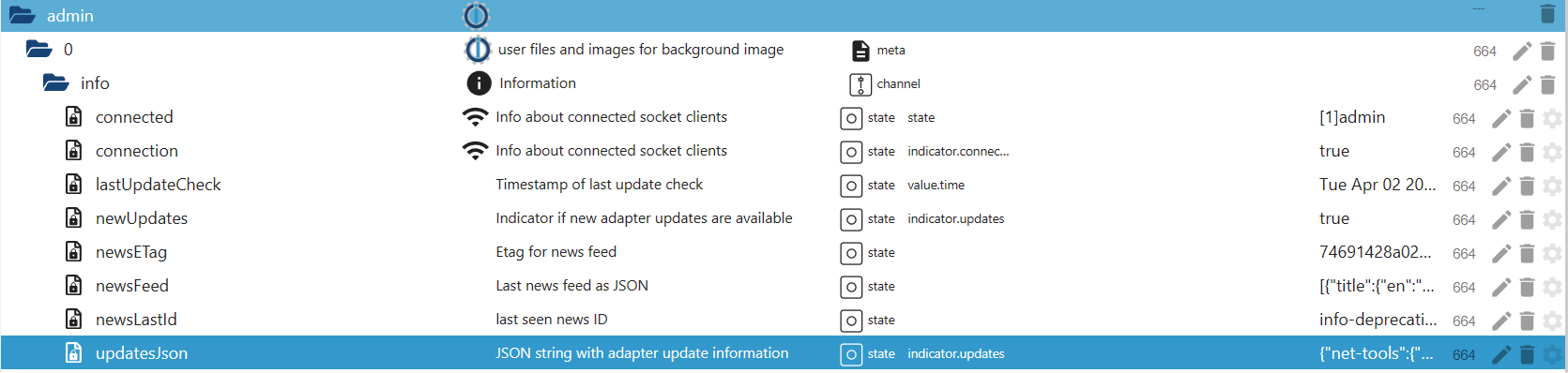
Schau dir den State mal an. Ich bin ziemlich sicher, dass da Schrott drinnen steht.
Lösung wäre (wenn ich den Code richtig lese)
Den State löschen
Oder
Den ihalt von admin.1.info.updateJson dort reinkopierenDass admin da crashed ist m.E. ein Bug. Ich wer da mal ein Issue erstellen. Wäre traumhaft wenn du den fehlerhaften Inhalt des States hier posten könntest.
Entwicklung u Betreuung: envertech-pv, hoymiles-ms, ns-client, pid, snmp Adapter;
Support Repositoryverwaltung.Wer 'nen Kaffee spendieren will: https://paypal.me
-
@roffi said in ioBroker admin startet nicht mehr:
Ich hab jetzt mal im source nachgesehen.
An der Stelle wird der state info.update.Json der admin Instanz gelesen.Schau dir den State mal an. Ich bin ziemlich sicher, dass da Schrott drinnen steht.
Lösung wäre (wenn ich den Code richtig lese)
Den State löschen
Oder
Den ihalt von admin.1.info.updateJson dort reinkopierenDass admin da crashed ist m.E. ein Bug. Ich wer da mal ein Issue erstellen. Wäre traumhaft wenn du den fehlerhaften Inhalt des States hier posten könntest.
@mcm57 vielen Dank für das Nachschauen, da lag der Fehler. Der telegram Adapter hat fleißig überall
ON-Commandrein geschrieben, inklusive der Zustände von admin.0 .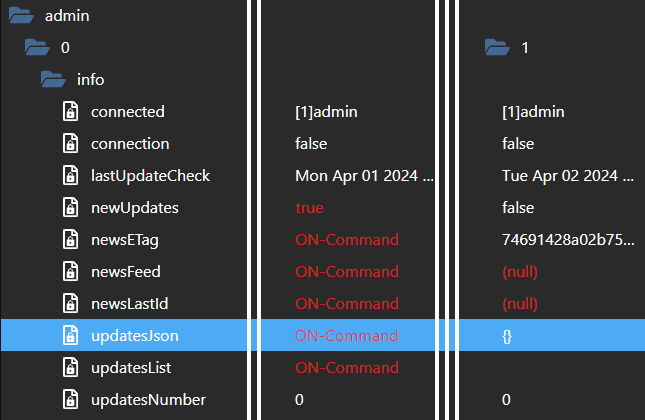
Hab die roten Zustände durch den Inhalt der admin.1 ersetzt, wie du vorgeschlagen hast. Nach wechseln der Instanz per ssh lief die Weboberfläche dann wieder. Beim Kopieren wurde geloggt, dass Änderungen ohne acknowledge vorgenommen wurden, bei Starten dann kein einzige Warnung oÄ mehr.
warn Read-only state "admin.0.info.updatesJson" has been written without ack-flag with value "{}"Vielen Dank für die Hilfe!
-
@mcm57 vielen Dank für das Nachschauen, da lag der Fehler. Der telegram Adapter hat fleißig überall
ON-Commandrein geschrieben, inklusive der Zustände von admin.0 .Hab die roten Zustände durch den Inhalt der admin.1 ersetzt, wie du vorgeschlagen hast. Nach wechseln der Instanz per ssh lief die Weboberfläche dann wieder. Beim Kopieren wurde geloggt, dass Änderungen ohne acknowledge vorgenommen wurden, bei Starten dann kein einzige Warnung oÄ mehr.
warn Read-only state "admin.0.info.updatesJson" has been written without ack-flag with value "{}"Vielen Dank für die Hilfe!
OK - schön das die Ursache für das Startproblem gefunden wurde.
ABER ehrlich gesagt kann ich mir nicht vorstellen, dass der TG einfach so aus "Spass" sinnvollen Text in ganz andere States geschrieben hat. Eventuell ist auch dein Dateisysetm angeschlagen und die Datenbank hat da Schrott gelesen.
Will keine Panic auslösen - aber ev. kan @Thomas-Braun sagen wie das Dateisystem ggF geprüft werden kann, Immerhin hast du ja einen Cold Reboot (also einen unsauberen Shutdown) dem Sysetm zugemutet (oder zumuten müssen).
Zusätzlich würde ich alle Adaptereinstellungen prüfen sofern sie kritische Adapter sind, Nicht dass der Heizungsregler dein Schalfzimmer in ne Sauna umwandelt :-)
Und noch was;
Was genau meinst du im ersten Post mit "In den Einstellungen "Settings telegram.0" eingeschaltet. Wo hast du da was getan?
OK, du hast offenbar telegramm bei ALLEN States eingschaltet. Dass da das Memory raucht ist mal klar.Entwicklung u Betreuung: envertech-pv, hoymiles-ms, ns-client, pid, snmp Adapter;
Support Repositoryverwaltung.Wer 'nen Kaffee spendieren will: https://paypal.me
-
OK - schön das die Ursache für das Startproblem gefunden wurde.
ABER ehrlich gesagt kann ich mir nicht vorstellen, dass der TG einfach so aus "Spass" sinnvollen Text in ganz andere States geschrieben hat. Eventuell ist auch dein Dateisysetm angeschlagen und die Datenbank hat da Schrott gelesen.
Will keine Panic auslösen - aber ev. kan @Thomas-Braun sagen wie das Dateisystem ggF geprüft werden kann, Immerhin hast du ja einen Cold Reboot (also einen unsauberen Shutdown) dem Sysetm zugemutet (oder zumuten müssen).
Zusätzlich würde ich alle Adaptereinstellungen prüfen sofern sie kritische Adapter sind, Nicht dass der Heizungsregler dein Schalfzimmer in ne Sauna umwandelt :-)
Und noch was;
Was genau meinst du im ersten Post mit "In den Einstellungen "Settings telegram.0" eingeschaltet. Wo hast du da was getan?
OK, du hast offenbar telegramm bei ALLEN States eingschaltet. Dass da das Memory raucht ist mal klar.@mcm57
Zumindest um 14:47 war das Dateisystem sauber.Messages concerning ext4 filesystem in dmesg: [Tue Apr 2 14:47:48 2024] Kernel command line: coherent_pool=1M 8250.nr_uarts=0 snd_bcm2835.enable_headphones=0 snd_bcm2835.enable_headphones=1 snd_bcm2835.enable_hdmi=1 snd_bcm2835.enable_hdmi=0 video=Composite-1:720x480@60i vc_mem.mem_base=0x3ec00000 vc_mem.mem_size=0x40000000 console=ttyS0,115200 console=tty1 root=PARTUUID=4ad59149-02 rootfstype=ext4 fsck.repair=yes rootwait cfg80211.ieee80211_regdom=DE [Tue Apr 2 14:47:51 2024] EXT4-fs (mmcblk0p2): mounted filesystem with ordered data mode. Quota mode: none. [Tue Apr 2 14:47:51 2024] VFS: Mounted root (ext4 filesystem) readonly on device 179:2. [Tue Apr 2 14:47:57 2024] EXT4-fs (mmcblk0p2): re-mounted. Quota mode: none. -
OK, hab mal den Telegrammer ein wenig überflogen. Der scheint auch Antworetn in States zu schreiben.
Wenn nun wer die States des Admin (dadurch dass er ALLE States) dem Telegramm zum Fraß vorwirft dann kann Telegramm da auch was reinschreiben ...Ergo:
User error - kein Dateisystemproblem.Und für Admin gibts ein Issue. Crashen sollte admin da natürlich nicht...
-
OK - schön das die Ursache für das Startproblem gefunden wurde.
ABER ehrlich gesagt kann ich mir nicht vorstellen, dass der TG einfach so aus "Spass" sinnvollen Text in ganz andere States geschrieben hat. Eventuell ist auch dein Dateisysetm angeschlagen und die Datenbank hat da Schrott gelesen.
Will keine Panic auslösen - aber ev. kan @Thomas-Braun sagen wie das Dateisystem ggF geprüft werden kann, Immerhin hast du ja einen Cold Reboot (also einen unsauberen Shutdown) dem Sysetm zugemutet (oder zumuten müssen).
Zusätzlich würde ich alle Adaptereinstellungen prüfen sofern sie kritische Adapter sind, Nicht dass der Heizungsregler dein Schalfzimmer in ne Sauna umwandelt :-)
Und noch was;
Was genau meinst du im ersten Post mit "In den Einstellungen "Settings telegram.0" eingeschaltet. Wo hast du da was getan?
OK, du hast offenbar telegramm bei ALLEN States eingschaltet. Dass da das Memory raucht ist mal klar.@mcm57
Danke für die Warnung. Zum glück bin ich noch in der Experimentalen Phase und habe noch nichts wichtiges aktiv, werde die Zustände prüfen, bevor ich etwas aktiviere :-)Ja, das Problem ist definitiv mein Verschulden gewesen. Wenn auch ich überrascht bin, wie leicht es war, das System abzuschießen.
-
@mcm57
Zumindest um 14:47 war das Dateisystem sauber.Messages concerning ext4 filesystem in dmesg: [Tue Apr 2 14:47:48 2024] Kernel command line: coherent_pool=1M 8250.nr_uarts=0 snd_bcm2835.enable_headphones=0 snd_bcm2835.enable_headphones=1 snd_bcm2835.enable_hdmi=1 snd_bcm2835.enable_hdmi=0 video=Composite-1:720x480@60i vc_mem.mem_base=0x3ec00000 vc_mem.mem_size=0x40000000 console=ttyS0,115200 console=tty1 root=PARTUUID=4ad59149-02 rootfstype=ext4 fsck.repair=yes rootwait cfg80211.ieee80211_regdom=DE [Tue Apr 2 14:47:51 2024] EXT4-fs (mmcblk0p2): mounted filesystem with ordered data mode. Quota mode: none. [Tue Apr 2 14:47:51 2024] VFS: Mounted root (ext4 filesystem) readonly on device 179:2. [Tue Apr 2 14:47:57 2024] EXT4-fs (mmcblk0p2): re-mounted. Quota mode: none.@thomas-braun Dankeschön :-)
-
@mcm1957 Hatte auf Basis der Fehlerursache das issue https://github.com/ioBroker/ioBroker.admin/issues/2422 hier erstellt. Vielleicht kann es ja jemand @Roffi ? mit der aktuellen admin Version (z.B. 6.17.13) testen, ob der Bugfix i.O. ist und das issue geschlossen werden kann.





Hey! Du scheinst an dieser Unterhaltung interessiert zu sein, hast aber noch kein Konto.
Hast du es satt, bei jedem Besuch durch die gleichen Beiträge zu scrollen? Wenn du dich für ein Konto anmeldest, kommst du immer genau dorthin zurück, wo du zuvor warst, und kannst dich über neue Antworten benachrichtigen lassen (entweder per E-Mail oder Push-Benachrichtigung). Du kannst auch Lesezeichen speichern und Beiträge positiv bewerten, um anderen Community-Mitgliedern deine Wertschätzung zu zeigen.
Mit deinem Input könnte dieser Beitrag noch besser werden 💗
Registrieren AnmeldenSupport us
209
Online33.0k
Benutzer83.6k
Themen1.3m
Beiträge