




Instanzen sind teilweise nicht zu finden
-
Ich habe das merkwürdige Phänomen dass einige installierte Adapter neuerdings in den Instanzen nicht aufzufinden sind. z.B die mit den Pfeilen markierten
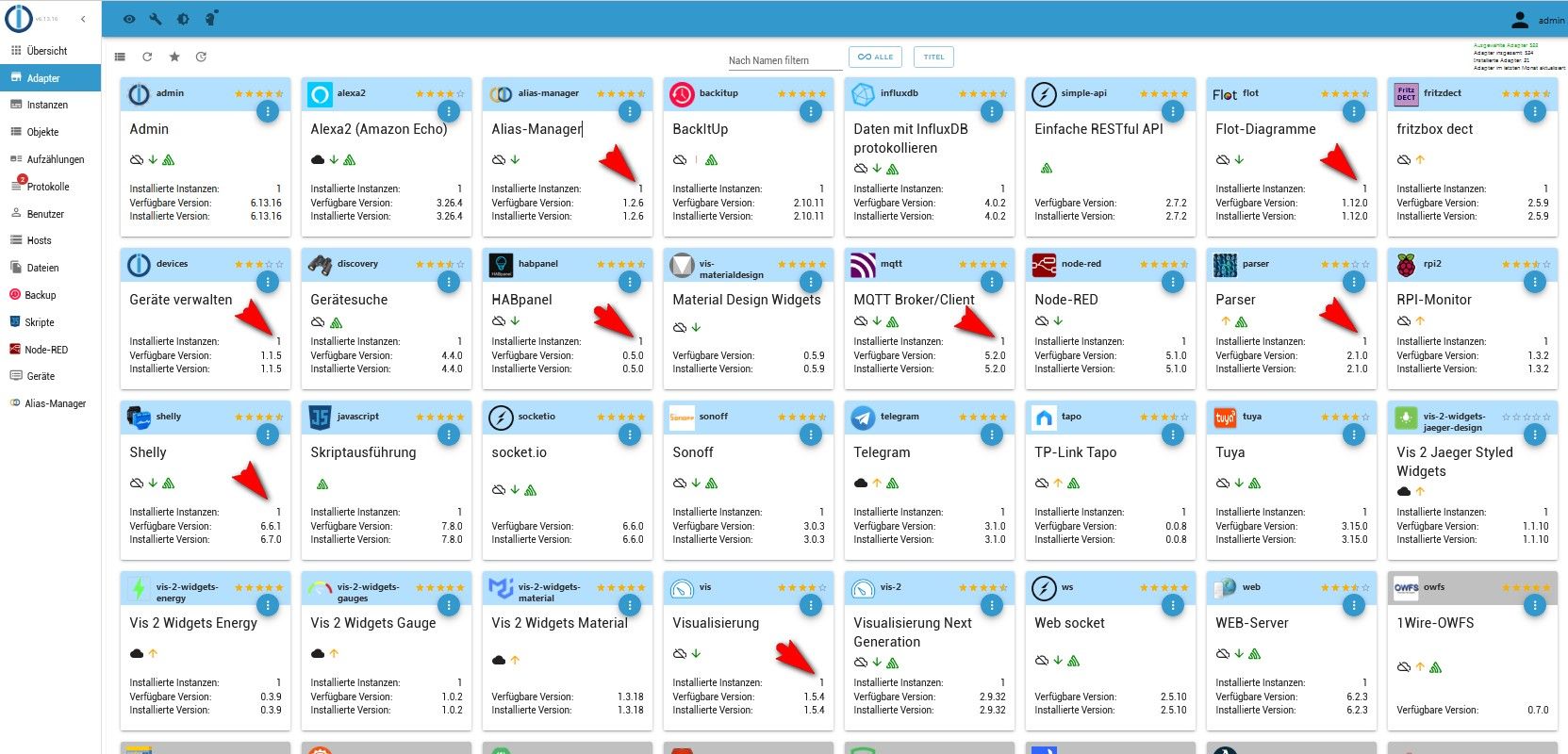
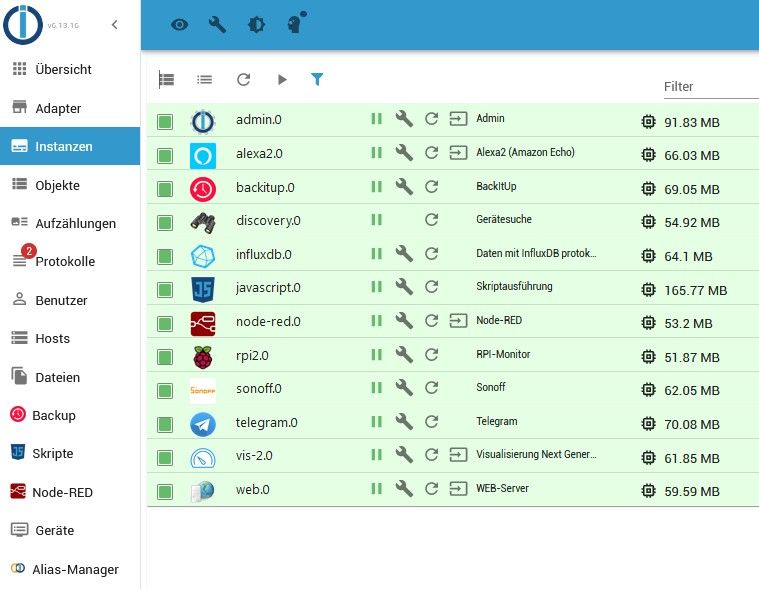
Browser Cache gelöscht, ioBroker neu gestartet, RasPi neu gebootet.
keine Änderung.
iobroker fix
keine ÄnderungHier die iobroker diag
======== Start marking the full check here ========= Skript v.2023-10-10 *** BASE SYSTEM *** Static hostname: pivpn Icon name: computer Operating System: Raspbian GNU/Linux 11 (bullseye) Kernel: Linux 6.1.21-v8+ Architecture: arm64 Model : Raspberry Pi 4 Model B Rev 1.4 Docker : false Virtualization : none Kernel : aarch64 Userland : armhf Systemuptime and Load: 20:48:50 up 1:58, 1 user, load average: 1.38, 0.62, 0.56 CPU threads: 4 *** RASPBERRY THROTTLING *** Current issues: No throttling issues detected. Previously detected issues: No throttling issues detected. *** Time and Time Zones *** Local time: Sun 2024-03-24 20:48:51 WET Universal time: Sun 2024-03-24 20:48:51 UTC RTC time: n/a Time zone: Atlantic/Canary (WET, +0000) System clock synchronized: yes NTP service: active RTC in local TZ: no *** User and Groups *** pi /home/pi pi adm dialout cdrom sudo audio video plugdev games users input render netdev gpio i2c spi iobroker *** X-Server-Setup *** X-Server: false Desktop: Terminal: tty Boot Target: multi-user.target *** MEMORY *** total used free shared buff/cache available Mem: 1.8G 662M 825M 3.0M 361M 1.1G Swap: 99M 99M 0.0K Total: 1.9G 762M 825M 1849 M total memory 662 M used memory 403 M active memory 470 M inactive memory 825 M free memory 5 M buffer memory 355 M swap cache 99 M total swap 99 M used swap 0 M free swap Raspberry only: oom events: 0 lifetime oom required: 0 Mbytes total time in oom handler: 0 ms max time spent in oom handler: 0 ms *** FAILED SERVICES *** UNIT LOAD ACTIVE SUB DESCRIPTION * hciuart.service loaded failed failed Configure Bluetooth Modems connected by UART * iobroker.service loaded failed failed ioBroker Server LOAD = Reflects whether the unit definition was properly loaded. ACTIVE = The high-level unit activation state, i.e. generalization of SUB. SUB = The low-level unit activation state, values depend on unit type. 2 loaded units listed. *** FILESYSTEM *** Filesystem Type Size Used Avail Use% Mounted on /dev/root ext4 29G 8.5G 20G 31% / devtmpfs devtmpfs 667M 0 667M 0% /dev tmpfs tmpfs 925M 1.8M 923M 1% /dev/shm tmpfs tmpfs 370M 1.1M 369M 1% /run tmpfs tmpfs 5.0M 4.0K 5.0M 1% /run/lock /dev/mmcblk0p1 vfat 255M 51M 205M 20% /boot tmpfs tmpfs 185M 0 185M 0% /run/user/1000 Messages concerning ext4 filesystem in dmesg: [Sun Mar 24 18:50:14 2024] Kernel command line: coherent_pool=1M 8250.nr_uarts=0 snd_bcm2835.enable_headphones=0 snd_bcm2835.enable_headphones=1 snd_bcm2835.enable_hdmi=1 snd_bcm2835.enable_hdmi=0 smsc95xx.macaddr=E4:5F:01:20:8D:54 vc_mem.mem_base=0x3ec00000 vc_mem.mem_size=0x40000000 console=ttyS0,115200 console=tty1 root=PARTUUID=bd727156-02 rootfstype=ext4 fsck.repair=yes rootwait cfg80211.ieee80211_regdom=AT [Sun Mar 24 18:50:15 2024] EXT4-fs (mmcblk0p2): INFO: recovery required on readonly filesystem [Sun Mar 24 18:50:15 2024] EXT4-fs (mmcblk0p2): write access will be enabled during recovery [Sun Mar 24 18:50:16 2024] EXT4-fs (mmcblk0p2): orphan cleanup on readonly fs [Sun Mar 24 18:50:16 2024] EXT4-fs (mmcblk0p2): 3 orphan inodes deleted [Sun Mar 24 18:50:16 2024] EXT4-fs (mmcblk0p2): recovery complete [Sun Mar 24 18:50:16 2024] EXT4-fs (mmcblk0p2): mounted filesystem with ordered data mode. Quota mode: none. [Sun Mar 24 18:50:16 2024] VFS: Mounted root (ext4 filesystem) readonly on device 179:2. [Sun Mar 24 18:50:18 2024] EXT4-fs (mmcblk0p2): re-mounted. Quota mode: none. Show mounted filesystems \(real ones only\): TARGET SOURCE FSTYPE OPTIONS / /dev/mmcblk0p2 ext4 rw,noatime `-/boot /dev/mmcblk0p1 vfat rw,relatime,fmask=0022,dmask=0022,codepage=437,iocharset=ascii,shortname=mixed,errors=remount-ro Files in neuralgic directories: /var: 2.4G /var/ 1.4G /var/log 1.2G /var/log/journal/8f8800bc2dd742ba810579339a904aaf 1.2G /var/log/journal 540M /var/cache Archived and active journals take up 1.1G in the file system. /opt/iobroker/backups: 2.2G /opt/iobroker/backups/ /opt/iobroker/iobroker-data: 134M /opt/iobroker/iobroker-data/ 82M /opt/iobroker/iobroker-data/files 67M /opt/iobroker/iobroker-data/files/javascript.admin 48M /opt/iobroker/iobroker-data/files/javascript.admin/static 47M /opt/iobroker/iobroker-data/files/javascript.admin/static/js The five largest files in iobroker-data are: 13M /opt/iobroker/iobroker-data/objects.jsonl 7.5M /opt/iobroker/iobroker-data/files/javascript.admin/static/js/691.26ff76ce.chunk.js.map 7.1M /opt/iobroker/iobroker-data/files/javascript.admin/static/js/610.d3cce782.chunk.js.map 6.3M /opt/iobroker/iobroker-data/files/admin.admin/custom/static/js/vendors-node_modules_iobroker_adapter-react-v5_assets_devices_parseNames_js-node_modules_iobr-99c23e.847b8ad9.chunk.js.map 6.0M /opt/iobroker/iobroker-data/states.jsonl USB-Devices by-id: USB-Sticks - Avoid direct links to /dev/* in your adapter setups, please always prefer the links 'by-id': find: '/dev/serial/by-id/': No such file or directory *** NodeJS-Installation *** /usr/bin/nodejs v18.19.1 /usr/bin/node v18.19.1 /usr/bin/npm 10.2.4 /usr/bin/npx 10.2.4 /usr/bin/corepack 0.22.0 nodejs: Installed: 18.19.1-1nodesource1 Candidate: 18.19.1-1nodesource1 Version table: *** 18.19.1-1nodesource1 500 500 https://deb.nodesource.com/node_18.x nodistro/main armhf Packages 100 /var/lib/dpkg/status 18.19.0-1nodesource1 500 500 https://deb.nodesource.com/node_18.x nodistro/main armhf Packages 18.18.2-1nodesource1 500 500 https://deb.nodesource.com/node_18.x nodistro/main armhf Packages 18.18.1-1nodesource1 500 500 https://deb.nodesource.com/node_18.x nodistro/main armhf Packages 18.18.0-1nodesource1 500 500 https://deb.nodesource.com/node_18.x nodistro/main armhf Packages 18.17.1-1nodesource1 500 500 https://deb.nodesource.com/node_18.x nodistro/main armhf Packages 18.17.0-1nodesource1 500 500 https://deb.nodesource.com/node_18.x nodistro/main armhf Packages 18.16.1-1nodesource1 500 500 https://deb.nodesource.com/node_18.x nodistro/main armhf Packages 18.16.0-1nodesource1 500 500 https://deb.nodesource.com/node_18.x nodistro/main armhf Packages 18.15.0-1nodesource1 500 500 https://deb.nodesource.com/node_18.x nodistro/main armhf Packages 18.14.2-1nodesource1 500 500 https://deb.nodesource.com/node_18.x nodistro/main armhf Packages 18.14.1-1nodesource1 500 500 https://deb.nodesource.com/node_18.x nodistro/main armhf Packages 18.14.0-1nodesource1 500 500 https://deb.nodesource.com/node_18.x nodistro/main armhf Packages 18.13.0-1nodesource1 500 500 https://deb.nodesource.com/node_18.x nodistro/main armhf Packages 18.12.0-1nodesource1 500 500 https://deb.nodesource.com/node_18.x nodistro/main armhf Packages 18.11.0-1nodesource1 500 500 https://deb.nodesource.com/node_18.x nodistro/main armhf Packages 18.10.0-1nodesource1 500 500 https://deb.nodesource.com/node_18.x nodistro/main armhf Packages 18.9.1-1nodesource1 500 500 https://deb.nodesource.com/node_18.x nodistro/main armhf Packages 18.9.0-1nodesource1 500 500 https://deb.nodesource.com/node_18.x nodistro/main armhf Packages 18.8.0-1nodesource1 500 500 https://deb.nodesource.com/node_18.x nodistro/main armhf Packages 18.7.0-1nodesource1 500 500 https://deb.nodesource.com/node_18.x nodistro/main armhf Packages 18.6.0-1nodesource1 500 500 https://deb.nodesource.com/node_18.x nodistro/main armhf Packages 18.5.0-1nodesource1 500 500 https://deb.nodesource.com/node_18.x nodistro/main armhf Packages 18.4.0-1nodesource1 500 500 https://deb.nodesource.com/node_18.x nodistro/main armhf Packages 18.3.0-1nodesource1 500 500 https://deb.nodesource.com/node_18.x nodistro/main armhf Packages 18.2.0-1nodesource1 500 500 https://deb.nodesource.com/node_18.x nodistro/main armhf Packages 18.1.0-1nodesource1 500 500 https://deb.nodesource.com/node_18.x nodistro/main armhf Packages 18.0.0-1nodesource1 500 500 https://deb.nodesource.com/node_18.x nodistro/main armhf Packages 12.22.12~dfsg-1~deb11u4 500 500 http://raspbian.raspberrypi.org/raspbian bullseye/main armhf Packages Temp directories causing npm8 problem: 0 No problems detected Errors in npm tree: *** ioBroker-Installation *** ioBroker Status iobroker is not running on this host. No iobroker host is running. Objects type: redis States type: redis Core adapters versions js-controller: 5.0.19 admin: 6.13.16 javascript: 7.8.0 Adapters from github: 0 Adapter State system.adapter.admin.0 : admin : pivpn - enabled, port: 8081, bind: 0.0.0.0, run as: admin system.adapter.alexa2.0 : alexa2 : pivpn - enabled system.adapter.alias-manager.0 : alias-manager : pivpn - enabled system.adapter.backitup.0 : backitup : pivpn - enabled system.adapter.devices.0 : devices : pivpn - enabled system.adapter.discovery.0 : discovery : pivpn - enabled system.adapter.flot.0 : flot : pivpn - enabled system.adapter.fritzdect.0 : fritzdect : pivpn - disabled system.adapter.habpanel.0 : habpanel : pivpn - enabled system.adapter.influxdb.0 : influxdb : pivpn - enabled, port: 8086 system.adapter.javascript.0 : javascript : pivpn - enabled system.adapter.mqtt.0 : mqtt : pivpn - disabled, port: 1886, bind: 192.168.1.9 system.adapter.node-red.0 : node-red : pivpn - enabled, port: 1880, bind: 0.0.0.0 system.adapter.parser.0 : parser : pivpn - disabled system.adapter.rpi2.0 : rpi2 : pivpn - enabled system.adapter.shelly.0 : shelly : pivpn - disabled, port: 1882, bind: 0.0.0.0 system.adapter.sonoff.0 : sonoff : pivpn - enabled, port: 1500, bind: 0.0.0.0 system.adapter.tapo.0 : tapo : pivpn - disabled system.adapter.telegram.0 : telegram : pivpn - enabled, port: 8443, bind: 0.0.0.0 system.adapter.tuya.0 : tuya : pivpn - enabled system.adapter.vis-2-widgets-energy.0 : vis-2-widgets-energy : pivpn - enabled system.adapter.vis-2-widgets-gauges.0 : vis-2-widgets-gauges : pivpn - enabled system.adapter.vis-2-widgets-jaeger-design.0: vis-2-widgets-jaeger-design: pivpn - enabled system.adapter.vis-2.0 : vis-2 : pivpn - enabled system.adapter.vis.0 : vis : pivpn - enabled system.adapter.web.0 : web : pivpn - enabled, port: 8082, bind: 0.0.0.0, run as: admin + instance is alive Enabled adapters with bindings system.adapter.admin.0 : admin : pivpn - enabled, port: 8081, bind: 0.0.0.0, run as: admin system.adapter.influxdb.0 : influxdb : pivpn - enabled, port: 8086 system.adapter.node-red.0 : node-red : pivpn - enabled, port: 1880, bind: 0.0.0.0 system.adapter.sonoff.0 : sonoff : pivpn - enabled, port: 1500, bind: 0.0.0.0 system.adapter.telegram.0 : telegram : pivpn - enabled, port: 8443, bind: 0.0.0.0 system.adapter.web.0 : web : pivpn - enabled, port: 8082, bind: 0.0.0.0, run as: admin ioBroker-Repositories stable : http://download.iobroker.net/sources-dist.json beta : http://download.iobroker.net/sources-dist-latest.json Active repo(s): stable Installed ioBroker-Instances Used repository: stable Adapter "admin" : 6.13.16 , installed 6.13.16 Adapter "alexa2" : 3.26.4 , installed 3.26.4 Adapter "alias-manager": 1.2.6 , installed 1.2.6 Adapter "backitup" : 2.10.11 , installed 2.10.11 Adapter "devices" : 1.1.5 , installed 1.1.5 Adapter "discovery" : 4.4.0 , installed 4.4.0 Adapter "flot" : 1.12.0 , installed 1.12.0 Adapter "fritzdect" : 2.5.9 , installed 2.5.9 Adapter "habpanel" : 0.5.0 , installed 0.5.0 Adapter "influxdb" : 4.0.2 , installed 4.0.2 Adapter "javascript" : 7.8.0 , installed 7.8.0 Controller "js-controller": 5.0.19 , installed 5.0.19 Adapter "mqtt" : 5.2.0 , installed 5.2.0 Adapter "node-red" : 5.1.0 , installed 5.1.0 Adapter "parser" : 2.1.0 , installed 2.1.0 Adapter "rpi2" : 1.3.2 , installed 1.3.2 Adapter "shelly" : 6.6.1 , installed 6.7.0 Adapter "simple-api" : 2.7.2 , installed 2.7.2 Adapter "socketio" : 6.6.0 , installed 6.6.0 Adapter "sonoff" : 3.0.3 , installed 3.0.3 Adapter "tapo" : 0.0.8 , installed 0.0.8 Adapter "telegram" : 3.1.0 , installed 3.1.0 Adapter "tuya" : 3.15.0 , installed 3.15.0 Adapter "vis" : 1.5.4 , installed 1.5.4 Adapter "vis-2" : 2.9.32 , installed 2.9.32 Adapter "vis-2-widgets-energy": 0.3.9, installed 0.3.9 Adapter "vis-2-widgets-gauges": 1.0.2, installed 1.0.2 Adapter "vis-2-widgets-jaeger-design": 1.1.10, installed 1.1.10 Adapter "vis-2-widgets-material": 1.3.18, installed 1.3.18 Adapter "vis-materialdesign": 0.5.9, installed 0.5.9 Adapter "web" : 6.2.3 , installed 6.2.3 Adapter "ws" : 2.5.10 , installed 2.5.10 Objects and States Please stand by - This may take a while Objects: 2384 States: 1740 *** OS-Repositories and Updates *** Hit:1 http://archive.raspberrypi.org/debian bullseye InRelease Hit:2 http://raspbian.raspberrypi.org/raspbian bullseye InRelease Hit:3 https://packages.grafana.com/oss/deb stable InRelease Hit:4 https://deb.nodesource.com/node_18.x nodistro InRelease Hit:5 https://repos.influxdata.com/debian bullseye InRelease Reading package lists... Pending Updates: 0 *** Listening Ports *** Active Internet connections (only servers) Proto Recv-Q Send-Q Local Address Foreign Address State User Inode PID/Program name tcp 0 0 0.0.0.0:53 0.0.0.0:* LISTEN 999 13214 835/pihole-FTL tcp 0 0 127.0.0.1:8088 0.0.0.0:* LISTEN 998 15441 803/influxd tcp 0 0 0.0.0.0:22 0.0.0.0:* LISTEN 0 1799 547/sshd: /usr/sbin tcp 0 0 0.0.0.0:80 0.0.0.0:* LISTEN 0 15445 899/lighttpd tcp 0 0 127.0.0.1:4711 0.0.0.0:* LISTEN 999 13220 835/pihole-FTL tcp 0 0 127.0.0.1:8953 0.0.0.0:* LISTEN 0 15376 791/unbound tcp 0 0 0.0.0.0:514 0.0.0.0:* LISTEN 0 12071 366/rsyslogd tcp 0 0 127.0.0.1:6379 0.0.0.0:* LISTEN 112 1813 512/redis-server 12 tcp 0 0 127.0.0.1:5335 0.0.0.0:* LISTEN 0 15375 791/unbound tcp6 0 0 :::53 :::* LISTEN 999 13216 835/pihole-FTL tcp6 0 0 :::22 :::* LISTEN 0 1801 547/sshd: /usr/sbin tcp6 0 0 :::80 :::* LISTEN 0 15446 899/lighttpd tcp6 0 0 ::1:6379 :::* LISTEN 112 1814 512/redis-server 12 tcp6 0 0 :::514 :::* LISTEN 0 12072 366/rsyslogd tcp6 0 0 :::3000 :::* LISTEN 111 52927 6079/grafana tcp6 0 0 ::1:4711 :::* LISTEN 999 13221 835/pihole-FTL tcp6 0 0 :::8086 :::* LISTEN 998 14976 803/influxd udp 0 0 0.0.0.0:5353 0.0.0.0:* 108 14655 316/avahi-daemon: r udp 0 0 0.0.0.0:514 0.0.0.0:* 0 12066 366/rsyslogd udp 0 0 0.0.0.0:51820 0.0.0.0:* 0 16387 - udp 0 0 0.0.0.0:34610 0.0.0.0:* 108 14657 316/avahi-daemon: r udp 0 0 0.0.0.0:53 0.0.0.0:* 999 13213 835/pihole-FTL udp 0 0 0.0.0.0:68 0.0.0.0:* 0 14778 796/dhcpcd udp 0 0 127.0.0.1:5335 0.0.0.0:* 0 15374 791/unbound udp6 0 0 :::5353 :::* 108 14656 316/avahi-daemon: r udp6 0 0 :::514 :::* 0 12067 366/rsyslogd udp6 0 0 :::51820 :::* 0 16388 - udp6 0 0 :::52110 :::* 108 14658 316/avahi-daemon: r udp6 0 0 :::53 :::* 999 13215 835/pihole-FTL *** Log File - Last 25 Lines *** 2024-03-24 20:48:19.983 - info: web.0 (8799) terminating 2024-03-24 20:48:19.988 - info: backitup.0 (8770) terminating 2024-03-24 20:48:19.995 - info: alexa2.0 (8662) terminating 2024-03-24 20:48:20.015 - info: telegram.0 (8634) terminating 2024-03-24 20:48:20.019 - info: telegram.0 (8634) Terminated (NO_ERROR): Without reason 2024-03-24 20:48:20.020 - info: sonoff.0 (8755) terminating 2024-03-24 20:48:20.031 - info: sonoff.0 (8755) Terminated (NO_ERROR): Without reason 2024-03-24 20:48:20.057 - info: host.pivpn instance system.adapter.rpi2.0 terminated with code 0 (NO_ERROR) 2024-03-24 20:48:20.099 - info: admin.0 (8563) terminating 2024-03-24 20:48:20.106 - info: host.pivpn instance system.adapter.node-red.0 terminated with code 0 (NO_ERROR) 2024-03-24 20:48:20.151 - info: host.pivpn instance system.adapter.alexa2.0 terminated with code 0 (NO_ERROR) 2024-03-24 20:48:20.153 - info: host.pivpn instance system.adapter.discovery.0 terminated with code 0 (NO_ERROR) 2024-03-24 20:48:20.173 - info: host.pivpn instance system.adapter.javascript.0 terminated with code 0 (NO_ERROR) 2024-03-24 20:48:20.226 - info: host.pivpn instance system.adapter.admin.0 terminated with code 0 (NO_ERROR) 2024-03-24 20:48:20.227 - info: host.pivpn instance system.adapter.backitup.0 terminated with code 0 (NO_ERROR) 2024-03-24 20:48:20.227 - info: host.pivpn instance system.adapter.web.0 terminated with code 0 (NO_ERROR) 2024-03-24 20:48:20.228 - info: host.pivpn instance system.adapter.vis-2.0 terminated with code 0 (NO_ERROR) 2024-03-24 20:48:20.280 - info: host.pivpn instance system.adapter.influxdb.0 terminated with code 0 (NO_ERROR) 2024-03-24 20:48:20.586 - info: host.pivpn instance system.adapter.telegram.0 terminated with code 0 (NO_ERROR) 2024-03-24 20:48:20.620 - info: host.pivpn instance system.adapter.sonoff.0 terminated with code 0 (NO_ERROR) 2024-03-24 20:48:22.473 - info: tuya.0 (8792) terminating 2024-03-24 20:48:22.475 - info: tuya.0 (8792) Terminated (NO_ERROR): Without reason 2024-03-24 20:48:23.014 - info: host.pivpn instance system.adapter.tuya.0 terminated with code 0 (NO_ERROR) 2024-03-24 20:48:23.014 - info: host.pivpn All instances are stopped. 2024-03-24 20:48:23.168 - info: host.pivpn terminated ============ Mark until here for C&P =============Ich habe nachdem ich VIS-2 installiert hatte, in der Meinung es nicht mehr zu brauchen VIS deinstalliert. Da aber einige Widgets in VIS-2 noch nicht funktionieren habe ich VIS erneut installiert.
Und dann gibt es noch diese Fehlermeldung.
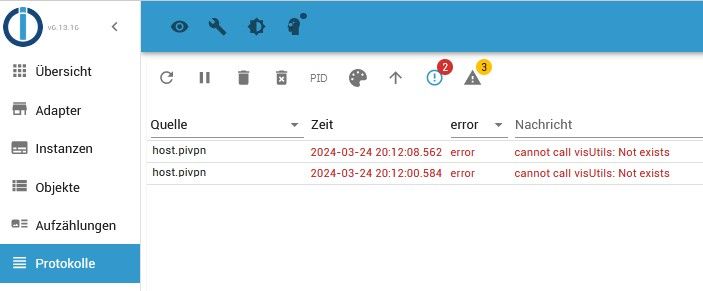
Wie bringe ich das wieder in Ordnung?
LG Gerhard
RasPi 4 4GB bookworm
nodejs v20.19.4
npm 10.8.2
Objects type: jsonl
States type: redis
js-controller: 7.0.6
admin: 7.6.17
javascript: 8.9.2 -
Ich habe das merkwürdige Phänomen dass einige installierte Adapter neuerdings in den Instanzen nicht aufzufinden sind. z.B die mit den Pfeilen markierten
Browser Cache gelöscht, ioBroker neu gestartet, RasPi neu gebootet.
keine Änderung.
iobroker fix
keine ÄnderungHier die iobroker diag
======== Start marking the full check here ========= Skript v.2023-10-10 *** BASE SYSTEM *** Static hostname: pivpn Icon name: computer Operating System: Raspbian GNU/Linux 11 (bullseye) Kernel: Linux 6.1.21-v8+ Architecture: arm64 Model : Raspberry Pi 4 Model B Rev 1.4 Docker : false Virtualization : none Kernel : aarch64 Userland : armhf Systemuptime and Load: 20:48:50 up 1:58, 1 user, load average: 1.38, 0.62, 0.56 CPU threads: 4 *** RASPBERRY THROTTLING *** Current issues: No throttling issues detected. Previously detected issues: No throttling issues detected. *** Time and Time Zones *** Local time: Sun 2024-03-24 20:48:51 WET Universal time: Sun 2024-03-24 20:48:51 UTC RTC time: n/a Time zone: Atlantic/Canary (WET, +0000) System clock synchronized: yes NTP service: active RTC in local TZ: no *** User and Groups *** pi /home/pi pi adm dialout cdrom sudo audio video plugdev games users input render netdev gpio i2c spi iobroker *** X-Server-Setup *** X-Server: false Desktop: Terminal: tty Boot Target: multi-user.target *** MEMORY *** total used free shared buff/cache available Mem: 1.8G 662M 825M 3.0M 361M 1.1G Swap: 99M 99M 0.0K Total: 1.9G 762M 825M 1849 M total memory 662 M used memory 403 M active memory 470 M inactive memory 825 M free memory 5 M buffer memory 355 M swap cache 99 M total swap 99 M used swap 0 M free swap Raspberry only: oom events: 0 lifetime oom required: 0 Mbytes total time in oom handler: 0 ms max time spent in oom handler: 0 ms *** FAILED SERVICES *** UNIT LOAD ACTIVE SUB DESCRIPTION * hciuart.service loaded failed failed Configure Bluetooth Modems connected by UART * iobroker.service loaded failed failed ioBroker Server LOAD = Reflects whether the unit definition was properly loaded. ACTIVE = The high-level unit activation state, i.e. generalization of SUB. SUB = The low-level unit activation state, values depend on unit type. 2 loaded units listed. *** FILESYSTEM *** Filesystem Type Size Used Avail Use% Mounted on /dev/root ext4 29G 8.5G 20G 31% / devtmpfs devtmpfs 667M 0 667M 0% /dev tmpfs tmpfs 925M 1.8M 923M 1% /dev/shm tmpfs tmpfs 370M 1.1M 369M 1% /run tmpfs tmpfs 5.0M 4.0K 5.0M 1% /run/lock /dev/mmcblk0p1 vfat 255M 51M 205M 20% /boot tmpfs tmpfs 185M 0 185M 0% /run/user/1000 Messages concerning ext4 filesystem in dmesg: [Sun Mar 24 18:50:14 2024] Kernel command line: coherent_pool=1M 8250.nr_uarts=0 snd_bcm2835.enable_headphones=0 snd_bcm2835.enable_headphones=1 snd_bcm2835.enable_hdmi=1 snd_bcm2835.enable_hdmi=0 smsc95xx.macaddr=E4:5F:01:20:8D:54 vc_mem.mem_base=0x3ec00000 vc_mem.mem_size=0x40000000 console=ttyS0,115200 console=tty1 root=PARTUUID=bd727156-02 rootfstype=ext4 fsck.repair=yes rootwait cfg80211.ieee80211_regdom=AT [Sun Mar 24 18:50:15 2024] EXT4-fs (mmcblk0p2): INFO: recovery required on readonly filesystem [Sun Mar 24 18:50:15 2024] EXT4-fs (mmcblk0p2): write access will be enabled during recovery [Sun Mar 24 18:50:16 2024] EXT4-fs (mmcblk0p2): orphan cleanup on readonly fs [Sun Mar 24 18:50:16 2024] EXT4-fs (mmcblk0p2): 3 orphan inodes deleted [Sun Mar 24 18:50:16 2024] EXT4-fs (mmcblk0p2): recovery complete [Sun Mar 24 18:50:16 2024] EXT4-fs (mmcblk0p2): mounted filesystem with ordered data mode. Quota mode: none. [Sun Mar 24 18:50:16 2024] VFS: Mounted root (ext4 filesystem) readonly on device 179:2. [Sun Mar 24 18:50:18 2024] EXT4-fs (mmcblk0p2): re-mounted. Quota mode: none. Show mounted filesystems \(real ones only\): TARGET SOURCE FSTYPE OPTIONS / /dev/mmcblk0p2 ext4 rw,noatime `-/boot /dev/mmcblk0p1 vfat rw,relatime,fmask=0022,dmask=0022,codepage=437,iocharset=ascii,shortname=mixed,errors=remount-ro Files in neuralgic directories: /var: 2.4G /var/ 1.4G /var/log 1.2G /var/log/journal/8f8800bc2dd742ba810579339a904aaf 1.2G /var/log/journal 540M /var/cache Archived and active journals take up 1.1G in the file system. /opt/iobroker/backups: 2.2G /opt/iobroker/backups/ /opt/iobroker/iobroker-data: 134M /opt/iobroker/iobroker-data/ 82M /opt/iobroker/iobroker-data/files 67M /opt/iobroker/iobroker-data/files/javascript.admin 48M /opt/iobroker/iobroker-data/files/javascript.admin/static 47M /opt/iobroker/iobroker-data/files/javascript.admin/static/js The five largest files in iobroker-data are: 13M /opt/iobroker/iobroker-data/objects.jsonl 7.5M /opt/iobroker/iobroker-data/files/javascript.admin/static/js/691.26ff76ce.chunk.js.map 7.1M /opt/iobroker/iobroker-data/files/javascript.admin/static/js/610.d3cce782.chunk.js.map 6.3M /opt/iobroker/iobroker-data/files/admin.admin/custom/static/js/vendors-node_modules_iobroker_adapter-react-v5_assets_devices_parseNames_js-node_modules_iobr-99c23e.847b8ad9.chunk.js.map 6.0M /opt/iobroker/iobroker-data/states.jsonl USB-Devices by-id: USB-Sticks - Avoid direct links to /dev/* in your adapter setups, please always prefer the links 'by-id': find: '/dev/serial/by-id/': No such file or directory *** NodeJS-Installation *** /usr/bin/nodejs v18.19.1 /usr/bin/node v18.19.1 /usr/bin/npm 10.2.4 /usr/bin/npx 10.2.4 /usr/bin/corepack 0.22.0 nodejs: Installed: 18.19.1-1nodesource1 Candidate: 18.19.1-1nodesource1 Version table: *** 18.19.1-1nodesource1 500 500 https://deb.nodesource.com/node_18.x nodistro/main armhf Packages 100 /var/lib/dpkg/status 18.19.0-1nodesource1 500 500 https://deb.nodesource.com/node_18.x nodistro/main armhf Packages 18.18.2-1nodesource1 500 500 https://deb.nodesource.com/node_18.x nodistro/main armhf Packages 18.18.1-1nodesource1 500 500 https://deb.nodesource.com/node_18.x nodistro/main armhf Packages 18.18.0-1nodesource1 500 500 https://deb.nodesource.com/node_18.x nodistro/main armhf Packages 18.17.1-1nodesource1 500 500 https://deb.nodesource.com/node_18.x nodistro/main armhf Packages 18.17.0-1nodesource1 500 500 https://deb.nodesource.com/node_18.x nodistro/main armhf Packages 18.16.1-1nodesource1 500 500 https://deb.nodesource.com/node_18.x nodistro/main armhf Packages 18.16.0-1nodesource1 500 500 https://deb.nodesource.com/node_18.x nodistro/main armhf Packages 18.15.0-1nodesource1 500 500 https://deb.nodesource.com/node_18.x nodistro/main armhf Packages 18.14.2-1nodesource1 500 500 https://deb.nodesource.com/node_18.x nodistro/main armhf Packages 18.14.1-1nodesource1 500 500 https://deb.nodesource.com/node_18.x nodistro/main armhf Packages 18.14.0-1nodesource1 500 500 https://deb.nodesource.com/node_18.x nodistro/main armhf Packages 18.13.0-1nodesource1 500 500 https://deb.nodesource.com/node_18.x nodistro/main armhf Packages 18.12.0-1nodesource1 500 500 https://deb.nodesource.com/node_18.x nodistro/main armhf Packages 18.11.0-1nodesource1 500 500 https://deb.nodesource.com/node_18.x nodistro/main armhf Packages 18.10.0-1nodesource1 500 500 https://deb.nodesource.com/node_18.x nodistro/main armhf Packages 18.9.1-1nodesource1 500 500 https://deb.nodesource.com/node_18.x nodistro/main armhf Packages 18.9.0-1nodesource1 500 500 https://deb.nodesource.com/node_18.x nodistro/main armhf Packages 18.8.0-1nodesource1 500 500 https://deb.nodesource.com/node_18.x nodistro/main armhf Packages 18.7.0-1nodesource1 500 500 https://deb.nodesource.com/node_18.x nodistro/main armhf Packages 18.6.0-1nodesource1 500 500 https://deb.nodesource.com/node_18.x nodistro/main armhf Packages 18.5.0-1nodesource1 500 500 https://deb.nodesource.com/node_18.x nodistro/main armhf Packages 18.4.0-1nodesource1 500 500 https://deb.nodesource.com/node_18.x nodistro/main armhf Packages 18.3.0-1nodesource1 500 500 https://deb.nodesource.com/node_18.x nodistro/main armhf Packages 18.2.0-1nodesource1 500 500 https://deb.nodesource.com/node_18.x nodistro/main armhf Packages 18.1.0-1nodesource1 500 500 https://deb.nodesource.com/node_18.x nodistro/main armhf Packages 18.0.0-1nodesource1 500 500 https://deb.nodesource.com/node_18.x nodistro/main armhf Packages 12.22.12~dfsg-1~deb11u4 500 500 http://raspbian.raspberrypi.org/raspbian bullseye/main armhf Packages Temp directories causing npm8 problem: 0 No problems detected Errors in npm tree: *** ioBroker-Installation *** ioBroker Status iobroker is not running on this host. No iobroker host is running. Objects type: redis States type: redis Core adapters versions js-controller: 5.0.19 admin: 6.13.16 javascript: 7.8.0 Adapters from github: 0 Adapter State system.adapter.admin.0 : admin : pivpn - enabled, port: 8081, bind: 0.0.0.0, run as: admin system.adapter.alexa2.0 : alexa2 : pivpn - enabled system.adapter.alias-manager.0 : alias-manager : pivpn - enabled system.adapter.backitup.0 : backitup : pivpn - enabled system.adapter.devices.0 : devices : pivpn - enabled system.adapter.discovery.0 : discovery : pivpn - enabled system.adapter.flot.0 : flot : pivpn - enabled system.adapter.fritzdect.0 : fritzdect : pivpn - disabled system.adapter.habpanel.0 : habpanel : pivpn - enabled system.adapter.influxdb.0 : influxdb : pivpn - enabled, port: 8086 system.adapter.javascript.0 : javascript : pivpn - enabled system.adapter.mqtt.0 : mqtt : pivpn - disabled, port: 1886, bind: 192.168.1.9 system.adapter.node-red.0 : node-red : pivpn - enabled, port: 1880, bind: 0.0.0.0 system.adapter.parser.0 : parser : pivpn - disabled system.adapter.rpi2.0 : rpi2 : pivpn - enabled system.adapter.shelly.0 : shelly : pivpn - disabled, port: 1882, bind: 0.0.0.0 system.adapter.sonoff.0 : sonoff : pivpn - enabled, port: 1500, bind: 0.0.0.0 system.adapter.tapo.0 : tapo : pivpn - disabled system.adapter.telegram.0 : telegram : pivpn - enabled, port: 8443, bind: 0.0.0.0 system.adapter.tuya.0 : tuya : pivpn - enabled system.adapter.vis-2-widgets-energy.0 : vis-2-widgets-energy : pivpn - enabled system.adapter.vis-2-widgets-gauges.0 : vis-2-widgets-gauges : pivpn - enabled system.adapter.vis-2-widgets-jaeger-design.0: vis-2-widgets-jaeger-design: pivpn - enabled system.adapter.vis-2.0 : vis-2 : pivpn - enabled system.adapter.vis.0 : vis : pivpn - enabled system.adapter.web.0 : web : pivpn - enabled, port: 8082, bind: 0.0.0.0, run as: admin + instance is alive Enabled adapters with bindings system.adapter.admin.0 : admin : pivpn - enabled, port: 8081, bind: 0.0.0.0, run as: admin system.adapter.influxdb.0 : influxdb : pivpn - enabled, port: 8086 system.adapter.node-red.0 : node-red : pivpn - enabled, port: 1880, bind: 0.0.0.0 system.adapter.sonoff.0 : sonoff : pivpn - enabled, port: 1500, bind: 0.0.0.0 system.adapter.telegram.0 : telegram : pivpn - enabled, port: 8443, bind: 0.0.0.0 system.adapter.web.0 : web : pivpn - enabled, port: 8082, bind: 0.0.0.0, run as: admin ioBroker-Repositories stable : http://download.iobroker.net/sources-dist.json beta : http://download.iobroker.net/sources-dist-latest.json Active repo(s): stable Installed ioBroker-Instances Used repository: stable Adapter "admin" : 6.13.16 , installed 6.13.16 Adapter "alexa2" : 3.26.4 , installed 3.26.4 Adapter "alias-manager": 1.2.6 , installed 1.2.6 Adapter "backitup" : 2.10.11 , installed 2.10.11 Adapter "devices" : 1.1.5 , installed 1.1.5 Adapter "discovery" : 4.4.0 , installed 4.4.0 Adapter "flot" : 1.12.0 , installed 1.12.0 Adapter "fritzdect" : 2.5.9 , installed 2.5.9 Adapter "habpanel" : 0.5.0 , installed 0.5.0 Adapter "influxdb" : 4.0.2 , installed 4.0.2 Adapter "javascript" : 7.8.0 , installed 7.8.0 Controller "js-controller": 5.0.19 , installed 5.0.19 Adapter "mqtt" : 5.2.0 , installed 5.2.0 Adapter "node-red" : 5.1.0 , installed 5.1.0 Adapter "parser" : 2.1.0 , installed 2.1.0 Adapter "rpi2" : 1.3.2 , installed 1.3.2 Adapter "shelly" : 6.6.1 , installed 6.7.0 Adapter "simple-api" : 2.7.2 , installed 2.7.2 Adapter "socketio" : 6.6.0 , installed 6.6.0 Adapter "sonoff" : 3.0.3 , installed 3.0.3 Adapter "tapo" : 0.0.8 , installed 0.0.8 Adapter "telegram" : 3.1.0 , installed 3.1.0 Adapter "tuya" : 3.15.0 , installed 3.15.0 Adapter "vis" : 1.5.4 , installed 1.5.4 Adapter "vis-2" : 2.9.32 , installed 2.9.32 Adapter "vis-2-widgets-energy": 0.3.9, installed 0.3.9 Adapter "vis-2-widgets-gauges": 1.0.2, installed 1.0.2 Adapter "vis-2-widgets-jaeger-design": 1.1.10, installed 1.1.10 Adapter "vis-2-widgets-material": 1.3.18, installed 1.3.18 Adapter "vis-materialdesign": 0.5.9, installed 0.5.9 Adapter "web" : 6.2.3 , installed 6.2.3 Adapter "ws" : 2.5.10 , installed 2.5.10 Objects and States Please stand by - This may take a while Objects: 2384 States: 1740 *** OS-Repositories and Updates *** Hit:1 http://archive.raspberrypi.org/debian bullseye InRelease Hit:2 http://raspbian.raspberrypi.org/raspbian bullseye InRelease Hit:3 https://packages.grafana.com/oss/deb stable InRelease Hit:4 https://deb.nodesource.com/node_18.x nodistro InRelease Hit:5 https://repos.influxdata.com/debian bullseye InRelease Reading package lists... Pending Updates: 0 *** Listening Ports *** Active Internet connections (only servers) Proto Recv-Q Send-Q Local Address Foreign Address State User Inode PID/Program name tcp 0 0 0.0.0.0:53 0.0.0.0:* LISTEN 999 13214 835/pihole-FTL tcp 0 0 127.0.0.1:8088 0.0.0.0:* LISTEN 998 15441 803/influxd tcp 0 0 0.0.0.0:22 0.0.0.0:* LISTEN 0 1799 547/sshd: /usr/sbin tcp 0 0 0.0.0.0:80 0.0.0.0:* LISTEN 0 15445 899/lighttpd tcp 0 0 127.0.0.1:4711 0.0.0.0:* LISTEN 999 13220 835/pihole-FTL tcp 0 0 127.0.0.1:8953 0.0.0.0:* LISTEN 0 15376 791/unbound tcp 0 0 0.0.0.0:514 0.0.0.0:* LISTEN 0 12071 366/rsyslogd tcp 0 0 127.0.0.1:6379 0.0.0.0:* LISTEN 112 1813 512/redis-server 12 tcp 0 0 127.0.0.1:5335 0.0.0.0:* LISTEN 0 15375 791/unbound tcp6 0 0 :::53 :::* LISTEN 999 13216 835/pihole-FTL tcp6 0 0 :::22 :::* LISTEN 0 1801 547/sshd: /usr/sbin tcp6 0 0 :::80 :::* LISTEN 0 15446 899/lighttpd tcp6 0 0 ::1:6379 :::* LISTEN 112 1814 512/redis-server 12 tcp6 0 0 :::514 :::* LISTEN 0 12072 366/rsyslogd tcp6 0 0 :::3000 :::* LISTEN 111 52927 6079/grafana tcp6 0 0 ::1:4711 :::* LISTEN 999 13221 835/pihole-FTL tcp6 0 0 :::8086 :::* LISTEN 998 14976 803/influxd udp 0 0 0.0.0.0:5353 0.0.0.0:* 108 14655 316/avahi-daemon: r udp 0 0 0.0.0.0:514 0.0.0.0:* 0 12066 366/rsyslogd udp 0 0 0.0.0.0:51820 0.0.0.0:* 0 16387 - udp 0 0 0.0.0.0:34610 0.0.0.0:* 108 14657 316/avahi-daemon: r udp 0 0 0.0.0.0:53 0.0.0.0:* 999 13213 835/pihole-FTL udp 0 0 0.0.0.0:68 0.0.0.0:* 0 14778 796/dhcpcd udp 0 0 127.0.0.1:5335 0.0.0.0:* 0 15374 791/unbound udp6 0 0 :::5353 :::* 108 14656 316/avahi-daemon: r udp6 0 0 :::514 :::* 0 12067 366/rsyslogd udp6 0 0 :::51820 :::* 0 16388 - udp6 0 0 :::52110 :::* 108 14658 316/avahi-daemon: r udp6 0 0 :::53 :::* 999 13215 835/pihole-FTL *** Log File - Last 25 Lines *** 2024-03-24 20:48:19.983 - info: web.0 (8799) terminating 2024-03-24 20:48:19.988 - info: backitup.0 (8770) terminating 2024-03-24 20:48:19.995 - info: alexa2.0 (8662) terminating 2024-03-24 20:48:20.015 - info: telegram.0 (8634) terminating 2024-03-24 20:48:20.019 - info: telegram.0 (8634) Terminated (NO_ERROR): Without reason 2024-03-24 20:48:20.020 - info: sonoff.0 (8755) terminating 2024-03-24 20:48:20.031 - info: sonoff.0 (8755) Terminated (NO_ERROR): Without reason 2024-03-24 20:48:20.057 - info: host.pivpn instance system.adapter.rpi2.0 terminated with code 0 (NO_ERROR) 2024-03-24 20:48:20.099 - info: admin.0 (8563) terminating 2024-03-24 20:48:20.106 - info: host.pivpn instance system.adapter.node-red.0 terminated with code 0 (NO_ERROR) 2024-03-24 20:48:20.151 - info: host.pivpn instance system.adapter.alexa2.0 terminated with code 0 (NO_ERROR) 2024-03-24 20:48:20.153 - info: host.pivpn instance system.adapter.discovery.0 terminated with code 0 (NO_ERROR) 2024-03-24 20:48:20.173 - info: host.pivpn instance system.adapter.javascript.0 terminated with code 0 (NO_ERROR) 2024-03-24 20:48:20.226 - info: host.pivpn instance system.adapter.admin.0 terminated with code 0 (NO_ERROR) 2024-03-24 20:48:20.227 - info: host.pivpn instance system.adapter.backitup.0 terminated with code 0 (NO_ERROR) 2024-03-24 20:48:20.227 - info: host.pivpn instance system.adapter.web.0 terminated with code 0 (NO_ERROR) 2024-03-24 20:48:20.228 - info: host.pivpn instance system.adapter.vis-2.0 terminated with code 0 (NO_ERROR) 2024-03-24 20:48:20.280 - info: host.pivpn instance system.adapter.influxdb.0 terminated with code 0 (NO_ERROR) 2024-03-24 20:48:20.586 - info: host.pivpn instance system.adapter.telegram.0 terminated with code 0 (NO_ERROR) 2024-03-24 20:48:20.620 - info: host.pivpn instance system.adapter.sonoff.0 terminated with code 0 (NO_ERROR) 2024-03-24 20:48:22.473 - info: tuya.0 (8792) terminating 2024-03-24 20:48:22.475 - info: tuya.0 (8792) Terminated (NO_ERROR): Without reason 2024-03-24 20:48:23.014 - info: host.pivpn instance system.adapter.tuya.0 terminated with code 0 (NO_ERROR) 2024-03-24 20:48:23.014 - info: host.pivpn All instances are stopped. 2024-03-24 20:48:23.168 - info: host.pivpn terminated ============ Mark until here for C&P =============Ich habe nachdem ich VIS-2 installiert hatte, in der Meinung es nicht mehr zu brauchen VIS deinstalliert. Da aber einige Widgets in VIS-2 noch nicht funktionieren habe ich VIS erneut installiert.
Und dann gibt es noch diese Fehlermeldung.
Wie bringe ich das wieder in Ordnung?
LG Gerhard
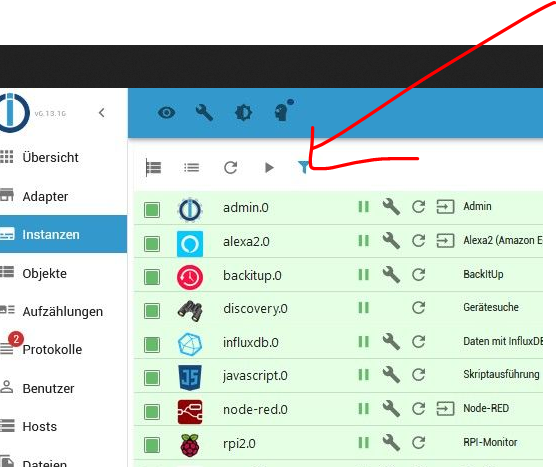
@maximinus irgendwelche Filter gesetzt
-
Ich habe das merkwürdige Phänomen dass einige installierte Adapter neuerdings in den Instanzen nicht aufzufinden sind. z.B die mit den Pfeilen markierten
Browser Cache gelöscht, ioBroker neu gestartet, RasPi neu gebootet.
keine Änderung.
iobroker fix
keine ÄnderungHier die iobroker diag
======== Start marking the full check here ========= Skript v.2023-10-10 *** BASE SYSTEM *** Static hostname: pivpn Icon name: computer Operating System: Raspbian GNU/Linux 11 (bullseye) Kernel: Linux 6.1.21-v8+ Architecture: arm64 Model : Raspberry Pi 4 Model B Rev 1.4 Docker : false Virtualization : none Kernel : aarch64 Userland : armhf Systemuptime and Load: 20:48:50 up 1:58, 1 user, load average: 1.38, 0.62, 0.56 CPU threads: 4 *** RASPBERRY THROTTLING *** Current issues: No throttling issues detected. Previously detected issues: No throttling issues detected. *** Time and Time Zones *** Local time: Sun 2024-03-24 20:48:51 WET Universal time: Sun 2024-03-24 20:48:51 UTC RTC time: n/a Time zone: Atlantic/Canary (WET, +0000) System clock synchronized: yes NTP service: active RTC in local TZ: no *** User and Groups *** pi /home/pi pi adm dialout cdrom sudo audio video plugdev games users input render netdev gpio i2c spi iobroker *** X-Server-Setup *** X-Server: false Desktop: Terminal: tty Boot Target: multi-user.target *** MEMORY *** total used free shared buff/cache available Mem: 1.8G 662M 825M 3.0M 361M 1.1G Swap: 99M 99M 0.0K Total: 1.9G 762M 825M 1849 M total memory 662 M used memory 403 M active memory 470 M inactive memory 825 M free memory 5 M buffer memory 355 M swap cache 99 M total swap 99 M used swap 0 M free swap Raspberry only: oom events: 0 lifetime oom required: 0 Mbytes total time in oom handler: 0 ms max time spent in oom handler: 0 ms *** FAILED SERVICES *** UNIT LOAD ACTIVE SUB DESCRIPTION * hciuart.service loaded failed failed Configure Bluetooth Modems connected by UART * iobroker.service loaded failed failed ioBroker Server LOAD = Reflects whether the unit definition was properly loaded. ACTIVE = The high-level unit activation state, i.e. generalization of SUB. SUB = The low-level unit activation state, values depend on unit type. 2 loaded units listed. *** FILESYSTEM *** Filesystem Type Size Used Avail Use% Mounted on /dev/root ext4 29G 8.5G 20G 31% / devtmpfs devtmpfs 667M 0 667M 0% /dev tmpfs tmpfs 925M 1.8M 923M 1% /dev/shm tmpfs tmpfs 370M 1.1M 369M 1% /run tmpfs tmpfs 5.0M 4.0K 5.0M 1% /run/lock /dev/mmcblk0p1 vfat 255M 51M 205M 20% /boot tmpfs tmpfs 185M 0 185M 0% /run/user/1000 Messages concerning ext4 filesystem in dmesg: [Sun Mar 24 18:50:14 2024] Kernel command line: coherent_pool=1M 8250.nr_uarts=0 snd_bcm2835.enable_headphones=0 snd_bcm2835.enable_headphones=1 snd_bcm2835.enable_hdmi=1 snd_bcm2835.enable_hdmi=0 smsc95xx.macaddr=E4:5F:01:20:8D:54 vc_mem.mem_base=0x3ec00000 vc_mem.mem_size=0x40000000 console=ttyS0,115200 console=tty1 root=PARTUUID=bd727156-02 rootfstype=ext4 fsck.repair=yes rootwait cfg80211.ieee80211_regdom=AT [Sun Mar 24 18:50:15 2024] EXT4-fs (mmcblk0p2): INFO: recovery required on readonly filesystem [Sun Mar 24 18:50:15 2024] EXT4-fs (mmcblk0p2): write access will be enabled during recovery [Sun Mar 24 18:50:16 2024] EXT4-fs (mmcblk0p2): orphan cleanup on readonly fs [Sun Mar 24 18:50:16 2024] EXT4-fs (mmcblk0p2): 3 orphan inodes deleted [Sun Mar 24 18:50:16 2024] EXT4-fs (mmcblk0p2): recovery complete [Sun Mar 24 18:50:16 2024] EXT4-fs (mmcblk0p2): mounted filesystem with ordered data mode. Quota mode: none. [Sun Mar 24 18:50:16 2024] VFS: Mounted root (ext4 filesystem) readonly on device 179:2. [Sun Mar 24 18:50:18 2024] EXT4-fs (mmcblk0p2): re-mounted. Quota mode: none. Show mounted filesystems \(real ones only\): TARGET SOURCE FSTYPE OPTIONS / /dev/mmcblk0p2 ext4 rw,noatime `-/boot /dev/mmcblk0p1 vfat rw,relatime,fmask=0022,dmask=0022,codepage=437,iocharset=ascii,shortname=mixed,errors=remount-ro Files in neuralgic directories: /var: 2.4G /var/ 1.4G /var/log 1.2G /var/log/journal/8f8800bc2dd742ba810579339a904aaf 1.2G /var/log/journal 540M /var/cache Archived and active journals take up 1.1G in the file system. /opt/iobroker/backups: 2.2G /opt/iobroker/backups/ /opt/iobroker/iobroker-data: 134M /opt/iobroker/iobroker-data/ 82M /opt/iobroker/iobroker-data/files 67M /opt/iobroker/iobroker-data/files/javascript.admin 48M /opt/iobroker/iobroker-data/files/javascript.admin/static 47M /opt/iobroker/iobroker-data/files/javascript.admin/static/js The five largest files in iobroker-data are: 13M /opt/iobroker/iobroker-data/objects.jsonl 7.5M /opt/iobroker/iobroker-data/files/javascript.admin/static/js/691.26ff76ce.chunk.js.map 7.1M /opt/iobroker/iobroker-data/files/javascript.admin/static/js/610.d3cce782.chunk.js.map 6.3M /opt/iobroker/iobroker-data/files/admin.admin/custom/static/js/vendors-node_modules_iobroker_adapter-react-v5_assets_devices_parseNames_js-node_modules_iobr-99c23e.847b8ad9.chunk.js.map 6.0M /opt/iobroker/iobroker-data/states.jsonl USB-Devices by-id: USB-Sticks - Avoid direct links to /dev/* in your adapter setups, please always prefer the links 'by-id': find: '/dev/serial/by-id/': No such file or directory *** NodeJS-Installation *** /usr/bin/nodejs v18.19.1 /usr/bin/node v18.19.1 /usr/bin/npm 10.2.4 /usr/bin/npx 10.2.4 /usr/bin/corepack 0.22.0 nodejs: Installed: 18.19.1-1nodesource1 Candidate: 18.19.1-1nodesource1 Version table: *** 18.19.1-1nodesource1 500 500 https://deb.nodesource.com/node_18.x nodistro/main armhf Packages 100 /var/lib/dpkg/status 18.19.0-1nodesource1 500 500 https://deb.nodesource.com/node_18.x nodistro/main armhf Packages 18.18.2-1nodesource1 500 500 https://deb.nodesource.com/node_18.x nodistro/main armhf Packages 18.18.1-1nodesource1 500 500 https://deb.nodesource.com/node_18.x nodistro/main armhf Packages 18.18.0-1nodesource1 500 500 https://deb.nodesource.com/node_18.x nodistro/main armhf Packages 18.17.1-1nodesource1 500 500 https://deb.nodesource.com/node_18.x nodistro/main armhf Packages 18.17.0-1nodesource1 500 500 https://deb.nodesource.com/node_18.x nodistro/main armhf Packages 18.16.1-1nodesource1 500 500 https://deb.nodesource.com/node_18.x nodistro/main armhf Packages 18.16.0-1nodesource1 500 500 https://deb.nodesource.com/node_18.x nodistro/main armhf Packages 18.15.0-1nodesource1 500 500 https://deb.nodesource.com/node_18.x nodistro/main armhf Packages 18.14.2-1nodesource1 500 500 https://deb.nodesource.com/node_18.x nodistro/main armhf Packages 18.14.1-1nodesource1 500 500 https://deb.nodesource.com/node_18.x nodistro/main armhf Packages 18.14.0-1nodesource1 500 500 https://deb.nodesource.com/node_18.x nodistro/main armhf Packages 18.13.0-1nodesource1 500 500 https://deb.nodesource.com/node_18.x nodistro/main armhf Packages 18.12.0-1nodesource1 500 500 https://deb.nodesource.com/node_18.x nodistro/main armhf Packages 18.11.0-1nodesource1 500 500 https://deb.nodesource.com/node_18.x nodistro/main armhf Packages 18.10.0-1nodesource1 500 500 https://deb.nodesource.com/node_18.x nodistro/main armhf Packages 18.9.1-1nodesource1 500 500 https://deb.nodesource.com/node_18.x nodistro/main armhf Packages 18.9.0-1nodesource1 500 500 https://deb.nodesource.com/node_18.x nodistro/main armhf Packages 18.8.0-1nodesource1 500 500 https://deb.nodesource.com/node_18.x nodistro/main armhf Packages 18.7.0-1nodesource1 500 500 https://deb.nodesource.com/node_18.x nodistro/main armhf Packages 18.6.0-1nodesource1 500 500 https://deb.nodesource.com/node_18.x nodistro/main armhf Packages 18.5.0-1nodesource1 500 500 https://deb.nodesource.com/node_18.x nodistro/main armhf Packages 18.4.0-1nodesource1 500 500 https://deb.nodesource.com/node_18.x nodistro/main armhf Packages 18.3.0-1nodesource1 500 500 https://deb.nodesource.com/node_18.x nodistro/main armhf Packages 18.2.0-1nodesource1 500 500 https://deb.nodesource.com/node_18.x nodistro/main armhf Packages 18.1.0-1nodesource1 500 500 https://deb.nodesource.com/node_18.x nodistro/main armhf Packages 18.0.0-1nodesource1 500 500 https://deb.nodesource.com/node_18.x nodistro/main armhf Packages 12.22.12~dfsg-1~deb11u4 500 500 http://raspbian.raspberrypi.org/raspbian bullseye/main armhf Packages Temp directories causing npm8 problem: 0 No problems detected Errors in npm tree: *** ioBroker-Installation *** ioBroker Status iobroker is not running on this host. No iobroker host is running. Objects type: redis States type: redis Core adapters versions js-controller: 5.0.19 admin: 6.13.16 javascript: 7.8.0 Adapters from github: 0 Adapter State system.adapter.admin.0 : admin : pivpn - enabled, port: 8081, bind: 0.0.0.0, run as: admin system.adapter.alexa2.0 : alexa2 : pivpn - enabled system.adapter.alias-manager.0 : alias-manager : pivpn - enabled system.adapter.backitup.0 : backitup : pivpn - enabled system.adapter.devices.0 : devices : pivpn - enabled system.adapter.discovery.0 : discovery : pivpn - enabled system.adapter.flot.0 : flot : pivpn - enabled system.adapter.fritzdect.0 : fritzdect : pivpn - disabled system.adapter.habpanel.0 : habpanel : pivpn - enabled system.adapter.influxdb.0 : influxdb : pivpn - enabled, port: 8086 system.adapter.javascript.0 : javascript : pivpn - enabled system.adapter.mqtt.0 : mqtt : pivpn - disabled, port: 1886, bind: 192.168.1.9 system.adapter.node-red.0 : node-red : pivpn - enabled, port: 1880, bind: 0.0.0.0 system.adapter.parser.0 : parser : pivpn - disabled system.adapter.rpi2.0 : rpi2 : pivpn - enabled system.adapter.shelly.0 : shelly : pivpn - disabled, port: 1882, bind: 0.0.0.0 system.adapter.sonoff.0 : sonoff : pivpn - enabled, port: 1500, bind: 0.0.0.0 system.adapter.tapo.0 : tapo : pivpn - disabled system.adapter.telegram.0 : telegram : pivpn - enabled, port: 8443, bind: 0.0.0.0 system.adapter.tuya.0 : tuya : pivpn - enabled system.adapter.vis-2-widgets-energy.0 : vis-2-widgets-energy : pivpn - enabled system.adapter.vis-2-widgets-gauges.0 : vis-2-widgets-gauges : pivpn - enabled system.adapter.vis-2-widgets-jaeger-design.0: vis-2-widgets-jaeger-design: pivpn - enabled system.adapter.vis-2.0 : vis-2 : pivpn - enabled system.adapter.vis.0 : vis : pivpn - enabled system.adapter.web.0 : web : pivpn - enabled, port: 8082, bind: 0.0.0.0, run as: admin + instance is alive Enabled adapters with bindings system.adapter.admin.0 : admin : pivpn - enabled, port: 8081, bind: 0.0.0.0, run as: admin system.adapter.influxdb.0 : influxdb : pivpn - enabled, port: 8086 system.adapter.node-red.0 : node-red : pivpn - enabled, port: 1880, bind: 0.0.0.0 system.adapter.sonoff.0 : sonoff : pivpn - enabled, port: 1500, bind: 0.0.0.0 system.adapter.telegram.0 : telegram : pivpn - enabled, port: 8443, bind: 0.0.0.0 system.adapter.web.0 : web : pivpn - enabled, port: 8082, bind: 0.0.0.0, run as: admin ioBroker-Repositories stable : http://download.iobroker.net/sources-dist.json beta : http://download.iobroker.net/sources-dist-latest.json Active repo(s): stable Installed ioBroker-Instances Used repository: stable Adapter "admin" : 6.13.16 , installed 6.13.16 Adapter "alexa2" : 3.26.4 , installed 3.26.4 Adapter "alias-manager": 1.2.6 , installed 1.2.6 Adapter "backitup" : 2.10.11 , installed 2.10.11 Adapter "devices" : 1.1.5 , installed 1.1.5 Adapter "discovery" : 4.4.0 , installed 4.4.0 Adapter "flot" : 1.12.0 , installed 1.12.0 Adapter "fritzdect" : 2.5.9 , installed 2.5.9 Adapter "habpanel" : 0.5.0 , installed 0.5.0 Adapter "influxdb" : 4.0.2 , installed 4.0.2 Adapter "javascript" : 7.8.0 , installed 7.8.0 Controller "js-controller": 5.0.19 , installed 5.0.19 Adapter "mqtt" : 5.2.0 , installed 5.2.0 Adapter "node-red" : 5.1.0 , installed 5.1.0 Adapter "parser" : 2.1.0 , installed 2.1.0 Adapter "rpi2" : 1.3.2 , installed 1.3.2 Adapter "shelly" : 6.6.1 , installed 6.7.0 Adapter "simple-api" : 2.7.2 , installed 2.7.2 Adapter "socketio" : 6.6.0 , installed 6.6.0 Adapter "sonoff" : 3.0.3 , installed 3.0.3 Adapter "tapo" : 0.0.8 , installed 0.0.8 Adapter "telegram" : 3.1.0 , installed 3.1.0 Adapter "tuya" : 3.15.0 , installed 3.15.0 Adapter "vis" : 1.5.4 , installed 1.5.4 Adapter "vis-2" : 2.9.32 , installed 2.9.32 Adapter "vis-2-widgets-energy": 0.3.9, installed 0.3.9 Adapter "vis-2-widgets-gauges": 1.0.2, installed 1.0.2 Adapter "vis-2-widgets-jaeger-design": 1.1.10, installed 1.1.10 Adapter "vis-2-widgets-material": 1.3.18, installed 1.3.18 Adapter "vis-materialdesign": 0.5.9, installed 0.5.9 Adapter "web" : 6.2.3 , installed 6.2.3 Adapter "ws" : 2.5.10 , installed 2.5.10 Objects and States Please stand by - This may take a while Objects: 2384 States: 1740 *** OS-Repositories and Updates *** Hit:1 http://archive.raspberrypi.org/debian bullseye InRelease Hit:2 http://raspbian.raspberrypi.org/raspbian bullseye InRelease Hit:3 https://packages.grafana.com/oss/deb stable InRelease Hit:4 https://deb.nodesource.com/node_18.x nodistro InRelease Hit:5 https://repos.influxdata.com/debian bullseye InRelease Reading package lists... Pending Updates: 0 *** Listening Ports *** Active Internet connections (only servers) Proto Recv-Q Send-Q Local Address Foreign Address State User Inode PID/Program name tcp 0 0 0.0.0.0:53 0.0.0.0:* LISTEN 999 13214 835/pihole-FTL tcp 0 0 127.0.0.1:8088 0.0.0.0:* LISTEN 998 15441 803/influxd tcp 0 0 0.0.0.0:22 0.0.0.0:* LISTEN 0 1799 547/sshd: /usr/sbin tcp 0 0 0.0.0.0:80 0.0.0.0:* LISTEN 0 15445 899/lighttpd tcp 0 0 127.0.0.1:4711 0.0.0.0:* LISTEN 999 13220 835/pihole-FTL tcp 0 0 127.0.0.1:8953 0.0.0.0:* LISTEN 0 15376 791/unbound tcp 0 0 0.0.0.0:514 0.0.0.0:* LISTEN 0 12071 366/rsyslogd tcp 0 0 127.0.0.1:6379 0.0.0.0:* LISTEN 112 1813 512/redis-server 12 tcp 0 0 127.0.0.1:5335 0.0.0.0:* LISTEN 0 15375 791/unbound tcp6 0 0 :::53 :::* LISTEN 999 13216 835/pihole-FTL tcp6 0 0 :::22 :::* LISTEN 0 1801 547/sshd: /usr/sbin tcp6 0 0 :::80 :::* LISTEN 0 15446 899/lighttpd tcp6 0 0 ::1:6379 :::* LISTEN 112 1814 512/redis-server 12 tcp6 0 0 :::514 :::* LISTEN 0 12072 366/rsyslogd tcp6 0 0 :::3000 :::* LISTEN 111 52927 6079/grafana tcp6 0 0 ::1:4711 :::* LISTEN 999 13221 835/pihole-FTL tcp6 0 0 :::8086 :::* LISTEN 998 14976 803/influxd udp 0 0 0.0.0.0:5353 0.0.0.0:* 108 14655 316/avahi-daemon: r udp 0 0 0.0.0.0:514 0.0.0.0:* 0 12066 366/rsyslogd udp 0 0 0.0.0.0:51820 0.0.0.0:* 0 16387 - udp 0 0 0.0.0.0:34610 0.0.0.0:* 108 14657 316/avahi-daemon: r udp 0 0 0.0.0.0:53 0.0.0.0:* 999 13213 835/pihole-FTL udp 0 0 0.0.0.0:68 0.0.0.0:* 0 14778 796/dhcpcd udp 0 0 127.0.0.1:5335 0.0.0.0:* 0 15374 791/unbound udp6 0 0 :::5353 :::* 108 14656 316/avahi-daemon: r udp6 0 0 :::514 :::* 0 12067 366/rsyslogd udp6 0 0 :::51820 :::* 0 16388 - udp6 0 0 :::52110 :::* 108 14658 316/avahi-daemon: r udp6 0 0 :::53 :::* 999 13215 835/pihole-FTL *** Log File - Last 25 Lines *** 2024-03-24 20:48:19.983 - info: web.0 (8799) terminating 2024-03-24 20:48:19.988 - info: backitup.0 (8770) terminating 2024-03-24 20:48:19.995 - info: alexa2.0 (8662) terminating 2024-03-24 20:48:20.015 - info: telegram.0 (8634) terminating 2024-03-24 20:48:20.019 - info: telegram.0 (8634) Terminated (NO_ERROR): Without reason 2024-03-24 20:48:20.020 - info: sonoff.0 (8755) terminating 2024-03-24 20:48:20.031 - info: sonoff.0 (8755) Terminated (NO_ERROR): Without reason 2024-03-24 20:48:20.057 - info: host.pivpn instance system.adapter.rpi2.0 terminated with code 0 (NO_ERROR) 2024-03-24 20:48:20.099 - info: admin.0 (8563) terminating 2024-03-24 20:48:20.106 - info: host.pivpn instance system.adapter.node-red.0 terminated with code 0 (NO_ERROR) 2024-03-24 20:48:20.151 - info: host.pivpn instance system.adapter.alexa2.0 terminated with code 0 (NO_ERROR) 2024-03-24 20:48:20.153 - info: host.pivpn instance system.adapter.discovery.0 terminated with code 0 (NO_ERROR) 2024-03-24 20:48:20.173 - info: host.pivpn instance system.adapter.javascript.0 terminated with code 0 (NO_ERROR) 2024-03-24 20:48:20.226 - info: host.pivpn instance system.adapter.admin.0 terminated with code 0 (NO_ERROR) 2024-03-24 20:48:20.227 - info: host.pivpn instance system.adapter.backitup.0 terminated with code 0 (NO_ERROR) 2024-03-24 20:48:20.227 - info: host.pivpn instance system.adapter.web.0 terminated with code 0 (NO_ERROR) 2024-03-24 20:48:20.228 - info: host.pivpn instance system.adapter.vis-2.0 terminated with code 0 (NO_ERROR) 2024-03-24 20:48:20.280 - info: host.pivpn instance system.adapter.influxdb.0 terminated with code 0 (NO_ERROR) 2024-03-24 20:48:20.586 - info: host.pivpn instance system.adapter.telegram.0 terminated with code 0 (NO_ERROR) 2024-03-24 20:48:20.620 - info: host.pivpn instance system.adapter.sonoff.0 terminated with code 0 (NO_ERROR) 2024-03-24 20:48:22.473 - info: tuya.0 (8792) terminating 2024-03-24 20:48:22.475 - info: tuya.0 (8792) Terminated (NO_ERROR): Without reason 2024-03-24 20:48:23.014 - info: host.pivpn instance system.adapter.tuya.0 terminated with code 0 (NO_ERROR) 2024-03-24 20:48:23.014 - info: host.pivpn All instances are stopped. 2024-03-24 20:48:23.168 - info: host.pivpn terminated ============ Mark until here for C&P =============Ich habe nachdem ich VIS-2 installiert hatte, in der Meinung es nicht mehr zu brauchen VIS deinstalliert. Da aber einige Widgets in VIS-2 noch nicht funktionieren habe ich VIS erneut installiert.
Und dann gibt es noch diese Fehlermeldung.
Wie bringe ich das wieder in Ordnung?
LG Gerhard
@maximinus sagte in Instanzen sind teilweise nicht zu finden:
*** FAILED SERVICES ***

  UNIT             LOAD   ACTIVE SUB    DESCRIPTION
* hciuart.service  loaded failed failed Configure Bluetooth Modems connected by UART
* iobroker.service loaded failed failed ioBroker Server
Da klemmt irgendwas.
Starte den Service mal neu.sudo systemctl restart iobroker.serviceDann nach dem Status schauen:
systemctl status iobroker.service -
Ich habe das merkwürdige Phänomen dass einige installierte Adapter neuerdings in den Instanzen nicht aufzufinden sind. z.B die mit den Pfeilen markierten
Browser Cache gelöscht, ioBroker neu gestartet, RasPi neu gebootet.
keine Änderung.
iobroker fix
keine ÄnderungHier die iobroker diag
======== Start marking the full check here ========= Skript v.2023-10-10 *** BASE SYSTEM *** Static hostname: pivpn Icon name: computer Operating System: Raspbian GNU/Linux 11 (bullseye) Kernel: Linux 6.1.21-v8+ Architecture: arm64 Model : Raspberry Pi 4 Model B Rev 1.4 Docker : false Virtualization : none Kernel : aarch64 Userland : armhf Systemuptime and Load: 20:48:50 up 1:58, 1 user, load average: 1.38, 0.62, 0.56 CPU threads: 4 *** RASPBERRY THROTTLING *** Current issues: No throttling issues detected. Previously detected issues: No throttling issues detected. *** Time and Time Zones *** Local time: Sun 2024-03-24 20:48:51 WET Universal time: Sun 2024-03-24 20:48:51 UTC RTC time: n/a Time zone: Atlantic/Canary (WET, +0000) System clock synchronized: yes NTP service: active RTC in local TZ: no *** User and Groups *** pi /home/pi pi adm dialout cdrom sudo audio video plugdev games users input render netdev gpio i2c spi iobroker *** X-Server-Setup *** X-Server: false Desktop: Terminal: tty Boot Target: multi-user.target *** MEMORY *** total used free shared buff/cache available Mem: 1.8G 662M 825M 3.0M 361M 1.1G Swap: 99M 99M 0.0K Total: 1.9G 762M 825M 1849 M total memory 662 M used memory 403 M active memory 470 M inactive memory 825 M free memory 5 M buffer memory 355 M swap cache 99 M total swap 99 M used swap 0 M free swap Raspberry only: oom events: 0 lifetime oom required: 0 Mbytes total time in oom handler: 0 ms max time spent in oom handler: 0 ms *** FAILED SERVICES *** UNIT LOAD ACTIVE SUB DESCRIPTION * hciuart.service loaded failed failed Configure Bluetooth Modems connected by UART * iobroker.service loaded failed failed ioBroker Server LOAD = Reflects whether the unit definition was properly loaded. ACTIVE = The high-level unit activation state, i.e. generalization of SUB. SUB = The low-level unit activation state, values depend on unit type. 2 loaded units listed. *** FILESYSTEM *** Filesystem Type Size Used Avail Use% Mounted on /dev/root ext4 29G 8.5G 20G 31% / devtmpfs devtmpfs 667M 0 667M 0% /dev tmpfs tmpfs 925M 1.8M 923M 1% /dev/shm tmpfs tmpfs 370M 1.1M 369M 1% /run tmpfs tmpfs 5.0M 4.0K 5.0M 1% /run/lock /dev/mmcblk0p1 vfat 255M 51M 205M 20% /boot tmpfs tmpfs 185M 0 185M 0% /run/user/1000 Messages concerning ext4 filesystem in dmesg: [Sun Mar 24 18:50:14 2024] Kernel command line: coherent_pool=1M 8250.nr_uarts=0 snd_bcm2835.enable_headphones=0 snd_bcm2835.enable_headphones=1 snd_bcm2835.enable_hdmi=1 snd_bcm2835.enable_hdmi=0 smsc95xx.macaddr=E4:5F:01:20:8D:54 vc_mem.mem_base=0x3ec00000 vc_mem.mem_size=0x40000000 console=ttyS0,115200 console=tty1 root=PARTUUID=bd727156-02 rootfstype=ext4 fsck.repair=yes rootwait cfg80211.ieee80211_regdom=AT [Sun Mar 24 18:50:15 2024] EXT4-fs (mmcblk0p2): INFO: recovery required on readonly filesystem [Sun Mar 24 18:50:15 2024] EXT4-fs (mmcblk0p2): write access will be enabled during recovery [Sun Mar 24 18:50:16 2024] EXT4-fs (mmcblk0p2): orphan cleanup on readonly fs [Sun Mar 24 18:50:16 2024] EXT4-fs (mmcblk0p2): 3 orphan inodes deleted [Sun Mar 24 18:50:16 2024] EXT4-fs (mmcblk0p2): recovery complete [Sun Mar 24 18:50:16 2024] EXT4-fs (mmcblk0p2): mounted filesystem with ordered data mode. Quota mode: none. [Sun Mar 24 18:50:16 2024] VFS: Mounted root (ext4 filesystem) readonly on device 179:2. [Sun Mar 24 18:50:18 2024] EXT4-fs (mmcblk0p2): re-mounted. Quota mode: none. Show mounted filesystems \(real ones only\): TARGET SOURCE FSTYPE OPTIONS / /dev/mmcblk0p2 ext4 rw,noatime `-/boot /dev/mmcblk0p1 vfat rw,relatime,fmask=0022,dmask=0022,codepage=437,iocharset=ascii,shortname=mixed,errors=remount-ro Files in neuralgic directories: /var: 2.4G /var/ 1.4G /var/log 1.2G /var/log/journal/8f8800bc2dd742ba810579339a904aaf 1.2G /var/log/journal 540M /var/cache Archived and active journals take up 1.1G in the file system. /opt/iobroker/backups: 2.2G /opt/iobroker/backups/ /opt/iobroker/iobroker-data: 134M /opt/iobroker/iobroker-data/ 82M /opt/iobroker/iobroker-data/files 67M /opt/iobroker/iobroker-data/files/javascript.admin 48M /opt/iobroker/iobroker-data/files/javascript.admin/static 47M /opt/iobroker/iobroker-data/files/javascript.admin/static/js The five largest files in iobroker-data are: 13M /opt/iobroker/iobroker-data/objects.jsonl 7.5M /opt/iobroker/iobroker-data/files/javascript.admin/static/js/691.26ff76ce.chunk.js.map 7.1M /opt/iobroker/iobroker-data/files/javascript.admin/static/js/610.d3cce782.chunk.js.map 6.3M /opt/iobroker/iobroker-data/files/admin.admin/custom/static/js/vendors-node_modules_iobroker_adapter-react-v5_assets_devices_parseNames_js-node_modules_iobr-99c23e.847b8ad9.chunk.js.map 6.0M /opt/iobroker/iobroker-data/states.jsonl USB-Devices by-id: USB-Sticks - Avoid direct links to /dev/* in your adapter setups, please always prefer the links 'by-id': find: '/dev/serial/by-id/': No such file or directory *** NodeJS-Installation *** /usr/bin/nodejs v18.19.1 /usr/bin/node v18.19.1 /usr/bin/npm 10.2.4 /usr/bin/npx 10.2.4 /usr/bin/corepack 0.22.0 nodejs: Installed: 18.19.1-1nodesource1 Candidate: 18.19.1-1nodesource1 Version table: *** 18.19.1-1nodesource1 500 500 https://deb.nodesource.com/node_18.x nodistro/main armhf Packages 100 /var/lib/dpkg/status 18.19.0-1nodesource1 500 500 https://deb.nodesource.com/node_18.x nodistro/main armhf Packages 18.18.2-1nodesource1 500 500 https://deb.nodesource.com/node_18.x nodistro/main armhf Packages 18.18.1-1nodesource1 500 500 https://deb.nodesource.com/node_18.x nodistro/main armhf Packages 18.18.0-1nodesource1 500 500 https://deb.nodesource.com/node_18.x nodistro/main armhf Packages 18.17.1-1nodesource1 500 500 https://deb.nodesource.com/node_18.x nodistro/main armhf Packages 18.17.0-1nodesource1 500 500 https://deb.nodesource.com/node_18.x nodistro/main armhf Packages 18.16.1-1nodesource1 500 500 https://deb.nodesource.com/node_18.x nodistro/main armhf Packages 18.16.0-1nodesource1 500 500 https://deb.nodesource.com/node_18.x nodistro/main armhf Packages 18.15.0-1nodesource1 500 500 https://deb.nodesource.com/node_18.x nodistro/main armhf Packages 18.14.2-1nodesource1 500 500 https://deb.nodesource.com/node_18.x nodistro/main armhf Packages 18.14.1-1nodesource1 500 500 https://deb.nodesource.com/node_18.x nodistro/main armhf Packages 18.14.0-1nodesource1 500 500 https://deb.nodesource.com/node_18.x nodistro/main armhf Packages 18.13.0-1nodesource1 500 500 https://deb.nodesource.com/node_18.x nodistro/main armhf Packages 18.12.0-1nodesource1 500 500 https://deb.nodesource.com/node_18.x nodistro/main armhf Packages 18.11.0-1nodesource1 500 500 https://deb.nodesource.com/node_18.x nodistro/main armhf Packages 18.10.0-1nodesource1 500 500 https://deb.nodesource.com/node_18.x nodistro/main armhf Packages 18.9.1-1nodesource1 500 500 https://deb.nodesource.com/node_18.x nodistro/main armhf Packages 18.9.0-1nodesource1 500 500 https://deb.nodesource.com/node_18.x nodistro/main armhf Packages 18.8.0-1nodesource1 500 500 https://deb.nodesource.com/node_18.x nodistro/main armhf Packages 18.7.0-1nodesource1 500 500 https://deb.nodesource.com/node_18.x nodistro/main armhf Packages 18.6.0-1nodesource1 500 500 https://deb.nodesource.com/node_18.x nodistro/main armhf Packages 18.5.0-1nodesource1 500 500 https://deb.nodesource.com/node_18.x nodistro/main armhf Packages 18.4.0-1nodesource1 500 500 https://deb.nodesource.com/node_18.x nodistro/main armhf Packages 18.3.0-1nodesource1 500 500 https://deb.nodesource.com/node_18.x nodistro/main armhf Packages 18.2.0-1nodesource1 500 500 https://deb.nodesource.com/node_18.x nodistro/main armhf Packages 18.1.0-1nodesource1 500 500 https://deb.nodesource.com/node_18.x nodistro/main armhf Packages 18.0.0-1nodesource1 500 500 https://deb.nodesource.com/node_18.x nodistro/main armhf Packages 12.22.12~dfsg-1~deb11u4 500 500 http://raspbian.raspberrypi.org/raspbian bullseye/main armhf Packages Temp directories causing npm8 problem: 0 No problems detected Errors in npm tree: *** ioBroker-Installation *** ioBroker Status iobroker is not running on this host. No iobroker host is running. Objects type: redis States type: redis Core adapters versions js-controller: 5.0.19 admin: 6.13.16 javascript: 7.8.0 Adapters from github: 0 Adapter State system.adapter.admin.0 : admin : pivpn - enabled, port: 8081, bind: 0.0.0.0, run as: admin system.adapter.alexa2.0 : alexa2 : pivpn - enabled system.adapter.alias-manager.0 : alias-manager : pivpn - enabled system.adapter.backitup.0 : backitup : pivpn - enabled system.adapter.devices.0 : devices : pivpn - enabled system.adapter.discovery.0 : discovery : pivpn - enabled system.adapter.flot.0 : flot : pivpn - enabled system.adapter.fritzdect.0 : fritzdect : pivpn - disabled system.adapter.habpanel.0 : habpanel : pivpn - enabled system.adapter.influxdb.0 : influxdb : pivpn - enabled, port: 8086 system.adapter.javascript.0 : javascript : pivpn - enabled system.adapter.mqtt.0 : mqtt : pivpn - disabled, port: 1886, bind: 192.168.1.9 system.adapter.node-red.0 : node-red : pivpn - enabled, port: 1880, bind: 0.0.0.0 system.adapter.parser.0 : parser : pivpn - disabled system.adapter.rpi2.0 : rpi2 : pivpn - enabled system.adapter.shelly.0 : shelly : pivpn - disabled, port: 1882, bind: 0.0.0.0 system.adapter.sonoff.0 : sonoff : pivpn - enabled, port: 1500, bind: 0.0.0.0 system.adapter.tapo.0 : tapo : pivpn - disabled system.adapter.telegram.0 : telegram : pivpn - enabled, port: 8443, bind: 0.0.0.0 system.adapter.tuya.0 : tuya : pivpn - enabled system.adapter.vis-2-widgets-energy.0 : vis-2-widgets-energy : pivpn - enabled system.adapter.vis-2-widgets-gauges.0 : vis-2-widgets-gauges : pivpn - enabled system.adapter.vis-2-widgets-jaeger-design.0: vis-2-widgets-jaeger-design: pivpn - enabled system.adapter.vis-2.0 : vis-2 : pivpn - enabled system.adapter.vis.0 : vis : pivpn - enabled system.adapter.web.0 : web : pivpn - enabled, port: 8082, bind: 0.0.0.0, run as: admin + instance is alive Enabled adapters with bindings system.adapter.admin.0 : admin : pivpn - enabled, port: 8081, bind: 0.0.0.0, run as: admin system.adapter.influxdb.0 : influxdb : pivpn - enabled, port: 8086 system.adapter.node-red.0 : node-red : pivpn - enabled, port: 1880, bind: 0.0.0.0 system.adapter.sonoff.0 : sonoff : pivpn - enabled, port: 1500, bind: 0.0.0.0 system.adapter.telegram.0 : telegram : pivpn - enabled, port: 8443, bind: 0.0.0.0 system.adapter.web.0 : web : pivpn - enabled, port: 8082, bind: 0.0.0.0, run as: admin ioBroker-Repositories stable : http://download.iobroker.net/sources-dist.json beta : http://download.iobroker.net/sources-dist-latest.json Active repo(s): stable Installed ioBroker-Instances Used repository: stable Adapter "admin" : 6.13.16 , installed 6.13.16 Adapter "alexa2" : 3.26.4 , installed 3.26.4 Adapter "alias-manager": 1.2.6 , installed 1.2.6 Adapter "backitup" : 2.10.11 , installed 2.10.11 Adapter "devices" : 1.1.5 , installed 1.1.5 Adapter "discovery" : 4.4.0 , installed 4.4.0 Adapter "flot" : 1.12.0 , installed 1.12.0 Adapter "fritzdect" : 2.5.9 , installed 2.5.9 Adapter "habpanel" : 0.5.0 , installed 0.5.0 Adapter "influxdb" : 4.0.2 , installed 4.0.2 Adapter "javascript" : 7.8.0 , installed 7.8.0 Controller "js-controller": 5.0.19 , installed 5.0.19 Adapter "mqtt" : 5.2.0 , installed 5.2.0 Adapter "node-red" : 5.1.0 , installed 5.1.0 Adapter "parser" : 2.1.0 , installed 2.1.0 Adapter "rpi2" : 1.3.2 , installed 1.3.2 Adapter "shelly" : 6.6.1 , installed 6.7.0 Adapter "simple-api" : 2.7.2 , installed 2.7.2 Adapter "socketio" : 6.6.0 , installed 6.6.0 Adapter "sonoff" : 3.0.3 , installed 3.0.3 Adapter "tapo" : 0.0.8 , installed 0.0.8 Adapter "telegram" : 3.1.0 , installed 3.1.0 Adapter "tuya" : 3.15.0 , installed 3.15.0 Adapter "vis" : 1.5.4 , installed 1.5.4 Adapter "vis-2" : 2.9.32 , installed 2.9.32 Adapter "vis-2-widgets-energy": 0.3.9, installed 0.3.9 Adapter "vis-2-widgets-gauges": 1.0.2, installed 1.0.2 Adapter "vis-2-widgets-jaeger-design": 1.1.10, installed 1.1.10 Adapter "vis-2-widgets-material": 1.3.18, installed 1.3.18 Adapter "vis-materialdesign": 0.5.9, installed 0.5.9 Adapter "web" : 6.2.3 , installed 6.2.3 Adapter "ws" : 2.5.10 , installed 2.5.10 Objects and States Please stand by - This may take a while Objects: 2384 States: 1740 *** OS-Repositories and Updates *** Hit:1 http://archive.raspberrypi.org/debian bullseye InRelease Hit:2 http://raspbian.raspberrypi.org/raspbian bullseye InRelease Hit:3 https://packages.grafana.com/oss/deb stable InRelease Hit:4 https://deb.nodesource.com/node_18.x nodistro InRelease Hit:5 https://repos.influxdata.com/debian bullseye InRelease Reading package lists... Pending Updates: 0 *** Listening Ports *** Active Internet connections (only servers) Proto Recv-Q Send-Q Local Address Foreign Address State User Inode PID/Program name tcp 0 0 0.0.0.0:53 0.0.0.0:* LISTEN 999 13214 835/pihole-FTL tcp 0 0 127.0.0.1:8088 0.0.0.0:* LISTEN 998 15441 803/influxd tcp 0 0 0.0.0.0:22 0.0.0.0:* LISTEN 0 1799 547/sshd: /usr/sbin tcp 0 0 0.0.0.0:80 0.0.0.0:* LISTEN 0 15445 899/lighttpd tcp 0 0 127.0.0.1:4711 0.0.0.0:* LISTEN 999 13220 835/pihole-FTL tcp 0 0 127.0.0.1:8953 0.0.0.0:* LISTEN 0 15376 791/unbound tcp 0 0 0.0.0.0:514 0.0.0.0:* LISTEN 0 12071 366/rsyslogd tcp 0 0 127.0.0.1:6379 0.0.0.0:* LISTEN 112 1813 512/redis-server 12 tcp 0 0 127.0.0.1:5335 0.0.0.0:* LISTEN 0 15375 791/unbound tcp6 0 0 :::53 :::* LISTEN 999 13216 835/pihole-FTL tcp6 0 0 :::22 :::* LISTEN 0 1801 547/sshd: /usr/sbin tcp6 0 0 :::80 :::* LISTEN 0 15446 899/lighttpd tcp6 0 0 ::1:6379 :::* LISTEN 112 1814 512/redis-server 12 tcp6 0 0 :::514 :::* LISTEN 0 12072 366/rsyslogd tcp6 0 0 :::3000 :::* LISTEN 111 52927 6079/grafana tcp6 0 0 ::1:4711 :::* LISTEN 999 13221 835/pihole-FTL tcp6 0 0 :::8086 :::* LISTEN 998 14976 803/influxd udp 0 0 0.0.0.0:5353 0.0.0.0:* 108 14655 316/avahi-daemon: r udp 0 0 0.0.0.0:514 0.0.0.0:* 0 12066 366/rsyslogd udp 0 0 0.0.0.0:51820 0.0.0.0:* 0 16387 - udp 0 0 0.0.0.0:34610 0.0.0.0:* 108 14657 316/avahi-daemon: r udp 0 0 0.0.0.0:53 0.0.0.0:* 999 13213 835/pihole-FTL udp 0 0 0.0.0.0:68 0.0.0.0:* 0 14778 796/dhcpcd udp 0 0 127.0.0.1:5335 0.0.0.0:* 0 15374 791/unbound udp6 0 0 :::5353 :::* 108 14656 316/avahi-daemon: r udp6 0 0 :::514 :::* 0 12067 366/rsyslogd udp6 0 0 :::51820 :::* 0 16388 - udp6 0 0 :::52110 :::* 108 14658 316/avahi-daemon: r udp6 0 0 :::53 :::* 999 13215 835/pihole-FTL *** Log File - Last 25 Lines *** 2024-03-24 20:48:19.983 - info: web.0 (8799) terminating 2024-03-24 20:48:19.988 - info: backitup.0 (8770) terminating 2024-03-24 20:48:19.995 - info: alexa2.0 (8662) terminating 2024-03-24 20:48:20.015 - info: telegram.0 (8634) terminating 2024-03-24 20:48:20.019 - info: telegram.0 (8634) Terminated (NO_ERROR): Without reason 2024-03-24 20:48:20.020 - info: sonoff.0 (8755) terminating 2024-03-24 20:48:20.031 - info: sonoff.0 (8755) Terminated (NO_ERROR): Without reason 2024-03-24 20:48:20.057 - info: host.pivpn instance system.adapter.rpi2.0 terminated with code 0 (NO_ERROR) 2024-03-24 20:48:20.099 - info: admin.0 (8563) terminating 2024-03-24 20:48:20.106 - info: host.pivpn instance system.adapter.node-red.0 terminated with code 0 (NO_ERROR) 2024-03-24 20:48:20.151 - info: host.pivpn instance system.adapter.alexa2.0 terminated with code 0 (NO_ERROR) 2024-03-24 20:48:20.153 - info: host.pivpn instance system.adapter.discovery.0 terminated with code 0 (NO_ERROR) 2024-03-24 20:48:20.173 - info: host.pivpn instance system.adapter.javascript.0 terminated with code 0 (NO_ERROR) 2024-03-24 20:48:20.226 - info: host.pivpn instance system.adapter.admin.0 terminated with code 0 (NO_ERROR) 2024-03-24 20:48:20.227 - info: host.pivpn instance system.adapter.backitup.0 terminated with code 0 (NO_ERROR) 2024-03-24 20:48:20.227 - info: host.pivpn instance system.adapter.web.0 terminated with code 0 (NO_ERROR) 2024-03-24 20:48:20.228 - info: host.pivpn instance system.adapter.vis-2.0 terminated with code 0 (NO_ERROR) 2024-03-24 20:48:20.280 - info: host.pivpn instance system.adapter.influxdb.0 terminated with code 0 (NO_ERROR) 2024-03-24 20:48:20.586 - info: host.pivpn instance system.adapter.telegram.0 terminated with code 0 (NO_ERROR) 2024-03-24 20:48:20.620 - info: host.pivpn instance system.adapter.sonoff.0 terminated with code 0 (NO_ERROR) 2024-03-24 20:48:22.473 - info: tuya.0 (8792) terminating 2024-03-24 20:48:22.475 - info: tuya.0 (8792) Terminated (NO_ERROR): Without reason 2024-03-24 20:48:23.014 - info: host.pivpn instance system.adapter.tuya.0 terminated with code 0 (NO_ERROR) 2024-03-24 20:48:23.014 - info: host.pivpn All instances are stopped. 2024-03-24 20:48:23.168 - info: host.pivpn terminated ============ Mark until here for C&P =============Ich habe nachdem ich VIS-2 installiert hatte, in der Meinung es nicht mehr zu brauchen VIS deinstalliert. Da aber einige Widgets in VIS-2 noch nicht funktionieren habe ich VIS erneut installiert.
Und dann gibt es noch diese Fehlermeldung.
Wie bringe ich das wieder in Ordnung?
LG Gerhard
@maximinus Hallo Gerhard, ich bin zwar nicht der Fachmann für die Fehlersuche, speziell mit dem PI, aber meinst du nicht, dass du dem Kleinen mit so vielen Adaptern bei nur 2 GB RAM etwas viel zumutest?
-
@maximinus sagte in Instanzen sind teilweise nicht zu finden:
*** FAILED SERVICES ***

  UNIT             LOAD   ACTIVE SUB    DESCRIPTION
* hciuart.service  loaded failed failed Configure Bluetooth Modems connected by UART
* iobroker.service loaded failed failed ioBroker Server
Da klemmt irgendwas.
Starte den Service mal neu.sudo systemctl restart iobroker.serviceDann nach dem Status schauen:
systemctl status iobroker.serviceDanke hat geholfen. Jetzt ist wieder alles da.
Ich wusste nicht dass der Server nicht auch mit dem restart des iobrokers neu gestartet wird.
"sudo systemctl restart iobroker.service" kommt in meine Werkzeugkiste.
Bis jetzt ist er noch nicht unangenehm aufgefallen aber es ist einer mit 4GB schon bestellt .
LG Gerhard
RasPi 4 4GB bookworm
nodejs v20.19.4
npm 10.8.2
Objects type: jsonl
States type: redis
js-controller: 7.0.6
admin: 7.6.17
javascript: 8.9.2 -
Danke hat geholfen. Jetzt ist wieder alles da.
Ich wusste nicht dass der Server nicht auch mit dem restart des iobrokers neu gestartet wird.
"sudo systemctl restart iobroker.service" kommt in meine Werkzeugkiste.
Bis jetzt ist er noch nicht unangenehm aufgefallen aber es ist einer mit 4GB schon bestellt .
LG Gerhard
@maximinus sagte in Instanzen sind teilweise nicht zu finden:
Ich wusste nicht dass der Server nicht auch mit dem restart des iobrokers neu gestartet wird.
Sollte er eigentlich aber. Warum das bei dir nicht richtig funktioniert müsste man sich dann mal anschauen.
-
@maximinus sagte in Instanzen sind teilweise nicht zu finden:
Ich wusste nicht dass der Server nicht auch mit dem restart des iobrokers neu gestartet wird.
Sollte er eigentlich aber. Warum das bei dir nicht richtig funktioniert müsste man sich dann mal anschauen.
Ich werde das beobachten. Der Raspi lief bis jetzt seit fast 6 Monaten ohne Probleme.
Eben sehe ich aber dass dieser Fehler immer noch besteht.
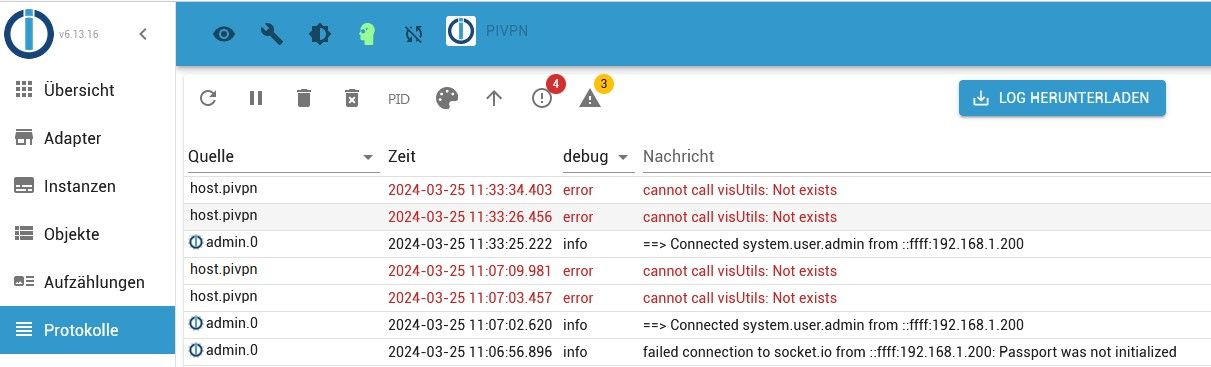
Was fehlt da?
Edit: Falsche Frage
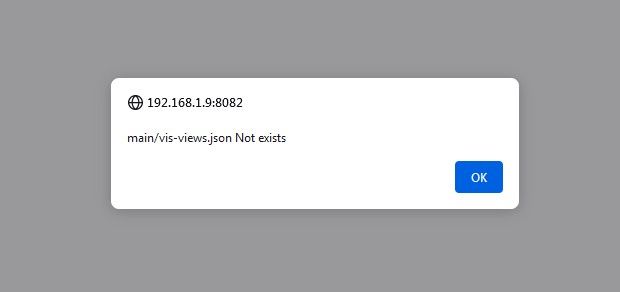
Wie behebe ich das?
LG Gerhard
RasPi 4 4GB bookworm
nodejs v20.19.4
npm 10.8.2
Objects type: jsonl
States type: redis
js-controller: 7.0.6
admin: 7.6.17
javascript: 8.9.2 -
Ich werde das beobachten. Der Raspi lief bis jetzt seit fast 6 Monaten ohne Probleme.
Eben sehe ich aber dass dieser Fehler immer noch besteht.
Was fehlt da?
Edit: Falsche Frage
Wie behebe ich das?
LG Gerhard
@maximinus logs und code immer als Text in code-tags! Nie als Screenshot
jetzt kann ich leider den Fehler für dich nicht in die Suche kopieren.
Bin mir sicher, dass dazu einiges kommtEDIT:
sind anscheinend zwei verschiedene Meldungen.Letztere deutet auf eine fehlende vis-Installation oder nagelneue die zum ersten mal bearbeitet wird


Hey! Du scheinst an dieser Unterhaltung interessiert zu sein, hast aber noch kein Konto.
Hast du es satt, bei jedem Besuch durch die gleichen Beiträge zu scrollen? Wenn du dich für ein Konto anmeldest, kommst du immer genau dorthin zurück, wo du zuvor warst, und kannst dich über neue Antworten benachrichtigen lassen (entweder per E-Mail oder Push-Benachrichtigung). Du kannst auch Lesezeichen speichern und Beiträge positiv bewerten, um anderen Community-Mitgliedern deine Wertschätzung zu zeigen.
Mit deinem Input könnte dieser Beitrag noch besser werden 💗
Registrieren AnmeldenSupport us
225
Online33.0k
Benutzer83.5k
Themen1.3m
Beiträge