




IOT Adapter
-
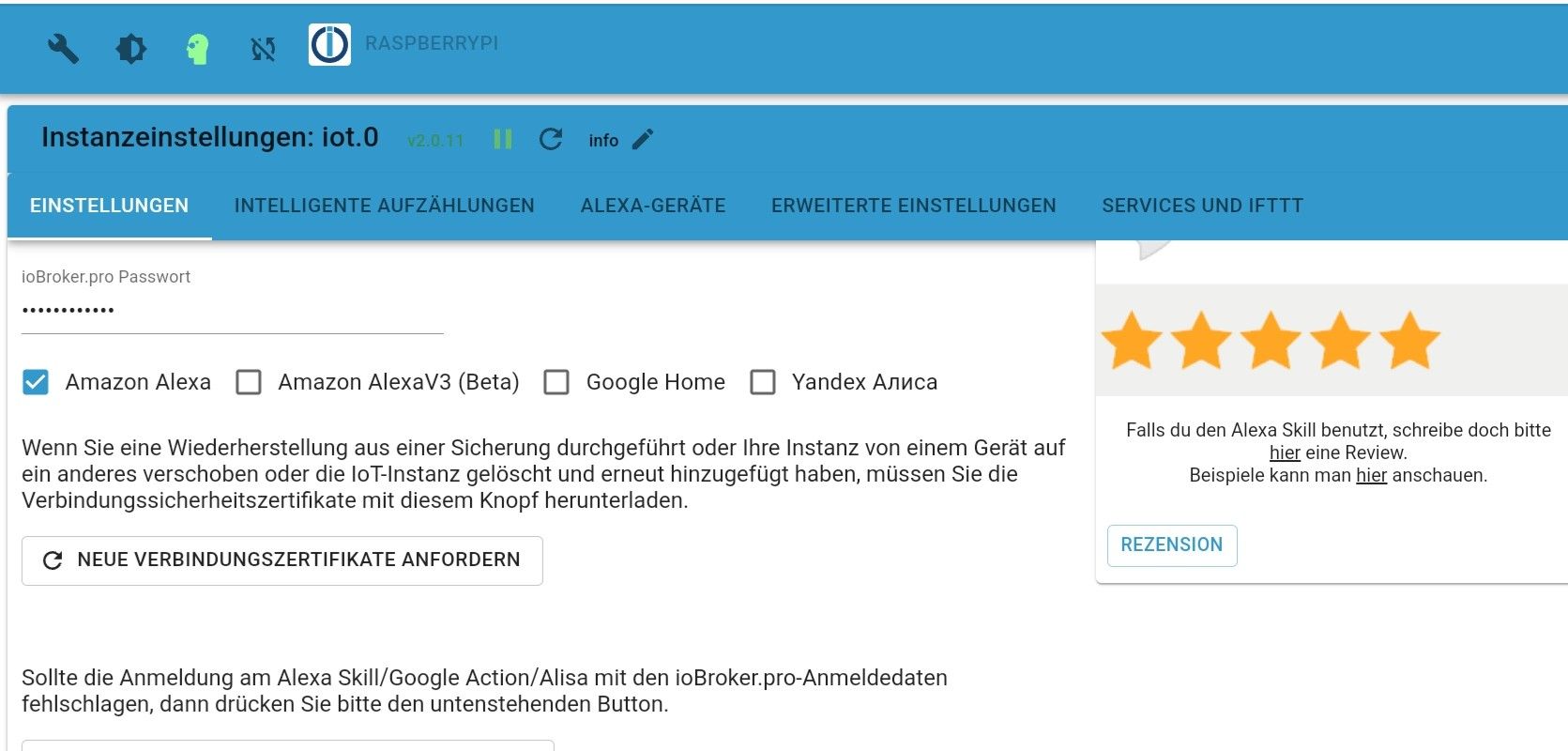
Hallo ihr 2, habt ihr im iot-Adapter das iobroker.pro Passwort eingegeben und das Häkchen bei Alexa gesetzt?
Weiter unten ist auch zu lesen:
@babba79 die 2FA von Amazon war bei mir, und ich glaube auch bei anderen erforderlich um den Alexa-Adapter zum laufen zu bringen. -
Hallo ihr 2, habt ihr im iot-Adapter das iobroker.pro Passwort eingegeben und das Häkchen bei Alexa gesetzt?
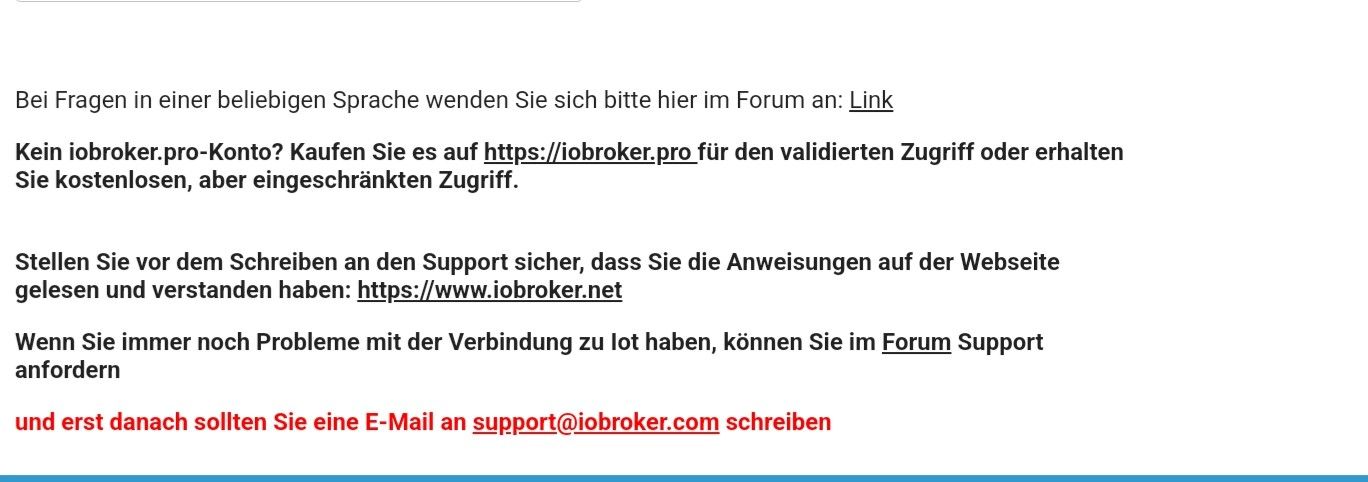
Weiter unten ist auch zu lesen:
@babba79 die 2FA von Amazon war bei mir, und ich glaube auch bei anderen erforderlich um den Alexa-Adapter zum laufen zu bringen.Hi @winni,
danke für dein Einmischen. Ja das Passwort vom iobroker.pro Account habe ich eingegeben. Ich hab das Passwort auch geändert. Per Passwortmanager und auch von Hand eingetragen und natürlich ist auch der Haken bei Alexa gesetzt.
Ich werde das mit der 2FA mal ausprobieren. Hab das bisher immer vermieden, da meine Frau auch über mein Amazon Konto shoppt.

-
ich habe mir die Freiheit genommen, und die Bilder entfernt!
da waren private Daten sichtbar.Bitte wieder die Bilder einstelken, aber die privaten Daten unkenntlich machen
-
ich habe mir die Freiheit genommen, und die Bilder entfernt!
da waren private Daten sichtbar.Bitte wieder die Bilder einstelken, aber die privaten Daten unkenntlich machen
Update:
In den letzten paar Tagen habe ich gefühlt 20x den Fixer sowohl auf dem Master, als auch auf dem Slave gestartet.
Ich habe vorhin die 2FA bei Amazon aktiviert. Ausgeloggt eingeloggt mit SMS. Login Amazon funktioniert.Dann habe ich den Adapter auf meinen Master verschoben, wo auch der IOT Adapter läuft.(Wollte alles versucht haben, um dem Fehler auf die Spur zu kommen) (Hatte ihn über Jahre auf dem Slave laufen) IP in den Proxy-Einstellungen geändert.
Dann gab es ein paar Abstürze des Alexa Adapter. Also hab ich ihn komplett gelöscht und neu installiert. Coockies erneuert (Amazon Login etc.)
Dann im IOT Adapter die beiden Zertifikats-Buttons gedrückt.
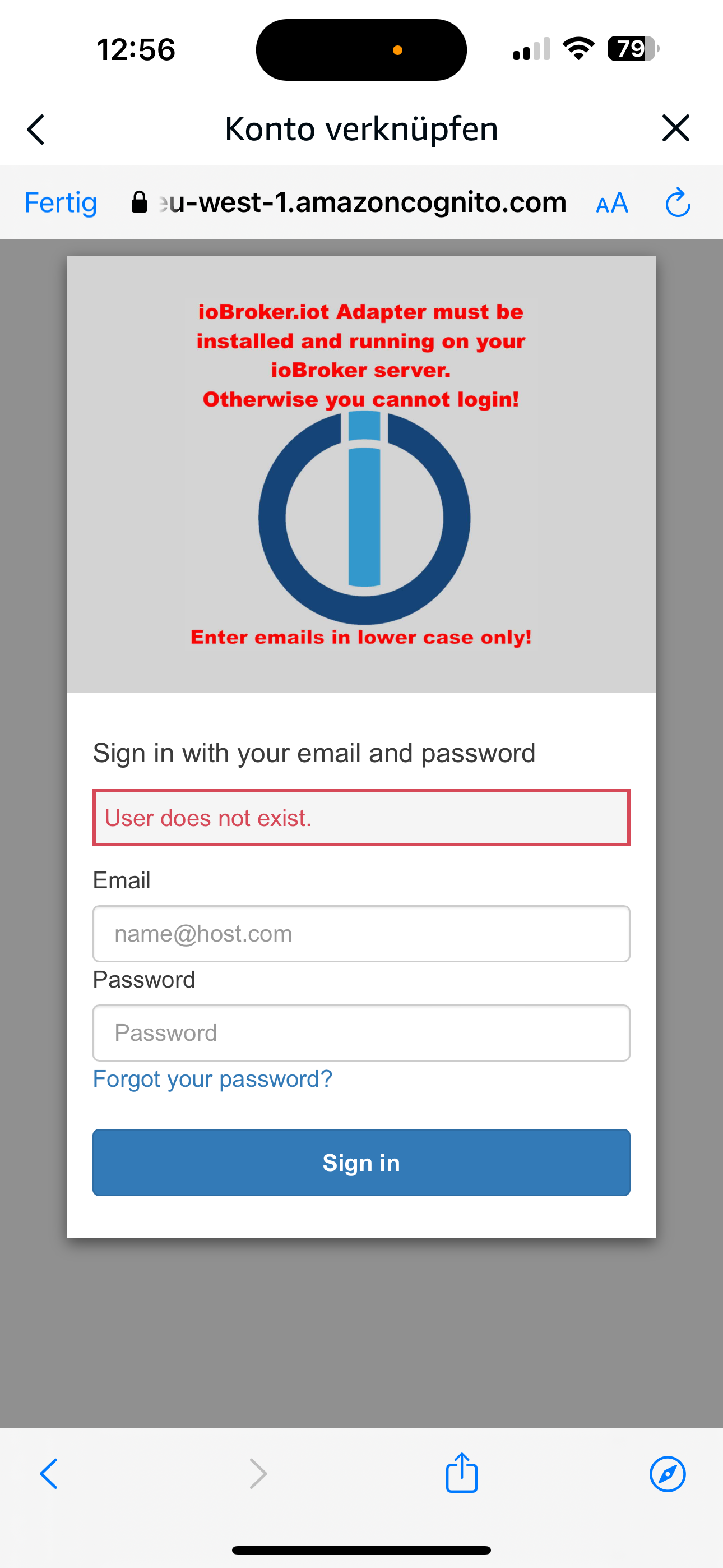
Alexa App am Handy zum 1000 mal geöffnet und den Skill iobroker.iot gesucht. Button "Zur Verwendung aktivieren" gedrückt und die Logindaten des iobroker.pro Account eingegben. Selber Bild....."User does not exists".
Kann es daran liegen, dass im iobroker.pro keine Daten angezeigt werden unter "IoT-Informationen"?
Ich hab schon Hornhaut am Zeigefinger und Daumen.
Ich bin echt ratlos. Habt ihr noch ein paar Lösungsansätze ihr Profis?
-
Update:
In den letzten paar Tagen habe ich gefühlt 20x den Fixer sowohl auf dem Master, als auch auf dem Slave gestartet.
Ich habe vorhin die 2FA bei Amazon aktiviert. Ausgeloggt eingeloggt mit SMS. Login Amazon funktioniert.Dann habe ich den Adapter auf meinen Master verschoben, wo auch der IOT Adapter läuft.(Wollte alles versucht haben, um dem Fehler auf die Spur zu kommen) (Hatte ihn über Jahre auf dem Slave laufen) IP in den Proxy-Einstellungen geändert.
Dann gab es ein paar Abstürze des Alexa Adapter. Also hab ich ihn komplett gelöscht und neu installiert. Coockies erneuert (Amazon Login etc.)
Dann im IOT Adapter die beiden Zertifikats-Buttons gedrückt.
Alexa App am Handy zum 1000 mal geöffnet und den Skill iobroker.iot gesucht. Button "Zur Verwendung aktivieren" gedrückt und die Logindaten des iobroker.pro Account eingegben. Selber Bild....."User does not exists".
Kann es daran liegen, dass im iobroker.pro keine Daten angezeigt werden unter "IoT-Informationen"?
Ich hab schon Hornhaut am Zeigefinger und Daumen.Ich bin echt ratlos. Habt ihr noch ein paar Lösungsansätze ihr Profis?
-
Jetzt wollte ich den Cloud Adapter vom Slave auf den Master übertragen per admin..Jetzt geht nichts mehr

Bekomme die Fehlermeldung per Console / Admin ist nicht mehr erreichbar. Könnt ihr mir helfen?
iob status node:internal/modules/cjs/loader:1137 throw err; ^ Error: Cannot find module '/opt/iobroker/node_modules/iobroker.js-controller/iobroker.js' at Module._resolveFilename (node:internal/modules/cjs/loader:1134:15) at Module._load (node:internal/modules/cjs/loader:975:27) at Function.executeUserEntryPoint [as runMain] (node:internal/modules/run_main:128:12) at node:internal/main/run_main_module:28:49 { code: 'MODULE_NOT_FOUND', requireStack: [] } Node.js v18.19.1 -
Jetzt wollte ich den Cloud Adapter vom Slave auf den Master übertragen per admin..Jetzt geht nichts mehr
Bekomme die Fehlermeldung per Console / Admin ist nicht mehr erreichbar. Könnt ihr mir helfen?
iob status node:internal/modules/cjs/loader:1137 throw err; ^ Error: Cannot find module '/opt/iobroker/node_modules/iobroker.js-controller/iobroker.js' at Module._resolveFilename (node:internal/modules/cjs/loader:1134:15) at Module._load (node:internal/modules/cjs/loader:975:27) at Function.executeUserEntryPoint [as runMain] (node:internal/modules/run_main:128:12) at node:internal/main/run_main_module:28:49 { code: 'MODULE_NOT_FOUND', requireStack: [] } Node.js v18.19.1cd /opt/iobroker sudo -H -u iobroker npm install iobroker.js-controller -
cd /opt/iobroker sudo -H -u iobroker npm install iobroker.js-controller@thomas-braun vielen Dank. Probiere ich gleich mal aus. Nur auf dem Master, oder?
-
@thomas-braun vielen Dank. Probiere ich gleich mal aus. Nur auf dem Master, oder?
Auf der Kiste mit der Fehlermeldung. Wenn du die vollständige Ausgabe inkl. der Eingabezeile posten würdest wäre es klarer.
-
@thomas-braun vielen Dank. Probiere ich gleich mal aus. Nur auf dem Master, oder?
pi@Jarvis1:~ $ cd /opt/iobroker
pi@Jarvis1:/opt/iobroker $ sudo -H -u iobroker npm install iobroker.js-controller
npm WARN skipping integrity check for git dependency ssh://git@github.com/Jey-Cee/ioBroker.net-tools.git
npm WARN skipping integrity check for git dependency ssh://git@github.com/homecineplexx/ioBroker.homepilot20.git
npm WARN deprecated dgram@1.0.1: npm is holding this package for security reasons. As it's a core Node module, we will not transfer it over to other users. You may safely remove the package from your dependencies.
npm WARN deprecated @types/bl@5.1.0: This is a stub types definition. bl provides its own type definitions, so you do not need this installed.
npm WARN deprecated request-promise-native@1.0.9: request-promise-native has been deprecated because it extends the now deprecated request package, see https://github.com/request/request/issues/3142
npm WARN deprecated har-validator@5.1.5: this library is no longer supported
npm WARN deprecated request-promise@4.2.6: request-promise has been deprecated because it extends the now deprecated request package, see https://github.com/request/request/issues/3142
npm WARN deprecated querystring@0.2.1: The querystring API is considered Legacy. new code should use the URLSearchParams API instead.
npm WARN deprecated node-inspect@2.0.0: This module is part of Node.js core and does not need to be installed separately. It is now unmaintained.
npm WARN deprecated debug@4.1.1: Debug versions >=3.2.0 <3.2.7 || >=4 <4.3.1 have a low-severity ReDos regression when used in a Node.js environment. It is recommended you upgrade to 3.2.7 or 4.3.1. (https://github.com/visionmedia/debug/issues/797)
npm WARN deprecated uuid@3.4.0: Please upgrade  to version 7 or higher.  Older versions may use Math.random() in certain circumstances, which is known to be problematic.  See https://v8.dev/blog/math-random for details.
npm WARN deprecated request@2.88.2: request has been deprecated, see https://github.com/request/request/issues/3142
npm WARN cleanup Failed to remove some directories [
npm WARN cleanup   [
npm WARN cleanup     '/opt/iobroker/node_modules/node-dht-sensor',
npm WARN cleanup     [Error: ENOTEMPTY: directory not empty, rmdir '/opt/iobroker/node_modules/node-dht-sensor'] {
npm WARN cleanup       errno: -39,
npm WARN cleanup       code: 'ENOTEMPTY',
npm WARN cleanup       syscall: 'rmdir',
npm WARN cleanup       path: '/opt/iobroker/node_modules/node-dht-sensor'
npm WARN cleanup     }
npm WARN cleanup   ],
npm WARN cleanup   [
npm WARN cleanup     '/opt/iobroker/node_modules/node-dht-sensor',
npm WARN cleanup     [Error: ENOTEMPTY: directory not empty, rmdir '/opt/iobroker/node_modules/node-dht-sensor'] {
npm WARN cleanup       errno: -39,
npm WARN cleanup       code: 'ENOTEMPTY',
npm WARN cleanup       syscall: 'rmdir',
npm WARN cleanup       path: '/opt/iobroker/node_modules/node-dht-sensor'
npm WARN cleanup     }
npm WARN cleanup   ],
npm WARN cleanup   [
npm WARN cleanup     '/opt/iobroker/node_modules/iobroker.js-controller',
npm WARN cleanup     [Error: ENOTEMPTY: directory not empty, rmdir '/opt/iobroker/node_modules/iobroker.js-controller'] {
npm WARN cleanup       errno: -39,
npm WARN cleanup       code: 'ENOTEMPTY',
npm WARN cleanup       syscall: 'rmdir',
npm WARN cleanup       path: '/opt/iobroker/node_modules/iobroker.js-controller'
npm WARN cleanup     }
npm WARN cleanup   ],
npm WARN cleanup   [
npm WARN cleanup     '/opt/iobroker/node_modules/iobroker.js-controller',
npm WARN cleanup     [Error: ENOTEMPTY: directory not empty, rmdir '/opt/iobroker/node_modules/iobroker.js-controller'] {
npm WARN cleanup       errno: -39,
npm WARN cleanup       code: 'ENOTEMPTY',
npm WARN cleanup       syscall: 'rmdir',
npm WARN cleanup       path: '/opt/iobroker/node_modules/iobroker.js-controller'
npm WARN cleanup     }
npm WARN cleanup   ],
npm WARN cleanup   [
npm WARN cleanup     '/opt/iobroker/node_modules/cpu-features',
npm WARN cleanup     [Error: ENOTEMPTY: directory not empty, rmdir '/opt/iobroker/node_modules/cpu-features/build/Release'] {
npm WARN cleanup       errno: -39,
npm WARN cleanup       code: 'ENOTEMPTY',
npm WARN cleanup       syscall: 'rmdir',
npm WARN cleanup       path: '/opt/iobroker/node_modules/cpu-features/build/Release'
npm WARN cleanup     }
npm WARN cleanup   ],
npm WARN cleanup   [
npm WARN cleanup     '/opt/iobroker/node_modules/cpu-features',
npm WARN cleanup     [Error: ENOTEMPTY: directory not empty, rmdir '/opt/iobroker/node_modules/cpu-features/build/Release'] {
npm WARN cleanup       errno: -39,
npm WARN cleanup       code: 'ENOTEMPTY',
npm WARN cleanup       syscall: 'rmdir',
npm WARN cleanup       path: '/opt/iobroker/node_modules/cpu-features/build/Release'
npm WARN cleanup     }
npm WARN cleanup   ]
npm WARN cleanup ]
npm ERR! code 1
npm ERR! path /opt/iobroker/node_modules/iobroker.js-controller
npm ERR! command failed
npm ERR! command sh -c node iobroker.js setup first
npm ERR! No connection to objects 127.0.0.1:6379[redis]
npm ERR! /opt/iobroker/node_modules/standard-as-callback/built/index.js:6
npm ERR!         throw e;
npm ERR!         ^
npm ERR!
npm ERR! Error: Connection is closed.
npm ERR!     at close (/opt/iobroker/node_modules/ioredis/built/redis/event_handler.js:184:25)
npm ERR!     at Socket.<anonymous> (/opt/iobroker/node_modules/ioredis/built/redis/event_handler.js:151:20)
npm ERR!     at Object.onceWrapper (node:events:632:26)
npm ERR!     at Socket.emit (node:events:517:28)
npm ERR!     at TCP.<anonymous> (node:net:350:12)
npm ERR! Emitted 'error' event on ScanStream instance at:
npm ERR!     at /opt/iobroker/node_modules/ioredis/built/ScanStream.js:38:22
npm ERR!     at tryCatcher (/opt/iobroker/node_modules/standard-as-callback/built/utils.js:12:23)
npm ERR!     at /opt/iobroker/node_modules/standard-as-callback/built/index.js:33:51
npm ERR!     at process.processTicksAndRejections (node:internal/process/task_queues:95:5)
npm ERR!
npm ERR! Node.js v18.19.1

npm ERR! A complete log of this run can be found in: /home/iobroker/.npm/_logs/2024-03-19T14_03_05_090Z-debug-0.log
pi@Jarvis1:/opt/iobroker $
Als Rest bleiben im "node_modules" Ordner 3 versteckte Ordner mit . vorne.

-
pi@Jarvis1:~ $ cd /opt/iobroker
pi@Jarvis1:/opt/iobroker $ sudo -H -u iobroker npm install iobroker.js-controller
npm WARN skipping integrity check for git dependency ssh://git@github.com/Jey-Cee/ioBroker.net-tools.git
npm WARN skipping integrity check for git dependency ssh://git@github.com/homecineplexx/ioBroker.homepilot20.git
npm WARN deprecated dgram@1.0.1: npm is holding this package for security reasons. As it's a core Node module, we will not transfer it over to other users. You may safely remove the package from your dependencies.
npm WARN deprecated @types/bl@5.1.0: This is a stub types definition. bl provides its own type definitions, so you do not need this installed.
npm WARN deprecated request-promise-native@1.0.9: request-promise-native has been deprecated because it extends the now deprecated request package, see https://github.com/request/request/issues/3142
npm WARN deprecated har-validator@5.1.5: this library is no longer supported
npm WARN deprecated request-promise@4.2.6: request-promise has been deprecated because it extends the now deprecated request package, see https://github.com/request/request/issues/3142
npm WARN deprecated querystring@0.2.1: The querystring API is considered Legacy. new code should use the URLSearchParams API instead.
npm WARN deprecated node-inspect@2.0.0: This module is part of Node.js core and does not need to be installed separately. It is now unmaintained.
npm WARN deprecated debug@4.1.1: Debug versions >=3.2.0 <3.2.7 || >=4 <4.3.1 have a low-severity ReDos regression when used in a Node.js environment. It is recommended you upgrade to 3.2.7 or 4.3.1. (https://github.com/visionmedia/debug/issues/797)
npm WARN deprecated uuid@3.4.0: Please upgrade  to version 7 or higher.  Older versions may use Math.random() in certain circumstances, which is known to be problematic.  See https://v8.dev/blog/math-random for details.
npm WARN deprecated request@2.88.2: request has been deprecated, see https://github.com/request/request/issues/3142
npm WARN cleanup Failed to remove some directories [
npm WARN cleanup   [
npm WARN cleanup     '/opt/iobroker/node_modules/node-dht-sensor',
npm WARN cleanup     [Error: ENOTEMPTY: directory not empty, rmdir '/opt/iobroker/node_modules/node-dht-sensor'] {
npm WARN cleanup       errno: -39,
npm WARN cleanup       code: 'ENOTEMPTY',
npm WARN cleanup       syscall: 'rmdir',
npm WARN cleanup       path: '/opt/iobroker/node_modules/node-dht-sensor'
npm WARN cleanup     }
npm WARN cleanup   ],
npm WARN cleanup   [
npm WARN cleanup     '/opt/iobroker/node_modules/node-dht-sensor',
npm WARN cleanup     [Error: ENOTEMPTY: directory not empty, rmdir '/opt/iobroker/node_modules/node-dht-sensor'] {
npm WARN cleanup       errno: -39,
npm WARN cleanup       code: 'ENOTEMPTY',
npm WARN cleanup       syscall: 'rmdir',
npm WARN cleanup       path: '/opt/iobroker/node_modules/node-dht-sensor'
npm WARN cleanup     }
npm WARN cleanup   ],
npm WARN cleanup   [
npm WARN cleanup     '/opt/iobroker/node_modules/iobroker.js-controller',
npm WARN cleanup     [Error: ENOTEMPTY: directory not empty, rmdir '/opt/iobroker/node_modules/iobroker.js-controller'] {
npm WARN cleanup       errno: -39,
npm WARN cleanup       code: 'ENOTEMPTY',
npm WARN cleanup       syscall: 'rmdir',
npm WARN cleanup       path: '/opt/iobroker/node_modules/iobroker.js-controller'
npm WARN cleanup     }
npm WARN cleanup   ],
npm WARN cleanup   [
npm WARN cleanup     '/opt/iobroker/node_modules/iobroker.js-controller',
npm WARN cleanup     [Error: ENOTEMPTY: directory not empty, rmdir '/opt/iobroker/node_modules/iobroker.js-controller'] {
npm WARN cleanup       errno: -39,
npm WARN cleanup       code: 'ENOTEMPTY',
npm WARN cleanup       syscall: 'rmdir',
npm WARN cleanup       path: '/opt/iobroker/node_modules/iobroker.js-controller'
npm WARN cleanup     }
npm WARN cleanup   ],
npm WARN cleanup   [
npm WARN cleanup     '/opt/iobroker/node_modules/cpu-features',
npm WARN cleanup     [Error: ENOTEMPTY: directory not empty, rmdir '/opt/iobroker/node_modules/cpu-features/build/Release'] {
npm WARN cleanup       errno: -39,
npm WARN cleanup       code: 'ENOTEMPTY',
npm WARN cleanup       syscall: 'rmdir',
npm WARN cleanup       path: '/opt/iobroker/node_modules/cpu-features/build/Release'
npm WARN cleanup     }
npm WARN cleanup   ],
npm WARN cleanup   [
npm WARN cleanup     '/opt/iobroker/node_modules/cpu-features',
npm WARN cleanup     [Error: ENOTEMPTY: directory not empty, rmdir '/opt/iobroker/node_modules/cpu-features/build/Release'] {
npm WARN cleanup       errno: -39,
npm WARN cleanup       code: 'ENOTEMPTY',
npm WARN cleanup       syscall: 'rmdir',
npm WARN cleanup       path: '/opt/iobroker/node_modules/cpu-features/build/Release'
npm WARN cleanup     }
npm WARN cleanup   ]
npm WARN cleanup ]
npm ERR! code 1
npm ERR! path /opt/iobroker/node_modules/iobroker.js-controller
npm ERR! command failed
npm ERR! command sh -c node iobroker.js setup first
npm ERR! No connection to objects 127.0.0.1:6379[redis]
npm ERR! /opt/iobroker/node_modules/standard-as-callback/built/index.js:6
npm ERR!         throw e;
npm ERR!         ^
npm ERR!
npm ERR! Error: Connection is closed.
npm ERR!     at close (/opt/iobroker/node_modules/ioredis/built/redis/event_handler.js:184:25)
npm ERR!     at Socket.<anonymous> (/opt/iobroker/node_modules/ioredis/built/redis/event_handler.js:151:20)
npm ERR!     at Object.onceWrapper (node:events:632:26)
npm ERR!     at Socket.emit (node:events:517:28)
npm ERR!     at TCP.<anonymous> (node:net:350:12)
npm ERR! Emitted 'error' event on ScanStream instance at:
npm ERR!     at /opt/iobroker/node_modules/ioredis/built/ScanStream.js:38:22
npm ERR!     at tryCatcher (/opt/iobroker/node_modules/standard-as-callback/built/utils.js:12:23)
npm ERR!     at /opt/iobroker/node_modules/standard-as-callback/built/index.js:33:51
npm ERR!     at process.processTicksAndRejections (node:internal/process/task_queues:95:5)
npm ERR!
npm ERR! Node.js v18.19.1

npm ERR! A complete log of this run can be found in: /home/iobroker/.npm/_logs/2024-03-19T14_03_05_090Z-debug-0.log
pi@Jarvis1:/opt/iobroker $
Als Rest bleiben im "node_modules" Ordner 3 versteckte Ordner mit . vorne.
-
pi@Jarvis1:/opt/iobroker $ iob start
pi@Jarvis1:/opt/iobroker $ sudo -H -u iobroker npm install iobroker.js-controller
npm WARN skipping integrity check for git dependency ssh://git@github.com/Jey-Cee/ioBroker.net-tools.git
npm WARN skipping integrity check for git dependency ssh://git@github.com/homecineplexx/ioBroker.homepilot20.git
npm WARN deprecated dgram@1.0.1: npm is holding this package for security reasons. As it's a core Node module, we will not transfer it over to other users. You may safely remove the package from your dependencies.
npm WARN deprecated @types/bl@5.1.0: This is a stub types definition. bl provides its own type definitions, so you do not need this installed.
npm WARN deprecated request-promise-native@1.0.9: request-promise-native has been deprecated because it extends the now deprecated request package, see https://github.com/request/request/issues/3142
npm WARN deprecated har-validator@5.1.5: this library is no longer supported
npm WARN deprecated request-promise@4.2.6: request-promise has been deprecated because it extends the now deprecated request package, see https://github.com/request/request/issues/3142
npm WARN deprecated querystring@0.2.1: The querystring API is considered Legacy. new code should use the URLSearchParams API instead.
npm WARN deprecated node-inspect@2.0.0: This module is part of Node.js core and does not need to be installed separately. It is now unmaintained.
npm WARN deprecated debug@4.1.1: Debug versions >=3.2.0 <3.2.7 || >=4 <4.3.1 have a low-severity ReDos regression when used in a Node.js environment. It is recommended you upgrade to 3.2.7 or 4.3.1. (https://github.com/visionmedia/debug/issues/797)
npm WARN deprecated uuid@3.4.0: Please upgrade  to version 7 or higher.  Older versions may use Math.random() in certain circumstances, which is known to be problematic.  See https://v8.dev/blog/math-random for details.
npm WARN deprecated request@2.88.2: request has been deprecated, see https://github.com/request/request/issues/3142
npm WARN cleanup Failed to remove some directories [
npm WARN cleanup   [
npm WARN cleanup     '/opt/iobroker/node_modules/node-dht-sensor',
npm WARN cleanup     [Error: ENOTEMPTY: directory not empty, rmdir '/opt/iobroker/node_modules/node-dht-sensor'] {
npm WARN cleanup       errno: -39,
npm WARN cleanup       code: 'ENOTEMPTY',
npm WARN cleanup       syscall: 'rmdir',
npm WARN cleanup       path: '/opt/iobroker/node_modules/node-dht-sensor'
npm WARN cleanup     }
npm WARN cleanup   ],
npm WARN cleanup   [
npm WARN cleanup     '/opt/iobroker/node_modules/node-dht-sensor',
npm WARN cleanup     [Error: ENOTEMPTY: directory not empty, rmdir '/opt/iobroker/node_modules/node-dht-sensor'] {
npm WARN cleanup       errno: -39,
npm WARN cleanup       code: 'ENOTEMPTY',
npm WARN cleanup       syscall: 'rmdir',
npm WARN cleanup       path: '/opt/iobroker/node_modules/node-dht-sensor'
npm WARN cleanup     }
npm WARN cleanup   ],
npm WARN cleanup   [
npm WARN cleanup     '/opt/iobroker/node_modules/iobroker.js-controller',
npm WARN cleanup     [Error: ENOTEMPTY: directory not empty, rmdir '/opt/iobroker/node_modules/iobroker.js-controller'] {
npm WARN cleanup       errno: -39,
npm WARN cleanup       code: 'ENOTEMPTY',
npm WARN cleanup       syscall: 'rmdir',
npm WARN cleanup       path: '/opt/iobroker/node_modules/iobroker.js-controller'
npm WARN cleanup     }
npm WARN cleanup   ],
npm WARN cleanup   [
npm WARN cleanup     '/opt/iobroker/node_modules/iobroker.js-controller',
npm WARN cleanup     [Error: ENOTEMPTY: directory not empty, rmdir '/opt/iobroker/node_modules/iobroker.js-controller'] {
npm WARN cleanup       errno: -39,
npm WARN cleanup       code: 'ENOTEMPTY',
npm WARN cleanup       syscall: 'rmdir',
npm WARN cleanup       path: '/opt/iobroker/node_modules/iobroker.js-controller'
npm WARN cleanup     }
npm WARN cleanup   ]
npm WARN cleanup ]
npm ERR! code 1
npm ERR! path /opt/iobroker/node_modules/iobroker.js-controller
npm ERR! command failed
npm ERR! command sh -c node iobroker.js setup first
npm ERR! No connection to objects 127.0.0.1:6379[redis]
npm ERR! /opt/iobroker/node_modules/standard-as-callback/built/index.js:6
npm ERR!         throw e;
npm ERR!         ^
npm ERR!
npm ERR! Error: Connection is closed.
npm ERR!     at close (/opt/iobroker/node_modules/ioredis/built/redis/event_handler.js:184:25)
npm ERR!     at Socket.<anonymous> (/opt/iobroker/node_modules/ioredis/built/redis/event_handler.js:151:20)
npm ERR!     at Object.onceWrapper (node:events:632:26)
npm ERR!     at Socket.emit (node:events:517:28)
npm ERR!     at TCP.<anonymous> (node:net:350:12)
npm ERR! Emitted 'error' event on ScanStream instance at:
npm ERR!     at /opt/iobroker/node_modules/ioredis/built/ScanStream.js:38:22
npm ERR!     at tryCatcher (/opt/iobroker/node_modules/standard-as-callback/built/utils.js:12:23)
npm ERR!     at /opt/iobroker/node_modules/standard-as-callback/built/index.js:33:51
npm ERR!     at process.processTicksAndRejections (node:internal/process/task_queues:95:5)
npm ERR!
npm ERR! Node.js v18.19.1

npm ERR! A complete log of this run can be found in: /home/iobroker/.npm/_logs/2024-03-19T14_51_02_406Z-debug-0.log
pi@Jarvis1:/opt/iobroker $
Gleicher Fehler.

-
pi@Jarvis1:/opt/iobroker $ iob start
pi@Jarvis1:/opt/iobroker $ sudo -H -u iobroker npm install iobroker.js-controller
npm WARN skipping integrity check for git dependency ssh://git@github.com/Jey-Cee/ioBroker.net-tools.git
npm WARN skipping integrity check for git dependency ssh://git@github.com/homecineplexx/ioBroker.homepilot20.git
npm WARN deprecated dgram@1.0.1: npm is holding this package for security reasons. As it's a core Node module, we will not transfer it over to other users. You may safely remove the package from your dependencies.
npm WARN deprecated @types/bl@5.1.0: This is a stub types definition. bl provides its own type definitions, so you do not need this installed.
npm WARN deprecated request-promise-native@1.0.9: request-promise-native has been deprecated because it extends the now deprecated request package, see https://github.com/request/request/issues/3142
npm WARN deprecated har-validator@5.1.5: this library is no longer supported
npm WARN deprecated request-promise@4.2.6: request-promise has been deprecated because it extends the now deprecated request package, see https://github.com/request/request/issues/3142
npm WARN deprecated querystring@0.2.1: The querystring API is considered Legacy. new code should use the URLSearchParams API instead.
npm WARN deprecated node-inspect@2.0.0: This module is part of Node.js core and does not need to be installed separately. It is now unmaintained.
npm WARN deprecated debug@4.1.1: Debug versions >=3.2.0 <3.2.7 || >=4 <4.3.1 have a low-severity ReDos regression when used in a Node.js environment. It is recommended you upgrade to 3.2.7 or 4.3.1. (https://github.com/visionmedia/debug/issues/797)
npm WARN deprecated uuid@3.4.0: Please upgrade  to version 7 or higher.  Older versions may use Math.random() in certain circumstances, which is known to be problematic.  See https://v8.dev/blog/math-random for details.
npm WARN deprecated request@2.88.2: request has been deprecated, see https://github.com/request/request/issues/3142
npm WARN cleanup Failed to remove some directories [
npm WARN cleanup   [
npm WARN cleanup     '/opt/iobroker/node_modules/node-dht-sensor',
npm WARN cleanup     [Error: ENOTEMPTY: directory not empty, rmdir '/opt/iobroker/node_modules/node-dht-sensor'] {
npm WARN cleanup       errno: -39,
npm WARN cleanup       code: 'ENOTEMPTY',
npm WARN cleanup       syscall: 'rmdir',
npm WARN cleanup       path: '/opt/iobroker/node_modules/node-dht-sensor'
npm WARN cleanup     }
npm WARN cleanup   ],
npm WARN cleanup   [
npm WARN cleanup     '/opt/iobroker/node_modules/node-dht-sensor',
npm WARN cleanup     [Error: ENOTEMPTY: directory not empty, rmdir '/opt/iobroker/node_modules/node-dht-sensor'] {
npm WARN cleanup       errno: -39,
npm WARN cleanup       code: 'ENOTEMPTY',
npm WARN cleanup       syscall: 'rmdir',
npm WARN cleanup       path: '/opt/iobroker/node_modules/node-dht-sensor'
npm WARN cleanup     }
npm WARN cleanup   ],
npm WARN cleanup   [
npm WARN cleanup     '/opt/iobroker/node_modules/iobroker.js-controller',
npm WARN cleanup     [Error: ENOTEMPTY: directory not empty, rmdir '/opt/iobroker/node_modules/iobroker.js-controller'] {
npm WARN cleanup       errno: -39,
npm WARN cleanup       code: 'ENOTEMPTY',
npm WARN cleanup       syscall: 'rmdir',
npm WARN cleanup       path: '/opt/iobroker/node_modules/iobroker.js-controller'
npm WARN cleanup     }
npm WARN cleanup   ],
npm WARN cleanup   [
npm WARN cleanup     '/opt/iobroker/node_modules/iobroker.js-controller',
npm WARN cleanup     [Error: ENOTEMPTY: directory not empty, rmdir '/opt/iobroker/node_modules/iobroker.js-controller'] {
npm WARN cleanup       errno: -39,
npm WARN cleanup       code: 'ENOTEMPTY',
npm WARN cleanup       syscall: 'rmdir',
npm WARN cleanup       path: '/opt/iobroker/node_modules/iobroker.js-controller'
npm WARN cleanup     }
npm WARN cleanup   ]
npm WARN cleanup ]
npm ERR! code 1
npm ERR! path /opt/iobroker/node_modules/iobroker.js-controller
npm ERR! command failed
npm ERR! command sh -c node iobroker.js setup first
npm ERR! No connection to objects 127.0.0.1:6379[redis]
npm ERR! /opt/iobroker/node_modules/standard-as-callback/built/index.js:6
npm ERR!         throw e;
npm ERR!         ^
npm ERR!
npm ERR! Error: Connection is closed.
npm ERR!     at close (/opt/iobroker/node_modules/ioredis/built/redis/event_handler.js:184:25)
npm ERR!     at Socket.<anonymous> (/opt/iobroker/node_modules/ioredis/built/redis/event_handler.js:151:20)
npm ERR!     at Object.onceWrapper (node:events:632:26)
npm ERR!     at Socket.emit (node:events:517:28)
npm ERR!     at TCP.<anonymous> (node:net:350:12)
npm ERR! Emitted 'error' event on ScanStream instance at:
npm ERR!     at /opt/iobroker/node_modules/ioredis/built/ScanStream.js:38:22
npm ERR!     at tryCatcher (/opt/iobroker/node_modules/standard-as-callback/built/utils.js:12:23)
npm ERR!     at /opt/iobroker/node_modules/standard-as-callback/built/index.js:33:51
npm ERR!     at process.processTicksAndRejections (node:internal/process/task_queues:95:5)
npm ERR!
npm ERR! Node.js v18.19.1

npm ERR! A complete log of this run can be found in: /home/iobroker/.npm/_logs/2024-03-19T14_51_02_406Z-debug-0.log
pi@Jarvis1:/opt/iobroker $
Gleicher Fehler.
@babba79 sagte in IOT Adapter:
/opt/iobroker/node_modules/node-dht-sensor
rm -rf /opt/iobroker/node_modules/node-dht-sensor rm -rf /opt/iobroker/node_modules/iobroker.js-controller -
@babba79 sagte in IOT Adapter:
/opt/iobroker/node_modules/node-dht-sensor
rm -rf /opt/iobroker/node_modules/node-dht-sensor rm -rf /opt/iobroker/node_modules/iobroker.js-controller@thomas-braun
das ganze hab ich 2x wiederholt und die Fehler Ordner ebenfalls gelöscht. Jetzt hat es funktioniert.pi@Jarvis1:/opt/iobroker $ sudo -H -u iobroker npm install iobroker.js-controller npm WARN skipping integrity check for git dependency ssh://git@github.com/Jey-Cee/ioBroker.net-tools.git npm WARN skipping integrity check for git dependency ssh://git@github.com/homecineplexx/ioBroker.homepilot20.git npm WARN deprecated dgram@1.0.1: npm is holding this package for security reasons. As it's a core Node module, we will not transfer it over to other users. You may safely remove the package from your dependencies. npm WARN deprecated @types/bl@5.1.0: This is a stub types definition. bl provides its own type definitions, so you do not need this installed. npm WARN deprecated request-promise-native@1.0.9: request-promise-native has been deprecated because it extends the now deprecated request package, see https://github.com/request/request/issues/3142 npm WARN deprecated har-validator@5.1.5: this library is no longer supported npm WARN deprecated request-promise@4.2.6: request-promise has been deprecated because it extends the now deprecated request package, see https://github.com/request/request/issues/3142 npm WARN deprecated querystring@0.2.1: The querystring API is considered Legacy. new code should use the URLSearchParams API instead. npm WARN deprecated node-inspect@2.0.0: This module is part of Node.js core and does not need to be installed separately. It is now unmaintained. npm WARN deprecated debug@4.1.1: Debug versions >=3.2.0 <3.2.7 || >=4 <4.3.1 have a low-severity ReDos regression when used in a Node.js environment. It is recommended you upgrade to 3.2.7 or 4.3.1. (https://github.com/visionmedia/debug/issues/797) npm WARN deprecated uuid@3.4.0: Please upgrade to version 7 or higher. Older versions may use Math.random() in certain circumstances, which is known to be problematic. See https://v8.dev/blog/math-random for details. npm WARN deprecated request@2.88.2: request has been deprecated, see https://github.com/request/request/issues/3142 added 25 packages, removed 82 packages, and changed 1013 packages in 4m 86 packages are looking for funding run `npm fund` for details pi@Jarvis1:/opt/iobroker $Du bist mein Held. Ich danke dir für deine Unterstützung. iob läuft wieder.....


 Als nächstes nehm ich mir mal dein Tutorial Bullseye -> Bookworm vor, aber zuerst muss ich noch vom Buster weg, oder kann ich von Buster auch direkt zu Bookworm upgraden?
 -
@thomas-braun
das ganze hab ich 2x wiederholt und die Fehler Ordner ebenfalls gelöscht. Jetzt hat es funktioniert.pi@Jarvis1:/opt/iobroker $ sudo -H -u iobroker npm install iobroker.js-controller npm WARN skipping integrity check for git dependency ssh://git@github.com/Jey-Cee/ioBroker.net-tools.git npm WARN skipping integrity check for git dependency ssh://git@github.com/homecineplexx/ioBroker.homepilot20.git npm WARN deprecated dgram@1.0.1: npm is holding this package for security reasons. As it's a core Node module, we will not transfer it over to other users. You may safely remove the package from your dependencies. npm WARN deprecated @types/bl@5.1.0: This is a stub types definition. bl provides its own type definitions, so you do not need this installed. npm WARN deprecated request-promise-native@1.0.9: request-promise-native has been deprecated because it extends the now deprecated request package, see https://github.com/request/request/issues/3142 npm WARN deprecated har-validator@5.1.5: this library is no longer supported npm WARN deprecated request-promise@4.2.6: request-promise has been deprecated because it extends the now deprecated request package, see https://github.com/request/request/issues/3142 npm WARN deprecated querystring@0.2.1: The querystring API is considered Legacy. new code should use the URLSearchParams API instead. npm WARN deprecated node-inspect@2.0.0: This module is part of Node.js core and does not need to be installed separately. It is now unmaintained. npm WARN deprecated debug@4.1.1: Debug versions >=3.2.0 <3.2.7 || >=4 <4.3.1 have a low-severity ReDos regression when used in a Node.js environment. It is recommended you upgrade to 3.2.7 or 4.3.1. (https://github.com/visionmedia/debug/issues/797) npm WARN deprecated uuid@3.4.0: Please upgrade to version 7 or higher. Older versions may use Math.random() in certain circumstances, which is known to be problematic. See https://v8.dev/blog/math-random for details. npm WARN deprecated request@2.88.2: request has been deprecated, see https://github.com/request/request/issues/3142 added 25 packages, removed 82 packages, and changed 1013 packages in 4m 86 packages are looking for funding run `npm fund` for details pi@Jarvis1:/opt/iobroker $Du bist mein Held. Ich danke dir für deine Unterstützung. iob läuft wieder.....
Als nächstes nehm ich mir mal dein Tutorial Bullseye -> Bookworm vor, aber zuerst muss ich noch vom Buster weg, oder kann ich von Buster auch direkt zu Bookworm upgraden?@babba79 sagte in IOT Adapter:
Bullseye -> Bookworm vor, aber zuerst muss ich noch vom Buster weg, oder kann ich von Buster auch direkt zu Bookworm upgraden?
Das würde ich auf einem RaspberryPi gar nicht machen. Die Änderungen insbesondere von Bullseye auf Bookworm sind zu groß. Mach eine Neuinstallation.
Und bleib da am Ball, der 'Buster' ist schon länger abgekündigt. -
@babba79 sagte in IOT Adapter:
Bullseye -> Bookworm vor, aber zuerst muss ich noch vom Buster weg, oder kann ich von Buster auch direkt zu Bookworm upgraden?
Das würde ich auf einem RaspberryPi gar nicht machen. Die Änderungen insbesondere von Bullseye auf Bookworm sind zu groß. Mach eine Neuinstallation.
Und bleib da am Ball, der 'Buster' ist schon länger abgekündigt. -
OK dann werd ich es so machen. Dann kommen meine 2x RPi 5 auch mal zum Einsatz für die Neuinstallation.
Auf RPi5 ohnehin neuinstallieren, da wird eh ein anderer Kernel verwendet, weil da ein anderer Chipsatz läuft.
-
Auf RPi5 ohnehin neuinstallieren, da wird eh ein anderer Kernel verwendet, weil da ein anderer Chipsatz läuft.
@thomas-braun
OK ich habe verstanden. Ich warte noch auf meine POE Hats für die 5er und dann mach ich mich mit meinem gefährlichen Halbwissen ans Werk. Nochmals vielen Dank für deine Unterstützung. -
Auf RPi5 ohnehin neuinstallieren, da wird eh ein anderer Kernel verwendet, weil da ein anderer Chipsatz läuft.
Ich habe die Hardware nun alles zusammen 2x RPI 5 mit POE-Hats und M.2 SSD Bottom. Bookworm auf beiden installiert, iobroker mit Redis drauf.....und läuft.
Leider klappt iot und Alexa immer noch nicht. Bekomme in der Alexa-App beim aktivieren des iobroker.iot Skills immer noch die Meldung "User does not exist".
Hat jemand noch irgendwelche Ansätze, wie ich das lösen kann?
Nochmal kurz meine Zusammenfassung, da der letze Versuch im März war mit der alten Buster Installation.
Ich habe ein iobroker.pro Abo "Assistent.year" das bis Feb. 2025 läuft. Passwörter wurden alle neu gemacht und der Login funktioniert auch. Bei Amazon habe ich die 2FA aktiviert.
IOT Adapter läuft und ist grün. Der Haken ist nur bei Alexa gesetzt (nicht bei alexa v3 (Beta)).Ich gehe dann in die Alexa App unter Skills und suche den iobroker.iot Skill und betätige den Button "Zur Verwendung aktivieren" und gebe die Zugangsdaten des iobroker.pro Account ein und dann bekomme ich immer die Meldung in ROT "User does not exist". Ich bin echt am verzweifeln.
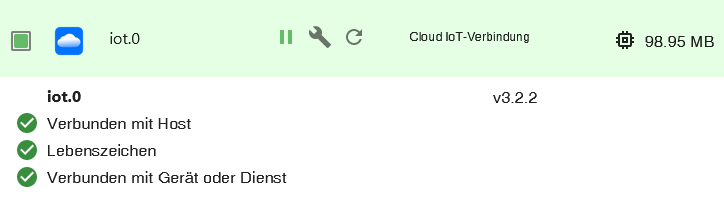
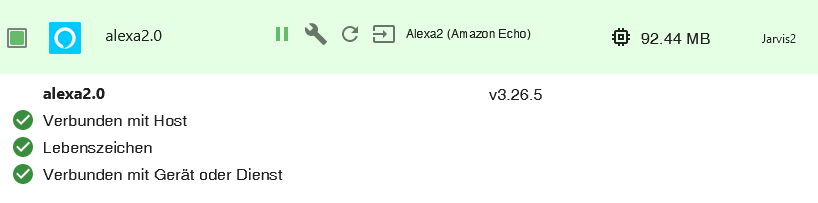
Ich weiß nicht , ob es relevant ist , aber der alexa2 Adapter läuft auf dem Slave und der iot Adapter auf dem Master.Grüße aus Karlsruhe
Edit:
Ich habe nun nochmal jede Anleitung zu iobroker.pro, iot Adapter Wort für Wort durchgelesen. Ich habe den Anmeldedaten neu erstellen Button im iot Adapter schon bestimmt 30 mal bei den einzelnen Versuchen gedrückt und es hat nie funktioniert.Das habe ich vorher nochmals probiert und jetzt hat es geklappt. Halleluja

Schön, dass es jetzt funktioniert, aber ärgerlich das ich nicht weiß woran es gelegen hat.Danke für eure Hilfe, Unterstützung und Geduld.
-
Ich habe die Hardware nun alles zusammen 2x RPI 5 mit POE-Hats und M.2 SSD Bottom. Bookworm auf beiden installiert, iobroker mit Redis drauf.....und läuft.
Leider klappt iot und Alexa immer noch nicht. Bekomme in der Alexa-App beim aktivieren des iobroker.iot Skills immer noch die Meldung "User does not exist".
Hat jemand noch irgendwelche Ansätze, wie ich das lösen kann?
Nochmal kurz meine Zusammenfassung, da der letze Versuch im März war mit der alten Buster Installation.
Ich habe ein iobroker.pro Abo "Assistent.year" das bis Feb. 2025 läuft. Passwörter wurden alle neu gemacht und der Login funktioniert auch. Bei Amazon habe ich die 2FA aktiviert.
IOT Adapter läuft und ist grün. Der Haken ist nur bei Alexa gesetzt (nicht bei alexa v3 (Beta)).Ich gehe dann in die Alexa App unter Skills und suche den iobroker.iot Skill und betätige den Button "Zur Verwendung aktivieren" und gebe die Zugangsdaten des iobroker.pro Account ein und dann bekomme ich immer die Meldung in ROT "User does not exist". Ich bin echt am verzweifeln.
Ich weiß nicht , ob es relevant ist , aber der alexa2 Adapter läuft auf dem Slave und der iot Adapter auf dem Master.Grüße aus Karlsruhe
Edit:
Ich habe nun nochmal jede Anleitung zu iobroker.pro, iot Adapter Wort für Wort durchgelesen. Ich habe den Anmeldedaten neu erstellen Button im iot Adapter schon bestimmt 30 mal bei den einzelnen Versuchen gedrückt und es hat nie funktioniert.Das habe ich vorher nochmals probiert und jetzt hat es geklappt. Halleluja
Schön, dass es jetzt funktioniert, aber ärgerlich das ich nicht weiß woran es gelegen hat.Danke für eure Hilfe, Unterstützung und Geduld.
Hallo,
also meine Pro Verbindung ging bis jetzt immer sehr gut.. nur jetzt auf einmal nicht.
Alles ist grün, startet man den VIS Editor auf der Startseite kommt beim VIS Editor nach kurzem Laden folgenden Fehlermeldung. An was liegt das Problem?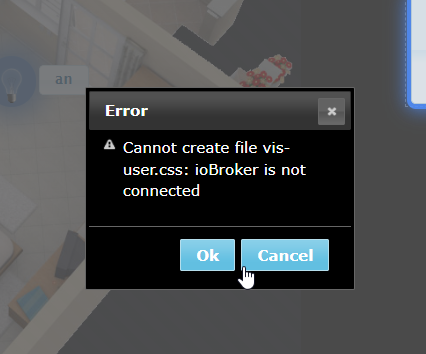



Hey! Du scheinst an dieser Unterhaltung interessiert zu sein, hast aber noch kein Konto.
Hast du es satt, bei jedem Besuch durch die gleichen Beiträge zu scrollen? Wenn du dich für ein Konto anmeldest, kommst du immer genau dorthin zurück, wo du zuvor warst, und kannst dich über neue Antworten benachrichtigen lassen (entweder per E-Mail oder Push-Benachrichtigung). Du kannst auch Lesezeichen speichern und Beiträge positiv bewerten, um anderen Community-Mitgliedern deine Wertschätzung zu zeigen.
Mit deinem Input könnte dieser Beitrag noch besser werden 💗
Registrieren Anmelden469
Online33.0k
Benutzer83.6k
Themen1.3m
Beiträge