




[gelöst] Upgrade einer vernachlässigten ioBroker Inst.
-
@cocomp sagte in Upgrade einer vernachlässigten ioBroker Installation:
iob nodejs-update
sudo reboot
iob update
iob upgrade all
iob stop
iob upgrade self
iob start
Und dann nochmal
iob diagda ist nach dem ersten Schritt was schiefgelaufen, scheint es....
ioBroker nodejs updater 2023-10-13 Recommended nodejs-version is: 16.20.2 Checking your installation now. Please be patient! Your current setup is: /usr/bin/node v16.18.0 /usr/bin/npm 8.19.2 /usr/bin/npx 8.19.2 /usr/bin/corepack 0.14.1 We found these nodejs versions available for installation: nodejs: Installed: 16.18.0-deb-1nodesource1 Candidate: 16.20.2-deb-1nodesource1 Version table: 16.20.2-deb-1nodesource1 500 500 https://deb.nodesource.com/node_16.x bullseye/main armhf Packages *** 16.18.0-deb-1nodesource1 100 100 /var/lib/dpkg/status 12.22.12~dfsg-1~deb11u4 500 500 http://raspbian.raspberrypi.org/raspbian bullseye/main armhf Packages Nothing to do - Your installation is using the correct paths. You are running nodejs v16.18.0. Do you want to install recommended version 16.20.2? Press <y> to continue or any other key to quit Trying to update your installation now. Please be patient. Waiting for ioBroker to shut down - Give me a minute... ############################################################ *** These repos are active on your system: Hit:1 http://raspbian.raspberrypi.org/raspbian bullseye InRelease Hit:2 http://archive.raspberrypi.org/debian bullseye InRelease Reading package lists... Done *** Installing ca-certificates, curl and gnupg, just in case they are missing. (Reading database ... 53643 files and directories currently installed.) Preparing to unpack .../curl_7.74.0-1.3+deb11u11_armhf.deb ... Unpacking curl (7.74.0-1.3+deb11u11) over (7.74.0-1.3+deb11u3) ... Preparing to unpack .../libcurl4_7.74.0-1.3+deb11u11_armhf.deb ... Unpacking libcurl4:armhf (7.74.0-1.3+deb11u11) over (7.74.0-1.3+deb11u3) ... Setting up libcurl4:armhf (7.74.0-1.3+deb11u11) ... Setting up curl (7.74.0-1.3+deb11u11) ... Processing triggers for man-db (2.9.4-2) ... Processing triggers for libc-bin (2.31-13+rpt2+rpi1+deb11u4) ... *** Creating new /etc/apt/sources.list.d/nodesource.list and pinning source deb [signed-by=/etc/apt/keyrings/nodesource.gpg] https://deb.nodesource.com/node_18.x nodistro main Package: nodejs Pin: origin deb.nodesource.com Pin-Priority: 1001 *** These repos are active after the adjustments: Hit:1 http://archive.raspberrypi.org/debian bullseye InRelease Hit:2 http://raspbian.raspberrypi.org/raspbian bullseye InRelease Get:3 https://deb.nodesource.com/node_18.x nodistro InRelease [12.1 kB] Get:4 https://deb.nodesource.com/node_18.x nodistro/main armhf Packages [7097 B] Fetched 19.2 kB in 2s (8129 B/s) Reading package lists... Done Installing the recommended nodejs version now! /home/iobroker/.nodejs-update.sh: line 329: [: : integer expression expected /home/iobroker/.nodejs-update.sh: line 346: [: : integer expression expected Installing the recommended nodejs version! E: Failed to fetch http://archive.raspberrypi.org/debian/pool/main/f/firmware-nonfree/firmware-libertas_20230210-5%7ebpo11%2b1%2brpt2_all.deb Error reading from server. Remote end closed connection [IP: 46.235.230.122 80] E: Unable to fetch some archives, maybe run apt-get update or try with --fix-missing? We tried our best to update or fix your nodejs. Please run iob diag again to verify. -
da ist nach dem ersten Schritt was schiefgelaufen, scheint es....
ioBroker nodejs updater 2023-10-13 Recommended nodejs-version is: 16.20.2 Checking your installation now. Please be patient! Your current setup is: /usr/bin/node v16.18.0 /usr/bin/npm 8.19.2 /usr/bin/npx 8.19.2 /usr/bin/corepack 0.14.1 We found these nodejs versions available for installation: nodejs: Installed: 16.18.0-deb-1nodesource1 Candidate: 16.20.2-deb-1nodesource1 Version table: 16.20.2-deb-1nodesource1 500 500 https://deb.nodesource.com/node_16.x bullseye/main armhf Packages *** 16.18.0-deb-1nodesource1 100 100 /var/lib/dpkg/status 12.22.12~dfsg-1~deb11u4 500 500 http://raspbian.raspberrypi.org/raspbian bullseye/main armhf Packages Nothing to do - Your installation is using the correct paths. You are running nodejs v16.18.0. Do you want to install recommended version 16.20.2? Press <y> to continue or any other key to quit Trying to update your installation now. Please be patient. Waiting for ioBroker to shut down - Give me a minute... ############################################################ *** These repos are active on your system: Hit:1 http://raspbian.raspberrypi.org/raspbian bullseye InRelease Hit:2 http://archive.raspberrypi.org/debian bullseye InRelease Reading package lists... Done *** Installing ca-certificates, curl and gnupg, just in case they are missing. (Reading database ... 53643 files and directories currently installed.) Preparing to unpack .../curl_7.74.0-1.3+deb11u11_armhf.deb ... Unpacking curl (7.74.0-1.3+deb11u11) over (7.74.0-1.3+deb11u3) ... Preparing to unpack .../libcurl4_7.74.0-1.3+deb11u11_armhf.deb ... Unpacking libcurl4:armhf (7.74.0-1.3+deb11u11) over (7.74.0-1.3+deb11u3) ... Setting up libcurl4:armhf (7.74.0-1.3+deb11u11) ... Setting up curl (7.74.0-1.3+deb11u11) ... Processing triggers for man-db (2.9.4-2) ... Processing triggers for libc-bin (2.31-13+rpt2+rpi1+deb11u4) ... *** Creating new /etc/apt/sources.list.d/nodesource.list and pinning source deb [signed-by=/etc/apt/keyrings/nodesource.gpg] https://deb.nodesource.com/node_18.x nodistro main Package: nodejs Pin: origin deb.nodesource.com Pin-Priority: 1001 *** These repos are active after the adjustments: Hit:1 http://archive.raspberrypi.org/debian bullseye InRelease Hit:2 http://raspbian.raspberrypi.org/raspbian bullseye InRelease Get:3 https://deb.nodesource.com/node_18.x nodistro InRelease [12.1 kB] Get:4 https://deb.nodesource.com/node_18.x nodistro/main armhf Packages [7097 B] Fetched 19.2 kB in 2s (8129 B/s) Reading package lists... Done Installing the recommended nodejs version now! /home/iobroker/.nodejs-update.sh: line 329: [: : integer expression expected /home/iobroker/.nodejs-update.sh: line 346: [: : integer expression expected Installing the recommended nodejs version! E: Failed to fetch http://archive.raspberrypi.org/debian/pool/main/f/firmware-nonfree/firmware-libertas_20230210-5%7ebpo11%2b1%2brpt2_all.deb Error reading from server. Remote end closed connection [IP: 46.235.230.122 80] E: Unable to fetch some archives, maybe run apt-get update or try with --fix-missing? We tried our best to update or fix your nodejs. Please run iob diag again to verify.sudo apt update sudo apt full-upgrade -
sudo apt update sudo apt full-upgrade@thomas-braun said in Upgrade einer vernachlässigten ioBroker Installation:
sudo apt update sudo apt full-upgradevor
iob update iob upgrade all iob stop iob upgrade self iob startoder danach?
-
@thomas-braun said in Upgrade einer vernachlässigten ioBroker Installation:
sudo apt update
sudo apt full-upgrade
vor
iob update
iob upgrade all
iob stop
iob upgrade self
iob start
oder danach?
Davor.
-
Davor.
-
und danach
sudo rebootund dann den Block komplett nochmal?
iob nodejs-update sudo reboot iob update iob upgrade all iob stop iob upgrade self iob startDanach sollte ein
iob nodejs-updatevermelden, dass alles i.O. ist.
Dann kann man sich um den ioBroker kümmern. -
Danach sollte ein
iob nodejs-updatevermelden, dass alles i.O. ist.
Dann kann man sich um den ioBroker kümmern.Scheint durchgelaufen zu sein...arbeite jetzt mal die nächsten Schritte ab.
iob update iob upgrade all iob stop iob upgrade self iob start -
Scheint durchgelaufen zu sein...arbeite jetzt mal die nächsten Schritte ab.
iob update iob upgrade all iob stop iob upgrade self iob startSo, scheint erfolgreich durchgelaufen zu sein. Nur der Smartmeter-Adapter steht auf gelb, weil er keine Verbindung zum Lesekopf zu haben scheint. War kurz auf grün und dann wieder auf gelb....
======== Start marking the full check here =========

Skript v.2023-10-10

*** BASE SYSTEM ***
   Static hostname: raspberrypi
         Icon name: computer
  Operating System: Raspbian GNU/Linux 11 (bullseye)
            Kernel: Linux 6.1.21-v7+
      Architecture: arm

Model           : Raspberry Pi 2 Model B Rev 1.1
Docker          : false
Virtualization  : none
Kernel          : armv7l
Userland        : armhf

Systemuptime and Load:
 21:14:18 up 23 min,  1 user,  load average: 6.49, 3.85, 2.97
CPU threads: 4


*** RASPBERRY THROTTLING ***
Current issues:
No throttling issues detected.

Previously detected issues:
No throttling issues detected.

*** Time and Time Zones ***
               Local time: Wed 2024-02-14 21:14:19 CET
           Universal time: Wed 2024-02-14 20:14:19 UTC
                 RTC time: n/a
                Time zone: Europe/Berlin (CET, +0100)
System clock synchronized: yes
              NTP service: active
          RTC in local TZ: no

*** User and Groups ***
pi
/home/pi
pi adm dialout cdrom sudo audio video plugdev games users input render netdev gpio i2c spi iobroker

*** X-Server-Setup ***
X-Server:       false
Desktop:
Terminal:       tty
Boot Target:    multi-user.target

*** MEMORY ***
               total        used        free      shared  buff/cache   available
Mem:            921M        514M        150M        0.0K        256M        347M
Swap:            99M         17M         82M
Total:          1.0G        532M        232M

          921 M total memory
          514 M used memory
          141 M active memory
          548 M inactive memory
          150 M free memory
           38 M buffer memory
          218 M swap cache
           99 M total swap
           17 M used swap
           82 M free swap

Raspberry only:
oom events: 0
lifetime oom required: 0 Mbytes
total time in oom handler: 0 ms
max time spent in oom handler: 0 ms

*** FAILED SERVICES ***

  UNIT LOAD ACTIVE SUB DESCRIPTION
0 loaded units listed.

*** FILESYSTEM ***
Filesystem     Type      Size  Used Avail Use% Mounted on
/dev/root      ext4       29G  3.6G   25G  13% /
devtmpfs       devtmpfs  333M     0  333M   0% /dev
tmpfs          tmpfs     461M     0  461M   0% /dev/shm
tmpfs          tmpfs     185M  940K  184M   1% /run
tmpfs          tmpfs     5.0M  4.0K  5.0M   1% /run/lock
/dev/mmcblk0p1 vfat      255M   51M  205M  20% /boot
tmpfs          tmpfs      93M     0   93M   0% /run/user/1000

Messages concerning ext4 filesystem in dmesg:
[Wed Feb 14 20:51:00 2024] Kernel command line: coherent_pool=1M snd_bcm2835.enable_headphones=0 snd_bcm2835.enable_headphones=1 snd_bcm2835.enable_hdmi=1 snd_bcm2835.enable_hdmi=0 video=Composite-1:720x480@60i vc_mem.mem_base=0x3ec00000 vc_mem.mem_size=0x40000000  console=ttyAMA0,115200 console=tty1 root=PARTUUID=6bc33173-02 rootfstype=ext4 fsck.repair=yes rootwait
[Wed Feb 14 20:51:04 2024] EXT4-fs (mmcblk0p2): mounted filesystem with ordered data mode. Quota mode: none.
[Wed Feb 14 20:51:04 2024] VFS: Mounted root (ext4 filesystem) readonly on device 179:2.
[Wed Feb 14 20:51:09 2024] EXT4-fs (mmcblk0p2): re-mounted. Quota mode: none.

Show mounted filesystems \(real ones only\):
TARGET  SOURCE         FSTYPE OPTIONS
/       /dev/mmcblk0p2 ext4   rw,noatime
`-/boot /dev/mmcblk0p1 vfat   rw,relatime,fmask=0022,dmask=0022,codepage=437,iocharset=ascii,shortname=mixed,errors=remount-ro

Files in neuralgic directories:

/var:
1.3G    /var/
707M    /var/log
705M    /var/log/journal/21286045b254429896948513200b4631
705M    /var/log/journal
377M    /var/cache

Archived and active journals take up 704.1M in the file system.

/opt/iobroker/backups:
38M     /opt/iobroker/backups/

/opt/iobroker/iobroker-data:
99M     /opt/iobroker/iobroker-data/
46M     /opt/iobroker/iobroker-data/files
37M     /opt/iobroker/iobroker-data/backup-objects
31M     /opt/iobroker/iobroker-data/files/modbus.admin/static/js
31M     /opt/iobroker/iobroker-data/files/modbus.admin/static

The five largest files in iobroker-data are:
22M     /opt/iobroker/iobroker-data/files/modbus.admin/static/js/main.578d79d9.js.map
11M     /opt/iobroker/iobroker-data/objects.jsonl
8.8M    /opt/iobroker/iobroker-data/files/modbus.admin/static/js/main.578d79d9.js
6.3M    /opt/iobroker/iobroker-data/files/admin.admin/custom/static/js/vendors-node_modules_iobroker_adapter-react-v5_assets_devices_parseNames_js-node_modules_iobr-99c23e.847b8ad9.chunk.js.map
4.7M    /opt/iobroker/iobroker-data/states.jsonl

USB-Devices by-id:
USB-Sticks -  Avoid direct links to /dev/* in your adapter setups, please always prefer the links 'by-id':

/dev/serial/by-id/usb-Silicon_Labs_CP2102N_USB_to_UART_Bridge_Controller_383ea6098193eb1196abdcc77d11dc1e-if00-port0
/dev/serial/by-id/usb-FTDI_FT232R_USB_UART_A103R2XZ-if00-port0

*** NodeJS-Installation ***

/usr/bin/nodejs         v18.19.0
/usr/bin/node           v18.19.0
/usr/bin/npm            10.2.3
/usr/bin/npx            10.2.3
/usr/bin/corepack       0.22.0


nodejs:
  Installed: 18.19.0-1nodesource1
  Candidate: 18.19.0-1nodesource1
  Version table:
 *** 18.19.0-1nodesource1 1001
        500 https://deb.nodesource.com/node_18.x nodistro/main armhf Packages
        100 /var/lib/dpkg/status
     18.18.2-1nodesource1 1001
        500 https://deb.nodesource.com/node_18.x nodistro/main armhf Packages
     18.18.1-1nodesource1 1001
        500 https://deb.nodesource.com/node_18.x nodistro/main armhf Packages
     18.18.0-1nodesource1 1001
        500 https://deb.nodesource.com/node_18.x nodistro/main armhf Packages
     18.17.1-1nodesource1 1001
        500 https://deb.nodesource.com/node_18.x nodistro/main armhf Packages
     18.17.0-1nodesource1 1001
        500 https://deb.nodesource.com/node_18.x nodistro/main armhf Packages
     18.16.1-1nodesource1 1001
        500 https://deb.nodesource.com/node_18.x nodistro/main armhf Packages
     18.16.0-1nodesource1 1001
        500 https://deb.nodesource.com/node_18.x nodistro/main armhf Packages
     18.15.0-1nodesource1 1001
        500 https://deb.nodesource.com/node_18.x nodistro/main armhf Packages
     18.14.2-1nodesource1 1001
        500 https://deb.nodesource.com/node_18.x nodistro/main armhf Packages
     18.14.1-1nodesource1 1001
        500 https://deb.nodesource.com/node_18.x nodistro/main armhf Packages
     18.14.0-1nodesource1 1001
        500 https://deb.nodesource.com/node_18.x nodistro/main armhf Packages
     18.13.0-1nodesource1 1001
        500 https://deb.nodesource.com/node_18.x nodistro/main armhf Packages
     18.12.0-1nodesource1 1001
        500 https://deb.nodesource.com/node_18.x nodistro/main armhf Packages
     18.11.0-1nodesource1 1001
        500 https://deb.nodesource.com/node_18.x nodistro/main armhf Packages
     18.10.0-1nodesource1 1001
        500 https://deb.nodesource.com/node_18.x nodistro/main armhf Packages
     18.9.1-1nodesource1 1001
        500 https://deb.nodesource.com/node_18.x nodistro/main armhf Packages
     18.9.0-1nodesource1 1001
        500 https://deb.nodesource.com/node_18.x nodistro/main armhf Packages
     18.8.0-1nodesource1 1001
        500 https://deb.nodesource.com/node_18.x nodistro/main armhf Packages
     18.7.0-1nodesource1 1001
        500 https://deb.nodesource.com/node_18.x nodistro/main armhf Packages
     18.6.0-1nodesource1 1001
        500 https://deb.nodesource.com/node_18.x nodistro/main armhf Packages
     18.5.0-1nodesource1 1001
        500 https://deb.nodesource.com/node_18.x nodistro/main armhf Packages
     18.4.0-1nodesource1 1001
        500 https://deb.nodesource.com/node_18.x nodistro/main armhf Packages
     18.3.0-1nodesource1 1001
        500 https://deb.nodesource.com/node_18.x nodistro/main armhf Packages
     18.2.0-1nodesource1 1001
        500 https://deb.nodesource.com/node_18.x nodistro/main armhf Packages
     18.1.0-1nodesource1 1001
        500 https://deb.nodesource.com/node_18.x nodistro/main armhf Packages
     18.0.0-1nodesource1 1001
        500 https://deb.nodesource.com/node_18.x nodistro/main armhf Packages
     12.22.12~dfsg-1~deb11u4 500
        500 http://raspbian.raspberrypi.org/raspbian bullseye/main armhf Packages

Temp directories causing npm8 problem: 0
No problems detected

Errors in npm tree:

*** ioBroker-Installation ***

ioBroker Status
iobroker is running on this host.


Objects type: jsonl
States  type: jsonl

Core adapters versions
js-controller:  5.0.17
admin:          6.13.16
javascript:     "javascript" not found

Adapters from github:   0

Adapter State
+ system.adapter.admin.0                  : admin                 : raspberrypi                              -  enabled, port: 8081, bind: 0.0.0.0, run as: admin
+ system.adapter.backitup.0               : backitup              : raspberrypi                              -  enabled
+ system.adapter.discovery.0              : discovery             : raspberrypi                              -  enabled
+ system.adapter.influxdb.0               : influxdb              : raspberrypi                              -  enabled, port: 8086
+ system.adapter.influxdb.1               : influxdb              : raspberrypi                              -  enabled, port: 8086
+ system.adapter.influxdb.2               : influxdb              : raspberrypi                              -  enabled, port: 8086
+ system.adapter.jeelink.0                : jeelink               : raspberrypi                              -  enabled
+ system.adapter.loxone.0                 : loxone                : raspberrypi                              -  enabled, port: 80
+ system.adapter.node-red.0               : node-red              : raspberrypi                              -  enabled, port: 1880, bind: 0.0.0.0
+ system.adapter.plenticore.0             : plenticore            : raspberrypi                              -  enabled, port: 443
+ system.adapter.smartmeter.0             : smartmeter            : raspberrypi                              -  enabled

+ instance is alive

Enabled adapters with bindings
+ system.adapter.admin.0                  : admin                 : raspberrypi                              -  enabled, port: 8081, bind: 0.0.0.0, run as: admin
+ system.adapter.influxdb.0               : influxdb              : raspberrypi                              -  enabled, port: 8086
+ system.adapter.influxdb.1               : influxdb              : raspberrypi                              -  enabled, port: 8086
+ system.adapter.influxdb.2               : influxdb              : raspberrypi                              -  enabled, port: 8086
+ system.adapter.loxone.0                 : loxone                : raspberrypi                              -  enabled, port: 80
+ system.adapter.node-red.0               : node-red              : raspberrypi                              -  enabled, port: 1880, bind: 0.0.0.0
+ system.adapter.plenticore.0             : plenticore            : raspberrypi                              -  enabled, port: 443

ioBroker-Repositories
stable        : http://download.iobroker.net/sources-dist.json
beta          : http://download.iobroker.net/sources-dist-latest.json

Active repo(s): stable

Installed ioBroker-Instances
Used repository: stable
Adapter    "admin"        : 6.13.16  , installed 6.13.16
Adapter    "backitup"     : 2.9.8    , installed 2.9.8
Adapter    "discovery"    : 4.2.0    , installed 4.2.0
Adapter    "influxdb"     : 4.0.2    , installed 4.0.2
Adapter    "jeelink"      : 1.2.3    , installed 1.2.3
Controller "js-controller": 5.0.17   , installed 5.0.17
Adapter    "loxone"       : 3.0.1    , installed 3.0.1
Adapter    "modbus"       : 6.1.0    , installed 6.1.0
Adapter    "node-red"     : 5.1.0    , installed 5.1.0
Adapter    "plenticore"   : 2.2.0    , installed 2.2.0
Adapter    "smartmeter"   : 3.4.0    , installed 3.4.0

Objects and States
Please stand by - This may take a while
Objects:        2443
States:         1742

*** OS-Repositories and Updates ***
Hit:1 http://raspbian.raspberrypi.org/raspbian bullseye InRelease
Hit:2 http://archive.raspberrypi.org/debian bullseye InRelease
Hit:3 https://deb.nodesource.com/node_18.x nodistro InRelease
Reading package lists...
Pending Updates: 0

*** Listening Ports ***
Active Internet connections (only servers)
Proto Recv-Q Send-Q Local Address           Foreign Address         State       User       Inode      PID/Program name

tcp        0      0 0.0.0.0:1880            0.0.0.0:*               LISTEN      1001       18352      2444/node-red

tcp        0      0 127.0.0.1:9001          0.0.0.0:*               LISTEN      1001       18626      2382/iobroker.js-co
tcp        0      0 127.0.0.1:9000          0.0.0.0:*               LISTEN      1001       18062      2382/iobroker.js-co
tcp        0      0 0.0.0.0:22              0.0.0.0:*               LISTEN      0          1861       475/sshd: /usr/sbin
tcp6       0      0 :::8081                 :::*                    LISTEN      1001       18743      2400/io.admin.0

tcp6       0      0 :::22                   :::*                    LISTEN      0          1863       475/sshd: /usr/sbin
udp        0      0 0.0.0.0:33645           0.0.0.0:*                           108        597        354/avahi-daemon: r
udp        0      0 0.0.0.0:68              0.0.0.0:*                           0          12487      533/dhcpcd

udp        0      0 0.0.0.0:5353            0.0.0.0:*                           108        595        354/avahi-daemon: r
udp6       0      0 :::45120                :::*                                108        598        354/avahi-daemon: r
udp6       0      0 :::5353                 :::*                                108        596        354/avahi-daemon: r

*** Log File - Last 25 Lines ***

2024-02-14 21:14:15.898  - info: plenticore.0 (2560) Configured Wp of panel(s) is 0
2024-02-14 21:14:15.911  - info: plenticore.0 (2560) [INFO] Configured polling interval: 20000
2024-02-14 21:14:16.778  - info: loxone.0 (2503) starting. Version 3.0.1 in /opt/iobroker/node_modules/iobroker.loxone, node: v18.19.0, js-controller: 5.0.17
2024-02-14 21:14:17.749  - info: backitup.0 (2525) starting. Version 2.9.8 in /opt/iobroker/node_modules/iobroker.backitup, node: v18.19.0, js-controller: 5.0.17
2024-02-14 21:14:18.400  - info: smartmeter.0 (2491) Received 14 values, 14 updated
2024-02-14 21:14:18.608  - info: backitup.0 (2525) [iobroker] backup will be activated at 02:40 every 1 day(s)
2024-02-14 21:14:20.229  - info: loxone.0 (2503) Trying to connect
2024-02-14 21:14:22.354  - info: loxone.0 (2503) got structure file; last modified on 2024-02-12 17:02:50
2024-02-14 21:14:22.773  - info: plenticore.0 (2560) Not enabling forecast data.
2024-02-14 21:14:22.783  - info: plenticore.0 (2560) Not enabling MinSoC forecast data.
2024-02-14 21:14:29.736  - info: loxone.0 (2503) Unsupported device control CarCharger
2024-02-14 21:14:33.278  - info: loxone.0 (2503) Unsupported device control IRoomController
2024-02-14 21:14:35.286  - info: loxone.0 (2503) Unsupported device control IRoomController
2024-02-14 21:14:37.782  - info: loxone.0 (2503) Unsupported device control IRoomController
2024-02-14 21:14:46.993  - info: loxone.0 (2503) Unsupported device control LeftRightAnalog
2024-02-14 21:14:49.187  - info: loxone.0 (2503) Unsupported device control LeftRightAnalog
2024-02-14 21:14:49.674  - info: loxone.0 (2503) Unsupported device control LeftRightAnalog
2024-02-14 21:14:59.027  - info: loxone.0 (2503) Unsupported device control IRoomController
2024-02-14 21:15:00.877  - info: loxone.0 (2503) Unsupported device control IRoomController
2024-02-14 21:15:07.012  - info: loxone.0 (2503) Unsupported device control LeftRightAnalog
2024-02-14 21:15:09.131  - info: loxone.0 (2503) Unsupported device control EFM
2024-02-14 21:15:09.810  - info: loxone.0 (2503) Unsupported device control EnergyManager2
2024-02-14 21:15:29.582  - info: loxone.0 (2503) State value to set for "loxone.0.10998e53-004d-364a-ffff145cea42a008.sceneList" has to be stringified but received type "object"
2024-02-14 21:16:21.871  - info: smartmeter.0 (2491) Error: No or too long answer from Serial Device after last request.
2024-02-14 21:16:21.875  - warn: smartmeter.0 (2491) No or too long answer from Serial Device after last request.

============ Mark until here for C&P =============
und hier die Summary
======================= SUMMARY =======================
                        v.2023-10-10


   Static hostname: raspberrypi
         Icon name: computer
  Operating System: Raspbian GNU/Linux 11 (bullseye)
            Kernel: Linux 6.1.21-v7+
      Architecture: arm

Installation:           native
Kernel:                 armv7l
Userland:               armhf
Timezone:               Europe/Berlin (CET, +0100)
User-ID:                1000
X-Server:               false
Boot Target:            multi-user.target

Pending OS-Updates:     0
Pending iob updates:    0

Nodejs-Installation:    /usr/bin/nodejs         v18.19.0
                        /usr/bin/node           v18.19.0
                        /usr/bin/npm            10.2.3
                        /usr/bin/npx            10.2.3
                        /usr/bin/corepack       0.22.0

Recommended versions are nodejs  and npm
Your nodejs installation is correct

MEMORY:
               total        used        free      shared  buff/cache   available
Mem:            921M        488M        135M        0.0K        298M        372M
Swap:            99M         65M         34M
Total:          1.0G        553M        169M

Active iob-Instances:   12
Active repo(s): stable

ioBroker Core:          js-controller           5.0.17
                        admin                   6.13.16

ioBroker Status:        iobroker is running on this host.


Objects type: jsonl
States  type: jsonl

Status admin and web instance:
+ system.adapter.admin.0                  : admin                 : raspberrypi                              -  enabled, port: 8081, bind: 0.0.0.0, run as: admin

Objects:                2443
States:                 1742

Size of iob-Database:

12M     /opt/iobroker/iobroker-data/objects.jsonl
5.4M    /opt/iobroker/iobroker-data/states.jsonl


=================== END OF SUMMARY ====================
Fällt dir etwas "krummes" auf?
node.js scheint jetzt auf 18.19 zu sein.
-
So, scheint erfolgreich durchgelaufen zu sein. Nur der Smartmeter-Adapter steht auf gelb, weil er keine Verbindung zum Lesekopf zu haben scheint. War kurz auf grün und dann wieder auf gelb....
======== Start marking the full check here =========

Skript v.2023-10-10

*** BASE SYSTEM ***
   Static hostname: raspberrypi
         Icon name: computer
  Operating System: Raspbian GNU/Linux 11 (bullseye)
            Kernel: Linux 6.1.21-v7+
      Architecture: arm

Model           : Raspberry Pi 2 Model B Rev 1.1
Docker          : false
Virtualization  : none
Kernel          : armv7l
Userland        : armhf

Systemuptime and Load:
 21:14:18 up 23 min,  1 user,  load average: 6.49, 3.85, 2.97
CPU threads: 4


*** RASPBERRY THROTTLING ***
Current issues:
No throttling issues detected.

Previously detected issues:
No throttling issues detected.

*** Time and Time Zones ***
               Local time: Wed 2024-02-14 21:14:19 CET
           Universal time: Wed 2024-02-14 20:14:19 UTC
                 RTC time: n/a
                Time zone: Europe/Berlin (CET, +0100)
System clock synchronized: yes
              NTP service: active
          RTC in local TZ: no

*** User and Groups ***
pi
/home/pi
pi adm dialout cdrom sudo audio video plugdev games users input render netdev gpio i2c spi iobroker

*** X-Server-Setup ***
X-Server:       false
Desktop:
Terminal:       tty
Boot Target:    multi-user.target

*** MEMORY ***
               total        used        free      shared  buff/cache   available
Mem:            921M        514M        150M        0.0K        256M        347M
Swap:            99M         17M         82M
Total:          1.0G        532M        232M

          921 M total memory
          514 M used memory
          141 M active memory
          548 M inactive memory
          150 M free memory
           38 M buffer memory
          218 M swap cache
           99 M total swap
           17 M used swap
           82 M free swap

Raspberry only:
oom events: 0
lifetime oom required: 0 Mbytes
total time in oom handler: 0 ms
max time spent in oom handler: 0 ms

*** FAILED SERVICES ***

  UNIT LOAD ACTIVE SUB DESCRIPTION
0 loaded units listed.

*** FILESYSTEM ***
Filesystem     Type      Size  Used Avail Use% Mounted on
/dev/root      ext4       29G  3.6G   25G  13% /
devtmpfs       devtmpfs  333M     0  333M   0% /dev
tmpfs          tmpfs     461M     0  461M   0% /dev/shm
tmpfs          tmpfs     185M  940K  184M   1% /run
tmpfs          tmpfs     5.0M  4.0K  5.0M   1% /run/lock
/dev/mmcblk0p1 vfat      255M   51M  205M  20% /boot
tmpfs          tmpfs      93M     0   93M   0% /run/user/1000

Messages concerning ext4 filesystem in dmesg:
[Wed Feb 14 20:51:00 2024] Kernel command line: coherent_pool=1M snd_bcm2835.enable_headphones=0 snd_bcm2835.enable_headphones=1 snd_bcm2835.enable_hdmi=1 snd_bcm2835.enable_hdmi=0 video=Composite-1:720x480@60i vc_mem.mem_base=0x3ec00000 vc_mem.mem_size=0x40000000  console=ttyAMA0,115200 console=tty1 root=PARTUUID=6bc33173-02 rootfstype=ext4 fsck.repair=yes rootwait
[Wed Feb 14 20:51:04 2024] EXT4-fs (mmcblk0p2): mounted filesystem with ordered data mode. Quota mode: none.
[Wed Feb 14 20:51:04 2024] VFS: Mounted root (ext4 filesystem) readonly on device 179:2.
[Wed Feb 14 20:51:09 2024] EXT4-fs (mmcblk0p2): re-mounted. Quota mode: none.

Show mounted filesystems \(real ones only\):
TARGET  SOURCE         FSTYPE OPTIONS
/       /dev/mmcblk0p2 ext4   rw,noatime
`-/boot /dev/mmcblk0p1 vfat   rw,relatime,fmask=0022,dmask=0022,codepage=437,iocharset=ascii,shortname=mixed,errors=remount-ro

Files in neuralgic directories:

/var:
1.3G    /var/
707M    /var/log
705M    /var/log/journal/21286045b254429896948513200b4631
705M    /var/log/journal
377M    /var/cache

Archived and active journals take up 704.1M in the file system.

/opt/iobroker/backups:
38M     /opt/iobroker/backups/

/opt/iobroker/iobroker-data:
99M     /opt/iobroker/iobroker-data/
46M     /opt/iobroker/iobroker-data/files
37M     /opt/iobroker/iobroker-data/backup-objects
31M     /opt/iobroker/iobroker-data/files/modbus.admin/static/js
31M     /opt/iobroker/iobroker-data/files/modbus.admin/static

The five largest files in iobroker-data are:
22M     /opt/iobroker/iobroker-data/files/modbus.admin/static/js/main.578d79d9.js.map
11M     /opt/iobroker/iobroker-data/objects.jsonl
8.8M    /opt/iobroker/iobroker-data/files/modbus.admin/static/js/main.578d79d9.js
6.3M    /opt/iobroker/iobroker-data/files/admin.admin/custom/static/js/vendors-node_modules_iobroker_adapter-react-v5_assets_devices_parseNames_js-node_modules_iobr-99c23e.847b8ad9.chunk.js.map
4.7M    /opt/iobroker/iobroker-data/states.jsonl

USB-Devices by-id:
USB-Sticks -  Avoid direct links to /dev/* in your adapter setups, please always prefer the links 'by-id':

/dev/serial/by-id/usb-Silicon_Labs_CP2102N_USB_to_UART_Bridge_Controller_383ea6098193eb1196abdcc77d11dc1e-if00-port0
/dev/serial/by-id/usb-FTDI_FT232R_USB_UART_A103R2XZ-if00-port0

*** NodeJS-Installation ***

/usr/bin/nodejs         v18.19.0
/usr/bin/node           v18.19.0
/usr/bin/npm            10.2.3
/usr/bin/npx            10.2.3
/usr/bin/corepack       0.22.0


nodejs:
  Installed: 18.19.0-1nodesource1
  Candidate: 18.19.0-1nodesource1
  Version table:
 *** 18.19.0-1nodesource1 1001
        500 https://deb.nodesource.com/node_18.x nodistro/main armhf Packages
        100 /var/lib/dpkg/status
     18.18.2-1nodesource1 1001
        500 https://deb.nodesource.com/node_18.x nodistro/main armhf Packages
     18.18.1-1nodesource1 1001
        500 https://deb.nodesource.com/node_18.x nodistro/main armhf Packages
     18.18.0-1nodesource1 1001
        500 https://deb.nodesource.com/node_18.x nodistro/main armhf Packages
     18.17.1-1nodesource1 1001
        500 https://deb.nodesource.com/node_18.x nodistro/main armhf Packages
     18.17.0-1nodesource1 1001
        500 https://deb.nodesource.com/node_18.x nodistro/main armhf Packages
     18.16.1-1nodesource1 1001
        500 https://deb.nodesource.com/node_18.x nodistro/main armhf Packages
     18.16.0-1nodesource1 1001
        500 https://deb.nodesource.com/node_18.x nodistro/main armhf Packages
     18.15.0-1nodesource1 1001
        500 https://deb.nodesource.com/node_18.x nodistro/main armhf Packages
     18.14.2-1nodesource1 1001
        500 https://deb.nodesource.com/node_18.x nodistro/main armhf Packages
     18.14.1-1nodesource1 1001
        500 https://deb.nodesource.com/node_18.x nodistro/main armhf Packages
     18.14.0-1nodesource1 1001
        500 https://deb.nodesource.com/node_18.x nodistro/main armhf Packages
     18.13.0-1nodesource1 1001
        500 https://deb.nodesource.com/node_18.x nodistro/main armhf Packages
     18.12.0-1nodesource1 1001
        500 https://deb.nodesource.com/node_18.x nodistro/main armhf Packages
     18.11.0-1nodesource1 1001
        500 https://deb.nodesource.com/node_18.x nodistro/main armhf Packages
     18.10.0-1nodesource1 1001
        500 https://deb.nodesource.com/node_18.x nodistro/main armhf Packages
     18.9.1-1nodesource1 1001
        500 https://deb.nodesource.com/node_18.x nodistro/main armhf Packages
     18.9.0-1nodesource1 1001
        500 https://deb.nodesource.com/node_18.x nodistro/main armhf Packages
     18.8.0-1nodesource1 1001
        500 https://deb.nodesource.com/node_18.x nodistro/main armhf Packages
     18.7.0-1nodesource1 1001
        500 https://deb.nodesource.com/node_18.x nodistro/main armhf Packages
     18.6.0-1nodesource1 1001
        500 https://deb.nodesource.com/node_18.x nodistro/main armhf Packages
     18.5.0-1nodesource1 1001
        500 https://deb.nodesource.com/node_18.x nodistro/main armhf Packages
     18.4.0-1nodesource1 1001
        500 https://deb.nodesource.com/node_18.x nodistro/main armhf Packages
     18.3.0-1nodesource1 1001
        500 https://deb.nodesource.com/node_18.x nodistro/main armhf Packages
     18.2.0-1nodesource1 1001
        500 https://deb.nodesource.com/node_18.x nodistro/main armhf Packages
     18.1.0-1nodesource1 1001
        500 https://deb.nodesource.com/node_18.x nodistro/main armhf Packages
     18.0.0-1nodesource1 1001
        500 https://deb.nodesource.com/node_18.x nodistro/main armhf Packages
     12.22.12~dfsg-1~deb11u4 500
        500 http://raspbian.raspberrypi.org/raspbian bullseye/main armhf Packages

Temp directories causing npm8 problem: 0
No problems detected

Errors in npm tree:

*** ioBroker-Installation ***

ioBroker Status
iobroker is running on this host.


Objects type: jsonl
States  type: jsonl

Core adapters versions
js-controller:  5.0.17
admin:          6.13.16
javascript:     "javascript" not found

Adapters from github:   0

Adapter State
+ system.adapter.admin.0                  : admin                 : raspberrypi                              -  enabled, port: 8081, bind: 0.0.0.0, run as: admin
+ system.adapter.backitup.0               : backitup              : raspberrypi                              -  enabled
+ system.adapter.discovery.0              : discovery             : raspberrypi                              -  enabled
+ system.adapter.influxdb.0               : influxdb              : raspberrypi                              -  enabled, port: 8086
+ system.adapter.influxdb.1               : influxdb              : raspberrypi                              -  enabled, port: 8086
+ system.adapter.influxdb.2               : influxdb              : raspberrypi                              -  enabled, port: 8086
+ system.adapter.jeelink.0                : jeelink               : raspberrypi                              -  enabled
+ system.adapter.loxone.0                 : loxone                : raspberrypi                              -  enabled, port: 80
+ system.adapter.node-red.0               : node-red              : raspberrypi                              -  enabled, port: 1880, bind: 0.0.0.0
+ system.adapter.plenticore.0             : plenticore            : raspberrypi                              -  enabled, port: 443
+ system.adapter.smartmeter.0             : smartmeter            : raspberrypi                              -  enabled

+ instance is alive

Enabled adapters with bindings
+ system.adapter.admin.0                  : admin                 : raspberrypi                              -  enabled, port: 8081, bind: 0.0.0.0, run as: admin
+ system.adapter.influxdb.0               : influxdb              : raspberrypi                              -  enabled, port: 8086
+ system.adapter.influxdb.1               : influxdb              : raspberrypi                              -  enabled, port: 8086
+ system.adapter.influxdb.2               : influxdb              : raspberrypi                              -  enabled, port: 8086
+ system.adapter.loxone.0                 : loxone                : raspberrypi                              -  enabled, port: 80
+ system.adapter.node-red.0               : node-red              : raspberrypi                              -  enabled, port: 1880, bind: 0.0.0.0
+ system.adapter.plenticore.0             : plenticore            : raspberrypi                              -  enabled, port: 443

ioBroker-Repositories
stable        : http://download.iobroker.net/sources-dist.json
beta          : http://download.iobroker.net/sources-dist-latest.json

Active repo(s): stable

Installed ioBroker-Instances
Used repository: stable
Adapter    "admin"        : 6.13.16  , installed 6.13.16
Adapter    "backitup"     : 2.9.8    , installed 2.9.8
Adapter    "discovery"    : 4.2.0    , installed 4.2.0
Adapter    "influxdb"     : 4.0.2    , installed 4.0.2
Adapter    "jeelink"      : 1.2.3    , installed 1.2.3
Controller "js-controller": 5.0.17   , installed 5.0.17
Adapter    "loxone"       : 3.0.1    , installed 3.0.1
Adapter    "modbus"       : 6.1.0    , installed 6.1.0
Adapter    "node-red"     : 5.1.0    , installed 5.1.0
Adapter    "plenticore"   : 2.2.0    , installed 2.2.0
Adapter    "smartmeter"   : 3.4.0    , installed 3.4.0

Objects and States
Please stand by - This may take a while
Objects:        2443
States:         1742

*** OS-Repositories and Updates ***
Hit:1 http://raspbian.raspberrypi.org/raspbian bullseye InRelease
Hit:2 http://archive.raspberrypi.org/debian bullseye InRelease
Hit:3 https://deb.nodesource.com/node_18.x nodistro InRelease
Reading package lists...
Pending Updates: 0

*** Listening Ports ***
Active Internet connections (only servers)
Proto Recv-Q Send-Q Local Address           Foreign Address         State       User       Inode      PID/Program name

tcp        0      0 0.0.0.0:1880            0.0.0.0:*               LISTEN      1001       18352      2444/node-red

tcp        0      0 127.0.0.1:9001          0.0.0.0:*               LISTEN      1001       18626      2382/iobroker.js-co
tcp        0      0 127.0.0.1:9000          0.0.0.0:*               LISTEN      1001       18062      2382/iobroker.js-co
tcp        0      0 0.0.0.0:22              0.0.0.0:*               LISTEN      0          1861       475/sshd: /usr/sbin
tcp6       0      0 :::8081                 :::*                    LISTEN      1001       18743      2400/io.admin.0

tcp6       0      0 :::22                   :::*                    LISTEN      0          1863       475/sshd: /usr/sbin
udp        0      0 0.0.0.0:33645           0.0.0.0:*                           108        597        354/avahi-daemon: r
udp        0      0 0.0.0.0:68              0.0.0.0:*                           0          12487      533/dhcpcd

udp        0      0 0.0.0.0:5353            0.0.0.0:*                           108        595        354/avahi-daemon: r
udp6       0      0 :::45120                :::*                                108        598        354/avahi-daemon: r
udp6       0      0 :::5353                 :::*                                108        596        354/avahi-daemon: r

*** Log File - Last 25 Lines ***

2024-02-14 21:14:15.898  - info: plenticore.0 (2560) Configured Wp of panel(s) is 0
2024-02-14 21:14:15.911  - info: plenticore.0 (2560) [INFO] Configured polling interval: 20000
2024-02-14 21:14:16.778  - info: loxone.0 (2503) starting. Version 3.0.1 in /opt/iobroker/node_modules/iobroker.loxone, node: v18.19.0, js-controller: 5.0.17
2024-02-14 21:14:17.749  - info: backitup.0 (2525) starting. Version 2.9.8 in /opt/iobroker/node_modules/iobroker.backitup, node: v18.19.0, js-controller: 5.0.17
2024-02-14 21:14:18.400  - info: smartmeter.0 (2491) Received 14 values, 14 updated
2024-02-14 21:14:18.608  - info: backitup.0 (2525) [iobroker] backup will be activated at 02:40 every 1 day(s)
2024-02-14 21:14:20.229  - info: loxone.0 (2503) Trying to connect
2024-02-14 21:14:22.354  - info: loxone.0 (2503) got structure file; last modified on 2024-02-12 17:02:50
2024-02-14 21:14:22.773  - info: plenticore.0 (2560) Not enabling forecast data.
2024-02-14 21:14:22.783  - info: plenticore.0 (2560) Not enabling MinSoC forecast data.
2024-02-14 21:14:29.736  - info: loxone.0 (2503) Unsupported device control CarCharger
2024-02-14 21:14:33.278  - info: loxone.0 (2503) Unsupported device control IRoomController
2024-02-14 21:14:35.286  - info: loxone.0 (2503) Unsupported device control IRoomController
2024-02-14 21:14:37.782  - info: loxone.0 (2503) Unsupported device control IRoomController
2024-02-14 21:14:46.993  - info: loxone.0 (2503) Unsupported device control LeftRightAnalog
2024-02-14 21:14:49.187  - info: loxone.0 (2503) Unsupported device control LeftRightAnalog
2024-02-14 21:14:49.674  - info: loxone.0 (2503) Unsupported device control LeftRightAnalog
2024-02-14 21:14:59.027  - info: loxone.0 (2503) Unsupported device control IRoomController
2024-02-14 21:15:00.877  - info: loxone.0 (2503) Unsupported device control IRoomController
2024-02-14 21:15:07.012  - info: loxone.0 (2503) Unsupported device control LeftRightAnalog
2024-02-14 21:15:09.131  - info: loxone.0 (2503) Unsupported device control EFM
2024-02-14 21:15:09.810  - info: loxone.0 (2503) Unsupported device control EnergyManager2
2024-02-14 21:15:29.582  - info: loxone.0 (2503) State value to set for "loxone.0.10998e53-004d-364a-ffff145cea42a008.sceneList" has to be stringified but received type "object"
2024-02-14 21:16:21.871  - info: smartmeter.0 (2491) Error: No or too long answer from Serial Device after last request.
2024-02-14 21:16:21.875  - warn: smartmeter.0 (2491) No or too long answer from Serial Device after last request.

============ Mark until here for C&P =============
und hier die Summary
======================= SUMMARY =======================
                        v.2023-10-10


   Static hostname: raspberrypi
         Icon name: computer
  Operating System: Raspbian GNU/Linux 11 (bullseye)
            Kernel: Linux 6.1.21-v7+
      Architecture: arm

Installation:           native
Kernel:                 armv7l
Userland:               armhf
Timezone:               Europe/Berlin (CET, +0100)
User-ID:                1000
X-Server:               false
Boot Target:            multi-user.target

Pending OS-Updates:     0
Pending iob updates:    0

Nodejs-Installation:    /usr/bin/nodejs         v18.19.0
                        /usr/bin/node           v18.19.0
                        /usr/bin/npm            10.2.3
                        /usr/bin/npx            10.2.3
                        /usr/bin/corepack       0.22.0

Recommended versions are nodejs  and npm
Your nodejs installation is correct

MEMORY:
               total        used        free      shared  buff/cache   available
Mem:            921M        488M        135M        0.0K        298M        372M
Swap:            99M         65M         34M
Total:          1.0G        553M        169M

Active iob-Instances:   12
Active repo(s): stable

ioBroker Core:          js-controller           5.0.17
                        admin                   6.13.16

ioBroker Status:        iobroker is running on this host.


Objects type: jsonl
States  type: jsonl

Status admin and web instance:
+ system.adapter.admin.0                  : admin                 : raspberrypi                              -  enabled, port: 8081, bind: 0.0.0.0, run as: admin

Objects:                2443
States:                 1742

Size of iob-Database:

12M     /opt/iobroker/iobroker-data/objects.jsonl
5.4M    /opt/iobroker/iobroker-data/states.jsonl


=================== END OF SUMMARY ====================
Fällt dir etwas "krummes" auf?
node.js scheint jetzt auf 18.19 zu sein.
-
Merkwürdig, dass der Adapter eine Zeitlang auf "grün" steht, bevor er dann auf "gelb" wechselt.
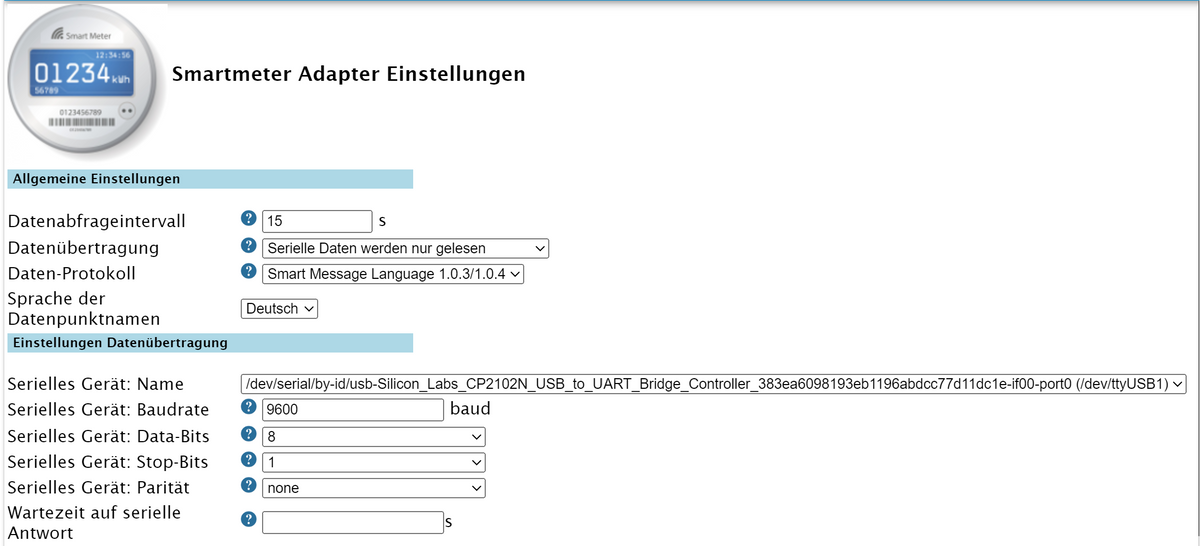
Ich habe den Raspi jetzt mal physisch neu gestartet - und er geht wieder auf gelb...
und das sagt das Protokoll:
smartmeter.0 2024-02-14 21:32:18.164 warn No or too long answer from Serial Device after last request. smartmeter.0 2024-02-14 21:32:18.162 info Error: No or too long answer from Serial Device after last request. smartmeter.0 2024-02-14 21:30:03.148 warn No or too long answer from Serial Device after last request. smartmeter.0 2024-02-14 21:30:03.140 info Error: No or too long answer from Serial Device after last request. smartmeter.0 2024-02-14 21:28:22.511 info List of port: [{"path":"/dev/ttyAMA0"},{"path":"/dev/ttyUSB1","manufacturer":"Silicon Labs","serialNumber":"383ea6098193eb1196abdcc77d11dc1e","pnpId":"usb-Silicon_Labs_CP2102N_USB_to_UART_Bridge_Controller_383ea6098193eb1196abdcc77d11dc1e-if00-port0","vendorId":"10c4","productId":"ea60"},{"path":"/dev/ttyUSB0","manufacturer":"FTDI","serialNumber":"A103R2XZ","pnpId":"usb-FTDI_FT232R_USB_UART_A103R2XZ-if00-port0","vendorId":"0403","productId":"6001"}] -
So, scheint erfolgreich durchgelaufen zu sein. Nur der Smartmeter-Adapter steht auf gelb, weil er keine Verbindung zum Lesekopf zu haben scheint. War kurz auf grün und dann wieder auf gelb....
======== Start marking the full check here =========

Skript v.2023-10-10

*** BASE SYSTEM ***
   Static hostname: raspberrypi
         Icon name: computer
  Operating System: Raspbian GNU/Linux 11 (bullseye)
            Kernel: Linux 6.1.21-v7+
      Architecture: arm

Model           : Raspberry Pi 2 Model B Rev 1.1
Docker          : false
Virtualization  : none
Kernel          : armv7l
Userland        : armhf

Systemuptime and Load:
 21:14:18 up 23 min,  1 user,  load average: 6.49, 3.85, 2.97
CPU threads: 4


*** RASPBERRY THROTTLING ***
Current issues:
No throttling issues detected.

Previously detected issues:
No throttling issues detected.

*** Time and Time Zones ***
               Local time: Wed 2024-02-14 21:14:19 CET
           Universal time: Wed 2024-02-14 20:14:19 UTC
                 RTC time: n/a
                Time zone: Europe/Berlin (CET, +0100)
System clock synchronized: yes
              NTP service: active
          RTC in local TZ: no

*** User and Groups ***
pi
/home/pi
pi adm dialout cdrom sudo audio video plugdev games users input render netdev gpio i2c spi iobroker

*** X-Server-Setup ***
X-Server:       false
Desktop:
Terminal:       tty
Boot Target:    multi-user.target

*** MEMORY ***
               total        used        free      shared  buff/cache   available
Mem:            921M        514M        150M        0.0K        256M        347M
Swap:            99M         17M         82M
Total:          1.0G        532M        232M

          921 M total memory
          514 M used memory
          141 M active memory
          548 M inactive memory
          150 M free memory
           38 M buffer memory
          218 M swap cache
           99 M total swap
           17 M used swap
           82 M free swap

Raspberry only:
oom events: 0
lifetime oom required: 0 Mbytes
total time in oom handler: 0 ms
max time spent in oom handler: 0 ms

*** FAILED SERVICES ***

  UNIT LOAD ACTIVE SUB DESCRIPTION
0 loaded units listed.

*** FILESYSTEM ***
Filesystem     Type      Size  Used Avail Use% Mounted on
/dev/root      ext4       29G  3.6G   25G  13% /
devtmpfs       devtmpfs  333M     0  333M   0% /dev
tmpfs          tmpfs     461M     0  461M   0% /dev/shm
tmpfs          tmpfs     185M  940K  184M   1% /run
tmpfs          tmpfs     5.0M  4.0K  5.0M   1% /run/lock
/dev/mmcblk0p1 vfat      255M   51M  205M  20% /boot
tmpfs          tmpfs      93M     0   93M   0% /run/user/1000

Messages concerning ext4 filesystem in dmesg:
[Wed Feb 14 20:51:00 2024] Kernel command line: coherent_pool=1M snd_bcm2835.enable_headphones=0 snd_bcm2835.enable_headphones=1 snd_bcm2835.enable_hdmi=1 snd_bcm2835.enable_hdmi=0 video=Composite-1:720x480@60i vc_mem.mem_base=0x3ec00000 vc_mem.mem_size=0x40000000  console=ttyAMA0,115200 console=tty1 root=PARTUUID=6bc33173-02 rootfstype=ext4 fsck.repair=yes rootwait
[Wed Feb 14 20:51:04 2024] EXT4-fs (mmcblk0p2): mounted filesystem with ordered data mode. Quota mode: none.
[Wed Feb 14 20:51:04 2024] VFS: Mounted root (ext4 filesystem) readonly on device 179:2.
[Wed Feb 14 20:51:09 2024] EXT4-fs (mmcblk0p2): re-mounted. Quota mode: none.

Show mounted filesystems \(real ones only\):
TARGET  SOURCE         FSTYPE OPTIONS
/       /dev/mmcblk0p2 ext4   rw,noatime
`-/boot /dev/mmcblk0p1 vfat   rw,relatime,fmask=0022,dmask=0022,codepage=437,iocharset=ascii,shortname=mixed,errors=remount-ro

Files in neuralgic directories:

/var:
1.3G    /var/
707M    /var/log
705M    /var/log/journal/21286045b254429896948513200b4631
705M    /var/log/journal
377M    /var/cache

Archived and active journals take up 704.1M in the file system.

/opt/iobroker/backups:
38M     /opt/iobroker/backups/

/opt/iobroker/iobroker-data:
99M     /opt/iobroker/iobroker-data/
46M     /opt/iobroker/iobroker-data/files
37M     /opt/iobroker/iobroker-data/backup-objects
31M     /opt/iobroker/iobroker-data/files/modbus.admin/static/js
31M     /opt/iobroker/iobroker-data/files/modbus.admin/static

The five largest files in iobroker-data are:
22M     /opt/iobroker/iobroker-data/files/modbus.admin/static/js/main.578d79d9.js.map
11M     /opt/iobroker/iobroker-data/objects.jsonl
8.8M    /opt/iobroker/iobroker-data/files/modbus.admin/static/js/main.578d79d9.js
6.3M    /opt/iobroker/iobroker-data/files/admin.admin/custom/static/js/vendors-node_modules_iobroker_adapter-react-v5_assets_devices_parseNames_js-node_modules_iobr-99c23e.847b8ad9.chunk.js.map
4.7M    /opt/iobroker/iobroker-data/states.jsonl

USB-Devices by-id:
USB-Sticks -  Avoid direct links to /dev/* in your adapter setups, please always prefer the links 'by-id':

/dev/serial/by-id/usb-Silicon_Labs_CP2102N_USB_to_UART_Bridge_Controller_383ea6098193eb1196abdcc77d11dc1e-if00-port0
/dev/serial/by-id/usb-FTDI_FT232R_USB_UART_A103R2XZ-if00-port0

*** NodeJS-Installation ***

/usr/bin/nodejs         v18.19.0
/usr/bin/node           v18.19.0
/usr/bin/npm            10.2.3
/usr/bin/npx            10.2.3
/usr/bin/corepack       0.22.0


nodejs:
  Installed: 18.19.0-1nodesource1
  Candidate: 18.19.0-1nodesource1
  Version table:
 *** 18.19.0-1nodesource1 1001
        500 https://deb.nodesource.com/node_18.x nodistro/main armhf Packages
        100 /var/lib/dpkg/status
     18.18.2-1nodesource1 1001
        500 https://deb.nodesource.com/node_18.x nodistro/main armhf Packages
     18.18.1-1nodesource1 1001
        500 https://deb.nodesource.com/node_18.x nodistro/main armhf Packages
     18.18.0-1nodesource1 1001
        500 https://deb.nodesource.com/node_18.x nodistro/main armhf Packages
     18.17.1-1nodesource1 1001
        500 https://deb.nodesource.com/node_18.x nodistro/main armhf Packages
     18.17.0-1nodesource1 1001
        500 https://deb.nodesource.com/node_18.x nodistro/main armhf Packages
     18.16.1-1nodesource1 1001
        500 https://deb.nodesource.com/node_18.x nodistro/main armhf Packages
     18.16.0-1nodesource1 1001
        500 https://deb.nodesource.com/node_18.x nodistro/main armhf Packages
     18.15.0-1nodesource1 1001
        500 https://deb.nodesource.com/node_18.x nodistro/main armhf Packages
     18.14.2-1nodesource1 1001
        500 https://deb.nodesource.com/node_18.x nodistro/main armhf Packages
     18.14.1-1nodesource1 1001
        500 https://deb.nodesource.com/node_18.x nodistro/main armhf Packages
     18.14.0-1nodesource1 1001
        500 https://deb.nodesource.com/node_18.x nodistro/main armhf Packages
     18.13.0-1nodesource1 1001
        500 https://deb.nodesource.com/node_18.x nodistro/main armhf Packages
     18.12.0-1nodesource1 1001
        500 https://deb.nodesource.com/node_18.x nodistro/main armhf Packages
     18.11.0-1nodesource1 1001
        500 https://deb.nodesource.com/node_18.x nodistro/main armhf Packages
     18.10.0-1nodesource1 1001
        500 https://deb.nodesource.com/node_18.x nodistro/main armhf Packages
     18.9.1-1nodesource1 1001
        500 https://deb.nodesource.com/node_18.x nodistro/main armhf Packages
     18.9.0-1nodesource1 1001
        500 https://deb.nodesource.com/node_18.x nodistro/main armhf Packages
     18.8.0-1nodesource1 1001
        500 https://deb.nodesource.com/node_18.x nodistro/main armhf Packages
     18.7.0-1nodesource1 1001
        500 https://deb.nodesource.com/node_18.x nodistro/main armhf Packages
     18.6.0-1nodesource1 1001
        500 https://deb.nodesource.com/node_18.x nodistro/main armhf Packages
     18.5.0-1nodesource1 1001
        500 https://deb.nodesource.com/node_18.x nodistro/main armhf Packages
     18.4.0-1nodesource1 1001
        500 https://deb.nodesource.com/node_18.x nodistro/main armhf Packages
     18.3.0-1nodesource1 1001
        500 https://deb.nodesource.com/node_18.x nodistro/main armhf Packages
     18.2.0-1nodesource1 1001
        500 https://deb.nodesource.com/node_18.x nodistro/main armhf Packages
     18.1.0-1nodesource1 1001
        500 https://deb.nodesource.com/node_18.x nodistro/main armhf Packages
     18.0.0-1nodesource1 1001
        500 https://deb.nodesource.com/node_18.x nodistro/main armhf Packages
     12.22.12~dfsg-1~deb11u4 500
        500 http://raspbian.raspberrypi.org/raspbian bullseye/main armhf Packages

Temp directories causing npm8 problem: 0
No problems detected

Errors in npm tree:

*** ioBroker-Installation ***

ioBroker Status
iobroker is running on this host.


Objects type: jsonl
States  type: jsonl

Core adapters versions
js-controller:  5.0.17
admin:          6.13.16
javascript:     "javascript" not found

Adapters from github:   0

Adapter State
+ system.adapter.admin.0                  : admin                 : raspberrypi                              -  enabled, port: 8081, bind: 0.0.0.0, run as: admin
+ system.adapter.backitup.0               : backitup              : raspberrypi                              -  enabled
+ system.adapter.discovery.0              : discovery             : raspberrypi                              -  enabled
+ system.adapter.influxdb.0               : influxdb              : raspberrypi                              -  enabled, port: 8086
+ system.adapter.influxdb.1               : influxdb              : raspberrypi                              -  enabled, port: 8086
+ system.adapter.influxdb.2               : influxdb              : raspberrypi                              -  enabled, port: 8086
+ system.adapter.jeelink.0                : jeelink               : raspberrypi                              -  enabled
+ system.adapter.loxone.0                 : loxone                : raspberrypi                              -  enabled, port: 80
+ system.adapter.node-red.0               : node-red              : raspberrypi                              -  enabled, port: 1880, bind: 0.0.0.0
+ system.adapter.plenticore.0             : plenticore            : raspberrypi                              -  enabled, port: 443
+ system.adapter.smartmeter.0             : smartmeter            : raspberrypi                              -  enabled

+ instance is alive

Enabled adapters with bindings
+ system.adapter.admin.0                  : admin                 : raspberrypi                              -  enabled, port: 8081, bind: 0.0.0.0, run as: admin
+ system.adapter.influxdb.0               : influxdb              : raspberrypi                              -  enabled, port: 8086
+ system.adapter.influxdb.1               : influxdb              : raspberrypi                              -  enabled, port: 8086
+ system.adapter.influxdb.2               : influxdb              : raspberrypi                              -  enabled, port: 8086
+ system.adapter.loxone.0                 : loxone                : raspberrypi                              -  enabled, port: 80
+ system.adapter.node-red.0               : node-red              : raspberrypi                              -  enabled, port: 1880, bind: 0.0.0.0
+ system.adapter.plenticore.0             : plenticore            : raspberrypi                              -  enabled, port: 443

ioBroker-Repositories
stable        : http://download.iobroker.net/sources-dist.json
beta          : http://download.iobroker.net/sources-dist-latest.json

Active repo(s): stable

Installed ioBroker-Instances
Used repository: stable
Adapter    "admin"        : 6.13.16  , installed 6.13.16
Adapter    "backitup"     : 2.9.8    , installed 2.9.8
Adapter    "discovery"    : 4.2.0    , installed 4.2.0
Adapter    "influxdb"     : 4.0.2    , installed 4.0.2
Adapter    "jeelink"      : 1.2.3    , installed 1.2.3
Controller "js-controller": 5.0.17   , installed 5.0.17
Adapter    "loxone"       : 3.0.1    , installed 3.0.1
Adapter    "modbus"       : 6.1.0    , installed 6.1.0
Adapter    "node-red"     : 5.1.0    , installed 5.1.0
Adapter    "plenticore"   : 2.2.0    , installed 2.2.0
Adapter    "smartmeter"   : 3.4.0    , installed 3.4.0

Objects and States
Please stand by - This may take a while
Objects:        2443
States:         1742

*** OS-Repositories and Updates ***
Hit:1 http://raspbian.raspberrypi.org/raspbian bullseye InRelease
Hit:2 http://archive.raspberrypi.org/debian bullseye InRelease
Hit:3 https://deb.nodesource.com/node_18.x nodistro InRelease
Reading package lists...
Pending Updates: 0

*** Listening Ports ***
Active Internet connections (only servers)
Proto Recv-Q Send-Q Local Address           Foreign Address         State       User       Inode      PID/Program name

tcp        0      0 0.0.0.0:1880            0.0.0.0:*               LISTEN      1001       18352      2444/node-red

tcp        0      0 127.0.0.1:9001          0.0.0.0:*               LISTEN      1001       18626      2382/iobroker.js-co
tcp        0      0 127.0.0.1:9000          0.0.0.0:*               LISTEN      1001       18062      2382/iobroker.js-co
tcp        0      0 0.0.0.0:22              0.0.0.0:*               LISTEN      0          1861       475/sshd: /usr/sbin
tcp6       0      0 :::8081                 :::*                    LISTEN      1001       18743      2400/io.admin.0

tcp6       0      0 :::22                   :::*                    LISTEN      0          1863       475/sshd: /usr/sbin
udp        0      0 0.0.0.0:33645           0.0.0.0:*                           108        597        354/avahi-daemon: r
udp        0      0 0.0.0.0:68              0.0.0.0:*                           0          12487      533/dhcpcd

udp        0      0 0.0.0.0:5353            0.0.0.0:*                           108        595        354/avahi-daemon: r
udp6       0      0 :::45120                :::*                                108        598        354/avahi-daemon: r
udp6       0      0 :::5353                 :::*                                108        596        354/avahi-daemon: r

*** Log File - Last 25 Lines ***

2024-02-14 21:14:15.898  - info: plenticore.0 (2560) Configured Wp of panel(s) is 0
2024-02-14 21:14:15.911  - info: plenticore.0 (2560) [INFO] Configured polling interval: 20000
2024-02-14 21:14:16.778  - info: loxone.0 (2503) starting. Version 3.0.1 in /opt/iobroker/node_modules/iobroker.loxone, node: v18.19.0, js-controller: 5.0.17
2024-02-14 21:14:17.749  - info: backitup.0 (2525) starting. Version 2.9.8 in /opt/iobroker/node_modules/iobroker.backitup, node: v18.19.0, js-controller: 5.0.17
2024-02-14 21:14:18.400  - info: smartmeter.0 (2491) Received 14 values, 14 updated
2024-02-14 21:14:18.608  - info: backitup.0 (2525) [iobroker] backup will be activated at 02:40 every 1 day(s)
2024-02-14 21:14:20.229  - info: loxone.0 (2503) Trying to connect
2024-02-14 21:14:22.354  - info: loxone.0 (2503) got structure file; last modified on 2024-02-12 17:02:50
2024-02-14 21:14:22.773  - info: plenticore.0 (2560) Not enabling forecast data.
2024-02-14 21:14:22.783  - info: plenticore.0 (2560) Not enabling MinSoC forecast data.
2024-02-14 21:14:29.736  - info: loxone.0 (2503) Unsupported device control CarCharger
2024-02-14 21:14:33.278  - info: loxone.0 (2503) Unsupported device control IRoomController
2024-02-14 21:14:35.286  - info: loxone.0 (2503) Unsupported device control IRoomController
2024-02-14 21:14:37.782  - info: loxone.0 (2503) Unsupported device control IRoomController
2024-02-14 21:14:46.993  - info: loxone.0 (2503) Unsupported device control LeftRightAnalog
2024-02-14 21:14:49.187  - info: loxone.0 (2503) Unsupported device control LeftRightAnalog
2024-02-14 21:14:49.674  - info: loxone.0 (2503) Unsupported device control LeftRightAnalog
2024-02-14 21:14:59.027  - info: loxone.0 (2503) Unsupported device control IRoomController
2024-02-14 21:15:00.877  - info: loxone.0 (2503) Unsupported device control IRoomController
2024-02-14 21:15:07.012  - info: loxone.0 (2503) Unsupported device control LeftRightAnalog
2024-02-14 21:15:09.131  - info: loxone.0 (2503) Unsupported device control EFM
2024-02-14 21:15:09.810  - info: loxone.0 (2503) Unsupported device control EnergyManager2
2024-02-14 21:15:29.582  - info: loxone.0 (2503) State value to set for "loxone.0.10998e53-004d-364a-ffff145cea42a008.sceneList" has to be stringified but received type "object"
2024-02-14 21:16:21.871  - info: smartmeter.0 (2491) Error: No or too long answer from Serial Device after last request.
2024-02-14 21:16:21.875  - warn: smartmeter.0 (2491) No or too long answer from Serial Device after last request.

============ Mark until here for C&P =============
und hier die Summary
======================= SUMMARY =======================
                        v.2023-10-10


   Static hostname: raspberrypi
         Icon name: computer
  Operating System: Raspbian GNU/Linux 11 (bullseye)
            Kernel: Linux 6.1.21-v7+
      Architecture: arm

Installation:           native
Kernel:                 armv7l
Userland:               armhf
Timezone:               Europe/Berlin (CET, +0100)
User-ID:                1000
X-Server:               false
Boot Target:            multi-user.target

Pending OS-Updates:     0
Pending iob updates:    0

Nodejs-Installation:    /usr/bin/nodejs         v18.19.0
                        /usr/bin/node           v18.19.0
                        /usr/bin/npm            10.2.3
                        /usr/bin/npx            10.2.3
                        /usr/bin/corepack       0.22.0

Recommended versions are nodejs  and npm
Your nodejs installation is correct

MEMORY:
               total        used        free      shared  buff/cache   available
Mem:            921M        488M        135M        0.0K        298M        372M
Swap:            99M         65M         34M
Total:          1.0G        553M        169M

Active iob-Instances:   12
Active repo(s): stable

ioBroker Core:          js-controller           5.0.17
                        admin                   6.13.16

ioBroker Status:        iobroker is running on this host.


Objects type: jsonl
States  type: jsonl

Status admin and web instance:
+ system.adapter.admin.0                  : admin                 : raspberrypi                              -  enabled, port: 8081, bind: 0.0.0.0, run as: admin

Objects:                2443
States:                 1742

Size of iob-Database:

12M     /opt/iobroker/iobroker-data/objects.jsonl
5.4M    /opt/iobroker/iobroker-data/states.jsonl


=================== END OF SUMMARY ====================
Fällt dir etwas "krummes" auf?
node.js scheint jetzt auf 18.19 zu sein.
@cocomp sagte in Upgrade einer vernachlässigten ioBroker Installation:
Fällt dir etwas "krummes" auf?
Nein, passt.
-
@cocomp sagte in Upgrade einer vernachlässigten ioBroker Installation:
Fällt dir etwas "krummes" auf?
Nein, passt.
Zunächst mal 1000 Dank, nach einem physischen Neustart scheint alles zu laufen und auch der Smartmeteradapter tut, was er soll.
Soll ich an node.js nochmal ran? Läuft jetzt auf Version 18.19.0
Plattform: linux Betriebssystem: linux Architektur: arm CPUs: 4 Geschwindigkeit: 900 MHz Modell: ARMv7 Processor rev 5 (v7l) RAM: 921.9 MB System-Betriebszeit: 00:06:52 Node.js: v18.19.0 time: 1707944060753 timeOffset: -60 NPM: 10.2.3 Adapter-Anzahl: 531 Datenträgergröße: 29.0 GB Freier Festplattenspeicher: 25.4 GB Aktive Instanzen: 10 Pfad: /opt/iobroker/ Betriebszeit: 00:07:55 aktiv: -
Zunächst mal 1000 Dank, nach einem physischen Neustart scheint alles zu laufen und auch der Smartmeteradapter tut, was er soll.
Soll ich an node.js nochmal ran? Läuft jetzt auf Version 18.19.0
Plattform: linux Betriebssystem: linux Architektur: arm CPUs: 4 Geschwindigkeit: 900 MHz Modell: ARMv7 Processor rev 5 (v7l) RAM: 921.9 MB System-Betriebszeit: 00:06:52 Node.js: v18.19.0 time: 1707944060753 timeOffset: -60 NPM: 10.2.3 Adapter-Anzahl: 531 Datenträgergröße: 29.0 GB Freier Festplattenspeicher: 25.4 GB Aktive Instanzen: 10 Pfad: /opt/iobroker/ Betriebszeit: 00:07:55 aktiv:@cocomp sagte in Upgrade einer vernachlässigten ioBroker Installation:
Soll ich an node.js nochmal ran? Läuft jetzt auf Version 18.19.0
Warum? v18 ist genau richtig.
Halt die Kiste dann künftig egenständig aktuell. Im Sommer ist spätestens ein Wechsel auf 'Bookworm' erforderlich, besser aber jetzt schon mal in Angriff nehmen.
-
@cocomp sagte in Upgrade einer vernachlässigten ioBroker Installation:
Soll ich an node.js nochmal ran? Läuft jetzt auf Version 18.19.0
Warum? v18 ist genau richtig.
Halt die Kiste dann künftig egenständig aktuell. Im Sommer ist spätestens ein Wechsel auf 'Bookworm' erforderlich, besser aber jetzt schon mal in Angriff nehmen.
Ok, das bedeutet dann aber
1.) ioBroker und alle Adapter auf Stand bringen
2.) ioBroker Backup
3.) vollständige Neuinstallation anstatt Upgrade
4. ioBroker BackUp zurückspielen? -
@cocomp sagte in [Upgrade einer vernachlässigten ioBroker Installation](/post/1128870
Ich habe den Raspi jetzt mal physisch neu gestartet - und er geht wieder auf gelb...
Also zweimal neu gestartet?
Zunächst mal 1000 Dank, nach einem physischen Neustart scheint alles zu laufen und auch der Smartmeteradapter tut, was er soll..
-
Ok, das bedeutet dann aber
1.) ioBroker und alle Adapter auf Stand bringen
2.) ioBroker Backup
3.) vollständige Neuinstallation anstatt Upgrade
4. ioBroker BackUp zurückspielen?Ja, im wesentlichen genau so.
-
Ok, das bedeutet dann aber
1.) ioBroker und alle Adapter auf Stand bringen
2.) ioBroker Backup
3.) vollständige Neuinstallation anstatt Upgrade
4. ioBroker BackUp zurückspielen?



Hey! Du scheinst an dieser Unterhaltung interessiert zu sein, hast aber noch kein Konto.
Hast du es satt, bei jedem Besuch durch die gleichen Beiträge zu scrollen? Wenn du dich für ein Konto anmeldest, kommst du immer genau dorthin zurück, wo du zuvor warst, und kannst dich über neue Antworten benachrichtigen lassen (entweder per E-Mail oder Push-Benachrichtigung). Du kannst auch Lesezeichen speichern und Beiträge positiv bewerten, um anderen Community-Mitgliedern deine Wertschätzung zu zeigen.
Mit deinem Input könnte dieser Beitrag noch besser werden 💗
Registrieren AnmeldenSupport us
273
Online33.0k
Benutzer83.6k
Themen1.3m
Beiträge