



Skip to content
  • Home
  • Aktuell
  • Tags
  • 0 Ungelesen 0
  • Kategorien
  • Unreplied
  • Beliebt
  • GitHub
  • Docu
  • Hilfe
Skins
  • Light
  • Brite
  • Cerulean
  • Cosmo
  • Flatly
  • Journal
  • Litera
  • Lumen
  • Lux
  • Materia
  • Minty
  • Morph
  • Pulse
  • Sandstone
  • Simplex
  • Sketchy
  • Spacelab
  • United
  • Yeti
  • Zephyr
  • Dark
  • Cyborg
  • Darkly
  • Quartz
  • Slate
  • Solar
  • Superhero
  • Vapor

  • Standard: (Kein Skin)
  • Kein Skin
Einklappen
ioBroker Logo

Community Forum

donate donate
  1. ioBroker Community Home
  2. Deutsch
  3. Einsteigerfragen
  4. Installation
  5. Installation bleibt stehen

NEWS

  • Jahresrückblick 2025 – unser neuer Blogbeitrag ist online! ✨
    BluefoxB
    Bluefox
    16
    1
    1.8k

  • Neuer Blogbeitrag: Monatsrückblick - Dezember 2025 🎄
    BluefoxB
    Bluefox
    13
    1
    883

  • Weihnachtsangebot 2025! 🎄
    BluefoxB
    Bluefox
    25
    1
    2.1k

Installation bleibt stehen

Geplant Angeheftet Gesperrt Verschoben Installation
15 Beiträge 5 Kommentatoren 795 Aufrufe 3 Watching
  • Älteste zuerst
  • Neuste zuerst
  • Meiste Stimmen
Antworten
  • In einem neuen Thema antworten
Anmelden zum Antworten
Dieses Thema wurde gelöscht. Nur Nutzer mit entsprechenden Rechten können es sehen.
  • S Offline
    S Offline
    Schöni
    schrieb am zuletzt editiert von
    #1

    Hallo zusammen und ein gutes Neues!

    Ich bin grade dabei meine Raspis mit neuem OS zu versehen:
    Raspberry Pi OS Lite (Bookworm)
    Nun bleibt heute die Installation nach Eingabe von "curl -sLf https://iobroker.net/install.sh | bash -" bei Punkt 3/4 stehen.

    ==========================================================================
        Installing ioBroker (3/4)
    ==========================================================================
    
    (##################) ⠇ reify:iobroker.admin: http fetch GET 200 https://registry.npmjs.org/iobroker.admin/-/iobroker.admin


    Gestern hat das ganze auf einem anderen Raspi noch funktioniert.
    Die Webseite "https://registry.npmjs.org/iobroker.admin/-/iobroker.admin" reagiert mit einem:

    code	"ResourceNotFound"
    message	"/iobroker.admin/-/iobroker.admin does not exist"
    

    Hier bleibt die Installation einfach stehen, kann nicht abgebrochen werden, neue SSH Session bekommt kein Login.

    Habt ihr hier Ideen, was ich falsch mache?

    Gruß
    Ralf

    HomoranH 1 Antwort Letzte Antwort
    0
    • S Schöni

      Hallo zusammen und ein gutes Neues!

      Ich bin grade dabei meine Raspis mit neuem OS zu versehen:
      Raspberry Pi OS Lite (Bookworm)
      Nun bleibt heute die Installation nach Eingabe von "curl -sLf https://iobroker.net/install.sh | bash -" bei Punkt 3/4 stehen.

      ==========================================================================
          Installing ioBroker (3/4)
      ==========================================================================
      
      (##################) ⠇ reify:iobroker.admin: http fetch GET 200 https://registry.npmjs.org/iobroker.admin/-/iobroker.admin


      Gestern hat das ganze auf einem anderen Raspi noch funktioniert.
      Die Webseite "https://registry.npmjs.org/iobroker.admin/-/iobroker.admin" reagiert mit einem:

      code	"ResourceNotFound"
      message	"/iobroker.admin/-/iobroker.admin does not exist"
      

      Hier bleibt die Installation einfach stehen, kann nicht abgebrochen werden, neue SSH Session bekommt kein Login.

      Habt ihr hier Ideen, was ich falsch mache?

      Gruß
      Ralf

      HomoranH Nicht stören
      HomoranH Nicht stören
      Homoran
      Global Moderator Administrators
      schrieb am zuletzt editiert von Homoran
      #2

      @schöni sagte in Installation bleibt stehen:

      Punkt 3/4 stehen.

      da rödelt er, das dauert!
      was für ein Pi?

      wenn probleme mit npm, kann es an ipv6 liegen oder an dem oben angepinnten

      kein Support per PN! - Fragen im Forum stellen - es gibt fast nichts, was nicht auch für andere interessant ist.

      Benutzt das Voting rechts unten im Beitrag wenn er euch geholfen hat.

      der Installationsfixer: curl -fsL https://iobroker.net/fix.sh | bash -

      S 1 Antwort Letzte Antwort
      0
      • HomoranH Homoran

        @schöni sagte in Installation bleibt stehen:

        Punkt 3/4 stehen.

        da rödelt er, das dauert!
        was für ein Pi?

        wenn probleme mit npm, kann es an ipv6 liegen oder an dem oben angepinnten

        S Offline
        S Offline
        Schöni
        schrieb am zuletzt editiert von
        #3

        @homoran, das ist ein Pi 3B.
        Ist es denn "normal", daß die Webseite mit "ResourceNotFound" antwortet?
        An dem Punkt der Installation steht er nun seit knapp 3 Stunden...

        S 1 Antwort Letzte Antwort
        0
        • HomoranH Nicht stören
          HomoranH Nicht stören
          Homoran
          Global Moderator Administrators
          schrieb am zuletzt editiert von Homoran
          #4

          @schöni sagte in Installation bleibt stehen:

          das ist ein Pi 3B.

          der kann da schon mal etwas Zeit brauchen

          @schöni sagte in Installation bleibt stehen:

          Ist es denn "normal", daß die Webseite mit "ResourceNotFound" antwortet?

          nein, deswegen ja die anderen Alternativen

          aber komnt denn due Meldung von der Website?
          doch eher vom Installer

          kein Support per PN! - Fragen im Forum stellen - es gibt fast nichts, was nicht auch für andere interessant ist.

          Benutzt das Voting rechts unten im Beitrag wenn er euch geholfen hat.

          der Installationsfixer: curl -fsL https://iobroker.net/fix.sh | bash -

          1 Antwort Letzte Antwort
          0
          • S Schöni

            @homoran, das ist ein Pi 3B.
            Ist es denn "normal", daß die Webseite mit "ResourceNotFound" antwortet?
            An dem Punkt der Installation steht er nun seit knapp 3 Stunden...

            S Offline
            S Offline
            Schöni
            schrieb am zuletzt editiert von
            #5

            @schöni

            Im Web Browser erscheint bei
            https://registry.npmjs.org/iobroker.admin/-/iobroker.admin
            die Meldung:
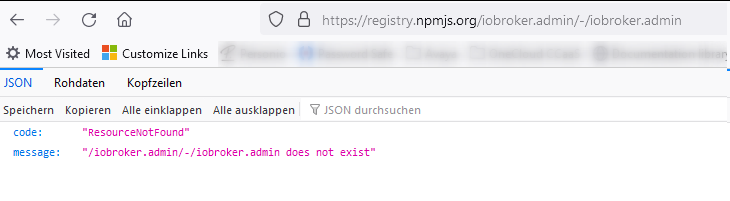
            3ca20521-17a4-40f2-8d1b-c058dc4bc184-grafik.png

            Welche Alternativen?

            Marc BergM HomoranH 2 Antworten Letzte Antwort
            0
            • S Schöni

              @schöni

              Im Web Browser erscheint bei
              https://registry.npmjs.org/iobroker.admin/-/iobroker.admin
              die Meldung:
              3ca20521-17a4-40f2-8d1b-c058dc4bc184-grafik.png

              Welche Alternativen?

              Marc BergM Offline
              Marc BergM Offline
              Marc Berg
              Most Active
              schrieb am zuletzt editiert von
              #6

              @schöni sagte in Installation bleibt stehen:

              Im Web Browser erscheint bei
              https://registry.npmjs.org/iobroker.admin/-/iobroker.admin
              die Meldung:

              Da fehlt die Versionsnummer, die wurde wahrscheinlich in deinem Terminalfenster abgeschnitten.

              NUC10I3+Ubuntu+Docker+ioBroker+influxDB2+Node Red+EMQX+Grafana

              Pi-hole, Traefik, Checkmk, Conbee II+Zigbee2MQTT, ESPSomfy-RTS, LoRaWAN, Arduino, KiCad

              Benutzt das Voting im Beitrag, wenn er euch geholfen hat.

              S 1 Antwort Letzte Antwort
              0
              • S Schöni

                @schöni

                Im Web Browser erscheint bei
                https://registry.npmjs.org/iobroker.admin/-/iobroker.admin
                die Meldung:
                3ca20521-17a4-40f2-8d1b-c058dc4bc184-grafik.png

                Welche Alternativen?

                HomoranH Nicht stören
                HomoranH Nicht stören
                Homoran
                Global Moderator Administrators
                schrieb am zuletzt editiert von
                #7

                @schöni sagte in Installation bleibt stehen:

                Welche Alternativen?

                @homoran sagte in Installation bleibt stehen:

                kann es an ipv6 liegen

                anscheinend arbeitet npm jetzt via ipv6.
                Wenn du damit Probleme in deinem Netz hast kann es zu not found kommen

                @homoran sagte in Installation bleibt stehen:

                oder an dem oben angepinnten

                da isi in Den Ankündigungen oben im Forum noch was angepinnt

                kein Support per PN! - Fragen im Forum stellen - es gibt fast nichts, was nicht auch für andere interessant ist.

                Benutzt das Voting rechts unten im Beitrag wenn er euch geholfen hat.

                der Installationsfixer: curl -fsL https://iobroker.net/fix.sh | bash -

                1 Antwort Letzte Antwort
                0
                • Marc BergM Marc Berg

                  @schöni sagte in Installation bleibt stehen:

                  Im Web Browser erscheint bei
                  https://registry.npmjs.org/iobroker.admin/-/iobroker.admin
                  die Meldung:

                  Da fehlt die Versionsnummer, die wurde wahrscheinlich in deinem Terminalfenster abgeschnitten.

                  S Offline
                  S Offline
                  Schöni
                  schrieb am zuletzt editiert von
                  #8

                  @marc-berg
                  da ist nix abgeschnitten, mehr steht nich im Terminal:
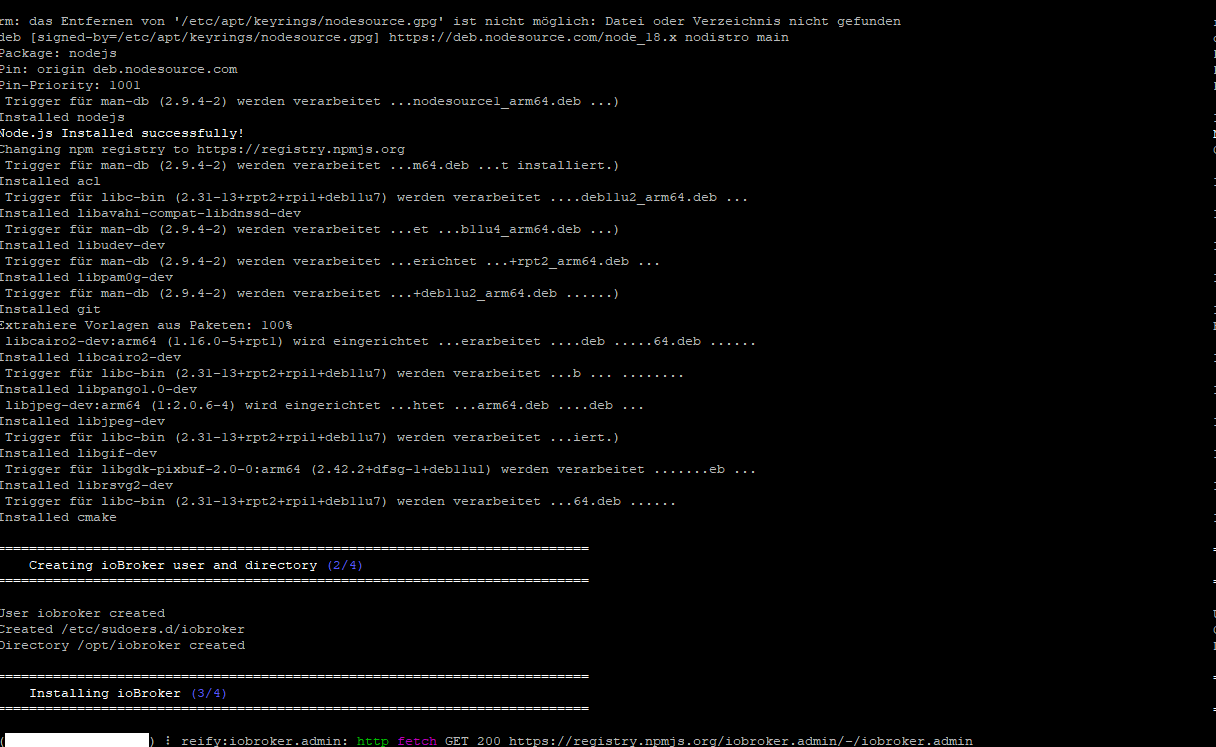
                  04816a1e-ad55-423a-aab3-82ba3ae674cd-grafik.png

                  Kann ich die Installation irgendwie abbrechen und die node-js überprüfen?

                  HomoranH Thomas BraunT 2 Antworten Letzte Antwort
                  0
                  • S Schöni

                    @marc-berg
                    da ist nix abgeschnitten, mehr steht nich im Terminal:
                    04816a1e-ad55-423a-aab3-82ba3ae674cd-grafik.png

                    Kann ich die Installation irgendwie abbrechen und die node-js überprüfen?

                    HomoranH Nicht stören
                    HomoranH Nicht stören
                    Homoran
                    Global Moderator Administrators
                    schrieb am zuletzt editiert von Homoran
                    #9

                    @schöni sagte in Installation bleibt stehen:

                    Kann ich die Installation irgendwie abbrechen und die node-js überprüfen?

                    wenn

                    @schöni sagte in Installation bleibt stehen:

                    neue SSH Session bekommt kein Login.

                    ist die bestehende vielleicht auch tot

                    ist der Pi noch im Netzwerk zu sehen?

                    kein Support per PN! - Fragen im Forum stellen - es gibt fast nichts, was nicht auch für andere interessant ist.

                    Benutzt das Voting rechts unten im Beitrag wenn er euch geholfen hat.

                    der Installationsfixer: curl -fsL https://iobroker.net/fix.sh | bash -

                    1 Antwort Letzte Antwort
                    0
                    • S Schöni

                      @marc-berg
                      da ist nix abgeschnitten, mehr steht nich im Terminal:
                      04816a1e-ad55-423a-aab3-82ba3ae674cd-grafik.png

                      Kann ich die Installation irgendwie abbrechen und die node-js überprüfen?

                      Thomas BraunT Online
                      Thomas BraunT Online
                      Thomas Braun
                      Most Active
                      schrieb am zuletzt editiert von Thomas Braun
                      #10

                      @schöni

                      Zweite Session aufmachen und in der arbeiten.

                      Edith: Ah, die läuft ins Leere... Meldungen?

                      Linux-Werkzeugkasten:
                      https://forum.iobroker.net/topic/42952/der-kleine-iobroker-linux-werkzeugkasten
                      NodeJS Fixer Skript:
                      https://forum.iobroker.net/topic/68035/iob-node-fix-skript
                      iob_diag: curl -sLf -o diag.sh https://iobroker.net/diag.sh && bash diag.sh

                      S 1 Antwort Letzte Antwort
                      0
                      • Thomas BraunT Thomas Braun

                        @schöni

                        Zweite Session aufmachen und in der arbeiten.

                        Edith: Ah, die läuft ins Leere... Meldungen?

                        S Offline
                        S Offline
                        Schöni
                        schrieb am zuletzt editiert von
                        #11
                        1. Session hat keinen Login Prompt erzeugt... Keine Meldungen
                          Der Pi war aber im Netz sichtbar. Die Sessions waren aktiv.

                        Nun habe ich einen harten Reboot durchgeführt.
                        Pi wieder gestartet.
                        Nodejs Version überprüft - korrekt.
                        Install-fix laufen lassen.
                        Danach die Installtion nochmal gestartet und 5 Minuten später war alles erfolgreich erledigt.
                        Nun kann ich weiter machen.

                        Sehr komisch, aber danke für die Unterstützung.
                        Gruß
                        Ralf

                        Thomas BraunT S 2 Antworten Letzte Antwort
                        0
                        • S Schöni
                          1. Session hat keinen Login Prompt erzeugt... Keine Meldungen
                            Der Pi war aber im Netz sichtbar. Die Sessions waren aktiv.

                          Nun habe ich einen harten Reboot durchgeführt.
                          Pi wieder gestartet.
                          Nodejs Version überprüft - korrekt.
                          Install-fix laufen lassen.
                          Danach die Installtion nochmal gestartet und 5 Minuten später war alles erfolgreich erledigt.
                          Nun kann ich weiter machen.

                          Sehr komisch, aber danke für die Unterstützung.
                          Gruß
                          Ralf

                          Thomas BraunT Online
                          Thomas BraunT Online
                          Thomas Braun
                          Most Active
                          schrieb am zuletzt editiert von Thomas Braun
                          #12

                          @schöni

                          Zeig mal die Langfassung von

                          iob diag
                          

                          Vielleicht sieht man da irgendwas.

                          Linux-Werkzeugkasten:
                          https://forum.iobroker.net/topic/42952/der-kleine-iobroker-linux-werkzeugkasten
                          NodeJS Fixer Skript:
                          https://forum.iobroker.net/topic/68035/iob-node-fix-skript
                          iob_diag: curl -sLf -o diag.sh https://iobroker.net/diag.sh && bash diag.sh

                          1 Antwort Letzte Antwort
                          0
                          • S Schöni
                            1. Session hat keinen Login Prompt erzeugt... Keine Meldungen
                              Der Pi war aber im Netz sichtbar. Die Sessions waren aktiv.

                            Nun habe ich einen harten Reboot durchgeführt.
                            Pi wieder gestartet.
                            Nodejs Version überprüft - korrekt.
                            Install-fix laufen lassen.
                            Danach die Installtion nochmal gestartet und 5 Minuten später war alles erfolgreich erledigt.
                            Nun kann ich weiter machen.

                            Sehr komisch, aber danke für die Unterstützung.
                            Gruß
                            Ralf

                            S Offline
                            S Offline
                            Schöni
                            schrieb am zuletzt editiert von
                            #13

                            @schöni ```

                            Skript v.2023-10-10
                            
                            *** BASE SYSTEM ***
                               Static hostname: rasp-iobroker3
                                     Icon name: computer
                              Operating System: Debian GNU/Linux 11 (bullseye)
                                        Kernel: Linux 6.1.21-v8+
                                  Architecture: arm64
                            
                            Model           : Raspberry Pi 3 Model B Rev 1.2
                            Docker          : false
                            Virtualization  : none
                            Kernel          : aarch64
                            Userland        : arm64
                            
                            Systemuptime and Load:
                             19:21:10 up 17 min,  1 user,  load average: 0.55, 0.61, 0.36
                            CPU threads: 4
                            
                            
                            *** RASPBERRY THROTTLING ***
                            Current issues:
                            No throttling issues detected.
                            
                            Previously detected issues:
                            No throttling issues detected.
                            
                            *** Time and Time Zones ***
                                           Local time: Wed 2024-01-03 19:21:11 CET
                                       Universal time: Wed 2024-01-03 18:21:11 UTC
                                             RTC time: n/a
                                            Time zone: Europe/Berlin (CET, +0100)
                            System clock synchronized: yes
                                          NTP service: active
                                      RTC in local TZ: no
                            
                            *** User and Groups ***
                            pi
                            /home/pi
                            pi adm dialout cdrom sudo audio video plugdev games users input render netdev gpio i2c spi iobroker
                            
                            *** X-Server-Setup ***
                            X-Server:       false
                            Desktop:
                            Terminal:       tty
                            Boot Target:    multi-user.target
                            
                            *** MEMORY ***
                                           total        used        free      shared  buff/cache   available
                            Mem:            909M        120M        322M        0.0K        466M        726M
                            Swap:            99M          0B         99M
                            Total:          1.0G        120M        422M
                            
                                      909 M total memory
                                      120 M used memory
                                      181 M active memory
                                      310 M inactive memory
                                      322 M free memory
                                       27 M buffer memory
                                      438 M swap cache
                                       99 M total swap
                                        0 M used swap
                                       99 M free swap
                            
                            Raspberry only:
                            oom events: 0
                            lifetime oom required: 0 Mbytes
                            total time in oom handler: 0 ms
                            max time spent in oom handler: 0 ms
                            
                            *** FAILED SERVICES ***
                            
                              UNIT LOAD ACTIVE SUB DESCRIPTION
                            0 loaded units listed.
                            
                            *** FILESYSTEM ***
                            Filesystem     Type      Size  Used Avail Use% Mounted on
                            /dev/root      ext4       14G  2.3G   12G  18% /
                            devtmpfs       devtmpfs  325M     0  325M   0% /dev
                            tmpfs          tmpfs     455M     0  455M   0% /dev/shm
                            tmpfs          tmpfs     182M  960K  181M   1% /run
                            tmpfs          tmpfs     5.0M  4.0K  5.0M   1% /run/lock
                            /dev/mmcblk0p1 vfat      255M   31M  225M  13% /boot
                            tmpfs          tmpfs      91M     0   91M   0% /run/user/1000
                            
                            Messages concerning ext4 filesystem in dmesg:
                            [Wed Jan  3 19:03:17 2024] Kernel command line: coherent_pool=1M 8250.nr_uarts=0 snd_bcm2835.enable_headphones=0 snd_bcm2835.enable_headphones=1 snd_bcm2835.enable_hdmi=1 snd_bcm2835.enable_hdmi=0 video=Composite-1:720x480@60i vc_mem.mem_base=0x3ec00000 vc_mem.mem_size=0x40000000  console=tty1 root=PARTUUID=e6eaa33f-02 rootfstype=ext4 fsck.repair=yes rootwait
                            [Wed Jan  3 19:03:20 2024] EXT4-fs (mmcblk0p2): mounted filesystem with ordered data mode. Quota mode: none.
                            [Wed Jan  3 19:03:20 2024] VFS: Mounted root (ext4 filesystem) readonly on device 179:2.
                            [Wed Jan  3 19:03:23 2024] EXT4-fs (mmcblk0p2): re-mounted. Quota mode: none.
                            
                            Show mounted filesystems \(real ones only\):
                            TARGET  SOURCE         FSTYPE OPTIONS
                            /       /dev/mmcblk0p2 ext4   rw,noatime
                            `-/boot /dev/mmcblk0p1 vfat   rw,relatime,fmask=0022,dmask=0022,codepage=437,iocharset=ascii,shortname=mixed,errors=remount-ro
                            
                            Files in neuralgic directories:
                            
                            /var:
                            485M    /var/
                            182M    /var/cache
                            176M    /var/cache/apt
                            155M    /var/lib
                            130M    /var/lib/apt/lists
                            
                            Archived and active journals take up 48.0M in the file system.
                            
                            /opt/iobroker/backups:
                            4.0K    /opt/iobroker/backups/
                            
                            /opt/iobroker/iobroker-data:
                            19M     /opt/iobroker/iobroker-data/
                            15M     /opt/iobroker/iobroker-data/files
                            13M     /opt/iobroker/iobroker-data/files/admin.admin/custom/static/js
                            13M     /opt/iobroker/iobroker-data/files/admin.admin/custom/static
                            13M     /opt/iobroker/iobroker-data/files/admin.admin/custom
                            
                            The five largest files in iobroker-data are:
                            6.3M    /opt/iobroker/iobroker-data/files/admin.admin/custom/static/js/vendors-node_modules_iobroker_adapter-react-v5_assets_devices_parseNames_js-node_modules_iobr-99c23e.847b8ad9.chunk.js.map
                            4.1M    /opt/iobroker/iobroker-data/objects.jsonl
                            2.8M    /opt/iobroker/iobroker-data/files/admin.admin/custom/static/js/vendors-node_modules_iobroker_adapter-react-v5_assets_devices_parseNames_js-node_modules_iobr-99c23e.847b8ad9.chunk.js
                            1.6M    /opt/iobroker/iobroker-data/files/admin.admin/custom/static/js/vendors-node_modules_mui_material_Accordion_index_js-node_modules_mui_material_AccordionDetai-57e02d.0886b730.chunk.js.map
                            652K    /opt/iobroker/iobroker-data/files/admin.admin/custom/static/js/vendors-node_modules_mui_material_index_js.40e01f69.chunk.js.map
                            
                            USB-Devices by-id:
                            USB-Sticks -  Avoid direct links to /dev/* in your adapter setups, please always prefer the links 'by-id':
                            
                            find: '/dev/serial/by-id/': No such file or directory
                            
                            *** NodeJS-Installation ***
                            
                            /usr/bin/nodejs         v18.19.0
                            /usr/bin/node           v18.19.0
                            /usr/bin/npm            10.2.3
                            /usr/bin/npx            10.2.3
                            /usr/bin/corepack       0.22.0
                            
                            
                            nodejs:
                              Installed: 18.19.0-1nodesource1
                              Candidate: 18.19.0-1nodesource1
                              Version table:
                             *** 18.19.0-1nodesource1 1001
                                    500 https://deb.nodesource.com/node_18.x nodistro/main arm64 Packages
                                    100 /var/lib/dpkg/status
                                 18.18.2-1nodesource1 1001
                                    500 https://deb.nodesource.com/node_18.x nodistro/main arm64 Packages
                                 18.18.1-1nodesource1 1001
                                    500 https://deb.nodesource.com/node_18.x nodistro/main arm64 Packages
                                 18.18.0-1nodesource1 1001
                                    500 https://deb.nodesource.com/node_18.x nodistro/main arm64 Packages
                                 18.17.1-1nodesource1 1001
                                    500 https://deb.nodesource.com/node_18.x nodistro/main arm64 Packages
                                 18.17.0-1nodesource1 1001
                                    500 https://deb.nodesource.com/node_18.x nodistro/main arm64 Packages
                                 18.16.1-1nodesource1 1001
                                    500 https://deb.nodesource.com/node_18.x nodistro/main arm64 Packages
                                 18.16.0-1nodesource1 1001
                                    500 https://deb.nodesource.com/node_18.x nodistro/main arm64 Packages
                                 18.15.0-1nodesource1 1001
                                    500 https://deb.nodesource.com/node_18.x nodistro/main arm64 Packages
                                 18.14.2-1nodesource1 1001
                                    500 https://deb.nodesource.com/node_18.x nodistro/main arm64 Packages
                                 18.14.1-1nodesource1 1001
                                    500 https://deb.nodesource.com/node_18.x nodistro/main arm64 Packages
                                 18.14.0-1nodesource1 1001
                                    500 https://deb.nodesource.com/node_18.x nodistro/main arm64 Packages
                                 18.13.0-1nodesource1 1001
                                    500 https://deb.nodesource.com/node_18.x nodistro/main arm64 Packages
                                 18.12.0-1nodesource1 1001
                                    500 https://deb.nodesource.com/node_18.x nodistro/main arm64 Packages
                                 18.11.0-1nodesource1 1001
                                    500 https://deb.nodesource.com/node_18.x nodistro/main arm64 Packages
                                 18.10.0-1nodesource1 1001
                                    500 https://deb.nodesource.com/node_18.x nodistro/main arm64 Packages
                                 18.9.1-1nodesource1 1001
                                    500 https://deb.nodesource.com/node_18.x nodistro/main arm64 Packages
                                 18.9.0-1nodesource1 1001
                                    500 https://deb.nodesource.com/node_18.x nodistro/main arm64 Packages
                                 18.8.0-1nodesource1 1001
                                    500 https://deb.nodesource.com/node_18.x nodistro/main arm64 Packages
                                 18.7.0-1nodesource1 1001
                                    500 https://deb.nodesource.com/node_18.x nodistro/main arm64 Packages
                                 18.6.0-1nodesource1 1001
                                    500 https://deb.nodesource.com/node_18.x nodistro/main arm64 Packages
                                 18.5.0-1nodesource1 1001
                                    500 https://deb.nodesource.com/node_18.x nodistro/main arm64 Packages
                                 18.4.0-1nodesource1 1001
                                    500 https://deb.nodesource.com/node_18.x nodistro/main arm64 Packages
                                 18.3.0-1nodesource1 1001
                                    500 https://deb.nodesource.com/node_18.x nodistro/main arm64 Packages
                                 18.2.0-1nodesource1 1001
                                    500 https://deb.nodesource.com/node_18.x nodistro/main arm64 Packages
                                 18.1.0-1nodesource1 1001
                                    500 https://deb.nodesource.com/node_18.x nodistro/main arm64 Packages
                                 18.0.0-1nodesource1 1001
                                    500 https://deb.nodesource.com/node_18.x nodistro/main arm64 Packages
                                 12.22.12~dfsg-1~deb11u4 500
                                    500 http://deb.debian.org/debian bullseye/main arm64 Packages
                                    500 http://security.debian.org/debian-security bullseye-security/main arm64 Packages
                            
                            Temp directories causing npm8 problem: 0
                            No problems detected
                            
                            Errors in npm tree:
                            
                            *** ioBroker-Installation ***
                            
                            ioBroker Status
                            iobroker is running on this host.
                            
                            At least one iobroker host is running.
                            
                            Objects type: jsonl
                            States  type: jsonl
                            
                            Core adapters versions
                            js-controller:  5.0.17
                            admin:          6.12.0
                            javascript:     "javascript" not found
                            
                            Adapters from github:   0
                            
                            Adapter State
                            + system.adapter.admin.0                  : admin                 : rasp-iobroker1                           -  enabled, port: 8081, bind: 0.0.0.0, run as: admin
                            + system.adapter.admin.1                  : admin                 : rasp-iobroker2                           -  enabled, port: 8081, bind: 0.0.0.0, run as: admin
                            + system.adapter.backitup.0               : backitup              : rasp-iobroker1                           -  enabled
                              system.adapter.daswetter.0              : daswetter             : rasp-iobroker1                           -  enabled
                            + system.adapter.discovery.0              : discovery             : rasp-iobroker1                           -  enabled
                              system.adapter.email.0                  : email                 : rasp-iobroker1                           - disabled
                            + system.adapter.energiefluss-erweitert.0 : energiefluss-erweitert: rasp-iobroker2                           -  enabled
                            + system.adapter.fahrplan.0               : fahrplan              : rasp-iobroker2                           -  enabled
                              system.adapter.fb-checkpresence.0       : fb-checkpresence      : rasp-iobroker1                           - disabled
                              system.adapter.feiertage.0              : feiertage             : rasp-iobroker1                           -  enabled
                              system.adapter.flot.0                   : flot                  : rasp-iobroker2                           - disabled
                            + system.adapter.fritzbox.0               : fritzbox              : rasp-iobroker1                           -  enabled
                            + system.adapter.fritzdect.0              : fritzdect             : rasp-iobroker1                           -  enabled
                            + system.adapter.hm-rega.0                : hm-rega               : rasp-iobroker1                           -  enabled
                            + system.adapter.hm-rpc.0                 : hm-rpc                : rasp-iobroker1                           -  enabled, port: 12001
                            + system.adapter.hm-rpc.1                 : hm-rpc                : rasp-iobroker1                           -  enabled, port: 12010
                              system.adapter.icons-addictive-flavour-png.0: icons-addictive-flavour-png: rasp-iobroker1                           - disabled
                              system.adapter.icons-icons8.0           : icons-icons8          : rasp-iobroker1                           - disabled
                              system.adapter.icons-material-png.0     : icons-material-png    : rasp-iobroker1                           - disabled
                              system.adapter.icons-material-svg.0     : icons-material-svg    : rasp-iobroker1                           - disabled
                              system.adapter.icons-mfd-png.0          : icons-mfd-png         : rasp-iobroker1                           - disabled
                              system.adapter.icons-mfd-svg.0          : icons-mfd-svg         : rasp-iobroker1                           - disabled
                              system.adapter.icons-open-icon-library-png.0: icons-open-icon-library-png: rasp-iobroker1                           - disabled
                              system.adapter.icons-ultimate-png.0     : icons-ultimate-png    : rasp-iobroker1                           - disabled
                            + system.adapter.info.0                   : info                  : rasp-iobroker1                           -  enabled
                            + system.adapter.iqontrol.0               : iqontrol              : rasp-iobroker2                           -  enabled
                            + system.adapter.javascript.0             : javascript            : rasp-iobroker1                           -  enabled
                              system.adapter.lgtv.0                   : lgtv                  : rasp-iobroker1                           - disabled
                            + system.adapter.modbus.0                 : modbus                : rasp-iobroker2                           -  enabled
                            + system.adapter.modbus.1                 : modbus                : rasp-iobroker2                           -  enabled
                            + system.adapter.ping.0                   : ping                  : rasp-iobroker1                           -  enabled
                            + system.adapter.rpi2.0                   : rpi2                  : rasp-iobroker1                           -  enabled
                            + system.adapter.rpi2.1                   : rpi2                  : rasp-iobroker2                           -  enabled
                              system.adapter.smartgarden.0            : smartgarden           : rasp-iobroker2                           - disabled
                            + system.adapter.sql.0                    : sql                   : rasp-iobroker1                           -  enabled, port: 3306
                            + system.adapter.stiebel-isg.0            : stiebel-isg           : rasp-iobroker2                           -  enabled
                            + system.adapter.synology.0               : synology              : rasp-iobroker1                           -  enabled, port: 5001
                            + system.adapter.tr-064.0                 : tr-064                : rasp-iobroker1                           -  enabled
                              system.adapter.vis-bars.0               : vis-bars              : rasp-iobroker1                           - disabled
                              system.adapter.vis-canvas-gauges.0      : vis-canvas-gauges     : rasp-iobroker1                           - disabled
                              system.adapter.vis-colorpicker.0        : vis-colorpicker       : rasp-iobroker1                           - disabled
                              system.adapter.vis-fancyswitch.0        : vis-fancyswitch       : rasp-iobroker1                           - disabled
                              system.adapter.vis-google-fonts.0       : vis-google-fonts      : rasp-iobroker1                           -  enabled
                              system.adapter.vis-history.0            : vis-history           : rasp-iobroker1                           - disabled
                              system.adapter.vis-hqwidgets.0          : vis-hqwidgets         : rasp-iobroker1                           - disabled
                              system.adapter.vis-jqui-mfd.0           : vis-jqui-mfd          : rasp-iobroker1                           - disabled
                              system.adapter.vis-justgage.0           : vis-justgage          : rasp-iobroker1                           - disabled
                              system.adapter.vis-map.0                : vis-map               : rasp-iobroker1                           - disabled
                              system.adapter.vis-metro.0              : vis-metro             : rasp-iobroker1                           - disabled
                              system.adapter.vis-timeandweather.0     : vis-timeandweather    : rasp-iobroker1                           - disabled
                              system.adapter.vis-weather.0            : vis-weather           : rasp-iobroker2                           - disabled
                              system.adapter.vis.0                    : vis                   : rasp-iobroker2                           -  enabled
                            + system.adapter.web.0                    : web                   : rasp-iobroker1                           -  enabled, port: 8082, bind: 0.0.0.0, run as: admin
                            + system.adapter.web.1                    : web                   : rasp-iobroker2                           -  enabled, port: 8082, bind: 0.0.0.0, run as: admin
                            + system.adapter.ws.0                     : ws                    : rasp-iobroker2                           -  enabled, port: 8084, bind: 0.0.0.0, run as: admin
                            
                            + instance is alive
                            
                            Enabled adapters with bindings
                            + system.adapter.admin.0                  : admin                 : rasp-iobroker1                           -  enabled, port: 8081, bind: 0.0.0.0, run as: admin
                            + system.adapter.admin.1                  : admin                 : rasp-iobroker2                           -  enabled, port: 8081, bind: 0.0.0.0, run as: admin
                            + system.adapter.hm-rpc.0                 : hm-rpc                : rasp-iobroker1                           -  enabled, port: 12001
                            + system.adapter.hm-rpc.1                 : hm-rpc                : rasp-iobroker1                           -  enabled, port: 12010
                            + system.adapter.sql.0                    : sql                   : rasp-iobroker1                           -  enabled, port: 3306
                            + system.adapter.synology.0               : synology              : rasp-iobroker1                           -  enabled, port: 5001
                            + system.adapter.web.0                    : web                   : rasp-iobroker1                           -  enabled, port: 8082, bind: 0.0.0.0, run as: admin
                            + system.adapter.web.1                    : web                   : rasp-iobroker2                           -  enabled, port: 8082, bind: 0.0.0.0, run as: admin
                            + system.adapter.ws.0                     : ws                    : rasp-iobroker2                           -  enabled, port: 8084, bind: 0.0.0.0, run as: admin
                            
                            ioBroker-Repositories
                            stable        : http://download.iobroker.net/sources-dist.json
                            beta          : http://download.iobroker.net/sources-dist-latest.json
                            
                            Active repo(s): stable
                            
                            Installed ioBroker-Instances
                            Used repository: stable
                            Adapter    "admin"        : 6.12.0   , installed 6.12.0
                            Adapter    "backitup"     : 2.9.8    , installed 2.9.8
                            Adapter    "discovery"    : 4.2.0    , installed 4.2.0
                            Controller "js-controller": 5.0.17   , installed 5.0.17
                            
                            Objects and States
                            Please stand by - This may take a while
                            Objects:        12696
                            States:         11009
                            
                            *** OS-Repositories and Updates ***
                            Hit:1 http://security.debian.org/debian-security bullseye-security InRelease
                            Hit:2 http://deb.debian.org/debian bullseye InRelease
                            Hit:3 http://deb.debian.org/debian bullseye-updates InRelease
                            Hit:4 http://archive.raspberrypi.org/debian bullseye InRelease
                            Hit:5 https://deb.nodesource.com/node_18.x nodistro InRelease
                            Reading package lists...
                            Pending Updates: 0
                            
                            *** Listening Ports ***
                            Active Internet connections (only servers)
                            Proto Recv-Q Send-Q Local Address           Foreign Address         State       User       Inode      PID/Program name
                            tcp        0      0 0.0.0.0:22              0.0.0.0:*               LISTEN      0          13267      510/sshd: /usr/sbin
                            tcp6       0      0 :::22                   :::*                    LISTEN      0          13269      510/sshd: /usr/sbin
                            udp        0      0 0.0.0.0:37045           0.0.0.0:*                           108        3965       388/avahi-daemon: r
                            udp        0      0 0.0.0.0:5353            0.0.0.0:*                           108        3963       388/avahi-daemon: r
                            udp        0      0 0.0.0.0:68              0.0.0.0:*                           0          12246      617/dhcpcd
                            udp6       0      0 :::5353                 :::*                                108        3964       388/avahi-daemon: r
                            udp6       0      0 :::47211                :::*                                108        3966       388/avahi-daemon: r
                            
                            *** Log File - Last 25 Lines ***
                            
                            2024-01-03 19:20:27.112  - info: backitup.0 (656) Terminated (NO_ERROR): Without reason
                            2024-01-03 19:20:27.113  - info: host.rasp-iobroker3 stopInstance system.adapter.discovery.0 send kill signal
                            2024-01-03 19:20:27.114  - info: host.rasp-iobroker3 stopInstance system.adapter.backitup.0 send kill signal
                            2024-01-03 19:20:27.117  - info: admin.0 (630) Terminated (NO_ERROR): Without reason
                            2024-01-03 19:20:27.152  - info: discovery.0 (637) terminating
                            2024-01-03 19:20:27.156  - info: discovery.0 (637) Terminated (NO_ERROR): Without reason
                            2024-01-03 19:20:27.570  - info: backitup.0 (656) terminating
                            2024-01-03 19:20:27.579  - info: admin.0 (630) terminating
                            2024-01-03 19:20:27.583  - info: discovery.0 (637) terminating
                            2024-01-03 19:20:27.776  - info: host.rasp-iobroker3 instance system.adapter.backitup.0 terminated with code 0 (NO_ERROR)
                            2024-01-03 19:20:27.820  - info: host.rasp-iobroker3 instance system.adapter.admin.0 terminated with code 0 (NO_ERROR)
                            2024-01-03 19:20:27.854  - info: host.rasp-iobroker3 instance system.adapter.discovery.0 terminated with code 0 (NO_ERROR)
                            2024-01-03 19:20:27.856  - info: host.rasp-iobroker3 All instances are stopped.
                            2024-01-03 19:20:27.930  - info: host.rasp-iobroker3 terminated
                            2024-01-03 19:20:32.501  - info: host.rasp-iobroker3 iobroker.js-controller version 5.0.17 js-controller starting
                            2024-01-03 19:20:32.514  - info: host.rasp-iobroker3 Copyright (c) 2014-2023 bluefox, 2014 hobbyquaker
                            2024-01-03 19:20:32.516  - info: host.rasp-iobroker3 hostname: rasp-iobroker3, node: v18.19.0
                            2024-01-03 19:20:32.517  - info: host.rasp-iobroker3 ip addresses: 172.18.3.219 fe80::90fa:1132:10aa:75a0
                            2024-01-03 19:20:32.991  - info: host.rasp-iobroker3 connected to Objects and States
                            2024-01-03 19:20:33.046  - info: host.rasp-iobroker3 Node.js version has changed from unknown to 18.19.0
                            2024-01-03 19:20:33.155  - info: host.rasp-iobroker3 added notifications configuration of host
                            2024-01-03 19:20:33.169  - info: host.rasp-iobroker3 Successfully updated capabilities "cap_net_admin, cap_net_bind_service, cap_net_raw" for /usr/bin/node
                            2024-01-03 19:20:33.612  - info: host.rasp-iobroker3 Instance system.adapter.admin.0 removed from host, clear notifications
                            2024-01-03 19:20:34.792  - info: host.rasp-iobroker3 55 instances found
                            2024-01-03 19:20:34.870  - warn: host.rasp-iobroker3 does not start any instances on this host


                            mmmhh, stelle grad fest, daß hier noch Bullseye drauf ist.
                            Blöd.
                            Also nochmal von vorn...

                            S 1 Antwort Letzte Antwort
                            0
                            • S Schöni

                              @schöni ```

                              Skript v.2023-10-10
                              
                              *** BASE SYSTEM ***
                                 Static hostname: rasp-iobroker3
                                       Icon name: computer
                                Operating System: Debian GNU/Linux 11 (bullseye)
                                          Kernel: Linux 6.1.21-v8+
                                    Architecture: arm64
                              
                              Model           : Raspberry Pi 3 Model B Rev 1.2
                              Docker          : false
                              Virtualization  : none
                              Kernel          : aarch64
                              Userland        : arm64
                              
                              Systemuptime and Load:
                               19:21:10 up 17 min,  1 user,  load average: 0.55, 0.61, 0.36
                              CPU threads: 4
                              
                              
                              *** RASPBERRY THROTTLING ***
                              Current issues:
                              No throttling issues detected.
                              
                              Previously detected issues:
                              No throttling issues detected.
                              
                              *** Time and Time Zones ***
                                             Local time: Wed 2024-01-03 19:21:11 CET
                                         Universal time: Wed 2024-01-03 18:21:11 UTC
                                               RTC time: n/a
                                              Time zone: Europe/Berlin (CET, +0100)
                              System clock synchronized: yes
                                            NTP service: active
                                        RTC in local TZ: no
                              
                              *** User and Groups ***
                              pi
                              /home/pi
                              pi adm dialout cdrom sudo audio video plugdev games users input render netdev gpio i2c spi iobroker
                              
                              *** X-Server-Setup ***
                              X-Server:       false
                              Desktop:
                              Terminal:       tty
                              Boot Target:    multi-user.target
                              
                              *** MEMORY ***
                                             total        used        free      shared  buff/cache   available
                              Mem:            909M        120M        322M        0.0K        466M        726M
                              Swap:            99M          0B         99M
                              Total:          1.0G        120M        422M
                              
                                        909 M total memory
                                        120 M used memory
                                        181 M active memory
                                        310 M inactive memory
                                        322 M free memory
                                         27 M buffer memory
                                        438 M swap cache
                                         99 M total swap
                                          0 M used swap
                                         99 M free swap
                              
                              Raspberry only:
                              oom events: 0
                              lifetime oom required: 0 Mbytes
                              total time in oom handler: 0 ms
                              max time spent in oom handler: 0 ms
                              
                              *** FAILED SERVICES ***
                              
                                UNIT LOAD ACTIVE SUB DESCRIPTION
                              0 loaded units listed.
                              
                              *** FILESYSTEM ***
                              Filesystem     Type      Size  Used Avail Use% Mounted on
                              /dev/root      ext4       14G  2.3G   12G  18% /
                              devtmpfs       devtmpfs  325M     0  325M   0% /dev
                              tmpfs          tmpfs     455M     0  455M   0% /dev/shm
                              tmpfs          tmpfs     182M  960K  181M   1% /run
                              tmpfs          tmpfs     5.0M  4.0K  5.0M   1% /run/lock
                              /dev/mmcblk0p1 vfat      255M   31M  225M  13% /boot
                              tmpfs          tmpfs      91M     0   91M   0% /run/user/1000
                              
                              Messages concerning ext4 filesystem in dmesg:
                              [Wed Jan  3 19:03:17 2024] Kernel command line: coherent_pool=1M 8250.nr_uarts=0 snd_bcm2835.enable_headphones=0 snd_bcm2835.enable_headphones=1 snd_bcm2835.enable_hdmi=1 snd_bcm2835.enable_hdmi=0 video=Composite-1:720x480@60i vc_mem.mem_base=0x3ec00000 vc_mem.mem_size=0x40000000  console=tty1 root=PARTUUID=e6eaa33f-02 rootfstype=ext4 fsck.repair=yes rootwait
                              [Wed Jan  3 19:03:20 2024] EXT4-fs (mmcblk0p2): mounted filesystem with ordered data mode. Quota mode: none.
                              [Wed Jan  3 19:03:20 2024] VFS: Mounted root (ext4 filesystem) readonly on device 179:2.
                              [Wed Jan  3 19:03:23 2024] EXT4-fs (mmcblk0p2): re-mounted. Quota mode: none.
                              
                              Show mounted filesystems \(real ones only\):
                              TARGET  SOURCE         FSTYPE OPTIONS
                              /       /dev/mmcblk0p2 ext4   rw,noatime
                              `-/boot /dev/mmcblk0p1 vfat   rw,relatime,fmask=0022,dmask=0022,codepage=437,iocharset=ascii,shortname=mixed,errors=remount-ro
                              
                              Files in neuralgic directories:
                              
                              /var:
                              485M    /var/
                              182M    /var/cache
                              176M    /var/cache/apt
                              155M    /var/lib
                              130M    /var/lib/apt/lists
                              
                              Archived and active journals take up 48.0M in the file system.
                              
                              /opt/iobroker/backups:
                              4.0K    /opt/iobroker/backups/
                              
                              /opt/iobroker/iobroker-data:
                              19M     /opt/iobroker/iobroker-data/
                              15M     /opt/iobroker/iobroker-data/files
                              13M     /opt/iobroker/iobroker-data/files/admin.admin/custom/static/js
                              13M     /opt/iobroker/iobroker-data/files/admin.admin/custom/static
                              13M     /opt/iobroker/iobroker-data/files/admin.admin/custom
                              
                              The five largest files in iobroker-data are:
                              6.3M    /opt/iobroker/iobroker-data/files/admin.admin/custom/static/js/vendors-node_modules_iobroker_adapter-react-v5_assets_devices_parseNames_js-node_modules_iobr-99c23e.847b8ad9.chunk.js.map
                              4.1M    /opt/iobroker/iobroker-data/objects.jsonl
                              2.8M    /opt/iobroker/iobroker-data/files/admin.admin/custom/static/js/vendors-node_modules_iobroker_adapter-react-v5_assets_devices_parseNames_js-node_modules_iobr-99c23e.847b8ad9.chunk.js
                              1.6M    /opt/iobroker/iobroker-data/files/admin.admin/custom/static/js/vendors-node_modules_mui_material_Accordion_index_js-node_modules_mui_material_AccordionDetai-57e02d.0886b730.chunk.js.map
                              652K    /opt/iobroker/iobroker-data/files/admin.admin/custom/static/js/vendors-node_modules_mui_material_index_js.40e01f69.chunk.js.map
                              
                              USB-Devices by-id:
                              USB-Sticks -  Avoid direct links to /dev/* in your adapter setups, please always prefer the links 'by-id':
                              
                              find: '/dev/serial/by-id/': No such file or directory
                              
                              *** NodeJS-Installation ***
                              
                              /usr/bin/nodejs         v18.19.0
                              /usr/bin/node           v18.19.0
                              /usr/bin/npm            10.2.3
                              /usr/bin/npx            10.2.3
                              /usr/bin/corepack       0.22.0
                              
                              
                              nodejs:
                                Installed: 18.19.0-1nodesource1
                                Candidate: 18.19.0-1nodesource1
                                Version table:
                               *** 18.19.0-1nodesource1 1001
                                      500 https://deb.nodesource.com/node_18.x nodistro/main arm64 Packages
                                      100 /var/lib/dpkg/status
                                   18.18.2-1nodesource1 1001
                                      500 https://deb.nodesource.com/node_18.x nodistro/main arm64 Packages
                                   18.18.1-1nodesource1 1001
                                      500 https://deb.nodesource.com/node_18.x nodistro/main arm64 Packages
                                   18.18.0-1nodesource1 1001
                                      500 https://deb.nodesource.com/node_18.x nodistro/main arm64 Packages
                                   18.17.1-1nodesource1 1001
                                      500 https://deb.nodesource.com/node_18.x nodistro/main arm64 Packages
                                   18.17.0-1nodesource1 1001
                                      500 https://deb.nodesource.com/node_18.x nodistro/main arm64 Packages
                                   18.16.1-1nodesource1 1001
                                      500 https://deb.nodesource.com/node_18.x nodistro/main arm64 Packages
                                   18.16.0-1nodesource1 1001
                                      500 https://deb.nodesource.com/node_18.x nodistro/main arm64 Packages
                                   18.15.0-1nodesource1 1001
                                      500 https://deb.nodesource.com/node_18.x nodistro/main arm64 Packages
                                   18.14.2-1nodesource1 1001
                                      500 https://deb.nodesource.com/node_18.x nodistro/main arm64 Packages
                                   18.14.1-1nodesource1 1001
                                      500 https://deb.nodesource.com/node_18.x nodistro/main arm64 Packages
                                   18.14.0-1nodesource1 1001
                                      500 https://deb.nodesource.com/node_18.x nodistro/main arm64 Packages
                                   18.13.0-1nodesource1 1001
                                      500 https://deb.nodesource.com/node_18.x nodistro/main arm64 Packages
                                   18.12.0-1nodesource1 1001
                                      500 https://deb.nodesource.com/node_18.x nodistro/main arm64 Packages
                                   18.11.0-1nodesource1 1001
                                      500 https://deb.nodesource.com/node_18.x nodistro/main arm64 Packages
                                   18.10.0-1nodesource1 1001
                                      500 https://deb.nodesource.com/node_18.x nodistro/main arm64 Packages
                                   18.9.1-1nodesource1 1001
                                      500 https://deb.nodesource.com/node_18.x nodistro/main arm64 Packages
                                   18.9.0-1nodesource1 1001
                                      500 https://deb.nodesource.com/node_18.x nodistro/main arm64 Packages
                                   18.8.0-1nodesource1 1001
                                      500 https://deb.nodesource.com/node_18.x nodistro/main arm64 Packages
                                   18.7.0-1nodesource1 1001
                                      500 https://deb.nodesource.com/node_18.x nodistro/main arm64 Packages
                                   18.6.0-1nodesource1 1001
                                      500 https://deb.nodesource.com/node_18.x nodistro/main arm64 Packages
                                   18.5.0-1nodesource1 1001
                                      500 https://deb.nodesource.com/node_18.x nodistro/main arm64 Packages
                                   18.4.0-1nodesource1 1001
                                      500 https://deb.nodesource.com/node_18.x nodistro/main arm64 Packages
                                   18.3.0-1nodesource1 1001
                                      500 https://deb.nodesource.com/node_18.x nodistro/main arm64 Packages
                                   18.2.0-1nodesource1 1001
                                      500 https://deb.nodesource.com/node_18.x nodistro/main arm64 Packages
                                   18.1.0-1nodesource1 1001
                                      500 https://deb.nodesource.com/node_18.x nodistro/main arm64 Packages
                                   18.0.0-1nodesource1 1001
                                      500 https://deb.nodesource.com/node_18.x nodistro/main arm64 Packages
                                   12.22.12~dfsg-1~deb11u4 500
                                      500 http://deb.debian.org/debian bullseye/main arm64 Packages
                                      500 http://security.debian.org/debian-security bullseye-security/main arm64 Packages
                              
                              Temp directories causing npm8 problem: 0
                              No problems detected
                              
                              Errors in npm tree:
                              
                              *** ioBroker-Installation ***
                              
                              ioBroker Status
                              iobroker is running on this host.
                              
                              At least one iobroker host is running.
                              
                              Objects type: jsonl
                              States  type: jsonl
                              
                              Core adapters versions
                              js-controller:  5.0.17
                              admin:          6.12.0
                              javascript:     "javascript" not found
                              
                              Adapters from github:   0
                              
                              Adapter State
                              + system.adapter.admin.0                  : admin                 : rasp-iobroker1                           -  enabled, port: 8081, bind: 0.0.0.0, run as: admin
                              + system.adapter.admin.1                  : admin                 : rasp-iobroker2                           -  enabled, port: 8081, bind: 0.0.0.0, run as: admin
                              + system.adapter.backitup.0               : backitup              : rasp-iobroker1                           -  enabled
                                system.adapter.daswetter.0              : daswetter             : rasp-iobroker1                           -  enabled
                              + system.adapter.discovery.0              : discovery             : rasp-iobroker1                           -  enabled
                                system.adapter.email.0                  : email                 : rasp-iobroker1                           - disabled
                              + system.adapter.energiefluss-erweitert.0 : energiefluss-erweitert: rasp-iobroker2                           -  enabled
                              + system.adapter.fahrplan.0               : fahrplan              : rasp-iobroker2                           -  enabled
                                system.adapter.fb-checkpresence.0       : fb-checkpresence      : rasp-iobroker1                           - disabled
                                system.adapter.feiertage.0              : feiertage             : rasp-iobroker1                           -  enabled
                                system.adapter.flot.0                   : flot                  : rasp-iobroker2                           - disabled
                              + system.adapter.fritzbox.0               : fritzbox              : rasp-iobroker1                           -  enabled
                              + system.adapter.fritzdect.0              : fritzdect             : rasp-iobroker1                           -  enabled
                              + system.adapter.hm-rega.0                : hm-rega               : rasp-iobroker1                           -  enabled
                              + system.adapter.hm-rpc.0                 : hm-rpc                : rasp-iobroker1                           -  enabled, port: 12001
                              + system.adapter.hm-rpc.1                 : hm-rpc                : rasp-iobroker1                           -  enabled, port: 12010
                                system.adapter.icons-addictive-flavour-png.0: icons-addictive-flavour-png: rasp-iobroker1                           - disabled
                                system.adapter.icons-icons8.0           : icons-icons8          : rasp-iobroker1                           - disabled
                                system.adapter.icons-material-png.0     : icons-material-png    : rasp-iobroker1                           - disabled
                                system.adapter.icons-material-svg.0     : icons-material-svg    : rasp-iobroker1                           - disabled
                                system.adapter.icons-mfd-png.0          : icons-mfd-png         : rasp-iobroker1                           - disabled
                                system.adapter.icons-mfd-svg.0          : icons-mfd-svg         : rasp-iobroker1                           - disabled
                                system.adapter.icons-open-icon-library-png.0: icons-open-icon-library-png: rasp-iobroker1                           - disabled
                                system.adapter.icons-ultimate-png.0     : icons-ultimate-png    : rasp-iobroker1                           - disabled
                              + system.adapter.info.0                   : info                  : rasp-iobroker1                           -  enabled
                              + system.adapter.iqontrol.0               : iqontrol              : rasp-iobroker2                           -  enabled
                              + system.adapter.javascript.0             : javascript            : rasp-iobroker1                           -  enabled
                                system.adapter.lgtv.0                   : lgtv                  : rasp-iobroker1                           - disabled
                              + system.adapter.modbus.0                 : modbus                : rasp-iobroker2                           -  enabled
                              + system.adapter.modbus.1                 : modbus                : rasp-iobroker2                           -  enabled
                              + system.adapter.ping.0                   : ping                  : rasp-iobroker1                           -  enabled
                              + system.adapter.rpi2.0                   : rpi2                  : rasp-iobroker1                           -  enabled
                              + system.adapter.rpi2.1                   : rpi2                  : rasp-iobroker2                           -  enabled
                                system.adapter.smartgarden.0            : smartgarden           : rasp-iobroker2                           - disabled
                              + system.adapter.sql.0                    : sql                   : rasp-iobroker1                           -  enabled, port: 3306
                              + system.adapter.stiebel-isg.0            : stiebel-isg           : rasp-iobroker2                           -  enabled
                              + system.adapter.synology.0               : synology              : rasp-iobroker1                           -  enabled, port: 5001
                              + system.adapter.tr-064.0                 : tr-064                : rasp-iobroker1                           -  enabled
                                system.adapter.vis-bars.0               : vis-bars              : rasp-iobroker1                           - disabled
                                system.adapter.vis-canvas-gauges.0      : vis-canvas-gauges     : rasp-iobroker1                           - disabled
                                system.adapter.vis-colorpicker.0        : vis-colorpicker       : rasp-iobroker1                           - disabled
                                system.adapter.vis-fancyswitch.0        : vis-fancyswitch       : rasp-iobroker1                           - disabled
                                system.adapter.vis-google-fonts.0       : vis-google-fonts      : rasp-iobroker1                           -  enabled
                                system.adapter.vis-history.0            : vis-history           : rasp-iobroker1                           - disabled
                                system.adapter.vis-hqwidgets.0          : vis-hqwidgets         : rasp-iobroker1                           - disabled
                                system.adapter.vis-jqui-mfd.0           : vis-jqui-mfd          : rasp-iobroker1                           - disabled
                                system.adapter.vis-justgage.0           : vis-justgage          : rasp-iobroker1                           - disabled
                                system.adapter.vis-map.0                : vis-map               : rasp-iobroker1                           - disabled
                                system.adapter.vis-metro.0              : vis-metro             : rasp-iobroker1                           - disabled
                                system.adapter.vis-timeandweather.0     : vis-timeandweather    : rasp-iobroker1                           - disabled
                                system.adapter.vis-weather.0            : vis-weather           : rasp-iobroker2                           - disabled
                                system.adapter.vis.0                    : vis                   : rasp-iobroker2                           -  enabled
                              + system.adapter.web.0                    : web                   : rasp-iobroker1                           -  enabled, port: 8082, bind: 0.0.0.0, run as: admin
                              + system.adapter.web.1                    : web                   : rasp-iobroker2                           -  enabled, port: 8082, bind: 0.0.0.0, run as: admin
                              + system.adapter.ws.0                     : ws                    : rasp-iobroker2                           -  enabled, port: 8084, bind: 0.0.0.0, run as: admin
                              
                              + instance is alive
                              
                              Enabled adapters with bindings
                              + system.adapter.admin.0                  : admin                 : rasp-iobroker1                           -  enabled, port: 8081, bind: 0.0.0.0, run as: admin
                              + system.adapter.admin.1                  : admin                 : rasp-iobroker2                           -  enabled, port: 8081, bind: 0.0.0.0, run as: admin
                              + system.adapter.hm-rpc.0                 : hm-rpc                : rasp-iobroker1                           -  enabled, port: 12001
                              + system.adapter.hm-rpc.1                 : hm-rpc                : rasp-iobroker1                           -  enabled, port: 12010
                              + system.adapter.sql.0                    : sql                   : rasp-iobroker1                           -  enabled, port: 3306
                              + system.adapter.synology.0               : synology              : rasp-iobroker1                           -  enabled, port: 5001
                              + system.adapter.web.0                    : web                   : rasp-iobroker1                           -  enabled, port: 8082, bind: 0.0.0.0, run as: admin
                              + system.adapter.web.1                    : web                   : rasp-iobroker2                           -  enabled, port: 8082, bind: 0.0.0.0, run as: admin
                              + system.adapter.ws.0                     : ws                    : rasp-iobroker2                           -  enabled, port: 8084, bind: 0.0.0.0, run as: admin
                              
                              ioBroker-Repositories
                              stable        : http://download.iobroker.net/sources-dist.json
                              beta          : http://download.iobroker.net/sources-dist-latest.json
                              
                              Active repo(s): stable
                              
                              Installed ioBroker-Instances
                              Used repository: stable
                              Adapter    "admin"        : 6.12.0   , installed 6.12.0
                              Adapter    "backitup"     : 2.9.8    , installed 2.9.8
                              Adapter    "discovery"    : 4.2.0    , installed 4.2.0
                              Controller "js-controller": 5.0.17   , installed 5.0.17
                              
                              Objects and States
                              Please stand by - This may take a while
                              Objects:        12696
                              States:         11009
                              
                              *** OS-Repositories and Updates ***
                              Hit:1 http://security.debian.org/debian-security bullseye-security InRelease
                              Hit:2 http://deb.debian.org/debian bullseye InRelease
                              Hit:3 http://deb.debian.org/debian bullseye-updates InRelease
                              Hit:4 http://archive.raspberrypi.org/debian bullseye InRelease
                              Hit:5 https://deb.nodesource.com/node_18.x nodistro InRelease
                              Reading package lists...
                              Pending Updates: 0
                              
                              *** Listening Ports ***
                              Active Internet connections (only servers)
                              Proto Recv-Q Send-Q Local Address           Foreign Address         State       User       Inode      PID/Program name
                              tcp        0      0 0.0.0.0:22              0.0.0.0:*               LISTEN      0          13267      510/sshd: /usr/sbin
                              tcp6       0      0 :::22                   :::*                    LISTEN      0          13269      510/sshd: /usr/sbin
                              udp        0      0 0.0.0.0:37045           0.0.0.0:*                           108        3965       388/avahi-daemon: r
                              udp        0      0 0.0.0.0:5353            0.0.0.0:*                           108        3963       388/avahi-daemon: r
                              udp        0      0 0.0.0.0:68              0.0.0.0:*                           0          12246      617/dhcpcd
                              udp6       0      0 :::5353                 :::*                                108        3964       388/avahi-daemon: r
                              udp6       0      0 :::47211                :::*                                108        3966       388/avahi-daemon: r
                              
                              *** Log File - Last 25 Lines ***
                              
                              2024-01-03 19:20:27.112  - info: backitup.0 (656) Terminated (NO_ERROR): Without reason
                              2024-01-03 19:20:27.113  - info: host.rasp-iobroker3 stopInstance system.adapter.discovery.0 send kill signal
                              2024-01-03 19:20:27.114  - info: host.rasp-iobroker3 stopInstance system.adapter.backitup.0 send kill signal
                              2024-01-03 19:20:27.117  - info: admin.0 (630) Terminated (NO_ERROR): Without reason
                              2024-01-03 19:20:27.152  - info: discovery.0 (637) terminating
                              2024-01-03 19:20:27.156  - info: discovery.0 (637) Terminated (NO_ERROR): Without reason
                              2024-01-03 19:20:27.570  - info: backitup.0 (656) terminating
                              2024-01-03 19:20:27.579  - info: admin.0 (630) terminating
                              2024-01-03 19:20:27.583  - info: discovery.0 (637) terminating
                              2024-01-03 19:20:27.776  - info: host.rasp-iobroker3 instance system.adapter.backitup.0 terminated with code 0 (NO_ERROR)
                              2024-01-03 19:20:27.820  - info: host.rasp-iobroker3 instance system.adapter.admin.0 terminated with code 0 (NO_ERROR)
                              2024-01-03 19:20:27.854  - info: host.rasp-iobroker3 instance system.adapter.discovery.0 terminated with code 0 (NO_ERROR)
                              2024-01-03 19:20:27.856  - info: host.rasp-iobroker3 All instances are stopped.
                              2024-01-03 19:20:27.930  - info: host.rasp-iobroker3 terminated
                              2024-01-03 19:20:32.501  - info: host.rasp-iobroker3 iobroker.js-controller version 5.0.17 js-controller starting
                              2024-01-03 19:20:32.514  - info: host.rasp-iobroker3 Copyright (c) 2014-2023 bluefox, 2014 hobbyquaker
                              2024-01-03 19:20:32.516  - info: host.rasp-iobroker3 hostname: rasp-iobroker3, node: v18.19.0
                              2024-01-03 19:20:32.517  - info: host.rasp-iobroker3 ip addresses: 172.18.3.219 fe80::90fa:1132:10aa:75a0
                              2024-01-03 19:20:32.991  - info: host.rasp-iobroker3 connected to Objects and States
                              2024-01-03 19:20:33.046  - info: host.rasp-iobroker3 Node.js version has changed from unknown to 18.19.0
                              2024-01-03 19:20:33.155  - info: host.rasp-iobroker3 added notifications configuration of host
                              2024-01-03 19:20:33.169  - info: host.rasp-iobroker3 Successfully updated capabilities "cap_net_admin, cap_net_bind_service, cap_net_raw" for /usr/bin/node
                              2024-01-03 19:20:33.612  - info: host.rasp-iobroker3 Instance system.adapter.admin.0 removed from host, clear notifications
                              2024-01-03 19:20:34.792  - info: host.rasp-iobroker3 55 instances found
                              2024-01-03 19:20:34.870  - warn: host.rasp-iobroker3 does not start any instances on this host


                              mmmhh, stelle grad fest, daß hier noch Bullseye drauf ist.
                              Blöd.
                              Also nochmal von vorn...

                              S Offline
                              S Offline
                              Schöni
                              schrieb am zuletzt editiert von
                              #14

                              OK, auch mit Bookworm bleibt das Ergebunis gleich.
                              Und auch die Prozedur zum fixen.

                              Schönen Abend noch.

                              Mars_scriptM 1 Antwort Letzte Antwort
                              0
                              • S Schöni

                                OK, auch mit Bookworm bleibt das Ergebunis gleich.
                                Und auch die Prozedur zum fixen.

                                Schönen Abend noch.

                                Mars_scriptM Offline
                                Mars_scriptM Offline
                                Mars_script
                                schrieb am zuletzt editiert von
                                #15

                                @schöni Das hat mir den Tag gerettet, Danke! Hatte genau das selbe Problem, mit deinem Fix scheint alles zu laufen.
                                Grüße!

                                1 Antwort Letzte Antwort
                                0
                                Antworten
                                • In einem neuen Thema antworten
                                Anmelden zum Antworten
                                • Älteste zuerst
                                • Neuste zuerst
                                • Meiste Stimmen


                                Support us

                                ioBroker
                                Community Adapters
                                Donate

                                743

                                Online

                                32.6k

                                Benutzer

                                82.1k

                                Themen

                                1.3m

                                Beiträge
                                Community
                                Impressum | Datenschutz-Bestimmungen | Nutzungsbedingungen | Einwilligungseinstellungen
                                ioBroker Community 2014-2025
                                logo
                                • Anmelden

                                • Du hast noch kein Konto? Registrieren

                                • Anmelden oder registrieren, um zu suchen
                                • Erster Beitrag
                                  Letzter Beitrag
                                0
                                • Home
                                • Aktuell
                                • Tags
                                • Ungelesen 0
                                • Kategorien
                                • Unreplied
                                • Beliebt
                                • GitHub
                                • Docu
                                • Hilfe