




Installation bleibt stehen
-
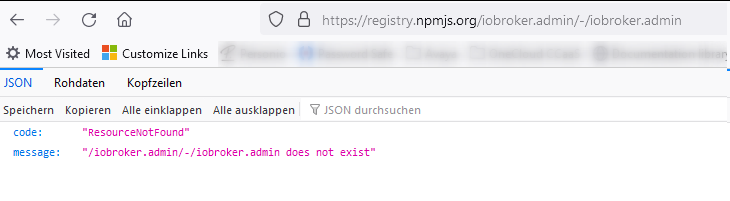
Im Web Browser erscheint bei
https://registry.npmjs.org/iobroker.admin/-/iobroker.admin
die Meldung:
Welche Alternativen?
@schöni sagte in Installation bleibt stehen:
Im Web Browser erscheint bei
https://registry.npmjs.org/iobroker.admin/-/iobroker.admin
die Meldung:Da fehlt die Versionsnummer, die wurde wahrscheinlich in deinem Terminalfenster abgeschnitten.
-
Im Web Browser erscheint bei
https://registry.npmjs.org/iobroker.admin/-/iobroker.admin
die Meldung:
Welche Alternativen?
@schöni sagte in Installation bleibt stehen:
Welche Alternativen?
@homoran sagte in Installation bleibt stehen:
kann es an ipv6 liegen
anscheinend arbeitet npm jetzt via ipv6.
Wenn du damit Probleme in deinem Netz hast kann es zu not found kommen@homoran sagte in Installation bleibt stehen:
oder an dem oben angepinnten
da isi in Den Ankündigungen oben im Forum noch was angepinnt
-
@schöni sagte in Installation bleibt stehen:
Im Web Browser erscheint bei
https://registry.npmjs.org/iobroker.admin/-/iobroker.admin
die Meldung:Da fehlt die Versionsnummer, die wurde wahrscheinlich in deinem Terminalfenster abgeschnitten.
@marc-berg
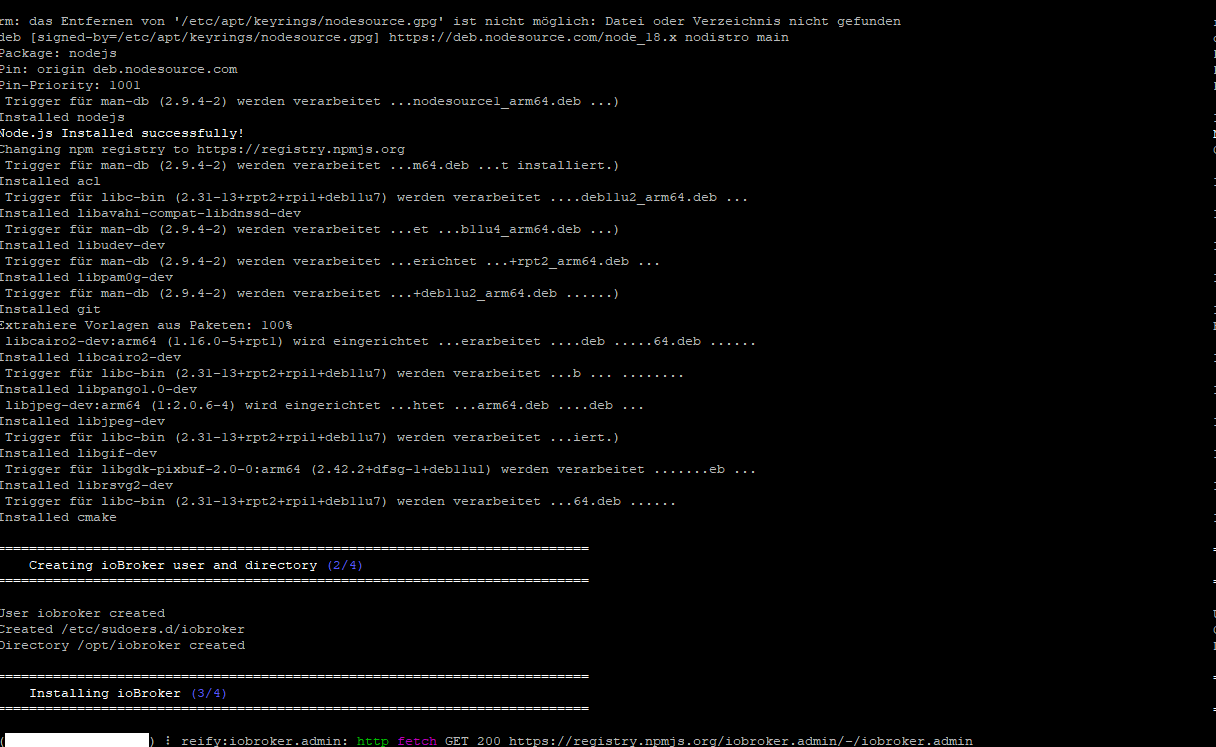
da ist nix abgeschnitten, mehr steht nich im Terminal:
Kann ich die Installation irgendwie abbrechen und die node-js überprüfen?
-
@marc-berg
da ist nix abgeschnitten, mehr steht nich im Terminal:
Kann ich die Installation irgendwie abbrechen und die node-js überprüfen?
@schöni sagte in Installation bleibt stehen:
Kann ich die Installation irgendwie abbrechen und die node-js überprüfen?
wenn
@schöni sagte in Installation bleibt stehen:
neue SSH Session bekommt kein Login.
ist die bestehende vielleicht auch tot
ist der Pi noch im Netzwerk zu sehen?
-
@marc-berg
da ist nix abgeschnitten, mehr steht nich im Terminal:
Kann ich die Installation irgendwie abbrechen und die node-js überprüfen?
-
- Session hat keinen Login Prompt erzeugt... Keine Meldungen
Der Pi war aber im Netz sichtbar. Die Sessions waren aktiv.
Nun habe ich einen harten Reboot durchgeführt.
Pi wieder gestartet.
Nodejs Version überprüft - korrekt.
Install-fix laufen lassen.
Danach die Installtion nochmal gestartet und 5 Minuten später war alles erfolgreich erledigt.
Nun kann ich weiter machen.Sehr komisch, aber danke für die Unterstützung.
Gruß
Ralf - Session hat keinen Login Prompt erzeugt... Keine Meldungen
-
- Session hat keinen Login Prompt erzeugt... Keine Meldungen
Der Pi war aber im Netz sichtbar. Die Sessions waren aktiv.
Nun habe ich einen harten Reboot durchgeführt.
Pi wieder gestartet.
Nodejs Version überprüft - korrekt.
Install-fix laufen lassen.
Danach die Installtion nochmal gestartet und 5 Minuten später war alles erfolgreich erledigt.
Nun kann ich weiter machen.Sehr komisch, aber danke für die Unterstützung.
Gruß
Ralf - Session hat keinen Login Prompt erzeugt... Keine Meldungen
-
- Session hat keinen Login Prompt erzeugt... Keine Meldungen
Der Pi war aber im Netz sichtbar. Die Sessions waren aktiv.
Nun habe ich einen harten Reboot durchgeführt.
Pi wieder gestartet.
Nodejs Version überprüft - korrekt.
Install-fix laufen lassen.
Danach die Installtion nochmal gestartet und 5 Minuten später war alles erfolgreich erledigt.
Nun kann ich weiter machen.Sehr komisch, aber danke für die Unterstützung.
Gruß
Ralf@schöni ```
Skript v.2023-10-10 *** BASE SYSTEM *** Static hostname: rasp-iobroker3 Icon name: computer Operating System: Debian GNU/Linux 11 (bullseye) Kernel: Linux 6.1.21-v8+ Architecture: arm64 Model : Raspberry Pi 3 Model B Rev 1.2 Docker : false Virtualization : none Kernel : aarch64 Userland : arm64 Systemuptime and Load: 19:21:10 up 17 min, 1 user, load average: 0.55, 0.61, 0.36 CPU threads: 4 *** RASPBERRY THROTTLING *** Current issues: No throttling issues detected. Previously detected issues: No throttling issues detected. *** Time and Time Zones *** Local time: Wed 2024-01-03 19:21:11 CET Universal time: Wed 2024-01-03 18:21:11 UTC RTC time: n/a Time zone: Europe/Berlin (CET, +0100) System clock synchronized: yes NTP service: active RTC in local TZ: no *** User and Groups *** pi /home/pi pi adm dialout cdrom sudo audio video plugdev games users input render netdev gpio i2c spi iobroker *** X-Server-Setup *** X-Server: false Desktop: Terminal: tty Boot Target: multi-user.target *** MEMORY *** total used free shared buff/cache available Mem: 909M 120M 322M 0.0K 466M 726M Swap: 99M 0B 99M Total: 1.0G 120M 422M 909 M total memory 120 M used memory 181 M active memory 310 M inactive memory 322 M free memory 27 M buffer memory 438 M swap cache 99 M total swap 0 M used swap 99 M free swap Raspberry only: oom events: 0 lifetime oom required: 0 Mbytes total time in oom handler: 0 ms max time spent in oom handler: 0 ms *** FAILED SERVICES *** UNIT LOAD ACTIVE SUB DESCRIPTION 0 loaded units listed. *** FILESYSTEM *** Filesystem Type Size Used Avail Use% Mounted on /dev/root ext4 14G 2.3G 12G 18% / devtmpfs devtmpfs 325M 0 325M 0% /dev tmpfs tmpfs 455M 0 455M 0% /dev/shm tmpfs tmpfs 182M 960K 181M 1% /run tmpfs tmpfs 5.0M 4.0K 5.0M 1% /run/lock /dev/mmcblk0p1 vfat 255M 31M 225M 13% /boot tmpfs tmpfs 91M 0 91M 0% /run/user/1000 Messages concerning ext4 filesystem in dmesg: [Wed Jan 3 19:03:17 2024] Kernel command line: coherent_pool=1M 8250.nr_uarts=0 snd_bcm2835.enable_headphones=0 snd_bcm2835.enable_headphones=1 snd_bcm2835.enable_hdmi=1 snd_bcm2835.enable_hdmi=0 video=Composite-1:720x480@60i vc_mem.mem_base=0x3ec00000 vc_mem.mem_size=0x40000000 console=tty1 root=PARTUUID=e6eaa33f-02 rootfstype=ext4 fsck.repair=yes rootwait [Wed Jan 3 19:03:20 2024] EXT4-fs (mmcblk0p2): mounted filesystem with ordered data mode. Quota mode: none. [Wed Jan 3 19:03:20 2024] VFS: Mounted root (ext4 filesystem) readonly on device 179:2. [Wed Jan 3 19:03:23 2024] EXT4-fs (mmcblk0p2): re-mounted. Quota mode: none. Show mounted filesystems \(real ones only\): TARGET SOURCE FSTYPE OPTIONS / /dev/mmcblk0p2 ext4 rw,noatime `-/boot /dev/mmcblk0p1 vfat rw,relatime,fmask=0022,dmask=0022,codepage=437,iocharset=ascii,shortname=mixed,errors=remount-ro Files in neuralgic directories: /var: 485M /var/ 182M /var/cache 176M /var/cache/apt 155M /var/lib 130M /var/lib/apt/lists Archived and active journals take up 48.0M in the file system. /opt/iobroker/backups: 4.0K /opt/iobroker/backups/ /opt/iobroker/iobroker-data: 19M /opt/iobroker/iobroker-data/ 15M /opt/iobroker/iobroker-data/files 13M /opt/iobroker/iobroker-data/files/admin.admin/custom/static/js 13M /opt/iobroker/iobroker-data/files/admin.admin/custom/static 13M /opt/iobroker/iobroker-data/files/admin.admin/custom The five largest files in iobroker-data are: 6.3M /opt/iobroker/iobroker-data/files/admin.admin/custom/static/js/vendors-node_modules_iobroker_adapter-react-v5_assets_devices_parseNames_js-node_modules_iobr-99c23e.847b8ad9.chunk.js.map 4.1M /opt/iobroker/iobroker-data/objects.jsonl 2.8M /opt/iobroker/iobroker-data/files/admin.admin/custom/static/js/vendors-node_modules_iobroker_adapter-react-v5_assets_devices_parseNames_js-node_modules_iobr-99c23e.847b8ad9.chunk.js 1.6M /opt/iobroker/iobroker-data/files/admin.admin/custom/static/js/vendors-node_modules_mui_material_Accordion_index_js-node_modules_mui_material_AccordionDetai-57e02d.0886b730.chunk.js.map 652K /opt/iobroker/iobroker-data/files/admin.admin/custom/static/js/vendors-node_modules_mui_material_index_js.40e01f69.chunk.js.map USB-Devices by-id: USB-Sticks - Avoid direct links to /dev/* in your adapter setups, please always prefer the links 'by-id': find: '/dev/serial/by-id/': No such file or directory *** NodeJS-Installation *** /usr/bin/nodejs v18.19.0 /usr/bin/node v18.19.0 /usr/bin/npm 10.2.3 /usr/bin/npx 10.2.3 /usr/bin/corepack 0.22.0 nodejs: Installed: 18.19.0-1nodesource1 Candidate: 18.19.0-1nodesource1 Version table: *** 18.19.0-1nodesource1 1001 500 https://deb.nodesource.com/node_18.x nodistro/main arm64 Packages 100 /var/lib/dpkg/status 18.18.2-1nodesource1 1001 500 https://deb.nodesource.com/node_18.x nodistro/main arm64 Packages 18.18.1-1nodesource1 1001 500 https://deb.nodesource.com/node_18.x nodistro/main arm64 Packages 18.18.0-1nodesource1 1001 500 https://deb.nodesource.com/node_18.x nodistro/main arm64 Packages 18.17.1-1nodesource1 1001 500 https://deb.nodesource.com/node_18.x nodistro/main arm64 Packages 18.17.0-1nodesource1 1001 500 https://deb.nodesource.com/node_18.x nodistro/main arm64 Packages 18.16.1-1nodesource1 1001 500 https://deb.nodesource.com/node_18.x nodistro/main arm64 Packages 18.16.0-1nodesource1 1001 500 https://deb.nodesource.com/node_18.x nodistro/main arm64 Packages 18.15.0-1nodesource1 1001 500 https://deb.nodesource.com/node_18.x nodistro/main arm64 Packages 18.14.2-1nodesource1 1001 500 https://deb.nodesource.com/node_18.x nodistro/main arm64 Packages 18.14.1-1nodesource1 1001 500 https://deb.nodesource.com/node_18.x nodistro/main arm64 Packages 18.14.0-1nodesource1 1001 500 https://deb.nodesource.com/node_18.x nodistro/main arm64 Packages 18.13.0-1nodesource1 1001 500 https://deb.nodesource.com/node_18.x nodistro/main arm64 Packages 18.12.0-1nodesource1 1001 500 https://deb.nodesource.com/node_18.x nodistro/main arm64 Packages 18.11.0-1nodesource1 1001 500 https://deb.nodesource.com/node_18.x nodistro/main arm64 Packages 18.10.0-1nodesource1 1001 500 https://deb.nodesource.com/node_18.x nodistro/main arm64 Packages 18.9.1-1nodesource1 1001 500 https://deb.nodesource.com/node_18.x nodistro/main arm64 Packages 18.9.0-1nodesource1 1001 500 https://deb.nodesource.com/node_18.x nodistro/main arm64 Packages 18.8.0-1nodesource1 1001 500 https://deb.nodesource.com/node_18.x nodistro/main arm64 Packages 18.7.0-1nodesource1 1001 500 https://deb.nodesource.com/node_18.x nodistro/main arm64 Packages 18.6.0-1nodesource1 1001 500 https://deb.nodesource.com/node_18.x nodistro/main arm64 Packages 18.5.0-1nodesource1 1001 500 https://deb.nodesource.com/node_18.x nodistro/main arm64 Packages 18.4.0-1nodesource1 1001 500 https://deb.nodesource.com/node_18.x nodistro/main arm64 Packages 18.3.0-1nodesource1 1001 500 https://deb.nodesource.com/node_18.x nodistro/main arm64 Packages 18.2.0-1nodesource1 1001 500 https://deb.nodesource.com/node_18.x nodistro/main arm64 Packages 18.1.0-1nodesource1 1001 500 https://deb.nodesource.com/node_18.x nodistro/main arm64 Packages 18.0.0-1nodesource1 1001 500 https://deb.nodesource.com/node_18.x nodistro/main arm64 Packages 12.22.12~dfsg-1~deb11u4 500 500 http://deb.debian.org/debian bullseye/main arm64 Packages 500 http://security.debian.org/debian-security bullseye-security/main arm64 Packages Temp directories causing npm8 problem: 0 No problems detected Errors in npm tree: *** ioBroker-Installation *** ioBroker Status iobroker is running on this host. At least one iobroker host is running. Objects type: jsonl States type: jsonl Core adapters versions js-controller: 5.0.17 admin: 6.12.0 javascript: "javascript" not found Adapters from github: 0 Adapter State + system.adapter.admin.0 : admin : rasp-iobroker1 - enabled, port: 8081, bind: 0.0.0.0, run as: admin + system.adapter.admin.1 : admin : rasp-iobroker2 - enabled, port: 8081, bind: 0.0.0.0, run as: admin + system.adapter.backitup.0 : backitup : rasp-iobroker1 - enabled system.adapter.daswetter.0 : daswetter : rasp-iobroker1 - enabled + system.adapter.discovery.0 : discovery : rasp-iobroker1 - enabled system.adapter.email.0 : email : rasp-iobroker1 - disabled + system.adapter.energiefluss-erweitert.0 : energiefluss-erweitert: rasp-iobroker2 - enabled + system.adapter.fahrplan.0 : fahrplan : rasp-iobroker2 - enabled system.adapter.fb-checkpresence.0 : fb-checkpresence : rasp-iobroker1 - disabled system.adapter.feiertage.0 : feiertage : rasp-iobroker1 - enabled system.adapter.flot.0 : flot : rasp-iobroker2 - disabled + system.adapter.fritzbox.0 : fritzbox : rasp-iobroker1 - enabled + system.adapter.fritzdect.0 : fritzdect : rasp-iobroker1 - enabled + system.adapter.hm-rega.0 : hm-rega : rasp-iobroker1 - enabled + system.adapter.hm-rpc.0 : hm-rpc : rasp-iobroker1 - enabled, port: 12001 + system.adapter.hm-rpc.1 : hm-rpc : rasp-iobroker1 - enabled, port: 12010 system.adapter.icons-addictive-flavour-png.0: icons-addictive-flavour-png: rasp-iobroker1 - disabled system.adapter.icons-icons8.0 : icons-icons8 : rasp-iobroker1 - disabled system.adapter.icons-material-png.0 : icons-material-png : rasp-iobroker1 - disabled system.adapter.icons-material-svg.0 : icons-material-svg : rasp-iobroker1 - disabled system.adapter.icons-mfd-png.0 : icons-mfd-png : rasp-iobroker1 - disabled system.adapter.icons-mfd-svg.0 : icons-mfd-svg : rasp-iobroker1 - disabled system.adapter.icons-open-icon-library-png.0: icons-open-icon-library-png: rasp-iobroker1 - disabled system.adapter.icons-ultimate-png.0 : icons-ultimate-png : rasp-iobroker1 - disabled + system.adapter.info.0 : info : rasp-iobroker1 - enabled + system.adapter.iqontrol.0 : iqontrol : rasp-iobroker2 - enabled + system.adapter.javascript.0 : javascript : rasp-iobroker1 - enabled system.adapter.lgtv.0 : lgtv : rasp-iobroker1 - disabled + system.adapter.modbus.0 : modbus : rasp-iobroker2 - enabled + system.adapter.modbus.1 : modbus : rasp-iobroker2 - enabled + system.adapter.ping.0 : ping : rasp-iobroker1 - enabled + system.adapter.rpi2.0 : rpi2 : rasp-iobroker1 - enabled + system.adapter.rpi2.1 : rpi2 : rasp-iobroker2 - enabled system.adapter.smartgarden.0 : smartgarden : rasp-iobroker2 - disabled + system.adapter.sql.0 : sql : rasp-iobroker1 - enabled, port: 3306 + system.adapter.stiebel-isg.0 : stiebel-isg : rasp-iobroker2 - enabled + system.adapter.synology.0 : synology : rasp-iobroker1 - enabled, port: 5001 + system.adapter.tr-064.0 : tr-064 : rasp-iobroker1 - enabled system.adapter.vis-bars.0 : vis-bars : rasp-iobroker1 - disabled system.adapter.vis-canvas-gauges.0 : vis-canvas-gauges : rasp-iobroker1 - disabled system.adapter.vis-colorpicker.0 : vis-colorpicker : rasp-iobroker1 - disabled system.adapter.vis-fancyswitch.0 : vis-fancyswitch : rasp-iobroker1 - disabled system.adapter.vis-google-fonts.0 : vis-google-fonts : rasp-iobroker1 - enabled system.adapter.vis-history.0 : vis-history : rasp-iobroker1 - disabled system.adapter.vis-hqwidgets.0 : vis-hqwidgets : rasp-iobroker1 - disabled system.adapter.vis-jqui-mfd.0 : vis-jqui-mfd : rasp-iobroker1 - disabled system.adapter.vis-justgage.0 : vis-justgage : rasp-iobroker1 - disabled system.adapter.vis-map.0 : vis-map : rasp-iobroker1 - disabled system.adapter.vis-metro.0 : vis-metro : rasp-iobroker1 - disabled system.adapter.vis-timeandweather.0 : vis-timeandweather : rasp-iobroker1 - disabled system.adapter.vis-weather.0 : vis-weather : rasp-iobroker2 - disabled system.adapter.vis.0 : vis : rasp-iobroker2 - enabled + system.adapter.web.0 : web : rasp-iobroker1 - enabled, port: 8082, bind: 0.0.0.0, run as: admin + system.adapter.web.1 : web : rasp-iobroker2 - enabled, port: 8082, bind: 0.0.0.0, run as: admin + system.adapter.ws.0 : ws : rasp-iobroker2 - enabled, port: 8084, bind: 0.0.0.0, run as: admin + instance is alive Enabled adapters with bindings + system.adapter.admin.0 : admin : rasp-iobroker1 - enabled, port: 8081, bind: 0.0.0.0, run as: admin + system.adapter.admin.1 : admin : rasp-iobroker2 - enabled, port: 8081, bind: 0.0.0.0, run as: admin + system.adapter.hm-rpc.0 : hm-rpc : rasp-iobroker1 - enabled, port: 12001 + system.adapter.hm-rpc.1 : hm-rpc : rasp-iobroker1 - enabled, port: 12010 + system.adapter.sql.0 : sql : rasp-iobroker1 - enabled, port: 3306 + system.adapter.synology.0 : synology : rasp-iobroker1 - enabled, port: 5001 + system.adapter.web.0 : web : rasp-iobroker1 - enabled, port: 8082, bind: 0.0.0.0, run as: admin + system.adapter.web.1 : web : rasp-iobroker2 - enabled, port: 8082, bind: 0.0.0.0, run as: admin + system.adapter.ws.0 : ws : rasp-iobroker2 - enabled, port: 8084, bind: 0.0.0.0, run as: admin ioBroker-Repositories stable : http://download.iobroker.net/sources-dist.json beta : http://download.iobroker.net/sources-dist-latest.json Active repo(s): stable Installed ioBroker-Instances Used repository: stable Adapter "admin" : 6.12.0 , installed 6.12.0 Adapter "backitup" : 2.9.8 , installed 2.9.8 Adapter "discovery" : 4.2.0 , installed 4.2.0 Controller "js-controller": 5.0.17 , installed 5.0.17 Objects and States Please stand by - This may take a while Objects: 12696 States: 11009 *** OS-Repositories and Updates *** Hit:1 http://security.debian.org/debian-security bullseye-security InRelease Hit:2 http://deb.debian.org/debian bullseye InRelease Hit:3 http://deb.debian.org/debian bullseye-updates InRelease Hit:4 http://archive.raspberrypi.org/debian bullseye InRelease Hit:5 https://deb.nodesource.com/node_18.x nodistro InRelease Reading package lists... Pending Updates: 0 *** Listening Ports *** Active Internet connections (only servers) Proto Recv-Q Send-Q Local Address Foreign Address State User Inode PID/Program name tcp 0 0 0.0.0.0:22 0.0.0.0:* LISTEN 0 13267 510/sshd: /usr/sbin tcp6 0 0 :::22 :::* LISTEN 0 13269 510/sshd: /usr/sbin udp 0 0 0.0.0.0:37045 0.0.0.0:* 108 3965 388/avahi-daemon: r udp 0 0 0.0.0.0:5353 0.0.0.0:* 108 3963 388/avahi-daemon: r udp 0 0 0.0.0.0:68 0.0.0.0:* 0 12246 617/dhcpcd udp6 0 0 :::5353 :::* 108 3964 388/avahi-daemon: r udp6 0 0 :::47211 :::* 108 3966 388/avahi-daemon: r *** Log File - Last 25 Lines *** 2024-01-03 19:20:27.112 - info: backitup.0 (656) Terminated (NO_ERROR): Without reason 2024-01-03 19:20:27.113 - info: host.rasp-iobroker3 stopInstance system.adapter.discovery.0 send kill signal 2024-01-03 19:20:27.114 - info: host.rasp-iobroker3 stopInstance system.adapter.backitup.0 send kill signal 2024-01-03 19:20:27.117 - info: admin.0 (630) Terminated (NO_ERROR): Without reason 2024-01-03 19:20:27.152 - info: discovery.0 (637) terminating 2024-01-03 19:20:27.156 - info: discovery.0 (637) Terminated (NO_ERROR): Without reason 2024-01-03 19:20:27.570 - info: backitup.0 (656) terminating 2024-01-03 19:20:27.579 - info: admin.0 (630) terminating 2024-01-03 19:20:27.583 - info: discovery.0 (637) terminating 2024-01-03 19:20:27.776 - info: host.rasp-iobroker3 instance system.adapter.backitup.0 terminated with code 0 (NO_ERROR) 2024-01-03 19:20:27.820 - info: host.rasp-iobroker3 instance system.adapter.admin.0 terminated with code 0 (NO_ERROR) 2024-01-03 19:20:27.854 - info: host.rasp-iobroker3 instance system.adapter.discovery.0 terminated with code 0 (NO_ERROR) 2024-01-03 19:20:27.856 - info: host.rasp-iobroker3 All instances are stopped. 2024-01-03 19:20:27.930 - info: host.rasp-iobroker3 terminated 2024-01-03 19:20:32.501 - info: host.rasp-iobroker3 iobroker.js-controller version 5.0.17 js-controller starting 2024-01-03 19:20:32.514 - info: host.rasp-iobroker3 Copyright (c) 2014-2023 bluefox, 2014 hobbyquaker 2024-01-03 19:20:32.516 - info: host.rasp-iobroker3 hostname: rasp-iobroker3, node: v18.19.0 2024-01-03 19:20:32.517 - info: host.rasp-iobroker3 ip addresses: 172.18.3.219 fe80::90fa:1132:10aa:75a0 2024-01-03 19:20:32.991 - info: host.rasp-iobroker3 connected to Objects and States 2024-01-03 19:20:33.046 - info: host.rasp-iobroker3 Node.js version has changed from unknown to 18.19.0 2024-01-03 19:20:33.155 - info: host.rasp-iobroker3 added notifications configuration of host 2024-01-03 19:20:33.169 - info: host.rasp-iobroker3 Successfully updated capabilities "cap_net_admin, cap_net_bind_service, cap_net_raw" for /usr/bin/node 2024-01-03 19:20:33.612 - info: host.rasp-iobroker3 Instance system.adapter.admin.0 removed from host, clear notifications 2024-01-03 19:20:34.792 - info: host.rasp-iobroker3 55 instances found 2024-01-03 19:20:34.870 - warn: host.rasp-iobroker3 does not start any instances on this hostmmmhh, stelle grad fest, daß hier noch Bullseye drauf ist.
Blöd.
Also nochmal von vorn... - Session hat keinen Login Prompt erzeugt... Keine Meldungen
-
@schöni ```
Skript v.2023-10-10 *** BASE SYSTEM *** Static hostname: rasp-iobroker3 Icon name: computer Operating System: Debian GNU/Linux 11 (bullseye) Kernel: Linux 6.1.21-v8+ Architecture: arm64 Model : Raspberry Pi 3 Model B Rev 1.2 Docker : false Virtualization : none Kernel : aarch64 Userland : arm64 Systemuptime and Load: 19:21:10 up 17 min, 1 user, load average: 0.55, 0.61, 0.36 CPU threads: 4 *** RASPBERRY THROTTLING *** Current issues: No throttling issues detected. Previously detected issues: No throttling issues detected. *** Time and Time Zones *** Local time: Wed 2024-01-03 19:21:11 CET Universal time: Wed 2024-01-03 18:21:11 UTC RTC time: n/a Time zone: Europe/Berlin (CET, +0100) System clock synchronized: yes NTP service: active RTC in local TZ: no *** User and Groups *** pi /home/pi pi adm dialout cdrom sudo audio video plugdev games users input render netdev gpio i2c spi iobroker *** X-Server-Setup *** X-Server: false Desktop: Terminal: tty Boot Target: multi-user.target *** MEMORY *** total used free shared buff/cache available Mem: 909M 120M 322M 0.0K 466M 726M Swap: 99M 0B 99M Total: 1.0G 120M 422M 909 M total memory 120 M used memory 181 M active memory 310 M inactive memory 322 M free memory 27 M buffer memory 438 M swap cache 99 M total swap 0 M used swap 99 M free swap Raspberry only: oom events: 0 lifetime oom required: 0 Mbytes total time in oom handler: 0 ms max time spent in oom handler: 0 ms *** FAILED SERVICES *** UNIT LOAD ACTIVE SUB DESCRIPTION 0 loaded units listed. *** FILESYSTEM *** Filesystem Type Size Used Avail Use% Mounted on /dev/root ext4 14G 2.3G 12G 18% / devtmpfs devtmpfs 325M 0 325M 0% /dev tmpfs tmpfs 455M 0 455M 0% /dev/shm tmpfs tmpfs 182M 960K 181M 1% /run tmpfs tmpfs 5.0M 4.0K 5.0M 1% /run/lock /dev/mmcblk0p1 vfat 255M 31M 225M 13% /boot tmpfs tmpfs 91M 0 91M 0% /run/user/1000 Messages concerning ext4 filesystem in dmesg: [Wed Jan 3 19:03:17 2024] Kernel command line: coherent_pool=1M 8250.nr_uarts=0 snd_bcm2835.enable_headphones=0 snd_bcm2835.enable_headphones=1 snd_bcm2835.enable_hdmi=1 snd_bcm2835.enable_hdmi=0 video=Composite-1:720x480@60i vc_mem.mem_base=0x3ec00000 vc_mem.mem_size=0x40000000 console=tty1 root=PARTUUID=e6eaa33f-02 rootfstype=ext4 fsck.repair=yes rootwait [Wed Jan 3 19:03:20 2024] EXT4-fs (mmcblk0p2): mounted filesystem with ordered data mode. Quota mode: none. [Wed Jan 3 19:03:20 2024] VFS: Mounted root (ext4 filesystem) readonly on device 179:2. [Wed Jan 3 19:03:23 2024] EXT4-fs (mmcblk0p2): re-mounted. Quota mode: none. Show mounted filesystems \(real ones only\): TARGET SOURCE FSTYPE OPTIONS / /dev/mmcblk0p2 ext4 rw,noatime `-/boot /dev/mmcblk0p1 vfat rw,relatime,fmask=0022,dmask=0022,codepage=437,iocharset=ascii,shortname=mixed,errors=remount-ro Files in neuralgic directories: /var: 485M /var/ 182M /var/cache 176M /var/cache/apt 155M /var/lib 130M /var/lib/apt/lists Archived and active journals take up 48.0M in the file system. /opt/iobroker/backups: 4.0K /opt/iobroker/backups/ /opt/iobroker/iobroker-data: 19M /opt/iobroker/iobroker-data/ 15M /opt/iobroker/iobroker-data/files 13M /opt/iobroker/iobroker-data/files/admin.admin/custom/static/js 13M /opt/iobroker/iobroker-data/files/admin.admin/custom/static 13M /opt/iobroker/iobroker-data/files/admin.admin/custom The five largest files in iobroker-data are: 6.3M /opt/iobroker/iobroker-data/files/admin.admin/custom/static/js/vendors-node_modules_iobroker_adapter-react-v5_assets_devices_parseNames_js-node_modules_iobr-99c23e.847b8ad9.chunk.js.map 4.1M /opt/iobroker/iobroker-data/objects.jsonl 2.8M /opt/iobroker/iobroker-data/files/admin.admin/custom/static/js/vendors-node_modules_iobroker_adapter-react-v5_assets_devices_parseNames_js-node_modules_iobr-99c23e.847b8ad9.chunk.js 1.6M /opt/iobroker/iobroker-data/files/admin.admin/custom/static/js/vendors-node_modules_mui_material_Accordion_index_js-node_modules_mui_material_AccordionDetai-57e02d.0886b730.chunk.js.map 652K /opt/iobroker/iobroker-data/files/admin.admin/custom/static/js/vendors-node_modules_mui_material_index_js.40e01f69.chunk.js.map USB-Devices by-id: USB-Sticks - Avoid direct links to /dev/* in your adapter setups, please always prefer the links 'by-id': find: '/dev/serial/by-id/': No such file or directory *** NodeJS-Installation *** /usr/bin/nodejs v18.19.0 /usr/bin/node v18.19.0 /usr/bin/npm 10.2.3 /usr/bin/npx 10.2.3 /usr/bin/corepack 0.22.0 nodejs: Installed: 18.19.0-1nodesource1 Candidate: 18.19.0-1nodesource1 Version table: *** 18.19.0-1nodesource1 1001 500 https://deb.nodesource.com/node_18.x nodistro/main arm64 Packages 100 /var/lib/dpkg/status 18.18.2-1nodesource1 1001 500 https://deb.nodesource.com/node_18.x nodistro/main arm64 Packages 18.18.1-1nodesource1 1001 500 https://deb.nodesource.com/node_18.x nodistro/main arm64 Packages 18.18.0-1nodesource1 1001 500 https://deb.nodesource.com/node_18.x nodistro/main arm64 Packages 18.17.1-1nodesource1 1001 500 https://deb.nodesource.com/node_18.x nodistro/main arm64 Packages 18.17.0-1nodesource1 1001 500 https://deb.nodesource.com/node_18.x nodistro/main arm64 Packages 18.16.1-1nodesource1 1001 500 https://deb.nodesource.com/node_18.x nodistro/main arm64 Packages 18.16.0-1nodesource1 1001 500 https://deb.nodesource.com/node_18.x nodistro/main arm64 Packages 18.15.0-1nodesource1 1001 500 https://deb.nodesource.com/node_18.x nodistro/main arm64 Packages 18.14.2-1nodesource1 1001 500 https://deb.nodesource.com/node_18.x nodistro/main arm64 Packages 18.14.1-1nodesource1 1001 500 https://deb.nodesource.com/node_18.x nodistro/main arm64 Packages 18.14.0-1nodesource1 1001 500 https://deb.nodesource.com/node_18.x nodistro/main arm64 Packages 18.13.0-1nodesource1 1001 500 https://deb.nodesource.com/node_18.x nodistro/main arm64 Packages 18.12.0-1nodesource1 1001 500 https://deb.nodesource.com/node_18.x nodistro/main arm64 Packages 18.11.0-1nodesource1 1001 500 https://deb.nodesource.com/node_18.x nodistro/main arm64 Packages 18.10.0-1nodesource1 1001 500 https://deb.nodesource.com/node_18.x nodistro/main arm64 Packages 18.9.1-1nodesource1 1001 500 https://deb.nodesource.com/node_18.x nodistro/main arm64 Packages 18.9.0-1nodesource1 1001 500 https://deb.nodesource.com/node_18.x nodistro/main arm64 Packages 18.8.0-1nodesource1 1001 500 https://deb.nodesource.com/node_18.x nodistro/main arm64 Packages 18.7.0-1nodesource1 1001 500 https://deb.nodesource.com/node_18.x nodistro/main arm64 Packages 18.6.0-1nodesource1 1001 500 https://deb.nodesource.com/node_18.x nodistro/main arm64 Packages 18.5.0-1nodesource1 1001 500 https://deb.nodesource.com/node_18.x nodistro/main arm64 Packages 18.4.0-1nodesource1 1001 500 https://deb.nodesource.com/node_18.x nodistro/main arm64 Packages 18.3.0-1nodesource1 1001 500 https://deb.nodesource.com/node_18.x nodistro/main arm64 Packages 18.2.0-1nodesource1 1001 500 https://deb.nodesource.com/node_18.x nodistro/main arm64 Packages 18.1.0-1nodesource1 1001 500 https://deb.nodesource.com/node_18.x nodistro/main arm64 Packages 18.0.0-1nodesource1 1001 500 https://deb.nodesource.com/node_18.x nodistro/main arm64 Packages 12.22.12~dfsg-1~deb11u4 500 500 http://deb.debian.org/debian bullseye/main arm64 Packages 500 http://security.debian.org/debian-security bullseye-security/main arm64 Packages Temp directories causing npm8 problem: 0 No problems detected Errors in npm tree: *** ioBroker-Installation *** ioBroker Status iobroker is running on this host. At least one iobroker host is running. Objects type: jsonl States type: jsonl Core adapters versions js-controller: 5.0.17 admin: 6.12.0 javascript: "javascript" not found Adapters from github: 0 Adapter State + system.adapter.admin.0 : admin : rasp-iobroker1 - enabled, port: 8081, bind: 0.0.0.0, run as: admin + system.adapter.admin.1 : admin : rasp-iobroker2 - enabled, port: 8081, bind: 0.0.0.0, run as: admin + system.adapter.backitup.0 : backitup : rasp-iobroker1 - enabled system.adapter.daswetter.0 : daswetter : rasp-iobroker1 - enabled + system.adapter.discovery.0 : discovery : rasp-iobroker1 - enabled system.adapter.email.0 : email : rasp-iobroker1 - disabled + system.adapter.energiefluss-erweitert.0 : energiefluss-erweitert: rasp-iobroker2 - enabled + system.adapter.fahrplan.0 : fahrplan : rasp-iobroker2 - enabled system.adapter.fb-checkpresence.0 : fb-checkpresence : rasp-iobroker1 - disabled system.adapter.feiertage.0 : feiertage : rasp-iobroker1 - enabled system.adapter.flot.0 : flot : rasp-iobroker2 - disabled + system.adapter.fritzbox.0 : fritzbox : rasp-iobroker1 - enabled + system.adapter.fritzdect.0 : fritzdect : rasp-iobroker1 - enabled + system.adapter.hm-rega.0 : hm-rega : rasp-iobroker1 - enabled + system.adapter.hm-rpc.0 : hm-rpc : rasp-iobroker1 - enabled, port: 12001 + system.adapter.hm-rpc.1 : hm-rpc : rasp-iobroker1 - enabled, port: 12010 system.adapter.icons-addictive-flavour-png.0: icons-addictive-flavour-png: rasp-iobroker1 - disabled system.adapter.icons-icons8.0 : icons-icons8 : rasp-iobroker1 - disabled system.adapter.icons-material-png.0 : icons-material-png : rasp-iobroker1 - disabled system.adapter.icons-material-svg.0 : icons-material-svg : rasp-iobroker1 - disabled system.adapter.icons-mfd-png.0 : icons-mfd-png : rasp-iobroker1 - disabled system.adapter.icons-mfd-svg.0 : icons-mfd-svg : rasp-iobroker1 - disabled system.adapter.icons-open-icon-library-png.0: icons-open-icon-library-png: rasp-iobroker1 - disabled system.adapter.icons-ultimate-png.0 : icons-ultimate-png : rasp-iobroker1 - disabled + system.adapter.info.0 : info : rasp-iobroker1 - enabled + system.adapter.iqontrol.0 : iqontrol : rasp-iobroker2 - enabled + system.adapter.javascript.0 : javascript : rasp-iobroker1 - enabled system.adapter.lgtv.0 : lgtv : rasp-iobroker1 - disabled + system.adapter.modbus.0 : modbus : rasp-iobroker2 - enabled + system.adapter.modbus.1 : modbus : rasp-iobroker2 - enabled + system.adapter.ping.0 : ping : rasp-iobroker1 - enabled + system.adapter.rpi2.0 : rpi2 : rasp-iobroker1 - enabled + system.adapter.rpi2.1 : rpi2 : rasp-iobroker2 - enabled system.adapter.smartgarden.0 : smartgarden : rasp-iobroker2 - disabled + system.adapter.sql.0 : sql : rasp-iobroker1 - enabled, port: 3306 + system.adapter.stiebel-isg.0 : stiebel-isg : rasp-iobroker2 - enabled + system.adapter.synology.0 : synology : rasp-iobroker1 - enabled, port: 5001 + system.adapter.tr-064.0 : tr-064 : rasp-iobroker1 - enabled system.adapter.vis-bars.0 : vis-bars : rasp-iobroker1 - disabled system.adapter.vis-canvas-gauges.0 : vis-canvas-gauges : rasp-iobroker1 - disabled system.adapter.vis-colorpicker.0 : vis-colorpicker : rasp-iobroker1 - disabled system.adapter.vis-fancyswitch.0 : vis-fancyswitch : rasp-iobroker1 - disabled system.adapter.vis-google-fonts.0 : vis-google-fonts : rasp-iobroker1 - enabled system.adapter.vis-history.0 : vis-history : rasp-iobroker1 - disabled system.adapter.vis-hqwidgets.0 : vis-hqwidgets : rasp-iobroker1 - disabled system.adapter.vis-jqui-mfd.0 : vis-jqui-mfd : rasp-iobroker1 - disabled system.adapter.vis-justgage.0 : vis-justgage : rasp-iobroker1 - disabled system.adapter.vis-map.0 : vis-map : rasp-iobroker1 - disabled system.adapter.vis-metro.0 : vis-metro : rasp-iobroker1 - disabled system.adapter.vis-timeandweather.0 : vis-timeandweather : rasp-iobroker1 - disabled system.adapter.vis-weather.0 : vis-weather : rasp-iobroker2 - disabled system.adapter.vis.0 : vis : rasp-iobroker2 - enabled + system.adapter.web.0 : web : rasp-iobroker1 - enabled, port: 8082, bind: 0.0.0.0, run as: admin + system.adapter.web.1 : web : rasp-iobroker2 - enabled, port: 8082, bind: 0.0.0.0, run as: admin + system.adapter.ws.0 : ws : rasp-iobroker2 - enabled, port: 8084, bind: 0.0.0.0, run as: admin + instance is alive Enabled adapters with bindings + system.adapter.admin.0 : admin : rasp-iobroker1 - enabled, port: 8081, bind: 0.0.0.0, run as: admin + system.adapter.admin.1 : admin : rasp-iobroker2 - enabled, port: 8081, bind: 0.0.0.0, run as: admin + system.adapter.hm-rpc.0 : hm-rpc : rasp-iobroker1 - enabled, port: 12001 + system.adapter.hm-rpc.1 : hm-rpc : rasp-iobroker1 - enabled, port: 12010 + system.adapter.sql.0 : sql : rasp-iobroker1 - enabled, port: 3306 + system.adapter.synology.0 : synology : rasp-iobroker1 - enabled, port: 5001 + system.adapter.web.0 : web : rasp-iobroker1 - enabled, port: 8082, bind: 0.0.0.0, run as: admin + system.adapter.web.1 : web : rasp-iobroker2 - enabled, port: 8082, bind: 0.0.0.0, run as: admin + system.adapter.ws.0 : ws : rasp-iobroker2 - enabled, port: 8084, bind: 0.0.0.0, run as: admin ioBroker-Repositories stable : http://download.iobroker.net/sources-dist.json beta : http://download.iobroker.net/sources-dist-latest.json Active repo(s): stable Installed ioBroker-Instances Used repository: stable Adapter "admin" : 6.12.0 , installed 6.12.0 Adapter "backitup" : 2.9.8 , installed 2.9.8 Adapter "discovery" : 4.2.0 , installed 4.2.0 Controller "js-controller": 5.0.17 , installed 5.0.17 Objects and States Please stand by - This may take a while Objects: 12696 States: 11009 *** OS-Repositories and Updates *** Hit:1 http://security.debian.org/debian-security bullseye-security InRelease Hit:2 http://deb.debian.org/debian bullseye InRelease Hit:3 http://deb.debian.org/debian bullseye-updates InRelease Hit:4 http://archive.raspberrypi.org/debian bullseye InRelease Hit:5 https://deb.nodesource.com/node_18.x nodistro InRelease Reading package lists... Pending Updates: 0 *** Listening Ports *** Active Internet connections (only servers) Proto Recv-Q Send-Q Local Address Foreign Address State User Inode PID/Program name tcp 0 0 0.0.0.0:22 0.0.0.0:* LISTEN 0 13267 510/sshd: /usr/sbin tcp6 0 0 :::22 :::* LISTEN 0 13269 510/sshd: /usr/sbin udp 0 0 0.0.0.0:37045 0.0.0.0:* 108 3965 388/avahi-daemon: r udp 0 0 0.0.0.0:5353 0.0.0.0:* 108 3963 388/avahi-daemon: r udp 0 0 0.0.0.0:68 0.0.0.0:* 0 12246 617/dhcpcd udp6 0 0 :::5353 :::* 108 3964 388/avahi-daemon: r udp6 0 0 :::47211 :::* 108 3966 388/avahi-daemon: r *** Log File - Last 25 Lines *** 2024-01-03 19:20:27.112 - info: backitup.0 (656) Terminated (NO_ERROR): Without reason 2024-01-03 19:20:27.113 - info: host.rasp-iobroker3 stopInstance system.adapter.discovery.0 send kill signal 2024-01-03 19:20:27.114 - info: host.rasp-iobroker3 stopInstance system.adapter.backitup.0 send kill signal 2024-01-03 19:20:27.117 - info: admin.0 (630) Terminated (NO_ERROR): Without reason 2024-01-03 19:20:27.152 - info: discovery.0 (637) terminating 2024-01-03 19:20:27.156 - info: discovery.0 (637) Terminated (NO_ERROR): Without reason 2024-01-03 19:20:27.570 - info: backitup.0 (656) terminating 2024-01-03 19:20:27.579 - info: admin.0 (630) terminating 2024-01-03 19:20:27.583 - info: discovery.0 (637) terminating 2024-01-03 19:20:27.776 - info: host.rasp-iobroker3 instance system.adapter.backitup.0 terminated with code 0 (NO_ERROR) 2024-01-03 19:20:27.820 - info: host.rasp-iobroker3 instance system.adapter.admin.0 terminated with code 0 (NO_ERROR) 2024-01-03 19:20:27.854 - info: host.rasp-iobroker3 instance system.adapter.discovery.0 terminated with code 0 (NO_ERROR) 2024-01-03 19:20:27.856 - info: host.rasp-iobroker3 All instances are stopped. 2024-01-03 19:20:27.930 - info: host.rasp-iobroker3 terminated 2024-01-03 19:20:32.501 - info: host.rasp-iobroker3 iobroker.js-controller version 5.0.17 js-controller starting 2024-01-03 19:20:32.514 - info: host.rasp-iobroker3 Copyright (c) 2014-2023 bluefox, 2014 hobbyquaker 2024-01-03 19:20:32.516 - info: host.rasp-iobroker3 hostname: rasp-iobroker3, node: v18.19.0 2024-01-03 19:20:32.517 - info: host.rasp-iobroker3 ip addresses: 172.18.3.219 fe80::90fa:1132:10aa:75a0 2024-01-03 19:20:32.991 - info: host.rasp-iobroker3 connected to Objects and States 2024-01-03 19:20:33.046 - info: host.rasp-iobroker3 Node.js version has changed from unknown to 18.19.0 2024-01-03 19:20:33.155 - info: host.rasp-iobroker3 added notifications configuration of host 2024-01-03 19:20:33.169 - info: host.rasp-iobroker3 Successfully updated capabilities "cap_net_admin, cap_net_bind_service, cap_net_raw" for /usr/bin/node 2024-01-03 19:20:33.612 - info: host.rasp-iobroker3 Instance system.adapter.admin.0 removed from host, clear notifications 2024-01-03 19:20:34.792 - info: host.rasp-iobroker3 55 instances found 2024-01-03 19:20:34.870 - warn: host.rasp-iobroker3 does not start any instances on this hostmmmhh, stelle grad fest, daß hier noch Bullseye drauf ist.
Blöd.
Also nochmal von vorn... -
OK, auch mit Bookworm bleibt das Ergebunis gleich.
Und auch die Prozedur zum fixen.Schönen Abend noch.
@schöni Das hat mir den Tag gerettet, Danke! Hatte genau das selbe Problem, mit deinem Fix scheint alles zu laufen.
Grüße!



Hey! Du scheinst an dieser Unterhaltung interessiert zu sein, hast aber noch kein Konto.
Hast du es satt, bei jedem Besuch durch die gleichen Beiträge zu scrollen? Wenn du dich für ein Konto anmeldest, kommst du immer genau dorthin zurück, wo du zuvor warst, und kannst dich über neue Antworten benachrichtigen lassen (entweder per E-Mail oder Push-Benachrichtigung). Du kannst auch Lesezeichen speichern und Beiträge positiv bewerten, um anderen Community-Mitgliedern deine Wertschätzung zu zeigen.
Mit deinem Input könnte dieser Beitrag noch besser werden 💗
Registrieren AnmeldenSupport us
206
Online33.0k
Benutzer83.6k
Themen1.3m
Beiträge