




Vis 1 lädt nicht mehr, Loading Values
-
@pamf sagte in Vis 1 lädt nicht mehr, Loading Values:
Nodejs-Version:
v18.19.0
NPM-Version:
9.8.1Sieht nach falscher Installation aus. Fix das per
iob nodejs-updateLeider keine Änderung, VIS ist weiterhin nicht aufrufbar.
ioBroker nodejs fixer 2023-10-13

Recommended nodejs-version is: 18.19.0
Checking your installation now. Please be patient!

Your current setup is:
/usr/bin/nodejs         v18.19.0
/usr/bin/node           v18.19.0
/usr/bin/npm            10.2.3
/usr/bin/npx            10.2.3
/usr/bin/corepack       0.22.0

We found these nodejs versions available for installation:

nodejs:
  Installed: 18.19.0-1nodesource1
  Candidate: 18.19.0-1nodesource1
  Version table:
 *** 18.19.0-1nodesource1 500
        500 https://deb.nodesource.com/node_18.x nodistro/main amd64 Packages
        100 /var/lib/dpkg/status
     18.18.2-1nodesource1 500
        500 https://deb.nodesource.com/node_18.x nodistro/main amd64 Packages
     18.18.1-1nodesource1 500
        500 https://deb.nodesource.com/node_18.x nodistro/main amd64 Packages
     18.18.0-1nodesource1 500
        500 https://deb.nodesource.com/node_18.x nodistro/main amd64 Packages
     18.17.1-1nodesource1 500
        500 https://deb.nodesource.com/node_18.x nodistro/main amd64 Packages
     18.17.0-1nodesource1 500
        500 https://deb.nodesource.com/node_18.x nodistro/main amd64 Packages
     18.16.1-1nodesource1 500
        500 https://deb.nodesource.com/node_18.x nodistro/main amd64 Packages
     18.16.0-1nodesource1 500
        500 https://deb.nodesource.com/node_18.x nodistro/main amd64 Packages
     18.15.0-1nodesource1 500
        500 https://deb.nodesource.com/node_18.x nodistro/main amd64 Packages
     18.14.2-1nodesource1 500
        500 https://deb.nodesource.com/node_18.x nodistro/main amd64 Packages
     18.14.1-1nodesource1 500
        500 https://deb.nodesource.com/node_18.x nodistro/main amd64 Packages
     18.14.0-1nodesource1 500
        500 https://deb.nodesource.com/node_18.x nodistro/main amd64 Packages
     18.13.0+dfsg1-1 500
        500 http://deb.debian.org/debian bookworm/main amd64 Packages
     18.13.0-1nodesource1 500
        500 https://deb.nodesource.com/node_18.x nodistro/main amd64 Packages
     18.12.0-1nodesource1 500
        500 https://deb.nodesource.com/node_18.x nodistro/main amd64 Packages
     18.11.0-1nodesource1 500
        500 https://deb.nodesource.com/node_18.x nodistro/main amd64 Packages
     18.10.0-1nodesource1 500
        500 https://deb.nodesource.com/node_18.x nodistro/main amd64 Packages
     18.9.1-1nodesource1 500
        500 https://deb.nodesource.com/node_18.x nodistro/main amd64 Packages
     18.9.0-1nodesource1 500
        500 https://deb.nodesource.com/node_18.x nodistro/main amd64 Packages
     18.8.0-1nodesource1 500
        500 https://deb.nodesource.com/node_18.x nodistro/main amd64 Packages
     18.7.0-1nodesource1 500
        500 https://deb.nodesource.com/node_18.x nodistro/main amd64 Packages
     18.6.0-1nodesource1 500
        500 https://deb.nodesource.com/node_18.x nodistro/main amd64 Packages
     18.5.0-1nodesource1 500
        500 https://deb.nodesource.com/node_18.x nodistro/main amd64 Packages
     18.4.0-1nodesource1 500
        500 https://deb.nodesource.com/node_18.x nodistro/main amd64 Packages
     18.3.0-1nodesource1 500
        500 https://deb.nodesource.com/node_18.x nodistro/main amd64 Packages
     18.2.0-1nodesource1 500
        500 https://deb.nodesource.com/node_18.x nodistro/main amd64 Packages
     18.1.0-1nodesource1 500
        500 https://deb.nodesource.com/node_18.x nodistro/main amd64 Packages
     18.0.0-1nodesource1 500
        500 https://deb.nodesource.com/node_18.x nodistro/main amd64 Packages


Nothing to do - Your installation is using the correct paths.
Nothing to do - Your version is the recommended one.

You can now keep your whole system up-to-date using the usual 'sudo apt update &                                                                                                 & sudo apt full-upgrade' commands.
Please DO NOT USE node version managers like 'nvm', 'n' and others in parallel.                                                                                                  They will break your current installation!
npm ist auch laut Konsole bei 10.2.5
-
Leider keine Änderung, VIS ist weiterhin nicht aufrufbar.
ioBroker nodejs fixer 2023-10-13

Recommended nodejs-version is: 18.19.0
Checking your installation now. Please be patient!

Your current setup is:
/usr/bin/nodejs         v18.19.0
/usr/bin/node           v18.19.0
/usr/bin/npm            10.2.3
/usr/bin/npx            10.2.3
/usr/bin/corepack       0.22.0

We found these nodejs versions available for installation:

nodejs:
  Installed: 18.19.0-1nodesource1
  Candidate: 18.19.0-1nodesource1
  Version table:
 *** 18.19.0-1nodesource1 500
        500 https://deb.nodesource.com/node_18.x nodistro/main amd64 Packages
        100 /var/lib/dpkg/status
     18.18.2-1nodesource1 500
        500 https://deb.nodesource.com/node_18.x nodistro/main amd64 Packages
     18.18.1-1nodesource1 500
        500 https://deb.nodesource.com/node_18.x nodistro/main amd64 Packages
     18.18.0-1nodesource1 500
        500 https://deb.nodesource.com/node_18.x nodistro/main amd64 Packages
     18.17.1-1nodesource1 500
        500 https://deb.nodesource.com/node_18.x nodistro/main amd64 Packages
     18.17.0-1nodesource1 500
        500 https://deb.nodesource.com/node_18.x nodistro/main amd64 Packages
     18.16.1-1nodesource1 500
        500 https://deb.nodesource.com/node_18.x nodistro/main amd64 Packages
     18.16.0-1nodesource1 500
        500 https://deb.nodesource.com/node_18.x nodistro/main amd64 Packages
     18.15.0-1nodesource1 500
        500 https://deb.nodesource.com/node_18.x nodistro/main amd64 Packages
     18.14.2-1nodesource1 500
        500 https://deb.nodesource.com/node_18.x nodistro/main amd64 Packages
     18.14.1-1nodesource1 500
        500 https://deb.nodesource.com/node_18.x nodistro/main amd64 Packages
     18.14.0-1nodesource1 500
        500 https://deb.nodesource.com/node_18.x nodistro/main amd64 Packages
     18.13.0+dfsg1-1 500
        500 http://deb.debian.org/debian bookworm/main amd64 Packages
     18.13.0-1nodesource1 500
        500 https://deb.nodesource.com/node_18.x nodistro/main amd64 Packages
     18.12.0-1nodesource1 500
        500 https://deb.nodesource.com/node_18.x nodistro/main amd64 Packages
     18.11.0-1nodesource1 500
        500 https://deb.nodesource.com/node_18.x nodistro/main amd64 Packages
     18.10.0-1nodesource1 500
        500 https://deb.nodesource.com/node_18.x nodistro/main amd64 Packages
     18.9.1-1nodesource1 500
        500 https://deb.nodesource.com/node_18.x nodistro/main amd64 Packages
     18.9.0-1nodesource1 500
        500 https://deb.nodesource.com/node_18.x nodistro/main amd64 Packages
     18.8.0-1nodesource1 500
        500 https://deb.nodesource.com/node_18.x nodistro/main amd64 Packages
     18.7.0-1nodesource1 500
        500 https://deb.nodesource.com/node_18.x nodistro/main amd64 Packages
     18.6.0-1nodesource1 500
        500 https://deb.nodesource.com/node_18.x nodistro/main amd64 Packages
     18.5.0-1nodesource1 500
        500 https://deb.nodesource.com/node_18.x nodistro/main amd64 Packages
     18.4.0-1nodesource1 500
        500 https://deb.nodesource.com/node_18.x nodistro/main amd64 Packages
     18.3.0-1nodesource1 500
        500 https://deb.nodesource.com/node_18.x nodistro/main amd64 Packages
     18.2.0-1nodesource1 500
        500 https://deb.nodesource.com/node_18.x nodistro/main amd64 Packages
     18.1.0-1nodesource1 500
        500 https://deb.nodesource.com/node_18.x nodistro/main amd64 Packages
     18.0.0-1nodesource1 500
        500 https://deb.nodesource.com/node_18.x nodistro/main amd64 Packages


Nothing to do - Your installation is using the correct paths.
Nothing to do - Your version is the recommended one.

You can now keep your whole system up-to-date using the usual 'sudo apt update &                                                                                                 & sudo apt full-upgrade' commands.
Please DO NOT USE node version managers like 'nvm', 'n' and others in parallel.                                                                                                  They will break your current installation!
npm ist auch laut Konsole bei 10.2.5
@pamf sagte in Vis 1 lädt nicht mehr, Loading Values:
npm ist auch laut Konsole bei 10.2.5
Nein, auf 10.2.3, wie es richtig ist.
-
@pamf sagte in Vis 1 lädt nicht mehr, Loading Values:
npm ist auch laut Konsole bei 10.2.5
Nein, auf 10.2.3, wie es richtig ist.
-
@pamf bitte
iob diagin der Langfassungkein Support per PN! - Fragen im Forum stellen - Benutzt das Voting rechts unten im Beitrag wenn er euch geholfen hat.
Das Forum freut sich über eine Spende. Benutzt dazu den Spendenbutton oben rechts. Danke!
der Installationsfixer: curl -fsL https://iobroker.net/fix.sh | bash - -
======== Start marking the full check here ========= Skript v.2023-10-10 *** BASE SYSTEM *** Static hostname: IoBroker-auf-AMD Icon name: computer-vm Chassis: vm 🖴 Virtualization: kvm Operating System: Debian GNU/Linux 12 (bookworm) Kernel: Linux 6.1.0-15-amd64 Architecture: x86-64 Hardware Vendor: QEMU Hardware Model: Standard PC _i440FX + PIIX, 1996_ Firmware Version: rel-1.16.2-0-gea1b7a073390-prebuilt.qemu.org model name : QEMU Virtual CPU version 2.5+ Docker : false Virtualization : kvm Kernel : x86_64 Userland : amd64 Systemuptime and Load: 21:35:30 up 10 min, 2 users, load average: 0.57, 0.30, 0.12 CPU threads: 4 *** Time and Time Zones *** Local time: Fri 2023-12-15 21:35:31 CET Universal time: Fri 2023-12-15 20:35:31 UTC RTC time: Fri 2023-12-15 20:35:31 Time zone: Europe/Berlin (CET, +0100) System clock synchronized: yes NTP service: active RTC in local TZ: no *** User and Groups *** patrick /home/patrick patrick cdrom floppy sudo audio dip video plugdev users netdev iobroker *** X-Server-Setup *** X-Server: false Desktop: Terminal: tty Boot Target: graphical.target *** MEMORY *** total used free shared buff/cache available Mem: 10G 2.9G 7.0G 581K 745M 7.5G Swap: 1.0G 0B 1.0G Total: 11G 2.9G 8.1G 9944 M total memory 2764 M used memory 125 M active memory 2877 M inactive memory 6712 M free memory 36 M buffer memory 674 M swap cache 974 M total swap 0 M used swap 974 M free swap *** FAILED SERVICES *** UNIT LOAD ACTIVE SUB DESCRIPTION 0 loaded units listed. *** FILESYSTEM *** Filesystem Type Size Used Avail Use% Mounted on udev devtmpfs 4.9G 0 4.9G 0% /dev tmpfs tmpfs 995M 576K 994M 1% /run /dev/sda1 ext4 31G 5.9G 23G 21% / tmpfs tmpfs 4.9G 0 4.9G 0% /dev/shm tmpfs tmpfs 5.0M 0 5.0M 0% /run/lock tmpfs tmpfs 995M 0 995M 0% /run/user/1000 Messages concerning ext4 filesystem in dmesg: [Fri Dec 15 21:24:39 2023] EXT4-fs (sda1): mounted filesystem with ordered data mode. Quota mode: none. [Fri Dec 15 21:24:39 2023] EXT4-fs (sda1): re-mounted. Quota mode: none. Show mounted filesystems \(real ones only\): TARGET SOURCE FSTYPE OPTIONS / /dev/sda1 ext4 rw,relatime,errors=remount-ro Files in neuralgic directories: /var: 519M /var/ 297M /var/cache 290M /var/cache/apt 214M /var/cache/apt/archives 171M /var/lib Hint: You are currently not seeing messages from other users and the system. Users in groups 'adm', 'systemd-journal' can see all messages. Pass -q to turn off this notice. Archived and active journals take up 8.0M in the file system. /opt/iobroker/backups: 388M /opt/iobroker/backups/ /opt/iobroker/iobroker-data: 1.1G /opt/iobroker/iobroker-data/ 503M /opt/iobroker/iobroker-data/files 95M /opt/iobroker/iobroker-data/backup-objects 90M /opt/iobroker/iobroker-data/files/echarts.admin 87M /opt/iobroker/iobroker-data/files/vis.0 The five largest files in iobroker-data are: 354M /opt/iobroker/iobroker-data/states.jsonl 35M /opt/iobroker/iobroker-data/objects.jsonl 24M /opt/iobroker/iobroker-data/files/echarts/static/js/main.5f66c5d9.js.map 24M /opt/iobroker/iobroker-data/files/echarts.admin/static/js/main.9f2a6569.js.map 24M /opt/iobroker/iobroker-data/files/echarts.admin/chart/static/js/main.5f66c5d9.js.map USB-Devices by-id: USB-Sticks - Avoid direct links to /dev/* in your adapter setups, please always prefer the links 'by-id': /dev/serial/by-id/usb-dresden_elektronik_ingenieurtechnik_GmbH_ConBee_II_DE2190944-if00 *** NodeJS-Installation *** /usr/bin/nodejs v18.19.0 /usr/bin/node v18.19.0 /usr/bin/npm 10.2.5 /usr/bin/npx 10.2.5 /usr/bin/corepack 0.22.0 nodejs: Installed: 18.19.0-1nodesource1 Candidate: 18.19.0-1nodesource1 Version table: *** 18.19.0-1nodesource1 500 500 https://deb.nodesource.com/node_18.x nodistro/main amd64 Packages 100 /var/lib/dpkg/status 18.18.2-1nodesource1 500 500 https://deb.nodesource.com/node_18.x nodistro/main amd64 Packages 18.18.1-1nodesource1 500 500 https://deb.nodesource.com/node_18.x nodistro/main amd64 Packages 18.18.0-1nodesource1 500 500 https://deb.nodesource.com/node_18.x nodistro/main amd64 Packages 18.17.1-1nodesource1 500 500 https://deb.nodesource.com/node_18.x nodistro/main amd64 Packages 18.17.0-1nodesource1 500 500 https://deb.nodesource.com/node_18.x nodistro/main amd64 Packages 18.16.1-1nodesource1 500 500 https://deb.nodesource.com/node_18.x nodistro/main amd64 Packages 18.16.0-1nodesource1 500 500 https://deb.nodesource.com/node_18.x nodistro/main amd64 Packages 18.15.0-1nodesource1 500 500 https://deb.nodesource.com/node_18.x nodistro/main amd64 Packages 18.14.2-1nodesource1 500 500 https://deb.nodesource.com/node_18.x nodistro/main amd64 Packages 18.14.1-1nodesource1 500 500 https://deb.nodesource.com/node_18.x nodistro/main amd64 Packages 18.14.0-1nodesource1 500 500 https://deb.nodesource.com/node_18.x nodistro/main amd64 Packages 18.13.0+dfsg1-1 500 500 http://deb.debian.org/debian bookworm/main amd64 Packages 18.13.0-1nodesource1 500 500 https://deb.nodesource.com/node_18.x nodistro/main amd64 Packages 18.12.0-1nodesource1 500 500 https://deb.nodesource.com/node_18.x nodistro/main amd64 Packages 18.11.0-1nodesource1 500 500 https://deb.nodesource.com/node_18.x nodistro/main amd64 Packages 18.10.0-1nodesource1 500 500 https://deb.nodesource.com/node_18.x nodistro/main amd64 Packages 18.9.1-1nodesource1 500 500 https://deb.nodesource.com/node_18.x nodistro/main amd64 Packages 18.9.0-1nodesource1 500 500 https://deb.nodesource.com/node_18.x nodistro/main amd64 Packages 18.8.0-1nodesource1 500 500 https://deb.nodesource.com/node_18.x nodistro/main amd64 Packages 18.7.0-1nodesource1 500 500 https://deb.nodesource.com/node_18.x nodistro/main amd64 Packages 18.6.0-1nodesource1 500 500 https://deb.nodesource.com/node_18.x nodistro/main amd64 Packages 18.5.0-1nodesource1 500 500 https://deb.nodesource.com/node_18.x nodistro/main amd64 Packages 18.4.0-1nodesource1 500 500 https://deb.nodesource.com/node_18.x nodistro/main amd64 Packages 18.3.0-1nodesource1 500 500 https://deb.nodesource.com/node_18.x nodistro/main amd64 Packages 18.2.0-1nodesource1 500 500 https://deb.nodesource.com/node_18.x nodistro/main amd64 Packages 18.1.0-1nodesource1 500 500 https://deb.nodesource.com/node_18.x nodistro/main amd64 Packages 18.0.0-1nodesource1 500 500 https://deb.nodesource.com/node_18.x nodistro/main amd64 Packages Temp directories causing npm8 problem: 0 No problems detected Errors in npm tree: *** ioBroker-Installation *** ioBroker Status iobroker is running on this host. Objects type: jsonl States type: jsonl Core adapters versions js-controller: 5.0.17 admin: 6.12.0 javascript: 7.1.6 Adapters from github: 1 Adapter State + system.adapter.admin.0 : admin : IoBroker-auf-AMD - enabled, port: 8081, bind: 0.0.0.0, run as: admin + system.adapter.alexa2.0 : alexa2 : IoBroker-auf-AMD - enabled system.adapter.alias-manager.0 : alias-manager : IoBroker-auf-AMD - disabled + system.adapter.backitup.0 : backitup : IoBroker-auf-AMD - enabled + system.adapter.backitup.1 : backitup : Raspberry-Keller - enabled + system.adapter.countdown.0 : countdown : IoBroker-auf-AMD - enabled + system.adapter.drops-weather.0 : drops-weather : IoBroker-auf-AMD - enabled + system.adapter.eventlist.0 : eventlist : IoBroker-auf-AMD - enabled system.adapter.feiertage.0 : feiertage : IoBroker-auf-AMD - enabled system.adapter.flot.0 : flot : IoBroker-auf-AMD - enabled + system.adapter.fullybrowser.0 : fullybrowser : IoBroker-auf-AMD - enabled + system.adapter.hue.0 : hue : IoBroker-auf-AMD - enabled, port: 443 + system.adapter.influxdb.0 : influxdb : IoBroker-auf-AMD - enabled, port: 8086 + system.adapter.jarvis.0 : jarvis : IoBroker-auf-AMD - enabled + system.adapter.javascript.1 : javascript : Raspberry-Keller - enabled + system.adapter.javascript.2 : javascript : IoBroker-auf-AMD - enabled + system.adapter.logparser.0 : logparser : IoBroker-auf-AMD - enabled + system.adapter.mihome-vacuum.0 : mihome-vacuum : IoBroker-auf-AMD - enabled, port: 54321 system.adapter.proxmox.0 : proxmox : IoBroker-auf-AMD - disabled, port: 8006 + system.adapter.simple-api.0 : simple-api : IoBroker-auf-AMD - enabled, port: 8087, bind: 0.0.0.0, run as: admin + system.adapter.telegram.0 : telegram : IoBroker-auf-AMD - enabled, port: 8443, bind: 0.0.0.0 + system.adapter.telegram.2 : telegram : IoBroker-auf-AMD - enabled, port: 8443, bind: 0.0.0.0 + system.adapter.telegram.3 : telegram : Raspberry-Keller - enabled, port: 8443, bind: 0.0.0.0 + system.adapter.telegram.4 : telegram : IoBroker-auf-AMD - enabled, port: 8443, bind: 0.0.0.0 + system.adapter.telegram.5 : telegram : IoBroker-auf-AMD - enabled, port: 8443, bind: 0.0.0.0 + system.adapter.telegram.6 : telegram : IoBroker-auf-AMD - enabled, port: 8443, bind: 0.0.0.0 + system.adapter.tr-064.0 : tr-064 : IoBroker-auf-AMD - enabled system.adapter.vis-hqwidgets.0 : vis-hqwidgets : IoBroker-auf-AMD - disabled system.adapter.vis-icontwo.0 : vis-icontwo : IoBroker-auf-AMD - disabled + system.adapter.vis-inventwo.0 : vis-inventwo : IoBroker-auf-AMD - enabled system.adapter.vis-material-webfont.0 : vis-material-webfont : IoBroker-auf-AMD - enabled system.adapter.vis-materialdesign.0 : vis-materialdesign : IoBroker-auf-AMD - enabled system.adapter.vis-timeandweather.0 : vis-timeandweather : IoBroker-auf-AMD - disabled system.adapter.vis.0 : vis : IoBroker-auf-AMD - enabled + system.adapter.web.0 : web : IoBroker-auf-AMD - enabled, port: 8082, bind: 0.0.0.0, run as: admin system.adapter.yr.0 : yr : IoBroker-auf-AMD - enabled + system.adapter.zigbee.0 : zigbee : IoBroker-auf-AMD - enabled, port: /dev/ttyACM0 + system.adapter.zigbee.1 : zigbee : Raspberry-Keller - enabled, port: /dev/ttyACM0 + instance is alive Enabled adapters with bindings + system.adapter.admin.0 : admin : IoBroker-auf-AMD - enabled, port: 8081, bind: 0.0.0.0, run as: admin + system.adapter.hue.0 : hue : IoBroker-auf-AMD - enabled, port: 443 + system.adapter.influxdb.0 : influxdb : IoBroker-auf-AMD - enabled, port: 8086 + system.adapter.mihome-vacuum.0 : mihome-vacuum : IoBroker-auf-AMD - enabled, port: 54321 + system.adapter.simple-api.0 : simple-api : IoBroker-auf-AMD - enabled, port: 8087, bind: 0.0.0.0, run as: admin + system.adapter.telegram.0 : telegram : IoBroker-auf-AMD - enabled, port: 8443, bind: 0.0.0.0 + system.adapter.telegram.2 : telegram : IoBroker-auf-AMD - enabled, port: 8443, bind: 0.0.0.0 + system.adapter.telegram.3 : telegram : Raspberry-Keller - enabled, port: 8443, bind: 0.0.0.0 + system.adapter.telegram.4 : telegram : IoBroker-auf-AMD - enabled, port: 8443, bind: 0.0.0.0 + system.adapter.telegram.5 : telegram : IoBroker-auf-AMD - enabled, port: 8443, bind: 0.0.0.0 + system.adapter.telegram.6 : telegram : IoBroker-auf-AMD - enabled, port: 8443, bind: 0.0.0.0 + system.adapter.web.0 : web : IoBroker-auf-AMD - enabled, port: 8082, bind: 0.0.0.0, run as: admin + system.adapter.zigbee.0 : zigbee : IoBroker-auf-AMD - enabled, port: /dev/ttyACM0 + system.adapter.zigbee.1 : zigbee : Raspberry-Keller - enabled, port: /dev/ttyACM0 ioBroker-Repositories stable : http://download.iobroker.net/sources-dist.json beta : http://download.iobroker.net/sources-dist-latest.json Active repo(s): stable Installed ioBroker-Instances Used repository: stable Adapter "admin" : 6.12.0 , installed 6.12.0 Adapter "alexa2" : 3.26.3 , installed 3.26.3 Adapter "alias-manager": 1.2.6 , installed 1.2.6 Adapter "backitup" : 2.8.7 , installed 2.8.7 Adapter "countdown" : 2.2.0 , installed 2.2.0 Adapter "echarts" : 1.5.4 , installed 1.5.4 Adapter "eventlist" : 2.0.0 , installed 2.0.0 Adapter "feiertage" : 1.1.4 , installed 1.1.4 Adapter "flot" : 1.12.0 , installed 1.12.0 Adapter "fullybrowser" : 3.0.6 , installed 3.0.6 Adapter "history" : 3.0.1 , installed 3.0.1 Adapter "hue" : 3.10.1 , installed 3.10.1 Adapter "influxdb" : 3.2.0 , installed 3.2.0 Adapter "jarvis" : 3.1.8 , installed 3.1.8 Adapter "javascript" : 7.1.6 , installed 7.1.6 Controller "js-controller": 5.0.17 , installed 5.0.17 Adapter "linux-control": 1.1.5 , installed 1.1.5 Adapter "logparser" : 2.2.0 , installed 2.2.0 Adapter "mihome-vacuum": 4.1.0 , installed 4.1.0 Adapter "ping" : 1.6.2 , installed 1.6.2 Adapter "proxmox" : 2.2.2 , installed 2.2.2 Adapter "simple-api" : 2.7.2 , installed 2.7.2 Adapter "socketio" : 6.6.0 , installed 6.6.0 Adapter "telegram" : 3.0.0 , installed 3.0.0 Adapter "tr-064" : 4.2.18 , installed 4.2.18 Adapter "vis" : 1.4.16 , installed 1.4.16 Adapter "vis-hqwidgets": 1.4.0 , installed 1.4.0 Adapter "vis-icontwo" : 1.0.0 , installed 1.0.0 Adapter "vis-inventwo" : 3.3.3 , installed 3.3.3 Adapter "vis-timeandweather": 1.2.2, installed 1.2.2 Adapter "web" : 6.1.10 , installed 6.1.10 Adapter "ws" : 2.5.8 , installed 2.5.8 Adapter "yr" : 5.3.0 , installed 5.3.0 Adapter "zigbee" : 1.8.24 , installed 1.8.24 Objects and States Please stand by - This may take a while Objects: 8559 States: 6966 *** OS-Repositories and Updates *** Hit:1 http://security.debian.org/debian-security bookworm-security InRelease Hit:2 http://deb.debian.org/debian bookworm InRelease Hit:3 http://deb.debian.org/debian bookworm-updates InRelease Hit:4 https://deb.nodesource.com/node_18.x nodistro InRelease Hit:5 https://packagecloud.io/ookla/speedtest-cli/debian bookworm InRelease Reading package lists... Pending Updates: 1 *** Listening Ports *** Active Internet connections (only servers) Proto Recv-Q Send-Q Local Address Foreign Address State User Inode PID/Program name tcp 0 0 0.0.0.0:111 0.0.0.0:* LISTEN 0 1370 1/init tcp 0 0 0.0.0.0:22 0.0.0.0:* LISTEN 0 15921 548/sshd: /usr/sbin tcp 0 0 0.0.0.0:8400 0.0.0.0:* LISTEN 1001 18894 944/io.jarvis.0 tcp 0 0 0.0.0.0:9000 0.0.0.0:* LISTEN 1001 676 514/iobroker.js-con tcp 0 0 0.0.0.0:9001 0.0.0.0:* LISTEN 1001 17409 514/iobroker.js-con tcp6 0 0 :::8087 :::* LISTEN 1001 17926 959/io.simple-api.0 tcp6 0 0 :::8081 :::* LISTEN 1001 15948 566/io.admin.0 tcp6 0 0 :::8082 :::* LISTEN 1001 20908 1004/io.web.0 tcp6 0 0 :::111 :::* LISTEN 0 1371 1/init tcp6 0 0 :::22 :::* LISTEN 0 15923 548/sshd: /usr/sbin tcp6 0 0 :::3000 :::* LISTEN 1001 20825 929/io.fullybrowser udp 0 0 0.0.0.0:53421 0.0.0.0:* 1001 15257 738/io.mihome-vacuu udp 0 0 0.0.0.0:68 0.0.0.0:* 0 16426 402/dhclient udp 0 0 0.0.0.0:111 0.0.0.0:* 0 15620 1/init udp6 0 0 :::111 :::* 0 14552 1/init *** Log File - Last 25 Lines *** 2023-12-15 21:26:16.936 - debug: vis.0 (989) States create User PubSub Client 2023-12-15 21:26:16.987 - debug: vis.0 (989) States connected to redis: 0.0.0.0:9000 2023-12-15 21:26:16.987 - silly: vis.0 (989) statesDB connected 2023-12-15 21:26:17.013 - info: vis.0 (989) starting. Version 1.4.16 in /opt/iobroker/node_modules/iobroker.vis, node: v18.19.0, js-controller: 5.0.17 2023-12-15 21:26:17.047 - silly: vis.0 (989) States system redis pmessage system.adapter.vis.0.logLevel/system.adapter.vis.0.logLevel:{"val":"silly","ack":true,"ts":1702671977019,"q":0,"from":"system.adapter.vis.0","lc":1702593049548} 2023-12-15 21:26:17.147 - info: vis.0 (989) vis license is OK. 2023-12-15 21:26:17.908 - info: vis.0 (989) Terminated (NO_ERROR): Without reason 2023-12-15 21:26:18.437 - info: host.IoBroker-auf-AMD instance system.adapter.vis.0 terminated while should be started once 2023-12-15 21:26:20.568 - info: host.IoBroker-auf-AMD instance system.adapter.web.0 started with pid 1004 2023-12-15 21:26:21.095 - info: web.0 (1004) starting. Version 6.1.10 in /opt/iobroker/node_modules/iobroker.web, node: v18.19.0, js-controller: 5.0.17 2023-12-15 21:26:21.152 - info: web.0 (1004) socket.io server listening on port 8082 2023-12-15 21:26:21.154 - info: web.0 (1004) http server listening on port 8082 2023-12-15 21:26:24.512 - info: web.0 (1004) ==> Connected system.user.admin from ::ffff:192.168.178.22 2023-12-15 21:26:24.568 - info: host.IoBroker-auf-AMD instance system.adapter.logparser.0 started with pid 1019 2023-12-15 21:26:24.661 - info: web.0 (1004) <== Disconnect system.user.admin from ::ffff:192.168.178.22 2023-12-15 21:26:25.073 - info: logparser.0 (1019) starting. Version 2.2.0 in /opt/iobroker/node_modules/iobroker.logparser, node: v18.19.0, js-controller: 5.0.17 2023-12-15 21:26:29.979 - info: web.0 (1004) ==> Connected system.user.admin from ::ffff:192.168.178.22 2023-12-15 21:30:00.005 - info: javascript.2 (633) script.js.common.VIS_2024.Scripte_andere_Seiten.Speedtest: Speedtest gestartet! Der Test dauert zwischen 10 - 20 Sekunden! 2023-12-15 21:30:15.990 - info: javascript.2 (633) script.js.common.VIS_2024.Scripte_andere_Seiten.Speedtest: Speedtest durchgeführt. Ergebnisse: Download: 253.03 MBits/s | Upload: 36.18 MBits/s | Ping: 0.657ms 2023-12-15 21:33:24.443 - info: web.0 (1004) ==> Connected system.user.admin from ::ffff:192.168.178.206 2023-12-15 21:33:35.912 - info: web.0 (1004) <== Disconnect system.user.admin from ::ffff:192.168.178.206 vis.0 2023-12-15 21:33:36.230 - info: web.0 (1004) ==> Connected system.user.admin from ::ffff:192.168.178.206 2023-12-15 21:34:29.848 - info: web.0 (1004) <== Disconnect system.user.admin from ::ffff:192.168.178.22 vis.0 2023-12-15 21:34:35.696 - info: web.0 (1004) ==> Connected system.user.admin from ::ffff:192.168.178.22 2023-12-15 21:34:49.356 - info: influxdb.0 (618) Store 61 buffered influxDB history points ============ Mark until here for C&P ============= iob diag has finished.Ich habe soeben auch entdeckt, dass ich VIS öffnen kann, aber nicht mein eigentliches Projekt. Da fängt es an zu laden und friert ein.
-
======== Start marking the full check here ========= Skript v.2023-10-10 *** BASE SYSTEM *** Static hostname: IoBroker-auf-AMD Icon name: computer-vm Chassis: vm 🖴 Virtualization: kvm Operating System: Debian GNU/Linux 12 (bookworm) Kernel: Linux 6.1.0-15-amd64 Architecture: x86-64 Hardware Vendor: QEMU Hardware Model: Standard PC _i440FX + PIIX, 1996_ Firmware Version: rel-1.16.2-0-gea1b7a073390-prebuilt.qemu.org model name : QEMU Virtual CPU version 2.5+ Docker : false Virtualization : kvm Kernel : x86_64 Userland : amd64 Systemuptime and Load: 21:35:30 up 10 min, 2 users, load average: 0.57, 0.30, 0.12 CPU threads: 4 *** Time and Time Zones *** Local time: Fri 2023-12-15 21:35:31 CET Universal time: Fri 2023-12-15 20:35:31 UTC RTC time: Fri 2023-12-15 20:35:31 Time zone: Europe/Berlin (CET, +0100) System clock synchronized: yes NTP service: active RTC in local TZ: no *** User and Groups *** patrick /home/patrick patrick cdrom floppy sudo audio dip video plugdev users netdev iobroker *** X-Server-Setup *** X-Server: false Desktop: Terminal: tty Boot Target: graphical.target *** MEMORY *** total used free shared buff/cache available Mem: 10G 2.9G 7.0G 581K 745M 7.5G Swap: 1.0G 0B 1.0G Total: 11G 2.9G 8.1G 9944 M total memory 2764 M used memory 125 M active memory 2877 M inactive memory 6712 M free memory 36 M buffer memory 674 M swap cache 974 M total swap 0 M used swap 974 M free swap *** FAILED SERVICES *** UNIT LOAD ACTIVE SUB DESCRIPTION 0 loaded units listed. *** FILESYSTEM *** Filesystem Type Size Used Avail Use% Mounted on udev devtmpfs 4.9G 0 4.9G 0% /dev tmpfs tmpfs 995M 576K 994M 1% /run /dev/sda1 ext4 31G 5.9G 23G 21% / tmpfs tmpfs 4.9G 0 4.9G 0% /dev/shm tmpfs tmpfs 5.0M 0 5.0M 0% /run/lock tmpfs tmpfs 995M 0 995M 0% /run/user/1000 Messages concerning ext4 filesystem in dmesg: [Fri Dec 15 21:24:39 2023] EXT4-fs (sda1): mounted filesystem with ordered data mode. Quota mode: none. [Fri Dec 15 21:24:39 2023] EXT4-fs (sda1): re-mounted. Quota mode: none. Show mounted filesystems \(real ones only\): TARGET SOURCE FSTYPE OPTIONS / /dev/sda1 ext4 rw,relatime,errors=remount-ro Files in neuralgic directories: /var: 519M /var/ 297M /var/cache 290M /var/cache/apt 214M /var/cache/apt/archives 171M /var/lib Hint: You are currently not seeing messages from other users and the system. Users in groups 'adm', 'systemd-journal' can see all messages. Pass -q to turn off this notice. Archived and active journals take up 8.0M in the file system. /opt/iobroker/backups: 388M /opt/iobroker/backups/ /opt/iobroker/iobroker-data: 1.1G /opt/iobroker/iobroker-data/ 503M /opt/iobroker/iobroker-data/files 95M /opt/iobroker/iobroker-data/backup-objects 90M /opt/iobroker/iobroker-data/files/echarts.admin 87M /opt/iobroker/iobroker-data/files/vis.0 The five largest files in iobroker-data are: 354M /opt/iobroker/iobroker-data/states.jsonl 35M /opt/iobroker/iobroker-data/objects.jsonl 24M /opt/iobroker/iobroker-data/files/echarts/static/js/main.5f66c5d9.js.map 24M /opt/iobroker/iobroker-data/files/echarts.admin/static/js/main.9f2a6569.js.map 24M /opt/iobroker/iobroker-data/files/echarts.admin/chart/static/js/main.5f66c5d9.js.map USB-Devices by-id: USB-Sticks - Avoid direct links to /dev/* in your adapter setups, please always prefer the links 'by-id': /dev/serial/by-id/usb-dresden_elektronik_ingenieurtechnik_GmbH_ConBee_II_DE2190944-if00 *** NodeJS-Installation *** /usr/bin/nodejs v18.19.0 /usr/bin/node v18.19.0 /usr/bin/npm 10.2.5 /usr/bin/npx 10.2.5 /usr/bin/corepack 0.22.0 nodejs: Installed: 18.19.0-1nodesource1 Candidate: 18.19.0-1nodesource1 Version table: *** 18.19.0-1nodesource1 500 500 https://deb.nodesource.com/node_18.x nodistro/main amd64 Packages 100 /var/lib/dpkg/status 18.18.2-1nodesource1 500 500 https://deb.nodesource.com/node_18.x nodistro/main amd64 Packages 18.18.1-1nodesource1 500 500 https://deb.nodesource.com/node_18.x nodistro/main amd64 Packages 18.18.0-1nodesource1 500 500 https://deb.nodesource.com/node_18.x nodistro/main amd64 Packages 18.17.1-1nodesource1 500 500 https://deb.nodesource.com/node_18.x nodistro/main amd64 Packages 18.17.0-1nodesource1 500 500 https://deb.nodesource.com/node_18.x nodistro/main amd64 Packages 18.16.1-1nodesource1 500 500 https://deb.nodesource.com/node_18.x nodistro/main amd64 Packages 18.16.0-1nodesource1 500 500 https://deb.nodesource.com/node_18.x nodistro/main amd64 Packages 18.15.0-1nodesource1 500 500 https://deb.nodesource.com/node_18.x nodistro/main amd64 Packages 18.14.2-1nodesource1 500 500 https://deb.nodesource.com/node_18.x nodistro/main amd64 Packages 18.14.1-1nodesource1 500 500 https://deb.nodesource.com/node_18.x nodistro/main amd64 Packages 18.14.0-1nodesource1 500 500 https://deb.nodesource.com/node_18.x nodistro/main amd64 Packages 18.13.0+dfsg1-1 500 500 http://deb.debian.org/debian bookworm/main amd64 Packages 18.13.0-1nodesource1 500 500 https://deb.nodesource.com/node_18.x nodistro/main amd64 Packages 18.12.0-1nodesource1 500 500 https://deb.nodesource.com/node_18.x nodistro/main amd64 Packages 18.11.0-1nodesource1 500 500 https://deb.nodesource.com/node_18.x nodistro/main amd64 Packages 18.10.0-1nodesource1 500 500 https://deb.nodesource.com/node_18.x nodistro/main amd64 Packages 18.9.1-1nodesource1 500 500 https://deb.nodesource.com/node_18.x nodistro/main amd64 Packages 18.9.0-1nodesource1 500 500 https://deb.nodesource.com/node_18.x nodistro/main amd64 Packages 18.8.0-1nodesource1 500 500 https://deb.nodesource.com/node_18.x nodistro/main amd64 Packages 18.7.0-1nodesource1 500 500 https://deb.nodesource.com/node_18.x nodistro/main amd64 Packages 18.6.0-1nodesource1 500 500 https://deb.nodesource.com/node_18.x nodistro/main amd64 Packages 18.5.0-1nodesource1 500 500 https://deb.nodesource.com/node_18.x nodistro/main amd64 Packages 18.4.0-1nodesource1 500 500 https://deb.nodesource.com/node_18.x nodistro/main amd64 Packages 18.3.0-1nodesource1 500 500 https://deb.nodesource.com/node_18.x nodistro/main amd64 Packages 18.2.0-1nodesource1 500 500 https://deb.nodesource.com/node_18.x nodistro/main amd64 Packages 18.1.0-1nodesource1 500 500 https://deb.nodesource.com/node_18.x nodistro/main amd64 Packages 18.0.0-1nodesource1 500 500 https://deb.nodesource.com/node_18.x nodistro/main amd64 Packages Temp directories causing npm8 problem: 0 No problems detected Errors in npm tree: *** ioBroker-Installation *** ioBroker Status iobroker is running on this host. Objects type: jsonl States type: jsonl Core adapters versions js-controller: 5.0.17 admin: 6.12.0 javascript: 7.1.6 Adapters from github: 1 Adapter State + system.adapter.admin.0 : admin : IoBroker-auf-AMD - enabled, port: 8081, bind: 0.0.0.0, run as: admin + system.adapter.alexa2.0 : alexa2 : IoBroker-auf-AMD - enabled system.adapter.alias-manager.0 : alias-manager : IoBroker-auf-AMD - disabled + system.adapter.backitup.0 : backitup : IoBroker-auf-AMD - enabled + system.adapter.backitup.1 : backitup : Raspberry-Keller - enabled + system.adapter.countdown.0 : countdown : IoBroker-auf-AMD - enabled + system.adapter.drops-weather.0 : drops-weather : IoBroker-auf-AMD - enabled + system.adapter.eventlist.0 : eventlist : IoBroker-auf-AMD - enabled system.adapter.feiertage.0 : feiertage : IoBroker-auf-AMD - enabled system.adapter.flot.0 : flot : IoBroker-auf-AMD - enabled + system.adapter.fullybrowser.0 : fullybrowser : IoBroker-auf-AMD - enabled + system.adapter.hue.0 : hue : IoBroker-auf-AMD - enabled, port: 443 + system.adapter.influxdb.0 : influxdb : IoBroker-auf-AMD - enabled, port: 8086 + system.adapter.jarvis.0 : jarvis : IoBroker-auf-AMD - enabled + system.adapter.javascript.1 : javascript : Raspberry-Keller - enabled + system.adapter.javascript.2 : javascript : IoBroker-auf-AMD - enabled + system.adapter.logparser.0 : logparser : IoBroker-auf-AMD - enabled + system.adapter.mihome-vacuum.0 : mihome-vacuum : IoBroker-auf-AMD - enabled, port: 54321 system.adapter.proxmox.0 : proxmox : IoBroker-auf-AMD - disabled, port: 8006 + system.adapter.simple-api.0 : simple-api : IoBroker-auf-AMD - enabled, port: 8087, bind: 0.0.0.0, run as: admin + system.adapter.telegram.0 : telegram : IoBroker-auf-AMD - enabled, port: 8443, bind: 0.0.0.0 + system.adapter.telegram.2 : telegram : IoBroker-auf-AMD - enabled, port: 8443, bind: 0.0.0.0 + system.adapter.telegram.3 : telegram : Raspberry-Keller - enabled, port: 8443, bind: 0.0.0.0 + system.adapter.telegram.4 : telegram : IoBroker-auf-AMD - enabled, port: 8443, bind: 0.0.0.0 + system.adapter.telegram.5 : telegram : IoBroker-auf-AMD - enabled, port: 8443, bind: 0.0.0.0 + system.adapter.telegram.6 : telegram : IoBroker-auf-AMD - enabled, port: 8443, bind: 0.0.0.0 + system.adapter.tr-064.0 : tr-064 : IoBroker-auf-AMD - enabled system.adapter.vis-hqwidgets.0 : vis-hqwidgets : IoBroker-auf-AMD - disabled system.adapter.vis-icontwo.0 : vis-icontwo : IoBroker-auf-AMD - disabled + system.adapter.vis-inventwo.0 : vis-inventwo : IoBroker-auf-AMD - enabled system.adapter.vis-material-webfont.0 : vis-material-webfont : IoBroker-auf-AMD - enabled system.adapter.vis-materialdesign.0 : vis-materialdesign : IoBroker-auf-AMD - enabled system.adapter.vis-timeandweather.0 : vis-timeandweather : IoBroker-auf-AMD - disabled system.adapter.vis.0 : vis : IoBroker-auf-AMD - enabled + system.adapter.web.0 : web : IoBroker-auf-AMD - enabled, port: 8082, bind: 0.0.0.0, run as: admin system.adapter.yr.0 : yr : IoBroker-auf-AMD - enabled + system.adapter.zigbee.0 : zigbee : IoBroker-auf-AMD - enabled, port: /dev/ttyACM0 + system.adapter.zigbee.1 : zigbee : Raspberry-Keller - enabled, port: /dev/ttyACM0 + instance is alive Enabled adapters with bindings + system.adapter.admin.0 : admin : IoBroker-auf-AMD - enabled, port: 8081, bind: 0.0.0.0, run as: admin + system.adapter.hue.0 : hue : IoBroker-auf-AMD - enabled, port: 443 + system.adapter.influxdb.0 : influxdb : IoBroker-auf-AMD - enabled, port: 8086 + system.adapter.mihome-vacuum.0 : mihome-vacuum : IoBroker-auf-AMD - enabled, port: 54321 + system.adapter.simple-api.0 : simple-api : IoBroker-auf-AMD - enabled, port: 8087, bind: 0.0.0.0, run as: admin + system.adapter.telegram.0 : telegram : IoBroker-auf-AMD - enabled, port: 8443, bind: 0.0.0.0 + system.adapter.telegram.2 : telegram : IoBroker-auf-AMD - enabled, port: 8443, bind: 0.0.0.0 + system.adapter.telegram.3 : telegram : Raspberry-Keller - enabled, port: 8443, bind: 0.0.0.0 + system.adapter.telegram.4 : telegram : IoBroker-auf-AMD - enabled, port: 8443, bind: 0.0.0.0 + system.adapter.telegram.5 : telegram : IoBroker-auf-AMD - enabled, port: 8443, bind: 0.0.0.0 + system.adapter.telegram.6 : telegram : IoBroker-auf-AMD - enabled, port: 8443, bind: 0.0.0.0 + system.adapter.web.0 : web : IoBroker-auf-AMD - enabled, port: 8082, bind: 0.0.0.0, run as: admin + system.adapter.zigbee.0 : zigbee : IoBroker-auf-AMD - enabled, port: /dev/ttyACM0 + system.adapter.zigbee.1 : zigbee : Raspberry-Keller - enabled, port: /dev/ttyACM0 ioBroker-Repositories stable : http://download.iobroker.net/sources-dist.json beta : http://download.iobroker.net/sources-dist-latest.json Active repo(s): stable Installed ioBroker-Instances Used repository: stable Adapter "admin" : 6.12.0 , installed 6.12.0 Adapter "alexa2" : 3.26.3 , installed 3.26.3 Adapter "alias-manager": 1.2.6 , installed 1.2.6 Adapter "backitup" : 2.8.7 , installed 2.8.7 Adapter "countdown" : 2.2.0 , installed 2.2.0 Adapter "echarts" : 1.5.4 , installed 1.5.4 Adapter "eventlist" : 2.0.0 , installed 2.0.0 Adapter "feiertage" : 1.1.4 , installed 1.1.4 Adapter "flot" : 1.12.0 , installed 1.12.0 Adapter "fullybrowser" : 3.0.6 , installed 3.0.6 Adapter "history" : 3.0.1 , installed 3.0.1 Adapter "hue" : 3.10.1 , installed 3.10.1 Adapter "influxdb" : 3.2.0 , installed 3.2.0 Adapter "jarvis" : 3.1.8 , installed 3.1.8 Adapter "javascript" : 7.1.6 , installed 7.1.6 Controller "js-controller": 5.0.17 , installed 5.0.17 Adapter "linux-control": 1.1.5 , installed 1.1.5 Adapter "logparser" : 2.2.0 , installed 2.2.0 Adapter "mihome-vacuum": 4.1.0 , installed 4.1.0 Adapter "ping" : 1.6.2 , installed 1.6.2 Adapter "proxmox" : 2.2.2 , installed 2.2.2 Adapter "simple-api" : 2.7.2 , installed 2.7.2 Adapter "socketio" : 6.6.0 , installed 6.6.0 Adapter "telegram" : 3.0.0 , installed 3.0.0 Adapter "tr-064" : 4.2.18 , installed 4.2.18 Adapter "vis" : 1.4.16 , installed 1.4.16 Adapter "vis-hqwidgets": 1.4.0 , installed 1.4.0 Adapter "vis-icontwo" : 1.0.0 , installed 1.0.0 Adapter "vis-inventwo" : 3.3.3 , installed 3.3.3 Adapter "vis-timeandweather": 1.2.2, installed 1.2.2 Adapter "web" : 6.1.10 , installed 6.1.10 Adapter "ws" : 2.5.8 , installed 2.5.8 Adapter "yr" : 5.3.0 , installed 5.3.0 Adapter "zigbee" : 1.8.24 , installed 1.8.24 Objects and States Please stand by - This may take a while Objects: 8559 States: 6966 *** OS-Repositories and Updates *** Hit:1 http://security.debian.org/debian-security bookworm-security InRelease Hit:2 http://deb.debian.org/debian bookworm InRelease Hit:3 http://deb.debian.org/debian bookworm-updates InRelease Hit:4 https://deb.nodesource.com/node_18.x nodistro InRelease Hit:5 https://packagecloud.io/ookla/speedtest-cli/debian bookworm InRelease Reading package lists... Pending Updates: 1 *** Listening Ports *** Active Internet connections (only servers) Proto Recv-Q Send-Q Local Address Foreign Address State User Inode PID/Program name tcp 0 0 0.0.0.0:111 0.0.0.0:* LISTEN 0 1370 1/init tcp 0 0 0.0.0.0:22 0.0.0.0:* LISTEN 0 15921 548/sshd: /usr/sbin tcp 0 0 0.0.0.0:8400 0.0.0.0:* LISTEN 1001 18894 944/io.jarvis.0 tcp 0 0 0.0.0.0:9000 0.0.0.0:* LISTEN 1001 676 514/iobroker.js-con tcp 0 0 0.0.0.0:9001 0.0.0.0:* LISTEN 1001 17409 514/iobroker.js-con tcp6 0 0 :::8087 :::* LISTEN 1001 17926 959/io.simple-api.0 tcp6 0 0 :::8081 :::* LISTEN 1001 15948 566/io.admin.0 tcp6 0 0 :::8082 :::* LISTEN 1001 20908 1004/io.web.0 tcp6 0 0 :::111 :::* LISTEN 0 1371 1/init tcp6 0 0 :::22 :::* LISTEN 0 15923 548/sshd: /usr/sbin tcp6 0 0 :::3000 :::* LISTEN 1001 20825 929/io.fullybrowser udp 0 0 0.0.0.0:53421 0.0.0.0:* 1001 15257 738/io.mihome-vacuu udp 0 0 0.0.0.0:68 0.0.0.0:* 0 16426 402/dhclient udp 0 0 0.0.0.0:111 0.0.0.0:* 0 15620 1/init udp6 0 0 :::111 :::* 0 14552 1/init *** Log File - Last 25 Lines *** 2023-12-15 21:26:16.936 - debug: vis.0 (989) States create User PubSub Client 2023-12-15 21:26:16.987 - debug: vis.0 (989) States connected to redis: 0.0.0.0:9000 2023-12-15 21:26:16.987 - silly: vis.0 (989) statesDB connected 2023-12-15 21:26:17.013 - info: vis.0 (989) starting. Version 1.4.16 in /opt/iobroker/node_modules/iobroker.vis, node: v18.19.0, js-controller: 5.0.17 2023-12-15 21:26:17.047 - silly: vis.0 (989) States system redis pmessage system.adapter.vis.0.logLevel/system.adapter.vis.0.logLevel:{"val":"silly","ack":true,"ts":1702671977019,"q":0,"from":"system.adapter.vis.0","lc":1702593049548} 2023-12-15 21:26:17.147 - info: vis.0 (989) vis license is OK. 2023-12-15 21:26:17.908 - info: vis.0 (989) Terminated (NO_ERROR): Without reason 2023-12-15 21:26:18.437 - info: host.IoBroker-auf-AMD instance system.adapter.vis.0 terminated while should be started once 2023-12-15 21:26:20.568 - info: host.IoBroker-auf-AMD instance system.adapter.web.0 started with pid 1004 2023-12-15 21:26:21.095 - info: web.0 (1004) starting. Version 6.1.10 in /opt/iobroker/node_modules/iobroker.web, node: v18.19.0, js-controller: 5.0.17 2023-12-15 21:26:21.152 - info: web.0 (1004) socket.io server listening on port 8082 2023-12-15 21:26:21.154 - info: web.0 (1004) http server listening on port 8082 2023-12-15 21:26:24.512 - info: web.0 (1004) ==> Connected system.user.admin from ::ffff:192.168.178.22 2023-12-15 21:26:24.568 - info: host.IoBroker-auf-AMD instance system.adapter.logparser.0 started with pid 1019 2023-12-15 21:26:24.661 - info: web.0 (1004) <== Disconnect system.user.admin from ::ffff:192.168.178.22 2023-12-15 21:26:25.073 - info: logparser.0 (1019) starting. Version 2.2.0 in /opt/iobroker/node_modules/iobroker.logparser, node: v18.19.0, js-controller: 5.0.17 2023-12-15 21:26:29.979 - info: web.0 (1004) ==> Connected system.user.admin from ::ffff:192.168.178.22 2023-12-15 21:30:00.005 - info: javascript.2 (633) script.js.common.VIS_2024.Scripte_andere_Seiten.Speedtest: Speedtest gestartet! Der Test dauert zwischen 10 - 20 Sekunden! 2023-12-15 21:30:15.990 - info: javascript.2 (633) script.js.common.VIS_2024.Scripte_andere_Seiten.Speedtest: Speedtest durchgeführt. Ergebnisse: Download: 253.03 MBits/s | Upload: 36.18 MBits/s | Ping: 0.657ms 2023-12-15 21:33:24.443 - info: web.0 (1004) ==> Connected system.user.admin from ::ffff:192.168.178.206 2023-12-15 21:33:35.912 - info: web.0 (1004) <== Disconnect system.user.admin from ::ffff:192.168.178.206 vis.0 2023-12-15 21:33:36.230 - info: web.0 (1004) ==> Connected system.user.admin from ::ffff:192.168.178.206 2023-12-15 21:34:29.848 - info: web.0 (1004) <== Disconnect system.user.admin from ::ffff:192.168.178.22 vis.0 2023-12-15 21:34:35.696 - info: web.0 (1004) ==> Connected system.user.admin from ::ffff:192.168.178.22 2023-12-15 21:34:49.356 - info: influxdb.0 (618) Store 61 buffered influxDB history points ============ Mark until here for C&P ============= iob diag has finished.Ich habe soeben auch entdeckt, dass ich VIS öffnen kann, aber nicht mein eigentliches Projekt. Da fängt es an zu laden und friert ein.
sudo systemctl set-default multi-user.target
sudo usermod -a -G adm patrick
sudo apt update
sudo apt full-upgrade
sudo apt install --reinstall nodejs
sudo reboot
Und lass die Finger von npm-Updates. Das Ding wird nicht separat angepackt.
-
sudo systemctl set-default multi-user.target
sudo usermod -a -G adm patrick
sudo apt update
sudo apt full-upgrade
sudo apt install --reinstall nodejs
sudo reboot
Und lass die Finger von npm-Updates. Das Ding wird nicht separat angepackt.
@thomas-braun Danke, zumindest die Versionen sind nun passend. Auf meine View hab ich aber leider weiterhin keinen Zugriff.
Jemand noch eine Idee? Ich habe hier gestern nur Widgets erstellt (kopiert aus einem schon vorher bestehendem und inhaltlich angepasst) und seitdem hab ich keinen Zugriff mehr
-
======== Start marking the full check here ========= Skript v.2023-10-10 *** BASE SYSTEM *** Static hostname: IoBroker-auf-AMD Icon name: computer-vm Chassis: vm 🖴 Virtualization: kvm Operating System: Debian GNU/Linux 12 (bookworm) Kernel: Linux 6.1.0-15-amd64 Architecture: x86-64 Hardware Vendor: QEMU Hardware Model: Standard PC _i440FX + PIIX, 1996_ Firmware Version: rel-1.16.2-0-gea1b7a073390-prebuilt.qemu.org model name : QEMU Virtual CPU version 2.5+ Docker : false Virtualization : kvm Kernel : x86_64 Userland : amd64 Systemuptime and Load: 21:35:30 up 10 min, 2 users, load average: 0.57, 0.30, 0.12 CPU threads: 4 *** Time and Time Zones *** Local time: Fri 2023-12-15 21:35:31 CET Universal time: Fri 2023-12-15 20:35:31 UTC RTC time: Fri 2023-12-15 20:35:31 Time zone: Europe/Berlin (CET, +0100) System clock synchronized: yes NTP service: active RTC in local TZ: no *** User and Groups *** patrick /home/patrick patrick cdrom floppy sudo audio dip video plugdev users netdev iobroker *** X-Server-Setup *** X-Server: false Desktop: Terminal: tty Boot Target: graphical.target *** MEMORY *** total used free shared buff/cache available Mem: 10G 2.9G 7.0G 581K 745M 7.5G Swap: 1.0G 0B 1.0G Total: 11G 2.9G 8.1G 9944 M total memory 2764 M used memory 125 M active memory 2877 M inactive memory 6712 M free memory 36 M buffer memory 674 M swap cache 974 M total swap 0 M used swap 974 M free swap *** FAILED SERVICES *** UNIT LOAD ACTIVE SUB DESCRIPTION 0 loaded units listed. *** FILESYSTEM *** Filesystem Type Size Used Avail Use% Mounted on udev devtmpfs 4.9G 0 4.9G 0% /dev tmpfs tmpfs 995M 576K 994M 1% /run /dev/sda1 ext4 31G 5.9G 23G 21% / tmpfs tmpfs 4.9G 0 4.9G 0% /dev/shm tmpfs tmpfs 5.0M 0 5.0M 0% /run/lock tmpfs tmpfs 995M 0 995M 0% /run/user/1000 Messages concerning ext4 filesystem in dmesg: [Fri Dec 15 21:24:39 2023] EXT4-fs (sda1): mounted filesystem with ordered data mode. Quota mode: none. [Fri Dec 15 21:24:39 2023] EXT4-fs (sda1): re-mounted. Quota mode: none. Show mounted filesystems \(real ones only\): TARGET SOURCE FSTYPE OPTIONS / /dev/sda1 ext4 rw,relatime,errors=remount-ro Files in neuralgic directories: /var: 519M /var/ 297M /var/cache 290M /var/cache/apt 214M /var/cache/apt/archives 171M /var/lib Hint: You are currently not seeing messages from other users and the system. Users in groups 'adm', 'systemd-journal' can see all messages. Pass -q to turn off this notice. Archived and active journals take up 8.0M in the file system. /opt/iobroker/backups: 388M /opt/iobroker/backups/ /opt/iobroker/iobroker-data: 1.1G /opt/iobroker/iobroker-data/ 503M /opt/iobroker/iobroker-data/files 95M /opt/iobroker/iobroker-data/backup-objects 90M /opt/iobroker/iobroker-data/files/echarts.admin 87M /opt/iobroker/iobroker-data/files/vis.0 The five largest files in iobroker-data are: 354M /opt/iobroker/iobroker-data/states.jsonl 35M /opt/iobroker/iobroker-data/objects.jsonl 24M /opt/iobroker/iobroker-data/files/echarts/static/js/main.5f66c5d9.js.map 24M /opt/iobroker/iobroker-data/files/echarts.admin/static/js/main.9f2a6569.js.map 24M /opt/iobroker/iobroker-data/files/echarts.admin/chart/static/js/main.5f66c5d9.js.map USB-Devices by-id: USB-Sticks - Avoid direct links to /dev/* in your adapter setups, please always prefer the links 'by-id': /dev/serial/by-id/usb-dresden_elektronik_ingenieurtechnik_GmbH_ConBee_II_DE2190944-if00 *** NodeJS-Installation *** /usr/bin/nodejs v18.19.0 /usr/bin/node v18.19.0 /usr/bin/npm 10.2.5 /usr/bin/npx 10.2.5 /usr/bin/corepack 0.22.0 nodejs: Installed: 18.19.0-1nodesource1 Candidate: 18.19.0-1nodesource1 Version table: *** 18.19.0-1nodesource1 500 500 https://deb.nodesource.com/node_18.x nodistro/main amd64 Packages 100 /var/lib/dpkg/status 18.18.2-1nodesource1 500 500 https://deb.nodesource.com/node_18.x nodistro/main amd64 Packages 18.18.1-1nodesource1 500 500 https://deb.nodesource.com/node_18.x nodistro/main amd64 Packages 18.18.0-1nodesource1 500 500 https://deb.nodesource.com/node_18.x nodistro/main amd64 Packages 18.17.1-1nodesource1 500 500 https://deb.nodesource.com/node_18.x nodistro/main amd64 Packages 18.17.0-1nodesource1 500 500 https://deb.nodesource.com/node_18.x nodistro/main amd64 Packages 18.16.1-1nodesource1 500 500 https://deb.nodesource.com/node_18.x nodistro/main amd64 Packages 18.16.0-1nodesource1 500 500 https://deb.nodesource.com/node_18.x nodistro/main amd64 Packages 18.15.0-1nodesource1 500 500 https://deb.nodesource.com/node_18.x nodistro/main amd64 Packages 18.14.2-1nodesource1 500 500 https://deb.nodesource.com/node_18.x nodistro/main amd64 Packages 18.14.1-1nodesource1 500 500 https://deb.nodesource.com/node_18.x nodistro/main amd64 Packages 18.14.0-1nodesource1 500 500 https://deb.nodesource.com/node_18.x nodistro/main amd64 Packages 18.13.0+dfsg1-1 500 500 http://deb.debian.org/debian bookworm/main amd64 Packages 18.13.0-1nodesource1 500 500 https://deb.nodesource.com/node_18.x nodistro/main amd64 Packages 18.12.0-1nodesource1 500 500 https://deb.nodesource.com/node_18.x nodistro/main amd64 Packages 18.11.0-1nodesource1 500 500 https://deb.nodesource.com/node_18.x nodistro/main amd64 Packages 18.10.0-1nodesource1 500 500 https://deb.nodesource.com/node_18.x nodistro/main amd64 Packages 18.9.1-1nodesource1 500 500 https://deb.nodesource.com/node_18.x nodistro/main amd64 Packages 18.9.0-1nodesource1 500 500 https://deb.nodesource.com/node_18.x nodistro/main amd64 Packages 18.8.0-1nodesource1 500 500 https://deb.nodesource.com/node_18.x nodistro/main amd64 Packages 18.7.0-1nodesource1 500 500 https://deb.nodesource.com/node_18.x nodistro/main amd64 Packages 18.6.0-1nodesource1 500 500 https://deb.nodesource.com/node_18.x nodistro/main amd64 Packages 18.5.0-1nodesource1 500 500 https://deb.nodesource.com/node_18.x nodistro/main amd64 Packages 18.4.0-1nodesource1 500 500 https://deb.nodesource.com/node_18.x nodistro/main amd64 Packages 18.3.0-1nodesource1 500 500 https://deb.nodesource.com/node_18.x nodistro/main amd64 Packages 18.2.0-1nodesource1 500 500 https://deb.nodesource.com/node_18.x nodistro/main amd64 Packages 18.1.0-1nodesource1 500 500 https://deb.nodesource.com/node_18.x nodistro/main amd64 Packages 18.0.0-1nodesource1 500 500 https://deb.nodesource.com/node_18.x nodistro/main amd64 Packages Temp directories causing npm8 problem: 0 No problems detected Errors in npm tree: *** ioBroker-Installation *** ioBroker Status iobroker is running on this host. Objects type: jsonl States type: jsonl Core adapters versions js-controller: 5.0.17 admin: 6.12.0 javascript: 7.1.6 Adapters from github: 1 Adapter State + system.adapter.admin.0 : admin : IoBroker-auf-AMD - enabled, port: 8081, bind: 0.0.0.0, run as: admin + system.adapter.alexa2.0 : alexa2 : IoBroker-auf-AMD - enabled system.adapter.alias-manager.0 : alias-manager : IoBroker-auf-AMD - disabled + system.adapter.backitup.0 : backitup : IoBroker-auf-AMD - enabled + system.adapter.backitup.1 : backitup : Raspberry-Keller - enabled + system.adapter.countdown.0 : countdown : IoBroker-auf-AMD - enabled + system.adapter.drops-weather.0 : drops-weather : IoBroker-auf-AMD - enabled + system.adapter.eventlist.0 : eventlist : IoBroker-auf-AMD - enabled system.adapter.feiertage.0 : feiertage : IoBroker-auf-AMD - enabled system.adapter.flot.0 : flot : IoBroker-auf-AMD - enabled + system.adapter.fullybrowser.0 : fullybrowser : IoBroker-auf-AMD - enabled + system.adapter.hue.0 : hue : IoBroker-auf-AMD - enabled, port: 443 + system.adapter.influxdb.0 : influxdb : IoBroker-auf-AMD - enabled, port: 8086 + system.adapter.jarvis.0 : jarvis : IoBroker-auf-AMD - enabled + system.adapter.javascript.1 : javascript : Raspberry-Keller - enabled + system.adapter.javascript.2 : javascript : IoBroker-auf-AMD - enabled + system.adapter.logparser.0 : logparser : IoBroker-auf-AMD - enabled + system.adapter.mihome-vacuum.0 : mihome-vacuum : IoBroker-auf-AMD - enabled, port: 54321 system.adapter.proxmox.0 : proxmox : IoBroker-auf-AMD - disabled, port: 8006 + system.adapter.simple-api.0 : simple-api : IoBroker-auf-AMD - enabled, port: 8087, bind: 0.0.0.0, run as: admin + system.adapter.telegram.0 : telegram : IoBroker-auf-AMD - enabled, port: 8443, bind: 0.0.0.0 + system.adapter.telegram.2 : telegram : IoBroker-auf-AMD - enabled, port: 8443, bind: 0.0.0.0 + system.adapter.telegram.3 : telegram : Raspberry-Keller - enabled, port: 8443, bind: 0.0.0.0 + system.adapter.telegram.4 : telegram : IoBroker-auf-AMD - enabled, port: 8443, bind: 0.0.0.0 + system.adapter.telegram.5 : telegram : IoBroker-auf-AMD - enabled, port: 8443, bind: 0.0.0.0 + system.adapter.telegram.6 : telegram : IoBroker-auf-AMD - enabled, port: 8443, bind: 0.0.0.0 + system.adapter.tr-064.0 : tr-064 : IoBroker-auf-AMD - enabled system.adapter.vis-hqwidgets.0 : vis-hqwidgets : IoBroker-auf-AMD - disabled system.adapter.vis-icontwo.0 : vis-icontwo : IoBroker-auf-AMD - disabled + system.adapter.vis-inventwo.0 : vis-inventwo : IoBroker-auf-AMD - enabled system.adapter.vis-material-webfont.0 : vis-material-webfont : IoBroker-auf-AMD - enabled system.adapter.vis-materialdesign.0 : vis-materialdesign : IoBroker-auf-AMD - enabled system.adapter.vis-timeandweather.0 : vis-timeandweather : IoBroker-auf-AMD - disabled system.adapter.vis.0 : vis : IoBroker-auf-AMD - enabled + system.adapter.web.0 : web : IoBroker-auf-AMD - enabled, port: 8082, bind: 0.0.0.0, run as: admin system.adapter.yr.0 : yr : IoBroker-auf-AMD - enabled + system.adapter.zigbee.0 : zigbee : IoBroker-auf-AMD - enabled, port: /dev/ttyACM0 + system.adapter.zigbee.1 : zigbee : Raspberry-Keller - enabled, port: /dev/ttyACM0 + instance is alive Enabled adapters with bindings + system.adapter.admin.0 : admin : IoBroker-auf-AMD - enabled, port: 8081, bind: 0.0.0.0, run as: admin + system.adapter.hue.0 : hue : IoBroker-auf-AMD - enabled, port: 443 + system.adapter.influxdb.0 : influxdb : IoBroker-auf-AMD - enabled, port: 8086 + system.adapter.mihome-vacuum.0 : mihome-vacuum : IoBroker-auf-AMD - enabled, port: 54321 + system.adapter.simple-api.0 : simple-api : IoBroker-auf-AMD - enabled, port: 8087, bind: 0.0.0.0, run as: admin + system.adapter.telegram.0 : telegram : IoBroker-auf-AMD - enabled, port: 8443, bind: 0.0.0.0 + system.adapter.telegram.2 : telegram : IoBroker-auf-AMD - enabled, port: 8443, bind: 0.0.0.0 + system.adapter.telegram.3 : telegram : Raspberry-Keller - enabled, port: 8443, bind: 0.0.0.0 + system.adapter.telegram.4 : telegram : IoBroker-auf-AMD - enabled, port: 8443, bind: 0.0.0.0 + system.adapter.telegram.5 : telegram : IoBroker-auf-AMD - enabled, port: 8443, bind: 0.0.0.0 + system.adapter.telegram.6 : telegram : IoBroker-auf-AMD - enabled, port: 8443, bind: 0.0.0.0 + system.adapter.web.0 : web : IoBroker-auf-AMD - enabled, port: 8082, bind: 0.0.0.0, run as: admin + system.adapter.zigbee.0 : zigbee : IoBroker-auf-AMD - enabled, port: /dev/ttyACM0 + system.adapter.zigbee.1 : zigbee : Raspberry-Keller - enabled, port: /dev/ttyACM0 ioBroker-Repositories stable : http://download.iobroker.net/sources-dist.json beta : http://download.iobroker.net/sources-dist-latest.json Active repo(s): stable Installed ioBroker-Instances Used repository: stable Adapter "admin" : 6.12.0 , installed 6.12.0 Adapter "alexa2" : 3.26.3 , installed 3.26.3 Adapter "alias-manager": 1.2.6 , installed 1.2.6 Adapter "backitup" : 2.8.7 , installed 2.8.7 Adapter "countdown" : 2.2.0 , installed 2.2.0 Adapter "echarts" : 1.5.4 , installed 1.5.4 Adapter "eventlist" : 2.0.0 , installed 2.0.0 Adapter "feiertage" : 1.1.4 , installed 1.1.4 Adapter "flot" : 1.12.0 , installed 1.12.0 Adapter "fullybrowser" : 3.0.6 , installed 3.0.6 Adapter "history" : 3.0.1 , installed 3.0.1 Adapter "hue" : 3.10.1 , installed 3.10.1 Adapter "influxdb" : 3.2.0 , installed 3.2.0 Adapter "jarvis" : 3.1.8 , installed 3.1.8 Adapter "javascript" : 7.1.6 , installed 7.1.6 Controller "js-controller": 5.0.17 , installed 5.0.17 Adapter "linux-control": 1.1.5 , installed 1.1.5 Adapter "logparser" : 2.2.0 , installed 2.2.0 Adapter "mihome-vacuum": 4.1.0 , installed 4.1.0 Adapter "ping" : 1.6.2 , installed 1.6.2 Adapter "proxmox" : 2.2.2 , installed 2.2.2 Adapter "simple-api" : 2.7.2 , installed 2.7.2 Adapter "socketio" : 6.6.0 , installed 6.6.0 Adapter "telegram" : 3.0.0 , installed 3.0.0 Adapter "tr-064" : 4.2.18 , installed 4.2.18 Adapter "vis" : 1.4.16 , installed 1.4.16 Adapter "vis-hqwidgets": 1.4.0 , installed 1.4.0 Adapter "vis-icontwo" : 1.0.0 , installed 1.0.0 Adapter "vis-inventwo" : 3.3.3 , installed 3.3.3 Adapter "vis-timeandweather": 1.2.2, installed 1.2.2 Adapter "web" : 6.1.10 , installed 6.1.10 Adapter "ws" : 2.5.8 , installed 2.5.8 Adapter "yr" : 5.3.0 , installed 5.3.0 Adapter "zigbee" : 1.8.24 , installed 1.8.24 Objects and States Please stand by - This may take a while Objects: 8559 States: 6966 *** OS-Repositories and Updates *** Hit:1 http://security.debian.org/debian-security bookworm-security InRelease Hit:2 http://deb.debian.org/debian bookworm InRelease Hit:3 http://deb.debian.org/debian bookworm-updates InRelease Hit:4 https://deb.nodesource.com/node_18.x nodistro InRelease Hit:5 https://packagecloud.io/ookla/speedtest-cli/debian bookworm InRelease Reading package lists... Pending Updates: 1 *** Listening Ports *** Active Internet connections (only servers) Proto Recv-Q Send-Q Local Address Foreign Address State User Inode PID/Program name tcp 0 0 0.0.0.0:111 0.0.0.0:* LISTEN 0 1370 1/init tcp 0 0 0.0.0.0:22 0.0.0.0:* LISTEN 0 15921 548/sshd: /usr/sbin tcp 0 0 0.0.0.0:8400 0.0.0.0:* LISTEN 1001 18894 944/io.jarvis.0 tcp 0 0 0.0.0.0:9000 0.0.0.0:* LISTEN 1001 676 514/iobroker.js-con tcp 0 0 0.0.0.0:9001 0.0.0.0:* LISTEN 1001 17409 514/iobroker.js-con tcp6 0 0 :::8087 :::* LISTEN 1001 17926 959/io.simple-api.0 tcp6 0 0 :::8081 :::* LISTEN 1001 15948 566/io.admin.0 tcp6 0 0 :::8082 :::* LISTEN 1001 20908 1004/io.web.0 tcp6 0 0 :::111 :::* LISTEN 0 1371 1/init tcp6 0 0 :::22 :::* LISTEN 0 15923 548/sshd: /usr/sbin tcp6 0 0 :::3000 :::* LISTEN 1001 20825 929/io.fullybrowser udp 0 0 0.0.0.0:53421 0.0.0.0:* 1001 15257 738/io.mihome-vacuu udp 0 0 0.0.0.0:68 0.0.0.0:* 0 16426 402/dhclient udp 0 0 0.0.0.0:111 0.0.0.0:* 0 15620 1/init udp6 0 0 :::111 :::* 0 14552 1/init *** Log File - Last 25 Lines *** 2023-12-15 21:26:16.936 - debug: vis.0 (989) States create User PubSub Client 2023-12-15 21:26:16.987 - debug: vis.0 (989) States connected to redis: 0.0.0.0:9000 2023-12-15 21:26:16.987 - silly: vis.0 (989) statesDB connected 2023-12-15 21:26:17.013 - info: vis.0 (989) starting. Version 1.4.16 in /opt/iobroker/node_modules/iobroker.vis, node: v18.19.0, js-controller: 5.0.17 2023-12-15 21:26:17.047 - silly: vis.0 (989) States system redis pmessage system.adapter.vis.0.logLevel/system.adapter.vis.0.logLevel:{"val":"silly","ack":true,"ts":1702671977019,"q":0,"from":"system.adapter.vis.0","lc":1702593049548} 2023-12-15 21:26:17.147 - info: vis.0 (989) vis license is OK. 2023-12-15 21:26:17.908 - info: vis.0 (989) Terminated (NO_ERROR): Without reason 2023-12-15 21:26:18.437 - info: host.IoBroker-auf-AMD instance system.adapter.vis.0 terminated while should be started once 2023-12-15 21:26:20.568 - info: host.IoBroker-auf-AMD instance system.adapter.web.0 started with pid 1004 2023-12-15 21:26:21.095 - info: web.0 (1004) starting. Version 6.1.10 in /opt/iobroker/node_modules/iobroker.web, node: v18.19.0, js-controller: 5.0.17 2023-12-15 21:26:21.152 - info: web.0 (1004) socket.io server listening on port 8082 2023-12-15 21:26:21.154 - info: web.0 (1004) http server listening on port 8082 2023-12-15 21:26:24.512 - info: web.0 (1004) ==> Connected system.user.admin from ::ffff:192.168.178.22 2023-12-15 21:26:24.568 - info: host.IoBroker-auf-AMD instance system.adapter.logparser.0 started with pid 1019 2023-12-15 21:26:24.661 - info: web.0 (1004) <== Disconnect system.user.admin from ::ffff:192.168.178.22 2023-12-15 21:26:25.073 - info: logparser.0 (1019) starting. Version 2.2.0 in /opt/iobroker/node_modules/iobroker.logparser, node: v18.19.0, js-controller: 5.0.17 2023-12-15 21:26:29.979 - info: web.0 (1004) ==> Connected system.user.admin from ::ffff:192.168.178.22 2023-12-15 21:30:00.005 - info: javascript.2 (633) script.js.common.VIS_2024.Scripte_andere_Seiten.Speedtest: Speedtest gestartet! Der Test dauert zwischen 10 - 20 Sekunden! 2023-12-15 21:30:15.990 - info: javascript.2 (633) script.js.common.VIS_2024.Scripte_andere_Seiten.Speedtest: Speedtest durchgeführt. Ergebnisse: Download: 253.03 MBits/s | Upload: 36.18 MBits/s | Ping: 0.657ms 2023-12-15 21:33:24.443 - info: web.0 (1004) ==> Connected system.user.admin from ::ffff:192.168.178.206 2023-12-15 21:33:35.912 - info: web.0 (1004) <== Disconnect system.user.admin from ::ffff:192.168.178.206 vis.0 2023-12-15 21:33:36.230 - info: web.0 (1004) ==> Connected system.user.admin from ::ffff:192.168.178.206 2023-12-15 21:34:29.848 - info: web.0 (1004) <== Disconnect system.user.admin from ::ffff:192.168.178.22 vis.0 2023-12-15 21:34:35.696 - info: web.0 (1004) ==> Connected system.user.admin from ::ffff:192.168.178.22 2023-12-15 21:34:49.356 - info: influxdb.0 (618) Store 61 buffered influxDB history points ============ Mark until here for C&P ============= iob diag has finished.Ich habe soeben auch entdeckt, dass ich VIS öffnen kann, aber nicht mein eigentliches Projekt. Da fängt es an zu laden und friert ein.
@pamf sagte in Vis 1 lädt nicht mehr, Loading Values:
Da fängt es an zu laden und friert ein.
Im Log steht dazu?
-
@pamf sagte in Vis 1 lädt nicht mehr, Loading Values:
Da fängt es an zu laden und friert ein.
Im Log steht dazu?
@thomas-braun sagte in Vis 1 lädt nicht mehr, Loading Values:
@pamf sagte in Vis 1 lädt nicht mehr, Loading Values:
Da fängt es an zu laden und friert ein.
Im Log steht dazu?
@Pamf
oder in der Browserkonsole (f12)kein Support per PN! - Fragen im Forum stellen - Benutzt das Voting rechts unten im Beitrag wenn er euch geholfen hat.
Das Forum freut sich über eine Spende. Benutzt dazu den Spendenbutton oben rechts. Danke!
der Installationsfixer: curl -fsL https://iobroker.net/fix.sh | bash - -
@thomas-braun sagte in Vis 1 lädt nicht mehr, Loading Values:
@pamf sagte in Vis 1 lädt nicht mehr, Loading Values:
Da fängt es an zu laden und friert ein.
Im Log steht dazu?
@Pamf
oder in der Browserkonsole (f12) -
im Log steht gar nichts, in der Browserkonsole u.a. (sorry, ich konnte es nicht als Text herauskopieren):
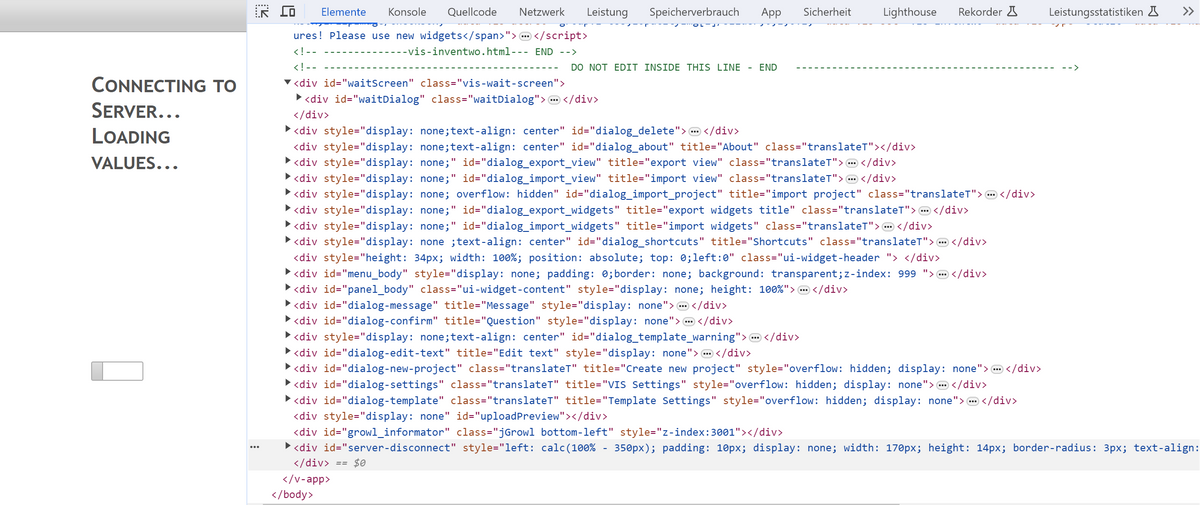
-
im Log steht gar nichts, in der Browserkonsole u.a. (sorry, ich konnte es nicht als Text herauskopieren):
@pamf sagte in Vis 1 lädt nicht mehr, Loading Values:
in der Browserkonsole u.a
das ist nicht die Konsole.
Das wäre der nächste Reiter -
Systemdata Bitte Ausfüllen Hardwaresystem: Mini PC Ryzen 7 AMD R7 5700U mit Proxmox Arbeitsspeicher: 12 GB Festplattenart: SSD Betriebssystem: Debian Node-Version: v18.19.0 Nodejs-Version: v18.19.0 NPM-Version: 9.8.1 Installationsart: Skript Image genutzt: Nein Moin, ich habe gerade meine View in Vis 1 bearbeitet (per VPN verbunden), nach ca. 30 Min brach die Verbindung zur VIS ab, nicht jedoch zu IoBroker an sich. Seitdem kann ich sowohl die Bearbeitung als auch die Anzeige der View nicht mehr öffnen, es bleibt bei Loading Values hängen.
Bis zu dem Zeitpunkt hatte ich nichts im System geändert. Als VIS nicht mehr lief habe ich den js-Controller auf 5.0.17 upgedatet, keine Änderung. Neustart von Vis, IoBroker komplett, von der VM auf der IoBroker läuft, alles keine Änderung. Durch das Update des js-Controllers ist ja auch ein Fix durchgelaufen. Alle meine Adapter sind aktuell, Repo ist Stable.
Ich habe Backups von gestern, diese würde ich aber ungern nutzen wegen meinen heutigen Änderungen.
Was mir beim Ausfüllen hier aufgefallen ist: unter Host wird mir die Node.js Version
v18.18.2 angezeigt, bei Abfrage per Konsole wird aber v18.19.0 ausgegeben.Hilfe!! ;-)
@pamf Hast du auf dieser View Objekte/Widgets gruppiert, kopiert? Wenn ja ist das der Auslöser. Wenn dem so ist, Backup der VIS einspielem.
Ro75.
SERVER = Beelink U59 16GB DDR4 RAM 512GB SSD, FB 7490, FritzDect 200+301+440, ConBee II, Zigbee Aqara Sensoren + NOUS A1Z, NOUS A1T, Philips Hue ** ioBroker, REDIS, influxdb2, Grafana, PiHole, Plex-Mediaserver, paperless-ngx (Docker), MariaDB + phpmyadmin *** VIS-Runtime = Intel NUC 8GB RAM 128GB SSD + 24" Touchscreen
-
@thomas-braun Du hast recht, im Log steht etwas, aber nicht dazu. VIS, Web etc. haben nichts im Log eingetragen.
@Ro75 genau das habe ich gemacht, nach langer Zeit ohne Nutzung der Möglichkeit des Kopierens dieses mal wieder gemacht. Danke! Bin gerade beim Einspielen der Sicherung.
-
@pamf Hast du auf dieser View Objekte/Widgets gruppiert, kopiert? Wenn ja ist das der Auslöser. Wenn dem so ist, Backup der VIS einspielem.
Ro75.
-
@pamf Hast du auf dieser View Objekte/Widgets gruppiert, kopiert? Wenn ja ist das der Auslöser. Wenn dem so ist, Backup der VIS einspielem.
Ro75.
@ro75 said in Vis 1 lädt nicht mehr, Loading Values:
@pamf Hast du auf dieser View Objekte/Widgets gruppiert, kopiert? Wenn ja ist das der Auslöser. Wenn dem so ist, Backup der VIS einspielem.
Ro75.
Ist dir dazu ein Issue im Adapter Repo bekannt?
Offenbar gibt es hier ein bekanntes Problem. Ich konnte mal auf die Schnelle kein passendes Issue entdecken.Wenn dir auch keines bekannt ist, erstell dich du (oder sonst wer hier) ein passended Issue im Repo (https://github.com/ioBroker/ioBroker.vis/issues).
Da ich vis nicht gut kenne, kann ich nicht sinnvoll beschreiben welche Aktion wie das Problem auslöst und welche Symptome da genau ausgelöst werden.
DANKE




Hey! Du scheinst an dieser Unterhaltung interessiert zu sein, hast aber noch kein Konto.
Hast du es satt, bei jedem Besuch durch die gleichen Beiträge zu scrollen? Wenn du dich für ein Konto anmeldest, kommst du immer genau dorthin zurück, wo du zuvor warst, und kannst dich über neue Antworten benachrichtigen lassen (entweder per E-Mail oder Push-Benachrichtigung). Du kannst auch Lesezeichen speichern und Beiträge positiv bewerten, um anderen Community-Mitgliedern deine Wertschätzung zu zeigen.
Mit deinem Input könnte dieser Beitrag noch besser werden 💗
Registrieren AnmeldenSupport us
444
Online33.0k
Benutzer83.6k
Themen1.3m
Beiträge