



Skip to content
  • Home
  • Aktuell
  • Tags
  • 0 Ungelesen 0
  • Kategorien
  • Unreplied
  • Beliebt
  • GitHub
  • Docu
  • Hilfe
Skins
  • Light
  • Brite
  • Cerulean
  • Cosmo
  • Flatly
  • Journal
  • Litera
  • Lumen
  • Lux
  • Materia
  • Minty
  • Morph
  • Pulse
  • Sandstone
  • Simplex
  • Sketchy
  • Spacelab
  • United
  • Yeti
  • Zephyr
  • Dark
  • Cyborg
  • Darkly
  • Quartz
  • Slate
  • Solar
  • Superhero
  • Vapor

  • Standard: (Kein Skin)
  • Kein Skin
Einklappen
ioBroker Logo

Community Forum

donate donate
  1. ioBroker Community Home
  2. Deutsch
  3. Einsteigerfragen
  4. Installation
  5. Backup aus älterer Version einspielen

NEWS

  • UPDATE 31.10.: Amazon Alexa - ioBroker Skill läuft aus ?
    apollon77A
    apollon77
    48
    3
    8.8k

  • Monatsrückblick – September 2025
    BluefoxB
    Bluefox
    13
    1
    2.2k

  • Neues Video "KI im Smart Home" - ioBroker plus n8n
    BluefoxB
    Bluefox
    16
    1
    3.3k

Backup aus älterer Version einspielen

Geplant Angeheftet Gesperrt Verschoben Installation
54 Beiträge 4 Kommentatoren 4.4k Aufrufe 2 Watching
  • Älteste zuerst
  • Neuste zuerst
  • Meiste Stimmen
Antworten
  • In einem neuen Thema antworten
Anmelden zum Antworten
Dieses Thema wurde gelöscht. Nur Nutzer mit entsprechenden Rechten können es sehen.
  • F firefighter166

    Hallo zusammen,
    da ich im November 2022 einen Festplattenausfall hatte und mein QNAP NAS sich dann auch noch verabschiedet hat. Wo natürlich der IoBroker als Docker drauf gelaufen ist. Naja was soll ich sagen ganze Jahresarbeit fürn Arsch.
    Jetzt wollte ich heute mal wieder damit Anfangen eine neue Instanz aufzusetzen, was auch ohne Probleme funktioniert hat, nur bekomme ich leider das Backup vom 01.11.2022 nicht mehr dort eingespielt und es erscheint folgende Fehlermeldung vielleicht könnt Ihr mir hier weiterhelfen an was es liegen kann.
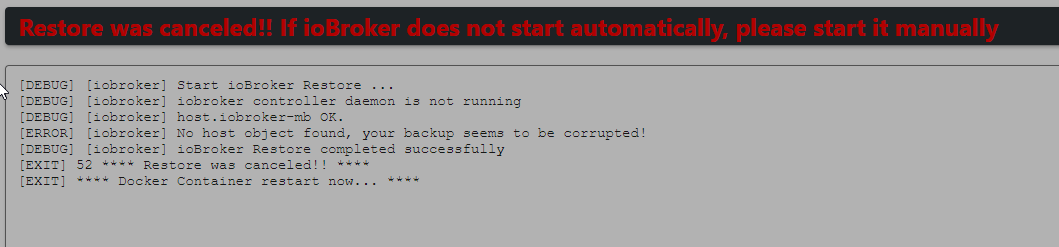
    a51e9bff-47d9-485a-944b-a538a91d0304-image.png

    Nach langen hin und her habe ich jetzt eine Version 7 als Instanz aufgesetzt und siehe da das Backup lasst sich einspielen nur hängt er sich dann beim Starten auf.

    --------------------------------------------------------------------------------
     
    Starting ioBroker... 
     
    ##### #### ### ## # iobroker.js-controller log output # ## ### #### #####
    ================================== > LOG REDIRECT system.adapter.admin.0 => true [starting]
    host.iobroker-1 check instance "system.adapter.admin.0" for host "iobroker-mb"
    host.iobroker-1 check instance "system.adapter.javascript.0" for host "iobroker-mb"
    host.iobroker-1 check instance "system.adapter.history.0" for host "iobroker-mb"
    host.iobroker-1 check instance "system.adapter.influxdb.0" for host "iobroker-mb"
    host.iobroker-1 check instance "system.adapter.influxdb.1" for host "iobroker-mb"
    host.iobroker-1 check instance "system.adapter.node-red.0" for host "slavestrom"
    host.iobroker-1 check instance "system.adapter.telegram.0" for host "iobroker-mb"
    host.iobroker-1 check instance "system.adapter.alexa2.0" for host "iobroker-mb"
    host.iobroker-1 check instance "system.adapter.alexa2.1" for host "iobroker-mb"
    host.iobroker-1 check instance "system.adapter.hm-rega.0" for host "iobroker-mb"
    host.iobroker-1 check instance "system.adapter.hm-rpc.0" for host "iobroker-mb"
    host.iobroker-1 check instance "system.adapter.hue.0" for host "iobroker-mb"
    host.iobroker-1 check instance "system.adapter.modbus.0" for host "iobroker-mb"
    host.iobroker-1 check instance "system.adapter.mqtt.0" for host "iobroker-mb"
    host.iobroker-1 check instance "system.adapter.smartmeter.0" for host "slavestrom"
    host.iobroker-1 check instance "system.adapter.sonoff.0" for host "iobroker-mb"
    host.iobroker-1 check instance "system.adapter.sonos.0" for host "iobroker-mb"
    host.iobroker-1 check instance "system.adapter.sony-bravia.0" for host "iobroker-mb"
    host.iobroker-1 check instance "system.adapter.discovery.0" for host "iobroker-mb"
    host.iobroker-1 check instance "system.adapter.backitup.0" for host "iobroker-mb"
    host.iobroker-1 check instance "system.adapter.daswetter.0" for host "iobroker-mb"
    host.iobroker-1 check instance "system.adapter.device-reminder.0" for host "iobroker-mb"
    host.iobroker-1 check instance "system.adapter.echarts.0" for host "iobroker-mb"
    host.iobroker-1 check instance "system.adapter.energymanager.0" for host "iobroker-mb"
    host.iobroker-1 check instance "system.adapter.fritzdect.0" for host "iobroker-mb"
    host.iobroker-1 check instance "system.adapter.fronius.1" for host "iobroker-mb"
    host.iobroker-1 check instance "system.adapter.habpanel.0" for host "iobroker-mb"
    host.iobroker-1 check instance "system.adapter.info.0" for host "iobroker-mb"
    host.iobroker-1 check instance "system.adapter.kecontact.0" for host "iobroker-mb"
    host.iobroker-1 check instance "system.adapter.pvforecast.0" for host "iobroker-mb"
    host.iobroker-1 check instance "system.adapter.smartgarden.0" for host "iobroker-mb"
    host.iobroker-1 check instance "system.adapter.vis.0" for host "iobroker-mb"
    host.iobroker-1 check instance "system.adapter.web.0" for host "iobroker-mb"
    
    Marc BergM Offline
    Marc BergM Offline
    Marc Berg
    Most Active
    schrieb am zuletzt editiert von Marc Berg
    #2

    @firefighter166

    Was meinst du mit „Version 7 als Instanz“?
    Ich nehme an, dass das Backup mit einer alten Version des js-controllers erstellt wurde. Weißt du noch, welche das war?

    PS: warum war eigentlich deine ganze Arbeit futsch? Backup mit auf den NAS?

    PS2: es würde helfen, wenn du das gesamte Log posten würdest

    NUC10I3+Ubuntu+Docker+ioBroker+influxDB2+Node Red+RabbitMQ+Grafana

    Pi-hole, Traefik, Checkmk, Conbee II+Zigbee2MQTT, ESPSomfy-RTS, LoRaWAN, Arduino, KiCad

    Benutzt das Voting im Beitrag, wenn er euch geholfen hat.

    F HomoranH 2 Antworten Letzte Antwort
    0
    • Marc BergM Marc Berg

      @firefighter166

      Was meinst du mit „Version 7 als Instanz“?
      Ich nehme an, dass das Backup mit einer alten Version des js-controllers erstellt wurde. Weißt du noch, welche das war?

      PS: warum war eigentlich deine ganze Arbeit futsch? Backup mit auf den NAS?

      PS2: es würde helfen, wenn du das gesamte Log posten würdest

      F Offline
      F Offline
      firefighter166
      schrieb am zuletzt editiert von
      #3

      @marc-berg said in Backup aus älterer Version einspielen:

      @firefighter166

      Was meinst du mit „Version 7 als Instanz“?
      Ich nehme an, dass das Backup mit einer alten Version des js-controllers erstellt wurde. Weißt du noch, welche das war?

      PS: warum war eigentlich deine ganze Arbeit futsch? Backup mit auf den NAS?

      PS2: es würde helfen, wenn du das gesamte Log posten würdest

      @Marc-Berg
      richtig das Backup ist aus einer alten Version des js-controllers. Leider weiß ich das nicht mehr genau, kann man das irgendwie nachsehen?

      Backup habe ich zum Glück auf einem Weiteren NAS gespeichert.

      Wo finde ich denn den Log?

      Marc BergM 1 Antwort Letzte Antwort
      0
      • Marc BergM Marc Berg

        @firefighter166

        Was meinst du mit „Version 7 als Instanz“?
        Ich nehme an, dass das Backup mit einer alten Version des js-controllers erstellt wurde. Weißt du noch, welche das war?

        PS: warum war eigentlich deine ganze Arbeit futsch? Backup mit auf den NAS?

        PS2: es würde helfen, wenn du das gesamte Log posten würdest

        HomoranH Nicht stören
        HomoranH Nicht stören
        Homoran
        Global Moderator Administrators
        schrieb am zuletzt editiert von
        #4

        @marc-berg sagte in Backup aus älterer Version einspielen:

        Was meinst du mit „Version 7 als Instanz“?

        ich fürchte er dockert

        kein Support per PN! - Fragen im Forum stellen - es gibt fast nichts, was nicht auch für andere interessant ist.

        Benutzt das Voting rechts unten im Beitrag wenn er euch geholfen hat.

        der Installationsfixer: curl -fsL https://iobroker.net/fix.sh | bash -

        F 1 Antwort Letzte Antwort
        0
        • HomoranH Homoran

          @marc-berg sagte in Backup aus älterer Version einspielen:

          Was meinst du mit „Version 7 als Instanz“?

          ich fürchte er dockert

          F Offline
          F Offline
          firefighter166
          schrieb am zuletzt editiert von
          #5

          @homoran

          Richtig der IoBroker ist als Docker gelaufen.

          HomoranH 1 Antwort Letzte Antwort
          0
          • F firefighter166

            @homoran

            Richtig der IoBroker ist als Docker gelaufen.

            HomoranH Nicht stören
            HomoranH Nicht stören
            Homoran
            Global Moderator Administrators
            schrieb am zuletzt editiert von
            #6

            @firefighter166 sagte in Backup aus älterer Version einspielen:

            @homoran

            Richtig der IoBroker ist als Docker gelaufen.

            und die Version 7 ist die des Dockers?

            kein Support per PN! - Fragen im Forum stellen - es gibt fast nichts, was nicht auch für andere interessant ist.

            Benutzt das Voting rechts unten im Beitrag wenn er euch geholfen hat.

            der Installationsfixer: curl -fsL https://iobroker.net/fix.sh | bash -

            F 1 Antwort Letzte Antwort
            0
            • F firefighter166

              @marc-berg said in Backup aus älterer Version einspielen:

              @firefighter166

              Was meinst du mit „Version 7 als Instanz“?
              Ich nehme an, dass das Backup mit einer alten Version des js-controllers erstellt wurde. Weißt du noch, welche das war?

              PS: warum war eigentlich deine ganze Arbeit futsch? Backup mit auf den NAS?

              PS2: es würde helfen, wenn du das gesamte Log posten würdest

              @Marc-Berg
              richtig das Backup ist aus einer alten Version des js-controllers. Leider weiß ich das nicht mehr genau, kann man das irgendwie nachsehen?

              Backup habe ich zum Glück auf einem Weiteren NAS gespeichert.

              Wo finde ich denn den Log?

              Marc BergM Offline
              Marc BergM Offline
              Marc Berg
              Most Active
              schrieb am zuletzt editiert von
              #7

              @firefighter166 sagte in Backup aus älterer Version einspielen:

              Leider weiß ich das nicht mehr genau, kann man das irgendwie nachsehen?

              Ja. Ich weiß nicht, ob es einen besseren Weg gibt, aber wenn du das Backupfile entpackst und die darin enthaltene backup.json öffnest, dann gibt es darin folgenden Text:

              "name": "system.host.$$__hostname__$$",
              "title": "JS controller",
              "installedVersion": "5.0.17",
              

              NUC10I3+Ubuntu+Docker+ioBroker+influxDB2+Node Red+RabbitMQ+Grafana

              Pi-hole, Traefik, Checkmk, Conbee II+Zigbee2MQTT, ESPSomfy-RTS, LoRaWAN, Arduino, KiCad

              Benutzt das Voting im Beitrag, wenn er euch geholfen hat.

              F 1 Antwort Letzte Antwort
              0
              • HomoranH Homoran

                @firefighter166 sagte in Backup aus älterer Version einspielen:

                @homoran

                Richtig der IoBroker ist als Docker gelaufen.

                und die Version 7 ist die des Dockers?

                F Offline
                F Offline
                firefighter166
                schrieb am zuletzt editiert von
                #8

                @homoran

                Richtig das müsste die Image Version sein aber auch da bin ich mir nicht sicher welche Version als letztes als Docker gelaufen ist.

                https://hub.docker.com/r/buanet/iobroker

                HomoranH 1 Antwort Letzte Antwort
                0
                • F firefighter166

                  @homoran

                  Richtig das müsste die Image Version sein aber auch da bin ich mir nicht sicher welche Version als letztes als Docker gelaufen ist.

                  https://hub.docker.com/r/buanet/iobroker

                  HomoranH Nicht stören
                  HomoranH Nicht stören
                  Homoran
                  Global Moderator Administrators
                  schrieb am zuletzt editiert von
                  #9

                  @firefighter166

                  jetzt bring mal alle notwendigen Informationen strukturiert bei.

                  https://forum.iobroker.net/topic/51555/hinweise-für-gute-forenbeiträge/1

                  kein Support per PN! - Fragen im Forum stellen - es gibt fast nichts, was nicht auch für andere interessant ist.

                  Benutzt das Voting rechts unten im Beitrag wenn er euch geholfen hat.

                  der Installationsfixer: curl -fsL https://iobroker.net/fix.sh | bash -

                  1 Antwort Letzte Antwort
                  0
                  • Marc BergM Marc Berg

                    @firefighter166 sagte in Backup aus älterer Version einspielen:

                    Leider weiß ich das nicht mehr genau, kann man das irgendwie nachsehen?

                    Ja. Ich weiß nicht, ob es einen besseren Weg gibt, aber wenn du das Backupfile entpackst und die darin enthaltene backup.json öffnest, dann gibt es darin folgenden Text:

                    "name": "system.host.$$__hostname__$$",
                    "title": "JS controller",
                    "installedVersion": "5.0.17",
                    
                    F Offline
                    F Offline
                    firefighter166
                    schrieb am zuletzt editiert von firefighter166
                    #10

                    @marc-berg said in Backup aus älterer Version einspielen:

                    "name": "system.host.$$hostname$$", "title": "JS controller", "installedVersion": "5.0.17",

                    @Marc-Berg

                    "name": "system.host.$$__hostname__$$",
                    "title": "JS controller",
                    "installedVersion": "3.2.16",
                    
                    1 Antwort Letzte Antwort
                    0
                    • Marc BergM Offline
                      Marc BergM Offline
                      Marc Berg
                      Most Active
                      schrieb am zuletzt editiert von Marc Berg
                      #11

                      @firefighter166 sagte in Backup aus älterer Version einspielen:

                      "installedVersion": "3.2.16",

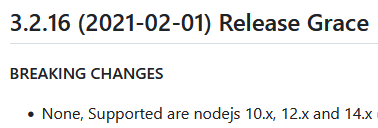
                      Die Version feiert bald dritten Geburtstag.
                      98ccf05e-bc92-42be-851f-8ad123d8a193-grafik.png

                      NUC10I3+Ubuntu+Docker+ioBroker+influxDB2+Node Red+RabbitMQ+Grafana

                      Pi-hole, Traefik, Checkmk, Conbee II+Zigbee2MQTT, ESPSomfy-RTS, LoRaWAN, Arduino, KiCad

                      Benutzt das Voting im Beitrag, wenn er euch geholfen hat.

                      F 1 Antwort Letzte Antwort
                      0
                      • Marc BergM Marc Berg

                        @firefighter166 sagte in Backup aus älterer Version einspielen:

                        "installedVersion": "3.2.16",

                        Die Version feiert bald dritten Geburtstag.
                        98ccf05e-bc92-42be-851f-8ad123d8a193-grafik.png

                        F Offline
                        F Offline
                        firefighter166
                        schrieb am zuletzt editiert von
                        #12

                        @marc-berg

                        Dann muss ich doch jetzt nur eine Docker Instanz aufsetzten, wo nodejs 14.x drauf läuft oder ?

                        Marc BergM 1 Antwort Letzte Antwort
                        0
                        • F firefighter166

                          @marc-berg

                          Dann muss ich doch jetzt nur eine Docker Instanz aufsetzten, wo nodejs 14.x drauf läuft oder ?

                          Marc BergM Offline
                          Marc BergM Offline
                          Marc Berg
                          Most Active
                          schrieb am zuletzt editiert von
                          #13

                          @firefighter166 sagte in Backup aus älterer Version einspielen:

                          Dann muss ich doch jetzt nur eine Docker Instanz aufsetzten, wo nodejs 14.x drauf läuft oder ?

                          Insofern war das mit dem Docker-Image 7.x genau richtig, denn dort läuft Node.js 14. Ich hätte es wohl auch so gemacht.

                          Versuch noch mal bei einem leeren Verzeichnis zu starten. Und (wie schon anfangs erwähnt) das komplette Docker-Log aus der Console hier rein.

                          NUC10I3+Ubuntu+Docker+ioBroker+influxDB2+Node Red+RabbitMQ+Grafana

                          Pi-hole, Traefik, Checkmk, Conbee II+Zigbee2MQTT, ESPSomfy-RTS, LoRaWAN, Arduino, KiCad

                          Benutzt das Voting im Beitrag, wenn er euch geholfen hat.

                          F 1 Antwort Letzte Antwort
                          0
                          • Marc BergM Marc Berg

                            @firefighter166 sagte in Backup aus älterer Version einspielen:

                            Dann muss ich doch jetzt nur eine Docker Instanz aufsetzten, wo nodejs 14.x drauf läuft oder ?

                            Insofern war das mit dem Docker-Image 7.x genau richtig, denn dort läuft Node.js 14. Ich hätte es wohl auch so gemacht.

                            Versuch noch mal bei einem leeren Verzeichnis zu starten. Und (wie schon anfangs erwähnt) das komplette Docker-Log aus der Console hier rein.

                            F Offline
                            F Offline
                            firefighter166
                            schrieb am zuletzt editiert von
                            #14

                            @marc-berg

                            wie gewünscht der Docker Log

                            --------------------------------------------------------------------------------
                            -------------------------     2023-12-07 13:56:53      -------------------------
                            --------------------------------------------------------------------------------
                            -----                                                                      -----
                            ----- ██╗  ██████╗  ██████╗  ██████╗   ██████╗  ██╗  ██╗ ███████╗ ██████╗  -----
                            ----- ██║ ██╔═══██╗ ██╔══██╗ ██╔══██╗ ██╔═══██╗ ██║ ██╔╝ ██╔════╝ ██╔══██╗ -----
                            ----- ██║ ██║   ██║ ██████╔╝ ██████╔╝ ██║   ██║ █████╔╝  █████╗   ██████╔╝ -----
                            ----- ██║ ██║   ██║ ██╔══██╗ ██╔══██╗ ██║   ██║ ██╔═██╗  ██╔══╝   ██╔══██╗ -----
                            ----- ██║ ╚██████╔╝ ██████╔╝ ██║  ██║ ╚██████╔╝ ██║  ██╗ ███████╗ ██║  ██║ -----
                            ----- ╚═╝  ╚═════╝  ╚═════╝  ╚═╝  ╚═╝  ╚═════╝  ╚═╝  ╚═╝ ╚══════╝ ╚═╝  ╚═╝ -----
                            -----                                                                      -----
                            -----              Welcome to your ioBroker Docker container!              -----
                            -----                    Startupscript is now running!                     -----
                            -----                          Please be patient!                          -----
                            --------------------------------------------------------------------------------
                             
                            --------------------------------------------------------------------------------
                            -----                          System Information                          -----
                            -----                    arch:                x86_64                       -----
                            -----                    hostname:            51ebd490ef3f                 -----
                            -----                                                                      -----
                            -----                          Version Information                         -----
                            -----                    image:               v7.2.0                       -----
                            -----                    build:               2023-02-10T23:45:25+00:00    -----
                            -----                    node:                v16.20.2                     -----
                            -----                    npm:                 8.19.4                       -----
                            -----                                                                      -----
                            -----                        Environment Variables                         -----
                            -----                    SETGID:              1000                         -----
                            -----                    SETUID:              1000                         -----
                            --------------------------------------------------------------------------------
                             
                            --------------------------------------------------------------------------------
                            -----                  Step 1 of 5: Preparing container                   -----
                            --------------------------------------------------------------------------------
                             
                            This is not the first run of this container. Skipping first run preparation.
                             
                            --------------------------------------------------------------------------------
                            -----             Step 2 of 5: Detecting ioBroker installation             -----
                            --------------------------------------------------------------------------------
                             
                            Existing installation of ioBroker detected in "/opt/iobroker".
                             
                            --------------------------------------------------------------------------------
                            -----             Step 3 of 5: Checking ioBroker installation              -----
                            --------------------------------------------------------------------------------
                             
                            (Re)setting permissions (This might take a while! Please be patient!)... Done.
                             
                            Fixing "sudo-bug" by replacing sudo with gosu... Done.
                             
                            Hostname in ioBroker matches the hostname of this container.
                            No action required.
                             
                            --------------------------------------------------------------------------------
                            -----                Step 4 of 5: Applying special settings                -----
                            --------------------------------------------------------------------------------
                             
                            Some adapters have special requirements/ settings which can be activated by the use of environment variables.
                            For more information see ioBroker Docker Image Docs (https://docs.buanet.de/iobroker-docker-image/docs/).
                             
                            --------------------------------------------------------------------------------
                            -----                    Step 5 of 5: ioBroker startup                     -----
                            --------------------------------------------------------------------------------
                             
                            Starting ioBroker... 
                             
                            ##### #### ### ## # iobroker.js-controller log output # ## ### #### #####
                            host.51ebd490ef3f check instance "system.adapter.admin.0" for host "51ebd490ef3f"
                            host.51ebd490ef3f check instance "system.adapter.discovery.0" for host "51ebd490ef3f"
                            host.51ebd490ef3f check instance "system.adapter.backitup.0" for host "51ebd490ef3f"
                            Send diag info: {"uuid":"95b5c97c-816b-475b-9b4d-29c6637fe84f","language":"de","country":"","hosts":[{"version":"4.0.24","platform":"Javascript/Node.js","type":"linux"}],"node":"v16.20.2","arch":"x64","docker":true,"adapters":{"admin":{"version":"6.3.5","platform":"Javascript/Node.js"},"discovery":{"version":"3.1.0","platform":"Javascript/Node.js"},"backitup":{"version":"2.5.12","platform":"Javascript/Node.js"}},"statesType":"jsonl","objectsType":"jsonl","noInstances":3,"compactMode":false,"noCompactInstances":0,"model":"AMD GX-424CC SOC with Radeon(TM) R5E Graphics","cpus":4,"mem":15734272000,"ostype":"Linux","city":""}
                            ================================== > LOG REDIRECT system.adapter.admin.0 => true [system.adapter.admin.0.logging]
                            
                            
                            Marc BergM 1 Antwort Letzte Antwort
                            0
                            • F firefighter166

                              @marc-berg

                              wie gewünscht der Docker Log

                              --------------------------------------------------------------------------------
                              -------------------------     2023-12-07 13:56:53      -------------------------
                              --------------------------------------------------------------------------------
                              -----                                                                      -----
                              ----- ██╗  ██████╗  ██████╗  ██████╗   ██████╗  ██╗  ██╗ ███████╗ ██████╗  -----
                              ----- ██║ ██╔═══██╗ ██╔══██╗ ██╔══██╗ ██╔═══██╗ ██║ ██╔╝ ██╔════╝ ██╔══██╗ -----
                              ----- ██║ ██║   ██║ ██████╔╝ ██████╔╝ ██║   ██║ █████╔╝  █████╗   ██████╔╝ -----
                              ----- ██║ ██║   ██║ ██╔══██╗ ██╔══██╗ ██║   ██║ ██╔═██╗  ██╔══╝   ██╔══██╗ -----
                              ----- ██║ ╚██████╔╝ ██████╔╝ ██║  ██║ ╚██████╔╝ ██║  ██╗ ███████╗ ██║  ██║ -----
                              ----- ╚═╝  ╚═════╝  ╚═════╝  ╚═╝  ╚═╝  ╚═════╝  ╚═╝  ╚═╝ ╚══════╝ ╚═╝  ╚═╝ -----
                              -----                                                                      -----
                              -----              Welcome to your ioBroker Docker container!              -----
                              -----                    Startupscript is now running!                     -----
                              -----                          Please be patient!                          -----
                              --------------------------------------------------------------------------------
                               
                              --------------------------------------------------------------------------------
                              -----                          System Information                          -----
                              -----                    arch:                x86_64                       -----
                              -----                    hostname:            51ebd490ef3f                 -----
                              -----                                                                      -----
                              -----                          Version Information                         -----
                              -----                    image:               v7.2.0                       -----
                              -----                    build:               2023-02-10T23:45:25+00:00    -----
                              -----                    node:                v16.20.2                     -----
                              -----                    npm:                 8.19.4                       -----
                              -----                                                                      -----
                              -----                        Environment Variables                         -----
                              -----                    SETGID:              1000                         -----
                              -----                    SETUID:              1000                         -----
                              --------------------------------------------------------------------------------
                               
                              --------------------------------------------------------------------------------
                              -----                  Step 1 of 5: Preparing container                   -----
                              --------------------------------------------------------------------------------
                               
                              This is not the first run of this container. Skipping first run preparation.
                               
                              --------------------------------------------------------------------------------
                              -----             Step 2 of 5: Detecting ioBroker installation             -----
                              --------------------------------------------------------------------------------
                               
                              Existing installation of ioBroker detected in "/opt/iobroker".
                               
                              --------------------------------------------------------------------------------
                              -----             Step 3 of 5: Checking ioBroker installation              -----
                              --------------------------------------------------------------------------------
                               
                              (Re)setting permissions (This might take a while! Please be patient!)... Done.
                               
                              Fixing "sudo-bug" by replacing sudo with gosu... Done.
                               
                              Hostname in ioBroker matches the hostname of this container.
                              No action required.
                               
                              --------------------------------------------------------------------------------
                              -----                Step 4 of 5: Applying special settings                -----
                              --------------------------------------------------------------------------------
                               
                              Some adapters have special requirements/ settings which can be activated by the use of environment variables.
                              For more information see ioBroker Docker Image Docs (https://docs.buanet.de/iobroker-docker-image/docs/).
                               
                              --------------------------------------------------------------------------------
                              -----                    Step 5 of 5: ioBroker startup                     -----
                              --------------------------------------------------------------------------------
                               
                              Starting ioBroker... 
                               
                              ##### #### ### ## # iobroker.js-controller log output # ## ### #### #####
                              host.51ebd490ef3f check instance "system.adapter.admin.0" for host "51ebd490ef3f"
                              host.51ebd490ef3f check instance "system.adapter.discovery.0" for host "51ebd490ef3f"
                              host.51ebd490ef3f check instance "system.adapter.backitup.0" for host "51ebd490ef3f"
                              Send diag info: {"uuid":"95b5c97c-816b-475b-9b4d-29c6637fe84f","language":"de","country":"","hosts":[{"version":"4.0.24","platform":"Javascript/Node.js","type":"linux"}],"node":"v16.20.2","arch":"x64","docker":true,"adapters":{"admin":{"version":"6.3.5","platform":"Javascript/Node.js"},"discovery":{"version":"3.1.0","platform":"Javascript/Node.js"},"backitup":{"version":"2.5.12","platform":"Javascript/Node.js"}},"statesType":"jsonl","objectsType":"jsonl","noInstances":3,"compactMode":false,"noCompactInstances":0,"model":"AMD GX-424CC SOC with Radeon(TM) R5E Graphics","cpus":4,"mem":15734272000,"ostype":"Linux","city":""}
                              ================================== > LOG REDIRECT system.adapter.admin.0 => true [system.adapter.admin.0.logging]
                              
                              
                              Marc BergM Offline
                              Marc BergM Offline
                              Marc Berg
                              Most Active
                              schrieb am zuletzt editiert von Marc Berg
                              #15

                              @firefighter166 sagte in Backup aus älterer Version einspielen:

                              wie gewünscht der Docker Log

                              Da ist jetzt aber Node 16 drin. Dann müsstest du noch mal in den Release Notes wühlen, mit welchem Image die 14 mitkam.

                              NUC10I3+Ubuntu+Docker+ioBroker+influxDB2+Node Red+RabbitMQ+Grafana

                              Pi-hole, Traefik, Checkmk, Conbee II+Zigbee2MQTT, ESPSomfy-RTS, LoRaWAN, Arduino, KiCad

                              Benutzt das Voting im Beitrag, wenn er euch geholfen hat.

                              F 1 Antwort Letzte Antwort
                              0
                              • Marc BergM Marc Berg

                                @firefighter166 sagte in Backup aus älterer Version einspielen:

                                wie gewünscht der Docker Log

                                Da ist jetzt aber Node 16 drin. Dann müsstest du noch mal in den Release Notes wühlen, mit welchem Image die 14 mitkam.

                                F Offline
                                F Offline
                                firefighter166
                                schrieb am zuletzt editiert von
                                #16

                                @marc-berg

                                ich bin jetzt nochmal auf die Docker-Image 6.0 zurück gegangen und jetzt müsste es mit Node.js 14x passen oder?

                                --------------------------------------------------------------------------------
                                -------------------------     2023-12-07 14:19:06      -------------------------
                                --------------------------------------------------------------------------------
                                 
                                --------------------------------------------------------------------------------
                                -----                 Welcome to your ioBroker-container!                  -----
                                -----                    Startupscript is now running.                     -----
                                -----                          Please be patient!                          -----
                                --------------------------------------------------------------------------------
                                 
                                --------------------------------------------------------------------------------
                                -----                        Debugging information                         -----
                                -----                                                                      -----
                                -----                                System                                -----
                                -----                    arch:                x86_64                       -----
                                -----                                                                      -----
                                -----                             Docker-Image                             -----
                                -----                    image:               v6.0.0                       -----
                                -----                    build:               2022-02-25T23:46:04+00:00    -----
                                -----                                                                      -----
                                -----                               Versions                               -----
                                -----                    node:                v14.21.3                     -----
                                -----                    npm:                 6.14.18                      -----
                                -----                                                                      -----
                                -----                                 ENV                                  -----
                                -----                    SETGID:              1000                         -----
                                -----                    SETUID:              1000                         -----
                                --------------------------------------------------------------------------------
                                 
                                --------------------------------------------------------------------------------
                                -----                  Step 1 of 5: Preparing container                   -----
                                --------------------------------------------------------------------------------
                                 
                                Nothing to do here.
                                 
                                --------------------------------------------------------------------------------
                                -----             Step 2 of 5: Detecting ioBroker installation             -----
                                --------------------------------------------------------------------------------
                                 
                                Existing installation of ioBroker detected in /opt/iobroker.
                                 
                                --------------------------------------------------------------------------------
                                -----             Step 3 of 5: Checking ioBroker installation              -----
                                --------------------------------------------------------------------------------
                                 
                                (Re)Setting folder permissions (This might take a while! Please be patient!)...
                                Done.
                                 
                                Fixing "sudo-bug" by replacing sudo in iobroker with gosu...
                                Done.
                                 
                                --------------------------------------------------------------------------------
                                -----                Step 4 of 5: Applying special settings                -----
                                --------------------------------------------------------------------------------
                                 
                                Some adapters have special requirements/ settings which can be activated by the use of environment variables.
                                For more information take a look at readme.md on Github!
                                 
                                --------------------------------------------------------------------------------
                                -----                    Step 5 of 5: ioBroker startup                     -----
                                --------------------------------------------------------------------------------
                                 
                                Starting ioBroker...
                                 
                                host.3b2fadb26f50 check instance "system.adapter.admin.0" for host "3b2fadb26f50"
                                host.3b2fadb26f50 check instance "system.adapter.discovery.0" for host "3b2fadb26f50"
                                host.3b2fadb26f50 check instance "system.adapter.backitup.0" for host "3b2fadb26f50"
                                ================================== > LOG REDIRECT system.adapter.admin.0 => true [system.adapter.admin.0.logging]
                                
                                
                                Marc BergM 1 Antwort Letzte Antwort
                                0
                                • F firefighter166

                                  @marc-berg

                                  ich bin jetzt nochmal auf die Docker-Image 6.0 zurück gegangen und jetzt müsste es mit Node.js 14x passen oder?

                                  --------------------------------------------------------------------------------
                                  -------------------------     2023-12-07 14:19:06      -------------------------
                                  --------------------------------------------------------------------------------
                                   
                                  --------------------------------------------------------------------------------
                                  -----                 Welcome to your ioBroker-container!                  -----
                                  -----                    Startupscript is now running.                     -----
                                  -----                          Please be patient!                          -----
                                  --------------------------------------------------------------------------------
                                   
                                  --------------------------------------------------------------------------------
                                  -----                        Debugging information                         -----
                                  -----                                                                      -----
                                  -----                                System                                -----
                                  -----                    arch:                x86_64                       -----
                                  -----                                                                      -----
                                  -----                             Docker-Image                             -----
                                  -----                    image:               v6.0.0                       -----
                                  -----                    build:               2022-02-25T23:46:04+00:00    -----
                                  -----                                                                      -----
                                  -----                               Versions                               -----
                                  -----                    node:                v14.21.3                     -----
                                  -----                    npm:                 6.14.18                      -----
                                  -----                                                                      -----
                                  -----                                 ENV                                  -----
                                  -----                    SETGID:              1000                         -----
                                  -----                    SETUID:              1000                         -----
                                  --------------------------------------------------------------------------------
                                   
                                  --------------------------------------------------------------------------------
                                  -----                  Step 1 of 5: Preparing container                   -----
                                  --------------------------------------------------------------------------------
                                   
                                  Nothing to do here.
                                   
                                  --------------------------------------------------------------------------------
                                  -----             Step 2 of 5: Detecting ioBroker installation             -----
                                  --------------------------------------------------------------------------------
                                   
                                  Existing installation of ioBroker detected in /opt/iobroker.
                                   
                                  --------------------------------------------------------------------------------
                                  -----             Step 3 of 5: Checking ioBroker installation              -----
                                  --------------------------------------------------------------------------------
                                   
                                  (Re)Setting folder permissions (This might take a while! Please be patient!)...
                                  Done.
                                   
                                  Fixing "sudo-bug" by replacing sudo in iobroker with gosu...
                                  Done.
                                   
                                  --------------------------------------------------------------------------------
                                  -----                Step 4 of 5: Applying special settings                -----
                                  --------------------------------------------------------------------------------
                                   
                                  Some adapters have special requirements/ settings which can be activated by the use of environment variables.
                                  For more information take a look at readme.md on Github!
                                   
                                  --------------------------------------------------------------------------------
                                  -----                    Step 5 of 5: ioBroker startup                     -----
                                  --------------------------------------------------------------------------------
                                   
                                  Starting ioBroker...
                                   
                                  host.3b2fadb26f50 check instance "system.adapter.admin.0" for host "3b2fadb26f50"
                                  host.3b2fadb26f50 check instance "system.adapter.discovery.0" for host "3b2fadb26f50"
                                  host.3b2fadb26f50 check instance "system.adapter.backitup.0" for host "3b2fadb26f50"
                                  ================================== > LOG REDIRECT system.adapter.admin.0 => true [system.adapter.admin.0.logging]
                                  
                                  
                                  Marc BergM Offline
                                  Marc BergM Offline
                                  Marc Berg
                                  Most Active
                                  schrieb am zuletzt editiert von
                                  #17

                                  @firefighter166
                                  sieht gut aus, versuch dein Glück.

                                  NUC10I3+Ubuntu+Docker+ioBroker+influxDB2+Node Red+RabbitMQ+Grafana

                                  Pi-hole, Traefik, Checkmk, Conbee II+Zigbee2MQTT, ESPSomfy-RTS, LoRaWAN, Arduino, KiCad

                                  Benutzt das Voting im Beitrag, wenn er euch geholfen hat.

                                  F 1 Antwort Letzte Antwort
                                  0
                                  • Marc BergM Marc Berg

                                    @firefighter166
                                    sieht gut aus, versuch dein Glück.

                                    F Offline
                                    F Offline
                                    firefighter166
                                    schrieb am zuletzt editiert von firefighter166
                                    #18

                                    @marc-berg

                                    ich habe jetzt nochmal auf die Docker Version 7 umgeschwenkt, da ich eine neuere Backupdatei gefunden haben.

                                    installedVersion ist hier 4.0.23

                                    Die Backup Datei lässt sich auch einspielen nur beim Container Neustart hängt er sich dann auf.

                                    --------------------------------------------------------------------------------
                                    -------------------------     2023-12-07 14:54:41      -------------------------
                                    --------------------------------------------------------------------------------
                                    -----                                                                      -----
                                    ----- ██╗  ██████╗  ██████╗  ██████╗   ██████╗  ██╗  ██╗ ███████╗ ██████╗  -----
                                    ----- ██║ ██╔═══██╗ ██╔══██╗ ██╔══██╗ ██╔═══██╗ ██║ ██╔╝ ██╔════╝ ██╔══██╗ -----
                                    ----- ██║ ██║   ██║ ██████╔╝ ██████╔╝ ██║   ██║ █████╔╝  █████╗   ██████╔╝ -----
                                    ----- ██║ ██║   ██║ ██╔══██╗ ██╔══██╗ ██║   ██║ ██╔═██╗  ██╔══╝   ██╔══██╗ -----
                                    ----- ██║ ╚██████╔╝ ██████╔╝ ██║  ██║ ╚██████╔╝ ██║  ██╗ ███████╗ ██║  ██║ -----
                                    ----- ╚═╝  ╚═════╝  ╚═════╝  ╚═╝  ╚═╝  ╚═════╝  ╚═╝  ╚═╝ ╚══════╝ ╚═╝  ╚═╝ -----
                                    -----                                                                      -----
                                    -----              Welcome to your ioBroker Docker container!              -----
                                    -----                    Startupscript is now running!                     -----
                                    -----                          Please be patient!                          -----
                                    --------------------------------------------------------------------------------
                                     
                                    --------------------------------------------------------------------------------
                                    -----                          System Information                          -----
                                    -----                    arch:                x86_64                       -----
                                    -----                    hostname:            5e92feb257f9                 -----
                                    -----                                                                      -----
                                    -----                          Version Information                         -----
                                    -----                    image:               v7.2.0                       -----
                                    -----                    build:               2023-02-10T23:45:25+00:00    -----
                                    -----                    node:                v16.20.2                     -----
                                    -----                    npm:                 8.19.4                       -----
                                    -----                                                                      -----
                                    -----                        Environment Variables                         -----
                                    -----                    SETGID:              1000                         -----
                                    -----                    SETUID:              1000                         -----
                                    --------------------------------------------------------------------------------
                                     
                                    --------------------------------------------------------------------------------
                                    -----                  Step 1 of 5: Preparing container                   -----
                                    --------------------------------------------------------------------------------
                                     
                                    This is not the first run of this container. Skipping first run preparation.
                                     
                                    --------------------------------------------------------------------------------
                                    -----             Step 2 of 5: Detecting ioBroker installation             -----
                                    --------------------------------------------------------------------------------
                                     
                                    Existing installation of ioBroker detected in "/opt/iobroker".
                                     
                                    --------------------------------------------------------------------------------
                                    -----             Step 3 of 5: Checking ioBroker installation              -----
                                    --------------------------------------------------------------------------------
                                     
                                    (Re)setting permissions (This might take a while! Please be patient!)... Done.
                                     
                                    Fixing "sudo-bug" by replacing sudo with gosu... Done.
                                     
                                    Hostname in ioBroker matches the hostname of this container.
                                    No action required.
                                     
                                    --------------------------------------------------------------------------------
                                    -----                Step 4 of 5: Applying special settings                -----
                                    --------------------------------------------------------------------------------
                                     
                                    Some adapters have special requirements/ settings which can be activated by the use of environment variables.
                                    For more information see ioBroker Docker Image Docs (https://docs.buanet.de/iobroker-docker-image/docs/).
                                     
                                    --------------------------------------------------------------------------------
                                    -----                    Step 5 of 5: ioBroker startup                     -----
                                    --------------------------------------------------------------------------------
                                     
                                    Starting ioBroker... 
                                     
                                    ##### #### ### ## # iobroker.js-controller log output # ## ### #### #####
                                    ================================== > LOG REDIRECT system.adapter.admin.0 => true [starting]
                                    host.iobroker-1 check instance "system.adapter.admin.0" for host "5e92feb257f9"
                                    host.iobroker-1 check instance "system.adapter.history.0" for host "5e92feb257f9"
                                    host.iobroker-1 check instance "system.adapter.influxdb.0" for host "5e92feb257f9"
                                    host.iobroker-1 check instance "system.adapter.influxdb.1" for host "5e92feb257f9"
                                    host.iobroker-1 check instance "system.adapter.javascript.0" for host "5e92feb257f9"
                                    host.iobroker-1 check instance "system.adapter.node-red.0" for host "slavestrom"
                                    host.iobroker-1 check instance "system.adapter.telegram.0" for host "5e92feb257f9"
                                    host.iobroker-1 check instance "system.adapter.alexa2.0" for host "5e92feb257f9"
                                    host.iobroker-1 check instance "system.adapter.alexa2.1" for host "5e92feb257f9"
                                    host.iobroker-1 check instance "system.adapter.hm-rega.0" for host "5e92feb257f9"
                                    host.iobroker-1 check instance "system.adapter.hm-rpc.0" for host "5e92feb257f9"
                                    host.iobroker-1 check instance "system.adapter.hue.0" for host "5e92feb257f9"
                                    host.iobroker-1 check instance "system.adapter.modbus.0" for host "5e92feb257f9"
                                    host.iobroker-1 check instance "system.adapter.mqtt.0" for host "5e92feb257f9"
                                    host.iobroker-1 check instance "system.adapter.smartmeter.0" for host "slavestrom"
                                    host.iobroker-1 check instance "system.adapter.sonoff.0" for host "5e92feb257f9"
                                    host.iobroker-1 check instance "system.adapter.sonos.0" for host "5e92feb257f9"
                                    host.iobroker-1 check instance "system.adapter.sony-bravia.0" for host "5e92feb257f9"
                                    host.iobroker-1 check instance "system.adapter.discovery.0" for host "5e92feb257f9"
                                    host.iobroker-1 check instance "system.adapter.backitup.0" for host "5e92feb257f9"
                                    host.iobroker-1 check instance "system.adapter.daswetter.0" for host "5e92feb257f9"
                                    host.iobroker-1 check instance "system.adapter.device-reminder.0" for host "5e92feb257f9"
                                    host.iobroker-1 check instance "system.adapter.echarts.0" for host "5e92feb257f9"
                                    host.iobroker-1 check instance "system.adapter.energymanager.0" for host "5e92feb257f9"
                                    host.iobroker-1 check instance "system.adapter.fritzdect.0" for host "5e92feb257f9"
                                    host.iobroker-1 check instance "system.adapter.fronius.1" for host "5e92feb257f9"
                                    host.iobroker-1 check instance "system.adapter.habpanel.0" for host "5e92feb257f9"
                                    host.iobroker-1 check instance "system.adapter.info.0" for host "5e92feb257f9"
                                    host.iobroker-1 check instance "system.adapter.kecontact.0" for host "5e92feb257f9"
                                    host.iobroker-1 check instance "system.adapter.pvforecast.0" for host "5e92feb257f9"
                                    host.iobroker-1 check instance "system.adapter.smartgarden.0" for host "5e92feb257f9"
                                    host.iobroker-1 check instance "system.adapter.vis.0" for host "5e92feb257f9"
                                    host.iobroker-1 check instance "system.adapter.web.0" for host "5e92feb257f9"
                                    
                                    Marc BergM 1 Antwort Letzte Antwort
                                    0
                                    • F firefighter166

                                      @marc-berg

                                      ich habe jetzt nochmal auf die Docker Version 7 umgeschwenkt, da ich eine neuere Backupdatei gefunden haben.

                                      installedVersion ist hier 4.0.23

                                      Die Backup Datei lässt sich auch einspielen nur beim Container Neustart hängt er sich dann auf.

                                      --------------------------------------------------------------------------------
                                      -------------------------     2023-12-07 14:54:41      -------------------------
                                      --------------------------------------------------------------------------------
                                      -----                                                                      -----
                                      ----- ██╗  ██████╗  ██████╗  ██████╗   ██████╗  ██╗  ██╗ ███████╗ ██████╗  -----
                                      ----- ██║ ██╔═══██╗ ██╔══██╗ ██╔══██╗ ██╔═══██╗ ██║ ██╔╝ ██╔════╝ ██╔══██╗ -----
                                      ----- ██║ ██║   ██║ ██████╔╝ ██████╔╝ ██║   ██║ █████╔╝  █████╗   ██████╔╝ -----
                                      ----- ██║ ██║   ██║ ██╔══██╗ ██╔══██╗ ██║   ██║ ██╔═██╗  ██╔══╝   ██╔══██╗ -----
                                      ----- ██║ ╚██████╔╝ ██████╔╝ ██║  ██║ ╚██████╔╝ ██║  ██╗ ███████╗ ██║  ██║ -----
                                      ----- ╚═╝  ╚═════╝  ╚═════╝  ╚═╝  ╚═╝  ╚═════╝  ╚═╝  ╚═╝ ╚══════╝ ╚═╝  ╚═╝ -----
                                      -----                                                                      -----
                                      -----              Welcome to your ioBroker Docker container!              -----
                                      -----                    Startupscript is now running!                     -----
                                      -----                          Please be patient!                          -----
                                      --------------------------------------------------------------------------------
                                       
                                      --------------------------------------------------------------------------------
                                      -----                          System Information                          -----
                                      -----                    arch:                x86_64                       -----
                                      -----                    hostname:            5e92feb257f9                 -----
                                      -----                                                                      -----
                                      -----                          Version Information                         -----
                                      -----                    image:               v7.2.0                       -----
                                      -----                    build:               2023-02-10T23:45:25+00:00    -----
                                      -----                    node:                v16.20.2                     -----
                                      -----                    npm:                 8.19.4                       -----
                                      -----                                                                      -----
                                      -----                        Environment Variables                         -----
                                      -----                    SETGID:              1000                         -----
                                      -----                    SETUID:              1000                         -----
                                      --------------------------------------------------------------------------------
                                       
                                      --------------------------------------------------------------------------------
                                      -----                  Step 1 of 5: Preparing container                   -----
                                      --------------------------------------------------------------------------------
                                       
                                      This is not the first run of this container. Skipping first run preparation.
                                       
                                      --------------------------------------------------------------------------------
                                      -----             Step 2 of 5: Detecting ioBroker installation             -----
                                      --------------------------------------------------------------------------------
                                       
                                      Existing installation of ioBroker detected in "/opt/iobroker".
                                       
                                      --------------------------------------------------------------------------------
                                      -----             Step 3 of 5: Checking ioBroker installation              -----
                                      --------------------------------------------------------------------------------
                                       
                                      (Re)setting permissions (This might take a while! Please be patient!)... Done.
                                       
                                      Fixing "sudo-bug" by replacing sudo with gosu... Done.
                                       
                                      Hostname in ioBroker matches the hostname of this container.
                                      No action required.
                                       
                                      --------------------------------------------------------------------------------
                                      -----                Step 4 of 5: Applying special settings                -----
                                      --------------------------------------------------------------------------------
                                       
                                      Some adapters have special requirements/ settings which can be activated by the use of environment variables.
                                      For more information see ioBroker Docker Image Docs (https://docs.buanet.de/iobroker-docker-image/docs/).
                                       
                                      --------------------------------------------------------------------------------
                                      -----                    Step 5 of 5: ioBroker startup                     -----
                                      --------------------------------------------------------------------------------
                                       
                                      Starting ioBroker... 
                                       
                                      ##### #### ### ## # iobroker.js-controller log output # ## ### #### #####
                                      ================================== > LOG REDIRECT system.adapter.admin.0 => true [starting]
                                      host.iobroker-1 check instance "system.adapter.admin.0" for host "5e92feb257f9"
                                      host.iobroker-1 check instance "system.adapter.history.0" for host "5e92feb257f9"
                                      host.iobroker-1 check instance "system.adapter.influxdb.0" for host "5e92feb257f9"
                                      host.iobroker-1 check instance "system.adapter.influxdb.1" for host "5e92feb257f9"
                                      host.iobroker-1 check instance "system.adapter.javascript.0" for host "5e92feb257f9"
                                      host.iobroker-1 check instance "system.adapter.node-red.0" for host "slavestrom"
                                      host.iobroker-1 check instance "system.adapter.telegram.0" for host "5e92feb257f9"
                                      host.iobroker-1 check instance "system.adapter.alexa2.0" for host "5e92feb257f9"
                                      host.iobroker-1 check instance "system.adapter.alexa2.1" for host "5e92feb257f9"
                                      host.iobroker-1 check instance "system.adapter.hm-rega.0" for host "5e92feb257f9"
                                      host.iobroker-1 check instance "system.adapter.hm-rpc.0" for host "5e92feb257f9"
                                      host.iobroker-1 check instance "system.adapter.hue.0" for host "5e92feb257f9"
                                      host.iobroker-1 check instance "system.adapter.modbus.0" for host "5e92feb257f9"
                                      host.iobroker-1 check instance "system.adapter.mqtt.0" for host "5e92feb257f9"
                                      host.iobroker-1 check instance "system.adapter.smartmeter.0" for host "slavestrom"
                                      host.iobroker-1 check instance "system.adapter.sonoff.0" for host "5e92feb257f9"
                                      host.iobroker-1 check instance "system.adapter.sonos.0" for host "5e92feb257f9"
                                      host.iobroker-1 check instance "system.adapter.sony-bravia.0" for host "5e92feb257f9"
                                      host.iobroker-1 check instance "system.adapter.discovery.0" for host "5e92feb257f9"
                                      host.iobroker-1 check instance "system.adapter.backitup.0" for host "5e92feb257f9"
                                      host.iobroker-1 check instance "system.adapter.daswetter.0" for host "5e92feb257f9"
                                      host.iobroker-1 check instance "system.adapter.device-reminder.0" for host "5e92feb257f9"
                                      host.iobroker-1 check instance "system.adapter.echarts.0" for host "5e92feb257f9"
                                      host.iobroker-1 check instance "system.adapter.energymanager.0" for host "5e92feb257f9"
                                      host.iobroker-1 check instance "system.adapter.fritzdect.0" for host "5e92feb257f9"
                                      host.iobroker-1 check instance "system.adapter.fronius.1" for host "5e92feb257f9"
                                      host.iobroker-1 check instance "system.adapter.habpanel.0" for host "5e92feb257f9"
                                      host.iobroker-1 check instance "system.adapter.info.0" for host "5e92feb257f9"
                                      host.iobroker-1 check instance "system.adapter.kecontact.0" for host "5e92feb257f9"
                                      host.iobroker-1 check instance "system.adapter.pvforecast.0" for host "5e92feb257f9"
                                      host.iobroker-1 check instance "system.adapter.smartgarden.0" for host "5e92feb257f9"
                                      host.iobroker-1 check instance "system.adapter.vis.0" for host "5e92feb257f9"
                                      host.iobroker-1 check instance "system.adapter.web.0" for host "5e92feb257f9"
                                      
                                      Marc BergM Offline
                                      Marc BergM Offline
                                      Marc Berg
                                      Most Active
                                      schrieb am zuletzt editiert von Marc Berg
                                      #19

                                      @firefighter166
                                      Ja, so ganz ohne Fehlermeldung ...

                                      Versuch mal folgendes:

                                      In den Container gehen und

                                      iob fix
                                      pkill -u iobroker
                                      iob host this
                                      

                                      Neustart des Containers.

                                      NUC10I3+Ubuntu+Docker+ioBroker+influxDB2+Node Red+RabbitMQ+Grafana

                                      Pi-hole, Traefik, Checkmk, Conbee II+Zigbee2MQTT, ESPSomfy-RTS, LoRaWAN, Arduino, KiCad

                                      Benutzt das Voting im Beitrag, wenn er euch geholfen hat.

                                      F 1 Antwort Letzte Antwort
                                      0
                                      • Marc BergM Marc Berg

                                        @firefighter166
                                        Ja, so ganz ohne Fehlermeldung ...

                                        Versuch mal folgendes:

                                        In den Container gehen und

                                        iob fix
                                        pkill -u iobroker
                                        iob host this
                                        

                                        Neustart des Containers.

                                        F Offline
                                        F Offline
                                        firefighter166
                                        schrieb am zuletzt editiert von
                                        #20

                                        @marc-berg

                                        Keine Chance der Container bleibt an der selben Stelle hängen.

                                        Marc BergM 1 Antwort Letzte Antwort
                                        0
                                        • F firefighter166

                                          @marc-berg

                                          Keine Chance der Container bleibt an der selben Stelle hängen.

                                          Marc BergM Offline
                                          Marc BergM Offline
                                          Marc Berg
                                          Most Active
                                          schrieb am zuletzt editiert von Marc Berg
                                          #21

                                          @firefighter166 sagte in Backup aus älterer Version einspielen:

                                          @marc-berg

                                          Keine Chance der Container bleibt an der selben Stelle hängen.

                                          Der Container-/Hostname ist jetzt scheinbar ein anderer als in der Sicherung.

                                          host.iobroker-1 check instance "system.adapter.web.0" for host "5e92feb257f9"

                                          Benenne den mal wie vorher (also "iobroker-1"), und dann nochmal mit leerem Ordner starten.

                                          NUC10I3+Ubuntu+Docker+ioBroker+influxDB2+Node Red+RabbitMQ+Grafana

                                          Pi-hole, Traefik, Checkmk, Conbee II+Zigbee2MQTT, ESPSomfy-RTS, LoRaWAN, Arduino, KiCad

                                          Benutzt das Voting im Beitrag, wenn er euch geholfen hat.

                                          F 1 Antwort Letzte Antwort
                                          0
                                          Antworten
                                          • In einem neuen Thema antworten
                                          Anmelden zum Antworten
                                          • Älteste zuerst
                                          • Neuste zuerst
                                          • Meiste Stimmen


                                          Support us

                                          ioBroker
                                          Community Adapters
                                          Donate

                                          813

                                          Online

                                          32.4k

                                          Benutzer

                                          81.5k

                                          Themen

                                          1.3m

                                          Beiträge
                                          Community
                                          Impressum | Datenschutz-Bestimmungen | Nutzungsbedingungen | Einwilligungseinstellungen
                                          ioBroker Community 2014-2025
                                          logo
                                          • Anmelden

                                          • Du hast noch kein Konto? Registrieren

                                          • Anmelden oder registrieren, um zu suchen
                                          • Erster Beitrag
                                            Letzter Beitrag
                                          0
                                          • Home
                                          • Aktuell
                                          • Tags
                                          • Ungelesen 0
                                          • Kategorien
                                          • Unreplied
                                          • Beliebt
                                          • GitHub
                                          • Docu
                                          • Hilfe