




Kein Zugriff auf Vis edit runtime und flot üner interne IP
-
Hallo,
ich kann über meine interne IP http://192.168.178.x weder auf vis editor, vis runtime noch flot zugreifen.

Über iobroker.pro kann ich auf alles zugreifen.Über http://192.168.178.x:8082/ funktioniert nur Admin.

Kann mir jemand weiterhelfen?
Danke.
Gruss
Karacho
-
Hallo,
ich kann über meine interne IP http://192.168.178.x weder auf vis editor, vis runtime noch flot zugreifen.
Über iobroker.pro kann ich auf alles zugreifen.Über http://192.168.178.x:8082/ funktioniert nur Admin.
Kann mir jemand weiterhelfen?
Danke.
Gruss
Karacho
-
======== Start marking the full check here ========= Skript v.2023-10-10 *** BASE SYSTEM *** Static hostname: raspberrypi4-iob Icon name: computer Operating System: Raspbian GNU/Linux 10 (buster) Kernel: Linux 5.10.103-v7l+ Architecture: arm Model : Raspberry Pi 4 Model B Rev 1.2 Docker : false Virtualization : none Kernel : armv7l Userland : armhf Systemuptime and Load: 20:56:35 up 1:10, 1 user, load average: 0.68, 0.55, 0.72 CPU threads: 4 *** RASPBERRY THROTTLING *** Current issues: No throttling issues detected. Previously detected issues: No throttling issues detected. *** Time and Time Zones *** Local time: Sun 2023-11-26 20:56:36 CET Universal time: Sun 2023-11-26 19:56:36 UTC RTC time: n/a Time zone: Europe/Berlin (CET, +0100) System clock synchronized: yes NTP service: active RTC in local TZ: no *** User and Groups *** pi /home/pi pi adm dialout cdrom sudo audio video plugdev games users input netdev lpadmin gpio i2c spi iobroker *** X-Server-Setup *** X-Server: false Desktop: Terminal: tty Boot Target: graphical.target *** MEMORY *** total used free shared buff/cache available Mem: 3.8G 1.4G 2.0G 8.0M 435M 2.3G Swap: 99M 0B 99M Total: 3.9G 1.4G 2.1G 3837 M total memory 1396 M used memory 292 M active memory 1436 M inactive memory 2006 M free memory 93 M buffer memory 341 M swap cache 99 M total swap 0 M used swap 99 M free swap Raspberry only: oom events: 0 lifetime oom required: 0 Mbytes total time in oom handler: 0 ms max time spent in oom handler: 0 ms *** FAILED SERVICES *** UNIT LOAD ACTIVE SUB DESCRIPTION * bthelper@hci0.service loaded failed failed Raspberry Pi bluetooth helper * lightdm.service loaded failed failed Light Display Manager LOAD = Reflects whether the unit definition was properly loaded. ACTIVE = The high-level unit activation state, i.e. generalization of SUB. SUB = The low-level unit activation state, values depend on unit type. 2 loaded units listed. Pass --all to see loaded but inactive units, too. To show all installed unit files use 'systemctl list-unit-files'. *** FILESYSTEM *** Filesystem Type Size Used Avail Use% Mounted on /dev/root ext4 59G 43G 14G 77% / devtmpfs devtmpfs 1.8G 0 1.8G 0% /dev tmpfs tmpfs 1.9G 0 1.9G 0% /dev/shm tmpfs tmpfs 1.9G 8.5M 1.9G 1% /run tmpfs tmpfs 5.0M 4.0K 5.0M 1% /run/lock tmpfs tmpfs 1.9G 0 1.9G 0% /sys/fs/cgroup /dev/sda1 vfat 253M 49M 204M 20% /boot tmpfs tmpfs 384M 0 384M 0% /run/user/1000 Messages concerning ext4 filesystem in dmesg: [Sun Nov 26 19:46:10 2023] Kernel command line: coherent_pool=1M 8250.nr_uarts=0 snd_bcm2835.enable_compat_alsa=0 snd_bcm2835.enable_hdmi=1 smsc95xx.macaddr=DC:A6:32:61:2C:40 vc_mem.mem_base=0x3eb00000 vc_mem.mem_size=0x3ff00000 console=ttyS0,115200 console=tty1 root=PARTUUID=738a4d67-02 rootfstype=ext4 elevator=deadline fsck.repair=yes rootwait quiet splash plymouth.ignore-serial-consoles [Sun Nov 26 19:46:12 2023] EXT4-fs (sda2): mounted filesystem with ordered data mode. Opts: (null) [Sun Nov 26 19:46:12 2023] VFS: Mounted root (ext4 filesystem) readonly on device 8:2. [Sun Nov 26 19:46:13 2023] EXT4-fs (sda2): re-mounted. Opts: (null) Show mounted filesystems \(real ones only\): TARGET SOURCE FSTYPE OPTIONS / /dev/sda2 ext4 rw,noatime |-/sys/fs/bpf none bpf rw,nosuid,nodev,noexec,relatime,mode=700 `-/boot /dev/sda1 vfat rw,relatime,fmask=0022,dmask=0022,codepage=437,iocharset=ascii,shortname=mixed,errors=remount-ro Files in neuralgic directories: /var: 2.2G /var/ 1.9G /var/cache/apt 1.9G /var/cache 1.8G /var/cache/apt/archives 117M /var/lib Archived and active journals take up 8.0M in the file system. /opt/iobroker/backups: 194M /opt/iobroker/backups/ /opt/iobroker/iobroker-data: 1.2G /opt/iobroker/iobroker-data/ 698M /opt/iobroker/iobroker-data/history 278M /opt/iobroker/iobroker-data/files 134M /opt/iobroker/iobroker-data/backup-objects 67M /opt/iobroker/iobroker-data/files/javascript.admin The five largest files in iobroker-data are: 35M /opt/iobroker/iobroker-data/files/devices.admin/static/js/main.24f2bb56.js.map 33M /opt/iobroker/iobroker-data/objects.jsonl 21M /opt/iobroker/iobroker-data/files/web.admin/static/js/main.aaea95f8.js.map 17M /opt/iobroker/iobroker-data/states.jsonl 11M /opt/iobroker/iobroker-data/objects.json.migrated USB-Devices by-id: USB-Sticks - Avoid direct links to /dev/* in your adapter setups, please always prefer the links 'by-id': /dev/serial/by-id/usb-ITead_Sonoff_Zigbee_3.0_USB_Dongle_Plus_e486124e65c8eb11afebc4c3de5b81b4-if00-port0 *** NodeJS-Installation *** /usr/bin/nodejs v18.18.2 /usr/bin/node v18.18.2 /usr/bin/npm 9.8.1 /usr/bin/npx 9.8.1 /usr/bin/corepack 0.19.0 nodejs: Installed: 18.18.2-1nodesource1 Candidate: 18.18.2-1nodesource1 Version table: *** 18.18.2-1nodesource1 1001 500 https://deb.nodesource.com/node_18.x nodistro/main armhf Packages 100 /var/lib/dpkg/status 18.18.1-1nodesource1 1001 500 https://deb.nodesource.com/node_18.x nodistro/main armhf Packages 18.18.0-1nodesource1 1001 500 https://deb.nodesource.com/node_18.x nodistro/main armhf Packages 18.17.1-1nodesource1 1001 500 https://deb.nodesource.com/node_18.x nodistro/main armhf Packages 18.17.0-1nodesource1 1001 500 https://deb.nodesource.com/node_18.x nodistro/main armhf Packages 18.16.1-1nodesource1 1001 500 https://deb.nodesource.com/node_18.x nodistro/main armhf Packages 18.16.0-1nodesource1 1001 500 https://deb.nodesource.com/node_18.x nodistro/main armhf Packages 18.15.0-1nodesource1 1001 500 https://deb.nodesource.com/node_18.x nodistro/main armhf Packages 18.14.2-1nodesource1 1001 500 https://deb.nodesource.com/node_18.x nodistro/main armhf Packages 18.14.1-1nodesource1 1001 500 https://deb.nodesource.com/node_18.x nodistro/main armhf Packages 18.14.0-1nodesource1 1001 500 https://deb.nodesource.com/node_18.x nodistro/main armhf Packages 18.13.0-1nodesource1 1001 500 https://deb.nodesource.com/node_18.x nodistro/main armhf Packages 18.12.0-1nodesource1 1001 500 https://deb.nodesource.com/node_18.x nodistro/main armhf Packages 18.11.0-1nodesource1 1001 500 https://deb.nodesource.com/node_18.x nodistro/main armhf Packages 18.10.0-1nodesource1 1001 500 https://deb.nodesource.com/node_18.x nodistro/main armhf Packages 18.9.1-1nodesource1 1001 500 https://deb.nodesource.com/node_18.x nodistro/main armhf Packages 18.9.0-1nodesource1 1001 500 https://deb.nodesource.com/node_18.x nodistro/main armhf Packages 18.8.0-1nodesource1 1001 500 https://deb.nodesource.com/node_18.x nodistro/main armhf Packages 18.7.0-1nodesource1 1001 500 https://deb.nodesource.com/node_18.x nodistro/main armhf Packages 18.6.0-1nodesource1 1001 500 https://deb.nodesource.com/node_18.x nodistro/main armhf Packages 18.5.0-1nodesource1 1001 500 https://deb.nodesource.com/node_18.x nodistro/main armhf Packages 18.4.0-1nodesource1 1001 500 https://deb.nodesource.com/node_18.x nodistro/main armhf Packages 18.3.0-1nodesource1 1001 500 https://deb.nodesource.com/node_18.x nodistro/main armhf Packages 18.2.0-1nodesource1 1001 500 https://deb.nodesource.com/node_18.x nodistro/main armhf Packages 18.1.0-1nodesource1 1001 500 https://deb.nodesource.com/node_18.x nodistro/main armhf Packages 18.0.0-1nodesource1 1001 500 https://deb.nodesource.com/node_18.x nodistro/main armhf Packages 10.24.0~dfsg-1~deb10u3 500 500 http://raspbian.raspberrypi.org/raspbian buster/main armhf Packages Temp directories causing npm8 problem: 0 No problems detected Errors in npm tree: *** ioBroker-Installation *** ioBroker Status iobroker is running on this host. Objects type: jsonl States type: jsonl Core adapters versions js-controller: 5.0.16 admin: 6.12.0 javascript: 7.1.6 Adapters from github: 4 Adapter State + system.adapter.admin.0 : admin : raspberrypi4-iob - enabled, port: 8081, bind: 0.0.0.0, run as: admin + system.adapter.backitup.0 : backitup : raspberrypi4-iob - enabled + system.adapter.bmw.0 : bmw : raspberrypi4-iob - enabled + system.adapter.bosch-ebike.0 : bosch-ebike : raspberrypi4-iob - enabled + system.adapter.broadlink2.0 : broadlink2 : raspberrypi4-iob - enabled + system.adapter.cloud.0 : cloud : raspberrypi4-iob - enabled system.adapter.daswetter.0 : daswetter : raspberrypi4-iob - enabled system.adapter.devices.0 : devices : raspberrypi4-iob - disabled + system.adapter.discovery.0 : discovery : raspberrypi4-iob - enabled system.adapter.dwd.0 : dwd : raspberrypi4-iob - enabled + system.adapter.easee.0 : easee : raspberrypi4-iob - enabled + system.adapter.ems-esp.0 : ems-esp : raspberrypi4-iob - enabled + system.adapter.energiefluss.0 : energiefluss : raspberrypi4-iob - enabled system.adapter.flot.0 : flot : raspberrypi4-iob - disabled + system.adapter.harmony.0 : harmony : raspberrypi4-iob - enabled + system.adapter.heatingcontrol.0 : heatingcontrol : raspberrypi4-iob - enabled + system.adapter.history.0 : history : raspberrypi4-iob - enabled + system.adapter.hmip.0 : hmip : raspberrypi4-iob - enabled + system.adapter.homeconnect.0 : homeconnect : raspberrypi4-iob - enabled system.adapter.hs100.0 : hs100 : raspberrypi4-iob - disabled system.adapter.ical.0 : ical : raspberrypi4-iob - enabled system.adapter.icons-mfd-svg.0 : icons-mfd-svg : raspberrypi4-iob - disabled + system.adapter.info.0 : info : raspberrypi4-iob - enabled + system.adapter.javascript.0 : javascript : raspberrypi4-iob - enabled + system.adapter.meater.0 : meater : raspberrypi4-iob - enabled + system.adapter.mercedesme.0 : mercedesme : raspberrypi4-iob - enabled + system.adapter.mihome-vacuum.0 : mihome-vacuum : raspberrypi4-iob - enabled, port: 54321 system.adapter.mihome-vacuum.1 : mihome-vacuum : raspberrypi4-iob - disabled, port: 54321 + system.adapter.nuki-extended.0 : nuki-extended : raspberrypi4-iob - enabled + system.adapter.pushover.0 : pushover : raspberrypi4-iob - enabled + system.adapter.rpi2.0 : rpi2 : raspberrypi4-iob - enabled + system.adapter.scenes.0 : scenes : raspberrypi4-iob - enabled + system.adapter.smartgarden.0 : smartgarden : raspberrypi4-iob - enabled + system.adapter.solarlog.0 : solarlog : raspberrypi4-iob - enabled, port: 80 + system.adapter.sonoff.0 : sonoff : raspberrypi4-iob - enabled, port: 1883, bind: 0.0.0.0 + system.adapter.trashschedule.0 : trashschedule : raspberrypi4-iob - enabled system.adapter.vis-icontwo.0 : vis-icontwo : raspberrypi4-iob - disabled system.adapter.vis-justgage.0 : vis-justgage : raspberrypi4-iob - enabled system.adapter.vis-rgraph.0 : vis-rgraph : raspberrypi4-iob - enabled system.adapter.vis-timeandweather.0 : vis-timeandweather : raspberrypi4-iob - disabled system.adapter.vis.0 : vis : raspberrypi4-iob - enabled + system.adapter.web.0 : web : raspberrypi4-iob - enabled, port: 8082, bind: 0.0.0.0, run as: admin + system.adapter.worx.0 : worx : raspberrypi4-iob - enabled + system.adapter.zigbee.0 : zigbee : raspberrypi4-iob - enabled, port: /dev/serial/by-id/usb-ITead_Sonoff_Zigbee_3.0_USB_Dongle_Plus_e486124e65c8eb11afebc4c3de5b81b4-if00-port0 + instance is alive Enabled adapters with bindings + system.adapter.admin.0 : admin : raspberrypi4-iob - enabled, port: 8081, bind: 0.0.0.0, run as: admin + system.adapter.mihome-vacuum.0 : mihome-vacuum : raspberrypi4-iob - enabled, port: 54321 + system.adapter.solarlog.0 : solarlog : raspberrypi4-iob - enabled, port: 80 + system.adapter.sonoff.0 : sonoff : raspberrypi4-iob - enabled, port: 1883, bind: 0.0.0.0 + system.adapter.web.0 : web : raspberrypi4-iob - enabled, port: 8082, bind: 0.0.0.0, run as: admin + system.adapter.zigbee.0 : zigbee : raspberrypi4-iob - enabled, port: /dev/serial/by-id/usb-ITead_Sonoff_Zigbee_3.0_USB_Dongle_Plus_e486124e65c8eb11afebc4c3de5b81b4-if00-port0 ioBroker-Repositories Stable (default): http://download.iobroker.net/sources-dist.json Beta (latest) : http://download.iobroker.net/sources-dist-latest.json Active repo(s): Stable (default) Installed ioBroker-Instances Used repository: Stable (default) Adapter "admin" : 6.12.0 , installed 6.12.0 Adapter "backitup" : 2.8.7 , installed 2.8.7 Adapter "bmw" : 2.5.7 , installed 2.6.1 Adapter "bosch-ebike" : 0.0.3 , installed 0.1.0 Adapter "broadlink2" : 2.1.5 , installed 2.1.5 Adapter "cloud" : 4.4.1 , installed 4.4.1 Adapter "daswetter" : 3.1.10 , installed 3.1.10 Adapter "devices" : 1.1.5 , installed 1.1.5 Adapter "discovery" : 4.2.0 , installed 4.2.0 Adapter "dwd" : 2.8.5 , installed 2.8.5 Adapter "easee" : 1.0.10 , installed 1.0.10 Adapter "ems-esp" : 2.6.1 , installed 2.6.1 Adapter "flot" : 1.12.0 , installed 1.12.0 Adapter "harmony" : 1.3.0 , installed 1.3.0 Adapter "heatingcontrol": 2.11.1 , installed 2.11.1 Adapter "history" : 3.0.1 , installed 3.0.1 Adapter "hmip" : 1.20.0 , installed 1.20.0 Adapter "homeconnect" : 1.1.1 , installed 1.1.1 Adapter "hs100" : 2.2.0 , installed 2.2.0 Adapter "ical" : 1.13.3 , installed 1.13.3 Adapter "icons-mfd-svg": 1.1.0 , installed 1.1.0 Adapter "info" : 2.0.0 , installed 2.0.0 Adapter "javascript" : 7.1.6 , installed 7.1.6 Controller "js-controller": 5.0.16 , installed 5.0.16 Adapter "km200" : 2.0.3 , installed 2.0.3 Adapter "meater" : 1.0.2 , installed 1.0.2 Adapter "mercedesme" : 0.1.1 , installed 0.1.1 Adapter "mihome-vacuum": 4.1.0 , installed 4.1.0 Adapter "nuki-extended": 2.6.5 , installed 2.6.5 Adapter "pushover" : 3.0.3 , installed 3.0.3 Adapter "rpi2" : 1.3.2 , installed 1.3.2 Adapter "scenes" : 2.3.9 , installed 2.3.9 Adapter "simple-api" : 2.7.2 , installed 2.7.2 Adapter "smartgarden" : 2.0.0 , installed 2.0.0 Adapter "socketio" : 6.6.0 , installed 6.6.0 Adapter "solarlog" : 2.2.8 , installed 2.2.8 Adapter "sonoff" : 3.0.3 , installed 3.0.3 Adapter "trashschedule": 2.3.0 , installed 2.3.0 Adapter "vis" : 1.4.16 , installed 1.4.16 Adapter "vis-icontwo" : 0.97.1 , installed 0.97.1 Adapter "vis-justgage" : 2.0.2 , installed 2.0.2 Adapter "vis-rgraph" : 0.0.2 , installed 0.0.2 Adapter "vis-timeandweather": 1.2.2, installed 1.2.2 Adapter "web" : 6.1.10 , installed 6.1.10 Adapter "wireguard" : 1.6.1 , installed 1.6.1 Adapter "worx" : 2.3.4 , installed 2.3.4 Adapter "ws" : 2.5.8 , installed 2.5.8 Adapter "zigbee" : 1.8.24 , installed 1.8.24 Objects and States Please stand by - This may take a while Objects: 15752 States: 13681 *** OS-Repositories and Updates *** Hit:1 http://raspbian.raspberrypi.org/raspbian buster InRelease Hit:2 http://archive.raspberrypi.org/debian buster InRelease Hit:3 https://deb.nodesource.com/node_18.x nodistro InRelease Reading package lists... Pending Updates: 0 *** Listening Ports *** Active Internet connections (only servers) Proto Recv-Q Send-Q Local Address Foreign Address State User Inode PID/Program name tcp 0 0 0.0.0.0:22 0.0.0.0:* LISTEN 0 13108 628/sshd tcp 0 0 127.0.0.1:631 0.0.0.0:* LISTEN 0 16274 379/cupsd tcp 0 0 0.0.0.0:1883 0.0.0.0:* LISTEN 1001 44781 4274/io.sonoff.0 tcp 0 0 127.0.0.1:9000 0.0.0.0:* LISTEN 1001 46193 4061/iobroker.js-co tcp 0 0 127.0.0.1:9001 0.0.0.0:* LISTEN 1001 45103 4061/iobroker.js-co tcp6 0 0 :::8081 :::* LISTEN 1001 44603 4079/io.admin.0 tcp6 0 0 :::8082 :::* LISTEN 1001 50700 5209/io.web.0 tcp6 0 0 :::51989 :::* LISTEN 1001 51699 5461/io.nuki-extend tcp6 0 0 :::22 :::* LISTEN 0 13110 628/sshd tcp6 0 0 ::1:3350 :::* LISTEN 0 19511 622/xrdp-sesman tcp6 0 0 ::1:631 :::* LISTEN 0 16273 379/cupsd tcp6 0 0 :::3389 :::* LISTEN 109 21762 641/xrdp tcp6 0 0 :::61991 :::* LISTEN 1001 47257 4419/io.harmony.0 udp 0 0 0.0.0.0:36381 0.0.0.0:* 108 12730 401/avahi-daemon: r udp 0 0 0.0.0.0:61991 0.0.0.0:* 1001 47258 4419/io.harmony.0 udp 0 0 0.0.0.0:68 0.0.0.0:* 0 17296 614/dhcpcd udp 0 0 0.0.0.0:631 0.0.0.0:* 0 15254 489/cups-browsed udp 0 0 0.0.0.0:15001 0.0.0.0:* 1001 47151 4330/io.broadlink2. udp 0 0 0.0.0.0:53421 0.0.0.0:* 1001 43968 4259/io.mihome-vacu udp 0 0 0.0.0.0:57560 0.0.0.0:* 1001 47154 4330/io.broadlink2. udp 0 0 0.0.0.0:5353 0.0.0.0:* 108 12728 401/avahi-daemon: r udp 0 0 0.0.0.0:41823 0.0.0.0:* 1001 44877 4330/io.broadlink2. udp6 0 0 :::46088 :::* 108 12731 401/avahi-daemon: r udp6 0 0 :::5353 :::* 108 12729 401/avahi-daemon: r *** Log File - Last 25 Lines *** 2023-11-26 20:49:53.431 - info: admin.0 (4079) <== Disconnect system.user.admin from ::ffff:192.168.178.44 admin 2023-11-26 20:49:57.570 - info: admin.0 (4079) <== Disconnect system.user.admin from ::ffff:192.168.178.44 admin 2023-11-26 20:50:00.850 - info: host.raspberrypi4-iob instance system.adapter.dwd.0 started with pid 5837 2023-11-26 20:50:04.222 - info: dwd.0 (5837) starting. Version 2.8.5 in /opt/iobroker/node_modules/iobroker.dwd, node: v18.18.2, js-controller: 5.0.16 2023-11-26 20:50:06.855 - info: dwd.0 (5837) State value to set for "dwd.0.warning1.begin" has to be type "string" but received type "number" 2023-11-26 20:50:06.861 - info: dwd.0 (5837) State value to set for "dwd.0.warning1.end" has to be type "string" but received type "number" 2023-11-26 20:50:06.903 - info: dwd.0 (5837) State value to set for "dwd.0.warning2.begin" has to be type "string" but received type "number" 2023-11-26 20:50:06.948 - info: dwd.0 (5837) State value to set for "dwd.0.warning2.end" has to be type "string" but received type "number" 2023-11-26 20:50:07.001 - info: dwd.0 (5837) State value to set for "dwd.0.warning3.begin" has to be type "string" but received type "number" 2023-11-26 20:50:07.052 - info: dwd.0 (5837) State value to set for "dwd.0.warning3.end" has to be type "string" but received type "number" 2023-11-26 20:50:07.174 - info: dwd.0 (5837) Terminated (ADAPTER_REQUESTED_TERMINATION): Without reason 2023-11-26 20:50:07.721 - info: host.raspberrypi4-iob instance system.adapter.dwd.0 terminated with code 11 (ADAPTER_REQUESTED_TERMINATION) 2023-11-26 20:50:31.425 - info: admin.0 (4079) <== Disconnect system.user.admin from ::ffff:192.168.178.44 admin 2023-11-26 20:51:16.753 - error: easee.0 (4408) RefreshToken error 2023-11-26 20:51:16.755 - error: easee.0 (4408) AxiosError: Request failed with status code 504 2023-11-26 20:55:00.058 - info: host.raspberrypi4-iob instance system.adapter.dwd.0 started with pid 6034 2023-11-26 20:55:03.262 - info: dwd.0 (6034) starting. Version 2.8.5 in /opt/iobroker/node_modules/iobroker.dwd, node: v18.18.2, js-controller: 5.0.16 2023-11-26 20:55:05.759 - info: dwd.0 (6034) State value to set for "dwd.0.warning1.begin" has to be type "string" but received type "number" 2023-11-26 20:55:05.808 - info: dwd.0 (6034) State value to set for "dwd.0.warning1.end" has to be type "string" but received type "number" 2023-11-26 20:55:05.866 - info: dwd.0 (6034) State value to set for "dwd.0.warning2.begin" has to be type "string" but received type "number" 2023-11-26 20:55:05.918 - info: dwd.0 (6034) State value to set for "dwd.0.warning2.end" has to be type "string" but received type "number" 2023-11-26 20:55:05.965 - info: dwd.0 (6034) State value to set for "dwd.0.warning3.begin" has to be type "string" but received type "number" 2023-11-26 20:55:05.971 - info: dwd.0 (6034) State value to set for "dwd.0.warning3.end" has to be type "string" but received type "number" 2023-11-26 20:55:06.058 - info: dwd.0 (6034) Terminated (ADAPTER_REQUESTED_TERMINATION): Without reason 2023-11-26 20:55:06.588 - info: host.raspberrypi4-iob instance system.adapter.dwd.0 terminated with code 11 (ADAPTER_REQUESTED_TERMINATION) ============ Mark until here for C&P ============= -
======== Start marking the full check here ========= Skript v.2023-10-10 *** BASE SYSTEM *** Static hostname: raspberrypi4-iob Icon name: computer Operating System: Raspbian GNU/Linux 10 (buster) Kernel: Linux 5.10.103-v7l+ Architecture: arm Model : Raspberry Pi 4 Model B Rev 1.2 Docker : false Virtualization : none Kernel : armv7l Userland : armhf Systemuptime and Load: 20:56:35 up 1:10, 1 user, load average: 0.68, 0.55, 0.72 CPU threads: 4 *** RASPBERRY THROTTLING *** Current issues: No throttling issues detected. Previously detected issues: No throttling issues detected. *** Time and Time Zones *** Local time: Sun 2023-11-26 20:56:36 CET Universal time: Sun 2023-11-26 19:56:36 UTC RTC time: n/a Time zone: Europe/Berlin (CET, +0100) System clock synchronized: yes NTP service: active RTC in local TZ: no *** User and Groups *** pi /home/pi pi adm dialout cdrom sudo audio video plugdev games users input netdev lpadmin gpio i2c spi iobroker *** X-Server-Setup *** X-Server: false Desktop: Terminal: tty Boot Target: graphical.target *** MEMORY *** total used free shared buff/cache available Mem: 3.8G 1.4G 2.0G 8.0M 435M 2.3G Swap: 99M 0B 99M Total: 3.9G 1.4G 2.1G 3837 M total memory 1396 M used memory 292 M active memory 1436 M inactive memory 2006 M free memory 93 M buffer memory 341 M swap cache 99 M total swap 0 M used swap 99 M free swap Raspberry only: oom events: 0 lifetime oom required: 0 Mbytes total time in oom handler: 0 ms max time spent in oom handler: 0 ms *** FAILED SERVICES *** UNIT LOAD ACTIVE SUB DESCRIPTION * bthelper@hci0.service loaded failed failed Raspberry Pi bluetooth helper * lightdm.service loaded failed failed Light Display Manager LOAD = Reflects whether the unit definition was properly loaded. ACTIVE = The high-level unit activation state, i.e. generalization of SUB. SUB = The low-level unit activation state, values depend on unit type. 2 loaded units listed. Pass --all to see loaded but inactive units, too. To show all installed unit files use 'systemctl list-unit-files'. *** FILESYSTEM *** Filesystem Type Size Used Avail Use% Mounted on /dev/root ext4 59G 43G 14G 77% / devtmpfs devtmpfs 1.8G 0 1.8G 0% /dev tmpfs tmpfs 1.9G 0 1.9G 0% /dev/shm tmpfs tmpfs 1.9G 8.5M 1.9G 1% /run tmpfs tmpfs 5.0M 4.0K 5.0M 1% /run/lock tmpfs tmpfs 1.9G 0 1.9G 0% /sys/fs/cgroup /dev/sda1 vfat 253M 49M 204M 20% /boot tmpfs tmpfs 384M 0 384M 0% /run/user/1000 Messages concerning ext4 filesystem in dmesg: [Sun Nov 26 19:46:10 2023] Kernel command line: coherent_pool=1M 8250.nr_uarts=0 snd_bcm2835.enable_compat_alsa=0 snd_bcm2835.enable_hdmi=1 smsc95xx.macaddr=DC:A6:32:61:2C:40 vc_mem.mem_base=0x3eb00000 vc_mem.mem_size=0x3ff00000 console=ttyS0,115200 console=tty1 root=PARTUUID=738a4d67-02 rootfstype=ext4 elevator=deadline fsck.repair=yes rootwait quiet splash plymouth.ignore-serial-consoles [Sun Nov 26 19:46:12 2023] EXT4-fs (sda2): mounted filesystem with ordered data mode. Opts: (null) [Sun Nov 26 19:46:12 2023] VFS: Mounted root (ext4 filesystem) readonly on device 8:2. [Sun Nov 26 19:46:13 2023] EXT4-fs (sda2): re-mounted. Opts: (null) Show mounted filesystems \(real ones only\): TARGET SOURCE FSTYPE OPTIONS / /dev/sda2 ext4 rw,noatime |-/sys/fs/bpf none bpf rw,nosuid,nodev,noexec,relatime,mode=700 `-/boot /dev/sda1 vfat rw,relatime,fmask=0022,dmask=0022,codepage=437,iocharset=ascii,shortname=mixed,errors=remount-ro Files in neuralgic directories: /var: 2.2G /var/ 1.9G /var/cache/apt 1.9G /var/cache 1.8G /var/cache/apt/archives 117M /var/lib Archived and active journals take up 8.0M in the file system. /opt/iobroker/backups: 194M /opt/iobroker/backups/ /opt/iobroker/iobroker-data: 1.2G /opt/iobroker/iobroker-data/ 698M /opt/iobroker/iobroker-data/history 278M /opt/iobroker/iobroker-data/files 134M /opt/iobroker/iobroker-data/backup-objects 67M /opt/iobroker/iobroker-data/files/javascript.admin The five largest files in iobroker-data are: 35M /opt/iobroker/iobroker-data/files/devices.admin/static/js/main.24f2bb56.js.map 33M /opt/iobroker/iobroker-data/objects.jsonl 21M /opt/iobroker/iobroker-data/files/web.admin/static/js/main.aaea95f8.js.map 17M /opt/iobroker/iobroker-data/states.jsonl 11M /opt/iobroker/iobroker-data/objects.json.migrated USB-Devices by-id: USB-Sticks - Avoid direct links to /dev/* in your adapter setups, please always prefer the links 'by-id': /dev/serial/by-id/usb-ITead_Sonoff_Zigbee_3.0_USB_Dongle_Plus_e486124e65c8eb11afebc4c3de5b81b4-if00-port0 *** NodeJS-Installation *** /usr/bin/nodejs v18.18.2 /usr/bin/node v18.18.2 /usr/bin/npm 9.8.1 /usr/bin/npx 9.8.1 /usr/bin/corepack 0.19.0 nodejs: Installed: 18.18.2-1nodesource1 Candidate: 18.18.2-1nodesource1 Version table: *** 18.18.2-1nodesource1 1001 500 https://deb.nodesource.com/node_18.x nodistro/main armhf Packages 100 /var/lib/dpkg/status 18.18.1-1nodesource1 1001 500 https://deb.nodesource.com/node_18.x nodistro/main armhf Packages 18.18.0-1nodesource1 1001 500 https://deb.nodesource.com/node_18.x nodistro/main armhf Packages 18.17.1-1nodesource1 1001 500 https://deb.nodesource.com/node_18.x nodistro/main armhf Packages 18.17.0-1nodesource1 1001 500 https://deb.nodesource.com/node_18.x nodistro/main armhf Packages 18.16.1-1nodesource1 1001 500 https://deb.nodesource.com/node_18.x nodistro/main armhf Packages 18.16.0-1nodesource1 1001 500 https://deb.nodesource.com/node_18.x nodistro/main armhf Packages 18.15.0-1nodesource1 1001 500 https://deb.nodesource.com/node_18.x nodistro/main armhf Packages 18.14.2-1nodesource1 1001 500 https://deb.nodesource.com/node_18.x nodistro/main armhf Packages 18.14.1-1nodesource1 1001 500 https://deb.nodesource.com/node_18.x nodistro/main armhf Packages 18.14.0-1nodesource1 1001 500 https://deb.nodesource.com/node_18.x nodistro/main armhf Packages 18.13.0-1nodesource1 1001 500 https://deb.nodesource.com/node_18.x nodistro/main armhf Packages 18.12.0-1nodesource1 1001 500 https://deb.nodesource.com/node_18.x nodistro/main armhf Packages 18.11.0-1nodesource1 1001 500 https://deb.nodesource.com/node_18.x nodistro/main armhf Packages 18.10.0-1nodesource1 1001 500 https://deb.nodesource.com/node_18.x nodistro/main armhf Packages 18.9.1-1nodesource1 1001 500 https://deb.nodesource.com/node_18.x nodistro/main armhf Packages 18.9.0-1nodesource1 1001 500 https://deb.nodesource.com/node_18.x nodistro/main armhf Packages 18.8.0-1nodesource1 1001 500 https://deb.nodesource.com/node_18.x nodistro/main armhf Packages 18.7.0-1nodesource1 1001 500 https://deb.nodesource.com/node_18.x nodistro/main armhf Packages 18.6.0-1nodesource1 1001 500 https://deb.nodesource.com/node_18.x nodistro/main armhf Packages 18.5.0-1nodesource1 1001 500 https://deb.nodesource.com/node_18.x nodistro/main armhf Packages 18.4.0-1nodesource1 1001 500 https://deb.nodesource.com/node_18.x nodistro/main armhf Packages 18.3.0-1nodesource1 1001 500 https://deb.nodesource.com/node_18.x nodistro/main armhf Packages 18.2.0-1nodesource1 1001 500 https://deb.nodesource.com/node_18.x nodistro/main armhf Packages 18.1.0-1nodesource1 1001 500 https://deb.nodesource.com/node_18.x nodistro/main armhf Packages 18.0.0-1nodesource1 1001 500 https://deb.nodesource.com/node_18.x nodistro/main armhf Packages 10.24.0~dfsg-1~deb10u3 500 500 http://raspbian.raspberrypi.org/raspbian buster/main armhf Packages Temp directories causing npm8 problem: 0 No problems detected Errors in npm tree: *** ioBroker-Installation *** ioBroker Status iobroker is running on this host. Objects type: jsonl States type: jsonl Core adapters versions js-controller: 5.0.16 admin: 6.12.0 javascript: 7.1.6 Adapters from github: 4 Adapter State + system.adapter.admin.0 : admin : raspberrypi4-iob - enabled, port: 8081, bind: 0.0.0.0, run as: admin + system.adapter.backitup.0 : backitup : raspberrypi4-iob - enabled + system.adapter.bmw.0 : bmw : raspberrypi4-iob - enabled + system.adapter.bosch-ebike.0 : bosch-ebike : raspberrypi4-iob - enabled + system.adapter.broadlink2.0 : broadlink2 : raspberrypi4-iob - enabled + system.adapter.cloud.0 : cloud : raspberrypi4-iob - enabled system.adapter.daswetter.0 : daswetter : raspberrypi4-iob - enabled system.adapter.devices.0 : devices : raspberrypi4-iob - disabled + system.adapter.discovery.0 : discovery : raspberrypi4-iob - enabled system.adapter.dwd.0 : dwd : raspberrypi4-iob - enabled + system.adapter.easee.0 : easee : raspberrypi4-iob - enabled + system.adapter.ems-esp.0 : ems-esp : raspberrypi4-iob - enabled + system.adapter.energiefluss.0 : energiefluss : raspberrypi4-iob - enabled system.adapter.flot.0 : flot : raspberrypi4-iob - disabled + system.adapter.harmony.0 : harmony : raspberrypi4-iob - enabled + system.adapter.heatingcontrol.0 : heatingcontrol : raspberrypi4-iob - enabled + system.adapter.history.0 : history : raspberrypi4-iob - enabled + system.adapter.hmip.0 : hmip : raspberrypi4-iob - enabled + system.adapter.homeconnect.0 : homeconnect : raspberrypi4-iob - enabled system.adapter.hs100.0 : hs100 : raspberrypi4-iob - disabled system.adapter.ical.0 : ical : raspberrypi4-iob - enabled system.adapter.icons-mfd-svg.0 : icons-mfd-svg : raspberrypi4-iob - disabled + system.adapter.info.0 : info : raspberrypi4-iob - enabled + system.adapter.javascript.0 : javascript : raspberrypi4-iob - enabled + system.adapter.meater.0 : meater : raspberrypi4-iob - enabled + system.adapter.mercedesme.0 : mercedesme : raspberrypi4-iob - enabled + system.adapter.mihome-vacuum.0 : mihome-vacuum : raspberrypi4-iob - enabled, port: 54321 system.adapter.mihome-vacuum.1 : mihome-vacuum : raspberrypi4-iob - disabled, port: 54321 + system.adapter.nuki-extended.0 : nuki-extended : raspberrypi4-iob - enabled + system.adapter.pushover.0 : pushover : raspberrypi4-iob - enabled + system.adapter.rpi2.0 : rpi2 : raspberrypi4-iob - enabled + system.adapter.scenes.0 : scenes : raspberrypi4-iob - enabled + system.adapter.smartgarden.0 : smartgarden : raspberrypi4-iob - enabled + system.adapter.solarlog.0 : solarlog : raspberrypi4-iob - enabled, port: 80 + system.adapter.sonoff.0 : sonoff : raspberrypi4-iob - enabled, port: 1883, bind: 0.0.0.0 + system.adapter.trashschedule.0 : trashschedule : raspberrypi4-iob - enabled system.adapter.vis-icontwo.0 : vis-icontwo : raspberrypi4-iob - disabled system.adapter.vis-justgage.0 : vis-justgage : raspberrypi4-iob - enabled system.adapter.vis-rgraph.0 : vis-rgraph : raspberrypi4-iob - enabled system.adapter.vis-timeandweather.0 : vis-timeandweather : raspberrypi4-iob - disabled system.adapter.vis.0 : vis : raspberrypi4-iob - enabled + system.adapter.web.0 : web : raspberrypi4-iob - enabled, port: 8082, bind: 0.0.0.0, run as: admin + system.adapter.worx.0 : worx : raspberrypi4-iob - enabled + system.adapter.zigbee.0 : zigbee : raspberrypi4-iob - enabled, port: /dev/serial/by-id/usb-ITead_Sonoff_Zigbee_3.0_USB_Dongle_Plus_e486124e65c8eb11afebc4c3de5b81b4-if00-port0 + instance is alive Enabled adapters with bindings + system.adapter.admin.0 : admin : raspberrypi4-iob - enabled, port: 8081, bind: 0.0.0.0, run as: admin + system.adapter.mihome-vacuum.0 : mihome-vacuum : raspberrypi4-iob - enabled, port: 54321 + system.adapter.solarlog.0 : solarlog : raspberrypi4-iob - enabled, port: 80 + system.adapter.sonoff.0 : sonoff : raspberrypi4-iob - enabled, port: 1883, bind: 0.0.0.0 + system.adapter.web.0 : web : raspberrypi4-iob - enabled, port: 8082, bind: 0.0.0.0, run as: admin + system.adapter.zigbee.0 : zigbee : raspberrypi4-iob - enabled, port: /dev/serial/by-id/usb-ITead_Sonoff_Zigbee_3.0_USB_Dongle_Plus_e486124e65c8eb11afebc4c3de5b81b4-if00-port0 ioBroker-Repositories Stable (default): http://download.iobroker.net/sources-dist.json Beta (latest) : http://download.iobroker.net/sources-dist-latest.json Active repo(s): Stable (default) Installed ioBroker-Instances Used repository: Stable (default) Adapter "admin" : 6.12.0 , installed 6.12.0 Adapter "backitup" : 2.8.7 , installed 2.8.7 Adapter "bmw" : 2.5.7 , installed 2.6.1 Adapter "bosch-ebike" : 0.0.3 , installed 0.1.0 Adapter "broadlink2" : 2.1.5 , installed 2.1.5 Adapter "cloud" : 4.4.1 , installed 4.4.1 Adapter "daswetter" : 3.1.10 , installed 3.1.10 Adapter "devices" : 1.1.5 , installed 1.1.5 Adapter "discovery" : 4.2.0 , installed 4.2.0 Adapter "dwd" : 2.8.5 , installed 2.8.5 Adapter "easee" : 1.0.10 , installed 1.0.10 Adapter "ems-esp" : 2.6.1 , installed 2.6.1 Adapter "flot" : 1.12.0 , installed 1.12.0 Adapter "harmony" : 1.3.0 , installed 1.3.0 Adapter "heatingcontrol": 2.11.1 , installed 2.11.1 Adapter "history" : 3.0.1 , installed 3.0.1 Adapter "hmip" : 1.20.0 , installed 1.20.0 Adapter "homeconnect" : 1.1.1 , installed 1.1.1 Adapter "hs100" : 2.2.0 , installed 2.2.0 Adapter "ical" : 1.13.3 , installed 1.13.3 Adapter "icons-mfd-svg": 1.1.0 , installed 1.1.0 Adapter "info" : 2.0.0 , installed 2.0.0 Adapter "javascript" : 7.1.6 , installed 7.1.6 Controller "js-controller": 5.0.16 , installed 5.0.16 Adapter "km200" : 2.0.3 , installed 2.0.3 Adapter "meater" : 1.0.2 , installed 1.0.2 Adapter "mercedesme" : 0.1.1 , installed 0.1.1 Adapter "mihome-vacuum": 4.1.0 , installed 4.1.0 Adapter "nuki-extended": 2.6.5 , installed 2.6.5 Adapter "pushover" : 3.0.3 , installed 3.0.3 Adapter "rpi2" : 1.3.2 , installed 1.3.2 Adapter "scenes" : 2.3.9 , installed 2.3.9 Adapter "simple-api" : 2.7.2 , installed 2.7.2 Adapter "smartgarden" : 2.0.0 , installed 2.0.0 Adapter "socketio" : 6.6.0 , installed 6.6.0 Adapter "solarlog" : 2.2.8 , installed 2.2.8 Adapter "sonoff" : 3.0.3 , installed 3.0.3 Adapter "trashschedule": 2.3.0 , installed 2.3.0 Adapter "vis" : 1.4.16 , installed 1.4.16 Adapter "vis-icontwo" : 0.97.1 , installed 0.97.1 Adapter "vis-justgage" : 2.0.2 , installed 2.0.2 Adapter "vis-rgraph" : 0.0.2 , installed 0.0.2 Adapter "vis-timeandweather": 1.2.2, installed 1.2.2 Adapter "web" : 6.1.10 , installed 6.1.10 Adapter "wireguard" : 1.6.1 , installed 1.6.1 Adapter "worx" : 2.3.4 , installed 2.3.4 Adapter "ws" : 2.5.8 , installed 2.5.8 Adapter "zigbee" : 1.8.24 , installed 1.8.24 Objects and States Please stand by - This may take a while Objects: 15752 States: 13681 *** OS-Repositories and Updates *** Hit:1 http://raspbian.raspberrypi.org/raspbian buster InRelease Hit:2 http://archive.raspberrypi.org/debian buster InRelease Hit:3 https://deb.nodesource.com/node_18.x nodistro InRelease Reading package lists... Pending Updates: 0 *** Listening Ports *** Active Internet connections (only servers) Proto Recv-Q Send-Q Local Address Foreign Address State User Inode PID/Program name tcp 0 0 0.0.0.0:22 0.0.0.0:* LISTEN 0 13108 628/sshd tcp 0 0 127.0.0.1:631 0.0.0.0:* LISTEN 0 16274 379/cupsd tcp 0 0 0.0.0.0:1883 0.0.0.0:* LISTEN 1001 44781 4274/io.sonoff.0 tcp 0 0 127.0.0.1:9000 0.0.0.0:* LISTEN 1001 46193 4061/iobroker.js-co tcp 0 0 127.0.0.1:9001 0.0.0.0:* LISTEN 1001 45103 4061/iobroker.js-co tcp6 0 0 :::8081 :::* LISTEN 1001 44603 4079/io.admin.0 tcp6 0 0 :::8082 :::* LISTEN 1001 50700 5209/io.web.0 tcp6 0 0 :::51989 :::* LISTEN 1001 51699 5461/io.nuki-extend tcp6 0 0 :::22 :::* LISTEN 0 13110 628/sshd tcp6 0 0 ::1:3350 :::* LISTEN 0 19511 622/xrdp-sesman tcp6 0 0 ::1:631 :::* LISTEN 0 16273 379/cupsd tcp6 0 0 :::3389 :::* LISTEN 109 21762 641/xrdp tcp6 0 0 :::61991 :::* LISTEN 1001 47257 4419/io.harmony.0 udp 0 0 0.0.0.0:36381 0.0.0.0:* 108 12730 401/avahi-daemon: r udp 0 0 0.0.0.0:61991 0.0.0.0:* 1001 47258 4419/io.harmony.0 udp 0 0 0.0.0.0:68 0.0.0.0:* 0 17296 614/dhcpcd udp 0 0 0.0.0.0:631 0.0.0.0:* 0 15254 489/cups-browsed udp 0 0 0.0.0.0:15001 0.0.0.0:* 1001 47151 4330/io.broadlink2. udp 0 0 0.0.0.0:53421 0.0.0.0:* 1001 43968 4259/io.mihome-vacu udp 0 0 0.0.0.0:57560 0.0.0.0:* 1001 47154 4330/io.broadlink2. udp 0 0 0.0.0.0:5353 0.0.0.0:* 108 12728 401/avahi-daemon: r udp 0 0 0.0.0.0:41823 0.0.0.0:* 1001 44877 4330/io.broadlink2. udp6 0 0 :::46088 :::* 108 12731 401/avahi-daemon: r udp6 0 0 :::5353 :::* 108 12729 401/avahi-daemon: r *** Log File - Last 25 Lines *** 2023-11-26 20:49:53.431 - info: admin.0 (4079) <== Disconnect system.user.admin from ::ffff:192.168.178.44 admin 2023-11-26 20:49:57.570 - info: admin.0 (4079) <== Disconnect system.user.admin from ::ffff:192.168.178.44 admin 2023-11-26 20:50:00.850 - info: host.raspberrypi4-iob instance system.adapter.dwd.0 started with pid 5837 2023-11-26 20:50:04.222 - info: dwd.0 (5837) starting. Version 2.8.5 in /opt/iobroker/node_modules/iobroker.dwd, node: v18.18.2, js-controller: 5.0.16 2023-11-26 20:50:06.855 - info: dwd.0 (5837) State value to set for "dwd.0.warning1.begin" has to be type "string" but received type "number" 2023-11-26 20:50:06.861 - info: dwd.0 (5837) State value to set for "dwd.0.warning1.end" has to be type "string" but received type "number" 2023-11-26 20:50:06.903 - info: dwd.0 (5837) State value to set for "dwd.0.warning2.begin" has to be type "string" but received type "number" 2023-11-26 20:50:06.948 - info: dwd.0 (5837) State value to set for "dwd.0.warning2.end" has to be type "string" but received type "number" 2023-11-26 20:50:07.001 - info: dwd.0 (5837) State value to set for "dwd.0.warning3.begin" has to be type "string" but received type "number" 2023-11-26 20:50:07.052 - info: dwd.0 (5837) State value to set for "dwd.0.warning3.end" has to be type "string" but received type "number" 2023-11-26 20:50:07.174 - info: dwd.0 (5837) Terminated (ADAPTER_REQUESTED_TERMINATION): Without reason 2023-11-26 20:50:07.721 - info: host.raspberrypi4-iob instance system.adapter.dwd.0 terminated with code 11 (ADAPTER_REQUESTED_TERMINATION) 2023-11-26 20:50:31.425 - info: admin.0 (4079) <== Disconnect system.user.admin from ::ffff:192.168.178.44 admin 2023-11-26 20:51:16.753 - error: easee.0 (4408) RefreshToken error 2023-11-26 20:51:16.755 - error: easee.0 (4408) AxiosError: Request failed with status code 504 2023-11-26 20:55:00.058 - info: host.raspberrypi4-iob instance system.adapter.dwd.0 started with pid 6034 2023-11-26 20:55:03.262 - info: dwd.0 (6034) starting. Version 2.8.5 in /opt/iobroker/node_modules/iobroker.dwd, node: v18.18.2, js-controller: 5.0.16 2023-11-26 20:55:05.759 - info: dwd.0 (6034) State value to set for "dwd.0.warning1.begin" has to be type "string" but received type "number" 2023-11-26 20:55:05.808 - info: dwd.0 (6034) State value to set for "dwd.0.warning1.end" has to be type "string" but received type "number" 2023-11-26 20:55:05.866 - info: dwd.0 (6034) State value to set for "dwd.0.warning2.begin" has to be type "string" but received type "number" 2023-11-26 20:55:05.918 - info: dwd.0 (6034) State value to set for "dwd.0.warning2.end" has to be type "string" but received type "number" 2023-11-26 20:55:05.965 - info: dwd.0 (6034) State value to set for "dwd.0.warning3.begin" has to be type "string" but received type "number" 2023-11-26 20:55:05.971 - info: dwd.0 (6034) State value to set for "dwd.0.warning3.end" has to be type "string" but received type "number" 2023-11-26 20:55:06.058 - info: dwd.0 (6034) Terminated (ADAPTER_REQUESTED_TERMINATION): Without reason 2023-11-26 20:55:06.588 - info: host.raspberrypi4-iob instance system.adapter.dwd.0 terminated with code 11 (ADAPTER_REQUESTED_TERMINATION) ============ Mark until here for C&P =============@karacho
Buster ist EOL.
Das solltest Du dringend updaten. -
@karacho
Buster ist EOL.
Das solltest Du dringend updaten.@codierknecht
Was meinst Du? Was ist Buster? -
@codierknecht
Was meinst Du? Was ist Buster?@karacho sagte in Kein Zugriff auf Vis edit runtime und flot üner interne IP:
Was ist Buster?
Der Releasename deines Betriebssystems.
Ist aber abgekündigt, installier da neu in der 64Bit-Light-Version das aktuelle Release 'Bookworm'. -
@codierknecht
Was meinst Du? Was ist Buster?@karacho said in Kein Zugriff auf Vis edit runtime und flot üner interne IP:
@codierknecht
Bin keine Experte, aber löst das mein Problem?Kann ich so updaten... habe externe Festplatte...
https://www.youtube.com/watch?v=P_iq1bLFzrgOder muss ich neu aufsetzen?
-
@karacho said in Kein Zugriff auf Vis edit runtime und flot üner interne IP:
@codierknecht
Bin keine Experte, aber löst das mein Problem?Kann ich so updaten... habe externe Festplatte...
https://www.youtube.com/watch?v=P_iq1bLFzrgOder muss ich neu aufsetzen?
64Bit nur per Neuinstallation.
-
64Bit nur per Neuinstallation.
-
@thomas-braun
Kann ich erst einmal das aktuelle Problem lösen? Oder liegt das am Buster OS?Keine Ahnung. Aber das Betriebssystem ist abgekündigt, muss ersetzt werden. Das schau ich mir doch gar nicht weiter an.
-
Keine Ahnung. Aber das Betriebssystem ist abgekündigt, muss ersetzt werden. Das schau ich mir doch gar nicht weiter an.
@thomas-braun
Für Dich mag das ja easy sein... Aber ich bin Anwender und bin froh, dass ich im Iobroker eine VIS erstellen kann...Raspberry neu aufsetzen ist heftig für mich... keine Ahnung wie ich dann wieder an meine iobroker "progammierung" komme, geschweige denn ein Backup von der VIS wieder einspiele....
Keine Chance wieder an meine lokale Vis zu kommen?
-
@thomas-braun
Für Dich mag das ja easy sein... Aber ich bin Anwender und bin froh, dass ich im Iobroker eine VIS erstellen kann...Raspberry neu aufsetzen ist heftig für mich... keine Ahnung wie ich dann wieder an meine iobroker "progammierung" komme, geschweige denn ein Backup von der VIS wieder einspiele....
Keine Chance wieder an meine lokale Vis zu kommen?
Den Backitup-Adapter kennst du?
-
Den Backitup-Adapter kennst du?
-
@thomas-braun
Ja, ich sichere BackUps auf NAS und OneDrive zigbee, java, history ioborkerWenn ich den neue aufsetze, dann brauche ich eine Kochrezept. vor allem weil ich mit externer Festplatte und nicht SD Card arbeite
Nimm den Raspberry OS Imager.
-
Nimm den Raspberry OS Imager.
-
@thomas-braun
Kurze blöde Frage:
In mehreren Beiträgen ist in BackitUp Instanz ein Folder wiederherstellen. Bei mir finde ich keinen....@karacho sagte in Kein Zugriff auf Vis edit runtime und flot üner interne IP:
In mehreren Beiträgen ist in BackitUp Instanz ein Folder wiederherstellen. Bei mir finde ich keinen....
Was meinst du genau?
-
@karacho sagte in Kein Zugriff auf Vis edit runtime und flot üner interne IP:
In mehreren Beiträgen ist in BackitUp Instanz ein Folder wiederherstellen. Bei mir finde ich keinen....
Was meinst du genau?
@thomas-braun
wir kann ich mit dem BackitUp Adapter eine frühere Version einspielen? Bei anderen Screenshots war der da...Oder wie kann ich eine BackUp wiederherstellen bzw auf einen früheren Stand?
Wo ist der Folder "wiederherstellen"?

-
@thomas-braun
wir kann ich mit dem BackitUp Adapter eine frühere Version einspielen? Bei anderen Screenshots war der da...Oder wie kann ich eine BackUp wiederherstellen bzw auf einen früheren Stand?
Wo ist der Folder "wiederherstellen"?
@karacho
Nicht in den Instanzeinstellungen, sondern über das Menü links.
-
Hallo,
ich kann über meine interne IP http://192.168.178.x weder auf vis editor, vis runtime noch flot zugreifen.
Über iobroker.pro kann ich auf alles zugreifen.Über http://192.168.178.x:8082/ funktioniert nur Admin.
Kann mir jemand weiterhelfen?
Danke.
Gruss
Karacho
@karacho und ich kann kein vis edit mehr aufrufen. Gleicher Fehler mit "no connection". Es funktioniert aber vis normal und flot.
Eigentlich bin ich up-to-date.
Zuletzt gab es paar Updates... ich meine der web-Adapter... und ich habe mal testweise vis2 installiert... -
@karacho und ich kann kein vis edit mehr aufrufen. Gleicher Fehler mit "no connection". Es funktioniert aber vis normal und flot.
Eigentlich bin ich up-to-date.
Zuletzt gab es paar Updates... ich meine der web-Adapter... und ich habe mal testweise vis2 installiert...@lobomau
ich habe heute mal einen alten Stand eingespielt....
jetzt funktioniert wieder alles...
folgende Adapter sind jetzt nicht aktuell.... einer von diesen muss es sein....
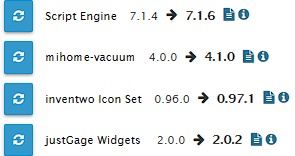
Bereite mich jetzt mal vor Bullseye zu installieren......



Hey! Du scheinst an dieser Unterhaltung interessiert zu sein, hast aber noch kein Konto.
Hast du es satt, bei jedem Besuch durch die gleichen Beiträge zu scrollen? Wenn du dich für ein Konto anmeldest, kommst du immer genau dorthin zurück, wo du zuvor warst, und kannst dich über neue Antworten benachrichtigen lassen (entweder per E-Mail oder Push-Benachrichtigung). Du kannst auch Lesezeichen speichern und Beiträge positiv bewerten, um anderen Community-Mitgliedern deine Wertschätzung zu zeigen.
Mit deinem Input könnte dieser Beitrag noch besser werden 💗
Registrieren AnmeldenSupport us
439
Online33.0k
Benutzer83.6k
Themen1.3m
Beiträge