



Skip to content
  • Home
  • Aktuell
  • Tags
  • 0 Ungelesen 0
  • Kategorien
  • Unreplied
  • Beliebt
  • GitHub
  • Docu
  • Hilfe
Skins
  • Light
  • Brite
  • Cerulean
  • Cosmo
  • Flatly
  • Journal
  • Litera
  • Lumen
  • Lux
  • Materia
  • Minty
  • Morph
  • Pulse
  • Sandstone
  • Simplex
  • Sketchy
  • Spacelab
  • United
  • Yeti
  • Zephyr
  • Dark
  • Cyborg
  • Darkly
  • Quartz
  • Slate
  • Solar
  • Superhero
  • Vapor

  • Standard: (Kein Skin)
  • Kein Skin
Einklappen
ioBroker Logo

Community Forum

donate donate
  1. ioBroker Community Home
  2. Deutsch
  3. ioBroker Allgemein
  4. ioBroker.Unifi verbindet nicht (Erstinstallation)
NEWS

  • UPDATE 31.10.: Amazon Alexa - ioBroker Skill läuft aus ?
    apollon77A
    apollon77
    48
    3
    8.8k

  • Monatsrückblick – September 2025
    BluefoxB
    Bluefox
    13
    1
    2.2k

  • Neues Video "KI im Smart Home" - ioBroker plus n8n
    BluefoxB
    Bluefox
    16
    1
    3.4k

ioBroker.Unifi verbindet nicht (Erstinstallation)
Geplant Angeheftet Gesperrt Verschoben ioBroker Allgemein
31 Beiträge 4 Kommentatoren 2.6k Aufrufe 5 Watching
  • Älteste zuerst
  • Neuste zuerst
  • Meiste Stimmen
Antworten
  • In einem neuen Thema antworten
Anmelden zum Antworten
Dieses Thema wurde gelöscht. Nur Nutzer mit entsprechenden Rechten können es sehen.
  • D DiMe

    @ilovegym @Thomas-Braun
    Vielen Dank euch, Update läuft gerade, hat mir aber von 16.19 auf 16.20.2 vorgeschlagen.
    Mal schauen was passiert wenn er fertig ist.

    Thomas BraunT Online
    Thomas BraunT Online
    Thomas Braun
    Most Active
    schrieb am zuletzt editiert von
    #11

    @dime

    Wenn der iobrokee auf Stand gebracht worden ist sollte da auch eine Empfehlung zu nodejs@18 erscheinen.
    Oder du erzwingst die 18 direkt:

    iob nodejs-update 18
    

    Linux-Werkzeugkasten:
    https://forum.iobroker.net/topic/42952/der-kleine-iobroker-linux-werkzeugkasten
    NodeJS Fixer Skript:
    https://forum.iobroker.net/topic/68035/iob-node-fix-skript
    iob_diag: curl -sLf -o diag.sh https://iobroker.net/diag.sh && bash diag.sh

    1 Antwort Letzte Antwort
    0
    • ? Ein ehemaliger Benutzer

      @dime

      bitte die Ausgabe von

      iob diag
      
      D Offline
      D Offline
      DiMe
      schrieb am zuletzt editiert von
      #12

      @ilovegym

      ======================= SUMMARY =======================
      v.2023-10-10

      Copy text starting here:

      ======================= SUMMARY =======================
                              v.2023-10-10
      
      
         Static hostname: raspberrypi
               Icon name: computer
        Operating System: Raspbian GNU/Linux 11 (bullseye)
                  Kernel: Linux 6.1.19-v7l+
            Architecture: arm
      
      Installation:           native
      Kernel:                 armv7l
      Userland:               armhf
      Timezone:               Europe/Berlin (CET, +0100)
      User-ID:                1000
      X-Server:               false
      Boot Target:            graphical.target
      
      Pending OS-Updates:     0
      Pending iob updates:    15
      
      This system needs to be REBOOTED NOW!
      
      
      Nodejs-Installation:    /usr/bin/nodejs         v18.18.2
                              /usr/bin/node           v18.18.2
                              /usr/bin/npm            9.8.1
                              /usr/bin/npx            9.8.1
                              /usr/bin/corepack       0.19.0
      
      Recommended versions are nodejs 16.20.2 and npm 8.19.4
      Your nodejs installation is correct
      
      MEMORY:
                     total        used        free      shared  buff/cache   available
      Mem:            3.8G        1.1G        1.8G        0.0K        926M        2.6G
      Swap:            99M         80M         19M
      Total:          3.9G        1.2G        1.9G
      
      Active iob-Instances:   13
      Active repo(s): stable
      
      ioBroker Core:          js-controller           4.0.24
                              admin                   6.3.5
      
      ioBroker Status:        iobroker is running on this host.
      
      
      Objects type: jsonl
      States  type: jsonl
      
      Status admin and web instance:
      + system.adapter.admin.0                  : admin                 : raspberrypi                              -  enabled, port: 8081, bind: 0.0.0.0, run as: admin
      + system.adapter.web.0                    : web                   : raspberrypi                              -  enabled, port: 8082, bind: 0.0.0.0, run as: admin
      
      Objects:                3374
      States:                 3133
      
      Size of iob-Database:
      
      6.8M    /opt/iobroker/iobroker-data/objects.jsonl
      1.2M    /opt/iobroker/iobroker-data/states.jsonl


      =================== END OF SUMMARY ====================
      
      
      Thomas BraunT 1 Antwort Letzte Antwort
      0
      • D DiMe

        @ilovegym

        ======================= SUMMARY =======================
        v.2023-10-10

        Copy text starting here:

        ======================= SUMMARY =======================
                                v.2023-10-10
        
        
           Static hostname: raspberrypi
                 Icon name: computer
          Operating System: Raspbian GNU/Linux 11 (bullseye)
                    Kernel: Linux 6.1.19-v7l+
              Architecture: arm
        
        Installation:           native
        Kernel:                 armv7l
        Userland:               armhf
        Timezone:               Europe/Berlin (CET, +0100)
        User-ID:                1000
        X-Server:               false
        Boot Target:            graphical.target
        
        Pending OS-Updates:     0
        Pending iob updates:    15
        
        This system needs to be REBOOTED NOW!
        
        
        Nodejs-Installation:    /usr/bin/nodejs         v18.18.2
                                /usr/bin/node           v18.18.2
                                /usr/bin/npm            9.8.1
                                /usr/bin/npx            9.8.1
                                /usr/bin/corepack       0.19.0
        
        Recommended versions are nodejs 16.20.2 and npm 8.19.4
        Your nodejs installation is correct
        
        MEMORY:
                       total        used        free      shared  buff/cache   available
        Mem:            3.8G        1.1G        1.8G        0.0K        926M        2.6G
        Swap:            99M         80M         19M
        Total:          3.9G        1.2G        1.9G
        
        Active iob-Instances:   13
        Active repo(s): stable
        
        ioBroker Core:          js-controller           4.0.24
                                admin                   6.3.5
        
        ioBroker Status:        iobroker is running on this host.
        
        
        Objects type: jsonl
        States  type: jsonl
        
        Status admin and web instance:
        + system.adapter.admin.0                  : admin                 : raspberrypi                              -  enabled, port: 8081, bind: 0.0.0.0, run as: admin
        + system.adapter.web.0                    : web                   : raspberrypi                              -  enabled, port: 8082, bind: 0.0.0.0, run as: admin
        
        Objects:                3374
        States:                 3133
        
        Size of iob-Database:
        
        6.8M    /opt/iobroker/iobroker-data/objects.jsonl
        1.2M    /opt/iobroker/iobroker-data/states.jsonl


        =================== END OF SUMMARY ====================
        
        
        Thomas BraunT Online
        Thomas BraunT Online
        Thomas Braun
        Most Active
        schrieb am zuletzt editiert von
        #13

        @dime

        This system needs to be REBOOTED NOW!

        Solltest du tun.

        Linux-Werkzeugkasten:
        https://forum.iobroker.net/topic/42952/der-kleine-iobroker-linux-werkzeugkasten
        NodeJS Fixer Skript:
        https://forum.iobroker.net/topic/68035/iob-node-fix-skript
        iob_diag: curl -sLf -o diag.sh https://iobroker.net/diag.sh && bash diag.sh

        D 1 Antwort Letzte Antwort
        0
        • Thomas BraunT Thomas Braun

          @dime

          This system needs to be REBOOTED NOW!

          Solltest du tun.

          D Offline
          D Offline
          DiMe
          schrieb am zuletzt editiert von DiMe
          #14

          @thomas-braun
          Done

          Neuer Diag:

          ======================= SUMMARY =======================
                                  v.2023-10-10
          
          
             Static hostname: raspberrypi
                   Icon name: computer
            Operating System: Raspbian GNU/Linux 11 (bullseye)
                      Kernel: Linux 6.1.21-v7l+
                Architecture: arm
          
          Installation:           native
          Kernel:                 armv7l
          Userland:               armhf
          Timezone:               Europe/Berlin (CET, +0100)
          User-ID:                1000
          X-Server:               false
          Boot Target:            graphical.target
          
          Pending OS-Updates:     0
          Pending iob updates:    15
          
          Nodejs-Installation:    /usr/bin/nodejs         v18.18.2
                                  /usr/bin/node           v18.18.2
                                  /usr/bin/npm            9.8.1
                                  /usr/bin/npx            9.8.1
                                  /usr/bin/corepack       0.19.0
          
          Recommended versions are nodejs 16.20.2 and npm 8.19.4
          Your nodejs installation is correct
          
          MEMORY:
                         total        used        free      shared  buff/cache   available
          Mem:            3.8G        1.4G        1.6G        6.0M        917M        2.3G
          Swap:            99M          0B         99M
          Total:          3.9G        1.4G        1.7G
          
          Active iob-Instances:   13
          Active repo(s): stable
          
          ioBroker Core:          js-controller           4.0.24
                                  admin                   6.3.5
          
          ioBroker Status:        iobroker is running on this host.
          
          
          Objects type: jsonl
          States  type: jsonl
          
          Status admin and web instance:
          + system.adapter.admin.0                  : admin                 : raspberrypi                              -  enabled, port: 8081, bind: 0.0.0.0, run as: admin
          + system.adapter.web.0                    : web                   : raspberrypi                              -  enabled, port: 8082, bind: 0.0.0.0, run as: admin
          
          Objects:                3430
          States:                 3189
          
          Size of iob-Database:
          
          7.9M    /opt/iobroker/iobroker-data/objects.jsonl
          1.9M    /opt/iobroker/iobroker-data/states.jsonl


          =================== END OF SUMMARY ====================
          
          ? 1 Antwort Letzte Antwort
          0
          • D DiMe

            @thomas-braun
            Done

            Neuer Diag:

            ======================= SUMMARY =======================
                                    v.2023-10-10
            
            
               Static hostname: raspberrypi
                     Icon name: computer
              Operating System: Raspbian GNU/Linux 11 (bullseye)
                        Kernel: Linux 6.1.21-v7l+
                  Architecture: arm
            
            Installation:           native
            Kernel:                 armv7l
            Userland:               armhf
            Timezone:               Europe/Berlin (CET, +0100)
            User-ID:                1000
            X-Server:               false
            Boot Target:            graphical.target
            
            Pending OS-Updates:     0
            Pending iob updates:    15
            
            Nodejs-Installation:    /usr/bin/nodejs         v18.18.2
                                    /usr/bin/node           v18.18.2
                                    /usr/bin/npm            9.8.1
                                    /usr/bin/npx            9.8.1
                                    /usr/bin/corepack       0.19.0
            
            Recommended versions are nodejs 16.20.2 and npm 8.19.4
            Your nodejs installation is correct
            
            MEMORY:
                           total        used        free      shared  buff/cache   available
            Mem:            3.8G        1.4G        1.6G        6.0M        917M        2.3G
            Swap:            99M          0B         99M
            Total:          3.9G        1.4G        1.7G
            
            Active iob-Instances:   13
            Active repo(s): stable
            
            ioBroker Core:          js-controller           4.0.24
                                    admin                   6.3.5
            
            ioBroker Status:        iobroker is running on this host.
            
            
            Objects type: jsonl
            States  type: jsonl
            
            Status admin and web instance:
            + system.adapter.admin.0                  : admin                 : raspberrypi                              -  enabled, port: 8081, bind: 0.0.0.0, run as: admin
            + system.adapter.web.0                    : web                   : raspberrypi                              -  enabled, port: 8082, bind: 0.0.0.0, run as: admin
            
            Objects:                3430
            States:                 3189
            
            Size of iob-Database:
            
            7.9M    /opt/iobroker/iobroker-data/objects.jsonl
            1.9M    /opt/iobroker/iobroker-data/states.jsonl


            =================== END OF SUMMARY ====================
            
            ? Offline
            ? Offline
            Ein ehemaliger Benutzer
            schrieb am zuletzt editiert von
            #15

            @dime sagte in ioBroker.Unifi verbindet nicht (Erstinstallation):

            Pending iob updates: 15

            jetzt den iobroker auf den Stand bringen..

            und wenn du das fertig hast, sagst du uns noch die Versionen von Unifi-Controller und -Netwerk, damit wir den unifi-adapter in Gang bringen.. aber erstmal das Fundament.. mit nem Haus faengt man auch nicht am Dach an zu bauen.. :-)

            D 1 Antwort Letzte Antwort
            0
            • ? Ein ehemaliger Benutzer

              @dime sagte in ioBroker.Unifi verbindet nicht (Erstinstallation):

              Pending iob updates: 15

              jetzt den iobroker auf den Stand bringen..

              und wenn du das fertig hast, sagst du uns noch die Versionen von Unifi-Controller und -Netwerk, damit wir den unifi-adapter in Gang bringen.. aber erstmal das Fundament.. mit nem Haus faengt man auch nicht am Dach an zu bauen.. :-)

              D Offline
              D Offline
              DiMe
              schrieb am zuletzt editiert von DiMe
              #16

              @ilovegym
              Alles klar, mach ich. Möchte nur schnell noch ein Backup meiner SD machen, falls etwas schief gehen sollte. Ich habe da ein Händchen dafür :grin:

              ? 1 Antwort Letzte Antwort
              0
              • D DiMe

                @ilovegym
                Alles klar, mach ich. Möchte nur schnell noch ein Backup meiner SD machen, falls etwas schief gehen sollte. Ich habe da ein Händchen dafür :grin:

                ? Offline
                ? Offline
                Ein ehemaliger Benutzer
                schrieb am zuletzt editiert von
                #17

                @dime

                Das sollte man zwischen diesen Schritten sowieso immer machen.. am besten ganze SD Karte.. die geht sowieso gern kaputt..

                und auch vom iobroker ein Backup machen, also in der Konsole "iob backup" eingeben, und das dann irgendwohin(wo es sicher ist und man es wieder findet und einfach zurueck kopieren kann) kopieren...

                D 1 Antwort Letzte Antwort
                0
                • ? Ein ehemaliger Benutzer

                  @dime

                  Das sollte man zwischen diesen Schritten sowieso immer machen.. am besten ganze SD Karte.. die geht sowieso gern kaputt..

                  und auch vom iobroker ein Backup machen, also in der Konsole "iob backup" eingeben, und das dann irgendwohin(wo es sicher ist und man es wieder findet und einfach zurueck kopieren kann) kopieren...

                  D Offline
                  D Offline
                  DiMe
                  schrieb am zuletzt editiert von DiMe
                  #18

                  @ilovegym
                  SD Karten Backup mache ich eigentlich immer in einem bestimmt Turnus oder bevor ich gerade rumschraube.
                  Habe auch ein Adapter bei mir auf dem Broker wo täglich meine Daten vom Broker sichert (Grafana , Werte usw.).
                  Aber das mit dem "iob Backup" mache ich jetzt trotzdem auch noch. Lieber eine Sicherung zu viel.

                  Kurze Frage mit dem IOBroker update, kann ich den einfach mit

                  iob upgrade self
                  

                  starten oder gibt es noch etwas zu beachten, ich frage für ein Freund :laughing:

                  Thomas BraunT 1 Antwort Letzte Antwort
                  0
                  • D DiMe

                    @ilovegym
                    SD Karten Backup mache ich eigentlich immer in einem bestimmt Turnus oder bevor ich gerade rumschraube.
                    Habe auch ein Adapter bei mir auf dem Broker wo täglich meine Daten vom Broker sichert (Grafana , Werte usw.).
                    Aber das mit dem "iob Backup" mache ich jetzt trotzdem auch noch. Lieber eine Sicherung zu viel.

                    Kurze Frage mit dem IOBroker update, kann ich den einfach mit

                    iob upgrade self
                    

                    starten oder gibt es noch etwas zu beachten, ich frage für ein Freund :laughing:

                    Thomas BraunT Online
                    Thomas BraunT Online
                    Thomas Braun
                    Most Active
                    schrieb am zuletzt editiert von
                    #19

                    @dime

                    iob update
                    iob upgrade all
                    iob stop
                    iob fix
                    iob upgrade self
                    iob start
                    

                    Linux-Werkzeugkasten:
                    https://forum.iobroker.net/topic/42952/der-kleine-iobroker-linux-werkzeugkasten
                    NodeJS Fixer Skript:
                    https://forum.iobroker.net/topic/68035/iob-node-fix-skript
                    iob_diag: curl -sLf -o diag.sh https://iobroker.net/diag.sh && bash diag.sh

                    D 1 Antwort Letzte Antwort
                    0
                    • Thomas BraunT Thomas Braun

                      @dime

                      iob update
                      iob upgrade all
                      iob stop
                      iob fix
                      iob upgrade self
                      iob start
                      
                      D Offline
                      D Offline
                      DiMe
                      schrieb am zuletzt editiert von DiMe
                      #20

                      @thomas-braun @ilovegym

                      So alles erledigt und noch ein Diag gemacht

                      ======================= SUMMARY =======================
                                              v.2023-10-10
                      
                      
                         Static hostname: raspberrypi
                               Icon name: computer
                        Operating System: Raspbian GNU/Linux 11 (bullseye)
                                  Kernel: Linux 6.1.21-v7l+
                            Architecture: arm
                      
                      Installation:           native
                      Kernel:                 armv7l
                      Userland:               armhf
                      Timezone:               Europe/Berlin (CET, +0100)
                      User-ID:                1000
                      X-Server:               false
                      Boot Target:            graphical.target
                      
                      Pending OS-Updates:     0
                      Pending iob updates:    0
                      
                      Nodejs-Installation:    /usr/bin/nodejs         v18.18.2
                                              /usr/bin/node           v18.18.2
                                              /usr/bin/npm            9.8.1
                                              /usr/bin/npx            9.8.1
                                              /usr/bin/corepack       0.19.0
                      
                      Recommended versions are nodejs 18.18.2 and npm 9.8.1
                      Your nodejs installation is correct
                      
                      MEMORY:
                                     total        used        free      shared  buff/cache   available
                      Mem:            3.8G        1.4G        1.5G        6.0M        1.0G        2.3G
                      Swap:            99M          0B         99M
                      Total:          3.9G        1.4G        1.6G
                      
                      Active iob-Instances:   13
                      Active repo(s): stable
                      
                      ioBroker Core:          js-controller           5.0.16
                                              admin                   6.12.0
                      
                      ioBroker Status:        iobroker is running on this host.
                      
                      
                      Objects type: jsonl
                      States  type: jsonl
                      
                      Status admin and web instance:
                      + system.adapter.admin.0                  : admin                 : raspberrypi                              -  enabled, port: 8081, bind: 0.0.0.0, run as: admin
                      + system.adapter.web.0                    : web                   : raspberrypi                              -  enabled, port: 8082, bind: 0.0.0.0, run as: admin
                      
                      Objects:                3548
                      States:                 3267
                      
                      Size of iob-Database:
                      
                      6.9M    /opt/iobroker/iobroker-data/objects.jsonl
                      1.1M    /opt/iobroker/iobroker-data/states.jsonl


                      =================== END OF SUMMARY ====================
                      

                      Danke für die Codes

                      Thomas BraunT ? 2 Antworten Letzte Antwort
                      0
                      • D DiMe

                        @thomas-braun @ilovegym

                        So alles erledigt und noch ein Diag gemacht

                        ======================= SUMMARY =======================
                                                v.2023-10-10
                        
                        
                           Static hostname: raspberrypi
                                 Icon name: computer
                          Operating System: Raspbian GNU/Linux 11 (bullseye)
                                    Kernel: Linux 6.1.21-v7l+
                              Architecture: arm
                        
                        Installation:           native
                        Kernel:                 armv7l
                        Userland:               armhf
                        Timezone:               Europe/Berlin (CET, +0100)
                        User-ID:                1000
                        X-Server:               false
                        Boot Target:            graphical.target
                        
                        Pending OS-Updates:     0
                        Pending iob updates:    0
                        
                        Nodejs-Installation:    /usr/bin/nodejs         v18.18.2
                                                /usr/bin/node           v18.18.2
                                                /usr/bin/npm            9.8.1
                                                /usr/bin/npx            9.8.1
                                                /usr/bin/corepack       0.19.0
                        
                        Recommended versions are nodejs 18.18.2 and npm 9.8.1
                        Your nodejs installation is correct
                        
                        MEMORY:
                                       total        used        free      shared  buff/cache   available
                        Mem:            3.8G        1.4G        1.5G        6.0M        1.0G        2.3G
                        Swap:            99M          0B         99M
                        Total:          3.9G        1.4G        1.6G
                        
                        Active iob-Instances:   13
                        Active repo(s): stable
                        
                        ioBroker Core:          js-controller           5.0.16
                                                admin                   6.12.0
                        
                        ioBroker Status:        iobroker is running on this host.
                        
                        
                        Objects type: jsonl
                        States  type: jsonl
                        
                        Status admin and web instance:
                        + system.adapter.admin.0                  : admin                 : raspberrypi                              -  enabled, port: 8081, bind: 0.0.0.0, run as: admin
                        + system.adapter.web.0                    : web                   : raspberrypi                              -  enabled, port: 8082, bind: 0.0.0.0, run as: admin
                        
                        Objects:                3548
                        States:                 3267
                        
                        Size of iob-Database:
                        
                        6.9M    /opt/iobroker/iobroker-data/objects.jsonl
                        1.1M    /opt/iobroker/iobroker-data/states.jsonl


                        =================== END OF SUMMARY ====================
                        

                        Danke für die Codes

                        Thomas BraunT Online
                        Thomas BraunT Online
                        Thomas Braun
                        Most Active
                        schrieb am zuletzt editiert von
                        #21

                        @dime

                        Ja, jetzt ist die Basis auf aktuellem Stand.

                        Linux-Werkzeugkasten:
                        https://forum.iobroker.net/topic/42952/der-kleine-iobroker-linux-werkzeugkasten
                        NodeJS Fixer Skript:
                        https://forum.iobroker.net/topic/68035/iob-node-fix-skript
                        iob_diag: curl -sLf -o diag.sh https://iobroker.net/diag.sh && bash diag.sh

                        1 Antwort Letzte Antwort
                        0
                        • D DiMe

                          @thomas-braun @ilovegym

                          So alles erledigt und noch ein Diag gemacht

                          ======================= SUMMARY =======================
                                                  v.2023-10-10
                          
                          
                             Static hostname: raspberrypi
                                   Icon name: computer
                            Operating System: Raspbian GNU/Linux 11 (bullseye)
                                      Kernel: Linux 6.1.21-v7l+
                                Architecture: arm
                          
                          Installation:           native
                          Kernel:                 armv7l
                          Userland:               armhf
                          Timezone:               Europe/Berlin (CET, +0100)
                          User-ID:                1000
                          X-Server:               false
                          Boot Target:            graphical.target
                          
                          Pending OS-Updates:     0
                          Pending iob updates:    0
                          
                          Nodejs-Installation:    /usr/bin/nodejs         v18.18.2
                                                  /usr/bin/node           v18.18.2
                                                  /usr/bin/npm            9.8.1
                                                  /usr/bin/npx            9.8.1
                                                  /usr/bin/corepack       0.19.0
                          
                          Recommended versions are nodejs 18.18.2 and npm 9.8.1
                          Your nodejs installation is correct
                          
                          MEMORY:
                                         total        used        free      shared  buff/cache   available
                          Mem:            3.8G        1.4G        1.5G        6.0M        1.0G        2.3G
                          Swap:            99M          0B         99M
                          Total:          3.9G        1.4G        1.6G
                          
                          Active iob-Instances:   13
                          Active repo(s): stable
                          
                          ioBroker Core:          js-controller           5.0.16
                                                  admin                   6.12.0
                          
                          ioBroker Status:        iobroker is running on this host.
                          
                          
                          Objects type: jsonl
                          States  type: jsonl
                          
                          Status admin and web instance:
                          + system.adapter.admin.0                  : admin                 : raspberrypi                              -  enabled, port: 8081, bind: 0.0.0.0, run as: admin
                          + system.adapter.web.0                    : web                   : raspberrypi                              -  enabled, port: 8082, bind: 0.0.0.0, run as: admin
                          
                          Objects:                3548
                          States:                 3267
                          
                          Size of iob-Database:
                          
                          6.9M    /opt/iobroker/iobroker-data/objects.jsonl
                          1.1M    /opt/iobroker/iobroker-data/states.jsonl


                          =================== END OF SUMMARY ====================
                          

                          Danke für die Codes

                          ? Offline
                          ? Offline
                          Ein ehemaliger Benutzer
                          schrieb am zuletzt editiert von
                          #22

                          @dime

                          Jetzt mal den Unifi Adapter starten und das komplette log vom start bis zur Fehlermeldung posten, bitte..

                          D 1 Antwort Letzte Antwort
                          0
                          • ? Ein ehemaliger Benutzer

                            @dime

                            Jetzt mal den Unifi Adapter starten und das komplette log vom start bis zur Fehlermeldung posten, bitte..

                            D Offline
                            D Offline
                            DiMe
                            schrieb am zuletzt editiert von
                            #23

                            @ilovegym
                            Geht klar

                            
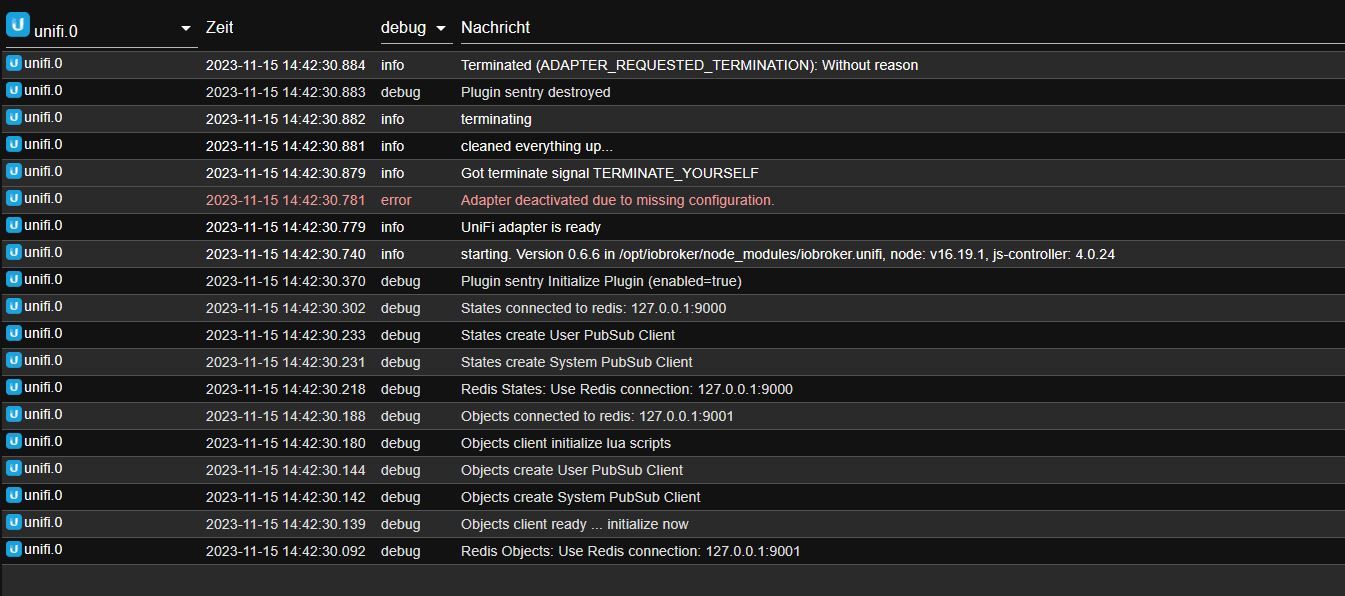
                            unifi.0
                            2023-11-16 16:13:58.862	info	terminating
                            
                            unifi.0
                            2023-11-16 16:13:58.358	info	Terminated (ADAPTER_REQUESTED_TERMINATION): Without reason
                            
                            unifi.0
                            2023-11-16 16:13:58.357	debug	Plugin sentry destroyed
                            
                            unifi.0
                            2023-11-16 16:13:58.355	info	terminating
                            
                            unifi.0
                            2023-11-16 16:13:58.354	info	cleaned everything up...
                            
                            unifi.0
                            2023-11-16 16:13:58.351	info	Got terminate signal TERMINATE_YOURSELF
                            
                            unifi.0
                            2023-11-16 16:13:58.200	error	Adapter deactivated due to missing configuration.
                            
                            unifi.0
                            2023-11-16 16:13:58.198	info	UniFi adapter is ready
                            
                            unifi.0
                            2023-11-16 16:13:58.142	info	starting. Version 0.6.6 in /opt/iobroker/node_modules/iobroker.unifi, node: v18.18.2, js-controller: 5.0.16
                            
                            unifi.0
                            2023-11-16 16:13:57.357	debug	Plugin sentry Initialize Plugin (enabled=true)
                            
                            unifi.0
                            2023-11-16 16:13:57.269	debug	States connected to redis: 127.0.0.1:9000
                            
                            unifi.0
                            2023-11-16 16:13:57.193	debug	States create User PubSub Client
                            
                            unifi.0
                            2023-11-16 16:13:57.191	debug	States create System PubSub Client
                            
                            unifi.0
                            2023-11-16 16:13:57.174	debug	Redis States: Use Redis connection: 127.0.0.1:9000
                            
                            unifi.0
                            2023-11-16 16:13:57.134	debug	Objects connected to redis: 127.0.0.1:9001
                            
                            unifi.0
                            2023-11-16 16:13:57.122	debug	Objects client initialize lua scripts
                            
                            unifi.0
                            2023-11-16 16:13:57.076	debug	Objects create User PubSub Client
                            
                            unifi.0
                            2023-11-16 16:13:57.065	debug	Objects create System PubSub Client
                            
                            unifi.0
                            2023-11-16 16:13:57.060	debug	Objects client ready ... initialize now
                            
                            unifi.0
                            2023-11-16 16:13:56.985	debug	Redis Objects: Use Redis connection: 127.0.0.1:9001
                            
                            Thomas BraunT 1 Antwort Letzte Antwort
                            0
                            • D DiMe

                              @ilovegym
                              Geht klar

                              
                              unifi.0
                              2023-11-16 16:13:58.862	info	terminating
                              
                              unifi.0
                              2023-11-16 16:13:58.358	info	Terminated (ADAPTER_REQUESTED_TERMINATION): Without reason
                              
                              unifi.0
                              2023-11-16 16:13:58.357	debug	Plugin sentry destroyed
                              
                              unifi.0
                              2023-11-16 16:13:58.355	info	terminating
                              
                              unifi.0
                              2023-11-16 16:13:58.354	info	cleaned everything up...
                              
                              unifi.0
                              2023-11-16 16:13:58.351	info	Got terminate signal TERMINATE_YOURSELF
                              
                              unifi.0
                              2023-11-16 16:13:58.200	error	Adapter deactivated due to missing configuration.
                              
                              unifi.0
                              2023-11-16 16:13:58.198	info	UniFi adapter is ready
                              
                              unifi.0
                              2023-11-16 16:13:58.142	info	starting. Version 0.6.6 in /opt/iobroker/node_modules/iobroker.unifi, node: v18.18.2, js-controller: 5.0.16
                              
                              unifi.0
                              2023-11-16 16:13:57.357	debug	Plugin sentry Initialize Plugin (enabled=true)
                              
                              unifi.0
                              2023-11-16 16:13:57.269	debug	States connected to redis: 127.0.0.1:9000
                              
                              unifi.0
                              2023-11-16 16:13:57.193	debug	States create User PubSub Client
                              
                              unifi.0
                              2023-11-16 16:13:57.191	debug	States create System PubSub Client
                              
                              unifi.0
                              2023-11-16 16:13:57.174	debug	Redis States: Use Redis connection: 127.0.0.1:9000
                              
                              unifi.0
                              2023-11-16 16:13:57.134	debug	Objects connected to redis: 127.0.0.1:9001
                              
                              unifi.0
                              2023-11-16 16:13:57.122	debug	Objects client initialize lua scripts
                              
                              unifi.0
                              2023-11-16 16:13:57.076	debug	Objects create User PubSub Client
                              
                              unifi.0
                              2023-11-16 16:13:57.065	debug	Objects create System PubSub Client
                              
                              unifi.0
                              2023-11-16 16:13:57.060	debug	Objects client ready ... initialize now
                              
                              unifi.0
                              2023-11-16 16:13:56.985	debug	Redis Objects: Use Redis connection: 127.0.0.1:9001
                              
                              Thomas BraunT Online
                              Thomas BraunT Online
                              Thomas Braun
                              Most Active
                              schrieb am zuletzt editiert von
                              #24

                              @dime sagte in ioBroker.Unifi verbindet nicht (Erstinstallation):

                              Adapter deactivated due to missing configuration.

                              Ich würde mal in die Einstellungen des Adapters schauen. Da fehlt offenbar irgendwas.

                              Linux-Werkzeugkasten:
                              https://forum.iobroker.net/topic/42952/der-kleine-iobroker-linux-werkzeugkasten
                              NodeJS Fixer Skript:
                              https://forum.iobroker.net/topic/68035/iob-node-fix-skript
                              iob_diag: curl -sLf -o diag.sh https://iobroker.net/diag.sh && bash diag.sh

                              D 1 Antwort Letzte Antwort
                              0
                              • Thomas BraunT Thomas Braun

                                @dime sagte in ioBroker.Unifi verbindet nicht (Erstinstallation):

                                Adapter deactivated due to missing configuration.

                                Ich würde mal in die Einstellungen des Adapters schauen. Da fehlt offenbar irgendwas.

                                D Offline
                                D Offline
                                DiMe
                                schrieb am zuletzt editiert von DiMe
                                #25

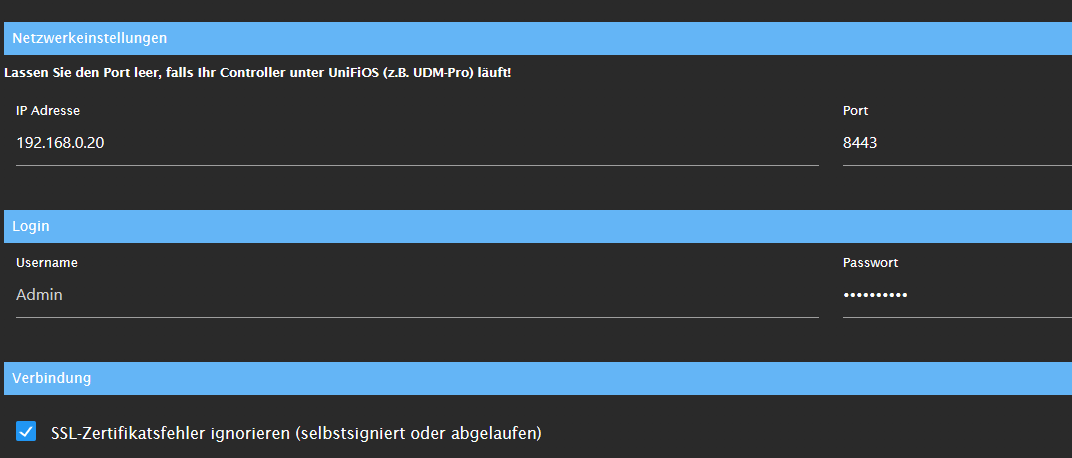
                                @thomas-braun
                                Wie gesagt es wird ja noch im Readme auf das Nodemodul hingewiesen.
                                Von den Einstellungen her sollte es passen
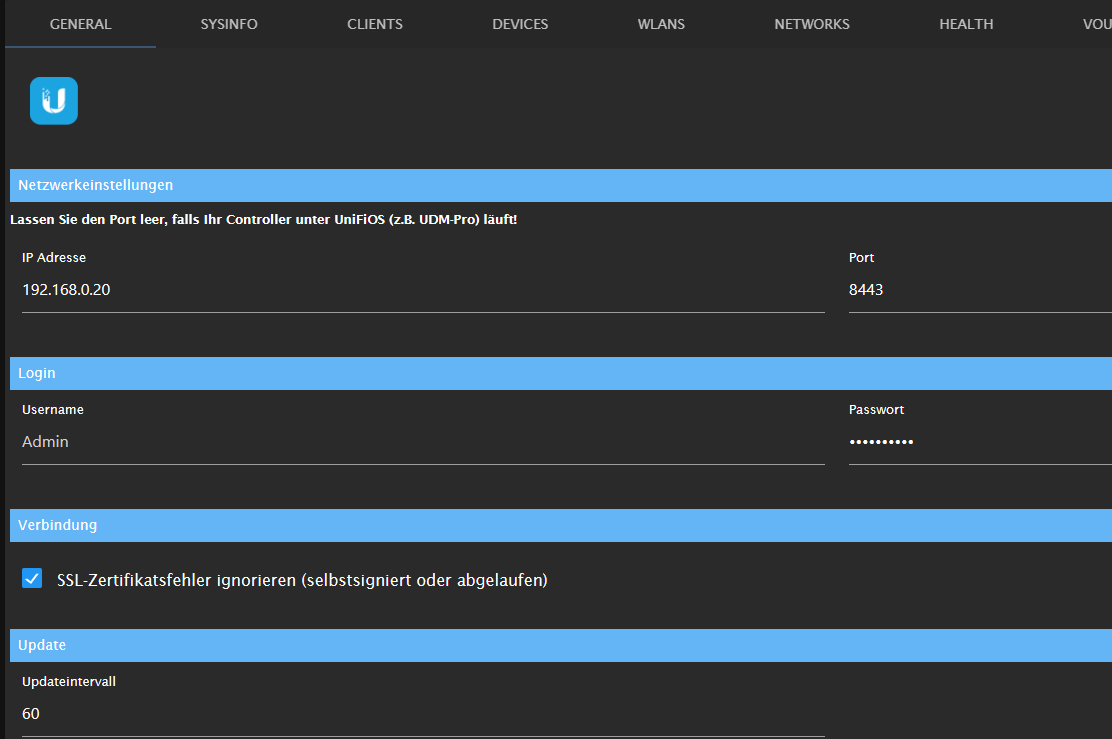
                                07f44ddd-b96d-4631-8701-69ef66882d63-image.png

                                Die UnifiController Version ist:

                                Network Version 7.3.83 | Windows 10
                                
                                ? 1 Antwort Letzte Antwort
                                0
                                • D DiMe

                                  @thomas-braun
                                  Wie gesagt es wird ja noch im Readme auf das Nodemodul hingewiesen.
                                  Von den Einstellungen her sollte es passen
                                  07f44ddd-b96d-4631-8701-69ef66882d63-image.png

                                  Die UnifiController Version ist:

                                  Network Version 7.3.83 | Windows 10
                                  
                                  ? Offline
                                  ? Offline
                                  Ein ehemaliger Benutzer
                                  schrieb am zuletzt editiert von Ein ehemaliger Benutzer
                                  #26

                                  @dime

                                  Nee, am Node-Unifi kann es nicht liegen, er kommt ja garnicht soweit, weil deine Konfiguration fehlerhaft ist..

                                  Schreib doch mal n username in die Konfiguration.. hilft ..

                                  D 1 Antwort Letzte Antwort
                                  0
                                  • ? Ein ehemaliger Benutzer

                                    @dime

                                    Nee, am Node-Unifi kann es nicht liegen, er kommt ja garnicht soweit, weil deine Konfiguration fehlerhaft ist..

                                    Schreib doch mal n username in die Konfiguration.. hilft ..

                                    D Offline
                                    D Offline
                                    DiMe
                                    schrieb am zuletzt editiert von DiMe
                                    #27

                                    @ilovegym
                                    Oh man,
                                    Admin ist mein Usename,
                                    der vorgegeben Benutzername "Admin" ist aber nicht "aktiv" Als ich ihn nochmals reingeschrieben habe, läuft er.

                                    @ilovegym @Thomas-Braun vielen lieben Dank für eure Unterstützung.
                                    Aber nichtsdestotrotz abe ich trotzdem etwas gelernt (Node-Update und Iobroker-Update)
                                    "kaum macht man's richtig, funktioniert's... :-) :-)" true

                                    Meister MopperM 1 Antwort Letzte Antwort
                                    0
                                    • ? Offline
                                      ? Offline
                                      Ein ehemaliger Benutzer
                                      schrieb am zuletzt editiert von
                                      #28

                                      @dime sagte in ioBroker.Unifi verbindet nicht (Erstinstallation):

                                      @ilovegym
                                      Oh man,
                                      Admin ist mein Usename,
                                      der vorgegeben Benutzername "Admin" ist aber nicht "aktiv" Als ich ihn nochmals reingeschrieben habe, läuft er.

                                      ja, das ist auch etwas verwirrend bei manchen Adaptern in der Konfig-Gui gemacht.. muss ich sagen..
                                      Was oft fehlt bei den Adaptern, ist ein richtiges Errorhandling, hier haette man das Fenster erst garnicht schliessen und die Konfig speichern duerfen, wenn der Login nicht geaendert wurde..

                                      @ilovegym @Thomas-Braun vielen lieben Dank für eure Unterstützung.
                                      Aber nichtsdestotrotz abe ich trotzdem etwas gelernt (Node-Update und Iobroker-Update)
                                      "kaum macht man's richtig, funktioniert's... :-) :-)" true

                                      Gerne, na, jetzt weisst du, wie das System aktuell zu halten ist, ich mach das einmal im Monat, hab da n festen Tag fuer Extra-Backup und Updates, so bleibt man aktuell.. und ja, den Spruch sag ich mir selbst auch immer mal wieder... :-)

                                      D 1 Antwort Letzte Antwort
                                      0
                                      • ? Ein ehemaliger Benutzer

                                        @dime sagte in ioBroker.Unifi verbindet nicht (Erstinstallation):

                                        @ilovegym
                                        Oh man,
                                        Admin ist mein Usename,
                                        der vorgegeben Benutzername "Admin" ist aber nicht "aktiv" Als ich ihn nochmals reingeschrieben habe, läuft er.

                                        ja, das ist auch etwas verwirrend bei manchen Adaptern in der Konfig-Gui gemacht.. muss ich sagen..
                                        Was oft fehlt bei den Adaptern, ist ein richtiges Errorhandling, hier haette man das Fenster erst garnicht schliessen und die Konfig speichern duerfen, wenn der Login nicht geaendert wurde..

                                        @ilovegym @Thomas-Braun vielen lieben Dank für eure Unterstützung.
                                        Aber nichtsdestotrotz abe ich trotzdem etwas gelernt (Node-Update und Iobroker-Update)
                                        "kaum macht man's richtig, funktioniert's... :-) :-)" true

                                        Gerne, na, jetzt weisst du, wie das System aktuell zu halten ist, ich mach das einmal im Monat, hab da n festen Tag fuer Extra-Backup und Updates, so bleibt man aktuell.. und ja, den Spruch sag ich mir selbst auch immer mal wieder... :-)

                                        D Offline
                                        D Offline
                                        DiMe
                                        schrieb am zuletzt editiert von
                                        #29

                                        @ilovegym
                                        Den Spruch habe ich mir von dir geklaut :blush:

                                        1 Antwort Letzte Antwort
                                        0
                                        • D DiMe

                                          @ilovegym
                                          Oh man,
                                          Admin ist mein Usename,
                                          der vorgegeben Benutzername "Admin" ist aber nicht "aktiv" Als ich ihn nochmals reingeschrieben habe, läuft er.

                                          @ilovegym @Thomas-Braun vielen lieben Dank für eure Unterstützung.
                                          Aber nichtsdestotrotz abe ich trotzdem etwas gelernt (Node-Update und Iobroker-Update)
                                          "kaum macht man's richtig, funktioniert's... :-) :-)" true

                                          Meister MopperM Abwesend
                                          Meister MopperM Abwesend
                                          Meister Mopper
                                          schrieb am zuletzt editiert von
                                          #30

                                          @dime sagte in ioBroker.Unifi verbindet nicht (Erstinstallation):

                                          Oh man,
                                          Admin ist mein Usename,
                                          der vorgegeben Benutzername "Admin" ist aber nicht "aktiv" Als ich ihn nochmals reingeschrieben habe, läuft er.

                                          Tja, wie ich im zweiten Beitrag bereits schrieb. :man-shrugging:

                                          Proxmox und HA

                                          D 1 Antwort Letzte Antwort
                                          0
                                          Antworten
                                          • In einem neuen Thema antworten
                                          Anmelden zum Antworten
                                          • Älteste zuerst
                                          • Neuste zuerst
                                          • Meiste Stimmen


                                          Support us

                                          ioBroker
                                          Community Adapters
                                          Donate
                                          FAQ Cloud / IOT
                                          HowTo: Node.js-Update
                                          HowTo: Backup/Restore
                                          Downloads
                                          BLOG

                                          663

                                          Online

                                          32.4k

                                          Benutzer

                                          81.5k

                                          Themen

                                          1.3m

                                          Beiträge
                                          Community
                                          Impressum | Datenschutz-Bestimmungen | Nutzungsbedingungen | Einwilligungseinstellungen
                                          ioBroker Community 2014-2025
                                          logo
                                          • Anmelden

                                          • Du hast noch kein Konto? Registrieren

                                          • Anmelden oder registrieren, um zu suchen
                                          • Erster Beitrag
                                            Letzter Beitrag
                                          0
                                          • Home
                                          • Aktuell
                                          • Tags
                                          • Ungelesen 0
                                          • Kategorien
                                          • Unreplied
                                          • Beliebt
                                          • GitHub
                                          • Docu
                                          • Hilfe
