




Adapter Problem mit z-Wave ZMEEUZB1
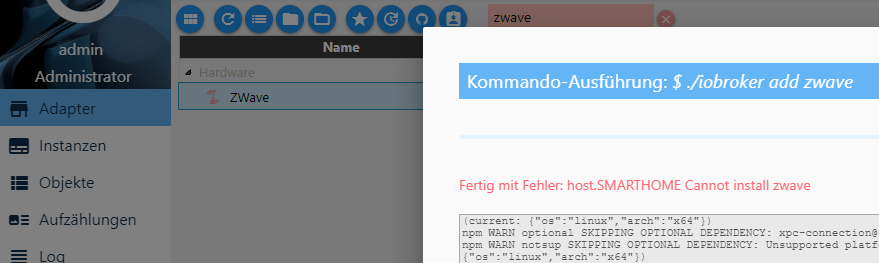
-
Hallo ioBroker Gemeinschaft,
ich bin noch ein Frischling in der ioBroker-Sache.
Eine Vermutung habe ich um das Problem zu lösen, aber die Umsetzung ist schwierig. Es geht um die Gruppe "dialout" die unter ioBroker nicht angelegt ist.
Der Adapter hat die Version 1.0.0 und ioBroker läuft mit einem Debian9 Server und auf einem GB-BACE-3150. Benutzer gibt es nur die Standard Einstellung Admin.
Log zur fehlgeschlagenen Adapterinstallation sieht etwas länger aus
! ````
$ ./iobroker add zwave
npm install iobroker.zwave --unsafe-perm --production --prefix "/opt/iobroker" (System call)
/bin/sh: 1: sudo: not found
/opt/iobroker/node_modules/.staging/iobroker.zwave-936e120a/lib/preinstall.js:15 if (!suppressException) throw e;
^
! Error: Command failed: sudo apt-get install libudev-dev -y
/bin/sh: 1: sudo: not found
! at checkExecSyncError (child_process.js:473:13)
at Object.execSync (child_process.js:513:13)
at doScript (/opt/iobroker/node_modules/.staging/iobroker.zwave-936e120a/lib/preinstall.js:12:15)
at Object. <anonymous>(/opt/iobroker/node_modules/.staging/iobroker.zwave-936e120a/lib/preinstall.js:25:7)
at Module._compile (module.js:570:32)
at Object.Module._extensions..js (module.js:579:10)
at Module.load (module.js:487:32)
at tryModuleLoad (module.js:446:12)
at Function.Module._load (module.js:438:3)
at Module.runMain (module.js:604:10)
! npm WARN optional SKIPPING OPTIONAL DEPENDENCY: xpc-connection@~0.1.4 (node_modules/iobroker.ble/node_modules/noble/node_modules/xpc-connection):
npm WARN notsup SKIPPING OPTIONAL DEPENDENCY: Unsupported platform for xpc-connection@0.1.4: wanted {"os":"darwin","arch":"any"} (current: {"os":"linux","arch":"x64"})npm WARN optional SKIPPING OPTIONAL DEPENDENCY: xpc-connection@~0.1.4 (node_modules/noble/node_modules/xpc-connection):
npm WARN notsup SKIPPING OPTIONAL DEPENDENCY: Unsupported platform for xpc-connection@0.1.4: wanted {"os":"darwin","arch":"any"} (current: {"os":"linux","arch":"x64"})
! npm ERR! Linux 4.9.0-4-amd64
npm ERR! argv "/usr/bin/node" "/usr/bin/npm" "install" "iobroker.zwave" "--unsafe-perm" "--production" "--prefix" "/opt/iobroker"npm ERR! node v6.12.3
npm ERR! npm v3.10.10
npm ERR! code ELIFECYCLE
! npm ERR! iobroker.zwave@1.0.0 preinstall:node lib/preinstall.js
npm ERR! Exit status 1
! npm ERR! npm ERR! Failed at the iobroker.zwave@1.0.0 preinstall script 'node lib/preinstall.js'.
npm ERR! Make sure you have the latest version of node.js and npm installed.
npm ERR! If you do, this is most likely a problem with the iobroker.zwave package,
npm ERR! not with npm itself.
npm ERR! Tell the author that this fails on your system:
npm
ERR! node lib/preinstall.jsnpm ERR! You can get information on how to open an issue for this project with:
npm ERR! npm bugs iobroker.zwave
npm ERR! Or if that isn't available, you can get their info via:
npm ERR! npm owner ls iobroker.zwave
npm ERR! There is likely additional logging output above.
! npm ERR! Please include the following file with any support request:
npm ERR!
/npm-debug.lognpm ERR! code 1
! host.SMARTHOME install adapter zwave
npm install iobroker.zwave --unsafe-perm --production --prefix "/opt/iobroker" (System call)
/bin/sh: 1: sudo: not found
/opt/iobroker/node_modules/.staging/iobroker.zwave-936e120a/lib/preinstall.js:15 if (!suppressException) throw e;
^
! Error: Command failed: sudo apt-get install libudev-dev -y
/bin/sh: 1: sudo: not found
! at checkExecSyncError (child_process.js:473:13)
at Object.execSync (child_process.js:513:13)
at doScript (/opt/iobroker/node_modules/.staging/iobroker.zwave-936e120a/lib/preinstall.js:12:15)
at Object. <anonymous>(/opt/iobroker/node_modules/.staging/iobroker.zwave-936e120a/lib/preinstall.js:25:7)
at Module._compile (module.js:570:32)
at Object.Module._extensions..js (module.js:579:10)
at Module.load (module.js:487:32)
at tryModuleLoad (module.js:446:12)
at Function.Module._load (module.js:438:3)
at Module.runMain (module.js:604:10)
! npm WARN optional SKIPPING OPTIONAL DEPENDENCY: xpc-connection@~0.1.4 (node_modules/iobroker.ble/node_modules/noble/node_modules/xpc-connection):
npm WARN notsup SKIPPING OPTIONAL DEPENDENCY: Unsupported platform for xpc-connection@0.1.4: wanted {"os":"darwin","arch":"any"} (current: {"os":"linux","arch":"x64"})npm WARN optional SKIPPING OPTIONAL DEPENDENCY: xpc-connection@~0.1.4 (node_modules/noble/node_modules/xpc-connection):
npm WARN notsup SKIPPING OPTIONAL DEPENDENCY: Unsupported platform for xpc-connection@0.1.4: wanted {"os":"darwin","arch":"any"} (current: {"os":"linux","arch":"x64"})
! npm ERR! Linux 4.9.0-4-amd64npm ERR! argv "/usr/bin/node" "/usr/bin/npm" "install" "iobroker.zwave" "--unsafe-perm" "--production" "--prefix" "/opt/iobroker"
npm ERR! node v6.12.3
npm ERR! npm v3.10.10
npm ERR! code ELIFECYCLE
! npm ERR! iobroker.zwave@1.0.0 preinstall:node lib/preinstall.jsnpm ERR! Exit status 1
npm ERR!
npm ERR! Failed at the iobroker.zwave@1.0.0 preinstall script 'node lib/preinstall.js'.
npm ERR! Make sure you have the latest version of node.js and npm installed.
npm ERR! If you do, this is most likely a problem with the iobroker.zwave package,
npm ERR! not with npm itself.
npm ERR! Tell the author that this fails on your system:
npm ERR! node lib/preinstall.js
npm ERR! You can get information on how to open an issue for this project with:
npm ERR! npm bugs iobroker.zwave
npm
ERR! Or if that isn't available, you can get their info via:npm ERR! npm owner ls iobroker.zwave
npm ERR!
There is likely additional logging output above.
npm ERR! Please include the following file with any support request:
npm
ERR!
/npm-debug.lognpm ERR! code 1
! host.SMARTHOME install adapter zwave
npm install iobroker.zwave --unsafe-perm --production --prefix "/opt/iobroker" (System call)
/bin/sh: 1: sudo: not found
/opt/iobroker/node_modules/.staging/iobroker.zwave-936e120a/lib/preinstall.js:15 if (!suppressException) throw e;
^
! Error: Command failed: sudo apt-get install libudev-dev -y
/bin/sh: 1: sudo: not found
! at checkExecSyncError (child_process.js:473:13)
at Object.execSync (child_process.js:513:13)
at doScript (/opt/iobroker/node_modules/.staging/iobroker.zwave-936e120a/lib/preinstall.js:12:15)
at Object. <anonymous>(/opt/iobroker/node_modules/.staging/iobroker.zwave-936e120a/lib/preinstall.js:25:7)
at Module._compile (module.js:570:32)
at Object.Module._extensions..js (module.js:579:10)
at Module.load (module.js:487:32)
at tryModuleLoad (module.js:446:12)
at Function.Module._load (module.js:438:3)
at Module.runMain (module.js:604:10)
! npm WARN optional SKIPPING OPTIONAL DEPENDENCY: xpc-connection@~0.1.4 (node_modules/iobroker.ble/node_modules/noble/node_modules/xpc-connection):npm WARN notsup SKIPPING OPTIONAL DEPENDENCY: Unsupported platform for xpc-connection@0.1.4: wanted {"os":"darwin","arch":"any"} (current: {"os":"linux","arch":"x64"})
npm WARN optional SKIPPING OPTIONAL DEPENDENCY: xpc-connection@~0.1.4 (node_modules/noble/node_modules/xpc-connection):
npm WARN notsup SKIPPING OPTIONAL DEPENDENCY: Unsupported platform for xpc-connection@0.1.4: wanted {"os":"darwin","arch":"any"} (current: {"os":"linux","arch":"x64"})
npm ERR! Linux 4.9.0-4-amd64
npm ERR! argv "/usr/bin/node" "/usr/bin/npm" "install" "iobroker.zwave" "--unsafe-perm" "--production" "--prefix" "/opt/iobroker"
npm ERR! node v6.12.3
npm ERR! npm v3.10.10
npm ERR! code ELIFECYCLE
! npm ERR! iobroker.zwave@1.0.0 preinstall:node lib/preinstall.js
npm ERR! Exit status 1
npm ERR!
npm ERR! Failed at the iobroker.zwave@1.0.0 preinstall script 'node lib/preinstall.js'.
npm ERR! Make sure you have the latest version of node.js and npm installed.
npm ERR! If you do, this is most likely a problem with the iobroker.zwave package,
npm ERR! not with npm itself.
npm ERR! Tell the author that this fails on your system:
npm ERR! node lib/preinstall.js
npm ERR! You can get information on how to open an issue for this project with:
npm ERR! npm bugs iobroker.zwave
npm ERR! Or if that isn't available, you can get their info via:
npm ERR! npm owner ls iobroker.zwave
npm ERR! There is likely additional logging output above.
! npm ERR! Please include the following file with any support request:npm
ERR!
/npm-debug.lognpm ERR! code 1
! host.SMARTHOME install adapter zwave
ERROR: host.SMARTHOME Cannot install zwave
ERROR: process exited with code 13$ ./iobroker add zwave
npm install iobroker.zwave --unsafe-perm --production --prefix "/opt/iobroker" (System call)
/bin/sh: 1: sudo: not found
/opt/iobroker/node_modules/.staging/iobroker.zwave-936e120a/lib/preinstall.js:15 if (!suppressException) throw e;
^
! Error: Command failed: sudo apt-get install libudev-dev -y
/bin/sh: 1: sudo: not found
! at checkExecSyncError (child_process.js:473:13)
at Object.execSync (child_process.js:513:13)
at doScript (/opt/iobroker/node_modules/.staging/iobroker.zwave-936e120a/lib/preinstall.js:12:15)
at Object. <anonymous>(/opt/iobroker/node_modules/.staging/iobroker.zwave-936e120a/lib/preinstall.js:25:7)
at Module._compile (module.js:570:32)
at Object.Module._extensions..js (module.js:579:10)
at Module.load (module.js:487:32)
at tryModuleLoad (module.js:446:12)
at Function.Module._load (module.js:438:3)
at Module.runMain (module.js:604:10)
! npm WARN optional SKIPPING OPTIONAL DEPENDENCY: xpc-connection@~0.1.4 (node_modules/iobroker.ble/node_modules/noble/node_modules/xpc-connection):
npm WARN notsup SKIPPING OPTIONAL DEPENDENCY: Unsupported platform for xpc-connection@0.1.4: wanted {"os":"darwin","arch":"any"} (current: {"os":"linux","arch":"x64"})npm WARN optional SKIPPING OPTIONAL DEPENDENCY: xpc-connection@~0.1.4 (node_modules/noble/node_modules/xpc-connection):
npm WARN notsup SKIPPING OPTIONAL DEPENDENCY: Unsupported platform for xpc-connection@0.1.4: wanted {"os":"darwin","arch":"any"} (current: {"os":"linux","arch":"x64"})
! npm ERR! Linux 4.9.0-4-amd64
npm ERR! argv "/usr/bin/node" "/usr/bin/npm" "install" "iobroker.zwave" "--unsafe-perm" "--production" "--prefix" "/opt/iobroker"npm ERR! node v6.12.3
npm ERR! npm v3.10.10
npm ERR! code ELIFECYCLE
! npm ERR! iobroker.zwave@1.0.0 preinstall:node lib/preinstall.js
npm ERR! Exit status 1
! npm ERR! npm ERR! Failed at the iobroker.zwave@1.0.0 preinstall script 'node lib/preinstall.js'.
npm ERR! Make sure you have the latest version of node.js and npm installed.
npm ERR! If you do, this is most likely a problem with the iobroker.zwave package,
npm ERR! not with npm itself.
npm ERR! Tell the author that this fails on your system:
npm
ERR! node lib/preinstall.jsnpm ERR! You can get information on how to open an issue for this project with:
npm ERR! npm bugs iobroker.zwave
npm ERR! Or if that isn't available, you can get their info via:
npm ERR! npm owner ls iobroker.zwave
npm ERR! There is likely additional logging output above.
! npm ERR! Please include the following file with any support request:
npm ERR!
/npm-debug.lognpm ERR! code 1
! host.SMARTHOME install adapter zwave
npm install iobroker.zwave --unsafe-perm --production --prefix "/opt/iobroker" (System call)
/bin/sh: 1: sudo: not found
/opt/iobroker/node_modules/.staging/iobroker.zwave-936e120a/lib/preinstall.js:15 if (!suppressException) throw e;
^
! Error: Command failed: sudo apt-get install libudev-dev -y
/bin/sh: 1: sudo: not found
! at checkExecSyncError (child_process.js:473:13)
at Object.execSync (child_process.js:513:13)
at doScript (/opt/iobroker/node_modules/.staging/iobroker.zwave-936e120a/lib/preinstall.js:12:15)
at Object. <anonymous>(/opt/iobroker/node_modules/.staging/iobroker.zwave-936e120a/lib/preinstall.js:25:7)
at Module._compile (module.js:570:32)
at Object.Module._extensions..js (module.js:579:10)
at Module.load (module.js:487:32)
at tryModuleLoad (module.js:446:12)
at Function.Module._load (module.js:438:3)
at Module.runMain (module.js:604:10)
! npm WARN optional SKIPPING OPTIONAL DEPENDENCY: xpc-connection@~0.1.4 (node_modules/iobroker.ble/node_modules/noble/node_modules/xpc-connection):
npm WARN notsup SKIPPING OPTIONAL DEPENDENCY: Unsupported platform for xpc-connection@0.1.4: wanted {"os":"darwin","arch":"any"} (current: {"os":"linux","arch":"x64"})npm WARN optional SKIPPING OPTIONAL DEPENDENCY: xpc-connection@~0.1.4 (node_modules/noble/node_modules/xpc-connection):
npm WARN notsup SKIPPING OPTIONAL DEPENDENCY: Unsupported platform for xpc-connection@0.1.4: wanted {"os":"darwin","arch":"any"} (current: {"os":"linux","arch":"x64"})
! npm ERR! Linux 4.9.0-4-amd64npm ERR! argv "/usr/bin/node" "/usr/bin/npm" "install" "iobroker.zwave" "--unsafe-perm" "--production" "--prefix" "/opt/iobroker"
npm ERR! node v6.12.3
npm ERR! npm v3.10.10
npm ERR! code ELIFECYCLE
! npm ERR! iobroker.zwave@1.0.0 preinstall:node lib/preinstall.jsnpm ERR! Exit status 1
npm ERR!
npm ERR! Failed at the iobroker.zwave@1.0.0 preinstall script 'node lib/preinstall.js'.
npm ERR! Make sure you have the latest version of node.js and npm installed.
npm ERR! If you do, this is most likely a problem with the iobroker.zwave package,
npm ERR! not with npm itself.
npm ERR! Tell the author that this fails on your system:
npm ERR! node lib/preinstall.js
npm ERR! You can get information on how to open an issue for this project with:
npm ERR! npm bugs iobroker.zwave
npm
ERR! Or if that isn't available, you can get their info via:npm ERR! npm owner ls iobroker.zwave
npm ERR!
There is likely additional logging output above.
npm ERR! Please include the following file with any support request:
npm
ERR!
/npm-debug.lognpm ERR! code 1
! host.SMARTHOME install adapter zwave
npm install iobroker.zwave --unsafe-perm --production --prefix "/opt/iobroker" (System call)
/bin/sh: 1: sudo: not found
/opt/iobroker/node_modules/.staging/iobroker.zwave-936e120a/lib/preinstall.js:15 if (!suppressException) throw e;
^
! Error: Command failed: sudo apt-get install libudev-dev -y
/bin/sh: 1: sudo: not found
! at checkExecSyncError (child_process.js:473:13)
at Object.execSync (child_process.js:513:13)
at doScript (/opt/iobroker/node_modules/.staging/iobroker.zwave-936e120a/lib/preinstall.js:12:15)
at Object. <anonymous>(/opt/iobroker/node_modules/.staging/iobroker.zwave-936e120a/lib/preinstall.js:25:7)
at Module._compile (module.js:570:32)
at Object.Module._extensions..js (module.js:579:10)
at Module.load (module.js:487:32)
at tryModuleLoad (module.js:446:12)
at Function.Module._load (module.js:438:3)
at Module.runMain (module.js:604:10)
! npm WARN optional SKIPPING OPTIONAL DEPENDENCY: xpc-connection@~0.1.4 (node_modules/iobroker.ble/node_modules/noble/node_modules/xpc-connection):npm WARN notsup SKIPPING OPTIONAL DEPENDENCY: Unsupported platform for xpc-connection@0.1.4: wanted {"os":"darwin","arch":"any"} (current: {"os":"linux","arch":"x64"})
npm WARN optional SKIPPING OPTIONAL DEPENDENCY: xpc-connection@~0.1.4 (node_modules/noble/node_modules/xpc-connection):
npm WARN notsup SKIPPING OPTIONAL DEPENDENCY: Unsupported platform for xpc-connection@0.1.4: wanted {"os":"darwin","arch":"any"} (current: {"os":"linux","arch":"x64"})
npm ERR! Linux 4.9.0-4-amd64
npm ERR! argv "/usr/bin/node" "/usr/bin/npm" "install" "iobroker.zwave" "--unsafe-perm" "--production" "--prefix" "/opt/iobroker"
npm ERR! node v6.12.3
npm ERR! npm v3.10.10
npm ERR! code ELIFECYCLE
! npm ERR! iobroker.zwave@1.0.0 preinstall:node lib/preinstall.js
npm ERR! Exit status 1
npm ERR!
npm ERR! Failed at the iobroker.zwave@1.0.0 preinstall script 'node lib/preinstall.js'.
npm ERR! Make sure you have the latest version of node.js and npm installed.
npm ERR! If you do, this is most likely a problem with the iobroker.zwave package,
npm ERR! not with npm itself.
npm ERR! Tell the author that this fails on your system:
npm ERR! node lib/preinstall.js
npm ERR! You can get information on how to open an issue for this project with:
npm ERR! npm bugs iobroker.zwave
npm ERR! Or if that isn't available, you can get their info via:
npm ERR! npm owner ls iobroker.zwave
npm ERR! There is likely additional logging output above.
! npm ERR! Please include the following file with any support request:npm
ERR!
/npm-debug.lognpm ERR! code 1
! host.SMARTHOME install adapter zwave
ERROR: host.SMARTHOME Cannot install zwave
ERROR: process exited with code 13</anonymous></anonymous></anonymous></anonymous></anonymous></anonymous>****geändert: Code in Code-Tags und Spoiler; Homoran (Mod)**** [5811_zwave_installation_2018-02-11.png](/assets/uploads/files/5811_zwave_installation_2018-02-11.png) -
Wenn das der Adapter vom Hersteller ist dann nicht, nur das was im Adapter GitHUB steht.
Installation and test script
Whenever you have OpenZWave installed in your machine, then all you need to do is:
$ npm install openzwave-shared
aber ohne weiters zu testen!!!
Vor der Installation habe ich diese Paket installiert und das Ergebnis mit Version steht ab der 2.Zeile
~# apt-get install pkg-config libudev-dev build-essential curl unzip
Paketlisten werden gelesen… Fertig
Abhängigkeitsbaum wird aufgebaut.
Statusinformationen werden eingelesen.... Fertig
build-essential ist schon die neueste Version (12.3).
pkg-config ist schon die neueste Version (0.29-4+b1).
libudev-dev ist schon die neueste Version (232-25+deb9u1).
unzip ist schon die neueste Version (6.0-21).
curl ist schon die neueste Version (7.52.1-5+deb9u4).
-
machmal erstmal
apt-get install libudev-dev -y> Wenn das der Adapter vom Hersteller ist dann nicht, nur das was im Adapter GitHUB steht.wie meinst du das ???
openzwave hat nichts mit einem Hersteller zu tun.. das ist das Linux Treiber Paket damit der Adapter auf diese zugreift musst du es erstmal installieren
-
Ich versteh zwar nicht ganz was du da von dir gibst, aber das Problem liegt nicht an ioBroker oder dem Adapter:
Error: Command failed: sudo apt-get install libudev-dev -y
/bin/sh: 1: sudo: not found
Sieh erst mal zu, dass du das "sudo not found" behebst, danach sollte die Adapter-Installation (die auch openzwave installiert) durchlaufen.
-
ich habe nach "sudo" in der Fehlermeldung gesucht und diese beiden Kommandos gefunden. Diese habe ich in die Console eingegeben
npm install iobroker.zwave –unsafe-perm --production --prefix "/opt/iobroker" (1.)
apt-get install libudev-dev -y (2.)
Ich verwende ein Debian-Linux, da gibt es doch den Befehl "sudo" nicht, oder!!!
Nach dem Durchlauf von den 2 gefundenen Befehlen habe ich unter der ioBroker Desktop das Plus nochmal bei Adapter gedrückt und immer noch mit Fehler erhalten.
Eine neue Entscheidung von mir ich lösche alles und setze den Server neu auf und diesmal unter ubuntu 16.x lts
bei (1.) kommt dieser LOG. Ich bin zusätzlich noch in das Verzeichnis Installationsverz. gewechselt, was ich vorher nicht gemacht habe
root@SMARTHOME:/opt/iobroker# npm install iobroker.zwave --unsafe-perm --produc tion --prefix "/opt/iobroker"
openzwave-shared@1.4.0 preinstall /opt/iobroker/node_modules/.staging/openzwav e-shared-8e400646
node lib/install-ozw.js
iobroker.zwave@1.0.0 preinstall /opt/iobroker/node_modules/.staging/iobroker.z wave-936e120a
node lib/preinstall.js
---> find /tmp -name 'OZWException.h'
---> find /usr/include/ -name 'OZWException.h'
---> find /usr/local/include/ -name 'OZWException.h'
---> find /usr/lib -name 'libopenzwave.so'
---> find /usr/local/lib -name 'libopenzwave.so'
---> find /usr/etc -name 'zwcfg.xsd'
---> find /usr/local/etc/ -name 'zwcfg.xsd'
---> find /etc/ -name 'zwcfg.xsd'
---> sudo apt-get install libudev-dev -y
/bin/sh: 1: sudo: not found
---> Error: Command failed: sudo apt-get install libudev-dev -y
/bin/sh: 1: sudo: not found
/opt/iobroker/node_modules/.staging/iobroker.zwave-936e120a/lib/preinstall.js:15
if (!suppressException) throw e;
^
Error: Command failed: sudo apt-get install libudev-dev -y
/bin/sh: 1: sudo: not found
at checkExecSyncError (child_process.js:473:13)
at Object.execSync (child_process.js:513:13)
at doScript (/opt/iobroker/node_modules/.staging/iobroker.zwave-936e120a/lib /preinstall.js:12:15)
at Object. <anonymous>(/opt/iobroker/node_modules/.staging/iobroker.zwave-93 6e120a/lib/preinstall.js:25:7)
at Module._compile (module.js:570:32)
at Object.Module._extensions..js (module.js:579:10)
at Module.load (module.js:487:32)
at tryModuleLoad (module.js:446:12)
at Function.Module._load (module.js:438:3)
at Module.runMain (module.js:604:10)
iobroker.inst@1.0.8 /opt/iobroker
└── (empty)
npm WARN optional SKIPPING OPTIONAL DEPENDENCY: xpc-connection@~0.1.4 (node_modu les/iobroker.ble/node_modules/noble/node_modules/xpc-connection):
npm WARN notsup SKIPPING OPTIONAL DEPENDENCY: Unsupported platform for xpc-conne ction@0.1.4: wanted {"os":"darwin","arch":"any"} (current: {"os":"linux","arch": "x64"})
npm WARN optional SKIPPING OPTIONAL DEPENDENCY: xpc-connection@~0.1.4 (node_modu les/noble/node_modules/xpc-connection):
npm WARN notsup SKIPPING OPTIONAL DEPENDENCY: Unsupported platform for xpc-conne ction@0.1.4: wanted {"os":"darwin","arch":"any"} (current: {"os":"linux","arch": "x64"})
npm ERR! Linux 4.9.0-4-amd64
npm ERR! argv "/usr/bin/node" "/usr/bin/npm" "install" "iobroker.zwave" "--unsaf e-perm" "--production" "--prefix" "/opt/iobroker"
npm ERR! node v6.12.3
npm ERR! npm v3.10.10
npm ERR! code ELIFECYCLE
npm ERR! iobroker.zwave@1.0.0 preinstall:
node lib/preinstall.jsnpm ERR! Exit status 1
npm ERR!
npm ERR! Failed at the iobroker.zwave@1.0.0 preinstall script 'node lib/preinsta ll.js'.
npm ERR! Make sure you have the latest version of node.js and npm installed.
npm ERR! If you do, this is most likely a problem with the iobroker.zwave packag e,
npm ERR! not with npm itself.
npm ERR! Tell the author that this fails on your system:
npm ERR! node lib/preinstall.js
npm ERR! You can get information on how to open an issue for this project with:
npm ERR! npm bugs iobroker.zwave
npm ERR! Or if that isn't available, you can get their info via:
npm ERR! npm owner ls iobroker.zwave
npm ERR! There is likely additional logging output above.
npm ERR! Please include the following file with any support request:
npm ERR! /opt/iobroker/npm-debug.log
npm ERR! code 1</anonymous>
-
Der Adapter versucht einen der Installationsbefehle mit sudo auszuführen, da das gerade auf Raspbian notwendig ist. Du kannst sudo nachinstallieren und es dann nochmal probieren, siehe Anleitung hier:
https://www.privateinternetaccess.com/f … by-default
Bzw. der kürzere Weg:
` > You also don't actually need to edit the sudoers file, you can just add yourself to the sudo group.su - && aptitude install sudo && adduser myusername sudoafter you're in the group you need to logout and back in then you're good. `
-
So nun geht auch der Z-Wave Adapter unter ioBroker.
Ich habe nun Ubuntu-Server 16.4 LTS installiert zuvor hatte ich Debian 9.3. Problem war die fehlende "sudo" Unterstützung.
Der Weg zu Ubuntu war aber auch mit Stolpersteinen gepflastert (falsche Version/en von npm oder/und nodejs), aber der Link http://www.iobroker.net/docu/?page_id=5 … n_optional brachte mich dann später gradlinig zu Ziel.
Das Adapter-Paket (z-wave) benötigt auf jeden Fall noch den "unzip", deshalb habe ich die komplette Zeile aus der Hilfe genommen und installiert "apt-get install pkg-config libudev-dev build-essential curl unzip
-
Ja, erste Erfolge durch das Umstellen der Linux Distribution.
Manuelles Installieren und Schnittstelle (gleiche Schnittstelle gewählt, wie bei IB Assistenten) eingestellt bleibt die Ampel auf Rot (alle 3 Bedingungen nicht erfüllt. Mit dem ioBroker Such-Assistent wird z-wave gefunden von mir markiert, aber anschließend kommt ein Lizenzhinweis was ich nicht bestätigen kann. Die Installation bleibt stehen durch inaktiv bzw invers Fenster.
Browser schon getestet mit Chrome (auch zurückgesetzt) und MS Edge bei beiden kein Erfolg, dass es weiter geht.
Kennt jemand eine Lösung?
5811_zwave_invers.png



Hey! Du scheinst an dieser Unterhaltung interessiert zu sein, hast aber noch kein Konto.
Hast du es satt, bei jedem Besuch durch die gleichen Beiträge zu scrollen? Wenn du dich für ein Konto anmeldest, kommst du immer genau dorthin zurück, wo du zuvor warst, und kannst dich über neue Antworten benachrichtigen lassen (entweder per E-Mail oder Push-Benachrichtigung). Du kannst auch Lesezeichen speichern und Beiträge positiv bewerten, um anderen Community-Mitgliedern deine Wertschätzung zu zeigen.
Mit deinem Input könnte dieser Beitrag noch besser werden 💗
Registrieren Anmelden438
Online33.0k
Benutzer83.5k
Themen1.3m
Beiträge