




Probleme mit HomeMatic RPC
-
Mit
HomeMatic ReGaHSS Adapter 3.0.47
HomeMatic RPC 1.15.19
Node 18.18.2Immer noch Probleme mit dem rpc Adapter, selbe Fehlermeldungen.
Update
HomeMatic ReGaHSS Adapter 4.0.0 von Github
HomeMatic RPC 1.15.19
Node 18.18.2Probleme bleiben. Hab jetzt Sentry aus und alle Fehler weg.
-
Mit
HomeMatic ReGaHSS Adapter 3.0.47
HomeMatic RPC 1.15.19
Node 18.18.2Immer noch Probleme mit dem rpc Adapter, selbe Fehlermeldungen.
Update
HomeMatic ReGaHSS Adapter 4.0.0 von Github
HomeMatic RPC 1.15.19
Node 18.18.2Probleme bleiben. Hab jetzt Sentry aus und alle Fehler weg.
Hallo,
um das ganze beurteilen zu können braucht man:ccu:
- screenshot firewall
- screenshot systemsteuerung.sicherheit (Authentifizierung und Https)
- Hast du viele Programme auf der ccu ?
iob hm-rega:
- screenshot config
iob hm-rpc:
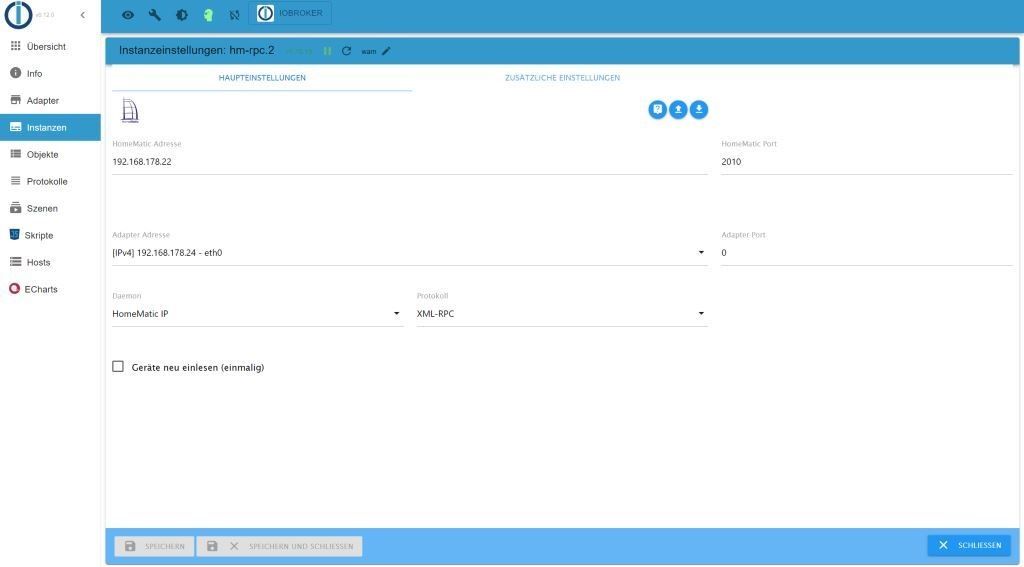
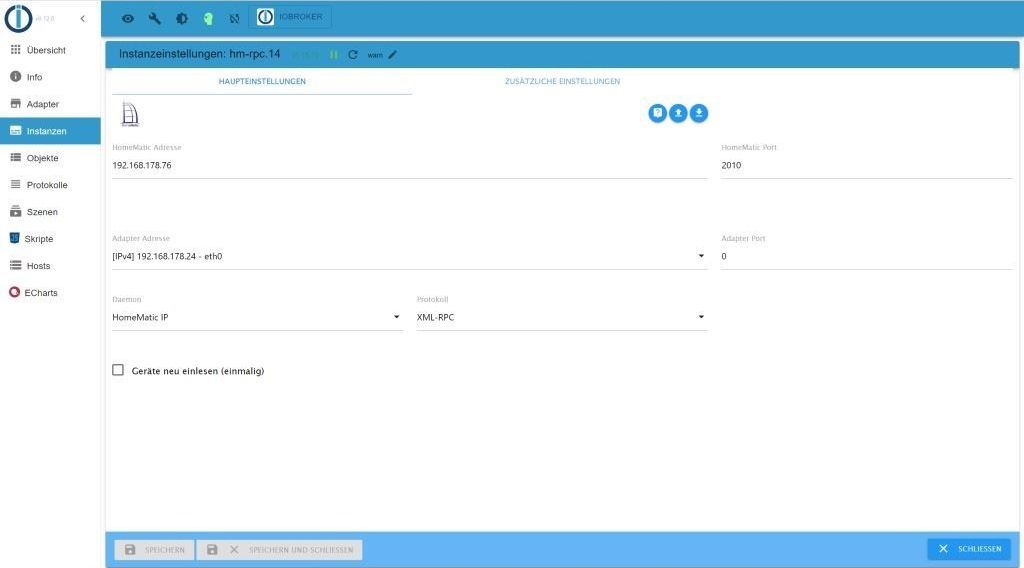
- screenshot config
Hilfreich wäre auch "iob diag" (das ganze und in code-tags); damit man weiß wie du unterwegs bist.
-
Mit
HomeMatic ReGaHSS Adapter 3.0.47
HomeMatic RPC 1.15.19
Node 18.18.2Immer noch Probleme mit dem rpc Adapter, selbe Fehlermeldungen.
Update
HomeMatic ReGaHSS Adapter 4.0.0 von Github
HomeMatic RPC 1.15.19
Node 18.18.2Probleme bleiben. Hab jetzt Sentry aus und alle Fehler weg.
@micha-3 sagte in Probleme mit HomeMatic RPC:
Hab jetzt Sentry aus und alle Fehler weg.
was sagt
iob diagin der Langfassung? -
@homoran sagte in Probleme mit HomeMatic RPC:
iob diag
Skript v.2023-10-10 *** BASE SYSTEM *** Static hostname: IoBroker Icon name: computer-container Chassis: container ☐ Virtualization: lxc Operating System: Debian GNU/Linux 12 (bookworm) Kernel: Linux 6.2.16-19-pve Architecture: x86-64 model name : Intel(R) Core(TM) i5-10210U CPU @ 1.60GHz Docker : false Virtualization : lxc Kernel : x86_64 Userland : amd64 Systemuptime and Load: 17:34:57 up 12 min, 2 users, load average: 1.66, 1.56, 1.49 CPU threads: 4 *** Time and Time Zones *** Local time: Thu 2023-11-09 17:34:57 CET Universal time: Thu 2023-11-09 16:34:57 UTC RTC time: n/a Time zone: Europe/Berlin (CET, +0100) System clock synchronized: yes NTP service: inactive RTC in local TZ: no *** User and Groups *** pi /home/pi pi users *** X-Server-Setup *** X-Server: false Desktop: Terminal: tty Boot Target: graphical.target *** MEMORY *** total used free shared buff/cache available Mem: 16G 2.6G 13G 131K 1.0G 14G Swap: 2.1G 0B 2.1G Total: 18G 2.6G 15G 16000 M total memory 2444 M used memory 332 M active memory 2871 M inactive memory 12597 M free memory 0 M buffer memory 958 M swap cache 2048 M total swap 0 M used swap 2048 M free swap *** FAILED SERVICES *** UNIT LOAD ACTIVE SUB DESCRIPTION * run-rpc_pipefs.mount loaded failed failed RPC Pipe File System * sys-kernel-config.mount loaded failed failed Kernel Configuration File System LOAD = Reflects whether the unit definition was properly loaded. ACTIVE = The high-level unit activation state, i.e. generalization of SUB. SUB = The low-level unit activation state, values depend on unit type. 2 loaded units listed. *** FILESYSTEM *** Filesystem Type Size Used Avail Use% Mounted on /dev/loop1 ext4 12G 5.1G 6.1G 46% / none tmpfs 492K 4.0K 488K 1% /dev udev devtmpfs 16G 0 16G 0% /dev/tty tmpfs tmpfs 16G 0 16G 0% /dev/shm tmpfs tmpfs 6.3G 124K 6.3G 1% /run tmpfs tmpfs 5.0M 0 5.0M 0% /run/lock tmpfs tmpfs 3.2G 0 3.2G 0% /run/user/1001 Messages concerning ext4 filesystem in dmesg: dmesg: read kernel buffer failed: Operation not permitted Show mounted filesystems \(real ones only\): TARGET SOURCE FSTYPE OPTIONS / /dev/loop1 ext4 rw,relatime Files in neuralgic directories: /var: 427M /var/ 249M /var/cache 246M /var/cache/apt 170M /var/cache/apt/archives 145M /var/lib Hint: You are currently not seeing messages from other users and the system. Users in groups 'adm', 'systemd-journal' can see all messages. Pass -q to turn off this notice. Archived and active journals take up 8.0M in the file system. /opt/iobroker/backups: 4.0K /opt/iobroker/backups/ /opt/iobroker/iobroker-data: 1007M /opt/iobroker/iobroker-data/ 563M /opt/iobroker/iobroker-data/files 327M /opt/iobroker/iobroker-data/backup-objects 88M /opt/iobroker/iobroker-data/files/echarts.admin 78M /opt/iobroker/iobroker-data/files/icons-open-icon-library-png The five largest files in iobroker-data are: 33M /opt/iobroker/iobroker-data/files/iot.admin/static/js/main.05aa79ca.js.map 27M /opt/iobroker/iobroker-data/sqlite/sqlite.db 27M /opt/iobroker/iobroker-data/objects.jsonl 25M /opt/iobroker/iobroker-data/objects.json.migrated 25M /opt/iobroker/iobroker-data/objects.json.bak.migrated USB-Devices by-id: USB-Sticks - Avoid direct links to /dev/* in your adapter setups, please always prefer the links 'by-id': find: '/dev/serial/by-id/': No such file or directory *** NodeJS-Installation *** /usr/bin/nodejs v18.18.2 /usr/bin/node v18.18.2 /usr/bin/npm 9.8.1 /usr/bin/npx 9.8.1 /usr/bin/corepack 0.19.0 nodejs: Installed: 18.18.2-1nodesource1 Candidate: 18.18.2-1nodesource1 Version table: *** 18.18.2-1nodesource1 500 500 https://deb.nodesource.com/node_18.x nodistro/main amd64 Packages 100 /var/lib/dpkg/status 18.18.1-1nodesource1 500 500 https://deb.nodesource.com/node_18.x nodistro/main amd64 Packages 18.18.0-1nodesource1 500 500 https://deb.nodesource.com/node_18.x nodistro/main amd64 Packages 18.17.1-1nodesource1 500 500 https://deb.nodesource.com/node_18.x nodistro/main amd64 Packages 18.17.0-1nodesource1 500 500 https://deb.nodesource.com/node_18.x nodistro/main amd64 Packages 18.16.1-1nodesource1 500 500 https://deb.nodesource.com/node_18.x nodistro/main amd64 Packages 18.16.0-1nodesource1 500 500 https://deb.nodesource.com/node_18.x nodistro/main amd64 Packages 18.15.0-1nodesource1 500 500 https://deb.nodesource.com/node_18.x nodistro/main amd64 Packages 18.14.2-1nodesource1 500 500 https://deb.nodesource.com/node_18.x nodistro/main amd64 Packages 18.14.1-1nodesource1 500 500 https://deb.nodesource.com/node_18.x nodistro/main amd64 Packages 18.14.0-1nodesource1 500 500 https://deb.nodesource.com/node_18.x nodistro/main amd64 Packages 18.13.0+dfsg1-1 500 500 http://deb.debian.org/debian bookworm/main amd64 Packages 18.13.0-1nodesource1 500 500 https://deb.nodesource.com/node_18.x nodistro/main amd64 Packages 18.12.0-1nodesource1 500 500 https://deb.nodesource.com/node_18.x nodistro/main amd64 Packages 18.11.0-1nodesource1 500 500 https://deb.nodesource.com/node_18.x nodistro/main amd64 Packages 18.10.0-1nodesource1 500 500 https://deb.nodesource.com/node_18.x nodistro/main amd64 Packages 18.9.1-1nodesource1 500 500 https://deb.nodesource.com/node_18.x nodistro/main amd64 Packages 18.9.0-1nodesource1 500 500 https://deb.nodesource.com/node_18.x nodistro/main amd64 Packages 18.8.0-1nodesource1 500 500 https://deb.nodesource.com/node_18.x nodistro/main amd64 Packages 18.7.0-1nodesource1 500 500 https://deb.nodesource.com/node_18.x nodistro/main amd64 Packages 18.6.0-1nodesource1 500 500 https://deb.nodesource.com/node_18.x nodistro/main amd64 Packages 18.5.0-1nodesource1 500 500 https://deb.nodesource.com/node_18.x nodistro/main amd64 Packages 18.4.0-1nodesource1 500 500 https://deb.nodesource.com/node_18.x nodistro/main amd64 Packages 18.3.0-1nodesource1 500 500 https://deb.nodesource.com/node_18.x nodistro/main amd64 Packages 18.2.0-1nodesource1 500 500 https://deb.nodesource.com/node_18.x nodistro/main amd64 Packages 18.1.0-1nodesource1 500 500 https://deb.nodesource.com/node_18.x nodistro/main amd64 Packages 18.0.0-1nodesource1 500 500 https://deb.nodesource.com/node_18.x nodistro/main amd64 Packages Temp directories causing npm8 problem: 0 No problems detected Errors in npm tree: *** ioBroker-Installation *** ioBroker Status iobroker is running on this host. Objects type: jsonl States type: jsonl Core adapters versions js-controller: 5.0.12 admin: 6.12.0 javascript: 7.1.6 Adapters from github: 14 Adapter State + system.adapter.admin.0 : admin : IoBroker - enabled, port: 9081, bind: 0.0.0.0, run as: admin + system.adapter.alexa2.0 : alexa2 : IoBroker - enabled + system.adapter.broadlink2.0 : broadlink2 : IoBroker - enabled + system.adapter.cloud.0 : cloud : IoBroker - enabled system.adapter.daswetter.0 : daswetter : IoBroker - enabled + system.adapter.discovery.0 : discovery : IoBroker - enabled + system.adapter.echarts.0 : echarts : IoBroker - enabled system.adapter.fb-checkpresence.0 : fb-checkpresence : IoBroker - disabled system.adapter.flot.0 : flot : IoBroker - disabled + system.adapter.fritzdect.0 : fritzdect : IoBroker - enabled system.adapter.history.0 : history : IoBroker - disabled + system.adapter.hm-rega.0 : hm-rega : IoBroker - enabled + system.adapter.hm-rega.3 : hm-rega : IoBroker - enabled + system.adapter.hm-rpc.0 : hm-rpc : IoBroker - enabled, port: 0 + system.adapter.hm-rpc.1 : hm-rpc : IoBroker - enabled, port: 0 + system.adapter.hm-rpc.12 : hm-rpc : IoBroker - enabled, port: 0 + system.adapter.hm-rpc.13 : hm-rpc : IoBroker - enabled, port: 0 + system.adapter.hm-rpc.14 : hm-rpc : IoBroker - enabled, port: 0 + system.adapter.hm-rpc.15 : hm-rpc : IoBroker - enabled, port: 0 + system.adapter.hm-rpc.2 : hm-rpc : IoBroker - enabled, port: 0 + system.adapter.hm-rpc.3 : hm-rpc : IoBroker - enabled, port: 0 + system.adapter.homeconnect.0 : homeconnect : IoBroker - enabled + system.adapter.homepilot20.0 : homepilot20 : IoBroker - enabled system.adapter.ical.0 : ical : IoBroker - enabled system.adapter.ico-cloud.0 : ico-cloud : IoBroker - enabled system.adapter.icons-addictive-flavour-png.0: icons-addictive-flavour-png: IoBroker - disabled system.adapter.icons-material-png.0 : icons-material-png : IoBroker - disabled system.adapter.icons-material-svg.0 : icons-material-svg : IoBroker - enabled system.adapter.icons-mfd-png.0 : icons-mfd-png : IoBroker - disabled system.adapter.icons-mfd-svg.0 : icons-mfd-svg : IoBroker - enabled system.adapter.icons-open-icon-library-png.0: icons-open-icon-library-png: IoBroker - enabled system.adapter.icons-ultimate-png.0 : icons-ultimate-png : IoBroker - disabled + system.adapter.info.0 : info : IoBroker - enabled + system.adapter.iot.0 : iot : IoBroker - enabled + system.adapter.javascript.0 : javascript : IoBroker - enabled system.adapter.jeelink.0 : jeelink : Touch-Broker - disabled + system.adapter.klf200.0 : klf200 : IoBroker - enabled + system.adapter.linux-control.0 : linux-control : IoBroker - enabled system.adapter.material.0 : material : IoBroker - enabled system.adapter.mobile.0 : mobile : IoBroker - disabled + system.adapter.nuki-extended.0 : nuki-extended : IoBroker - enabled + system.adapter.scenes.0 : scenes : IoBroker - enabled + system.adapter.simple-api.0 : simple-api : IoBroker - enabled, port: 8099, bind: 0.0.0.0, run as: admin + system.adapter.smartmeter.0 : smartmeter : strom-pi - enabled + system.adapter.sonoff.0 : sonoff : IoBroker - enabled, port: 1883, bind: 0.0.0.0 + system.adapter.sql.0 : sql : IoBroker - enabled, port: 3306 + system.adapter.tankerkoenig.0 : tankerkoenig : IoBroker - enabled + system.adapter.telegram.0 : telegram : IoBroker - enabled, port: 8443, bind: 0.0.0.0 + system.adapter.tr-064.0 : tr-064 : IoBroker - enabled + system.adapter.trashschedule.0 : trashschedule : IoBroker - enabled + system.adapter.tuya.0 : tuya : IoBroker - enabled system.adapter.vis-bars.0 : vis-bars : IoBroker - disabled system.adapter.vis-canvas-gauges.0 : vis-canvas-gauges : IoBroker - disabled system.adapter.vis-colorpicker.0 : vis-colorpicker : IoBroker - enabled system.adapter.vis-fancyswitch.0 : vis-fancyswitch : IoBroker - disabled system.adapter.vis-google-fonts.0 : vis-google-fonts : IoBroker - enabled system.adapter.vis-history.0 : vis-history : IoBroker - enabled system.adapter.vis-hqwidgets.0 : vis-hqwidgets : IoBroker - disabled system.adapter.vis-icontwo.0 : vis-icontwo : IoBroker - enabled + system.adapter.vis-inventwo.0 : vis-inventwo : IoBroker - enabled system.adapter.vis-jqui-mfd.0 : vis-jqui-mfd : IoBroker - disabled system.adapter.vis-justgage.0 : vis-justgage : IoBroker - disabled system.adapter.vis-material-advanced.0 : vis-material-advanced : IoBroker - enabled system.adapter.vis-materialdesign.0 : vis-materialdesign : IoBroker - enabled system.adapter.vis-metro.0 : vis-metro : IoBroker - enabled system.adapter.vis-plumb.0 : vis-plumb : IoBroker - enabled system.adapter.vis-rgraph.0 : vis-rgraph : IoBroker - disabled system.adapter.vis-timeandweather.0 : vis-timeandweather : IoBroker - disabled system.adapter.vis-weather.0 : vis-weather : IoBroker - enabled system.adapter.vis.0 : vis : IoBroker - enabled + system.adapter.web.0 : web : IoBroker - enabled, port: 8082, bind: 0.0.0.0, run as: admin + system.adapter.web.1 : web : IoBroker - enabled, port: 8090, bind: 0.0.0.0, run as: admin + system.adapter.worx.0 : worx : IoBroker - enabled system.adapter.yr.0 : yr : IoBroker - enabled + instance is alive Enabled adapters with bindings + system.adapter.admin.0 : admin : IoBroker - enabled, port: 9081, bind: 0.0.0.0, run as: admin + system.adapter.hm-rpc.0 : hm-rpc : IoBroker - enabled, port: 0 + system.adapter.hm-rpc.1 : hm-rpc : IoBroker - enabled, port: 0 + system.adapter.hm-rpc.12 : hm-rpc : IoBroker - enabled, port: 0 + system.adapter.hm-rpc.13 : hm-rpc : IoBroker - enabled, port: 0 + system.adapter.hm-rpc.14 : hm-rpc : IoBroker - enabled, port: 0 + system.adapter.hm-rpc.15 : hm-rpc : IoBroker - enabled, port: 0 + system.adapter.hm-rpc.2 : hm-rpc : IoBroker - enabled, port: 0 + system.adapter.hm-rpc.3 : hm-rpc : IoBroker - enabled, port: 0 + system.adapter.simple-api.0 : simple-api : IoBroker - enabled, port: 8099, bind: 0.0.0.0, run as: admin + system.adapter.sonoff.0 : sonoff : IoBroker - enabled, port: 1883, bind: 0.0.0.0 + system.adapter.sql.0 : sql : IoBroker - enabled, port: 3306 + system.adapter.telegram.0 : telegram : IoBroker - enabled, port: 8443, bind: 0.0.0.0 + system.adapter.web.0 : web : IoBroker - enabled, port: 8082, bind: 0.0.0.0, run as: admin + system.adapter.web.1 : web : IoBroker - enabled, port: 8090, bind: 0.0.0.0, run as: admin ioBroker-Repositories stable : http://download.iobroker.net/sources-dist.json live-stable : http://iobroker.live/repo/sources-dist.json default : http://download.iobroker.net/sources-dist.json beta : http://download.iobroker.net/sources-dist-latest.json Active repo(s): stable, live-stable, default Installed ioBroker-Instances Used repositories: stable, live-stable, default Adapter "admin" : 6.12.0 , installed 6.12.0 Adapter "alexa2" : 3.25.2 , installed 3.25.5 Adapter "broadlink2" : 2.1.5 , installed 2.1.5 Adapter "cloud" : 4.4.1 , installed 4.4.1 Adapter "daswetter" : 3.1.10 , installed 3.1.10 Adapter "discovery" : 3.1.0 , installed 3.1.0 Adapter "echarts" : 1.5.1 , installed 1.5.1 Adapter "fb-checkpresence": 1.2.2 , installed 1.2.2 Adapter "flot" : 1.12.0 , installed 1.12.0 Adapter "fritzdect" : 2.3.1 , installed 2.3.1 Adapter "history" : 3.0.1 , installed 3.0.1 Adapter "hm-rega" : 3.0.47 , installed 4.0.0 Adapter "hm-rpc" : 1.15.19 , installed 1.15.19 Adapter "homeconnect" : 1.1.1 , installed 1.1.1 Adapter "ical" : 1.13.3 , installed 1.13.3 Adapter "ico-cloud" : 1.1.0 , installed 1.1.0 Adapter "icons-addictive-flavour-png": 0.1.0, installed 0.1.0 Adapter "icons-material-png": 0.1.0, installed 0.1.0 Adapter "icons-material-svg": 0.1.0, installed 0.1.0 Adapter "icons-mfd-png": 1.1.0 , installed 1.1.0 Adapter "icons-mfd-svg": 1.1.0 , installed 1.1.0 Adapter "icons-open-icon-library-png": 0.1.2, installed 0.1.2 Adapter "icons-ultimate-png": 1.0.1, installed 1.0.1 Adapter "info" : 2.0.0 , installed 2.0.0 Adapter "iot" : 1.14.5 , installed 2.0.9 Adapter "javascript" : 7.1.4 , installed 7.1.6 Controller "js-controller": 5.0.12 , installed 5.0.12 Adapter "klf200" : 1.1.2 , installed 1.1.2 Adapter "linux-control": 1.1.5 , installed 1.1.6 Adapter "material" : 1.3.1 , installed 1.3.1 Adapter "mobile" : 1.0.1 , installed 1.0.1 Adapter "nuki-extended": 2.6.5 , installed 2.6.5 Adapter "scenes" : 2.3.9 , installed 2.3.9 Adapter "simple-api" : 2.7.2 , installed 2.7.2 Adapter "socketio" : 6.5.5 , installed 6.5.7 Adapter "sonoff" : 2.5.3 , installed 3.0.2 Adapter "sql" : 2.2.0 , installed 2.2.0 Adapter "tankerkoenig" : 3.3.7 , installed 3.3.7 Adapter "telegram" : 2.0.1 , installed 2.0.1 Adapter "tr-064" : 4.2.18 , installed 4.2.18 Adapter "trashschedule": 2.3.0 , installed 2.3.0 Adapter "tuya" : 3.14.2 , installed 3.14.2 Adapter "vis" : 1.4.16 , installed 1.4.16 Adapter "vis-bars" : 0.1.4 , installed 0.1.4 Adapter "vis-canvas-gauges": 1.0.1, installed 1.0.1 Adapter "vis-colorpicker": 2.0.3 , installed 2.0.3 Adapter "vis-fancyswitch": 1.1.0 , installed 1.1.0 Adapter "vis-google-fonts": 1.0.4 , installed 1.0.4 Adapter "vis-history" : 1.0.0 , installed 1.0.0 Adapter "vis-hqwidgets": 1.4.0 , installed 1.4.0 Adapter "vis-icontwo" : 0.96.0 , installed 0.96.0 Adapter "vis-inventwo" : 3.3.3 , installed 3.3.3 Adapter "vis-jqui-mfd" : 1.0.12 , installed 1.0.12 Adapter "vis-justgage" : 1.0.2 , installed 1.0.2 Adapter "vis-material-advanced": 1.7.4, installed 1.7.4 Adapter "vis-metro" : 1.2.0 , installed 1.2.0 Adapter "vis-plumb" : 1.0.2 , installed 1.0.2 Adapter "vis-rgraph" : 0.0.2 , installed 0.0.2 Adapter "vis-timeandweather": 1.2.2, installed 1.2.2 Adapter "vis-weather" : 2.5.6 , installed 2.5.6 Adapter "web" : 6.1.4 , installed 6.1.4 Adapter "worx" : 2.3.4 , installed 2.3.4 Adapter "ws" : 2.5.5 , installed 2.5.7 Adapter "yr" : 5.3.0 , installed 5.3.0 Objects and States Please stand by - This may take a while Objects: 21651 States: 20006 *** OS-Repositories and Updates *** Hit:1 http://deb.debian.org/debian bookworm InRelease Hit:2 http://security.debian.org bookworm-security InRelease Hit:3 http://deb.debian.org/debian bookworm-updates InRelease Hit:4 https://deb.nodesource.com/node_18.x nodistro InRelease Reading package lists... Pending Updates: 2 *** Listening Ports *** Active Internet connections (only servers) Proto Recv-Q Send-Q Local Address Foreign Address State User Inode PID/Program name tcp 0 0 127.0.0.1:25 0.0.0.0:* LISTEN 0 18480124 296/master tcp 0 0 192.168.178.24:2001 0.0.0.0:* LISTEN 1000 18484957 443/io.hm-rpc.1 tcp 0 0 192.168.178.24:2002 0.0.0.0:* LISTEN 1000 18486160 633/io.hm-rpc.13 tcp 0 0 192.168.178.24:2011 0.0.0.0:* LISTEN 1000 18489642 648/io.hm-rpc.14 tcp 0 0 192.168.178.24:2010 0.0.0.0:* LISTEN 1000 18487411 481/io.hm-rpc.2 tcp 0 0 0.0.0.0:9000 0.0.0.0:* LISTEN 1000 18485379 132/iobroker.js-con tcp 0 0 0.0.0.0:9001 0.0.0.0:* LISTEN 1000 18484518 132/iobroker.js-con tcp 0 0 192.168.178.24:8701 0.0.0.0:* LISTEN 1000 18483776 428/io.hm-rpc.0 tcp 0 0 192.168.178.24:8702 0.0.0.0:* LISTEN 1000 18487897 617/io.hm-rpc.12 tcp 0 0 192.168.178.24:9293 0.0.0.0:* LISTEN 1000 18486230 663/io.hm-rpc.15 tcp 0 0 192.168.178.24:9292 0.0.0.0:* LISTEN 1000 18485083 496/io.hm-rpc.3 tcp 0 0 0.0.0.0:1883 0.0.0.0:* LISTEN 1000 18484113 541/io.sonoff.0 tcp 0 0 0.0.0.0:111 0.0.0.0:* LISTEN 0 18484240 1/init tcp6 0 0 ::1:25 :::* LISTEN 0 18480125 296/master tcp6 0 0 :::9081 :::* LISTEN 1000 18484560 307/io.admin.0 tcp6 0 0 :::8099 :::* LISTEN 1000 18497621 1258/io.simple-api. tcp6 0 0 :::8082 :::* LISTEN 1000 18498362 1351/io.web.0 tcp6 0 0 :::8090 :::* LISTEN 1000 18498375 1366/io.web.1 tcp6 0 0 :::51989 :::* LISTEN 1000 18485210 526/io.nuki-extende tcp6 0 0 :::22 :::* LISTEN 0 18479973 1/init tcp6 0 0 :::111 :::* LISTEN 0 18484242 1/init udp 0 0 0.0.0.0:56842 0.0.0.0:* 1000 18489816 678/io.broadlink2.0 udp 0 0 0.0.0.0:40519 0.0.0.0:* 1000 18489726 678/io.broadlink2.0 udp 0 0 0.0.0.0:15001 0.0.0.0:* 1000 18488006 678/io.broadlink2.0 udp 0 0 0.0.0.0:111 0.0.0.0:* 0 18484241 1/init udp 0 0 0.0.0.0:6666 0.0.0.0:* 1000 18484170 571/io.tuya.0 udp 0 0 0.0.0.0:6667 0.0.0.0:* 1000 18484171 571/io.tuya.0 udp6 0 0 :::111 :::* 0 18484243 1/init *** Log File - Last 25 Lines *** 2023-11-09 17:32:48.226 - info: admin.0 (307) <== Disconnect system.user.admin from ::ffff:192.168.178.20 2023-11-09 17:32:52.320 - info: admin.0 (307) <== Disconnect system.user.admin from ::ffff:192.168.178.20 admin 2023-11-09 17:32:53.298 - info: admin.0 (307) ==> Connected system.user.admin from ::ffff:192.168.178.20 -
@homoran sagte in Probleme mit HomeMatic RPC:
iob diag
Skript v.2023-10-10 *** BASE SYSTEM *** Static hostname: IoBroker Icon name: computer-container Chassis: container ☐ Virtualization: lxc Operating System: Debian GNU/Linux 12 (bookworm) Kernel: Linux 6.2.16-19-pve Architecture: x86-64 model name : Intel(R) Core(TM) i5-10210U CPU @ 1.60GHz Docker : false Virtualization : lxc Kernel : x86_64 Userland : amd64 Systemuptime and Load: 17:34:57 up 12 min, 2 users, load average: 1.66, 1.56, 1.49 CPU threads: 4 *** Time and Time Zones *** Local time: Thu 2023-11-09 17:34:57 CET Universal time: Thu 2023-11-09 16:34:57 UTC RTC time: n/a Time zone: Europe/Berlin (CET, +0100) System clock synchronized: yes NTP service: inactive RTC in local TZ: no *** User and Groups *** pi /home/pi pi users *** X-Server-Setup *** X-Server: false Desktop: Terminal: tty Boot Target: graphical.target *** MEMORY *** total used free shared buff/cache available Mem: 16G 2.6G 13G 131K 1.0G 14G Swap: 2.1G 0B 2.1G Total: 18G 2.6G 15G 16000 M total memory 2444 M used memory 332 M active memory 2871 M inactive memory 12597 M free memory 0 M buffer memory 958 M swap cache 2048 M total swap 0 M used swap 2048 M free swap *** FAILED SERVICES *** UNIT LOAD ACTIVE SUB DESCRIPTION * run-rpc_pipefs.mount loaded failed failed RPC Pipe File System * sys-kernel-config.mount loaded failed failed Kernel Configuration File System LOAD = Reflects whether the unit definition was properly loaded. ACTIVE = The high-level unit activation state, i.e. generalization of SUB. SUB = The low-level unit activation state, values depend on unit type. 2 loaded units listed. *** FILESYSTEM *** Filesystem Type Size Used Avail Use% Mounted on /dev/loop1 ext4 12G 5.1G 6.1G 46% / none tmpfs 492K 4.0K 488K 1% /dev udev devtmpfs 16G 0 16G 0% /dev/tty tmpfs tmpfs 16G 0 16G 0% /dev/shm tmpfs tmpfs 6.3G 124K 6.3G 1% /run tmpfs tmpfs 5.0M 0 5.0M 0% /run/lock tmpfs tmpfs 3.2G 0 3.2G 0% /run/user/1001 Messages concerning ext4 filesystem in dmesg: dmesg: read kernel buffer failed: Operation not permitted Show mounted filesystems \(real ones only\): TARGET SOURCE FSTYPE OPTIONS / /dev/loop1 ext4 rw,relatime Files in neuralgic directories: /var: 427M /var/ 249M /var/cache 246M /var/cache/apt 170M /var/cache/apt/archives 145M /var/lib Hint: You are currently not seeing messages from other users and the system. Users in groups 'adm', 'systemd-journal' can see all messages. Pass -q to turn off this notice. Archived and active journals take up 8.0M in the file system. /opt/iobroker/backups: 4.0K /opt/iobroker/backups/ /opt/iobroker/iobroker-data: 1007M /opt/iobroker/iobroker-data/ 563M /opt/iobroker/iobroker-data/files 327M /opt/iobroker/iobroker-data/backup-objects 88M /opt/iobroker/iobroker-data/files/echarts.admin 78M /opt/iobroker/iobroker-data/files/icons-open-icon-library-png The five largest files in iobroker-data are: 33M /opt/iobroker/iobroker-data/files/iot.admin/static/js/main.05aa79ca.js.map 27M /opt/iobroker/iobroker-data/sqlite/sqlite.db 27M /opt/iobroker/iobroker-data/objects.jsonl 25M /opt/iobroker/iobroker-data/objects.json.migrated 25M /opt/iobroker/iobroker-data/objects.json.bak.migrated USB-Devices by-id: USB-Sticks - Avoid direct links to /dev/* in your adapter setups, please always prefer the links 'by-id': find: '/dev/serial/by-id/': No such file or directory *** NodeJS-Installation *** /usr/bin/nodejs v18.18.2 /usr/bin/node v18.18.2 /usr/bin/npm 9.8.1 /usr/bin/npx 9.8.1 /usr/bin/corepack 0.19.0 nodejs: Installed: 18.18.2-1nodesource1 Candidate: 18.18.2-1nodesource1 Version table: *** 18.18.2-1nodesource1 500 500 https://deb.nodesource.com/node_18.x nodistro/main amd64 Packages 100 /var/lib/dpkg/status 18.18.1-1nodesource1 500 500 https://deb.nodesource.com/node_18.x nodistro/main amd64 Packages 18.18.0-1nodesource1 500 500 https://deb.nodesource.com/node_18.x nodistro/main amd64 Packages 18.17.1-1nodesource1 500 500 https://deb.nodesource.com/node_18.x nodistro/main amd64 Packages 18.17.0-1nodesource1 500 500 https://deb.nodesource.com/node_18.x nodistro/main amd64 Packages 18.16.1-1nodesource1 500 500 https://deb.nodesource.com/node_18.x nodistro/main amd64 Packages 18.16.0-1nodesource1 500 500 https://deb.nodesource.com/node_18.x nodistro/main amd64 Packages 18.15.0-1nodesource1 500 500 https://deb.nodesource.com/node_18.x nodistro/main amd64 Packages 18.14.2-1nodesource1 500 500 https://deb.nodesource.com/node_18.x nodistro/main amd64 Packages 18.14.1-1nodesource1 500 500 https://deb.nodesource.com/node_18.x nodistro/main amd64 Packages 18.14.0-1nodesource1 500 500 https://deb.nodesource.com/node_18.x nodistro/main amd64 Packages 18.13.0+dfsg1-1 500 500 http://deb.debian.org/debian bookworm/main amd64 Packages 18.13.0-1nodesource1 500 500 https://deb.nodesource.com/node_18.x nodistro/main amd64 Packages 18.12.0-1nodesource1 500 500 https://deb.nodesource.com/node_18.x nodistro/main amd64 Packages 18.11.0-1nodesource1 500 500 https://deb.nodesource.com/node_18.x nodistro/main amd64 Packages 18.10.0-1nodesource1 500 500 https://deb.nodesource.com/node_18.x nodistro/main amd64 Packages 18.9.1-1nodesource1 500 500 https://deb.nodesource.com/node_18.x nodistro/main amd64 Packages 18.9.0-1nodesource1 500 500 https://deb.nodesource.com/node_18.x nodistro/main amd64 Packages 18.8.0-1nodesource1 500 500 https://deb.nodesource.com/node_18.x nodistro/main amd64 Packages 18.7.0-1nodesource1 500 500 https://deb.nodesource.com/node_18.x nodistro/main amd64 Packages 18.6.0-1nodesource1 500 500 https://deb.nodesource.com/node_18.x nodistro/main amd64 Packages 18.5.0-1nodesource1 500 500 https://deb.nodesource.com/node_18.x nodistro/main amd64 Packages 18.4.0-1nodesource1 500 500 https://deb.nodesource.com/node_18.x nodistro/main amd64 Packages 18.3.0-1nodesource1 500 500 https://deb.nodesource.com/node_18.x nodistro/main amd64 Packages 18.2.0-1nodesource1 500 500 https://deb.nodesource.com/node_18.x nodistro/main amd64 Packages 18.1.0-1nodesource1 500 500 https://deb.nodesource.com/node_18.x nodistro/main amd64 Packages 18.0.0-1nodesource1 500 500 https://deb.nodesource.com/node_18.x nodistro/main amd64 Packages Temp directories causing npm8 problem: 0 No problems detected Errors in npm tree: *** ioBroker-Installation *** ioBroker Status iobroker is running on this host. Objects type: jsonl States type: jsonl Core adapters versions js-controller: 5.0.12 admin: 6.12.0 javascript: 7.1.6 Adapters from github: 14 Adapter State + system.adapter.admin.0 : admin : IoBroker - enabled, port: 9081, bind: 0.0.0.0, run as: admin + system.adapter.alexa2.0 : alexa2 : IoBroker - enabled + system.adapter.broadlink2.0 : broadlink2 : IoBroker - enabled + system.adapter.cloud.0 : cloud : IoBroker - enabled system.adapter.daswetter.0 : daswetter : IoBroker - enabled + system.adapter.discovery.0 : discovery : IoBroker - enabled + system.adapter.echarts.0 : echarts : IoBroker - enabled system.adapter.fb-checkpresence.0 : fb-checkpresence : IoBroker - disabled system.adapter.flot.0 : flot : IoBroker - disabled + system.adapter.fritzdect.0 : fritzdect : IoBroker - enabled system.adapter.history.0 : history : IoBroker - disabled + system.adapter.hm-rega.0 : hm-rega : IoBroker - enabled + system.adapter.hm-rega.3 : hm-rega : IoBroker - enabled + system.adapter.hm-rpc.0 : hm-rpc : IoBroker - enabled, port: 0 + system.adapter.hm-rpc.1 : hm-rpc : IoBroker - enabled, port: 0 + system.adapter.hm-rpc.12 : hm-rpc : IoBroker - enabled, port: 0 + system.adapter.hm-rpc.13 : hm-rpc : IoBroker - enabled, port: 0 + system.adapter.hm-rpc.14 : hm-rpc : IoBroker - enabled, port: 0 + system.adapter.hm-rpc.15 : hm-rpc : IoBroker - enabled, port: 0 + system.adapter.hm-rpc.2 : hm-rpc : IoBroker - enabled, port: 0 + system.adapter.hm-rpc.3 : hm-rpc : IoBroker - enabled, port: 0 + system.adapter.homeconnect.0 : homeconnect : IoBroker - enabled + system.adapter.homepilot20.0 : homepilot20 : IoBroker - enabled system.adapter.ical.0 : ical : IoBroker - enabled system.adapter.ico-cloud.0 : ico-cloud : IoBroker - enabled system.adapter.icons-addictive-flavour-png.0: icons-addictive-flavour-png: IoBroker - disabled system.adapter.icons-material-png.0 : icons-material-png : IoBroker - disabled system.adapter.icons-material-svg.0 : icons-material-svg : IoBroker - enabled system.adapter.icons-mfd-png.0 : icons-mfd-png : IoBroker - disabled system.adapter.icons-mfd-svg.0 : icons-mfd-svg : IoBroker - enabled system.adapter.icons-open-icon-library-png.0: icons-open-icon-library-png: IoBroker - enabled system.adapter.icons-ultimate-png.0 : icons-ultimate-png : IoBroker - disabled + system.adapter.info.0 : info : IoBroker - enabled + system.adapter.iot.0 : iot : IoBroker - enabled + system.adapter.javascript.0 : javascript : IoBroker - enabled system.adapter.jeelink.0 : jeelink : Touch-Broker - disabled + system.adapter.klf200.0 : klf200 : IoBroker - enabled + system.adapter.linux-control.0 : linux-control : IoBroker - enabled system.adapter.material.0 : material : IoBroker - enabled system.adapter.mobile.0 : mobile : IoBroker - disabled + system.adapter.nuki-extended.0 : nuki-extended : IoBroker - enabled + system.adapter.scenes.0 : scenes : IoBroker - enabled + system.adapter.simple-api.0 : simple-api : IoBroker - enabled, port: 8099, bind: 0.0.0.0, run as: admin + system.adapter.smartmeter.0 : smartmeter : strom-pi - enabled + system.adapter.sonoff.0 : sonoff : IoBroker - enabled, port: 1883, bind: 0.0.0.0 + system.adapter.sql.0 : sql : IoBroker - enabled, port: 3306 + system.adapter.tankerkoenig.0 : tankerkoenig : IoBroker - enabled + system.adapter.telegram.0 : telegram : IoBroker - enabled, port: 8443, bind: 0.0.0.0 + system.adapter.tr-064.0 : tr-064 : IoBroker - enabled + system.adapter.trashschedule.0 : trashschedule : IoBroker - enabled + system.adapter.tuya.0 : tuya : IoBroker - enabled system.adapter.vis-bars.0 : vis-bars : IoBroker - disabled system.adapter.vis-canvas-gauges.0 : vis-canvas-gauges : IoBroker - disabled system.adapter.vis-colorpicker.0 : vis-colorpicker : IoBroker - enabled system.adapter.vis-fancyswitch.0 : vis-fancyswitch : IoBroker - disabled system.adapter.vis-google-fonts.0 : vis-google-fonts : IoBroker - enabled system.adapter.vis-history.0 : vis-history : IoBroker - enabled system.adapter.vis-hqwidgets.0 : vis-hqwidgets : IoBroker - disabled system.adapter.vis-icontwo.0 : vis-icontwo : IoBroker - enabled + system.adapter.vis-inventwo.0 : vis-inventwo : IoBroker - enabled system.adapter.vis-jqui-mfd.0 : vis-jqui-mfd : IoBroker - disabled system.adapter.vis-justgage.0 : vis-justgage : IoBroker - disabled system.adapter.vis-material-advanced.0 : vis-material-advanced : IoBroker - enabled system.adapter.vis-materialdesign.0 : vis-materialdesign : IoBroker - enabled system.adapter.vis-metro.0 : vis-metro : IoBroker - enabled system.adapter.vis-plumb.0 : vis-plumb : IoBroker - enabled system.adapter.vis-rgraph.0 : vis-rgraph : IoBroker - disabled system.adapter.vis-timeandweather.0 : vis-timeandweather : IoBroker - disabled system.adapter.vis-weather.0 : vis-weather : IoBroker - enabled system.adapter.vis.0 : vis : IoBroker - enabled + system.adapter.web.0 : web : IoBroker - enabled, port: 8082, bind: 0.0.0.0, run as: admin + system.adapter.web.1 : web : IoBroker - enabled, port: 8090, bind: 0.0.0.0, run as: admin + system.adapter.worx.0 : worx : IoBroker - enabled system.adapter.yr.0 : yr : IoBroker - enabled + instance is alive Enabled adapters with bindings + system.adapter.admin.0 : admin : IoBroker - enabled, port: 9081, bind: 0.0.0.0, run as: admin + system.adapter.hm-rpc.0 : hm-rpc : IoBroker - enabled, port: 0 + system.adapter.hm-rpc.1 : hm-rpc : IoBroker - enabled, port: 0 + system.adapter.hm-rpc.12 : hm-rpc : IoBroker - enabled, port: 0 + system.adapter.hm-rpc.13 : hm-rpc : IoBroker - enabled, port: 0 + system.adapter.hm-rpc.14 : hm-rpc : IoBroker - enabled, port: 0 + system.adapter.hm-rpc.15 : hm-rpc : IoBroker - enabled, port: 0 + system.adapter.hm-rpc.2 : hm-rpc : IoBroker - enabled, port: 0 + system.adapter.hm-rpc.3 : hm-rpc : IoBroker - enabled, port: 0 + system.adapter.simple-api.0 : simple-api : IoBroker - enabled, port: 8099, bind: 0.0.0.0, run as: admin + system.adapter.sonoff.0 : sonoff : IoBroker - enabled, port: 1883, bind: 0.0.0.0 + system.adapter.sql.0 : sql : IoBroker - enabled, port: 3306 + system.adapter.telegram.0 : telegram : IoBroker - enabled, port: 8443, bind: 0.0.0.0 + system.adapter.web.0 : web : IoBroker - enabled, port: 8082, bind: 0.0.0.0, run as: admin + system.adapter.web.1 : web : IoBroker - enabled, port: 8090, bind: 0.0.0.0, run as: admin ioBroker-Repositories stable : http://download.iobroker.net/sources-dist.json live-stable : http://iobroker.live/repo/sources-dist.json default : http://download.iobroker.net/sources-dist.json beta : http://download.iobroker.net/sources-dist-latest.json Active repo(s): stable, live-stable, default Installed ioBroker-Instances Used repositories: stable, live-stable, default Adapter "admin" : 6.12.0 , installed 6.12.0 Adapter "alexa2" : 3.25.2 , installed 3.25.5 Adapter "broadlink2" : 2.1.5 , installed 2.1.5 Adapter "cloud" : 4.4.1 , installed 4.4.1 Adapter "daswetter" : 3.1.10 , installed 3.1.10 Adapter "discovery" : 3.1.0 , installed 3.1.0 Adapter "echarts" : 1.5.1 , installed 1.5.1 Adapter "fb-checkpresence": 1.2.2 , installed 1.2.2 Adapter "flot" : 1.12.0 , installed 1.12.0 Adapter "fritzdect" : 2.3.1 , installed 2.3.1 Adapter "history" : 3.0.1 , installed 3.0.1 Adapter "hm-rega" : 3.0.47 , installed 4.0.0 Adapter "hm-rpc" : 1.15.19 , installed 1.15.19 Adapter "homeconnect" : 1.1.1 , installed 1.1.1 Adapter "ical" : 1.13.3 , installed 1.13.3 Adapter "ico-cloud" : 1.1.0 , installed 1.1.0 Adapter "icons-addictive-flavour-png": 0.1.0, installed 0.1.0 Adapter "icons-material-png": 0.1.0, installed 0.1.0 Adapter "icons-material-svg": 0.1.0, installed 0.1.0 Adapter "icons-mfd-png": 1.1.0 , installed 1.1.0 Adapter "icons-mfd-svg": 1.1.0 , installed 1.1.0 Adapter "icons-open-icon-library-png": 0.1.2, installed 0.1.2 Adapter "icons-ultimate-png": 1.0.1, installed 1.0.1 Adapter "info" : 2.0.0 , installed 2.0.0 Adapter "iot" : 1.14.5 , installed 2.0.9 Adapter "javascript" : 7.1.4 , installed 7.1.6 Controller "js-controller": 5.0.12 , installed 5.0.12 Adapter "klf200" : 1.1.2 , installed 1.1.2 Adapter "linux-control": 1.1.5 , installed 1.1.6 Adapter "material" : 1.3.1 , installed 1.3.1 Adapter "mobile" : 1.0.1 , installed 1.0.1 Adapter "nuki-extended": 2.6.5 , installed 2.6.5 Adapter "scenes" : 2.3.9 , installed 2.3.9 Adapter "simple-api" : 2.7.2 , installed 2.7.2 Adapter "socketio" : 6.5.5 , installed 6.5.7 Adapter "sonoff" : 2.5.3 , installed 3.0.2 Adapter "sql" : 2.2.0 , installed 2.2.0 Adapter "tankerkoenig" : 3.3.7 , installed 3.3.7 Adapter "telegram" : 2.0.1 , installed 2.0.1 Adapter "tr-064" : 4.2.18 , installed 4.2.18 Adapter "trashschedule": 2.3.0 , installed 2.3.0 Adapter "tuya" : 3.14.2 , installed 3.14.2 Adapter "vis" : 1.4.16 , installed 1.4.16 Adapter "vis-bars" : 0.1.4 , installed 0.1.4 Adapter "vis-canvas-gauges": 1.0.1, installed 1.0.1 Adapter "vis-colorpicker": 2.0.3 , installed 2.0.3 Adapter "vis-fancyswitch": 1.1.0 , installed 1.1.0 Adapter "vis-google-fonts": 1.0.4 , installed 1.0.4 Adapter "vis-history" : 1.0.0 , installed 1.0.0 Adapter "vis-hqwidgets": 1.4.0 , installed 1.4.0 Adapter "vis-icontwo" : 0.96.0 , installed 0.96.0 Adapter "vis-inventwo" : 3.3.3 , installed 3.3.3 Adapter "vis-jqui-mfd" : 1.0.12 , installed 1.0.12 Adapter "vis-justgage" : 1.0.2 , installed 1.0.2 Adapter "vis-material-advanced": 1.7.4, installed 1.7.4 Adapter "vis-metro" : 1.2.0 , installed 1.2.0 Adapter "vis-plumb" : 1.0.2 , installed 1.0.2 Adapter "vis-rgraph" : 0.0.2 , installed 0.0.2 Adapter "vis-timeandweather": 1.2.2, installed 1.2.2 Adapter "vis-weather" : 2.5.6 , installed 2.5.6 Adapter "web" : 6.1.4 , installed 6.1.4 Adapter "worx" : 2.3.4 , installed 2.3.4 Adapter "ws" : 2.5.5 , installed 2.5.7 Adapter "yr" : 5.3.0 , installed 5.3.0 Objects and States Please stand by - This may take a while Objects: 21651 States: 20006 *** OS-Repositories and Updates *** Hit:1 http://deb.debian.org/debian bookworm InRelease Hit:2 http://security.debian.org bookworm-security InRelease Hit:3 http://deb.debian.org/debian bookworm-updates InRelease Hit:4 https://deb.nodesource.com/node_18.x nodistro InRelease Reading package lists... Pending Updates: 2 *** Listening Ports *** Active Internet connections (only servers) Proto Recv-Q Send-Q Local Address Foreign Address State User Inode PID/Program name tcp 0 0 127.0.0.1:25 0.0.0.0:* LISTEN 0 18480124 296/master tcp 0 0 192.168.178.24:2001 0.0.0.0:* LISTEN 1000 18484957 443/io.hm-rpc.1 tcp 0 0 192.168.178.24:2002 0.0.0.0:* LISTEN 1000 18486160 633/io.hm-rpc.13 tcp 0 0 192.168.178.24:2011 0.0.0.0:* LISTEN 1000 18489642 648/io.hm-rpc.14 tcp 0 0 192.168.178.24:2010 0.0.0.0:* LISTEN 1000 18487411 481/io.hm-rpc.2 tcp 0 0 0.0.0.0:9000 0.0.0.0:* LISTEN 1000 18485379 132/iobroker.js-con tcp 0 0 0.0.0.0:9001 0.0.0.0:* LISTEN 1000 18484518 132/iobroker.js-con tcp 0 0 192.168.178.24:8701 0.0.0.0:* LISTEN 1000 18483776 428/io.hm-rpc.0 tcp 0 0 192.168.178.24:8702 0.0.0.0:* LISTEN 1000 18487897 617/io.hm-rpc.12 tcp 0 0 192.168.178.24:9293 0.0.0.0:* LISTEN 1000 18486230 663/io.hm-rpc.15 tcp 0 0 192.168.178.24:9292 0.0.0.0:* LISTEN 1000 18485083 496/io.hm-rpc.3 tcp 0 0 0.0.0.0:1883 0.0.0.0:* LISTEN 1000 18484113 541/io.sonoff.0 tcp 0 0 0.0.0.0:111 0.0.0.0:* LISTEN 0 18484240 1/init tcp6 0 0 ::1:25 :::* LISTEN 0 18480125 296/master tcp6 0 0 :::9081 :::* LISTEN 1000 18484560 307/io.admin.0 tcp6 0 0 :::8099 :::* LISTEN 1000 18497621 1258/io.simple-api. tcp6 0 0 :::8082 :::* LISTEN 1000 18498362 1351/io.web.0 tcp6 0 0 :::8090 :::* LISTEN 1000 18498375 1366/io.web.1 tcp6 0 0 :::51989 :::* LISTEN 1000 18485210 526/io.nuki-extende tcp6 0 0 :::22 :::* LISTEN 0 18479973 1/init tcp6 0 0 :::111 :::* LISTEN 0 18484242 1/init udp 0 0 0.0.0.0:56842 0.0.0.0:* 1000 18489816 678/io.broadlink2.0 udp 0 0 0.0.0.0:40519 0.0.0.0:* 1000 18489726 678/io.broadlink2.0 udp 0 0 0.0.0.0:15001 0.0.0.0:* 1000 18488006 678/io.broadlink2.0 udp 0 0 0.0.0.0:111 0.0.0.0:* 0 18484241 1/init udp 0 0 0.0.0.0:6666 0.0.0.0:* 1000 18484170 571/io.tuya.0 udp 0 0 0.0.0.0:6667 0.0.0.0:* 1000 18484171 571/io.tuya.0 udp6 0 0 :::111 :::* 0 18484243 1/init *** Log File - Last 25 Lines *** 2023-11-09 17:32:48.226 - info: admin.0 (307) <== Disconnect system.user.admin from ::ffff:192.168.178.20 2023-11-09 17:32:52.320 - info: admin.0 (307) <== Disconnect system.user.admin from ::ffff:192.168.178.20 admin 2023-11-09 17:32:53.298 - info: admin.0 (307) ==> Connected system.user.admin from ::ffff:192.168.178.20@micha-3 sagte in Probleme mit HomeMatic RPC:
lxc
hmmm
bei containern bin ich raus@micha-3 sagte in Probleme mit HomeMatic RPC:
tcp 0 0 192.168.178.24:9293 0.0.0.0:* LISTEN 1000 18486230 663/io.hm-rpc.15
16 rpc instanzen?
@micha-3 sagte in Probleme mit HomeMatic RPC:
Used repositories: stable, live-stable, default
wieso 3 aktive repos?
-
@micha-3 sagte in Probleme mit HomeMatic RPC:
lxc
hmmm
bei containern bin ich raus@micha-3 sagte in Probleme mit HomeMatic RPC:
tcp 0 0 192.168.178.24:9293 0.0.0.0:* LISTEN 1000 18486230 663/io.hm-rpc.15
16 rpc instanzen?
@micha-3 sagte in Probleme mit HomeMatic RPC:
Used repositories: stable, live-stable, default
wieso 3 aktive repos?
-
@micha-3 sagte in Probleme mit HomeMatic RPC:
lxc
hmmm
bei containern bin ich raus@micha-3 sagte in Probleme mit HomeMatic RPC:
tcp 0 0 192.168.178.24:9293 0.0.0.0:* LISTEN 1000 18486230 663/io.hm-rpc.15
16 rpc instanzen?
@micha-3 sagte in Probleme mit HomeMatic RPC:
Used repositories: stable, live-stable, default
wieso 3 aktive repos?
@homoran sagte in Probleme mit HomeMatic RPC:
tcp 0 0 192.168.178.24:9293 0.0.0.0:* LISTEN 1000 18486230 663/io.hm-rpc.15
Ist aber port 9292 eingetragen.
wieso 3 aktive repos?
Keine Ahnung. installiert nach Anleitung.
curl -sLf https://iobroker.net/install.sh | bash --HM-RPC 2 macht ja nur die Probleme.
Daemon: HomeMatic IP
Port: 2010Achso und keine Authentifizierung und https
-
@homoran sagte in Probleme mit HomeMatic RPC:
tcp 0 0 192.168.178.24:9293 0.0.0.0:* LISTEN 1000 18486230 663/io.hm-rpc.15
Ist aber port 9292 eingetragen.
wieso 3 aktive repos?
Keine Ahnung. installiert nach Anleitung.
curl -sLf https://iobroker.net/install.sh | bash --HM-RPC 2 macht ja nur die Probleme.
Daemon: HomeMatic IP
Port: 2010Achso und keine Authentifizierung und https
@micha-3 aber die Sache mit Sentry ist imho längst behoben
-
@homoran sagte in Probleme mit HomeMatic RPC:
tcp 0 0 192.168.178.24:9293 0.0.0.0:* LISTEN 1000 18486230 663/io.hm-rpc.15
Ist aber port 9292 eingetragen.
wieso 3 aktive repos?
Keine Ahnung. installiert nach Anleitung.
curl -sLf https://iobroker.net/install.sh | bash --HM-RPC 2 macht ja nur die Probleme.
Daemon: HomeMatic IP
Port: 2010Achso und keine Authentifizierung und https
@micha-3 sagte in Probleme mit HomeMatic RPC:
Ist aber port 9292 eingetragen.
zeigen!
hier passt der port zu dem was du sagst:
@micha-3 sagte in Probleme mit HomeMatic RPC:
tcp 0 0 192.168.178.24:2010 0.0.0.0:* LISTEN 1000 18487411 481/io.hm-rpc.2
@micha-3 sagte in Probleme mit HomeMatic RPC:
wieso 3 aktive repos?
Keine Ahnung. installiert nach Anleitung.
zeigen! Systemeinstellungen Verwahrungsorte
wahrscheinlich alles angehakt. -
@micha-3 sagte in Probleme mit HomeMatic RPC:
Ist aber port 9292 eingetragen.
zeigen!
hier passt der port zu dem was du sagst:
@micha-3 sagte in Probleme mit HomeMatic RPC:
tcp 0 0 192.168.178.24:2010 0.0.0.0:* LISTEN 1000 18487411 481/io.hm-rpc.2
@micha-3 sagte in Probleme mit HomeMatic RPC:
wieso 3 aktive repos?
Keine Ahnung. installiert nach Anleitung.
zeigen! Systemeinstellungen Verwahrungsorte
wahrscheinlich alles angehakt.@homoran sagte in Probleme mit HomeMatic RPC:
@micha-3 sagte in Probleme mit HomeMatic RPC:
Ist aber port 9292 eingetragen.
zeigen!
hier passt der port zu dem was du sagst:

@micha-3 sagte in Probleme mit HomeMatic RPC:
tcp 0 0 192.168.178.24:2010 0.0.0.0:* LISTEN 1000 18487411 481/io.hm-rpc.2
rpc 15 ist gelöscht, weil ich ja keine Gruppen habe auf dem Homematic.
Aber die Ports stimmen alle, sind richtig eingetragen. IOB erhöt aber immer um 1 bei den Ports . Sehe ich jetzt auch erst durch den Bericht.
In der Homematic sind die Ports alle auf Standard eingestellt.tcp 0 0 192.168.178.24:8701 0.0.0.0:* LISTEN 1000 18483776 428/io.hm-rpc.0 tcp 0 0 192.168.178.24:2001 0.0.0.0:* LISTEN 1000 18484957 443/io.hm-rpc.1 tcp 0 0 192.168.178.24:2010 0.0.0.0:* LISTEN 1000 18487411 481/io.hm-rpc.2 tcp 0 0 192.168.178.24:9292 0.0.0.0:* LISTEN 1000 18485083 496/io.hm-rpc.3 tcp 0 0 192.168.178.24:8702 0.0.0.0:* LISTEN 1000 18487897 617/io.hm-rpc.12 tcp 0 0 192.168.178.24:2002 0.0.0.0:* LISTEN 1000 18486160 633/io.hm-rpc.13 tcp 0 0 192.168.178.24:2011 0.0.0.0:* LISTEN 1000 18489642 648/io.hm-rpc.14rpc 12; 13; 14 laufen aber trotzdem einwandfrei.
@micha-3 sagte in Probleme mit HomeMatic RPC:
wieso 3 aktive repos?
Keine Ahnung. installiert nach Anleitung.
zeigen! Systemeinstellungen Verwahrungsorte
wahrscheinlich alles angehakt.Ja sorry, alle 3 haken dran, ist schlimm und tut der sache not?
-
@homoran sagte in Probleme mit HomeMatic RPC:
@micha-3 sagte in Probleme mit HomeMatic RPC:
Ist aber port 9292 eingetragen.
zeigen!
hier passt der port zu dem was du sagst:
@micha-3 sagte in Probleme mit HomeMatic RPC:
tcp 0 0 192.168.178.24:2010 0.0.0.0:* LISTEN 1000 18487411 481/io.hm-rpc.2
rpc 15 ist gelöscht, weil ich ja keine Gruppen habe auf dem Homematic.
Aber die Ports stimmen alle, sind richtig eingetragen. IOB erhöt aber immer um 1 bei den Ports . Sehe ich jetzt auch erst durch den Bericht.
In der Homematic sind die Ports alle auf Standard eingestellt.tcp 0 0 192.168.178.24:8701 0.0.0.0:* LISTEN 1000 18483776 428/io.hm-rpc.0 tcp 0 0 192.168.178.24:2001 0.0.0.0:* LISTEN 1000 18484957 443/io.hm-rpc.1 tcp 0 0 192.168.178.24:2010 0.0.0.0:* LISTEN 1000 18487411 481/io.hm-rpc.2 tcp 0 0 192.168.178.24:9292 0.0.0.0:* LISTEN 1000 18485083 496/io.hm-rpc.3 tcp 0 0 192.168.178.24:8702 0.0.0.0:* LISTEN 1000 18487897 617/io.hm-rpc.12 tcp 0 0 192.168.178.24:2002 0.0.0.0:* LISTEN 1000 18486160 633/io.hm-rpc.13 tcp 0 0 192.168.178.24:2011 0.0.0.0:* LISTEN 1000 18489642 648/io.hm-rpc.14rpc 12; 13; 14 laufen aber trotzdem einwandfrei.
@micha-3 sagte in Probleme mit HomeMatic RPC:
wieso 3 aktive repos?
Keine Ahnung. installiert nach Anleitung.
zeigen! Systemeinstellungen Verwahrungsorte
wahrscheinlich alles angehakt.Ja sorry, alle 3 haken dran, ist schlimm und tut der sache not?
@micha-3 sagte in Probleme mit HomeMatic RPC:
alle 3 haken dran, ist schlimm
nur stable anhaken!
welches repo soll der admin denn laden und anzeigen, wenn 3 zur Verfügung stehen?@micha-3 sagte in Probleme mit HomeMatic RPC:
rpc 15 ist gelöscht, weil ich ja keine Gruppen habe auf dem Homematic.
Aber die Ports stimmen alle, sind richtig eingetragen.du zeigst da die HM Firewall.
gibt es dort einen Port 9292?in der liste von iob diag sind die ports bei ioBroker. Die können identisch sein, müssen aber nicht
du kannst in der Konfig des hm-rpc einen beliebigen freien ioBroker Port eintragen. steht da 0 wird der hm port genommen, wenn verfügbar.aber gezeigt hast du von deinen iob konfigs ja jetzt wieder nichts :-(
-
@homoran sagte in Probleme mit HomeMatic RPC:
@micha-3 sagte in Probleme mit HomeMatic RPC:
Ist aber port 9292 eingetragen.
zeigen!
hier passt der port zu dem was du sagst:
@micha-3 sagte in Probleme mit HomeMatic RPC:
tcp 0 0 192.168.178.24:2010 0.0.0.0:* LISTEN 1000 18487411 481/io.hm-rpc.2
rpc 15 ist gelöscht, weil ich ja keine Gruppen habe auf dem Homematic.
Aber die Ports stimmen alle, sind richtig eingetragen. IOB erhöt aber immer um 1 bei den Ports . Sehe ich jetzt auch erst durch den Bericht.
In der Homematic sind die Ports alle auf Standard eingestellt.tcp 0 0 192.168.178.24:8701 0.0.0.0:* LISTEN 1000 18483776 428/io.hm-rpc.0 tcp 0 0 192.168.178.24:2001 0.0.0.0:* LISTEN 1000 18484957 443/io.hm-rpc.1 tcp 0 0 192.168.178.24:2010 0.0.0.0:* LISTEN 1000 18487411 481/io.hm-rpc.2 tcp 0 0 192.168.178.24:9292 0.0.0.0:* LISTEN 1000 18485083 496/io.hm-rpc.3 tcp 0 0 192.168.178.24:8702 0.0.0.0:* LISTEN 1000 18487897 617/io.hm-rpc.12 tcp 0 0 192.168.178.24:2002 0.0.0.0:* LISTEN 1000 18486160 633/io.hm-rpc.13 tcp 0 0 192.168.178.24:2011 0.0.0.0:* LISTEN 1000 18489642 648/io.hm-rpc.14rpc 12; 13; 14 laufen aber trotzdem einwandfrei.
@micha-3 sagte in Probleme mit HomeMatic RPC:
wieso 3 aktive repos?
Keine Ahnung. installiert nach Anleitung.
zeigen! Systemeinstellungen Verwahrungsorte
wahrscheinlich alles angehakt.Ja sorry, alle 3 haken dran, ist schlimm und tut der sache not?
@micha-3 sagte in Probleme mit HomeMatic RPC:
alle 3 haken dran, ist schlimm und tut der sache not?
Ja, es funktioniert nämlich nicht richtig, wenn mehrere Repos gleichzeitig aktiv sind.
-
@micha-3 sagte in Probleme mit HomeMatic RPC:
alle 3 haken dran, ist schlimm und tut der sache not?
Ja, es funktioniert nämlich nicht richtig, wenn mehrere Repos gleichzeitig aktiv sind.
@thomas-braun sagte in Probleme mit HomeMatic RPC:
@micha-3 sagte in Probleme mit HomeMatic RPC:
alle 3 haken dran, ist schlimm und tut der sache not?
Ja, es funktioniert nämlich nicht richtig, wenn mehrere Repos gleichzeitig aktiv sind.
Hab es schon geändert. Danke für den Hinweis.


Hey! Du scheinst an dieser Unterhaltung interessiert zu sein, hast aber noch kein Konto.
Hast du es satt, bei jedem Besuch durch die gleichen Beiträge zu scrollen? Wenn du dich für ein Konto anmeldest, kommst du immer genau dorthin zurück, wo du zuvor warst, und kannst dich über neue Antworten benachrichtigen lassen (entweder per E-Mail oder Push-Benachrichtigung). Du kannst auch Lesezeichen speichern und Beiträge positiv bewerten, um anderen Community-Mitgliedern deine Wertschätzung zu zeigen.
Mit deinem Input könnte dieser Beitrag noch besser werden 💗
Registrieren Anmelden457
Online33.0k
Benutzer83.6k
Themen1.3m
Beiträge