




Iobroker IOT Adapter bleibt gelb!
-
@dp20eic War mein Fehler soweit ich das über
nodejs -vherausfinden konnte ist es auch 18.17.1@iobroker-smarti said in Iobroker IOT Adapter bleibt gelb!:
Hallo Zusammen ich bin am verzweifeln, ich wollte etwas ändern beim IOT Adapter bezüglich Alexa.
Eigentlich nur ein weiteres Gerät hinzufügen. Nun geht mein Adapter nicht mehr in der "grünen" Bereich. Ich habe alles Versucht:
Iobroker Pro
Iobroker Net beide Passwörte geändert.Zertifikate neu eingeholt und und und.
Adapter neu installiert
Fehlermeldung lautet im Log:
Error by device connection: "getaddrinfo ENOTFOUND @pro_iobroker..............................................
Was könnte das Sein soweit ich gelesen habe sind es mehrere Leute die diese Problem haben.
P.S Alexa Skil (Iobroker IOT) Meldung: Die Verknüpfung zwischen den Konten ist abgelaufen.......
Systemdata Bitte Ausfüllen Hardwaresystem: PI 4b. Arbeitsspeicher: 2GB Festplattenart: SSD Betriebssystem: Node-Version: 18.17.1 Nodejs-Version: 18.17.1 NPM-Version: 9.6.7 Installationsart: Skript/Manuell Image genutzt: Ja Ort/Name der Imagedatei: Link @iobroker-smarti sagte in Iobroker IOT Adapter bleibt gelb!:
War mein Fehler
Moin,
kein Thema, aber kannst Du noch den langen Output vom Kommando
iob diaghier hereinstellen, dann haben die helfenden, erst einmal alles Wichtige zusammen.VG
BerndP.S.: aktuelle
nodejsist18.18.2daher auch der Link zum anderen Thread, da gibt es jetzt ein Skript von @Thomas-Braun, womit Du ganz einfach diese wichtige Komponente Up to date halten kannst. -
@iobroker-smarti sagte in Iobroker IOT Adapter bleibt gelb!:
War mein Fehler
Moin,
kein Thema, aber kannst Du noch den langen Output vom Kommando
iob diaghier hereinstellen, dann haben die helfenden, erst einmal alles Wichtige zusammen.VG
BerndP.S.: aktuelle
nodejsist18.18.2daher auch der Link zum anderen Thread, da gibt es jetzt ein Skript von @Thomas-Braun, womit Du ganz einfach diese wichtige Komponente Up to date halten kannst.Also mit dem Link habe ich nun node und nodejs geupdatet. das passte Prima.
Großen Dank an @apollon77 und @Thomas-Braun.
Trotzdem besteht das Problem weiterhin. :(
======== Start marking the full check here =========
Skript v.2023-10-10

*** BASE SYSTEM ***
   Static hostname: raspberrypi
         Icon name: computer
  Operating System: Raspbian GNU/Linux 11 (bullseye)
            Kernel: Linux 6.1.21-v8+
      Architecture: arm64

Model           : Raspberry Pi 4 Model B Rev 1.1
Docker          : false
Virtualization  : none
Kernel          : aarch64
Userland        : armhf

Systemuptime and Load:
 10:31:53 up 1 day, 21:37,  1 user,  load average: 1.69, 0.72, 0.45
CPU threads: 4


*** RASPBERRY THROTTLING ***
Current issues:
No throttling issues detected.

Previously detected issues:
No throttling issues detected.

*** Time and Time Zones ***
               Local time: Fri 2023-11-03 10:31:54 CET
           Universal time: Fri 2023-11-03 09:31:54 UTC
                 RTC time: n/a
                Time zone: Europe/Berlin (CET, +0100)
System clock synchronized: yes
              NTP service: active
          RTC in local TZ: no

*** User and Groups ***
IobEG
/home/IobEG
IobEG adm dialout cdrom sudo audio video plugdev games users input render netdev gpio i2c spi iobroker

*** X-Server-Setup ***
X-Server:       false
Desktop:
Terminal:       tty
Boot Target:    multi-user.target

*** MEMORY ***
               total        used        free      shared  buff/cache   available
Mem:            1.8G        735M        188M        0.0K        924M        1.0G
Swap:            99M         20M         79M
Total:          1.9G        755M        268M

         1848 M total memory
          735 M used memory
          753 M active memory
          613 M inactive memory
          188 M free memory
          147 M buffer memory
          776 M swap cache
           99 M total swap
           20 M used swap
           79 M free swap

Raspberry only:
oom events: 0
lifetime oom required: 0 Mbytes
total time in oom handler: 0 ms
max time spent in oom handler: 0 ms

*** FAILED SERVICES ***

  UNIT             LOAD   ACTIVE SUB    DESCRIPTION
* influxdb.service loaded failed failed InfluxDB is an open-source, distributed, time series database

LOAD   = Reflects whether the unit definition was properly loaded.
ACTIVE = The high-level unit activation state, i.e. generalization of SUB.
SUB    = The low-level unit activation state, values depend on unit type.
1 loaded units listed.

*** FILESYSTEM ***
Filesystem     Type      Size  Used Avail Use% Mounted on
/dev/root      ext4       30G  7.7G   21G  28% /
devtmpfs       devtmpfs  667M     0  667M   0% /dev
tmpfs          tmpfs     925M     0  925M   0% /dev/shm
tmpfs          tmpfs     370M  1.2M  369M   1% /run
tmpfs          tmpfs     5.0M  4.0K  5.0M   1% /run/lock
/dev/sda1      vfat      255M   51M  205M  20% /boot
tmpfs          tmpfs     185M     0  185M   0% /run/user/1000

Messages concerning ext4 filesystem in dmesg:
[Wed Nov  1 12:54:25 2023] Kernel command line: coherent_pool=1M 8250.nr_uarts=0 snd_bcm2835.enable_headphones=0 snd_bcm2835.enable_headphones=1 snd_bcm2835.enable_hdmi=1 snd_bcm2835.enable_hdmi=0  smsc95xx.macaddr=DC:A6:32:35:92:92 vc_mem.mem_base=0x3eb00000 vc_mem.mem_size=0x3ff00000  console=ttyS0,115200 console=tty1 root=PARTUUID=0a7c123f-02 rootfstype=ext4 fsck.repair=yes rootwait
[Wed Nov  1 12:54:27 2023] EXT4-fs (sda2): mounted filesystem with ordered data mode. Quota mode: none.
[Wed Nov  1 12:54:27 2023] VFS: Mounted root (ext4 filesystem) readonly on device 8:2.
[Wed Nov  1 12:54:29 2023] EXT4-fs (sda2): re-mounted. Quota mode: none.

Show mounted filesystems \(real ones only\):
TARGET  SOURCE    FSTYPE OPTIONS
/       /dev/sda2 ext4   rw,noatime
`-/boot /dev/sda1 vfat   rw,relatime,fmask=0022,dmask=0022,codepage=437,iocharset=ascii,shortname=mixed,errors=remount-ro

Files in neuralgic directories:

/var:
2.0G    /var/
1.7G    /var/log/journal/ed894b9272e241f3a75f436a92573436
1.7G    /var/log/journal
1.7G    /var/log
144M    /var/cache

Archived and active journals take up 1.6G in the file system.

/opt/iobroker/backups:
239M    /opt/iobroker/backups/

/opt/iobroker/iobroker-data:
511M    /opt/iobroker/iobroker-data/
429M    /opt/iobroker/iobroker-data/files
156M    /opt/iobroker/iobroker-data/files/vis-2-beta
98M     /opt/iobroker/iobroker-data/files/vis-2-beta/static
97M     /opt/iobroker/iobroker-data/files/vis-2-beta/static/js

The five largest files in iobroker-data are:
35M     /opt/iobroker/iobroker-data/files/devices.admin/static/js/main.24f2bb56.js.map
21M     /opt/iobroker/iobroker-data/files/web.admin/static/js/main.edf7552a.js.map
19M     /opt/iobroker/iobroker-data/files/iot.admin/static/js/main.2975a411.js.map
18M     /opt/iobroker/iobroker-data/files/text2command.admin/static/js/main.274a4d8d.js.map
12M     /opt/iobroker/iobroker-data/objects.jsonl

USB-Devices by-id:
USB-Sticks -  Avoid direct links to /dev/* in your adapter setups, please always prefer the links 'by-id':

find: '/dev/serial/by-id/': No such file or directory

*** NodeJS-Installation ***

/usr/bin/nodejs         v18.18.2
/usr/bin/node           v18.18.2
/usr/bin/npm            9.8.1
/usr/bin/npx            9.8.1
/usr/bin/corepack       0.19.0


nodejs:
  Installed: 18.18.2-1nodesource1
  Candidate: 18.18.2-1nodesource1
  Version table:
 *** 18.18.2-1nodesource1 1001
        500 https://deb.nodesource.com/node_18.x nodistro/main armhf Packages
        100 /var/lib/dpkg/status
     18.18.1-1nodesource1 1001
        500 https://deb.nodesource.com/node_18.x nodistro/main armhf Packages
     18.18.0-1nodesource1 1001
        500 https://deb.nodesource.com/node_18.x nodistro/main armhf Packages
     18.17.1-1nodesource1 1001
        500 https://deb.nodesource.com/node_18.x nodistro/main armhf Packages
     18.17.0-1nodesource1 1001
        500 https://deb.nodesource.com/node_18.x nodistro/main armhf Packages
     18.16.1-1nodesource1 1001
        500 https://deb.nodesource.com/node_18.x nodistro/main armhf Packages
     18.16.0-1nodesource1 1001
        500 https://deb.nodesource.com/node_18.x nodistro/main armhf Packages
     18.15.0-1nodesource1 1001
        500 https://deb.nodesource.com/node_18.x nodistro/main armhf Packages
     18.14.2-1nodesource1 1001
        500 https://deb.nodesource.com/node_18.x nodistro/main armhf Packages
     18.14.1-1nodesource1 1001
        500 https://deb.nodesource.com/node_18.x nodistro/main armhf Packages
     18.14.0-1nodesource1 1001
        500 https://deb.nodesource.com/node_18.x nodistro/main armhf Packages
     18.13.0-1nodesource1 1001
        500 https://deb.nodesource.com/node_18.x nodistro/main armhf Packages
     18.12.0-1nodesource1 1001
        500 https://deb.nodesource.com/node_18.x nodistro/main armhf Packages
     18.11.0-1nodesource1 1001
        500 https://deb.nodesource.com/node_18.x nodistro/main armhf Packages
     18.10.0-1nodesource1 1001
        500 https://deb.nodesource.com/node_18.x nodistro/main armhf Packages
     18.9.1-1nodesource1 1001
        500 https://deb.nodesource.com/node_18.x nodistro/main armhf Packages
     18.9.0-1nodesource1 1001
        500 https://deb.nodesource.com/node_18.x nodistro/main armhf Packages
     18.8.0-1nodesource1 1001
        500 https://deb.nodesource.com/node_18.x nodistro/main armhf Packages
     18.7.0-1nodesource1 1001
        500 https://deb.nodesource.com/node_18.x nodistro/main armhf Packages
     18.6.0-1nodesource1 1001
        500 https://deb.nodesource.com/node_18.x nodistro/main armhf Packages
     18.5.0-1nodesource1 1001
        500 https://deb.nodesource.com/node_18.x nodistro/main armhf Packages
     18.4.0-1nodesource1 1001
        500 https://deb.nodesource.com/node_18.x nodistro/main armhf Packages
     18.3.0-1nodesource1 1001
        500 https://deb.nodesource.com/node_18.x nodistro/main armhf Packages
     18.2.0-1nodesource1 1001
        500 https://deb.nodesource.com/node_18.x nodistro/main armhf Packages
     18.1.0-1nodesource1 1001
        500 https://deb.nodesource.com/node_18.x nodistro/main armhf Packages
     18.0.0-1nodesource1 1001
        500 https://deb.nodesource.com/node_18.x nodistro/main armhf Packages
     12.22.12~dfsg-1~deb11u4 500
        500 http://raspbian.raspberrypi.org/raspbian bullseye/main armhf Packages

Temp directories causing npm8 problem: 0
No problems detected

Errors in npm tree:

*** ioBroker-Installation ***

ioBroker Status
iobroker is running on this host.


Objects type: jsonl
States  type: jsonl

Core adapters versions
js-controller:  5.0.12
admin:          6.12.0
javascript:     7.1.4

Adapters from github:   2

Adapter State
+ system.adapter.admin.0                  : admin                 : raspberrypi                              -  enabled, port: 8089, bind: 0.0.0.0, run as: admin
+ system.adapter.alexa2.0                 : alexa2                : raspberrypi                              -  enabled
+ system.adapter.backitup.0               : backitup              : raspberrypi                              -  enabled
  system.adapter.bshb.0                   : bshb                  : raspberrypi                              - disabled
  system.adapter.devices.0                : devices               : raspberrypi                              -  enabled
+ system.adapter.discovery.0              : discovery             : raspberrypi                              -  enabled
+ system.adapter.euhome.0                 : euhome                : raspberrypi                              -  enabled
  system.adapter.ical.0                   : ical                  : raspberrypi                              -  enabled
+ system.adapter.iot.0                    : iot                   : raspberrypi                              -  enabled
+ system.adapter.javascript.0             : javascript            : raspberrypi                              -  enabled
+ system.adapter.lovelace.0               : lovelace              : raspberrypi                              -  enabled, port: 8091, bind: 0.0.0.0, run as: admin
+ system.adapter.mqtt-client.0            : mqtt-client           : raspberrypi                              -  enabled, port: 1886
+ system.adapter.mqtt.0                   : mqtt                  : raspberrypi                              -  enabled, port: 1889, bind: 0.0.0.0
+ system.adapter.octoprint.0              : octoprint             : raspberrypi                              -  enabled
+ system.adapter.sonoff.0                 : sonoff                : raspberrypi                              -  enabled, port: 1883, bind: 0.0.0.0
+ system.adapter.sourceanalytix.0         : sourceanalytix        : raspberrypi                              -  enabled
+ system.adapter.telegram.0               : telegram              : raspberrypi                              -  enabled, port: 8443, bind: 0.0.0.0
+ system.adapter.text2command.0           : text2command          : raspberrypi                              -  enabled
+ system.adapter.trashschedule.0          : trashschedule         : raspberrypi                              -  enabled
+ system.adapter.vis-2-beta.0             : vis-2-beta            : raspberrypi                              -  enabled
  system.adapter.vis-2-widgets-energy.0   : vis-2-widgets-energy  : raspberrypi                              -  enabled
  system.adapter.vis-2-widgets-gauges.0   : vis-2-widgets-gauges  : raspberrypi                              -  enabled
  system.adapter.vis-2-widgets-material.0 : vis-2-widgets-material: raspberrypi                              -  enabled
  system.adapter.vis-icontwo.0            : vis-icontwo           : raspberrypi                              -  enabled
  system.adapter.vis.0                    : vis                   : raspberrypi                              -  enabled
+ system.adapter.web.0                    : web                   : raspberrypi                              -  enabled, port: 8082, bind: 0.0.0.0, run as: admin
+ system.adapter.yahka.0                  : yahka                 : raspberrypi                              -  enabled
+ system.adapter.yahka.1                  : yahka                 : raspberrypi                              -  enabled
+ system.adapter.zigbee.0                 : zigbee                : raspberrypi                              -  enabled, port: /dev/ttyACM0

+ instance is alive

Enabled adapters with bindings
+ system.adapter.admin.0                  : admin                 : raspberrypi                              -  enabled, port: 8089, bind: 0.0.0.0, run as: admin
+ system.adapter.lovelace.0               : lovelace              : raspberrypi                              -  enabled, port: 8091, bind: 0.0.0.0, run as: admin
+ system.adapter.mqtt-client.0            : mqtt-client           : raspberrypi                              -  enabled, port: 1886
+ system.adapter.mqtt.0                   : mqtt                  : raspberrypi                              -  enabled, port: 1889, bind: 0.0.0.0
+ system.adapter.sonoff.0                 : sonoff                : raspberrypi                              -  enabled, port: 1883, bind: 0.0.0.0
+ system.adapter.telegram.0               : telegram              : raspberrypi                              -  enabled, port: 8443, bind: 0.0.0.0
+ system.adapter.web.0                    : web                   : raspberrypi                              -  enabled, port: 8082, bind: 0.0.0.0, run as: admin
+ system.adapter.zigbee.0                 : zigbee                : raspberrypi                              -  enabled, port: /dev/ttyACM0

ioBroker-Repositories
stable        : http://download.iobroker.net/sources-dist.json
beta          : http://download.iobroker.net/sources-dist-latest.json

Active repo(s): stable

Installed ioBroker-Instances
Used repository: stable
Adapter    "admin"        : 6.12.0   , installed 6.12.0
Adapter    "alexa2"       : 3.25.2   , installed 3.25.2
Adapter    "backitup"     : 2.8.7    , installed 2.8.7
Adapter    "bshb"         : 0.2.4    , installed 0.2.4
Adapter    "devices"      : 1.1.5    , installed 1.1.5
Adapter    "discovery"    : 3.1.0    , installed 3.1.0
Adapter    "homekit-controller": 0.5.8, installed 0.5.8
Adapter    "ical"         : 1.13.3   , installed 1.13.3
Adapter    "influxdb"     : 3.2.0    , installed 3.2.0
Adapter    "iot"          : 1.14.5   , installed 1.14.5
Adapter    "javascript"   : 7.1.4    , installed 7.1.4
Controller "js-controller": 5.0.12   , installed 5.0.12
Adapter    "lovelace"     : 3.0.1    , installed 3.0.1
Adapter    "mqtt"         : 4.1.1    , installed 4.1.1
Adapter    "mqtt-client"  : 1.6.5    , installed 1.6.5
Adapter    "octoprint"    : 4.0.0    , installed 4.0.0
Adapter    "rpi2"         : 1.3.2    , installed 1.3.2
Adapter    "signal-cmb"   : 0.3.0    , installed 0.3.0
Adapter    "simple-api"   : 2.7.2    , installed 2.7.2
Adapter    "smartthings"  : 0.0.4    , installed 0.0.4
Adapter    "socketio"     : 6.5.5    , installed 6.5.5
Adapter    "sonoff"       : 2.5.3    , installed 2.5.3
Adapter    "sony-bravia"  : 1.0.9    , installed 1.0.9
Adapter    "telegram"     : 1.16.0   , installed 1.16.0
Adapter    "text2command" : 3.0.2    , installed 3.0.2
Adapter    "tr-064"       : 4.2.18   , installed 4.2.18
Adapter    "trashschedule": 2.2.0    , installed 2.2.0
Adapter    "vis"          : 1.4.16   , installed 1.4.16
Adapter    "vis-icontwo"  : 0.96.0   , installed 0.96.0
Adapter    "web"          : 6.1.2    , installed 6.1.2
Adapter    "whatsapp-cmb" : 0.2.3    , installed 0.2.3
Adapter    "ws"           : 2.5.5    , installed 2.5.5
Adapter    "yahka"        : 1.0.3    , installed 1.0.3
Adapter    "zigbee"       : 1.8.23   , installed 1.8.23

Objects and States
Please stand by - This may take a while
Objects:        3688
States:         3206

*** OS-Repositories and Updates ***
Hit:1 http://raspbian.raspberrypi.org/raspbian bullseye InRelease
Hit:2 https://deb.nodesource.com/node_18.x nodistro InRelease
Reading package lists...
Pending Updates: 0

*** Listening Ports ***
Active Internet connections (only servers)
Proto Recv-Q Send-Q Local Address           Foreign Address         State       User       Inode      PID/Program name
tcp        0      0 192.168.188.20:9001     0.0.0.0:*               LISTEN      1001       96415      15252/iobroker.js-c
tcp        0      0 192.168.188.20:9000     0.0.0.0:*               LISTEN      1001       95741      15252/iobroker.js-c
tcp        0      0 127.0.0.1:6379          0.0.0.0:*               LISTEN      111        11799      501/redis-server 12
tcp        0      0 127.0.0.1:36183         0.0.0.0:*               LISTEN      1001       98680      15856/io.yahka.1
tcp        0      0 0.0.0.0:22              0.0.0.0:*               LISTEN      0          11821      542/sshd: /usr/sbin
tcp        0      0 0.0.0.0:1889            0.0.0.0:*               LISTEN      1001       95914      15439/io.mqtt.0
tcp        0      0 0.0.0.0:1890            0.0.0.0:*               LISTEN      1001       95915      15439/io.mqtt.0
tcp        0      0 0.0.0.0:1883            0.0.0.0:*               LISTEN      1001       96645      15394/io.sonoff.0
tcp6       0      0 :::40159                :::*                    LISTEN      1001       96742      15469/io.yahka.0
tcp6       0      0 ::1:6379                :::*                    LISTEN      111        11800      501/redis-server 12
tcp6       0      0 :::22                   :::*                    LISTEN      0          11823      542/sshd: /usr/sbin
tcp6       0      0 :::8089                 :::*                    LISTEN      1001       95814      15278/io.admin.0
tcp6       0      0 :::8091                 :::*                    LISTEN      1001       98051      15788/io.lovelace.0
tcp6       0      0 :::8082                 :::*                    LISTEN      1001       96173      15572/io.web.0
tcp6       0      0 :::42541                :::*                    LISTEN      1001       97142      15856/io.yahka.1
udp        0      0 0.0.0.0:68              0.0.0.0:*                           0          14949      716/dhcpcd
udp        0      0 0.0.0.0:5353            0.0.0.0:*                           108        14841      384/avahi-daemon: r
udp        0      0 0.0.0.0:49715           0.0.0.0:*                           108        14843      384/avahi-daemon: r
udp6       0      0 :::34806                :::*                                108        14844      384/avahi-daemon: r
udp6       0      0 :::5353                 :::*                                108        14842      384/avahi-daemon: r
udp6       0      0 :::546                  :::*                                0          11842      716/dhcpcd

*** Log File - Last 25 Lines ***

2023-11-03 10:32:40.475  - info: euhome.0 (15688) Found 1 devices
2023-11-03 10:32:40.477  - info: euhome.0 (15688) Device: eufy (bfebf9fb52e8bcdc85ho98)
2023-11-03 10:32:41.527  - info: host.raspberrypi instance system.adapter.yahka.1 started with pid 15856
2023-11-03 10:32:43.831  - info: backitup.0 (15841) starting. Version 2.8.7 in /opt/iobroker/node_modules/iobroker.backitup, node: v18.18.2, js-controller: 5.0.12
2023-11-03 10:32:44.093  - info: backitup.0 (15841) [iobroker] backup will be activated at 02:40 every 1 day(s)
2023-11-03 10:32:46.809  - info: euhome.0 (15688) Found device on network with IP: undefined
2023-11-03 10:32:46.871  - info: euhome.0 (15688) Connected to device!
2023-11-03 10:32:46.911  - info: euhome.0 (15688) [object Object]
2023-11-03 10:32:47.250  - info: yahka.1 (15856) starting. Version 1.0.3 in /opt/iobroker/node_modules/iobroker.yahka, node: v18.18.2, js-controller: 5.0.12
2023-11-03 10:32:47.362  - info: yahka.1 (15856) adapter ready, checking config
2023-11-03 10:32:47.397  - info: yahka.1 (15856) adding Flur Licht with UUID: c6996353-1ce9-41d9-b833-0b9d2768dfbf
2023-11-03 10:32:47.420  - info: yahka.1 (15856) adding Nähmaschine Licht with UUID: 36d4edfe-0ce2-4432-80b5-ecfd53dc89ed
2023-11-03 10:32:47.429  - info: yahka.1 (15856) adding Fernseher  with UUID: ce6acb78-025e-4247-a929-b5a13623843b
2023-11-03 10:32:47.436  - info: yahka.1 (15856) adding Warmwasser with UUID: dc76cca4-e842-40e2-9e2e-7572ec7b165a
2023-11-03 10:32:47.444  - info: yahka.1 (15856) adding Waschmaschine with UUID: faf79c24-e973-4a0e-84c1-2008a0dbe55d
2023-11-03 10:32:47.450  - info: yahka.1 (15856) adding Trockner with UUID: 2ac39dd9-d7b2-470d-8aaf-ed7bf45e9deb
2023-11-03 10:32:47.457  - info: yahka.1 (15856) publishing bridge Yahka-1 on 0.0.0.0 using avahi
2023-11-03 10:32:53.728  - error: iot.0 (15677) Error by device connection: "getaddrinfo ENOTFOUND @pro_iobroker.smart@gmail.com_.......5f1"
2023-11-03 10:32:53.732  - error: iot.0 (15677) Error by device connection: "getaddrinfo ENOTFOUND @pro_iobroker.smart@gmail.com_956d...........ffb-53b7b19615f1"
2023-11-03 10:32:53.734  - info: iot.0 (15677) Connection changed: disconnect
2023-11-03 10:32:57.448  - info: alexa2.0 (15365) Subscribing to states...
2023-11-03 10:32:59.248  - info: alexa2.0 (15365) Alexa-Push-Connection (macDms = true) established. Disable Polling
2023-11-03 10:33:11.122  - info: alexa2.0 (15365) Initialization Done ...
2023-11-03 10:33:13.686  - info: euhome.0 (15688) All devices in the network: [{"id":"bfebf9fb52e8bcdc85ho98","ip":"192.168.188.43"}]
2023-11-03 10:33:17.316  - info: euhome.0 (15688) [object Object]
Mit freundlichen Grü........
Iobroker Fan :). Endlich eine Plattform ohne Kommerz. Bitte Unterstützt die ganzen Jungs und Mädels. Daumen hoch !!!!
-
Also mit dem Link habe ich nun node und nodejs geupdatet. das passte Prima.
Großen Dank an @apollon77 und @Thomas-Braun.
Trotzdem besteht das Problem weiterhin. :(
======== Start marking the full check here =========
Skript v.2023-10-10 *** BASE SYSTEM *** Static hostname: raspberrypi Icon name: computer Operating System: Raspbian GNU/Linux 11 (bullseye) Kernel: Linux 6.1.21-v8+ Architecture: arm64 Model : Raspberry Pi 4 Model B Rev 1.1 Docker : false Virtualization : none Kernel : aarch64 Userland : armhf Systemuptime and Load: 10:31:53 up 1 day, 21:37, 1 user, load average: 1.69, 0.72, 0.45 CPU threads: 4 *** RASPBERRY THROTTLING *** Current issues: No throttling issues detected. Previously detected issues: No throttling issues detected. *** Time and Time Zones *** Local time: Fri 2023-11-03 10:31:54 CET Universal time: Fri 2023-11-03 09:31:54 UTC RTC time: n/a Time zone: Europe/Berlin (CET, +0100) System clock synchronized: yes NTP service: active RTC in local TZ: no *** User and Groups *** IobEG /home/IobEG IobEG adm dialout cdrom sudo audio video plugdev games users input render netdev gpio i2c spi iobroker *** X-Server-Setup *** X-Server: false Desktop: Terminal: tty Boot Target: multi-user.target *** MEMORY *** total used free shared buff/cache available Mem: 1.8G 735M 188M 0.0K 924M 1.0G Swap: 99M 20M 79M Total: 1.9G 755M 268M 1848 M total memory 735 M used memory 753 M active memory 613 M inactive memory 188 M free memory 147 M buffer memory 776 M swap cache 99 M total swap 20 M used swap 79 M free swap Raspberry only: oom events: 0 lifetime oom required: 0 Mbytes total time in oom handler: 0 ms max time spent in oom handler: 0 ms *** FAILED SERVICES *** UNIT LOAD ACTIVE SUB DESCRIPTION * influxdb.service loaded failed failed InfluxDB is an open-source, distributed, time series database LOAD = Reflects whether the unit definition was properly loaded. ACTIVE = The high-level unit activation state, i.e. generalization of SUB. SUB = The low-level unit activation state, values depend on unit type. 1 loaded units listed. *** FILESYSTEM *** Filesystem Type Size Used Avail Use% Mounted on /dev/root ext4 30G 7.7G 21G 28% / devtmpfs devtmpfs 667M 0 667M 0% /dev tmpfs tmpfs 925M 0 925M 0% /dev/shm tmpfs tmpfs 370M 1.2M 369M 1% /run tmpfs tmpfs 5.0M 4.0K 5.0M 1% /run/lock /dev/sda1 vfat 255M 51M 205M 20% /boot tmpfs tmpfs 185M 0 185M 0% /run/user/1000 Messages concerning ext4 filesystem in dmesg: [Wed Nov 1 12:54:25 2023] Kernel command line: coherent_pool=1M 8250.nr_uarts=0 snd_bcm2835.enable_headphones=0 snd_bcm2835.enable_headphones=1 snd_bcm2835.enable_hdmi=1 snd_bcm2835.enable_hdmi=0 smsc95xx.macaddr=DC:A6:32:35:92:92 vc_mem.mem_base=0x3eb00000 vc_mem.mem_size=0x3ff00000 console=ttyS0,115200 console=tty1 root=PARTUUID=0a7c123f-02 rootfstype=ext4 fsck.repair=yes rootwait [Wed Nov 1 12:54:27 2023] EXT4-fs (sda2): mounted filesystem with ordered data mode. Quota mode: none. [Wed Nov 1 12:54:27 2023] VFS: Mounted root (ext4 filesystem) readonly on device 8:2. [Wed Nov 1 12:54:29 2023] EXT4-fs (sda2): re-mounted. Quota mode: none. Show mounted filesystems \(real ones only\): TARGET SOURCE FSTYPE OPTIONS / /dev/sda2 ext4 rw,noatime `-/boot /dev/sda1 vfat rw,relatime,fmask=0022,dmask=0022,codepage=437,iocharset=ascii,shortname=mixed,errors=remount-ro Files in neuralgic directories: /var: 2.0G /var/ 1.7G /var/log/journal/ed894b9272e241f3a75f436a92573436 1.7G /var/log/journal 1.7G /var/log 144M /var/cache Archived and active journals take up 1.6G in the file system. /opt/iobroker/backups: 239M /opt/iobroker/backups/ /opt/iobroker/iobroker-data: 511M /opt/iobroker/iobroker-data/ 429M /opt/iobroker/iobroker-data/files 156M /opt/iobroker/iobroker-data/files/vis-2-beta 98M /opt/iobroker/iobroker-data/files/vis-2-beta/static 97M /opt/iobroker/iobroker-data/files/vis-2-beta/static/js The five largest files in iobroker-data are: 35M /opt/iobroker/iobroker-data/files/devices.admin/static/js/main.24f2bb56.js.map 21M /opt/iobroker/iobroker-data/files/web.admin/static/js/main.edf7552a.js.map 19M /opt/iobroker/iobroker-data/files/iot.admin/static/js/main.2975a411.js.map 18M /opt/iobroker/iobroker-data/files/text2command.admin/static/js/main.274a4d8d.js.map 12M /opt/iobroker/iobroker-data/objects.jsonl USB-Devices by-id: USB-Sticks - Avoid direct links to /dev/* in your adapter setups, please always prefer the links 'by-id': find: '/dev/serial/by-id/': No such file or directory *** NodeJS-Installation *** /usr/bin/nodejs v18.18.2 /usr/bin/node v18.18.2 /usr/bin/npm 9.8.1 /usr/bin/npx 9.8.1 /usr/bin/corepack 0.19.0 nodejs: Installed: 18.18.2-1nodesource1 Candidate: 18.18.2-1nodesource1 Version table: *** 18.18.2-1nodesource1 1001 500 https://deb.nodesource.com/node_18.x nodistro/main armhf Packages 100 /var/lib/dpkg/status 18.18.1-1nodesource1 1001 500 https://deb.nodesource.com/node_18.x nodistro/main armhf Packages 18.18.0-1nodesource1 1001 500 https://deb.nodesource.com/node_18.x nodistro/main armhf Packages 18.17.1-1nodesource1 1001 500 https://deb.nodesource.com/node_18.x nodistro/main armhf Packages 18.17.0-1nodesource1 1001 500 https://deb.nodesource.com/node_18.x nodistro/main armhf Packages 18.16.1-1nodesource1 1001 500 https://deb.nodesource.com/node_18.x nodistro/main armhf Packages 18.16.0-1nodesource1 1001 500 https://deb.nodesource.com/node_18.x nodistro/main armhf Packages 18.15.0-1nodesource1 1001 500 https://deb.nodesource.com/node_18.x nodistro/main armhf Packages 18.14.2-1nodesource1 1001 500 https://deb.nodesource.com/node_18.x nodistro/main armhf Packages 18.14.1-1nodesource1 1001 500 https://deb.nodesource.com/node_18.x nodistro/main armhf Packages 18.14.0-1nodesource1 1001 500 https://deb.nodesource.com/node_18.x nodistro/main armhf Packages 18.13.0-1nodesource1 1001 500 https://deb.nodesource.com/node_18.x nodistro/main armhf Packages 18.12.0-1nodesource1 1001 500 https://deb.nodesource.com/node_18.x nodistro/main armhf Packages 18.11.0-1nodesource1 1001 500 https://deb.nodesource.com/node_18.x nodistro/main armhf Packages 18.10.0-1nodesource1 1001 500 https://deb.nodesource.com/node_18.x nodistro/main armhf Packages 18.9.1-1nodesource1 1001 500 https://deb.nodesource.com/node_18.x nodistro/main armhf Packages 18.9.0-1nodesource1 1001 500 https://deb.nodesource.com/node_18.x nodistro/main armhf Packages 18.8.0-1nodesource1 1001 500 https://deb.nodesource.com/node_18.x nodistro/main armhf Packages 18.7.0-1nodesource1 1001 500 https://deb.nodesource.com/node_18.x nodistro/main armhf Packages 18.6.0-1nodesource1 1001 500 https://deb.nodesource.com/node_18.x nodistro/main armhf Packages 18.5.0-1nodesource1 1001 500 https://deb.nodesource.com/node_18.x nodistro/main armhf Packages 18.4.0-1nodesource1 1001 500 https://deb.nodesource.com/node_18.x nodistro/main armhf Packages 18.3.0-1nodesource1 1001 500 https://deb.nodesource.com/node_18.x nodistro/main armhf Packages 18.2.0-1nodesource1 1001 500 https://deb.nodesource.com/node_18.x nodistro/main armhf Packages 18.1.0-1nodesource1 1001 500 https://deb.nodesource.com/node_18.x nodistro/main armhf Packages 18.0.0-1nodesource1 1001 500 https://deb.nodesource.com/node_18.x nodistro/main armhf Packages 12.22.12~dfsg-1~deb11u4 500 500 http://raspbian.raspberrypi.org/raspbian bullseye/main armhf Packages Temp directories causing npm8 problem: 0 No problems detected Errors in npm tree: *** ioBroker-Installation *** ioBroker Status iobroker is running on this host. Objects type: jsonl States type: jsonl Core adapters versions js-controller: 5.0.12 admin: 6.12.0 javascript: 7.1.4 Adapters from github: 2 Adapter State + system.adapter.admin.0 : admin : raspberrypi - enabled, port: 8089, bind: 0.0.0.0, run as: admin + system.adapter.alexa2.0 : alexa2 : raspberrypi - enabled + system.adapter.backitup.0 : backitup : raspberrypi - enabled system.adapter.bshb.0 : bshb : raspberrypi - disabled system.adapter.devices.0 : devices : raspberrypi - enabled + system.adapter.discovery.0 : discovery : raspberrypi - enabled + system.adapter.euhome.0 : euhome : raspberrypi - enabled system.adapter.ical.0 : ical : raspberrypi - enabled + system.adapter.iot.0 : iot : raspberrypi - enabled + system.adapter.javascript.0 : javascript : raspberrypi - enabled + system.adapter.lovelace.0 : lovelace : raspberrypi - enabled, port: 8091, bind: 0.0.0.0, run as: admin + system.adapter.mqtt-client.0 : mqtt-client : raspberrypi - enabled, port: 1886 + system.adapter.mqtt.0 : mqtt : raspberrypi - enabled, port: 1889, bind: 0.0.0.0 + system.adapter.octoprint.0 : octoprint : raspberrypi - enabled + system.adapter.sonoff.0 : sonoff : raspberrypi - enabled, port: 1883, bind: 0.0.0.0 + system.adapter.sourceanalytix.0 : sourceanalytix : raspberrypi - enabled + system.adapter.telegram.0 : telegram : raspberrypi - enabled, port: 8443, bind: 0.0.0.0 + system.adapter.text2command.0 : text2command : raspberrypi - enabled + system.adapter.trashschedule.0 : trashschedule : raspberrypi - enabled + system.adapter.vis-2-beta.0 : vis-2-beta : raspberrypi - enabled system.adapter.vis-2-widgets-energy.0 : vis-2-widgets-energy : raspberrypi - enabled system.adapter.vis-2-widgets-gauges.0 : vis-2-widgets-gauges : raspberrypi - enabled system.adapter.vis-2-widgets-material.0 : vis-2-widgets-material: raspberrypi - enabled system.adapter.vis-icontwo.0 : vis-icontwo : raspberrypi - enabled system.adapter.vis.0 : vis : raspberrypi - enabled + system.adapter.web.0 : web : raspberrypi - enabled, port: 8082, bind: 0.0.0.0, run as: admin + system.adapter.yahka.0 : yahka : raspberrypi - enabled + system.adapter.yahka.1 : yahka : raspberrypi - enabled + system.adapter.zigbee.0 : zigbee : raspberrypi - enabled, port: /dev/ttyACM0 + instance is alive Enabled adapters with bindings + system.adapter.admin.0 : admin : raspberrypi - enabled, port: 8089, bind: 0.0.0.0, run as: admin + system.adapter.lovelace.0 : lovelace : raspberrypi - enabled, port: 8091, bind: 0.0.0.0, run as: admin + system.adapter.mqtt-client.0 : mqtt-client : raspberrypi - enabled, port: 1886 + system.adapter.mqtt.0 : mqtt : raspberrypi - enabled, port: 1889, bind: 0.0.0.0 + system.adapter.sonoff.0 : sonoff : raspberrypi - enabled, port: 1883, bind: 0.0.0.0 + system.adapter.telegram.0 : telegram : raspberrypi - enabled, port: 8443, bind: 0.0.0.0 + system.adapter.web.0 : web : raspberrypi - enabled, port: 8082, bind: 0.0.0.0, run as: admin + system.adapter.zigbee.0 : zigbee : raspberrypi - enabled, port: /dev/ttyACM0 ioBroker-Repositories stable : http://download.iobroker.net/sources-dist.json beta : http://download.iobroker.net/sources-dist-latest.json Active repo(s): stable Installed ioBroker-Instances Used repository: stable Adapter "admin" : 6.12.0 , installed 6.12.0 Adapter "alexa2" : 3.25.2 , installed 3.25.2 Adapter "backitup" : 2.8.7 , installed 2.8.7 Adapter "bshb" : 0.2.4 , installed 0.2.4 Adapter "devices" : 1.1.5 , installed 1.1.5 Adapter "discovery" : 3.1.0 , installed 3.1.0 Adapter "homekit-controller": 0.5.8, installed 0.5.8 Adapter "ical" : 1.13.3 , installed 1.13.3 Adapter "influxdb" : 3.2.0 , installed 3.2.0 Adapter "iot" : 1.14.5 , installed 1.14.5 Adapter "javascript" : 7.1.4 , installed 7.1.4 Controller "js-controller": 5.0.12 , installed 5.0.12 Adapter "lovelace" : 3.0.1 , installed 3.0.1 Adapter "mqtt" : 4.1.1 , installed 4.1.1 Adapter "mqtt-client" : 1.6.5 , installed 1.6.5 Adapter "octoprint" : 4.0.0 , installed 4.0.0 Adapter "rpi2" : 1.3.2 , installed 1.3.2 Adapter "signal-cmb" : 0.3.0 , installed 0.3.0 Adapter "simple-api" : 2.7.2 , installed 2.7.2 Adapter "smartthings" : 0.0.4 , installed 0.0.4 Adapter "socketio" : 6.5.5 , installed 6.5.5 Adapter "sonoff" : 2.5.3 , installed 2.5.3 Adapter "sony-bravia" : 1.0.9 , installed 1.0.9 Adapter "telegram" : 1.16.0 , installed 1.16.0 Adapter "text2command" : 3.0.2 , installed 3.0.2 Adapter "tr-064" : 4.2.18 , installed 4.2.18 Adapter "trashschedule": 2.2.0 , installed 2.2.0 Adapter "vis" : 1.4.16 , installed 1.4.16 Adapter "vis-icontwo" : 0.96.0 , installed 0.96.0 Adapter "web" : 6.1.2 , installed 6.1.2 Adapter "whatsapp-cmb" : 0.2.3 , installed 0.2.3 Adapter "ws" : 2.5.5 , installed 2.5.5 Adapter "yahka" : 1.0.3 , installed 1.0.3 Adapter "zigbee" : 1.8.23 , installed 1.8.23 Objects and States Please stand by - This may take a while Objects: 3688 States: 3206 *** OS-Repositories and Updates *** Hit:1 http://raspbian.raspberrypi.org/raspbian bullseye InRelease Hit:2 https://deb.nodesource.com/node_18.x nodistro InRelease Reading package lists... Pending Updates: 0 *** Listening Ports *** Active Internet connections (only servers) Proto Recv-Q Send-Q Local Address Foreign Address State User Inode PID/Program name tcp 0 0 192.168.188.20:9001 0.0.0.0:* LISTEN 1001 96415 15252/iobroker.js-c tcp 0 0 192.168.188.20:9000 0.0.0.0:* LISTEN 1001 95741 15252/iobroker.js-c tcp 0 0 127.0.0.1:6379 0.0.0.0:* LISTEN 111 11799 501/redis-server 12 tcp 0 0 127.0.0.1:36183 0.0.0.0:* LISTEN 1001 98680 15856/io.yahka.1 tcp 0 0 0.0.0.0:22 0.0.0.0:* LISTEN 0 11821 542/sshd: /usr/sbin tcp 0 0 0.0.0.0:1889 0.0.0.0:* LISTEN 1001 95914 15439/io.mqtt.0 tcp 0 0 0.0.0.0:1890 0.0.0.0:* LISTEN 1001 95915 15439/io.mqtt.0 tcp 0 0 0.0.0.0:1883 0.0.0.0:* LISTEN 1001 96645 15394/io.sonoff.0 tcp6 0 0 :::40159 :::* LISTEN 1001 96742 15469/io.yahka.0 tcp6 0 0 ::1:6379 :::* LISTEN 111 11800 501/redis-server 12 tcp6 0 0 :::22 :::* LISTEN 0 11823 542/sshd: /usr/sbin tcp6 0 0 :::8089 :::* LISTEN 1001 95814 15278/io.admin.0 tcp6 0 0 :::8091 :::* LISTEN 1001 98051 15788/io.lovelace.0 tcp6 0 0 :::8082 :::* LISTEN 1001 96173 15572/io.web.0 tcp6 0 0 :::42541 :::* LISTEN 1001 97142 15856/io.yahka.1 udp 0 0 0.0.0.0:68 0.0.0.0:* 0 14949 716/dhcpcd udp 0 0 0.0.0.0:5353 0.0.0.0:* 108 14841 384/avahi-daemon: r udp 0 0 0.0.0.0:49715 0.0.0.0:* 108 14843 384/avahi-daemon: r udp6 0 0 :::34806 :::* 108 14844 384/avahi-daemon: r udp6 0 0 :::5353 :::* 108 14842 384/avahi-daemon: r udp6 0 0 :::546 :::* 0 11842 716/dhcpcd *** Log File - Last 25 Lines *** 2023-11-03 10:32:40.475 - info: euhome.0 (15688) Found 1 devices 2023-11-03 10:32:40.477 - info: euhome.0 (15688) Device: eufy (bfebf9fb52e8bcdc85ho98) 2023-11-03 10:32:41.527 - info: host.raspberrypi instance system.adapter.yahka.1 started with pid 15856 2023-11-03 10:32:43.831 - info: backitup.0 (15841) starting. Version 2.8.7 in /opt/iobroker/node_modules/iobroker.backitup, node: v18.18.2, js-controller: 5.0.12 2023-11-03 10:32:44.093 - info: backitup.0 (15841) [iobroker] backup will be activated at 02:40 every 1 day(s) 2023-11-03 10:32:46.809 - info: euhome.0 (15688) Found device on network with IP: undefined 2023-11-03 10:32:46.871 - info: euhome.0 (15688) Connected to device! 2023-11-03 10:32:46.911 - info: euhome.0 (15688) [object Object] 2023-11-03 10:32:47.250 - info: yahka.1 (15856) starting. Version 1.0.3 in /opt/iobroker/node_modules/iobroker.yahka, node: v18.18.2, js-controller: 5.0.12 2023-11-03 10:32:47.362 - info: yahka.1 (15856) adapter ready, checking config 2023-11-03 10:32:47.397 - info: yahka.1 (15856) adding Flur Licht with UUID: c6996353-1ce9-41d9-b833-0b9d2768dfbf 2023-11-03 10:32:47.420 - info: yahka.1 (15856) adding Nähmaschine Licht with UUID: 36d4edfe-0ce2-4432-80b5-ecfd53dc89ed 2023-11-03 10:32:47.429 - info: yahka.1 (15856) adding Fernseher with UUID: ce6acb78-025e-4247-a929-b5a13623843b 2023-11-03 10:32:47.436 - info: yahka.1 (15856) adding Warmwasser with UUID: dc76cca4-e842-40e2-9e2e-7572ec7b165a 2023-11-03 10:32:47.444 - info: yahka.1 (15856) adding Waschmaschine with UUID: faf79c24-e973-4a0e-84c1-2008a0dbe55d 2023-11-03 10:32:47.450 - info: yahka.1 (15856) adding Trockner with UUID: 2ac39dd9-d7b2-470d-8aaf-ed7bf45e9deb 2023-11-03 10:32:47.457 - info: yahka.1 (15856) publishing bridge Yahka-1 on 0.0.0.0 using avahi 2023-11-03 10:32:53.728 - error: iot.0 (15677) Error by device connection: "getaddrinfo ENOTFOUND @pro_iobroker.smart@gmail.com_.......5f1" 2023-11-03 10:32:53.732 - error: iot.0 (15677) Error by device connection: "getaddrinfo ENOTFOUND @pro_iobroker.smart@gmail.com_956d...........ffb-53b7b19615f1" 2023-11-03 10:32:53.734 - info: iot.0 (15677) Connection changed: disconnect 2023-11-03 10:32:57.448 - info: alexa2.0 (15365) Subscribing to states... 2023-11-03 10:32:59.248 - info: alexa2.0 (15365) Alexa-Push-Connection (macDms = true) established. Disable Polling 2023-11-03 10:33:11.122 - info: alexa2.0 (15365) Initialization Done ... 2023-11-03 10:33:13.686 - info: euhome.0 (15688) All devices in the network: [{"id":"bfebf9fb52e8bcdc85ho98","ip":"192.168.188.43"}] 2023-11-03 10:33:17.316 - info: euhome.0 (15688) [object Object]systemctl status influxdb.service -
Also mit dem Link habe ich nun node und nodejs geupdatet. das passte Prima.
Großen Dank an @apollon77 und @Thomas-Braun.
Trotzdem besteht das Problem weiterhin. :(
======== Start marking the full check here =========
Skript v.2023-10-10 *** BASE SYSTEM *** Static hostname: raspberrypi Icon name: computer Operating System: Raspbian GNU/Linux 11 (bullseye) Kernel: Linux 6.1.21-v8+ Architecture: arm64 Model : Raspberry Pi 4 Model B Rev 1.1 Docker : false Virtualization : none Kernel : aarch64 Userland : armhf Systemuptime and Load: 10:31:53 up 1 day, 21:37, 1 user, load average: 1.69, 0.72, 0.45 CPU threads: 4 *** RASPBERRY THROTTLING *** Current issues: No throttling issues detected. Previously detected issues: No throttling issues detected. *** Time and Time Zones *** Local time: Fri 2023-11-03 10:31:54 CET Universal time: Fri 2023-11-03 09:31:54 UTC RTC time: n/a Time zone: Europe/Berlin (CET, +0100) System clock synchronized: yes NTP service: active RTC in local TZ: no *** User and Groups *** IobEG /home/IobEG IobEG adm dialout cdrom sudo audio video plugdev games users input render netdev gpio i2c spi iobroker *** X-Server-Setup *** X-Server: false Desktop: Terminal: tty Boot Target: multi-user.target *** MEMORY *** total used free shared buff/cache available Mem: 1.8G 735M 188M 0.0K 924M 1.0G Swap: 99M 20M 79M Total: 1.9G 755M 268M 1848 M total memory 735 M used memory 753 M active memory 613 M inactive memory 188 M free memory 147 M buffer memory 776 M swap cache 99 M total swap 20 M used swap 79 M free swap Raspberry only: oom events: 0 lifetime oom required: 0 Mbytes total time in oom handler: 0 ms max time spent in oom handler: 0 ms *** FAILED SERVICES *** UNIT LOAD ACTIVE SUB DESCRIPTION * influxdb.service loaded failed failed InfluxDB is an open-source, distributed, time series database LOAD = Reflects whether the unit definition was properly loaded. ACTIVE = The high-level unit activation state, i.e. generalization of SUB. SUB = The low-level unit activation state, values depend on unit type. 1 loaded units listed. *** FILESYSTEM *** Filesystem Type Size Used Avail Use% Mounted on /dev/root ext4 30G 7.7G 21G 28% / devtmpfs devtmpfs 667M 0 667M 0% /dev tmpfs tmpfs 925M 0 925M 0% /dev/shm tmpfs tmpfs 370M 1.2M 369M 1% /run tmpfs tmpfs 5.0M 4.0K 5.0M 1% /run/lock /dev/sda1 vfat 255M 51M 205M 20% /boot tmpfs tmpfs 185M 0 185M 0% /run/user/1000 Messages concerning ext4 filesystem in dmesg: [Wed Nov 1 12:54:25 2023] Kernel command line: coherent_pool=1M 8250.nr_uarts=0 snd_bcm2835.enable_headphones=0 snd_bcm2835.enable_headphones=1 snd_bcm2835.enable_hdmi=1 snd_bcm2835.enable_hdmi=0 smsc95xx.macaddr=DC:A6:32:35:92:92 vc_mem.mem_base=0x3eb00000 vc_mem.mem_size=0x3ff00000 console=ttyS0,115200 console=tty1 root=PARTUUID=0a7c123f-02 rootfstype=ext4 fsck.repair=yes rootwait [Wed Nov 1 12:54:27 2023] EXT4-fs (sda2): mounted filesystem with ordered data mode. Quota mode: none. [Wed Nov 1 12:54:27 2023] VFS: Mounted root (ext4 filesystem) readonly on device 8:2. [Wed Nov 1 12:54:29 2023] EXT4-fs (sda2): re-mounted. Quota mode: none. Show mounted filesystems \(real ones only\): TARGET SOURCE FSTYPE OPTIONS / /dev/sda2 ext4 rw,noatime `-/boot /dev/sda1 vfat rw,relatime,fmask=0022,dmask=0022,codepage=437,iocharset=ascii,shortname=mixed,errors=remount-ro Files in neuralgic directories: /var: 2.0G /var/ 1.7G /var/log/journal/ed894b9272e241f3a75f436a92573436 1.7G /var/log/journal 1.7G /var/log 144M /var/cache Archived and active journals take up 1.6G in the file system. /opt/iobroker/backups: 239M /opt/iobroker/backups/ /opt/iobroker/iobroker-data: 511M /opt/iobroker/iobroker-data/ 429M /opt/iobroker/iobroker-data/files 156M /opt/iobroker/iobroker-data/files/vis-2-beta 98M /opt/iobroker/iobroker-data/files/vis-2-beta/static 97M /opt/iobroker/iobroker-data/files/vis-2-beta/static/js The five largest files in iobroker-data are: 35M /opt/iobroker/iobroker-data/files/devices.admin/static/js/main.24f2bb56.js.map 21M /opt/iobroker/iobroker-data/files/web.admin/static/js/main.edf7552a.js.map 19M /opt/iobroker/iobroker-data/files/iot.admin/static/js/main.2975a411.js.map 18M /opt/iobroker/iobroker-data/files/text2command.admin/static/js/main.274a4d8d.js.map 12M /opt/iobroker/iobroker-data/objects.jsonl USB-Devices by-id: USB-Sticks - Avoid direct links to /dev/* in your adapter setups, please always prefer the links 'by-id': find: '/dev/serial/by-id/': No such file or directory *** NodeJS-Installation *** /usr/bin/nodejs v18.18.2 /usr/bin/node v18.18.2 /usr/bin/npm 9.8.1 /usr/bin/npx 9.8.1 /usr/bin/corepack 0.19.0 nodejs: Installed: 18.18.2-1nodesource1 Candidate: 18.18.2-1nodesource1 Version table: *** 18.18.2-1nodesource1 1001 500 https://deb.nodesource.com/node_18.x nodistro/main armhf Packages 100 /var/lib/dpkg/status 18.18.1-1nodesource1 1001 500 https://deb.nodesource.com/node_18.x nodistro/main armhf Packages 18.18.0-1nodesource1 1001 500 https://deb.nodesource.com/node_18.x nodistro/main armhf Packages 18.17.1-1nodesource1 1001 500 https://deb.nodesource.com/node_18.x nodistro/main armhf Packages 18.17.0-1nodesource1 1001 500 https://deb.nodesource.com/node_18.x nodistro/main armhf Packages 18.16.1-1nodesource1 1001 500 https://deb.nodesource.com/node_18.x nodistro/main armhf Packages 18.16.0-1nodesource1 1001 500 https://deb.nodesource.com/node_18.x nodistro/main armhf Packages 18.15.0-1nodesource1 1001 500 https://deb.nodesource.com/node_18.x nodistro/main armhf Packages 18.14.2-1nodesource1 1001 500 https://deb.nodesource.com/node_18.x nodistro/main armhf Packages 18.14.1-1nodesource1 1001 500 https://deb.nodesource.com/node_18.x nodistro/main armhf Packages 18.14.0-1nodesource1 1001 500 https://deb.nodesource.com/node_18.x nodistro/main armhf Packages 18.13.0-1nodesource1 1001 500 https://deb.nodesource.com/node_18.x nodistro/main armhf Packages 18.12.0-1nodesource1 1001 500 https://deb.nodesource.com/node_18.x nodistro/main armhf Packages 18.11.0-1nodesource1 1001 500 https://deb.nodesource.com/node_18.x nodistro/main armhf Packages 18.10.0-1nodesource1 1001 500 https://deb.nodesource.com/node_18.x nodistro/main armhf Packages 18.9.1-1nodesource1 1001 500 https://deb.nodesource.com/node_18.x nodistro/main armhf Packages 18.9.0-1nodesource1 1001 500 https://deb.nodesource.com/node_18.x nodistro/main armhf Packages 18.8.0-1nodesource1 1001 500 https://deb.nodesource.com/node_18.x nodistro/main armhf Packages 18.7.0-1nodesource1 1001 500 https://deb.nodesource.com/node_18.x nodistro/main armhf Packages 18.6.0-1nodesource1 1001 500 https://deb.nodesource.com/node_18.x nodistro/main armhf Packages 18.5.0-1nodesource1 1001 500 https://deb.nodesource.com/node_18.x nodistro/main armhf Packages 18.4.0-1nodesource1 1001 500 https://deb.nodesource.com/node_18.x nodistro/main armhf Packages 18.3.0-1nodesource1 1001 500 https://deb.nodesource.com/node_18.x nodistro/main armhf Packages 18.2.0-1nodesource1 1001 500 https://deb.nodesource.com/node_18.x nodistro/main armhf Packages 18.1.0-1nodesource1 1001 500 https://deb.nodesource.com/node_18.x nodistro/main armhf Packages 18.0.0-1nodesource1 1001 500 https://deb.nodesource.com/node_18.x nodistro/main armhf Packages 12.22.12~dfsg-1~deb11u4 500 500 http://raspbian.raspberrypi.org/raspbian bullseye/main armhf Packages Temp directories causing npm8 problem: 0 No problems detected Errors in npm tree: *** ioBroker-Installation *** ioBroker Status iobroker is running on this host. Objects type: jsonl States type: jsonl Core adapters versions js-controller: 5.0.12 admin: 6.12.0 javascript: 7.1.4 Adapters from github: 2 Adapter State + system.adapter.admin.0 : admin : raspberrypi - enabled, port: 8089, bind: 0.0.0.0, run as: admin + system.adapter.alexa2.0 : alexa2 : raspberrypi - enabled + system.adapter.backitup.0 : backitup : raspberrypi - enabled system.adapter.bshb.0 : bshb : raspberrypi - disabled system.adapter.devices.0 : devices : raspberrypi - enabled + system.adapter.discovery.0 : discovery : raspberrypi - enabled + system.adapter.euhome.0 : euhome : raspberrypi - enabled system.adapter.ical.0 : ical : raspberrypi - enabled + system.adapter.iot.0 : iot : raspberrypi - enabled + system.adapter.javascript.0 : javascript : raspberrypi - enabled + system.adapter.lovelace.0 : lovelace : raspberrypi - enabled, port: 8091, bind: 0.0.0.0, run as: admin + system.adapter.mqtt-client.0 : mqtt-client : raspberrypi - enabled, port: 1886 + system.adapter.mqtt.0 : mqtt : raspberrypi - enabled, port: 1889, bind: 0.0.0.0 + system.adapter.octoprint.0 : octoprint : raspberrypi - enabled + system.adapter.sonoff.0 : sonoff : raspberrypi - enabled, port: 1883, bind: 0.0.0.0 + system.adapter.sourceanalytix.0 : sourceanalytix : raspberrypi - enabled + system.adapter.telegram.0 : telegram : raspberrypi - enabled, port: 8443, bind: 0.0.0.0 + system.adapter.text2command.0 : text2command : raspberrypi - enabled + system.adapter.trashschedule.0 : trashschedule : raspberrypi - enabled + system.adapter.vis-2-beta.0 : vis-2-beta : raspberrypi - enabled system.adapter.vis-2-widgets-energy.0 : vis-2-widgets-energy : raspberrypi - enabled system.adapter.vis-2-widgets-gauges.0 : vis-2-widgets-gauges : raspberrypi - enabled system.adapter.vis-2-widgets-material.0 : vis-2-widgets-material: raspberrypi - enabled system.adapter.vis-icontwo.0 : vis-icontwo : raspberrypi - enabled system.adapter.vis.0 : vis : raspberrypi - enabled + system.adapter.web.0 : web : raspberrypi - enabled, port: 8082, bind: 0.0.0.0, run as: admin + system.adapter.yahka.0 : yahka : raspberrypi - enabled + system.adapter.yahka.1 : yahka : raspberrypi - enabled + system.adapter.zigbee.0 : zigbee : raspberrypi - enabled, port: /dev/ttyACM0 + instance is alive Enabled adapters with bindings + system.adapter.admin.0 : admin : raspberrypi - enabled, port: 8089, bind: 0.0.0.0, run as: admin + system.adapter.lovelace.0 : lovelace : raspberrypi - enabled, port: 8091, bind: 0.0.0.0, run as: admin + system.adapter.mqtt-client.0 : mqtt-client : raspberrypi - enabled, port: 1886 + system.adapter.mqtt.0 : mqtt : raspberrypi - enabled, port: 1889, bind: 0.0.0.0 + system.adapter.sonoff.0 : sonoff : raspberrypi - enabled, port: 1883, bind: 0.0.0.0 + system.adapter.telegram.0 : telegram : raspberrypi - enabled, port: 8443, bind: 0.0.0.0 + system.adapter.web.0 : web : raspberrypi - enabled, port: 8082, bind: 0.0.0.0, run as: admin + system.adapter.zigbee.0 : zigbee : raspberrypi - enabled, port: /dev/ttyACM0 ioBroker-Repositories stable : http://download.iobroker.net/sources-dist.json beta : http://download.iobroker.net/sources-dist-latest.json Active repo(s): stable Installed ioBroker-Instances Used repository: stable Adapter "admin" : 6.12.0 , installed 6.12.0 Adapter "alexa2" : 3.25.2 , installed 3.25.2 Adapter "backitup" : 2.8.7 , installed 2.8.7 Adapter "bshb" : 0.2.4 , installed 0.2.4 Adapter "devices" : 1.1.5 , installed 1.1.5 Adapter "discovery" : 3.1.0 , installed 3.1.0 Adapter "homekit-controller": 0.5.8, installed 0.5.8 Adapter "ical" : 1.13.3 , installed 1.13.3 Adapter "influxdb" : 3.2.0 , installed 3.2.0 Adapter "iot" : 1.14.5 , installed 1.14.5 Adapter "javascript" : 7.1.4 , installed 7.1.4 Controller "js-controller": 5.0.12 , installed 5.0.12 Adapter "lovelace" : 3.0.1 , installed 3.0.1 Adapter "mqtt" : 4.1.1 , installed 4.1.1 Adapter "mqtt-client" : 1.6.5 , installed 1.6.5 Adapter "octoprint" : 4.0.0 , installed 4.0.0 Adapter "rpi2" : 1.3.2 , installed 1.3.2 Adapter "signal-cmb" : 0.3.0 , installed 0.3.0 Adapter "simple-api" : 2.7.2 , installed 2.7.2 Adapter "smartthings" : 0.0.4 , installed 0.0.4 Adapter "socketio" : 6.5.5 , installed 6.5.5 Adapter "sonoff" : 2.5.3 , installed 2.5.3 Adapter "sony-bravia" : 1.0.9 , installed 1.0.9 Adapter "telegram" : 1.16.0 , installed 1.16.0 Adapter "text2command" : 3.0.2 , installed 3.0.2 Adapter "tr-064" : 4.2.18 , installed 4.2.18 Adapter "trashschedule": 2.2.0 , installed 2.2.0 Adapter "vis" : 1.4.16 , installed 1.4.16 Adapter "vis-icontwo" : 0.96.0 , installed 0.96.0 Adapter "web" : 6.1.2 , installed 6.1.2 Adapter "whatsapp-cmb" : 0.2.3 , installed 0.2.3 Adapter "ws" : 2.5.5 , installed 2.5.5 Adapter "yahka" : 1.0.3 , installed 1.0.3 Adapter "zigbee" : 1.8.23 , installed 1.8.23 Objects and States Please stand by - This may take a while Objects: 3688 States: 3206 *** OS-Repositories and Updates *** Hit:1 http://raspbian.raspberrypi.org/raspbian bullseye InRelease Hit:2 https://deb.nodesource.com/node_18.x nodistro InRelease Reading package lists... Pending Updates: 0 *** Listening Ports *** Active Internet connections (only servers) Proto Recv-Q Send-Q Local Address Foreign Address State User Inode PID/Program name tcp 0 0 192.168.188.20:9001 0.0.0.0:* LISTEN 1001 96415 15252/iobroker.js-c tcp 0 0 192.168.188.20:9000 0.0.0.0:* LISTEN 1001 95741 15252/iobroker.js-c tcp 0 0 127.0.0.1:6379 0.0.0.0:* LISTEN 111 11799 501/redis-server 12 tcp 0 0 127.0.0.1:36183 0.0.0.0:* LISTEN 1001 98680 15856/io.yahka.1 tcp 0 0 0.0.0.0:22 0.0.0.0:* LISTEN 0 11821 542/sshd: /usr/sbin tcp 0 0 0.0.0.0:1889 0.0.0.0:* LISTEN 1001 95914 15439/io.mqtt.0 tcp 0 0 0.0.0.0:1890 0.0.0.0:* LISTEN 1001 95915 15439/io.mqtt.0 tcp 0 0 0.0.0.0:1883 0.0.0.0:* LISTEN 1001 96645 15394/io.sonoff.0 tcp6 0 0 :::40159 :::* LISTEN 1001 96742 15469/io.yahka.0 tcp6 0 0 ::1:6379 :::* LISTEN 111 11800 501/redis-server 12 tcp6 0 0 :::22 :::* LISTEN 0 11823 542/sshd: /usr/sbin tcp6 0 0 :::8089 :::* LISTEN 1001 95814 15278/io.admin.0 tcp6 0 0 :::8091 :::* LISTEN 1001 98051 15788/io.lovelace.0 tcp6 0 0 :::8082 :::* LISTEN 1001 96173 15572/io.web.0 tcp6 0 0 :::42541 :::* LISTEN 1001 97142 15856/io.yahka.1 udp 0 0 0.0.0.0:68 0.0.0.0:* 0 14949 716/dhcpcd udp 0 0 0.0.0.0:5353 0.0.0.0:* 108 14841 384/avahi-daemon: r udp 0 0 0.0.0.0:49715 0.0.0.0:* 108 14843 384/avahi-daemon: r udp6 0 0 :::34806 :::* 108 14844 384/avahi-daemon: r udp6 0 0 :::5353 :::* 108 14842 384/avahi-daemon: r udp6 0 0 :::546 :::* 0 11842 716/dhcpcd *** Log File - Last 25 Lines *** 2023-11-03 10:32:40.475 - info: euhome.0 (15688) Found 1 devices 2023-11-03 10:32:40.477 - info: euhome.0 (15688) Device: eufy (bfebf9fb52e8bcdc85ho98) 2023-11-03 10:32:41.527 - info: host.raspberrypi instance system.adapter.yahka.1 started with pid 15856 2023-11-03 10:32:43.831 - info: backitup.0 (15841) starting. Version 2.8.7 in /opt/iobroker/node_modules/iobroker.backitup, node: v18.18.2, js-controller: 5.0.12 2023-11-03 10:32:44.093 - info: backitup.0 (15841) [iobroker] backup will be activated at 02:40 every 1 day(s) 2023-11-03 10:32:46.809 - info: euhome.0 (15688) Found device on network with IP: undefined 2023-11-03 10:32:46.871 - info: euhome.0 (15688) Connected to device! 2023-11-03 10:32:46.911 - info: euhome.0 (15688) [object Object] 2023-11-03 10:32:47.250 - info: yahka.1 (15856) starting. Version 1.0.3 in /opt/iobroker/node_modules/iobroker.yahka, node: v18.18.2, js-controller: 5.0.12 2023-11-03 10:32:47.362 - info: yahka.1 (15856) adapter ready, checking config 2023-11-03 10:32:47.397 - info: yahka.1 (15856) adding Flur Licht with UUID: c6996353-1ce9-41d9-b833-0b9d2768dfbf 2023-11-03 10:32:47.420 - info: yahka.1 (15856) adding Nähmaschine Licht with UUID: 36d4edfe-0ce2-4432-80b5-ecfd53dc89ed 2023-11-03 10:32:47.429 - info: yahka.1 (15856) adding Fernseher with UUID: ce6acb78-025e-4247-a929-b5a13623843b 2023-11-03 10:32:47.436 - info: yahka.1 (15856) adding Warmwasser with UUID: dc76cca4-e842-40e2-9e2e-7572ec7b165a 2023-11-03 10:32:47.444 - info: yahka.1 (15856) adding Waschmaschine with UUID: faf79c24-e973-4a0e-84c1-2008a0dbe55d 2023-11-03 10:32:47.450 - info: yahka.1 (15856) adding Trockner with UUID: 2ac39dd9-d7b2-470d-8aaf-ed7bf45e9deb 2023-11-03 10:32:47.457 - info: yahka.1 (15856) publishing bridge Yahka-1 on 0.0.0.0 using avahi 2023-11-03 10:32:53.728 - error: iot.0 (15677) Error by device connection: "getaddrinfo ENOTFOUND @pro_iobroker.smart@gmail.com_.......5f1" 2023-11-03 10:32:53.732 - error: iot.0 (15677) Error by device connection: "getaddrinfo ENOTFOUND @pro_iobroker.smart@gmail.com_956d...........ffb-53b7b19615f1" 2023-11-03 10:32:53.734 - info: iot.0 (15677) Connection changed: disconnect 2023-11-03 10:32:57.448 - info: alexa2.0 (15365) Subscribing to states... 2023-11-03 10:32:59.248 - info: alexa2.0 (15365) Alexa-Push-Connection (macDms = true) established. Disable Polling 2023-11-03 10:33:11.122 - info: alexa2.0 (15365) Initialization Done ... 2023-11-03 10:33:13.686 - info: euhome.0 (15688) All devices in the network: [{"id":"bfebf9fb52e8bcdc85ho98","ip":"192.168.188.43"}] 2023-11-03 10:33:17.316 - info: euhome.0 (15688) [object Object]@iobroker-smarti sagte in Iobroker IOT Adapter bleibt gelb!:
Trotzdem besteht das Problem weiterhin.
Moin,
zum einen, das was @Thomas-Braun schon nachgefragt hat, dazu noch mein Hinweis, wenn Du auf der kleinen Kiste 2 GB RAM auch noch
influxDBbetreibst, dann bekommst Du über kurz oder lang, Probleme mit selbigen!Dann mal zum eigentlichen Anliegen,
2023-11-03 10:32:53.728  - error: iot.0 (15677) Error by device connection: "getaddrinfo ENOTFOUND @pro_iobroker.smart@gmail.com_.......5f1"
2023-11-03 10:32:53.732  - error: iot.0 (15677) Error by device connection: "getaddrinfo ENOTFOUND @pro_iobroker.smart@gmail.com_956d...........ffb-53b7b19615f1"
2023-11-03 10:32:53.734  - info: iot.0 (15677) Connection changed: disconnect
Du hast da etwas konfiguriert, was so wohl nicht korrekt ist, was Du da gemacht hast, solltest Du uns auch noch zeigen!
Wie sieht die Konfiguration des Adapters aus?VG
Bernd -
@dp20eic Also ich nutze kein InfluxDB ich hatte das mal Probeweise drauf, aber schnell gemerkt das Der "kleine" an seine Grenzen kommt.
Habe geschaut soweit ist eigentlich keine Installation mehr von Influx DB und Grafana mehr vorhanden.
Was meinst du mit Konfiguration ?
In dem Code Ausgabe habe ich nur die zahlen durch punkte ersetz. da es ja ein Key ist. (Vielleicht auch übervorsichtig
-
@dp20eic Also ich nutze kein InfluxDB ich hatte das mal Probeweise drauf, aber schnell gemerkt das Der "kleine" an seine Grenzen kommt.
Habe geschaut soweit ist eigentlich keine Installation mehr von Influx DB und Grafana mehr vorhanden.
Was meinst du mit Konfiguration ?
In dem Code Ausgabe habe ich nur die zahlen durch punkte ersetz. da es ja ein Key ist. (Vielleicht auch übervorsichtig
@iobroker-smarti sagte in Iobroker IOT Adapter bleibt gelb!:
In dem Code Ausgabe habe ich nur die zahlen durch punkte ersetz. da es ja ein Key ist.
Moin,
ja und bei dieser Anmeldung, woran auch immer, geht was schief!
Also, hier mein Beispiel, und da in der Konfiguration hast Du ein Fehler!
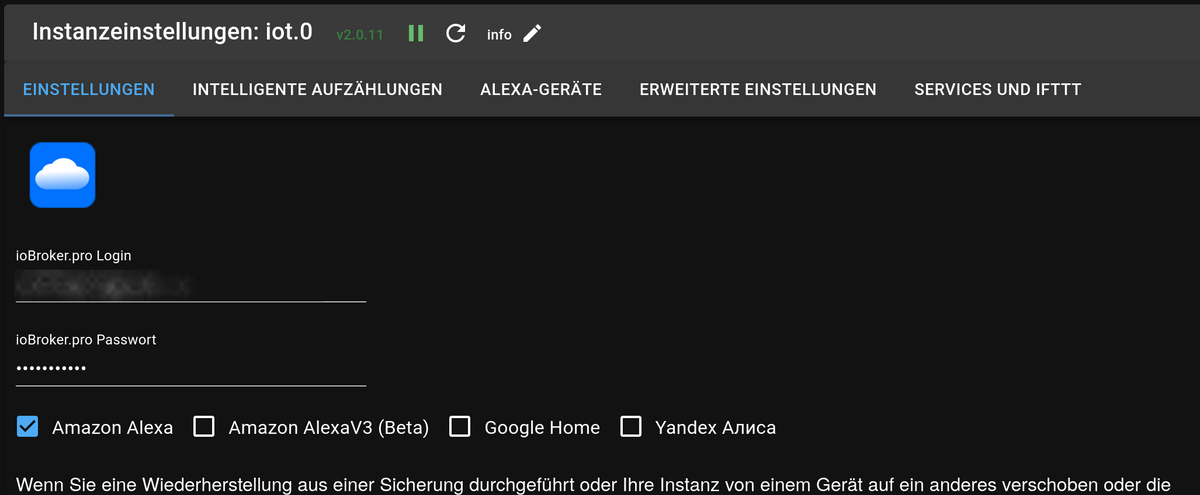
VG
Bernd -
@dp20eic Also ich nutze kein InfluxDB ich hatte das mal Probeweise drauf, aber schnell gemerkt das Der "kleine" an seine Grenzen kommt.
Habe geschaut soweit ist eigentlich keine Installation mehr von Influx DB und Grafana mehr vorhanden.
Was meinst du mit Konfiguration ?
In dem Code Ausgabe habe ich nur die zahlen durch punkte ersetz. da es ja ein Key ist. (Vielleicht auch übervorsichtig
@iobroker-smarti sagte in Iobroker IOT Adapter bleibt gelb!:
Habe geschaut soweit ist eigentlich keine Installation mehr von Influx DB und Grafana mehr vorhanden.
Moin,
dann solltest Du mal schauen
# sudo systemctl status influxdb.serviceTaucht da noch irgendwie
enabledauf, dann# sudo systemctl disable influxdb.serviceDann kann man schauen, wo die Servicedatei abgelegt ist und diese dann von Hand löschen.
VG
Bernd -
@dp20eic
Bzw
sudo systemctl hide influxdb.service -
@dp20eic Ok Also
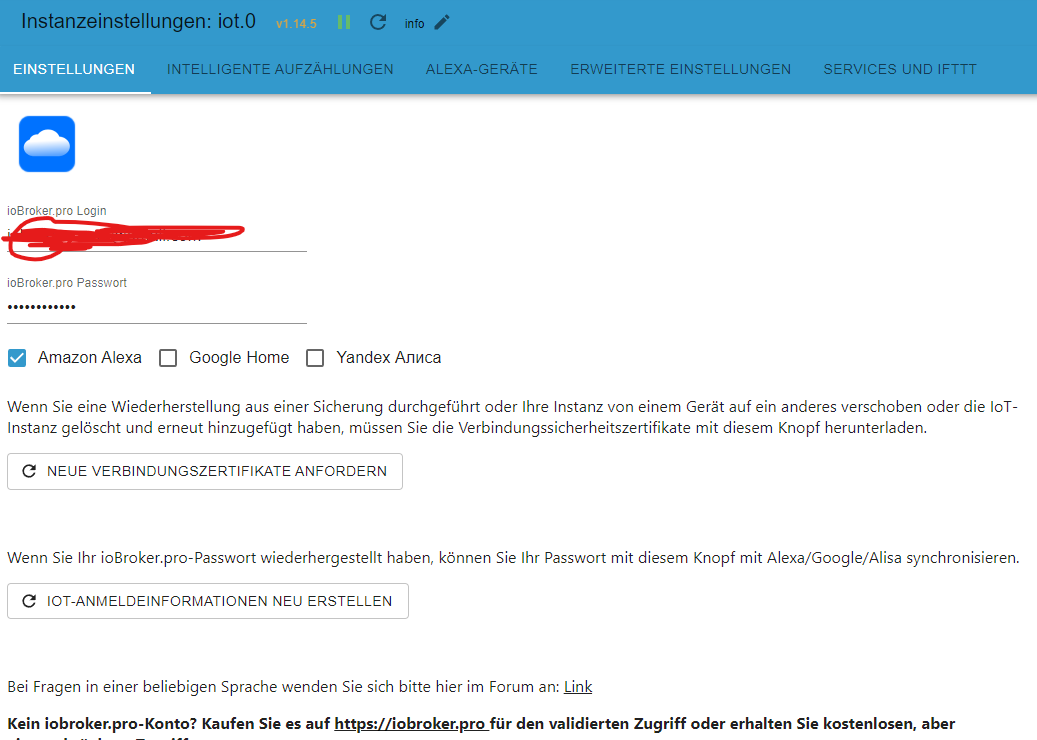
Habe es noch einmal probiert mit Iobroker Pro und Iobroker Net
keinen Erfolg im Log habe ich nun
Looks like your connection certificates are invalid. Please renew them via configuration dialog.Zertifikate neu angefordert aber weiter keinen Erfolg.
P.S Alexa App Skill Neu Verbunden nur dort steh immer wieder Verknüpfung zwischen den Konten ist abgelaufen.....
Mit freundlichen Grü........
Iobroker Fan :). Endlich eine Plattform ohne Kommerz. Bitte Unterstützt die ganzen Jungs und Mädels. Daumen hoch !!!!
-
@iobroker-smarti sagte in Iobroker IOT Adapter bleibt gelb!:
Habe geschaut soweit ist eigentlich keine Installation mehr von Influx DB und Grafana mehr vorhanden.
Moin,
dann solltest Du mal schauen
# sudo systemctl status influxdb.serviceTaucht da noch irgendwie
enabledauf, dann# sudo systemctl disable influxdb.serviceDann kann man schauen, wo die Servicedatei abgelegt ist und diese dann von Hand löschen.
VG
Bernd@dp20eic said in Iobroker IOT Adapter bleibt gelb!:
@iobroker-smarti sagte in Iobroker IOT Adapter bleibt gelb!:
Habe geschaut soweit ist eigentlich keine Installation mehr von Influx DB und Grafana mehr vorhanden.
Moin,
dann solltest Du mal schauen
# sudo systemctl status influxdb.serviceTaucht da noch irgendwie
enabledauf, dann# sudo systemctl disable influxdb.serviceDann kann man schauen, wo die Servicedatei abgelegt ist und diese dann von Hand löschen.
VG
Bernd● influxdb.service - InfluxDB is an open-source, distributed, time series database Loaded: loaded (/lib/systemd/system/influxdb.service; disabled; vendor preset: enabled) Active: failed (Result: exit-code) since Fri 2023-11-03 10:31:09 CET; 1h 9min ago Docs: https://docs.influxdata.com/influxdb/ CPU: 2ms Nov 03 10:31:09 raspberrypi systemd[1]: influxdb.service: Scheduled restart job, restart counter is at 5. Nov 03 10:31:09 raspberrypi systemd[1]: Stopped InfluxDB is an open-source, distributed, time series database. Nov 03 10:31:09 raspberrypi systemd[1]: influxdb.service: Start request repeated too quickly. Nov 03 10:31:09 raspberrypi systemd[1]: influxdb.service: Failed with result 'exit-code'. Nov 03 10:31:09 raspberrypi systemd[1]: Failed to start InfluxDB is an open-source, distributed, time series database. -
@dp20eic Ok Also
Habe es noch einmal probiert mit Iobroker Pro und Iobroker Net
keinen Erfolg im Log habe ich nun
Looks like your connection certificates are invalid. Please renew them via configuration dialog.Zertifikate neu angefordert aber weiter keinen Erfolg.
P.S Alexa App Skill Neu Verbunden nur dort steh immer wieder Verknüpfung zwischen den Konten ist abgelaufen.....
Welchen Skill benutzt Du denn?
Synology DS218+ & 2 x Fujitsu Esprimo (VM/Container) + FritzBox7590 + 2 AVM 3000 Repeater & Homematic & HUE & Osram & Xiaomi, NPM 10.9.8, Nodejs 22.23.2 ,JS Controller 7.2.2 ,Admin 8.0.4
-
Welchen Skill benutzt Du denn?
Mit freundlichen Grü........
Iobroker Fan :). Endlich eine Plattform ohne Kommerz. Bitte Unterstützt die ganzen Jungs und Mädels. Daumen hoch !!!!
-
@dp20eic said in Iobroker IOT Adapter bleibt gelb!:
@iobroker-smarti sagte in Iobroker IOT Adapter bleibt gelb!:
Habe geschaut soweit ist eigentlich keine Installation mehr von Influx DB und Grafana mehr vorhanden.
Moin,
dann solltest Du mal schauen
# sudo systemctl status influxdb.serviceTaucht da noch irgendwie
enabledauf, dann# sudo systemctl disable influxdb.serviceDann kann man schauen, wo die Servicedatei abgelegt ist und diese dann von Hand löschen.
VG
Bernd● influxdb.service - InfluxDB is an open-source, distributed, time series database Loaded: loaded (/lib/systemd/system/influxdb.service; disabled; vendor preset: enabled) Active: failed (Result: exit-code) since Fri 2023-11-03 10:31:09 CET; 1h 9min ago Docs: https://docs.influxdata.com/influxdb/ CPU: 2ms Nov 03 10:31:09 raspberrypi systemd[1]: influxdb.service: Scheduled restart job, restart counter is at 5. Nov 03 10:31:09 raspberrypi systemd[1]: Stopped InfluxDB is an open-source, distributed, time series database. Nov 03 10:31:09 raspberrypi systemd[1]: influxdb.service: Start request repeated too quickly. Nov 03 10:31:09 raspberrypi systemd[1]: influxdb.service: Failed with result 'exit-code'. Nov 03 10:31:09 raspberrypi systemd[1]: Failed to start InfluxDB is an open-source, distributed, time series database.@iobroker-smarti sagte in Iobroker IOT Adapter bleibt gelb!:
Loaded: loaded (/lib/systemd/system/influxdb.service; disabled; vendor preset: enabled)
Moin,
da wird noch was gestartet
Auflisten, ob noch was von _influxDB_ da ist
# sudo apt list --installed | fgrep influ
Wenn, ja, dann löschen, außer es ist `influxDB2-cli/influxdb-client`, das braucht der `ioBroker - influxdb Adapter`

# sudo systemctl stop influxdb.service
# sudo systemctl disable influxdb.service
# sudo systemctl daemon-reload
Wie hast Du das damals installiert, per Paketquelle oder hast Du ein
debPaket heruntergeladen und Installiert?VG
Bernd -
Synology DS218+ & 2 x Fujitsu Esprimo (VM/Container) + FritzBox7590 + 2 AVM 3000 Repeater & Homematic & HUE & Osram & Xiaomi, NPM 10.9.8, Nodejs 22.23.2 ,JS Controller 7.2.2 ,Admin 8.0.4
-
@haselchen Moin,
habe das wie du beschrieben gemacht eben gerade sogar mit einer neuen mail Adresse usw. leider keinen erfolg
-
@haselchen Moin,
habe das wie du beschrieben gemacht eben gerade sogar mit einer neuen mail Adresse usw. leider keinen erfolg
@iobroker-smarti sagte in Iobroker IOT Adapter bleibt gelb!:
habe das wie du beschrieben gemacht eben gerade sogar mit einer neuen mail Adresse usw. leider keinen erfolg
Moin,
Schritt für Schritt, zeigen, nicht nacherzählen ;)
Dann, ob es hilft, keine Ahnung, denioTAdapter mal auf Debug stellen und schauen, ob zusätzliche Informationen kommen, oder weil mir nichts Besseres einfällt, mal die BrowserkonsoleF12öffnen und schauen was passiert.Irgendwelche FW, pihols, oä. am Start?
VG
Bernd -
@iobroker-smarti sagte in Iobroker IOT Adapter bleibt gelb!:
Loaded: loaded (/lib/systemd/system/influxdb.service; disabled; vendor preset: enabled)
Moin,
da wird noch was gestartet
Auflisten, ob noch was von _influxDB_ da ist
# sudo apt list --installed | fgrep influ
Wenn, ja, dann löschen, außer es ist `influxDB2-cli/influxdb-client`, das braucht der `ioBroker - influxdb Adapter`

# sudo systemctl stop influxdb.service
# sudo systemctl disable influxdb.service
# sudo systemctl daemon-reload
Wie hast Du das damals installiert, per Paketquelle oder hast Du ein
debPaket heruntergeladen und Installiert?VG
Bernd@dp20eic said in Iobroker IOT Adapter bleibt gelb!:
sudo apt list --installed | fgrep influ
Habe deine Befehle und Anweisungen gefolgt leider immer wieder beisudo systemctl status influxdb.serviceinfluxdb.service - InfluxDB is an open-source, distributed, time series database Loaded: loaded (/lib/systemd/system/influxdb.service; disabled; vendor preset: enabled) Active: failed (Result: exit-code) since Fri 2023-11-03 13:28:06 CET; 5min ago Docs: https://docs.influxdata.com/influxdb/ CPU: 1ms Nov 03 13:28:05 raspberrypi systemd[1]: Failed to start InfluxDB is an open-source, distributed, time series database. Nov 03 13:28:06 raspberrypi systemd[1]: influxdb.service: Scheduled restart job, restart counter is at 5. Nov 03 13:28:06 raspberrypi systemd[1]: Stopped InfluxDB is an open-source, distributed, time series database. Nov 03 13:28:06 raspberrypi systemd[1]: influxdb.service: Start request repeated too quickly. Nov 03 13:28:06 raspberrypi systemd[1]: influxdb.service: Failed with result 'exit-code'. Nov 03 13:28:06 raspberrypi systemd[1]: Failed to start InfluxDB is an open-source, distributed, time series database.Aber ich denke daran sollte es nicht liegen war ja vorher auch soweit unverändert.
Das Thema sollte evlt in einen extra Thread rein. :)
-
@dp20eic said in Iobroker IOT Adapter bleibt gelb!:
sudo apt list --installed | fgrep influ
Habe deine Befehle und Anweisungen gefolgt leider immer wieder beisudo systemctl status influxdb.serviceinfluxdb.service - InfluxDB is an open-source, distributed, time series database Loaded: loaded (/lib/systemd/system/influxdb.service; disabled; vendor preset: enabled) Active: failed (Result: exit-code) since Fri 2023-11-03 13:28:06 CET; 5min ago Docs: https://docs.influxdata.com/influxdb/ CPU: 1ms Nov 03 13:28:05 raspberrypi systemd[1]: Failed to start InfluxDB is an open-source, distributed, time series database. Nov 03 13:28:06 raspberrypi systemd[1]: influxdb.service: Scheduled restart job, restart counter is at 5. Nov 03 13:28:06 raspberrypi systemd[1]: Stopped InfluxDB is an open-source, distributed, time series database. Nov 03 13:28:06 raspberrypi systemd[1]: influxdb.service: Start request repeated too quickly. Nov 03 13:28:06 raspberrypi systemd[1]: influxdb.service: Failed with result 'exit-code'. Nov 03 13:28:06 raspberrypi systemd[1]: Failed to start InfluxDB is an open-source, distributed, time series database.Aber ich denke daran sollte es nicht liegen war ja vorher auch soweit unverändert.
Das Thema sollte evlt in einen extra Thread rein. :)
@iobroker-smarti sagte in Iobroker IOT Adapter bleibt gelb!:
Das Thema sollte evlt in einen extra Thread rein.
Moin,
ja, denke ich auch, kam eben auch schon durch einender :(
VG
BerndP.S.: frag mal nett bei @Homoran nach, ob er die zwei/drei Postest
inflixdb.servicesbetreffend in einen eigenen Thread schieben kann. -
@iobroker-smarti sagte in Iobroker IOT Adapter bleibt gelb!:
Das Thema sollte evlt in einen extra Thread rein.
Moin,
ja, denke ich auch, kam eben auch schon durch einender :(
VG
BerndP.S.: frag mal nett bei @Homoran nach, ob er die zwei/drei Postest
inflixdb.servicesbetreffend in einen eigenen Thread schieben kann. -
@homoran sagte in Iobroker IOT Adapter bleibt gelb!:
welche genau?
Moin,
die, die sich mit dem Thema
influxdb.servicebeschäftigen- https://forum.iobroker.net/topic/69801/iobroker-iot-adapter-bleibt-gelb/6?page=1
- https://forum.iobroker.net/topic/69801/iobroker-iot-adapter-bleibt-gelb/11?page=1
- https://forum.iobroker.net/topic/69801/iobroker-iot-adapter-bleibt-gelb/12?page=1
- https://forum.iobroker.net/topic/69801/iobroker-iot-adapter-bleibt-gelb/13?page=1
- https://forum.iobroker.net/topic/69801/iobroker-iot-adapter-bleibt-gelb/17?page=1
- https://forum.iobroker.net/topic/69801/iobroker-iot-adapter-bleibt-gelb/20?page=1
Denke, dass das alle sind.
Danke und schönes Wochenende
VG
Bernd




Hey! Du scheinst an dieser Unterhaltung interessiert zu sein, hast aber noch kein Konto.
Hast du es satt, bei jedem Besuch durch die gleichen Beiträge zu scrollen? Wenn du dich für ein Konto anmeldest, kommst du immer genau dorthin zurück, wo du zuvor warst, und kannst dich über neue Antworten benachrichtigen lassen (entweder per E-Mail oder Push-Benachrichtigung). Du kannst auch Lesezeichen speichern und Beiträge positiv bewerten, um anderen Community-Mitgliedern deine Wertschätzung zu zeigen.
Mit deinem Input könnte dieser Beitrag noch besser werden 💗
Registrieren AnmeldenSupport us
324
Online33.0k
Benutzer83.6k
Themen1.3m
Beiträge