




ioBroker hängt sich auf
-
Skript v.2023-10-10
*** BASE SYSTEM ***
======== Start marking the full check here =========
Skript v.2023-10-10 *** BASE SYSTEM *** Static hostname: iobrokerkuk Icon name: computer Operating System: Debian GNU/Linux 12 (bookworm) Kernel: Linux 6.1.0-rpi4-rpi-v8 Architecture: arm64 Model : Raspberry Pi 4 Model B Rev 1.1 Docker : false Virtualization : none Kernel : aarch64 Userland : arm64 Systemuptime and Load: 10:17:51 up 3:12, 4 users, load average: 2.62, 2.20, 2.15 CPU threads: 4 *** RASPBERRY THROTTLING *** Current issues: No throttling issues detected. Previously detected issues: No throttling issues detected. *** Time and Time Zones *** Local time: Tue 2023-10-31 10:17:51 CET Universal time: Tue 2023-10-31 09:17:51 UTC RTC time: n/a Time zone: Europe/Berlin (CET, +0100) System clock synchronized: yes NTP service: active RTC in local TZ: no *** User and Groups *** pi /home/pi pi adm dialout cdrom sudo audio video plugdev games users input render netdev lpadmin gpio i2c spi iobroker *** X-Server-Setup *** X-Server: false Desktop: Terminal: tty Boot Target: graphical.target *** MEMORY *** total used free shared buff/cache available Mem: 4.0G 3.5G 275M 13M 288M 456M Swap: 104M 13M 91M Total: 4.1G 3.5G 367M 3793 M total memory 3358 M used memory 1768 M active memory 1593 M inactive memory 262 M free memory 7 M buffer memory 267 M swap cache 99 M total swap 13 M used swap 86 M free swap Raspberry only: oom events: 0 lifetime oom required: 0 Mbytes total time in oom handler: 0 ms max time spent in oom handler: 0 ms *** FAILED SERVICES *** UNIT LOAD ACTIVE SUB DESCRIPTION 0 loaded units listed. *** FILESYSTEM *** Filesystem Type Size Used Avail Use% Mounted on udev devtmpfs 1.6G 0 1.6G 0% /dev tmpfs tmpfs 380M 1.3M 379M 1% /run /dev/mmcblk0p2 ext4 117G 6.4G 105G 6% / tmpfs tmpfs 1.9G 148K 1.9G 1% /dev/shm tmpfs tmpfs 5.0M 16K 5.0M 1% /run/lock /dev/mmcblk0p1 vfat 510M 73M 438M 15% /boot/firmware tmpfs tmpfs 380M 36K 380M 1% /run/user/1000 Messages concerning ext4 filesystem in dmesg: [Tue Oct 31 07:05:47 2023] Kernel command line: coherent_pool=1M 8250.nr_uarts=0 snd_bcm2835.enable_headphones=0 snd_bcm2835.enable_headphones=1 snd_bcm2835.enable_hdmi=1 snd_bcm2835.enable_hdmi=0 smsc95xx.macaddr=DC:A6:32:62:1D:50 vc_mem.mem_base=0x3ec00000 vc_mem.mem_size=0x40000000 console=ttyS0,115200 console=tty1 root=PARTUUID=440452de-02 rootfstype=ext4 fsck.repair=yes rootwait quiet splash plymouth.ignore-serial-consoles [Tue Oct 31 07:05:51 2023] EXT4-fs (mmcblk0p2): mounted filesystem with ordered data mode. Quota mode: none. [Tue Oct 31 07:05:53 2023] EXT4-fs (mmcblk0p2): re-mounted. Quota mode: none. Show mounted filesystems \(real ones only\): TARGET SOURCE FSTYPE OPTIONS / /dev/mmcblk0p2 ext4 rw,noatime |-/run/user/1000/doc portal fuse.portal rw,nosuid,nodev,relatime,user_id=1000,group_id=1000 `-/boot/firmware /dev/mmcblk0p1 vfat rw,relatime,fmask=0022,dmask=0022,codepage=437,iocharset=ascii,shortname=mixed,errors=remount-ro Files in neuralgic directories: /var: 544M /var/ 190M /var/lib 180M /var/cache 173M /var/cache/apt 131M /var/lib/apt Archived and active journals take up 72.0M in the file system. /opt/iobroker/backups: 22M /opt/iobroker/backups/ /opt/iobroker/iobroker-data: 357M /opt/iobroker/iobroker-data/ 285M /opt/iobroker/iobroker-data/files 52M /opt/iobroker/iobroker-data/files/javascript.admin 43M /opt/iobroker/iobroker-data/files/iot.admin 42M /opt/iobroker/iobroker-data/files/iot.admin/static/js The five largest files in iobroker-data are: 33M /opt/iobroker/iobroker-data/files/iot.admin/static/js/main.1797d034.js.map 29M /opt/iobroker/iobroker-data/objects.jsonl 21M /opt/iobroker/iobroker-data/files/web.admin/static/js/main.edf7552a.js.map 12M /opt/iobroker/iobroker-data/states.jsonl 8.5M /opt/iobroker/iobroker-data/files/iot.admin/static/js/main.1797d034.js USB-Devices by-id: USB-Sticks - Avoid direct links to /dev/* in your adapter setups, please always prefer the links 'by-id': /dev/serial/by-id/usb-ITead_Sonoff_Zigbee_3.0_USB_Dongle_Plus_76e54d3c6f12ec118f7721c7bd930c07-if00-port0 *** NodeJS-Installation *** /usr/bin/nodejs v18.18.2 /usr/bin/node v18.18.2 /usr/bin/npm 9.8.1 /usr/bin/npx 9.8.1 /usr/bin/corepack 0.19.0 nodejs: Installed: 18.18.2-1nodesource1 Candidate: 18.18.2-1nodesource1 Version table: *** 18.18.2-1nodesource1 500 500 https://deb.nodesource.com/node_18.x nodistro/main arm64 Packages 100 /var/lib/dpkg/status 18.18.1-1nodesource1 500 500 https://deb.nodesource.com/node_18.x nodistro/main arm64 Packages 18.18.0-1nodesource1 500 500 https://deb.nodesource.com/node_18.x nodistro/main arm64 Packages 18.17.1-1nodesource1 500 500 https://deb.nodesource.com/node_18.x nodistro/main arm64 Packages 18.17.0-1nodesource1 500 500 https://deb.nodesource.com/node_18.x nodistro/main arm64 Packages 18.16.1-1nodesource1 500 500 https://deb.nodesource.com/node_18.x nodistro/main arm64 Packages 18.16.0-1nodesource1 500 500 https://deb.nodesource.com/node_18.x nodistro/main arm64 Packages 18.15.0-1nodesource1 500 500 https://deb.nodesource.com/node_18.x nodistro/main arm64 Packages 18.14.2-1nodesource1 500 500 https://deb.nodesource.com/node_18.x nodistro/main arm64 Packages 18.14.1-1nodesource1 500 500 https://deb.nodesource.com/node_18.x nodistro/main arm64 Packages 18.14.0-1nodesource1 500 500 https://deb.nodesource.com/node_18.x nodistro/main arm64 Packages 18.13.0+dfsg1-1 500 500 http://deb.debian.org/debian bookworm/main arm64 Packages 18.13.0-1nodesource1 500 500 https://deb.nodesource.com/node_18.x nodistro/main arm64 Packages 18.12.0-1nodesource1 500 500 https://deb.nodesource.com/node_18.x nodistro/main arm64 Packages 18.11.0-1nodesource1 500 500 https://deb.nodesource.com/node_18.x nodistro/main arm64 Packages 18.10.0-1nodesource1 500 500 https://deb.nodesource.com/node_18.x nodistro/main arm64 Packages 18.9.1-1nodesource1 500 500 https://deb.nodesource.com/node_18.x nodistro/main arm64 Packages 18.9.0-1nodesource1 500 500 https://deb.nodesource.com/node_18.x nodistro/main arm64 Packages 18.8.0-1nodesource1 500 500 https://deb.nodesource.com/node_18.x nodistro/main arm64 Packages 18.7.0-1nodesource1 500 500 https://deb.nodesource.com/node_18.x nodistro/main arm64 Packages 18.6.0-1nodesource1 500 500 https://deb.nodesource.com/node_18.x nodistro/main arm64 Packages 18.5.0-1nodesource1 500 500 https://deb.nodesource.com/node_18.x nodistro/main arm64 Packages 18.4.0-1nodesource1 500 500 https://deb.nodesource.com/node_18.x nodistro/main arm64 Packages 18.3.0-1nodesource1 500 500 https://deb.nodesource.com/node_18.x nodistro/main arm64 Packages 18.2.0-1nodesource1 500 500 https://deb.nodesource.com/node_18.x nodistro/main arm64 Packages 18.1.0-1nodesource1 500 500 https://deb.nodesource.com/node_18.x nodistro/main arm64 Packages 18.0.0-1nodesource1 500 500 https://deb.nodesource.com/node_18.x nodistro/main arm64 Packages Temp directories causing npm8 problem: 0 No problems detected Errors in npm tree: *** ioBroker-Installation *** ioBroker Status iobroker is running on this host. Objects type: jsonl States type: jsonl Core adapters versions js-controller: 5.0.12 admin: 6.12.0 javascript: 7.1.4 Adapters from github: 3 Adapter State + system.adapter.admin.0 : admin : iobrokerkuk - enabled, port: 8081, bind: 0.0.0.0, run as: admin + system.adapter.alexa2.0 : alexa2 : iobrokerkuk - enabled system.adapter.alias-manager.0 : alias-manager : iobrokerkuk - disabled + system.adapter.backitup.0 : backitup : iobrokerkuk - enabled + system.adapter.broadlink2.0 : broadlink2 : iobrokerkuk - enabled + system.adapter.cloud.0 : cloud : iobrokerkuk - enabled system.adapter.daswetter.0 : daswetter : iobrokerkuk - enabled + system.adapter.discovery.0 : discovery : iobrokerkuk - enabled system.adapter.dwd.0 : dwd : iobrokerkuk - enabled + system.adapter.email.0 : email : iobrokerkuk - enabled + system.adapter.energiefluss.0 : energiefluss : iobrokerkuk - enabled system.adapter.feiertage.0 : feiertage : iobrokerkuk - enabled system.adapter.flot.0 : flot : iobrokerkuk - disabled system.adapter.history.0 : history : iobrokerkuk - disabled + system.adapter.homepilot20.0 : homepilot20 : iobrokerkuk - enabled system.adapter.ical.0 : ical : iobrokerkuk - enabled system.adapter.ical.1 : ical : iobrokerkuk - enabled system.adapter.icons-fatcow-hosting.0 : icons-fatcow-hosting : iobrokerkuk - disabled system.adapter.icons-mfd-png.0 : icons-mfd-png : iobrokerkuk - disabled system.adapter.icons-mfd-svg.0 : icons-mfd-svg : iobrokerkuk - disabled + system.adapter.influxdb.0 : influxdb : iobrokerkuk - enabled, port: 8086 + system.adapter.info.0 : info : iobrokerkuk - enabled + system.adapter.iot.0 : iot : iobrokerkuk - enabled + system.adapter.jarvis.0 : jarvis : iobrokerkuk - enabled + system.adapter.jarvis.1 : jarvis : iobrokerkuk - enabled + system.adapter.javascript.0 : javascript : iobrokerkuk - enabled + system.adapter.life360.0 : life360 : iobrokerkuk - enabled + system.adapter.mercedesme.0 : mercedesme : iobrokerkuk - enabled + system.adapter.meross.0 : meross : iobrokerkuk - enabled + system.adapter.mqtt.0 : mqtt : iobrokerkuk - enabled, port: 1884, bind: 0.0.0.0 system.adapter.mqtt.1 : mqtt : iobrokerkuk - disabled, port: 1883, bind: 0.0.0.0 + system.adapter.netatmo.0 : netatmo : iobrokerkuk - enabled + system.adapter.powerfox2.0 : powerfox2 : iobrokerkuk - enabled + system.adapter.pushover.0 : pushover : iobrokerkuk - enabled + system.adapter.pushover.1 : pushover : iobrokerkuk - enabled + system.adapter.rpi2.0 : rpi2 : iobrokerkuk - enabled + system.adapter.rssfeed.0 : rssfeed : iobrokerkuk - enabled + system.adapter.shelly.0 : shelly : iobrokerkuk - enabled, port: 1882, bind: 0.0.0.0 + system.adapter.shelly.1 : shelly : iobrokerkuk - enabled, port: 1882, bind: 0.0.0.0 + system.adapter.simple-api.0 : simple-api : iobrokerkuk - enabled, port: 8087, bind: 0.0.0.0, run as: admin + system.adapter.smartcontrol.0 : smartcontrol : iobrokerkuk - enabled + system.adapter.sonoff.0 : sonoff : iobrokerkuk - enabled, port: 1885, bind: 0.0.0.0 + system.adapter.sonos.0 : sonos : iobrokerkuk - enabled system.adapter.spotify-premium.0 : spotify-premium : iobrokerkuk - disabled + system.adapter.tankerkoenig.0 : tankerkoenig : iobrokerkuk - enabled + system.adapter.tr-064.0 : tr-064 : iobrokerkuk - enabled + system.adapter.tr-064.1 : tr-064 : iobrokerkuk - enabled + system.adapter.trashschedule.0 : trashschedule : iobrokerkuk - enabled system.adapter.vis-bars.0 : vis-bars : iobrokerkuk - disabled system.adapter.vis-colorpicker.0 : vis-colorpicker : iobrokerkuk - disabled system.adapter.vis-fancyswitch.0 : vis-fancyswitch : iobrokerkuk - disabled system.adapter.vis-history.0 : vis-history : iobrokerkuk - disabled system.adapter.vis-hqwidgets.0 : vis-hqwidgets : iobrokerkuk - disabled system.adapter.vis-icontwo.0 : vis-icontwo : iobrokerkuk - disabled + system.adapter.vis-inventwo.0 : vis-inventwo : iobrokerkuk - enabled system.adapter.vis-jqui-mfd.0 : vis-jqui-mfd : iobrokerkuk - disabled system.adapter.vis-map.0 : vis-map : iobrokerkuk - disabled system.adapter.vis-material-advanced.0 : vis-material-advanced : iobrokerkuk - disabled system.adapter.vis-metro.0 : vis-metro : iobrokerkuk - disabled system.adapter.vis-players.0 : vis-players : iobrokerkuk - disabled system.adapter.vis-timeandweather.0 : vis-timeandweather : iobrokerkuk - disabled system.adapter.vis-weather.0 : vis-weather : iobrokerkuk - disabled system.adapter.vis.0 : vis : iobrokerkuk - enabled + system.adapter.web.0 : web : iobrokerkuk - enabled, port: 8082, bind: 0.0.0.0, run as: admin + system.adapter.whatsapp-cmb.0 : whatsapp-cmb : iobrokerkuk - enabled + system.adapter.wolf-smartset.0 : wolf-smartset : iobrokerkuk - enabled + system.adapter.yahka.0 : yahka : iobrokerkuk - enabled + system.adapter.yahka.1 : yahka : iobrokerkuk - enabled + system.adapter.zigbee.0 : zigbee : iobrokerkuk - enabled, port: /dev/serial/by-id/usb-ITead_Sonoff_Zigbee_3.0_USB_Dongle_Plus_76e54d3c6f12ec118f7721c7bd930c07-if00-port0 + instance is alive Enabled adapters with bindings + system.adapter.admin.0 : admin : iobrokerkuk - enabled, port: 8081, bind: 0.0.0.0, run as: admin + system.adapter.influxdb.0 : influxdb : iobrokerkuk - enabled, port: 8086 + system.adapter.mqtt.0 : mqtt : iobrokerkuk - enabled, port: 1884, bind: 0.0.0.0 + system.adapter.shelly.0 : shelly : iobrokerkuk - enabled, port: 1882, bind: 0.0.0.0 + system.adapter.shelly.1 : shelly : iobrokerkuk - enabled, port: 1882, bind: 0.0.0.0 + system.adapter.simple-api.0 : simple-api : iobrokerkuk - enabled, port: 8087, bind: 0.0.0.0, run as: admin + system.adapter.sonoff.0 : sonoff : iobrokerkuk - enabled, port: 1885, bind: 0.0.0.0 + system.adapter.web.0 : web : iobrokerkuk - enabled, port: 8082, bind: 0.0.0.0, run as: admin + system.adapter.zigbee.0 : zigbee : iobrokerkuk - enabled, port: /dev/serial/by-id/usb-ITead_Sonoff_Zigbee_3.0_USB_Dongle_Plus_76e54d3c6f12ec118f7721c7bd930c07-if00-port0 ioBroker-Repositories stable : http://download.iobroker.net/sources-dist.json beta : http://download.iobroker.net/sources-dist-latest.json Active repo(s): stable Installed ioBroker-Instances Used repository: stable Adapter "admin" : 6.12.0 , installed 6.12.0 Adapter "alexa2" : 3.25.2 , installed 3.25.2 Adapter "alias-manager": 1.2.6 , installed 1.2.6 Adapter "backitup" : 2.8.1 , installed 2.8.1 Adapter "broadlink2" : 2.1.5 , installed 2.1.5 Adapter "cloud" : 4.4.1 , installed 4.4.1 Adapter "daswetter" : 3.1.10 , installed 3.1.10 Adapter "discovery" : 3.1.0 , installed 3.2.0 Adapter "dwd" : 2.8.5 , installed 2.8.5 Adapter "email" : 1.2.0 , installed 1.2.0 Adapter "feiertage" : 1.1.4 , installed 1.1.4 Adapter "flot" : 1.12.0 , installed 1.12.0 Adapter "history" : 3.0.1 , installed 3.0.1 Adapter "ical" : 1.13.3 , installed 1.13.3 Adapter "icons-fatcow-hosting": 0.1.0, installed 0.1.0 Adapter "icons-mfd-png": 1.1.0 , installed 1.1.0 Adapter "icons-mfd-svg": 1.1.0 , installed 1.1.0 Adapter "influxdb" : 3.2.0 , installed 3.2.0 Adapter "info" : 2.0.0 , installed 2.0.0 Adapter "iot" : 1.14.5 , installed 2.0.11 Adapter "jarvis" : 3.1.2 , installed 3.1.8 Adapter "javascript" : 7.1.4 , installed 7.1.4 Controller "js-controller": 5.0.12 , installed 5.0.12 Adapter "mercedesme" : 0.1.1 , installed 0.1.3 Adapter "meross" : 1.15.1 , installed 1.15.1 Adapter "mqtt" : 4.1.1 , installed 4.1.1 Adapter "netatmo" : 3.1.0 , installed 3.1.0 Adapter "powerfox2" : 0.0.12 , installed 0.0.12 Adapter "pushover" : 3.0.3 , installed 3.0.4 Adapter "rpi2" : 1.3.2 , installed 1.3.2 Adapter "rssfeed" : 2.6.1 , installed 2.8.1 Adapter "shelly" : 6.4.5 , installed 6.4.5 Adapter "simple-api" : 2.7.2 , installed 2.7.2 Adapter "smartcontrol" : 2.0.1 , installed 2.0.1 Adapter "socketio" : 6.5.5 , installed 6.5.5 Adapter "sonoff" : 2.5.3 , installed 2.5.7 Adapter "sonos" : 2.3.1 , installed 2.3.1 Adapter "spotify-premium": 1.2.2 , installed 1.2.2 Adapter "tankerkoenig" : 3.3.7 , installed 3.3.7 Adapter "tr-064" : 4.2.18 , installed 4.2.18 Adapter "trashschedule": 2.2.0 , installed 2.2.0 Adapter "vis" : 1.4.16 , installed 1.4.16 Adapter "vis-bars" : 0.1.4 , installed 0.1.4 Adapter "vis-colorpicker": 2.0.3 , installed 2.0.3 Adapter "vis-fancyswitch": 1.1.0 , installed 1.1.0 Adapter "vis-history" : 1.0.0 , installed 1.0.0 Adapter "vis-hqwidgets": 1.4.0 , installed 1.4.0 Adapter "vis-icontwo" : 0.96.0 , installed 0.96.0 Adapter "vis-inventwo" : 3.3.3 , installed 3.3.3 Adapter "vis-jqui-mfd" : 1.0.12 , installed 1.0.12 Adapter "vis-map" : 1.0.4 , installed 1.0.4 Adapter "vis-material-advanced": 1.7.4, installed 1.7.4 Adapter "vis-metro" : 1.2.0 , installed 1.2.0 Adapter "vis-players" : 0.1.6 , installed 0.1.6 Adapter "vis-timeandweather": 1.2.2, installed 1.2.2 Adapter "vis-weather" : 2.5.6 , installed 2.5.6 Adapter "web" : 6.1.2 , installed 6.1.2 Adapter "whatsapp-cmb" : 0.2.3 , installed 0.2.3 Adapter "wolf-smartset": 1.1.1 , installed 1.1.1 Adapter "ws" : 2.5.5 , installed 2.5.5 Adapter "yahka" : 1.0.3 , installed 1.0.3 Adapter "zigbee" : 1.8.23 , installed 1.8.23 Objects and States Please stand by - This may take a while Objects: 20039 States: 16275 *** OS-Repositories and Updates *** Hit:1 http://deb.debian.org/debian bookworm InRelease Hit:2 http://deb.debian.org/debian-security bookworm-security InRelease Hit:3 http://deb.debian.org/debian bookworm-updates InRelease Hit:4 http://archive.raspberrypi.com/debian bookworm InRelease Hit:5 https://deb.nodesource.com/node_18.x nodistro InRelease Reading package lists... Pending Updates: 1 *** Listening Ports *** Active Internet connections (only servers) Proto Recv-Q Send-Q Local Address Foreign Address State User Inode PID/Program name tcp 0 0 0.0.0.0:1885 0.0.0.0:* LISTEN 1001 22058 2483/io.sonoff.0 tcp 0 0 0.0.0.0:1884 0.0.0.0:* LISTEN 1001 23691 2293/io.mqtt.0 tcp 0 0 0.0.0.0:1882 0.0.0.0:* LISTEN 1001 23108 2371/io.shelly.1 tcp 0 0 127.0.0.1:631 0.0.0.0:* LISTEN 0 15268 786/cupsd tcp 0 0 0.0.0.0:46815 0.0.0.0:* LISTEN 1001 24370 3031/io.yahka.0 tcp 0 0 127.0.0.1:43275 0.0.0.0:* LISTEN 1001 26071 3031/io.yahka.0 tcp 0 0 127.0.0.1:34949 0.0.0.0:* LISTEN 1001 25542 3185/io.yahka.1 tcp 0 0 0.0.0.0:9001 0.0.0.0:* LISTEN 1001 16336 789/iobroker.js-con tcp 0 0 0.0.0.0:9000 0.0.0.0:* LISTEN 1001 19811 789/iobroker.js-con tcp 0 0 0.0.0.0:22 0.0.0.0:* LISTEN 0 15850 811/sshd: /usr/sbin tcp 0 0 0.0.0.0:8401 0.0.0.0:* LISTEN 1001 25200 2940/io.jarvis.1 tcp 0 0 0.0.0.0:8400 0.0.0.0:* LISTEN 1001 26806 2922/io.jarvis.0 tcp6 0 0 :::8087 :::* LISTEN 1001 26193 3054/io.simple-api. tcp6 0 0 :::8082 :::* LISTEN 1001 24441 3184/io.web.0 tcp6 0 0 :::8081 :::* LISTEN 1001 22552 1996/io.admin.0 tcp6 0 0 ::1:631 :::* LISTEN 0 15267 786/cupsd tcp6 0 0 :::33129 :::* LISTEN 1001 26250 3185/io.yahka.1 tcp6 0 0 :::22 :::* LISTEN 0 15863 811/sshd: /usr/sbin udp 0 0 0.0.0.0:5353 0.0.0.0:* 104 15146 596/avahi-daemon: r udp 0 0 0.0.0.0:44426 0.0.0.0:* 1001 23115 2446/io.broadlink2. udp 0 0 0.0.0.0:54669 0.0.0.0:* 1001 22012 2446/io.broadlink2. udp 0 0 0.0.0.0:5683 0.0.0.0:* 1001 21304 2349/io.shelly.0 udp 0 0 192.168.178.95:1905 0.0.0.0:* 1001 558147 2509/io.sonos.0 udp 0 0 0.0.0.0:59683 0.0.0.0:* 104 15148 596/avahi-daemon: r udp 0 0 0.0.0.0:631 0.0.0.0:* 0 16193 1037/cups-browsed udp 0 0 0.0.0.0:15001 0.0.0.0:* 1001 23109 2446/io.broadlink2. udp 0 0 0.0.0.0:33444 0.0.0.0:* 1001 21324 2349/io.shelly.0 udp6 0 0 :::5353 :::* 104 15147 596/avahi-daemon: r udp6 0 0 :::47618 :::* 104 15149 596/avahi-daemon: r udp6 0 0 fe80::f617:38a8:5b1:546 :::* 0 16215 705/NetworkManager *** Log File - Last 25 Lines *** 2023-10-31 10:19:55.146 - info: mqtt.0 (2293) Client [AHOY-DTU-DISPLA-DBB788] publishOnSubscribe 2023-10-31 10:19:55.147 - info: mqtt.0 (2293) Client [AHOY-DTU-DISPLA-DBB788] publishOnSubscribe 2023-10-31 10:19:55.151 - info: mqtt.0 (2293) Client [AHOY-DTU-DISPLA-DBB788] publishOnSubscribe 2023-10-31 10:19:55.151 - info: mqtt.0 (2293) Client [AHOY-DTU-DISPLA-DBB788] publishOnSubscribe 2023-10-31 10:19:55.157 - info: mqtt.0 (2293) Client [AHOY-DTU-DISPLA-DBB788] publishOnSubscribe 2023-10-31 10:19:55.158 - info: mqtt.0 (2293) Client [AHOY-DTU-DISPLA-DBB788] publishOnSubscribe 2023-10-31 10:19:55.159 - info: mqtt.0 (2293) Client [AHOY-DTU-DISPLA-DBB788] publishOnSubscribe 2023-10-31 10:19:55.160 - info: mqtt.0 (2293) Client [AHOY-DTU-DISPLA-DBB788] publishOnSubscribe 2023-10-31 10:19:55.161 - info: mqtt.0 (2293) Client [AHOY-DTU-DISPLA-DBB788] publishOnSubscribe 2023-10-31 10:19:55.162 - info: mqtt.0 (2293) Client [AHOY-DTU-DISPLA-DBB788] publishOnSubscribe 2023-10-31 10:19:55.164 - info: mqtt.0 (2293) Client [AHOY-DTU-DISPLA-DBB788] publishOnSubscribe 2023-10-31 10:19:55.164 - info: mqtt.0 (2293) Client [AHOY-DTU-DISPLA-DBB788] publishOnSubscribe 2023-10-31 10:19:55.165 - info: mqtt.0 (2293) Client [AHOY-DTU-DISPLA-DBB788] publishOnSubscribe 2023-10-31 10:19:55.182 - info: powerfox2.0 (22884) Terminated (NO_ERROR): Without reason 2023-10-31 10:19:55.830 - info: host.iobrokerkuk instance system.adapter.powerfox2.0 terminated with code 0 (NO_ERROR) 2023-10-31 10:20:02.143 - error: rpi2.0 (2330) Cannot evaluate: Filesystem 1K-blocks Used Available Use% Mounted on /dev/mmcblk0p2 122342604 6649880 109459408 6% / /1024 2023-10-31 10:20:02.146 - error: rpi2.0 (2330) Cannot evaluate: Filesystem 1K-blocks Used Available Use% Mounted on /dev/mmcblk0p2 122342604 6649856 109459432 6% / /1024 2023-10-31 10:20:02.192 - info: host.iobrokerkuk instance system.adapter.powerfox2.0 started with pid 23336 2023-10-31 10:20:09.394 - info: host.iobrokerkuk instance system.adapter.dwd.0 started with pid 23722 2023-10-31 10:20:15.089 - warn: host.iobrokerkuk instance system.adapter.powerfox2.0 already running with pid 23336 2023-10-31 10:20:16.109 - info: powerfox2.0 (23336) starting. Version 0.0.12 in /opt/iobroker/node_modules/iobroker.powerfox2, node: v18.18.2, js-controller: 5.0.12======================= SUMMARY ======================= v.2023-10-10 Static hostname: iobrokerkuk Icon name: computer Operating System: Debian GNU/Linux 12 (bookworm) Kernel: Linux 6.1.0-rpi4-rpi-v8 Architecture: arm64 Installation: native Kernel: aarch64 Userland: arm64 Timezone: Europe/Berlin (CET, +0100) User-ID: 1000 X-Server: false Boot Target: graphical.target Pending OS-Updates: 1 Pending iob updates: 0 Nodejs-Installation: /usr/bin/nodejs v18.18.2 /usr/bin/node v18.18.2 /usr/bin/npm 9.8.1 /usr/bin/npx 9.8.1 /usr/bin/corepack 0.19.0 Recommended versions are nodejs 18.18.2 and npm 9.8.1 Your nodejs installation is correct MEMORY: total used free shared buff/cache available Mem: 4.0G 3.4G 453M 13M 226M 588M Swap: 104M 66M 38M Total: 4.1G 3.5G 492M Active iob-Instances: 42 Active repo(s): stable ioBroker Core: js-controller 5.0.12 admin 6.12.0 ioBroker Status: iobroker is running on this host. Objects type: jsonl States type: jsonl Status admin and web instance: + system.adapter.admin.0 : admin : iobrokerkuk - enabled, port: 8081, bind: 0.0.0.0, run as: admin + system.adapter.web.0 : web : iobrokerkuk - enabled, port: 8082, bind: 0.0.0.0, run as: admin Objects: 20039 States: 16275 Size of iob-Database: 29M /opt/iobroker/iobroker-data/objects.jsonl 39M /opt/iobroker/iobroker-data/states.jsonl =================== END OF SUMMARY ==================== -
======================= SUMMARY ======================= v.2023-10-10 Static hostname: iobrokerkuk Icon name: computer Operating System: Debian GNU/Linux 12 (bookworm) Kernel: Linux 6.1.0-rpi4-rpi-v8 Architecture: arm64 Installation: native Kernel: aarch64 Userland: arm64 Timezone: Europe/Berlin (CET, +0100) User-ID: 1000 X-Server: false Boot Target: graphical.target Pending OS-Updates: 1 Pending iob updates: 0 Nodejs-Installation: /usr/bin/nodejs v18.18.2 /usr/bin/node v18.18.2 /usr/bin/npm 9.8.1 /usr/bin/npx 9.8.1 /usr/bin/corepack 0.19.0 Recommended versions are nodejs 18.18.2 and npm 9.8.1 Your nodejs installation is correct MEMORY: total used free shared buff/cache available Mem: 4.0G 3.4G 453M 13M 226M 588M Swap: 104M 66M 38M Total: 4.1G 3.5G 492M Active iob-Instances: 42 Active repo(s): stable ioBroker Core: js-controller 5.0.12 admin 6.12.0 ioBroker Status: iobroker is running on this host. Objects type: jsonl States type: jsonl Status admin and web instance: + system.adapter.admin.0 : admin : iobrokerkuk - enabled, port: 8081, bind: 0.0.0.0, run as: admin + system.adapter.web.0 : web : iobrokerkuk - enabled, port: 8082, bind: 0.0.0.0, run as: admin Objects: 20039 States: 16275 Size of iob-Database: 29M /opt/iobroker/iobroker-data/objects.jsonl 39M /opt/iobroker/iobroker-data/states.jsonl =================== END OF SUMMARY ==================== -
@kukli31
Da Du ja die Ausgaben in Post 2 & 3 bereits korrigiert hast, kannst Du den Roman in Post 1 auch löschen und darauf verweisen, dass das in den weiteren Posts korrigiert wurde. So liest das kein Mensch.42 Instanzen bei nur 4 GB RAM? Reichlich sportlich.
Wie reagiert das System, wenn Du mal eine Reihe von Instanzen temporär stoppst? -
@kukli31
Da Du ja die Ausgaben in Post 2 & 3 bereits korrigiert hast, kannst Du den Roman in Post 1 auch löschen und darauf verweisen, dass das in den weiteren Posts korrigiert wurde. So liest das kein Mensch.42 Instanzen bei nur 4 GB RAM? Reichlich sportlich.
Wie reagiert das System, wenn Du mal eine Reihe von Instanzen temporär stoppst?@codierknecht Stimmt, den Roman habe ich gelöscht :)
Mit welchen Instanzen sollte ich da anfangen? Du meinst, das sind zu viele Instanzen? Allerdings hatte das System davor, bevor ich mit influxDB und Grafana angefangen habe, bestens funktioniert und da war es dann 1 Instanz (influxDB) weniger.
Die influxDB und Grafana habe ich bereits auf einem 2. Raspberry laufen.Folgendes ist mir auch aufgefallen: Wenn ich ein Skript bearbeiten möchte dauert es lange, bis das Skript gespeichert wird. Wenn ich dann aber das Skript anschaue, wurden meine Änderungen nicht gespeichert.
-
@codierknecht Stimmt, den Roman habe ich gelöscht :)
Mit welchen Instanzen sollte ich da anfangen? Du meinst, das sind zu viele Instanzen? Allerdings hatte das System davor, bevor ich mit influxDB und Grafana angefangen habe, bestens funktioniert und da war es dann 1 Instanz (influxDB) weniger.
Die influxDB und Grafana habe ich bereits auf einem 2. Raspberry laufen.Folgendes ist mir auch aufgefallen: Wenn ich ein Skript bearbeiten möchte dauert es lange, bis das Skript gespeichert wird. Wenn ich dann aber das Skript anschaue, wurden meine Änderungen nicht gespeichert.
@kukli31 sagte in ioBroker hängt sich auf:
bevor ich mit influxDB und Grafana angefangen habe
Das läuft (bzw. lief) auch noch auf der Kiste?
Dann ist die ziemlich unterdimensioniert.Mit welchen Instanzen sollte ich da anfangen?
Mit denen, die am unkritischsten sind und z.B. nur relativ unwichtiges liefern bzw. steuern.
Discovery braucht man eh nicht. Kann komplett weg.
DasWetter, DWD, Tankerkoenig, Sonos, Spotify ... alles was nicht lebenswichtig ist kann man mal stoppen.Warum 2x Yahka, 2x Shelly, 2x TR064, 2x Pushover, 2x MQTT, 2x Jarvis?
Warum verschiedene Visualisierungen (Vis, Jarvis) -
@kukli31 sagte in ioBroker hängt sich auf:
bevor ich mit influxDB und Grafana angefangen habe
Das läuft (bzw. lief) auch noch auf der Kiste?
Dann ist die ziemlich unterdimensioniert.Mit welchen Instanzen sollte ich da anfangen?
Mit denen, die am unkritischsten sind und z.B. nur relativ unwichtiges liefern bzw. steuern.
Discovery braucht man eh nicht. Kann komplett weg.
DasWetter, DWD, Tankerkoenig, Sonos, Spotify ... alles was nicht lebenswichtig ist kann man mal stoppen.Warum 2x Yahka, 2x Shelly, 2x TR064, 2x Pushover, 2x MQTT, 2x Jarvis?
Warum verschiedene Visualisierungen (Vis, Jarvis)@codierknecht die influxDB und Grafana laufen auf einem anderen Raspberry.
Discovery, Jarvis und 2. Instanz von Pushover und TR064 habe ich gelöscht. Unnötig, da hast du vollkommen Recht.
2x Yahka benötige ich, da die Anzahl der Geräte bei der 1. Instanz überschritten ist.
Die 2. Instanz von Shelly benötige ich für die neuen Plus Geräte, die über MQTT angebunden sind.Mal sehen wie sich das jetzt auf mein System auswirkt.
Jetzt:
Freier Festplattenspeicher: 95%, Gesamte RAM-Auslastung: 2973 Mb / Frei: 7% = 273 Mb [Server: iobrokerkuk - 37 Prozesse]Danke schon mal :)
-
@codierknecht die influxDB und Grafana laufen auf einem anderen Raspberry.
Discovery, Jarvis und 2. Instanz von Pushover und TR064 habe ich gelöscht. Unnötig, da hast du vollkommen Recht.
2x Yahka benötige ich, da die Anzahl der Geräte bei der 1. Instanz überschritten ist.
Die 2. Instanz von Shelly benötige ich für die neuen Plus Geräte, die über MQTT angebunden sind.Mal sehen wie sich das jetzt auf mein System auswirkt.
Jetzt:
Freier Festplattenspeicher: 95%, Gesamte RAM-Auslastung: 2973 Mb / Frei: 7% = 273 Mb [Server: iobrokerkuk - 37 Prozesse]Danke schon mal :)
@kukli31 sagte in ioBroker hängt sich auf:
Freier Festplattenspeicher: 95%, Gesamte RAM-Auslastung: 2973 Mb / Frei: 7% = 273 Mb [Server: iobrokerkuk - 37 Prozesse]
Damit kratzt der aber immer noch so ziemlich am Limit.
Bei einer so großen Installation solltest Du mal übers Aufrüsten nachdenken.
Kleine Rechner mit SSD und 8 GB (erweiterbar) kosten refurbished nicht viel mehr als ein Raspi.
Beispielsweise ein NUC oder ein Lenovo ThinkCentre. -
@kukli31 sagte in ioBroker hängt sich auf:
Freier Festplattenspeicher: 95%, Gesamte RAM-Auslastung: 2973 Mb / Frei: 7% = 273 Mb [Server: iobrokerkuk - 37 Prozesse]
Damit kratzt der aber immer noch so ziemlich am Limit.
Bei einer so großen Installation solltest Du mal übers Aufrüsten nachdenken.
Kleine Rechner mit SSD und 8 GB (erweiterbar) kosten refurbished nicht viel mehr als ein Raspi.
Beispielsweise ein NUC oder ein Lenovo ThinkCentre.@codierknecht Das schaue ich mir mal an. Danke!
-
@kukli31 sagte in ioBroker hängt sich auf:
Freier Festplattenspeicher: 95%, Gesamte RAM-Auslastung: 2973 Mb / Frei: 7% = 273 Mb [Server: iobrokerkuk - 37 Prozesse]
Damit kratzt der aber immer noch so ziemlich am Limit.
Bei einer so großen Installation solltest Du mal übers Aufrüsten nachdenken.
Kleine Rechner mit SSD und 8 GB (erweiterbar) kosten refurbished nicht viel mehr als ein Raspi.
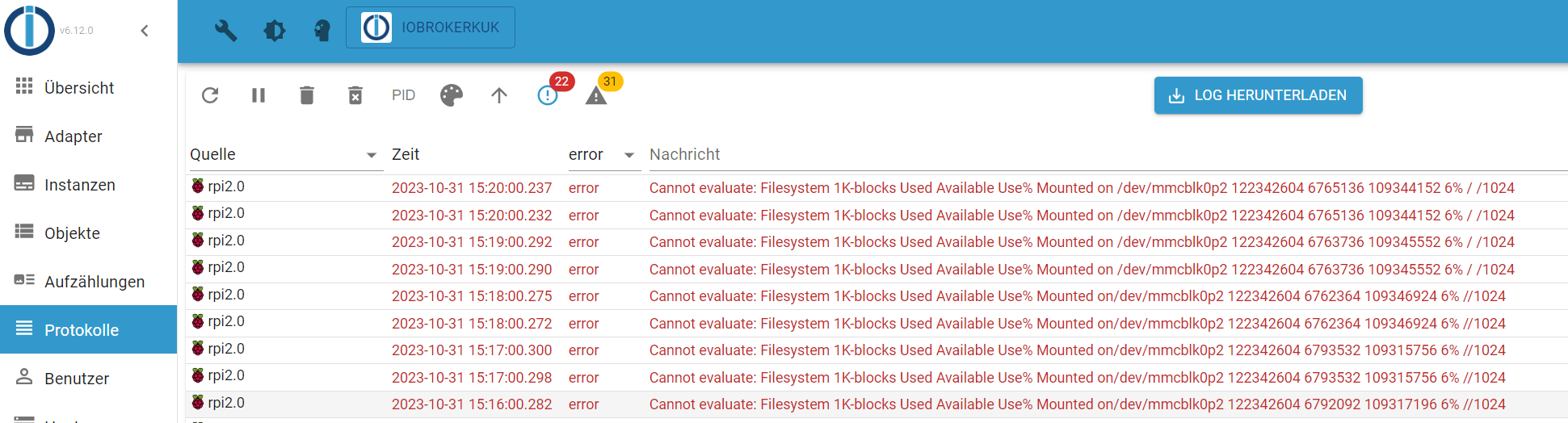
Beispielsweise ein NUC oder ein Lenovo ThinkCentre.@codierknecht Weißt du, wie ich diese Fehlermeldung weg bekomme?
-
@codierknecht Weißt du, wie ich diese Fehlermeldung weg bekomme?
@kukli31
Ich habe und hatte noch nie einen Pi.
SD-Karte? Möglicherweise hat die 'nen Schuss bekommen. -
@codierknecht Weißt du, wie ich diese Fehlermeldung weg bekomme?
@kukli31 sagte in ioBroker hängt sich auf:
Weißt du, wie ich diese Fehlermeldung weg bekomme?
Schalt die Prüfung der SD-Karte im Adapter aus.
Ist ein Issue im Adapter.
-
@kukli31 sagte in ioBroker hängt sich auf:
Weißt du, wie ich diese Fehlermeldung weg bekomme?
Schalt die Prüfung der SD-Karte im Adapter aus.
Ist ein Issue im Adapter.
@thomas-braun Tipp mit dem Ausschalten der Prüfung der SD-Karte war gut. Danke :)



Hey! Du scheinst an dieser Unterhaltung interessiert zu sein, hast aber noch kein Konto.
Hast du es satt, bei jedem Besuch durch die gleichen Beiträge zu scrollen? Wenn du dich für ein Konto anmeldest, kommst du immer genau dorthin zurück, wo du zuvor warst, und kannst dich über neue Antworten benachrichtigen lassen (entweder per E-Mail oder Push-Benachrichtigung). Du kannst auch Lesezeichen speichern und Beiträge positiv bewerten, um anderen Community-Mitgliedern deine Wertschätzung zu zeigen.
Mit deinem Input könnte dieser Beitrag noch besser werden 💗
Registrieren Anmelden266
Online33.0k
Benutzer83.4k
Themen1.3m
Beiträge