Weiter zum Inhalt
  • Home
  • Aktuell
  • Tags
  • 0 Ungelesen 0
  • Kategorien
  • Unreplied
  • Beliebt
  • GitHub
  • Docu
  • Hilfe
Skins
  • Hell
  • Brite
  • Cerulean
  • Cosmo
  • Flatly
  • Journal
  • Litera
  • Lumen
  • Lux
  • Materia
  • Minty
  • Morph
  • Pulse
  • Sandstone
  • Simplex
  • Sketchy
  • Spacelab
  • United
  • Yeti
  • Zephyr
  • Dunkel
  • Cyborg
  • Darkly
  • Quartz
  • Slate
  • Solar
  • Superhero
  • Vapor

  • Standard: (Kein Skin)
  • Kein Skin
Einklappen
ioBroker Logo

Community Forum

donate donate
  1. ioBroker Community Home
  2. Deutsch
  3. ioBroker Allgemein
  4. JS.Controller Sicherheitsproblem

NEWS

  • Neuer ioBroker-Blog online: Monatsrückblick März/April 2026
    BluefoxB
    Bluefox
    8
    1
    528

  • Verwendung von KI bitte immer deutlich kennzeichnen
    HomoranH
    Homoran
    10
    1
    438

  • Monatsrückblick Januar/Februar 2026 ist online!
    BluefoxB
    Bluefox
    18
    1
    1.0k

JS.Controller Sicherheitsproblem

Geplant Angeheftet Gesperrt Verschoben ioBroker Allgemein
28 Beiträge 10 Kommentatoren 2.5k Aufrufe 10 Beobachtet
  • Älteste zuerst
  • Neuste zuerst
  • Meiste Stimmen
Antworten
  • In einem neuen Thema antworten
Anmelden zum Antworten
Dieses Thema wurde gelöscht. Nur Nutzer mit entsprechenden Rechten können es sehen.
  • teletapiT Online
    teletapiT Online
    teletapi
    schrieb am zuletzt editiert von
    #1

    Re: js-controller 3.2 jetzt im STABLE!

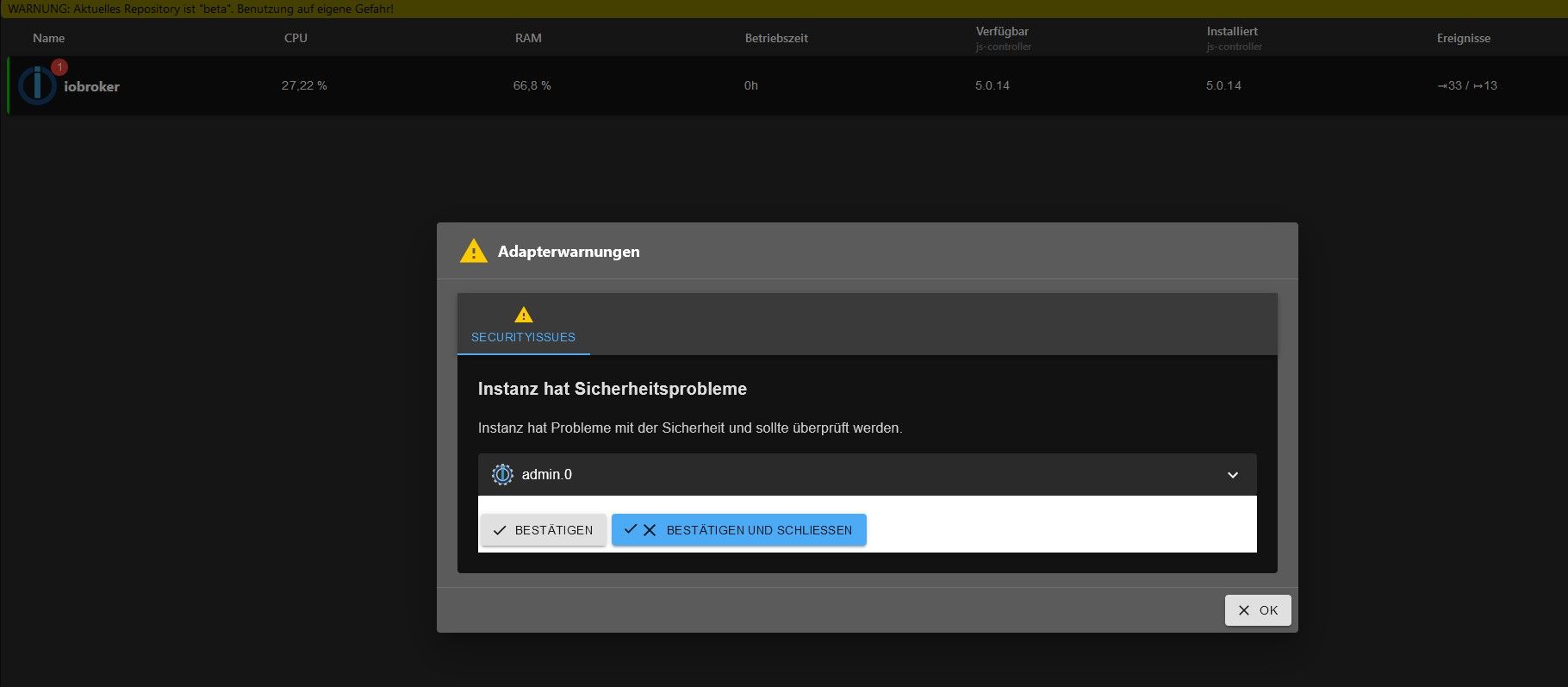
    Nachdem ich gestern das Update des JS. Controllers von der 5.0.13 auf die 5.0.14 gezogen habe bekomme ich jetzt eine Medung wegen eines Sicherheits problems. Hat da jemand rat für mich. Kann ich wieder zurück auf die 5.0.13 und mit welchem befehl...?
    Danke im voraus

    Meister MopperM Thomas BraunT 2 Antworten Letzte Antwort
    0
    • teletapiT teletapi

      Re: js-controller 3.2 jetzt im STABLE!

      Nachdem ich gestern das Update des JS. Controllers von der 5.0.13 auf die 5.0.14 gezogen habe bekomme ich jetzt eine Medung wegen eines Sicherheits problems. Hat da jemand rat für mich. Kann ich wieder zurück auf die 5.0.13 und mit welchem befehl...?
      Danke im voraus

      Meister MopperM Offline
      Meister MopperM Offline
      Meister Mopper
      Most Active
      schrieb am zuletzt editiert von
      #2

      @teletapi sagte in JS.Controller Sicherheitsproblem:

      bekomme ich jetzt eine Medung wegen eines Sicherheits problems.

      Welche?

      Proxmox und HA - dank KI/AI endlich "blocklyfrei"

      1 Antwort Letzte Antwort
      0
      • teletapiT teletapi

        Re: js-controller 3.2 jetzt im STABLE!

        Nachdem ich gestern das Update des JS. Controllers von der 5.0.13 auf die 5.0.14 gezogen habe bekomme ich jetzt eine Medung wegen eines Sicherheits problems. Hat da jemand rat für mich. Kann ich wieder zurück auf die 5.0.13 und mit welchem befehl...?
        Danke im voraus

        Thomas BraunT Online
        Thomas BraunT Online
        Thomas Braun
        Most Active
        schrieb am zuletzt editiert von
        #3

        @teletapi sagte in JS.Controller Sicherheitsproblem:

        Hat da jemand rat für mich. Kann ich wieder zurück auf die 5.0.13 und mit welchem befehl...?

        Wie wäre es mit 'Meldung bestätigen'?
        Oder das Problem beseitigen (wenn es denn überhaupt eines ist)?

        Linux-Werkzeugkasten:
        https://forum.iobroker.net/topic/42952/der-kleine-iobroker-linux-werkzeugkasten
        NodeJS Fixer Skript:
        https://forum.iobroker.net/topic/68035/iob-node-fix-skript
        iob_diag: curl -sLf -o diag.sh https://iobroker.net/diag.sh && bash diag.sh

        1 Antwort Letzte Antwort
        0
        • arteckA Offline
          arteckA Offline
          arteck
          Developer Most Active
          schrieb am zuletzt editiert von
          #4

          @teletapi sagte in JS.Controller Sicherheitsproblem:

          Medung wegen eines Sicherheits problems

          ahhhhhhhhhhhhhh..eine Medung ..ahhh..

          im ersnt was soll man mit dem Thread anfangen.. wo sind die LOG's ..

          zigbee hab ich, zwave auch, nuc's genauso und HA auch

          teletapiT 1 Antwort Letzte Antwort
          0
          • arteckA arteck

            @teletapi sagte in JS.Controller Sicherheitsproblem:

            Medung wegen eines Sicherheits problems

            ahhhhhhhhhhhhhh..eine Medung ..ahhh..

            im ersnt was soll man mit dem Thread anfangen.. wo sind die LOG's ..

            teletapiT Online
            teletapiT Online
            teletapi
            schrieb am zuletzt editiert von
            #5

            @arteck Ich kanns jetzt leider nicht genau wiedergeben. Bei der nächsten Meldung mach ich einen screen und schick ihn mit Ich habe die Meldung bestätigt und ist damit zwar weg aber die meldung kam gestern direkt nach dem Update auch schon.

            Iob Diag gibt wenn ich das richtig sehe nix aus

            ======== Start marking the full check here =========

            Skript v.2023-10-10
            
            *** BASE SYSTEM ***
               Static hostname: iobroker
                     Icon name: computer
              Operating System: Debian GNU/Linux 11 (bullseye)
                        Kernel: Linux 6.1.21-v8+
                  Architecture: arm64
            
            Model           : Raspberry Pi 4 Model B Rev 1.5
            Docker          : false
            Virtualization  : none
            Kernel          : aarch64
            Userland        : arm64
            
            Systemuptime and Load:
             13:12:01 up  3:51,  1 user,  load average: 0.63, 0.52, 0.60
            CPU threads: 4
            
            
            *** RASPBERRY THROTTLING ***
            Current issues:
            No throttling issues detected.
            
            Previously detected issues:
            No throttling issues detected.
            
            *** Time and Time Zones ***
                           Local time: Wed 2023-10-18 13:12:01 CEST
                       Universal time: Wed 2023-10-18 11:12:01 UTC
                             RTC time: n/a
                            Time zone: Europe/Berlin (CEST, +0200)
            System clock synchronized: yes
                          NTP service: active
                      RTC in local TZ: no
            
            *** User and Groups ***
            pi
            /home/pi
            pi adm dialout cdrom sudo audio video plugdev games users input render netdev lpadmin gpio i2c spi iobroker
            
            *** X-Server-Setup ***
            X-Server:       false
            Desktop:
            Terminal:       tty
            Boot Target:    multi-user.target
            
            *** MEMORY ***
                           total        used        free      shared  buff/cache   available
            Mem:            7.8G        2.8G        3.6G        1.0M        1.4G        4.9G
            Swap:            99M          0B         99M
            Total:          7.9G        2.8G        3.7G
            
                     7811 M total memory
                     2760 M used memory
                     3681 M active memory
                      357 M inactive memory
                     3606 M free memory
                      129 M buffer memory
                     1315 M swap cache
                       99 M total swap
                        0 M used swap
                       99 M free swap
            
            Raspberry only:
            oom events: 0
            lifetime oom required: 0 Mbytes
            total time in oom handler: 0 ms
            max time spent in oom handler: 0 ms
            
            *** FAILED SERVICES ***
            
              UNIT LOAD ACTIVE SUB DESCRIPTION
            0 loaded units listed.
            
            *** FILESYSTEM ***
            Filesystem     Type      Size  Used Avail Use% Mounted on
            /dev/root      ext4       59G   11G   46G  19% /
            devtmpfs       devtmpfs  3.6G     0  3.6G   0% /dev
            tmpfs          tmpfs     3.9G     0  3.9G   0% /dev/shm
            tmpfs          tmpfs     1.6G  1.2M  1.6G   1% /run
            tmpfs          tmpfs     5.0M  4.0K  5.0M   1% /run/lock
            /dev/sda1      vfat      255M   31M  225M  13% /boot
            tmpfs          tmpfs     782M   16K  782M   1% /run/user/1000
            
            Messages concerning ext4 filesystem in dmesg:
            [Wed Oct 18 09:20:53 2023] Kernel command line: coherent_pool=1M 8250.nr_uarts=1 snd_bcm2835.enable_headphones=0 snd_bcm2835.enable_headphones=1 snd_bcm2835.enable_hdmi=1 snd_bcm2835.enable_hdmi=0  smsc95xx.macaddr=D8:3A:DD:13:A5:D1 vc_mem.mem_base=0x3eb00000 vc_mem.mem_size=0x3ff00000  console=tty1 root=PARTUUID=2c0392e1-02 rootfstype=ext4 fsck.repair=yes rootwait quiet splash plymouth.ignore-serial-consoles
            [Wed Oct 18 09:20:55 2023] EXT4-fs (sda2): mounted filesystem with ordered data mode. Quota mode: none.
            [Wed Oct 18 09:20:55 2023] VFS: Mounted root (ext4 filesystem) readonly on device 8:2.
            [Wed Oct 18 09:20:56 2023] EXT4-fs (sda2): re-mounted. Quota mode: none.
            
            Show mounted filesystems \(real ones only\):
            TARGET  SOURCE    FSTYPE OPTIONS
            /       /dev/sda2 ext4   rw,noatime
            `-/boot /dev/sda1 vfat   rw,relatime,fmask=0022,dmask=0022,codepage=437,iocharset=ascii,shortname=mixed,errors=remount-ro
            
            Files in neuralgic directories:
            
            /var:
            1.8G    /var/
            1.1G    /var/log/journal/a9f1eae0dc5a48ddbf0e2a62c2227673
            1.1G    /var/log/journal
            1.1G    /var/log
            525M    /var/lib
            
            Archived and active journals take up 1.0G in the file system.
            
            /opt/iobroker/backups:
            1.3G    /opt/iobroker/backups/
            
            /opt/iobroker/iobroker-data:
            384M    /opt/iobroker/iobroker-data/
            184M    /opt/iobroker/iobroker-data/files
            72M     /opt/iobroker/iobroker-data/backup-objects
            62M     /opt/iobroker/iobroker-data/node-red/node_modules
            62M     /opt/iobroker/iobroker-data/node-red
            
            The five largest files in iobroker-data are:
            50M     /opt/iobroker/iobroker-data/objects.jsonl
            33M     /opt/iobroker/iobroker-data/files/iot.admin/static/js/main.1797d034.js.map
            21M     /opt/iobroker/iobroker-data/files/web.admin/static/js/main.aaea95f8.js.map
            15M     /opt/iobroker/iobroker-data/states.jsonl
            8.5M    /opt/iobroker/iobroker-data/files/iot.admin/static/js/main.1797d034.js
            
            USB-Devices by-id:
            USB-Sticks -  Avoid direct links to /dev/* in your adapter setups, please always prefer the links 'by-id':
            
            find: '/dev/serial/by-id/': No such file or directory
            
            *** NodeJS-Installation ***
            
            /usr/bin/nodejs         v18.18.2
            /usr/bin/node           v18.18.2
            /usr/bin/npm            9.8.1
            /usr/bin/npx            9.8.1
            /usr/bin/corepack       0.19.0
            
            
            nodejs:
              Installed: 18.18.2-1nodesource1
              Candidate: 18.18.2-1nodesource1
              Version table:
             *** 18.18.2-1nodesource1 1001
                    500 https://deb.nodesource.com/node_18.x nodistro/main arm64 Packages
                    100 /var/lib/dpkg/status
                 18.18.1-1nodesource1 1001
                    500 https://deb.nodesource.com/node_18.x nodistro/main arm64 Packages
                 18.18.0-1nodesource1 1001
                    500 https://deb.nodesource.com/node_18.x nodistro/main arm64 Packages
                 18.17.1-1nodesource1 1001
                    500 https://deb.nodesource.com/node_18.x nodistro/main arm64 Packages
                 18.17.0-1nodesource1 1001
                    500 https://deb.nodesource.com/node_18.x nodistro/main arm64 Packages
                 18.16.1-1nodesource1 1001
                    500 https://deb.nodesource.com/node_18.x nodistro/main arm64 Packages
                 18.16.0-1nodesource1 1001
                    500 https://deb.nodesource.com/node_18.x nodistro/main arm64 Packages
                 18.15.0-1nodesource1 1001
                    500 https://deb.nodesource.com/node_18.x nodistro/main arm64 Packages
                 18.14.2-1nodesource1 1001
                    500 https://deb.nodesource.com/node_18.x nodistro/main arm64 Packages
                 18.14.1-1nodesource1 1001
                    500 https://deb.nodesource.com/node_18.x nodistro/main arm64 Packages
                 18.14.0-1nodesource1 1001
                    500 https://deb.nodesource.com/node_18.x nodistro/main arm64 Packages
                 18.13.0-1nodesource1 1001
                    500 https://deb.nodesource.com/node_18.x nodistro/main arm64 Packages
                 18.12.0-1nodesource1 1001
                    500 https://deb.nodesource.com/node_18.x nodistro/main arm64 Packages
                 18.11.0-1nodesource1 1001
                    500 https://deb.nodesource.com/node_18.x nodistro/main arm64 Packages
                 18.10.0-1nodesource1 1001
                    500 https://deb.nodesource.com/node_18.x nodistro/main arm64 Packages
                 18.9.1-1nodesource1 1001
                    500 https://deb.nodesource.com/node_18.x nodistro/main arm64 Packages
                 18.9.0-1nodesource1 1001
                    500 https://deb.nodesource.com/node_18.x nodistro/main arm64 Packages
                 18.8.0-1nodesource1 1001
                    500 https://deb.nodesource.com/node_18.x nodistro/main arm64 Packages
                 18.7.0-1nodesource1 1001
                    500 https://deb.nodesource.com/node_18.x nodistro/main arm64 Packages
                 18.6.0-1nodesource1 1001
                    500 https://deb.nodesource.com/node_18.x nodistro/main arm64 Packages
                 18.5.0-1nodesource1 1001
                    500 https://deb.nodesource.com/node_18.x nodistro/main arm64 Packages
                 18.4.0-1nodesource1 1001
                    500 https://deb.nodesource.com/node_18.x nodistro/main arm64 Packages
                 18.3.0-1nodesource1 1001
                    500 https://deb.nodesource.com/node_18.x nodistro/main arm64 Packages
                 18.2.0-1nodesource1 1001
                    500 https://deb.nodesource.com/node_18.x nodistro/main arm64 Packages
                 18.1.0-1nodesource1 1001
                    500 https://deb.nodesource.com/node_18.x nodistro/main arm64 Packages
                 18.0.0-1nodesource1 1001
                    500 https://deb.nodesource.com/node_18.x nodistro/main arm64 Packages
                 12.22.12~dfsg-1~deb11u4 500
                    500 http://deb.debian.org/debian bullseye/main arm64 Packages
                    500 http://security.debian.org/debian-security bullseye-security/main arm64 Packages
            
            Temp directories causing npm8 problem: 0
            No problems detected
            
            Errors in npm tree:
            
            *** ioBroker-Installation ***
            
            ioBroker Status
            iobroker is running on this host.
            
            
            Objects type: jsonl
            States  type: jsonl
            
            Core adapters versions
            js-controller:  5.0.14
            admin:          6.10.8
            javascript:     7.1.5
            
            Adapters from github:   2
            
            Adapter State
            + system.adapter.admin.0                  : admin                 : iobroker                                 -  enabled, port: 8081, bind: 0.0.0.0, run as: admin
            + system.adapter.alexa2.0                 : alexa2                : iobroker                                 -  enabled
              system.adapter.alias-manager.0          : alias-manager         : iobroker                                 - disabled
            + system.adapter.backitup.0               : backitup              : iobroker                                 -  enabled
            + system.adapter.cloud.0                  : cloud                 : iobroker                                 -  enabled
            + system.adapter.discovery.0              : discovery             : iobroker                                 -  enabled
            + system.adapter.energiefluss-erweitert.0 : energiefluss-erweitert: iobroker                                 -  enabled
            + system.adapter.fritzdect.0              : fritzdect             : iobroker                                 -  enabled
            + system.adapter.hm-rega.0                : hm-rega               : iobroker                                 -  enabled
            + system.adapter.hm-rpc.0                 : hm-rpc                : iobroker                                 -  enabled, port: 18701
            + system.adapter.hm-rpc.1                 : hm-rpc                : iobroker                                 -  enabled, port: 12001
            + system.adapter.hm-rpc.2                 : hm-rpc                : iobroker                                 -  enabled, port: 12010
            + system.adapter.hm-rpc.3                 : hm-rpc                : iobroker                                 -  enabled, port: 0
            + system.adapter.hue-extended.0           : hue-extended          : iobroker                                 -  enabled
              system.adapter.ical.0                   : ical                  : iobroker                                 -  enabled
            + system.adapter.influxdb.0               : influxdb              : iobroker                                 -  enabled, port: 8086
            + system.adapter.info.0                   : info                  : iobroker                                 -  enabled
            + system.adapter.iot.0                    : iot                   : iobroker                                 -  enabled
            + system.adapter.jarvis.0                 : jarvis                : iobroker                                 -  enabled
            + system.adapter.javascript.0             : javascript            : iobroker                                 -  enabled
              system.adapter.modbus.0                 : modbus                : iobroker                                 - disabled
            + system.adapter.mqtt.0                   : mqtt                  : iobroker                                 -  enabled, port: 1883, bind: 0.0.0.0
            + system.adapter.net-tools.0              : net-tools             : iobroker                                 -  enabled
            + system.adapter.node-red.0               : node-red              : iobroker                                 -  enabled, port: 1880, bind: 0.0.0.0
            + system.adapter.nuki.0                   : nuki                  : iobroker                                 -  enabled
            + system.adapter.opendtu.0                : opendtu               : iobroker                                 -  enabled
            + system.adapter.panasonic-viera.0        : panasonic-viera       : iobroker                                 -  enabled
            + system.adapter.ping.0                   : ping                  : iobroker                                 -  enabled
            + system.adapter.rpi2.0                   : rpi2                  : iobroker                                 -  enabled
            + system.adapter.shelly.0                 : shelly                : iobroker                                 -  enabled, port: 1882, bind: 0.0.0.0
            + system.adapter.simple-api.0             : simple-api            : iobroker                                 -  enabled, port: 8087, bind: 192.168.178.82, run as: admin
              system.adapter.smartmeter.0             : smartmeter            : iobroker                                 - disabled
              system.adapter.smartmeter.1             : smartmeter            : iobroker                                 - disabled
            + system.adapter.socketio.0               : socketio              : iobroker                                 -  enabled, port: 8084, bind: 0.0.0.0, run as: admin
            + system.adapter.sonoff.0                 : sonoff                : iobroker                                 -  enabled, port: 1886, bind: 0.0.0.0
            + system.adapter.telegram.0               : telegram              : iobroker                                 -  enabled, port: 8443, bind: 0.0.0.0
            + system.adapter.tr-064.0                 : tr-064                : iobroker                                 -  enabled
            + system.adapter.web.0                    : web                   : iobroker                                 -  enabled, port: 8082, bind: 0.0.0.0, run as: admin
            
            + instance is alive
            
            Enabled adapters with bindings
            + system.adapter.admin.0                  : admin                 : iobroker                                 -  enabled, port: 8081, bind: 0.0.0.0, run as: admin
            + system.adapter.hm-rpc.0                 : hm-rpc                : iobroker                                 -  enabled, port: 18701
            + system.adapter.hm-rpc.1                 : hm-rpc                : iobroker                                 -  enabled, port: 12001
            + system.adapter.hm-rpc.2                 : hm-rpc                : iobroker                                 -  enabled, port: 12010
            + system.adapter.hm-rpc.3                 : hm-rpc                : iobroker                                 -  enabled, port: 0
            + system.adapter.influxdb.0               : influxdb              : iobroker                                 -  enabled, port: 8086
            + system.adapter.mqtt.0                   : mqtt                  : iobroker                                 -  enabled, port: 1883, bind: 0.0.0.0
            + system.adapter.node-red.0               : node-red              : iobroker                                 -  enabled, port: 1880, bind: 0.0.0.0
            + system.adapter.shelly.0                 : shelly                : iobroker                                 -  enabled, port: 1882, bind: 0.0.0.0
            + system.adapter.simple-api.0             : simple-api            : iobroker                                 -  enabled, port: 8087, bind: 192.168.178.82, run as: admin
            + system.adapter.socketio.0               : socketio              : iobroker                                 -  enabled, port: 8084, bind: 0.0.0.0, run as: admin
            + system.adapter.sonoff.0                 : sonoff                : iobroker                                 -  enabled, port: 1886, bind: 0.0.0.0
            + system.adapter.telegram.0               : telegram              : iobroker                                 -  enabled, port: 8443, bind: 0.0.0.0
            + system.adapter.web.0                    : web                   : iobroker                                 -  enabled, port: 8082, bind: 0.0.0.0, run as: admin
            
            ioBroker-Repositories
            stable        : http://download.iobroker.net/sources-dist.json
            beta          : http://download.iobroker.net/sources-dist-latest.json
            
            Active repo(s): beta
            
            Installed ioBroker-Instances
            Used repository: beta
            Adapter    "admin"        : 6.10.8   , installed 6.10.8
            Adapter    "alexa2"       : 3.25.2   , installed 3.25.2
            Adapter    "alias-manager": 1.2.6    , installed 1.2.6
            Adapter    "backitup"     : 2.8.6    , installed 2.8.6
            Adapter    "cloud"        : 4.4.1    , installed 4.4.1
            Adapter    "discovery"    : 4.2.0    , installed 4.2.0
            Adapter    "fritzdect"    : 2.5.2    , installed 2.5.2
            Adapter    "hm-rega"      : 4.0.0    , installed 4.0.0
            Adapter    "hm-rpc"       : 1.15.19  , installed 1.15.19
            Adapter    "hue-extended" : 2.0.0    , installed 2.0.0
            Adapter    "ical"         : 1.13.3   , installed 1.13.3
            Adapter    "influxdb"     : 3.2.0    , installed 3.2.0
            Adapter    "info"         : 2.0.0    , installed 2.0.0
            Adapter    "iot"          : 2.0.11   , installed 2.0.11
            Adapter    "jarvis"       : 3.1.8    , installed 3.1.9-beta.3
            Adapter    "javascript"   : 7.1.5    , installed 7.1.5
            Controller "js-controller": 5.0.14   , installed 5.0.14
            Adapter    "modbus"       : 5.0.11   , installed 5.0.11
            Adapter    "mqtt"         : 5.1.0    , installed 5.1.0
            Adapter    "net-tools"    : 0.2.0    , installed 0.2.0
            Adapter    "node-red"     : 4.0.3    , installed 4.0.3
            Adapter    "nuki"         : 1.6.0    , installed 1.6.0
            Adapter    "opendtu"      : 1.0.0    , installed 1.0.0
            Adapter    "panasonic-viera": 2.0.0  , installed 2.0.0
            Adapter    "ping"         : 1.6.2    , installed 1.6.2
            Adapter    "rpi2"         : 1.3.2    , installed 1.3.2
            Adapter    "shelly"       : 6.6.0    , installed 6.6.0
            Adapter    "simple-api"   : 2.7.2    , installed 2.7.2
            Adapter    "smartmeter"   : 3.3.4    , installed 3.3.4
            Adapter    "socketio"     : 6.6.0    , installed 6.6.0
            Adapter    "sonoff"       : 3.0.3    , installed 3.0.3
            Adapter    "telegram"     : 2.0.1    , installed 2.0.1
            Adapter    "tr-064"       : 4.2.18   , installed 4.2.18
            Adapter    "web"          : 6.1.10   , installed 6.1.10
            Adapter    "ws"           : 2.5.8    , installed 2.5.8
            
            Objects and States
            Please stand by - This may take a while
            Objects:        9872
            States:         9225
            
            *** OS-Repositories and Updates ***
            Hit:1 http://deb.debian.org/debian bullseye InRelease
            Hit:2 http://deb.debian.org/debian bullseye-updates InRelease
            Hit:3 http://security.debian.org/debian-security bullseye-security InRelease
            Hit:4 https://repos.influxdata.com/debian stable InRelease
            Hit:5 http://archive.raspberrypi.org/debian bullseye InRelease
            Hit:6 https://apt.grafana.com stable InRelease
            Hit:7 https://deb.nodesource.com/node_18.x nodistro InRelease
            Reading package lists...
            Pending Updates: 0
            
            *** Listening Ports ***
            Active Internet connections (only servers)
            Proto Recv-Q Send-Q Local Address           Foreign Address         State       User       Inode      PID/Program name
            tcp        0      0 192.168.178.82:12001    0.0.0.0:*               LISTEN      1001       16702      1359/io.hm-rpc.1
            tcp        0      0 192.168.178.82:12010    0.0.0.0:*               LISTEN      1001       18469      1377/io.hm-rpc.2
            tcp        0      0 192.168.178.82:8087     0.0.0.0:*               LISTEN      1001       23723      2226/io.simple-api.
            tcp        0      0 0.0.0.0:1886            0.0.0.0:*               LISTEN      1001       18851      1508/io.sonoff.0
            tcp        0      0 0.0.0.0:1880            0.0.0.0:*               LISTEN      1001       15096      1273/node-red
            tcp        0      0 0.0.0.0:1883            0.0.0.0:*               LISTEN      116        15973      553/mosquitto
            tcp        0      0 0.0.0.0:1882            0.0.0.0:*               LISTEN      1001       18170      1568/io.shelly.0
            tcp        0      0 0.0.0.0:22              0.0.0.0:*               LISTEN      0          14621      574/sshd: /usr/sbin
            tcp        0      0 0.0.0.0:8400            0.0.0.0:*               LISTEN      1001       21994      1825/io.jarvis.0
            tcp        0      0 192.168.178.82:18701    0.0.0.0:*               LISTEN      1001       15083      1339/io.hm-rpc.0
            tcp        0      0 192.168.178.82:2001     0.0.0.0:*               LISTEN      1001       15239      1434/io.hm-rpc.3
            tcp        0      0 127.0.0.1:631           0.0.0.0:*               LISTEN      0          12966      538/cupsd
            tcp        0      0 192.168.178.82:9092     0.0.0.0:*               LISTEN      1001       22404      1965/io.nuki.0
            tcp        0      0 127.0.0.1:9000          0.0.0.0:*               LISTEN      1001       617        652/iobroker.js-con
            tcp        0      0 127.0.0.1:9001          0.0.0.0:*               LISTEN      1001       16283      652/iobroker.js-con
            tcp6       0      0 :::1883                 :::*                    LISTEN      116        15974      553/mosquitto
            tcp6       0      0 :::22                   :::*                    LISTEN      0          14623      574/sshd: /usr/sbin
            tcp6       0      0 :::8084                 :::*                    LISTEN      1001       21335      2260/io.socketio.0
            tcp6       0      0 :::8086                 :::*                    LISTEN      999        16011      542/influxd
            tcp6       0      0 :::8081                 :::*                    LISTEN      1001       16458      1120/io.admin.0
            tcp6       0      0 :::8082                 :::*                    LISTEN      1001       19364      1655/io.web.0
            tcp6       0      0 :::3000                 :::*                    LISTEN      117        659        651/grafana
            tcp6       0      0 ::1:631                 :::*                    LISTEN      0          12965      538/cupsd
            udp        0      0 0.0.0.0:5353            0.0.0.0:*                           108        15747      401/avahi-daemon: r
            udp        0      0 0.0.0.0:59127           0.0.0.0:*                           108        15749      401/avahi-daemon: r
            udp        0      0 0.0.0.0:68              0.0.0.0:*                           0          520        466/dhcpcd
            udp        0      0 0.0.0.0:631             0.0.0.0:*                           0          12981      617/cups-browsed
            udp6       0      0 :::5353                 :::*                                108        15748      401/avahi-daemon: r
            udp6       0      0 :::546                  :::*                                0          16080      466/dhcpcd
            udp6       0      0 :::54373                :::*                                108        15750      401/avahi-daemon: r
            
            *** Log File - Last 25 Lines ***
            
            2023-10-18 12:32:40.256  - info: fritzdect.0 (1635) glob state ["116570586980"]
            2023-10-18 12:37:40.186  - info: fritzdect.0 (1635) glob state ["116570586980"]
            2023-10-18 12:38:00.557  - info: nuki.0 (1965) status change received for NukiID 790083444: locked
            2023-10-18 12:38:00.558  - info: nuki.0 (1965) battery status received for NukiID 790083444: false
            2023-10-18 12:41:16.689  - info: admin.0 (1120) ==> Connected system.user.admin from ::ffff:192.168.178.63
            2023-10-18 12:42:19.228  - info: admin.0 (1120) ==> Connected system.user.admin from ::ffff:192.168.178.63
            2023-10-18 12:42:29.725  - info: admin.0 (1120) <== Disconnect system.user.admin from ::ffff:192.168.178.63 admin
            2023-10-18 12:42:40.038  - info: fritzdect.0 (1635) glob state ["116570586980"]
            2023-10-18 12:47:40.088  - info: fritzdect.0 (1635) glob state ["116570586980"]
            2023-10-18 12:52:39.921  - info: fritzdect.0 (1635) glob state ["116570586980"]
            2023-10-18 12:57:40.278  - info: fritzdect.0 (1635) glob state ["116570586980"]
            2023-10-18 13:00:00.165  - info: host.iobroker instance system.adapter.ical.0 started with pid 33359
            
            2023-10-18 13:00:09.530  - info: ical.0 (33359) Terminated (NO_ERROR): Without reason
            2023-10-18 13:00:10.070  - info: host.iobroker instance system.adapter.ical.0 terminated with code 0 (NO_ERROR)
            2023-10-18 13:02:40.056  - info: fritzdect.0 (1635) glob state ["116570586980"]
            2023-10-18 13:07:39.999  - info: fritzdect.0 (1635) glob state ["116570586980"]
            2023-10-18 13:09:48.618  - info: admin.0 (1120) ==> Connected system.user.admin from ::ffff:192.168.178.63
            2023-10-18 13:09:51.781  - info: javascript.0 (1232) Start javascript script.js.test.Bluetti_ein_ausschalten
            2023-10-18 13:09:51.811  - info: javascript.0 (1232) script.js.test.Bluetti_ein_ausschalten: registered 1 subscription, 0 schedules, 0 messages, 0 logs and 0 file subscriptions
            2023-10-18 13:12:39.882  - info: fritzdect.0 (1635) glob state ["116570586980"]


            ============ Mark until here for C&P =============

            iob diag has finished.

            Press any key for a summary

            T 1 Antwort Letzte Antwort
            0
            • teletapiT teletapi

              @arteck Ich kanns jetzt leider nicht genau wiedergeben. Bei der nächsten Meldung mach ich einen screen und schick ihn mit Ich habe die Meldung bestätigt und ist damit zwar weg aber die meldung kam gestern direkt nach dem Update auch schon.

              Iob Diag gibt wenn ich das richtig sehe nix aus

              ======== Start marking the full check here =========

              Skript v.2023-10-10
              
              *** BASE SYSTEM ***
                 Static hostname: iobroker
                       Icon name: computer
                Operating System: Debian GNU/Linux 11 (bullseye)
                          Kernel: Linux 6.1.21-v8+
                    Architecture: arm64
              
              Model           : Raspberry Pi 4 Model B Rev 1.5
              Docker          : false
              Virtualization  : none
              Kernel          : aarch64
              Userland        : arm64
              
              Systemuptime and Load:
               13:12:01 up  3:51,  1 user,  load average: 0.63, 0.52, 0.60
              CPU threads: 4
              
              
              *** RASPBERRY THROTTLING ***
              Current issues:
              No throttling issues detected.
              
              Previously detected issues:
              No throttling issues detected.
              
              *** Time and Time Zones ***
                             Local time: Wed 2023-10-18 13:12:01 CEST
                         Universal time: Wed 2023-10-18 11:12:01 UTC
                               RTC time: n/a
                              Time zone: Europe/Berlin (CEST, +0200)
              System clock synchronized: yes
                            NTP service: active
                        RTC in local TZ: no
              
              *** User and Groups ***
              pi
              /home/pi
              pi adm dialout cdrom sudo audio video plugdev games users input render netdev lpadmin gpio i2c spi iobroker
              
              *** X-Server-Setup ***
              X-Server:       false
              Desktop:
              Terminal:       tty
              Boot Target:    multi-user.target
              
              *** MEMORY ***
                             total        used        free      shared  buff/cache   available
              Mem:            7.8G        2.8G        3.6G        1.0M        1.4G        4.9G
              Swap:            99M          0B         99M
              Total:          7.9G        2.8G        3.7G
              
                       7811 M total memory
                       2760 M used memory
                       3681 M active memory
                        357 M inactive memory
                       3606 M free memory
                        129 M buffer memory
                       1315 M swap cache
                         99 M total swap
                          0 M used swap
                         99 M free swap
              
              Raspberry only:
              oom events: 0
              lifetime oom required: 0 Mbytes
              total time in oom handler: 0 ms
              max time spent in oom handler: 0 ms
              
              *** FAILED SERVICES ***
              
                UNIT LOAD ACTIVE SUB DESCRIPTION
              0 loaded units listed.
              
              *** FILESYSTEM ***
              Filesystem     Type      Size  Used Avail Use% Mounted on
              /dev/root      ext4       59G   11G   46G  19% /
              devtmpfs       devtmpfs  3.6G     0  3.6G   0% /dev
              tmpfs          tmpfs     3.9G     0  3.9G   0% /dev/shm
              tmpfs          tmpfs     1.6G  1.2M  1.6G   1% /run
              tmpfs          tmpfs     5.0M  4.0K  5.0M   1% /run/lock
              /dev/sda1      vfat      255M   31M  225M  13% /boot
              tmpfs          tmpfs     782M   16K  782M   1% /run/user/1000
              
              Messages concerning ext4 filesystem in dmesg:
              [Wed Oct 18 09:20:53 2023] Kernel command line: coherent_pool=1M 8250.nr_uarts=1 snd_bcm2835.enable_headphones=0 snd_bcm2835.enable_headphones=1 snd_bcm2835.enable_hdmi=1 snd_bcm2835.enable_hdmi=0  smsc95xx.macaddr=D8:3A:DD:13:A5:D1 vc_mem.mem_base=0x3eb00000 vc_mem.mem_size=0x3ff00000  console=tty1 root=PARTUUID=2c0392e1-02 rootfstype=ext4 fsck.repair=yes rootwait quiet splash plymouth.ignore-serial-consoles
              [Wed Oct 18 09:20:55 2023] EXT4-fs (sda2): mounted filesystem with ordered data mode. Quota mode: none.
              [Wed Oct 18 09:20:55 2023] VFS: Mounted root (ext4 filesystem) readonly on device 8:2.
              [Wed Oct 18 09:20:56 2023] EXT4-fs (sda2): re-mounted. Quota mode: none.
              
              Show mounted filesystems \(real ones only\):
              TARGET  SOURCE    FSTYPE OPTIONS
              /       /dev/sda2 ext4   rw,noatime
              `-/boot /dev/sda1 vfat   rw,relatime,fmask=0022,dmask=0022,codepage=437,iocharset=ascii,shortname=mixed,errors=remount-ro
              
              Files in neuralgic directories:
              
              /var:
              1.8G    /var/
              1.1G    /var/log/journal/a9f1eae0dc5a48ddbf0e2a62c2227673
              1.1G    /var/log/journal
              1.1G    /var/log
              525M    /var/lib
              
              Archived and active journals take up 1.0G in the file system.
              
              /opt/iobroker/backups:
              1.3G    /opt/iobroker/backups/
              
              /opt/iobroker/iobroker-data:
              384M    /opt/iobroker/iobroker-data/
              184M    /opt/iobroker/iobroker-data/files
              72M     /opt/iobroker/iobroker-data/backup-objects
              62M     /opt/iobroker/iobroker-data/node-red/node_modules
              62M     /opt/iobroker/iobroker-data/node-red
              
              The five largest files in iobroker-data are:
              50M     /opt/iobroker/iobroker-data/objects.jsonl
              33M     /opt/iobroker/iobroker-data/files/iot.admin/static/js/main.1797d034.js.map
              21M     /opt/iobroker/iobroker-data/files/web.admin/static/js/main.aaea95f8.js.map
              15M     /opt/iobroker/iobroker-data/states.jsonl
              8.5M    /opt/iobroker/iobroker-data/files/iot.admin/static/js/main.1797d034.js
              
              USB-Devices by-id:
              USB-Sticks -  Avoid direct links to /dev/* in your adapter setups, please always prefer the links 'by-id':
              
              find: '/dev/serial/by-id/': No such file or directory
              
              *** NodeJS-Installation ***
              
              /usr/bin/nodejs         v18.18.2
              /usr/bin/node           v18.18.2
              /usr/bin/npm            9.8.1
              /usr/bin/npx            9.8.1
              /usr/bin/corepack       0.19.0
              
              
              nodejs:
                Installed: 18.18.2-1nodesource1
                Candidate: 18.18.2-1nodesource1
                Version table:
               *** 18.18.2-1nodesource1 1001
                      500 https://deb.nodesource.com/node_18.x nodistro/main arm64 Packages
                      100 /var/lib/dpkg/status
                   18.18.1-1nodesource1 1001
                      500 https://deb.nodesource.com/node_18.x nodistro/main arm64 Packages
                   18.18.0-1nodesource1 1001
                      500 https://deb.nodesource.com/node_18.x nodistro/main arm64 Packages
                   18.17.1-1nodesource1 1001
                      500 https://deb.nodesource.com/node_18.x nodistro/main arm64 Packages
                   18.17.0-1nodesource1 1001
                      500 https://deb.nodesource.com/node_18.x nodistro/main arm64 Packages
                   18.16.1-1nodesource1 1001
                      500 https://deb.nodesource.com/node_18.x nodistro/main arm64 Packages
                   18.16.0-1nodesource1 1001
                      500 https://deb.nodesource.com/node_18.x nodistro/main arm64 Packages
                   18.15.0-1nodesource1 1001
                      500 https://deb.nodesource.com/node_18.x nodistro/main arm64 Packages
                   18.14.2-1nodesource1 1001
                      500 https://deb.nodesource.com/node_18.x nodistro/main arm64 Packages
                   18.14.1-1nodesource1 1001
                      500 https://deb.nodesource.com/node_18.x nodistro/main arm64 Packages
                   18.14.0-1nodesource1 1001
                      500 https://deb.nodesource.com/node_18.x nodistro/main arm64 Packages
                   18.13.0-1nodesource1 1001
                      500 https://deb.nodesource.com/node_18.x nodistro/main arm64 Packages
                   18.12.0-1nodesource1 1001
                      500 https://deb.nodesource.com/node_18.x nodistro/main arm64 Packages
                   18.11.0-1nodesource1 1001
                      500 https://deb.nodesource.com/node_18.x nodistro/main arm64 Packages
                   18.10.0-1nodesource1 1001
                      500 https://deb.nodesource.com/node_18.x nodistro/main arm64 Packages
                   18.9.1-1nodesource1 1001
                      500 https://deb.nodesource.com/node_18.x nodistro/main arm64 Packages
                   18.9.0-1nodesource1 1001
                      500 https://deb.nodesource.com/node_18.x nodistro/main arm64 Packages
                   18.8.0-1nodesource1 1001
                      500 https://deb.nodesource.com/node_18.x nodistro/main arm64 Packages
                   18.7.0-1nodesource1 1001
                      500 https://deb.nodesource.com/node_18.x nodistro/main arm64 Packages
                   18.6.0-1nodesource1 1001
                      500 https://deb.nodesource.com/node_18.x nodistro/main arm64 Packages
                   18.5.0-1nodesource1 1001
                      500 https://deb.nodesource.com/node_18.x nodistro/main arm64 Packages
                   18.4.0-1nodesource1 1001
                      500 https://deb.nodesource.com/node_18.x nodistro/main arm64 Packages
                   18.3.0-1nodesource1 1001
                      500 https://deb.nodesource.com/node_18.x nodistro/main arm64 Packages
                   18.2.0-1nodesource1 1001
                      500 https://deb.nodesource.com/node_18.x nodistro/main arm64 Packages
                   18.1.0-1nodesource1 1001
                      500 https://deb.nodesource.com/node_18.x nodistro/main arm64 Packages
                   18.0.0-1nodesource1 1001
                      500 https://deb.nodesource.com/node_18.x nodistro/main arm64 Packages
                   12.22.12~dfsg-1~deb11u4 500
                      500 http://deb.debian.org/debian bullseye/main arm64 Packages
                      500 http://security.debian.org/debian-security bullseye-security/main arm64 Packages
              
              Temp directories causing npm8 problem: 0
              No problems detected
              
              Errors in npm tree:
              
              *** ioBroker-Installation ***
              
              ioBroker Status
              iobroker is running on this host.
              
              
              Objects type: jsonl
              States  type: jsonl
              
              Core adapters versions
              js-controller:  5.0.14
              admin:          6.10.8
              javascript:     7.1.5
              
              Adapters from github:   2
              
              Adapter State
              + system.adapter.admin.0                  : admin                 : iobroker                                 -  enabled, port: 8081, bind: 0.0.0.0, run as: admin
              + system.adapter.alexa2.0                 : alexa2                : iobroker                                 -  enabled
                system.adapter.alias-manager.0          : alias-manager         : iobroker                                 - disabled
              + system.adapter.backitup.0               : backitup              : iobroker                                 -  enabled
              + system.adapter.cloud.0                  : cloud                 : iobroker                                 -  enabled
              + system.adapter.discovery.0              : discovery             : iobroker                                 -  enabled
              + system.adapter.energiefluss-erweitert.0 : energiefluss-erweitert: iobroker                                 -  enabled
              + system.adapter.fritzdect.0              : fritzdect             : iobroker                                 -  enabled
              + system.adapter.hm-rega.0                : hm-rega               : iobroker                                 -  enabled
              + system.adapter.hm-rpc.0                 : hm-rpc                : iobroker                                 -  enabled, port: 18701
              + system.adapter.hm-rpc.1                 : hm-rpc                : iobroker                                 -  enabled, port: 12001
              + system.adapter.hm-rpc.2                 : hm-rpc                : iobroker                                 -  enabled, port: 12010
              + system.adapter.hm-rpc.3                 : hm-rpc                : iobroker                                 -  enabled, port: 0
              + system.adapter.hue-extended.0           : hue-extended          : iobroker                                 -  enabled
                system.adapter.ical.0                   : ical                  : iobroker                                 -  enabled
              + system.adapter.influxdb.0               : influxdb              : iobroker                                 -  enabled, port: 8086
              + system.adapter.info.0                   : info                  : iobroker                                 -  enabled
              + system.adapter.iot.0                    : iot                   : iobroker                                 -  enabled
              + system.adapter.jarvis.0                 : jarvis                : iobroker                                 -  enabled
              + system.adapter.javascript.0             : javascript            : iobroker                                 -  enabled
                system.adapter.modbus.0                 : modbus                : iobroker                                 - disabled
              + system.adapter.mqtt.0                   : mqtt                  : iobroker                                 -  enabled, port: 1883, bind: 0.0.0.0
              + system.adapter.net-tools.0              : net-tools             : iobroker                                 -  enabled
              + system.adapter.node-red.0               : node-red              : iobroker                                 -  enabled, port: 1880, bind: 0.0.0.0
              + system.adapter.nuki.0                   : nuki                  : iobroker                                 -  enabled
              + system.adapter.opendtu.0                : opendtu               : iobroker                                 -  enabled
              + system.adapter.panasonic-viera.0        : panasonic-viera       : iobroker                                 -  enabled
              + system.adapter.ping.0                   : ping                  : iobroker                                 -  enabled
              + system.adapter.rpi2.0                   : rpi2                  : iobroker                                 -  enabled
              + system.adapter.shelly.0                 : shelly                : iobroker                                 -  enabled, port: 1882, bind: 0.0.0.0
              + system.adapter.simple-api.0             : simple-api            : iobroker                                 -  enabled, port: 8087, bind: 192.168.178.82, run as: admin
                system.adapter.smartmeter.0             : smartmeter            : iobroker                                 - disabled
                system.adapter.smartmeter.1             : smartmeter            : iobroker                                 - disabled
              + system.adapter.socketio.0               : socketio              : iobroker                                 -  enabled, port: 8084, bind: 0.0.0.0, run as: admin
              + system.adapter.sonoff.0                 : sonoff                : iobroker                                 -  enabled, port: 1886, bind: 0.0.0.0
              + system.adapter.telegram.0               : telegram              : iobroker                                 -  enabled, port: 8443, bind: 0.0.0.0
              + system.adapter.tr-064.0                 : tr-064                : iobroker                                 -  enabled
              + system.adapter.web.0                    : web                   : iobroker                                 -  enabled, port: 8082, bind: 0.0.0.0, run as: admin
              
              + instance is alive
              
              Enabled adapters with bindings
              + system.adapter.admin.0                  : admin                 : iobroker                                 -  enabled, port: 8081, bind: 0.0.0.0, run as: admin
              + system.adapter.hm-rpc.0                 : hm-rpc                : iobroker                                 -  enabled, port: 18701
              + system.adapter.hm-rpc.1                 : hm-rpc                : iobroker                                 -  enabled, port: 12001
              + system.adapter.hm-rpc.2                 : hm-rpc                : iobroker                                 -  enabled, port: 12010
              + system.adapter.hm-rpc.3                 : hm-rpc                : iobroker                                 -  enabled, port: 0
              + system.adapter.influxdb.0               : influxdb              : iobroker                                 -  enabled, port: 8086
              + system.adapter.mqtt.0                   : mqtt                  : iobroker                                 -  enabled, port: 1883, bind: 0.0.0.0
              + system.adapter.node-red.0               : node-red              : iobroker                                 -  enabled, port: 1880, bind: 0.0.0.0
              + system.adapter.shelly.0                 : shelly                : iobroker                                 -  enabled, port: 1882, bind: 0.0.0.0
              + system.adapter.simple-api.0             : simple-api            : iobroker                                 -  enabled, port: 8087, bind: 192.168.178.82, run as: admin
              + system.adapter.socketio.0               : socketio              : iobroker                                 -  enabled, port: 8084, bind: 0.0.0.0, run as: admin
              + system.adapter.sonoff.0                 : sonoff                : iobroker                                 -  enabled, port: 1886, bind: 0.0.0.0
              + system.adapter.telegram.0               : telegram              : iobroker                                 -  enabled, port: 8443, bind: 0.0.0.0
              + system.adapter.web.0                    : web                   : iobroker                                 -  enabled, port: 8082, bind: 0.0.0.0, run as: admin
              
              ioBroker-Repositories
              stable        : http://download.iobroker.net/sources-dist.json
              beta          : http://download.iobroker.net/sources-dist-latest.json
              
              Active repo(s): beta
              
              Installed ioBroker-Instances
              Used repository: beta
              Adapter    "admin"        : 6.10.8   , installed 6.10.8
              Adapter    "alexa2"       : 3.25.2   , installed 3.25.2
              Adapter    "alias-manager": 1.2.6    , installed 1.2.6
              Adapter    "backitup"     : 2.8.6    , installed 2.8.6
              Adapter    "cloud"        : 4.4.1    , installed 4.4.1
              Adapter    "discovery"    : 4.2.0    , installed 4.2.0
              Adapter    "fritzdect"    : 2.5.2    , installed 2.5.2
              Adapter    "hm-rega"      : 4.0.0    , installed 4.0.0
              Adapter    "hm-rpc"       : 1.15.19  , installed 1.15.19
              Adapter    "hue-extended" : 2.0.0    , installed 2.0.0
              Adapter    "ical"         : 1.13.3   , installed 1.13.3
              Adapter    "influxdb"     : 3.2.0    , installed 3.2.0
              Adapter    "info"         : 2.0.0    , installed 2.0.0
              Adapter    "iot"          : 2.0.11   , installed 2.0.11
              Adapter    "jarvis"       : 3.1.8    , installed 3.1.9-beta.3
              Adapter    "javascript"   : 7.1.5    , installed 7.1.5
              Controller "js-controller": 5.0.14   , installed 5.0.14
              Adapter    "modbus"       : 5.0.11   , installed 5.0.11
              Adapter    "mqtt"         : 5.1.0    , installed 5.1.0
              Adapter    "net-tools"    : 0.2.0    , installed 0.2.0
              Adapter    "node-red"     : 4.0.3    , installed 4.0.3
              Adapter    "nuki"         : 1.6.0    , installed 1.6.0
              Adapter    "opendtu"      : 1.0.0    , installed 1.0.0
              Adapter    "panasonic-viera": 2.0.0  , installed 2.0.0
              Adapter    "ping"         : 1.6.2    , installed 1.6.2
              Adapter    "rpi2"         : 1.3.2    , installed 1.3.2
              Adapter    "shelly"       : 6.6.0    , installed 6.6.0
              Adapter    "simple-api"   : 2.7.2    , installed 2.7.2
              Adapter    "smartmeter"   : 3.3.4    , installed 3.3.4
              Adapter    "socketio"     : 6.6.0    , installed 6.6.0
              Adapter    "sonoff"       : 3.0.3    , installed 3.0.3
              Adapter    "telegram"     : 2.0.1    , installed 2.0.1
              Adapter    "tr-064"       : 4.2.18   , installed 4.2.18
              Adapter    "web"          : 6.1.10   , installed 6.1.10
              Adapter    "ws"           : 2.5.8    , installed 2.5.8
              
              Objects and States
              Please stand by - This may take a while
              Objects:        9872
              States:         9225
              
              *** OS-Repositories and Updates ***
              Hit:1 http://deb.debian.org/debian bullseye InRelease
              Hit:2 http://deb.debian.org/debian bullseye-updates InRelease
              Hit:3 http://security.debian.org/debian-security bullseye-security InRelease
              Hit:4 https://repos.influxdata.com/debian stable InRelease
              Hit:5 http://archive.raspberrypi.org/debian bullseye InRelease
              Hit:6 https://apt.grafana.com stable InRelease
              Hit:7 https://deb.nodesource.com/node_18.x nodistro InRelease
              Reading package lists...
              Pending Updates: 0
              
              *** Listening Ports ***
              Active Internet connections (only servers)
              Proto Recv-Q Send-Q Local Address           Foreign Address         State       User       Inode      PID/Program name
              tcp        0      0 192.168.178.82:12001    0.0.0.0:*               LISTEN      1001       16702      1359/io.hm-rpc.1
              tcp        0      0 192.168.178.82:12010    0.0.0.0:*               LISTEN      1001       18469      1377/io.hm-rpc.2
              tcp        0      0 192.168.178.82:8087     0.0.0.0:*               LISTEN      1001       23723      2226/io.simple-api.
              tcp        0      0 0.0.0.0:1886            0.0.0.0:*               LISTEN      1001       18851      1508/io.sonoff.0
              tcp        0      0 0.0.0.0:1880            0.0.0.0:*               LISTEN      1001       15096      1273/node-red
              tcp        0      0 0.0.0.0:1883            0.0.0.0:*               LISTEN      116        15973      553/mosquitto
              tcp        0      0 0.0.0.0:1882            0.0.0.0:*               LISTEN      1001       18170      1568/io.shelly.0
              tcp        0      0 0.0.0.0:22              0.0.0.0:*               LISTEN      0          14621      574/sshd: /usr/sbin
              tcp        0      0 0.0.0.0:8400            0.0.0.0:*               LISTEN      1001       21994      1825/io.jarvis.0
              tcp        0      0 192.168.178.82:18701    0.0.0.0:*               LISTEN      1001       15083      1339/io.hm-rpc.0
              tcp        0      0 192.168.178.82:2001     0.0.0.0:*               LISTEN      1001       15239      1434/io.hm-rpc.3
              tcp        0      0 127.0.0.1:631           0.0.0.0:*               LISTEN      0          12966      538/cupsd
              tcp        0      0 192.168.178.82:9092     0.0.0.0:*               LISTEN      1001       22404      1965/io.nuki.0
              tcp        0      0 127.0.0.1:9000          0.0.0.0:*               LISTEN      1001       617        652/iobroker.js-con
              tcp        0      0 127.0.0.1:9001          0.0.0.0:*               LISTEN      1001       16283      652/iobroker.js-con
              tcp6       0      0 :::1883                 :::*                    LISTEN      116        15974      553/mosquitto
              tcp6       0      0 :::22                   :::*                    LISTEN      0          14623      574/sshd: /usr/sbin
              tcp6       0      0 :::8084                 :::*                    LISTEN      1001       21335      2260/io.socketio.0
              tcp6       0      0 :::8086                 :::*                    LISTEN      999        16011      542/influxd
              tcp6       0      0 :::8081                 :::*                    LISTEN      1001       16458      1120/io.admin.0
              tcp6       0      0 :::8082                 :::*                    LISTEN      1001       19364      1655/io.web.0
              tcp6       0      0 :::3000                 :::*                    LISTEN      117        659        651/grafana
              tcp6       0      0 ::1:631                 :::*                    LISTEN      0          12965      538/cupsd
              udp        0      0 0.0.0.0:5353            0.0.0.0:*                           108        15747      401/avahi-daemon: r
              udp        0      0 0.0.0.0:59127           0.0.0.0:*                           108        15749      401/avahi-daemon: r
              udp        0      0 0.0.0.0:68              0.0.0.0:*                           0          520        466/dhcpcd
              udp        0      0 0.0.0.0:631             0.0.0.0:*                           0          12981      617/cups-browsed
              udp6       0      0 :::5353                 :::*                                108        15748      401/avahi-daemon: r
              udp6       0      0 :::546                  :::*                                0          16080      466/dhcpcd
              udp6       0      0 :::54373                :::*                                108        15750      401/avahi-daemon: r
              
              *** Log File - Last 25 Lines ***
              
              2023-10-18 12:32:40.256  - info: fritzdect.0 (1635) glob state ["116570586980"]
              2023-10-18 12:37:40.186  - info: fritzdect.0 (1635) glob state ["116570586980"]
              2023-10-18 12:38:00.557  - info: nuki.0 (1965) status change received for NukiID 790083444: locked
              2023-10-18 12:38:00.558  - info: nuki.0 (1965) battery status received for NukiID 790083444: false
              2023-10-18 12:41:16.689  - info: admin.0 (1120) ==> Connected system.user.admin from ::ffff:192.168.178.63
              2023-10-18 12:42:19.228  - info: admin.0 (1120) ==> Connected system.user.admin from ::ffff:192.168.178.63
              2023-10-18 12:42:29.725  - info: admin.0 (1120) <== Disconnect system.user.admin from ::ffff:192.168.178.63 admin
              2023-10-18 12:42:40.038  - info: fritzdect.0 (1635) glob state ["116570586980"]
              2023-10-18 12:47:40.088  - info: fritzdect.0 (1635) glob state ["116570586980"]
              2023-10-18 12:52:39.921  - info: fritzdect.0 (1635) glob state ["116570586980"]
              2023-10-18 12:57:40.278  - info: fritzdect.0 (1635) glob state ["116570586980"]
              2023-10-18 13:00:00.165  - info: host.iobroker instance system.adapter.ical.0 started with pid 33359
              
              2023-10-18 13:00:09.530  - info: ical.0 (33359) Terminated (NO_ERROR): Without reason
              2023-10-18 13:00:10.070  - info: host.iobroker instance system.adapter.ical.0 terminated with code 0 (NO_ERROR)
              2023-10-18 13:02:40.056  - info: fritzdect.0 (1635) glob state ["116570586980"]
              2023-10-18 13:07:39.999  - info: fritzdect.0 (1635) glob state ["116570586980"]
              2023-10-18 13:09:48.618  - info: admin.0 (1120) ==> Connected system.user.admin from ::ffff:192.168.178.63
              2023-10-18 13:09:51.781  - info: javascript.0 (1232) Start javascript script.js.test.Bluetti_ein_ausschalten
              2023-10-18 13:09:51.811  - info: javascript.0 (1232) script.js.test.Bluetti_ein_ausschalten: registered 1 subscription, 0 schedules, 0 messages, 0 logs and 0 file subscriptions
              2023-10-18 13:12:39.882  - info: fritzdect.0 (1635) glob state ["116570586980"]


              ============ Mark until here for C&P =============

              iob diag has finished.

              Press any key for a summary

              T Nicht stören
              T Nicht stören
              ticaki
              schrieb am zuletzt editiert von ticaki
              #6

              @teletapi
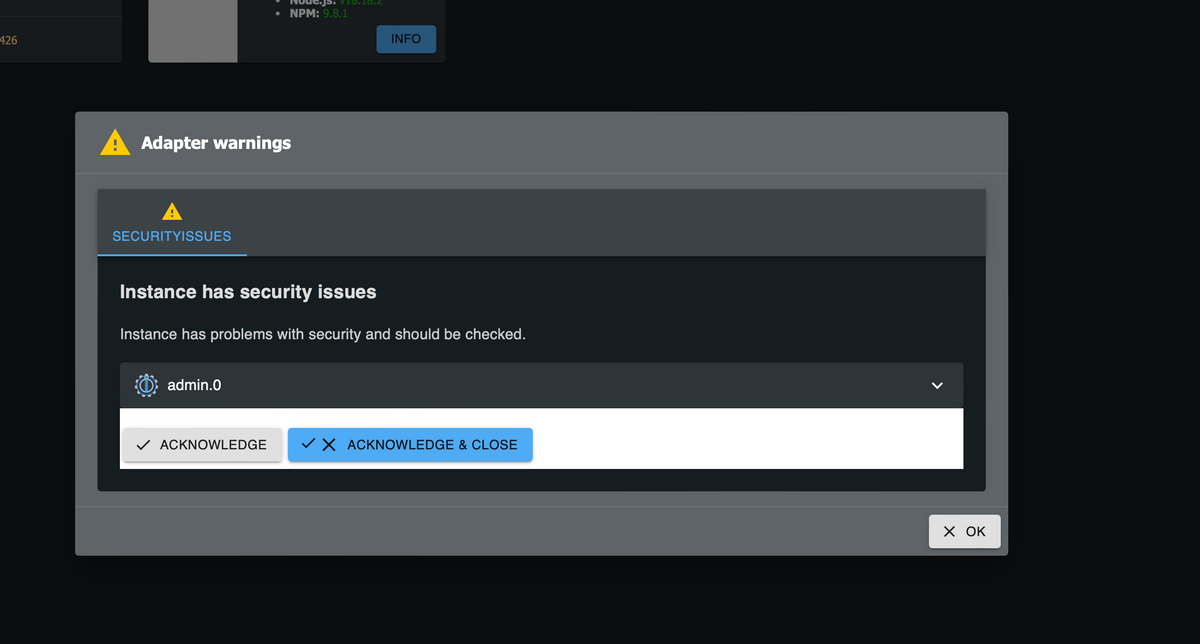
              kam bei mir auf dem dev-server nach dem Update ebenfalls, aber nur genau 1 mal. Hab sie auch nicht genau gelesen, denke es ging um die fehlende Nutzeranmeldung.

              war es die?
              Bildschirmfoto 2023-10-18 um 13.25.14.png

              Weather-Warnings Espresense NSPanel-Lovelace-ui Tagesschau

              Spenden

              teletapiT Thomas MaulT 2 Antworten Letzte Antwort
              0
              • T ticaki

                @teletapi
                kam bei mir auf dem dev-server nach dem Update ebenfalls, aber nur genau 1 mal. Hab sie auch nicht genau gelesen, denke es ging um die fehlende Nutzeranmeldung.

                war es die?
                Bildschirmfoto 2023-10-18 um 13.25.14.png

                teletapiT Online
                teletapiT Online
                teletapi
                schrieb am zuletzt editiert von teletapi
                #7

                @ticaki Also in den Logs (Iobroker/Protokolle )ist kein fehler diesbezüglich hab den Raspi gerade mal neu gestartet ich warte mal darauf ob nochmal eine entsprechende Warnung (So stand das dadrin) auftaucht dann melde ich mich nochmal

                T 1 Antwort Letzte Antwort
                0
                • teletapiT teletapi

                  @ticaki Also in den Logs (Iobroker/Protokolle )ist kein fehler diesbezüglich hab den Raspi gerade mal neu gestartet ich warte mal darauf ob nochmal eine entsprechende Warnung (So stand das dadrin) auftaucht dann melde ich mich nochmal

                  T Nicht stören
                  T Nicht stören
                  ticaki
                  schrieb am zuletzt editiert von ticaki
                  #8

                  @teletapi beachte meine Edit :)

                  Ah auch per telegram...

                  Instanz hat Sicherheitsprobleme
                  
                  Instanz hat Probleme mit der Sicherheit und sollte überprüft werden.
                  system.host.iobroker:   
                  admin.1: 18.10.2023, 11:28:47
                  

                  was ist der iobroker gesprächig geworden... da würde ich mir aber tatsächlich noch ein wieso wünschen :)

                  Weather-Warnings Espresense NSPanel-Lovelace-ui Tagesschau

                  Spenden

                  teletapiT 1 Antwort Letzte Antwort
                  0
                  • T ticaki

                    @teletapi beachte meine Edit :)

                    Ah auch per telegram...

                    Instanz hat Sicherheitsprobleme
                    
                    Instanz hat Probleme mit der Sicherheit und sollte überprüft werden.
                    system.host.iobroker:   
                    admin.1: 18.10.2023, 11:28:47
                    

                    was ist der iobroker gesprächig geworden... da würde ich mir aber tatsächlich noch ein wieso wünschen :)

                    teletapiT Online
                    teletapiT Online
                    teletapi
                    schrieb am zuletzt editiert von teletapi
                    #9

                    @ticaki Ja ist gerade wieder aufgetaucht ich schau dann auch mal ob das irgendweche Fehler im Protocol sind hab den Host mal umgestellt auf "Alles" anzeigen

                    Screenshot_2.jpg

                    T 1 Antwort Letzte Antwort
                    0
                    • teletapiT teletapi

                      @ticaki Ja ist gerade wieder aufgetaucht ich schau dann auch mal ob das irgendweche Fehler im Protocol sind hab den Host mal umgestellt auf "Alles" anzeigen

                      Screenshot_2.jpg

                      T Nicht stören
                      T Nicht stören
                      ticaki
                      schrieb am zuletzt editiert von
                      #10

                      @teletapi
                      Das ist kein "Fehler", sondern jetzt wird auf Risiken, die du die ganze Zeit schon hattest hingewiesen. Das sollte nach dem Drücken der blauen Schaltfläche eigentlich für immer verschwinden.

                      Weather-Warnings Espresense NSPanel-Lovelace-ui Tagesschau

                      Spenden

                      teletapiT F 2 Antworten Letzte Antwort
                      0
                      • T ticaki

                        @teletapi
                        Das ist kein "Fehler", sondern jetzt wird auf Risiken, die du die ganze Zeit schon hattest hingewiesen. Das sollte nach dem Drücken der blauen Schaltfläche eigentlich für immer verschwinden.

                        teletapiT Online
                        teletapiT Online
                        teletapi
                        schrieb am zuletzt editiert von teletapi
                        #11

                        @ticaki kommt jetzt schon zum 3ten mal und der Iobroker stürzt danach ab, startet aber wieder, ich muss das erstnochmal beobachten wenns nicht besser wird hol ich mir ne Sicherung von gestern zurück

                        teletapiT T 2 Antworten Letzte Antwort
                        0
                        • teletapiT teletapi

                          @ticaki kommt jetzt schon zum 3ten mal und der Iobroker stürzt danach ab, startet aber wieder, ich muss das erstnochmal beobachten wenns nicht besser wird hol ich mir ne Sicherung von gestern zurück

                          teletapiT Online
                          teletapiT Online
                          teletapi
                          schrieb am zuletzt editiert von
                          #12

                          @teletapi

                          1 Antwort Letzte Antwort
                          0
                          • teletapiT teletapi

                            @ticaki kommt jetzt schon zum 3ten mal und der Iobroker stürzt danach ab, startet aber wieder, ich muss das erstnochmal beobachten wenns nicht besser wird hol ich mir ne Sicherung von gestern zurück

                            T Nicht stören
                            T Nicht stören
                            ticaki
                            schrieb am zuletzt editiert von
                            #13

                            @teletapi
                            dann benötigen wir die Fehlermeldung die beim Absturz ausgegeben wird.

                            Weather-Warnings Espresense NSPanel-Lovelace-ui Tagesschau

                            Spenden

                            teletapiT 1 Antwort Letzte Antwort
                            0
                            • T ticaki

                              @teletapi
                              dann benötigen wir die Fehlermeldung die beim Absturz ausgegeben wird.

                              teletapiT Online
                              teletapiT Online
                              teletapi
                              schrieb am zuletzt editiert von teletapi
                              #14

                              @ticaki Das ist im Prinzip wie ein Neustart und die Fehler die dabei entstehen sind die ,die bei jedem Start für den ersten Moment vorhanden sind aber nach einem vollständigen Start dann wieder weg sind

                              T 1 Antwort Letzte Antwort
                              0
                              • teletapiT teletapi

                                @ticaki Das ist im Prinzip wie ein Neustart und die Fehler die dabei entstehen sind die ,die bei jedem Start für den ersten Moment vorhanden sind aber nach einem vollständigen Start dann wieder weg sind

                                T Nicht stören
                                T Nicht stören
                                ticaki
                                schrieb am zuletzt editiert von ticaki
                                #15

                                @teletapi
                                Die sollte aber soweit ich weiß im downloadbaren Log vorhanden sein. Nicht der Start, sondern der Absturz. Weiß nicht wie ich an logs über die Console komme, braucht das bis jetzt nicht.

                                Weather-Warnings Espresense NSPanel-Lovelace-ui Tagesschau

                                Spenden

                                Thomas BraunT 1 Antwort Letzte Antwort
                                0
                                • T ticaki

                                  @teletapi
                                  Die sollte aber soweit ich weiß im downloadbaren Log vorhanden sein. Nicht der Start, sondern der Absturz. Weiß nicht wie ich an logs über die Console komme, braucht das bis jetzt nicht.

                                  Thomas BraunT Online
                                  Thomas BraunT Online
                                  Thomas Braun
                                  Most Active
                                  schrieb am zuletzt editiert von
                                  #16

                                  @ticaki

                                  iob logs --watch
                                  

                                  Oder das LogFile hier einsehen:

                                  ls -lAh /opt/iobroker/log
                                  

                                  Linux-Werkzeugkasten:
                                  https://forum.iobroker.net/topic/42952/der-kleine-iobroker-linux-werkzeugkasten
                                  NodeJS Fixer Skript:
                                  https://forum.iobroker.net/topic/68035/iob-node-fix-skript
                                  iob_diag: curl -sLf -o diag.sh https://iobroker.net/diag.sh && bash diag.sh

                                  teletapiT 1 Antwort Letzte Antwort
                                  1
                                  • Thomas BraunT Thomas Braun

                                    @ticaki

                                    iob logs --watch
                                    

                                    Oder das LogFile hier einsehen:

                                    ls -lAh /opt/iobroker/log
                                    
                                    teletapiT Online
                                    teletapiT Online
                                    teletapi
                                    schrieb am zuletzt editiert von
                                    #17

                                    @thomas-braun said in JS.Controller Sicherheitsproblem:

                                    ls -lAh /opt/iobroker/log


                                    The programs included with the Debian GNU/Linux system are free software;
                                    the exact distribution terms for each program are described in the
                                    individual files in /usr/share/doc/*/copyright.

                                    Debian GNU/Linux comes with ABSOLUTELY NO WARRANTY, to the extent
                                    permitted by applicable law.
                                    Last login: Wed Oct 18 13:11:40 2023 from 192.168.178.63
                                    pi@iobroker:~ $ ls -lAh /opt/iobroker/log
                                    insgesamt 112K
                                    -rw-rwxr--+ 1 iobroker iobroker 4,7K 12. Okt 00:00 iobroker.2023-10-11.log.gz
                                    -rw-rwxr--+ 1 iobroker iobroker 15K 13. Okt 00:00 iobroker.2023-10-12.log.gz
                                    -rw-rwxr--+ 1 iobroker iobroker 49K 14. Okt 00:00 iobroker.2023-10-13.log.gz
                                    -rw-rw-r--+ 1 iobroker iobroker 1,1K 15. Okt 00:00 iobroker.2023-10-14.log.gz
                                    -rw-rw-r--+ 1 iobroker iobroker 16K 16. Okt 00:00 iobroker.2023-10-15.log.gz
                                    -rw-rw-r--+ 1 iobroker iobroker 2,1K 17. Okt 00:00 iobroker.2023-10-16.log.gz
                                    -rw-rw-r--+ 1 iobroker iobroker 1,4K 18. Okt 00:00 iobroker.2023-10-17.log.gz
                                    -rw-rw-r--+ 1 iobroker iobroker 649 18. Okt 13:47 iobroker.2023-10-18.log
                                    -rw-rwxr--+ 1 iobroker iobroker 1,8K 18. Okt 00:04 iobroker-audit.json
                                    lrwxrwxrwx 1 iobroker iobroker 23 18. Okt 13:41 iobroker.current.log -> iobroker.2023-10-18.log
                                    pi@iobroker:~ $

                                    Thomas BraunT 1 Antwort Letzte Antwort
                                    0
                                    • teletapiT teletapi

                                      @thomas-braun said in JS.Controller Sicherheitsproblem:

                                      ls -lAh /opt/iobroker/log


                                      The programs included with the Debian GNU/Linux system are free software;
                                      the exact distribution terms for each program are described in the
                                      individual files in /usr/share/doc/*/copyright.

                                      Debian GNU/Linux comes with ABSOLUTELY NO WARRANTY, to the extent
                                      permitted by applicable law.
                                      Last login: Wed Oct 18 13:11:40 2023 from 192.168.178.63
                                      pi@iobroker:~ $ ls -lAh /opt/iobroker/log
                                      insgesamt 112K
                                      -rw-rwxr--+ 1 iobroker iobroker 4,7K 12. Okt 00:00 iobroker.2023-10-11.log.gz
                                      -rw-rwxr--+ 1 iobroker iobroker 15K 13. Okt 00:00 iobroker.2023-10-12.log.gz
                                      -rw-rwxr--+ 1 iobroker iobroker 49K 14. Okt 00:00 iobroker.2023-10-13.log.gz
                                      -rw-rw-r--+ 1 iobroker iobroker 1,1K 15. Okt 00:00 iobroker.2023-10-14.log.gz
                                      -rw-rw-r--+ 1 iobroker iobroker 16K 16. Okt 00:00 iobroker.2023-10-15.log.gz
                                      -rw-rw-r--+ 1 iobroker iobroker 2,1K 17. Okt 00:00 iobroker.2023-10-16.log.gz
                                      -rw-rw-r--+ 1 iobroker iobroker 1,4K 18. Okt 00:00 iobroker.2023-10-17.log.gz
                                      -rw-rw-r--+ 1 iobroker iobroker 649 18. Okt 13:47 iobroker.2023-10-18.log
                                      -rw-rwxr--+ 1 iobroker iobroker 1,8K 18. Okt 00:04 iobroker-audit.json
                                      lrwxrwxrwx 1 iobroker iobroker 23 18. Okt 13:41 iobroker.current.log -> iobroker.2023-10-18.log
                                      pi@iobroker:~ $

                                      Thomas BraunT Online
                                      Thomas BraunT Online
                                      Thomas Braun
                                      Most Active
                                      schrieb am zuletzt editiert von
                                      #18

                                      @teletapi

                                      Ja, da sind sie alle versammelt.

                                      Linux-Werkzeugkasten:
                                      https://forum.iobroker.net/topic/42952/der-kleine-iobroker-linux-werkzeugkasten
                                      NodeJS Fixer Skript:
                                      https://forum.iobroker.net/topic/68035/iob-node-fix-skript
                                      iob_diag: curl -sLf -o diag.sh https://iobroker.net/diag.sh && bash diag.sh

                                      teletapiT 1 Antwort Letzte Antwort
                                      0
                                      • Thomas BraunT Thomas Braun

                                        @teletapi

                                        Ja, da sind sie alle versammelt.

                                        teletapiT Online
                                        teletapiT Online
                                        teletapi
                                        schrieb am zuletzt editiert von teletapi
                                        #19

                                        @thomas-braun stellt sich mir gerade aber die Frage wie kann ich die öffnen

                                        Das iob logs --watch gibt mir derzeit folgendes aus


                                        pi@iobroker:~ $ iob logs --watch
                                        2023-10-18 13:43:29.219 - info: javascript.0 (42580) script.js.Fensterkontakte.Telegram_Benachrichtigung_Fenster_Kontakte: telegram: Küche Balkontür geschlossen
                                        2023-10-18 13:46:10.127 - info: fritzdect.0 (43166) glob state ["116570586980"]
                                        2023-10-18 13:47:31.674 - info: admin.0 (42520) ==> Connected system.user.admin from ::ffff:192.168.178.63
                                        2023-10-18 13:47:40.393 - info: host.iobroker Updating repository "beta" under "http://download.iobroker.net/sources-dist-latest.json"
                                        2023-10-18 13:47:49.267 - info: admin.0 (42520) <== Disconnect system.user.admin from ::ffff:192.168.178.63
                                        2023-10-18 13:51:09.745 - info: fritzdect.0 (43166) glob state ["116570586980"]

                                        Thomas BraunT ? 2 Antworten Letzte Antwort
                                        0
                                        • teletapiT teletapi

                                          @thomas-braun stellt sich mir gerade aber die Frage wie kann ich die öffnen

                                          Das iob logs --watch gibt mir derzeit folgendes aus


                                          pi@iobroker:~ $ iob logs --watch
                                          2023-10-18 13:43:29.219 - info: javascript.0 (42580) script.js.Fensterkontakte.Telegram_Benachrichtigung_Fenster_Kontakte: telegram: Küche Balkontür geschlossen
                                          2023-10-18 13:46:10.127 - info: fritzdect.0 (43166) glob state ["116570586980"]
                                          2023-10-18 13:47:31.674 - info: admin.0 (42520) ==> Connected system.user.admin from ::ffff:192.168.178.63
                                          2023-10-18 13:47:40.393 - info: host.iobroker Updating repository "beta" under "http://download.iobroker.net/sources-dist-latest.json"
                                          2023-10-18 13:47:49.267 - info: admin.0 (42520) <== Disconnect system.user.admin from ::ffff:192.168.178.63
                                          2023-10-18 13:51:09.745 - info: fritzdect.0 (43166) glob state ["116570586980"]

                                          Thomas BraunT Online
                                          Thomas BraunT Online
                                          Thomas Braun
                                          Most Active
                                          schrieb am zuletzt editiert von
                                          #20

                                          @teletapi sagte in JS.Controller Sicherheitsproblem:

                                          wie kann ich die öffnen

                                          Mit einem Pager wie less zum Beispiel.

                                          less /pfad/zur/datei
                                          

                                          Linux-Werkzeugkasten:
                                          https://forum.iobroker.net/topic/42952/der-kleine-iobroker-linux-werkzeugkasten
                                          NodeJS Fixer Skript:
                                          https://forum.iobroker.net/topic/68035/iob-node-fix-skript
                                          iob_diag: curl -sLf -o diag.sh https://iobroker.net/diag.sh && bash diag.sh

                                          1 Antwort Letzte Antwort
                                          0

                                          Hey! Du scheinst an dieser Unterhaltung interessiert zu sein, hast aber noch kein Konto.

                                          Hast du es satt, bei jedem Besuch durch die gleichen Beiträge zu scrollen? Wenn du dich für ein Konto anmeldest, kommst du immer genau dorthin zurück, wo du zuvor warst, und kannst dich über neue Antworten benachrichtigen lassen (entweder per E-Mail oder Push-Benachrichtigung). Du kannst auch Lesezeichen speichern und Beiträge positiv bewerten, um anderen Community-Mitgliedern deine Wertschätzung zu zeigen.

                                          Mit deinem Input könnte dieser Beitrag noch besser werden 💗

                                          Registrieren Anmelden
                                          Antworten
                                          • In einem neuen Thema antworten
                                          Anmelden zum Antworten
                                          • Älteste zuerst
                                          • Neuste zuerst
                                          • Meiste Stimmen


                                          Support us

                                          ioBroker
                                          Community Adapters
                                          Donate
                                          FAQ Cloud / IOT
                                          HowTo: Node.js-Update
                                          HowTo: Backup/Restore
                                          Downloads
                                          BLOG

                                          263

                                          Online

                                          32.8k

                                          Benutzer

                                          82.9k

                                          Themen

                                          1.3m

                                          Beiträge
                                          Community
                                          Impressum | Datenschutz-Bestimmungen | Nutzungsbedingungen | Einwilligungseinstellungen
                                          ioBroker Community 2014-2025
                                          logo
                                          • Anmelden

                                          • Du hast noch kein Konto? Registrieren

                                          • Anmelden oder registrieren, um zu suchen
                                          • Erster Beitrag
                                            Letzter Beitrag
                                          0
                                          • Home
                                          • Aktuell
                                          • Tags
                                          • Ungelesen 0
                                          • Kategorien
                                          • Unreplied
                                          • Beliebt
                                          • GitHub
                                          • Docu
                                          • Hilfe