




Kein Start nach Backup möglich / Unraid Docker
-
iobroker Docker startet nach Backup nicht.
Hallo zusammen, vlt kann mir jemand helfen.
Ich nutze einen Unraid Docker, welcher auch nach der Installation wunderbar startet.
Spiele ich jedoch mein Backup ein (egal welches) startet der Docker nachher nicht mehr. Die Backups an sich sind sauber.Ich vermute ich hatte nach der Dockerinstallation npm und javascript geupdatet.
Jedoch müsste er diese doch nach dem Löschen und neuinstallieren des Docker verwerfen und mit der Standardversion aus dem Docker arbeiten?Grüße
-
iobroker Docker startet nach Backup nicht.
Hallo zusammen, vlt kann mir jemand helfen.
Ich nutze einen Unraid Docker, welcher auch nach der Installation wunderbar startet.
Spiele ich jedoch mein Backup ein (egal welches) startet der Docker nachher nicht mehr. Die Backups an sich sind sauber.Ich vermute ich hatte nach der Dockerinstallation npm und javascript geupdatet.
Jedoch müsste er diese doch nach dem Löschen und neuinstallieren des Docker verwerfen und mit der Standardversion aus dem Docker arbeiten?Grüße
@bass-ti sagte in Kein Start nach Backup möglich / Unraid Docker:
Ich nutze einen Unraid Docker, welcher auch nach der Installation wunderbar startet.
Und dann läuft auch ioBroker?
iobroker Docker startet nach Backup nicht.
Was sagt das log des Docker Containers?
-
iobroker Docker startet nach Backup nicht.
Hallo zusammen, vlt kann mir jemand helfen.
Ich nutze einen Unraid Docker, welcher auch nach der Installation wunderbar startet.
Spiele ich jedoch mein Backup ein (egal welches) startet der Docker nachher nicht mehr. Die Backups an sich sind sauber.Ich vermute ich hatte nach der Dockerinstallation npm und javascript geupdatet.
Jedoch müsste er diese doch nach dem Löschen und neuinstallieren des Docker verwerfen und mit der Standardversion aus dem Docker arbeiten?Grüße
@bass-ti sagte in Kein Start nach Backup möglich / Unraid Docker:
Spiele ich jedoch mein Backup ein (egal welches) startet der Docker nachher nicht mehr. Die Backups an sich sind sauber.
Moin,
nach dem Restore auch lange genug gewartet, das kann schon mal ein paar Minuten dauern, bis da alles wieder gebaut ist!
Was sagt, hier dann bitte auch den langen Output
# iob diagVG
Bernd -
iobroker Docker startet nach Backup nicht.
Hallo zusammen, vlt kann mir jemand helfen.
Ich nutze einen Unraid Docker, welcher auch nach der Installation wunderbar startet.
Spiele ich jedoch mein Backup ein (egal welches) startet der Docker nachher nicht mehr. Die Backups an sich sind sauber.Ich vermute ich hatte nach der Dockerinstallation npm und javascript geupdatet.
Jedoch müsste er diese doch nach dem Löschen und neuinstallieren des Docker verwerfen und mit der Standardversion aus dem Docker arbeiten?Grüße
@bass-ti sagte in Kein Start nach Backup möglich / Unraid Docker:
Spiele ich jedoch mein Backup ein (egal welches) startet der Docker nachher nicht mehr
Bitte klarer beschreiben, wie sich das Verhalten äußert. Gibt es noch ein Docker-Log? Wie ist der Status des Containers?
Edit: ach. Hat ja @FredF schon gefragt...
-
iobroker Docker startet nach Backup nicht.
Hallo zusammen, vlt kann mir jemand helfen.
Ich nutze einen Unraid Docker, welcher auch nach der Installation wunderbar startet.
Spiele ich jedoch mein Backup ein (egal welches) startet der Docker nachher nicht mehr. Die Backups an sich sind sauber.Ich vermute ich hatte nach der Dockerinstallation npm und javascript geupdatet.
Jedoch müsste er diese doch nach dem Löschen und neuinstallieren des Docker verwerfen und mit der Standardversion aus dem Docker arbeiten?Grüße
Danke für Eure Rückmeldungen.
den Befehl habe ich ausgeführt, es kommt jedoch keinerlei Rückmeldung dazu.
Wenn der Docker gestartet wird, läuft alles laut Log sauber durch.
Die Oberfläche startet jedoch nicht.-------------------------------------------------------------------------------- ----- Step 5 of 5: ioBroker startup ----- -------------------------------------------------------------------------------- Starting ioBroker... ##### #### ### ## # iobroker.js-controller log output # ## ### #### ##### ================================== > LOG REDIRECT system.adapter.admin.0 => true [starting] host.fea5d32f5dbd check instance "system.adapter.admin.0" for host "fa845846d6ac" host.fea5d32f5dbd check instance "system.adapter.influxdb.0" for host "fa845846d6ac" host.fea5d32f5dbd check instance "system.adapter.javascript.0" for host "fa845846d6ac" host.fea5d32f5dbd check instance "system.adapter.node-red.0" for host "fa845846d6ac" host.fea5d32f5dbd check instance "system.adapter.telegram.0" for host "fa845846d6ac" host.fea5d32f5dbd check instance "system.adapter.alexa2.0" for host "fa845846d6ac" host.fea5d32f5dbd check instance "system.adapter.alexa2.1" for host "fa845846d6ac" host.fea5d32f5dbd check instance "system.adapter.cul.0" for host "fa845846d6ac" host.fea5d32f5dbd check instance "system.adapter.hm-rega.0" for host "fa845846d6ac" host.fea5d32f5dbd check instance "system.adapter.hm-rpc.0" for host "fa845846d6ac" host.fea5d32f5dbd check instance "system.adapter.hm-rpc.1" for host "fa845846d6ac" host.fea5d32f5dbd check instance "system.adapter.hmip.0" for host "fa845846d6ac" host.fea5d32f5dbd check instance "system.adapter.ical.0" for host "fa845846d6ac"usw.....
root@fa845846d6ac:/opt/iobroker# iobroker status
iobroker is running on this host.


Objects type: jsonl
States  type: jsonl
root@fa845846d6ac:/opt/iobroker# npm -v 9.6.7 root@fa845846d6ac:/opt/iobroker# iobroker upgrade self Host "fea5d32f5dbd" is up to date. root@fa845846d6ac:/opt/iobroker# iobroker update Used repository: stable Adapter "admin" : 6.8.0 , installed 6.3.5 [Updatable] Adapter "backitup" : 2.6.23 , installed 2.4.10 [Updatable] Controller "js-controller": 4.0.24 , installed 4.0.24 root@fa845846d6ac:/opt/iobroker# -
@bass-ti sagte in Kein Start nach Backup möglich / Unraid Docker:
den Befehl habe ich ausgeführt, es kommt jedoch keinerlei Rückmeldung dazu.
Moin,
welche Version des Docker Images setzt Du ein?
Dasiob diagnichts zurückgibt ist aber nicht normal, ich glaube Dir schon, aber kannst Du bitte immer zeigen, mit Eingabezeile, bis neuen Prompt?Was gibt den
netstataus?# netstat -tulpeVG
Bernd -
Danke für Eure Rückmeldungen.
den Befehl habe ich ausgeführt, es kommt jedoch keinerlei Rückmeldung dazu.
Wenn der Docker gestartet wird, läuft alles laut Log sauber durch.
Die Oberfläche startet jedoch nicht.-------------------------------------------------------------------------------- ----- Step 5 of 5: ioBroker startup ----- -------------------------------------------------------------------------------- Starting ioBroker... ##### #### ### ## # iobroker.js-controller log output # ## ### #### ##### ================================== > LOG REDIRECT system.adapter.admin.0 => true [starting] host.fea5d32f5dbd check instance "system.adapter.admin.0" for host "fa845846d6ac" host.fea5d32f5dbd check instance "system.adapter.influxdb.0" for host "fa845846d6ac" host.fea5d32f5dbd check instance "system.adapter.javascript.0" for host "fa845846d6ac" host.fea5d32f5dbd check instance "system.adapter.node-red.0" for host "fa845846d6ac" host.fea5d32f5dbd check instance "system.adapter.telegram.0" for host "fa845846d6ac" host.fea5d32f5dbd check instance "system.adapter.alexa2.0" for host "fa845846d6ac" host.fea5d32f5dbd check instance "system.adapter.alexa2.1" for host "fa845846d6ac" host.fea5d32f5dbd check instance "system.adapter.cul.0" for host "fa845846d6ac" host.fea5d32f5dbd check instance "system.adapter.hm-rega.0" for host "fa845846d6ac" host.fea5d32f5dbd check instance "system.adapter.hm-rpc.0" for host "fa845846d6ac" host.fea5d32f5dbd check instance "system.adapter.hm-rpc.1" for host "fa845846d6ac" host.fea5d32f5dbd check instance "system.adapter.hmip.0" for host "fa845846d6ac" host.fea5d32f5dbd check instance "system.adapter.ical.0" for host "fa845846d6ac"usw.....
root@fa845846d6ac:/opt/iobroker# iobroker status
iobroker is running on this host.


Objects type: jsonl
States  type: jsonl
root@fa845846d6ac:/opt/iobroker# npm -v 9.6.7 root@fa845846d6ac:/opt/iobroker# iobroker upgrade self Host "fea5d32f5dbd" is up to date. root@fa845846d6ac:/opt/iobroker# iobroker update Used repository: stable Adapter "admin" : 6.8.0 , installed 6.3.5 [Updatable] Adapter "backitup" : 2.6.23 , installed 2.4.10 [Updatable] Controller "js-controller": 4.0.24 , installed 4.0.24 root@fa845846d6ac:/opt/iobroker#@bass-ti sagte in Kein Start nach Backup möglich / Unraid Docker:
Wenn der Docker gestartet wird, läuft alles laut Log sauber durch.
Die Oberfläche startet jedoch nicht.Versuche mal ein
iob host thisEs könnte sein, dass es ein Problem mit dem Hostnamen gibt, wenn der Name im Backup vom jetzigen Hostnamen abweicht.
-
@bass-ti sagte in Kein Start nach Backup möglich / Unraid Docker:
den Befehl habe ich ausgeführt, es kommt jedoch keinerlei Rückmeldung dazu.
Moin,
welche Version des Docker Images setzt Du ein?
Dasiob diagnichts zurückgibt ist aber nicht normal, ich glaube Dir schon, aber kannst Du bitte immer zeigen, mit Eingabezeile, bis neuen Prompt?Was gibt den
netstataus?# netstat -tulpeVG
Bernd@dp20eic
root@fa845846d6ac:/opt/iobroker# iob diag
root@fa845846d6ac:/opt/iobroker# netstat -tulpe
Active Internet connections (only servers)
Proto Recv-Q Send-Q Local Address           Foreign Address         State       User       Inode      PID/Program name
tcp        0      0 127.0.0.11:37859        0.0.0.0:*               LISTEN      root       15054605   -
tcp        0      0 localhost:9000          0.0.0.0:*               LISTEN      iobroker   15063313   -
tcp        0      0 localhost:9001          0.0.0.0:*               LISTEN      iobroker   15063306   -
udp        0      0 127.0.0.11:41409        0.0.0.0:*                           root       15054604   -
root@fa845846d6ac:/opt/iobroker#
root@fa845846d6ac:/opt/iobroker# iob host this Cannot execute changes on running system. Stop iobroker first. root@fa845846d6ac:/opt/iobroker# iobroker stop iobroker controller daemon is not running root@fa845846d6ac:/opt/iobroker# iobroker stop all The adapter "admin.0" was stopped. The adapter "backitup.0" was stopped. root@fa845846d6ac:/opt/iobroker# iob host this Cannot execute changes on running system. Stop iobroker first. root@fa845846d6ac:/opt/iobroker#leider keinen erfolg
-
@dp20eic
root@fa845846d6ac:/opt/iobroker# iob diag
root@fa845846d6ac:/opt/iobroker# netstat -tulpe
Active Internet connections (only servers)
Proto Recv-Q Send-Q Local Address           Foreign Address         State       User       Inode      PID/Program name
tcp        0      0 127.0.0.11:37859        0.0.0.0:*               LISTEN      root       15054605   -
tcp        0      0 localhost:9000          0.0.0.0:*               LISTEN      iobroker   15063313   -
tcp        0      0 localhost:9001          0.0.0.0:*               LISTEN      iobroker   15063306   -
udp        0      0 127.0.0.11:41409        0.0.0.0:*                           root       15054604   -
root@fa845846d6ac:/opt/iobroker#
root@fa845846d6ac:/opt/iobroker# iob host this Cannot execute changes on running system. Stop iobroker first. root@fa845846d6ac:/opt/iobroker# iobroker stop iobroker controller daemon is not running root@fa845846d6ac:/opt/iobroker# iobroker stop all The adapter "admin.0" was stopped. The adapter "backitup.0" was stopped. root@fa845846d6ac:/opt/iobroker# iob host this Cannot execute changes on running system. Stop iobroker first. root@fa845846d6ac:/opt/iobroker#leider keinen erfolg
@bass-ti sagte in Kein Start nach Backup möglich / Unraid Docker:
leider keinen erfolg
Cannot execute changes on running system. Stop iobroker first.m on iob host this m offiob start all -
@bass-ti sagte in Kein Start nach Backup möglich / Unraid Docker:
leider keinen erfolg
Cannot execute changes on running system. Stop iobroker first.m on iob host this m offiob start all@marc-berg danke, da hat sich zumindest etwas getan.
-------------------------------------------------------------------------------- ----- Step 3 of 5: Checking ioBroker installation ----- -------------------------------------------------------------------------------- (Re)setting permissions (This might take a while! Please be patient!)... Done. Fixing "sudo-bug" by replacing sudo with gosu... Done. (Re)setting permissions (This might take a while! Please be patient!)... Done. Fixing "sudo-bug" by replacing sudo with gosu... Done. Checking Database connection... Done. /opt/iobroker/node_modules/standard-as-callback/built/index.js:6 throw e; Error: Connection is closed. at Redis.sendCommand (/opt/iobroker/node_modules/ioredis/built/redis/index.js:636:24) at Redis.scan (/opt/iobroker/node_modules/ioredis/built/commander.js:122:25) at ScanStream._read (/opt/iobroker/node_modules/ioredis/built/ScanStream.js:36:41) at Readable.read (node:internal/streams/readable:496:12) at resume_ (node:internal/streams/readable:999:12) at process.processTicksAndRejections (node:internal/process/task_queues:82:21) Emitted 'error' event on ScanStream instance at: at /opt/iobroker/node_modules/ioredis/built/ScanStream.js:38:22 at tryCatcher (/opt/iobroker/node_modules/standard-as-callback/built/utils.js:12:23) at /opt/iobroker/node_modules/standard-as-callback/built/index.js:33:51 at process.processTicksAndRejections (node:internal/process/task_queues:95:5) Node.js v18.17.1 /opt/iobroker/node_modules/standard-as-callback/built/index.js:6 throw e; Error: Connection is closed. at Redis.sendCommand (/opt/iobroker/node_modules/ioredis/built/redis/index.js:636:24) at Redis.scan (/opt/iobroker/node_modules/ioredis/built/commander.js:122:25) at ScanStream._read (/opt/iobroker/node_modules/ioredis/built/ScanStream.js:36:41) at Readable.read (node:internal/streams/readable:496:12) at resume_ (node:internal/streams/readable:999:12) at process.processTicksAndRejections (node:internal/process/task_queues:82:21) Emitted 'error' event on ScanStream instance at: at /opt/iobroker/node_modules/ioredis/built/ScanStream.js:38:22 at tryCatcher (/opt/iobroker/node_modules/standard-as-callback/built/utils.js:12:23) at /opt/iobroker/node_modules/standard-as-callback/built/index.js:33:51 at process.processTicksAndRejections (node:internal/process/task_queues:95:5) Node.js v18.17.1 There was a problem detecting the admin instance of your iobroker. Make sure the ioBroker installation you use has an admin instance or try again with a fresh installation and restore your configuration. For more details see https://docs.buanet.de/iobroker-docker-image/docs/#restore This Script will exit now. There was a problem detecting the admin instance of your iobroker. Make sure the ioBroker installation you use has an admin instance or try again with a fresh installation and restore your configuration. For more details see https://docs.buanet.de/iobroker-docker-image/docs/#restore This Script will exit now. -
@marc-berg danke, da hat sich zumindest etwas getan.
-------------------------------------------------------------------------------- ----- Step 3 of 5: Checking ioBroker installation ----- -------------------------------------------------------------------------------- (Re)setting permissions (This might take a while! Please be patient!)... Done. Fixing "sudo-bug" by replacing sudo with gosu... Done. (Re)setting permissions (This might take a while! Please be patient!)... Done. Fixing "sudo-bug" by replacing sudo with gosu... Done. Checking Database connection... Done. /opt/iobroker/node_modules/standard-as-callback/built/index.js:6 throw e; Error: Connection is closed. at Redis.sendCommand (/opt/iobroker/node_modules/ioredis/built/redis/index.js:636:24) at Redis.scan (/opt/iobroker/node_modules/ioredis/built/commander.js:122:25) at ScanStream._read (/opt/iobroker/node_modules/ioredis/built/ScanStream.js:36:41) at Readable.read (node:internal/streams/readable:496:12) at resume_ (node:internal/streams/readable:999:12) at process.processTicksAndRejections (node:internal/process/task_queues:82:21) Emitted 'error' event on ScanStream instance at: at /opt/iobroker/node_modules/ioredis/built/ScanStream.js:38:22 at tryCatcher (/opt/iobroker/node_modules/standard-as-callback/built/utils.js:12:23) at /opt/iobroker/node_modules/standard-as-callback/built/index.js:33:51 at process.processTicksAndRejections (node:internal/process/task_queues:95:5) Node.js v18.17.1 /opt/iobroker/node_modules/standard-as-callback/built/index.js:6 throw e; Error: Connection is closed. at Redis.sendCommand (/opt/iobroker/node_modules/ioredis/built/redis/index.js:636:24) at Redis.scan (/opt/iobroker/node_modules/ioredis/built/commander.js:122:25) at ScanStream._read (/opt/iobroker/node_modules/ioredis/built/ScanStream.js:36:41) at Readable.read (node:internal/streams/readable:496:12) at resume_ (node:internal/streams/readable:999:12) at process.processTicksAndRejections (node:internal/process/task_queues:82:21) Emitted 'error' event on ScanStream instance at: at /opt/iobroker/node_modules/ioredis/built/ScanStream.js:38:22 at tryCatcher (/opt/iobroker/node_modules/standard-as-callback/built/utils.js:12:23) at /opt/iobroker/node_modules/standard-as-callback/built/index.js:33:51 at process.processTicksAndRejections (node:internal/process/task_queues:95:5) Node.js v18.17.1 There was a problem detecting the admin instance of your iobroker. Make sure the ioBroker installation you use has an admin instance or try again with a fresh installation and restore your configuration. For more details see https://docs.buanet.de/iobroker-docker-image/docs/#restore This Script will exit now. There was a problem detecting the admin instance of your iobroker. Make sure the ioBroker installation you use has an admin instance or try again with a fresh installation and restore your configuration. For more details see https://docs.buanet.de/iobroker-docker-image/docs/#restore This Script will exit now. -
@bass-ti ich habe den docker noch einmal neugestartet und zumindest scheint die oberfläche vom admin zu laufen. Muss erst einmal los und prüfe dann noch einmal später nach, danke erst einmal.
-
@bass-ti sagte in Kein Start nach Backup möglich / Unraid Docker:
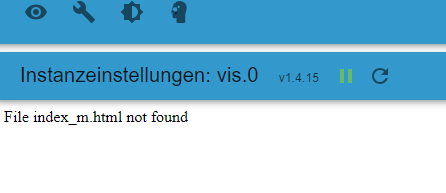
leider hat die VIS wohl ein großes Problem.
Ja, ist ein bekanntes VIS Problem nach dem Restore. Suche mal hier im Forum, da wirst du schnell fündig.
-
-
da stelle ich mich wohl etwas dümmlich an, beiträge finde ich einige. jedoch nur viel bla bla und keine lösung.
-
iobroker Docker startet nach Backup nicht.
Hallo zusammen, vlt kann mir jemand helfen.
Ich nutze einen Unraid Docker, welcher auch nach der Installation wunderbar startet.
Spiele ich jedoch mein Backup ein (egal welches) startet der Docker nachher nicht mehr. Die Backups an sich sind sauber.Ich vermute ich hatte nach der Dockerinstallation npm und javascript geupdatet.
Jedoch müsste er diese doch nach dem Löschen und neuinstallieren des Docker verwerfen und mit der Standardversion aus dem Docker arbeiten?Grüße



Hey! Du scheinst an dieser Unterhaltung interessiert zu sein, hast aber noch kein Konto.
Hast du es satt, bei jedem Besuch durch die gleichen Beiträge zu scrollen? Wenn du dich für ein Konto anmeldest, kommst du immer genau dorthin zurück, wo du zuvor warst, und kannst dich über neue Antworten benachrichtigen lassen (entweder per E-Mail oder Push-Benachrichtigung). Du kannst auch Lesezeichen speichern und Beiträge positiv bewerten, um anderen Community-Mitgliedern deine Wertschätzung zu zeigen.
Mit deinem Input könnte dieser Beitrag noch besser werden 💗
Registrieren AnmeldenSupport us
436
Online33.0k
Benutzer83.5k
Themen1.3m
Beiträge