
- ioBroker Community Home
- Deutsch
- Off Topic
- Grafana
- Fehler Grafana Update (sudo apt Update)




Fehler Grafana Update (sudo apt Update)
-
Der X-Server läuft noch:
*** X-Server-Setup ***
X-Server:       true
Desktop:
Terminal:       tty
Boot Target:    graphical.target
Und da läuft auch ein Druckerserver 'cupsd' mit. Druckst du mit der Kiste? Vermutlich eher nicht.
@thomas-braun Das hab ich total überlesen was bitte ist ein X-Server und wie kann ich den ausschalten...?
-
@teletapi sagte in Fehler Grafana Update (sudo apt Update):
das mit der simple-api wie das geht muss ich erstmal schauen....
Das wird in der Instanz gemacht. Stell 2. auf z. B. Fehler (error)

@meister-mopper
Danke das war noch vom letzten Fehler da hatte ich auf "silly" gestellt und vergessen wieder auf "info" zu gehn -
@thomas-braun Das hab ich total überlesen was bitte ist ein X-Server und wie kann ich den ausschalten...?
@teletapi sagte in Fehler Grafana Update (sudo apt Update):
was bitte ist ein X-Server
Da läuft (u.a.) die graphische Benutzeroberfläche drauf.
Kann man aussstellen, in dem man insudo raspi-configDen boot-Vorgang auf 'CLI without login' oder so ähnlich stellt.
Kann das aber gerade nicht nachschauen. -
@teletapi sagte in Fehler Grafana Update (sudo apt Update):
was bitte ist ein X-Server
Da läuft (u.a.) die graphische Benutzeroberfläche drauf.
Kann man aussstellen, in dem man insudo raspi-configDen boot-Vorgang auf 'CLI without login' oder so ähnlich stellt.
Kann das aber gerade nicht nachschauen.@thomas-braun said in Fehler Grafana Update (sudo apt Update):
CLI without login
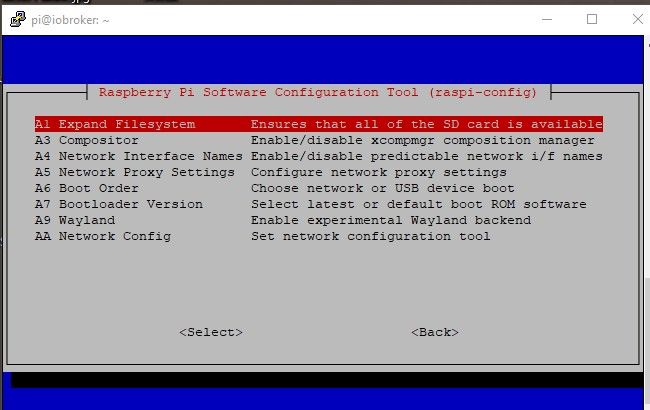
leider finde ich unter sudo Raspi-config nichts was mich dahingehend den X-server ausschalten lässt
Ich hatte irgendwann mal gesehen das ich wohl den raspi mit grafischer Oberfläche installiert hatte obwohl ich das garnicht wollte. Hat aber bisher nicht gestört.
Von daher hatte ich das bisher nicht weiter beachtet -
@thomas-braun said in Fehler Grafana Update (sudo apt Update):
CLI without login
leider finde ich unter sudo Raspi-config nichts was mich dahingehend den X-server ausschalten lässt
Ich hatte irgendwann mal gesehen das ich wohl den raspi mit grafischer Oberfläche installiert hatte obwohl ich das garnicht wollte. Hat aber bisher nicht gestört.
Von daher hatte ich das bisher nicht weiter beachtet@teletapi sagte in Fehler Grafana Update (sudo apt Update):
finde ich unter sudo Raspi-config
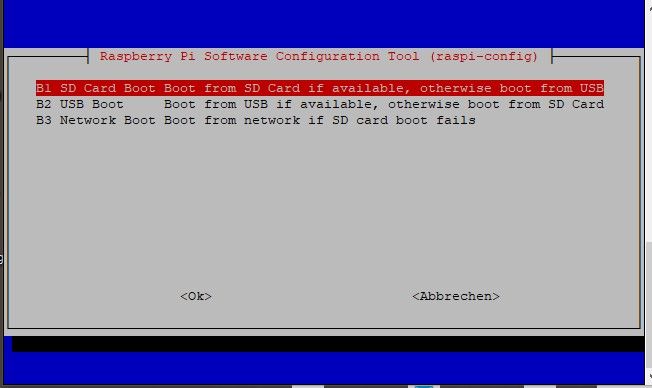
zeigen!
muss beim boot menü stehenkein Support per PN! - Fragen im Forum stellen - Benutzt das Voting rechts unten im Beitrag wenn er euch geholfen hat.
Das Forum freut sich über eine Spende. Benutzt dazu den Spendenbutton oben rechts. Danke!
der Installationsfixer: curl -fsL https://iobroker.net/fix.sh | bash - -
@teletapi sagte in Fehler Grafana Update (sudo apt Update):
finde ich unter sudo Raspi-config
zeigen!
muss beim boot menü stehen -
kein Support per PN! - Fragen im Forum stellen - Benutzt das Voting rechts unten im Beitrag wenn er euch geholfen hat.
Das Forum freut sich über eine Spende. Benutzt dazu den Spendenbutton oben rechts. Danke!
der Installationsfixer: curl -fsL https://iobroker.net/fix.sh | bash - -
@homora
Boah seid Ihr gut.
Danke
======== Start marking the full check here =========Skript v.2023-04-16 *** BASE SYSTEM *** Model : Raspberry Pi 4 Model B Rev 1.5 Architecture : aarch64 Docker : false Virtualization : none Distributor ID: Debian Description: Debian GNU/Linux 11 (bullseye) Release: 11 Codename: bullseye PRETTY_NAME="Debian GNU/Linux 11 (bullseye)" NAME="Debian GNU/Linux" VERSION_ID="11" VERSION="11 (bullseye)" VERSION_CODENAME=bullseye ID=debian HOME_URL="https://www.debian.org/" SUPPORT_URL="https://www.debian.org/support" BUG_REPORT_URL="https://bugs.debian.org/" Systemuptime and Load: 12:44:01 up 4 min, 1 user, load average: 2.51, 2.26, 1.03 CPU threads: 4 Raspberry only: throttled=0x0 Other values than 0x0 hint to temperature/voltage problems temp=49.1'C volt=0.9360V *** Time and Time Zones *** Local time: Thu 2023-08-31 12:44:02 CEST Universal time: Thu 2023-08-31 10:44:02 UTC RTC time: n/a Time zone: Europe/Berlin (CEST, +0200) System clock synchronized: yes NTP service: active RTC in local TZ: no *** User and Groups *** pi /home/pi pi adm dialout cdrom sudo audio video plugdev games users input render netdev lpadmin gpio i2c spi iobroker *** X-Server-Setup *** X-Server: false Desktop: Terminal: tty Boot Target: multi-user.target *** MEMORY *** total used free shared buff/cache available Mem: 7.8G 2.2G 4.1G 1.0M 1.4G 5.4G Swap: 99M 0B 99M Total: 7.9G 2.2G 4.2G 7811 M total memory 2248 M used memory 3010 M active memory 484 M inactive memory 4125 M free memory 99 M buffer memory 1337 M swap cache 99 M total swap 0 M used swap 99 M free swap Raspberry only: oom events: 0 lifetime oom required: 0 Mbytes total time in oom handler: 0 ms max time spent in oom handler: 0 ms *** FILESYSTEM *** Filesystem Type Size Used Avail Use% Mounted on /dev/root ext4 59G 9.3G 47G 17% / devtmpfs devtmpfs 3.6G 0 3.6G 0% /dev tmpfs tmpfs 3.9G 0 3.9G 0% /dev/shm tmpfs tmpfs 1.6G 1.2M 1.6G 1% /run tmpfs tmpfs 5.0M 4.0K 5.0M 1% /run/lock /dev/sda1 vfat 255M 31M 225M 13% /boot tmpfs tmpfs 782M 16K 782M 1% /run/user/1000 Messages concerning ext4 filesystem in dmesg: [Thu Aug 31 12:39:32 2023] Kernel command line: coherent_pool=1M 8250.nr_uarts=1 snd_bcm2835.enable_headphones=0 snd_bcm2835.enable_headphones=1 snd_bcm2835.enable_hdmi=1 snd_bcm2835.enable_hdmi=0 smsc95xx.macaddr=D8:3A:DD:13:A5:D1 vc_mem.mem_base=0x3eb00000 vc_mem.mem_size=0x3ff00000 console=tty1 root=PARTUUID=2c0392e1-02 rootfstype=ext4 fsck.repair=yes rootwait quiet splash plymouth.ignore-serial-consoles [Thu Aug 31 12:39:34 2023] EXT4-fs (sda2): mounted filesystem with ordered data mode. Quota mode: none. [Thu Aug 31 12:39:34 2023] VFS: Mounted root (ext4 filesystem) readonly on device 8:2. [Thu Aug 31 12:39:35 2023] EXT4-fs (sda2): re-mounted. Quota mode: none. Show mounted filesystems (real ones only): TARGET SOURCE FSTYPE OPTIONS / /dev/sda2 ext4 rw,noatime `-/boot /dev/sda1 vfat rw,relatime,fmask=0022,dmask=0022,codepage=437,iocharset=ascii,shortname=mixed,errors=remount-ro Files in neuralgic directories: /var: 1.9G /var/ 1.3G /var/log/journal/a9f1eae0dc5a48ddbf0e2a62c2227673 1.3G /var/log/journal 1.3G /var/log 447M /var/lib Archived and active journals take up 1.2G in the file system. /opt/iobroker/backups: 887M /opt/iobroker/backups/ /opt/iobroker/iobroker-data: 340M /opt/iobroker/iobroker-data/ 182M /opt/iobroker/iobroker-data/files 71M /opt/iobroker/iobroker-data/backup-objects 62M /opt/iobroker/iobroker-data/node-red/node_modules 62M /opt/iobroker/iobroker-data/node-red The five largest files in iobroker-data are: 33M /opt/iobroker/iobroker-data/files/iot.admin/static/js/main.1797d034.js.map 21M /opt/iobroker/iobroker-data/files/web.admin/static/js/main.e564fb87.js.map 16M /opt/iobroker/iobroker-data/objects.jsonl 8.5M /opt/iobroker/iobroker-data/files/iot.admin/static/js/main.1797d034.js 8.3M /opt/iobroker/iobroker-data/files/web.admin/static/js/main.e564fb87.js *** NodeJS-Installation *** /usr/bin/nodejs v18.17.1 /usr/bin/node v18.17.1 /usr/bin/npm 9.6.7 /usr/bin/npx 9.6.7 nodejs: Installed: 18.17.1-deb-1nodesource1 Candidate: 18.17.1-deb-1nodesource1 Version table: *** 18.17.1-deb-1nodesource1 500 500 https://deb.nodesource.com/node_18.x bullseye/main arm64 Packages 100 /var/lib/dpkg/status 12.22.12~dfsg-1~deb11u4 500 500 http://security.debian.org/debian-security bullseye-security/main arm64 Packages 12.22.12~dfsg-1~deb11u3 500 500 http://deb.debian.org/debian bullseye/main arm64 Packages Temp directories causing npm8 problem: 0 No problems detected *** ioBroker-Installation *** ioBroker Status iobroker is running on this host. Objects type: jsonl States type: jsonl MULTIHOSTSERVICE/enabled: false Core adapters versions js-controller: 5.0.12 admin: 6.9.1 javascript: 7.1.4 Adapters from github: 2 Adapter State + system.adapter.admin.0 : admin : iobroker - enabled, port: 8081, bind: 0.0.0.0, run as: admin + system.adapter.alexa2.0 : alexa2 : iobroker - enabled system.adapter.alias-manager.0 : alias-manager : iobroker - disabled + system.adapter.backitup.0 : backitup : iobroker - enabled + system.adapter.cloud.0 : cloud : iobroker - enabled + system.adapter.discovery.0 : discovery : iobroker - enabled + system.adapter.energiefluss.0 : energiefluss : iobroker - enabled + system.adapter.energiefluss.1 : energiefluss : iobroker - enabled + system.adapter.fritzdect.0 : fritzdect : iobroker - enabled + system.adapter.hm-rega.0 : hm-rega : iobroker - enabled + system.adapter.hm-rpc.0 : hm-rpc : iobroker - enabled, port: 18701 + system.adapter.hm-rpc.1 : hm-rpc : iobroker - enabled, port: 12001 + system.adapter.hm-rpc.2 : hm-rpc : iobroker - enabled, port: 12010 + system.adapter.hm-rpc.3 : hm-rpc : iobroker - enabled, port: 0 + system.adapter.hue-extended.0 : hue-extended : iobroker - enabled system.adapter.ical.0 : ical : iobroker - enabled + system.adapter.influxdb.0 : influxdb : iobroker - enabled, port: 8086 + system.adapter.info.0 : info : iobroker - enabled + system.adapter.iot.0 : iot : iobroker - enabled + system.adapter.jarvis.0 : jarvis : iobroker - enabled + system.adapter.javascript.0 : javascript : iobroker - enabled system.adapter.modbus.0 : modbus : iobroker - disabled + system.adapter.mqtt.0 : mqtt : iobroker - enabled, port: 1883, bind: 0.0.0.0 + system.adapter.net-tools.0 : net-tools : iobroker - enabled + system.adapter.node-red.0 : node-red : iobroker - enabled, port: 1880, bind: 0.0.0.0 + system.adapter.nuki.0 : nuki : iobroker - enabled + system.adapter.opendtu.0 : opendtu : iobroker - enabled + system.adapter.panasonic-viera.0 : panasonic-viera : iobroker - enabled + system.adapter.ping.0 : ping : iobroker - enabled + system.adapter.rpi2.0 : rpi2 : iobroker - enabled + system.adapter.simple-api.0 : simple-api : iobroker - enabled, port: 8087, bind: 192.168.178.82, run as: admin system.adapter.smartmeter.0 : smartmeter : iobroker - disabled system.adapter.smartmeter.1 : smartmeter : iobroker - disabled + system.adapter.socketio.0 : socketio : iobroker - enabled, port: 8084, bind: 0.0.0.0, run as: admin + system.adapter.sonoff.0 : sonoff : iobroker - enabled, port: 1886, bind: 0.0.0.0 + system.adapter.sourceanalytix.0 : sourceanalytix : iobroker - enabled + system.adapter.telegram.0 : telegram : iobroker - enabled, port: 8443, bind: 0.0.0.0 + system.adapter.tr-064.0 : tr-064 : iobroker - enabled + system.adapter.web.0 : web : iobroker - enabled, port: 8082, bind: 0.0.0.0, run as: admin + instance is alive Enabled adapters with bindings + system.adapter.admin.0 : admin : iobroker - enabled, port: 8081, bind: 0.0.0.0, run as: admin + system.adapter.hm-rpc.0 : hm-rpc : iobroker - enabled, port: 18701 + system.adapter.hm-rpc.1 : hm-rpc : iobroker - enabled, port: 12001 + system.adapter.hm-rpc.2 : hm-rpc : iobroker - enabled, port: 12010 + system.adapter.hm-rpc.3 : hm-rpc : iobroker - enabled, port: 0 + system.adapter.influxdb.0 : influxdb : iobroker - enabled, port: 8086 + system.adapter.mqtt.0 : mqtt : iobroker - enabled, port: 1883, bind: 0.0.0.0 + system.adapter.node-red.0 : node-red : iobroker - enabled, port: 1880, bind: 0.0.0.0 + system.adapter.simple-api.0 : simple-api : iobroker - enabled, port: 8087, bind: 192.168.178.82, run as: admin + system.adapter.socketio.0 : socketio : iobroker - enabled, port: 8084, bind: 0.0.0.0, run as: admin + system.adapter.sonoff.0 : sonoff : iobroker - enabled, port: 1886, bind: 0.0.0.0 + system.adapter.telegram.0 : telegram : iobroker - enabled, port: 8443, bind: 0.0.0.0 + system.adapter.web.0 : web : iobroker - enabled, port: 8082, bind: 0.0.0.0, run as: admin ioBroker-Repositories stable : http://download.iobroker.net/sources-dist.json beta : http://download.iobroker.net/sources-dist-latest.json Active repo(s): beta Installed ioBroker-Instances Used repository: beta Adapter "admin" : 6.9.1 , installed 6.9.1 Adapter "alexa2" : 3.24.1 , installed 3.24.1 Adapter "alias-manager": 1.2.6 , installed 1.2.6 Adapter "backitup" : 2.7.0 , installed 2.7.0 Adapter "cloud" : 4.4.1 , installed 4.4.1 Adapter "discovery" : 3.2.0 , installed 3.2.0 Adapter "fritzdect" : 2.3.1 , installed 2.3.1 Adapter "hm-rega" : 3.0.47 , installed 3.0.47 Adapter "hm-rpc" : 1.15.19 , installed 1.15.19 Adapter "hue-extended" : 2.0.0 , installed 2.0.0 Adapter "ical" : 1.13.3 , installed 1.13.3 Adapter "influxdb" : 3.2.0 , installed 3.2.0 Adapter "info" : 1.9.26 , installed 1.9.26 Adapter "iot" : 2.0.11 , installed 2.0.11 Adapter "jarvis" : 3.1.8 , installed 3.1.9-beta.2 Adapter "javascript" : 7.1.4 , installed 7.1.4 Controller "js-controller": 5.0.12 , installed 5.0.12 Adapter "modbus" : 5.0.11 , installed 5.0.11 Adapter "mqtt" : 4.1.1 , installed 4.1.1 Adapter "net-tools" : 0.2.0 , installed 0.2.0 Adapter "node-red" : 4.0.3 , installed 4.0.3 Adapter "nuki" : 1.6.0 , installed 1.6.0 Adapter "opendtu" : 0.1.7 , installed 0.1.7 Adapter "panasonic-viera": 2.0.0 , installed 2.0.0 Adapter "ping" : 1.6.2 , installed 1.6.2 Adapter "rpi2" : 1.3.2 , installed 1.3.2 Adapter "simple-api" : 2.7.2 , installed 2.7.2 Adapter "smartmeter" : 3.3.4 , installed 3.3.4 Adapter "socketio" : 6.5.2 , installed 6.5.2 Adapter "sonoff" : 2.5.7 , installed 2.5.7 Adapter "sourceanalytix": 0.4.14 , installed 0.4.14 Adapter "telegram" : 1.16.0 , installed 1.16.0 Adapter "tr-064" : 4.2.18 , installed 4.2.18 Adapter "web" : 6.1.0 , installed 6.1.0 Adapter "ws" : 2.5.3 , installed 2.5.3 Objects and States Please stand by - This may take a while Objects: 10140 States: 9480 *** OS-Repositories and Updates *** Hit:1 http://archive.raspberrypi.org/debian bullseye InRelease Hit:2 http://deb.debian.org/debian bullseye InRelease Hit:3 https://repos.influxdata.com/debian stable InRelease Hit:4 https://apt.grafana.com stable InRelease Hit:5 http://security.debian.org/debian-security bullseye-security InRelease Hit:6 http://deb.debian.org/debian bullseye-updates InRelease Get:7 https://deb.nodesource.com/node_18.x bullseye InRelease [4586 B] Fetched 4586 B in 2s (2313 B/s) Reading package lists... Pending Updates: 0 *** Listening Ports *** Active Internet connections (only servers) Proto Recv-Q Send-Q Local Address Foreign Address State User Inode PID/Program name tcp 0 0 192.168.178.82:18701 0.0.0.0:* LISTEN 1001 15145 1280/io.hm-rpc.0 tcp 0 0 0.0.0.0:1880 0.0.0.0:* LISTEN 1001 15119 1210/node-red tcp 0 0 0.0.0.0:1883 0.0.0.0:* LISTEN 116 14669 568/mosquitto tcp 0 0 0.0.0.0:1886 0.0.0.0:* LISTEN 1001 18264 1490/io.sonoff.0 tcp 0 0 0.0.0.0:22 0.0.0.0:* LISTEN 0 15685 577/sshd: /usr/sbin tcp 0 0 0.0.0.0:8400 0.0.0.0:* LISTEN 1001 22259 1949/io.jarvis.0 tcp 0 0 192.168.178.82:8087 0.0.0.0:* LISTEN 1001 23118 2087/io.simple-api. tcp 0 0 192.168.178.82:12010 0.0.0.0:* LISTEN 1001 17510 1318/io.hm-rpc.2 tcp 0 0 192.168.178.82:12001 0.0.0.0:* LISTEN 1001 15158 1297/io.hm-rpc.1 tcp 0 0 127.0.0.1:9001 0.0.0.0:* LISTEN 1001 16530 655/iobroker.js-con tcp 0 0 127.0.0.1:9000 0.0.0.0:* LISTEN 1001 16537 655/iobroker.js-con tcp 0 0 127.0.0.1:631 0.0.0.0:* LISTEN 0 14691 536/cupsd tcp 0 0 192.168.178.82:2001 0.0.0.0:* LISTEN 1001 17633 1370/io.hm-rpc.3 tcp6 0 0 ::1:631 :::* LISTEN 0 14690 536/cupsd tcp6 0 0 :::1883 :::* LISTEN 116 14670 568/mosquitto tcp6 0 0 :::22 :::* LISTEN 0 15687 577/sshd: /usr/sbin tcp6 0 0 :::8081 :::* LISTEN 1001 11941 977/io.admin.0 tcp6 0 0 :::8082 :::* LISTEN 1001 20296 1740/io.web.0 tcp6 0 0 :::8084 :::* LISTEN 1001 25046 2149/io.socketio.0 tcp6 0 0 :::8086 :::* LISTEN 999 15705 550/influxd tcp6 0 0 :::3000 :::* LISTEN 117 14951 654/grafana udp 0 0 0.0.0.0:5353 0.0.0.0:* 108 14547 402/avahi-daemon: r udp 0 0 0.0.0.0:68 0.0.0.0:* 0 14735 482/dhcpcd udp 0 0 0.0.0.0:49440 0.0.0.0:* 108 14549 402/avahi-daemon: r udp 0 0 0.0.0.0:631 0.0.0.0:* 0 14710 617/cups-browsed udp6 0 0 :::5353 :::* 108 14548 402/avahi-daemon: r udp6 0 0 :::39629 :::* 108 14550 402/avahi-daemon: r udp6 0 0 :::546 :::* 0 11745 482/dhcpcd *** Log File - Last 25 Lines *** 2023-08-31 12:42:10.347 - info: socketio.0 (2149) socket.io server listening on port 8084 2023-08-31 12:42:12.375 - info: sourceanalytix.0 (2291) starting. Version 0.4.14 in /opt/iobroker/node_modules/iobroker.sourceanalytix, node: v18.17.1, js-controller: 5.0.12 2023-08-31 12:42:12.528 - info: sourceanalytix.0 (2291) Welcome to SourceAnalytix, making things ready ... 2023-08-31 12:42:12.895 - info: opendtu.0 (2325) starting. Version 0.1.7 in /opt/iobroker/node_modules/iobroker.opendtu, node: v18.17.1, js-controller: 5.0.12 2023-08-31 12:42:12.908 - info: sourceanalytix.0 (2291) Found 4 SourceAnalytix enabled states 2023-08-31 12:42:12.909 - info: sourceanalytix.0 (2291) Initialising (1 of 4) "mqtt.0.Wechselrichter.total.YieldDay" 2023-08-31 12:42:14.857 - info: energiefluss.1 (2347) starting. Version 3.6.0 (non-npm: SKB-CGN/ioBroker.energiefluss) in /opt/iobroker/node_modules/iobroker.energiefluss, node: v18.17.1, js-controller: 5.0.12 2023-08-31 12:42:14.950 - info: energiefluss.1 (2347) Starting Energiefluss Adapter 2023-08-31 12:42:15.389 - info: energiefluss.1 (2347) Adapter started and listening to 5 States 2023-08-31 12:42:24.080 - info: sourceanalytix.0 (2291) Initialization of mqtt.0.Wechselrichter.total.YieldDay successfully 2023-08-31 12:42:24.082 - info: sourceanalytix.0 (2291) Initialising (2 of 4) "mqtt.0.Wechselrichter.total.YieldTotal" 2023-08-31 12:42:24.713 - info: cloud.0 (1779) Trying to connect as system.user.admin to cloud 2023-08-31 12:42:24.839 - info: cloud.0 (1779) Connection changed: connect 2023-08-31 12:42:30.785 - info: sourceanalytix.0 (2291) Initialization of mqtt.0.Wechselrichter.total.YieldTotal successfully 2023-08-31 12:42:30.786 - info: sourceanalytix.0 (2291) Initialising (3 of 4) "sonoff.0.Tasmota Energie LG E320.E320_Total_in" 2023-08-31 12:42:36.403 - info: sourceanalytix.0 (2291) Initialization of sonoff.0.Tasmota Energie LG E320.E320_Total_in successfully 2023-08-31 12:42:36.404 - info: sourceanalytix.0 (2291) Initialising (4 of 4) "sonoff.0.Tasmota Energie LG E320.E320_Total_out" 2023-08-31 12:42:41.703 - info: sourceanalytix.0 (2291) Initialization of sonoff.0.Tasmota Energie LG E320.E320_Total_out successfully 2023-08-31 12:42:41.745 - info: sourceanalytix.0 (2291) Successfully activated SourceAnalytix for 4 of 4 states, will do my Job until you stop me! 2023-08-31 12:42:45.680 - info: alexa2.0 (1356) No smart home devices to query 2023-08-31 12:42:50.642 - info: alexa2.0 (1356) Subscribing to states... 2023-08-31 12:42:50.652 - info: alexa2.0 (1356) Deleting the following states: ["Smart-Home-Devices.0b7e87f5-3204-4300-963e-f9d1c28910d4","Smart-Home-Devices.175077c8-5338-4770-a9e0-99967be386af","Smart-Home-Devices.8f896317-3a98-4dfa-976a-d79fa3009886","Smart-Home-Devices.bac632dd-ca10-43b4-91df-0e4db4dbddd3","Smart-Home-Devices.cd614394-ef0d-47d6-ab5d-09c680e762fc","Smart-Home-Devices.844e1fcb-f324-4e87-8c89-c7086bde3b84","Smart-Home-Devices.d09a9c49-a787-4db1-bdd2-b4211bb0d02f","Smart-Home-Devices.0b7e87f5-3204-4300-963e-f9d1c28910d4.#delete","Smart-Home-Devices.0b7e87f5-3204-4300-963e-f9d1c28910d4.#enabled","Smart-Home-Devices.0b7e87f5-3204-4300-963e-f9d1c28910d4.#includeInAllQuery","Smart-Home-Devices.0b7e87f5-3204-4300-963e-f9d1c28910d4.#query","Smart-Home-Devices.0b7e87f5-3204-4300-963e-f9d1c28910d4.powerState","Smart-Home-Devices.175077c8-5338-4770-a9e0-99967be386af.#delete","Smart-Home-Devices.175077c8-5338-4770-a9e0-99967be386af.#enabled","Smart-Home-Devices.175077c8-5338-4770-a9e0-99967be386af.#includeInAllQuery","Smart-Home-Devices.175077c8-5338-4770-a9e0-99967be386af.#query","Smart-Home-Devices.175077c8-5338-4770-a9e0-99967be386af.brightness","Smart-Home-Devices.175077c8-5338-4770-a9e0-99967be386af.colorTemperatureInKelvin","Smart-Home-Devices.175077c8-5338-4770-a9e0-99967be386af.colorTemperatureName","Smart-Home-Devices.175077c8-5338-4770-a9e0-99967be386af.powerState","Smart-Home-Devices.8f896317-3a98-4dfa-976a-d79fa3009886.#delete","Smart-Home-Devices.8f896317-3a98-4dfa-976a-d79fa3009886.#enabled","Smart-Home-Devices.8f896317-3a98-4dfa-976a-d79fa3009886.#includeInAllQuery","Smart-Home-Devices.8f896317-3a98-4dfa-976a-d79fa3009886.#query","Smart-Home-Devices.8f896317-3a98-4dfa-976a-d79fa3009886.powerState","Smart-Home-Devices.bac632dd-ca10-43b4-91df-0e4db4dbddd3.#delete","Smart-Home-Devices.bac632dd-ca10-43b4-91df-0e4db4dbddd3.#enabled","Smart-Home-Devices.bac632dd-ca10-43b4-91df-0e4db4dbddd3.#includeInAllQuery","Smart-Home-Devices.bac632dd-ca10-43b4-91df-0e4db4dbddd3.#query","Smart-Home-Devices.bac632dd-ca10-43b4-91df-0e4db4dbddd3.brightness","Smart-Home-Devices.bac632dd-ca10-43b4-91df-0e4db4dbddd3.colorTemperatureInKelvin","Smart-Home-Devices.bac632dd-ca10-43b4-91df-0e4db4dbddd3.colorTemperatureName","Smart-Home-Devices.bac632dd-ca10-43b4-91df-0e4db4dbddd3.powerState","Smart-Home-Devices.cd614394-ef0d-47d6-ab5d-09c680e762fc.#delete","Smart-Home-Devices.cd614394-ef0d-47d6-ab5d-09c680e762fc.#enabled","Smart-Home-Devices.cd614394-ef0d-47d6-ab5d-09c680e762fc.#includeInAllQuery","Smart-Home-Devices.cd614394-ef0d-47d6-ab5d-09c680e762fc.#query","Smart-Home-Devices.cd614394-ef0d-47d6-ab5d-09c680e762fc.powerState","Smart-Home-Devices.844e1fcb-f324-4e87-8c89-c7086bde3b84.#enabled","Smart-Home-Devices.844e1fcb-f324-4e87-8c89-c7086bde3b84.#delete","Smart-Home-Devices.844e1fcb-f324-4e87-8c89-c7086bde3b84.powerState","Smart-Home-Devices.844e1fcb-f324-4e87-8c89-c7086bde3b84.colorTemperatureName","Smart-Home-Devices.844e1fcb-f324-4e87-8c89-c7086bde3b84.colorTemperatureInKelvin","Smart-Home-Devices.844e1fcb-f324-4e87-8c89-c7086bde3b84.brightness","Smart-Home-Devices.844e1fcb-f324-4e87-8c89-c7086bde3b84.#query","Smart-Home-Devices.844e1fcb-f324-4e87-8c89-c7086bde3b84.#includeInAllQuery","Smart-Home-Devices.d09a9c49-a787-4db1-bdd2-b4211bb0d02f.#enabled","Smart-Home-Devices.d09a9c49-a787-4db1-bdd2-b4211bb0d02f.#delete","Smart-Home-Devices.d09a9c49-a787-4db1-bdd2-b4211bb0d02f.powerState","Smart-Home-Devices.d09a9c49-a787-4db1-bdd2-b4211bb0d02f.connectivity","Smart-Home-Devices.d09a9c49-a787-4db1-bdd2-b4211bb0d02f.connectivity-reason","Smart-Home-Devices.d09a9c49-a787-4db1-bdd2-b4211bb0d02f.#query","Smart-Home-Devices.d09a9c49-a787-4db1-bdd2-b4211bb0d02f.#includeInAllQuery"] 2023-08-31 12:42:52.635 - info: alexa2.0 (1356) Alexa-Push-Connection (macDms = true) established. Disable Polling 2023-08-31 12:43:00.975 - info: alexa2.0 (1356) Initialization Done ... 2023-08-31 12:43:49.926 - info: web.0 (1740) <== Disconnect system.user.admin from ::ffff:192.168.178.63============ Mark until here for C&P =============
iob diag has finished.
-
@homora
Boah seid Ihr gut.
Danke
======== Start marking the full check here =========Skript v.2023-04-16 *** BASE SYSTEM *** Model : Raspberry Pi 4 Model B Rev 1.5 Architecture : aarch64 Docker : false Virtualization : none Distributor ID: Debian Description: Debian GNU/Linux 11 (bullseye) Release: 11 Codename: bullseye PRETTY_NAME="Debian GNU/Linux 11 (bullseye)" NAME="Debian GNU/Linux" VERSION_ID="11" VERSION="11 (bullseye)" VERSION_CODENAME=bullseye ID=debian HOME_URL="https://www.debian.org/" SUPPORT_URL="https://www.debian.org/support" BUG_REPORT_URL="https://bugs.debian.org/" Systemuptime and Load: 12:44:01 up 4 min, 1 user, load average: 2.51, 2.26, 1.03 CPU threads: 4 Raspberry only: throttled=0x0 Other values than 0x0 hint to temperature/voltage problems temp=49.1'C volt=0.9360V *** Time and Time Zones *** Local time: Thu 2023-08-31 12:44:02 CEST Universal time: Thu 2023-08-31 10:44:02 UTC RTC time: n/a Time zone: Europe/Berlin (CEST, +0200) System clock synchronized: yes NTP service: active RTC in local TZ: no *** User and Groups *** pi /home/pi pi adm dialout cdrom sudo audio video plugdev games users input render netdev lpadmin gpio i2c spi iobroker *** X-Server-Setup *** X-Server: false Desktop: Terminal: tty Boot Target: multi-user.target *** MEMORY *** total used free shared buff/cache available Mem: 7.8G 2.2G 4.1G 1.0M 1.4G 5.4G Swap: 99M 0B 99M Total: 7.9G 2.2G 4.2G 7811 M total memory 2248 M used memory 3010 M active memory 484 M inactive memory 4125 M free memory 99 M buffer memory 1337 M swap cache 99 M total swap 0 M used swap 99 M free swap Raspberry only: oom events: 0 lifetime oom required: 0 Mbytes total time in oom handler: 0 ms max time spent in oom handler: 0 ms *** FILESYSTEM *** Filesystem Type Size Used Avail Use% Mounted on /dev/root ext4 59G 9.3G 47G 17% / devtmpfs devtmpfs 3.6G 0 3.6G 0% /dev tmpfs tmpfs 3.9G 0 3.9G 0% /dev/shm tmpfs tmpfs 1.6G 1.2M 1.6G 1% /run tmpfs tmpfs 5.0M 4.0K 5.0M 1% /run/lock /dev/sda1 vfat 255M 31M 225M 13% /boot tmpfs tmpfs 782M 16K 782M 1% /run/user/1000 Messages concerning ext4 filesystem in dmesg: [Thu Aug 31 12:39:32 2023] Kernel command line: coherent_pool=1M 8250.nr_uarts=1 snd_bcm2835.enable_headphones=0 snd_bcm2835.enable_headphones=1 snd_bcm2835.enable_hdmi=1 snd_bcm2835.enable_hdmi=0 smsc95xx.macaddr=D8:3A:DD:13:A5:D1 vc_mem.mem_base=0x3eb00000 vc_mem.mem_size=0x3ff00000 console=tty1 root=PARTUUID=2c0392e1-02 rootfstype=ext4 fsck.repair=yes rootwait quiet splash plymouth.ignore-serial-consoles [Thu Aug 31 12:39:34 2023] EXT4-fs (sda2): mounted filesystem with ordered data mode. Quota mode: none. [Thu Aug 31 12:39:34 2023] VFS: Mounted root (ext4 filesystem) readonly on device 8:2. [Thu Aug 31 12:39:35 2023] EXT4-fs (sda2): re-mounted. Quota mode: none. Show mounted filesystems (real ones only): TARGET SOURCE FSTYPE OPTIONS / /dev/sda2 ext4 rw,noatime `-/boot /dev/sda1 vfat rw,relatime,fmask=0022,dmask=0022,codepage=437,iocharset=ascii,shortname=mixed,errors=remount-ro Files in neuralgic directories: /var: 1.9G /var/ 1.3G /var/log/journal/a9f1eae0dc5a48ddbf0e2a62c2227673 1.3G /var/log/journal 1.3G /var/log 447M /var/lib Archived and active journals take up 1.2G in the file system. /opt/iobroker/backups: 887M /opt/iobroker/backups/ /opt/iobroker/iobroker-data: 340M /opt/iobroker/iobroker-data/ 182M /opt/iobroker/iobroker-data/files 71M /opt/iobroker/iobroker-data/backup-objects 62M /opt/iobroker/iobroker-data/node-red/node_modules 62M /opt/iobroker/iobroker-data/node-red The five largest files in iobroker-data are: 33M /opt/iobroker/iobroker-data/files/iot.admin/static/js/main.1797d034.js.map 21M /opt/iobroker/iobroker-data/files/web.admin/static/js/main.e564fb87.js.map 16M /opt/iobroker/iobroker-data/objects.jsonl 8.5M /opt/iobroker/iobroker-data/files/iot.admin/static/js/main.1797d034.js 8.3M /opt/iobroker/iobroker-data/files/web.admin/static/js/main.e564fb87.js *** NodeJS-Installation *** /usr/bin/nodejs v18.17.1 /usr/bin/node v18.17.1 /usr/bin/npm 9.6.7 /usr/bin/npx 9.6.7 nodejs: Installed: 18.17.1-deb-1nodesource1 Candidate: 18.17.1-deb-1nodesource1 Version table: *** 18.17.1-deb-1nodesource1 500 500 https://deb.nodesource.com/node_18.x bullseye/main arm64 Packages 100 /var/lib/dpkg/status 12.22.12~dfsg-1~deb11u4 500 500 http://security.debian.org/debian-security bullseye-security/main arm64 Packages 12.22.12~dfsg-1~deb11u3 500 500 http://deb.debian.org/debian bullseye/main arm64 Packages Temp directories causing npm8 problem: 0 No problems detected *** ioBroker-Installation *** ioBroker Status iobroker is running on this host. Objects type: jsonl States type: jsonl MULTIHOSTSERVICE/enabled: false Core adapters versions js-controller: 5.0.12 admin: 6.9.1 javascript: 7.1.4 Adapters from github: 2 Adapter State + system.adapter.admin.0 : admin : iobroker - enabled, port: 8081, bind: 0.0.0.0, run as: admin + system.adapter.alexa2.0 : alexa2 : iobroker - enabled system.adapter.alias-manager.0 : alias-manager : iobroker - disabled + system.adapter.backitup.0 : backitup : iobroker - enabled + system.adapter.cloud.0 : cloud : iobroker - enabled + system.adapter.discovery.0 : discovery : iobroker - enabled + system.adapter.energiefluss.0 : energiefluss : iobroker - enabled + system.adapter.energiefluss.1 : energiefluss : iobroker - enabled + system.adapter.fritzdect.0 : fritzdect : iobroker - enabled + system.adapter.hm-rega.0 : hm-rega : iobroker - enabled + system.adapter.hm-rpc.0 : hm-rpc : iobroker - enabled, port: 18701 + system.adapter.hm-rpc.1 : hm-rpc : iobroker - enabled, port: 12001 + system.adapter.hm-rpc.2 : hm-rpc : iobroker - enabled, port: 12010 + system.adapter.hm-rpc.3 : hm-rpc : iobroker - enabled, port: 0 + system.adapter.hue-extended.0 : hue-extended : iobroker - enabled system.adapter.ical.0 : ical : iobroker - enabled + system.adapter.influxdb.0 : influxdb : iobroker - enabled, port: 8086 + system.adapter.info.0 : info : iobroker - enabled + system.adapter.iot.0 : iot : iobroker - enabled + system.adapter.jarvis.0 : jarvis : iobroker - enabled + system.adapter.javascript.0 : javascript : iobroker - enabled system.adapter.modbus.0 : modbus : iobroker - disabled + system.adapter.mqtt.0 : mqtt : iobroker - enabled, port: 1883, bind: 0.0.0.0 + system.adapter.net-tools.0 : net-tools : iobroker - enabled + system.adapter.node-red.0 : node-red : iobroker - enabled, port: 1880, bind: 0.0.0.0 + system.adapter.nuki.0 : nuki : iobroker - enabled + system.adapter.opendtu.0 : opendtu : iobroker - enabled + system.adapter.panasonic-viera.0 : panasonic-viera : iobroker - enabled + system.adapter.ping.0 : ping : iobroker - enabled + system.adapter.rpi2.0 : rpi2 : iobroker - enabled + system.adapter.simple-api.0 : simple-api : iobroker - enabled, port: 8087, bind: 192.168.178.82, run as: admin system.adapter.smartmeter.0 : smartmeter : iobroker - disabled system.adapter.smartmeter.1 : smartmeter : iobroker - disabled + system.adapter.socketio.0 : socketio : iobroker - enabled, port: 8084, bind: 0.0.0.0, run as: admin + system.adapter.sonoff.0 : sonoff : iobroker - enabled, port: 1886, bind: 0.0.0.0 + system.adapter.sourceanalytix.0 : sourceanalytix : iobroker - enabled + system.adapter.telegram.0 : telegram : iobroker - enabled, port: 8443, bind: 0.0.0.0 + system.adapter.tr-064.0 : tr-064 : iobroker - enabled + system.adapter.web.0 : web : iobroker - enabled, port: 8082, bind: 0.0.0.0, run as: admin + instance is alive Enabled adapters with bindings + system.adapter.admin.0 : admin : iobroker - enabled, port: 8081, bind: 0.0.0.0, run as: admin + system.adapter.hm-rpc.0 : hm-rpc : iobroker - enabled, port: 18701 + system.adapter.hm-rpc.1 : hm-rpc : iobroker - enabled, port: 12001 + system.adapter.hm-rpc.2 : hm-rpc : iobroker - enabled, port: 12010 + system.adapter.hm-rpc.3 : hm-rpc : iobroker - enabled, port: 0 + system.adapter.influxdb.0 : influxdb : iobroker - enabled, port: 8086 + system.adapter.mqtt.0 : mqtt : iobroker - enabled, port: 1883, bind: 0.0.0.0 + system.adapter.node-red.0 : node-red : iobroker - enabled, port: 1880, bind: 0.0.0.0 + system.adapter.simple-api.0 : simple-api : iobroker - enabled, port: 8087, bind: 192.168.178.82, run as: admin + system.adapter.socketio.0 : socketio : iobroker - enabled, port: 8084, bind: 0.0.0.0, run as: admin + system.adapter.sonoff.0 : sonoff : iobroker - enabled, port: 1886, bind: 0.0.0.0 + system.adapter.telegram.0 : telegram : iobroker - enabled, port: 8443, bind: 0.0.0.0 + system.adapter.web.0 : web : iobroker - enabled, port: 8082, bind: 0.0.0.0, run as: admin ioBroker-Repositories stable : http://download.iobroker.net/sources-dist.json beta : http://download.iobroker.net/sources-dist-latest.json Active repo(s): beta Installed ioBroker-Instances Used repository: beta Adapter "admin" : 6.9.1 , installed 6.9.1 Adapter "alexa2" : 3.24.1 , installed 3.24.1 Adapter "alias-manager": 1.2.6 , installed 1.2.6 Adapter "backitup" : 2.7.0 , installed 2.7.0 Adapter "cloud" : 4.4.1 , installed 4.4.1 Adapter "discovery" : 3.2.0 , installed 3.2.0 Adapter "fritzdect" : 2.3.1 , installed 2.3.1 Adapter "hm-rega" : 3.0.47 , installed 3.0.47 Adapter "hm-rpc" : 1.15.19 , installed 1.15.19 Adapter "hue-extended" : 2.0.0 , installed 2.0.0 Adapter "ical" : 1.13.3 , installed 1.13.3 Adapter "influxdb" : 3.2.0 , installed 3.2.0 Adapter "info" : 1.9.26 , installed 1.9.26 Adapter "iot" : 2.0.11 , installed 2.0.11 Adapter "jarvis" : 3.1.8 , installed 3.1.9-beta.2 Adapter "javascript" : 7.1.4 , installed 7.1.4 Controller "js-controller": 5.0.12 , installed 5.0.12 Adapter "modbus" : 5.0.11 , installed 5.0.11 Adapter "mqtt" : 4.1.1 , installed 4.1.1 Adapter "net-tools" : 0.2.0 , installed 0.2.0 Adapter "node-red" : 4.0.3 , installed 4.0.3 Adapter "nuki" : 1.6.0 , installed 1.6.0 Adapter "opendtu" : 0.1.7 , installed 0.1.7 Adapter "panasonic-viera": 2.0.0 , installed 2.0.0 Adapter "ping" : 1.6.2 , installed 1.6.2 Adapter "rpi2" : 1.3.2 , installed 1.3.2 Adapter "simple-api" : 2.7.2 , installed 2.7.2 Adapter "smartmeter" : 3.3.4 , installed 3.3.4 Adapter "socketio" : 6.5.2 , installed 6.5.2 Adapter "sonoff" : 2.5.7 , installed 2.5.7 Adapter "sourceanalytix": 0.4.14 , installed 0.4.14 Adapter "telegram" : 1.16.0 , installed 1.16.0 Adapter "tr-064" : 4.2.18 , installed 4.2.18 Adapter "web" : 6.1.0 , installed 6.1.0 Adapter "ws" : 2.5.3 , installed 2.5.3 Objects and States Please stand by - This may take a while Objects: 10140 States: 9480 *** OS-Repositories and Updates *** Hit:1 http://archive.raspberrypi.org/debian bullseye InRelease Hit:2 http://deb.debian.org/debian bullseye InRelease Hit:3 https://repos.influxdata.com/debian stable InRelease Hit:4 https://apt.grafana.com stable InRelease Hit:5 http://security.debian.org/debian-security bullseye-security InRelease Hit:6 http://deb.debian.org/debian bullseye-updates InRelease Get:7 https://deb.nodesource.com/node_18.x bullseye InRelease [4586 B] Fetched 4586 B in 2s (2313 B/s) Reading package lists... Pending Updates: 0 *** Listening Ports *** Active Internet connections (only servers) Proto Recv-Q Send-Q Local Address Foreign Address State User Inode PID/Program name tcp 0 0 192.168.178.82:18701 0.0.0.0:* LISTEN 1001 15145 1280/io.hm-rpc.0 tcp 0 0 0.0.0.0:1880 0.0.0.0:* LISTEN 1001 15119 1210/node-red tcp 0 0 0.0.0.0:1883 0.0.0.0:* LISTEN 116 14669 568/mosquitto tcp 0 0 0.0.0.0:1886 0.0.0.0:* LISTEN 1001 18264 1490/io.sonoff.0 tcp 0 0 0.0.0.0:22 0.0.0.0:* LISTEN 0 15685 577/sshd: /usr/sbin tcp 0 0 0.0.0.0:8400 0.0.0.0:* LISTEN 1001 22259 1949/io.jarvis.0 tcp 0 0 192.168.178.82:8087 0.0.0.0:* LISTEN 1001 23118 2087/io.simple-api. tcp 0 0 192.168.178.82:12010 0.0.0.0:* LISTEN 1001 17510 1318/io.hm-rpc.2 tcp 0 0 192.168.178.82:12001 0.0.0.0:* LISTEN 1001 15158 1297/io.hm-rpc.1 tcp 0 0 127.0.0.1:9001 0.0.0.0:* LISTEN 1001 16530 655/iobroker.js-con tcp 0 0 127.0.0.1:9000 0.0.0.0:* LISTEN 1001 16537 655/iobroker.js-con tcp 0 0 127.0.0.1:631 0.0.0.0:* LISTEN 0 14691 536/cupsd tcp 0 0 192.168.178.82:2001 0.0.0.0:* LISTEN 1001 17633 1370/io.hm-rpc.3 tcp6 0 0 ::1:631 :::* LISTEN 0 14690 536/cupsd tcp6 0 0 :::1883 :::* LISTEN 116 14670 568/mosquitto tcp6 0 0 :::22 :::* LISTEN 0 15687 577/sshd: /usr/sbin tcp6 0 0 :::8081 :::* LISTEN 1001 11941 977/io.admin.0 tcp6 0 0 :::8082 :::* LISTEN 1001 20296 1740/io.web.0 tcp6 0 0 :::8084 :::* LISTEN 1001 25046 2149/io.socketio.0 tcp6 0 0 :::8086 :::* LISTEN 999 15705 550/influxd tcp6 0 0 :::3000 :::* LISTEN 117 14951 654/grafana udp 0 0 0.0.0.0:5353 0.0.0.0:* 108 14547 402/avahi-daemon: r udp 0 0 0.0.0.0:68 0.0.0.0:* 0 14735 482/dhcpcd udp 0 0 0.0.0.0:49440 0.0.0.0:* 108 14549 402/avahi-daemon: r udp 0 0 0.0.0.0:631 0.0.0.0:* 0 14710 617/cups-browsed udp6 0 0 :::5353 :::* 108 14548 402/avahi-daemon: r udp6 0 0 :::39629 :::* 108 14550 402/avahi-daemon: r udp6 0 0 :::546 :::* 0 11745 482/dhcpcd *** Log File - Last 25 Lines *** 2023-08-31 12:42:10.347 - info: socketio.0 (2149) socket.io server listening on port 8084 2023-08-31 12:42:12.375 - info: sourceanalytix.0 (2291) starting. Version 0.4.14 in /opt/iobroker/node_modules/iobroker.sourceanalytix, node: v18.17.1, js-controller: 5.0.12 2023-08-31 12:42:12.528 - info: sourceanalytix.0 (2291) Welcome to SourceAnalytix, making things ready ... 2023-08-31 12:42:12.895 - info: opendtu.0 (2325) starting. Version 0.1.7 in /opt/iobroker/node_modules/iobroker.opendtu, node: v18.17.1, js-controller: 5.0.12 2023-08-31 12:42:12.908 - info: sourceanalytix.0 (2291) Found 4 SourceAnalytix enabled states 2023-08-31 12:42:12.909 - info: sourceanalytix.0 (2291) Initialising (1 of 4) "mqtt.0.Wechselrichter.total.YieldDay" 2023-08-31 12:42:14.857 - info: energiefluss.1 (2347) starting. Version 3.6.0 (non-npm: SKB-CGN/ioBroker.energiefluss) in /opt/iobroker/node_modules/iobroker.energiefluss, node: v18.17.1, js-controller: 5.0.12 2023-08-31 12:42:14.950 - info: energiefluss.1 (2347) Starting Energiefluss Adapter 2023-08-31 12:42:15.389 - info: energiefluss.1 (2347) Adapter started and listening to 5 States 2023-08-31 12:42:24.080 - info: sourceanalytix.0 (2291) Initialization of mqtt.0.Wechselrichter.total.YieldDay successfully 2023-08-31 12:42:24.082 - info: sourceanalytix.0 (2291) Initialising (2 of 4) "mqtt.0.Wechselrichter.total.YieldTotal" 2023-08-31 12:42:24.713 - info: cloud.0 (1779) Trying to connect as system.user.admin to cloud 2023-08-31 12:42:24.839 - info: cloud.0 (1779) Connection changed: connect 2023-08-31 12:42:30.785 - info: sourceanalytix.0 (2291) Initialization of mqtt.0.Wechselrichter.total.YieldTotal successfully 2023-08-31 12:42:30.786 - info: sourceanalytix.0 (2291) Initialising (3 of 4) "sonoff.0.Tasmota Energie LG E320.E320_Total_in" 2023-08-31 12:42:36.403 - info: sourceanalytix.0 (2291) Initialization of sonoff.0.Tasmota Energie LG E320.E320_Total_in successfully 2023-08-31 12:42:36.404 - info: sourceanalytix.0 (2291) Initialising (4 of 4) "sonoff.0.Tasmota Energie LG E320.E320_Total_out" 2023-08-31 12:42:41.703 - info: sourceanalytix.0 (2291) Initialization of sonoff.0.Tasmota Energie LG E320.E320_Total_out successfully 2023-08-31 12:42:41.745 - info: sourceanalytix.0 (2291) Successfully activated SourceAnalytix for 4 of 4 states, will do my Job until you stop me! 2023-08-31 12:42:45.680 - info: alexa2.0 (1356) No smart home devices to query 2023-08-31 12:42:50.642 - info: alexa2.0 (1356) Subscribing to states... 2023-08-31 12:42:50.652 - info: alexa2.0 (1356) Deleting the following states: ["Smart-Home-Devices.0b7e87f5-3204-4300-963e-f9d1c28910d4","Smart-Home-Devices.175077c8-5338-4770-a9e0-99967be386af","Smart-Home-Devices.8f896317-3a98-4dfa-976a-d79fa3009886","Smart-Home-Devices.bac632dd-ca10-43b4-91df-0e4db4dbddd3","Smart-Home-Devices.cd614394-ef0d-47d6-ab5d-09c680e762fc","Smart-Home-Devices.844e1fcb-f324-4e87-8c89-c7086bde3b84","Smart-Home-Devices.d09a9c49-a787-4db1-bdd2-b4211bb0d02f","Smart-Home-Devices.0b7e87f5-3204-4300-963e-f9d1c28910d4.#delete","Smart-Home-Devices.0b7e87f5-3204-4300-963e-f9d1c28910d4.#enabled","Smart-Home-Devices.0b7e87f5-3204-4300-963e-f9d1c28910d4.#includeInAllQuery","Smart-Home-Devices.0b7e87f5-3204-4300-963e-f9d1c28910d4.#query","Smart-Home-Devices.0b7e87f5-3204-4300-963e-f9d1c28910d4.powerState","Smart-Home-Devices.175077c8-5338-4770-a9e0-99967be386af.#delete","Smart-Home-Devices.175077c8-5338-4770-a9e0-99967be386af.#enabled","Smart-Home-Devices.175077c8-5338-4770-a9e0-99967be386af.#includeInAllQuery","Smart-Home-Devices.175077c8-5338-4770-a9e0-99967be386af.#query","Smart-Home-Devices.175077c8-5338-4770-a9e0-99967be386af.brightness","Smart-Home-Devices.175077c8-5338-4770-a9e0-99967be386af.colorTemperatureInKelvin","Smart-Home-Devices.175077c8-5338-4770-a9e0-99967be386af.colorTemperatureName","Smart-Home-Devices.175077c8-5338-4770-a9e0-99967be386af.powerState","Smart-Home-Devices.8f896317-3a98-4dfa-976a-d79fa3009886.#delete","Smart-Home-Devices.8f896317-3a98-4dfa-976a-d79fa3009886.#enabled","Smart-Home-Devices.8f896317-3a98-4dfa-976a-d79fa3009886.#includeInAllQuery","Smart-Home-Devices.8f896317-3a98-4dfa-976a-d79fa3009886.#query","Smart-Home-Devices.8f896317-3a98-4dfa-976a-d79fa3009886.powerState","Smart-Home-Devices.bac632dd-ca10-43b4-91df-0e4db4dbddd3.#delete","Smart-Home-Devices.bac632dd-ca10-43b4-91df-0e4db4dbddd3.#enabled","Smart-Home-Devices.bac632dd-ca10-43b4-91df-0e4db4dbddd3.#includeInAllQuery","Smart-Home-Devices.bac632dd-ca10-43b4-91df-0e4db4dbddd3.#query","Smart-Home-Devices.bac632dd-ca10-43b4-91df-0e4db4dbddd3.brightness","Smart-Home-Devices.bac632dd-ca10-43b4-91df-0e4db4dbddd3.colorTemperatureInKelvin","Smart-Home-Devices.bac632dd-ca10-43b4-91df-0e4db4dbddd3.colorTemperatureName","Smart-Home-Devices.bac632dd-ca10-43b4-91df-0e4db4dbddd3.powerState","Smart-Home-Devices.cd614394-ef0d-47d6-ab5d-09c680e762fc.#delete","Smart-Home-Devices.cd614394-ef0d-47d6-ab5d-09c680e762fc.#enabled","Smart-Home-Devices.cd614394-ef0d-47d6-ab5d-09c680e762fc.#includeInAllQuery","Smart-Home-Devices.cd614394-ef0d-47d6-ab5d-09c680e762fc.#query","Smart-Home-Devices.cd614394-ef0d-47d6-ab5d-09c680e762fc.powerState","Smart-Home-Devices.844e1fcb-f324-4e87-8c89-c7086bde3b84.#enabled","Smart-Home-Devices.844e1fcb-f324-4e87-8c89-c7086bde3b84.#delete","Smart-Home-Devices.844e1fcb-f324-4e87-8c89-c7086bde3b84.powerState","Smart-Home-Devices.844e1fcb-f324-4e87-8c89-c7086bde3b84.colorTemperatureName","Smart-Home-Devices.844e1fcb-f324-4e87-8c89-c7086bde3b84.colorTemperatureInKelvin","Smart-Home-Devices.844e1fcb-f324-4e87-8c89-c7086bde3b84.brightness","Smart-Home-Devices.844e1fcb-f324-4e87-8c89-c7086bde3b84.#query","Smart-Home-Devices.844e1fcb-f324-4e87-8c89-c7086bde3b84.#includeInAllQuery","Smart-Home-Devices.d09a9c49-a787-4db1-bdd2-b4211bb0d02f.#enabled","Smart-Home-Devices.d09a9c49-a787-4db1-bdd2-b4211bb0d02f.#delete","Smart-Home-Devices.d09a9c49-a787-4db1-bdd2-b4211bb0d02f.powerState","Smart-Home-Devices.d09a9c49-a787-4db1-bdd2-b4211bb0d02f.connectivity","Smart-Home-Devices.d09a9c49-a787-4db1-bdd2-b4211bb0d02f.connectivity-reason","Smart-Home-Devices.d09a9c49-a787-4db1-bdd2-b4211bb0d02f.#query","Smart-Home-Devices.d09a9c49-a787-4db1-bdd2-b4211bb0d02f.#includeInAllQuery"] 2023-08-31 12:42:52.635 - info: alexa2.0 (1356) Alexa-Push-Connection (macDms = true) established. Disable Polling 2023-08-31 12:43:00.975 - info: alexa2.0 (1356) Initialization Done ... 2023-08-31 12:43:49.926 - info: web.0 (1740) <== Disconnect system.user.admin from ::ffff:192.168.178.63============ Mark until here for C&P =============
iob diag has finished.
Und direkt 500MB RAM und ein paar CPU-cycles mehr zur Verfügung die sonst für den graphischen Quatsch drauf gegangen sind.
(Für kritische Mitleser: Ja, ich weiß, das ist etwas vereinfacht plakativ...) -
Und direkt 500MB RAM und ein paar CPU-cycles mehr zur Verfügung die sonst für den graphischen Quatsch drauf gegangen sind.
(Für kritische Mitleser: Ja, ich weiß, das ist etwas vereinfacht plakativ...)@thomas-braun
Ja so gut bin ich dann doch nicht war immer sehr frroh das das System läuft aber es geht nix über Leute wie euch die es besser wissen und uns unterstützen wo Sie können.
Ganz herzlichen dank dafür
Hawe



Hey! Du scheinst an dieser Unterhaltung interessiert zu sein, hast aber noch kein Konto.
Hast du es satt, bei jedem Besuch durch die gleichen Beiträge zu scrollen? Wenn du dich für ein Konto anmeldest, kommst du immer genau dorthin zurück, wo du zuvor warst, und kannst dich über neue Antworten benachrichtigen lassen (entweder per E-Mail oder Push-Benachrichtigung). Du kannst auch Lesezeichen speichern und Beiträge positiv bewerten, um anderen Community-Mitgliedern deine Wertschätzung zu zeigen.
Mit deinem Input könnte dieser Beitrag noch besser werden 💗
Registrieren AnmeldenSupport us
498
Online33.0k
Benutzer83.6k
Themen1.3m
Beiträge