




Noch ein Zigbee Problem....

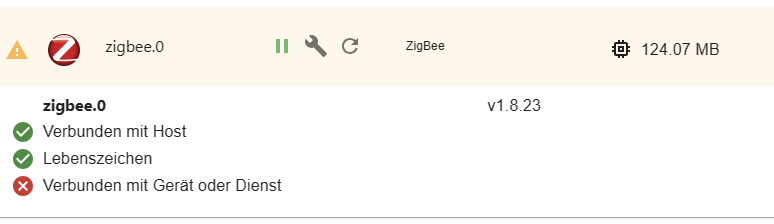
-
Kleine Transferleistung: Die IDs der vermissten keys werden genannt. Welche ID muss man dann bei --recv-keys wohl angeben?
@thomas-braun
Achso ich wusste nicht dass da etwas einzutragen ist...
Jetzt könnte es gehen:pi@raspi:/ $ sudo apt update OK:1 http://phoscon.de/apt/deconz bullseye InRelease OK:2 http://deb.debian.org/debian bullseye-proposed-updates InRelease OK:3 http://raspbian.raspberrypi.org/raspbian bullseye InRelease OK:4 http://archive.raspberrypi.org/debian bullseye InRelease OK:5 https://deb.nodesource.com/node_12.x bullseye InRelease OK:6 https://deb.nodesource.com/node_14.x bullseye InRelease OK:7 https://deb.nodesource.com/node_16.x bullseye InRelease OK:8 https://deb.nodesource.com/node_18.x bullseye InRelease Paketlisten werden gelesen… Fertig Abhängigkeitsbaum wird aufgebaut… Fertig Statusinformationen werden eingelesen… Fertig Aktualisierung für 41 Pakete verfügbar. Führen Sie »apt list --upgradable« aus, um sie anzuzeigen. pi@raspi:/ $ sudo apt -t bullseye-proposed-updates install udev Paketlisten werden gelesen… Fertig Abhängigkeitsbaum wird aufgebaut… Fertig Statusinformationen werden eingelesen… Fertig udev ist schon die neueste Version (247.3-7+rpi1+deb11u2). Die folgenden Pakete wurden automatisch installiert und werden nicht mehr benötigt: bsdmainutils g++-8 geoip-database gsfonts libbind9-161 libboost-atomic1.67.0 libboost-iostreams1.67.0 libboost-regex1.67.0 libboost-system1.67.0 libboost-thread1.67.0 libcdio18 libcodec2-0.8.1 libcroco3 libdc1394-22 libdns1104 libdns1110 libdouble-conversion1 libdvdread4 libegl1-mesa libevent-2.1-6 libfl2 libfluidsynth1 libgeoip1 libglade2-0 libgssdp-1.0-3 libgupnp-1.0-4 libgutenprint-common libgutenprint9 libhiredis0.14 libilmbase23 libindicator3-7 libisc1100 libisc1105 libisccc161 libisccfg163 libisl19 libjemalloc2 libjim0.77 libjsoncpp1 libkeybinder0 libkyotocabinet16v5 libllvm9 liblouis17 liblouisutdml8 liblwres161 libmpdec2 libmysofa0 libncursesw5 libnfs12 liboauth0 libopenexr23 libperl5.28 libpgm-5.2-0 libplymouth4 libpoppler82 libpython2-dev libpython2-stdlib libpython2.7 libpython2.7-dev libpython2.7-minimal libpython2.7-stdlib libpython3.7 libpython3.7-minimal libpython3.7-stdlib libqpdf21 libreadline5 libsane libsnmp30 libstdc++-8-dev libunique-1.0-0 libusb-0.1-4 libusbmuxd4 libvpx5 libwnck-common libwnck22 libx264-155 libx265-165 libxcb-util0 perl-modules-5.28 printer-driver-gutenprint python-pkg-resources python2 python2-dev python2-minimal python2.7 python2.7-dev python2.7-minimal python3.7-minimal rpi.gpio-common Verwenden Sie »sudo apt autoremove«, um sie zu entfernen. 0 aktualisiert, 0 neu installiert, 0 zu entfernen und 65 nicht aktualisiert. pi@raspi:/ $ -
@thomas-braun
Achso ich wusste nicht dass da etwas einzutragen ist...
Jetzt könnte es gehen:pi@raspi:/ $ sudo apt update OK:1 http://phoscon.de/apt/deconz bullseye InRelease OK:2 http://deb.debian.org/debian bullseye-proposed-updates InRelease OK:3 http://raspbian.raspberrypi.org/raspbian bullseye InRelease OK:4 http://archive.raspberrypi.org/debian bullseye InRelease OK:5 https://deb.nodesource.com/node_12.x bullseye InRelease OK:6 https://deb.nodesource.com/node_14.x bullseye InRelease OK:7 https://deb.nodesource.com/node_16.x bullseye InRelease OK:8 https://deb.nodesource.com/node_18.x bullseye InRelease Paketlisten werden gelesen… Fertig Abhängigkeitsbaum wird aufgebaut… Fertig Statusinformationen werden eingelesen… Fertig Aktualisierung für 41 Pakete verfügbar. Führen Sie »apt list --upgradable« aus, um sie anzuzeigen. pi@raspi:/ $ sudo apt -t bullseye-proposed-updates install udev Paketlisten werden gelesen… Fertig Abhängigkeitsbaum wird aufgebaut… Fertig Statusinformationen werden eingelesen… Fertig udev ist schon die neueste Version (247.3-7+rpi1+deb11u2). Die folgenden Pakete wurden automatisch installiert und werden nicht mehr benötigt: bsdmainutils g++-8 geoip-database gsfonts libbind9-161 libboost-atomic1.67.0 libboost-iostreams1.67.0 libboost-regex1.67.0 libboost-system1.67.0 libboost-thread1.67.0 libcdio18 libcodec2-0.8.1 libcroco3 libdc1394-22 libdns1104 libdns1110 libdouble-conversion1 libdvdread4 libegl1-mesa libevent-2.1-6 libfl2 libfluidsynth1 libgeoip1 libglade2-0 libgssdp-1.0-3 libgupnp-1.0-4 libgutenprint-common libgutenprint9 libhiredis0.14 libilmbase23 libindicator3-7 libisc1100 libisc1105 libisccc161 libisccfg163 libisl19 libjemalloc2 libjim0.77 libjsoncpp1 libkeybinder0 libkyotocabinet16v5 libllvm9 liblouis17 liblouisutdml8 liblwres161 libmpdec2 libmysofa0 libncursesw5 libnfs12 liboauth0 libopenexr23 libperl5.28 libpgm-5.2-0 libplymouth4 libpoppler82 libpython2-dev libpython2-stdlib libpython2.7 libpython2.7-dev libpython2.7-minimal libpython2.7-stdlib libpython3.7 libpython3.7-minimal libpython3.7-stdlib libqpdf21 libreadline5 libsane libsnmp30 libstdc++-8-dev libunique-1.0-0 libusb-0.1-4 libusbmuxd4 libvpx5 libwnck-common libwnck22 libx264-155 libx265-165 libxcb-util0 perl-modules-5.28 printer-driver-gutenprint python-pkg-resources python2 python2-dev python2-minimal python2.7 python2.7-dev python2.7-minimal python3.7-minimal rpi.gpio-common Verwenden Sie »sudo apt autoremove«, um sie zu entfernen. 0 aktualisiert, 0 neu installiert, 0 zu entfernen und 65 nicht aktualisiert. pi@raspi:/ $also der Vorgang kann jetzt ausgeführt werden, aber ich komme noch nicht ans Ziel.
Was muss ich noch machen?pi@raspi:~ $ sudo nano bullseye-proposed-updates.list pi@raspi:~ $ sudo apt update OK:1 http://phoscon.de/apt/deconz bullseye InRelease OK:2 http://deb.debian.org/debian bullseye-proposed-updates InRelease OK:3 http://archive.raspberrypi.org/debian bullseye InRelease OK:4 http://raspbian.raspberrypi.org/raspbian bullseye InRelease OK:5 https://deb.nodesource.com/node_12.x bullseye InRelease OK:6 https://deb.nodesource.com/node_14.x bullseye InRelease OK:7 https://deb.nodesource.com/node_16.x bullseye InRelease OK:8 https://deb.nodesource.com/node_18.x bullseye InRelease Paketlisten werden gelesen… Fertig Abhängigkeitsbaum wird aufgebaut… Fertig Statusinformationen werden eingelesen… Fertig Aktualisierung für 41 Pakete verfügbar. Führen Sie »apt list --upgradable« aus, um sie anzuzeigen. pi@raspi:~ $ sudo apt -t bullseye-proposed-updates install udev Paketlisten werden gelesen… Fertig Abhängigkeitsbaum wird aufgebaut… Fertig Statusinformationen werden eingelesen… Fertig udev ist schon die neueste Version (247.3-7+rpi1+deb11u2). Die folgenden Pakete wurden automatisch installiert und werden nicht mehr benötigt: bsdmainutils g++-8 geoip-database gsfonts libbind9-161 libboost-atomic1.67.0 libboost-iostreams1.67.0 libboost-regex1.67.0 libboost-system1.67.0 libboost-thread1.67.0 libcdio18 libcodec2-0.8.1 libcroco3 libdc1394-22 libdns1104 libdns1110 libdouble-conversion1 libdvdread4 libegl1-mesa libevent-2.1-6 libfl2 libfluidsynth1 libgeoip1 libglade2-0 libgssdp-1.0-3 libgupnp-1.0-4 libgutenprint-common libgutenprint9 libhiredis0.14 libilmbase23 libindicator3-7 libisc1100 libisc1105 libisccc161 libisccfg163 libisl19 libjemalloc2 libjim0.77 libjsoncpp1 libkeybinder0 libkyotocabinet16v5 libllvm9 liblouis17 liblouisutdml8 liblwres161 libmpdec2 libmysofa0 libncursesw5 libnfs12 liboauth0 libopenexr23 libperl5.28 libpgm-5.2-0 libplymouth4 libpoppler82 libpython2-dev libpython2-stdlib libpython2.7 libpython2.7-dev libpython2.7-minimal libpython2.7-stdlib libpython3.7 libpython3.7-minimal libpython3.7-stdlib libqpdf21 libreadline5 libsane libsnmp30 libstdc++-8-dev libunique-1.0-0 libusb-0.1-4 libusbmuxd4 libvpx5 libwnck-common libwnck22 libx264-155 libx265-165 libxcb-util0 perl-modules-5.28 printer-driver-gutenprint python-pkg-resources python2 python2-dev python2-minimal python2.7 python2.7-dev python2.7-minimal python3.7-minimal rpi.gpio-common Verwenden Sie »sudo apt autoremove«, um sie zu entfernen. 0 aktualisiert, 0 neu installiert, 0 zu entfernen und 65 nicht aktualisiert. pi@raspi:~ $ apt policy udev udev: Installiert: 247.3-7+rpi1+deb11u2 Installationskandidat: 247.3-7+rpi1+deb11u2 Versionstabelle: *** 247.3-7+rpi1+deb11u2 500 500 http://raspbian.raspberrypi.org/raspbian bullseye/main armhf Packages 100 /var/lib/dpkg/status 247.3-7+deb11u4 500 500 http://deb.debian.org/debian bullseye-proposed-updates/main armhf Packages pi@raspi:~ $ -
also der Vorgang kann jetzt ausgeführt werden, aber ich komme noch nicht ans Ziel.
Was muss ich noch machen?pi@raspi:~ $ sudo nano bullseye-proposed-updates.list pi@raspi:~ $ sudo apt update OK:1 http://phoscon.de/apt/deconz bullseye InRelease OK:2 http://deb.debian.org/debian bullseye-proposed-updates InRelease OK:3 http://archive.raspberrypi.org/debian bullseye InRelease OK:4 http://raspbian.raspberrypi.org/raspbian bullseye InRelease OK:5 https://deb.nodesource.com/node_12.x bullseye InRelease OK:6 https://deb.nodesource.com/node_14.x bullseye InRelease OK:7 https://deb.nodesource.com/node_16.x bullseye InRelease OK:8 https://deb.nodesource.com/node_18.x bullseye InRelease Paketlisten werden gelesen… Fertig Abhängigkeitsbaum wird aufgebaut… Fertig Statusinformationen werden eingelesen… Fertig Aktualisierung für 41 Pakete verfügbar. Führen Sie »apt list --upgradable« aus, um sie anzuzeigen. pi@raspi:~ $ sudo apt -t bullseye-proposed-updates install udev Paketlisten werden gelesen… Fertig Abhängigkeitsbaum wird aufgebaut… Fertig Statusinformationen werden eingelesen… Fertig udev ist schon die neueste Version (247.3-7+rpi1+deb11u2). Die folgenden Pakete wurden automatisch installiert und werden nicht mehr benötigt: bsdmainutils g++-8 geoip-database gsfonts libbind9-161 libboost-atomic1.67.0 libboost-iostreams1.67.0 libboost-regex1.67.0 libboost-system1.67.0 libboost-thread1.67.0 libcdio18 libcodec2-0.8.1 libcroco3 libdc1394-22 libdns1104 libdns1110 libdouble-conversion1 libdvdread4 libegl1-mesa libevent-2.1-6 libfl2 libfluidsynth1 libgeoip1 libglade2-0 libgssdp-1.0-3 libgupnp-1.0-4 libgutenprint-common libgutenprint9 libhiredis0.14 libilmbase23 libindicator3-7 libisc1100 libisc1105 libisccc161 libisccfg163 libisl19 libjemalloc2 libjim0.77 libjsoncpp1 libkeybinder0 libkyotocabinet16v5 libllvm9 liblouis17 liblouisutdml8 liblwres161 libmpdec2 libmysofa0 libncursesw5 libnfs12 liboauth0 libopenexr23 libperl5.28 libpgm-5.2-0 libplymouth4 libpoppler82 libpython2-dev libpython2-stdlib libpython2.7 libpython2.7-dev libpython2.7-minimal libpython2.7-stdlib libpython3.7 libpython3.7-minimal libpython3.7-stdlib libqpdf21 libreadline5 libsane libsnmp30 libstdc++-8-dev libunique-1.0-0 libusb-0.1-4 libusbmuxd4 libvpx5 libwnck-common libwnck22 libx264-155 libx265-165 libxcb-util0 perl-modules-5.28 printer-driver-gutenprint python-pkg-resources python2 python2-dev python2-minimal python2.7 python2.7-dev python2.7-minimal python3.7-minimal rpi.gpio-common Verwenden Sie »sudo apt autoremove«, um sie zu entfernen. 0 aktualisiert, 0 neu installiert, 0 zu entfernen und 65 nicht aktualisiert. pi@raspi:~ $ apt policy udev udev: Installiert: 247.3-7+rpi1+deb11u2 Installationskandidat: 247.3-7+rpi1+deb11u2 Versionstabelle: *** 247.3-7+rpi1+deb11u2 500 500 http://raspbian.raspberrypi.org/raspbian bullseye/main armhf Packages 100 /var/lib/dpkg/status 247.3-7+deb11u4 500 500 http://deb.debian.org/debian bullseye-proposed-updates/main armhf Packages pi@raspi:~ $Bitte vollständig lesen. @mickym hat sich so eine Mühe damit gemacht.
EDIT 10.06.2023
Falls jemand trotz allem auf dem Raspberry (vermutlich 32 bit OS) immer noch Probleme hat - beim mir hat alles gemäß Anleitung auf einem 64-bit OS auf dem Raspberry funktioniert - der kann noch folgendes versuchen:
sudo apt install udev=247.3-7+deb11u4 libudev1=247.3-7+deb11u4
und anschliessend mit
sudo apt-mark hold udev
auf hold setzen.
-
Bitte vollständig lesen. @mickym hat sich so eine Mühe damit gemacht.
EDIT 10.06.2023
Falls jemand trotz allem auf dem Raspberry (vermutlich 32 bit OS) immer noch Probleme hat - beim mir hat alles gemäß Anleitung auf einem 64-bit OS auf dem Raspberry funktioniert - der kann noch folgendes versuchen:
sudo apt install udev=247.3-7+deb11u4 libudev1=247.3-7+deb11u4
und anschliessend mit
sudo apt-mark hold udev
auf hold setzen.
-
@thomas-braun
Ach danke, ich bin schon ganz durch den Wind.
Das ging auch durch.
Und jetzt noch?
Nochmal restart?
Sorry, aber ich tu mich da nicht so leicht...Ich würde die
bullseye-proposed-updates.listjetzt wieder löschen, zumindest aber die aktive Zeile dort per # deaktivieren.Dann nochmal
sudo apt update -
Ich würde die
bullseye-proposed-updates.listjetzt wieder löschen, zumindest aber die aktive Zeile dort per # deaktivieren.Dann nochmal
sudo apt updatepi@raspi:~ $ sudo apt update OK:1 http://phoscon.de/apt/deconz bullseye InRelease OK:2 http://raspbian.raspberrypi.org/raspbian bullseye InRelease OK:3 http://deb.debian.org/debian bullseye-proposed-updates InRelease OK:4 http://archive.raspberrypi.org/debian bullseye InRelease OK:5 https://deb.nodesource.com/node_12.x bullseye InRelease OK:6 https://deb.nodesource.com/node_14.x bullseye InRelease OK:7 https://deb.nodesource.com/node_16.x bullseye InRelease OK:8 https://deb.nodesource.com/node_18.x bullseye InRelease Paketlisten werden gelesen… Fertig Abhängigkeitsbaum wird aufgebaut… Fertig Statusinformationen werden eingelesen… Fertig Aktualisierung für 43 Pakete verfügbar. Führen Sie »apt list --upgradable« aus, um sie anzuzeigen. pi@raspi:~ $wie sieht das jetzt aus?
pi@raspi:~ $ apt policy udev udev: Installiert: 247.3-7+deb11u4 Installationskandidat: 247.3-7+rpi1+deb11u2 Versionstabelle: 247.3-7+rpi1+deb11u2 500 500 http://raspbian.raspberrypi.org/raspbian bullseye/main armhf Packages *** 247.3-7+deb11u4 500 500 http://deb.debian.org/debian bullseye-proposed-updates/main armhf Packages 100 /var/lib/dpkg/status -
pi@raspi:~ $ sudo apt update
OK:1 http://phoscon.de/apt/deconz bullseye InRelease
OK:2 http://raspbian.raspberrypi.org/raspbian bullseye InRelease
OK:3 http://deb.debian.org/debian bullseye-proposed-updates InRelease
OK:4 http://archive.raspberrypi.org/debian bullseye InRelease
OK:5 https://deb.nodesource.com/node_12.x bullseye InRelease
OK:6 https://deb.nodesource.com/node_14.x bullseye InRelease
OK:7 https://deb.nodesource.com/node_16.x bullseye InRelease
OK:8 https://deb.nodesource.com/node_18.x bullseye InRelease
Paketlisten werden gelesen… Fertig
Abhängigkeitsbaum wird aufgebaut… Fertig
Statusinformationen werden eingelesen… Fertig
Aktualisierung für 43 Pakete verfügbar. Führen Sie »apt list --upgradable« aus, um sie anzuzeigen.
pi@raspi:~ $
wie sieht das jetzt aus?
pi@raspi:~ $ apt policy udev udev: Installiert: 247.3-7+deb11u4 Installationskandidat: 247.3-7+rpi1+deb11u2 Versionstabelle: 247.3-7+rpi1+deb11u2 500 500 http://raspbian.raspberrypi.org/raspbian bullseye/main armhf Packages *** 247.3-7+deb11u4 500 500 http://deb.debian.org/debian bullseye-proposed-updates/main armhf Packages 100 /var/lib/dpkg/status@brokeling sagte in Noch ein Zigbee Problem....:
wie sieht das jetzt aus?
Schmeiss die proposed-updates wieder raus.
Dann noch malsudo apt updates -
@brokeling sagte in Noch ein Zigbee Problem....:
wie sieht das jetzt aus?
Schmeiss die proposed-updates wieder raus.
Dann noch malsudo apt updates -
In dem du die .list-Datei wieder löschst.
Oder alle Zeilen dort auskommentierst.sudo rm /etc/apt/sources.list.d/bullseye-proposed-updates.list sudo apt update -
In dem du die .list-Datei wieder löschst.
Oder alle Zeilen dort auskommentierst.sudo rm /etc/apt/sources.list.d/bullseye-proposed-updates.list sudo apt updatepi@raspi:~ $ sudo apt update OK:1 http://phoscon.de/apt/deconz bullseye InRelease OK:2 http://raspbian.raspberrypi.org/raspbian bullseye InRelease OK:3 http://archive.raspberrypi.org/debian bullseye InRelease OK:4 https://deb.nodesource.com/node_12.x bullseye InRelease OK:5 https://deb.nodesource.com/node_14.x bullseye InRelease OK:6 https://deb.nodesource.com/node_16.x bullseye InRelease OK:7 https://deb.nodesource.com/node_18.x bullseye InRelease Paketlisten werden gelesen… Fertig Abhängigkeitsbaum wird aufgebaut… Fertig Statusinformationen werden eingelesen… Fertig Aktualisierung für 2 Pakete verfügbar. Führen Sie »apt list --upgradable« aus, um sie anzuzeigen. pi@raspi:~ $Und sollte jetzt nicht irgendwann auf den seriellen Port wieder zugegriffen werden können?
pi@raspi:~ $ ls -la /dev/serial/by-id/ ls: Zugriff auf '/dev/serial/by-id/' nicht möglich: Datei oder Verzeichnis nicht gefunden -
pi@raspi:~ $ sudo apt update
OK:1 http://phoscon.de/apt/deconz bullseye InRelease
OK:2 http://raspbian.raspberrypi.org/raspbian bullseye InRelease
OK:3 http://archive.raspberrypi.org/debian bullseye InRelease
OK:4 https://deb.nodesource.com/node_12.x bullseye InRelease
OK:5 https://deb.nodesource.com/node_14.x bullseye InRelease
OK:6 https://deb.nodesource.com/node_16.x bullseye InRelease
OK:7 https://deb.nodesource.com/node_18.x bullseye InRelease
Paketlisten werden gelesen… Fertig
Abhängigkeitsbaum wird aufgebaut… Fertig
Statusinformationen werden eingelesen… Fertig
Aktualisierung für 2 Pakete verfügbar. Führen Sie »apt list --upgradable« aus, um sie anzuzeigen.
pi@raspi:~ $
Und sollte jetzt nicht irgendwann auf den seriellen Port wieder zugegriffen werden können?
pi@raspi:~ $ ls -la /dev/serial/by-id/ ls: Zugriff auf '/dev/serial/by-id/' nicht möglich: Datei oder Verzeichnis nicht gefunden@brokeling sagte in Noch ein Zigbee Problem....:
Aktualisierung für 2 Pakete verfügbar. Führen Sie »apt list --upgradable« aus, um sie anzuzeigen.
Updaten, reboot.
-
@brokeling sagte in Noch ein Zigbee Problem....:
Aktualisierung für 2 Pakete verfügbar. Führen Sie »apt list --upgradable« aus, um sie anzuzeigen.
Updaten, reboot.
@thomas-braun
oh Manno, soll ich die löschen und warum upgaded er nicht?pi@raspi:~ $ sudo apt upgrade Paketlisten werden gelesen… Fertig Abhängigkeitsbaum wird aufgebaut… Fertig Statusinformationen werden eingelesen… Fertig Paketaktualisierung (Upgrade) wird berechnet… Fertig Die folgenden Pakete wurden automatisch installiert und werden nicht mehr benötigt: bsdmainutils g++-8 geoip-database gsfonts libbind9-161 libboost-atomic1.67.0 libboost-iostreams1.67.0 libboost-regex1.67.0 libboost-system1.67.0 libboost-thread1.67.0 libcdio18 libcodec2-0.8.1 libcroco3 libdc1394-22 libdns1104 libdns1110 libdouble-conversion1 libdvdread4 libegl1-mesa libevent-2.1-6 libfl2 libfluidsynth1 libgeoip1 libglade2-0 libgssdp-1.0-3 libgupnp-1.0-4 libgutenprint-common libgutenprint9 libhiredis0.14 libilmbase23 libindicator3-7 libisc1100 libisc1105 libisccc161 libisccfg163 libisl19 libjemalloc2 libjim0.77 libjsoncpp1 libkeybinder0 libkyotocabinet16v5 libllvm9 liblouis17 liblouisutdml8 liblwres161 libmpdec2 libmysofa0 libncursesw5 libnfs12 liboauth0 libopenexr23 libperl5.28 libpgm-5.2-0 libplymouth4 libpoppler82 libpython2-dev libpython2-stdlib libpython2.7 libpython2.7-dev libpython2.7-minimal libpython2.7-stdlib libpython3.7 libpython3.7-minimal libpython3.7-stdlib libqpdf21 libreadline5 libsane libsnmp30 libstdc++-8-dev libunique-1.0-0 libusb-0.1-4 libusbmuxd4 libvpx5 libwnck-common libwnck22 libx264-155 libx265-165 libxcb-util0 perl-modules-5.28 printer-driver-gutenprint python-pkg-resources python2 python2-dev python2-minimal python2.7 python2.7-dev python2.7-minimal python3.7-minimal rpi.gpio-common Verwenden Sie »sudo apt autoremove«, um sie zu entfernen. Die folgenden Pakete sind zurückgehalten worden: libudev1 udev 0 aktualisiert, 0 neu installiert, 0 zu entfernen und 2 nicht aktualisiert. pi@raspi:~ $ -
@thomas-braun
oh Manno, soll ich die löschen und warum upgaded er nicht?pi@raspi:~ $ sudo apt upgrade Paketlisten werden gelesen… Fertig Abhängigkeitsbaum wird aufgebaut… Fertig Statusinformationen werden eingelesen… Fertig Paketaktualisierung (Upgrade) wird berechnet… Fertig Die folgenden Pakete wurden automatisch installiert und werden nicht mehr benötigt: bsdmainutils g++-8 geoip-database gsfonts libbind9-161 libboost-atomic1.67.0 libboost-iostreams1.67.0 libboost-regex1.67.0 libboost-system1.67.0 libboost-thread1.67.0 libcdio18 libcodec2-0.8.1 libcroco3 libdc1394-22 libdns1104 libdns1110 libdouble-conversion1 libdvdread4 libegl1-mesa libevent-2.1-6 libfl2 libfluidsynth1 libgeoip1 libglade2-0 libgssdp-1.0-3 libgupnp-1.0-4 libgutenprint-common libgutenprint9 libhiredis0.14 libilmbase23 libindicator3-7 libisc1100 libisc1105 libisccc161 libisccfg163 libisl19 libjemalloc2 libjim0.77 libjsoncpp1 libkeybinder0 libkyotocabinet16v5 libllvm9 liblouis17 liblouisutdml8 liblwres161 libmpdec2 libmysofa0 libncursesw5 libnfs12 liboauth0 libopenexr23 libperl5.28 libpgm-5.2-0 libplymouth4 libpoppler82 libpython2-dev libpython2-stdlib libpython2.7 libpython2.7-dev libpython2.7-minimal libpython2.7-stdlib libpython3.7 libpython3.7-minimal libpython3.7-stdlib libqpdf21 libreadline5 libsane libsnmp30 libstdc++-8-dev libunique-1.0-0 libusb-0.1-4 libusbmuxd4 libvpx5 libwnck-common libwnck22 libx264-155 libx265-165 libxcb-util0 perl-modules-5.28 printer-driver-gutenprint python-pkg-resources python2 python2-dev python2-minimal python2.7 python2.7-dev python2.7-minimal python3.7-minimal rpi.gpio-common Verwenden Sie »sudo apt autoremove«, um sie zu entfernen. Die folgenden Pakete sind zurückgehalten worden: libudev1 udev 0 aktualisiert, 0 neu installiert, 0 zu entfernen und 2 nicht aktualisiert. pi@raspi:~ $Die zwei sind die beiden udev-Pakete, die du per hold festgetackert hast.
sudo apt autoremovehaut die alten Pakete raus.
-
Die zwei sind die beiden udev-Pakete, die du per hold festgetackert hast.
sudo apt autoremovehaut die alten Pakete raus.
pi@raspi:~ $ sudo apt-get update
OK:1 http://phoscon.de/apt/deconz bullseye InRelease
OK:2 http://raspbian.raspberrypi.org/raspbian bullseye InRelease
OK:3 http://archive.raspberrypi.org/debian bullseye InRelease
OK:4 https://deb.nodesource.com/node_12.x bullseye InRelease
OK:5 https://deb.nodesource.com/node_14.x bullseye InRelease
OK:6 https://deb.nodesource.com/node_16.x bullseye InRelease
OK:7 https://deb.nodesource.com/node_18.x bullseye InRelease
Paketlisten werden gelesen… Fertig
pi@raspi:~ $ sudo apt-get upgrade
Paketlisten werden gelesen… Fertig
Abhängigkeitsbaum wird aufgebaut… Fertig
Statusinformationen werden eingelesen… Fertig
Paketaktualisierung (Upgrade) wird berechnet… Fertig
Die folgenden Pakete sind zurückgehalten worden:
  libudev1 udev
0 aktualisiert, 0 neu installiert, 0 zu entfernen und 2 nicht aktualisiert.
pi@raspi:~ $```
code_text
aber was muss ich jetzt noch tun???
-
pi@raspi:~ $ sudo apt-get update
OK:1 http://phoscon.de/apt/deconz bullseye InRelease
OK:2 http://raspbian.raspberrypi.org/raspbian bullseye InRelease
OK:3 http://archive.raspberrypi.org/debian bullseye InRelease
OK:4 https://deb.nodesource.com/node_12.x bullseye InRelease
OK:5 https://deb.nodesource.com/node_14.x bullseye InRelease
OK:6 https://deb.nodesource.com/node_16.x bullseye InRelease
OK:7 https://deb.nodesource.com/node_18.x bullseye InRelease
Paketlisten werden gelesen… Fertig
pi@raspi:~ $ sudo apt-get upgrade
Paketlisten werden gelesen… Fertig
Abhängigkeitsbaum wird aufgebaut… Fertig
Statusinformationen werden eingelesen… Fertig
Paketaktualisierung (Upgrade) wird berechnet… Fertig
Die folgenden Pakete sind zurückgehalten worden:
  libudev1 udev
0 aktualisiert, 0 neu installiert, 0 zu entfernen und 2 nicht aktualisiert.
pi@raspi:~ $```
code_text
aber was muss ich jetzt noch tun???
-
Die zwei sind die beiden udev-Pakete, die du per hold festgetackert hast.
sudo apt autoremovehaut die alten Pakete raus.
@thomas-braun
meinst du es gibt noch eine Chance, dass das System in 15 Minuten wieder läuft (Zigbee)?
Weil ich muss mich jetzt dann leider wieder verabschieben für einige Tage....
Für euch wahrscheinlich nicht "leider", denn dann habt ihr mich Plagegeist mal zwischenzeitlich los...
Ansonsten lass ich das jetzt ruhen.........in Frieden. Zunächst. -
@thomas-braun said in Noch ein Zigbee Problem....:
@brokeling sagte in Noch ein Zigbee Problem....:
aber was muss ich jetzt noch tun???
Nichts.
Achso. Stimmt
pi@raspi:~ $ ls -la /dev/serial/by-id/
insgesamt 0
drwxr-xr-x 2 root root 80 17. Aug 22:23 .
drwxr-xr-x 4 root root 80 17. Aug 22:23 ..
lrwxrwxrwx 1 root root 13 17. Aug 22:23 usb-Texas_Instruments_XDS110__03.00.00.26__Embed_with_CMSIS-DAP_L1100GB8-if00 -> ../../ttyACM0
lrwxrwxrwx 1 root root 13 17. Aug 22:23 usb-Texas_Instruments_XDS110__03.00.00.26__Embed_with_CMSIS-DAP_L1100GB8-if03 -> ../../ttyACM1
Und Zigbee ist verbunden!!!
Mal sehen wie lange noch...
Also den allerherzlichsten Dank!!!!
Letzte Minute praktisch :) -
@thomas-braun said in Noch ein Zigbee Problem....:
@brokeling sagte in Noch ein Zigbee Problem....:
aber was muss ich jetzt noch tun???
Nichts.
Achso. Stimmt
pi@raspi:~ $ ls -la /dev/serial/by-id/
insgesamt 0
drwxr-xr-x 2 root root 80 17. Aug 22:23 .
drwxr-xr-x 4 root root 80 17. Aug 22:23 ..
lrwxrwxrwx 1 root root 13 17. Aug 22:23 usb-Texas_Instruments_XDS110__03.00.00.26__Embed_with_CMSIS-DAP_L1100GB8-if00 -> ../../ttyACM0
lrwxrwxrwx 1 root root 13 17. Aug 22:23 usb-Texas_Instruments_XDS110__03.00.00.26__Embed_with_CMSIS-DAP_L1100GB8-if03 -> ../../ttyACM1
Und Zigbee ist verbunden!!!
Mal sehen wie lange noch...
Also den allerherzlichsten Dank!!!!
Letzte Minute praktisch :)Ich sag doch das läuft jetzt wieder...
-
Ich sag doch das läuft jetzt wieder...
-
@thomas-braun
ach Mist, das Ding verliert aber leider immer wieder die Verbindung, also irgendwie wie am Anfang....LogFile sagt...?

Hey! Du scheinst an dieser Unterhaltung interessiert zu sein, hast aber noch kein Konto.
Hast du es satt, bei jedem Besuch durch die gleichen Beiträge zu scrollen? Wenn du dich für ein Konto anmeldest, kommst du immer genau dorthin zurück, wo du zuvor warst, und kannst dich über neue Antworten benachrichtigen lassen (entweder per E-Mail oder Push-Benachrichtigung). Du kannst auch Lesezeichen speichern und Beiträge positiv bewerten, um anderen Community-Mitgliedern deine Wertschätzung zu zeigen.
Mit deinem Input könnte dieser Beitrag noch besser werden 💗
Registrieren Anmelden253
Online33.0k
Benutzer83.5k
Themen1.3m
Beiträge