




Probleme bei Buster 32bit auf Bullseye 64bit Upgrade
-
Hallo zusammen,
ich habe eine neue SD Karte mit dem Raspian Bullseye 64bit lite Image beschrieben, den ioBroker installiert und das alte Buster Backitup aufgespielt (Raspberry Pi4 2GB). Fast alle Adapter "GRÜN", bis auf diese 2 "GELB"en ...

mqtt.0
	2023-07-22 11:12:02.938	error	Client error:Error: connect ECONNREFUSED 127.0.0.1:1883
mqtt.0
	2023-07-22 11:12:02.931	info	Reconnected to localhost
mqtt.0
	2023-07-22 11:11:52.941	debug	stateChange mqtt.0.info.connection: {"val":false,"ack":true,"ts":1690017112935,"q":0,"from":"system.adapter.mqtt.0","user":"system.user.admin","lc":1690016924651}
mqtt.0
	2023-07-22 11:11:52.938	debug	stateChange mqtt.0.info.connection: {"val":true,"ack":true,"ts":1690017112934,"q":0,"from":"system.adapter.mqtt.0","user":"system.user.admin","lc":1690017112934}
mqtt.0
	2023-07-22 11:11:52.929	info	Disconnected from localhost
mqtt.0
	2023-07-22 11:11:52.928	error	Client error:Error: connect ECONNREFUSED 127.0.0.1:1883
mqtt.0
	2023-07-22 11:11:52.923	info	Reconnected to localhost
mqtt.0
	2023-07-22 11:11:42.932	debug	stateChange mqtt.0.info.connection: {"val":false,"ack":true,"ts":1690017102926,"q":0,"from":"system.adapter.mqtt.0","user":"system.user.admin","lc":1690016924651}
mqtt.0
	2023-07-22 11:11:42.929	debug	stateChange mqtt.0.info.connection: {"val":true,"ack":true,"ts":1690017102925,"q":0,"from":"system.adapter.mqtt.0","user":"system.user.admin","lc":1690017102925}
mqtt.0
	2023-07-22 11:11:42.919	info	Disconnected from localhost
mqtt.0
	2023-07-22 11:11:42.918	error	Client error:Error: connect ECONNREFUSED 127.0.0.1:1883
mqtt.0
	2023-07-22 11:11:42.912	info	Reconnected to localhost
mqtt.0
	2023-07-22 11:11:32.930	debug	stateChange mqtt.0.info.connection: {"val":false,"ack":true,"ts":1690017092918,"q":0,"from":"system.adapter.mqtt.0","user":"system.user.admin","lc":1690016924651}
mqtt.0
	2023-07-22 11:11:32.923	debug	stateChange mqtt.0.info.connection: {"val":true,"ack":true,"ts":1690017092917,"q":0,"from":"system.adapter.mqtt.0","user":"system.user.admin","lc":1690017092917}
mqtt.0
	2023-07-22 11:11:32.908	info	Disconnected from localhost
mqtt.0
	2023-07-22 11:11:32.907	error	Client error:Error: connect ECONNREFUSED 127.0.0.1:1883
mqtt.0
	2023-07-22 11:11:32.896	info	Reconnected to localhost
mqtt.0
	2023-07-22 11:11:22.908	debug	stateChange mqtt.0.info.connection: {"val":false,"ack":true,"ts":1690017082901,"q":0,"from":"system.adapter.mqtt.0","user":"system.user.admin","lc":1690016924651}
mqtt.0
	2023-07-22 11:11:22.906	debug	stateChange mqtt.0.info.connection: {"val":true,"ack":true,"ts":1690017082900,"q":0,"from":"system.adapter.mqtt.0","user":"system.user.admin","lc":1690017082900}
mqtt.0
	2023-07-22 11:11:22.893	info	Disconnected from localhost
mqtt.0
	2023-07-22 11:11:22.893	error	Client error:Error: connect ECONNREFUSED 127.0.0.1:1883
mqtt.0
	2023-07-22 11:11:22.886	info	Reconnected to localhost
mqtt.0
	2023-07-22 11:11:12.882	error	Client error:Error: connect ECONNREFUSED 127.0.0.1:1883
mqtt.0
	2023-07-22 11:11:12.749	info	Try to connect to mqtt://localhost:1883 with clientId=ioBroker-Raspi.mqtt.0and credentials Nutzer:*******************
mqtt.0
	2023-07-22 11:11:12.187	info	starting. Version 4.1.1 in /opt/iobroker/node_modules/iobroker.mqtt, node: v18.16.1, js-controller: 4.0.24
mqtt.0
	2023-07-22 11:11:11.669	debug	Plugin sentry Initialize Plugin (enabled=true)
mqtt.0
	2023-07-22 11:11:11.426	debug	States connected to redis: 0.0.0.0:9000
mqtt.0
	2023-07-22 11:11:11.335	debug	States create User PubSub Client
mqtt.0
	2023-07-22 11:11:11.334	debug	States create System PubSub Client
mqtt.0
	2023-07-22 11:11:11.303	debug	Redis States: Use Redis connection: 0.0.0.0:9000
mqtt.0
	2023-07-22 11:11:11.249	debug	Objects connected to redis: 0.0.0.0:9001
mqtt.0
	2023-07-22 11:11:11.240	debug	Objects client initialize lua scripts
mqtt.0
	2023-07-22 11:11:11.136	debug	Objects create User PubSub Client
mqtt.0
	2023-07-22 11:11:11.134	debug	Objects create System PubSub Client
mqtt.0
	2023-07-22 11:11:11.132	debug	Objects client ready ... initialize now
mqtt.0
	2023-07-22 11:11:11.065	debug	Redis Objects: Use Redis connection: 0.0.0.0:9001
mqtt.0
	2023-07-22 11:11:06.819	info	Terminated (ADAPTER_REQUESTED_TERMINATION): Without reason
mqtt.0
	2023-07-22 11:11:06.819	debug	Plugin sentry destroyed
mqtt.0
	2023-07-22 11:11:06.817	info	terminating
mqtt.0
	2023-07-22 11:11:06.313	info	Got terminate signal TERMINATE_YOURSELF
	2023-07-22 11:18:04.246	debug	create/update parser 180.02
canbus.0
	2023-07-22 11:18:04.190	debug	create/update message id: 180, uuid: 1a56e754-7bd5-40f9-a1e5-5ba65c5ac578
canbus.0
	2023-07-22 11:18:04.150	info	starting. Version 1.3.1 in /opt/iobroker/node_modules/iobroker.canbus, node: v18.16.1, js-controller: 4.0.24
canbus.0
	2023-07-22 11:18:03.534	debug	Plugin sentry Initialize Plugin (enabled=true)
canbus.0
	2023-07-22 11:18:03.209	debug	States create User PubSub Client
canbus.0
	2023-07-22 11:18:03.207	debug	States create System PubSub Client
canbus.0
	2023-07-22 11:18:03.177	debug	Redis States: Use Redis connection: 0.0.0.0:9000
canbus.0
	2023-07-22 11:18:03.121	debug	Objects connected to redis: 0.0.0.0:9001
canbus.0
	2023-07-22 11:18:03.111	debug	Objects client initialize lua scripts
canbus.0
	2023-07-22 11:18:03.020	debug	Objects create User PubSub Client
canbus.0
	2023-07-22 11:18:03.017	debug	Objects create System PubSub Client
canbus.0
	2023-07-22 11:18:03.015	debug	Objects client ready ... initialize now
canbus.0
	2023-07-22 11:18:02.939	debug	Redis Objects: Use Redis connection: 0.0.0.0:9001
canbus.0
	2023-07-22 11:17:58.046	info	Terminated (ADAPTER_REQUESTED_TERMINATION): Without reason
canbus.0
	2023-07-22 11:17:58.045	debug	Plugin sentry destroyed
canbus.0
	2023-07-22 11:17:58.043	info	terminating
canbus.0
	2023-07-22 11:17:58.042	debug	cleaned everything up...
canbus.0
	2023-07-22 11:17:58.040	info	Got terminate signal TERMINATE_YOURSELF
Kann ein Fachmann etwas im Log erkennen bzw. mir sagen an welcher Schraube ich drehen muss ?
Die alte Buster SD Karte funktioniert einwandfrei.
-
Hallo zusammen,
ich habe eine neue SD Karte mit dem Raspian Bullseye 64bit lite Image beschrieben, den ioBroker installiert und das alte Buster Backitup aufgespielt (Raspberry Pi4 2GB). Fast alle Adapter "GRÜN", bis auf diese 2 "GELB"en ...
mqtt.0
	2023-07-22 11:12:02.938	error	Client error:Error: connect ECONNREFUSED 127.0.0.1:1883
mqtt.0
	2023-07-22 11:12:02.931	info	Reconnected to localhost
mqtt.0
	2023-07-22 11:11:52.941	debug	stateChange mqtt.0.info.connection: {"val":false,"ack":true,"ts":1690017112935,"q":0,"from":"system.adapter.mqtt.0","user":"system.user.admin","lc":1690016924651}
mqtt.0
	2023-07-22 11:11:52.938	debug	stateChange mqtt.0.info.connection: {"val":true,"ack":true,"ts":1690017112934,"q":0,"from":"system.adapter.mqtt.0","user":"system.user.admin","lc":1690017112934}
mqtt.0
	2023-07-22 11:11:52.929	info	Disconnected from localhost
mqtt.0
	2023-07-22 11:11:52.928	error	Client error:Error: connect ECONNREFUSED 127.0.0.1:1883
mqtt.0
	2023-07-22 11:11:52.923	info	Reconnected to localhost
mqtt.0
	2023-07-22 11:11:42.932	debug	stateChange mqtt.0.info.connection: {"val":false,"ack":true,"ts":1690017102926,"q":0,"from":"system.adapter.mqtt.0","user":"system.user.admin","lc":1690016924651}
mqtt.0
	2023-07-22 11:11:42.929	debug	stateChange mqtt.0.info.connection: {"val":true,"ack":true,"ts":1690017102925,"q":0,"from":"system.adapter.mqtt.0","user":"system.user.admin","lc":1690017102925}
mqtt.0
	2023-07-22 11:11:42.919	info	Disconnected from localhost
mqtt.0
	2023-07-22 11:11:42.918	error	Client error:Error: connect ECONNREFUSED 127.0.0.1:1883
mqtt.0
	2023-07-22 11:11:42.912	info	Reconnected to localhost
mqtt.0
	2023-07-22 11:11:32.930	debug	stateChange mqtt.0.info.connection: {"val":false,"ack":true,"ts":1690017092918,"q":0,"from":"system.adapter.mqtt.0","user":"system.user.admin","lc":1690016924651}
mqtt.0
	2023-07-22 11:11:32.923	debug	stateChange mqtt.0.info.connection: {"val":true,"ack":true,"ts":1690017092917,"q":0,"from":"system.adapter.mqtt.0","user":"system.user.admin","lc":1690017092917}
mqtt.0
	2023-07-22 11:11:32.908	info	Disconnected from localhost
mqtt.0
	2023-07-22 11:11:32.907	error	Client error:Error: connect ECONNREFUSED 127.0.0.1:1883
mqtt.0
	2023-07-22 11:11:32.896	info	Reconnected to localhost
mqtt.0
	2023-07-22 11:11:22.908	debug	stateChange mqtt.0.info.connection: {"val":false,"ack":true,"ts":1690017082901,"q":0,"from":"system.adapter.mqtt.0","user":"system.user.admin","lc":1690016924651}
mqtt.0
	2023-07-22 11:11:22.906	debug	stateChange mqtt.0.info.connection: {"val":true,"ack":true,"ts":1690017082900,"q":0,"from":"system.adapter.mqtt.0","user":"system.user.admin","lc":1690017082900}
mqtt.0
	2023-07-22 11:11:22.893	info	Disconnected from localhost
mqtt.0
	2023-07-22 11:11:22.893	error	Client error:Error: connect ECONNREFUSED 127.0.0.1:1883
mqtt.0
	2023-07-22 11:11:22.886	info	Reconnected to localhost
mqtt.0
	2023-07-22 11:11:12.882	error	Client error:Error: connect ECONNREFUSED 127.0.0.1:1883
mqtt.0
	2023-07-22 11:11:12.749	info	Try to connect to mqtt://localhost:1883 with clientId=ioBroker-Raspi.mqtt.0and credentials Nutzer:*******************
mqtt.0
	2023-07-22 11:11:12.187	info	starting. Version 4.1.1 in /opt/iobroker/node_modules/iobroker.mqtt, node: v18.16.1, js-controller: 4.0.24
mqtt.0
	2023-07-22 11:11:11.669	debug	Plugin sentry Initialize Plugin (enabled=true)
mqtt.0
	2023-07-22 11:11:11.426	debug	States connected to redis: 0.0.0.0:9000
mqtt.0
	2023-07-22 11:11:11.335	debug	States create User PubSub Client
mqtt.0
	2023-07-22 11:11:11.334	debug	States create System PubSub Client
mqtt.0
	2023-07-22 11:11:11.303	debug	Redis States: Use Redis connection: 0.0.0.0:9000
mqtt.0
	2023-07-22 11:11:11.249	debug	Objects connected to redis: 0.0.0.0:9001
mqtt.0
	2023-07-22 11:11:11.240	debug	Objects client initialize lua scripts
mqtt.0
	2023-07-22 11:11:11.136	debug	Objects create User PubSub Client
mqtt.0
	2023-07-22 11:11:11.134	debug	Objects create System PubSub Client
mqtt.0
	2023-07-22 11:11:11.132	debug	Objects client ready ... initialize now
mqtt.0
	2023-07-22 11:11:11.065	debug	Redis Objects: Use Redis connection: 0.0.0.0:9001
mqtt.0
	2023-07-22 11:11:06.819	info	Terminated (ADAPTER_REQUESTED_TERMINATION): Without reason
mqtt.0
	2023-07-22 11:11:06.819	debug	Plugin sentry destroyed
mqtt.0
	2023-07-22 11:11:06.817	info	terminating
mqtt.0
	2023-07-22 11:11:06.313	info	Got terminate signal TERMINATE_YOURSELF
2023-07-22 11:18:04.246 debug create/update parser 180.02 canbus.0 2023-07-22 11:18:04.190 debug create/update message id: 180, uuid: 1a56e754-7bd5-40f9-a1e5-5ba65c5ac578 canbus.0 2023-07-22 11:18:04.150 info starting. Version 1.3.1 in /opt/iobroker/node_modules/iobroker.canbus, node: v18.16.1, js-controller: 4.0.24 canbus.0 2023-07-22 11:18:03.534 debug Plugin sentry Initialize Plugin (enabled=true) canbus.0 2023-07-22 11:18:03.209 debug States create User PubSub Client canbus.0 2023-07-22 11:18:03.207 debug States create System PubSub Client canbus.0 2023-07-22 11:18:03.177 debug Redis States: Use Redis connection: 0.0.0.0:9000 canbus.0 2023-07-22 11:18:03.121 debug Objects connected to redis: 0.0.0.0:9001 canbus.0 2023-07-22 11:18:03.111 debug Objects client initialize lua scripts canbus.0 2023-07-22 11:18:03.020 debug Objects create User PubSub Client canbus.0 2023-07-22 11:18:03.017 debug Objects create System PubSub Client canbus.0 2023-07-22 11:18:03.015 debug Objects client ready ... initialize now canbus.0 2023-07-22 11:18:02.939 debug Redis Objects: Use Redis connection: 0.0.0.0:9001 canbus.0 2023-07-22 11:17:58.046 info Terminated (ADAPTER_REQUESTED_TERMINATION): Without reason canbus.0 2023-07-22 11:17:58.045 debug Plugin sentry destroyed canbus.0 2023-07-22 11:17:58.043 info terminating canbus.0 2023-07-22 11:17:58.042 debug cleaned everything up... canbus.0 2023-07-22 11:17:58.040 info Got terminate signal TERMINATE_YOURSELFKann ein Fachmann etwas im Log erkennen bzw. mir sagen an welcher Schraube ich drehen muss ?
Die alte Buster SD Karte funktioniert einwandfrei.
Poste mal zusätzlich die volle Ausgabe von
iob diagDamit gibt es noch mehr Informationen zu deinem System.
Gruß Tom
Wenn meine Hilfe erfolgreich war, benutze bitte das Voting unten rechts im Beitrag
Public Transport
https://github.com/tt-tom17/ioBroker.public-transport
https://github.com/tt-tom17/ioBroker.public-transport/wikiNSPanel Adapter Wiki
https://github.com/ticaki/ioBroker.nspanel-lovelace-ui/wiki -
Poste mal zusätzlich die volle Ausgabe von
iob diagDamit gibt es noch mehr Informationen zu deinem System.
Hallo und Guten Tag ...
Das hier ? Oder den ewig langen Log davor ?======================= SUMMARY ======================= v.2023-04-16 Operatingsystem: Debian GNU/Linux 11 (bullseye) Kernel: 6.1.21-v8+ Installation: Native Timezone: Europe/Berlin (CEST, +0200) User-ID: 1000 X-Server: false Boot Target: multi-user.target Pending OS-Updates: 3 Pending iob updates: 0 Nodejs-Installation: /usr/bin/nodejs v18.16.1 /usr/bin/node v18.16.1 /usr/bin/npm 9.5.1 /usr/bin/npx 9.5.1 Recommended versions are nodejs 18.x.y and npm 9.x.y Your nodejs installation is correct MEMORY: total used free shared buff/cache available Mem: 1.8G 1.5G 144M 0.0K 227M 304M Swap: 99M 99M 0.0K Total: 1.9G 1.6G 144M Active iob-Instances: 25 Active repo(s): stable ioBroker Core: js-controller 4.0.24 admin 6.3.5 ioBroker Status: iobroker is running on this host. Objects type: jsonl States type: jsonl Status admin and web instance: + system.adapter.admin.0 : admin : ioBroker-Raspi - enabled, port: 8081, bind: 0.0.0.0, run as: admin + system.adapter.web.0 : web : ioBroker-Raspi - enabled, port: 8082, bind: 0.0.0.0, run as: admin Objects: 9586 States: 8161 Size of iob-Database: 29M /opt/iobroker/iobroker-data/objects.jsonl 8.9M /opt/iobroker/iobroker-data/states.jsonl =================== END OF SUMMARY ==================== -
Hallo und Guten Tag ...
Das hier ? Oder den ewig langen Log davor ?======================= SUMMARY ======================= v.2023-04-16 Operatingsystem: Debian GNU/Linux 11 (bullseye) Kernel: 6.1.21-v8+ Installation: Native Timezone: Europe/Berlin (CEST, +0200) User-ID: 1000 X-Server: false Boot Target: multi-user.target Pending OS-Updates: 3 Pending iob updates: 0 Nodejs-Installation: /usr/bin/nodejs v18.16.1 /usr/bin/node v18.16.1 /usr/bin/npm 9.5.1 /usr/bin/npx 9.5.1 Recommended versions are nodejs 18.x.y and npm 9.x.y Your nodejs installation is correct MEMORY: total used free shared buff/cache available Mem: 1.8G 1.5G 144M 0.0K 227M 304M Swap: 99M 99M 0.0K Total: 1.9G 1.6G 144M Active iob-Instances: 25 Active repo(s): stable ioBroker Core: js-controller 4.0.24 admin 6.3.5 ioBroker Status: iobroker is running on this host. Objects type: jsonl States type: jsonl Status admin and web instance: + system.adapter.admin.0 : admin : ioBroker-Raspi - enabled, port: 8081, bind: 0.0.0.0, run as: admin + system.adapter.web.0 : web : ioBroker-Raspi - enabled, port: 8082, bind: 0.0.0.0, run as: admin Objects: 9586 States: 8161 Size of iob-Database: 29M /opt/iobroker/iobroker-data/objects.jsonl 8.9M /opt/iobroker/iobroker-data/states.jsonl =================== END OF SUMMARY ====================@raspiuser das Lange sagt mehr
Gruß Tom
Wenn meine Hilfe erfolgreich war, benutze bitte das Voting unten rechts im Beitrag
Public Transport
https://github.com/tt-tom17/ioBroker.public-transport
https://github.com/tt-tom17/ioBroker.public-transport/wikiNSPanel Adapter Wiki
https://github.com/ticaki/ioBroker.nspanel-lovelace-ui/wiki -
Hallo und Guten Tag ...
Das hier ? Oder den ewig langen Log davor ?======================= SUMMARY ======================= v.2023-04-16 Operatingsystem: Debian GNU/Linux 11 (bullseye) Kernel: 6.1.21-v8+ Installation: Native Timezone: Europe/Berlin (CEST, +0200) User-ID: 1000 X-Server: false Boot Target: multi-user.target Pending OS-Updates: 3 Pending iob updates: 0 Nodejs-Installation: /usr/bin/nodejs v18.16.1 /usr/bin/node v18.16.1 /usr/bin/npm 9.5.1 /usr/bin/npx 9.5.1 Recommended versions are nodejs 18.x.y and npm 9.x.y Your nodejs installation is correct MEMORY: total used free shared buff/cache available Mem: 1.8G 1.5G 144M 0.0K 227M 304M Swap: 99M 99M 0.0K Total: 1.9G 1.6G 144M Active iob-Instances: 25 Active repo(s): stable ioBroker Core: js-controller 4.0.24 admin 6.3.5 ioBroker Status: iobroker is running on this host. Objects type: jsonl States type: jsonl Status admin and web instance: + system.adapter.admin.0 : admin : ioBroker-Raspi - enabled, port: 8081, bind: 0.0.0.0, run as: admin + system.adapter.web.0 : web : ioBroker-Raspi - enabled, port: 8082, bind: 0.0.0.0, run as: admin Objects: 9586 States: 8161 Size of iob-Database: 29M /opt/iobroker/iobroker-data/objects.jsonl 8.9M /opt/iobroker/iobroker-data/states.jsonl =================== END OF SUMMARY ====================@raspiuser Dir geht der RAM aus
Lehrling seit 1975 !!!
Beitrag geholfen ? dann gerne ein upvote rechts unten im Beitrag klicken ;)
https://forum.iobroker.net/topic/51555/hinweise-f%C3%BCr-gute-forenbeitr%C3%A4ge -
@raspiuser das Lange sagt mehr
@tt-tom said in Probleme bei Buster 32bit auf Bullseye 64bit Upgrade:
das Lange sagt mehr
Bitte sehr ...
======== Start marking the full check here ========= Skript v.2023-04-16 BASE SYSTEM Model : Raspberry Pi 4 Model B Rev 1.1 Architecture : aarch64 Docker : false Virtualization : none Distributor ID: Debian Description: Debian GNU/Linux 11 (bullseye) Release: 11 Codename: bullseye PRETTY_NAME="Debian GNU/Linux 11 (bullseye)" NAME="Debian GNU/Linux" VERSION_ID="11" VERSION="11 (bullseye)" VERSION_CODENAME=bullseye ID=debian HOME_URL="https://www.debian.org/" SUPPORT_URL="https://www.debian.org/support" BUG_REPORT_URL="https://bugs.debian.org/" Systemuptime and Load: 11:57:49 up 1:24, 1 user, load average: 0.37, 0.28, 0.28 CPU threads: 4 Raspberry only: throttled=0x0 Other values than 0x0 hint to temperature/voltage problems temp=55.5'C volt=0.8625V Time and Time Zones Local time: Sat 2023-07-22 11:57:50 CEST Universal time: Sat 2023-07-22 09:57:50 UTC RTC time: n/a Time zone: Europe/Berlin (CEST, +0200) System clock synchronized: yes NTP service: active RTC in local TZ: no User and Groups pi /home/pi pi adm dialout cdrom sudo audio video plugdev games users input render netdev gpio i2c spi iobroker X-Server-Setup X-Server: false Desktop: Terminal: tty Boot Target: multi-user.target MEMORY total used free shared buff/cache available Mem: 1.8G 1.5G 147M 0.0K 235M 315M Swap: 99M 99M 0.0K Total: 1.9G 1.6G 148M 1849 M total memory 1466 M used memory 860 M active memory 713 M inactive memory 147 M free memory 4 M buffer memory 230 M swap cache 99 M total swap 99 M used swap 0 M free swap Raspberry only: oom events: 0 lifetime oom required: 0 Mbytes total time in oom handler: 0 ms max time spent in oom handler: 0 ms FILESYSTEM Filesystem Type Size Used Avail Use% Mounted on /dev/root ext4 14G 3.4G 10G 25% / devtmpfs devtmpfs 667M 0 667M 0% /dev tmpfs tmpfs 925M 0 925M 0% /dev/shm tmpfs tmpfs 370M 1.1M 369M 1% /run tmpfs tmpfs 5.0M 4.0K 5.0M 1% /run/lock /dev/mmcblk0p1 vfat 255M 31M 225M 13% /boot tmpfs tmpfs 185M 0 185M 0% /run/user/1000 Messages concerning ext4 filesystem in dmesg: [Sat Jul 22 10:33:26 2023] Kernel command line: coherent_pool=1M 8250.nr_uarts=0 snd_bcm2835.enable_headphones=0 snd_bcm2835.enable_headphones=1 snd_bcm2835.enable_hdmi=1 snd_bcm2835.enable_hdmi=0 smsc95xx.macaddr=DC:A6:32:12:B4:C8 vc_mem.mem_base=0x3ec00000 vc_mem.mem_size=0x40000000 console=ttyS0,115200 console=tty1 root=PARTUUID=228a697b-02 rootfstype=ext4 fsck.repair=yes rootwait [Sat Jul 22 10:33:27 2023] EXT4-fs (mmcblk0p2): INFO: recovery required on readonly filesystem [Sat Jul 22 10:33:27 2023] EXT4-fs (mmcblk0p2): write access will be enabled during recovery [Sat Jul 22 10:33:28 2023] EXT4-fs (mmcblk0p2): recovery complete [Sat Jul 22 10:33:28 2023] EXT4-fs (mmcblk0p2): mounted filesystem with ordered data mode. Quota mode: none. [Sat Jul 22 10:33:28 2023] VFS: Mounted root (ext4 filesystem) readonly on device 179:2. [Sat Jul 22 10:33:30 2023] EXT4-fs (mmcblk0p2): re-mounted. Quota mode: none. Show mounted filesystems (real ones only): TARGET SOURCE FSTYPE OPTIONS / /dev/mmcblk0p2 ext4 rw,noatime `-/boot /dev/mmcblk0p1 vfat rw,relatime,fmask=0022,dmask=0022,codepage=437,iocharset=ascii,shortname=mixed,errors=remount-ro Files in neuralgic directories: /var: 502M /var/ 190M /var/cache 185M /var/cache/apt 147M /var/lib 123M /var/lib/apt/lists Archived and active journals take up 64.0M in the file system. /opt/iobroker/backups: 4.0K /opt/iobroker/backups/ /opt/iobroker/iobroker-data: 232M /opt/iobroker/iobroker-data/ 193M /opt/iobroker/iobroker-data/files 52M /opt/iobroker/iobroker-data/files/javascript.admin 34M /opt/iobroker/iobroker-data/files/javascript.admin/static 33M /opt/iobroker/iobroker-data/files/javascript.admin/static/js The five largest files in iobroker-data are: 29M /opt/iobroker/iobroker-data/objects.jsonl 18M /opt/iobroker/iobroker-data/files/text2command.admin/static/js/main.274a4d8d.js.map 9.8M /opt/iobroker/iobroker-data/states.jsonl 8.9M /opt/iobroker/iobroker-data/files/scenes.admin/static/js/2.7de3299d.chunk.js.map 8.0M /opt/iobroker/iobroker-data/files/text2command.admin/static/js/main.274a4d8d.js NodeJS-Installation /usr/bin/nodejs v18.16.1 /usr/bin/node v18.16.1 /usr/bin/npm 9.5.1 /usr/bin/npx 9.5.1 nodejs: Installed: 18.16.1-deb-1nodesource1 Candidate: 18.17.0-deb-1nodesource1 Version table: 18.17.0-deb-1nodesource1 500 500 https://deb.nodesource.com/node_18.x bullseye/main arm64 Packages 18.16.1-deb-1nodesource1 100 100 /var/lib/dpkg/status 12.22.12~dfsg-1~deb11u4 500 500 http://security.debian.org/debian-security bullseye-security/main arm64 Packages 12.22.12~dfsg-1~deb11u3 500 500 http://deb.debian.org/debian bullseye/main arm64 Packages Temp directories causing npm8 problem: 0 No problems detected ioBroker-Installation ioBroker Status iobroker is running on this host. Objects type: jsonl States type: jsonl MULTIHOSTSERVICE/enabled: false Core adapters versions js-controller: 4.0.24 admin: 6.3.5 javascript: 7.0.3 Adapters from github: 1 Adapter State + system.adapter.admin.0 : admin : ioBroker-Raspi - enabled, port: 8081, bind: 0.0.0.0, run as: admin + system.adapter.backitup.0 : backitup : ioBroker-Raspi - enabled + system.adapter.canbus.0 : canbus : ioBroker-Raspi - enabled + system.adapter.cloud.0 : cloud : ioBroker-Raspi - enabled system.adapter.discovery.0 : discovery : ioBroker-Raspi - disabled system.adapter.email.0 : email : ioBroker-Raspi - disabled system.adapter.feiertage.0 : feiertage : ioBroker-Raspi - enabled + system.adapter.frontier_silicon.0 : frontier_silicon : ioBroker-Raspi - enabled system.adapter.go-e.0 : go-e : ioBroker-Raspi - disabled system.adapter.habpanel.0 : habpanel : ioBroker-Raspi - disabled + system.adapter.hm-rega.0 : hm-rega : ioBroker-Raspi - enabled + system.adapter.hm-rpc.0 : hm-rpc : ioBroker-Raspi - enabled, port: 0 + system.adapter.hm-rpc.1 : hm-rpc : ioBroker-Raspi - enabled, port: 0 system.adapter.influxdb.0 : influxdb : ioBroker-Raspi - disabled, port: 8086 system.adapter.info.0 : info : ioBroker-Raspi - disabled + system.adapter.iqontrol.0 : iqontrol : ioBroker-Raspi - enabled + system.adapter.javascript.0 : javascript : ioBroker-Raspi - enabled + system.adapter.lgtv.0 : lgtv : ioBroker-Raspi - enabled system.adapter.luftdaten.0 : luftdaten : ioBroker-Raspi - enabled + system.adapter.modbus.0 : modbus : ioBroker-Raspi - enabled + system.adapter.mqtt.0 : mqtt : ioBroker-Raspi - enabled, port: 1883, bind: 0.0.0.0 system.adapter.onkyo.0 : onkyo : ioBroker-Raspi - disabled system.adapter.psa.0 : psa : ioBroker-Raspi - disabled + system.adapter.sainlogic.1 : sainlogic : ioBroker-Raspi - enabled, port: 1030, bind: 192.168.178.36 + system.adapter.scenes.0 : scenes : ioBroker-Raspi - enabled + system.adapter.shuttercontrol.0 : shuttercontrol : ioBroker-Raspi - enabled + system.adapter.simple-api.0 : simple-api : ioBroker-Raspi - enabled, port: 8087, bind: 0.0.0.0, run as: admin + system.adapter.socketio.0 : socketio : ioBroker-Raspi - enabled, port: 8084, bind: 0.0.0.0, run as: admin + system.adapter.sonoff.0 : sonoff : ioBroker-Raspi - enabled, port: 1885, bind: 0.0.0.0 + system.adapter.tankerkoenig.0 : tankerkoenig : ioBroker-Raspi - enabled + system.adapter.telegram.0 : telegram : ioBroker-Raspi - enabled, port: 8443, bind: 0.0.0.0 system.adapter.text2command.0 : text2command : ioBroker-Raspi - disabled + system.adapter.tr-064.0 : tr-064 : ioBroker-Raspi - enabled system.adapter.vis-hqwidgets.0 : vis-hqwidgets : ioBroker-Raspi - disabled system.adapter.vis-justgage.0 : vis-justgage : ioBroker-Raspi - disabled system.adapter.vis-metro.0 : vis-metro : ioBroker-Raspi - disabled system.adapter.vis.0 : vis : ioBroker-Raspi - disabled system.adapter.vw-connect.0 : vw-connect : ioBroker-Raspi - disabled + system.adapter.web.0 : web : ioBroker-Raspi - enabled, port: 8082, bind: 0.0.0.0, run as: admin system.adapter.wled.0 : wled : ioBroker-Raspi - disabled + system.adapter.zigbee.0 : zigbee : ioBroker-Raspi - enabled, port: /dev/ttyUSB0 + instance is alive Enabled adapters with bindings + system.adapter.admin.0 : admin : ioBroker-Raspi - enabled, port: 8081, bind: 0.0.0.0, run as: admin + system.adapter.hm-rpc.0 : hm-rpc : ioBroker-Raspi - enabled, port: 0 + system.adapter.hm-rpc.1 : hm-rpc : ioBroker-Raspi - enabled, port: 0 + system.adapter.mqtt.0 : mqtt : ioBroker-Raspi - enabled, port: 1883, bind: 0.0.0.0 + system.adapter.sainlogic.1 : sainlogic : ioBroker-Raspi - enabled, port: 1030, bind: 192.168.178.36 + system.adapter.simple-api.0 : simple-api : ioBroker-Raspi - enabled, port: 8087, bind: 0.0.0.0, run as: admin + system.adapter.socketio.0 : socketio : ioBroker-Raspi - enabled, port: 8084, bind: 0.0.0.0, run as: admin + system.adapter.sonoff.0 : sonoff : ioBroker-Raspi - enabled, port: 1885, bind: 0.0.0.0 + system.adapter.telegram.0 : telegram : ioBroker-Raspi - enabled, port: 8443, bind: 0.0.0.0 + system.adapter.web.0 : web : ioBroker-Raspi - enabled, port: 8082, bind: 0.0.0.0, run as: admin + system.adapter.zigbee.0 : zigbee : ioBroker-Raspi - enabled, port: /dev/ttyUSB0 ioBroker-Repositories stable : http://download.iobroker.net/sources-dist.json beta : http://download.iobroker.net/sources-dist-latest.json Active repo(s): stable Installed ioBroker-Instances Used repository: stable Adapter "admin" : 6.3.5 , installed 6.3.5 Adapter "backitup" : 2.6.23 , installed 2.6.23 Adapter "canbus" : 1.3.1 , installed 1.3.1 Adapter "cloud" : 4.4.1 , installed 4.4.1 Adapter "discovery" : 3.1.0 , installed 3.1.0 Adapter "email" : 1.2.0 , installed 1.2.0 Adapter "feiertage" : 1.1.0 , installed 1.1.0 Adapter "frontier_silicon": 0.0.11, installed 0.0.11 Adapter "go-e" : 1.0.27 , installed 1.0.27 Adapter "habpanel" : 0.5.0 , installed 0.5.0 Adapter "hm-rega" : 3.0.46 , installed 3.0.46 Adapter "hm-rpc" : 1.15.18 , installed 1.15.18 Adapter "influxdb" : 3.2.0 , installed 3.2.0 Adapter "info" : 1.9.26 , installed 1.9.26 Adapter "iqontrol" : 2.1.0 , installed 2.1.0 Adapter "javascript" : 7.0.3 , installed 7.0.3 Controller "js-controller": 4.0.24 , installed 4.0.24 Adapter "lgtv" : 1.1.10 , installed 1.1.10 Adapter "luftdaten" : 3.0.0 , installed 3.0.0 Adapter "modbus" : 5.0.11 , installed 5.0.11 Adapter "mqtt" : 4.1.1 , installed 4.1.1 Adapter "onkyo" : 2.1.2 , installed 2.1.2 Adapter "psa" : 0.0.11 , installed 0.0.11 Adapter "sainlogic" : 0.10.3 , installed 0.10.3 Adapter "scenes" : 2.3.9 , installed 2.3.9 Adapter "shuttercontrol": 1.5.0 , installed 1.5.0 Adapter "simple-api" : 2.7.2 , installed 2.7.2 Adapter "socketio" : 4.2.0 , installed 4.2.0 Adapter "sonoff" : 2.5.3 , installed 2.5.3 Adapter "tankerkoenig" : 3.3.7 , installed 3.3.7 Adapter "telegram" : 1.16.0 , installed 1.16.0 Adapter "text2command" : 3.0.2 , installed 3.0.2 Adapter "tr-064" : 4.2.18 , installed 4.2.18 Adapter "vis-hqwidgets": 1.4.0 , installed 1.4.0 Adapter "vis-justgage" : 1.0.2 , installed 1.0.2 Adapter "vis-metro" : 1.2.0 , installed 1.2.0 Adapter "vw-connect" : 0.0.67 , installed 0.0.67 Adapter "web" : 4.3.0 , installed 4.3.0 Adapter "wled" : 0.6.7 , installed 0.6.7 Adapter "ws" : 1.3.0 , installed 1.3.0 Adapter "zigbee" : 1.8.16 , installed 1.8.16 Objects and States Please stand by - This may take a while Objects: 9586 States: 8161 OS-Repositories and Updates Hit:1 http://security.debian.org/debian-security bullseye-security InRelease Hit:2 http://archive.raspberrypi.org/debian bullseye InRelease Hit:3 http://deb.debian.org/debian bullseye InRelease Hit:4 http://deb.debian.org/debian bullseye-updates InRelease Hit:5 https://deb.nodesource.com/node_18.x bullseye InRelease Reading package lists... Pending Updates: 3 Listening Ports Active Internet connections (only servers) Proto Recv-Q Send-Q Local Address Foreign Address State User Inode PID/Program name tcp 0 0 0.0.0.0:9000 0.0.0.0:* LISTEN 1001 12864 459/iobroker.js-con tcp 0 0 0.0.0.0:9001 0.0.0.0:* LISTEN 1001 11574 459/iobroker.js-con tcp 0 0 0.0.0.0:1885 0.0.0.0:* LISTEN 1001 15033 1261/io.sonoff.0 tcp 0 0 0.0.0.0:22 0.0.0.0:* LISTEN 0 15581 548/sshd: /usr/sbin tcp 0 0 192.168.178.36:1030 0.0.0.0:* LISTEN 1001 18041 1670/io.sainlogic.1 tcp 0 0 192.168.178.36:42010 0.0.0.0:* LISTEN 1001 46521 4240/io.hm-rpc.1 tcp 0 0 192.168.178.36:42001 0.0.0.0:* LISTEN 1001 16001 1134/io.hm-rpc.0 tcp6 0 0 :::8087 :::* LISTEN 1001 18198 1864/io.simple-api. tcp6 0 0 :::8084 :::* LISTEN 1001 22573 2290/io.socketio.0 tcp6 0 0 :::8082 :::* LISTEN 1001 19885 1886/io.web.0 tcp6 0 0 :::8081 :::* LISTEN 1001 15819 993/io.admin.0 tcp6 0 0 :::22 :::* LISTEN 0 15583 548/sshd: /usr/sbin udp 0 0 0.0.0.0:68 0.0.0.0:* 0 14515 709/dhcpcd udp 0 0 0.0.0.0:48254 0.0.0.0:* 108 12732 338/avahi-daemon: r udp 0 0 0.0.0.0:5353 0.0.0.0:* 108 12730 338/avahi-daemon: r udp6 0 0 :::51223 :::* 108 12733 338/avahi-daemon: r udp6 0 0 :::5353 :::* 108 12731 338/avahi-daemon: r udp6 0 0 :::546 :::* 0 12835 709/dhcpcd *** Log File - Last 25 Lines *** 2023-07-22 11:58:20.708 - info: mqtt.0 (2940) Disconnected from localhost 2023-07-22 11:58:30.710 - info: mqtt.0 (2940) Reconnected to localhost 2023-07-22 11:58:30.713 - error: mqtt.0 (2940) Client error:Error: connect ECONNREFUSED 127.0.0.1:1883 2023-07-22 11:58:30.713 - info: mqtt.0 (2940) Disconnected from localhost 2023-07-22 11:58:32.076 - debug: shuttercontrol.0 (1738) start pendingAlarm to check if an alarm is currently pending (exept frost) 2023-07-22 11:58:32.077 - debug: shuttercontrol.0 (1738) status alarm pending for hm-rpc.0.OEQ1223791.1.LEVEL: false 2023-07-22 11:58:39.840 - debug: shuttercontrol.0 (1738) Lightsensor changed: hm-rpc.1.000D58A9A5AE9A.1.AVERAGE_ILLUMINATION Value: 13667 2023-07-22 11:58:40.714 - info: mqtt.0 (2940) Reconnected to localhost 2023-07-22 11:58:40.718 - error: mqtt.0 (2940) Client error:Error: connect ECONNREFUSED 127.0.0.1:1883 2023-07-22 11:58:40.719 - info: mqtt.0 (2940) Disconnected from localhost 2023-07-22 11:58:50.720 - info: mqtt.0 (2940) Reconnected to localhost 2023-07-22 11:58:50.725 - error: mqtt.0 (2940) Client error:Error: connect ECONNREFUSED 127.0.0.1:1883 2023-07-22 11:58:50.725 - info: mqtt.0 (2940) Disconnected from localhost 2023-07-22 11:59:00.726 - info: mqtt.0 (2940) Reconnected to localhost 2023-07-22 11:59:02.121 - debug: shuttercontrol.0 (1738) start pendingAlarm to check if an alarm is currently pending (exept frost) 2023-07-22 11:59:02.124 - debug: shuttercontrol.0 (1738) status alarm pending for hm-rpc.0.OEQ1223824.1.LEVEL: false 2023-07-22 11:59:03.104 - error: mqtt.0 (2940) Client error:Error: connect ECONNREFUSED 127.0.0.1:1883 2023-07-22 11:59:03.105 - info: mqtt.0 (2940) Disconnected from localhost 2023-07-22 11:59:13.107 - info: mqtt.0 (2940) Reconnected to localhost 2023-07-22 11:59:13.673 - error: mqtt.0 (2940) Client error:Error: connect ECONNREFUSED 127.0.0.1:1883 2023-07-22 11:59:13.674 - info: mqtt.0 (2940) Disconnected from localhost 2023-07-22 11:59:21.710 - debug: shuttercontrol.0 (1738) Lightsensor changed: hm-rpc.1.000D5D89AEBAAF.1.AVERAGE_ILLUMINATION Value: 34900 2023-07-22 11:59:23.676 - info: mqtt.0 (2940) Reconnected to localhost 2023-07-22 11:59:23.680 - error: mqtt.0 (2940) Client error:Error: connect ECONNREFUSED 127.0.0.1:1883 2023-07-22 11:59:23.680 - info: mqtt.0 (2940) Disconnected from localhost ============ Mark until here for C&P ============= -
@raspiuser Dir geht der RAM aus
@djmarc75 said in Probleme bei Buster 32bit auf Bullseye 64bit Upgrade:
Dir geht der RAM aus
... das habe ich schon einmal gehört ...
Also Adapter "stoppen" oder komplett "deinstallieren" ?
Aber hilft das dann ?
EDIT:
Ich habe die "unwichtigen" Adapter gestoppt, das bringt nix ... -
@djmarc75 said in Probleme bei Buster 32bit auf Bullseye 64bit Upgrade:
Dir geht der RAM aus
... das habe ich schon einmal gehört ...
Also Adapter "stoppen" oder komplett "deinstallieren" ?
Aber hilft das dann ?
EDIT:
Ich habe die "unwichtigen" Adapter gestoppt, das bringt nix ...@raspiuser sagte in Probleme bei Buster 32bit auf Bullseye 64bit Upgrade:
Also Adapter "stoppen" oder komplett "deinstallieren" ?
2 GB sind schon recht wenig - bei 24 laufenden Adaptern.
Nicht benötigte Adapter deinstallieren/stoppen.
Und danach die Kiste rebooten und den Speicher beobachten, der füllt sich erst nach ein paar Stunden wenn die Adapter alle ihren Dienst tun..Aber im Prinzip rate ich zu einer anderen Kiste mit mehr RAM.
Lehrling seit 1975 !!!
Beitrag geholfen ? dann gerne ein upvote rechts unten im Beitrag klicken ;)
https://forum.iobroker.net/topic/51555/hinweise-f%C3%BCr-gute-forenbeitr%C3%A4ge -
@raspiuser sagte in Probleme bei Buster 32bit auf Bullseye 64bit Upgrade:
Also Adapter "stoppen" oder komplett "deinstallieren" ?
2 GB sind schon recht wenig - bei 24 laufenden Adaptern.
Nicht benötigte Adapter deinstallieren/stoppen.
Und danach die Kiste rebooten und den Speicher beobachten, der füllt sich erst nach ein paar Stunden wenn die Adapter alle ihren Dienst tun..Aber im Prinzip rate ich zu einer anderen Kiste mit mehr RAM.
@djmarc75 said in Probleme bei Buster 32bit auf Bullseye 64bit Upgrade:
Aber im Prinzip rate ich zu einer anderen Kiste mit mehr RAM.
... wie schon gesagt:
Habe ich schon einmal gehört und plane demnächst den ioBroker auf einem QNAP NAS laufen zu lassen (Ich schrecke noch davor zurück / schafft sicher neue Probleme ....)
Pi's mit mehr RAM sind z.Zt. wohl genauso teuer ... bzw. diese zu bekommen wird wohl schwierig. -
@djmarc75 said in Probleme bei Buster 32bit auf Bullseye 64bit Upgrade:
Aber im Prinzip rate ich zu einer anderen Kiste mit mehr RAM.
... wie schon gesagt:
Habe ich schon einmal gehört und plane demnächst den ioBroker auf einem QNAP NAS laufen zu lassen (Ich schrecke noch davor zurück / schafft sicher neue Probleme ....)
Pi's mit mehr RAM sind z.Zt. wohl genauso teuer ... bzw. diese zu bekommen wird wohl schwierig.@raspiuser sagte: Pi's mit mehr RAM sind z.Zt. wohl genauso teuer
RasPi 4 mit 4 GB RAM ist wieder ab ca. 80 € verfügbar.
Bitte verzichtet auf Chat-Nachrichten, denn die Handhabung ist grauenhaft !
Produktiv: Asus PN 42 / N100 / 8 GB / 500 GB; Proxmox mit 2 VM (iob / openCCU) -
@raspiuser sagte: Pi's mit mehr RAM sind z.Zt. wohl genauso teuer
RasPi 4 mit 4 GB RAM ist wieder ab ca. 80 € verfügbar.
@paul53 said in Probleme bei Buster 32bit auf Bullseye 64bit Upgrade:
RasPi 4 mit 4 GB RAM ist wieder ab ca. 80 € verfügbar.
Stimmt, habe ich jetzt auch gefunden.
Aber das löst wohl nicht die ursprünglichen Problemen mit den 2 Adaptern ...
-
@paul53 said in Probleme bei Buster 32bit auf Bullseye 64bit Upgrade:
RasPi 4 mit 4 GB RAM ist wieder ab ca. 80 € verfügbar.
Stimmt, habe ich jetzt auch gefunden.
Aber das löst wohl nicht die ursprünglichen Problemen mit den 2 Adaptern ...hast du jetzt mal die unwichtigen alle deinstalliert?
ggf auch mal die MQTT und Canbus mit deinstallieren, dann mal den Ram checken.
und Einen nach dem Anderen neu laden.
Gruß Tom
Wenn meine Hilfe erfolgreich war, benutze bitte das Voting unten rechts im Beitrag
Public Transport
https://github.com/tt-tom17/ioBroker.public-transport
https://github.com/tt-tom17/ioBroker.public-transport/wikiNSPanel Adapter Wiki
https://github.com/ticaki/ioBroker.nspanel-lovelace-ui/wiki -
hast du jetzt mal die unwichtigen alle deinstalliert?
ggf auch mal die MQTT und Canbus mit deinstallieren, dann mal den Ram checken.
und Einen nach dem Anderen neu laden.
@tt-tom said in Probleme bei Buster 32bit auf Bullseye 64bit Upgrade:
hast du jetzt mal die unwichtigen alle deinstalliert?
ggf auch mal die MQTT und Canbus mit deinstallieren, dann mal den Ram checken.
und Einen nach dem Anderen neu laden.... also alle unwichtigen sind gestoppt. Der RAM sieht so aus ...!

CAN und MQTT deinstalliert und dann neu installiert ... ohne Erfolg.
Bei MQTT localhost, 192.168.178.36 und 127.0.0.1 try & error eingesetzt, Fehlermeldung bleibt.
Wie schon geschrieben: Alle Einstellungen hatten mit Buster funktioniert ... -
@tt-tom said in Probleme bei Buster 32bit auf Bullseye 64bit Upgrade:
hast du jetzt mal die unwichtigen alle deinstalliert?
ggf auch mal die MQTT und Canbus mit deinstallieren, dann mal den Ram checken.
und Einen nach dem Anderen neu laden.... also alle unwichtigen sind gestoppt. Der RAM sieht so aus ...!
CAN und MQTT deinstalliert und dann neu installiert ... ohne Erfolg.
Bei MQTT localhost, 192.168.178.36 und 127.0.0.1 try & error eingesetzt, Fehlermeldung bleibt.
Wie schon geschrieben: Alle Einstellungen hatten mit Buster funktioniert ...@raspiuser in der Konsole
free -meingeben und die Ausgabe hier bitte zeigen.
Auf eine GUI ist nicht immer verlass ;)edit: und die Kiste auch mal neu gestartet wie ich empfohlen habe ?
Lehrling seit 1975 !!!
Beitrag geholfen ? dann gerne ein upvote rechts unten im Beitrag klicken ;)
https://forum.iobroker.net/topic/51555/hinweise-f%C3%BCr-gute-forenbeitr%C3%A4ge -
@raspiuser in der Konsole
free -meingeben und die Ausgabe hier bitte zeigen.
Auf eine GUI ist nicht immer verlass ;)edit: und die Kiste auch mal neu gestartet wie ich empfohlen habe ?
... sieht so aus ...
total used free shared buff/cache available Mem: 1849 1332 311 1 205 447 Swap: 99 0 99@djmarc75 said in Probleme bei Buster 32bit auf Bullseye 64bit Upgrade:
die Kiste auch mal neu gestartet wie ich empfohlen habe ?
Ja ... nach jeder Änderung ...
Wieso konzentrierst Du Dich auf den RAM ?!
Mit Buster 32bit funktioniert es doch ... Das der RAM zu Buster 64bit mehr genutzt wird kann ich noch glauben (mal so als Laie rausgehauen ...)
Die Fehlermeldung deutet doch eher auf ein Netzwerkproblem hin, oder ? -
... sieht so aus ...
total used free shared buff/cache available Mem: 1849 1332 311 1 205 447 Swap: 99 0 99@djmarc75 said in Probleme bei Buster 32bit auf Bullseye 64bit Upgrade:
die Kiste auch mal neu gestartet wie ich empfohlen habe ?
Ja ... nach jeder Änderung ...
Wieso konzentrierst Du Dich auf den RAM ?!
Mit Buster 32bit funktioniert es doch ... Das der RAM zu Buster 64bit mehr genutzt wird kann ich noch glauben (mal so als Laie rausgehauen ...)
Die Fehlermeldung deutet doch eher auf ein Netzwerkproblem hin, oder ?Da läuft nix auf dem Port 1883.
Schau dir das Setup vom mqtt-Server an.
Welcher wird da verwendet?Das ganze ist auch kein Thema 32/64bit.
-
Da läuft nix auf dem Port 1883.
Schau dir das Setup vom mqtt-Server an.
Welcher wird da verwendet?Das ganze ist auch kein Thema 32/64bit.
@thomas-braun said in Probleme bei Buster 32bit auf Bullseye 64bit Upgrade:
Schau dir das Setup vom mqtt-Server an.
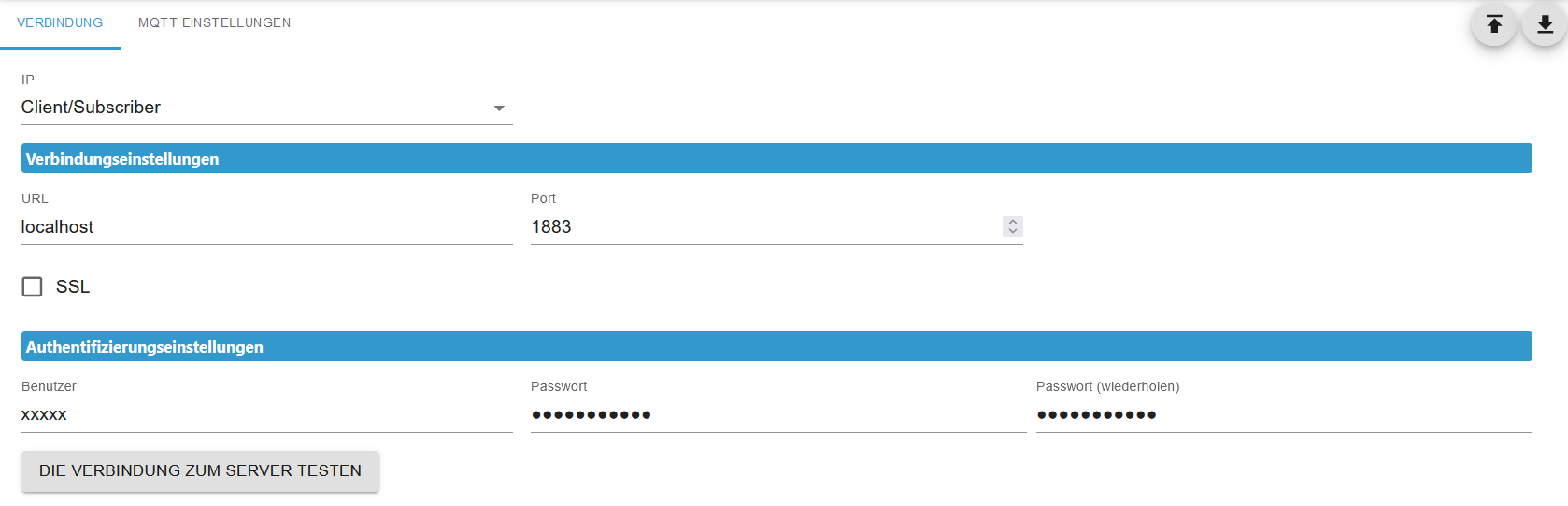
... und wenn ich auf "DIE VERBINDUNG ZUM SERVER TESTEN" klicke kommt "OK" als Antwort.
-
@thomas-braun said in Probleme bei Buster 32bit auf Bullseye 64bit Upgrade:
Schau dir das Setup vom mqtt-Server an.
... und wenn ich auf "DIE VERBINDUNG ZUM SERVER TESTEN" klicke kommt "OK" als Antwort.
Ich hab zwar von sonoff/mqtt usw. keine Ahnung, aber das ist da ein Client-Setup. Stell mal Port 1885 ein, da läuft der sonoff drauf
-
Ich hab zwar von sonoff/mqtt usw. keine Ahnung, aber das ist da ein Client-Setup. Stell mal Port 1885 ein, da läuft der sonoff drauf
@thomas-braun said in Probleme bei Buster 32bit auf Bullseye 64bit Upgrade:
Stell mal Port 1885 ein, da läuft der sonoff drauf
Stimmt, der läuft bei mir mit Port 1885 auch "GRÜN".
Den habe ich jetzt gestoppt, den Port 1885 beim MQTT Adapter eingestellt, reboot und nix ...
Der Fehler ist noch immer da, der Adapter "GELB".Und wieder alles auf Anfang ...
(An dieser Stelle vielen Dank, dass ihr eure Zeit / Gedanken mit meinem Problem teilt ....
 )
)Ich glaube langsam, ich nehme wieder die Buster-Karte und fertig.
Irgend etwas ist (scheinbar) in der LINUX Unterwäsche passiert, aber was ...
Kann es sein, dass das Backitup von der Buster-Installation von Bullseye nicht richtig übernommen wird ?Ich werde mal eine frische Bullseye / ioBroker Karte OHNE Backitup probieren und das Sorgenkind MQTT als erstes installieren ...
-
@thomas-braun said in Probleme bei Buster 32bit auf Bullseye 64bit Upgrade:
Stell mal Port 1885 ein, da läuft der sonoff drauf
Stimmt, der läuft bei mir mit Port 1885 auch "GRÜN".
Den habe ich jetzt gestoppt, den Port 1885 beim MQTT Adapter eingestellt, reboot und nix ...
Der Fehler ist noch immer da, der Adapter "GELB".Und wieder alles auf Anfang ...
(An dieser Stelle vielen Dank, dass ihr eure Zeit / Gedanken mit meinem Problem teilt ....
)Ich glaube langsam, ich nehme wieder die Buster-Karte und fertig.
Irgend etwas ist (scheinbar) in der LINUX Unterwäsche passiert, aber was ...
Kann es sein, dass das Backitup von der Buster-Installation von Bullseye nicht richtig übernommen wird ?Ich werde mal eine frische Bullseye / ioBroker Karte OHNE Backitup probieren und das Sorgenkind MQTT als erstes installieren ...
@raspiuser sagte in Probleme bei Buster 32bit auf Bullseye 64bit Upgrade:
Irgend etwas ist (scheinbar) in der LINUX Unterwäsche passiert, aber was ...
Kann es sein, dass das Backitup von der Buster-Installation von Bullseye nicht richtig übernommen wird ?Quatsch.





Hey! Du scheinst an dieser Unterhaltung interessiert zu sein, hast aber noch kein Konto.
Hast du es satt, bei jedem Besuch durch die gleichen Beiträge zu scrollen? Wenn du dich für ein Konto anmeldest, kommst du immer genau dorthin zurück, wo du zuvor warst, und kannst dich über neue Antworten benachrichtigen lassen (entweder per E-Mail oder Push-Benachrichtigung). Du kannst auch Lesezeichen speichern und Beiträge positiv bewerten, um anderen Community-Mitgliedern deine Wertschätzung zu zeigen.
Mit deinem Input könnte dieser Beitrag noch besser werden 💗
Registrieren Anmelden470
Online33.0k
Benutzer83.6k
Themen1.3m
Beiträge