



Skip to content
  • Home
  • Recent
  • Tags
  • 0 Unread 0
  • Categories
  • Unreplied
  • Popular
  • GitHub
  • Docu
  • Hilfe
Skins
  • Light
  • Brite
  • Cerulean
  • Cosmo
  • Flatly
  • Journal
  • Litera
  • Lumen
  • Lux
  • Materia
  • Minty
  • Morph
  • Pulse
  • Sandstone
  • Simplex
  • Sketchy
  • Spacelab
  • United
  • Yeti
  • Zephyr
  • Dark
  • Cyborg
  • Darkly
  • Quartz
  • Slate
  • Solar
  • Superhero
  • Vapor

  • Default (No Skin)
  • No Skin
Collapse
ioBroker Logo

Community Forum

donate donate
  1. ioBroker Community Home
  2. Deutsch
  3. Skripten / Logik
  4. Vorlage für Teperatur Check um bestimmte Uhrzeit

NEWS

  • Neuer ioBroker-Blog online: Monatsrückblick März/April 2026
    BluefoxB
    Bluefox
    5
    1
    109

  • Verwendung von KI bitte immer deutlich kennzeichnen
    HomoranH
    Homoran
    8
    1
    151

  • Monatsrückblick Januar/Februar 2026 ist online!
    BluefoxB
    Bluefox
    18
    1
    865

Vorlage für Teperatur Check um bestimmte Uhrzeit

Scheduled Pinned Locked Moved Skripten / Logik
3 Posts 2 Posters 486 Views
  • Oldest to Newest
  • Newest to Oldest
  • Most Votes
Reply
  • Reply as topic
Log in to reply
This topic has been deleted. Only users with topic management privileges can see it.
  • C Offline
    C Offline
    ChrisX
    wrote on last edited by
    #1

    Hallo,

    bin ganz neu bei iobrocker und versuche mich an blockly.

    Ich möchte jeden Tag gegen 12 Uhr meine "temp_aqua" prüfen ob Temperatur unter 22c wenn JA dann Push wenn NEIN dann nichts.

    Da jeden Tag.

    Leider bekomme ich keinen Timer mit Jeden tag und punkt 12 Uhr hin.

    Wer kann kurz helfen?

    Edit ich könnte sonst mit einem Cronjob alle 24 Stunden Arbeiten wenn ich diesen um 12 starte :P

    1 Reply Last reply
    0
    • HomoranH Do not disturb
      HomoranH Do not disturb
      Homoran
      Global Moderator Administrators
      wrote on last edited by
      #2

      @ChrisX:

      Leider bekomme ich keinen Timer mit Jeden tag und punkt 12 Uhr hin. `
      Nimm den Zeitplan als Trigger und stelle ihn nach deinen Wünschen ein.

      Beim Anklicken des Crons öffnet sich ein Wizard:
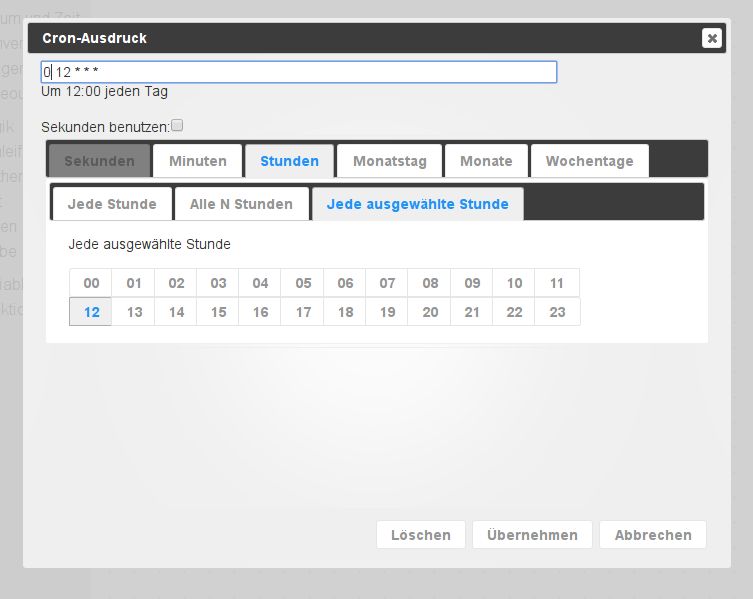
      144_cron.jpg

      Gruß

      Rainer

      kein Support per PN! - Fragen im Forum stellen -
      Benutzt das Voting rechts unten im Beitrag wenn er euch geholfen hat.
      Das Forum freut sich über eine Spende. Benutzt dazu den Spendenbutton oben rechts. Danke!
      der Installationsfixer: curl -fsL https://iobroker.net/fix.sh | bash -

      1 Reply Last reply
      0
      • C Offline
        C Offline
        ChrisX
        wrote on last edited by
        #3

        Danke :) Werde ich mal testen.

        1 Reply Last reply
        0

        Hello! It looks like you're interested in this conversation, but you don't have an account yet.

        Getting fed up of having to scroll through the same posts each visit? When you register for an account, you'll always come back to exactly where you were before, and choose to be notified of new replies (either via email, or push notification). You'll also be able to save bookmarks and upvote posts to show your appreciation to other community members.

        With your input, this post could be even better 💗

        Register Login
        Reply
        • Reply as topic
        Log in to reply
        • Oldest to Newest
        • Newest to Oldest
        • Most Votes


        Support us

        ioBroker
        Community Adapters
        Donate

        516

        Online

        32.8k

        Users

        82.7k

        Topics

        1.3m

        Posts
        Community
        Impressum | Datenschutz-Bestimmungen | Nutzungsbedingungen | Einwilligungseinstellungen
        ioBroker Community 2014-2025
        logo
        • Login

        • Don't have an account? Register

        • Login or register to search.
        • First post
          Last post
        0
        • Home
        • Recent
        • Tags
        • Unread 0
        • Categories
        • Unreplied
        • Popular
        • GitHub
        • Docu
        • Hilfe