




Umzug von Bullseye auf Trixie - Backitup Probleme
-
Hallo zusammen,
ich bin etwas am Verzweifeln. Nachdem ich mir schon lange vorgenommen habe den Iobroker von alten Bullseye auf Trixie umziehen zu lassen habe ich an diesem WE den Anlauf dazu genommen. Leider klappt aber weder das Backup vom alten System fehlerfrei (Mysql Sicherung bricht immer wieder mittendrin ab "connection lost") noch kann ich den Teil des Backups der anscheinend fehlerfrei läuft sauber auf das neue System einspielen.
Quelle des Backups ist der Iobroker auf einem Raspi4 8GB mit Node.js: v22.22.0 NPM: 10.9.4 und allen Adaptern auf aktuellstem Stand. Ziel des Backups ist ein zweiter Raspi4 8GB auf dem ich Iobroker, Grafana, MySQL usw. komplett neu installiert habe und dementsprechend auch Node.js: v22.22.0 NPM: 10.9.4 drauf sind. Der zweite Raspi läuft aktuell unter einer DHCP IP, die feste IP kann ich dann vergeben wenn das alte System offline gehen kann.
Eine Herausforderung besteht eventuell noch dadrin, dass auf dem Quellsystem der Speicherpfad für MySQL auf eine dauerhaft gemountete 256GB Samsung EVO SSD gelegt ist. Nachdem ich zunächst vor Jahren Probleme mit dem USB-SSD Adapter hatte hab ich einen Adapter gefunden der nun seit fast drei Jahren stabil läuft.
Die MySQL 50-server.conf ist schon auf den externen Speicherort vorbereitet, die Zeile ist allerdings noch so lange auskommentiert bis ich die SSD endlich umstecken kann. Bevor ich dies tue möchte ich aber erst mal den Inhalt der MySQL SSD sauber gesichert haben und den neuen Iobroker möglichst ohne Komplikationen am laufen haben.
Welche Probleme hab ich aktuell also?
-
Das Grafana Backup lässt sich nicht wieder einspielen. Wenn ich das Einspielen starte bleibt die Backitup-Wiederherstellungskonsole gleich nach dem Start mit der ersten Konsolenzeile 16:30:19.360 INFO gui starting Restore... bis zum sankt Nimmerleistag hängen. service grafana-server status gibt einen laufenden Grafana-Server aus.
-
Der Adapter iobroker.s7 wirft im Iobroker-Protokoll nachfolgende Fehler aus:
iobroker npm-install: host.IobrokerV13 Cannot install iobroker.s7@1.5.0: 1iobroker npm-install: npm error code 1npm error path /opt/iobroker/node_modules/node-snap7npm error command failednpm error command sh -c prebuild-install || node-gyp rebuildnpm error (node:4485) [DEP0060] DeprecationWarning: The `util._extend` API is deprecated. Please use Object.assign() instead.npm error (Use `node --trace-deprecation ...` to show where the warning was created)npm error Traceback (most recent call last):npm error File "/opt/iobroker/node_modules/node-gyp/gyp/gyp_main.py", line 42, in <module>npm error import gyp # noqa: E402npm error ^^^^^^^^^^npm error File "/opt/iobroker/node_modules/node-gyp/gyp/pylib/gyp/__init__.py", line 9, in <module>npm error import gyp.inputnpm error File "/opt/iobroker/node_modules/node-gyp/gyp/pylib/gyp/input.py", line 19, in <module>npm error from distutils.version import StrictVersionnpm error ModuleNotFoundError: No module named 'distutils'npm error gyp ERR! configure error npm error gyp ERR! stack Error: `gyp` failed with exit code: 1npm error gyp ERR! stack at ChildProcess.onCpExit (/opt/iobroker/node_modules/node-gyp/lib/configure.js:259:16)npm error gyp ERR! stack at ChildProcess.emit (node:events:519:28)npm error gyp ERR! stack at ChildProcess._handle.onexit (node:internal/child_process:293:12)npm error gyp ERR! System Linux 6.12.62+rpt-rpi-v8npm error gyp ERR! command "/usr/bin/node" "/opt/iobroker/node_modules/.bin/node-gyp" "rebuild"npm error gyp ERR! cwd /opt/iobroker/node_modules/node-snap7npm error gyp ERR! node -v v22.22.0npm error gyp ERR! node-gyp -v v8.4.1npm error gyp ERR! not oknpm error A complete log of this run can be found in: /home/iobroker/.npm/_logs/2026-02-15T15_19_17_587Z-debug-0.logIch entnehme dem Eintrag das, laienhaft formuliert, irgendwas deprecated ist. Aber wie kann ich das ändern?
Nachdem ich versucht habe den S7 Adapter manuell über den "Fuchskopf" NPM @latest zu installieren schmeißt Iobroker nach dem Installationsversuch
$ iobroker upload s7 --debug
INFO: Directory "for s7.admin" does not exist. Nothing was uploaded or deleted.
INFO: Directory "for s7" does not exist. Nothing was uploaded or deleted.
Process exited with code 0
als Fehlermeldung.
Warum bleibt das Rückspielen des Grafana Backups ohne weitere Meldungen hängen? Wie bekomme ich die hängende Backitup-Wiederherstellungskonsole wieder geschlossen?
Einstellungen in Backitup auf dem Quellsystem:
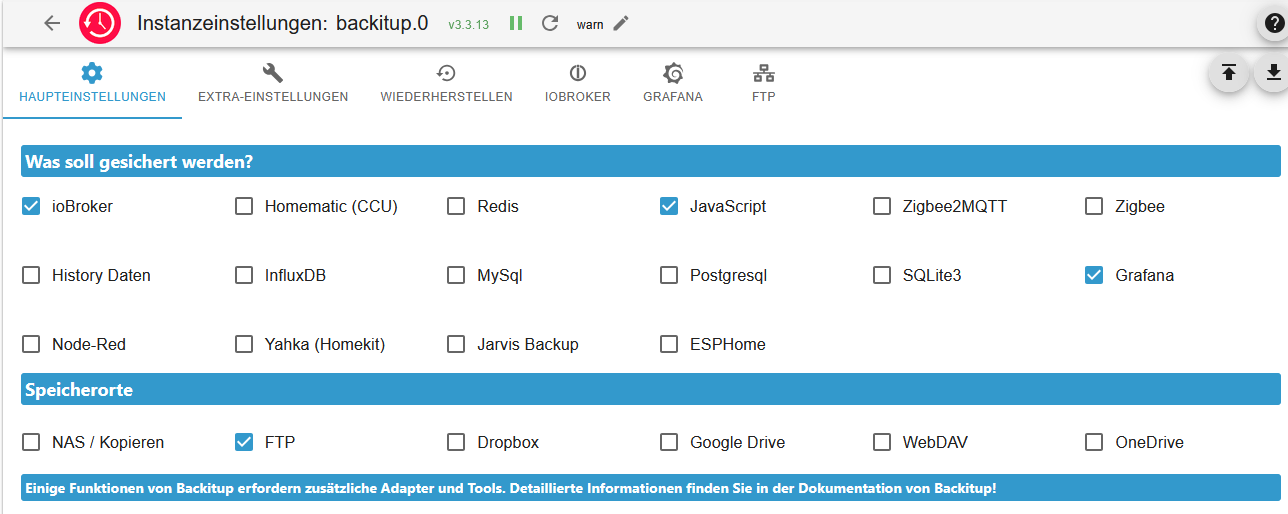
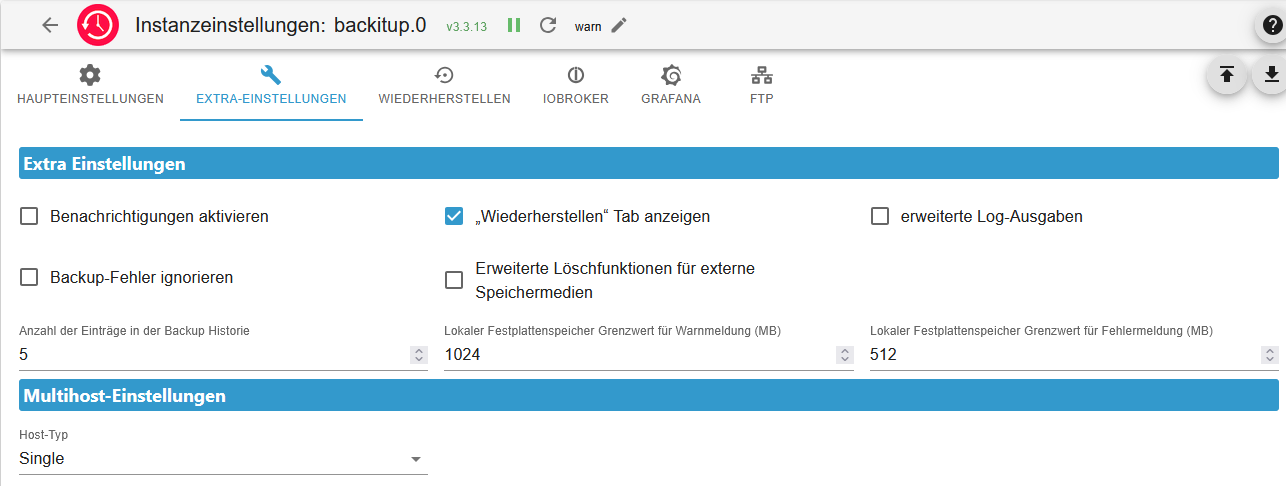
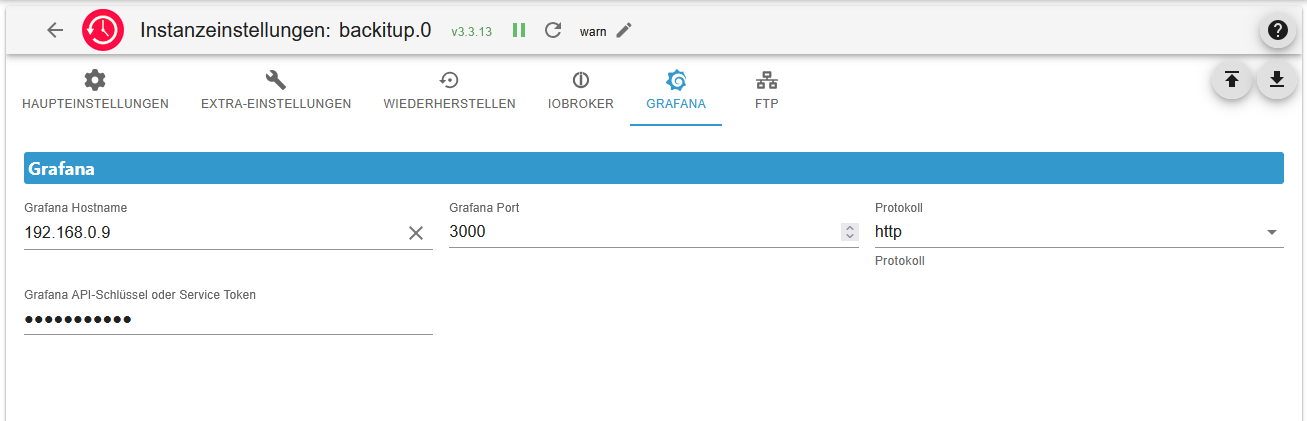
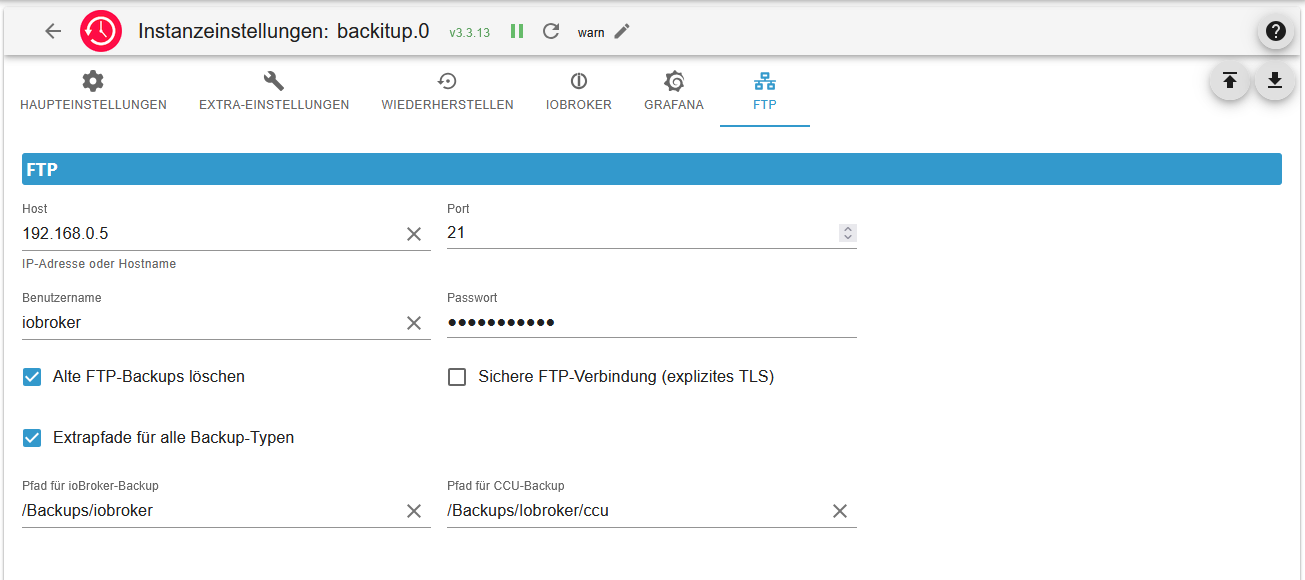
Und dann bleibt noch eine letzte Frage wie ich alles was im Iqontrol VIS erstellt wurde gesichert und auf dem neuen System wieder eingespielt werden kann. Da steckt echt viel Arbeit drin.
Ich danke schon mal vielmals für eure Unterstützung!
@HF_SPSler sagte in Umzug von Bullseye auf Trixie - Backitup Probleme:
Ich entnehme dem Eintrag das, laienhaft formuliert, irgendwas deprecated ist. Aber wie kann ich das ändern?
Installier da die 'python3-setuptools' nach.
-
-
@HF_SPSler sagte in Umzug von Bullseye auf Trixie - Backitup Probleme:
Ich entnehme dem Eintrag das, laienhaft formuliert, irgendwas deprecated ist. Aber wie kann ich das ändern?
Installier da die 'python3-setuptools' nach.
@Thomas-Braun Danke Thomas, das hat das Thema mit dem S7 Adapter schon mal behoben.
Jetzt bleibt nur noch das Problem, dass ich das Grafana Backup nicht zurück gespielt bekomme. Auf dem neuen System hab ich bereits einen neuen Service-Token erstellt und diesen in Backitup eingetragen.
Die Backups liegen auf einem FTP, von dort aus hab ich nun das letzte Backup lokal auf den neuen Iobroker gezogen und restoring gestartet. Damit bleibt zumindest die Wiederherstellungskonsole nicht mehr bis sonst wann hängen. Jedoch, die Ausgabe der Wiederherstellungskonsole sagt, es würden Berechtigungen fehlen. Der User admin mit den Rechten admin existiert aber im neuen Grafana Server. Wo sind die Zugangsdaten noch einzutragen?
17:17:34.856 INFO gui starting Restore...
17:17:34.905 DEBUG grafana Start Grafana Restore ...
17:17:34.920 DEBUG grafana filename for restore: /opt/iobroker/backups/grafana_2026_02_15-16_06_04_backupiobroker.tar.gz
17:17:34.990 DEBUG grafana start decompress
17:17:35.969 DEBUG grafana Grafana request started
17:17:36.061 DEBUG grafana Grafana is available ... Status: 200
17:17:36.102 DEBUG grafana Try to Restore: /opt/iobroker/backups/grafana_tmp/datasource/Infinity.json
17:17:36.125 DEBUG grafana Try to Restore: /opt/iobroker/backups/grafana_tmp/datasource/JSON.json
17:17:36.131 DEBUG grafana Try to Restore: /opt/iobroker/backups/grafana_tmp/datasource/Iobroker.json
17:17:36.148 DEBUG grafana cannot restore datasource "Infinity": "You'll need additional permissions to perform this action. Permissions needed: datasources:create"
17:17:36.150 DEBUG grafana cannot restore datasource "Iobroker": "You'll need additional permissions to perform this action. Permissions needed: datasources:create"
17:17:36.162 DEBUG grafana cannot restore datasource "JSON": "You'll need additional permissions to perform this action. Permissions needed: datasources:create"
S7 1214 (Master) + Logo!8(Slave Erdgeschoss) + Logo!8 (Slave Obergeschoss) + S7 1214 (Slave Garage/Nebengebäude)
-
@Thomas-Braun Danke Thomas, das hat das Thema mit dem S7 Adapter schon mal behoben.
Jetzt bleibt nur noch das Problem, dass ich das Grafana Backup nicht zurück gespielt bekomme. Auf dem neuen System hab ich bereits einen neuen Service-Token erstellt und diesen in Backitup eingetragen.
Die Backups liegen auf einem FTP, von dort aus hab ich nun das letzte Backup lokal auf den neuen Iobroker gezogen und restoring gestartet. Damit bleibt zumindest die Wiederherstellungskonsole nicht mehr bis sonst wann hängen. Jedoch, die Ausgabe der Wiederherstellungskonsole sagt, es würden Berechtigungen fehlen. Der User admin mit den Rechten admin existiert aber im neuen Grafana Server. Wo sind die Zugangsdaten noch einzutragen?
17:17:34.856 INFO gui starting Restore... 17:17:34.905 DEBUG grafana Start Grafana Restore ... 17:17:34.920 DEBUG grafana filename for restore: /opt/iobroker/backups/grafana_2026_02_15-16_06_04_backupiobroker.tar.gz 17:17:34.990 DEBUG grafana start decompress 17:17:35.969 DEBUG grafana Grafana request started 17:17:36.061 DEBUG grafana Grafana is available ... Status: 200 17:17:36.102 DEBUG grafana Try to Restore: /opt/iobroker/backups/grafana_tmp/datasource/Infinity.json 17:17:36.125 DEBUG grafana Try to Restore: /opt/iobroker/backups/grafana_tmp/datasource/JSON.json 17:17:36.131 DEBUG grafana Try to Restore: /opt/iobroker/backups/grafana_tmp/datasource/Iobroker.json 17:17:36.148 DEBUG grafana cannot restore datasource "Infinity": "You'll need additional permissions to perform this action. Permissions needed: datasources:create" 17:17:36.150 DEBUG grafana cannot restore datasource "Iobroker": "You'll need additional permissions to perform this action. Permissions needed: datasources:create" 17:17:36.162 DEBUG grafana cannot restore datasource "JSON": "You'll need additional permissions to perform this action. Permissions needed: datasources:create"@HF_SPSler nachdem du anscheinend an mehreren Stellen Baustellen hast, wäre ein komplettes
iob diagsehr sinnvoll.Da du e7nen Zusammenhang mit Trixie siehst, bitte außerdem eine detaillierte Info wie du upgedatet hast.
kein Support per PN! - Fragen im Forum stellen - Benutzt das Voting rechts unten im Beitrag wenn er euch geholfen hat.
Das Forum freut sich über eine Spende. Benutzt dazu den Spendenbutton oben rechts. Danke!
der Installationsfixer: curl -fsL https://iobroker.net/fix.sh | bash - -
@HF_SPSler nachdem du anscheinend an mehreren Stellen Baustellen hast, wäre ein komplettes
iob diagsehr sinnvoll.Da du e7nen Zusammenhang mit Trixie siehst, bitte außerdem eine detaillierte Info wie du upgedatet hast.
@Homoran sagte in Umzug von Bullseye auf Trixie - Backitup Probleme:
Da du e7nen Zusammenhang mit Trixie siehst, bitte außerdem eine detaillierte Info wie du upgedatet hast.
Ich sehe nicht bewusst einen Zusammenhang. Ich schilderte nur, was aktuell auf den neuem System noch nicht läuft oder Probleme macht den Umzug vollständig durch zu führen. Trixie ist eine Neuinstallation, kein Update von einer älteren Version. D.h. auch alles Andere wie Grafana, MySQL usw. ist neu installiert.
Iob-Diag sieht wie folgt aus:
========== Start marking the full check here ===========

Script v.2026-01-31

*** BASE SYSTEM ***
Operating System: Debian GNU/Linux 13 (trixie)
 Static hostname: IobrokerV13
       Icon name: computer
          Kernel: Linux 6.12.62+rpt-rpi-v8
    Architecture: arm64
OS is similar to:

Model           : Raspberry Pi 4 Model B Rev 1.5
Docker          : false
Virtualization  : none
Kernel          : aarch64
Userland        : 64 bit

Systemuptime and Load:
 18:00:25 up 51 min,  1 user,  load average: 0.17, 0.11, 0.07
CPU threads: 4


*** LIFE CYCLE STATUS ***
Operating System is the current Debian stable version codenamed 'trixie'!

*** RASPBERRY THROTTLING ***
Current issues:
No throttling issues detected.

Previously detected issues:
No throttling issues detected.

*** TIME AND TIMEZONES ***
               Local time: Sun 2026-02-15 18:00:25 CET
           Universal time: Sun 2026-02-15 17:00:25 UTC
                 RTC time: n/a
                Time zone: Europe/Berlin (CET, +0100)
System clock synchronized: yes
              NTP service: active
          RTC in local TZ: no

*** Users and Groups ***
User that called 'iob diag':
iobroker
HOME=/home/iobroker
GROUPS=iobroker adm tty dialout cdrom sudo audio video plugdev games users netdev bluetooth redis gpio i2c spi render input

User that is running 'js-controller':
iobroker
HOME=/home/iobroker
SUDO_HOME=/home/iobroker
GROUPS=iobroker adm tty dialout cdrom sudo audio video plugdev games users netdev bluetooth redis gpio i2c spi render input

A default user should be created! This user will be enabled to temporarily switch to root via 'sudo'!
A root login is not required in most Linux Distributions.
Run 'iobroker fix' or use the system tools to create a user.
*** DISPLAY-SERVER SETUP ***
Display-Server:         false
Unit display-manager.service could not be found.
Display-Manager:
Desktop:
Session:                tty

*** MEMORY ***
               total        used        free      shared  buff/cache   available
Mem:            8.2G        902M        6.6G         17M        857M        7.3G
Swap:           2.1G          0B        2.1G
Total:           10G        902M        8.7G

Active iob-Instances:   3

         7820 M total memory
          861 M used memory
         1136 M active memory
          265 M inactive memory
         6248 M free memory
           52 M buffer memory
          765 M swap cache
         2047 M total swap
            0 M used swap
         2047 M free swap

*** top - Table Of Processes  ***
top - 18:00:26 up 51 min,  1 user,  load average: 0.17, 0.11, 0.07
Tasks: 192 total,   1 running, 191 sleeping,   0 stopped,   0 zombie
%Cpu(s):  0.0 us,  2.1 sy,  0.0 ni, 97.9 id,  0.0 wa,  0.0 hi,  0.0 si,  0.0 st
MiB Mem :   7820.7 total,   6248.8 free,    861.1 used,    818.5 buff/cache
MiB Swap:   2048.0 total,   2048.0 free,      0.0 used.   6959.6 avail Mem

*** FAILED SERVICES ***

  UNIT            LOAD   ACTIVE SUB    DESCRIPTION
* mariadb.service loaded failed failed MariaDB 11.8.3 database server

Legend: LOAD   -> Reflects whether the unit definition was properly loaded.
        ACTIVE -> The high-level unit activation state, i.e. generalization of SUB.
        SUB    -> The low-level unit activation state, values depend on unit type.

1 loaded units listed.


*** DMESG CRITICAL ERRORS ***
No critical errors detected

*** FILESYSTEM ***
Filesystem     Type      Size  Used Avail Use% Mounted on
udev           devtmpfs  3.6G     0  3.6G   0% /dev
tmpfs          tmpfs     1.6G  9.3M  1.6G   1% /run
/dev/mmcblk0p2 ext4       15G  7.4G  6.1G  55% /
tmpfs          tmpfs     3.9G  2.1M  3.9G   1% /dev/shm
tmpfs          tmpfs     5.0M   16K  5.0M   1% /run/lock
tmpfs          tmpfs     1.0M     0  1.0M   0% /run/credentials/systemd-journald.service
tmpfs          tmpfs     3.9G  2.8M  3.9G   1% /tmp
/dev/mmcblk0p1 vfat      510M   66M  445M  13% /boot/firmware
tmpfs          tmpfs     1.0M     0  1.0M   0% /run/credentials/getty@tty1.service
tmpfs          tmpfs     1.0M     0  1.0M   0% /run/credentials/serial-getty@ttyS0.service
tmpfs          tmpfs     783M  8.0K  783M   1% /run/user/1000

Messages concerning ext4 filesystem in dmesg:
[Sun Feb 15 17:08:51 2026] EXT4-fs (mmcblk0p2): orphan cleanup on readonly fs
[Sun Feb 15 17:08:51 2026] EXT4-fs (mmcblk0p2): mounted filesystem 21724cc6-e5a3-48a1-8643-7917dba3a9fb ro with ordered data mode. Quota mode: none.
[Sun Feb 15 17:08:53 2026] EXT4-fs (mmcblk0p2): re-mounted 21724cc6-e5a3-48a1-8643-7917dba3a9fb r/w.

Show mounted filesystems:
TARGET           SOURCE         FSTYPE OPTIONS
/                /dev/mmcblk0p2 ext4   rw,noatime
`-/boot/firmware /dev/mmcblk0p1 vfat   rw,relatime,fmask=0022,dmask=0022,codepage=437,iocharset=ascii,shortname=mixed,errors=remount-ro

Files in neuralgic directories:

/var:
2.7G    /var/
430M    /var/lib
237M    /var/cache
231M    /var/cache/apt
149M    /var/lib/apt

Archived and active journals take up 8M in the file system.

/opt/iobroker/backups:
4.0M    /opt/iobroker/backups/

/opt/iobroker/iobroker-data:
165M    /opt/iobroker/iobroker-data/
141M    /opt/iobroker/iobroker-data/files
47M     /opt/iobroker/iobroker-data/files/admin.admin
46M     /opt/iobroker/iobroker-data/files/admin.admin/custom/assets
46M     /opt/iobroker/iobroker-data/files/admin.admin/custom

The five largest files in iobroker-data are:
15M     /opt/iobroker/iobroker-data/objects.jsonl
8.1M    /opt/iobroker/iobroker-data/files/modbus.admin/assets/index-BJ5wwkBW.js
8.1M    /opt/iobroker/iobroker-data/files/backitup.admin/assets/index-Djx0nwYT.js
6.5M    /opt/iobroker/iobroker-data/states.jsonl
4.6M    /opt/iobroker/iobroker-data/files/javascript.admin/vs/language/typescript/tsWorker.js

USB-Devices by-id:
USB-Sticks - Avoid direct links to /dev/tty* in your adapter setups,
please always prefer the links 'by-id':

No Devices found 'by-id'

No nvbackup.json found.

*** NodeJS-Installation ***

/usr/bin/nodejs         v22.22.0
/usr/bin/node           v22.22.0
/usr/bin/npm            10.9.4
/usr/bin/npx            10.9.4

✓ Node.js installation is correct

nodejs:
  Installed: 22.22.0-1nodesource1
  Candidate: 22.22.0-1nodesource1
  Version table:
 *** 22.22.0-1nodesource1 1001
        500 https://deb.nodesource.com/node_22.x nodistro/main arm64 Packages
        100 /var/lib/dpkg/status
     22.21.0-1nodesource1 1001
        500 https://deb.nodesource.com/node_22.x nodistro/main arm64 Packages
     22.20.0-1nodesource1 1001
        500 https://deb.nodesource.com/node_22.x nodistro/main arm64 Packages
     22.19.0-1nodesource1 1001
        500 https://deb.nodesource.com/node_22.x nodistro/main arm64 Packages
     22.18.0-1nodesource1 1001
        500 https://deb.nodesource.com/node_22.x nodistro/main arm64 Packages
     22.17.1-1nodesource1 1001
        500 https://deb.nodesource.com/node_22.x nodistro/main arm64 Packages
     22.17.0-1nodesource1 1001
        500 https://deb.nodesource.com/node_22.x nodistro/main arm64 Packages
     22.16.0-1nodesource1 1001
        500 https://deb.nodesource.com/node_22.x nodistro/main arm64 Packages
     22.15.1-1nodesource1 1001
        500 https://deb.nodesource.com/node_22.x nodistro/main arm64 Packages
     22.15.0-1nodesource1 1001
        500 https://deb.nodesource.com/node_22.x nodistro/main arm64 Packages
     22.14.0-1nodesource1 1001
        500 https://deb.nodesource.com/node_22.x nodistro/main arm64 Packages
     22.13.1-1nodesource1 1001
        500 https://deb.nodesource.com/node_22.x nodistro/main arm64 Packages
     22.13.0-1nodesource1 1001
        500 https://deb.nodesource.com/node_22.x nodistro/main arm64 Packages
     22.12.0-1nodesource1 1001
        500 https://deb.nodesource.com/node_22.x nodistro/main arm64 Packages
     22.11.0-1nodesource1 1001
        500 https://deb.nodesource.com/node_22.x nodistro/main arm64 Packages
     22.10.0-1nodesource1 1001
        500 https://deb.nodesource.com/node_22.x nodistro/main arm64 Packages
     22.9.0-1nodesource1 1001
        500 https://deb.nodesource.com/node_22.x nodistro/main arm64 Packages
     22.8.0-1nodesource1 1001
        500 https://deb.nodesource.com/node_22.x nodistro/main arm64 Packages
     22.7.0-1nodesource1 1001
        500 https://deb.nodesource.com/node_22.x nodistro/main arm64 Packages
     22.6.0-1nodesource1 1001
        500 https://deb.nodesource.com/node_22.x nodistro/main arm64 Packages
     22.5.1-1nodesource1 1001
        500 https://deb.nodesource.com/node_22.x nodistro/main arm64 Packages
     22.5.0-1nodesource1 1001
        500 https://deb.nodesource.com/node_22.x nodistro/main arm64 Packages
     22.4.1-1nodesource1 1001
        500 https://deb.nodesource.com/node_22.x nodistro/main arm64 Packages
     22.4.0-1nodesource1 1001
        500 https://deb.nodesource.com/node_22.x nodistro/main arm64 Packages
     22.3.0-1nodesource1 1001
        500 https://deb.nodesource.com/node_22.x nodistro/main arm64 Packages
     22.2.0-1nodesource1 1001
        500 https://deb.nodesource.com/node_22.x nodistro/main arm64 Packages
     22.1.0-1nodesource1 1001
        500 https://deb.nodesource.com/node_22.x nodistro/main arm64 Packages
     22.0.0-1nodesource1 1001
        500 https://deb.nodesource.com/node_22.x nodistro/main arm64 Packages
     20.19.2+dfsg-1 500
        500 http://deb.debian.org/debian trixie/main arm64 Packages

Temp directories causing deletion problem: 0
No problems detected

Errors in npm tree: 0
No problems detected

Checking for nodejs vulnerability:


 █████  ██      ██           ██████   ██████   ██████  ██████         ██
██   ██ ██      ██          ██       ██    ██ ██    ██ ██   ██     ██  ██
███████ ██      ██          ██   ███ ██    ██ ██    ██ ██   ██         ██
██   ██ ██      ██          ██    ██ ██    ██ ██    ██ ██   ██     ██  ██
██   ██ ███████ ███████      ██████   ██████   ██████  ██████         ██


*** ioBroker-Installation ***

ioBroker Status
iobroker is running on this host.


Objects type: jsonl
States  type: jsonl

Hosts:
IobrokerV13         IobrokerV13 (version: 7.0.7, hostname: IobrokerV13   , alive, uptime: 3081)

Core adapters versions
js-controller:  7.0.7
admin:          7.7.22
javascript:     9.0.18

nodejs modules from github:     0

Adapter State
+ system.adapter.admin.0                  : admin                 : IobrokerV13                              -  enabled, port: 8081, bind: 0.0.0.0, run as: admin
  system.adapter.alias-manager.0          : alias-manager         : IobrokerV13                              - disabled
  system.adapter.awattar.0                : awattar               : IobrokerV13                              - disabled
+ system.adapter.backitup.0               : backitup              : IobrokerV13                              -  enabled
  system.adapter.discovery.0              : discovery             : IobrokerV13                              - disabled
  system.adapter.ems-esp.0                : ems-esp               : IobrokerV13                              - disabled
  system.adapter.iqontrol.0               : iqontrol              : IobrokerV13                              - disabled
  system.adapter.javascript.0             : javascript            : IobrokerV13                              - disabled
  system.adapter.modbus.0                 : modbus                : IobrokerV13                              - disabled
  system.adapter.modbus.4                 : modbus                : IobrokerV13                              - disabled
  system.adapter.modbus.9                 : modbus                : IobrokerV13                              - disabled
  system.adapter.mqtt.0                   : mqtt                  : IobrokerV13                              - disabled, port: 1883, bind: 0.0.0.0
  system.adapter.ping.0                   : ping                  : IobrokerV13                              - disabled
  system.adapter.s7.0                     : s7                    : IobrokerV13                              - disabled
  system.adapter.seplos-v3-sniffer.0      : seplos-v3-sniffer     : IobrokerV13                              - disabled
  system.adapter.simple-api.0             : simple-api            : IobrokerV13                              - disabled, port: 8087, bind: 0.0.0.0, run as: admin
  system.adapter.smartmeter.0             : smartmeter            : IobrokerV13                              - disabled
  system.adapter.solax.0                  : solax                 : IobrokerV13                              - disabled
  system.adapter.sql.0                    : sql                   : IobrokerV13                              - disabled, port: 3306
  system.adapter.web.0                    : web                   : IobrokerV13                              - disabled, port: 8082, bind: 0.0.0.0, run as: admin

+ instance is alive

Enabled adapters with bindings
+ system.adapter.admin.0                  : admin                 : IobrokerV13                              -  enabled, port: 8081, bind: 0.0.0.0, run as: admin

ioBroker-Repositories
┌─────────┬──────────┬─────────────────────────────────────────────────────────┬──────────────┐
│ (index) │ name     │ url                                                     │ auto upgrade │
├─────────┼──────────┼─────────────────────────────────────────────────────────┼──────────────┤
│ 0       │ 'stable' │ 'http://download.iobroker.net/sources-dist.json'        │ false        │
│ 1       │ 'beta'   │ 'http://download.iobroker.net/sources-dist-latest.json' │ false        │
└─────────┴──────────┴─────────────────────────────────────────────────────────┴──────────────┘

Active repo(s): stable
Upgrade policy: none

Installed ioBroker-Adapters
Used repository: stable
Adapter    "admin"        : 7.7.22   , installed 7.7.22
Adapter    "alias-manager": 2.0.0    , installed 2.0.0
Adapter    "awattar"      : 1.0.6    , installed 1.0.6
Adapter    "backitup"     : 3.3.13   , installed 3.3.13
Adapter    "discovery"    : 5.0.0    , installed 5.0.0
Adapter    "ems-esp"      : 7.0.1    , installed 7.0.1
Adapter    "iqontrol"     : 3.0.0    , installed 3.0.0
Adapter    "javascript"   : 9.0.18   , installed 9.0.18
Controller "js-controller": 7.0.7    , installed 7.0.7
Adapter    "modbus"       : 7.0.6    , installed 7.0.6
Adapter    "mqtt"         : 6.1.4    , installed 6.1.4
Adapter    "ping"         : 1.7.9    , installed 1.7.9
Adapter    "s7"           : 1.5.0    , installed 1.5.0
Adapter    "seplos-v3-sniffer": 0.1.1, installed 0.1.1
Adapter    "simple-api"   : 2.8.0    , installed 2.8.0
Adapter    "smartmeter"   : 3.4.0    , installed 3.4.0
Adapter    "socketio"     : 6.7.1    , installed 7.0.8
Adapter    "solax"        : 0.9.21   , installed 0.9.21
Adapter    "sql"          : 3.0.1    , installed 3.0.1
Adapter    "web"          : 7.0.8    , installed 7.0.8
Adapter    "ws"           : 2.6.2    , installed 3.0.19

Objects and States
Please stand by - This may take a while
Objects:        2498
States:         1863

*** OS-Repositories and Updates ***
Hit:1 http://deb.debian.org/debian trixie InRelease
Hit:2 http://archive.raspberrypi.com/debian trixie InRelease
Hit:3 http://deb.debian.org/debian trixie-updates InRelease
Hit:4 http://deb.debian.org/debian-security trixie-security InRelease
Hit:5 https://apt.grafana.com stable InRelease
Hit:6 https://deb.nodesource.com/node_22.x nodistro InRelease
Reading package lists...
Pending systemupdates: 0

*** Listening Ports ***
Active Internet connections (only servers)
Proto Recv-Q Send-Q Local Address           Foreign Address         State       User       Inode      PID/Program name
tcp        0      0 0.0.0.0:111             0.0.0.0:*               LISTEN      0          2372       1/init
tcp        0      0 0.0.0.0:22              0.0.0.0:*               LISTEN      0          9377       1154/sshd: /usr/sbi
tcp        0      0 0.0.0.0:53              0.0.0.0:*               LISTEN      999        9531       1283/pihole-FTL
tcp        0      0 0.0.0.0:443             0.0.0.0:*               LISTEN      999        9544       1283/pihole-FTL
tcp        0      0 127.0.0.1:9000          0.0.0.0:*               LISTEN      1000       7697       1233/iobroker.js-co
tcp        0      0 127.0.0.1:9001          0.0.0.0:*               LISTEN      1000       7692       1233/iobroker.js-co
tcp        0      0 127.0.0.1:6379          0.0.0.0:*               LISTEN      106        9398       1139/redis-server 1
tcp6       0      0 :::80                   :::*                    LISTEN      0          8682       1309/apache2
tcp6       0      0 :::111                  :::*                    LISTEN      0          1254       1/init
tcp6       0      0 :::22                   :::*                    LISTEN      0          9379       1154/sshd: /usr/sbi
tcp6       0      0 :::53                   :::*                    LISTEN      999        9533       1283/pihole-FTL
tcp6       0      0 :::443                  :::*                    LISTEN      999        9546       1283/pihole-FTL
tcp6       0      0 ::1:6379                :::*                    LISTEN      106        9399       1139/redis-server 1
tcp6       0      0 :::3000                 :::*                    LISTEN      103        13508      1890/grafana
tcp6       0      0 :::8081                 :::*                    LISTEN      1000       6838       1337/io.admin.0
udp        0      0 0.0.0.0:111             0.0.0.0:*                           0          323        1/init
udp        0      0 0.0.0.0:123             0.0.0.0:*                           999        10051      1283/pihole-FTL
udp        0      0 0.0.0.0:5353            0.0.0.0:*                           101        2028       624/avahi-daemon: r
udp        0      0 0.0.0.0:51446           0.0.0.0:*                           101        2030       624/avahi-daemon: r
udp        0      0 0.0.0.0:53              0.0.0.0:*                           999        9530       1283/pihole-FTL
udp6       0      0 :::111                  :::*                                0          324        1/init
udp6       0      0 :::123                  :::*                                999        11742      1283/pihole-FTL
udp6       0      0 :::45909                :::*                                101        2031       624/avahi-daemon: r
udp6       0      0 :::5353                 :::*                                101        2029       624/avahi-daemon: r
udp6       0      0 :::53                   :::*                                999        9532       1283/pihole-FTL

*** Log File - Last 25 Lines ***

============ Mark until here for C&P =============
S7 1214 (Master) + Logo!8(Slave Erdgeschoss) + Logo!8 (Slave Obergeschoss) + S7 1214 (Slave Garage/Nebengebäude)
-
@Homoran sagte in Umzug von Bullseye auf Trixie - Backitup Probleme:
Da du e7nen Zusammenhang mit Trixie siehst, bitte außerdem eine detaillierte Info wie du upgedatet hast.
Ich sehe nicht bewusst einen Zusammenhang. Ich schilderte nur, was aktuell auf den neuem System noch nicht läuft oder Probleme macht den Umzug vollständig durch zu führen. Trixie ist eine Neuinstallation, kein Update von einer älteren Version. D.h. auch alles Andere wie Grafana, MySQL usw. ist neu installiert.
Iob-Diag sieht wie folgt aus:
========== Start marking the full check here =========== Script v.2026-01-31 *** BASE SYSTEM *** Operating System: Debian GNU/Linux 13 (trixie) Static hostname: IobrokerV13 Icon name: computer Kernel: Linux 6.12.62+rpt-rpi-v8 Architecture: arm64 OS is similar to: Model : Raspberry Pi 4 Model B Rev 1.5 Docker : false Virtualization : none Kernel : aarch64 Userland : 64 bit Systemuptime and Load: 18:00:25 up 51 min, 1 user, load average: 0.17, 0.11, 0.07 CPU threads: 4 *** LIFE CYCLE STATUS *** Operating System is the current Debian stable version codenamed 'trixie'! *** RASPBERRY THROTTLING *** Current issues: No throttling issues detected. Previously detected issues: No throttling issues detected. *** TIME AND TIMEZONES *** Local time: Sun 2026-02-15 18:00:25 CET Universal time: Sun 2026-02-15 17:00:25 UTC RTC time: n/a Time zone: Europe/Berlin (CET, +0100) System clock synchronized: yes NTP service: active RTC in local TZ: no *** Users and Groups *** User that called 'iob diag': iobroker HOME=/home/iobroker GROUPS=iobroker adm tty dialout cdrom sudo audio video plugdev games users netdev bluetooth redis gpio i2c spi render input User that is running 'js-controller': iobroker HOME=/home/iobroker SUDO_HOME=/home/iobroker GROUPS=iobroker adm tty dialout cdrom sudo audio video plugdev games users netdev bluetooth redis gpio i2c spi render input A default user should be created! This user will be enabled to temporarily switch to root via 'sudo'! A root login is not required in most Linux Distributions. Run 'iobroker fix' or use the system tools to create a user. *** DISPLAY-SERVER SETUP *** Display-Server: false Unit display-manager.service could not be found. Display-Manager: Desktop: Session: tty *** MEMORY *** total used free shared buff/cache available Mem: 8.2G 902M 6.6G 17M 857M 7.3G Swap: 2.1G 0B 2.1G Total: 10G 902M 8.7G Active iob-Instances: 3 7820 M total memory 861 M used memory 1136 M active memory 265 M inactive memory 6248 M free memory 52 M buffer memory 765 M swap cache 2047 M total swap 0 M used swap 2047 M free swap *** top - Table Of Processes *** top - 18:00:26 up 51 min, 1 user, load average: 0.17, 0.11, 0.07 Tasks: 192 total, 1 running, 191 sleeping, 0 stopped, 0 zombie %Cpu(s): 0.0 us, 2.1 sy, 0.0 ni, 97.9 id, 0.0 wa, 0.0 hi, 0.0 si, 0.0 st MiB Mem : 7820.7 total, 6248.8 free, 861.1 used, 818.5 buff/cache MiB Swap: 2048.0 total, 2048.0 free, 0.0 used. 6959.6 avail Mem *** FAILED SERVICES *** UNIT LOAD ACTIVE SUB DESCRIPTION * mariadb.service loaded failed failed MariaDB 11.8.3 database server Legend: LOAD -> Reflects whether the unit definition was properly loaded. ACTIVE -> The high-level unit activation state, i.e. generalization of SUB. SUB -> The low-level unit activation state, values depend on unit type. 1 loaded units listed. *** DMESG CRITICAL ERRORS *** No critical errors detected *** FILESYSTEM *** Filesystem Type Size Used Avail Use% Mounted on udev devtmpfs 3.6G 0 3.6G 0% /dev tmpfs tmpfs 1.6G 9.3M 1.6G 1% /run /dev/mmcblk0p2 ext4 15G 7.4G 6.1G 55% / tmpfs tmpfs 3.9G 2.1M 3.9G 1% /dev/shm tmpfs tmpfs 5.0M 16K 5.0M 1% /run/lock tmpfs tmpfs 1.0M 0 1.0M 0% /run/credentials/systemd-journald.service tmpfs tmpfs 3.9G 2.8M 3.9G 1% /tmp /dev/mmcblk0p1 vfat 510M 66M 445M 13% /boot/firmware tmpfs tmpfs 1.0M 0 1.0M 0% /run/credentials/getty@tty1.service tmpfs tmpfs 1.0M 0 1.0M 0% /run/credentials/serial-getty@ttyS0.service tmpfs tmpfs 783M 8.0K 783M 1% /run/user/1000 Messages concerning ext4 filesystem in dmesg: [Sun Feb 15 17:08:51 2026] EXT4-fs (mmcblk0p2): orphan cleanup on readonly fs [Sun Feb 15 17:08:51 2026] EXT4-fs (mmcblk0p2): mounted filesystem 21724cc6-e5a3-48a1-8643-7917dba3a9fb ro with ordered data mode. Quota mode: none. [Sun Feb 15 17:08:53 2026] EXT4-fs (mmcblk0p2): re-mounted 21724cc6-e5a3-48a1-8643-7917dba3a9fb r/w. Show mounted filesystems: TARGET SOURCE FSTYPE OPTIONS / /dev/mmcblk0p2 ext4 rw,noatime `-/boot/firmware /dev/mmcblk0p1 vfat rw,relatime,fmask=0022,dmask=0022,codepage=437,iocharset=ascii,shortname=mixed,errors=remount-ro Files in neuralgic directories: /var: 2.7G /var/ 430M /var/lib 237M /var/cache 231M /var/cache/apt 149M /var/lib/apt Archived and active journals take up 8M in the file system. /opt/iobroker/backups: 4.0M /opt/iobroker/backups/ /opt/iobroker/iobroker-data: 165M /opt/iobroker/iobroker-data/ 141M /opt/iobroker/iobroker-data/files 47M /opt/iobroker/iobroker-data/files/admin.admin 46M /opt/iobroker/iobroker-data/files/admin.admin/custom/assets 46M /opt/iobroker/iobroker-data/files/admin.admin/custom The five largest files in iobroker-data are: 15M /opt/iobroker/iobroker-data/objects.jsonl 8.1M /opt/iobroker/iobroker-data/files/modbus.admin/assets/index-BJ5wwkBW.js 8.1M /opt/iobroker/iobroker-data/files/backitup.admin/assets/index-Djx0nwYT.js 6.5M /opt/iobroker/iobroker-data/states.jsonl 4.6M /opt/iobroker/iobroker-data/files/javascript.admin/vs/language/typescript/tsWorker.js USB-Devices by-id: USB-Sticks - Avoid direct links to /dev/tty* in your adapter setups, please always prefer the links 'by-id': No Devices found 'by-id' No nvbackup.json found. *** NodeJS-Installation *** /usr/bin/nodejs v22.22.0 /usr/bin/node v22.22.0 /usr/bin/npm 10.9.4 /usr/bin/npx 10.9.4 ✓ Node.js installation is correct nodejs: Installed: 22.22.0-1nodesource1 Candidate: 22.22.0-1nodesource1 Version table: *** 22.22.0-1nodesource1 1001 500 https://deb.nodesource.com/node_22.x nodistro/main arm64 Packages 100 /var/lib/dpkg/status 22.21.0-1nodesource1 1001 500 https://deb.nodesource.com/node_22.x nodistro/main arm64 Packages 22.20.0-1nodesource1 1001 500 https://deb.nodesource.com/node_22.x nodistro/main arm64 Packages 22.19.0-1nodesource1 1001 500 https://deb.nodesource.com/node_22.x nodistro/main arm64 Packages 22.18.0-1nodesource1 1001 500 https://deb.nodesource.com/node_22.x nodistro/main arm64 Packages 22.17.1-1nodesource1 1001 500 https://deb.nodesource.com/node_22.x nodistro/main arm64 Packages 22.17.0-1nodesource1 1001 500 https://deb.nodesource.com/node_22.x nodistro/main arm64 Packages 22.16.0-1nodesource1 1001 500 https://deb.nodesource.com/node_22.x nodistro/main arm64 Packages 22.15.1-1nodesource1 1001 500 https://deb.nodesource.com/node_22.x nodistro/main arm64 Packages 22.15.0-1nodesource1 1001 500 https://deb.nodesource.com/node_22.x nodistro/main arm64 Packages 22.14.0-1nodesource1 1001 500 https://deb.nodesource.com/node_22.x nodistro/main arm64 Packages 22.13.1-1nodesource1 1001 500 https://deb.nodesource.com/node_22.x nodistro/main arm64 Packages 22.13.0-1nodesource1 1001 500 https://deb.nodesource.com/node_22.x nodistro/main arm64 Packages 22.12.0-1nodesource1 1001 500 https://deb.nodesource.com/node_22.x nodistro/main arm64 Packages 22.11.0-1nodesource1 1001 500 https://deb.nodesource.com/node_22.x nodistro/main arm64 Packages 22.10.0-1nodesource1 1001 500 https://deb.nodesource.com/node_22.x nodistro/main arm64 Packages 22.9.0-1nodesource1 1001 500 https://deb.nodesource.com/node_22.x nodistro/main arm64 Packages 22.8.0-1nodesource1 1001 500 https://deb.nodesource.com/node_22.x nodistro/main arm64 Packages 22.7.0-1nodesource1 1001 500 https://deb.nodesource.com/node_22.x nodistro/main arm64 Packages 22.6.0-1nodesource1 1001 500 https://deb.nodesource.com/node_22.x nodistro/main arm64 Packages 22.5.1-1nodesource1 1001 500 https://deb.nodesource.com/node_22.x nodistro/main arm64 Packages 22.5.0-1nodesource1 1001 500 https://deb.nodesource.com/node_22.x nodistro/main arm64 Packages 22.4.1-1nodesource1 1001 500 https://deb.nodesource.com/node_22.x nodistro/main arm64 Packages 22.4.0-1nodesource1 1001 500 https://deb.nodesource.com/node_22.x nodistro/main arm64 Packages 22.3.0-1nodesource1 1001 500 https://deb.nodesource.com/node_22.x nodistro/main arm64 Packages 22.2.0-1nodesource1 1001 500 https://deb.nodesource.com/node_22.x nodistro/main arm64 Packages 22.1.0-1nodesource1 1001 500 https://deb.nodesource.com/node_22.x nodistro/main arm64 Packages 22.0.0-1nodesource1 1001 500 https://deb.nodesource.com/node_22.x nodistro/main arm64 Packages 20.19.2+dfsg-1 500 500 http://deb.debian.org/debian trixie/main arm64 Packages Temp directories causing deletion problem: 0 No problems detected Errors in npm tree: 0 No problems detected Checking for nodejs vulnerability: █████ ██ ██ ██████ ██████ ██████ ██████ ██ ██ ██ ██ ██ ██ ██ ██ ██ ██ ██ ██ ██ ██ ███████ ██ ██ ██ ███ ██ ██ ██ ██ ██ ██ ██ ██ ██ ██ ██ ██ ██ ██ ██ ██ ██ ██ ██ ██ ██ ██ ██ ███████ ███████ ██████ ██████ ██████ ██████ ██ *** ioBroker-Installation *** ioBroker Status iobroker is running on this host. Objects type: jsonl States type: jsonl Hosts: IobrokerV13 IobrokerV13 (version: 7.0.7, hostname: IobrokerV13 , alive, uptime: 3081) Core adapters versions js-controller: 7.0.7 admin: 7.7.22 javascript: 9.0.18 nodejs modules from github: 0 Adapter State + system.adapter.admin.0 : admin : IobrokerV13 - enabled, port: 8081, bind: 0.0.0.0, run as: admin system.adapter.alias-manager.0 : alias-manager : IobrokerV13 - disabled system.adapter.awattar.0 : awattar : IobrokerV13 - disabled + system.adapter.backitup.0 : backitup : IobrokerV13 - enabled system.adapter.discovery.0 : discovery : IobrokerV13 - disabled system.adapter.ems-esp.0 : ems-esp : IobrokerV13 - disabled system.adapter.iqontrol.0 : iqontrol : IobrokerV13 - disabled system.adapter.javascript.0 : javascript : IobrokerV13 - disabled system.adapter.modbus.0 : modbus : IobrokerV13 - disabled system.adapter.modbus.4 : modbus : IobrokerV13 - disabled system.adapter.modbus.9 : modbus : IobrokerV13 - disabled system.adapter.mqtt.0 : mqtt : IobrokerV13 - disabled, port: 1883, bind: 0.0.0.0 system.adapter.ping.0 : ping : IobrokerV13 - disabled system.adapter.s7.0 : s7 : IobrokerV13 - disabled system.adapter.seplos-v3-sniffer.0 : seplos-v3-sniffer : IobrokerV13 - disabled system.adapter.simple-api.0 : simple-api : IobrokerV13 - disabled, port: 8087, bind: 0.0.0.0, run as: admin system.adapter.smartmeter.0 : smartmeter : IobrokerV13 - disabled system.adapter.solax.0 : solax : IobrokerV13 - disabled system.adapter.sql.0 : sql : IobrokerV13 - disabled, port: 3306 system.adapter.web.0 : web : IobrokerV13 - disabled, port: 8082, bind: 0.0.0.0, run as: admin + instance is alive Enabled adapters with bindings + system.adapter.admin.0 : admin : IobrokerV13 - enabled, port: 8081, bind: 0.0.0.0, run as: admin ioBroker-Repositories ┌─────────┬──────────┬─────────────────────────────────────────────────────────┬──────────────┐ │ (index) │ name │ url │ auto upgrade │ ├─────────┼──────────┼─────────────────────────────────────────────────────────┼──────────────┤ │ 0 │ 'stable' │ 'http://download.iobroker.net/sources-dist.json' │ false │ │ 1 │ 'beta' │ 'http://download.iobroker.net/sources-dist-latest.json' │ false │ └─────────┴──────────┴─────────────────────────────────────────────────────────┴──────────────┘ Active repo(s): stable Upgrade policy: none Installed ioBroker-Adapters Used repository: stable Adapter "admin" : 7.7.22 , installed 7.7.22 Adapter "alias-manager": 2.0.0 , installed 2.0.0 Adapter "awattar" : 1.0.6 , installed 1.0.6 Adapter "backitup" : 3.3.13 , installed 3.3.13 Adapter "discovery" : 5.0.0 , installed 5.0.0 Adapter "ems-esp" : 7.0.1 , installed 7.0.1 Adapter "iqontrol" : 3.0.0 , installed 3.0.0 Adapter "javascript" : 9.0.18 , installed 9.0.18 Controller "js-controller": 7.0.7 , installed 7.0.7 Adapter "modbus" : 7.0.6 , installed 7.0.6 Adapter "mqtt" : 6.1.4 , installed 6.1.4 Adapter "ping" : 1.7.9 , installed 1.7.9 Adapter "s7" : 1.5.0 , installed 1.5.0 Adapter "seplos-v3-sniffer": 0.1.1, installed 0.1.1 Adapter "simple-api" : 2.8.0 , installed 2.8.0 Adapter "smartmeter" : 3.4.0 , installed 3.4.0 Adapter "socketio" : 6.7.1 , installed 7.0.8 Adapter "solax" : 0.9.21 , installed 0.9.21 Adapter "sql" : 3.0.1 , installed 3.0.1 Adapter "web" : 7.0.8 , installed 7.0.8 Adapter "ws" : 2.6.2 , installed 3.0.19 Objects and States Please stand by - This may take a while Objects: 2498 States: 1863 *** OS-Repositories and Updates *** Hit:1 http://deb.debian.org/debian trixie InRelease Hit:2 http://archive.raspberrypi.com/debian trixie InRelease Hit:3 http://deb.debian.org/debian trixie-updates InRelease Hit:4 http://deb.debian.org/debian-security trixie-security InRelease Hit:5 https://apt.grafana.com stable InRelease Hit:6 https://deb.nodesource.com/node_22.x nodistro InRelease Reading package lists... Pending systemupdates: 0 *** Listening Ports *** Active Internet connections (only servers) Proto Recv-Q Send-Q Local Address Foreign Address State User Inode PID/Program name tcp 0 0 0.0.0.0:111 0.0.0.0:* LISTEN 0 2372 1/init tcp 0 0 0.0.0.0:22 0.0.0.0:* LISTEN 0 9377 1154/sshd: /usr/sbi tcp 0 0 0.0.0.0:53 0.0.0.0:* LISTEN 999 9531 1283/pihole-FTL tcp 0 0 0.0.0.0:443 0.0.0.0:* LISTEN 999 9544 1283/pihole-FTL tcp 0 0 127.0.0.1:9000 0.0.0.0:* LISTEN 1000 7697 1233/iobroker.js-co tcp 0 0 127.0.0.1:9001 0.0.0.0:* LISTEN 1000 7692 1233/iobroker.js-co tcp 0 0 127.0.0.1:6379 0.0.0.0:* LISTEN 106 9398 1139/redis-server 1 tcp6 0 0 :::80 :::* LISTEN 0 8682 1309/apache2 tcp6 0 0 :::111 :::* LISTEN 0 1254 1/init tcp6 0 0 :::22 :::* LISTEN 0 9379 1154/sshd: /usr/sbi tcp6 0 0 :::53 :::* LISTEN 999 9533 1283/pihole-FTL tcp6 0 0 :::443 :::* LISTEN 999 9546 1283/pihole-FTL tcp6 0 0 ::1:6379 :::* LISTEN 106 9399 1139/redis-server 1 tcp6 0 0 :::3000 :::* LISTEN 103 13508 1890/grafana tcp6 0 0 :::8081 :::* LISTEN 1000 6838 1337/io.admin.0 udp 0 0 0.0.0.0:111 0.0.0.0:* 0 323 1/init udp 0 0 0.0.0.0:123 0.0.0.0:* 999 10051 1283/pihole-FTL udp 0 0 0.0.0.0:5353 0.0.0.0:* 101 2028 624/avahi-daemon: r udp 0 0 0.0.0.0:51446 0.0.0.0:* 101 2030 624/avahi-daemon: r udp 0 0 0.0.0.0:53 0.0.0.0:* 999 9530 1283/pihole-FTL udp6 0 0 :::111 :::* 0 324 1/init udp6 0 0 :::123 :::* 999 11742 1283/pihole-FTL udp6 0 0 :::45909 :::* 101 2031 624/avahi-daemon: r udp6 0 0 :::5353 :::* 101 2029 624/avahi-daemon: r udp6 0 0 :::53 :::* 999 9532 1283/pihole-FTL *** Log File - Last 25 Lines *** ============ Mark until here for C&P =============@HF_SPSler sagte in Umzug von Bullseye auf Trixie - Backitup Probleme:
A default user should be created! This user will be enabled to temporarily switch to root via 'sudo'!
Warum hast du denn keinen Standarduser angelegt? Nein, den user 'iobroker' zu nennen ist keine gute Idee...
-
@Homoran sagte in Umzug von Bullseye auf Trixie - Backitup Probleme:
Da du e7nen Zusammenhang mit Trixie siehst, bitte außerdem eine detaillierte Info wie du upgedatet hast.
Ich sehe nicht bewusst einen Zusammenhang. Ich schilderte nur, was aktuell auf den neuem System noch nicht läuft oder Probleme macht den Umzug vollständig durch zu führen. Trixie ist eine Neuinstallation, kein Update von einer älteren Version. D.h. auch alles Andere wie Grafana, MySQL usw. ist neu installiert.
Iob-Diag sieht wie folgt aus:
========== Start marking the full check here =========== Script v.2026-01-31 *** BASE SYSTEM *** Operating System: Debian GNU/Linux 13 (trixie) Static hostname: IobrokerV13 Icon name: computer Kernel: Linux 6.12.62+rpt-rpi-v8 Architecture: arm64 OS is similar to: Model : Raspberry Pi 4 Model B Rev 1.5 Docker : false Virtualization : none Kernel : aarch64 Userland : 64 bit Systemuptime and Load: 18:00:25 up 51 min, 1 user, load average: 0.17, 0.11, 0.07 CPU threads: 4 *** LIFE CYCLE STATUS *** Operating System is the current Debian stable version codenamed 'trixie'! *** RASPBERRY THROTTLING *** Current issues: No throttling issues detected. Previously detected issues: No throttling issues detected. *** TIME AND TIMEZONES *** Local time: Sun 2026-02-15 18:00:25 CET Universal time: Sun 2026-02-15 17:00:25 UTC RTC time: n/a Time zone: Europe/Berlin (CET, +0100) System clock synchronized: yes NTP service: active RTC in local TZ: no *** Users and Groups *** User that called 'iob diag': iobroker HOME=/home/iobroker GROUPS=iobroker adm tty dialout cdrom sudo audio video plugdev games users netdev bluetooth redis gpio i2c spi render input User that is running 'js-controller': iobroker HOME=/home/iobroker SUDO_HOME=/home/iobroker GROUPS=iobroker adm tty dialout cdrom sudo audio video plugdev games users netdev bluetooth redis gpio i2c spi render input A default user should be created! This user will be enabled to temporarily switch to root via 'sudo'! A root login is not required in most Linux Distributions. Run 'iobroker fix' or use the system tools to create a user. *** DISPLAY-SERVER SETUP *** Display-Server: false Unit display-manager.service could not be found. Display-Manager: Desktop: Session: tty *** MEMORY *** total used free shared buff/cache available Mem: 8.2G 902M 6.6G 17M 857M 7.3G Swap: 2.1G 0B 2.1G Total: 10G 902M 8.7G Active iob-Instances: 3 7820 M total memory 861 M used memory 1136 M active memory 265 M inactive memory 6248 M free memory 52 M buffer memory 765 M swap cache 2047 M total swap 0 M used swap 2047 M free swap *** top - Table Of Processes *** top - 18:00:26 up 51 min, 1 user, load average: 0.17, 0.11, 0.07 Tasks: 192 total, 1 running, 191 sleeping, 0 stopped, 0 zombie %Cpu(s): 0.0 us, 2.1 sy, 0.0 ni, 97.9 id, 0.0 wa, 0.0 hi, 0.0 si, 0.0 st MiB Mem : 7820.7 total, 6248.8 free, 861.1 used, 818.5 buff/cache MiB Swap: 2048.0 total, 2048.0 free, 0.0 used. 6959.6 avail Mem *** FAILED SERVICES *** UNIT LOAD ACTIVE SUB DESCRIPTION * mariadb.service loaded failed failed MariaDB 11.8.3 database server Legend: LOAD -> Reflects whether the unit definition was properly loaded. ACTIVE -> The high-level unit activation state, i.e. generalization of SUB. SUB -> The low-level unit activation state, values depend on unit type. 1 loaded units listed. *** DMESG CRITICAL ERRORS *** No critical errors detected *** FILESYSTEM *** Filesystem Type Size Used Avail Use% Mounted on udev devtmpfs 3.6G 0 3.6G 0% /dev tmpfs tmpfs 1.6G 9.3M 1.6G 1% /run /dev/mmcblk0p2 ext4 15G 7.4G 6.1G 55% / tmpfs tmpfs 3.9G 2.1M 3.9G 1% /dev/shm tmpfs tmpfs 5.0M 16K 5.0M 1% /run/lock tmpfs tmpfs 1.0M 0 1.0M 0% /run/credentials/systemd-journald.service tmpfs tmpfs 3.9G 2.8M 3.9G 1% /tmp /dev/mmcblk0p1 vfat 510M 66M 445M 13% /boot/firmware tmpfs tmpfs 1.0M 0 1.0M 0% /run/credentials/getty@tty1.service tmpfs tmpfs 1.0M 0 1.0M 0% /run/credentials/serial-getty@ttyS0.service tmpfs tmpfs 783M 8.0K 783M 1% /run/user/1000 Messages concerning ext4 filesystem in dmesg: [Sun Feb 15 17:08:51 2026] EXT4-fs (mmcblk0p2): orphan cleanup on readonly fs [Sun Feb 15 17:08:51 2026] EXT4-fs (mmcblk0p2): mounted filesystem 21724cc6-e5a3-48a1-8643-7917dba3a9fb ro with ordered data mode. Quota mode: none. [Sun Feb 15 17:08:53 2026] EXT4-fs (mmcblk0p2): re-mounted 21724cc6-e5a3-48a1-8643-7917dba3a9fb r/w. Show mounted filesystems: TARGET SOURCE FSTYPE OPTIONS / /dev/mmcblk0p2 ext4 rw,noatime `-/boot/firmware /dev/mmcblk0p1 vfat rw,relatime,fmask=0022,dmask=0022,codepage=437,iocharset=ascii,shortname=mixed,errors=remount-ro Files in neuralgic directories: /var: 2.7G /var/ 430M /var/lib 237M /var/cache 231M /var/cache/apt 149M /var/lib/apt Archived and active journals take up 8M in the file system. /opt/iobroker/backups: 4.0M /opt/iobroker/backups/ /opt/iobroker/iobroker-data: 165M /opt/iobroker/iobroker-data/ 141M /opt/iobroker/iobroker-data/files 47M /opt/iobroker/iobroker-data/files/admin.admin 46M /opt/iobroker/iobroker-data/files/admin.admin/custom/assets 46M /opt/iobroker/iobroker-data/files/admin.admin/custom The five largest files in iobroker-data are: 15M /opt/iobroker/iobroker-data/objects.jsonl 8.1M /opt/iobroker/iobroker-data/files/modbus.admin/assets/index-BJ5wwkBW.js 8.1M /opt/iobroker/iobroker-data/files/backitup.admin/assets/index-Djx0nwYT.js 6.5M /opt/iobroker/iobroker-data/states.jsonl 4.6M /opt/iobroker/iobroker-data/files/javascript.admin/vs/language/typescript/tsWorker.js USB-Devices by-id: USB-Sticks - Avoid direct links to /dev/tty* in your adapter setups, please always prefer the links 'by-id': No Devices found 'by-id' No nvbackup.json found. *** NodeJS-Installation *** /usr/bin/nodejs v22.22.0 /usr/bin/node v22.22.0 /usr/bin/npm 10.9.4 /usr/bin/npx 10.9.4 ✓ Node.js installation is correct nodejs: Installed: 22.22.0-1nodesource1 Candidate: 22.22.0-1nodesource1 Version table: *** 22.22.0-1nodesource1 1001 500 https://deb.nodesource.com/node_22.x nodistro/main arm64 Packages 100 /var/lib/dpkg/status 22.21.0-1nodesource1 1001 500 https://deb.nodesource.com/node_22.x nodistro/main arm64 Packages 22.20.0-1nodesource1 1001 500 https://deb.nodesource.com/node_22.x nodistro/main arm64 Packages 22.19.0-1nodesource1 1001 500 https://deb.nodesource.com/node_22.x nodistro/main arm64 Packages 22.18.0-1nodesource1 1001 500 https://deb.nodesource.com/node_22.x nodistro/main arm64 Packages 22.17.1-1nodesource1 1001 500 https://deb.nodesource.com/node_22.x nodistro/main arm64 Packages 22.17.0-1nodesource1 1001 500 https://deb.nodesource.com/node_22.x nodistro/main arm64 Packages 22.16.0-1nodesource1 1001 500 https://deb.nodesource.com/node_22.x nodistro/main arm64 Packages 22.15.1-1nodesource1 1001 500 https://deb.nodesource.com/node_22.x nodistro/main arm64 Packages 22.15.0-1nodesource1 1001 500 https://deb.nodesource.com/node_22.x nodistro/main arm64 Packages 22.14.0-1nodesource1 1001 500 https://deb.nodesource.com/node_22.x nodistro/main arm64 Packages 22.13.1-1nodesource1 1001 500 https://deb.nodesource.com/node_22.x nodistro/main arm64 Packages 22.13.0-1nodesource1 1001 500 https://deb.nodesource.com/node_22.x nodistro/main arm64 Packages 22.12.0-1nodesource1 1001 500 https://deb.nodesource.com/node_22.x nodistro/main arm64 Packages 22.11.0-1nodesource1 1001 500 https://deb.nodesource.com/node_22.x nodistro/main arm64 Packages 22.10.0-1nodesource1 1001 500 https://deb.nodesource.com/node_22.x nodistro/main arm64 Packages 22.9.0-1nodesource1 1001 500 https://deb.nodesource.com/node_22.x nodistro/main arm64 Packages 22.8.0-1nodesource1 1001 500 https://deb.nodesource.com/node_22.x nodistro/main arm64 Packages 22.7.0-1nodesource1 1001 500 https://deb.nodesource.com/node_22.x nodistro/main arm64 Packages 22.6.0-1nodesource1 1001 500 https://deb.nodesource.com/node_22.x nodistro/main arm64 Packages 22.5.1-1nodesource1 1001 500 https://deb.nodesource.com/node_22.x nodistro/main arm64 Packages 22.5.0-1nodesource1 1001 500 https://deb.nodesource.com/node_22.x nodistro/main arm64 Packages 22.4.1-1nodesource1 1001 500 https://deb.nodesource.com/node_22.x nodistro/main arm64 Packages 22.4.0-1nodesource1 1001 500 https://deb.nodesource.com/node_22.x nodistro/main arm64 Packages 22.3.0-1nodesource1 1001 500 https://deb.nodesource.com/node_22.x nodistro/main arm64 Packages 22.2.0-1nodesource1 1001 500 https://deb.nodesource.com/node_22.x nodistro/main arm64 Packages 22.1.0-1nodesource1 1001 500 https://deb.nodesource.com/node_22.x nodistro/main arm64 Packages 22.0.0-1nodesource1 1001 500 https://deb.nodesource.com/node_22.x nodistro/main arm64 Packages 20.19.2+dfsg-1 500 500 http://deb.debian.org/debian trixie/main arm64 Packages Temp directories causing deletion problem: 0 No problems detected Errors in npm tree: 0 No problems detected Checking for nodejs vulnerability: █████ ██ ██ ██████ ██████ ██████ ██████ ██ ██ ██ ██ ██ ██ ██ ██ ██ ██ ██ ██ ██ ██ ███████ ██ ██ ██ ███ ██ ██ ██ ██ ██ ██ ██ ██ ██ ██ ██ ██ ██ ██ ██ ██ ██ ██ ██ ██ ██ ██ ██ ███████ ███████ ██████ ██████ ██████ ██████ ██ *** ioBroker-Installation *** ioBroker Status iobroker is running on this host. Objects type: jsonl States type: jsonl Hosts: IobrokerV13 IobrokerV13 (version: 7.0.7, hostname: IobrokerV13 , alive, uptime: 3081) Core adapters versions js-controller: 7.0.7 admin: 7.7.22 javascript: 9.0.18 nodejs modules from github: 0 Adapter State + system.adapter.admin.0 : admin : IobrokerV13 - enabled, port: 8081, bind: 0.0.0.0, run as: admin system.adapter.alias-manager.0 : alias-manager : IobrokerV13 - disabled system.adapter.awattar.0 : awattar : IobrokerV13 - disabled + system.adapter.backitup.0 : backitup : IobrokerV13 - enabled system.adapter.discovery.0 : discovery : IobrokerV13 - disabled system.adapter.ems-esp.0 : ems-esp : IobrokerV13 - disabled system.adapter.iqontrol.0 : iqontrol : IobrokerV13 - disabled system.adapter.javascript.0 : javascript : IobrokerV13 - disabled system.adapter.modbus.0 : modbus : IobrokerV13 - disabled system.adapter.modbus.4 : modbus : IobrokerV13 - disabled system.adapter.modbus.9 : modbus : IobrokerV13 - disabled system.adapter.mqtt.0 : mqtt : IobrokerV13 - disabled, port: 1883, bind: 0.0.0.0 system.adapter.ping.0 : ping : IobrokerV13 - disabled system.adapter.s7.0 : s7 : IobrokerV13 - disabled system.adapter.seplos-v3-sniffer.0 : seplos-v3-sniffer : IobrokerV13 - disabled system.adapter.simple-api.0 : simple-api : IobrokerV13 - disabled, port: 8087, bind: 0.0.0.0, run as: admin system.adapter.smartmeter.0 : smartmeter : IobrokerV13 - disabled system.adapter.solax.0 : solax : IobrokerV13 - disabled system.adapter.sql.0 : sql : IobrokerV13 - disabled, port: 3306 system.adapter.web.0 : web : IobrokerV13 - disabled, port: 8082, bind: 0.0.0.0, run as: admin + instance is alive Enabled adapters with bindings + system.adapter.admin.0 : admin : IobrokerV13 - enabled, port: 8081, bind: 0.0.0.0, run as: admin ioBroker-Repositories ┌─────────┬──────────┬─────────────────────────────────────────────────────────┬──────────────┐ │ (index) │ name │ url │ auto upgrade │ ├─────────┼──────────┼─────────────────────────────────────────────────────────┼──────────────┤ │ 0 │ 'stable' │ 'http://download.iobroker.net/sources-dist.json' │ false │ │ 1 │ 'beta' │ 'http://download.iobroker.net/sources-dist-latest.json' │ false │ └─────────┴──────────┴─────────────────────────────────────────────────────────┴──────────────┘ Active repo(s): stable Upgrade policy: none Installed ioBroker-Adapters Used repository: stable Adapter "admin" : 7.7.22 , installed 7.7.22 Adapter "alias-manager": 2.0.0 , installed 2.0.0 Adapter "awattar" : 1.0.6 , installed 1.0.6 Adapter "backitup" : 3.3.13 , installed 3.3.13 Adapter "discovery" : 5.0.0 , installed 5.0.0 Adapter "ems-esp" : 7.0.1 , installed 7.0.1 Adapter "iqontrol" : 3.0.0 , installed 3.0.0 Adapter "javascript" : 9.0.18 , installed 9.0.18 Controller "js-controller": 7.0.7 , installed 7.0.7 Adapter "modbus" : 7.0.6 , installed 7.0.6 Adapter "mqtt" : 6.1.4 , installed 6.1.4 Adapter "ping" : 1.7.9 , installed 1.7.9 Adapter "s7" : 1.5.0 , installed 1.5.0 Adapter "seplos-v3-sniffer": 0.1.1, installed 0.1.1 Adapter "simple-api" : 2.8.0 , installed 2.8.0 Adapter "smartmeter" : 3.4.0 , installed 3.4.0 Adapter "socketio" : 6.7.1 , installed 7.0.8 Adapter "solax" : 0.9.21 , installed 0.9.21 Adapter "sql" : 3.0.1 , installed 3.0.1 Adapter "web" : 7.0.8 , installed 7.0.8 Adapter "ws" : 2.6.2 , installed 3.0.19 Objects and States Please stand by - This may take a while Objects: 2498 States: 1863 *** OS-Repositories and Updates *** Hit:1 http://deb.debian.org/debian trixie InRelease Hit:2 http://archive.raspberrypi.com/debian trixie InRelease Hit:3 http://deb.debian.org/debian trixie-updates InRelease Hit:4 http://deb.debian.org/debian-security trixie-security InRelease Hit:5 https://apt.grafana.com stable InRelease Hit:6 https://deb.nodesource.com/node_22.x nodistro InRelease Reading package lists... Pending systemupdates: 0 *** Listening Ports *** Active Internet connections (only servers) Proto Recv-Q Send-Q Local Address Foreign Address State User Inode PID/Program name tcp 0 0 0.0.0.0:111 0.0.0.0:* LISTEN 0 2372 1/init tcp 0 0 0.0.0.0:22 0.0.0.0:* LISTEN 0 9377 1154/sshd: /usr/sbi tcp 0 0 0.0.0.0:53 0.0.0.0:* LISTEN 999 9531 1283/pihole-FTL tcp 0 0 0.0.0.0:443 0.0.0.0:* LISTEN 999 9544 1283/pihole-FTL tcp 0 0 127.0.0.1:9000 0.0.0.0:* LISTEN 1000 7697 1233/iobroker.js-co tcp 0 0 127.0.0.1:9001 0.0.0.0:* LISTEN 1000 7692 1233/iobroker.js-co tcp 0 0 127.0.0.1:6379 0.0.0.0:* LISTEN 106 9398 1139/redis-server 1 tcp6 0 0 :::80 :::* LISTEN 0 8682 1309/apache2 tcp6 0 0 :::111 :::* LISTEN 0 1254 1/init tcp6 0 0 :::22 :::* LISTEN 0 9379 1154/sshd: /usr/sbi tcp6 0 0 :::53 :::* LISTEN 999 9533 1283/pihole-FTL tcp6 0 0 :::443 :::* LISTEN 999 9546 1283/pihole-FTL tcp6 0 0 ::1:6379 :::* LISTEN 106 9399 1139/redis-server 1 tcp6 0 0 :::3000 :::* LISTEN 103 13508 1890/grafana tcp6 0 0 :::8081 :::* LISTEN 1000 6838 1337/io.admin.0 udp 0 0 0.0.0.0:111 0.0.0.0:* 0 323 1/init udp 0 0 0.0.0.0:123 0.0.0.0:* 999 10051 1283/pihole-FTL udp 0 0 0.0.0.0:5353 0.0.0.0:* 101 2028 624/avahi-daemon: r udp 0 0 0.0.0.0:51446 0.0.0.0:* 101 2030 624/avahi-daemon: r udp 0 0 0.0.0.0:53 0.0.0.0:* 999 9530 1283/pihole-FTL udp6 0 0 :::111 :::* 0 324 1/init udp6 0 0 :::123 :::* 999 11742 1283/pihole-FTL udp6 0 0 :::45909 :::* 101 2031 624/avahi-daemon: r udp6 0 0 :::5353 :::* 101 2029 624/avahi-daemon: r udp6 0 0 :::53 :::* 999 9532 1283/pihole-FTL *** Log File - Last 25 Lines *** ============ Mark until here for C&P =============@HF_SPSler sagte in Umzug von Bullseye auf Trixie - Backitup Probleme:
** Users and Groups ***
User that called 'iob diag':
iobroker
HOME=/home/iobroker
GROUPS=iobroker adm tty dialout cdrom sudo audio video plugdev games users netdev bluetooth redis gpio i2c spi render inputUser that is running 'js-controller':
iobroker
HOME=/home/iobroker
SUDO_HOME=/home/iobroker
GROUPS=iobroker adm tty dialout cdrom sudo audio video plugdev games users netdev bluetooth redis gpio i2c spi render inputsind das verschiedene
iobroker??@HF_SPSler sagte in Umzug von Bullseye auf Trixie - Backitup Probleme:
A default user should be created! This user will be enabled to temporarily switch to root via 'sudo'!
A root login is not required in most Linux Distributions.
Run 'iobroker fix' or use the system tools to create a user.@HF_SPSler sagte in Umzug von Bullseye auf Trixie - Backitup Probleme:
Mem: 8.2G
mehr als 8GB bei einem Pi4?
kein Support per PN! - Fragen im Forum stellen - Benutzt das Voting rechts unten im Beitrag wenn er euch geholfen hat.
Das Forum freut sich über eine Spende. Benutzt dazu den Spendenbutton oben rechts. Danke!
der Installationsfixer: curl -fsL https://iobroker.net/fix.sh | bash - -
@HF_SPSler sagte in Umzug von Bullseye auf Trixie - Backitup Probleme:
** Users and Groups ***
User that called 'iob diag':
iobroker
HOME=/home/iobroker
GROUPS=iobroker adm tty dialout cdrom sudo audio video plugdev games users netdev bluetooth redis gpio i2c spi render inputUser that is running 'js-controller':
iobroker
HOME=/home/iobroker
SUDO_HOME=/home/iobroker
GROUPS=iobroker adm tty dialout cdrom sudo audio video plugdev games users netdev bluetooth redis gpio i2c spi render inputsind das verschiedene
iobroker??@HF_SPSler sagte in Umzug von Bullseye auf Trixie - Backitup Probleme:
A default user should be created! This user will be enabled to temporarily switch to root via 'sudo'!
A root login is not required in most Linux Distributions.
Run 'iobroker fix' or use the system tools to create a user.@HF_SPSler sagte in Umzug von Bullseye auf Trixie - Backitup Probleme:
Mem: 8.2G
mehr als 8GB bei einem Pi4?
@Homoran sagte in Umzug von Bullseye auf Trixie - Backitup Probleme:
sind das verschiedene iobroker??
Nein, ich meine nicht.
@Homoran sagte in Umzug von Bullseye auf Trixie - Backitup Probleme:
mehr als 8GB bei einem Pi4?
Keine Ahnung, ich hab da nix dazu gelötet.
@Thomas-Braun sagte in Umzug von Bullseye auf Trixie - Backitup Probleme:
Warum hast du denn keinen Standarduser angelegt? Nein, den user 'iobroker' zu nennen ist keine gute Idee...
Ja okay, das wird sofort geändert, danke für den Hinweis.
S7 1214 (Master) + Logo!8(Slave Erdgeschoss) + Logo!8 (Slave Obergeschoss) + S7 1214 (Slave Garage/Nebengebäude)
-
@Homoran sagte in Umzug von Bullseye auf Trixie - Backitup Probleme:
sind das verschiedene iobroker??
Nein, ich meine nicht.
@Homoran sagte in Umzug von Bullseye auf Trixie - Backitup Probleme:
mehr als 8GB bei einem Pi4?
Keine Ahnung, ich hab da nix dazu gelötet.
@Thomas-Braun sagte in Umzug von Bullseye auf Trixie - Backitup Probleme:
Warum hast du denn keinen Standarduser angelegt? Nein, den user 'iobroker' zu nennen ist keine gute Idee...
Ja okay, das wird sofort geändert, danke für den Hinweis.
Wobei ich nicht verstehe, warum man das bei
Trixie ist eine Neuinstallation
nicht gleich von vorne herein so macht.
Für den auch laufenden pihole hast du ja auch keinen zum Dienst gleichlautenden user angelegt. -
@HF_SPSler sagte in Umzug von Bullseye auf Trixie - Backitup Probleme:
** Users and Groups ***
User that called 'iob diag':
iobroker
HOME=/home/iobroker
GROUPS=iobroker adm tty dialout cdrom sudo audio video plugdev games users netdev bluetooth redis gpio i2c spi render inputUser that is running 'js-controller':
iobroker
HOME=/home/iobroker
SUDO_HOME=/home/iobroker
GROUPS=iobroker adm tty dialout cdrom sudo audio video plugdev games users netdev bluetooth redis gpio i2c spi render inputsind das verschiedene
iobroker??@HF_SPSler sagte in Umzug von Bullseye auf Trixie - Backitup Probleme:
A default user should be created! This user will be enabled to temporarily switch to root via 'sudo'!
A root login is not required in most Linux Distributions.
Run 'iobroker fix' or use the system tools to create a user.@HF_SPSler sagte in Umzug von Bullseye auf Trixie - Backitup Probleme:
Mem: 8.2G
mehr als 8GB bei einem Pi4?
@Homoran sagte in Umzug von Bullseye auf Trixie - Backitup Probleme:
mehr als 8GB bei einem Pi4?
Das ist eine andere Anzeige. Also G vs. Gi.
echad@chet:~ $ free -h --mega gesamt benutzt frei gemns. Puffer/Cache verfügbar Speicher: 8,2G 6,0G 1,3G 16M 1,0G 2,2G Swap: 536M 265M 271M echad@chet:~ $ free -h gesamt benutzt frei gemns. Puffer/Cache verfügbar Speicher: 7,6Gi 5,6Gi 1,2Gi 15Mi 969Mi 2,1Gi Swap: 511Mi 253Mi 258Mi echad@chet:~ $ -
Wobei ich nicht verstehe, warum man das bei
Trixie ist eine Neuinstallation
nicht gleich von vorne herein so macht.
Für den auch laufenden pihole hast du ja auch keinen zum Dienst gleichlautenden user angelegt.@Thomas-Braun sagte in Umzug von Bullseye auf Trixie - Backitup Probleme:
nicht gleich von vorne herein so macht.
Da hast du natürlich Recht, das hab ich jetzt auch so umgesetzt. Der Standardbenutzer auf dem Raspi ist nicht mehr iobroker. Auch Pihole hat jetzt einen eigenen Benutzer.
Wollte jetzt auch nur zurück melden, dass es anscheinend mit dem Restore sowie auch mit Backups des neuen Trixie Systems soweit funktioniert. Einzig, der SQL Adpater meldet beim MySQL Backup häufig "too many connections" - da hab ich aktuell noch keine Ahnung a) warum diese Meldung kommt und b) wie ich sie abstellen kann - also die Ursache beheben, nicht die Warnung abstellen :)

Hey! Du scheinst an dieser Unterhaltung interessiert zu sein, hast aber noch kein Konto.
Hast du es satt, bei jedem Besuch durch die gleichen Beiträge zu scrollen? Wenn du dich für ein Konto anmeldest, kommst du immer genau dorthin zurück, wo du zuvor warst, und kannst dich über neue Antworten benachrichtigen lassen (entweder per E-Mail oder Push-Benachrichtigung). Du kannst auch Lesezeichen speichern und Beiträge positiv bewerten, um anderen Community-Mitgliedern deine Wertschätzung zu zeigen.
Mit deinem Input könnte dieser Beitrag noch besser werden 💗
Registrieren Anmelden247
Online33.0k
Benutzer83.6k
Themen1.3m
Beiträge