




ZWave - Adapter grün, Netzwerk keine Funktion/Reaktion
-
Guten Morgen zusammen,
ich musste gestern auf Grund einer defekten SSD meinen Proxmox-Server neu aufsetzen. Das soweit erfolgreich
Nun habe ich allerdings das Problem, das mein Z-Wave-Netzwerk nicht mehr "funktioniert". Der Adapter wird inzwischen wieder grün, allerdings erhalte ich während diversen Starts der Instanz verschiedene Fehlermeldungen
Node 20 interview failed: Maximum interview attempts reachedFailed to send the command after 3 attempts. Transmission queue full (ZW0202)Failed to initialize the driver: ZWaveError: Timeout while waiting for an ACK from the controller (ZW0200) at Driver.sendMessage (/opt/iobroker/node_modules/zwave-js/src/lib/driver/Driver.ts:4360:23) at ZWaveController.identify (/opt/iobroker/node_modules/zwave-js/src/lib/controller/Controller.ts:915:33) at Driver.initializeControllerAndNodes (/opt/iobroker/node_modules/zwave-js/src/lib/driver/Driver.ts:1365:26) at Immediate.<anonymous> (/opt/iobroker/node_modules/zwave-js/src/lib/driver/Driver.ts:1171:16) (ZW0100)Wie soll ich das interpretieren? defekte Hardware (Stick / USB-Controller vom Thinkcentre)?
Was ich gemacht habe:
- Proxmox neu aufgesetzt
- Backups der Container wieder eingespielt
- Device Passthrough für die beiden USB-Sticks (ZWave & Zigbee) eingerichtet
Infos:
- Zwave-Instanz (v3.1.0) wird grün (auch Zigbee-Adapter)
- die im Protokoll aufgeführten, erreichbaren Zwave-Geräte scheinen ausschließlich die batteriebetriebenen zu sein, die vom Stromnetz versorgten sind zumindest stichpunktüberprüft nicht aufzufinden
- iob fix durchgeführt, leider keine Änderung
iob diag:
Script v.2025-08-09 *** BASE SYSTEM *** Operating System: Ubuntu 22.04.5 LTS Static hostname: iobroker-produktiv Icon name: computer-container Chassis: container Virtualization: lxc Kernel: Linux 6.17.2-1-pve Architecture: x86-64 OS is similar to: debian model name : Intel(R) Core(TM) i5-4590T CPU @ 2.00GHz Docker : false Virtualization : lxc Kernel : x86_64 Userland : 64 bit Systemuptime and Load: 08:49:41 up 2:12, 2 users, load average: 2.49, 4.09, 4.04 CPU threads: 3 *** LIFE CYCLE STATUS *** Operating System codenamed 'jammy' is an aging Ubuntu release! Please upgrade to the latest LTS release 'noble' in due time! *** TIME AND TIMEZONES *** Local time: Mon 2026-01-19 08:49:41 CET Universal time: Mon 2026-01-19 07:49:41 UTC RTC time: n/a Time zone: Europe/Berlin (CET, +0100) System clock synchronized: yes NTP service: inactive RTC in local TZ: no *** Users and Groups *** User that called 'iob diag': ryck HOME=/home/ryck GROUPS=ryck sudo iobroker User that is running 'js-controller': js-controller is not running *** DISPLAY-SERVER SETUP *** Display-Server: false Unit display-manager.service could not be found. Display-Manager: Desktop: Session: *** MEMORY *** total used free shared buff/cache available Mem: 10G 89M 7.9G 0.0K 2.2G 10G Swap: 2.0G 0.0K 2.0G Total: 12G 89M 9G Active iob-Instances: 1 10240 M total memory 89 M used memory 195 M active memory 1783 M inactive memory 7925 M free memory 0 M buffer memory 2224 M swap cache 2048 M total swap 0 M used swap 2047 M free swap *** top - Table Of Processes *** top - 08:49:41 up 2:12, 2 users, load average: 2.49, 4.09, 4.04 Tasks: 31 total, 1 running, 30 sleeping, 0 stopped, 0 zombie %Cpu(s): 16.7 us, 4.2 sy, 0.0 ni, 77.1 id, 0.0 wa, 0.0 hi, 2.1 si, 0.0 st MiB Mem : 10240.0 total, 7925.5 free, 89.6 used, 2224.9 buff/cache MiB Swap: 2048.0 total, 2048.0 free, 0.0 used. 10150.3 avail Mem *** FAILED SERVICES *** UNIT LOAD ACTIVE SUB DESCRIPTION * run-rpc_pipefs.mount loaded failed failed RPC Pipe File System * iobroker.service loaded failed failed ioBroker Server LOAD = Reflects whether the unit definition was properly loaded. ACTIVE = The high-level unit activation state, i.e. generalization of SUB. SUB = The low-level unit activation state, values depend on unit type. 2 loaded units listed. *** DMESG CRITICAL ERRORS *** dmesg: read kernel buffer failed: Operation not permitted No critical errors detected *** FILESYSTEM *** Filesystem Type Size Used Avail Use% Mounted on /dev/mapper/pve-vm--100--disk--0 ext4 49G 31G 17G 66% / none tmpfs 492K 4.0K 488K 1% /dev none tmpfs 8.0K 4.0K 4.0K 50% /dev/serial/by-id/usb-0658_0200_12345678-9012-3456-7890-123456789012-if00 tmpfs tmpfs 7.8G 0 7.8G 0% /dev/shm tmpfs tmpfs 3.2G 136K 3.2G 1% /run tmpfs tmpfs 5.0M 0 5.0M 0% /run/lock Messages concerning ext4 filesystem in dmesg: dmesg: read kernel buffer failed: Operation not permitted Show mounted filesystems: TARGET SOURCE FSTYPE OPTIONS / /dev/mapper/pve-vm--100--disk--0 ext4 rw,relatime,stripe=16 Files in neuralgic directories: /var: 5.1G /var/ 4.2G /var/log/journal/07e26ae09c234232bf3f9e8c8a19e7c7 4.2G /var/log/journal 4.2G /var/log 501M /var/cache Hint: You are currently not seeing messages from other users and the system. Users in groups 'adm', 'systemd-journal' can see all messages. Pass -q to turn off this notice. Archived and active journals take up 72.0M in the file system. /opt/iobroker/backups: 3.1G /opt/iobroker/backups/ /opt/iobroker/iobroker-data: 13G /opt/iobroker/iobroker-data/ 12G /opt/iobroker/iobroker-data/history-data 740M /opt/iobroker/iobroker-data/files 161M /opt/iobroker/iobroker-data/backup-objects 139M /opt/iobroker/iobroker-data/files/vis The five largest files in iobroker-data are: 47M /opt/iobroker/iobroker-data/objects.jsonl 27M /opt/iobroker/iobroker-data/files/tankerkoenig.admin/build/index.js.map 24M /opt/iobroker/iobroker-data/files/scenes.admin/static/js/main.c9369f6c.js.map 17M /opt/iobroker/iobroker-data/states.jsonl 16M /opt/iobroker/iobroker-data/history-data/20230412/history.0_userdata.0.LeistungPhase1-BKW.json USB-Devices by-id: USB-Sticks - Avoid direct links to /dev/tty* in your adapter setups, please always prefer the links 'by-id': /dev/serial/by-id/usb-0658_0200_12345678-9012-3456-7890-123456789012-if00 /dev/serial/by-id/usb-Texas_Instruments_TI_CC2531_USB_CDC___0X00124B001CDD462D-if00 *** ZigBee Settings *** HINT: Your zigbee.0 COM-Port is NOT matching 'by-id'. Please check your setting: /dev/serial/by-id/usb-Texas_Instruments_TI_CC2531_USB_CDC___0X00124B001CDD462D-if00 Zigbee Network Settings on your coordinator/in nvbackup are: zigbee.X Extended Pan ID: *** MASKED *** Pan ID: *** MASKED *** Channel: *** MASKED *** Network Key: *** MASKED *** To unmask the settings run 'iob diag --unmask' *** NodeJS-Installation *** /usr/bin/nodejs v20.19.2 /usr/bin/node v20.19.2 /usr/bin/npm 10.8.2 /usr/bin/npx 10.8.2 /usr/bin/corepack 0.31.0 nodejs: Installed: 20.19.2-1nodesource1 Candidate: 20.20.0-1nodesource1 Version table: 20.20.0-1nodesource1 1001 500 https://deb.nodesource.com/node_20.x nodistro/main amd64 Packages 20.19.6-1nodesource1 1001 500 https://deb.nodesource.com/node_20.x nodistro/main amd64 Packages 20.19.5-1nodesource1 1001 500 https://deb.nodesource.com/node_20.x nodistro/main amd64 Packages 20.19.4-1nodesource1 1001 500 https://deb.nodesource.com/node_20.x nodistro/main amd64 Packages 20.19.3-1nodesource1 1001 500 https://deb.nodesource.com/node_20.x nodistro/main amd64 Packages *** 20.19.2-1nodesource1 1001 500 https://deb.nodesource.com/node_20.x nodistro/main amd64 Packages 100 /var/lib/dpkg/status 20.19.1-1nodesource1 1001 500 https://deb.nodesource.com/node_20.x nodistro/main amd64 Packages 20.19.0-1nodesource1 1001 500 https://deb.nodesource.com/node_20.x nodistro/main amd64 Packages 20.18.3-1nodesource1 1001 500 https://deb.nodesource.com/node_20.x nodistro/main amd64 Packages 20.18.2-1nodesource1 1001 500 https://deb.nodesource.com/node_20.x nodistro/main amd64 Packages 20.18.1-1nodesource1 1001 500 https://deb.nodesource.com/node_20.x nodistro/main amd64 Packages 20.18.0-1nodesource1 1001 500 https://deb.nodesource.com/node_20.x nodistro/main amd64 Packages 20.17.0-1nodesource1 1001 500 https://deb.nodesource.com/node_20.x nodistro/main amd64 Packages 20.16.0-1nodesource1 1001 500 https://deb.nodesource.com/node_20.x nodistro/main amd64 Packages 20.15.1-1nodesource1 1001 500 https://deb.nodesource.com/node_20.x nodistro/main amd64 Packages 20.15.0-1nodesource1 1001 500 https://deb.nodesource.com/node_20.x nodistro/main amd64 Packages 20.14.0-1nodesource1 1001 500 https://deb.nodesource.com/node_20.x nodistro/main amd64 Packages 20.13.1-1nodesource1 1001 500 https://deb.nodesource.com/node_20.x nodistro/main amd64 Packages 20.13.0-1nodesource1 1001 500 https://deb.nodesource.com/node_20.x nodistro/main amd64 Packages 20.12.2-1nodesource1 1001 500 https://deb.nodesource.com/node_20.x nodistro/main amd64 Packages 20.12.1-1nodesource1 1001 500 https://deb.nodesource.com/node_20.x nodistro/main amd64 Packages 20.12.0-1nodesource1 1001 500 https://deb.nodesource.com/node_20.x nodistro/main amd64 Packages 20.11.1-1nodesource1 1001 500 https://deb.nodesource.com/node_20.x nodistro/main amd64 Packages 20.11.0-1nodesource1 1001 500 https://deb.nodesource.com/node_20.x nodistro/main amd64 Packages 20.10.0-1nodesource1 1001 500 https://deb.nodesource.com/node_20.x nodistro/main amd64 Packages 20.9.0-1nodesource1 1001 500 https://deb.nodesource.com/node_20.x nodistro/main amd64 Packages 20.8.1-1nodesource1 1001 500 https://deb.nodesource.com/node_20.x nodistro/main amd64 Packages 20.8.0-1nodesource1 1001 500 https://deb.nodesource.com/node_20.x nodistro/main amd64 Packages 20.7.0-1nodesource1 1001 500 https://deb.nodesource.com/node_20.x nodistro/main amd64 Packages 20.6.1-1nodesource1 1001 500 https://deb.nodesource.com/node_20.x nodistro/main amd64 Packages 20.6.0-1nodesource1 1001 500 https://deb.nodesource.com/node_20.x nodistro/main amd64 Packages 20.5.1-1nodesource1 1001 500 https://deb.nodesource.com/node_20.x nodistro/main amd64 Packages 20.5.0-1nodesource1 1001 500 https://deb.nodesource.com/node_20.x nodistro/main amd64 Packages 20.4.0-1nodesource1 1001 500 https://deb.nodesource.com/node_20.x nodistro/main amd64 Packages 20.3.1-1nodesource1 1001 500 https://deb.nodesource.com/node_20.x nodistro/main amd64 Packages 20.3.0-1nodesource1 1001 500 https://deb.nodesource.com/node_20.x nodistro/main amd64 Packages 20.2.0-1nodesource1 1001 500 https://deb.nodesource.com/node_20.x nodistro/main amd64 Packages 20.1.0-1nodesource1 1001 500 https://deb.nodesource.com/node_20.x nodistro/main amd64 Packages 20.0.0-1nodesource1 1001 500 https://deb.nodesource.com/node_20.x nodistro/main amd64 Packages 12.22.9~dfsg-1ubuntu3.6 500 500 http://archive.ubuntu.com/ubuntu jammy-updates/universe amd64 Packages 500 http://archive.ubuntu.com/ubuntu jammy-security/universe amd64 Packages 12.22.9~dfsg-1ubuntu3 500 500 http://archive.ubuntu.com/ubuntu jammy/universe amd64 Packages Temp directories causing deletion problem: 0 No problems detected Errors in npm tree: 0 No problems detected Checking for nodejs vulnerability: ██████ █████ ███ ██ ██████ ███████ ███████ ██ ██ ██ ██ ████ ██ ██ ██ ██ ██ ██ ██ ███████ ██ ██ ██ ██ ███ █████ ███████ ██ ██ ██ ██ ██ ██ ██ ██ ██ ██ ██ ██ ██████ ██ ██ ██ ████ ██████ ███████ ██ ██ The current Node.js version (v20.19.2) is vulnerable to the following CVEs: CVE-2025-55130(high): A flaw in Node.js’s Permissions model allows attackers to bypass `--allow-fs-read` and `--allow-fs-write` restrictions using crafted relative symlink paths. By chaining directories and symlinks, a script granted access only to the current directory can escape the allowed path and read sensitive files. This breaks the expected isolation guarantees and enables arbitrary file read/write, leading to potential system compromise. This vulnerability affects users of the permission model on Node.js v20, v22, v24, and v25. Patched versions: ^20.20.0 || ^22.22.0 || ^24.13.0 || ^25.3.0 = CVE-2025-55131(high): A flaw in Node.js's buffer allocation logic can expose uninitialized memory when allocations are interrupted, when using the `vm` module with the timeout option. Under specific timing conditions, buffers allocated with `Buffer.alloc` and other `TypedArray` instances like `Uint8Array` may contain leftover data from previous operations, allowing in-process secrets like tokens or passwords to leak or causing data corruption. While exploitation typically requires precise timing or in-process code execution, it can become remotely exploitable when untrusted input influences workload and timeouts, leading to potential confidentiality and integrity impact. Patched versions: ^20.20.0 || ^22.22.0 || ^24.13.0 || ^25.3.0 = CVE-2025-55132(low): A flaw in Node.js's permission model allows a file's access and modification timestamps to be changed via `futimes()` even when the process has only read permissions. Unlike `utimes()`, `futimes()` does not apply the expected write-permission checks, which means file metadata can be modified in read-only directories. This behavior could be used to alter timestamps in ways that obscure activity, reducing the reliability of logs. This vulnerability affects users of the permission model on Node.js v20, v22, v24, and v25. Patched versions: ^20.20.0 || ^22.22.0 || ^24.13.0 || ^25.3.0 = CVE-2025-59465(high): A malformed `HTTP/2 HEADERS` frame with oversized, invalid `HPACK` data can cause Node.js to crash by triggering an unhandled `TLSSocket` error `ECONNRESET`. Instead of safely closing the connection, the process crashes, enabling a remote denial of service. This primarily affects applications that do not attach explicit error handlers to secure sockets, for example: `` server.on('secureConnection', socket => { socket.on('error', err => { console.log(err) }) }) `` Patched versions: ^20.20.0 || ^22.22.0 || ^24.13.0 || ^25.3.0 = CVE-2025-59466(medium): We have identified a bug in Node.js error handling where "Maximum call stack size exceeded" errors become uncatchable when `async_hooks.createHook()` is enabled. Instead of reaching `process.on('uncaughtException')`, the process terminates, making the crash unrecoverable. Applications that rely on `AsyncLocalStorage` (v22, v20) or `async_hooks.createHook()` (v24, v22, v20) become vulnerable to denial-of-service crashes triggered by deep recursion under specific conditions. Patched versions: ^20.20.0 || ^22.22.0 || ^24.13.0 || ^25.3.0 = CVE-2026-21637(medium): A flaw in Node.js TLS error handling allows remote attackers to crash or exhaust resources of a TLS server when `pskCallback` or `ALPNCallback` are in use. Synchronous exceptions thrown during these callbacks bypass standard TLS error handling paths (tlsClientError and error), causing either immediate process termination or silent file descriptor leaks that eventually lead to denial of service. Because these callbacks process attacker-controlled input during the TLS handshake, a remote client can repeatedly trigger the issue. This vulnerability affects TLS servers using PSK or ALPN callbacks across Node.js versions where these callbacks throw without being safely wrapped. Patched versions: ^20.20.0 || ^22.22.0 || ^24.13.0 || ^25.3.0 = *** ioBroker-Installation *** ioBroker Status iobroker is not running on this host. Objects type: jsonl States type: jsonl Hosts: iobroker-produktiv iobroker-produktiv (version: 7.0.7, hostname: iobroker-produktiv, alive, uptime: 521) Core adapters versions js-controller: 7.0.7 admin: 7.7.22 javascript: 9.0.11 nodejs modules from github: 9 +-- iobroker.klipper-moonraker@0.1.1 (git+ssh://git@github.com/DrozmotiX/ioBroker.klipper-moonraker.git#81680f7d4f8353ddd78f1f10414b27f217b9a7c8) +-- iobroker.labcom@0.1.6 (git+ssh://git@github.com/100prznt/ioBroker.labcom.git#b03e1f4e04d4839b753872ba9c97b0a2a84255a8) +-- iobroker.nina@0.0.26 (git+ssh://git@github.com/TA2k/ioBroker.nina.git#99d491a973e79ab12f86aa961414be4249cfd2dc) +-- iobroker.parcel@0.2.8-beta.0 (git+ssh://git@github.com/TA2k/ioBroker.parcel.git#430c6063c72715b09fa77f905d5deee78237f7b0) +-- iobroker.sourceanalytix@0.4.14 (git+ssh://git@github.com/DrozmotiX/ioBroker.sourceanalytix.git#c904199ffc910cb1326aadcf1dc23ba5f197f05f) +-- iobroker.tr-064@4.3.0 (git+ssh://git@github.com/iobroker-community-adapters/ioBroker.tr-064.git#3cfa16b4971c46effd70a59365d85a8fabd82de9) +-- iobroker.viessmannapi@2.4.4 (git+ssh://git@github.com/TA2k/ioBroker.viessmannapi.git#466bbb9a39d85b84f5f5ddcdc0d1da7f26d06cc2) +-- iobroker.vis-2-widgets-material@1.6.0 (git+ssh://git@github.com/ioBroker/ioBroker.vis-2-widgets-material.git#b8dc23db83a91ec4e8d413940e830ef1794ef8b6) +-- iobroker.vis-owl@0.2.13 (git+ssh://git@github.com/gerbuchner/ioBroker.vis-owl.git#26f227f5d70d75b265c03bb40c3e400d90013b84) Adapter State system.adapter.admin.0 : admin : iobroker-produktiv - enabled, port: 8081, bind: 0.0.0.0, run as: admin system.adapter.alexa2.0 : alexa2 : iobroker-produktiv - enabled system.adapter.alias-manager.0 : alias-manager : iobroker-produktiv - enabled system.adapter.backitup.0 : backitup : iobroker-produktiv - enabled system.adapter.bring.0 : bring : iobroker-produktiv - enabled system.adapter.cloud.0 : cloud : iobroker-produktiv - enabled system.adapter.device-reminder.0 : device-reminder : iobroker-produktiv - enabled system.adapter.device-watcher.0 : device-watcher : iobroker-produktiv - enabled system.adapter.devices.0 : devices : iobroker-produktiv - enabled system.adapter.discovery.0 : discovery : iobroker-produktiv - enabled system.adapter.dwd.0 : dwd : iobroker-produktiv - enabled system.adapter.ecovacs-deebot.0 : ecovacs-deebot : iobroker-produktiv - enabled system.adapter.energiefluss-erweitert.1 : energiefluss-erweitert: iobroker-produktiv - disabled system.adapter.enigma2.0 : enigma2 : iobroker-produktiv - enabled system.adapter.feiertage.0 : feiertage : iobroker-produktiv - enabled system.adapter.fullybrowser.0 : fullybrowser : iobroker-produktiv - enabled system.adapter.harmony.0 : harmony : iobroker-produktiv - enabled system.adapter.heatingcontrol.0 : heatingcontrol : iobroker-produktiv - enabled system.adapter.heizoel.0 : heizoel : iobroker-produktiv - enabled system.adapter.history.0 : history : iobroker-produktiv - enabled system.adapter.ical.0 : ical : iobroker-produktiv - enabled system.adapter.icons-material-svg.0 : icons-material-svg : iobroker-produktiv - enabled system.adapter.icons-mfd-svg.0 : icons-mfd-svg : iobroker-produktiv - enabled system.adapter.influxdb.0 : influxdb : iobroker-produktiv - enabled, port: 8086 system.adapter.iot.0 : iot : iobroker-produktiv - enabled system.adapter.iqontrol.0 : iqontrol : iobroker-produktiv - enabled system.adapter.javascript.0 : javascript : iobroker-produktiv - enabled system.adapter.klipper-moonraker.0 : klipper-moonraker : iobroker-produktiv - disabled system.adapter.labcom.0 : labcom : iobroker-produktiv - enabled system.adapter.mqtt.0 : mqtt : iobroker-produktiv - enabled, port: 1883, bind: 192.168.178.110 system.adapter.netatmo.0 : netatmo : iobroker-produktiv - enabled system.adapter.nina.0 : nina : iobroker-produktiv - enabled system.adapter.node-red.0 : node-red : iobroker-produktiv - enabled, port: 1880, bind: 0.0.0.0 system.adapter.octoprint.0 : octoprint : iobroker-produktiv - enabled system.adapter.openweathermap.0 : openweathermap : iobroker-produktiv - enabled system.adapter.parcel.0 : parcel : iobroker-produktiv - enabled system.adapter.pi-hole.0 : pi-hole : iobroker-produktiv - disabled system.adapter.ping.0 : ping : iobroker-produktiv - enabled system.adapter.pvforecast.0 : pvforecast : iobroker-produktiv - enabled system.adapter.pvforecast.1 : pvforecast : iobroker-produktiv - enabled system.adapter.reolink.0 : reolink : iobroker-produktiv - disabled system.adapter.reolink.1 : reolink : iobroker-produktiv - enabled system.adapter.reolink.2 : reolink : iobroker-produktiv - enabled system.adapter.ring.0 : ring : iobroker-produktiv - enabled system.adapter.s7.0 : s7 : iobroker-produktiv - enabled system.adapter.scenes.0 : scenes : iobroker-produktiv - enabled system.adapter.shelly.0 : shelly : iobroker-produktiv - enabled, port: 1882, bind: 0.0.0.0 system.adapter.shelly.1 : shelly : iobroker-produktiv - enabled, port: 1882, bind: 0.0.0.0 system.adapter.signal-cmb.0 : signal-cmb : iobroker-produktiv - enabled system.adapter.simple-api.0 : simple-api : iobroker-produktiv - enabled, port: 8087, bind: 192.168.178.110, run as: admin system.adapter.sonoff.0 : sonoff : iobroker-produktiv - enabled, port: 1885, bind: 0.0.0.0 system.adapter.sourceanalytix.0 : sourceanalytix : iobroker-produktiv - enabled system.adapter.tankerkoenig.0 : tankerkoenig : iobroker-produktiv - enabled system.adapter.telegram.0 : telegram : iobroker-produktiv - enabled, port: 8443, bind: 0.0.0.0 system.adapter.terminal.0 : terminal : iobroker-produktiv - enabled, port: 8088, bind: 0.0.0.0, run as: admin system.adapter.text2command.0 : text2command : iobroker-produktiv - enabled system.adapter.tibberlink.0 : tibberlink : iobroker-produktiv - enabled system.adapter.tr-064.0 : tr-064 : iobroker-produktiv - enabled system.adapter.trashschedule.0 : trashschedule : iobroker-produktiv - enabled system.adapter.tuya.0 : tuya : iobroker-produktiv - enabled system.adapter.unifi.0 : unifi : iobroker-produktiv - enabled system.adapter.upnp.0 : upnp : iobroker-produktiv - enabled system.adapter.viessmannapi.0 : viessmannapi : iobroker-produktiv - enabled system.adapter.vis-2-widgets-energy.0 : vis-2-widgets-energy : iobroker-produktiv - enabled system.adapter.vis-2-widgets-gauges.0 : vis-2-widgets-gauges : iobroker-produktiv - enabled system.adapter.vis-2-widgets-icontwo.0 : vis-2-widgets-icontwo : iobroker-produktiv - enabled system.adapter.vis-2-widgets-inventwo.0 : vis-2-widgets-inventwo: iobroker-produktiv - enabled system.adapter.vis-2-widgets-material.0 : vis-2-widgets-material: iobroker-produktiv - enabled system.adapter.vis-2-widgets-weather-and-heating.0: vis-2-widgets-weather-and-heating: iobroker-produktiv - enabled system.adapter.vis-2.0 : vis-2 : iobroker-produktiv - enabled system.adapter.vis-hqwidgets.0 : vis-hqwidgets : iobroker-produktiv - enabled system.adapter.vis-icontwo.0 : vis-icontwo : iobroker-produktiv - enabled system.adapter.vis-inventwo.0 : vis-inventwo : iobroker-produktiv - enabled system.adapter.vis-jqui-mfd.0 : vis-jqui-mfd : iobroker-produktiv - enabled system.adapter.vis-metro.0 : vis-metro : iobroker-produktiv - enabled system.adapter.vis-owl.0 : vis-owl : iobroker-produktiv - enabled system.adapter.vis-plumb.0 : vis-plumb : iobroker-produktiv - enabled system.adapter.vis-timeandweather.0 : vis-timeandweather : iobroker-produktiv - enabled system.adapter.vis.0 : vis : iobroker-produktiv - enabled system.adapter.weather-warnings.0 : weather-warnings : iobroker-produktiv - enabled system.adapter.weatherunderground.0 : weatherunderground : iobroker-produktiv - enabled system.adapter.web.1 : web : iobroker-produktiv - enabled, port: 8082, bind: 0.0.0.0, run as: admin system.adapter.wled.0 : wled : iobroker-produktiv - enabled system.adapter.yahka.0 : yahka : iobroker-produktiv - enabled system.adapter.zigbee.0 : zigbee : iobroker-produktiv - enabled, port: /dev/serial/by-id/usb-Texas_Instruments_TI_CC2531_USB_CDC___0X00124B001CDD462D-if00 system.adapter.zwave2.0 : zwave2 : iobroker-produktiv - enabled + instance is alive Enabled adapters with bindings system.adapter.admin.0 : admin : iobroker-produktiv - enabled, port: 8081, bind: 0.0.0.0, run as: admin system.adapter.influxdb.0 : influxdb : iobroker-produktiv - enabled, port: 8086 system.adapter.mqtt.0 : mqtt : iobroker-produktiv - enabled, port: 1883, bind: 192.168.178.110 system.adapter.node-red.0 : node-red : iobroker-produktiv - enabled, port: 1880, bind: 0.0.0.0 system.adapter.shelly.0 : shelly : iobroker-produktiv - enabled, port: 1882, bind: 0.0.0.0 system.adapter.shelly.1 : shelly : iobroker-produktiv - enabled, port: 1882, bind: 0.0.0.0 system.adapter.simple-api.0 : simple-api : iobroker-produktiv - enabled, port: 8087, bind: 192.168.178.110, run as: admin system.adapter.sonoff.0 : sonoff : iobroker-produktiv - enabled, port: 1885, bind: 0.0.0.0 system.adapter.telegram.0 : telegram : iobroker-produktiv - enabled, port: 8443, bind: 0.0.0.0 system.adapter.terminal.0 : terminal : iobroker-produktiv - enabled, port: 8088, bind: 0.0.0.0, run as: admin system.adapter.web.1 : web : iobroker-produktiv - enabled, port: 8082, bind: 0.0.0.0, run as: admin system.adapter.zigbee.0 : zigbee : iobroker-produktiv - enabled, port: /dev/serial/by-id/usb-Texas_Instruments_TI_CC2531_USB_CDC___0X00124B001CDD462D-if00 ioBroker-Repositories ┌─────────┬──────────┬─────────────────────────────────────────────────────────┬──────────────┐ │ (index) │ name │ url │ auto upgrade │ ├─────────┼──────────┼─────────────────────────────────────────────────────────┼──────────────┤ │ 0 │ 'stable' │ 'http://download.iobroker.net/sources-dist.json' │ false │ │ 1 │ 'beta' │ 'http://download.iobroker.net/sources-dist-latest.json' │ false │ │ 2 │ '__' │ '' │ false │ └─────────┴──────────┴─────────────────────────────────────────────────────────┴──────────────┘ Active repo(s): stable Upgrade policy: none Installed ioBroker-Adapters Used repository: stable Adapter "accuweather" : 2.1.1 , installed 2.1.1 Adapter "admin" : 7.7.22 , installed 7.7.22 Adapter "alexa2" : 3.27.4 , installed 3.27.4 Adapter "alias-manager": 2.0.0 , installed 2.0.0 Adapter "backitup" : 3.3.13 , installed 3.3.13 Adapter "bring" : 1.8.4 , installed 1.8.4 Adapter "cloud" : 5.0.1 , installed 5.0.1 Adapter "device-reminder": 3.1.2 , installed 3.1.2 Adapter "device-watcher": 2.13.1 , installed 2.13.1 Adapter "devices" : 1.2.8 , installed 1.2.8 Adapter "discovery" : 5.0.0 , installed 5.0.0 Adapter "dwd" : 2.8.5 , installed 2.8.5 Adapter "ecovacs-deebot": 1.4.15 , installed 1.4.15 Adapter "energiefluss-erweitert": 0.8.1, installed 0.8.1 Adapter "enigma2" : 2.2.3 , installed 2.2.3 Adapter "feiertage" : 1.2.1 , installed 1.2.1 Adapter "fullybrowser" : 3.1.2 , installed 3.1.2 Adapter "geofency" : 1.2.4 , installed 1.2.4 Adapter "harmony" : 1.5.0 , installed 1.5.0 Adapter "heatingcontrol": 2.12.19 , installed 2.12.19 Adapter "heizoel" : 1.0.3 , installed 1.0.3 Adapter "history" : 3.0.1 , installed 3.0.1 Adapter "ical" : 1.18.1 , installed 1.18.1 Adapter "icons-material-svg": 0.1.0, installed 0.1.0 Adapter "icons-mfd-svg": 1.2.0 , installed 1.2.0 Adapter "icons-ultimate-png": 1.0.1, installed 1.0.1 Adapter "influxdb" : 4.0.2 , installed 4.0.2 Adapter "iot" : 5.0.7 , installed 5.0.7 Adapter "iqontrol" : 3.0.0 , installed 3.0.0 Adapter "javascript" : 9.0.11 , installed 9.0.11 Controller "js-controller": 7.0.7 , installed 7.0.7 Adapter "mqtt" : 6.1.4 , installed 6.1.4 Adapter "netatmo" : 3.1.0 , installed 3.1.0 Adapter "nina" : 0.0.25 , installed 0.0.26 Adapter "node-red" : 5.2.1 , installed 5.2.1 Adapter "octoprint" : 5.1.0 , installed 5.1.0 Adapter "openweathermap": 1.1.2 , installed 1.1.2 Adapter "pi-hole" : 1.3.6 , installed 1.3.6 Adapter "ping" : 1.7.9 , installed 1.7.9 Adapter "pvforecast" : 5.0.0 , installed 5.0.0 Adapter "reolink" : 1.2.3 , installed 1.2.3 Adapter "ring" : 6.4.0 , installed 6.4.0 Adapter "s7" : 1.5.0 , installed 1.5.0 Adapter "scenes" : 3.2.3 , installed 3.2.3 Adapter "shelly" : 10.4.1 , installed 10.4.1 Adapter "signal-cmb" : 0.3.0 , installed 0.3.0 Adapter "simple-api" : 2.8.0 , installed 2.8.0 Adapter "socketio" : 6.7.1 , installed 6.7.1 Adapter "sonoff" : 3.2.1 , installed 3.2.1 Adapter "tankerkoenig" : 3.4.0 , installed 3.4.0 Adapter "telegram" : 4.1.0 , installed 4.1.0 Adapter "terminal" : 1.0.0 , installed 1.0.0 Adapter "text2command" : 4.0.0 , installed 4.0.0 Adapter "tibberlink" : 6.0.3 , installed 6.0.3 Adapter "tr-064" : 4.3.0 , installed 4.3.0 Adapter "trashschedule": 3.3.0 , installed 3.3.0 Adapter "tuya" : 3.16.0 , installed 3.16.0 Adapter "unifi" : 0.7.0 , installed 0.7.0 Adapter "upnp" : 1.1.0 , installed 1.1.0 Adapter "vis" : 1.5.6 , installed 1.5.6 Adapter "vis-2" : 2.13.4 , installed 2.13.4 Adapter "vis-2-widgets-collection": 1.8.1, installed 1.8.1 Adapter "vis-2-widgets-energy": 1.0.2, installed 1.0.2 Adapter "vis-2-widgets-gauges": 2.0.1, installed 2.0.1 Adapter "vis-2-widgets-icontwo": 1.20.0, installed 1.20.0 Adapter "vis-2-widgets-inventwo": 0.5.5, installed 0.5.5 Adapter "vis-2-widgets-material": 1.4.10, installed 1.6.0 Adapter "vis-2-widgets-weather-and-heating": 1.1.5, installed 1.1.5 Adapter "vis-hqwidgets": 1.5.1 , installed 1.5.1 Adapter "vis-icontwo" : 1.18.0 , installed 1.18.0 Adapter "vis-inventwo" : 3.3.5 , installed 3.3.5 Adapter "vis-jqui-mfd" : 1.1.1 , installed 1.1.1 Adapter "vis-lcars" : 1.1.1 , installed 1.1.1 Adapter "vis-metro" : 1.2.0 , installed 1.2.0 Adapter "vis-plumb" : 1.0.2 , installed 1.0.2 Adapter "vis-timeandweather": 1.2.2, installed 1.2.2 Adapter "weather-warnings": 0.10.0, installed 0.10.0 Adapter "weatherunderground": 3.7.0, installed 3.7.0 Adapter "web" : 7.0.8 , installed 7.0.8 Adapter "webcal" : 1.4.0 , installed 1.4.0 Adapter "wled" : 0.7.2 , installed 0.7.2 Adapter "ws" : 2.6.2 , installed 2.6.2 Adapter "yahka" : 1.1.5 , installed 1.1.5 Adapter "zigbee" : 3.1.5 , installed 3.1.5 Adapter "zwave2" : 3.1.0 , installed 3.1.0 Objects and States Please stand by - This may take a while Objects: 47195 States: 39280 *** OS-Repositories and Updates *** W: An error occurred during the signature verification. The repository is not updated and the previous index files will be used. GPG error: https://repos.influxdata.com/debian stable InRelease: The following signatures couldn't be verified because the public key is not available: NO_PUBKEY DA61C26A0585BD3B E: The repository 'https://download.docker.com/linux/debian jammy Release' does not have a Release file. Pending Updates: 33 *** Listening Ports *** Active Internet connections (only servers) Proto Recv-Q Send-Q Local Address Foreign Address State User Inode PID/Program name tcp 0 0 0.0.0.0:111 0.0.0.0:* LISTEN 0 130393 1/init tcp 0 0 127.0.0.1:25 0.0.0.0:* LISTEN 0 131755 328/master tcp 0 0 127.0.0.53:53 0.0.0.0:* LISTEN 106 130730 101/systemd-resolve tcp6 0 0 :::22 :::* LISTEN 0 129818 1/init tcp6 0 0 :::111 :::* LISTEN 0 130395 1/init tcp6 0 0 ::1:25 :::* LISTEN 0 131756 328/master udp 0 0 127.0.0.53:53 0.0.0.0:* 106 130729 101/systemd-resolve udp 0 0 0.0.0.0:111 0.0.0.0:* 0 130394 1/init udp6 0 0 :::111 :::* 0 130396 1/init udp6 0 0 fe80::2ca1:d2ff:fe1:546 :::* 105 130776 86/systemd-networkd *** Log File - Last 25 Lines *** 2026-01-19 08:48:04.527 - warn: host.iobroker-produktiv instance system.adapter.text2command.0 terminated due to SIGKILL 2026-01-19 08:48:04.527 - info: host.iobroker-produktiv instance system.adapter.text2command.0 terminated with code null () 2026-01-19 08:48:04.527 - warn: host.iobroker-produktiv instance system.adapter.signal-cmb.0 terminated due to SIGKILL 2026-01-19 08:48:04.527 - info: host.iobroker-produktiv instance system.adapter.signal-cmb.0 terminated with code null () 2026-01-19 08:48:04.561 - warn: host.iobroker-produktiv instance system.adapter.web.1 terminated due to SIGKILL 2026-01-19 08:48:04.561 - info: host.iobroker-produktiv instance system.adapter.web.1 terminated with code null () 2026-01-19 08:48:04.561 - warn: host.iobroker-produktiv instance system.adapter.device-reminder.0 terminated due to SIGKILL 2026-01-19 08:48:04.562 - info: host.iobroker-produktiv instance system.adapter.device-reminder.0 terminated with code null () 2026-01-19 08:48:04.586 - warn: host.iobroker-produktiv instance system.adapter.weather-warnings.0 terminated due to SIGKILL 2026-01-19 08:48:04.586 - info: host.iobroker-produktiv instance system.adapter.weather-warnings.0 terminated with code null () 2026-01-19 08:48:04.587 - warn: host.iobroker-produktiv instance system.adapter.iot.0 terminated due to SIGKILL 2026-01-19 08:48:04.587 - info: host.iobroker-produktiv instance system.adapter.iot.0 terminated with code null () 2026-01-19 08:48:04.643 - warn: host.iobroker-produktiv instance system.adapter.parcel.0 terminated due to SIGKILL 2026-01-19 08:48:04.643 - info: host.iobroker-produktiv instance system.adapter.parcel.0 terminated with code null () 2026-01-19 08:48:04.643 - warn: host.iobroker-produktiv instance system.adapter.vis-2.0 terminated due to SIGKILL 2026-01-19 08:48:04.643 - info: host.iobroker-produktiv instance system.adapter.vis-2.0 terminated with code null () 2026-01-19 08:48:04.643 - info: host.iobroker-produktiv instance system.adapter.node-red.0 terminated with code 0 (NO_ERROR) 2026-01-19 08:48:05.012 - warn: host.iobroker-produktiv instance system.adapter.zigbee.0 terminated due to SIGKILL 2026-01-19 08:48:05.012 - info: host.iobroker-produktiv instance system.adapter.zigbee.0 terminated with code null () 2026-01-19 08:48:05.012 - warn: host.iobroker-produktiv instance system.adapter.tuya.0 terminated due to SIGKILL 2026-01-19 08:48:05.012 - info: host.iobroker-produktiv instance system.adapter.tuya.0 terminated with code null () 2026-01-19 08:48:05.052 - info: host.iobroker-produktiv instance system.adapter.history.0 terminated with code 0 (NO_ERROR) 2026-01-19 08:48:05.052 - info: host.iobroker-produktiv instance system.adapter.influxdb.0 terminated with code 0 (NO_ERROR) 2026-01-19 08:48:05.053 - info: host.iobroker-produktiv All instances are stopped. 2026-01-19 08:48:05.254 - info: host.iobroker-produktiv terminatednodejs ist soeben auf 22. aktualisiert worden, Betriebssystemupdate folgt bestenfalls auch noch in den nächsten Tagen ;)
@iobroker-produktiv:~$ lsusb
Bus 002 Device 002: ID 8087:8000 Intel Corp. Integrated Rate Matching Hub
Bus 002 Device 001: ID 1d6b:0002 Linux Foundation 2.0 root hub
Bus 001 Device 002: ID 8087:8008 Intel Corp. Integrated Rate Matching Hub
Bus 001 Device 001: ID 1d6b:0002 Linux Foundation 2.0 root hub
Bus 004 Device 001: ID 1d6b:0003 Linux Foundation 3.0 root hub
Bus 003 Device 004: ID 8087:07dc Intel Corp. Bluetooth wireless interface
Bus 003 Device 003: ID 0451:16a8 Texas Instruments, Inc. CC2531 ZigBee
Bus 003 Device 002: ID 0658:0200 Sigma Designs, Inc. Aeotec Z-Stick Gen5 (ZW090) - UZB
Bus 003 Device 001: ID 1d6b:0002 Linux Foundation 2.0 root hub
@iobroker-produktiv:~$ ls -la /dev/serial/by-id total 0 drwxr-xr-x 2 root root 80 Jan 19 06:37 . drwxr-xr-x 3 root root 60 Jan 19 06:37 .. crw-rw-rw- 1 root root 166, 0 Jan 19 09:06 usb-0658_0200_12345678-9012-3456-7890-123456789012-if00 crw-rw-rw- 1 root root 166, 1 Jan 19 09:06 usb-Texas_Instruments_TI_CC2531_USB_CDC___0X00124B001CDD462D-if00erweitertes ZWave-Log
zwavejs_2026-01-19.logDanke im voraus für Euren support!
Rikverzeiht mir bitte die eventuell falschen Begrifflichkeiten :/
@arteck : der Wechsel auf ioBroker.zwavews steht noch aus sobald es hier wieder läuft
-
Guten Morgen zusammen,
ich musste gestern auf Grund einer defekten SSD meinen Proxmox-Server neu aufsetzen. Das soweit erfolgreich
Nun habe ich allerdings das Problem, das mein Z-Wave-Netzwerk nicht mehr "funktioniert". Der Adapter wird inzwischen wieder grün, allerdings erhalte ich während diversen Starts der Instanz verschiedene Fehlermeldungen
Node 20 interview failed: Maximum interview attempts reachedFailed to send the command after 3 attempts. Transmission queue full (ZW0202)Failed to initialize the driver: ZWaveError: Timeout while waiting for an ACK from the controller (ZW0200) at Driver.sendMessage (/opt/iobroker/node_modules/zwave-js/src/lib/driver/Driver.ts:4360:23) at ZWaveController.identify (/opt/iobroker/node_modules/zwave-js/src/lib/controller/Controller.ts:915:33) at Driver.initializeControllerAndNodes (/opt/iobroker/node_modules/zwave-js/src/lib/driver/Driver.ts:1365:26) at Immediate.<anonymous> (/opt/iobroker/node_modules/zwave-js/src/lib/driver/Driver.ts:1171:16) (ZW0100)Wie soll ich das interpretieren? defekte Hardware (Stick / USB-Controller vom Thinkcentre)?
Was ich gemacht habe:
- Proxmox neu aufgesetzt
- Backups der Container wieder eingespielt
- Device Passthrough für die beiden USB-Sticks (ZWave & Zigbee) eingerichtet
Infos:
- Zwave-Instanz (v3.1.0) wird grün (auch Zigbee-Adapter)
- die im Protokoll aufgeführten, erreichbaren Zwave-Geräte scheinen ausschließlich die batteriebetriebenen zu sein, die vom Stromnetz versorgten sind zumindest stichpunktüberprüft nicht aufzufinden
- iob fix durchgeführt, leider keine Änderung
iob diag:
Script v.2025-08-09 *** BASE SYSTEM *** Operating System: Ubuntu 22.04.5 LTS Static hostname: iobroker-produktiv Icon name: computer-container Chassis: container Virtualization: lxc Kernel: Linux 6.17.2-1-pve Architecture: x86-64 OS is similar to: debian model name : Intel(R) Core(TM) i5-4590T CPU @ 2.00GHz Docker : false Virtualization : lxc Kernel : x86_64 Userland : 64 bit Systemuptime and Load: 08:49:41 up 2:12, 2 users, load average: 2.49, 4.09, 4.04 CPU threads: 3 *** LIFE CYCLE STATUS *** Operating System codenamed 'jammy' is an aging Ubuntu release! Please upgrade to the latest LTS release 'noble' in due time! *** TIME AND TIMEZONES *** Local time: Mon 2026-01-19 08:49:41 CET Universal time: Mon 2026-01-19 07:49:41 UTC RTC time: n/a Time zone: Europe/Berlin (CET, +0100) System clock synchronized: yes NTP service: inactive RTC in local TZ: no *** Users and Groups *** User that called 'iob diag': ryck HOME=/home/ryck GROUPS=ryck sudo iobroker User that is running 'js-controller': js-controller is not running *** DISPLAY-SERVER SETUP *** Display-Server: false Unit display-manager.service could not be found. Display-Manager: Desktop: Session: *** MEMORY *** total used free shared buff/cache available Mem: 10G 89M 7.9G 0.0K 2.2G 10G Swap: 2.0G 0.0K 2.0G Total: 12G 89M 9G Active iob-Instances: 1 10240 M total memory 89 M used memory 195 M active memory 1783 M inactive memory 7925 M free memory 0 M buffer memory 2224 M swap cache 2048 M total swap 0 M used swap 2047 M free swap *** top - Table Of Processes *** top - 08:49:41 up 2:12, 2 users, load average: 2.49, 4.09, 4.04 Tasks: 31 total, 1 running, 30 sleeping, 0 stopped, 0 zombie %Cpu(s): 16.7 us, 4.2 sy, 0.0 ni, 77.1 id, 0.0 wa, 0.0 hi, 2.1 si, 0.0 st MiB Mem : 10240.0 total, 7925.5 free, 89.6 used, 2224.9 buff/cache MiB Swap: 2048.0 total, 2048.0 free, 0.0 used. 10150.3 avail Mem *** FAILED SERVICES *** UNIT LOAD ACTIVE SUB DESCRIPTION * run-rpc_pipefs.mount loaded failed failed RPC Pipe File System * iobroker.service loaded failed failed ioBroker Server LOAD = Reflects whether the unit definition was properly loaded. ACTIVE = The high-level unit activation state, i.e. generalization of SUB. SUB = The low-level unit activation state, values depend on unit type. 2 loaded units listed. *** DMESG CRITICAL ERRORS *** dmesg: read kernel buffer failed: Operation not permitted No critical errors detected *** FILESYSTEM *** Filesystem Type Size Used Avail Use% Mounted on /dev/mapper/pve-vm--100--disk--0 ext4 49G 31G 17G 66% / none tmpfs 492K 4.0K 488K 1% /dev none tmpfs 8.0K 4.0K 4.0K 50% /dev/serial/by-id/usb-0658_0200_12345678-9012-3456-7890-123456789012-if00 tmpfs tmpfs 7.8G 0 7.8G 0% /dev/shm tmpfs tmpfs 3.2G 136K 3.2G 1% /run tmpfs tmpfs 5.0M 0 5.0M 0% /run/lock Messages concerning ext4 filesystem in dmesg: dmesg: read kernel buffer failed: Operation not permitted Show mounted filesystems: TARGET SOURCE FSTYPE OPTIONS / /dev/mapper/pve-vm--100--disk--0 ext4 rw,relatime,stripe=16 Files in neuralgic directories: /var: 5.1G /var/ 4.2G /var/log/journal/07e26ae09c234232bf3f9e8c8a19e7c7 4.2G /var/log/journal 4.2G /var/log 501M /var/cache Hint: You are currently not seeing messages from other users and the system. Users in groups 'adm', 'systemd-journal' can see all messages. Pass -q to turn off this notice. Archived and active journals take up 72.0M in the file system. /opt/iobroker/backups: 3.1G /opt/iobroker/backups/ /opt/iobroker/iobroker-data: 13G /opt/iobroker/iobroker-data/ 12G /opt/iobroker/iobroker-data/history-data 740M /opt/iobroker/iobroker-data/files 161M /opt/iobroker/iobroker-data/backup-objects 139M /opt/iobroker/iobroker-data/files/vis The five largest files in iobroker-data are: 47M /opt/iobroker/iobroker-data/objects.jsonl 27M /opt/iobroker/iobroker-data/files/tankerkoenig.admin/build/index.js.map 24M /opt/iobroker/iobroker-data/files/scenes.admin/static/js/main.c9369f6c.js.map 17M /opt/iobroker/iobroker-data/states.jsonl 16M /opt/iobroker/iobroker-data/history-data/20230412/history.0_userdata.0.LeistungPhase1-BKW.json USB-Devices by-id: USB-Sticks - Avoid direct links to /dev/tty* in your adapter setups, please always prefer the links 'by-id': /dev/serial/by-id/usb-0658_0200_12345678-9012-3456-7890-123456789012-if00 /dev/serial/by-id/usb-Texas_Instruments_TI_CC2531_USB_CDC___0X00124B001CDD462D-if00 *** ZigBee Settings *** HINT: Your zigbee.0 COM-Port is NOT matching 'by-id'. Please check your setting: /dev/serial/by-id/usb-Texas_Instruments_TI_CC2531_USB_CDC___0X00124B001CDD462D-if00 Zigbee Network Settings on your coordinator/in nvbackup are: zigbee.X Extended Pan ID: *** MASKED *** Pan ID: *** MASKED *** Channel: *** MASKED *** Network Key: *** MASKED *** To unmask the settings run 'iob diag --unmask' *** NodeJS-Installation *** /usr/bin/nodejs v20.19.2 /usr/bin/node v20.19.2 /usr/bin/npm 10.8.2 /usr/bin/npx 10.8.2 /usr/bin/corepack 0.31.0 nodejs: Installed: 20.19.2-1nodesource1 Candidate: 20.20.0-1nodesource1 Version table: 20.20.0-1nodesource1 1001 500 https://deb.nodesource.com/node_20.x nodistro/main amd64 Packages 20.19.6-1nodesource1 1001 500 https://deb.nodesource.com/node_20.x nodistro/main amd64 Packages 20.19.5-1nodesource1 1001 500 https://deb.nodesource.com/node_20.x nodistro/main amd64 Packages 20.19.4-1nodesource1 1001 500 https://deb.nodesource.com/node_20.x nodistro/main amd64 Packages 20.19.3-1nodesource1 1001 500 https://deb.nodesource.com/node_20.x nodistro/main amd64 Packages *** 20.19.2-1nodesource1 1001 500 https://deb.nodesource.com/node_20.x nodistro/main amd64 Packages 100 /var/lib/dpkg/status 20.19.1-1nodesource1 1001 500 https://deb.nodesource.com/node_20.x nodistro/main amd64 Packages 20.19.0-1nodesource1 1001 500 https://deb.nodesource.com/node_20.x nodistro/main amd64 Packages 20.18.3-1nodesource1 1001 500 https://deb.nodesource.com/node_20.x nodistro/main amd64 Packages 20.18.2-1nodesource1 1001 500 https://deb.nodesource.com/node_20.x nodistro/main amd64 Packages 20.18.1-1nodesource1 1001 500 https://deb.nodesource.com/node_20.x nodistro/main amd64 Packages 20.18.0-1nodesource1 1001 500 https://deb.nodesource.com/node_20.x nodistro/main amd64 Packages 20.17.0-1nodesource1 1001 500 https://deb.nodesource.com/node_20.x nodistro/main amd64 Packages 20.16.0-1nodesource1 1001 500 https://deb.nodesource.com/node_20.x nodistro/main amd64 Packages 20.15.1-1nodesource1 1001 500 https://deb.nodesource.com/node_20.x nodistro/main amd64 Packages 20.15.0-1nodesource1 1001 500 https://deb.nodesource.com/node_20.x nodistro/main amd64 Packages 20.14.0-1nodesource1 1001 500 https://deb.nodesource.com/node_20.x nodistro/main amd64 Packages 20.13.1-1nodesource1 1001 500 https://deb.nodesource.com/node_20.x nodistro/main amd64 Packages 20.13.0-1nodesource1 1001 500 https://deb.nodesource.com/node_20.x nodistro/main amd64 Packages 20.12.2-1nodesource1 1001 500 https://deb.nodesource.com/node_20.x nodistro/main amd64 Packages 20.12.1-1nodesource1 1001 500 https://deb.nodesource.com/node_20.x nodistro/main amd64 Packages 20.12.0-1nodesource1 1001 500 https://deb.nodesource.com/node_20.x nodistro/main amd64 Packages 20.11.1-1nodesource1 1001 500 https://deb.nodesource.com/node_20.x nodistro/main amd64 Packages 20.11.0-1nodesource1 1001 500 https://deb.nodesource.com/node_20.x nodistro/main amd64 Packages 20.10.0-1nodesource1 1001 500 https://deb.nodesource.com/node_20.x nodistro/main amd64 Packages 20.9.0-1nodesource1 1001 500 https://deb.nodesource.com/node_20.x nodistro/main amd64 Packages 20.8.1-1nodesource1 1001 500 https://deb.nodesource.com/node_20.x nodistro/main amd64 Packages 20.8.0-1nodesource1 1001 500 https://deb.nodesource.com/node_20.x nodistro/main amd64 Packages 20.7.0-1nodesource1 1001 500 https://deb.nodesource.com/node_20.x nodistro/main amd64 Packages 20.6.1-1nodesource1 1001 500 https://deb.nodesource.com/node_20.x nodistro/main amd64 Packages 20.6.0-1nodesource1 1001 500 https://deb.nodesource.com/node_20.x nodistro/main amd64 Packages 20.5.1-1nodesource1 1001 500 https://deb.nodesource.com/node_20.x nodistro/main amd64 Packages 20.5.0-1nodesource1 1001 500 https://deb.nodesource.com/node_20.x nodistro/main amd64 Packages 20.4.0-1nodesource1 1001 500 https://deb.nodesource.com/node_20.x nodistro/main amd64 Packages 20.3.1-1nodesource1 1001 500 https://deb.nodesource.com/node_20.x nodistro/main amd64 Packages 20.3.0-1nodesource1 1001 500 https://deb.nodesource.com/node_20.x nodistro/main amd64 Packages 20.2.0-1nodesource1 1001 500 https://deb.nodesource.com/node_20.x nodistro/main amd64 Packages 20.1.0-1nodesource1 1001 500 https://deb.nodesource.com/node_20.x nodistro/main amd64 Packages 20.0.0-1nodesource1 1001 500 https://deb.nodesource.com/node_20.x nodistro/main amd64 Packages 12.22.9~dfsg-1ubuntu3.6 500 500 http://archive.ubuntu.com/ubuntu jammy-updates/universe amd64 Packages 500 http://archive.ubuntu.com/ubuntu jammy-security/universe amd64 Packages 12.22.9~dfsg-1ubuntu3 500 500 http://archive.ubuntu.com/ubuntu jammy/universe amd64 Packages Temp directories causing deletion problem: 0 No problems detected Errors in npm tree: 0 No problems detected Checking for nodejs vulnerability: ██████ █████ ███ ██ ██████ ███████ ███████ ██ ██ ██ ██ ████ ██ ██ ██ ██ ██ ██ ██ ███████ ██ ██ ██ ██ ███ █████ ███████ ██ ██ ██ ██ ██ ██ ██ ██ ██ ██ ██ ██ ██████ ██ ██ ██ ████ ██████ ███████ ██ ██ The current Node.js version (v20.19.2) is vulnerable to the following CVEs: CVE-2025-55130(high): A flaw in Node.js’s Permissions model allows attackers to bypass `--allow-fs-read` and `--allow-fs-write` restrictions using crafted relative symlink paths. By chaining directories and symlinks, a script granted access only to the current directory can escape the allowed path and read sensitive files. This breaks the expected isolation guarantees and enables arbitrary file read/write, leading to potential system compromise. This vulnerability affects users of the permission model on Node.js v20, v22, v24, and v25. Patched versions: ^20.20.0 || ^22.22.0 || ^24.13.0 || ^25.3.0 = CVE-2025-55131(high): A flaw in Node.js's buffer allocation logic can expose uninitialized memory when allocations are interrupted, when using the `vm` module with the timeout option. Under specific timing conditions, buffers allocated with `Buffer.alloc` and other `TypedArray` instances like `Uint8Array` may contain leftover data from previous operations, allowing in-process secrets like tokens or passwords to leak or causing data corruption. While exploitation typically requires precise timing or in-process code execution, it can become remotely exploitable when untrusted input influences workload and timeouts, leading to potential confidentiality and integrity impact. Patched versions: ^20.20.0 || ^22.22.0 || ^24.13.0 || ^25.3.0 = CVE-2025-55132(low): A flaw in Node.js's permission model allows a file's access and modification timestamps to be changed via `futimes()` even when the process has only read permissions. Unlike `utimes()`, `futimes()` does not apply the expected write-permission checks, which means file metadata can be modified in read-only directories. This behavior could be used to alter timestamps in ways that obscure activity, reducing the reliability of logs. This vulnerability affects users of the permission model on Node.js v20, v22, v24, and v25. Patched versions: ^20.20.0 || ^22.22.0 || ^24.13.0 || ^25.3.0 = CVE-2025-59465(high): A malformed `HTTP/2 HEADERS` frame with oversized, invalid `HPACK` data can cause Node.js to crash by triggering an unhandled `TLSSocket` error `ECONNRESET`. Instead of safely closing the connection, the process crashes, enabling a remote denial of service. This primarily affects applications that do not attach explicit error handlers to secure sockets, for example: `` server.on('secureConnection', socket => { socket.on('error', err => { console.log(err) }) }) `` Patched versions: ^20.20.0 || ^22.22.0 || ^24.13.0 || ^25.3.0 = CVE-2025-59466(medium): We have identified a bug in Node.js error handling where "Maximum call stack size exceeded" errors become uncatchable when `async_hooks.createHook()` is enabled. Instead of reaching `process.on('uncaughtException')`, the process terminates, making the crash unrecoverable. Applications that rely on `AsyncLocalStorage` (v22, v20) or `async_hooks.createHook()` (v24, v22, v20) become vulnerable to denial-of-service crashes triggered by deep recursion under specific conditions. Patched versions: ^20.20.0 || ^22.22.0 || ^24.13.0 || ^25.3.0 = CVE-2026-21637(medium): A flaw in Node.js TLS error handling allows remote attackers to crash or exhaust resources of a TLS server when `pskCallback` or `ALPNCallback` are in use. Synchronous exceptions thrown during these callbacks bypass standard TLS error handling paths (tlsClientError and error), causing either immediate process termination or silent file descriptor leaks that eventually lead to denial of service. Because these callbacks process attacker-controlled input during the TLS handshake, a remote client can repeatedly trigger the issue. This vulnerability affects TLS servers using PSK or ALPN callbacks across Node.js versions where these callbacks throw without being safely wrapped. Patched versions: ^20.20.0 || ^22.22.0 || ^24.13.0 || ^25.3.0 = *** ioBroker-Installation *** ioBroker Status iobroker is not running on this host. Objects type: jsonl States type: jsonl Hosts: iobroker-produktiv iobroker-produktiv (version: 7.0.7, hostname: iobroker-produktiv, alive, uptime: 521) Core adapters versions js-controller: 7.0.7 admin: 7.7.22 javascript: 9.0.11 nodejs modules from github: 9 +-- iobroker.klipper-moonraker@0.1.1 (git+ssh://git@github.com/DrozmotiX/ioBroker.klipper-moonraker.git#81680f7d4f8353ddd78f1f10414b27f217b9a7c8) +-- iobroker.labcom@0.1.6 (git+ssh://git@github.com/100prznt/ioBroker.labcom.git#b03e1f4e04d4839b753872ba9c97b0a2a84255a8) +-- iobroker.nina@0.0.26 (git+ssh://git@github.com/TA2k/ioBroker.nina.git#99d491a973e79ab12f86aa961414be4249cfd2dc) +-- iobroker.parcel@0.2.8-beta.0 (git+ssh://git@github.com/TA2k/ioBroker.parcel.git#430c6063c72715b09fa77f905d5deee78237f7b0) +-- iobroker.sourceanalytix@0.4.14 (git+ssh://git@github.com/DrozmotiX/ioBroker.sourceanalytix.git#c904199ffc910cb1326aadcf1dc23ba5f197f05f) +-- iobroker.tr-064@4.3.0 (git+ssh://git@github.com/iobroker-community-adapters/ioBroker.tr-064.git#3cfa16b4971c46effd70a59365d85a8fabd82de9) +-- iobroker.viessmannapi@2.4.4 (git+ssh://git@github.com/TA2k/ioBroker.viessmannapi.git#466bbb9a39d85b84f5f5ddcdc0d1da7f26d06cc2) +-- iobroker.vis-2-widgets-material@1.6.0 (git+ssh://git@github.com/ioBroker/ioBroker.vis-2-widgets-material.git#b8dc23db83a91ec4e8d413940e830ef1794ef8b6) +-- iobroker.vis-owl@0.2.13 (git+ssh://git@github.com/gerbuchner/ioBroker.vis-owl.git#26f227f5d70d75b265c03bb40c3e400d90013b84) Adapter State system.adapter.admin.0 : admin : iobroker-produktiv - enabled, port: 8081, bind: 0.0.0.0, run as: admin system.adapter.alexa2.0 : alexa2 : iobroker-produktiv - enabled system.adapter.alias-manager.0 : alias-manager : iobroker-produktiv - enabled system.adapter.backitup.0 : backitup : iobroker-produktiv - enabled system.adapter.bring.0 : bring : iobroker-produktiv - enabled system.adapter.cloud.0 : cloud : iobroker-produktiv - enabled system.adapter.device-reminder.0 : device-reminder : iobroker-produktiv - enabled system.adapter.device-watcher.0 : device-watcher : iobroker-produktiv - enabled system.adapter.devices.0 : devices : iobroker-produktiv - enabled system.adapter.discovery.0 : discovery : iobroker-produktiv - enabled system.adapter.dwd.0 : dwd : iobroker-produktiv - enabled system.adapter.ecovacs-deebot.0 : ecovacs-deebot : iobroker-produktiv - enabled system.adapter.energiefluss-erweitert.1 : energiefluss-erweitert: iobroker-produktiv - disabled system.adapter.enigma2.0 : enigma2 : iobroker-produktiv - enabled system.adapter.feiertage.0 : feiertage : iobroker-produktiv - enabled system.adapter.fullybrowser.0 : fullybrowser : iobroker-produktiv - enabled system.adapter.harmony.0 : harmony : iobroker-produktiv - enabled system.adapter.heatingcontrol.0 : heatingcontrol : iobroker-produktiv - enabled system.adapter.heizoel.0 : heizoel : iobroker-produktiv - enabled system.adapter.history.0 : history : iobroker-produktiv - enabled system.adapter.ical.0 : ical : iobroker-produktiv - enabled system.adapter.icons-material-svg.0 : icons-material-svg : iobroker-produktiv - enabled system.adapter.icons-mfd-svg.0 : icons-mfd-svg : iobroker-produktiv - enabled system.adapter.influxdb.0 : influxdb : iobroker-produktiv - enabled, port: 8086 system.adapter.iot.0 : iot : iobroker-produktiv - enabled system.adapter.iqontrol.0 : iqontrol : iobroker-produktiv - enabled system.adapter.javascript.0 : javascript : iobroker-produktiv - enabled system.adapter.klipper-moonraker.0 : klipper-moonraker : iobroker-produktiv - disabled system.adapter.labcom.0 : labcom : iobroker-produktiv - enabled system.adapter.mqtt.0 : mqtt : iobroker-produktiv - enabled, port: 1883, bind: 192.168.178.110 system.adapter.netatmo.0 : netatmo : iobroker-produktiv - enabled system.adapter.nina.0 : nina : iobroker-produktiv - enabled system.adapter.node-red.0 : node-red : iobroker-produktiv - enabled, port: 1880, bind: 0.0.0.0 system.adapter.octoprint.0 : octoprint : iobroker-produktiv - enabled system.adapter.openweathermap.0 : openweathermap : iobroker-produktiv - enabled system.adapter.parcel.0 : parcel : iobroker-produktiv - enabled system.adapter.pi-hole.0 : pi-hole : iobroker-produktiv - disabled system.adapter.ping.0 : ping : iobroker-produktiv - enabled system.adapter.pvforecast.0 : pvforecast : iobroker-produktiv - enabled system.adapter.pvforecast.1 : pvforecast : iobroker-produktiv - enabled system.adapter.reolink.0 : reolink : iobroker-produktiv - disabled system.adapter.reolink.1 : reolink : iobroker-produktiv - enabled system.adapter.reolink.2 : reolink : iobroker-produktiv - enabled system.adapter.ring.0 : ring : iobroker-produktiv - enabled system.adapter.s7.0 : s7 : iobroker-produktiv - enabled system.adapter.scenes.0 : scenes : iobroker-produktiv - enabled system.adapter.shelly.0 : shelly : iobroker-produktiv - enabled, port: 1882, bind: 0.0.0.0 system.adapter.shelly.1 : shelly : iobroker-produktiv - enabled, port: 1882, bind: 0.0.0.0 system.adapter.signal-cmb.0 : signal-cmb : iobroker-produktiv - enabled system.adapter.simple-api.0 : simple-api : iobroker-produktiv - enabled, port: 8087, bind: 192.168.178.110, run as: admin system.adapter.sonoff.0 : sonoff : iobroker-produktiv - enabled, port: 1885, bind: 0.0.0.0 system.adapter.sourceanalytix.0 : sourceanalytix : iobroker-produktiv - enabled system.adapter.tankerkoenig.0 : tankerkoenig : iobroker-produktiv - enabled system.adapter.telegram.0 : telegram : iobroker-produktiv - enabled, port: 8443, bind: 0.0.0.0 system.adapter.terminal.0 : terminal : iobroker-produktiv - enabled, port: 8088, bind: 0.0.0.0, run as: admin system.adapter.text2command.0 : text2command : iobroker-produktiv - enabled system.adapter.tibberlink.0 : tibberlink : iobroker-produktiv - enabled system.adapter.tr-064.0 : tr-064 : iobroker-produktiv - enabled system.adapter.trashschedule.0 : trashschedule : iobroker-produktiv - enabled system.adapter.tuya.0 : tuya : iobroker-produktiv - enabled system.adapter.unifi.0 : unifi : iobroker-produktiv - enabled system.adapter.upnp.0 : upnp : iobroker-produktiv - enabled system.adapter.viessmannapi.0 : viessmannapi : iobroker-produktiv - enabled system.adapter.vis-2-widgets-energy.0 : vis-2-widgets-energy : iobroker-produktiv - enabled system.adapter.vis-2-widgets-gauges.0 : vis-2-widgets-gauges : iobroker-produktiv - enabled system.adapter.vis-2-widgets-icontwo.0 : vis-2-widgets-icontwo : iobroker-produktiv - enabled system.adapter.vis-2-widgets-inventwo.0 : vis-2-widgets-inventwo: iobroker-produktiv - enabled system.adapter.vis-2-widgets-material.0 : vis-2-widgets-material: iobroker-produktiv - enabled system.adapter.vis-2-widgets-weather-and-heating.0: vis-2-widgets-weather-and-heating: iobroker-produktiv - enabled system.adapter.vis-2.0 : vis-2 : iobroker-produktiv - enabled system.adapter.vis-hqwidgets.0 : vis-hqwidgets : iobroker-produktiv - enabled system.adapter.vis-icontwo.0 : vis-icontwo : iobroker-produktiv - enabled system.adapter.vis-inventwo.0 : vis-inventwo : iobroker-produktiv - enabled system.adapter.vis-jqui-mfd.0 : vis-jqui-mfd : iobroker-produktiv - enabled system.adapter.vis-metro.0 : vis-metro : iobroker-produktiv - enabled system.adapter.vis-owl.0 : vis-owl : iobroker-produktiv - enabled system.adapter.vis-plumb.0 : vis-plumb : iobroker-produktiv - enabled system.adapter.vis-timeandweather.0 : vis-timeandweather : iobroker-produktiv - enabled system.adapter.vis.0 : vis : iobroker-produktiv - enabled system.adapter.weather-warnings.0 : weather-warnings : iobroker-produktiv - enabled system.adapter.weatherunderground.0 : weatherunderground : iobroker-produktiv - enabled system.adapter.web.1 : web : iobroker-produktiv - enabled, port: 8082, bind: 0.0.0.0, run as: admin system.adapter.wled.0 : wled : iobroker-produktiv - enabled system.adapter.yahka.0 : yahka : iobroker-produktiv - enabled system.adapter.zigbee.0 : zigbee : iobroker-produktiv - enabled, port: /dev/serial/by-id/usb-Texas_Instruments_TI_CC2531_USB_CDC___0X00124B001CDD462D-if00 system.adapter.zwave2.0 : zwave2 : iobroker-produktiv - enabled + instance is alive Enabled adapters with bindings system.adapter.admin.0 : admin : iobroker-produktiv - enabled, port: 8081, bind: 0.0.0.0, run as: admin system.adapter.influxdb.0 : influxdb : iobroker-produktiv - enabled, port: 8086 system.adapter.mqtt.0 : mqtt : iobroker-produktiv - enabled, port: 1883, bind: 192.168.178.110 system.adapter.node-red.0 : node-red : iobroker-produktiv - enabled, port: 1880, bind: 0.0.0.0 system.adapter.shelly.0 : shelly : iobroker-produktiv - enabled, port: 1882, bind: 0.0.0.0 system.adapter.shelly.1 : shelly : iobroker-produktiv - enabled, port: 1882, bind: 0.0.0.0 system.adapter.simple-api.0 : simple-api : iobroker-produktiv - enabled, port: 8087, bind: 192.168.178.110, run as: admin system.adapter.sonoff.0 : sonoff : iobroker-produktiv - enabled, port: 1885, bind: 0.0.0.0 system.adapter.telegram.0 : telegram : iobroker-produktiv - enabled, port: 8443, bind: 0.0.0.0 system.adapter.terminal.0 : terminal : iobroker-produktiv - enabled, port: 8088, bind: 0.0.0.0, run as: admin system.adapter.web.1 : web : iobroker-produktiv - enabled, port: 8082, bind: 0.0.0.0, run as: admin system.adapter.zigbee.0 : zigbee : iobroker-produktiv - enabled, port: /dev/serial/by-id/usb-Texas_Instruments_TI_CC2531_USB_CDC___0X00124B001CDD462D-if00 ioBroker-Repositories ┌─────────┬──────────┬─────────────────────────────────────────────────────────┬──────────────┐ │ (index) │ name │ url │ auto upgrade │ ├─────────┼──────────┼─────────────────────────────────────────────────────────┼──────────────┤ │ 0 │ 'stable' │ 'http://download.iobroker.net/sources-dist.json' │ false │ │ 1 │ 'beta' │ 'http://download.iobroker.net/sources-dist-latest.json' │ false │ │ 2 │ '__' │ '' │ false │ └─────────┴──────────┴─────────────────────────────────────────────────────────┴──────────────┘ Active repo(s): stable Upgrade policy: none Installed ioBroker-Adapters Used repository: stable Adapter "accuweather" : 2.1.1 , installed 2.1.1 Adapter "admin" : 7.7.22 , installed 7.7.22 Adapter "alexa2" : 3.27.4 , installed 3.27.4 Adapter "alias-manager": 2.0.0 , installed 2.0.0 Adapter "backitup" : 3.3.13 , installed 3.3.13 Adapter "bring" : 1.8.4 , installed 1.8.4 Adapter "cloud" : 5.0.1 , installed 5.0.1 Adapter "device-reminder": 3.1.2 , installed 3.1.2 Adapter "device-watcher": 2.13.1 , installed 2.13.1 Adapter "devices" : 1.2.8 , installed 1.2.8 Adapter "discovery" : 5.0.0 , installed 5.0.0 Adapter "dwd" : 2.8.5 , installed 2.8.5 Adapter "ecovacs-deebot": 1.4.15 , installed 1.4.15 Adapter "energiefluss-erweitert": 0.8.1, installed 0.8.1 Adapter "enigma2" : 2.2.3 , installed 2.2.3 Adapter "feiertage" : 1.2.1 , installed 1.2.1 Adapter "fullybrowser" : 3.1.2 , installed 3.1.2 Adapter "geofency" : 1.2.4 , installed 1.2.4 Adapter "harmony" : 1.5.0 , installed 1.5.0 Adapter "heatingcontrol": 2.12.19 , installed 2.12.19 Adapter "heizoel" : 1.0.3 , installed 1.0.3 Adapter "history" : 3.0.1 , installed 3.0.1 Adapter "ical" : 1.18.1 , installed 1.18.1 Adapter "icons-material-svg": 0.1.0, installed 0.1.0 Adapter "icons-mfd-svg": 1.2.0 , installed 1.2.0 Adapter "icons-ultimate-png": 1.0.1, installed 1.0.1 Adapter "influxdb" : 4.0.2 , installed 4.0.2 Adapter "iot" : 5.0.7 , installed 5.0.7 Adapter "iqontrol" : 3.0.0 , installed 3.0.0 Adapter "javascript" : 9.0.11 , installed 9.0.11 Controller "js-controller": 7.0.7 , installed 7.0.7 Adapter "mqtt" : 6.1.4 , installed 6.1.4 Adapter "netatmo" : 3.1.0 , installed 3.1.0 Adapter "nina" : 0.0.25 , installed 0.0.26 Adapter "node-red" : 5.2.1 , installed 5.2.1 Adapter "octoprint" : 5.1.0 , installed 5.1.0 Adapter "openweathermap": 1.1.2 , installed 1.1.2 Adapter "pi-hole" : 1.3.6 , installed 1.3.6 Adapter "ping" : 1.7.9 , installed 1.7.9 Adapter "pvforecast" : 5.0.0 , installed 5.0.0 Adapter "reolink" : 1.2.3 , installed 1.2.3 Adapter "ring" : 6.4.0 , installed 6.4.0 Adapter "s7" : 1.5.0 , installed 1.5.0 Adapter "scenes" : 3.2.3 , installed 3.2.3 Adapter "shelly" : 10.4.1 , installed 10.4.1 Adapter "signal-cmb" : 0.3.0 , installed 0.3.0 Adapter "simple-api" : 2.8.0 , installed 2.8.0 Adapter "socketio" : 6.7.1 , installed 6.7.1 Adapter "sonoff" : 3.2.1 , installed 3.2.1 Adapter "tankerkoenig" : 3.4.0 , installed 3.4.0 Adapter "telegram" : 4.1.0 , installed 4.1.0 Adapter "terminal" : 1.0.0 , installed 1.0.0 Adapter "text2command" : 4.0.0 , installed 4.0.0 Adapter "tibberlink" : 6.0.3 , installed 6.0.3 Adapter "tr-064" : 4.3.0 , installed 4.3.0 Adapter "trashschedule": 3.3.0 , installed 3.3.0 Adapter "tuya" : 3.16.0 , installed 3.16.0 Adapter "unifi" : 0.7.0 , installed 0.7.0 Adapter "upnp" : 1.1.0 , installed 1.1.0 Adapter "vis" : 1.5.6 , installed 1.5.6 Adapter "vis-2" : 2.13.4 , installed 2.13.4 Adapter "vis-2-widgets-collection": 1.8.1, installed 1.8.1 Adapter "vis-2-widgets-energy": 1.0.2, installed 1.0.2 Adapter "vis-2-widgets-gauges": 2.0.1, installed 2.0.1 Adapter "vis-2-widgets-icontwo": 1.20.0, installed 1.20.0 Adapter "vis-2-widgets-inventwo": 0.5.5, installed 0.5.5 Adapter "vis-2-widgets-material": 1.4.10, installed 1.6.0 Adapter "vis-2-widgets-weather-and-heating": 1.1.5, installed 1.1.5 Adapter "vis-hqwidgets": 1.5.1 , installed 1.5.1 Adapter "vis-icontwo" : 1.18.0 , installed 1.18.0 Adapter "vis-inventwo" : 3.3.5 , installed 3.3.5 Adapter "vis-jqui-mfd" : 1.1.1 , installed 1.1.1 Adapter "vis-lcars" : 1.1.1 , installed 1.1.1 Adapter "vis-metro" : 1.2.0 , installed 1.2.0 Adapter "vis-plumb" : 1.0.2 , installed 1.0.2 Adapter "vis-timeandweather": 1.2.2, installed 1.2.2 Adapter "weather-warnings": 0.10.0, installed 0.10.0 Adapter "weatherunderground": 3.7.0, installed 3.7.0 Adapter "web" : 7.0.8 , installed 7.0.8 Adapter "webcal" : 1.4.0 , installed 1.4.0 Adapter "wled" : 0.7.2 , installed 0.7.2 Adapter "ws" : 2.6.2 , installed 2.6.2 Adapter "yahka" : 1.1.5 , installed 1.1.5 Adapter "zigbee" : 3.1.5 , installed 3.1.5 Adapter "zwave2" : 3.1.0 , installed 3.1.0 Objects and States Please stand by - This may take a while Objects: 47195 States: 39280 *** OS-Repositories and Updates *** W: An error occurred during the signature verification. The repository is not updated and the previous index files will be used. GPG error: https://repos.influxdata.com/debian stable InRelease: The following signatures couldn't be verified because the public key is not available: NO_PUBKEY DA61C26A0585BD3B E: The repository 'https://download.docker.com/linux/debian jammy Release' does not have a Release file. Pending Updates: 33 *** Listening Ports *** Active Internet connections (only servers) Proto Recv-Q Send-Q Local Address Foreign Address State User Inode PID/Program name tcp 0 0 0.0.0.0:111 0.0.0.0:* LISTEN 0 130393 1/init tcp 0 0 127.0.0.1:25 0.0.0.0:* LISTEN 0 131755 328/master tcp 0 0 127.0.0.53:53 0.0.0.0:* LISTEN 106 130730 101/systemd-resolve tcp6 0 0 :::22 :::* LISTEN 0 129818 1/init tcp6 0 0 :::111 :::* LISTEN 0 130395 1/init tcp6 0 0 ::1:25 :::* LISTEN 0 131756 328/master udp 0 0 127.0.0.53:53 0.0.0.0:* 106 130729 101/systemd-resolve udp 0 0 0.0.0.0:111 0.0.0.0:* 0 130394 1/init udp6 0 0 :::111 :::* 0 130396 1/init udp6 0 0 fe80::2ca1:d2ff:fe1:546 :::* 105 130776 86/systemd-networkd *** Log File - Last 25 Lines *** 2026-01-19 08:48:04.527 - warn: host.iobroker-produktiv instance system.adapter.text2command.0 terminated due to SIGKILL 2026-01-19 08:48:04.527 - info: host.iobroker-produktiv instance system.adapter.text2command.0 terminated with code null () 2026-01-19 08:48:04.527 - warn: host.iobroker-produktiv instance system.adapter.signal-cmb.0 terminated due to SIGKILL 2026-01-19 08:48:04.527 - info: host.iobroker-produktiv instance system.adapter.signal-cmb.0 terminated with code null () 2026-01-19 08:48:04.561 - warn: host.iobroker-produktiv instance system.adapter.web.1 terminated due to SIGKILL 2026-01-19 08:48:04.561 - info: host.iobroker-produktiv instance system.adapter.web.1 terminated with code null () 2026-01-19 08:48:04.561 - warn: host.iobroker-produktiv instance system.adapter.device-reminder.0 terminated due to SIGKILL 2026-01-19 08:48:04.562 - info: host.iobroker-produktiv instance system.adapter.device-reminder.0 terminated with code null () 2026-01-19 08:48:04.586 - warn: host.iobroker-produktiv instance system.adapter.weather-warnings.0 terminated due to SIGKILL 2026-01-19 08:48:04.586 - info: host.iobroker-produktiv instance system.adapter.weather-warnings.0 terminated with code null () 2026-01-19 08:48:04.587 - warn: host.iobroker-produktiv instance system.adapter.iot.0 terminated due to SIGKILL 2026-01-19 08:48:04.587 - info: host.iobroker-produktiv instance system.adapter.iot.0 terminated with code null () 2026-01-19 08:48:04.643 - warn: host.iobroker-produktiv instance system.adapter.parcel.0 terminated due to SIGKILL 2026-01-19 08:48:04.643 - info: host.iobroker-produktiv instance system.adapter.parcel.0 terminated with code null () 2026-01-19 08:48:04.643 - warn: host.iobroker-produktiv instance system.adapter.vis-2.0 terminated due to SIGKILL 2026-01-19 08:48:04.643 - info: host.iobroker-produktiv instance system.adapter.vis-2.0 terminated with code null () 2026-01-19 08:48:04.643 - info: host.iobroker-produktiv instance system.adapter.node-red.0 terminated with code 0 (NO_ERROR) 2026-01-19 08:48:05.012 - warn: host.iobroker-produktiv instance system.adapter.zigbee.0 terminated due to SIGKILL 2026-01-19 08:48:05.012 - info: host.iobroker-produktiv instance system.adapter.zigbee.0 terminated with code null () 2026-01-19 08:48:05.012 - warn: host.iobroker-produktiv instance system.adapter.tuya.0 terminated due to SIGKILL 2026-01-19 08:48:05.012 - info: host.iobroker-produktiv instance system.adapter.tuya.0 terminated with code null () 2026-01-19 08:48:05.052 - info: host.iobroker-produktiv instance system.adapter.history.0 terminated with code 0 (NO_ERROR) 2026-01-19 08:48:05.052 - info: host.iobroker-produktiv instance system.adapter.influxdb.0 terminated with code 0 (NO_ERROR) 2026-01-19 08:48:05.053 - info: host.iobroker-produktiv All instances are stopped. 2026-01-19 08:48:05.254 - info: host.iobroker-produktiv terminatednodejs ist soeben auf 22. aktualisiert worden, Betriebssystemupdate folgt bestenfalls auch noch in den nächsten Tagen ;)
@iobroker-produktiv:~$ lsusb
Bus 002 Device 002: ID 8087:8000 Intel Corp. Integrated Rate Matching Hub
Bus 002 Device 001: ID 1d6b:0002 Linux Foundation 2.0 root hub
Bus 001 Device 002: ID 8087:8008 Intel Corp. Integrated Rate Matching Hub
Bus 001 Device 001: ID 1d6b:0002 Linux Foundation 2.0 root hub
Bus 004 Device 001: ID 1d6b:0003 Linux Foundation 3.0 root hub
Bus 003 Device 004: ID 8087:07dc Intel Corp. Bluetooth wireless interface
Bus 003 Device 003: ID 0451:16a8 Texas Instruments, Inc. CC2531 ZigBee
Bus 003 Device 002: ID 0658:0200 Sigma Designs, Inc. Aeotec Z-Stick Gen5 (ZW090) - UZB
Bus 003 Device 001: ID 1d6b:0002 Linux Foundation 2.0 root hub
@iobroker-produktiv:~$ ls -la /dev/serial/by-id total 0 drwxr-xr-x 2 root root 80 Jan 19 06:37 . drwxr-xr-x 3 root root 60 Jan 19 06:37 .. crw-rw-rw- 1 root root 166, 0 Jan 19 09:06 usb-0658_0200_12345678-9012-3456-7890-123456789012-if00 crw-rw-rw- 1 root root 166, 1 Jan 19 09:06 usb-Texas_Instruments_TI_CC2531_USB_CDC___0X00124B001CDD462D-if00erweitertes ZWave-Log
zwavejs_2026-01-19.logDanke im voraus für Euren support!
Rikverzeiht mir bitte die eventuell falschen Begrifflichkeiten :/
@arteck : der Wechsel auf ioBroker.zwavews steht noch aus sobald es hier wieder läuft
@RikDRS sagte in ZWave - Adapter grün, Netzwerk keine Funktion/Reaktion:
Failed to initialize the driver: ZWaveError: Timeout while waiting for an ACK from the controller (ZW0200) at Driver.sendMessage (/opt/iobroker/node_modules/zwave-js/src/lib/driver/Driver.ts:4360:23) at ZWaveController.identify (/opt/iobroker/node_modules/zwave-js/src/lib/controller/Controller.ts:915:33) at Driver.initializeControllerAndNodes (/opt/iobroker/node_modules/zwave-js/src/lib/driver/Driver.ts:1365:26) at Immediate.<anonymous> (/opt/iobroker/node_modules/zwave-js/src/lib/driver/Driver.ts:1171:16) (ZW0100)
das kann passieren.. abwarten der berapelt sich wieder... einfach nix tun..
zu den anderen Problem.. hast du auch die securitykeys richtig gepflegt..??
so wie die waren..wenn der Stick kaputt währe dann würde nix gehen.. da der Stick alle informationen IMMER hat im zwave umfeld
-
@RikDRS sagte in ZWave - Adapter grün, Netzwerk keine Funktion/Reaktion:
Failed to initialize the driver: ZWaveError: Timeout while waiting for an ACK from the controller (ZW0200) at Driver.sendMessage (/opt/iobroker/node_modules/zwave-js/src/lib/driver/Driver.ts:4360:23) at ZWaveController.identify (/opt/iobroker/node_modules/zwave-js/src/lib/controller/Controller.ts:915:33) at Driver.initializeControllerAndNodes (/opt/iobroker/node_modules/zwave-js/src/lib/driver/Driver.ts:1365:26) at Immediate.<anonymous> (/opt/iobroker/node_modules/zwave-js/src/lib/driver/Driver.ts:1171:16) (ZW0100)
das kann passieren.. abwarten der berapelt sich wieder... einfach nix tun..
zu den anderen Problem.. hast du auch die securitykeys richtig gepflegt..??
so wie die waren..wenn der Stick kaputt währe dann würde nix gehen.. da der Stick alle informationen IMMER hat im zwave umfeld
das kann passieren.. abwarten der berapelt sich wieder... einfach nix tun..
wie sind denn Deine zeitlichen Erfahrungswerte? Wie lange benötigt das system denn um sich wieder zu berappeln? Hatte die Kiste gestern Abend um 21:00Uhr fertig wiederhergestellt, bis heute morgen gab es keine Verbesserung bzgl ZWave...
zu den anderen Problem.. hast du auch die securitykeys richtig gepflegt..??
so wie die waren..öhm, nein. Ich dachte wenn ich ein Backup wieder einspiele, ist alles wieder hergestellt.
Was müsste ich machen, an die alten Schlüssel müsste ich noch drankommen...wenn der Stick kaputt währe dann würde nix gehen.. da der Stick alle informationen IMMER hat im zwave umfeld
okay, dann habe ich erstmal weiterhin Hoffnung ;)
-
@arteck weitere, spontane Frage:
kann ich meinen USB-Stick an beide Container (also iOBroker und ZWave-js-ui-Container) durchreichen oder kommt es dadurch u Problemen? Habe den neu eingerichteten Container für ZWave-js-ui nun erstmal auf Grund Unwissenheit deaktiviert gelassen -
@arteck weitere, spontane Frage:
kann ich meinen USB-Stick an beide Container (also iOBroker und ZWave-js-ui-Container) durchreichen oder kommt es dadurch u Problemen? Habe den neu eingerichteten Container für ZWave-js-ui nun erstmal auf Grund Unwissenheit deaktiviert gelassen@RikDRS sagte in ZWave - Adapter grün, Netzwerk keine Funktion/Reaktion:
kann ich meinen USB-Stick an beide Container (also iOBroker und ZWave-js-ui-Container) durchreichen
Auf serielle Geräte kann direkt immer nur einer zugreifen.
-
das kann passieren.. abwarten der berapelt sich wieder... einfach nix tun..
wie sind denn Deine zeitlichen Erfahrungswerte? Wie lange benötigt das system denn um sich wieder zu berappeln? Hatte die Kiste gestern Abend um 21:00Uhr fertig wiederhergestellt, bis heute morgen gab es keine Verbesserung bzgl ZWave...
zu den anderen Problem.. hast du auch die securitykeys richtig gepflegt..??
so wie die waren..öhm, nein. Ich dachte wenn ich ein Backup wieder einspiele, ist alles wieder hergestellt.
Was müsste ich machen, an die alten Schlüssel müsste ich noch drankommen...wenn der Stick kaputt währe dann würde nix gehen.. da der Stick alle informationen IMMER hat im zwave umfeld
okay, dann habe ich erstmal weiterhin Hoffnung ;)
@RikDRS wenn die schlüssel stimmen sollte das system innerhalb von 5 min da sein..
ich weiss nicht was Backup da macht..na guck doch mal ob hier was steht
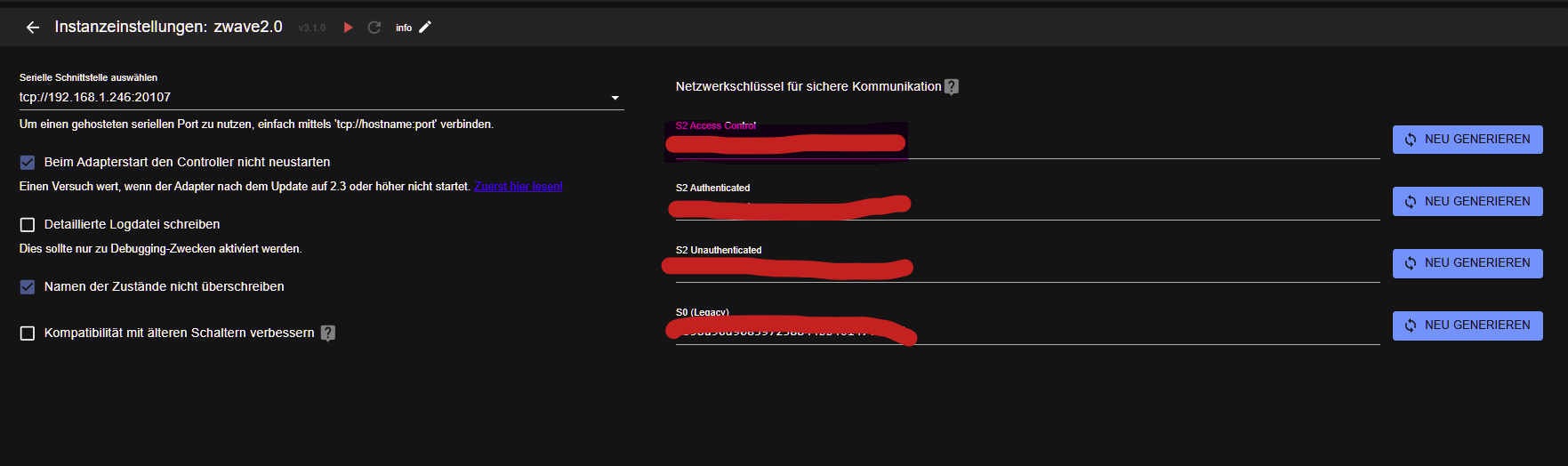
ansonsten hol die Informationen nochaml ab von dem Gerät.
und nein es darf nur eine Anwendung laufen.. zugreifend auf den Stick
-
@RikDRS wenn die schlüssel stimmen sollte das system innerhalb von 5 min da sein..
ich weiss nicht was Backup da macht..na guck doch mal ob hier was steht
ansonsten hol die Informationen nochaml ab von dem Gerät.
und nein es darf nur eine Anwendung laufen.. zugreifend auf den Stick
ansonsten hol die Informationen nochaml ab von dem Gerät.
ich kann die alte Installation nochmal aufbauen und den Proxmox starten und dann die SChlüssel aus der iOBroker-Instanz entnehmen.
Oder habe ich eine Alternative?und nein es darf nur eine Anwendung laufen.. zugreifend auf den Stick
ok
-
ansonsten hol die Informationen nochaml ab von dem Gerät.
ich kann die alte Installation nochmal aufbauen und den Proxmox starten und dann die SChlüssel aus der iOBroker-Instanz entnehmen.
Oder habe ich eine Alternative?und nein es darf nur eine Anwendung laufen.. zugreifend auf den Stick
ok
@RikDRS sagte in ZWave - Adapter grün, Netzwerk keine Funktion/Reaktion:
Oder habe ich eine Alternative?
keine ahung.. dein System..
-
@RikDRS sagte in ZWave - Adapter grün, Netzwerk keine Funktion/Reaktion:
Oder habe ich eine Alternative?
keine ahung.. dein System..
@arteck klar mein System ;) Dachte vielleicht hast Du noch nen Tipp
Habe den alten Proxmox nochmal an laufen bekommen und die Sicherheitsschlüssel verglichen, die haben sich nicht geändert. Daran liegt es also nicht
Was mir jetzt aber noch auffällt ist folgendes: in der Übersicht "Zwave" unter dem Tab "Geräte" findet unter Statistik der jeweiligen Geräte eine viel zu geringe und fast nur einseitige Kommunikation statt.
Hier mal ein paar Beispiele:


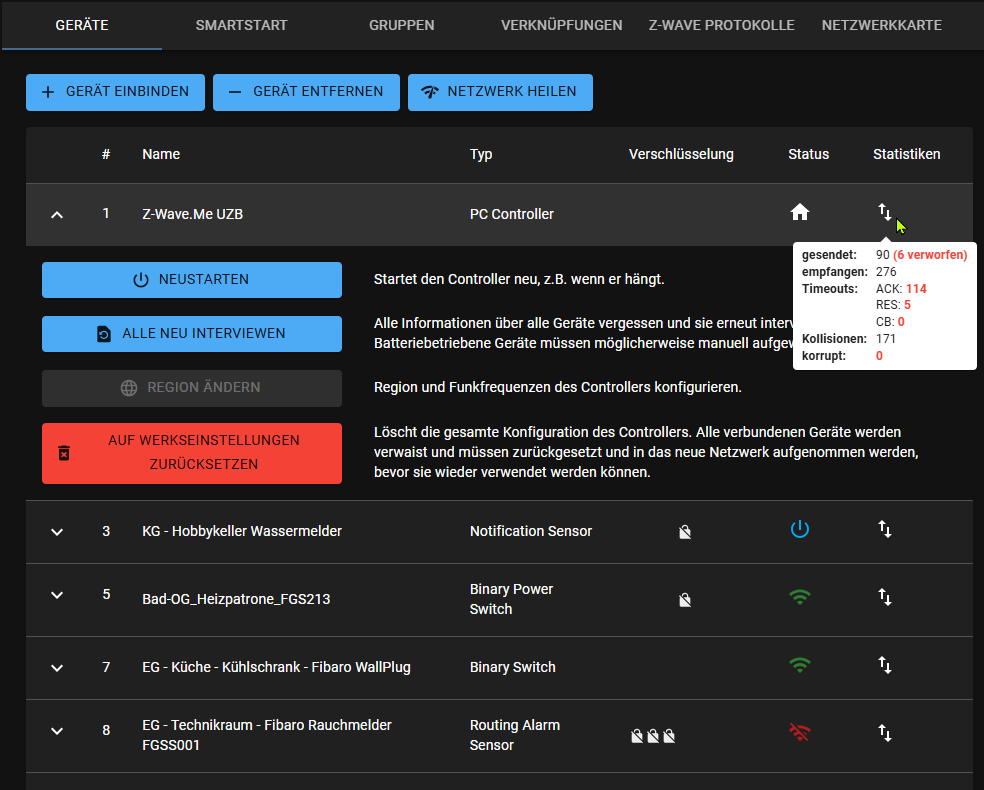
Wie ist das zu deuten?
Zusätzlich habe ich gerade versucht ein bestehendes Gerät (Thermostat) erneut zu interviewen oder zu exkludieren, funktioniert beides nicht, genauso erfolglos ein neues Gerät wieder anzulernen.
Irgendeine Idee was ich noch probieren könnte?
Danke Euch!
-
Thermostat musst du aufwecken.. die schlafen meistens
zieh mal den stick mal ab.. für 10 sek.. der hängt sich ab und an mal auf
@arteck sagte in ZWave - Adapter grün, Netzwerk keine Funktion/Reaktion:
Thermostat musst du aufwecken.. die schlafen meistens
war als Beispiel das ich das In- & Exkludieren mit dem Gerät ausprobiert habe, leider erfolglos.
zieh mal den stick mal ab.. für 10 sek.. der hängt sich ab und an mal auf
versuche ich gerne nochmal, hat bisher aber nicht geholfen
neue Infos: kurz nachdem ich gestern gepostet habe, hat sich gab es ein starke Aktivität bei den oben bereits genannten Statistiken auf diversen Geräten. es schien so, als würde ein Puffer abgearbeitet werden. Danach waren die Meisten Nodes wieder erreichbar und kommunizierten bidirektional
Nach einem Neustart der ZWave-Instanz war dann aber wieder alles wieder so wie vorher, kaum bis keine Kommunikation, wenn dann nur in eine Richtung, so wie oben bereits beschrieben
Frage: was passiert wenn ich die ZWave-Instanz lösche und wieder installiere? Was verliere ich alles? Muss alles neu angelernt werden?
Ich suche nach Lösungen und bin ein wenig verzweifelt.... :/
-
die Geräte daten werden am Stick gespeichert .. und nein man muss nicht alles neu anlernen.
das einzige ist die Geräte müssen ALLE neu abgefragt werden.aber
wenn du sagst dass da viel verkehr im Netzwerk ist.. hast du Steckdosen die Werte liefern.. nicht dass da Geräte dir im Netz ständig rumfunken.. zwecks Strommessung
ich würde dir raten auf zwave-js-ui mit dem neuen Adapter umzusteigen..
-
ich habe heute nun die ZWave-Instanz gelöscht und neu installiert, keine Änderung feststellbar
nun sehe ich für mich noch drei Varianten:
- ZWave-Stick austauschen
- zwave-js-ui inkl. neuem Adapter verwenden
- beides zusammen
Wie wäre Deine Empfehlung?
-
ich habe heute nun die ZWave-Instanz gelöscht und neu installiert, keine Änderung feststellbar
nun sehe ich für mich noch drei Varianten:
- ZWave-Stick austauschen
- zwave-js-ui inkl. neuem Adapter verwenden
- beides zusammen
Wie wäre Deine Empfehlung?
@RikDRS sagte in ZWave - Adapter grün, Netzwerk keine Funktion/Reaktion:
ich habe heute nun die ZWave-Instanz gelöscht und neu installiert, keine Änderung feststellbar
du hast aber mein post schon gelesen ja..
@arteck sagte in:
wenn du sagst dass da viel verkehr im Netzwerk ist.. hast du Steckdosen die Werte liefern.. nicht dass da Geräte dir im Netz ständig rumfunken.. zwecks Strommessung
-
@RikDRS sagte in ZWave - Adapter grün, Netzwerk keine Funktion/Reaktion:
ich habe heute nun die ZWave-Instanz gelöscht und neu installiert, keine Änderung feststellbar
du hast aber mein post schon gelesen ja..
@arteck sagte in:
wenn du sagst dass da viel verkehr im Netzwerk ist.. hast du Steckdosen die Werte liefern.. nicht dass da Geräte dir im Netz ständig rumfunken.. zwecks Strommessung
@arteck ja, habe ich gelesen - ich habe Aktoren die auch Stromverbrauchsdaten verarbeiten, an meinem Setup / Geräten / Geräteanzahl hat sich nichts verändert, es ist nicht mehr Datenverkehr dazugekommen.
Was ich sagen wollte ist, das es den Anschein hatte, das irgendwelche Geräte Daten gesammelt hatten und es ihnen auf einmal möglich war, dieses an den Controller zu übermitteln.
Ich bin nun an dem Punkt, das ich auf Deinen neuen Adapter wechseln werde, dazu aber mehr (Fragen ;) ) hier


Hey! Du scheinst an dieser Unterhaltung interessiert zu sein, hast aber noch kein Konto.
Hast du es satt, bei jedem Besuch durch die gleichen Beiträge zu scrollen? Wenn du dich für ein Konto anmeldest, kommst du immer genau dorthin zurück, wo du zuvor warst, und kannst dich über neue Antworten benachrichtigen lassen (entweder per E-Mail oder Push-Benachrichtigung). Du kannst auch Lesezeichen speichern und Beiträge positiv bewerten, um anderen Community-Mitgliedern deine Wertschätzung zu zeigen.
Mit deinem Input könnte dieser Beitrag noch besser werden 💗
Registrieren Anmelden467
Online33.0k
Benutzer83.6k
Themen1.3m
Beiträge