




[Erledigt]maxObjects erhöhen, aber wie?
-
Hallo alle zusammen und ein gutes und hoffentlich friedliches neues Jahr 2026,
auf dem unten gezeigten Bild bekomme ich seit einiger Zeit diesen Hinweis/Fehlermeldung. Aber auch bei der Suche im Forum finde ich keinen Hinweis, wie ich das Limit ändern kann. Muss ich das überhaupt? Mein System zeigt 46% RAM-Nutzung bei 8GB Ram. Auch die KI gibt mir keine vernünftigen Hinweise.
Beste Grüße und vielen Dank für Eure Hilfe
Jo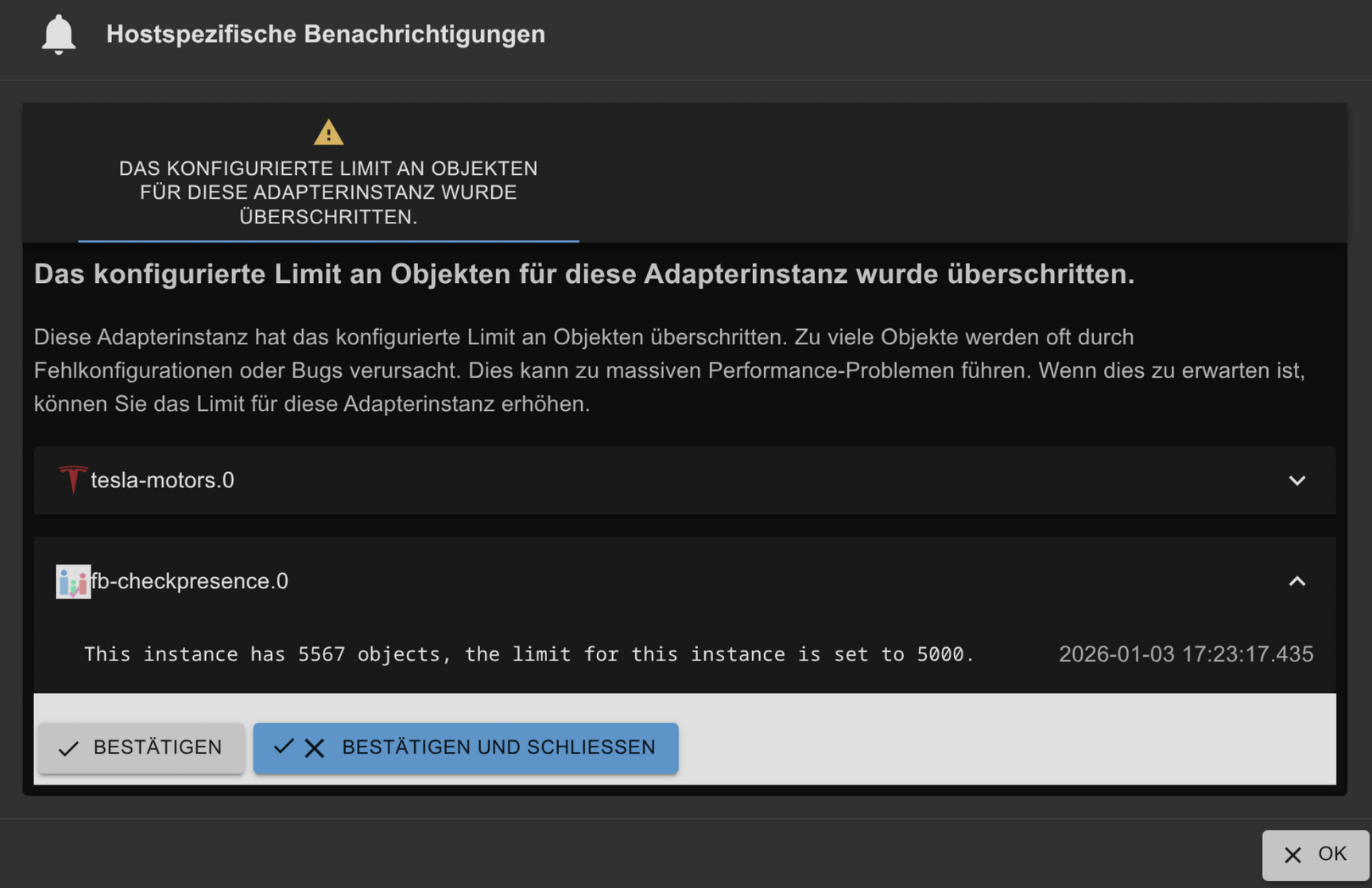
-
Zeig mal die Langfassung von
iob diag -
========== Start marking the full check here =========== ```bash Script v.2025-08-09 *** BASE SYSTEM *** Operating System: Debian GNU/Linux 12 (bookworm) Static hostname: ioBrokerDebian10VM Icon name: computer-vm Chassis: vm 🖴 Virtualization: kvm Kernel: Linux 6.1.0-41-amd64 Architecture: x86-64 Hardware Vendor: QEMU Hardware Model: Standard PC _i440FX + PIIX, 1996_ Firmware Version: rel-1.17.0-0-gb52ca86e094d-prebuilt.qemu.org OS is similar to: model name : Common KVM processor Docker : false Virtualization : kvm Kernel : x86_64 Userland : 64 bit Systemuptime and Load: 18:04:24 up 1:04, 2 users, load average: 1.44, 0.75, 0.51 CPU threads: 8 *** LIFE CYCLE STATUS *** Debian 'bookworm' is the current oldstable version. Please upgrade to the latest stable release 'trixie' in due time! *** TIME AND TIMEZONES *** Local time: Sat 2026-01-03 18:04:24 CET Universal time: Sat 2026-01-03 17:04:24 UTC RTC time: Sat 2026-01-03 17:04:24 Time zone: Europe/Berlin (CET, +0100) System clock synchronized: yes NTP service: active RTC in local TZ: no *** Users and Groups *** User that called 'iob diag': iobroker HOME=/home/iobroker GROUPS=iobroker tty dialout sudo audio video plugdev bluetooth User that is running 'js-controller': iobroker HOME=/home/iobroker GROUPS=iobroker tty dialout sudo audio video plugdev bluetooth A default user should be created! This user will be enabled to temporarily switch to root via 'sudo'! A root login is not required in most Linux Distributions. Run 'iobroker fix' or use the system tools to create a user. *** DISPLAY-SERVER SETUP *** Display-Server: false Unit display-manager.service could not be found. Display-Manager: Desktop: Session: tty *** MEMORY *** total used free shared buff/cache available Mem: 8.3G 3.9G 3.4G 536K 1.3G 4.4G Swap: 0B 0B 0B Total: 8.3G 3.9G 3.4G Active iob-Instances: 31 7940 M total memory 3741 M used memory 556 M active memory 3353 M inactive memory 3262 M free memory 226 M buffer memory 1052 M swap cache 0 M total swap 0 M used swap 0 M free swap *** top - Table Of Processes *** top - 18:04:24 up 1:04, 2 users, load average: 1.44, 0.75, 0.51 Tasks: 141 total, 1 running, 140 sleeping, 0 stopped, 0 zombie %Cpu(s): 20.0 us, 20.0 sy, 0.0 ni, 60.0 id, 0.0 wa, 0.0 hi, 0.0 si, 0.0 st MiB Mem : 7940.7 total, 3262.7 free, 3741.9 used, 1278.6 buff/cache MiB Swap: 0.0 total, 0.0 free, 0.0 used. 4198.8 avail Mem *** FAILED SERVICES *** UNIT LOAD ACTIVE SUB DESCRIPTION * wetterstation.service loaded failed failed Service für ioBroker Wetterstation LOAD = Reflects whether the unit definition was properly loaded. ACTIVE = The high-level unit activation state, i.e. generalization of SUB. SUB = The low-level unit activation state, values depend on unit type. 1 loaded units listed. *** DMESG CRITICAL ERRORS *** [sudo] password for iobroker: No critical errors detected *** FILESYSTEM *** Filesystem Type Size Used Avail Use% Mounted on udev devtmpfs 3.9G 0 3.9G 0% /dev tmpfs tmpfs 795M 524K 794M 1% /run /dev/sda1 ext4 59G 39G 18G 69% / tmpfs tmpfs 3.9G 0 3.9G 0% /dev/shm tmpfs tmpfs 5.0M 0 5.0M 0% /run/lock tmpfs tmpfs 795M 0 795M 0% /run/user/1001 Messages concerning ext4 filesystem in dmesg: [Sat Jan 3 16:59:43 2026] EXT4-fs (sda1): mounted filesystem with ordered data mode. Quota mode: none. [Sat Jan 3 16:59:44 2026] EXT4-fs (sda1): re-mounted. Quota mode: none. Show mounted filesystems: TARGET SOURCE FSTYPE OPTIONS / /dev/sda1 ext4 rw,noatime,errors=remount-ro Files in neuralgic directories: /var: 1.2G /var/ 846M /var/log 820M /var/log/journal/fc6bd0ba028b42bb9c62f77882022818 820M /var/log/journal 156M /var/cache Hint: You are currently not seeing messages from other users and the system. Users in groups 'adm', 'systemd-journal' can see all messages. Pass -q to turn off this notice. Archived and active journals take up 466.0M in the file system. /opt/iobroker/backups: 4.0K /opt/iobroker/backups/ /opt/iobroker/iobroker-data: 19G /opt/iobroker/iobroker-data/ 18G /opt/iobroker/iobroker-data/history 376M /opt/iobroker/iobroker-data/files 117M /opt/iobroker/iobroker-data/backup-objects 78M /opt/iobroker/iobroker-data/files/icons-open-icon-library-png The five largest files in iobroker-data are: 62M /opt/iobroker/iobroker-data/states.jsonl 30M /opt/iobroker/iobroker-data/objects.jsonl 27M /opt/iobroker/iobroker-data/files/tankerkoenig.admin/build/index.js.map 14M /opt/iobroker/iobroker-data/history/20190515/history.sonoff.0.Stromzaehler.POWER.json 14M /opt/iobroker/iobroker-data/history/20190514/history.sonoff.0.Stromzaehler.POWER.json USB-Devices by-id: USB-Sticks - Avoid direct links to /dev/tty* in your adapter setups, please always prefer the links 'by-id': /dev/serial/by-id/usb-Texas_Instruments_TI_CC2531_USB_CDC___0X00124B0014D9D6A3-if00 *** ZigBee Settings *** Your zigbee.0 COM-Port is matching 'by-id'. Very good! Zigbee Network Settings on your coordinator/in nvbackup are: zigbee.X Extended Pan ID: *** MASKED *** Pan ID: *** MASKED *** Channel: *** MASKED *** Network Key: *** MASKED *** To unmask the settings run 'iob diag --unmask' *** NodeJS-Installation *** /usr/bin/nodejs v22.21.0 /usr/bin/node v22.21.0 /usr/bin/npm 10.9.4 /usr/bin/npx 10.9.4 /usr/bin/corepack 0.34.0 nodejs: Installed: 22.21.0-1nodesource1 Candidate: 22.21.0-1nodesource1 Version table: *** 22.21.0-1nodesource1 1001 500 https://deb.nodesource.com/node_22.x nodistro/main amd64 Packages 100 /var/lib/dpkg/status 22.20.0-1nodesource1 1001 500 https://deb.nodesource.com/node_22.x nodistro/main amd64 Packages 22.19.0-1nodesource1 1001 500 https://deb.nodesource.com/node_22.x nodistro/main amd64 Packages 22.18.0-1nodesource1 1001 500 https://deb.nodesource.com/node_22.x nodistro/main amd64 Packages 22.17.1-1nodesource1 1001 500 https://deb.nodesource.com/node_22.x nodistro/main amd64 Packages 22.17.0-1nodesource1 1001 500 https://deb.nodesource.com/node_22.x nodistro/main amd64 Packages 22.16.0-1nodesource1 1001 500 https://deb.nodesource.com/node_22.x nodistro/main amd64 Packages 22.15.1-1nodesource1 1001 500 https://deb.nodesource.com/node_22.x nodistro/main amd64 Packages 22.15.0-1nodesource1 1001 500 https://deb.nodesource.com/node_22.x nodistro/main amd64 Packages 22.14.0-1nodesource1 1001 500 https://deb.nodesource.com/node_22.x nodistro/main amd64 Packages 22.13.1-1nodesource1 1001 500 https://deb.nodesource.com/node_22.x nodistro/main amd64 Packages 22.13.0-1nodesource1 1001 500 https://deb.nodesource.com/node_22.x nodistro/main amd64 Packages 22.12.0-1nodesource1 1001 500 https://deb.nodesource.com/node_22.x nodistro/main amd64 Packages 22.11.0-1nodesource1 1001 500 https://deb.nodesource.com/node_22.x nodistro/main amd64 Packages 22.10.0-1nodesource1 1001 500 https://deb.nodesource.com/node_22.x nodistro/main amd64 Packages 22.9.0-1nodesource1 1001 500 https://deb.nodesource.com/node_22.x nodistro/main amd64 Packages 22.8.0-1nodesource1 1001 500 https://deb.nodesource.com/node_22.x nodistro/main amd64 Packages 22.7.0-1nodesource1 1001 500 https://deb.nodesource.com/node_22.x nodistro/main amd64 Packages 22.6.0-1nodesource1 1001 500 https://deb.nodesource.com/node_22.x nodistro/main amd64 Packages 22.5.1-1nodesource1 1001 500 https://deb.nodesource.com/node_22.x nodistro/main amd64 Packages 22.5.0-1nodesource1 1001 500 https://deb.nodesource.com/node_22.x nodistro/main amd64 Packages 22.4.1-1nodesource1 1001 500 https://deb.nodesource.com/node_22.x nodistro/main amd64 Packages 22.4.0-1nodesource1 1001 500 https://deb.nodesource.com/node_22.x nodistro/main amd64 Packages 22.3.0-1nodesource1 1001 500 https://deb.nodesource.com/node_22.x nodistro/main amd64 Packages 22.2.0-1nodesource1 1001 500 https://deb.nodesource.com/node_22.x nodistro/main amd64 Packages 22.1.0-1nodesource1 1001 500 https://deb.nodesource.com/node_22.x nodistro/main amd64 Packages 22.0.0-1nodesource1 1001 500 https://deb.nodesource.com/node_22.x nodistro/main amd64 Packages 18.20.4+dfsg-1~deb12u1 500 500 http://deb.debian.org/debian bookworm/main amd64 Packages 500 http://security.debian.org/debian-security bookworm-security/main amd64 Packages Temp directories causing deletion problem: 0 No problems detected Errors in npm tree: 0 No problems detected Checking for nodejs vulnerability: █████ ██ ██ ██████ ██████ ██████ ██████ ██ ██ ██ ██ ██ ██ ██ ██ ██ ██ ██ ██ ██ ██ ███████ ██ ██ ██ ███ ██ ██ ██ ██ ██ ██ ██ ██ ██ ██ ██ ██ ██ ██ ██ ██ ██ ██ ██ ██ ██ ██ ██ ███████ ███████ ██████ ██████ ██████ ██████ ██ *** ioBroker-Installation *** ioBroker Status iobroker is running on this host. Objects type: jsonl States type: jsonl Hosts: ioBrokerDebian10VM ioBrokerDebian10VM (version: 7.1.0, hostname: ioBrokerDebian10VM, alive, uptime: 2600) Core adapters versions js-controller: 7.1.0 admin: 7.7.22 javascript: 9.0.17 nodejs modules from github: 1 +-- iobroker.icons-open-icon-library-png@0.1.3 (git+ssh://git@github.com/ioBroker/ioBroker.icons-open-icon-library-png.git#0847a79d713ee6725ccb6ccfb044c025b73ec946) Adapter State + system.adapter.admin.0 : admin : ioBrokerDebian10VM - enabled, port: 8081, bind: 0.0.0.0 (SSL), run as: admin + system.adapter.alexa2.0 : alexa2 : ioBrokerDebian10VM - enabled + system.adapter.backitup.0 : backitup : ioBrokerDebian10VM - enabled + system.adapter.daswetter.0 : daswetter : ioBrokerDebian10VM - enabled system.adapter.dwd.0 : dwd : ioBrokerDebian10VM - enabled + system.adapter.fb-checkpresence.0 : fb-checkpresence : ioBrokerDebian10VM - enabled system.adapter.feiertage.0 : feiertage : ioBrokerDebian10VM - enabled system.adapter.flot.0 : flot : ioBrokerDebian10VM - disabled + system.adapter.govee.0 : govee : ioBrokerDebian10VM - enabled + system.adapter.harmony.0 : harmony : ioBrokerDebian10VM - enabled + system.adapter.history.0 : history : ioBrokerDebian10VM - enabled + system.adapter.hm-rega.0 : hm-rega : ioBrokerDebian10VM - enabled + system.adapter.hm-rpc.2 : hm-rpc : ioBrokerDebian10VM - enabled, port: 12010 system.adapter.ical.0 : ical : ioBrokerDebian10VM - enabled system.adapter.icons-icons8.0 : icons-icons8 : ioBrokerDebian10VM - disabled system.adapter.icons-material-png.0 : icons-material-png : ioBrokerDebian10VM - disabled system.adapter.icons-mfd-png.0 : icons-mfd-png : ioBrokerDebian10VM - disabled system.adapter.icons-mfd-svg.0 : icons-mfd-svg : ioBrokerDebian10VM - disabled system.adapter.icons-open-icon-library-png.0: icons-open-icon-library-png: ioBrokerDebian10VM - disabled system.adapter.icons-ultimate-png.0 : icons-ultimate-png : ioBrokerDebian10VM - disabled + system.adapter.influxdb.0 : influxdb : ioBrokerDebian10VM - enabled, port: 8086 + system.adapter.iot.0 : iot : ioBrokerDebian10VM - enabled + system.adapter.javascript.0 : javascript : ioBrokerDebian10VM - enabled system.adapter.javascript.1 : javascript : ioBrokerDebian10VM - disabled + system.adapter.lgtv.0 : lgtv : ioBrokerDebian10VM - enabled + system.adapter.mihome.0 : mihome : ioBrokerDebian10VM - enabled, port: 9898, bind: 192.168.178.6 system.adapter.mobile.0 : mobile : ioBrokerDebian10VM - disabled system.adapter.mqtt.0 : mqtt : ioBrokerDebian10VM - disabled, port: 11883, bind: 0.0.0.0 + system.adapter.node-red.0 : node-red : ioBrokerDebian10VM - enabled, port: 1880, bind: 0.0.0.0 system.adapter.openweathermap.0 : openweathermap : ioBrokerDebian10VM - enabled + system.adapter.pi-hole.0 : pi-hole : ioBrokerDebian10VM - enabled system.adapter.pi-hole.1 : pi-hole : ioBrokerDebian10VM - disabled + system.adapter.proxmox.0 : proxmox : ioBrokerDebian10VM - enabled, port: 8006 + system.adapter.pvforecast.0 : pvforecast : ioBrokerDebian10VM - enabled system.adapter.pvforecast.1 : pvforecast : ioBrokerDebian10VM - disabled + system.adapter.rest-api.0 : rest-api : ioBrokerDebian10VM - enabled, port: 8093, bind: 0.0.0.0, run as: rest + system.adapter.shelly.0 : shelly : ioBrokerDebian10VM - enabled, port: 1882, bind: 0.0.0.0 + system.adapter.simple-api.0 : simple-api : ioBrokerDebian10VM - enabled, port: 8087, bind: 0.0.0.0, run as: admin + system.adapter.socketio.0 : socketio : ioBrokerDebian10VM - enabled, port: 8084, bind: 192.168.178.6, run as: admin + system.adapter.sonoff.0 : sonoff : ioBrokerDebian10VM - enabled, port: 1883, bind: 0.0.0.0 + system.adapter.tankerkoenig.0 : tankerkoenig : ioBrokerDebian10VM - enabled + system.adapter.telegram.0 : telegram : ioBrokerDebian10VM - enabled, port: 8443, bind: 0.0.0.0 + system.adapter.tesla-motors.0 : tesla-motors : ioBrokerDebian10VM - enabled + system.adapter.tesla-wallconnector3.0 : tesla-wallconnector3 : ioBrokerDebian10VM - enabled system.adapter.vis-canvas-gauges.0 : vis-canvas-gauges : ioBrokerDebian10VM - disabled system.adapter.vis-hqwidgets.0 : vis-hqwidgets : ioBrokerDebian10VM - disabled system.adapter.vis-jqui-mfd.0 : vis-jqui-mfd : ioBrokerDebian10VM - disabled system.adapter.vis-justgage.0 : vis-justgage : ioBrokerDebian10VM - disabled system.adapter.vis-material-advanced.0 : vis-material-advanced : ioBrokerDebian10VM - disabled system.adapter.vis-materialdesign.0 : vis-materialdesign : ioBrokerDebian10VM - enabled system.adapter.vis-timeandweather.0 : vis-timeandweather : ioBrokerDebian10VM - disabled system.adapter.vis-weather.0 : vis-weather : ioBrokerDebian10VM - disabled system.adapter.vis.0 : vis : ioBrokerDebian10VM - enabled system.adapter.weatherunderground.0 : weatherunderground : ioBrokerDebian10VM - enabled + system.adapter.web.0 : web : ioBrokerDebian10VM - enabled, port: 8082, bind: 0.0.0.0, run as: admin + system.adapter.zigbee.0 : zigbee : ioBrokerDebian10VM - enabled, port: /dev/serial/by-id/usb-Texas_Instruments_TI_CC2531_USB_CDC___0X00124B0014D9D6A3-if00 + instance is alive Enabled adapters with bindings + system.adapter.admin.0 : admin : ioBrokerDebian10VM - enabled, port: 8081, bind: 0.0.0.0 (SSL), run as: admin + system.adapter.hm-rpc.2 : hm-rpc : ioBrokerDebian10VM - enabled, port: 12010 + system.adapter.influxdb.0 : influxdb : ioBrokerDebian10VM - enabled, port: 8086 + system.adapter.mihome.0 : mihome : ioBrokerDebian10VM - enabled, port: 9898, bind: 192.168.178.6 + system.adapter.node-red.0 : node-red : ioBrokerDebian10VM - enabled, port: 1880, bind: 0.0.0.0 + system.adapter.proxmox.0 : proxmox : ioBrokerDebian10VM - enabled, port: 8006 + system.adapter.rest-api.0 : rest-api : ioBrokerDebian10VM - enabled, port: 8093, bind: 0.0.0.0, run as: rest + system.adapter.shelly.0 : shelly : ioBrokerDebian10VM - enabled, port: 1882, bind: 0.0.0.0 + system.adapter.simple-api.0 : simple-api : ioBrokerDebian10VM - enabled, port: 8087, bind: 0.0.0.0, run as: admin + system.adapter.socketio.0 : socketio : ioBrokerDebian10VM - enabled, port: 8084, bind: 192.168.178.6, run as: admin + system.adapter.sonoff.0 : sonoff : ioBrokerDebian10VM - enabled, port: 1883, bind: 0.0.0.0 + system.adapter.telegram.0 : telegram : ioBrokerDebian10VM - enabled, port: 8443, bind: 0.0.0.0 + system.adapter.web.0 : web : ioBrokerDebian10VM - enabled, port: 8082, bind: 0.0.0.0, run as: admin + system.adapter.zigbee.0 : zigbee : ioBrokerDebian10VM - enabled, port: /dev/serial/by-id/usb-Texas_Instruments_TI_CC2531_USB_CDC___0X00124B0014D9D6A3-if00 ioBroker-Repositories ┌─────────┬──────────┬─────────────────────────────────────────────────────────┬──────────────┐ │ (index) │ name │ url │ auto upgrade │ ├─────────┼──────────┼─────────────────────────────────────────────────────────┼──────────────┤ │ 0 │ 'stable' │ 'http://download.iobroker.net/sources-dist.json' │ false │ │ 1 │ 'beta' │ 'http://download.iobroker.net/sources-dist-latest.json' │ false │ └─────────┴──────────┴─────────────────────────────────────────────────────────┴──────────────┘ Active repo(s): beta Upgrade policy: none Installed ioBroker-Adapters Used repository: beta Adapter "admin" : 7.7.22 , installed 7.7.22 Adapter "alexa2" : 3.27.4 , installed 3.27.4 Adapter "backitup" : 3.3.13 , installed 3.3.13 Adapter "daswetter" : 4.2.0 , installed 4.2.0 Adapter "dwd" : 2.8.5 , installed 2.8.5 Adapter "fb-checkpresence": 1.4.2 , installed 1.4.2 Adapter "feiertage" : 1.2.1 , installed 1.2.1 Adapter "flot" : 1.12.0 , installed 1.12.0 Adapter "harmony" : 2.0.3 , installed 2.0.3 Adapter "history" : 3.0.1 , installed 3.0.1 Adapter "hm-rega" : 5.1.0 , installed 5.1.0 Adapter "hm-rpc" : 3.0.1 , installed 3.0.1 Adapter "ical" : 1.18.1 , installed 1.18.1 Adapter "icons-icons8" : 0.0.1 , installed 0.0.1 Adapter "icons-material-png": 0.1.0, installed 0.1.0 Adapter "icons-mfd-png": 1.2.1 , installed 1.2.1 Adapter "icons-mfd-svg": 1.2.0 , installed 1.2.0 Adapter "icons-open-icon-library-png": 0.1.2, installed 0.1.3 Adapter "icons-ultimate-png": 1.0.1, installed 1.0.1 Adapter "influxdb" : 4.0.2 , installed 4.0.2 Adapter "iot" : 5.0.12 , installed 5.0.12 Adapter "javascript" : 9.0.17 , installed 9.0.17 Controller "js-controller": 7.1.0 , installed 7.1.0 Adapter "lgtv" : 2.5.0 , installed 2.5.0 Adapter "mihome" : 1.4.0 , installed 1.4.0 Adapter "mobile" : 1.0.1 , installed 1.0.1 Adapter "mqtt" : 6.1.4 , installed 6.1.4 Adapter "node-red" : 6.0.7 , installed 6.0.7 Adapter "openweathermap": 1.4.0 , installed 1.4.0 Adapter "pi-hole" : 2.0.0 , installed 2.0.0 Adapter "proxmox" : 2.4.8 , installed 2.4.8 Adapter "pvforecast" : 5.0.0 , installed 5.0.0 Adapter "rest-api" : 3.1.1 , installed 3.1.1 Adapter "shelly" : 10.5.2 , installed 10.5.2 Adapter "simple-api" : 3.0.7 , installed 3.0.7 Adapter "socketio" : 7.0.8 , installed 7.0.8 Adapter "sonoff" : 3.3.0 , installed 3.3.0 Adapter "tankerkoenig" : 3.4.0 , installed 3.4.0 Adapter "telegram" : 4.1.0 , installed 4.1.0 Adapter "tesla-motors" : 1.5.0 , installed 1.5.0 Adapter "tesla-wallconnector3": 1.0.6, installed 1.0.6 Adapter "vis" : 1.5.6 , installed 1.5.6 Adapter "vis-canvas-gauges": 1.0.1, installed 1.0.1 Adapter "vis-hqwidgets": 1.6.0 , installed 1.6.0 Adapter "vis-jqui-mfd" : 1.1.1 , installed 1.1.1 Adapter "vis-justgage" : 2.1.7 , installed 2.1.7 Adapter "vis-material-advanced": 1.7.4, installed 1.7.4 Adapter "vis-materialdesign": 0.5.9, installed 0.5.9 Adapter "vis-timeandweather": 1.2.2, installed 1.2.2 Adapter "vis-weather" : 2.5.13 , installed 2.5.13 Adapter "weatherunderground": 3.7.0, installed 3.7.0 Adapter "web" : 7.0.9 , installed 7.0.9 Adapter "ws" : 3.0.19 , installed 3.0.19 Adapter "zigbee" : 3.3.1 , installed 3.3.1 Objects and States Please stand by - This may take a while Objects: 33825 States: 33235 *** OS-Repositories and Updates *** Hit:1 http://security.debian.org/debian-security bookworm-security InRelease Hit:2 http://deb.debian.org/debian bookworm InRelease Hit:3 http://deb.debian.org/debian bookworm-updates InRelease Hit:4 http://ftp.debian.org/debian bookworm-backports InRelease Hit:5 https://deb.nodesource.com/node_22.x nodistro InRelease Hit:6 https://repos.influxdata.com/debian stable InRelease Reading package lists... Pending Updates: 0 *** Listening Ports *** Active Internet connections (only servers) Proto Recv-Q Send-Q Local Address Foreign Address State User Inode PID/Program name tcp 0 0 192.168.178.6:12010 0.0.0.0:* LISTEN 1001 27932 1632/io.hm-rpc.2 tcp 0 0 192.168.178.6:8084 0.0.0.0:* LISTEN 1001 30732 1983/io.socketio.0 tcp 0 0 127.0.0.1:9001 0.0.0.0:* LISTEN 1001 26798 1403/iobroker.js-co tcp 0 0 127.0.0.1:9000 0.0.0.0:* LISTEN 1001 25123 1403/iobroker.js-co tcp 0 0 0.0.0.0:111 0.0.0.0:* LISTEN 0 13229 1/init tcp 0 0 0.0.0.0:22 0.0.0.0:* LISTEN 0 14004 523/sshd: /usr/sbin tcp 0 0 0.0.0.0:1880 0.0.0.0:* LISTEN 1001 27790 1618/node-red tcp 0 0 0.0.0.0:1883 0.0.0.0:* LISTEN 1001 27401 1797/io.sonoff.0 tcp 0 0 0.0.0.0:1882 0.0.0.0:* LISTEN 1001 28020 1782/io.shelly.0 tcp6 0 0 :::61991 :::* LISTEN 1001 25366 1573/io.harmony.0 tcp6 0 0 :::111 :::* LISTEN 0 13371 1/init tcp6 0 0 :::22 :::* LISTEN 0 14006 523/sshd: /usr/sbin tcp6 0 0 :::8093 :::* LISTEN 1001 28266 2026/io.rest-api.0 tcp6 0 0 :::8081 :::* LISTEN 1001 25185 1422/io.admin.0 tcp6 0 0 :::8082 :::* LISTEN 1001 28719 1886/io.web.0 tcp6 0 0 :::8087 :::* LISTEN 1001 28745 1971/io.simple-api. udp 0 0 0.0.0.0:9898 0.0.0.0:* 1001 27941 1701/io.mihome.0 udp 0 0 0.0.0.0:68 0.0.0.0:* 0 15578 383/dhclient udp 0 0 0.0.0.0:111 0.0.0.0:* 0 552 1/init udp 0 0 0.0.0.0:61991 0.0.0.0:* 1001 25367 1573/io.harmony.0 udp6 0 0 :::111 :::* 0 13230 1/init *** Log File - Last 25 Lines *** 2026-01-03 18:03:38.549 - info: govee.0 (2015) Server Response: 200 (OK) 2026-01-03 18:03:38.550 - info: govee.0 (2015) Values for object: ******************2:26 updated 2026-01-03 18:03:49.310 - info: node-red.0 (1618) State value to set for "0_userdata.0.Huawei.Inverter.Power_Grid_Voltage" has to be stringified but received type "number" 2026-01-03 18:04:04.579 - info: simple-api.0 (1971) State value to set for "0_userdata.0.Wetterstation.Aussentemperatur" has to be type "number" but received type "string" 2026-01-03 18:04:04.627 - info: simple-api.0 (1971) State value to set for "0_userdata.0.Wetterstation.Gefuehlte_Temperatur" has to be type "number" but received type "string" 2026-01-03 18:04:04.698 - info: simple-api.0 (1971) State value to set for "0_userdata.0.Wetterstation.Regen_Tag" has to be type "number" but received type "string" 2026-01-03 18:04:04.753 - info: simple-api.0 (1971) State value to set for "0_userdata.0.Wetterstation.Sonnenstrahlung" has to be type "number" but received type "string" 2026-01-03 18:04:10.141 - info: fb-checkpresence.0 (1927) newActive OnePlus-9-Pro true 2026-01-03 18:04:20.539 - info: node-red.0 (1618) State value to set for "0_userdata.0.Huawei.Inverter.Insulation_Resistance" has to be stringified but received type "object" 2026-01-03 18:04:32.506 - info: node-red.0 (1618) State value to set for "0_userdata.0.Huawei.Inverter.Efficiency" has to be stringified but received type "object" 2026-01-03 18:04:34.363 - info: node-red.0 (1618) State value to set for "0_userdata.0.Huawei.Inverter.Model_ID" has to be stringified but received type "object" 2026-01-03 18:04:45.005 - info: influxdb.0 (2038) Store 1002 buffered influxDB history points 2026-01-03 18:04:53.852 - info: node-red.0 (1618) State value to set for "0_userdata.0.Huawei.Inverter.Insulation_Resistance" has to be stringified but received type "object" 2026-01-03 18:05:09.019 - info: host.ioBrokerDebian10VM instance system.adapter.dwd.0 in version "2.8.5" started with pid 3695 2026-01-03 18:05:12.557 - info: dwd.0 (3695) starting. Version 2.8.5 in /opt/iobroker/node_modules/iobroker.dwd, node: v22.21.0, js-controller: 7.1.0 2026-01-03 18:05:13.259 - info: dwd.0 (3695) State value to set for "dwd.0.warning1.begin" has to be type "string" but received type "number" 2026-01-03 18:05:13.304 - info: dwd.0 (3695) State value to set for "dwd.0.warning1.end" has to be type "string" but received type "number" 2026-01-03 18:05:13.381 - info: dwd.0 (3695) State value to set for "dwd.0.warning2.begin" has to be type "string" but received type "number" 2026-01-03 18:05:13.428 - info: dwd.0 (3695) State value to set for "dwd.0.warning2.end" has to be type "string" but received type "number" 2026-01-03 18:05:13.501 - info: dwd.0 (3695) Terminated (ADAPTER_REQUESTED_TERMINATION): Without reason 2026-01-03 18:05:14.041 - info: host.ioBrokerDebian10VM instance system.adapter.dwd.0 having pid 3695 terminated with code 11 (ADAPTER_REQUESTED_TERMINATION) 2026-01-03 18:05:14.830 - info: fb-checkpresence.0 (1927) newActive OnePlus-9-Pro false 2026-01-03 18:05:15.049 - info: node-red.0 (1618) State value to set for "0_userdata.0.Huawei.Inverter.Power_Grid_Voltage" has to be stringified but received type "number" 2026-01-03 18:05:19.955 - info: javascript.0 (1501) script.js.Heizung.Der_Ofen_ist_an: Temperatur geändert auf 2026-01-03 18:05:19.957 - info: javascript.0 (1501) script.js.Heizung.Der_Ofen_ist_an: 25.6============ Mark until here for C&P =============
iob diag has finished.
ioBroker auf Intel NUC - Homematic CCU3/pivCCU auf Raspi 3B+
-
-
========== Start marking the full check here =========== ```bash Script v.2025-08-09 *** BASE SYSTEM *** Operating System: Debian GNU/Linux 12 (bookworm) Static hostname: ioBrokerDebian10VM Icon name: computer-vm Chassis: vm 🖴 Virtualization: kvm Kernel: Linux 6.1.0-41-amd64 Architecture: x86-64 Hardware Vendor: QEMU Hardware Model: Standard PC _i440FX + PIIX, 1996_ Firmware Version: rel-1.17.0-0-gb52ca86e094d-prebuilt.qemu.org OS is similar to: model name : Common KVM processor Docker : false Virtualization : kvm Kernel : x86_64 Userland : 64 bit Systemuptime and Load: 18:04:24 up 1:04, 2 users, load average: 1.44, 0.75, 0.51 CPU threads: 8 *** LIFE CYCLE STATUS *** Debian 'bookworm' is the current oldstable version. Please upgrade to the latest stable release 'trixie' in due time! *** TIME AND TIMEZONES *** Local time: Sat 2026-01-03 18:04:24 CET Universal time: Sat 2026-01-03 17:04:24 UTC RTC time: Sat 2026-01-03 17:04:24 Time zone: Europe/Berlin (CET, +0100) System clock synchronized: yes NTP service: active RTC in local TZ: no *** Users and Groups *** User that called 'iob diag': iobroker HOME=/home/iobroker GROUPS=iobroker tty dialout sudo audio video plugdev bluetooth User that is running 'js-controller': iobroker HOME=/home/iobroker GROUPS=iobroker tty dialout sudo audio video plugdev bluetooth A default user should be created! This user will be enabled to temporarily switch to root via 'sudo'! A root login is not required in most Linux Distributions. Run 'iobroker fix' or use the system tools to create a user. *** DISPLAY-SERVER SETUP *** Display-Server: false Unit display-manager.service could not be found. Display-Manager: Desktop: Session: tty *** MEMORY *** total used free shared buff/cache available Mem: 8.3G 3.9G 3.4G 536K 1.3G 4.4G Swap: 0B 0B 0B Total: 8.3G 3.9G 3.4G Active iob-Instances: 31 7940 M total memory 3741 M used memory 556 M active memory 3353 M inactive memory 3262 M free memory 226 M buffer memory 1052 M swap cache 0 M total swap 0 M used swap 0 M free swap *** top - Table Of Processes *** top - 18:04:24 up 1:04, 2 users, load average: 1.44, 0.75, 0.51 Tasks: 141 total, 1 running, 140 sleeping, 0 stopped, 0 zombie %Cpu(s): 20.0 us, 20.0 sy, 0.0 ni, 60.0 id, 0.0 wa, 0.0 hi, 0.0 si, 0.0 st MiB Mem : 7940.7 total, 3262.7 free, 3741.9 used, 1278.6 buff/cache MiB Swap: 0.0 total, 0.0 free, 0.0 used. 4198.8 avail Mem *** FAILED SERVICES *** UNIT LOAD ACTIVE SUB DESCRIPTION * wetterstation.service loaded failed failed Service für ioBroker Wetterstation LOAD = Reflects whether the unit definition was properly loaded. ACTIVE = The high-level unit activation state, i.e. generalization of SUB. SUB = The low-level unit activation state, values depend on unit type. 1 loaded units listed. *** DMESG CRITICAL ERRORS *** [sudo] password for iobroker: No critical errors detected *** FILESYSTEM *** Filesystem Type Size Used Avail Use% Mounted on udev devtmpfs 3.9G 0 3.9G 0% /dev tmpfs tmpfs 795M 524K 794M 1% /run /dev/sda1 ext4 59G 39G 18G 69% / tmpfs tmpfs 3.9G 0 3.9G 0% /dev/shm tmpfs tmpfs 5.0M 0 5.0M 0% /run/lock tmpfs tmpfs 795M 0 795M 0% /run/user/1001 Messages concerning ext4 filesystem in dmesg: [Sat Jan 3 16:59:43 2026] EXT4-fs (sda1): mounted filesystem with ordered data mode. Quota mode: none. [Sat Jan 3 16:59:44 2026] EXT4-fs (sda1): re-mounted. Quota mode: none. Show mounted filesystems: TARGET SOURCE FSTYPE OPTIONS / /dev/sda1 ext4 rw,noatime,errors=remount-ro Files in neuralgic directories: /var: 1.2G /var/ 846M /var/log 820M /var/log/journal/fc6bd0ba028b42bb9c62f77882022818 820M /var/log/journal 156M /var/cache Hint: You are currently not seeing messages from other users and the system. Users in groups 'adm', 'systemd-journal' can see all messages. Pass -q to turn off this notice. Archived and active journals take up 466.0M in the file system. /opt/iobroker/backups: 4.0K /opt/iobroker/backups/ /opt/iobroker/iobroker-data: 19G /opt/iobroker/iobroker-data/ 18G /opt/iobroker/iobroker-data/history 376M /opt/iobroker/iobroker-data/files 117M /opt/iobroker/iobroker-data/backup-objects 78M /opt/iobroker/iobroker-data/files/icons-open-icon-library-png The five largest files in iobroker-data are: 62M /opt/iobroker/iobroker-data/states.jsonl 30M /opt/iobroker/iobroker-data/objects.jsonl 27M /opt/iobroker/iobroker-data/files/tankerkoenig.admin/build/index.js.map 14M /opt/iobroker/iobroker-data/history/20190515/history.sonoff.0.Stromzaehler.POWER.json 14M /opt/iobroker/iobroker-data/history/20190514/history.sonoff.0.Stromzaehler.POWER.json USB-Devices by-id: USB-Sticks - Avoid direct links to /dev/tty* in your adapter setups, please always prefer the links 'by-id': /dev/serial/by-id/usb-Texas_Instruments_TI_CC2531_USB_CDC___0X00124B0014D9D6A3-if00 *** ZigBee Settings *** Your zigbee.0 COM-Port is matching 'by-id'. Very good! Zigbee Network Settings on your coordinator/in nvbackup are: zigbee.X Extended Pan ID: *** MASKED *** Pan ID: *** MASKED *** Channel: *** MASKED *** Network Key: *** MASKED *** To unmask the settings run 'iob diag --unmask' *** NodeJS-Installation *** /usr/bin/nodejs v22.21.0 /usr/bin/node v22.21.0 /usr/bin/npm 10.9.4 /usr/bin/npx 10.9.4 /usr/bin/corepack 0.34.0 nodejs: Installed: 22.21.0-1nodesource1 Candidate: 22.21.0-1nodesource1 Version table: *** 22.21.0-1nodesource1 1001 500 https://deb.nodesource.com/node_22.x nodistro/main amd64 Packages 100 /var/lib/dpkg/status 22.20.0-1nodesource1 1001 500 https://deb.nodesource.com/node_22.x nodistro/main amd64 Packages 22.19.0-1nodesource1 1001 500 https://deb.nodesource.com/node_22.x nodistro/main amd64 Packages 22.18.0-1nodesource1 1001 500 https://deb.nodesource.com/node_22.x nodistro/main amd64 Packages 22.17.1-1nodesource1 1001 500 https://deb.nodesource.com/node_22.x nodistro/main amd64 Packages 22.17.0-1nodesource1 1001 500 https://deb.nodesource.com/node_22.x nodistro/main amd64 Packages 22.16.0-1nodesource1 1001 500 https://deb.nodesource.com/node_22.x nodistro/main amd64 Packages 22.15.1-1nodesource1 1001 500 https://deb.nodesource.com/node_22.x nodistro/main amd64 Packages 22.15.0-1nodesource1 1001 500 https://deb.nodesource.com/node_22.x nodistro/main amd64 Packages 22.14.0-1nodesource1 1001 500 https://deb.nodesource.com/node_22.x nodistro/main amd64 Packages 22.13.1-1nodesource1 1001 500 https://deb.nodesource.com/node_22.x nodistro/main amd64 Packages 22.13.0-1nodesource1 1001 500 https://deb.nodesource.com/node_22.x nodistro/main amd64 Packages 22.12.0-1nodesource1 1001 500 https://deb.nodesource.com/node_22.x nodistro/main amd64 Packages 22.11.0-1nodesource1 1001 500 https://deb.nodesource.com/node_22.x nodistro/main amd64 Packages 22.10.0-1nodesource1 1001 500 https://deb.nodesource.com/node_22.x nodistro/main amd64 Packages 22.9.0-1nodesource1 1001 500 https://deb.nodesource.com/node_22.x nodistro/main amd64 Packages 22.8.0-1nodesource1 1001 500 https://deb.nodesource.com/node_22.x nodistro/main amd64 Packages 22.7.0-1nodesource1 1001 500 https://deb.nodesource.com/node_22.x nodistro/main amd64 Packages 22.6.0-1nodesource1 1001 500 https://deb.nodesource.com/node_22.x nodistro/main amd64 Packages 22.5.1-1nodesource1 1001 500 https://deb.nodesource.com/node_22.x nodistro/main amd64 Packages 22.5.0-1nodesource1 1001 500 https://deb.nodesource.com/node_22.x nodistro/main amd64 Packages 22.4.1-1nodesource1 1001 500 https://deb.nodesource.com/node_22.x nodistro/main amd64 Packages 22.4.0-1nodesource1 1001 500 https://deb.nodesource.com/node_22.x nodistro/main amd64 Packages 22.3.0-1nodesource1 1001 500 https://deb.nodesource.com/node_22.x nodistro/main amd64 Packages 22.2.0-1nodesource1 1001 500 https://deb.nodesource.com/node_22.x nodistro/main amd64 Packages 22.1.0-1nodesource1 1001 500 https://deb.nodesource.com/node_22.x nodistro/main amd64 Packages 22.0.0-1nodesource1 1001 500 https://deb.nodesource.com/node_22.x nodistro/main amd64 Packages 18.20.4+dfsg-1~deb12u1 500 500 http://deb.debian.org/debian bookworm/main amd64 Packages 500 http://security.debian.org/debian-security bookworm-security/main amd64 Packages Temp directories causing deletion problem: 0 No problems detected Errors in npm tree: 0 No problems detected Checking for nodejs vulnerability: █████ ██ ██ ██████ ██████ ██████ ██████ ██ ██ ██ ██ ██ ██ ██ ██ ██ ██ ██ ██ ██ ██ ███████ ██ ██ ██ ███ ██ ██ ██ ██ ██ ██ ██ ██ ██ ██ ██ ██ ██ ██ ██ ██ ██ ██ ██ ██ ██ ██ ██ ███████ ███████ ██████ ██████ ██████ ██████ ██ *** ioBroker-Installation *** ioBroker Status iobroker is running on this host. Objects type: jsonl States type: jsonl Hosts: ioBrokerDebian10VM ioBrokerDebian10VM (version: 7.1.0, hostname: ioBrokerDebian10VM, alive, uptime: 2600) Core adapters versions js-controller: 7.1.0 admin: 7.7.22 javascript: 9.0.17 nodejs modules from github: 1 +-- iobroker.icons-open-icon-library-png@0.1.3 (git+ssh://git@github.com/ioBroker/ioBroker.icons-open-icon-library-png.git#0847a79d713ee6725ccb6ccfb044c025b73ec946) Adapter State + system.adapter.admin.0 : admin : ioBrokerDebian10VM - enabled, port: 8081, bind: 0.0.0.0 (SSL), run as: admin + system.adapter.alexa2.0 : alexa2 : ioBrokerDebian10VM - enabled + system.adapter.backitup.0 : backitup : ioBrokerDebian10VM - enabled + system.adapter.daswetter.0 : daswetter : ioBrokerDebian10VM - enabled system.adapter.dwd.0 : dwd : ioBrokerDebian10VM - enabled + system.adapter.fb-checkpresence.0 : fb-checkpresence : ioBrokerDebian10VM - enabled system.adapter.feiertage.0 : feiertage : ioBrokerDebian10VM - enabled system.adapter.flot.0 : flot : ioBrokerDebian10VM - disabled + system.adapter.govee.0 : govee : ioBrokerDebian10VM - enabled + system.adapter.harmony.0 : harmony : ioBrokerDebian10VM - enabled + system.adapter.history.0 : history : ioBrokerDebian10VM - enabled + system.adapter.hm-rega.0 : hm-rega : ioBrokerDebian10VM - enabled + system.adapter.hm-rpc.2 : hm-rpc : ioBrokerDebian10VM - enabled, port: 12010 system.adapter.ical.0 : ical : ioBrokerDebian10VM - enabled system.adapter.icons-icons8.0 : icons-icons8 : ioBrokerDebian10VM - disabled system.adapter.icons-material-png.0 : icons-material-png : ioBrokerDebian10VM - disabled system.adapter.icons-mfd-png.0 : icons-mfd-png : ioBrokerDebian10VM - disabled system.adapter.icons-mfd-svg.0 : icons-mfd-svg : ioBrokerDebian10VM - disabled system.adapter.icons-open-icon-library-png.0: icons-open-icon-library-png: ioBrokerDebian10VM - disabled system.adapter.icons-ultimate-png.0 : icons-ultimate-png : ioBrokerDebian10VM - disabled + system.adapter.influxdb.0 : influxdb : ioBrokerDebian10VM - enabled, port: 8086 + system.adapter.iot.0 : iot : ioBrokerDebian10VM - enabled + system.adapter.javascript.0 : javascript : ioBrokerDebian10VM - enabled system.adapter.javascript.1 : javascript : ioBrokerDebian10VM - disabled + system.adapter.lgtv.0 : lgtv : ioBrokerDebian10VM - enabled + system.adapter.mihome.0 : mihome : ioBrokerDebian10VM - enabled, port: 9898, bind: 192.168.178.6 system.adapter.mobile.0 : mobile : ioBrokerDebian10VM - disabled system.adapter.mqtt.0 : mqtt : ioBrokerDebian10VM - disabled, port: 11883, bind: 0.0.0.0 + system.adapter.node-red.0 : node-red : ioBrokerDebian10VM - enabled, port: 1880, bind: 0.0.0.0 system.adapter.openweathermap.0 : openweathermap : ioBrokerDebian10VM - enabled + system.adapter.pi-hole.0 : pi-hole : ioBrokerDebian10VM - enabled system.adapter.pi-hole.1 : pi-hole : ioBrokerDebian10VM - disabled + system.adapter.proxmox.0 : proxmox : ioBrokerDebian10VM - enabled, port: 8006 + system.adapter.pvforecast.0 : pvforecast : ioBrokerDebian10VM - enabled system.adapter.pvforecast.1 : pvforecast : ioBrokerDebian10VM - disabled + system.adapter.rest-api.0 : rest-api : ioBrokerDebian10VM - enabled, port: 8093, bind: 0.0.0.0, run as: rest + system.adapter.shelly.0 : shelly : ioBrokerDebian10VM - enabled, port: 1882, bind: 0.0.0.0 + system.adapter.simple-api.0 : simple-api : ioBrokerDebian10VM - enabled, port: 8087, bind: 0.0.0.0, run as: admin + system.adapter.socketio.0 : socketio : ioBrokerDebian10VM - enabled, port: 8084, bind: 192.168.178.6, run as: admin + system.adapter.sonoff.0 : sonoff : ioBrokerDebian10VM - enabled, port: 1883, bind: 0.0.0.0 + system.adapter.tankerkoenig.0 : tankerkoenig : ioBrokerDebian10VM - enabled + system.adapter.telegram.0 : telegram : ioBrokerDebian10VM - enabled, port: 8443, bind: 0.0.0.0 + system.adapter.tesla-motors.0 : tesla-motors : ioBrokerDebian10VM - enabled + system.adapter.tesla-wallconnector3.0 : tesla-wallconnector3 : ioBrokerDebian10VM - enabled system.adapter.vis-canvas-gauges.0 : vis-canvas-gauges : ioBrokerDebian10VM - disabled system.adapter.vis-hqwidgets.0 : vis-hqwidgets : ioBrokerDebian10VM - disabled system.adapter.vis-jqui-mfd.0 : vis-jqui-mfd : ioBrokerDebian10VM - disabled system.adapter.vis-justgage.0 : vis-justgage : ioBrokerDebian10VM - disabled system.adapter.vis-material-advanced.0 : vis-material-advanced : ioBrokerDebian10VM - disabled system.adapter.vis-materialdesign.0 : vis-materialdesign : ioBrokerDebian10VM - enabled system.adapter.vis-timeandweather.0 : vis-timeandweather : ioBrokerDebian10VM - disabled system.adapter.vis-weather.0 : vis-weather : ioBrokerDebian10VM - disabled system.adapter.vis.0 : vis : ioBrokerDebian10VM - enabled system.adapter.weatherunderground.0 : weatherunderground : ioBrokerDebian10VM - enabled + system.adapter.web.0 : web : ioBrokerDebian10VM - enabled, port: 8082, bind: 0.0.0.0, run as: admin + system.adapter.zigbee.0 : zigbee : ioBrokerDebian10VM - enabled, port: /dev/serial/by-id/usb-Texas_Instruments_TI_CC2531_USB_CDC___0X00124B0014D9D6A3-if00 + instance is alive Enabled adapters with bindings + system.adapter.admin.0 : admin : ioBrokerDebian10VM - enabled, port: 8081, bind: 0.0.0.0 (SSL), run as: admin + system.adapter.hm-rpc.2 : hm-rpc : ioBrokerDebian10VM - enabled, port: 12010 + system.adapter.influxdb.0 : influxdb : ioBrokerDebian10VM - enabled, port: 8086 + system.adapter.mihome.0 : mihome : ioBrokerDebian10VM - enabled, port: 9898, bind: 192.168.178.6 + system.adapter.node-red.0 : node-red : ioBrokerDebian10VM - enabled, port: 1880, bind: 0.0.0.0 + system.adapter.proxmox.0 : proxmox : ioBrokerDebian10VM - enabled, port: 8006 + system.adapter.rest-api.0 : rest-api : ioBrokerDebian10VM - enabled, port: 8093, bind: 0.0.0.0, run as: rest + system.adapter.shelly.0 : shelly : ioBrokerDebian10VM - enabled, port: 1882, bind: 0.0.0.0 + system.adapter.simple-api.0 : simple-api : ioBrokerDebian10VM - enabled, port: 8087, bind: 0.0.0.0, run as: admin + system.adapter.socketio.0 : socketio : ioBrokerDebian10VM - enabled, port: 8084, bind: 192.168.178.6, run as: admin + system.adapter.sonoff.0 : sonoff : ioBrokerDebian10VM - enabled, port: 1883, bind: 0.0.0.0 + system.adapter.telegram.0 : telegram : ioBrokerDebian10VM - enabled, port: 8443, bind: 0.0.0.0 + system.adapter.web.0 : web : ioBrokerDebian10VM - enabled, port: 8082, bind: 0.0.0.0, run as: admin + system.adapter.zigbee.0 : zigbee : ioBrokerDebian10VM - enabled, port: /dev/serial/by-id/usb-Texas_Instruments_TI_CC2531_USB_CDC___0X00124B0014D9D6A3-if00 ioBroker-Repositories ┌─────────┬──────────┬─────────────────────────────────────────────────────────┬──────────────┐ │ (index) │ name │ url │ auto upgrade │ ├─────────┼──────────┼─────────────────────────────────────────────────────────┼──────────────┤ │ 0 │ 'stable' │ 'http://download.iobroker.net/sources-dist.json' │ false │ │ 1 │ 'beta' │ 'http://download.iobroker.net/sources-dist-latest.json' │ false │ └─────────┴──────────┴─────────────────────────────────────────────────────────┴──────────────┘ Active repo(s): beta Upgrade policy: none Installed ioBroker-Adapters Used repository: beta Adapter "admin" : 7.7.22 , installed 7.7.22 Adapter "alexa2" : 3.27.4 , installed 3.27.4 Adapter "backitup" : 3.3.13 , installed 3.3.13 Adapter "daswetter" : 4.2.0 , installed 4.2.0 Adapter "dwd" : 2.8.5 , installed 2.8.5 Adapter "fb-checkpresence": 1.4.2 , installed 1.4.2 Adapter "feiertage" : 1.2.1 , installed 1.2.1 Adapter "flot" : 1.12.0 , installed 1.12.0 Adapter "harmony" : 2.0.3 , installed 2.0.3 Adapter "history" : 3.0.1 , installed 3.0.1 Adapter "hm-rega" : 5.1.0 , installed 5.1.0 Adapter "hm-rpc" : 3.0.1 , installed 3.0.1 Adapter "ical" : 1.18.1 , installed 1.18.1 Adapter "icons-icons8" : 0.0.1 , installed 0.0.1 Adapter "icons-material-png": 0.1.0, installed 0.1.0 Adapter "icons-mfd-png": 1.2.1 , installed 1.2.1 Adapter "icons-mfd-svg": 1.2.0 , installed 1.2.0 Adapter "icons-open-icon-library-png": 0.1.2, installed 0.1.3 Adapter "icons-ultimate-png": 1.0.1, installed 1.0.1 Adapter "influxdb" : 4.0.2 , installed 4.0.2 Adapter "iot" : 5.0.12 , installed 5.0.12 Adapter "javascript" : 9.0.17 , installed 9.0.17 Controller "js-controller": 7.1.0 , installed 7.1.0 Adapter "lgtv" : 2.5.0 , installed 2.5.0 Adapter "mihome" : 1.4.0 , installed 1.4.0 Adapter "mobile" : 1.0.1 , installed 1.0.1 Adapter "mqtt" : 6.1.4 , installed 6.1.4 Adapter "node-red" : 6.0.7 , installed 6.0.7 Adapter "openweathermap": 1.4.0 , installed 1.4.0 Adapter "pi-hole" : 2.0.0 , installed 2.0.0 Adapter "proxmox" : 2.4.8 , installed 2.4.8 Adapter "pvforecast" : 5.0.0 , installed 5.0.0 Adapter "rest-api" : 3.1.1 , installed 3.1.1 Adapter "shelly" : 10.5.2 , installed 10.5.2 Adapter "simple-api" : 3.0.7 , installed 3.0.7 Adapter "socketio" : 7.0.8 , installed 7.0.8 Adapter "sonoff" : 3.3.0 , installed 3.3.0 Adapter "tankerkoenig" : 3.4.0 , installed 3.4.0 Adapter "telegram" : 4.1.0 , installed 4.1.0 Adapter "tesla-motors" : 1.5.0 , installed 1.5.0 Adapter "tesla-wallconnector3": 1.0.6, installed 1.0.6 Adapter "vis" : 1.5.6 , installed 1.5.6 Adapter "vis-canvas-gauges": 1.0.1, installed 1.0.1 Adapter "vis-hqwidgets": 1.6.0 , installed 1.6.0 Adapter "vis-jqui-mfd" : 1.1.1 , installed 1.1.1 Adapter "vis-justgage" : 2.1.7 , installed 2.1.7 Adapter "vis-material-advanced": 1.7.4, installed 1.7.4 Adapter "vis-materialdesign": 0.5.9, installed 0.5.9 Adapter "vis-timeandweather": 1.2.2, installed 1.2.2 Adapter "vis-weather" : 2.5.13 , installed 2.5.13 Adapter "weatherunderground": 3.7.0, installed 3.7.0 Adapter "web" : 7.0.9 , installed 7.0.9 Adapter "ws" : 3.0.19 , installed 3.0.19 Adapter "zigbee" : 3.3.1 , installed 3.3.1 Objects and States Please stand by - This may take a while Objects: 33825 States: 33235 *** OS-Repositories and Updates *** Hit:1 http://security.debian.org/debian-security bookworm-security InRelease Hit:2 http://deb.debian.org/debian bookworm InRelease Hit:3 http://deb.debian.org/debian bookworm-updates InRelease Hit:4 http://ftp.debian.org/debian bookworm-backports InRelease Hit:5 https://deb.nodesource.com/node_22.x nodistro InRelease Hit:6 https://repos.influxdata.com/debian stable InRelease Reading package lists... Pending Updates: 0 *** Listening Ports *** Active Internet connections (only servers) Proto Recv-Q Send-Q Local Address Foreign Address State User Inode PID/Program name tcp 0 0 192.168.178.6:12010 0.0.0.0:* LISTEN 1001 27932 1632/io.hm-rpc.2 tcp 0 0 192.168.178.6:8084 0.0.0.0:* LISTEN 1001 30732 1983/io.socketio.0 tcp 0 0 127.0.0.1:9001 0.0.0.0:* LISTEN 1001 26798 1403/iobroker.js-co tcp 0 0 127.0.0.1:9000 0.0.0.0:* LISTEN 1001 25123 1403/iobroker.js-co tcp 0 0 0.0.0.0:111 0.0.0.0:* LISTEN 0 13229 1/init tcp 0 0 0.0.0.0:22 0.0.0.0:* LISTEN 0 14004 523/sshd: /usr/sbin tcp 0 0 0.0.0.0:1880 0.0.0.0:* LISTEN 1001 27790 1618/node-red tcp 0 0 0.0.0.0:1883 0.0.0.0:* LISTEN 1001 27401 1797/io.sonoff.0 tcp 0 0 0.0.0.0:1882 0.0.0.0:* LISTEN 1001 28020 1782/io.shelly.0 tcp6 0 0 :::61991 :::* LISTEN 1001 25366 1573/io.harmony.0 tcp6 0 0 :::111 :::* LISTEN 0 13371 1/init tcp6 0 0 :::22 :::* LISTEN 0 14006 523/sshd: /usr/sbin tcp6 0 0 :::8093 :::* LISTEN 1001 28266 2026/io.rest-api.0 tcp6 0 0 :::8081 :::* LISTEN 1001 25185 1422/io.admin.0 tcp6 0 0 :::8082 :::* LISTEN 1001 28719 1886/io.web.0 tcp6 0 0 :::8087 :::* LISTEN 1001 28745 1971/io.simple-api. udp 0 0 0.0.0.0:9898 0.0.0.0:* 1001 27941 1701/io.mihome.0 udp 0 0 0.0.0.0:68 0.0.0.0:* 0 15578 383/dhclient udp 0 0 0.0.0.0:111 0.0.0.0:* 0 552 1/init udp 0 0 0.0.0.0:61991 0.0.0.0:* 1001 25367 1573/io.harmony.0 udp6 0 0 :::111 :::* 0 13230 1/init *** Log File - Last 25 Lines *** 2026-01-03 18:03:38.549 - info: govee.0 (2015) Server Response: 200 (OK) 2026-01-03 18:03:38.550 - info: govee.0 (2015) Values for object: ******************2:26 updated 2026-01-03 18:03:49.310 - info: node-red.0 (1618) State value to set for "0_userdata.0.Huawei.Inverter.Power_Grid_Voltage" has to be stringified but received type "number" 2026-01-03 18:04:04.579 - info: simple-api.0 (1971) State value to set for "0_userdata.0.Wetterstation.Aussentemperatur" has to be type "number" but received type "string" 2026-01-03 18:04:04.627 - info: simple-api.0 (1971) State value to set for "0_userdata.0.Wetterstation.Gefuehlte_Temperatur" has to be type "number" but received type "string" 2026-01-03 18:04:04.698 - info: simple-api.0 (1971) State value to set for "0_userdata.0.Wetterstation.Regen_Tag" has to be type "number" but received type "string" 2026-01-03 18:04:04.753 - info: simple-api.0 (1971) State value to set for "0_userdata.0.Wetterstation.Sonnenstrahlung" has to be type "number" but received type "string" 2026-01-03 18:04:10.141 - info: fb-checkpresence.0 (1927) newActive OnePlus-9-Pro true 2026-01-03 18:04:20.539 - info: node-red.0 (1618) State value to set for "0_userdata.0.Huawei.Inverter.Insulation_Resistance" has to be stringified but received type "object" 2026-01-03 18:04:32.506 - info: node-red.0 (1618) State value to set for "0_userdata.0.Huawei.Inverter.Efficiency" has to be stringified but received type "object" 2026-01-03 18:04:34.363 - info: node-red.0 (1618) State value to set for "0_userdata.0.Huawei.Inverter.Model_ID" has to be stringified but received type "object" 2026-01-03 18:04:45.005 - info: influxdb.0 (2038) Store 1002 buffered influxDB history points 2026-01-03 18:04:53.852 - info: node-red.0 (1618) State value to set for "0_userdata.0.Huawei.Inverter.Insulation_Resistance" has to be stringified but received type "object" 2026-01-03 18:05:09.019 - info: host.ioBrokerDebian10VM instance system.adapter.dwd.0 in version "2.8.5" started with pid 3695 2026-01-03 18:05:12.557 - info: dwd.0 (3695) starting. Version 2.8.5 in /opt/iobroker/node_modules/iobroker.dwd, node: v22.21.0, js-controller: 7.1.0 2026-01-03 18:05:13.259 - info: dwd.0 (3695) State value to set for "dwd.0.warning1.begin" has to be type "string" but received type "number" 2026-01-03 18:05:13.304 - info: dwd.0 (3695) State value to set for "dwd.0.warning1.end" has to be type "string" but received type "number" 2026-01-03 18:05:13.381 - info: dwd.0 (3695) State value to set for "dwd.0.warning2.begin" has to be type "string" but received type "number" 2026-01-03 18:05:13.428 - info: dwd.0 (3695) State value to set for "dwd.0.warning2.end" has to be type "string" but received type "number" 2026-01-03 18:05:13.501 - info: dwd.0 (3695) Terminated (ADAPTER_REQUESTED_TERMINATION): Without reason 2026-01-03 18:05:14.041 - info: host.ioBrokerDebian10VM instance system.adapter.dwd.0 having pid 3695 terminated with code 11 (ADAPTER_REQUESTED_TERMINATION) 2026-01-03 18:05:14.830 - info: fb-checkpresence.0 (1927) newActive OnePlus-9-Pro false 2026-01-03 18:05:15.049 - info: node-red.0 (1618) State value to set for "0_userdata.0.Huawei.Inverter.Power_Grid_Voltage" has to be stringified but received type "number" 2026-01-03 18:05:19.955 - info: javascript.0 (1501) script.js.Heizung.Der_Ofen_ist_an: Temperatur geändert auf 2026-01-03 18:05:19.957 - info: javascript.0 (1501) script.js.Heizung.Der_Ofen_ist_an: 25.6============ Mark until here for C&P =============
iob diag has finished.
@XxJooO sagte in maxObjects erhöhen, aber wie?:
Debian GNU/Linux 12 (bookworm)
Bring es auf Debian 13 Trixie.
User that called 'iob diag':
iobrokerVerwenden einen Standarduser. iobroker ist KEIN Standarduser.
Der wäre dann auch in den passenden Gruppen drin. -
Wenn der Adapter mehr als 5000 (!) Objekte anlegt dann wäre ziemlich sicher sinnvoll das zu hinterfragen.
Ich glaube nicht dass da jede Schraube einen eigenen State braucht ...Bevor du das Limit einfah erhöhst solltest du dir mal anschaun ob da unnötige States existieren. Die States verbrauchen jedenfalls Resourcen (v.a. Memory aber auch CPU wenn z.B. Javascript order ein Adapter alle States subscirbed). Wenn sie sinnvoll sind und dein System kräftig genug ist es OK das Limit anzupassen. Aber wie gesagt ich kann mir nicht vorstellen dass mehr als 500 States bei einem Auto notwendig bzw. sinnvoll sind. Wär ev. eine Issue beim Adapter wert wenn du feststellst dass da unnötige States angelegt werden.
Beim Tesla Adapter schau dir mal die Releasenoites an:
https://github.com/iobroker-community-adapters/ioBroker.tesla-motors#145-2024-04-19
Ev. ist da nur ein Cleanup notwendigBeim fb-presence hast du wahrscheinlich states für zig unnötige und gar nicht merh existente Geräte angelegt. Check das mal bevor du einfach die Limits erhöhst und dich irgendwann wunderst dass nichts mehr geht.
Entwicklung u Betreuung: envertech-pv, hoymiles-ms, ns-client, pid, snmp Adapter;
Support Repositoryverwaltung.Wer 'nen Kaffee spendieren will: https://paypal.me
-
Wenn der Adapter mehr als 5000 (!) Objekte anlegt dann wäre ziemlich sicher sinnvoll das zu hinterfragen.
Ich glaube nicht dass da jede Schraube einen eigenen State braucht ...Bevor du das Limit einfah erhöhst solltest du dir mal anschaun ob da unnötige States existieren. Die States verbrauchen jedenfalls Resourcen (v.a. Memory aber auch CPU wenn z.B. Javascript order ein Adapter alle States subscirbed). Wenn sie sinnvoll sind und dein System kräftig genug ist es OK das Limit anzupassen. Aber wie gesagt ich kann mir nicht vorstellen dass mehr als 500 States bei einem Auto notwendig bzw. sinnvoll sind. Wär ev. eine Issue beim Adapter wert wenn du feststellst dass da unnötige States angelegt werden.
Beim Tesla Adapter schau dir mal die Releasenoites an:
https://github.com/iobroker-community-adapters/ioBroker.tesla-motors#145-2024-04-19
Ev. ist da nur ein Cleanup notwendigBeim fb-presence hast du wahrscheinlich states für zig unnötige und gar nicht merh existente Geräte angelegt. Check das mal bevor du einfach die Limits erhöhst und dich irgendwann wunderst dass nichts mehr geht.
@mcm1957 sagte in [Erledigt]maxObjects erhöhen, aber wie?:
Wenn der Adapter mehr als 5000 (!) Objekte anlegt dann wäre ziemlich sicher sinnvoll das zu hinterfragen.
Selbstverständlich ist das ein guter Einwand. Mir bleibt dabei aber unklar, woher die steigende Menge der Objekte dann kommt. Beim fb-checkpresence ist naheliegend, was Du dazu gesagt hast, und ich habe jetzt mal den Adapter gestoppt, die Objekte alle gelöscht und dann neu einlesen lassen.
Beim Tesla-motors muss ich mir aber noch die Releasenotes durchlesen. Da würde ich ja erwarten, dass sich kaum was ändert.
Trotzdem vielen Dank für den Denkanstoß!
MfG
Jo -
Ich kann dir in deinem konkreten Fall auch nicht sagen woher die Objekte stammen. Wenn es dir auf Grund der Namen und Inhalte nicht klar ist frag gezielt beim Adapter nach.
So wie ich die Releasenotes des Tesla gelesen habe dürfte der Adapter auf Grund eine Fehlers beim Tokenrefresh immer wieder neue Objekte angelegt haben. Genaueres kann dir aber nur der Dev bzw Maintainer des jeweiligen Adapters sagen.Generell sollte bei einer so großen Anzahl von Objekten beim Adapterersteller nachgefragt werden wozu diese dienen. Nur in wenigen Fällen machen solche Mengen an Objekten auch einen Sinn. Das kann aber nur im Einzelfall abgeklärt werden. Wenn du dir die States nie ansiehst und auch keine Idee hast wie du sie in einer Vis verwenden kannst, dann ist das eher ein Indiz dafür dass diese unnötig sind :-)




Hey! Du scheinst an dieser Unterhaltung interessiert zu sein, hast aber noch kein Konto.
Hast du es satt, bei jedem Besuch durch die gleichen Beiträge zu scrollen? Wenn du dich für ein Konto anmeldest, kommst du immer genau dorthin zurück, wo du zuvor warst, und kannst dich über neue Antworten benachrichtigen lassen (entweder per E-Mail oder Push-Benachrichtigung). Du kannst auch Lesezeichen speichern und Beiträge positiv bewerten, um anderen Community-Mitgliedern deine Wertschätzung zu zeigen.
Mit deinem Input könnte dieser Beitrag noch besser werden 💗
Registrieren Anmelden469
Online33.0k
Benutzer83.6k
Themen1.3m
Beiträge