



Skip to content
  • Home
  • Recent
  • Tags
  • 0 Unread 0
  • Categories
  • Unreplied
  • Popular
  • GitHub
  • Docu
  • Hilfe
Skins
  • Light
  • Brite
  • Cerulean
  • Cosmo
  • Flatly
  • Journal
  • Litera
  • Lumen
  • Lux
  • Materia
  • Minty
  • Morph
  • Pulse
  • Sandstone
  • Simplex
  • Sketchy
  • Spacelab
  • United
  • Yeti
  • Zephyr
  • Dark
  • Cyborg
  • Darkly
  • Quartz
  • Slate
  • Solar
  • Superhero
  • Vapor

  • Default (No Skin)
  • No Skin
Collapse
ioBroker Logo

Community Forum

donate donate
  1. ioBroker Community Home
  2. Deutsch
  3. ioBroker Allgemein
  4. Adapter SNMP Drucker, Synology, QNAP etc auslesen

NEWS

  • UPDATE 31.10.: Amazon Alexa - ioBroker Skill läuft aus ?
    apollon77A
    apollon77
    48
    3
    8.8k

  • Monatsrückblick – September 2025
    BluefoxB
    Bluefox
    13
    1
    2.2k

  • Neues Video "KI im Smart Home" - ioBroker plus n8n
    BluefoxB
    Bluefox
    16
    1
    3.3k

Adapter SNMP Drucker, Synology, QNAP etc auslesen
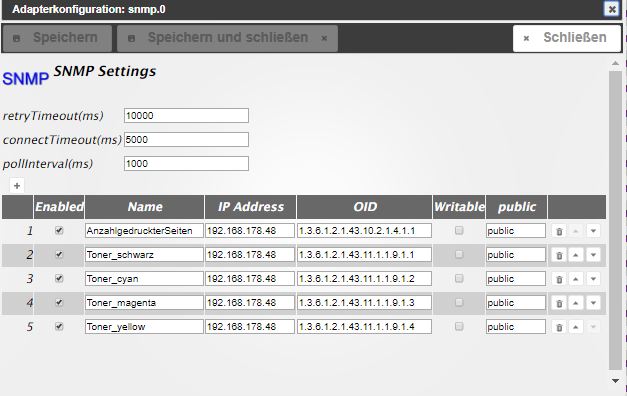
Scheduled Pinned Locked Moved ioBroker Allgemein
snmp
365 Posts 85 Posters 95.1k Views 41 Watching
  • Oldest to Newest
  • Newest to Oldest
  • Most Votes
Reply
  • Reply as topic
Log in to reply
This topic has been deleted. Only users with topic management privileges can see it.
  • K kuerfra

    @homoran Woran erkenn ich die Farbe für die anderen 3 Töne ?

    HomoranH Do not disturb
    HomoranH Do not disturb
    Homoran
    Global Moderator Administrators
    wrote on last edited by
    #240

    @kuerfra ruhig - ich brauch dafür auch ein paar Sekunden Zeit :-)

    kein Support per PN! - Fragen im Forum stellen - es gibt fast nichts, was nicht auch für andere interessant ist.

    Benutzt das Voting rechts unten im Beitrag wenn er euch geholfen hat.

    der Installationsfixer: curl -fsL https://iobroker.net/fix.sh | bash -

    1 Reply Last reply
    0
    • K kuerfra

      @homoran Woran erkenn ich die Farbe für die anderen 3 Töne ?

      HomoranH Do not disturb
      HomoranH Do not disturb
      Homoran
      Global Moderator Administrators
      wrote on last edited by
      #241

      @kuerfra und?
      passt's?

      kein Support per PN! - Fragen im Forum stellen - es gibt fast nichts, was nicht auch für andere interessant ist.

      Benutzt das Voting rechts unten im Beitrag wenn er euch geholfen hat.

      der Installationsfixer: curl -fsL https://iobroker.net/fix.sh | bash -

      K 1 Reply Last reply
      0
      • HomoranH Homoran

        @kuerfra und?
        passt's?

        K Offline
        K Offline
        kuerfra
        wrote on last edited by
        #242

        @homoran sagte in Adapter SNMP Drucker, Synology, QNAP etc auslesen:

        @kuerfra und?
        passt's?

        Im Moment will er noch nicht speichern und schliessen....

        HomoranH 1 Reply Last reply
        0
        • K kuerfra

          @homoran sagte in Adapter SNMP Drucker, Synology, QNAP etc auslesen:

          @kuerfra und?
          passt's?

          Im Moment will er noch nicht speichern und schliessen....

          HomoranH Do not disturb
          HomoranH Do not disturb
          Homoran
          Global Moderator Administrators
          wrote on last edited by
          #243

          @kuerfra sagte in Adapter SNMP Drucker, Synology, QNAP etc auslesen:

          Im Moment will er noch nicht speichern und schliessen....

          dann ist irgendwo noch eine leere Regel oder sonst ein Fehler

          kein Support per PN! - Fragen im Forum stellen - es gibt fast nichts, was nicht auch für andere interessant ist.

          Benutzt das Voting rechts unten im Beitrag wenn er euch geholfen hat.

          der Installationsfixer: curl -fsL https://iobroker.net/fix.sh | bash -

          K 1 Reply Last reply
          0
          • HomoranH Homoran

            @kuerfra sagte in Adapter SNMP Drucker, Synology, QNAP etc auslesen:

            Im Moment will er noch nicht speichern und schliessen....

            dann ist irgendwo noch eine leere Regel oder sonst ein Fehler

            K Offline
            K Offline
            kuerfra
            wrote on last edited by
            #244

            @homoran bei Yellow will er nicht

            HomoranH 1 Reply Last reply
            0
            • K kuerfra

              @homoran bei Yellow will er nicht

              HomoranH Do not disturb
              HomoranH Do not disturb
              Homoran
              Global Moderator Administrators
              wrote on last edited by
              #245

              @kuerfra sagte in Adapter SNMP Drucker, Synology, QNAP etc auslesen:

              bei Yellow will er nicht

              zeigen!

              kein Support per PN! - Fragen im Forum stellen - es gibt fast nichts, was nicht auch für andere interessant ist.

              Benutzt das Voting rechts unten im Beitrag wenn er euch geholfen hat.

              der Installationsfixer: curl -fsL https://iobroker.net/fix.sh | bash -

              K 1 Reply Last reply
              0
              • HomoranH Homoran

                @kuerfra sagte in Adapter SNMP Drucker, Synology, QNAP etc auslesen:

                bei Yellow will er nicht

                zeigen!

                K Offline
                K Offline
                kuerfra
                wrote on last edited by Homoran
                #246

                @homoran sagte in Adapter SNMP Drucker, Synology, QNAP etc auslesen:

                @kuerfra sagte in Adapter SNMP Drucker, Synology, QNAP etc auslesen:

                bei Yellow will er nicht

                zeigen!

                <html>
                <head>
                <meta content="text/html; charset=UTF-8" http-equiv="content-type">
                <meta HTTP-EQUIV="refresh" CONTENT="120; url=/cgi-bin/dynamic/printer/PrinterStatus.html">
                <title>Printer Status</title>
                <base target="_self">
                <LINK REL="stylesheet" HREF="/cgi-bin/dynamic/printer/configStyle.css" TYPE="text/css">
                </head>
                <body>
                <!-- Device Status Title-->
                
                <h3>Gerätestatus - <a href="/" TARGET="_top"><sub><b>Aktualisieren</b></sub></a></h3>


                <!-- More Details Link -->
                <table><tr> 
                   <td> <font face="Arial" size="4" color="#0066CC"></font><font face="Arial" size="2">
                    <a href="/cgi-bin/dynamic/printer/SuppliesStatus.html"><font color="#0040CC" size="2" face="Arial"><B>Weitere Details</B></font></a><font face="Arial" size="5" color="#FFFFFF">&nbsp;</font></font>
                  </td></tr>
                </table>
                
                
                <hr class="status_hr"/>
                
                <!-- Panel and Toner Level -->
                <table class="status_table">
                	<tr>
                		<th colspan="4">&nbsp;</th>
                	</tr>


                	<!-- Toner Level -->
                
                	<tr>
                		<td colspan="4">
                		<B>Kassettenstatus:</B>
                		</td>
                	</tr>
                
                
                	<TABLE width=650 borerColor=#000000 border=0>
                <tr>
                <td><table width="80%" height="25" border=0><tr>
                <TD WIDTH="30%" COLSPAN=2 nowrap><B>Cyan Kassette</B></TD>
                </tr>
                <TR>
                <TD width="25%">
                <TABLE borderColor=#000000 cellSpacing=0 width="160" height="23" border=1>
                <TBODY>
                <TR>
                <TD width="30%" bgColor=#00ffff title=30%>&nbsp;</TD>
                <TD width="70%" bgColor=#ffffff title=30%>&nbsp;</TD>
                </TBODY>
                </TABLE></TD>
                </tr>
                </table></td>
                <td><table width="80%" height="25" border=0><tr>
                <TD WIDTH="30%" COLSPAN=2 nowrap><B>Magenta Kassette</B></TD>
                </tr>
                <TR>
                <TD width="25%">
                <TABLE borderColor=#000000 cellSpacing=0 width="160" height="23" border=1>
                <TBODY>
                <TR>
                <TD width="90%" bgColor=#ff00ff title=90%>&nbsp;</TD>
                <TD width="10%" bgColor=#ffffff title=90%>&nbsp;</TD>
                </TBODY>
                </TABLE></TD>
                </tr>
                </table></td>
                <td><table width="80%" height="25" border=0><tr>
                <TD WIDTH="30%" COLSPAN=2 nowrap><B>Gelbe Kassette</B></TD>
                </tr>
                <TR>
                <TD width="25%">
                <TABLE borderColor=#000000 cellSpacing=0 width="160" height="23" border=1>
                <TBODY>
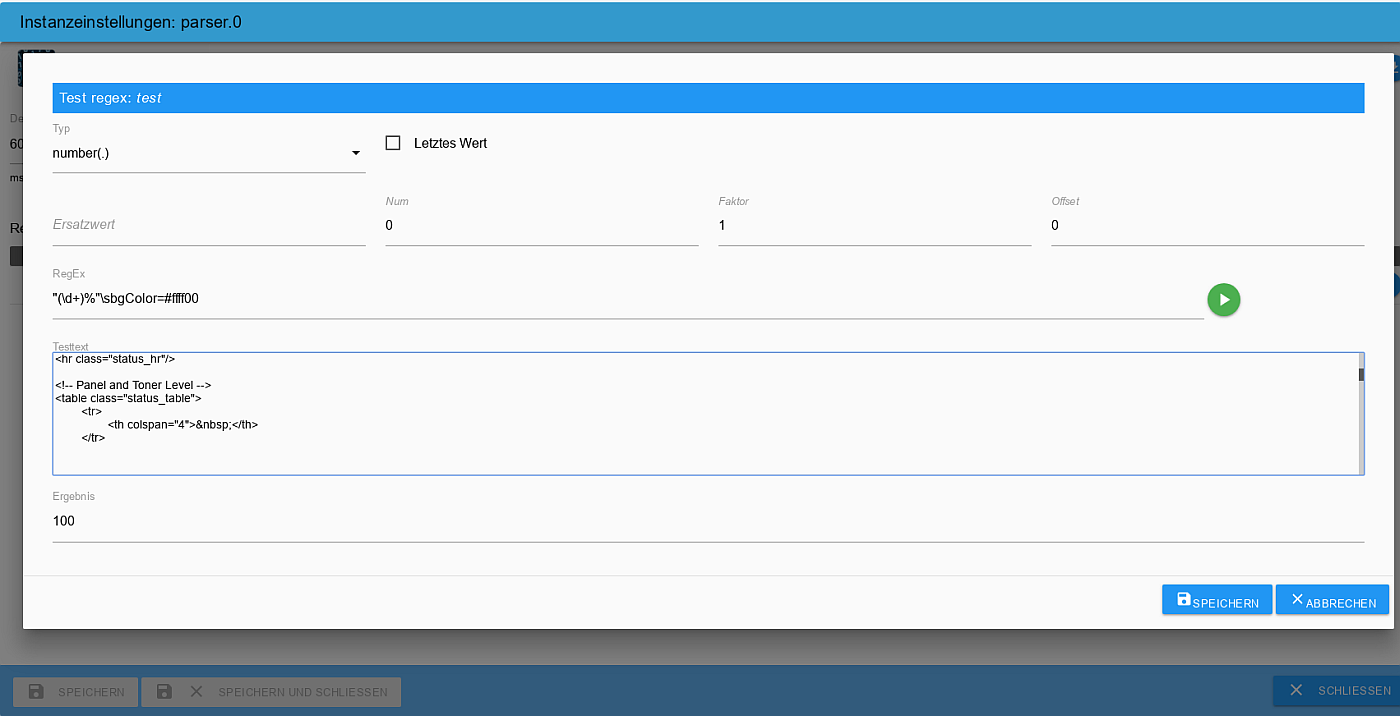
                <TR>
                <TD width="100%" bgColor=#ffff00 title=100%>&nbsp;</TD>
                </TBODY>
                </TABLE>
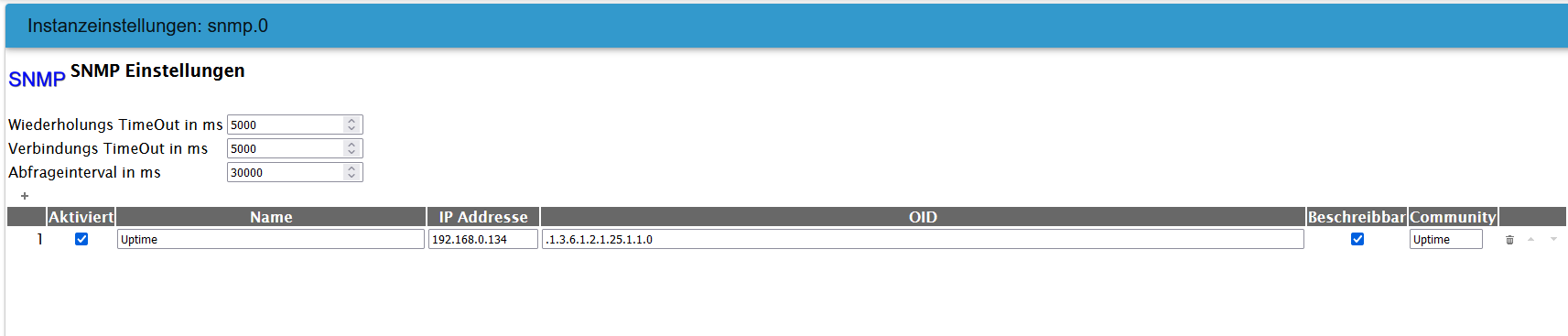
                </TD>
                </tr>
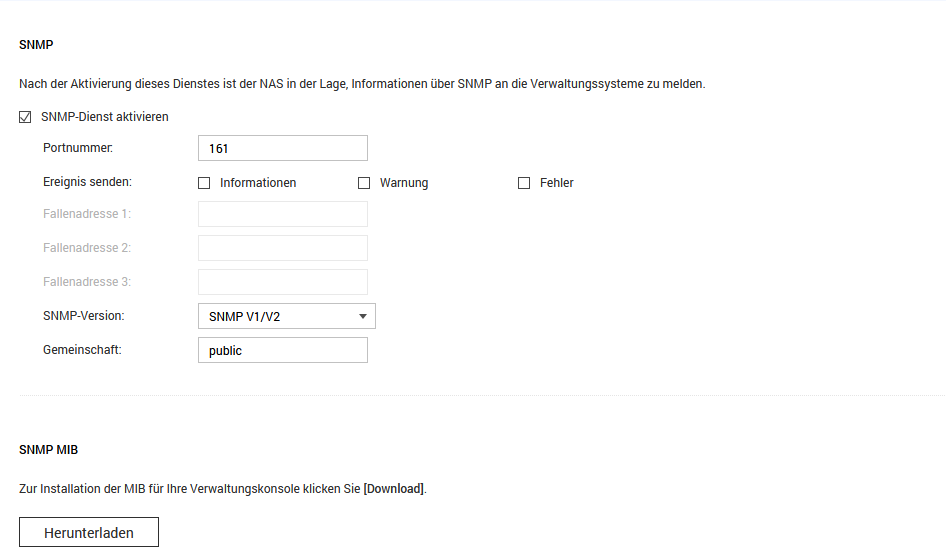
                </table></td>
                <td><table width="80%" height="25" border=0><tr>
                <TD WIDTH="30%" COLSPAN=2 nowrap><B>Schwarze Kassette</B></TD>
                </tr>
                <TR>
                <TD width="25%">
                <TABLE borderColor=#000000 cellSpacing=0 width="160" height="23" border=1>
                <TBODY>
                <TR>
                <TD width="90%" bgColor=#000000 title=90%>&nbsp;</TD>
                <TD width="10%" bgColor=#ffffff title=90%>&nbsp;</TD>
                </TBODY>
                </TABLE></TD>
                </tr>
                </table></td>
                </tr>
                </TABLE>
                          
                
                </table>
                
                <hr class="status_hr">
                <table class="status_table">
                	<tr>
                		<th colspan="5">&nbsp;</th>
                	</tr>
                
                	<tr>
                	<td width="23%"><P align="left" style="margin-top: 5; margin-bottom: 5"><B>Papierfach:</B></P> </TD>
                	<td width="20%"><P align="left" style="margin-top: 5; margin-bottom: 5"><B>Status:</B></P> </TD>
                	<td width="15%"><P align="left" style="margin-top: 5; margin-bottom: 5"><B>Kapazität:</B></P></TD>
                	<td width="15%"><P align="left" style="margin-top: 5; margin-bottom: 5"><B>Format:</B></P></TD>
                	<td width="25%"><P align="left" style="margin-top: 5; margin-bottom: 5"><B>Typ:</B></TD>
                	</tr>
                
                	<TR>
                  <TD><P style="margin-left:5">Fach 1</P></TD>
                 <td width="30%"><P style="margin-left:5"><table width="50%" bgcolor="#009900" style="padding: .75pt" height="1"><tr><td><b>OK</b></TD></TR></TABLE></P></TD>
                <TD><P style="margin-left:5">250</P></TD>
                  <TD><P style="margin-left:5">A4</P></TD>
                  <TD><P style="margin-left:5">Normalpapier</P></TD>
                </TR>


                </table>
                
                <hr class="status_hr"/>
                
                <table class="status_table">
                
                	<tr>
                		<td width="23%"><P align="left" style="margin-top: 5; margin-bottom: 5"><B>Papierablage:</B></P></TD>
                		<td width="20%"><P align="left" style="margin-top: 5; margin-bottom: 5"><B>Status:</B></P> </TD>
                		<td width="15%"><P align="left" style="margin-top: 5; margin-bottom: 5"><B>Kapazität:</B></P></TD>
                		<td width="15%"><P align="left" style="margin-top: 5; margin-bottom: 5"><B></B></P></TD>
                		<td width="25%"><P align="left" style="margin-top: 5; margin-bottom: 5"><B></B></P></TD>
                	</tr>
                	<TR>
                  <TD><P style="margin-left:5">Standardablage</P></TD>
                 <td width="30%"><P style="margin-left:5"><table width="50%" bgcolor="#009900" style="padding: .75pt" height="1"><tr><td><b>OK</b></TD></TR></TABLE></P></TD>
                <TD><P style="margin-left:5">125</P></TD>
                  <TD><P style="margin-left:5"></P></TD>
                  <TD><P style="margin-left:5"></P></TD>
                </TR>
                
                </table>
                
                <hr class="status_hr">
                <table class="status_table">
                	<tr>
                		<th colspan="2">&nbsp;</th>
                	</tr>
                	<TR>
                <TD width="15%"><B>Gerätetyp:</B></TD><TD width="60%">Farblaser</TD>
                </TR><TR>
                <TD><B>Geschwindigkeit:</B></TD><TD>Bis zu 25 Seiten/Minute</TD>
                </TR>
                </table>


                </body>
                </html>
                

                HomoranH 1 Reply Last reply
                0
                • K kuerfra

                  @homoran sagte in Adapter SNMP Drucker, Synology, QNAP etc auslesen:

                  @kuerfra sagte in Adapter SNMP Drucker, Synology, QNAP etc auslesen:

                  bei Yellow will er nicht

                  zeigen!

                  <html>
                  <head>
                  <meta content="text/html; charset=UTF-8" http-equiv="content-type">
                  <meta HTTP-EQUIV="refresh" CONTENT="120; url=/cgi-bin/dynamic/printer/PrinterStatus.html">
                  <title>Printer Status</title>
                  <base target="_self">
                  <LINK REL="stylesheet" HREF="/cgi-bin/dynamic/printer/configStyle.css" TYPE="text/css">
                  </head>
                  <body>
                  <!-- Device Status Title-->
                  
                  <h3>Gerätestatus - <a href="/" TARGET="_top"><sub><b>Aktualisieren</b></sub></a></h3>


                  <!-- More Details Link -->
                  <table><tr> 
                     <td> <font face="Arial" size="4" color="#0066CC"></font><font face="Arial" size="2">
                      <a href="/cgi-bin/dynamic/printer/SuppliesStatus.html"><font color="#0040CC" size="2" face="Arial"><B>Weitere Details</B></font></a><font face="Arial" size="5" color="#FFFFFF">&nbsp;</font></font>
                    </td></tr>
                  </table>
                  
                  
                  <hr class="status_hr"/>
                  
                  <!-- Panel and Toner Level -->
                  <table class="status_table">
                  	<tr>
                  		<th colspan="4">&nbsp;</th>
                  	</tr>


                  	<!-- Toner Level -->
                  
                  	<tr>
                  		<td colspan="4">
                  		<B>Kassettenstatus:</B>
                  		</td>
                  	</tr>
                  
                  
                  	<TABLE width=650 borerColor=#000000 border=0>
                  <tr>
                  <td><table width="80%" height="25" border=0><tr>
                  <TD WIDTH="30%" COLSPAN=2 nowrap><B>Cyan Kassette</B></TD>
                  </tr>
                  <TR>
                  <TD width="25%">
                  <TABLE borderColor=#000000 cellSpacing=0 width="160" height="23" border=1>
                  <TBODY>
                  <TR>
                  <TD width="30%" bgColor=#00ffff title=30%>&nbsp;</TD>
                  <TD width="70%" bgColor=#ffffff title=30%>&nbsp;</TD>
                  </TBODY>
                  </TABLE></TD>
                  </tr>
                  </table></td>
                  <td><table width="80%" height="25" border=0><tr>
                  <TD WIDTH="30%" COLSPAN=2 nowrap><B>Magenta Kassette</B></TD>
                  </tr>
                  <TR>
                  <TD width="25%">
                  <TABLE borderColor=#000000 cellSpacing=0 width="160" height="23" border=1>
                  <TBODY>
                  <TR>
                  <TD width="90%" bgColor=#ff00ff title=90%>&nbsp;</TD>
                  <TD width="10%" bgColor=#ffffff title=90%>&nbsp;</TD>
                  </TBODY>
                  </TABLE></TD>
                  </tr>
                  </table></td>
                  <td><table width="80%" height="25" border=0><tr>
                  <TD WIDTH="30%" COLSPAN=2 nowrap><B>Gelbe Kassette</B></TD>
                  </tr>
                  <TR>
                  <TD width="25%">
                  <TABLE borderColor=#000000 cellSpacing=0 width="160" height="23" border=1>
                  <TBODY>
                  <TR>
                  <TD width="100%" bgColor=#ffff00 title=100%>&nbsp;</TD>
                  </TBODY>
                  </TABLE>
                  </TD>
                  </tr>
                  </table></td>
                  <td><table width="80%" height="25" border=0><tr>
                  <TD WIDTH="30%" COLSPAN=2 nowrap><B>Schwarze Kassette</B></TD>
                  </tr>
                  <TR>
                  <TD width="25%">
                  <TABLE borderColor=#000000 cellSpacing=0 width="160" height="23" border=1>
                  <TBODY>
                  <TR>
                  <TD width="90%" bgColor=#000000 title=90%>&nbsp;</TD>
                  <TD width="10%" bgColor=#ffffff title=90%>&nbsp;</TD>
                  </TBODY>
                  </TABLE></TD>
                  </tr>
                  </table></td>
                  </tr>
                  </TABLE>
                            
                  
                  </table>
                  
                  <hr class="status_hr">
                  <table class="status_table">
                  	<tr>
                  		<th colspan="5">&nbsp;</th>
                  	</tr>
                  
                  	<tr>
                  	<td width="23%"><P align="left" style="margin-top: 5; margin-bottom: 5"><B>Papierfach:</B></P> </TD>
                  	<td width="20%"><P align="left" style="margin-top: 5; margin-bottom: 5"><B>Status:</B></P> </TD>
                  	<td width="15%"><P align="left" style="margin-top: 5; margin-bottom: 5"><B>Kapazität:</B></P></TD>
                  	<td width="15%"><P align="left" style="margin-top: 5; margin-bottom: 5"><B>Format:</B></P></TD>
                  	<td width="25%"><P align="left" style="margin-top: 5; margin-bottom: 5"><B>Typ:</B></TD>
                  	</tr>
                  
                  	<TR>
                    <TD><P style="margin-left:5">Fach 1</P></TD>
                   <td width="30%"><P style="margin-left:5"><table width="50%" bgcolor="#009900" style="padding: .75pt" height="1"><tr><td><b>OK</b></TD></TR></TABLE></P></TD>
                  <TD><P style="margin-left:5">250</P></TD>
                    <TD><P style="margin-left:5">A4</P></TD>
                    <TD><P style="margin-left:5">Normalpapier</P></TD>
                  </TR>


                  </table>
                  
                  <hr class="status_hr"/>
                  
                  <table class="status_table">
                  
                  	<tr>
                  		<td width="23%"><P align="left" style="margin-top: 5; margin-bottom: 5"><B>Papierablage:</B></P></TD>
                  		<td width="20%"><P align="left" style="margin-top: 5; margin-bottom: 5"><B>Status:</B></P> </TD>
                  		<td width="15%"><P align="left" style="margin-top: 5; margin-bottom: 5"><B>Kapazität:</B></P></TD>
                  		<td width="15%"><P align="left" style="margin-top: 5; margin-bottom: 5"><B></B></P></TD>
                  		<td width="25%"><P align="left" style="margin-top: 5; margin-bottom: 5"><B></B></P></TD>
                  	</tr>
                  	<TR>
                    <TD><P style="margin-left:5">Standardablage</P></TD>
                   <td width="30%"><P style="margin-left:5"><table width="50%" bgcolor="#009900" style="padding: .75pt" height="1"><tr><td><b>OK</b></TD></TR></TABLE></P></TD>
                  <TD><P style="margin-left:5">125</P></TD>
                    <TD><P style="margin-left:5"></P></TD>
                    <TD><P style="margin-left:5"></P></TD>
                  </TR>
                  
                  </table>
                  
                  <hr class="status_hr">
                  <table class="status_table">
                  	<tr>
                  		<th colspan="2">&nbsp;</th>
                  	</tr>
                  	<TR>
                  <TD width="15%"><B>Gerätetyp:</B></TD><TD width="60%">Farblaser</TD>
                  </TR><TR>
                  <TD><B>Geschwindigkeit:</B></TD><TD>Bis zu 25 Seiten/Minute</TD>
                  </TR>
                  </table>


                  </body>
                  </html>
                  

                  HomoranH Do not disturb
                  HomoranH Do not disturb
                  Homoran
                  Global Moderator Administrators
                  wrote on last edited by
                  #247

                  @kuerfra nein!
                  diesmal Screenshot vom Parser-Editor

                  kein Support per PN! - Fragen im Forum stellen - es gibt fast nichts, was nicht auch für andere interessant ist.

                  Benutzt das Voting rechts unten im Beitrag wenn er euch geholfen hat.

                  der Installationsfixer: curl -fsL https://iobroker.net/fix.sh | bash -

                  K 1 Reply Last reply
                  0
                  • HomoranH Homoran

                    @kuerfra nein!
                    diesmal Screenshot vom Parser-Editor

                    K Offline
                    K Offline
                    kuerfra
                    wrote on last edited by Homoran
                    #248

                    @homoran sagte in Adapter SNMP Drucker, Synology, QNAP etc auslesen:

                    @kuerfra nein!
                    diesmal Screenshot vom Parser-Editor

                    Dieses: ?

                    "_id": "parser.0.Lexmark_Y",
                      "common": {
                        "name": "Lexmark_Y",
                        "write": false,
                        "read": true,
                        "unit": "%",
                        "type": "number",
                        "role": "value"
                      },
                      "native": {
                        "link": "http://192.168.178.60/cgi-bin/dynamic/printer/PrinterStatus.html",
                        "regex": "\\(Y\\)\\*\\*<\\/dt><dd>\\(([0-9.]*)%\\)",
                        "interval": "",
                        "factor": 1,
                        "item": 0,
                        "offset": 0,
                        "substitute": "",
                        "substituteOld": false,
                        "comma": false
                      },
                      "type": "state",
                      "from": "system.adapter.admin.0",
                      "user": "system.user.admin",
                      "ts": 1641486274837,
                      "acl": {
                        "object": 1636,
                        "state": 1636,
                        "owner": "system.user.admin",
                        "ownerGroup": "system.group.administrator"
                      }
                    }
                    

                    HomoranH 1 Reply Last reply
                    0
                    • K kuerfra

                      @homoran sagte in Adapter SNMP Drucker, Synology, QNAP etc auslesen:

                      @kuerfra nein!
                      diesmal Screenshot vom Parser-Editor

                      Dieses: ?

                      "_id": "parser.0.Lexmark_Y",
                        "common": {
                          "name": "Lexmark_Y",
                          "write": false,
                          "read": true,
                          "unit": "%",
                          "type": "number",
                          "role": "value"
                        },
                        "native": {
                          "link": "http://192.168.178.60/cgi-bin/dynamic/printer/PrinterStatus.html",
                          "regex": "\\(Y\\)\\*\\*<\\/dt><dd>\\(([0-9.]*)%\\)",
                          "interval": "",
                          "factor": 1,
                          "item": 0,
                          "offset": 0,
                          "substitute": "",
                          "substituteOld": false,
                          "comma": false
                        },
                        "type": "state",
                        "from": "system.adapter.admin.0",
                        "user": "system.user.admin",
                        "ts": 1641486274837,
                        "acl": {
                          "object": 1636,
                          "state": 1636,
                          "owner": "system.user.admin",
                          "ownerGroup": "system.group.administrator"
                        }
                      }
                      

                      HomoranH Do not disturb
                      HomoranH Do not disturb
                      Homoran
                      Global Moderator Administrators
                      wrote on last edited by
                      #249

                      @kuerfra sagte in Adapter SNMP Drucker, Synology, QNAP etc auslesen:

                      Dieses

                      Nein, einen Screenshot :frame_with_picture: des Editors der Regel für Gelb

                      kein Support per PN! - Fragen im Forum stellen - es gibt fast nichts, was nicht auch für andere interessant ist.

                      Benutzt das Voting rechts unten im Beitrag wenn er euch geholfen hat.

                      der Installationsfixer: curl -fsL https://iobroker.net/fix.sh | bash -

                      K 1 Reply Last reply
                      0
                      • HomoranH Homoran

                        @kuerfra sagte in Adapter SNMP Drucker, Synology, QNAP etc auslesen:

                        Dieses

                        Nein, einen Screenshot :frame_with_picture: des Editors der Regel für Gelb

                        K Offline
                        K Offline
                        kuerfra
                        wrote on last edited by
                        #250

                        @homoran sagte in Adapter SNMP Drucker, Synology, QNAP etc auslesen:

                        @kuerfra sagte in Adapter SNMP Drucker, Synology, QNAP etc auslesen:

                        Dieses

                        Nein, einen Screenshot :frame_with_picture: des Editors der Regel für Gelb

                        Läuft, keine Ahnung was es war evtl einZeichen beim löschen vergessen ;-(

                        Vielen Dank SUPER

                        HomoranH 1 Reply Last reply
                        0
                        • K kuerfra

                          @homoran sagte in Adapter SNMP Drucker, Synology, QNAP etc auslesen:

                          @kuerfra sagte in Adapter SNMP Drucker, Synology, QNAP etc auslesen:

                          Dieses

                          Nein, einen Screenshot :frame_with_picture: des Editors der Regel für Gelb

                          Läuft, keine Ahnung was es war evtl einZeichen beim löschen vergessen ;-(

                          Vielen Dank SUPER

                          HomoranH Do not disturb
                          HomoranH Do not disturb
                          Homoran
                          Global Moderator Administrators
                          wrote on last edited by Homoran
                          #251

                          @kuerfra sagte in Adapter SNMP Drucker, Synology, QNAP etc auslesen:

                          Läuft

                          so soll es ja auch sein!

                          und das ist ein Screenshot :joy:
                          Screenshot_Parser.png

                          kein Support per PN! - Fragen im Forum stellen - es gibt fast nichts, was nicht auch für andere interessant ist.

                          Benutzt das Voting rechts unten im Beitrag wenn er euch geholfen hat.

                          der Installationsfixer: curl -fsL https://iobroker.net/fix.sh | bash -

                          K 1 Reply Last reply
                          0
                          • HomoranH Homoran

                            @kuerfra sagte in Adapter SNMP Drucker, Synology, QNAP etc auslesen:

                            Läuft

                            so soll es ja auch sein!

                            und das ist ein Screenshot :joy:
                            Screenshot_Parser.png

                            K Offline
                            K Offline
                            kuerfra
                            wrote on last edited by
                            #252

                            @homoran sagte in Adapter SNMP Drucker, Synology, QNAP etc auslesen:

                            @kuerfra sagte in Adapter SNMP Drucker, Synology, QNAP etc auslesen:

                            Läuft

                            so soll es ja auch sein!

                            und das ist ein Screenshot
                            Screenshot_Parser.png

                            Yes, überlesen vor lauter begeisterung ;-)

                            Gruß
                            Frank

                            Nochmals Danke

                            S 1 Reply Last reply
                            0
                            • K kuerfra

                              @homoran sagte in Adapter SNMP Drucker, Synology, QNAP etc auslesen:

                              @kuerfra sagte in Adapter SNMP Drucker, Synology, QNAP etc auslesen:

                              Läuft

                              so soll es ja auch sein!

                              und das ist ein Screenshot
                              Screenshot_Parser.png

                              Yes, überlesen vor lauter begeisterung ;-)

                              Gruß
                              Frank

                              Nochmals Danke

                              S Offline
                              S Offline
                              stefu87_CH
                              wrote on last edited by
                              #253

                              Hallo zusammen

                              Ich möchte gerne den SNMP Adapter mit meinem QNAP verbinden, aber ich frage mich, was ich falsch mache, das er nicht mit dem Gerät verbinden möchte. Habe mal den MIB Code für Uptime eingegeben, aber funktioniert nicht.
                              Muss ich am QNAP selber noch was einstellen?
                              708bf4b2-7bba-4572-bdb8-b3efccaad978-grafik.png

                              8 x Intel(R) Core(TM) i5-8250U CPU @ 1.60GHz
                              Gigabyte mit Proxmox
                              LXC Container mit Iobroker

                              DolomitiD HomoranH 2 Replies Last reply
                              0
                              • S stefu87_CH

                                Hallo zusammen

                                Ich möchte gerne den SNMP Adapter mit meinem QNAP verbinden, aber ich frage mich, was ich falsch mache, das er nicht mit dem Gerät verbinden möchte. Habe mal den MIB Code für Uptime eingegeben, aber funktioniert nicht.
                                Muss ich am QNAP selber noch was einstellen?

                                708bf4b2-7bba-4572-bdb8-b3efccaad978-grafik.png

                                DolomitiD Offline
                                DolomitiD Offline
                                Dolomiti
                                wrote on last edited by
                                #254

                                @stefu87_ch
                                Du musst das in den Einstellungen vom QNAP noch aktivieren, falls nicht schon geschehen. Wo weiss ich nicht mehr, aber die Suchmaschine deines Vertrauens kann dir da bestimmt weiterhelfen.

                                Benutzt das Voting rechts unten im Beitrag wenn er euch geholfen hat.
                                Intel N100 (32GB,256GB SSD), Proxmox -> Debian 12 in VM (Master) + Debian 12 in CT (Test) + Debmatic, HM-Aktoren, Wago 750-880, Shelly, Zigbee

                                S 1 Reply Last reply
                                0
                                • DolomitiD Dolomiti

                                  @stefu87_ch
                                  Du musst das in den Einstellungen vom QNAP noch aktivieren, falls nicht schon geschehen. Wo weiss ich nicht mehr, aber die Suchmaschine deines Vertrauens kann dir da bestimmt weiterhelfen.

                                  S Offline
                                  S Offline
                                  stefu87_CH
                                  wrote on last edited by stefu87_CH
                                  #255

                                  @dolomiti die SNMP Funktion hab ich im QNAP schon aktiviert. Will aber aus irgendeinem Grund nicht miteinander verbinden.
                                  e631369e-0abb-4766-84b4-bfef05a4e0b7-grafik.png

                                  8 x Intel(R) Core(TM) i5-8250U CPU @ 1.60GHz
                                  Gigabyte mit Proxmox
                                  LXC Container mit Iobroker

                                  GlasfaserG 1 Reply Last reply
                                  0
                                  • S stefu87_CH

                                    @dolomiti die SNMP Funktion hab ich im QNAP schon aktiviert. Will aber aus irgendeinem Grund nicht miteinander verbinden.

                                    e631369e-0abb-4766-84b4-bfef05a4e0b7-grafik.png

                                    GlasfaserG Offline
                                    GlasfaserG Offline
                                    Glasfaser
                                    wrote on last edited by
                                    #256

                                    @stefu87_ch

                                    Vergleich mal ... :

                                    @stefu87_ch sagte in Adapter SNMP Drucker, Synology, QNAP etc auslesen:

                                    c9b1ea1e-6582-4c5c-b582-4b6a6a50fc69-grafik.png

                                    @stefu87_ch sagte in Adapter SNMP Drucker, Synology, QNAP etc auslesen:
                                    @dolomiti die SNMP Funktion hab ich im QNAP schon aktiviert. Will aber aus irgendeinem Grund nicht miteinander verbinden.

                                    e631369e-0abb-4766-84b4-bfef05a4e0b7-grafik.png

                                    Synology 918+ 16GB - ioBroker in Docker v9 , VISO auf Trekstor Primebook C13 13,3" , Hikvision Domkameras mit Surveillance Station .. CCU RaspberryMatic in Synology VM .. Zigbee CC2538+CC2592 .. Sonoff .. KNX .. Modbus ..

                                    S 1 Reply Last reply
                                    1
                                    • GlasfaserG Glasfaser

                                      @stefu87_ch

                                      Vergleich mal ... :

                                      @stefu87_ch sagte in Adapter SNMP Drucker, Synology, QNAP etc auslesen:
                                      c9b1ea1e-6582-4c5c-b582-4b6a6a50fc69-grafik.png

                                      @stefu87_ch sagte in Adapter SNMP Drucker, Synology, QNAP etc auslesen:
                                      @dolomiti die SNMP Funktion hab ich im QNAP schon aktiviert. Will aber aus irgendeinem Grund nicht miteinander verbinden.

                                      e631369e-0abb-4766-84b4-bfef05a4e0b7-grafik.png

                                      S Offline
                                      S Offline
                                      stefu87_CH
                                      wrote on last edited by
                                      #257

                                      @glasfaser Ahh jetzt verstehe ich die Sache. Dann ist jetzt alles klar.

                                      8 x Intel(R) Core(TM) i5-8250U CPU @ 1.60GHz
                                      Gigabyte mit Proxmox
                                      LXC Container mit Iobroker

                                      1 Reply Last reply
                                      0
                                      • S stefu87_CH

                                        Hallo zusammen

                                        Ich möchte gerne den SNMP Adapter mit meinem QNAP verbinden, aber ich frage mich, was ich falsch mache, das er nicht mit dem Gerät verbinden möchte. Habe mal den MIB Code für Uptime eingegeben, aber funktioniert nicht.
                                        Muss ich am QNAP selber noch was einstellen?

                                        708bf4b2-7bba-4572-bdb8-b3efccaad978-grafik.png

                                        HomoranH Do not disturb
                                        HomoranH Do not disturb
                                        Homoran
                                        Global Moderator Administrators
                                        wrote on last edited by
                                        #258

                                        @stefu87_ch sagte in Adapter SNMP Drucker, Synology, QNAP etc auslesen:

                                        Ich frage mich, was ich falsch mache, das er nicht mit dem Gerät verbinden möchte

                                        Ich mich auch - hast du mehr Infos?

                                        kein Support per PN! - Fragen im Forum stellen - es gibt fast nichts, was nicht auch für andere interessant ist.

                                        Benutzt das Voting rechts unten im Beitrag wenn er euch geholfen hat.

                                        der Installationsfixer: curl -fsL https://iobroker.net/fix.sh | bash -

                                        S 1 Reply Last reply
                                        0
                                        • HomoranH Homoran

                                          @stefu87_ch sagte in Adapter SNMP Drucker, Synology, QNAP etc auslesen:

                                          Ich frage mich, was ich falsch mache, das er nicht mit dem Gerät verbinden möchte

                                          Ich mich auch - hast du mehr Infos?

                                          S Offline
                                          S Offline
                                          stefu87_CH
                                          wrote on last edited by
                                          #259

                                          @homoran glasfaser konnte mir helfen. Hatte in Qnap und bei Iobroker nicht die gleichen Bezeichnungen drin.


                                          8 x Intel(R) Core(TM) i5-8250U CPU @ 1.60GHz
                                          Gigabyte mit Proxmox
                                          LXC Container mit Iobroker

                                          S 1 Reply Last reply
                                          0
                                          Reply
                                          • Reply as topic
                                          Log in to reply
                                          • Oldest to Newest
                                          • Newest to Oldest
                                          • Most Votes


                                          Support us

                                          ioBroker
                                          Community Adapters
                                          Donate
                                          FAQ Cloud / IOT
                                          HowTo: Node.js-Update
                                          HowTo: Backup/Restore
                                          Downloads
                                          BLOG

                                          423

                                          Online

                                          32.4k

                                          Users

                                          81.5k

                                          Topics

                                          1.3m

                                          Posts
                                          Community
                                          Impressum | Datenschutz-Bestimmungen | Nutzungsbedingungen | Einwilligungseinstellungen
                                          ioBroker Community 2014-2025
                                          logo
                                          • Login

                                          • Don't have an account? Register

                                          • Login or register to search.
                                          • First post
                                            Last post
                                          0
                                          • Home
                                          • Recent
                                          • Tags
                                          • Unread 0
                                          • Categories
                                          • Unreplied
                                          • Popular
                                          • GitHub
                                          • Docu
                                          • Hilfe

