




Automatische Statusabfrage funktioniert nicht mehr
-
Servus zusammen,
die Statusabfrage meiner WiFi Geräte aktualisiert sich seit kurzem nicht mehr automatisch.Schalte ich z.B. das Licht per Sprachbefehl über Alexa ein, ändert sich im ioBroker der Status nicht.
Klicke ich dann auf den true Button und anschließend wieder auf falls, kann ich die Lampe ausschalten und auch wieder einschalten, schalte ich dann per Sprache aus, bleibt der Status auf true.
Hat Jemand eine Idee wie ich das behoben bekomme?Raspberry Pi 4 8gb
-
Servus zusammen,
die Statusabfrage meiner WiFi Geräte aktualisiert sich seit kurzem nicht mehr automatisch.Schalte ich z.B. das Licht per Sprachbefehl über Alexa ein, ändert sich im ioBroker der Status nicht.
Klicke ich dann auf den true Button und anschließend wieder auf falls, kann ich die Lampe ausschalten und auch wieder einschalten, schalte ich dann per Sprache aus, bleibt der Status auf true.
Hat Jemand eine Idee wie ich das behoben bekomme? -
@wendy2702 sagte in Automatische Statusabfrage funktioniert nicht mehr:
dazu müsste man wissen welche Adapter usw. Du benutzt.
hilft das?
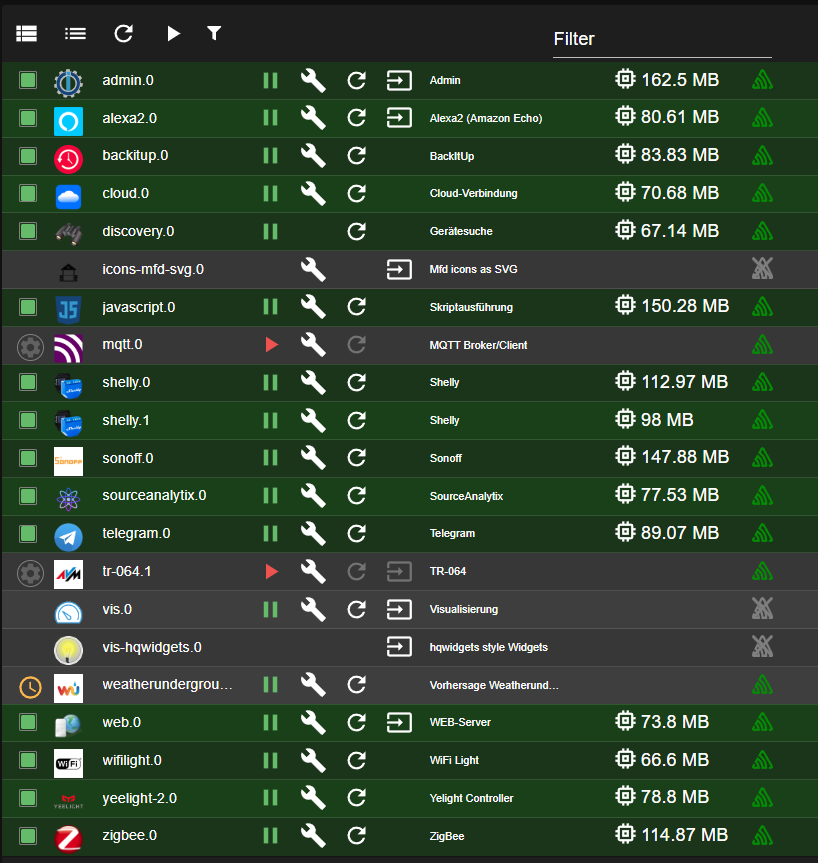
@wendy2702 sagte in Automatische Statusabfrage funktioniert nicht mehr:
Vielleicht erstmal die Ausgabe von
iob diagWie komme ich daran?
@wendy2702 sagte in Automatische Statusabfrage funktioniert nicht mehr:
Und eventuell das logfile posten wenn du was per Sprache und Manuel schaltest.
Im Log/Protokoll taucht nichts auf wenn ich etwas per Sprachbefehl schalte. Vorhin stand mal etwas als Warnung im Protokoll "Smart Home device request blocked for AAA_SonarCloudService_98aca9be-c123-403e-84c6-e25615145553:8a1ce6660370c74de4950f20f597ecd9"
Raspberry Pi 4 8gb
-
@wendy2702 sagte in Automatische Statusabfrage funktioniert nicht mehr:
dazu müsste man wissen welche Adapter usw. Du benutzt.
hilft das?
@wendy2702 sagte in Automatische Statusabfrage funktioniert nicht mehr:
Vielleicht erstmal die Ausgabe von
iob diagWie komme ich daran?
@wendy2702 sagte in Automatische Statusabfrage funktioniert nicht mehr:
Und eventuell das logfile posten wenn du was per Sprache und Manuel schaltest.
Im Log/Protokoll taucht nichts auf wenn ich etwas per Sprachbefehl schalte. Vorhin stand mal etwas als Warnung im Protokoll "Smart Home device request blocked for AAA_SonarCloudService_98aca9be-c123-403e-84c6-e25615145553:8a1ce6660370c74de4950f20f597ecd9"
@tiobb sagte in Automatische Statusabfrage funktioniert nicht mehr:
hilft das?
nein!
zeig mal in welchem Adapter das hier

zugeordnet ist@tiobb sagte in Automatische Statusabfrage funktioniert nicht mehr:
Vorhin stand mal etwas als Warnung im Protokoll "Smart Home device request blocked for AAA_SonarCloudService_98aca9be-c123-403e-84c6-e25615145553:8a1ce6660370c74de4950f20f597ecd9"
wenn du das log korrekt gezeigt hättest, wäre da auchvwas zu erkennen gewesen.
kein Support per PN! - Fragen im Forum stellen - Benutzt das Voting rechts unten im Beitrag wenn er euch geholfen hat.
Das Forum freut sich über eine Spende. Benutzt dazu den Spendenbutton oben rechts. Danke!
der Installationsfixer: curl -fsL https://iobroker.net/fix.sh | bash - -
@wendy2702 sagte in Automatische Statusabfrage funktioniert nicht mehr:
dazu müsste man wissen welche Adapter usw. Du benutzt.
hilft das?
@wendy2702 sagte in Automatische Statusabfrage funktioniert nicht mehr:
Vielleicht erstmal die Ausgabe von
iob diagWie komme ich daran?
@wendy2702 sagte in Automatische Statusabfrage funktioniert nicht mehr:
Und eventuell das logfile posten wenn du was per Sprache und Manuel schaltest.
Im Log/Protokoll taucht nichts auf wenn ich etwas per Sprachbefehl schalte. Vorhin stand mal etwas als Warnung im Protokoll "Smart Home device request blocked for AAA_SonarCloudService_98aca9be-c123-403e-84c6-e25615145553:8a1ce6660370c74de4950f20f597ecd9"
@tiobb sagte in Automatische Statusabfrage funktioniert nicht mehr:
Wie komme ich daran?
In deinem Terminal
iob diageingeben.
-
@tiobb sagte in Automatische Statusabfrage funktioniert nicht mehr:
hilft das?
nein!
zeig mal in welchem Adapter das hier
zugeordnet ist@tiobb sagte in Automatische Statusabfrage funktioniert nicht mehr:
Vorhin stand mal etwas als Warnung im Protokoll "Smart Home device request blocked for AAA_SonarCloudService_98aca9be-c123-403e-84c6-e25615145553:8a1ce6660370c74de4950f20f597ecd9"
wenn du das log korrekt gezeigt hättest, wäre da auchvwas zu erkennen gewesen.
@homoran sagte in Automatische Statusabfrage funktioniert nicht mehr:
@tiobb sagte in Automatische Statusabfrage funktioniert nicht mehr:
hilft das?
nein!
zeig mal in welchem Adapter das hier
zugeordnet istDas läuft über den Alexa Adapter., ist eine Steckdose die einen Lüfter steuert.
@tiobb sagte in Automatische Statusabfrage funktioniert nicht mehr:
Vorhin stand mal etwas als Warnung im Protokoll "Smart Home device request blocked for AAA_SonarCloudService_98aca9be-c123-403e-84c6-e25615145553:8a1ce6660370c74de4950f20f597ecd9"
wenn du das log korrekt gezeigt hättest, wäre da auchvwas zu erkennen gewesen.
Wie zeige ich es richtig? Wenn ich dias log herunterlade geht eine Seite auf die sehr sehr lang ist```
========== Start marking the full check here ===========
Script v.2025-02-23

*** BASE SYSTEM ***
   Static hostname: raspberrypi
         Icon name: computer
  Operating System: Raspbian GNU/Linux 10 (buster)
            Kernel: Linux 5.10.103-v7l+
      Architecture: arm
OS is similar to: debian

Model		: Raspberry Pi 4 Model B Rev 1.4
Docker          : false
Virtualization  : none
Kernel          : armv7l
Userland        : 32 bit

Systemuptime and Load:
 15:15:53 up 1 day,  4:43,  1 user,  load average: 1.18, 0.66, 0.37
CPU threads: 4


*** LIFE CYCLE STATUS ***
Unknown release codenamed 'buster'. Please check yourself if the Operating System is actively maintained.

*** RASPBERRY THROTTLING ***
Current issues:
No throttling issues detected.

Previously detected issues:
No throttling issues detected.

*** TIME AND TIMEZONES ***
               Local time: Sat 2025-05-24 15:15:53 CEST
           Universal time: Sat 2025-05-24 13:15:53 UTC
                 RTC time: n/a
                Time zone: Europe/Berlin (CEST, +0200)
System clock synchronized: yes
              NTP service: active
          RTC in local TZ: no

*** Users and Groups ***
User that called 'iob diag':
pi
XDG_CONFIG_HOME=/home/pi/.config
HOME=/home/pi
GROUPS=pi adm dialout cdrom sudo audio video plugdev games users input netdev lpadmin gpio i2c spi iobroker

User that is running 'js-controller':
iobroker
HOME=/home/iobroker
GROUPS=iobroker tty dialout audio video bluetooth gpio i2c

*** DISPLAY-SERVER SETUP ***
Display-Server: false
Desktop: 	LXDE-pi
Terminal: 	x11

*** MEMORY ***
              total        used        free      shared  buff/cache   available
Mem:           7.9G        1.2G        6.0G         16M        628M        6.4G
Swap:           99M          0B         99M
Total:         8.0G        1.2G        6.1G

Active iob-Instances: 	16

         7898 M total memory
         1243 M used memory
          292 M active memory
         1479 M inactive memory
         6026 M free memory
          119 M buffer memory
          509 M swap cache
           99 M total swap
            0 M used swap
           99 M free swap

*** top - Table Of Processes  ***
top - 15:15:53 up 1 day,  4:43,  1 user,  load average: 1.18, 0.66, 0.37
Tasks: 179 total,   1 running, 178 sleeping,   0 stopped,   0 zombie
%Cpu(s):  5.5 us,  2.7 sy,  0.0 ni, 91.8 id,  0.0 wa,  0.0 hi,  0.0 si,  0.0 st
MiB Mem :   7898.7 total,   6026.6 free,   1243.2 used,    628.9 buff/cache
MiB Swap:    100.0 total,    100.0 free,      0.0 used.   6404.7 avail Mem

*** FAILED SERVICES ***

0 loaded units listed. Pass --all to see loaded but inactive units, too.
To show all installed unit files use 'systemctl list-unit-files'.


*** DMESG CRITICAL ERRORS ***
No critical errors detected

*** FILESYSTEM ***
Filesystem     Type      Size  Used Avail Use% Mounted on
/dev/root      ext4       29G   12G   17G  41% /
devtmpfs       devtmpfs  3.7G     0  3.7G   0% /dev
tmpfs          tmpfs     3.9G     0  3.9G   0% /dev/shm
tmpfs          tmpfs     3.9G  8.6M  3.9G   1% /run
tmpfs          tmpfs     5.0M  4.0K  5.0M   1% /run/lock
tmpfs          tmpfs     3.9G     0  3.9G   0% /sys/fs/cgroup
/dev/mmcblk0p1 vfat      253M   49M  204M  20% /boot
tmpfs          tmpfs     790M  4.0K  790M   1% /run/user/1000

Messages concerning ext4 filesystem in dmesg:
[Fri May 23 10:31:59 2025] Kernel command line: coherent_pool=1M 8250.nr_uarts=0 snd_bcm2835.enable_compat_alsa=0 snd_bcm2835.enable_hdmi=1  smsc95xx.macaddr=E4:5F:01:35:E0:6E vc_mem.mem_base=0x3ec00000 vc_mem.mem_size=0x40000000  console=ttyS0,115200 console=tty1 root=PARTUUID=5168531a-02 rootfstype=ext4 elevator=deadline fsck.repair=yes rootwait quiet splash plymouth.ignore-serial-consoles
[Fri May 23 10:32:00 2025] EXT4-fs (mmcblk0p2): mounted filesystem with ordered data mode. Opts: (null)
[Fri May 23 10:32:00 2025] VFS: Mounted root (ext4 filesystem) readonly on device 179:2.
[Fri May 23 10:32:02 2025] EXT4-fs (mmcblk0p2): re-mounted. Opts: (null)

Show mounted filesystems:
TARGET                       SOURCE         FSTYPE            OPTIONS
/                            /dev/mmcblk0p2 ext4              rw,noatime
|-/sys/fs/bpf                none           bpf               rw,nosuid,nodev,noexec,relatime,mode=700
|-/run/user/1000/gvfs        gvfsd-fuse     fuse.gvfsd-fuse   rw,nosuid,nodev,relatime,user_id=1000,group_id=1000
|-/boot                      /dev/mmcblk0p1 vfat              rw,relatime,fmask=0022,dmask=0022,codepage=437,iocharset=ascii,shortname=mixed,errors=remount-ro
`-/home/pi/thinclient_drives xrdp-chansrv   fuse.xrdp-chansrv rw,nosuid,nodev,relatime,user_id=1000,group_id=1000

Files in neuralgic directories:

/var:
2.3G	/var/
2.0G	/var/cache/apt/archives
2.0G	/var/cache/apt
2.0G	/var/cache
142M	/var/lib

Archived and active journals take up 8.0M in the file system.

/opt/iobroker/backups:
74M	/opt/iobroker/backups/

/opt/iobroker/iobroker-data:
356M	/opt/iobroker/iobroker-data/
185M	/opt/iobroker/iobroker-data/files
124M	/opt/iobroker/iobroker-data/backup-objects
57M	/opt/iobroker/iobroker-data/files/javascript.admin
38M	/opt/iobroker/iobroker-data/files/javascript.admin/static

The five largest files in iobroker-data are:
28M	/opt/iobroker/iobroker-data/objects.jsonl
21M	/opt/iobroker/iobroker-data/files/web.admin/static/js/main.aaea95f8.js.map
8.3M	/opt/iobroker/iobroker-data/files/web.admin/static/js/main.aaea95f8.js
7.0M	/opt/iobroker/iobroker-data/files/javascript.admin/static/js/675.d0c8b930.chunk.js.map
6.8M	/opt/iobroker/iobroker-data/states.jsonl

USB-Devices by-id:
USB-Sticks -  Avoid direct links to /dev/tty* in your adapter setups, please always prefer the links 'by-id':

/dev/serial/by-id/usb-Texas_Instruments_TI_CC2531_USB_CDC___0X00124B001CDD4A3A-if00

*** ZigBee Settings ***

Your zigbee.0 COM-Port is matching 'by-id'. Very good!
Zigbee Network Settings on your coordinator/in nvbackup are:

zigbee.X
Extended Pan ID:
*** MASKED ***
Pan ID:
*** MASKED ***
Channel:
*** MASKED ***
Network Key:
*** MASKED ***

To unmask the settings run 'iob diag --unmask'


*** NodeJS-Installation ***

/usr/bin/nodejs 	v18.18.2
/usr/bin/node 		v18.18.2
/usr/bin/npm 		9.8.1
/usr/bin/npx 		9.8.1
/usr/bin/corepack 	0.19.0

nodejs:
  Installed: 18.18.2-1nodesource1
  Candidate: 18.20.8-1nodesource1
  Version table:
     18.20.8-1nodesource1 1001
        500 https://deb.nodesource.com/node_18.x nodistro/main armhf Packages
     18.20.6-1nodesource1 1001
        500 https://deb.nodesource.com/node_18.x nodistro/main armhf Packages
     18.20.5-1nodesource1 1001
        500 https://deb.nodesource.com/node_18.x nodistro/main armhf Packages
     18.20.4-1nodesource1 1001
        500 https://deb.nodesource.com/node_18.x nodistro/main armhf Packages
     18.20.3-1nodesource1 1001
        500 https://deb.nodesource.com/node_18.x nodistro/main armhf Packages
     18.20.2-1nodesource1 1001
        500 https://deb.nodesource.com/node_18.x nodistro/main armhf Packages
     18.20.1-1nodesource1 1001
        500 https://deb.nodesource.com/node_18.x nodistro/main armhf Packages
     18.20.0-1nodesource1 1001
        500 https://deb.nodesource.com/node_18.x nodistro/main armhf Packages
     18.19.1-1nodesource1 1001
        500 https://deb.nodesource.com/node_18.x nodistro/main armhf Packages
     18.19.0-1nodesource1 1001
        500 https://deb.nodesource.com/node_18.x nodistro/main armhf Packages
 *** 18.18.2-1nodesource1 1001
        500 https://deb.nodesource.com/node_18.x nodistro/main armhf Packages
        100 /var/lib/dpkg/status
     18.18.1-1nodesource1 1001
        500 https://deb.nodesource.com/node_18.x nodistro/main armhf Packages
     18.18.0-1nodesource1 1001
        500 https://deb.nodesource.com/node_18.x nodistro/main armhf Packages
     18.17.1-1nodesource1 1001
        500 https://deb.nodesource.com/node_18.x nodistro/main armhf Packages
     18.17.0-1nodesource1 1001
        500 https://deb.nodesource.com/node_18.x nodistro/main armhf Packages
     18.16.1-1nodesource1 1001
        500 https://deb.nodesource.com/node_18.x nodistro/main armhf Packages
     18.16.0-1nodesource1 1001
        500 https://deb.nodesource.com/node_18.x nodistro/main armhf Packages
     18.15.0-1nodesource1 1001
        500 https://deb.nodesource.com/node_18.x nodistro/main armhf Packages
     18.14.2-1nodesource1 1001
        500 https://deb.nodesource.com/node_18.x nodistro/main armhf Packages
     18.14.1-1nodesource1 1001
        500 https://deb.nodesource.com/node_18.x nodistro/main armhf Packages
     18.14.0-1nodesource1 1001
        500 https://deb.nodesource.com/node_18.x nodistro/main armhf Packages
     18.13.0-1nodesource1 1001
        500 https://deb.nodesource.com/node_18.x nodistro/main armhf Packages
     18.12.0-1nodesource1 1001
        500 https://deb.nodesource.com/node_18.x nodistro/main armhf Packages
     18.11.0-1nodesource1 1001
        500 https://deb.nodesource.com/node_18.x nodistro/main armhf Packages
     18.10.0-1nodesource1 1001
        500 https://deb.nodesource.com/node_18.x nodistro/main armhf Packages
     18.9.1-1nodesource1 1001
        500 https://deb.nodesource.com/node_18.x nodistro/main armhf Packages
     18.9.0-1nodesource1 1001
        500 https://deb.nodesource.com/node_18.x nodistro/main armhf Packages
     18.8.0-1nodesource1 1001
        500 https://deb.nodesource.com/node_18.x nodistro/main armhf Packages
     18.7.0-1nodesource1 1001
        500 https://deb.nodesource.com/node_18.x nodistro/main armhf Packages
     18.6.0-1nodesource1 1001
        500 https://deb.nodesource.com/node_18.x nodistro/main armhf Packages
     18.5.0-1nodesource1 1001
        500 https://deb.nodesource.com/node_18.x nodistro/main armhf Packages
     18.4.0-1nodesource1 1001
        500 https://deb.nodesource.com/node_18.x nodistro/main armhf Packages
     18.3.0-1nodesource1 1001
        500 https://deb.nodesource.com/node_18.x nodistro/main armhf Packages
     18.2.0-1nodesource1 1001
        500 https://deb.nodesource.com/node_18.x nodistro/main armhf Packages
     18.1.0-1nodesource1 1001
        500 https://deb.nodesource.com/node_18.x nodistro/main armhf Packages
     18.0.0-1nodesource1 1001
        500 https://deb.nodesource.com/node_18.x nodistro/main armhf Packages
     10.24.0~dfsg-1~deb10u3 500
        500 http://raspbian.raspberrypi.org/raspbian buster/main armhf Packages

Temp directories causing deletion problem: 0
No problems detected

Errors in npm tree: 0
No problems detected

*** ioBroker-Installation ***

ioBroker Status
iobroker is running on this host.


Objects type: jsonl
States  type: jsonl

Hosts:
raspberrypi         raspberrypi (version: 5.0.19, hostname: raspberrypi   , alive, uptime: 103434)

Core adapters versions
js-controller: 	5.0.19
admin: 		7.6.3
javascript: 	7.8.0

nodejs modules from github: 	0

Adapter State
+ system.adapter.admin.0                  : admin                 : raspberrypi                              -  enabled, port: 8081, bind: 0.0.0.0, run as: admin
+ system.adapter.alexa2.0                 : alexa2                : raspberrypi                              -  enabled
+ system.adapter.backitup.0               : backitup              : raspberrypi                              -  enabled
+ system.adapter.cloud.0                  : cloud                 : raspberrypi                              -  enabled
+ system.adapter.discovery.0              : discovery             : raspberrypi                              -  enabled
  system.adapter.icons-mfd-svg.0          : icons-mfd-svg         : raspberrypi                              - disabled
+ system.adapter.javascript.0             : javascript            : raspberrypi                              -  enabled
  system.adapter.mqtt.0                   : mqtt                  : raspberrypi                              - disabled, port: 1883, bind: 0.0.0.0
+ system.adapter.shelly.0                 : shelly                : raspberrypi                              -  enabled, port: 8081, bind: 0.0.0.0
+ system.adapter.shelly.1                 : shelly                : raspberrypi                              -  enabled, port: 1882, bind: 0.0.0.0
+ system.adapter.sonoff.0                 : sonoff                : raspberrypi                              -  enabled, port: 1883, bind: 0.0.0.0
+ system.adapter.sourceanalytix.0         : sourceanalytix        : raspberrypi                              -  enabled
+ system.adapter.telegram.0               : telegram              : raspberrypi                              -  enabled, port: 8443, bind: 0.0.0.0
  system.adapter.tr-064.1                 : tr-064                : raspberrypi                              - disabled
  system.adapter.vis-hqwidgets.0          : vis-hqwidgets         : raspberrypi                              - disabled
  system.adapter.vis.0                    : vis                   : raspberrypi                              -  enabled
  system.adapter.weatherunderground.0     : weatherunderground    : raspberrypi                              -  enabled
+ system.adapter.web.0                    : web                   : raspberrypi                              -  enabled, port: 8082, bind: 0.0.0.0, run as: admin
+ system.adapter.wifilight.0              : wifilight             : raspberrypi                              -  enabled
+ system.adapter.yeelight-2.0             : yeelight-2            : raspberrypi                              -  enabled
+ system.adapter.zigbee.0                 : zigbee                : raspberrypi                              -  enabled, port: /dev/serial/by-id/usb-Texas_Instruments_TI_CC2531_USB_CDC___0X00124B001CDD4A3A-if00

+ instance is alive

Enabled adapters with bindings
+ system.adapter.admin.0                  : admin                 : raspberrypi                              -  enabled, port: 8081, bind: 0.0.0.0, run as: admin
+ system.adapter.shelly.0                 : shelly                : raspberrypi                              -  enabled, port: 8081, bind: 0.0.0.0
+ system.adapter.shelly.1                 : shelly                : raspberrypi                              -  enabled, port: 1882, bind: 0.0.0.0
+ system.adapter.sonoff.0                 : sonoff                : raspberrypi                              -  enabled, port: 1883, bind: 0.0.0.0
+ system.adapter.telegram.0               : telegram              : raspberrypi                              -  enabled, port: 8443, bind: 0.0.0.0
+ system.adapter.web.0                    : web                   : raspberrypi                              -  enabled, port: 8082, bind: 0.0.0.0, run as: admin
+ system.adapter.zigbee.0                 : zigbee                : raspberrypi                              -  enabled, port: /dev/serial/by-id/usb-Texas_Instruments_TI_CC2531_USB_CDC___0X00124B001CDD4A3A-if00

ioBroker-Repositories
stable        : http://download.iobroker.net/sources-dist.json
beta          : http://download.iobroker.net/sources-dist-latest.json

Active repo(s): stable

Installed ioBroker-Adapters
Used repository: stable
Adapter    "admin"        : 7.6.3    , installed 7.6.3
Adapter    "alexa2"       : 3.26.5   , installed 3.26.5
Adapter    "backitup"     : 3.0.31   , installed 3.0.31
Adapter    "cloud"        : 5.0.1    , installed 5.0.1
Adapter    "discovery"    : 5.0.0    , installed 4.4.0  [Updatable]
Adapter    "icons-mfd-svg": 1.2.0    , installed 1.0.2  [Updatable]
Adapter    "javascript"   : 8.8.3    , installed 7.8.0  [Updatable]
Controller "js-controller": 7.0.6    , installed 5.0.19 [Updatable]
Adapter    "mqtt"         : 6.1.2    , installed 6.1.2
Adapter    "mqtt-client"  : 3.0.0    , installed 1.7.0  [Updatable]
Adapter    "shelly"       : 9.2.0    , installed 8.5.1  [Updatable]
Adapter    "simple-api"   : 2.8.0    , installed 2.7.2  [Updatable]
Adapter    "socketio"     : 6.7.1    , installed 6.6.0  [Updatable]
Adapter    "sonoff"       : 3.1.2    , installed 3.0.3  [Updatable]
Adapter    "telegram"     : 4.1.0    , installed 3.1.0  [Updatable]
Adapter    "tr-064"       : 4.3.0    , installed 4.2.18 [Updatable]
Adapter    "vis"          : 1.5.6    , installed 1.4.16 [Updatable]
Adapter    "vis-hqwidgets": 1.5.1    , installed 1.1.7  [Updatable]
Adapter    "weatherunderground": 3.7.0, installed 3.7.0
Adapter    "web"          : 7.0.8    , installed 6.1.10 [Updatable]
Adapter    "wifilight"    : 2.0.3    , installed 1.1.4  [Updatable]
Adapter    "ws"           : 2.6.2    , installed 2.5.8  [Updatable]
Adapter    "yeelight-2"   : 1.5.2    , installed 1.4.0  [Updatable]
Adapter    "zigbee"       : 2.0.5    , installed 1.10.1 [Updatable]

Objects and States
Please stand by - This may take a while
Objects: 	5461
States: 	4592

*** OS-Repositories and Updates ***
Hit:1 http://archive.raspberrypi.org/debian buster InRelease
Hit:2 http://raspbian.raspberrypi.org/raspbian buster InRelease
Hit:3 https://deb.nodesource.com/node_18.x nodistro InRelease
Reading package lists...
Pending Updates: 150

*** Listening Ports ***
Active Internet connections (only servers)
Proto Recv-Q Send-Q Local Address           Foreign Address         State       User       Inode      PID/Program name
tcp        0      0 0.0.0.0:22              0.0.0.0:*               LISTEN      0          15333      495/sshd
tcp        0      0 127.0.0.1:631           0.0.0.0:*               LISTEN      0          117560     6033/cupsd
tcp        0      0 0.0.0.0:1882            0.0.0.0:*               LISTEN      1001       20887      939/io.shelly.1
tcp        0      0 0.0.0.0:1883            0.0.0.0:*               LISTEN      1001       19194      920/io.sonoff.0
tcp        0      0 127.0.0.1:9000          0.0.0.0:*               LISTEN      1001       19524      474/iobroker.js-con
tcp        0      0 127.0.0.1:9001          0.0.0.0:*               LISTEN      1001       19517      474/iobroker.js-con
tcp6       0      0 :::8081                 :::*                    LISTEN      1001       18977      700/io.admin.0
tcp6       0      0 :::8082                 :::*                    LISTEN      1001       18236      1027/io.web.0
tcp6       0      0 ::1:3350                :::*                    LISTEN      0          17607      496/xrdp-sesman
tcp6       0      0 :::22                   :::*                    LISTEN      0          15335      495/sshd
tcp6       0      0 ::1:631                 :::*                    LISTEN      0          117559     6033/cupsd
tcp6       0      0 :::3389                 :::*                    LISTEN      115        17755      507/xrdp
udp        0      0 0.0.0.0:5683            0.0.0.0:*                           1001       19156      867/io.shelly.0
udp        0      0 0.0.0.0:68              0.0.0.0:*                           0          17210      424/dhcpcd
udp        0      0 0.0.0.0:631             0.0.0.0:*                           0          119596     6035/cups-browsed
udp        0      0 0.0.0.0:33478           0.0.0.0:*                           108        14312      364/avahi-daemon: r
udp        0      0 0.0.0.0:5353            0.0.0.0:*                           108        14310      364/avahi-daemon: r
udp6       0      0 :::546                  :::*                                0          18792      424/dhcpcd
udp6       0      0 :::37033                :::*                                108        14313      364/avahi-daemon: r
udp6       0      0 :::5353                 :::*                                108        14311      364/avahi-daemon: r

*** Log File - Last 25 Lines ***

2025-05-24 15:15:08.466  - info: shelly.0 (867) [authEnabled] 192.168.178.52 (shellyswitch25 / shellyswitch25-E8DB84A00809 / SHSW-25#E8DB84A00809#1): This device is not protected via restricted login (see adapter documentation for details)
2025-05-24 15:15:08.892  - info: weatherunderground.0 (11562) starting. Version 3.7.0 in /opt/iobroker/node_modules/iobroker.weatherunderground, node: v18.18.2, js-controller: 5.0.19
2025-05-24 15:15:13.702  - info: shelly.0 (867) [authEnabled] 192.168.178.52 (shellyswitch25 / shellyswitch25-E8DB84A00809 / SHSW-25#E8DB84A00809#1): This device is not protected via restricted login (see adapter documentation for details)
2025-05-24 15:15:16.545  - info: weatherunderground.0 (11562) Terminated (NO_ERROR): Without reason
2025-05-24 15:15:17.077  - info: host.raspberrypi instance system.adapter.weatherunderground.0 terminated with code 0 (NO_ERROR)
2025-05-24 15:15:19.000  - info: shelly.0 (867) [authEnabled] 192.168.178.52 (shellyswitch25 / shellyswitch25-E8DB84A00809 / SHSW-25#E8DB84A00809#1): This device is not protected via restricted login (see adapter documentation for details)
2025-05-24 15:15:24.245  - info: shelly.0 (867) [authEnabled] 192.168.178.52 (shellyswitch25 / shellyswitch25-E8DB84A00809 / SHSW-25#E8DB84A00809#1): This device is not protected via restricted login (see adapter documentation for details)
2025-05-24 15:15:29.475  - info: shelly.0 (867) [authEnabled] 192.168.178.52 (shellyswitch25 / shellyswitch25-E8DB84A00809 / SHSW-25#E8DB84A00809#1): This device is not protected via restricted login (see adapter documentation for details)
2025-05-24 15:15:34.678  - info: shelly.0 (867) [authEnabled] 192.168.178.52 (shellyswitch25 / shellyswitch25-E8DB84A00809 / SHSW-25#E8DB84A00809#1): This device is not protected via restricted login (see adapter documentation for details)
2025-05-24 15:15:39.910  - info: shelly.0 (867) [authEnabled] 192.168.178.52 (shellyswitch25 / shellyswitch25-E8DB84A00809 / SHSW-25#E8DB84A00809#1): This device is not protected via restricted login (see adapter documentation for details)
2025-05-24 15:15:45.133  - info: shelly.0 (867) [authEnabled] 192.168.178.52 (shellyswitch25 / shellyswitch25-E8DB84A00809 / SHSW-25#E8DB84A00809#1): This device is not protected via restricted login (see adapter documentation for details)
2025-05-24 15:15:50.363  - info: shelly.0 (867) [authEnabled] 192.168.178.52 (shellyswitch25 / shellyswitch25-E8DB84A00809 / SHSW-25#E8DB84A00809#1): This device is not protected via restricted login (see adapter documentation for details)
2025-05-24 15:15:55.549  - info: shelly.0 (867) [authEnabled] 192.168.178.52 (shellyswitch25 / shellyswitch25-E8DB84A00809 / SHSW-25#E8DB84A00809#1): This device is not protected via restricted login (see adapter documentation for details)
2025-05-24 15:16:00.765  - info: shelly.0 (867) [authEnabled] 192.168.178.52 (shellyswitch25 / shellyswitch25-E8DB84A00809 / SHSW-25#E8DB84A00809#1): This device is not protected via restricted login (see adapter documentation for details)
2025-05-24 15:16:05.995  - info: shelly.0 (867) [authEnabled] 192.168.178.52 (shellyswitch25 / shellyswitch25-E8DB84A00809 / SHSW-25#E8DB84A00809#1): This device is not protected via restricted login (see adapter documentation for details)
2025-05-24 15:16:11.182  - info: shelly.0 (867) [authEnabled] 192.168.178.52 (shellyswitch25 / shellyswitch25-E8DB84A00809 / SHSW-25#E8DB84A00809#1): This device is not protected via restricted login (see adapter documentation for details)
2025-05-24 15:16:16.363  - info: shelly.0 (867) [authEnabled] 192.168.178.52 (shellyswitch25 / shellyswitch25-E8DB84A00809 / SHSW-25#E8DB84A00809#1): This device is not protected via restricted login (see adapter documentation for details)
2025-05-24 15:16:21.560  - info: shelly.0 (867) [authEnabled] 192.168.178.52 (shellyswitch25 / shellyswitch25-E8DB84A00809 / SHSW-25#E8DB84A00809#1): This device is not protected via restricted login (see adapter documentation for details)
2025-05-24 15:16:26.789  - info: shelly.0 (867) [authEnabled] 192.168.178.52 (shellyswitch25 / shellyswitch25-E8DB84A00809 / SHSW-25#E8DB84A00809#1): This device is not protected via restricted login (see adapter documentation for details)
2025-05-24 15:16:32.020  - info: shelly.0 (867) [authEnabled] 192.168.178.52 (shellyswitch25 / shellyswitch25-E8DB84A00809 / SHSW-25#E8DB84A00809#1): This device is not protected via restricted login (see adapter documentation for details)
2025-05-24 15:16:37.260  - info: shelly.0 (867) [authEnabled] 192.168.178.52 (shellyswitch25 / shellyswitch25-E8DB84A00809 / SHSW-25#E8DB84A00809#1): This device is not protected via restricted login (see adapter documentation for details)
2025-05-24 15:16:42.479  - info: shelly.0 (867) [authEnabled] 192.168.178.52 (shellyswitch25 / shellyswitch25-E8DB84A00809 / SHSW-25#E8DB84A00809#1): This device is not protected via restricted login (see adapter documentation for details)
2025-05-24 15:16:47.668  - info: shelly.0 (867) [authEnabled] 192.168.178.52 (shellyswitch25 / shellyswitch25-E8DB84A00809 / SHSW-25#E8DB84A00809#1): This device is not protected via restricted login (see adapter documentation for details)
2025-05-24 15:16:52.886  - info: shelly.0 (867) [authEnabled] 192.168.178.52 (shellyswitch25 / shellyswitch25-E8DB84A00809 / SHSW-25#E8DB84A00809#1): This device is not protected via restricted login (see adapter documentation for details)
2025-05-24 15:16:58.116  - info: shelly.0 (867) [authEnabled] 192.168.178.52 (shellyswitch25 / shellyswitch25-E8DB84A00809 / SHSW-25#E8DB84A00809#1): This device is not protected via restricted login (see adapter documentation for details)
============ Mark until here for C&P =============
iob diag has finished.
Raspberry Pi 4 8gb
-
@homoran sagte in Automatische Statusabfrage funktioniert nicht mehr:
@tiobb sagte in Automatische Statusabfrage funktioniert nicht mehr:
hilft das?
nein!
zeig mal in welchem Adapter das hier
zugeordnet istDas läuft über den Alexa Adapter., ist eine Steckdose die einen Lüfter steuert.
@tiobb sagte in Automatische Statusabfrage funktioniert nicht mehr:
Vorhin stand mal etwas als Warnung im Protokoll "Smart Home device request blocked for AAA_SonarCloudService_98aca9be-c123-403e-84c6-e25615145553:8a1ce6660370c74de4950f20f597ecd9"
wenn du das log korrekt gezeigt hättest, wäre da auchvwas zu erkennen gewesen.
Wie zeige ich es richtig? Wenn ich dias log herunterlade geht eine Seite auf die sehr sehr lang ist```
========== Start marking the full check here ===========
Script v.2025-02-23

*** BASE SYSTEM ***
   Static hostname: raspberrypi
         Icon name: computer
  Operating System: Raspbian GNU/Linux 10 (buster)
            Kernel: Linux 5.10.103-v7l+
      Architecture: arm
OS is similar to: debian

Model		: Raspberry Pi 4 Model B Rev 1.4
Docker          : false
Virtualization  : none
Kernel          : armv7l
Userland        : 32 bit

Systemuptime and Load:
 15:15:53 up 1 day,  4:43,  1 user,  load average: 1.18, 0.66, 0.37
CPU threads: 4


*** LIFE CYCLE STATUS ***
Unknown release codenamed 'buster'. Please check yourself if the Operating System is actively maintained.

*** RASPBERRY THROTTLING ***
Current issues:
No throttling issues detected.

Previously detected issues:
No throttling issues detected.

*** TIME AND TIMEZONES ***
               Local time: Sat 2025-05-24 15:15:53 CEST
           Universal time: Sat 2025-05-24 13:15:53 UTC
                 RTC time: n/a
                Time zone: Europe/Berlin (CEST, +0200)
System clock synchronized: yes
              NTP service: active
          RTC in local TZ: no

*** Users and Groups ***
User that called 'iob diag':
pi
XDG_CONFIG_HOME=/home/pi/.config
HOME=/home/pi
GROUPS=pi adm dialout cdrom sudo audio video plugdev games users input netdev lpadmin gpio i2c spi iobroker

User that is running 'js-controller':
iobroker
HOME=/home/iobroker
GROUPS=iobroker tty dialout audio video bluetooth gpio i2c

*** DISPLAY-SERVER SETUP ***
Display-Server: false
Desktop: 	LXDE-pi
Terminal: 	x11

*** MEMORY ***
              total        used        free      shared  buff/cache   available
Mem:           7.9G        1.2G        6.0G         16M        628M        6.4G
Swap:           99M          0B         99M
Total:         8.0G        1.2G        6.1G

Active iob-Instances: 	16

         7898 M total memory
         1243 M used memory
          292 M active memory
         1479 M inactive memory
         6026 M free memory
          119 M buffer memory
          509 M swap cache
           99 M total swap
            0 M used swap
           99 M free swap

*** top - Table Of Processes  ***
top - 15:15:53 up 1 day,  4:43,  1 user,  load average: 1.18, 0.66, 0.37
Tasks: 179 total,   1 running, 178 sleeping,   0 stopped,   0 zombie
%Cpu(s):  5.5 us,  2.7 sy,  0.0 ni, 91.8 id,  0.0 wa,  0.0 hi,  0.0 si,  0.0 st
MiB Mem :   7898.7 total,   6026.6 free,   1243.2 used,    628.9 buff/cache
MiB Swap:    100.0 total,    100.0 free,      0.0 used.   6404.7 avail Mem

*** FAILED SERVICES ***

0 loaded units listed. Pass --all to see loaded but inactive units, too.
To show all installed unit files use 'systemctl list-unit-files'.


*** DMESG CRITICAL ERRORS ***
No critical errors detected

*** FILESYSTEM ***
Filesystem     Type      Size  Used Avail Use% Mounted on
/dev/root      ext4       29G   12G   17G  41% /
devtmpfs       devtmpfs  3.7G     0  3.7G   0% /dev
tmpfs          tmpfs     3.9G     0  3.9G   0% /dev/shm
tmpfs          tmpfs     3.9G  8.6M  3.9G   1% /run
tmpfs          tmpfs     5.0M  4.0K  5.0M   1% /run/lock
tmpfs          tmpfs     3.9G     0  3.9G   0% /sys/fs/cgroup
/dev/mmcblk0p1 vfat      253M   49M  204M  20% /boot
tmpfs          tmpfs     790M  4.0K  790M   1% /run/user/1000

Messages concerning ext4 filesystem in dmesg:
[Fri May 23 10:31:59 2025] Kernel command line: coherent_pool=1M 8250.nr_uarts=0 snd_bcm2835.enable_compat_alsa=0 snd_bcm2835.enable_hdmi=1  smsc95xx.macaddr=E4:5F:01:35:E0:6E vc_mem.mem_base=0x3ec00000 vc_mem.mem_size=0x40000000  console=ttyS0,115200 console=tty1 root=PARTUUID=5168531a-02 rootfstype=ext4 elevator=deadline fsck.repair=yes rootwait quiet splash plymouth.ignore-serial-consoles
[Fri May 23 10:32:00 2025] EXT4-fs (mmcblk0p2): mounted filesystem with ordered data mode. Opts: (null)
[Fri May 23 10:32:00 2025] VFS: Mounted root (ext4 filesystem) readonly on device 179:2.
[Fri May 23 10:32:02 2025] EXT4-fs (mmcblk0p2): re-mounted. Opts: (null)

Show mounted filesystems:
TARGET                       SOURCE         FSTYPE            OPTIONS
/                            /dev/mmcblk0p2 ext4              rw,noatime
|-/sys/fs/bpf                none           bpf               rw,nosuid,nodev,noexec,relatime,mode=700
|-/run/user/1000/gvfs        gvfsd-fuse     fuse.gvfsd-fuse   rw,nosuid,nodev,relatime,user_id=1000,group_id=1000
|-/boot                      /dev/mmcblk0p1 vfat              rw,relatime,fmask=0022,dmask=0022,codepage=437,iocharset=ascii,shortname=mixed,errors=remount-ro
`-/home/pi/thinclient_drives xrdp-chansrv   fuse.xrdp-chansrv rw,nosuid,nodev,relatime,user_id=1000,group_id=1000

Files in neuralgic directories:

/var:
2.3G	/var/
2.0G	/var/cache/apt/archives
2.0G	/var/cache/apt
2.0G	/var/cache
142M	/var/lib

Archived and active journals take up 8.0M in the file system.

/opt/iobroker/backups:
74M	/opt/iobroker/backups/

/opt/iobroker/iobroker-data:
356M	/opt/iobroker/iobroker-data/
185M	/opt/iobroker/iobroker-data/files
124M	/opt/iobroker/iobroker-data/backup-objects
57M	/opt/iobroker/iobroker-data/files/javascript.admin
38M	/opt/iobroker/iobroker-data/files/javascript.admin/static

The five largest files in iobroker-data are:
28M	/opt/iobroker/iobroker-data/objects.jsonl
21M	/opt/iobroker/iobroker-data/files/web.admin/static/js/main.aaea95f8.js.map
8.3M	/opt/iobroker/iobroker-data/files/web.admin/static/js/main.aaea95f8.js
7.0M	/opt/iobroker/iobroker-data/files/javascript.admin/static/js/675.d0c8b930.chunk.js.map
6.8M	/opt/iobroker/iobroker-data/states.jsonl

USB-Devices by-id:
USB-Sticks -  Avoid direct links to /dev/tty* in your adapter setups, please always prefer the links 'by-id':

/dev/serial/by-id/usb-Texas_Instruments_TI_CC2531_USB_CDC___0X00124B001CDD4A3A-if00

*** ZigBee Settings ***

Your zigbee.0 COM-Port is matching 'by-id'. Very good!
Zigbee Network Settings on your coordinator/in nvbackup are:

zigbee.X
Extended Pan ID:
*** MASKED ***
Pan ID:
*** MASKED ***
Channel:
*** MASKED ***
Network Key:
*** MASKED ***

To unmask the settings run 'iob diag --unmask'


*** NodeJS-Installation ***

/usr/bin/nodejs 	v18.18.2
/usr/bin/node 		v18.18.2
/usr/bin/npm 		9.8.1
/usr/bin/npx 		9.8.1
/usr/bin/corepack 	0.19.0

nodejs:
  Installed: 18.18.2-1nodesource1
  Candidate: 18.20.8-1nodesource1
  Version table:
     18.20.8-1nodesource1 1001
        500 https://deb.nodesource.com/node_18.x nodistro/main armhf Packages
     18.20.6-1nodesource1 1001
        500 https://deb.nodesource.com/node_18.x nodistro/main armhf Packages
     18.20.5-1nodesource1 1001
        500 https://deb.nodesource.com/node_18.x nodistro/main armhf Packages
     18.20.4-1nodesource1 1001
        500 https://deb.nodesource.com/node_18.x nodistro/main armhf Packages
     18.20.3-1nodesource1 1001
        500 https://deb.nodesource.com/node_18.x nodistro/main armhf Packages
     18.20.2-1nodesource1 1001
        500 https://deb.nodesource.com/node_18.x nodistro/main armhf Packages
     18.20.1-1nodesource1 1001
        500 https://deb.nodesource.com/node_18.x nodistro/main armhf Packages
     18.20.0-1nodesource1 1001
        500 https://deb.nodesource.com/node_18.x nodistro/main armhf Packages
     18.19.1-1nodesource1 1001
        500 https://deb.nodesource.com/node_18.x nodistro/main armhf Packages
     18.19.0-1nodesource1 1001
        500 https://deb.nodesource.com/node_18.x nodistro/main armhf Packages
 *** 18.18.2-1nodesource1 1001
        500 https://deb.nodesource.com/node_18.x nodistro/main armhf Packages
        100 /var/lib/dpkg/status
     18.18.1-1nodesource1 1001
        500 https://deb.nodesource.com/node_18.x nodistro/main armhf Packages
     18.18.0-1nodesource1 1001
        500 https://deb.nodesource.com/node_18.x nodistro/main armhf Packages
     18.17.1-1nodesource1 1001
        500 https://deb.nodesource.com/node_18.x nodistro/main armhf Packages
     18.17.0-1nodesource1 1001
        500 https://deb.nodesource.com/node_18.x nodistro/main armhf Packages
     18.16.1-1nodesource1 1001
        500 https://deb.nodesource.com/node_18.x nodistro/main armhf Packages
     18.16.0-1nodesource1 1001
        500 https://deb.nodesource.com/node_18.x nodistro/main armhf Packages
     18.15.0-1nodesource1 1001
        500 https://deb.nodesource.com/node_18.x nodistro/main armhf Packages
     18.14.2-1nodesource1 1001
        500 https://deb.nodesource.com/node_18.x nodistro/main armhf Packages
     18.14.1-1nodesource1 1001
        500 https://deb.nodesource.com/node_18.x nodistro/main armhf Packages
     18.14.0-1nodesource1 1001
        500 https://deb.nodesource.com/node_18.x nodistro/main armhf Packages
     18.13.0-1nodesource1 1001
        500 https://deb.nodesource.com/node_18.x nodistro/main armhf Packages
     18.12.0-1nodesource1 1001
        500 https://deb.nodesource.com/node_18.x nodistro/main armhf Packages
     18.11.0-1nodesource1 1001
        500 https://deb.nodesource.com/node_18.x nodistro/main armhf Packages
     18.10.0-1nodesource1 1001
        500 https://deb.nodesource.com/node_18.x nodistro/main armhf Packages
     18.9.1-1nodesource1 1001
        500 https://deb.nodesource.com/node_18.x nodistro/main armhf Packages
     18.9.0-1nodesource1 1001
        500 https://deb.nodesource.com/node_18.x nodistro/main armhf Packages
     18.8.0-1nodesource1 1001
        500 https://deb.nodesource.com/node_18.x nodistro/main armhf Packages
     18.7.0-1nodesource1 1001
        500 https://deb.nodesource.com/node_18.x nodistro/main armhf Packages
     18.6.0-1nodesource1 1001
        500 https://deb.nodesource.com/node_18.x nodistro/main armhf Packages
     18.5.0-1nodesource1 1001
        500 https://deb.nodesource.com/node_18.x nodistro/main armhf Packages
     18.4.0-1nodesource1 1001
        500 https://deb.nodesource.com/node_18.x nodistro/main armhf Packages
     18.3.0-1nodesource1 1001
        500 https://deb.nodesource.com/node_18.x nodistro/main armhf Packages
     18.2.0-1nodesource1 1001
        500 https://deb.nodesource.com/node_18.x nodistro/main armhf Packages
     18.1.0-1nodesource1 1001
        500 https://deb.nodesource.com/node_18.x nodistro/main armhf Packages
     18.0.0-1nodesource1 1001
        500 https://deb.nodesource.com/node_18.x nodistro/main armhf Packages
     10.24.0~dfsg-1~deb10u3 500
        500 http://raspbian.raspberrypi.org/raspbian buster/main armhf Packages

Temp directories causing deletion problem: 0
No problems detected

Errors in npm tree: 0
No problems detected

*** ioBroker-Installation ***

ioBroker Status
iobroker is running on this host.


Objects type: jsonl
States  type: jsonl

Hosts:
raspberrypi         raspberrypi (version: 5.0.19, hostname: raspberrypi   , alive, uptime: 103434)

Core adapters versions
js-controller: 	5.0.19
admin: 		7.6.3
javascript: 	7.8.0

nodejs modules from github: 	0

Adapter State
+ system.adapter.admin.0                  : admin                 : raspberrypi                              -  enabled, port: 8081, bind: 0.0.0.0, run as: admin
+ system.adapter.alexa2.0                 : alexa2                : raspberrypi                              -  enabled
+ system.adapter.backitup.0               : backitup              : raspberrypi                              -  enabled
+ system.adapter.cloud.0                  : cloud                 : raspberrypi                              -  enabled
+ system.adapter.discovery.0              : discovery             : raspberrypi                              -  enabled
  system.adapter.icons-mfd-svg.0          : icons-mfd-svg         : raspberrypi                              - disabled
+ system.adapter.javascript.0             : javascript            : raspberrypi                              -  enabled
  system.adapter.mqtt.0                   : mqtt                  : raspberrypi                              - disabled, port: 1883, bind: 0.0.0.0
+ system.adapter.shelly.0                 : shelly                : raspberrypi                              -  enabled, port: 8081, bind: 0.0.0.0
+ system.adapter.shelly.1                 : shelly                : raspberrypi                              -  enabled, port: 1882, bind: 0.0.0.0
+ system.adapter.sonoff.0                 : sonoff                : raspberrypi                              -  enabled, port: 1883, bind: 0.0.0.0
+ system.adapter.sourceanalytix.0         : sourceanalytix        : raspberrypi                              -  enabled
+ system.adapter.telegram.0               : telegram              : raspberrypi                              -  enabled, port: 8443, bind: 0.0.0.0
  system.adapter.tr-064.1                 : tr-064                : raspberrypi                              - disabled
  system.adapter.vis-hqwidgets.0          : vis-hqwidgets         : raspberrypi                              - disabled
  system.adapter.vis.0                    : vis                   : raspberrypi                              -  enabled
  system.adapter.weatherunderground.0     : weatherunderground    : raspberrypi                              -  enabled
+ system.adapter.web.0                    : web                   : raspberrypi                              -  enabled, port: 8082, bind: 0.0.0.0, run as: admin
+ system.adapter.wifilight.0              : wifilight             : raspberrypi                              -  enabled
+ system.adapter.yeelight-2.0             : yeelight-2            : raspberrypi                              -  enabled
+ system.adapter.zigbee.0                 : zigbee                : raspberrypi                              -  enabled, port: /dev/serial/by-id/usb-Texas_Instruments_TI_CC2531_USB_CDC___0X00124B001CDD4A3A-if00

+ instance is alive

Enabled adapters with bindings
+ system.adapter.admin.0                  : admin                 : raspberrypi                              -  enabled, port: 8081, bind: 0.0.0.0, run as: admin
+ system.adapter.shelly.0                 : shelly                : raspberrypi                              -  enabled, port: 8081, bind: 0.0.0.0
+ system.adapter.shelly.1                 : shelly                : raspberrypi                              -  enabled, port: 1882, bind: 0.0.0.0
+ system.adapter.sonoff.0                 : sonoff                : raspberrypi                              -  enabled, port: 1883, bind: 0.0.0.0
+ system.adapter.telegram.0               : telegram              : raspberrypi                              -  enabled, port: 8443, bind: 0.0.0.0
+ system.adapter.web.0                    : web                   : raspberrypi                              -  enabled, port: 8082, bind: 0.0.0.0, run as: admin
+ system.adapter.zigbee.0                 : zigbee                : raspberrypi                              -  enabled, port: /dev/serial/by-id/usb-Texas_Instruments_TI_CC2531_USB_CDC___0X00124B001CDD4A3A-if00

ioBroker-Repositories
stable        : http://download.iobroker.net/sources-dist.json
beta          : http://download.iobroker.net/sources-dist-latest.json

Active repo(s): stable

Installed ioBroker-Adapters
Used repository: stable
Adapter    "admin"        : 7.6.3    , installed 7.6.3
Adapter    "alexa2"       : 3.26.5   , installed 3.26.5
Adapter    "backitup"     : 3.0.31   , installed 3.0.31
Adapter    "cloud"        : 5.0.1    , installed 5.0.1
Adapter    "discovery"    : 5.0.0    , installed 4.4.0  [Updatable]
Adapter    "icons-mfd-svg": 1.2.0    , installed 1.0.2  [Updatable]
Adapter    "javascript"   : 8.8.3    , installed 7.8.0  [Updatable]
Controller "js-controller": 7.0.6    , installed 5.0.19 [Updatable]
Adapter    "mqtt"         : 6.1.2    , installed 6.1.2
Adapter    "mqtt-client"  : 3.0.0    , installed 1.7.0  [Updatable]
Adapter    "shelly"       : 9.2.0    , installed 8.5.1  [Updatable]
Adapter    "simple-api"   : 2.8.0    , installed 2.7.2  [Updatable]
Adapter    "socketio"     : 6.7.1    , installed 6.6.0  [Updatable]
Adapter    "sonoff"       : 3.1.2    , installed 3.0.3  [Updatable]
Adapter    "telegram"     : 4.1.0    , installed 3.1.0  [Updatable]
Adapter    "tr-064"       : 4.3.0    , installed 4.2.18 [Updatable]
Adapter    "vis"          : 1.5.6    , installed 1.4.16 [Updatable]
Adapter    "vis-hqwidgets": 1.5.1    , installed 1.1.7  [Updatable]
Adapter    "weatherunderground": 3.7.0, installed 3.7.0
Adapter    "web"          : 7.0.8    , installed 6.1.10 [Updatable]
Adapter    "wifilight"    : 2.0.3    , installed 1.1.4  [Updatable]
Adapter    "ws"           : 2.6.2    , installed 2.5.8  [Updatable]
Adapter    "yeelight-2"   : 1.5.2    , installed 1.4.0  [Updatable]
Adapter    "zigbee"       : 2.0.5    , installed 1.10.1 [Updatable]

Objects and States
Please stand by - This may take a while
Objects: 	5461
States: 	4592

*** OS-Repositories and Updates ***
Hit:1 http://archive.raspberrypi.org/debian buster InRelease
Hit:2 http://raspbian.raspberrypi.org/raspbian buster InRelease
Hit:3 https://deb.nodesource.com/node_18.x nodistro InRelease
Reading package lists...
Pending Updates: 150

*** Listening Ports ***
Active Internet connections (only servers)
Proto Recv-Q Send-Q Local Address           Foreign Address         State       User       Inode      PID/Program name
tcp        0      0 0.0.0.0:22              0.0.0.0:*               LISTEN      0          15333      495/sshd
tcp        0      0 127.0.0.1:631           0.0.0.0:*               LISTEN      0          117560     6033/cupsd
tcp        0      0 0.0.0.0:1882            0.0.0.0:*               LISTEN      1001       20887      939/io.shelly.1
tcp        0      0 0.0.0.0:1883            0.0.0.0:*               LISTEN      1001       19194      920/io.sonoff.0
tcp        0      0 127.0.0.1:9000          0.0.0.0:*               LISTEN      1001       19524      474/iobroker.js-con
tcp        0      0 127.0.0.1:9001          0.0.0.0:*               LISTEN      1001       19517      474/iobroker.js-con
tcp6       0      0 :::8081                 :::*                    LISTEN      1001       18977      700/io.admin.0
tcp6       0      0 :::8082                 :::*                    LISTEN      1001       18236      1027/io.web.0
tcp6       0      0 ::1:3350                :::*                    LISTEN      0          17607      496/xrdp-sesman
tcp6       0      0 :::22                   :::*                    LISTEN      0          15335      495/sshd
tcp6       0      0 ::1:631                 :::*                    LISTEN      0          117559     6033/cupsd
tcp6       0      0 :::3389                 :::*                    LISTEN      115        17755      507/xrdp
udp        0      0 0.0.0.0:5683            0.0.0.0:*                           1001       19156      867/io.shelly.0
udp        0      0 0.0.0.0:68              0.0.0.0:*                           0          17210      424/dhcpcd
udp        0      0 0.0.0.0:631             0.0.0.0:*                           0          119596     6035/cups-browsed
udp        0      0 0.0.0.0:33478           0.0.0.0:*                           108        14312      364/avahi-daemon: r
udp        0      0 0.0.0.0:5353            0.0.0.0:*                           108        14310      364/avahi-daemon: r
udp6       0      0 :::546                  :::*                                0          18792      424/dhcpcd
udp6       0      0 :::37033                :::*                                108        14313      364/avahi-daemon: r
udp6       0      0 :::5353                 :::*                                108        14311      364/avahi-daemon: r

*** Log File - Last 25 Lines ***

2025-05-24 15:15:08.466  - info: shelly.0 (867) [authEnabled] 192.168.178.52 (shellyswitch25 / shellyswitch25-E8DB84A00809 / SHSW-25#E8DB84A00809#1): This device is not protected via restricted login (see adapter documentation for details)
2025-05-24 15:15:08.892  - info: weatherunderground.0 (11562) starting. Version 3.7.0 in /opt/iobroker/node_modules/iobroker.weatherunderground, node: v18.18.2, js-controller: 5.0.19
2025-05-24 15:15:13.702  - info: shelly.0 (867) [authEnabled] 192.168.178.52 (shellyswitch25 / shellyswitch25-E8DB84A00809 / SHSW-25#E8DB84A00809#1): This device is not protected via restricted login (see adapter documentation for details)
2025-05-24 15:15:16.545  - info: weatherunderground.0 (11562) Terminated (NO_ERROR): Without reason
2025-05-24 15:15:17.077  - info: host.raspberrypi instance system.adapter.weatherunderground.0 terminated with code 0 (NO_ERROR)
2025-05-24 15:15:19.000  - info: shelly.0 (867) [authEnabled] 192.168.178.52 (shellyswitch25 / shellyswitch25-E8DB84A00809 / SHSW-25#E8DB84A00809#1): This device is not protected via restricted login (see adapter documentation for details)
2025-05-24 15:15:24.245  - info: shelly.0 (867) [authEnabled] 192.168.178.52 (shellyswitch25 / shellyswitch25-E8DB84A00809 / SHSW-25#E8DB84A00809#1): This device is not protected via restricted login (see adapter documentation for details)
2025-05-24 15:15:29.475  - info: shelly.0 (867) [authEnabled] 192.168.178.52 (shellyswitch25 / shellyswitch25-E8DB84A00809 / SHSW-25#E8DB84A00809#1): This device is not protected via restricted login (see adapter documentation for details)
2025-05-24 15:15:34.678  - info: shelly.0 (867) [authEnabled] 192.168.178.52 (shellyswitch25 / shellyswitch25-E8DB84A00809 / SHSW-25#E8DB84A00809#1): This device is not protected via restricted login (see adapter documentation for details)
2025-05-24 15:15:39.910  - info: shelly.0 (867) [authEnabled] 192.168.178.52 (shellyswitch25 / shellyswitch25-E8DB84A00809 / SHSW-25#E8DB84A00809#1): This device is not protected via restricted login (see adapter documentation for details)
2025-05-24 15:15:45.133  - info: shelly.0 (867) [authEnabled] 192.168.178.52 (shellyswitch25 / shellyswitch25-E8DB84A00809 / SHSW-25#E8DB84A00809#1): This device is not protected via restricted login (see adapter documentation for details)
2025-05-24 15:15:50.363  - info: shelly.0 (867) [authEnabled] 192.168.178.52 (shellyswitch25 / shellyswitch25-E8DB84A00809 / SHSW-25#E8DB84A00809#1): This device is not protected via restricted login (see adapter documentation for details)
2025-05-24 15:15:55.549  - info: shelly.0 (867) [authEnabled] 192.168.178.52 (shellyswitch25 / shellyswitch25-E8DB84A00809 / SHSW-25#E8DB84A00809#1): This device is not protected via restricted login (see adapter documentation for details)
2025-05-24 15:16:00.765  - info: shelly.0 (867) [authEnabled] 192.168.178.52 (shellyswitch25 / shellyswitch25-E8DB84A00809 / SHSW-25#E8DB84A00809#1): This device is not protected via restricted login (see adapter documentation for details)
2025-05-24 15:16:05.995  - info: shelly.0 (867) [authEnabled] 192.168.178.52 (shellyswitch25 / shellyswitch25-E8DB84A00809 / SHSW-25#E8DB84A00809#1): This device is not protected via restricted login (see adapter documentation for details)
2025-05-24 15:16:11.182  - info: shelly.0 (867) [authEnabled] 192.168.178.52 (shellyswitch25 / shellyswitch25-E8DB84A00809 / SHSW-25#E8DB84A00809#1): This device is not protected via restricted login (see adapter documentation for details)
2025-05-24 15:16:16.363  - info: shelly.0 (867) [authEnabled] 192.168.178.52 (shellyswitch25 / shellyswitch25-E8DB84A00809 / SHSW-25#E8DB84A00809#1): This device is not protected via restricted login (see adapter documentation for details)
2025-05-24 15:16:21.560  - info: shelly.0 (867) [authEnabled] 192.168.178.52 (shellyswitch25 / shellyswitch25-E8DB84A00809 / SHSW-25#E8DB84A00809#1): This device is not protected via restricted login (see adapter documentation for details)
2025-05-24 15:16:26.789  - info: shelly.0 (867) [authEnabled] 192.168.178.52 (shellyswitch25 / shellyswitch25-E8DB84A00809 / SHSW-25#E8DB84A00809#1): This device is not protected via restricted login (see adapter documentation for details)
2025-05-24 15:16:32.020  - info: shelly.0 (867) [authEnabled] 192.168.178.52 (shellyswitch25 / shellyswitch25-E8DB84A00809 / SHSW-25#E8DB84A00809#1): This device is not protected via restricted login (see adapter documentation for details)
2025-05-24 15:16:37.260  - info: shelly.0 (867) [authEnabled] 192.168.178.52 (shellyswitch25 / shellyswitch25-E8DB84A00809 / SHSW-25#E8DB84A00809#1): This device is not protected via restricted login (see adapter documentation for details)
2025-05-24 15:16:42.479  - info: shelly.0 (867) [authEnabled] 192.168.178.52 (shellyswitch25 / shellyswitch25-E8DB84A00809 / SHSW-25#E8DB84A00809#1): This device is not protected via restricted login (see adapter documentation for details)
2025-05-24 15:16:47.668  - info: shelly.0 (867) [authEnabled] 192.168.178.52 (shellyswitch25 / shellyswitch25-E8DB84A00809 / SHSW-25#E8DB84A00809#1): This device is not protected via restricted login (see adapter documentation for details)
2025-05-24 15:16:52.886  - info: shelly.0 (867) [authEnabled] 192.168.178.52 (shellyswitch25 / shellyswitch25-E8DB84A00809 / SHSW-25#E8DB84A00809#1): This device is not protected via restricted login (see adapter documentation for details)
2025-05-24 15:16:58.116  - info: shelly.0 (867) [authEnabled] 192.168.178.52 (shellyswitch25 / shellyswitch25-E8DB84A00809 / SHSW-25#E8DB84A00809#1): This device is not protected via restricted login (see adapter documentation for details)
============ Mark until here for C&P =============
iob diag has finished.
@tiobb sagte in Automatische Statusabfrage funktioniert nicht mehr:
Raspbian GNU/Linux 10 (buster)
Brauch ich gar nicht weiterlesen.
Debian 10 'Buster' ist TOT, TOT, TOT.
Installier da NEU Debian 12 'Bookworm'. Diesmal direkt in der 64Bit-Lite-Version.Edit:
Und davon abgesehen hängst du nicht nur beim Betriebssystem in nicht mehr unterstützten Niemandsland, beim ioBroker schaut es auch nicht besser aus. Da hängst du auch massiv in den Versionen zurück. -
@tiobb sagte in Automatische Statusabfrage funktioniert nicht mehr:
Raspbian GNU/Linux 10 (buster)
Brauch ich gar nicht weiterlesen.
Debian 10 'Buster' ist TOT, TOT, TOT.
Installier da NEU Debian 12 'Bookworm'. Diesmal direkt in der 64Bit-Lite-Version.Edit:
Und davon abgesehen hängst du nicht nur beim Betriebssystem in nicht mehr unterstützten Niemandsland, beim ioBroker schaut es auch nicht besser aus. Da hängst du auch massiv in den Versionen zurück.@thomas-braun sagte in Automatische Statusabfrage funktioniert nicht mehr:
@tiobb sagte in Automatische Statusabfrage funktioniert nicht mehr:
Raspbian GNU/Linux 10 (buster)
Brauch ich gar nicht weiterlesen.
Debian 10 'Buster' ist TOT, TOT, TOT.
Installier da NEU Debian 12 'Bookworm'. Diesmal direkt in der 64Bit-Lite-Version.Edit:
Und davon abgesehen hängst du nicht nur beim Betriebssystem in nicht mehr unterstützten Niemandsland, beim ioBroker schaut es auch nicht besser aus. Da hängst du auch massiv in den Versionen zurück.Aber darin kann ja nicht der Fehler liegen, lief ja alles noch vor ein paar Tagen.
Raspberry Pi 4 8gb
-
@thomas-braun sagte in Automatische Statusabfrage funktioniert nicht mehr:
@tiobb sagte in Automatische Statusabfrage funktioniert nicht mehr:
Raspbian GNU/Linux 10 (buster)
Brauch ich gar nicht weiterlesen.
Debian 10 'Buster' ist TOT, TOT, TOT.
Installier da NEU Debian 12 'Bookworm'. Diesmal direkt in der 64Bit-Lite-Version.Edit:
Und davon abgesehen hängst du nicht nur beim Betriebssystem in nicht mehr unterstützten Niemandsland, beim ioBroker schaut es auch nicht besser aus. Da hängst du auch massiv in den Versionen zurück.Aber darin kann ja nicht der Fehler liegen, lief ja alles noch vor ein paar Tagen.
Der Fehler ist viel grundlegender.
Du musst da aktuelle Versionen fahren, sonst macht das alles keinen Sinn. -
@thomas-braun sagte in Automatische Statusabfrage funktioniert nicht mehr:
@tiobb sagte in Automatische Statusabfrage funktioniert nicht mehr:
Raspbian GNU/Linux 10 (buster)
Brauch ich gar nicht weiterlesen.
Debian 10 'Buster' ist TOT, TOT, TOT.
Installier da NEU Debian 12 'Bookworm'. Diesmal direkt in der 64Bit-Lite-Version.Edit:
Und davon abgesehen hängst du nicht nur beim Betriebssystem in nicht mehr unterstützten Niemandsland, beim ioBroker schaut es auch nicht besser aus. Da hängst du auch massiv in den Versionen zurück.Aber darin kann ja nicht der Fehler liegen, lief ja alles noch vor ein paar Tagen.
Bringe das System auf aktuellen Stand, sonst macht eine Fehlersuche nur wenig sinn da man nicht weiss was z.B. bei Amazon, in der Cloud oder sonst wo geändert wurde was eventuell auch aktualisierte Adapter und ein aktuelles Betriebssystem erfordert.
-
Der Fehler ist viel grundlegender.
Du musst da aktuelle Versionen fahren, sonst macht das alles keinen Sinn.@thomas-braun sagte in Automatische Statusabfrage funktioniert nicht mehr:
Der Fehler ist viel grundlegender.
Du musst da aktuelle Versionen fahren, sonst macht das alles keinen Sinn.@wendy2702 sagte in Automatische Statusabfrage funktioniert nicht mehr:
Bringe das System auf aktuellen Stand, sonst macht eine Fehlersuche nur wenig sinn da man nicht weiss was z.B. bei Amazon, in der Cloud oder sonst wo geändert wurde was eventuell auch aktualisierte Adapter und ein aktuelles Betriebssystem erfordert.
Servus zusammen. Habe jetzt den Pi zurückgesetzt und das aktuellste System installiert. Habe xrdp über putty installiert, aber die Oberfläche vom pi bleibt schwarz nur oben der blaue Streifen ist zu sehen, wie bekomme ich vollen zugriff auf die Grafische Oberfläche, auch wenn die meisten das nicht mögen, warum auch immer.
Raspberry Pi 4 8gb
-
@thomas-braun sagte in Automatische Statusabfrage funktioniert nicht mehr:
Der Fehler ist viel grundlegender.
Du musst da aktuelle Versionen fahren, sonst macht das alles keinen Sinn.@wendy2702 sagte in Automatische Statusabfrage funktioniert nicht mehr:
Bringe das System auf aktuellen Stand, sonst macht eine Fehlersuche nur wenig sinn da man nicht weiss was z.B. bei Amazon, in der Cloud oder sonst wo geändert wurde was eventuell auch aktualisierte Adapter und ein aktuelles Betriebssystem erfordert.
Servus zusammen. Habe jetzt den Pi zurückgesetzt und das aktuellste System installiert. Habe xrdp über putty installiert, aber die Oberfläche vom pi bleibt schwarz nur oben der blaue Streifen ist zu sehen, wie bekomme ich vollen zugriff auf die Grafische Oberfläche, auch wenn die meisten das nicht mögen, warum auch immer.
@tiobb sagte in Automatische Statusabfrage funktioniert nicht mehr:
auch wenn die meisten das nicht mögen, warum auch immer
Gegenfrage: Wozu sollte man auf 'nem Server 'ne grafische klickibunti Oberfläche brauchen?
Ist nur unnötiger Ballast. Was nicht installiert ist, frisst keine Ressourcen und kann auch keine Fehler produzieren. -
@codierknecht
Das hilft mir leider nicht weiter, ich denke aber der pi hat für meine paar Anwendungen genug Ressourcen. Das System lief bis vor kurzem einwandfrei.Raspberry Pi 4 8gb
-
@thomas-braun sagte in Automatische Statusabfrage funktioniert nicht mehr:
Der Fehler ist viel grundlegender.
Du musst da aktuelle Versionen fahren, sonst macht das alles keinen Sinn.@wendy2702 sagte in Automatische Statusabfrage funktioniert nicht mehr:
Bringe das System auf aktuellen Stand, sonst macht eine Fehlersuche nur wenig sinn da man nicht weiss was z.B. bei Amazon, in der Cloud oder sonst wo geändert wurde was eventuell auch aktualisierte Adapter und ein aktuelles Betriebssystem erfordert.
Servus zusammen. Habe jetzt den Pi zurückgesetzt und das aktuellste System installiert. Habe xrdp über putty installiert, aber die Oberfläche vom pi bleibt schwarz nur oben der blaue Streifen ist zu sehen, wie bekomme ich vollen zugriff auf die Grafische Oberfläche, auch wenn die meisten das nicht mögen, warum auch immer.
@tiobb sagte in Automatische Statusabfrage funktioniert nicht mehr:
Habe xrdp über putty installiert,
Das war so auch immer meine Installation, aber nicht für den iob, aber seit dem neusten PI-OS bekomme ich auch keine Verbindung mehr hin, stört mich nicht, die Pis waren nur noch für "Spielereien" da.
Ich denke du musst dich an den Gedanken gewöhne, kein Desktop für den iob zu benutzen! -
@codierknecht
Das hilft mir leider nicht weiter, ich denke aber der pi hat für meine paar Anwendungen genug Ressourcen. Das System lief bis vor kurzem einwandfrei.Es geht auch nicht (primär) um 'Ressourcen', sondern darum das System möglichst einfach zu halten und nicht mit einem kompletten GUI-Stack zu verkomplizieren.
-
Es geht auch nicht (primär) um 'Ressourcen', sondern darum das System möglichst einfach zu halten und nicht mit einem kompletten GUI-Stack zu verkomplizieren.
-
Zurück zum eigentlichen Thema. Hab nun alles neu gemacht, aber die Statusabfrage funktioniert noch immer nicht, alles beim alten. Manchmal kann ich die Geräte nicht einmal manuell in den Objekten schalten.



-
steht da ja, du hast zu oft geschaltet - - der ist nicht zum regelmaessigen Schalten gedacht, Amazon limitiert hier.
@neuschwansteini sagte in Automatische Statusabfrage funktioniert nicht mehr:
steht da ja, du hast zu oft geschaltet - - der ist nicht zum regelmaessigen Schalten gedacht, Amazon limitiert hier.
Schon, aber auch wenn ich nach einer Stunde der Sprachbefehl schalte, bekomme ich ich keinen Status im ioBroker angezeigt, und das ist schlecht für meine Scripte, die laufen dann nämlich nicht.
-
@neuschwansteini sagte in Automatische Statusabfrage funktioniert nicht mehr:
steht da ja, du hast zu oft geschaltet - - der ist nicht zum regelmaessigen Schalten gedacht, Amazon limitiert hier.
Schon, aber auch wenn ich nach einer Stunde der Sprachbefehl schalte, bekomme ich ich keinen Status im ioBroker angezeigt, und das ist schlecht für meine Scripte, die laufen dann nämlich nicht.
-
ja, das ist auch so nicht designed und gedacht. Wie gesagt, zuviele Abfragen blockt Amazon.
Binde das Device direkt in iobroker ein und nicht ueber Amazon/Alexa.





Hey! Du scheinst an dieser Unterhaltung interessiert zu sein, hast aber noch kein Konto.
Hast du es satt, bei jedem Besuch durch die gleichen Beiträge zu scrollen? Wenn du dich für ein Konto anmeldest, kommst du immer genau dorthin zurück, wo du zuvor warst, und kannst dich über neue Antworten benachrichtigen lassen (entweder per E-Mail oder Push-Benachrichtigung). Du kannst auch Lesezeichen speichern und Beiträge positiv bewerten, um anderen Community-Mitgliedern deine Wertschätzung zu zeigen.
Mit deinem Input könnte dieser Beitrag noch besser werden 💗
Registrieren Anmelden463
Online33.0k
Benutzer83.6k
Themen1.3m
Beiträge