Skip to content
  • Home
  • Recent
  • Tags
  • 0 Unread 0
  • Categories
  • Unreplied
  • Popular
  • GitHub
  • Docu
  • Hilfe
Skins
  • Light
  • Brite
  • Cerulean
  • Cosmo
  • Flatly
  • Journal
  • Litera
  • Lumen
  • Lux
  • Materia
  • Minty
  • Morph
  • Pulse
  • Sandstone
  • Simplex
  • Sketchy
  • Spacelab
  • United
  • Yeti
  • Zephyr
  • Dark
  • Cyborg
  • Darkly
  • Quartz
  • Slate
  • Solar
  • Superhero
  • Vapor

  • Default (No Skin)
  • No Skin
Collapse
ioBroker Logo

Community Forum

donate donate
  1. ioBroker Community Home
  2. Deutsch
  3. Einsteigerfragen
  4. Permission denied Putty/Powershell [gelöst]

NEWS

  • Monatsrückblick Januar/Februar 2026 ist online!
    BluefoxB
    Bluefox
    16
    1
    300

  • Jahresrückblick 2025 – unser neuer Blogbeitrag ist online! ✨
    BluefoxB
    Bluefox
    17
    1
    4.7k

  • Neuer Blogbeitrag: Monatsrückblick - Dezember 2025 🎄
    BluefoxB
    Bluefox
    13
    1
    1.3k

Permission denied Putty/Powershell [gelöst]

Scheduled Pinned Locked Moved Einsteigerfragen
45 Posts 6 Posters 3.9k Views 5 Watching
  • Oldest to Newest
  • Newest to Oldest
  • Most Votes
Reply
  • Reply as topic
Log in to reply
This topic has been deleted. Only users with topic management privileges can see it.
  • Michael SchmittM Michael Schmitt

    @meister-mopper

    pi@raspberrypi:~ $ sudo systemctl status ssh
    ● ssh.service - OpenBSD Secure Shell server
         Loaded: loaded (/lib/systemd/system/ssh.service; enabled; preset: enabled)
         Active: active (running) since Sat 2025-01-18 00:30:50 CET; 4 weeks 0 days ago
           Docs: man:sshd(8)
                 man:sshd_config(5)
        Process: 547 ExecStartPre=/usr/sbin/sshd -t (code=exited, status=0/SUCCESS)
       Main PID: 564 (sshd)
          Tasks: 1 (limit: 3932)
            CPU: 550ms
         CGroup: /system.slice/ssh.service
                 └─564 "sshd: /usr/sbin/sshd -D [listener] 0 of 10-100 startups"
    
    Jan 18 16:28:51 raspberrypi sshd[13971]: Accepted password for pi from 192.168.178.20 port 62021 ssh2
    Jan 18 16:28:51 raspberrypi sshd[13971]: pam_unix(sshd:session): session opened for user pi(uid=1000) by (uid=0)
    Jan 18 16:28:52 raspberrypi sshd[13971]: pam_env(sshd:session): deprecated reading of user environment enabled
    Jan 18 20:47:27 raspberrypi sshd[16875]: Connection closed by 192.168.178.20 port 65137 [preauth]
    Jan 23 16:05:06 raspberrypi sshd[2611]: Accepted password for pi from 192.168.178.20 port 53610 ssh2
    Jan 23 16:05:06 raspberrypi sshd[2611]: pam_unix(sshd:session): session opened for user pi(uid=1000) by (uid=0)
    Jan 23 16:05:06 raspberrypi sshd[2611]: pam_env(sshd:session): deprecated reading of user environment enabled
    Feb 15 16:00:16 raspberrypi sshd[9808]: Accepted password for pi from 192.168.178.76 port 50367 ssh2
    Feb 15 16:00:16 raspberrypi sshd[9808]: pam_unix(sshd:session): session opened for user pi(uid=1000) by (uid=0)
    Feb 15 16:00:17 raspberrypi sshd[9808]: pam_env(sshd:session): deprecated reading of user environment enabled
    pi@raspberrypi:~ $
    
    Meister MopperM Online
    Meister MopperM Online
    Meister Mopper
    wrote on last edited by
    #13

    @michael-schmitt

    Also läuft der Dienst.

    Proxmox und HA

    1 Reply Last reply
    0
    • Michael SchmittM Michael Schmitt

      @meister-mopper

      pi@raspberrypi:~ $ sudo systemctl status ssh
      ● ssh.service - OpenBSD Secure Shell server
           Loaded: loaded (/lib/systemd/system/ssh.service; enabled; preset: enabled)
           Active: active (running) since Sat 2025-01-18 00:30:50 CET; 4 weeks 0 days ago
             Docs: man:sshd(8)
                   man:sshd_config(5)
          Process: 547 ExecStartPre=/usr/sbin/sshd -t (code=exited, status=0/SUCCESS)
         Main PID: 564 (sshd)
            Tasks: 1 (limit: 3932)
              CPU: 550ms
           CGroup: /system.slice/ssh.service
                   └─564 "sshd: /usr/sbin/sshd -D [listener] 0 of 10-100 startups"
      
      Jan 18 16:28:51 raspberrypi sshd[13971]: Accepted password for pi from 192.168.178.20 port 62021 ssh2
      Jan 18 16:28:51 raspberrypi sshd[13971]: pam_unix(sshd:session): session opened for user pi(uid=1000) by (uid=0)
      Jan 18 16:28:52 raspberrypi sshd[13971]: pam_env(sshd:session): deprecated reading of user environment enabled
      Jan 18 20:47:27 raspberrypi sshd[16875]: Connection closed by 192.168.178.20 port 65137 [preauth]
      Jan 23 16:05:06 raspberrypi sshd[2611]: Accepted password for pi from 192.168.178.20 port 53610 ssh2
      Jan 23 16:05:06 raspberrypi sshd[2611]: pam_unix(sshd:session): session opened for user pi(uid=1000) by (uid=0)
      Jan 23 16:05:06 raspberrypi sshd[2611]: pam_env(sshd:session): deprecated reading of user environment enabled
      Feb 15 16:00:16 raspberrypi sshd[9808]: Accepted password for pi from 192.168.178.76 port 50367 ssh2
      Feb 15 16:00:16 raspberrypi sshd[9808]: pam_unix(sshd:session): session opened for user pi(uid=1000) by (uid=0)
      Feb 15 16:00:17 raspberrypi sshd[9808]: pam_env(sshd:session): deprecated reading of user environment enabled
      pi@raspberrypi:~ $
      
      Meister MopperM Online
      Meister MopperM Online
      Meister Mopper
      wrote on last edited by
      #14

      @michael-schmitt

      netstat -tulpn | grep 22 sagt?

      Proxmox und HA

      Michael SchmittM 1 Reply Last reply
      0
      • Meister MopperM Meister Mopper

        @michael-schmitt

        netstat -tulpn | grep 22 sagt?

        Michael SchmittM Online
        Michael SchmittM Online
        Michael Schmitt
        wrote on last edited by
        #15

        @meister-mopper

        pi@raspberrypi:~ $ netstat -tulpn | grep 22
        (Es konnten nicht alle Prozesse identifiziert werden; Informationen über
        nicht-eigene Prozesse werden nicht angezeigt; Root kann sie anzeigen.)
        tcp        0      0 0.0.0.0:22              0.0.0.0:*               LISTEN      -
        tcp6       0      0 :::22                   :::*                    LISTEN      -
        pi@raspberrypi:~ $
        
        Meister MopperM 1 Reply Last reply
        0
        • Michael SchmittM Michael Schmitt

          @meister-mopper

          pi@raspberrypi:~ $ netstat -tulpn | grep 22
          (Es konnten nicht alle Prozesse identifiziert werden; Informationen über
          nicht-eigene Prozesse werden nicht angezeigt; Root kann sie anzeigen.)
          tcp        0      0 0.0.0.0:22              0.0.0.0:*               LISTEN      -
          tcp6       0      0 :::22                   :::*                    LISTEN      -
          pi@raspberrypi:~ $
          
          Meister MopperM Online
          Meister MopperM Online
          Meister Mopper
          wrote on last edited by
          #16

          @michael-schmitt

          zeig mal bitte sudo netstat -tulpn

          Proxmox und HA

          Michael SchmittM 1 Reply Last reply
          0
          • Meister MopperM Meister Mopper

            @michael-schmitt

            zeig mal bitte sudo netstat -tulpn

            Michael SchmittM Online
            Michael SchmittM Online
            Michael Schmitt
            wrote on last edited by
            #17

            @meister-mopper

            pi@raspberrypi:~ $ sudo netstat -tulpn
            Aktive Internetverbindungen (Nur Server)
            Proto Recv-Q Send-Q Local Address           Foreign Address         State       PID/Program name
            tcp        0      0 0.0.0.0:22              0.0.0.0:*               LISTEN      564/sshd: /usr/sbin
            tcp        0      0 0.0.0.0:80              0.0.0.0:*               LISTEN      395/deCONZ
            tcp        0      0 0.0.0.0:443             0.0.0.0:*               LISTEN      395/deCONZ
            tcp        0      0 127.0.0.1:6379          0.0.0.0:*               LISTEN      546/redis-server 12
            tcp        0      0 192.168.178.42:8084     0.0.0.0:*               LISTEN      1447/io.socketio.0
            tcp        0      0 127.0.0.1:9000          0.0.0.0:*               LISTEN      569/iobroker.js-con
            tcp        0      0 127.0.0.1:9001          0.0.0.0:*               LISTEN      569/iobroker.js-con
            tcp6       0      0 :::8087                 :::*                    LISTEN      1520/io.simple-api.
            tcp6       0      0 :::8081                 :::*                    LISTEN      788/io.admin.0
            tcp6       0      0 :::8082                 :::*                    LISTEN      1369/io.web.0
            tcp6       0      0 :::8088                 :::*                    LISTEN      816/io.admin.1
            tcp6       0      0 :::22                   :::*                    LISTEN      564/sshd: /usr/sbin
            tcp6       0      0 ::1:6379                :::*                    LISTEN      546/redis-server 12
            udp        0      0 0.0.0.0:1900            0.0.0.0:*                           1052/io.deconz.0
            udp        0      0 0.0.0.0:1900            0.0.0.0:*                           395/deCONZ
            udp        0      0 0.0.0.0:59302           0.0.0.0:*                           390/avahi-daemon: r
            udp        0      0 192.168.178.42:5353     0.0.0.0:*                           7997/io.tr-064.0
            udp        0      0 0.0.0.0:5353            0.0.0.0:*                           390/avahi-daemon: r
            udp6       0      0 :::1900                 :::*                                1052/io.deconz.0
            udp6       0      0 :::1900                 :::*                                1052/io.deconz.0
            udp6       0      0 :::1900                 :::*                                1052/io.deconz.0
            udp6       0      0 :::47338                :::*                                390/avahi-daemon: r
            udp6       0      0 fe80::f396:6d7a:b9a:546 :::*                                516/NetworkManager
            udp6       0      0 :::5353                 :::*                                390/avahi-daemon: r
            pi@raspberrypi:~ $
            
            Meister MopperM 1 Reply Last reply
            0
            • Michael SchmittM Michael Schmitt

              @meister-mopper

              pi@raspberrypi:~ $ sudo netstat -tulpn
              Aktive Internetverbindungen (Nur Server)
              Proto Recv-Q Send-Q Local Address           Foreign Address         State       PID/Program name
              tcp        0      0 0.0.0.0:22              0.0.0.0:*               LISTEN      564/sshd: /usr/sbin
              tcp        0      0 0.0.0.0:80              0.0.0.0:*               LISTEN      395/deCONZ
              tcp        0      0 0.0.0.0:443             0.0.0.0:*               LISTEN      395/deCONZ
              tcp        0      0 127.0.0.1:6379          0.0.0.0:*               LISTEN      546/redis-server 12
              tcp        0      0 192.168.178.42:8084     0.0.0.0:*               LISTEN      1447/io.socketio.0
              tcp        0      0 127.0.0.1:9000          0.0.0.0:*               LISTEN      569/iobroker.js-con
              tcp        0      0 127.0.0.1:9001          0.0.0.0:*               LISTEN      569/iobroker.js-con
              tcp6       0      0 :::8087                 :::*                    LISTEN      1520/io.simple-api.
              tcp6       0      0 :::8081                 :::*                    LISTEN      788/io.admin.0
              tcp6       0      0 :::8082                 :::*                    LISTEN      1369/io.web.0
              tcp6       0      0 :::8088                 :::*                    LISTEN      816/io.admin.1
              tcp6       0      0 :::22                   :::*                    LISTEN      564/sshd: /usr/sbin
              tcp6       0      0 ::1:6379                :::*                    LISTEN      546/redis-server 12
              udp        0      0 0.0.0.0:1900            0.0.0.0:*                           1052/io.deconz.0
              udp        0      0 0.0.0.0:1900            0.0.0.0:*                           395/deCONZ
              udp        0      0 0.0.0.0:59302           0.0.0.0:*                           390/avahi-daemon: r
              udp        0      0 192.168.178.42:5353     0.0.0.0:*                           7997/io.tr-064.0
              udp        0      0 0.0.0.0:5353            0.0.0.0:*                           390/avahi-daemon: r
              udp6       0      0 :::1900                 :::*                                1052/io.deconz.0
              udp6       0      0 :::1900                 :::*                                1052/io.deconz.0
              udp6       0      0 :::1900                 :::*                                1052/io.deconz.0
              udp6       0      0 :::47338                :::*                                390/avahi-daemon: r
              udp6       0      0 fe80::f396:6d7a:b9a:546 :::*                                516/NetworkManager
              udp6       0      0 :::5353                 :::*                                390/avahi-daemon: r
              pi@raspberrypi:~ $
              
              Meister MopperM Online
              Meister MopperM Online
              Meister Mopper
              wrote on last edited by
              #18

              @michael-schmitt

              Okay, für mich sieht die Konfig auf dem Raspberry richtig aus. Dann ist mein Latein leider am Ende.

              Proxmox und HA

              1 Reply Last reply
              0
              • wendy2702W Online
                wendy2702W Online
                wendy2702
                wrote on last edited by
                #19

                Welche Putty Version?

                Bitte keine Fragen per PN, die gehören ins Forum!

                Benutzt das Voting rechts unten im Beitrag wenn er euch geholfen hat.

                Michael SchmittM 1 Reply Last reply
                0
                • Michael SchmittM Michael Schmitt

                  Hallo,

                  ich habe mir einen neuen PC mit Windows 11 geholt. Alles installiert und nun komme ich nicht auf meinen Raspberry Pi. Weder mit Putty oder Powershell. Es kommt immer Permission denied. Was mach ich falsch ?
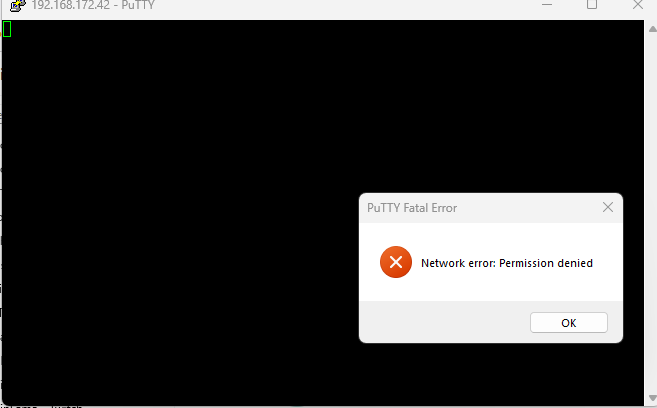
                  Screenshot 2025-02-15 153429.png

                  ? Offline
                  ? Offline
                  A Former User
                  wrote on last edited by
                  #20

                  @michael-schmitt

                  Wenn ssh. Im pc zum Raspi per Shell geht, kann’s eigentlich nicht am Raspi liegen.

                  Muss also ne Einstellung am pc sein.
                  Startest Du Putty mit Admin rechten ?

                  Michael SchmittM 1 Reply Last reply
                  0
                  • wendy2702W wendy2702

                    Welche Putty Version?

                    Michael SchmittM Online
                    Michael SchmittM Online
                    Michael Schmitt
                    wrote on last edited by
                    #21

                    @wendy2702

                    0.83

                    Meister MopperM 1 Reply Last reply
                    0
                    • ? A Former User

                      @michael-schmitt

                      Wenn ssh. Im pc zum Raspi per Shell geht, kann’s eigentlich nicht am Raspi liegen.

                      Muss also ne Einstellung am pc sein.
                      Startest Du Putty mit Admin rechten ?

                      Michael SchmittM Online
                      Michael SchmittM Online
                      Michael Schmitt
                      wrote on last edited by
                      #22

                      @ilovegym

                      ja auch probiert

                      ? 1 Reply Last reply
                      0
                      • Michael SchmittM Michael Schmitt

                        @wendy2702

                        0.83

                        Meister MopperM Online
                        Meister MopperM Online
                        Meister Mopper
                        wrote on last edited by
                        #23

                        @michael-schmitt

                        Wie kommst du denn aktuell auf den Raspi, wenn du uns die Ergebnisse zeigst? Stimmt die IP noch?

                        Proxmox und HA

                        Michael SchmittM 1 Reply Last reply
                        0
                        • Michael SchmittM Michael Schmitt

                          @ilovegym

                          ja auch probiert

                          ? Offline
                          ? Offline
                          A Former User
                          wrote on last edited by
                          #24

                          @michael-schmitt

                          Geht ne andere ip per ssh mit dem putty ?

                          1 Reply Last reply
                          0
                          • Meister MopperM Meister Mopper

                            @michael-schmitt

                            Wie kommst du denn aktuell auf den Raspi, wenn du uns die Ergebnisse zeigst? Stimmt die IP noch?

                            Michael SchmittM Online
                            Michael SchmittM Online
                            Michael Schmitt
                            wrote on last edited by
                            #25

                            @meister-mopper

                            mit ausgeschaltener Firewall komm ich drauf aber nicht wenn sie an ist. IP ist korekt

                            Michael SchmittM Meister MopperM 2 Replies Last reply
                            0
                            • Michael SchmittM Michael Schmitt

                              @meister-mopper

                              mit ausgeschaltener Firewall komm ich drauf aber nicht wenn sie an ist. IP ist korekt

                              Michael SchmittM Online
                              Michael SchmittM Online
                              Michael Schmitt
                              wrote on last edited by
                              #26

                              Firewall wieder an = verbindung weg.

                              Auf meinem alten PC (Windows 10) geht Putty, den hab ich mal schnell angeschlossen

                              1 Reply Last reply
                              0
                              • Michael SchmittM Michael Schmitt

                                @meister-mopper

                                mit ausgeschaltener Firewall komm ich drauf aber nicht wenn sie an ist. IP ist korekt

                                Meister MopperM Online
                                Meister MopperM Online
                                Meister Mopper
                                wrote on last edited by
                                #27

                                @michael-schmitt sagte in Permission denied Putty/Powershell:

                                @meister-mopper

                                mit ausgeschaltener Firewall komm ich drauf aber nicht wenn sie an ist. IP ist korekt

                                Das erschloss sich mir wegen

                                @michael-schmitt sagte in Permission denied Putty/Powershell:

                                @meister-mopper

                                Firewall aus per Powershell verbindung geht. Putty bringt jetzt ein "connection timeout"

                                bisher nicht.

                                Ja dann ist doch klar, dass ssh in der Firerwall erlaubt werden muss.

                                Proxmox und HA

                                1 Reply Last reply
                                0
                                • wendy2702W Online
                                  wendy2702W Online
                                  wendy2702
                                  wrote on last edited by
                                  #28

                                  Win11 fragt doch meistens beim erstenmal ob Geräte im lokalen Netzwerk …. Dürfen.

                                  Zufällig weg geklickt?

                                  Bitte keine Fragen per PN, die gehören ins Forum!

                                  Benutzt das Voting rechts unten im Beitrag wenn er euch geholfen hat.

                                  Michael SchmittM 1 Reply Last reply
                                  0
                                  • wendy2702W wendy2702

                                    Win11 fragt doch meistens beim erstenmal ob Geräte im lokalen Netzwerk …. Dürfen.

                                    Zufällig weg geklickt?

                                    Michael SchmittM Online
                                    Michael SchmittM Online
                                    Michael Schmitt
                                    wrote on last edited by
                                    #29

                                    @wendy2702 sagte in Permission denied Putty/Powershell:

                                    Win11 fragt doch meistens beim erstenmal ob Geräte im lokalen Netzwerk …. Dürfen.

                                    Zufällig weg geklickt?

                                    denke ich nicht

                                    Michael SchmittM 1 Reply Last reply
                                    0
                                    • Michael SchmittM Michael Schmitt

                                      @wendy2702 sagte in Permission denied Putty/Powershell:

                                      Win11 fragt doch meistens beim erstenmal ob Geräte im lokalen Netzwerk …. Dürfen.

                                      Zufällig weg geklickt?

                                      denke ich nicht

                                      Michael SchmittM Online
                                      Michael SchmittM Online
                                      Michael Schmitt
                                      wrote on last edited by
                                      #30

                                      angingen kann ich den Pi

                                      C:\Windows\System32>ping 192.168.178.42
                                      
                                      Ping wird ausgeführt für 192.168.178.42 mit 32 Bytes Daten:
                                      Antwort von 192.168.178.42: Bytes=32 Zeit<1ms TTL=64
                                      Antwort von 192.168.178.42: Bytes=32 Zeit<1ms TTL=64
                                      Antwort von 192.168.178.42: Bytes=32 Zeit<1ms TTL=64
                                      Antwort von 192.168.178.42: Bytes=32 Zeit<1ms TTL=64
                                      
                                      Ping-Statistik für 192.168.178.42:
                                          Pakete: Gesendet = 4, Empfangen = 4, Verloren = 0
                                          (0% Verlust),
                                      Ca. Zeitangaben in Millisek.:
                                          Minimum = 0ms, Maximum = 0ms, Mittelwert = 0ms
                                      
                                      wendy2702W Meister MopperM 2 Replies Last reply
                                      0
                                      • Michael SchmittM Michael Schmitt

                                        angingen kann ich den Pi

                                        C:\Windows\System32>ping 192.168.178.42
                                        
                                        Ping wird ausgeführt für 192.168.178.42 mit 32 Bytes Daten:
                                        Antwort von 192.168.178.42: Bytes=32 Zeit<1ms TTL=64
                                        Antwort von 192.168.178.42: Bytes=32 Zeit<1ms TTL=64
                                        Antwort von 192.168.178.42: Bytes=32 Zeit<1ms TTL=64
                                        Antwort von 192.168.178.42: Bytes=32 Zeit<1ms TTL=64
                                        
                                        Ping-Statistik für 192.168.178.42:
                                            Pakete: Gesendet = 4, Empfangen = 4, Verloren = 0
                                            (0% Verlust),
                                        Ca. Zeitangaben in Millisek.:
                                            Minimum = 0ms, Maximum = 0ms, Mittelwert = 0ms
                                        
                                        wendy2702W Online
                                        wendy2702W Online
                                        wendy2702
                                        wrote on last edited by
                                        #31

                                        @michael-schmitt Ping ist kein SSH

                                        Wenn das ohne Firewall geht liegt der „Fehler“ an der Firewall.

                                        Bitte keine Fragen per PN, die gehören ins Forum!

                                        Benutzt das Voting rechts unten im Beitrag wenn er euch geholfen hat.

                                        1 Reply Last reply
                                        0
                                        • Michael SchmittM Michael Schmitt

                                          angingen kann ich den Pi

                                          C:\Windows\System32>ping 192.168.178.42
                                          
                                          Ping wird ausgeführt für 192.168.178.42 mit 32 Bytes Daten:
                                          Antwort von 192.168.178.42: Bytes=32 Zeit<1ms TTL=64
                                          Antwort von 192.168.178.42: Bytes=32 Zeit<1ms TTL=64
                                          Antwort von 192.168.178.42: Bytes=32 Zeit<1ms TTL=64
                                          Antwort von 192.168.178.42: Bytes=32 Zeit<1ms TTL=64
                                          
                                          Ping-Statistik für 192.168.178.42:
                                              Pakete: Gesendet = 4, Empfangen = 4, Verloren = 0
                                              (0% Verlust),
                                          Ca. Zeitangaben in Millisek.:
                                              Minimum = 0ms, Maximum = 0ms, Mittelwert = 0ms
                                          
                                          Meister MopperM Online
                                          Meister MopperM Online
                                          Meister Mopper
                                          wrote on last edited by
                                          #32

                                          @michael-schmitt

                                          Zeig bitte mal aus der Powershell (als Administrator ausgeführt) das Ergebnis von Get-WindowsCapability -Online | Where-Object Name -like 'OpenSSH*'

                                          Proxmox und HA

                                          Michael SchmittM 1 Reply Last reply
                                          0
                                          Reply
                                          • Reply as topic
                                          Log in to reply
                                          • Oldest to Newest
                                          • Newest to Oldest
                                          • Most Votes


                                          Support us

                                          ioBroker
                                          Community Adapters
                                          Donate

                                          592

                                          Online

                                          32.7k

                                          Users

                                          82.5k

                                          Topics

                                          1.3m

                                          Posts
                                          Community
                                          Impressum | Datenschutz-Bestimmungen | Nutzungsbedingungen | Einwilligungseinstellungen
                                          ioBroker Community 2014-2025
                                          logo
                                          • Login

                                          • Don't have an account? Register

                                          • Login or register to search.
                                          • First post
                                            Last post
                                          0
                                          • Home
                                          • Recent
                                          • Tags
                                          • Unread 0
                                          • Categories
                                          • Unreplied
                                          • Popular
                                          • GitHub
                                          • Docu
                                          • Hilfe