
NEWS




[Vorlage] Spotify Skript
-
Coole Idee!
In der Beschreibung hast du vergessen, dass man auch das zusätzliche npm Paket installieren muss "querystring".
Das habe ich soweit hinbekommen bis zum Code der Seite:
Diese Website ist nicht erreichbar

Die Webseite unter https://example.com/callback/?code=AQB2......kd09 ist möglicherweise vorübergehend nicht verfügbar oder wurde dauerhaft an eine neue Webadresse verschoben.
ERR_INVALID_RESPONSE
Also Code habe ich genommen "AQB2…...kd09". Korrekt?
Den habe ich auch gleich eingetragen Authorization_Code. Habe es dreimal probiert, recht schnell, also unter 30 sec.
Aber die Werte bleiben rot und paar Knöpfe habe ich ausprobiert wie Get_Devices, Play, aber es steht nur im log:
javascript.0 2017-09-24 00:36:21.964 info } javascript.0 2017-09-24 00:36:21.964 info } javascript.0 2017-09-24 00:36:21.964 info "message": "Only valid bearer authentication supported" javascript.0 2017-09-24 00:36:21.964 info "status": 400, javascript.0 2017-09-24 00:36:21.964 info "error": { javascript.0 2017-09-24 00:36:21.964 info script.js.spotify: Body: { javascript.0 2017-09-24 00:36:21.964 info script.js.spotify: https://api.spotify.com/v1/me/player/play javascript.0 2017-09-24 00:35:46.653 info } javascript.0 2017-09-24 00:35:46.653 info } javascript.0 2017-09-24 00:35:46.653 info "message": "Only valid bearer authentication supported" javascript.0 2017-09-24 00:35:46.653 info "status": 400, javascript.0 2017-09-24 00:35:46.653 info "error": { javascript.0 2017-09-24 00:35:46.653 info script.js.spotify: Body: { javascript.0 2017-09-24 00:35:46.653 info script.js.spotify: https://api.spotify.com/v1/me/player/pause javascript.0 2017-09-24 00:35:17.710 info } javascript.0 2017-09-24 00:35:17.710 info } javascript.0 2017-09-24 00:35:17.710 info "message": "Only valid bearer authentication supported" javascript.0 2017-09-24 00:35:17.710 info "status": 400, javascript.0 2017-09-24 00:35:17.710 info "error": { javascript.0 2017-09-24 00:35:17.710 info script.js.spotify: Body: { javascript.0 2017-09-24 00:35:17.709 info script.js.spotify: https://api.spotify.com/v1/me/player/devices -
du hast recht, es muss natürlich noch das Paket querystring installiert werden !
Die Antwort solle im Browser ungefähr so aussehen..
https://example.com/callback/?code=abcdefghijk-xyxyxyxyxyxyxyxyxyxyx-xyxyxyxyxyxy-hsgatebskvz&state=34fFs29kd09
du darfst nur den rot markierten teil in den Authorization_Code State kopieren, wenn alles geklappt hat sollte im log
10:11:00.037	[info]	javascript.0 script.js.Spotify.Spotify: SpotifyRefreshToken Saved!
10:11:00.039	[info]	javascript.0 script.js.Spotify.Spotify: SpotifyAccessToken Saved!
stehen !
-
du hast recht, es muss natürlich noch das Paket querystring installiert werden !
Die Antwort solle im Browser ungefähr so aussehen.
https://example.com/callback/?code=****abcdefghijk-xyxyxyxyxyxyxyxyxyxyx-xyxyxyxyxyxy-hsgatebskvz****&state=34fFs29kd09du darfst nur den rot markierten teil in den Authorization_Code State kopieren, wenn alles geklappt hat sollte im log
10:11:00.037	[info]	javascript.0 script.js.Spotify.Spotify: SpotifyRefreshToken Saved!
10:11:00.039	[info]	javascript.0 script.js.Spotify.Spotify: SpotifyAccessToken Saved!
stehen !
Joh, jetzt habe ich den richtigen Teil des Codes genommen. Es scheint zu funktionieren.Ich habe nichts von
[info] javascript.0 script.js.Spotify.Spotify: SpotifyAccessToken Saved!gelesen.
Aber mit Get_Devices werden meine zwei Echos angezeigt, Google Home aber nicht.
Kann ich auch innerhalb des Device Ordners etwas schalten? Volume_percent macht hier nichts.
Es funktioniert aber play, pause, skip, volume. Schon nicht schlecht für den Anfang! :)
-
so, ich habe das "etwas" erweitert ;-)
hier nochmal die Anleitung:
1-Spotify Account muss vorhanden sein (habe Premium, ob es auch mit der Free Version geht weis ich nicht)
2-unter https://developer.spotify.com muss eine Application registriert werden
3-die dann erhaltene Client ID und Client Secret im Skript eintragen
4-als Redirect URI https://example.com/callback/ oder wenn vorhanden eigen Webseite eintragen
5-gleiche Redirect URI im Skript eintragen
6-wenn alles eingetragen ist, Skript starten
7-javascript.0.Spotify.Get_Authorization drücken
8-in javascript.0.Spotify.Authorization_URL wird eine URL angezeigt, diese in einem Browser öffnen, ihr werdet dann von Spotify gefragt ob ihr die App zulassen wollt, dem zustimmen.
9-wenn https://example.com/callback/ verwendet wurde, kommt eine Fehlermeldung vom Browser zurück, jetzt bitte die Redirect URL aus der Adresszeile des Browsers komplett kopieren !
10- die kopierte URL innerhalb von 30 Sekunden in javascript.0.Spotify.Authorization.Authorization_Return_URI eintragen, Token wird dann erzeugt und gespeichert
was neu ist:
-es werden alle mit Spotify verbundenen Geräte ausgelistet, zwischen diesen kann direkt gewechselt werden
-Informationen über die aktuelle Wiedergabe werden abgerufen
-Playlist des Users werden aufgelistet, diese können direkt angewählt werden
-es können Tracks und Playlist per ID gestartet werden
! ```
`//Version 0.2.0
//letzte änderung 04.11.2017 23:32
! createState('javascript.0.Spotify.Player.Play', false,{type: "boolean", role: "button"});
createState('javascript.0.Spotify.Player.Pause', false,{type: "boolean", role: "button"});
createState('javascript.0.Spotify.Player.Skip_Plus', false,{type: "boolean", role: "button"});
createState('javascript.0.Spotify.Player.Skip_Minus', false,{type: "boolean", role: "button"});
createState('javascript.0.Spotify.Player.Repeat_Track', false,{type: "boolean", role: "button"});
createState('javascript.0.Spotify.Player.Repeat_Context', false,{type: "boolean", role: "button"});
createState('javascript.0.Spotify.Player.Repeat_off', false,{type: "boolean", role: "button"});
createState('javascript.0.Spotify.Player.Volume', 0,{type: "number", role: "Volume %"});
createState('javascript.0.Spotify.Player.TrackId','' ,{type: "string", role: "Track Id to Play"});
createState('javascript.0.Spotify.Player.Playlist_ID','' ,{type: "string", role: "Playlist Id to Play"});
createState('javascript.0.Spotify.Player.Seek', 0,{type: "number", role: "Seek To Position (s)"});
! createState('javascript.0.Spotify.Devices.Get_Devices', false,{type: "boolean", role: "button"});
createState('javascript.0.Spotify.Authorization.Get_Authorization', false,{type: "boolean", role: "button"});
createState('javascript.0.Spotify.Authorization.Authorization_URL','',{type: "string", role: "Authorization_URL",write:false});
createState('javascript.0.Spotify.Authorization.Authorization_Return_URI','',{type: "string", role: "Authorization_Return_URI"});
createState('javascript.0.Spotify.Authorization.User_ID','',{type: "string", role: "User ID",write:false});
createState('javascript.0.Spotify.Authorization.Authorized',false,{type: "boolean", role: "Authorized",write:false});
//createState('javascript.0.Spotify.Get_Playback_Info', false,{type: "boolean", role: "button"});
createState('javascript.0.Spotify.Get_User_Playlists', false,{type: "boolean", role: "button"});
! createState('javascript.0.Spotify.PlaybackInfo.Track_Id','' ,{type: "string", role: "Track Id",write:false});
createState('javascript.0.Spotify.PlaybackInfo.Artist_Name','' ,{type: "string", role: "Artist Name",write:false});
createState('javascript.0.Spotify.PlaybackInfo.Type','' ,{type: "string", role: "Type",write:false});
createState('javascript.0.Spotify.PlaybackInfo.Album','' ,{type: "string", role: "Album",write:false});
createState('javascript.0.Spotify.PlaybackInfo.timestamp',0 ,{type: "number", role: "Timestamp",write:false});
createState('javascript.0.Spotify.PlaybackInfo.progress_ms',0 ,{type: "number", role: "progress_ms",write:false});
createState('javascript.0.Spotify.PlaybackInfo.is_playing',false ,{type: "boolean", role: "is_playing",write:false});
createState('javascript.0.Spotify.PlaybackInfo.image_url','' ,{type: "string", role: "Image URL",write:false});
createState('javascript.0.Spotify.PlaybackInfo.Track_Name','' ,{type: "string", role: "Track_Name",write:false});
createState('javascript.0.Spotify.PlaybackInfo.duration_ms',0 ,{type: "number", role: "Duration ms",write:false});
! createState('javascript.0.Spotify.PlaybackInfo.Device.id','',{type: "string", role: "id",write:false});
createState('javascript.0.Spotify.PlaybackInfo.Device.is_active',false,{type: "boolean", role: "is active",write:false});
createState('javascript.0.Spotify.PlaybackInfo.Device.is_restricted',false,{type: "boolean", role: "is restricted",write:false});
createState('javascript.0.Spotify.PlaybackInfo.Device.name','',{type: "string", role: "Name",write:false});
createState('javascript.0.Spotify.PlaybackInfo.Device.type','',{type: "string", role: "Type",write:false});
createState('javascript.0.Spotify.PlaybackInfo.Device.volume_percent',0,{type: "number", role: "volume_percent",write:false});
! var request = require('request');
var querystring = require('querystring');
var fs = require('fs');
! var Application = {
User_ID:'',//Nichts eintragen !!
BaseURL:'https://api.spotify.com',
Client_ID:'hier deine client ID',
Client_Secret:'hier dein client secret',
redirect_uri:'https://example.com/callback/',
Token:'', //Nichts eintragen !!
refresh_token:'',//Nichts eintragen !!
code:'',//Nichts eintragen !!
State:''//Nichts eintragen !!
};
! //############### Initial ##########
ReadTokenFiles(function(err){
! if(!err) {
SendRequest('/v1/me','GET','',function(err,data){
if(!err) {
GetUserInformation(data);
setState('javascript.0.Spotify.Authorization.Authorized',val=true,akt=true);SendRequest('/v1/me/player/devices','GET','',function(err,data){ if(!err){CreateDevices(data)} }); } else{setState('javascript.0.Spotify.Authorization.Authorized',val=false,akt=true)} });! }
});
! //#################################
! function ReadTokenFiles(callback){
! fs.readFile('SpotifyAccessToken.txt', function(err, data) {
if(!err){ //wenn keine Fehler
console.log('SpotifyAccessToken gelesen');
Application.Token=data;fs.readFile('SpotifyRefreshToken.txt', function(err, data) { if(!err){ console.log('SpotifyRefreshToken gelesen'); Application.refresh_token=data; return callback(false); } else{ //wenn Fehler console.log(err); return callback(true); } }); } else{ //wenn Fehler console.log (err); return callback(true); }});
!
}// End of Function ReadTokenFiles
! //###################################################################################### FUNCTION SEND REQUEST ###################################################################################
function SendRequest(Endpoint,Method,Send_Body,callback){
! var options = {
url: Application.BaseURL+Endpoint,
method: Method,
headers: {Authorization: 'Bearer '+Application.Token},
form:Send_Body
};
! //console.log(options.form);
//console.log('Spotify API Call...'+ Endpoint);
! request(options,function (error, response, body){var ParsetBody ;
! //console.log(response.statusCode);
    switch (response.statusCode){

        case 200: // OK
            return callback(false,JSON.parse(body));

        case 202: //Accepted, processing has not been completed.
        DummyBody={
            is_playing:false                //tritt ein wenn kein Player geöffnet ist
        };
            return callback(false,DummyBody);
! case 204: // OK, No Content
return callback(false,null);case 400: //Bad Request, message body will contain more information return callback(true,null); case 401: //Unauthorized if(JSON.parse(body).error.message=='The access token expired'){ Refresh_Token(Endpoint,Method,Send_Body,function(err,NewData){ return callback(err,NewData); //neue Daten }); } else{ //wenn anderer fehler console.warn(JSON.parse(body).error.message); return callback(true,null); } break; default: console.warn( 'Code '+response.statusCode+' wird nicht verarbeitet ! '); return callback(true,null); }! });
}//End of Function SendRequest
//###################################################################################### END OF FUNCTION SEND REQUEST ###################################################################################! function CreatePlaybackInfo(P_Body){
setState('javascript.0.Spotify.PlaybackInfo.is_playing',val=P_Body.is_playing,akt=true);if(P_Body.is_playing===true){
setState('javascript.0.Spotify.PlaybackInfo.Track_Id',val=P_Body.item.id,akt=true);
setState('javascript.0.Spotify.PlaybackInfo.Artist_Name',val=P_Body.item.artists[0].name,akt=true);
setState('javascript.0.Spotify.PlaybackInfo.Type',val=P_Body.item.type,akt=true);
setState('javascript.0.Spotify.PlaybackInfo.Album',val=P_Body.item.album.name,akt=true);
setState('javascript.0.Spotify.PlaybackInfo.timestamp',val=P_Body.timestamp,akt=true);
setState('javascript.0.Spotify.PlaybackInfo.progress_ms',val=P_Body.progress_ms,akt=true);
setState('javascript.0.Spotify.PlaybackInfo.image_url',val=P_Body.item.album.images[0].url,akt=true);
setState( 'javascript.0.Spotify.PlaybackInfo.Track_Name',val=P_Body.item.name,akt=true);
setState( 'javascript.0.Spotify.PlaybackInfo.duration_ms',val=P_Body.item.duration_ms,akt=true);setState( 'javascript.0.Spotify.PlaybackInfo.Device.id',val=P_Body.device.id,akt=true);
setState( 'javascript.0.Spotify.PlaybackInfo.Device.is_active',val=P_Body.device.is_active,akt=true);
setState( 'javascript.0.Spotify.PlaybackInfo.Device.is_restricted',val=P_Body.device.is_restricted,akt=true);
setState( 'javascript.0.Spotify.PlaybackInfo.Device.name',val=P_Body.device.name,akt=true);
setState( 'javascript.0.Spotify.PlaybackInfo.Device.type',val=P_Body.device.type,akt=true);
setState( 'javascript.0.Spotify.PlaybackInfo.Device.volume_percent',val=P_Body.device.volume_percent,akt=true);! }
}//End of Function CreatePlaybackInfo
! function GetUserInformation(P_Body){
! Application.User_ID=P_Body.id;
setState('javascript.0.Spotify.Authorization.User_ID',val=P_Body.id,akt=true);}//End of Function GetUserInformation
! function GetUsersPlaylist(P_Body){
! for (i = 0; i < P_Body.items.length; i++) {
//console.log(P_Body.items[i].name)
if (!getObject('javascript.0.Spotify.Playlists.'+P_Body.items[i].name.replace(/\s+/g, ''))) {
createState('javascript.0.Spotify.Playlists.'+P_Body.items[i].name.replace(/\s+/g, '')+'.'+'Play_this_List',false,{type:'boolean', role:'button'});
createState('javascript.0.Spotify.Playlists.'+P_Body.items[i].name.replace(/\s+/g, '')+'.'+'id',P_Body.items[i].id,{type:'string', role:'id'});
createState('javascript.0.Spotify.Playlists.'+P_Body.items[i].name.replace(/\s+/g, '')+'.'+'owner',P_Body.items[i].owner.id,{type:'string', role:'owner'});} }}
! function CreateDevices(P_Body){
for (i = 0; i < P_Body.devices.length; i++) { for (var ObjName in P_Body.devices[i]) { if (!getObject('javascript.0.Spotify.Devices.'+P_Body.devices[i].name.replace(/\s+/g, '')+'.'+ObjName)){ createState('javascript.0.Spotify.Devices.'+P_Body.devices[i].name.replace(/\s+/g, '')+'.'+ObjName,P_Body.devices[i][ObjName],{type: typeof P_Body.devices[i][ObjName], role: ObjName}); createState('javascript.0.Spotify.Devices.'+P_Body.devices[i].name.replace(/\s+/g, '')+'.'+'Use_for_Playback',false,{type:'boolean', role:'button'}); } else{setState('javascript.0.Spotify.Devices.'+P_Body.devices[i].name.replace(/\s+/g, '')+'.'+ObjName,P_Body.devices[i][ObjName],akt=true)} } }}//End of Function CreateDevices
! function generateRandomString (length) {
var text = '';
var possible = 'ABCDEFGHIJKLMNOPQRSTUVWXYZabcdefghijklmnopqrstuvwxyz0123456789';
! for (var i = 0; i < length; i++) {
text += possible.charAt(Math.floor(Math.random() * possible.length));
}
return text;
}
! function request_authorization(){Application.State=generateRandomString (20); var query ={ client_id:Application.Client_ID, response_type: 'code', redirect_uri :Application.redirect_uri, state:Application.State, scope:'user-modify-playback-state user-read-playback-state user-read-currently-playing playlist-read-private' };!
var options = {
url:'https://accounts.spotify.com/de/authorize/?'+querystring.stringify(query),
method: 'GET',
followAllRedirects: true,
};
! setState('javascript.0.Spotify.Authorization.Authorization_URL',val=options.url);
! // request(options, function (error, response,body){// console.log(options.url); // console.log('RESPONSE*************'+JSON.stringify(response)); //console.log('BODY*****'+body); //console.log('ERROR'+error); //console.log('FORM'+form); //console.log('HEADERS *****'+JSON.stringify(response.headers)); //console.log('HTML *****'+JSON.stringify(response.html));// });
! }// End of Function request_authorization
! function GetToken(){
var options = {
url: 'https://accounts.spotify.com/api/token',
method: 'POST',
headers: {Authorization: 'Basic '+Buffer.from(Application.Client_ID + ':' + Application.Client_Secret).toString('base64')},
form: {grant_type:'authorization_code',code:Application.code,redirect_uri:Application.redirect_uri}
};
! request(options, function (error, response, body){
if(SaveToken(body)===true){
setState('javascript.0.Spotify.Authorization.Authorization_URL',val='',akt=true);
setState('javascript.0.Spotify.Authorization.Authorization_Return_URI',val='',akt=true);
setState('javascript.0.Spotify.Authorization.Authorized',val=true,akt=true);
}});! }//End of Function GetToken
! function Refresh_Token(Endpoint,Method,Send_Body,callback){
console.log('Token wird erneut angefordert ! ');var options = { url: 'https://accounts.spotify.com/api/token', method: 'POST', headers: {Authorization: 'Basic '+Buffer.from(Application.Client_ID + ':' + Application.Client_Secret).toString('base64')}, form: {grant_type:'refresh_token',refresh_token:Application.refresh_token}};
! if(Application.refresh_token!==''){
! request(options, function (error, response, body){
if(error){console.log(error)}if (SaveToken(body)===true){ // wenn Token erfolgreich gespreichert wurde console.log('neuer Token eingetroffen'); SendRequest(Endpoint,Method,Send_Body,function(err,data){ if (!err){console.log('Daten mit neuem Token')} else{console.error('FEHLER BEIM ERNEUTEN DATEN ANFORDERN !')} callback(err,data); }); } else {callback(true,null)} });}
else{
console.warn('kein Refresh Token gefunden !!');
callback(true,null);
}}//End of Function Refresh_Token
! function SaveToken(Body){
var ParsedBody=JSON.parse(Body); if ("undefined" !== typeof ParsedBody.access_token){ Application.Token=ParsedBody.access_token; fs.writeFile('SpotifyAccessToken.txt', Application.Token, function (err) { if (err) {throw err} else{ console.log('SpotifyAccessToken Saved!'); } }); } if ("undefined" !== typeof ParsedBody.refresh_token){ Application.refresh_token=ParsedBody.refresh_token; fs.writeFile('SpotifyRefreshToken.txt', Application.refresh_token, function (err) { if (err) {throw err} else{ console.log('SpotifyRefreshToken Saved!'); } }); } return true;}//End of Function SaveToken
! on({id:'javascript.0.Spotify.Authorization.Authorization_Return_URI',change:"any"}, function (obj){
if (!obj.state.ack) {var return_uri=querystring.parse(obj.state.val.slice(obj.state.val.search('[?]')+1, obj.state.val.length)); if(return_uri.state==Application.State){ Application.code=return_uri.code; GetToken(); } }});
! on({id:'javascript.0.Spotify.Authorization.Get_Authorization',val:true}, function (obj){
request_authorization();
setState('javascript.0.Spotify.Authorization.Authorized',val=false,akt=true);
});
! on({id: /.Use_for_Playback$/, val:true},function (obj){var send={
device_ids:[getState(obj.id.slice(0,obj.id.lastIndexOf("."))+'.id').val]
};
SendRequest('/v1/me/player','PUT',JSON.stringify(send),function(){});
});on({id: /.Play_this_List$/, val:true},function (obj){
! var send ={
context_uri:'spotify:user:'+getState(obj.id.slice(0,obj.id.lastIndexOf("."))+'.owner').val+':playlist:'+getState(obj.id.slice(0,obj.id.lastIndexOf("."))+'.id').val,
offset:{
position:1
    }
};SendRequest('/v1/me/player/play','PUT',JSON.stringify(send),function(){ SendRequest('/v1/me/player','GET','',function(err,data){ if(!err) {CreatePlaybackInfo(data)} }); });});
! on({id:'javascript.0.Spotify.Player.Play',val:true}, function (obj){
SendRequest('/v1/me/player/play','PUT','',function(){});
});
! on({id:'javascript.0.Spotify.Player.Pause',val:true}, function (obj){
SendRequest('/v1/me/player/pause','PUT','',function(){});
});on({id:'javascript.0.Spotify.Player.Skip_Plus',val:true}, function (obj){
SendRequest('/v1/me/player/next','POST','',function(err,data){});});
on({id:'javascript.0.Spotify.Player.Skip_Minus',val:true}, function (obj){
SendRequest('/v1/me/player/previous','POST','',function(){});
});on({id:'javascript.0.Spotify.Player.Repeat_Track',val:true}, function (obj){ //aaaaaaaaaaaa
SendRequest('/v1/me/player/repeat?state=track','PUT','',function(){});
});on({id:'javascript.0.Spotify.Player.Repeat_Context',val:true}, function (obj){ //aaaaaaaaaaaa
SendRequest('/v1/me/player/repeat?state=context','PUT','',function(){});
});on({id:'javascript.0.Spotify.Player.Repeat_off',val:true}, function (obj){ //aaaaaaaaaaaa
SendRequest('/v1/me/player/repeat?state=off','PUT','',function(){});
});on({id:'javascript.0.Spotify.Player.Volume'}, function (obj){
SendRequest('/v1/me/player/volume?volume_percent='+obj.state.val,'PUT','',function(){});
});on({id:'javascript.0.Spotify.Player.Seek'}, function (obj){
SendRequest('/v1/me/player/seek?position_ms='+obj.state.val*1000,'PUT','',function(){});
});on({id:'javascript.0.Spotify.Player.TrackId'}, function (obj){
     var send ={
         uris:['spotify:track:'+obj.state.val],
         offset:{
             position:0
         }
     };

     SendRequest('/v1/me/player/play','PUT',JSON.stringify(send),function(){});
});
on({id:'javascript.0.Spotify.Player.Playlist_ID'}, function (obj){
     var send ={
         context_uri:'spotify:user:'+Application.User_ID+':playlist:'+obj.state.val,   //spotify:user:user:playlist:
         offset:{
             position:1
         }
     };

     SendRequest('/v1/me/player/play','PUT',JSON.stringify(send),function(){});
});
on({id:'javascript.0.Spotify.Get_User_Playlists'}, function (obj){
if(Application.User_ID!==''){
var query ={
limit:40,
offest:0
};SendRequest('/v1/users/'+Application.User_ID+'/playlists?'+querystring.stringify(query),'GET','',function(err,data){ if(!err) {GetUsersPlaylist(data)} }); }});
on({id:'javascript.0.Spotify.Devices.Get_Devices'}, function (obj){
    SendRequest('/v1/me/player/devices','GET','',function(err,data){
        if(!err){CreateDevices(data)}
    });
});
on({id:'javascript.0.Spotify.Get_Playback_Info'}, function (obj){
     SendRequest('/v1/me/player','GET','',function(err,data){
        if(!err) {CreatePlaybackInfo(data)}
     });
});
on({id:'javascript.0.Spotify.Authorization.Authorized'}, function (obj){
  if(obj.state.val===true){

         Intervall = setInterval(function () {

             SendRequest('/v1/me/player','GET','',function(err,data){
                if(!err) {CreatePlaybackInfo(data)}
                else{clearInterval(Intervall)}
             });

         },5000);
  }
  else{
      if ("undefined" !== typeof  Intervall){clearInterval(Intervall)}
  }
! });
onStop(function () {
setState('javascript.0.Spotify.Authorization.Authorization_URL',val='',akt=true);
setState('javascript.0.Spotify.Authorization.Authorization_Return_URI',val='',akt=true);
setState('javascript.0.Spotify.Player.TrackId',val='',akt=true);
setState('javascript.0.Spotify.Player.Playlist_ID',val='',akt=true);
setState('javascript.0.Spotify.Authorization.User_ID',val='',akt=true);
setState('javascript.0.Spotify.Authorization.Authorized',val=false,akt=true);
if ("undefined" !== typeof Intervall){clearInterval(Intervall)}
}, 1000 /ms/);` [/i][/i][/i][/i][/i][/i][/i][/i][/i][/i][/i][/i][/i][/i][/i] -
Hi . kannst du evtl kurz ab Punkt 6 erklären, was ich genau machen muss? Bin neu in iobroker und was programmieren angeht, bin ich leider auch nur Laie. Ich hab das Script in den Scripte reiter in iobroker geladen und die ID's, die mir die developer Seite gegeben hat dort eingesetzt. Wie soll ich jetzt das Script starten? Hättest du da ne kurze und anfängerfreundliche Anleitung für mich?
-
???
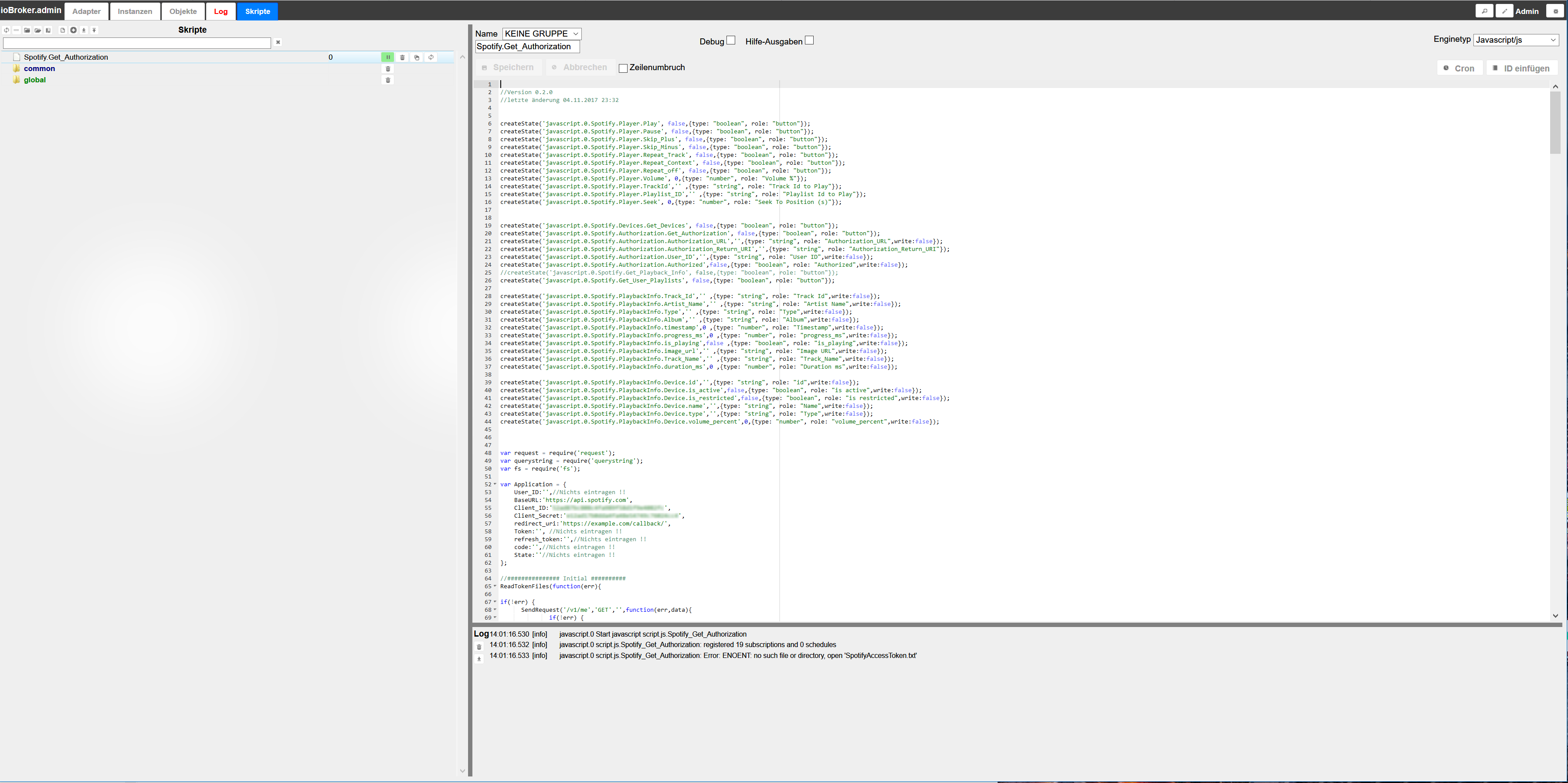
Wenn ich das Script starte, kommt immer folgende Fehlermeldung:
14:01:16.530 [info] javascript.0 Start javascript script.js.Spotify_Get_Authorization
14:01:16.532 [info] javascript.0 script.js.Spotify_Get_Authorization: registered 19 subscriptions and 0 schedules
14:01:16.533 [info] javascript.0 script.js.Spotify_Get_Authorization: Error: ENOENT: no such file or directory, open 'SpotifyAccessToken.txt'
-
bist du sicher, dass du uns deine keys und secret so mitteilen willst im Screenshot?
Hast du diesen Teil beachtet?:
` > 9-wenn https://example.com/callback/ verwendet wurde, kommt eine Fehlermeldung vom Browser zurück, jetzt bitte die Redirect URL aus der Adresszeile des Browsers komplett kopieren !
10- die kopierte URL innerhalb von 30 Sekunden in javascript.0.Spotify.Authorization.Authorization_Return_URI eintragen, Token wird dann erzeugt und gespeichert `
-
bist du sicher, dass du uns deine keys und secret so mitteilen willst im Screenshot?
Hast du diesen Teil beachtet?:
` > 9-wenn https://example.com/callback/ verwendet wurde, kommt eine Fehlermeldung vom Browser zurück, jetzt bitte die Redirect URL aus der Adresszeile des Browsers komplett kopieren !
10- die kopierte URL innerhalb von 30 Sekunden in javascript.0.Spotify.Authorization.Authorization_Return_URI eintragen, Token wird dann erzeugt und gespeichert
Ich bin ja gerade einmal bei Punkt 6 und da kommt dann ja schon die Meldung. Also direkt nach dem Starten des Scripts
EDIT:
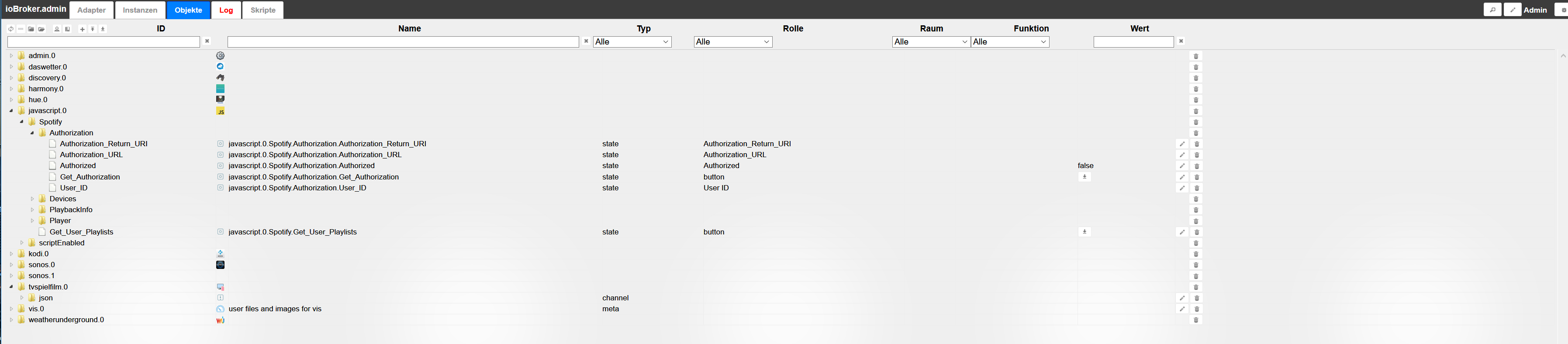
Wie gesagt. Ich bin da ganz neu in der Materie. Hab jetzt aber gerade gesehen, das im Reiter Objekte die jeweiligen einzelenen Scripte angelegt wurden, jedoch steht im "Authorizaion_URL" keine URL drinm, die ich im Browser kopieren und aufrufen könnte
EDIT2:
Hab alles nochmal gemacht. Die URL kam diesmal, hab dann die anderen schritte abgearbeitet , die Redirect URL kopiert und eingefügt und bei "Authorized" steht jetzt "true" Schein also jetzt funktioniert zu haben. Wie kann ich das ganze jetzt in einem Widget darstellen?
-
Nun habe ich das Script-Update vom 4.11 eingespielt. Das scheint auch zu laufen.
"Leider" habe ich inzwischen auf Spotify Family geupdatet. Dann werde ich wohl nur die Geräte sehen können, wo mein Spotify gerade drauf läuft und nicht das von meiner Frau. Ich glaube nicht, dass die Mitglieder bei Family gesondert Client ID und Secret ID erhalten werden. :roll:
-
das weis ich ehelich gesagt gar nicht… hat denn jeder bei Spotify Family einen eigenen Account oder läuft das über einen ?
Werden die Geräte der anderen Nutzer aufgelistet ? `
Das ist das Problem. Es ist nur ein Account. Die anderen bekommen eine Einladung und werden nicht aufgelistet. -
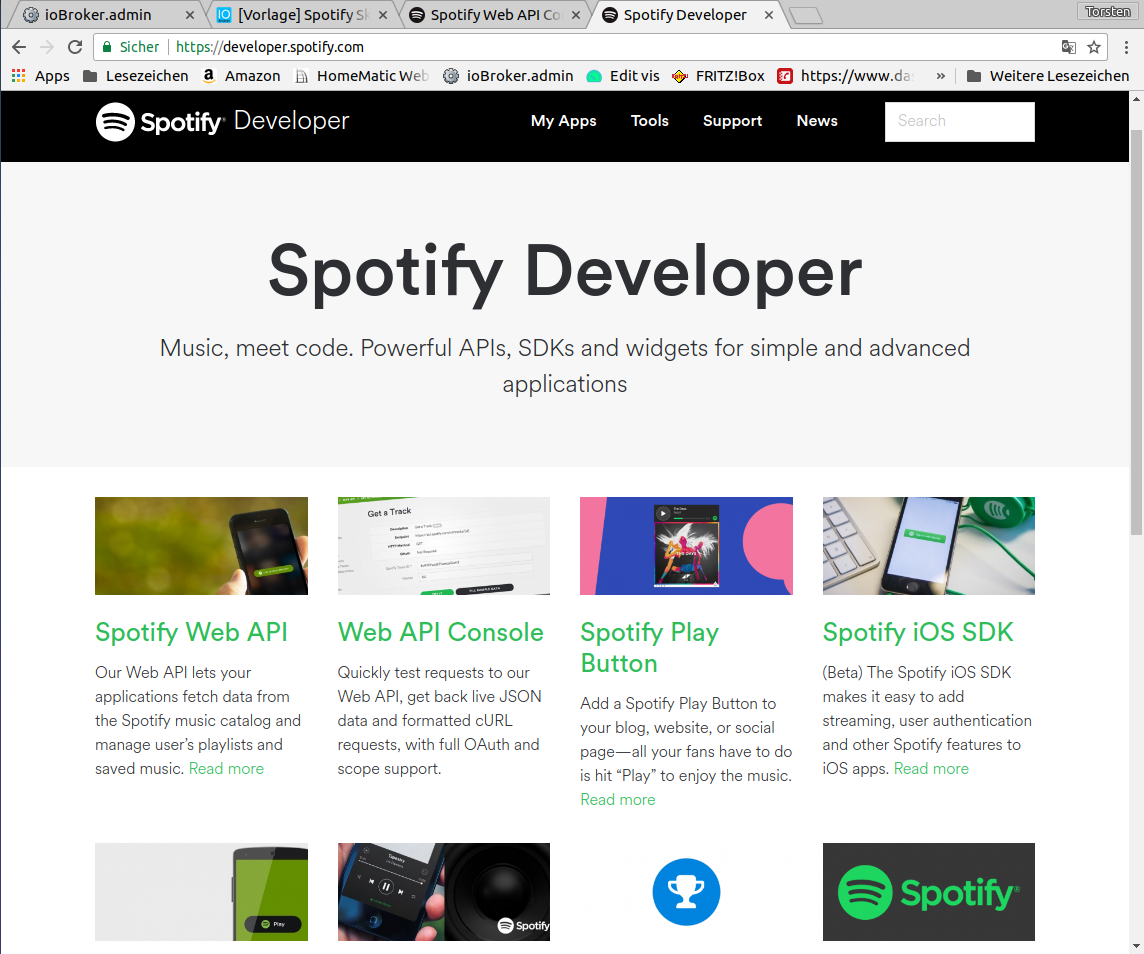
Hallo würde auch gerne dein Spotify Script nutzen leider hänge ich schon ganz am Anfang. Ich hab keine Ahnung wo man die Client ID bekommt. Was muss ich auf der Developer Seite anklicken? Eine Anleitung mit Screenshots wäre super gewesen dann würden viele Fragen vielleicht gar nicht auftauchen.
Würde mich freuen wenn mir jemand weiterhelfen könnte.
Gruß Torsten
470_bildschirmfoto_vom_2017-12-06_14-14-58.png -
@spoerl.torsten:Hallo würde auch gerne dein Spotify Script nutzen leider hänge ich schon ganz am Anfang. Ich hab keine Ahnung wo man die Client ID bekommt. Was muss ich auf der Developer Seite anklicken? Eine Anleitung mit Screenshots wäre super gewesen dann würden viele Fragen vielleicht gar nicht auftauchen.
Würde mich freuen wenn mir jemand weiterhelfen könnte.
Gruß Torsten `
Oben auf My Apps, musst registriert sein, dann create an app.Gibst der app einen Namen und eine Beschreibung und im nächsten Fenster hast du schon die Client ID
-
-
@spoerl.torsten:Super hat funktioniert. Danke lobomau.
Hab aber noch eine Frage und zwar wenn ich auf den Button "Get_User_Playlists" drücke passiert nichts ist das normal? Hatte gedacht das darüber meine in Spotify angelegte Playlist angezeigt wird.
LG Torsten `
Gerne.Hab es gerade ausprobiert. Bei Klick auf Get User Playlists werden darunter die Playlist Ordner angelegt.
-
-
` > Gerne.
Hab es gerade ausprobiert. Bei Klick auf Get User Playlists werden darunter die Playlist Ordner angelegt. `
Ja hat jetzt bei mir jetzt auch funktioniert musste nur iobroker einmal neu starten dann ging es.
Noch eine Frage habt ihr euch damit schon eine View gebastelt? Würde mich über Ideen sehr freuen vielleicht kann ich mir da ein wenig anschauen.
Kann man das Widget vom Sonos Player zur Steuerung benutzen oder ist dieser nur für Sonos geeignet?
LG Torsten


Support us
552
Online32.7k
Users82.4k
Topics1.3m
Posts