




ESPHome zeigt Dashboard nicht
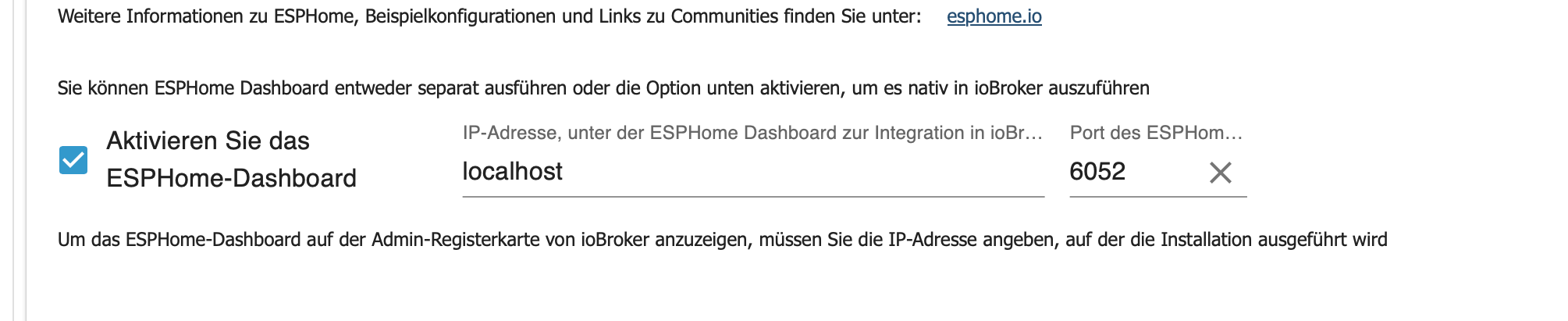
-
Hallo Miteinander,
ich wollte (bzw. will immer noch) in die ESPHome-Welt mit einsteigen.
Leider wird das Dashboard nicht angezeigt.
Unter Instanzen->esphome.0->Einstellungen werden neue Geräte erkannt, den Haken bei Dashboard habe ich gesetzt und sowohl mit 'localhost' als auch der IP des ioBrokers probiert - leider immer ohne Erfolg.
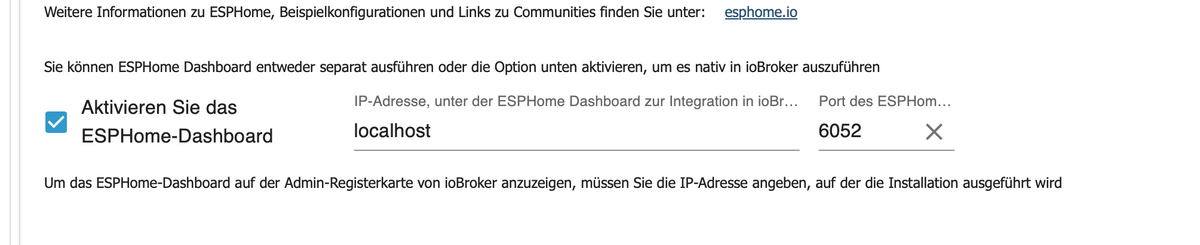
Scheinbar habe ich ein Problem mit meiner Python-Installation, zumindest im Log gibt's da einen dicken Eintrag:home.0 2024-07-16 11:26:37.171 info Native Integration of ESPHome Dashboard enabled esphome.0 2024-07-16 11:26:37.624 info [Error caught and send to Sentry, thank you collaborating!] error: Error: Command failed with exit code 1: /home/iobroker/.cache/autopy/python/3.11.9/bin/python3 -m venv /home/iobroker/.cache/autopy/venv/esphomePython path configuration: PYTHONHOME = (not set) PYTHONPATH = (not set) program name = '/home/iobroker/.cache/autopy/python/3.11.9/bin/python3' isolated = 0 environment = 1 user site = 1 safe_path = 0 import site = 1 is in build tree = 0 stdlib dir = '/home/iobroker/.cache/autopy/python/3.11.9/lib/python3.11' sys._base_executable = '/home/iobroker/.cache/autopy/python/3.11.9/bin/python3' sys.base_prefix = '/home/iobroker/.cache/autopy/python/3.11.9' sys.base_exec_prefix = '/home/iobroker/.cache/autopy/python/3.11.9' sys.platlibdir = 'lib' sys.executable = '/home/iobroker/.cache/autopy/python/3.11.9/bin/python3' sys.prefix = '/home/iobroker/.cache/autopy/python/3.11.9' sys.exec_prefix = '/home/iobroker/.cache/autopy/python/3.11.9' sys.path = [ '/home/iobroker/.cache/autopy/python/3.11.9/lib/python311.zip', '/home/iobroker/.cache/autopy/python/3.11.9/lib/python3.11', '/home/iobroker/.cache/autopy/python/3.11.9/lib/python3.11/lib-dynload', ]Fatal Python error: init_fs_encoding: failed to get the Python codec of the filesystem encodingPython runtime state: core initializedLookupError: no codec search functions registered: can't find encodingCurrent thread 0x0000007fba574040 (most recent call first): <no Python frame> at makeError (file:///opt/iobroker/node_modules/autopy/node_modules/execa/lib/error.js:60:11) at handlePromise (file:///opt/iobroker/node_modules/autopy/node_modules/execa/index.js:124:26) at process.processTicksAndRejections (node:internal/process/task_queues:95:5) at async $df9eabe9bda49ea8$export$e522f41234ab669a (file:///opt/iobroker/node_modules/autopy/dist/index.js:138:9) at async Esphome.espHomeDashboard (/opt/iobroker/node_modules/iobroker.esphome/main.js:110:19) at async Esphome.onReady (/opt/iobroker/node_modules/iobroker.esphome/main.js:78:5)Ich nehme an dass der 'Fatal Python error: init_fs_encoding' hier irgendwas schuld ist, bin aber leider auf dem Gebiet eine absolute Null.
Das ganze läuft auf einem Raspberry Pi 4, sicherheitshalber hatte ich 'sudo apt install python3-full python3.11-dev libpython3.11-dev python3-pip' schon nachinstalliert. Weitere Ideen oder Infos, die ihr braucht? -
Hallo Miteinander,
ich wollte (bzw. will immer noch) in die ESPHome-Welt mit einsteigen.
Leider wird das Dashboard nicht angezeigt.
Unter Instanzen->esphome.0->Einstellungen werden neue Geräte erkannt, den Haken bei Dashboard habe ich gesetzt und sowohl mit 'localhost' als auch der IP des ioBrokers probiert - leider immer ohne Erfolg.
Scheinbar habe ich ein Problem mit meiner Python-Installation, zumindest im Log gibt's da einen dicken Eintrag:home.0 2024-07-16 11:26:37.171 info Native Integration of ESPHome Dashboard enabled esphome.0 2024-07-16 11:26:37.624 info [Error caught and send to Sentry, thank you collaborating!] error: Error: Command failed with exit code 1: /home/iobroker/.cache/autopy/python/3.11.9/bin/python3 -m venv /home/iobroker/.cache/autopy/venv/esphomePython path configuration: PYTHONHOME = (not set) PYTHONPATH = (not set) program name = '/home/iobroker/.cache/autopy/python/3.11.9/bin/python3' isolated = 0 environment = 1 user site = 1 safe_path = 0 import site = 1 is in build tree = 0 stdlib dir = '/home/iobroker/.cache/autopy/python/3.11.9/lib/python3.11' sys._base_executable = '/home/iobroker/.cache/autopy/python/3.11.9/bin/python3' sys.base_prefix = '/home/iobroker/.cache/autopy/python/3.11.9' sys.base_exec_prefix = '/home/iobroker/.cache/autopy/python/3.11.9' sys.platlibdir = 'lib' sys.executable = '/home/iobroker/.cache/autopy/python/3.11.9/bin/python3' sys.prefix = '/home/iobroker/.cache/autopy/python/3.11.9' sys.exec_prefix = '/home/iobroker/.cache/autopy/python/3.11.9' sys.path = [ '/home/iobroker/.cache/autopy/python/3.11.9/lib/python311.zip', '/home/iobroker/.cache/autopy/python/3.11.9/lib/python3.11', '/home/iobroker/.cache/autopy/python/3.11.9/lib/python3.11/lib-dynload', ]Fatal Python error: init_fs_encoding: failed to get the Python codec of the filesystem encodingPython runtime state: core initializedLookupError: no codec search functions registered: can't find encodingCurrent thread 0x0000007fba574040 (most recent call first): <no Python frame> at makeError (file:///opt/iobroker/node_modules/autopy/node_modules/execa/lib/error.js:60:11) at handlePromise (file:///opt/iobroker/node_modules/autopy/node_modules/execa/index.js:124:26) at process.processTicksAndRejections (node:internal/process/task_queues:95:5) at async $df9eabe9bda49ea8$export$e522f41234ab669a (file:///opt/iobroker/node_modules/autopy/dist/index.js:138:9) at async Esphome.espHomeDashboard (/opt/iobroker/node_modules/iobroker.esphome/main.js:110:19) at async Esphome.onReady (/opt/iobroker/node_modules/iobroker.esphome/main.js:78:5)Ich nehme an dass der 'Fatal Python error: init_fs_encoding' hier irgendwas schuld ist, bin aber leider auf dem Gebiet eine absolute Null.
Das ganze läuft auf einem Raspberry Pi 4, sicherheitshalber hatte ich 'sudo apt install python3-full python3.11-dev libpython3.11-dev python3-pip' schon nachinstalliert. Weitere Ideen oder Infos, die ihr braucht?@jacquesnorris sagte in ESPHome zeigt Dashboard nicht:
3.11
da wird bestimmt noch eine 2.7x Version von python im zugriff sein
probiermal damit
sudo apt install --reinstall python3-full python3.11-dev libpython3.11-dev python3-pip sudo apt-get install --reinstall $(dpkg -S '/usr/lib/python3*' | cut -d ':' -f1 | cut -d ',' -f1 | sort | uniq | tr '\n' ' ') -
@jacquesnorris sagte in ESPHome zeigt Dashboard nicht:
3.11
da wird bestimmt noch eine 2.7x Version von python im zugriff sein
probiermal damit
sudo apt install --reinstall python3-full python3.11-dev libpython3.11-dev python3-pip sudo apt-get install --reinstall $(dpkg -S '/usr/lib/python3*' | cut -d ':' -f1 | cut -d ',' -f1 | sort | uniq | tr '\n' ' ')@arteck
Hey,
die erste Zeile davon hatte ich schon probiert - also den forced reinstall, der zweite liefert folgendes zurück:Reading package lists... Done Building dependency tree... Done Reading state information... Done E: Unable to locate package diversion E: Unable to locate package by E: Unable to locate package from E: Unable to locate package diversion E: Unable to locate package by E: Unable to locate package toDas ist wohl nicht das, was es machen sollte - glaube ich zumindest ;)
// EDIT:
An einer python2-Version kann es meiner Meinung nach nicht liegen:dpkg -S /usr/lib/python* python3-wheel, python3-smbc, python3-gi, python3-cupshelpers, python3-dbus, python3-cups:arm64, python3-cairo:arm64, python3-idna, python3-pycryptodome, python3.11, python3-pip, ssh-import-id, python3-urllib3, python3-toml, python3-spidev, python3-smbus2, python3-six, python3-rpi.gpio, python3-requests, python3-pkg-resources, python3-pigpio, python3-libgpiod:arm64, python3-lgpio, python3-gpiozero, python3-distro, python3-debconf, python3-colorzero, python3-charset-normalizer, python3-chardet, python3-certifi, python3-apt, python3-setuptools: /usr/lib/python3 python3.11-venv, raspberrypi-sys-mods, libpython3.11-testsuite, libpython3.11-stdlib:arm64, python3-tk:arm64, python3.11, libpython3.11:arm64, idle-python3.11, libpython3.11-minimal:arm64, libpython3.11-dev:arm64, python3-lib2to3, python3-distutils, python3-gdbm:arm64, python3.11-examples: /usr/lib/python3.11 -
@arteck
Hey,
die erste Zeile davon hatte ich schon probiert - also den forced reinstall, der zweite liefert folgendes zurück:Reading package lists... Done Building dependency tree... Done Reading state information... Done E: Unable to locate package diversion E: Unable to locate package by E: Unable to locate package from E: Unable to locate package diversion E: Unable to locate package by E: Unable to locate package toDas ist wohl nicht das, was es machen sollte - glaube ich zumindest ;)
// EDIT:
An einer python2-Version kann es meiner Meinung nach nicht liegen:dpkg -S /usr/lib/python* python3-wheel, python3-smbc, python3-gi, python3-cupshelpers, python3-dbus, python3-cups:arm64, python3-cairo:arm64, python3-idna, python3-pycryptodome, python3.11, python3-pip, ssh-import-id, python3-urllib3, python3-toml, python3-spidev, python3-smbus2, python3-six, python3-rpi.gpio, python3-requests, python3-pkg-resources, python3-pigpio, python3-libgpiod:arm64, python3-lgpio, python3-gpiozero, python3-distro, python3-debconf, python3-colorzero, python3-charset-normalizer, python3-chardet, python3-certifi, python3-apt, python3-setuptools: /usr/lib/python3 python3.11-venv, raspberrypi-sys-mods, libpython3.11-testsuite, libpython3.11-stdlib:arm64, python3-tk:arm64, python3.11, libpython3.11:arm64, idle-python3.11, libpython3.11-minimal:arm64, libpython3.11-dev:arm64, python3-lib2to3, python3-distutils, python3-gdbm:arm64, python3.11-examples: /usr/lib/python3.11Auch hier (gab schonmal ein Topic dazu: https://forum.iobroker.net/topic/69974/esphome-weboberfläche-nicht-erreichbar/3) :
Sorry, topic erst jetzt gesehen (bin im Forum nicht so aktiv)Kann das Problem leider nicht reproduzieren.
Auf Github kam heute gleicher Bug report rein, vielleicht hilft dir das ja weiter: https://github.com/DrozmotiX/ioBroker.esphome/issues/209Das ganze läuft auf einem Raspberry Pi 4, sicherheitshalber hatte ich 'sudo apt install python3-full python3.11-dev libpython3.11-dev python3-pip' schon nachinstalliert. Weitere Ideen oder Infos, die ihr braucht?
Ein paar mehr Infos zum System wären nett:
Welche Version? Debian 11/12?, 32 oder 64bit System? -
Auch hier (gab schonmal ein Topic dazu: https://forum.iobroker.net/topic/69974/esphome-weboberfläche-nicht-erreichbar/3) :
Sorry, topic erst jetzt gesehen (bin im Forum nicht so aktiv)Kann das Problem leider nicht reproduzieren.
Auf Github kam heute gleicher Bug report rein, vielleicht hilft dir das ja weiter: https://github.com/DrozmotiX/ioBroker.esphome/issues/209Das ganze läuft auf einem Raspberry Pi 4, sicherheitshalber hatte ich 'sudo apt install python3-full python3.11-dev libpython3.11-dev python3-pip' schon nachinstalliert. Weitere Ideen oder Infos, die ihr braucht?
Ein paar mehr Infos zum System wären nett:
Welche Version? Debian 11/12?, 32 oder 64bit System?@simon42
Auch hier und damit ein Forumsbenutzer in Zukunft vielleicht die Lösung hier finden kann:
Dein Tipp auf Github hat geholfen, einmal den adapter deinstalliert, adapter-cache aufräumen:
rm -rf /home/iobroker/.cache/autopyund dann adapter neu installieren.ob das deinstallieren / installieren notwendig war kann ich jetzt nicht mehr nachvollziehen, aber bei mir war die installation ja eh noch leer - also kein Problem.
Danke für deine Hilfe - den anderen Forumsbeitrag hatte ich in der Tat nicht gefunden.
-
@simon42
Auch hier und damit ein Forumsbenutzer in Zukunft vielleicht die Lösung hier finden kann:
Dein Tipp auf Github hat geholfen, einmal den adapter deinstalliert, adapter-cache aufräumen:
rm -rf /home/iobroker/.cache/autopyund dann adapter neu installieren.ob das deinstallieren / installieren notwendig war kann ich jetzt nicht mehr nachvollziehen, aber bei mir war die installation ja eh noch leer - also kein Problem.
Danke für deine Hilfe - den anderen Forumsbeitrag hatte ich in der Tat nicht gefunden.
@jacquesnorris
No problem, der andere Forumspost hatte ja auch keine Lösung.
Super dass das auch dir geholfen hat.Auch hier für Forumsuser:
PS: Adapter Neuinstallation sollte nicht notwendig sein,. Schadet aber nicht, falls man eh noch nichts konfiguriert hat.
Cache löschen und Adapter neustart sollte reichen.PS 2:
Es ist geplant das cache leeren zukünftig in der Adapterconfig zu integrieren, um nicht den Befehl nutzen zu müssen, siehe: https://github.com/DrozmotiX/ioBroker.esphome/issues/211


Hey! Du scheinst an dieser Unterhaltung interessiert zu sein, hast aber noch kein Konto.
Hast du es satt, bei jedem Besuch durch die gleichen Beiträge zu scrollen? Wenn du dich für ein Konto anmeldest, kommst du immer genau dorthin zurück, wo du zuvor warst, und kannst dich über neue Antworten benachrichtigen lassen (entweder per E-Mail oder Push-Benachrichtigung). Du kannst auch Lesezeichen speichern und Beiträge positiv bewerten, um anderen Community-Mitgliedern deine Wertschätzung zu zeigen.
Mit deinem Input könnte dieser Beitrag noch besser werden 💗
Registrieren Anmelden292
Online33.0k
Benutzer83.6k
Themen1.3m
Beiträge