
NEWS




Homeconnect Fehlermeldung
-
@tt-tom Hier mal der LOG nach 3 Minuten.
Jede Minute passiert etwas.2024-07-04 16:52:01.914 - info: host.iobroker "system.adapter.homeconnect.0" enabled 2024-07-04 16:52:02.309 - info: host.iobroker instance system.adapter.homeconnect.0 started with pid 101249 2024-07-04 16:52:03.207 - debug: homeconnect.0 (101249) Redis Objects: Use Redis connection: 127.0.0.1:9001 2024-07-04 16:52:03.275 - debug: homeconnect.0 (101249) Objects client ready ... initialize now 2024-07-04 16:52:03.277 - debug: homeconnect.0 (101249) Objects create System PubSub Client 2024-07-04 16:52:03.277 - debug: homeconnect.0 (101249) Objects create User PubSub Client 2024-07-04 16:52:03.441 - debug: homeconnect.0 (101249) Objects client initialize lua scripts 2024-07-04 16:52:03.446 - debug: homeconnect.0 (101249) Objects connected to redis: 127.0.0.1:9001 2024-07-04 16:52:03.535 - debug: homeconnect.0 (101249) Redis States: Use Redis connection: 127.0.0.1:9000 2024-07-04 16:52:03.638 - debug: homeconnect.0 (101249) States create System PubSub Client 2024-07-04 16:52:03.639 - debug: homeconnect.0 (101249) States create User PubSub Client 2024-07-04 16:52:03.768 - debug: homeconnect.0 (101249) States connected to redis: 127.0.0.1:9000 2024-07-04 16:52:03.837 - debug: homeconnect.0 (101249) Plugin sentry Initialize Plugin (enabled=true) 2024-07-04 16:52:04.158 - info: homeconnect.0 (101249) starting. Version 1.4.1 in /opt/iobroker/node_modules/iobroker.homeconnect, node: v18.17.1, js-controller: 5.0.19 2024-07-04 16:52:04.231 - debug: homeconnect.0 (101249) Found current session 2024-07-04 16:52:04.232 - debug: homeconnect.0 (101249) Refresh Token 2024-07-04 16:52:04.554 - debug: homeconnect.0 (101249) {"access_token":"eyJ4LWVudiI6IlBSRCIsImFsZyI6IlJTMjU2IiwieC1yZWciOiJFVSIsImtpZCI6InJldS1wcm9kdWN0aW9uIn0.eyJmZ3JwIjpbXSwiY2x0eSI6InByaXZhdGUiLCJzdWIiOiIxYzQwMzQyZS1kMGNlLTQzYzktODcwOS05MmY5NDZmNGIxYjAiLCJhdWQiOiIwODI1MTJCREVCOEFGNDUyNjBBRUQ5Q0U1QjBDRjNCRTVDM0IxRUI4RkRGRDI2Q0FBNTRDNzZFN0UyRDhDNTJGIiwic3RhZ2UiOiJQUkQiLCJhenAiOiIwODI1MTJCREVCOEFGNDUyNjBBRUQ5Q0U1QjBDRjNCRTVDM0IxRUI4RkRGRDI2Q0FBNTRDNzZFN0UyRDhDNTJGIiwic2NvcGUiOlsiSWRlbnRpZnlBcHBsaWFuY2UiLCJNb25pdG9yIiwiU2V0dGluZ3MiLCJDb250cm9sIl0sImlzcyI6IkVVOlBSRDowIiwiZXhwIjoxNzIwMTkxMTI0LCJyZWdpb24iOiJFVSIsImlhdCI6MTcyMDEwNDcyNCwianRpIjoiNWEyMmMwZTAtOTE5Ni00MDNlLThiYjAtN2FmZTAxNDQ3NDBlIn0.h05vzbNvOhLkpk6CTBVW8QUDpCTpPUzI9tHoDJGyPFqpNtX-oifpS7gRj_5KGQAb7ifxkzM_etF_wuvUVIHPVSSkSO0UWHaxQRHw8DLgyUKLTVDM4T7FAJ8cHAz6YM-e4_cd1Fbg8bq_O3-OYyMuWIQ1_w7Gp3X3tkUYiT5F1YEhQxHANgGGAtjrUUuw1AEnhIAmzmmJiX_6tYLFunAJ69zXrdc-ilE-BdVuLN6Yo6bonvayzI265D4bmLwIww_4x7enGUsUoLlkNx3ZDf4dEV1SWrZn2M6lwoMqxwzgdLQgGKCUdO7bIwD1mxLRoJzgV3kE6gEpLOKSPSs4XlDQOA","expires_in":86400,"id_token":"eyJ4LWVudiI6IlBSRCIsImFsZyI6IlJTMjU2IiwieC1yZWciOiJFVSIsImtpZCI6InJldS1wcm9kdWN0aW9uIn0.eyJmZ3JwIjpbXSwiY2x0eSI6InByaXZhdGUiLCJzdWIiOiIxYzQwMzQyZS1kMGNlLTQzYzktODcwOS05MmY5NDZmNGIxYjAiLCJhdWQiOiIwODI1MTJCREVCOEFGNDUyNjBBRUQ5Q0U1QjBDRjNCRTVDM0IxRUI4RkRGRDI2Q0FBNTRDNzZFN0UyRDhDNTJGIiwic3RhZ2UiOiJQUkQiLCJhenAiOiIwODI1MTJCREVCOEFGNDUyNjBBRUQ5Q0U1QjBDRjNCRTVDM0IxRUI4RkRGRDI2Q0FBNTRDNzZFN0UyRDhDNTJGIiwic2NvcGUiOlsiSWRlbnRpZnlBcHBsaWFuY2UiLCJNb25pdG9yIiwiU2V0dGluZ3MiLCJDb250cm9sIl0sImlzcyI6IkVVOlBSRDowIiwiZXhwIjoxNzIwMTkxMTI0LCJyZWdpb24iOiJFVSIsImlhdCI6MTcyMDEwNDcyNCwianRpIjoiNWEyMmMwZTAtOTE5Ni00MDNlLThiYjAtN2FmZTAxNDQ3NDBlIn0.h05vzbNvOhLkpk6CTBVW8QUDpCTpPUzI9tHoDJGyPFqpNtX-oifpS7gRj_5KGQAb7ifxkzM_etF_wuvUVIHPVSSkSO0UWHaxQRHw8DLgyUKLTVDM4T7FAJ8cHAz6YM-e4_cd1Fbg8bq_O3-OYyMuWIQ1_w7Gp3X3tkUYiT5F1YEhQxHANgGGAtjrUUuw1AEnhIAmzmmJiX_6tYLFunAJ69zXrdc-ilE-BdVuLN6Yo6bonvayzI265D4bmLwIww_4x7enGUsUoLlkNx3ZDf4dEV1SWrZn2M6lwoMqxwzgdLQgGKCUdO7bIwD1mxLRoJzgV3kE6gEpLOKSPSs4XlDQOA","refresh_token":"eyJyZWdpb24iOiJFVSIsInN0YWdlIjoiUFJEIiwiY3JlZiI6IjA4MjUxMkJEIiwidG9rZW4iOiJiZThjOTA5OC1hYmZlLTQ3N2ItODAwMi1kMzQwYjJhYjVjZmQiLCJjbHR5IjoicHJpdmF0ZSIsIngtcmVnIjoiRVUiLCJ4LWVudiI6IlBSRCJ9","scope":"IdentifyAppliance Monitor Settings Control","token_type":"Bearer"} 2024-07-04 16:52:04.555 - debug: homeconnect.0 (101249) Get device list 2024-07-04 16:52:04.735 - error: homeconnect.0 (101249) AxiosError: Request failed with status code 429 2024-07-04 16:52:04.736 - error: homeconnect.0 (101249) {"error":{"description":"The rate limit \"1000 calls in 1 day\" was reached. Requests are blocked during the remaining period of 85880 seconds.","key":"429"}} 2024-07-04 16:52:04.737 - debug: homeconnect.0 (101249) Start EventStream 2024-07-04 16:52:04.838 - error: homeconnect.0 (101249) 429 Too Many Requests 2024-07-04 16:52:04.838 - error: homeconnect.0 (101249) Start Event Stream Error: {"type":"error","status":429,"message":"Too Many Requests"} 2024-07-04 16:52:04.838 - info: homeconnect.0 (101249) Too many requests. Please wait 24h. 2024-07-04 16:52:14.813 - error: wled.0 (22162) Sending command to WLED device + http://192.168.9.91/json failed with error Error: connect ETIMEDOUT 192.168.9.91:80 2024-07-04 16:52:14.814 - error: wled.0 (22162) Sending command to WLED device + http://192.168.9.91/json failed with error Error: connect ETIMEDOUT 192.168.9.91:80 2024-07-04 16:52:40.625 - info: solax.0 (21770) State value to set for "solax.0.data.json" has to be type "string" but received type "number" 2024-07-04 16:53:14.742 - info: homeconnect.0 (101249) Keep Alive failed Reconnect EventStream 2024-07-04 16:53:14.743 - debug: homeconnect.0 (101249) Start EventStream 2024-07-04 16:53:14.817 - error: homeconnect.0 (101249) 429 Too Many Requests 2024-07-04 16:53:14.818 - error: homeconnect.0 (101249) Start Event Stream Error: {"type":"error","status":429,"message":"Too Many Requests"} 2024-07-04 16:53:14.818 - info: homeconnect.0 (101249) Too many requests. Please wait 24h. 2024-07-04 16:53:16.253 - error: wled.0 (22162) Sending command to WLED device + http://192.168.9.91/json failed with error Error: connect ETIMEDOUT 192.168.9.91:80 2024-07-04 16:53:16.254 - error: wled.0 (22162) Sending command to WLED device + http://192.168.9.91/json failed with error Error: connect ETIMEDOUT 192.168.9.91:80 2024-07-04 16:54:13.597 - error: wled.0 (22162) Sending command to WLED device + http://192.168.9.91/json failed with error Error: connect ETIMEDOUT 192.168.9.91:80 2024-07-04 16:54:13.598 - error: wled.0 (22162) Sending command to WLED device + http://192.168.9.91/json failed with error Error: connect ETIMEDOUT 192.168.9.91:80 2024-07-04 16:54:24.749 - info: homeconnect.0 (101249) Keep Alive failed Reconnect EventStream 2024-07-04 16:54:24.750 - debug: homeconnect.0 (101249) Start EventStream 2024-07-04 16:54:24.826 - error: homeconnect.0 (101249) 429 Too Many Requests 2024-07-04 16:54:24.826 - error: homeconnect.0 (101249) Start Event Stream Error: {"type":"error","status":429,"message":"Too Many Requests"} 2024-07-04 16:54:24.826 - info: homeconnect.0 (101249) Too many requests. Please wait 24h. 2024-07-04 16:55:15.037 - error: wled.0 (22162) Sending command to WLED device + http://192.168.9.91/json failed with error Error: connect ETIMEDOUT 192.168.9.91:80 2024-07-04 16:55:15.038 - error: wled.0 (22162) Sending command to WLED device + http://192.168.9.91/json failed with error Error: connect ETIMEDOUT 192.168.9.91:80 2024-07-04 16:55:34.756 - info: homeconnect.0 (101249) Keep Alive failed Reconnect EventStream 2024-07-04 16:55:34.756 - debug: homeconnect.0 (101249) Start EventStream 2024-07-04 16:55:34.862 - error: homeconnect.0 (101249) 429 Too Many Requests 2024-07-04 16:55:34.862 - error: homeconnect.0 (101249) Start Event Stream Error: {"type":"error","status":429,"message":"Too Many Requests"} 2024-07-04 16:55:34.862 - info: homeconnect.0 (101249) Too many requests. Please wait 24h.@timowald sagte in Homeconnect Fehlermeldung:
node: v18.17.1
Bring das auf eine aktuelle Version.
iob nodejs-update 20 -
@timowald sagte in Homeconnect Fehlermeldung:
node: v18.17.1
Bring das auf eine aktuelle Version.
iob nodejs-update 20 -
@thomas-braun Den Befehl in der Console?
iob nodejs-update 20Ja. Deine Installation steht auf dem falschen Gleis.
-
@thomas-braun Da kommt diese Meldung:
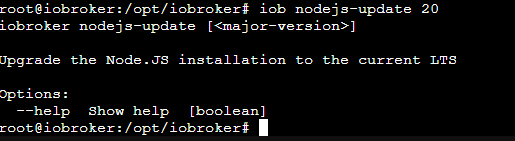
Zur Info: IoBroker läuft auf Proxmox.
Du sollst ja auch NICHT als root herumhampeln. Auch nicht im Proxmox-Container.
Als USER:iob stop iob fix iob nodejs-update 20 -
@tt-tom Hier mal der LOG nach 3 Minuten.
Jede Minute passiert etwas.2024-07-04 16:52:01.914 - info: host.iobroker "system.adapter.homeconnect.0" enabled 2024-07-04 16:52:02.309 - info: host.iobroker instance system.adapter.homeconnect.0 started with pid 101249 2024-07-04 16:52:03.207 - debug: homeconnect.0 (101249) Redis Objects: Use Redis connection: 127.0.0.1:9001 2024-07-04 16:52:03.275 - debug: homeconnect.0 (101249) Objects client ready ... initialize now 2024-07-04 16:52:03.277 - debug: homeconnect.0 (101249) Objects create System PubSub Client 2024-07-04 16:52:03.277 - debug: homeconnect.0 (101249) Objects create User PubSub Client 2024-07-04 16:52:03.441 - debug: homeconnect.0 (101249) Objects client initialize lua scripts 2024-07-04 16:52:03.446 - debug: homeconnect.0 (101249) Objects connected to redis: 127.0.0.1:9001 2024-07-04 16:52:03.535 - debug: homeconnect.0 (101249) Redis States: Use Redis connection: 127.0.0.1:9000 2024-07-04 16:52:03.638 - debug: homeconnect.0 (101249) States create System PubSub Client 2024-07-04 16:52:03.639 - debug: homeconnect.0 (101249) States create User PubSub Client 2024-07-04 16:52:03.768 - debug: homeconnect.0 (101249) States connected to redis: 127.0.0.1:9000 2024-07-04 16:52:03.837 - debug: homeconnect.0 (101249) Plugin sentry Initialize Plugin (enabled=true) 2024-07-04 16:52:04.158 - info: homeconnect.0 (101249) starting. Version 1.4.1 in /opt/iobroker/node_modules/iobroker.homeconnect, node: v18.17.1, js-controller: 5.0.19 2024-07-04 16:52:04.231 - debug: homeconnect.0 (101249) Found current session 2024-07-04 16:52:04.232 - debug: homeconnect.0 (101249) Refresh Token 2024-07-04 16:52:04.554 - debug: homeconnect.0 (101249) {"access_token":"eyJ4LWVudiI6IlBSRCIsImFsZyI6IlJTMjU2IiwieC1yZWciOiJFVSIsImtpZCI6InJldS1wcm9kdWN0aW9uIn0.eyJmZ3JwIjpbXSwiY2x0eSI6InByaXZhdGUiLCJzdWIiOiIxYzQwMzQyZS1kMGNlLTQzYzktODcwOS05MmY5NDZmNGIxYjAiLCJhdWQiOiIwODI1MTJCREVCOEFGNDUyNjBBRUQ5Q0U1QjBDRjNCRTVDM0IxRUI4RkRGRDI2Q0FBNTRDNzZFN0UyRDhDNTJGIiwic3RhZ2UiOiJQUkQiLCJhenAiOiIwODI1MTJCREVCOEFGNDUyNjBBRUQ5Q0U1QjBDRjNCRTVDM0IxRUI4RkRGRDI2Q0FBNTRDNzZFN0UyRDhDNTJGIiwic2NvcGUiOlsiSWRlbnRpZnlBcHBsaWFuY2UiLCJNb25pdG9yIiwiU2V0dGluZ3MiLCJDb250cm9sIl0sImlzcyI6IkVVOlBSRDowIiwiZXhwIjoxNzIwMTkxMTI0LCJyZWdpb24iOiJFVSIsImlhdCI6MTcyMDEwNDcyNCwianRpIjoiNWEyMmMwZTAtOTE5Ni00MDNlLThiYjAtN2FmZTAxNDQ3NDBlIn0.h05vzbNvOhLkpk6CTBVW8QUDpCTpPUzI9tHoDJGyPFqpNtX-oifpS7gRj_5KGQAb7ifxkzM_etF_wuvUVIHPVSSkSO0UWHaxQRHw8DLgyUKLTVDM4T7FAJ8cHAz6YM-e4_cd1Fbg8bq_O3-OYyMuWIQ1_w7Gp3X3tkUYiT5F1YEhQxHANgGGAtjrUUuw1AEnhIAmzmmJiX_6tYLFunAJ69zXrdc-ilE-BdVuLN6Yo6bonvayzI265D4bmLwIww_4x7enGUsUoLlkNx3ZDf4dEV1SWrZn2M6lwoMqxwzgdLQgGKCUdO7bIwD1mxLRoJzgV3kE6gEpLOKSPSs4XlDQOA","expires_in":86400,"id_token":"eyJ4LWVudiI6IlBSRCIsImFsZyI6IlJTMjU2IiwieC1yZWciOiJFVSIsImtpZCI6InJldS1wcm9kdWN0aW9uIn0.eyJmZ3JwIjpbXSwiY2x0eSI6InByaXZhdGUiLCJzdWIiOiIxYzQwMzQyZS1kMGNlLTQzYzktODcwOS05MmY5NDZmNGIxYjAiLCJhdWQiOiIwODI1MTJCREVCOEFGNDUyNjBBRUQ5Q0U1QjBDRjNCRTVDM0IxRUI4RkRGRDI2Q0FBNTRDNzZFN0UyRDhDNTJGIiwic3RhZ2UiOiJQUkQiLCJhenAiOiIwODI1MTJCREVCOEFGNDUyNjBBRUQ5Q0U1QjBDRjNCRTVDM0IxRUI4RkRGRDI2Q0FBNTRDNzZFN0UyRDhDNTJGIiwic2NvcGUiOlsiSWRlbnRpZnlBcHBsaWFuY2UiLCJNb25pdG9yIiwiU2V0dGluZ3MiLCJDb250cm9sIl0sImlzcyI6IkVVOlBSRDowIiwiZXhwIjoxNzIwMTkxMTI0LCJyZWdpb24iOiJFVSIsImlhdCI6MTcyMDEwNDcyNCwianRpIjoiNWEyMmMwZTAtOTE5Ni00MDNlLThiYjAtN2FmZTAxNDQ3NDBlIn0.h05vzbNvOhLkpk6CTBVW8QUDpCTpPUzI9tHoDJGyPFqpNtX-oifpS7gRj_5KGQAb7ifxkzM_etF_wuvUVIHPVSSkSO0UWHaxQRHw8DLgyUKLTVDM4T7FAJ8cHAz6YM-e4_cd1Fbg8bq_O3-OYyMuWIQ1_w7Gp3X3tkUYiT5F1YEhQxHANgGGAtjrUUuw1AEnhIAmzmmJiX_6tYLFunAJ69zXrdc-ilE-BdVuLN6Yo6bonvayzI265D4bmLwIww_4x7enGUsUoLlkNx3ZDf4dEV1SWrZn2M6lwoMqxwzgdLQgGKCUdO7bIwD1mxLRoJzgV3kE6gEpLOKSPSs4XlDQOA","refresh_token":"eyJyZWdpb24iOiJFVSIsInN0YWdlIjoiUFJEIiwiY3JlZiI6IjA4MjUxMkJEIiwidG9rZW4iOiJiZThjOTA5OC1hYmZlLTQ3N2ItODAwMi1kMzQwYjJhYjVjZmQiLCJjbHR5IjoicHJpdmF0ZSIsIngtcmVnIjoiRVUiLCJ4LWVudiI6IlBSRCJ9","scope":"IdentifyAppliance Monitor Settings Control","token_type":"Bearer"} 2024-07-04 16:52:04.555 - debug: homeconnect.0 (101249) Get device list 2024-07-04 16:52:04.735 - error: homeconnect.0 (101249) AxiosError: Request failed with status code 429 2024-07-04 16:52:04.736 - error: homeconnect.0 (101249) {"error":{"description":"The rate limit \"1000 calls in 1 day\" was reached. Requests are blocked during the remaining period of 85880 seconds.","key":"429"}} 2024-07-04 16:52:04.737 - debug: homeconnect.0 (101249) Start EventStream 2024-07-04 16:52:04.838 - error: homeconnect.0 (101249) 429 Too Many Requests 2024-07-04 16:52:04.838 - error: homeconnect.0 (101249) Start Event Stream Error: {"type":"error","status":429,"message":"Too Many Requests"} 2024-07-04 16:52:04.838 - info: homeconnect.0 (101249) Too many requests. Please wait 24h. 2024-07-04 16:52:14.813 - error: wled.0 (22162) Sending command to WLED device + http://192.168.9.91/json failed with error Error: connect ETIMEDOUT 192.168.9.91:80 2024-07-04 16:52:14.814 - error: wled.0 (22162) Sending command to WLED device + http://192.168.9.91/json failed with error Error: connect ETIMEDOUT 192.168.9.91:80 2024-07-04 16:52:40.625 - info: solax.0 (21770) State value to set for "solax.0.data.json" has to be type "string" but received type "number" 2024-07-04 16:53:14.742 - info: homeconnect.0 (101249) Keep Alive failed Reconnect EventStream 2024-07-04 16:53:14.743 - debug: homeconnect.0 (101249) Start EventStream 2024-07-04 16:53:14.817 - error: homeconnect.0 (101249) 429 Too Many Requests 2024-07-04 16:53:14.818 - error: homeconnect.0 (101249) Start Event Stream Error: {"type":"error","status":429,"message":"Too Many Requests"} 2024-07-04 16:53:14.818 - info: homeconnect.0 (101249) Too many requests. Please wait 24h. 2024-07-04 16:53:16.253 - error: wled.0 (22162) Sending command to WLED device + http://192.168.9.91/json failed with error Error: connect ETIMEDOUT 192.168.9.91:80 2024-07-04 16:53:16.254 - error: wled.0 (22162) Sending command to WLED device + http://192.168.9.91/json failed with error Error: connect ETIMEDOUT 192.168.9.91:80 2024-07-04 16:54:13.597 - error: wled.0 (22162) Sending command to WLED device + http://192.168.9.91/json failed with error Error: connect ETIMEDOUT 192.168.9.91:80 2024-07-04 16:54:13.598 - error: wled.0 (22162) Sending command to WLED device + http://192.168.9.91/json failed with error Error: connect ETIMEDOUT 192.168.9.91:80 2024-07-04 16:54:24.749 - info: homeconnect.0 (101249) Keep Alive failed Reconnect EventStream 2024-07-04 16:54:24.750 - debug: homeconnect.0 (101249) Start EventStream 2024-07-04 16:54:24.826 - error: homeconnect.0 (101249) 429 Too Many Requests 2024-07-04 16:54:24.826 - error: homeconnect.0 (101249) Start Event Stream Error: {"type":"error","status":429,"message":"Too Many Requests"} 2024-07-04 16:54:24.826 - info: homeconnect.0 (101249) Too many requests. Please wait 24h. 2024-07-04 16:55:15.037 - error: wled.0 (22162) Sending command to WLED device + http://192.168.9.91/json failed with error Error: connect ETIMEDOUT 192.168.9.91:80 2024-07-04 16:55:15.038 - error: wled.0 (22162) Sending command to WLED device + http://192.168.9.91/json failed with error Error: connect ETIMEDOUT 192.168.9.91:80 2024-07-04 16:55:34.756 - info: homeconnect.0 (101249) Keep Alive failed Reconnect EventStream 2024-07-04 16:55:34.756 - debug: homeconnect.0 (101249) Start EventStream 2024-07-04 16:55:34.862 - error: homeconnect.0 (101249) 429 Too Many Requests 2024-07-04 16:55:34.862 - error: homeconnect.0 (101249) Start Event Stream Error: {"type":"error","status":429,"message":"Too Many Requests"} 2024-07-04 16:55:34.862 - info: homeconnect.0 (101249) Too many requests. Please wait 24h.@timowald schalte mal den Adapter ab bis morgen. Heute kommen da eh keine sinnvolle Meldungen zurück, weil du kein Connect mehr bekommst.
Gruß Tom
https://github.com/tt-tom17
Wenn meine Hilfe erfolgreich war, benutze bitte das Voting unten rechts im BeitragNSPanel Script Wiki
https://github.com/joBr99/nspanel-lovelace-ui/wikiNSPanel Adapter Wiki
https://github.com/ticaki/ioBroker.nspanel-lovelace-ui/wiki -
@timowald schalte mal den Adapter ab bis morgen. Heute kommen da eh keine sinnvolle Meldungen zurück, weil du kein Connect mehr bekommst.
@tt-tom sagte in Homeconnect Fehlermeldung:
chalte mal den Adapter ab bis morgen. Heute kommen da eh keine sinnvolle Meldungen zurück, weil du kein Connect mehr bekommst.
Das stimmt.
Die Zeit kann man dann für ein vollständiges und richtiges Setup des Containers verwenden. -
@thomas-braun said in Homeconnect Fehlermeldung:
iob nodejs-update 20
Wie kann ich nachträglich noch einen Standard benutzer hinzufügen?
-
@thomas-braun said in Homeconnect Fehlermeldung:
iob nodejs-update 20
Wie kann ich nachträglich noch einen Standard benutzer hinzufügen?
-
@thomas-braun Also geht das im nachhinein gar nicht mehr?
Klar geht das. Einfache User können natürlich jederzeit angelegt und auch wieder gelöscht werden.
-
Klar geht das. Einfache User können natürlich jederzeit angelegt und auch wieder gelöscht werden.
@thomas-braun ich mus ihn doch anlegen über die konsole in proxmox oder über Putty oder liege ich da falsch?
Mus ich einen Benutzer für den IObroker oder für Proxmox anlegen? -
@thomas-braun ich mus ihn doch anlegen über die konsole in proxmox oder über Putty oder liege ich da falsch?
Mus ich einen Benutzer für den IObroker oder für Proxmox anlegen?Mit einem Terminal. Ich würde da aber immer was 'gescheites' verwenden.
puTTY halte ich nicht für gescheit...
Das Terminal aus proxmos kenne ich nicht. Keine Ahnung was die da verwenden. -
@thomas-braun ich mus ihn doch anlegen über die konsole in proxmox oder über Putty oder liege ich da falsch?
Mus ich einen Benutzer für den IObroker oder für Proxmox anlegen?@timowald sagte in Homeconnect Fehlermeldung:
Mus ich einen Benutzer für den IObroker oder für Proxmox anlegen?
Das steht doch in der Anleitung drin, oder nicht?
-
@timowald sagte in Homeconnect Fehlermeldung:
Mus ich einen Benutzer für den IObroker oder für Proxmox anlegen?
Das steht doch in der Anleitung drin, oder nicht?
@thomas-braun Ja aber ich kann mich danach nicht einloggen mit dem Nutzer.
iobroker user add <user> Add new user
iobroker user del <user> Delete user
iobroker user passwd <user> Change user password
iobroker user enable <user> Enable user
iobroker user disable <user> Disable user
iobroker user get <user> Get user
iobroker user check <user> Check user passwordDas habe ich verwendet.
-
@thomas-braun Ja aber ich kann mich danach nicht einloggen mit dem Nutzer.
iobroker user add <user> Add new user
iobroker user del <user> Delete user
iobroker user passwd <user> Change user password
iobroker user enable <user> Enable user
iobroker user disable <user> Disable user
iobroker user get <user> Get user
iobroker user check <user> Check user passwordDas habe ich verwendet.
@timowald sagte in Homeconnect Fehlermeldung:
Das habe ich verwendet.
??????
Du sollst in dem Container einen user anlegen und den dann statt des roots verwenden.
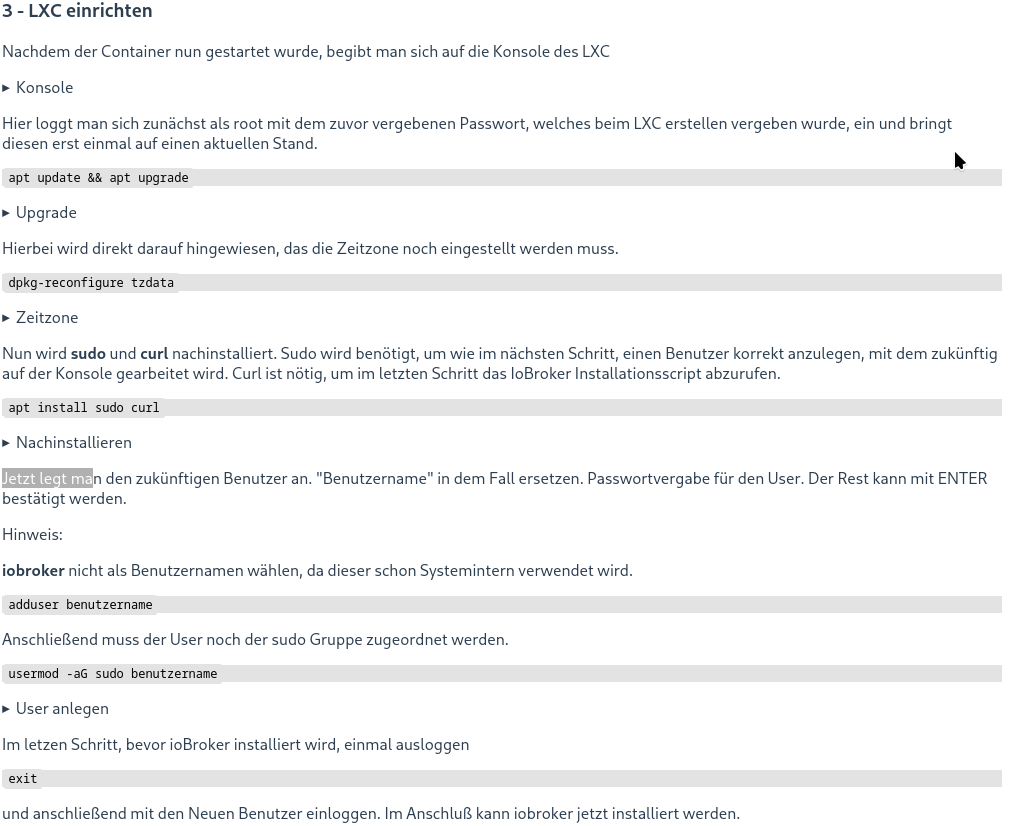
Wie das geht steht in der Anleitung drin:https://www.iobroker.net/#de/documentation/install/proxmox.md
Jetzt legt man den zukünftigen Benutzer an. "Benutzername" in dem Fall ersetzen. Passwortvergabe für den User. Der Rest kann mit ENTER bestätigt werden.
-
@thomas-braun Ja aber ich kann mich danach nicht einloggen mit dem Nutzer.
iobroker user add <user> Add new user
iobroker user del <user> Delete user
iobroker user passwd <user> Change user password
iobroker user enable <user> Enable user
iobroker user disable <user> Disable user
iobroker user get <user> Get user
iobroker user check <user> Check user passwordDas habe ich verwendet.
Hallo zusammen,
ich habe aktuell auch Probleme mit homeconnect.
Der Adapter ist grün und findet laut Log auch ein Gerät allerdings wird das Gerät als "connected":false angezeigt und die DP werden nicht aktualisiert. Über die App lässt sich das Gerät steuern.
Kann mir hier jemand weiterhelfen? -
@thomas-braun Ich glaube wir reden aneinander vorbei. In der Anleitung finde ich da absolut nix mit Benutzer für einen CT anlegen. Verbinde ich mich mit SSH mit der IP vom Iobroker oder vom Proxmox?
-



638
Online32.6k
Users82.3k
Topics1.3m
Posts