




Adapter aktualisieren
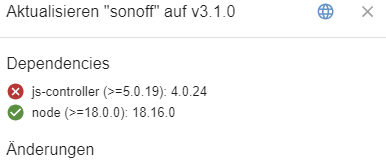
-
@thomas-braun said in Adapter aktualisieren:
Ja, immer zeilenweise einzeln.
iob update
al@Raspberry:~ $ al@Raspberry:~ $ iob update
Used repository: stable
Adapter    "admin"        : 6.13.16  , installed 6.13.16
Adapter    "alias-manager": 1.2.6    , installed 1.2.6
Adapter    "backitup"     : 2.11.0   , installed 2.11.0
Adapter    "device-watcher": 2.12.1  , installed 2.12.1
Adapter    "discovery"    : 4.5.0    , installed 4.5.0
Adapter    "echarts"      : 1.7.2    , installed 1.7.2
Adapter    "energiefluss" : 3.6.0    , installed 3.6.0
Adapter    "energiefluss-erweitert": 0.4.1, installed 0.4.1
Adapter    "history"      : 3.0.1    , installed 3.0.1
Adapter    "influxdb"     : 4.0.2    , installed 4.0.2
Adapter    "iqontrol"     : 2.3.0    , installed 2.3.0
Adapter    "javascript"   : 8.3.1    , installed 6.1.4  [Updatable]
Controller "js-controller": 5.0.19   , installed 5.0.19
Adapter    "modbus"       : 6.1.0    , installed 6.1.0
Adapter    "panasonic-comfort-cloud": 2.3.0, installed 2.3.0
Adapter    "shelly"       : 7.0.0    , installed 6.9.0  [Updatable]
Adapter    "simple-api"   : 2.8.0    , installed 2.8.0
Adapter    "socketio"     : 6.7.0    , installed 6.7.0
Adapter    "sonoff"       : 3.1.0    , installed 3.0.3  [Updatable]
Adapter    "trashschedule": 3.3.0    , installed 3.2.0  [Updatable]
Adapter    "web"          : 6.2.5    , installed 6.2.5
Adapter    "ws"           : 2.6.1    , installed 2.6.1
iob upgrade
al@Raspberry:~ $ iob upgrade

This upgrade of "trashschedule" will introduce the following changes:
==========================================================================
-> 3.3.0:
NodeJS >= 18.x and js-controller >= 5 is required

* Improved error reporting / log messages
* Fixed translations
* Added Abfall+ as Webservice
==========================================================================

Would you like to upgrade trashschedule from @3.2.0 to @3.3.0 now? [(y)es, (n)o]:
Y oder?
und die nächsten auchJa, alles aktualisieren.
-
Ja, alles aktualisieren.
@thomas-braun said in Adapter aktualisieren:
Ja, alles aktualisieren.
da gehts nicht weiter, nachdem ich y eingegeben hab
Would you like to upgrade trashschedule from @3.2.0 to @3.3.0 now? [(y)es, (n)o]: ^Cy Update trashschedule from @3.2.0 to @3.3.0 NPM version: 10.7.0 Installing iobroker.trashschedule@3.3.0... (System call) al@Raspberry:~ $ -
@thomas-braun said in Adapter aktualisieren:
Ja, alles aktualisieren.
da gehts nicht weiter, nachdem ich y eingegeben hab
Would you like to upgrade trashschedule from @3.2.0 to @3.3.0 now? [(y)es, (n)o]: ^Cy Update trashschedule from @3.2.0 to @3.3.0 NPM version: 10.7.0 Installing iobroker.trashschedule@3.3.0... (System call) al@Raspberry:~ $@lamo1966 sagte in Adapter aktualisieren:
da gehts nicht weiter, nachdem ich y eingegeben hab
hast Du ja auch nicht
@lamo1966 sagte in Adapter aktualisieren:
^Cy
-
@lamo1966 sagte in Adapter aktualisieren:
da gehts nicht weiter, nachdem ich y eingegeben hab
hast Du ja auch nicht
@lamo1966 sagte in Adapter aktualisieren:
^Cy
@djmarc75 said in Adapter aktualisieren:
@lamo1966 sagte in Adapter aktualisieren:
da gehts nicht weiter, nachdem ich y eingegeben hab
hast Du ja auch nicht
@lamo1966 sagte in Adapter aktualisieren:
^Cy
danke für den Hinweis, das kommt immer, wenn ich eine Copy vom Text machen will
-
@djmarc75 said in Adapter aktualisieren:
@lamo1966 sagte in Adapter aktualisieren:
da gehts nicht weiter, nachdem ich y eingegeben hab
hast Du ja auch nicht
@lamo1966 sagte in Adapter aktualisieren:
^Cy
danke für den Hinweis, das kommt immer, wenn ich eine Copy vom Text machen will
iob stop
sudo reboot
Und wenn die Kiste wieder oben ist mal ein
iob diagzum Besten geben.
-
@djmarc75 said in Adapter aktualisieren:
@lamo1966 sagte in Adapter aktualisieren:
da gehts nicht weiter, nachdem ich y eingegeben hab
hast Du ja auch nicht
@lamo1966 sagte in Adapter aktualisieren:
^Cy
danke für den Hinweis, das kommt immer, wenn ich eine Copy vom Text machen will
@Thomas-Braun
jetzt heisst esThis upgrade of "shelly" will introduce the following changes: ========================================================================== -> 7.0.0: NodeJS >= 18.x and js-controller >= 5 is required * Added Shelly 1 Mini (Gen3) * Added Shelly 1 PM Mini (Gen3) * Added Shelly PM Mini (Gen3) * Added Shelly Pro Dimmer 1 PM and Pro Dimmer 2 PM * Fixed Shelly Wall Display integration * Added device list of ble events (receivedBy) - removed rssi state * Added Switch Addon for Shelly Pro 3 EM ========================================================================== BE CAREFUL: THIS IS A MAJOR UPGRADE, WHICH WILL MOST LIKELY INTRODUCE BREAKING CHANGES! Would you like to upgrade shelly from @6.9.0 to @7.0.0 now? [(y)es, (n)o]:Machen ?
-
@Thomas-Braun
jetzt heisst esThis upgrade of "shelly" will introduce the following changes: ========================================================================== -> 7.0.0: NodeJS >= 18.x and js-controller >= 5 is required * Added Shelly 1 Mini (Gen3) * Added Shelly 1 PM Mini (Gen3) * Added Shelly PM Mini (Gen3) * Added Shelly Pro Dimmer 1 PM and Pro Dimmer 2 PM * Fixed Shelly Wall Display integration * Added device list of ble events (receivedBy) - removed rssi state * Added Switch Addon for Shelly Pro 3 EM ========================================================================== BE CAREFUL: THIS IS A MAJOR UPGRADE, WHICH WILL MOST LIKELY INTRODUCE BREAKING CHANGES! Would you like to upgrade shelly from @6.9.0 to @7.0.0 now? [(y)es, (n)o]:Machen ?
Ja, natürlich.
-
Ja, natürlich.
======================= SUMMARY =======================
                        v.2024-05-22


   Static hostname: Raspberry
         Icon name: computer
  Operating System: Debian GNU/Linux 11 (bullseye)
            Kernel: Linux 6.1.21-v8+
      Architecture: arm64

Installation:           native
Kernel:                 aarch64
Userland:               64 bit
Timezone:               Europe/Berlin (CEST, +0200)
User-ID:                1000
Display-Server:         false
Boot Target:            multi-user.target

Pending OS-Updates:     0
Pending iob updates:    0

Nodejs-Installation:
/usr/bin/nodejs         v20.15.0
/usr/bin/node           v20.15.0
/usr/bin/npm            10.7.0
/usr/bin/npx            10.7.0
/usr/bin/corepack       0.28.1

Recommended versions are nodejs 18.20.3 and npm 10.7.0
Your nodejs installation is correct

MEMORY:
               total        used        free      shared  buff/cache   available
Mem:            3.8G        976M        2.1G        1.0M        765M        2.8G
Swap:            99M          0B         99M
Total:          3.9G        976M        2.2G

Active iob-Instances:   16
Active repo(s): stable

ioBroker Core:          js-controller           5.0.19
                        admin                   6.13.16

ioBroker Status:        iobroker is running on this host.


Objects type: jsonl
States  type: jsonl

Status admin and web instance:
+ system.adapter.admin.0                  : admin                 : Raspberry                                -  enabled, port: 8081, bind: 0.0.0.0, run as: admin
+ system.adapter.web.0                    : web                   : Raspberry                                -  enabled, port: 8082, bind: 0.0.0.0, run as: admin

Objects:                1506
States:                 1248

Size of iob-Database:

25M     /opt/iobroker/iobroker-data/objects.jsonl
5.3M    /opt/iobroker/iobroker-data/states.jsonl


=================== END OF SUMMARY ====================
=== Mark text until here for copying ===
-
======================= SUMMARY =======================
                        v.2024-05-22


   Static hostname: Raspberry
         Icon name: computer
  Operating System: Debian GNU/Linux 11 (bullseye)
            Kernel: Linux 6.1.21-v8+
      Architecture: arm64

Installation:           native
Kernel:                 aarch64
Userland:               64 bit
Timezone:               Europe/Berlin (CEST, +0200)
User-ID:                1000
Display-Server:         false
Boot Target:            multi-user.target

Pending OS-Updates:     0
Pending iob updates:    0

Nodejs-Installation:
/usr/bin/nodejs         v20.15.0
/usr/bin/node           v20.15.0
/usr/bin/npm            10.7.0
/usr/bin/npx            10.7.0
/usr/bin/corepack       0.28.1

Recommended versions are nodejs 18.20.3 and npm 10.7.0
Your nodejs installation is correct

MEMORY:
               total        used        free      shared  buff/cache   available
Mem:            3.8G        976M        2.1G        1.0M        765M        2.8G
Swap:            99M          0B         99M
Total:          3.9G        976M        2.2G

Active iob-Instances:   16
Active repo(s): stable

ioBroker Core:          js-controller           5.0.19
                        admin                   6.13.16

ioBroker Status:        iobroker is running on this host.


Objects type: jsonl
States  type: jsonl

Status admin and web instance:
+ system.adapter.admin.0                  : admin                 : Raspberry                                -  enabled, port: 8081, bind: 0.0.0.0, run as: admin
+ system.adapter.web.0                    : web                   : Raspberry                                -  enabled, port: 8082, bind: 0.0.0.0, run as: admin

Objects:                1506
States:                 1248

Size of iob-Database:

25M     /opt/iobroker/iobroker-data/objects.jsonl
5.3M    /opt/iobroker/iobroker-data/states.jsonl


=================== END OF SUMMARY ====================
=== Mark text until here for copying ===
Die Zusammenfassung schaut gut aus.
-
Die Zusammenfassung schaut gut aus.
das war der Anfang
Skript v.2024-05-22 *** BASE SYSTEM *** Static hostname: Raspberry Icon name: computer Operating System: Debian GNU/Linux 11 (bullseye) Kernel: Linux 6.1.21-v8+ Architecture: arm64 Model : Raspberry Pi 4 Model B Rev 1.5 Docker : false Virtualization : none Kernel : aarch64 Userland : 64 bit Systemuptime and Load: 16:47:48 up 7 min, 2 users, load average: 0.68, 1.04, 0.61 CPU threads: 4 *** RASPBERRY THROTTLING *** Current issues: No throttling issues detected. Previously detected issues: No throttling issues detected. *** Time and Time Zones *** Local time: Sat 2024-06-22 16:47:49 CEST Universal time: Sat 2024-06-22 14:47:49 UTC RTC time: n/a Time zone: Europe/Berlin (CEST, +0200) System clock synchronized: yes NTP service: active RTC in local TZ: no *** Users and Groups *** User that called 'iob diag': al HOME=/home/al GROUPS=al adm dialout cdrom sudo audio video plugdev games users input render netdev lpadmin gpio i2c spi iobroker User that is running 'js-controller': iobroker HOME=/home/iobroker GROUPS=iobroker tty dialout audio video plugdev bluetooth gpio i2c *** Display-Server-Setup *** Display-Server: false Desktop: Terminal: tty Boot Target: multi-user.target *** MEMORY *** total used free shared buff/cache available Mem: 3.8G 977M 2.0G 1.0M 766M 2.8G Swap: 99M 0B 99M Total: 3.9G 977M 2.2G Active iob-Instances: 16 3794 M total memory 977 M used memory 1171 M active memory 432 M inactive memory 2050 M free memory 62 M buffer memory 703 M swap cache 99 M total swap 0 M used swap 99 M free swap *** top - Table Of Processes *** top - 16:47:49 up 7 min, 2 users, load average: 0.68, 1.04, 0.61 Tasks: 183 total, 1 running, 182 sleeping, 0 stopped, 0 zombie %Cpu(s): 2.9 us, 1.4 sy, 0.0 ni, 95.7 id, 0.0 wa, 0.0 hi, 0.0 si, 0.0 st MiB Mem : 3794.3 total, 2049.8 free, 978.2 used, 766.4 buff/cache MiB Swap: 100.0 total, 100.0 free, 0.0 used. 2756.8 avail Mem *** FAILED SERVICES *** UNIT LOAD ACTIVE SUB DESCRIPTION 0 loaded units listed. *** FILESYSTEM *** Filesystem Type Size Used Avail Use% Mounted on /dev/root ext4 29G 11G 17G 40% / devtmpfs devtmpfs 1.7G 0 1.7G 0% /dev tmpfs tmpfs 1.9G 0 1.9G 0% /dev/shm tmpfs tmpfs 759M 1.2M 758M 1% /run tmpfs tmpfs 5.0M 4.0K 5.0M 1% /run/lock /dev/mmcblk0p1 vfat 255M 31M 225M 13% /boot tmpfs tmpfs 380M 16K 380M 1% /run/user/1000 Messages concerning ext4 filesystem in dmesg: [Sat Jun 22 16:40:05 2024] Kernel command line: coherent_pool=1M 8250.nr_uarts=0 snd_bcm2835.enable_headphones=0 snd_bcm2835.enable_headphones=1 snd_bcm2835.enable_hdmi=1 snd_bcm2835.enable_hdmi=0 smsc95xx.macaddr=E4:5F:01:FD:FE:39 vc_mem.mem_base=0x3ec00000 vc_mem.mem_size=0x40000000 console=ttyS0,115200 console=tty1 root=PARTUUID=9be8b122-02 rootfstype=ext4 fsck.repair=yes rootwait quiet splash plymouth.ignore-serial-consoles [Sat Jun 22 16:40:06 2024] EXT4-fs (mmcblk0p2): mounted filesystem with ordered data mode. Quota mode: none. [Sat Jun 22 16:40:06 2024] VFS: Mounted root (ext4 filesystem) readonly on device 179:2. [Sat Jun 22 16:40:09 2024] EXT4-fs (mmcblk0p2): re-mounted. Quota mode: none. Show mounted filesystems: TARGET SOURCE FSTYPE OPTIONS / /dev/mmcblk0p2 ext4 rw,noatime |-/dev devtmpfs devtmpfs rw,relatime,size=1678472k,nr_inodes=419618,mode=755 | |-/dev/shm tmpfs tmpfs rw,nosuid,nodev | |-/dev/pts devpts devpts rw,nosuid,noexec,relatime,gid=5,mode=620,ptmxmode=000 | `-/dev/mqueue mqueue mqueue rw,nosuid,nodev,noexec,relatime |-/proc proc proc rw,relatime | `-/proc/sys/fs/binfmt_misc systemd-1 autofs rw,relatime,fd=29,pgrp=1,timeout=0,minproto=5,maxproto=5,direct |-/sys sysfs sysfs rw,nosuid,nodev,noexec,relatime | |-/sys/kernel/security securityfs securityfs rw,nosuid,nodev,noexec,relatime | |-/sys/fs/cgroup cgroup2 cgroup2 rw,nosuid,nodev,noexec,relatime,nsdelegate,memory_recursiveprot | |-/sys/fs/pstore pstore pstore rw,nosuid,nodev,noexec,relatime | |-/sys/fs/bpf bpf bpf rw,nosuid,nodev,noexec,relatime,mode=700 | |-/sys/kernel/debug debugfs debugfs rw,nosuid,nodev,noexec,relatime | |-/sys/kernel/tracing tracefs tracefs rw,nosuid,nodev,noexec,relatime | |-/sys/fs/fuse/connections fusectl fusectl rw,nosuid,nodev,noexec,relatime | `-/sys/kernel/config configfs configfs rw,nosuid,nodev,noexec,relatime |-/run tmpfs tmpfs rw,nosuid,nodev,size=777080k,nr_inodes=819200,mode=755 | |-/run/lock tmpfs tmpfs rw,nosuid,nodev,noexec,relatime,size=5120k | |-/run/rpc_pipefs sunrpc rpc_pipefs rw,relatime | `-/run/user/1000 tmpfs tmpfs rw,nosuid,nodev,relatime,size=388536k,nr_inodes=97134,mode=700,uid=1000,gid=1000 `-/boot /dev/mmcblk0p1 vfat rw,relatime,fmask=0022,dmask=0022,codepage=437,iocharset=ascii,shortname=mixed,errors=remount-ro Files in neuralgic directories: /var: 3.9G /var/ 2.9G /var/log/journal/20caf098a3be48108459316835c16c60 2.9G /var/log/journal 2.9G /var/log 692M /var/cache Archived and active journals take up 2.8G in the file system. /opt/iobroker/backups: 70M /opt/iobroker/backups/ /opt/iobroker/iobroker-data: 654M /opt/iobroker/iobroker-data/ 408M /opt/iobroker/iobroker-data/files 138M /opt/iobroker/iobroker-data/files/javascript.admin 136M /opt/iobroker/iobroker-data/history 118M /opt/iobroker/iobroker-data/files/javascript.admin/static The five largest files in iobroker-data are: 25M /opt/iobroker/iobroker-data/objects.jsonl 24M /opt/iobroker/iobroker-data/files/web.admin/static/js/main.135279a0.js.map 24M /opt/iobroker/iobroker-data/files/echarts/static/js/main.2b7495c2.js.map 24M /opt/iobroker/iobroker-data/files/echarts.admin/chart/static/js/main.2b7495c2.js.map 23M /opt/iobroker/iobroker-data/files/echarts.admin/static/js/main.245b61c0.js.map USB-Devices by-id: USB-Sticks - Avoid direct links to /dev/tty* in your adapter setups, please always prefer the links 'by-id': No Devices found 'by-id' *** NodeJS-Installation *** /usr/bin/nodejs v20.15.0 /usr/bin/node v20.15.0 /usr/bin/npm 10.7.0 /usr/bin/npx 10.7.0 /usr/bin/corepack 0.28.1 nodejs: Installed: 20.15.0-1nodesource1 Candidate: 20.15.0-1nodesource1 Version table: *** 20.15.0-1nodesource1 1001 500 https://deb.nodesource.com/node_20.x nodistro/main arm64 Packages 100 /var/lib/dpkg/status 20.14.0-1nodesource1 1001 500 https://deb.nodesource.com/node_20.x nodistro/main arm64 Packages 20.13.1-1nodesource1 1001 500 https://deb.nodesource.com/node_20.x nodistro/main arm64 Packages 20.13.0-1nodesource1 1001 500 https://deb.nodesource.com/node_20.x nodistro/main arm64 Packages 20.12.2-1nodesource1 1001 500 https://deb.nodesource.com/node_20.x nodistro/main arm64 Packages 20.12.1-1nodesource1 1001 500 https://deb.nodesource.com/node_20.x nodistro/main arm64 Packages 20.12.0-1nodesource1 1001 500 https://deb.nodesource.com/node_20.x nodistro/main arm64 Packages 20.11.1-1nodesource1 1001 500 https://deb.nodesource.com/node_20.x nodistro/main arm64 Packages 20.11.0-1nodesource1 1001 500 https://deb.nodesource.com/node_20.x nodistro/main arm64 Packages 20.10.0-1nodesource1 1001 500 https://deb.nodesource.com/node_20.x nodistro/main arm64 Packages 20.9.0-1nodesource1 1001 500 https://deb.nodesource.com/node_20.x nodistro/main arm64 Packages 20.8.1-1nodesource1 1001 500 https://deb.nodesource.com/node_20.x nodistro/main arm64 Packages 20.8.0-1nodesource1 1001 500 https://deb.nodesource.com/node_20.x nodistro/main arm64 Packages 20.7.0-1nodesource1 1001 500 https://deb.nodesource.com/node_20.x nodistro/main arm64 Packages 20.6.1-1nodesource1 1001 500 https://deb.nodesource.com/node_20.x nodistro/main arm64 Packages 20.6.0-1nodesource1 1001 500 https://deb.nodesource.com/node_20.x nodistro/main arm64 Packages 20.5.1-1nodesource1 1001 500 https://deb.nodesource.com/node_20.x nodistro/main arm64 Packages 20.5.0-1nodesource1 1001 500 https://deb.nodesource.com/node_20.x nodistro/main arm64 Packages 20.4.0-1nodesource1 1001 500 https://deb.nodesource.com/node_20.x nodistro/main arm64 Packages 20.3.1-1nodesource1 1001 500 https://deb.nodesource.com/node_20.x nodistro/main arm64 Packages 20.3.0-1nodesource1 1001 500 https://deb.nodesource.com/node_20.x nodistro/main arm64 Packages 20.2.0-1nodesource1 1001 500 https://deb.nodesource.com/node_20.x nodistro/main arm64 Packages 20.1.0-1nodesource1 1001 500 https://deb.nodesource.com/node_20.x nodistro/main arm64 Packages 20.0.0-1nodesource1 1001 500 https://deb.nodesource.com/node_20.x nodistro/main arm64 Packages 12.22.12~dfsg-1~deb11u4 500 500 http://deb.debian.org/debian bullseye/main arm64 Packages 500 http://security.debian.org/debian-security bullseye-security/main arm64 Packages Temp directories causing npm8 problem: 0 No problems detected Errors in npm tree: *** ioBroker-Installation *** ioBroker Status iobroker is running on this host. Objects type: jsonl States type: jsonl Core adapters versions js-controller: 5.0.19 admin: 6.13.16 javascript: 8.3.1 nodejs modules from github: 0 Adapter State + system.adapter.admin.0 : admin : Raspberry - enabled, port: 8081, bind: 0.0.0.0, run as: admin system.adapter.alias-manager.0 : alias-manager : Raspberry - enabled + system.adapter.backitup.0 : backitup : Raspberry - enabled + system.adapter.discovery.0 : discovery : Raspberry - enabled + system.adapter.echarts.0 : echarts : Raspberry - enabled + system.adapter.energiefluss-erweitert.0 : energiefluss-erweitert: Raspberry - enabled + system.adapter.energiefluss.0 : energiefluss : Raspberry - enabled + system.adapter.history.0 : history : Raspberry - enabled system.adapter.influxdb.0 : influxdb : Raspberry - disabled, port: 8086 + system.adapter.iqontrol.0 : iqontrol : Raspberry - enabled + system.adapter.javascript.0 : javascript : Raspberry - enabled + system.adapter.modbus.0 : modbus : Raspberry - enabled system.adapter.panasonic-comfort-cloud.0: panasonic-comfort-cloud: Raspberry - disabled + system.adapter.shelly.0 : shelly : Raspberry - enabled, port: 1882, bind: 0.0.0.0 + system.adapter.sonoff.0 : sonoff : Raspberry - enabled, port: 1883, bind: 0.0.0.0 + system.adapter.sourceanalytix.0 : sourceanalytix : Raspberry - enabled + system.adapter.trashschedule.0 : trashschedule : Raspberry - enabled + system.adapter.web.0 : web : Raspberry - enabled, port: 8082, bind: 0.0.0.0, run as: admin + instance is alive Enabled adapters with bindings + system.adapter.admin.0 : admin : Raspberry - enabled, port: 8081, bind: 0.0.0.0, run as: admin + system.adapter.shelly.0 : shelly : Raspberry - enabled, port: 1882, bind: 0.0.0.0 + system.adapter.sonoff.0 : sonoff : Raspberry - enabled, port: 1883, bind: 0.0.0.0 + system.adapter.web.0 : web : Raspberry - enabled, port: 8082, bind: 0.0.0.0, run as: admin ioBroker-Repositories stable : http://download.iobroker.net/sources-dist.json beta : http://download.iobroker.net/sources-dist-latest.json Active repo(s): stable Installed ioBroker-Instances Used repository: stable Adapter "admin" : 6.13.16 , installed 6.13.16 Adapter "alias-manager": 1.2.6 , installed 1.2.6 Adapter "backitup" : 2.11.0 , installed 2.11.0 Adapter "device-watcher": 2.12.1 , installed 2.12.1 Adapter "discovery" : 4.5.0 , installed 4.5.0 Adapter "echarts" : 1.7.2 , installed 1.7.2 Adapter "energiefluss" : 3.6.0 , installed 3.6.0 Adapter "energiefluss-erweitert": 0.4.1, installed 0.4.1 Adapter "history" : 3.0.1 , installed 3.0.1 Adapter "influxdb" : 4.0.2 , installed 4.0.2 Adapter "iqontrol" : 2.3.0 , installed 2.3.0 Adapter "javascript" : 8.3.1 , installed 8.3.1 Controller "js-controller": 5.0.19 , installed 5.0.19 Adapter "modbus" : 6.1.0 , installed 6.1.0 Adapter "panasonic-comfort-cloud": 2.3.0, installed 2.3.0 Adapter "shelly" : 7.0.0 , installed 7.0.0 Adapter "simple-api" : 2.8.0 , installed 2.8.0 Adapter "socketio" : 6.7.0 , installed 6.7.0 Adapter "sonoff" : 3.1.0 , installed 3.1.0 Adapter "trashschedule": 3.3.0 , installed 3.3.0 Adapter "web" : 6.2.5 , installed 6.2.5 Adapter "ws" : 2.6.1 , installed 2.6.1 Objects and States Please stand by - This may take a while Objects: 1506 States: 1248 *** OS-Repositories and Updates *** Hit:1 http://security.debian.org/debian-security bullseye-security InRelease Hit:2 https://apt.grafana.com stable InRelease Hit:3 https://repos.influxdata.com/debian stable InRelease Hit:4 http://deb.debian.org/debian bullseye InRelease Hit:5 http://deb.debian.org/debian bullseye-updates InRelease Hit:6 http://archive.raspberrypi.org/debian bullseye InRelease Hit:7 https://deb.nodesource.com/node_20.x nodistro InRelease Reading package lists... Pending Updates: 0 *** Listening Ports *** Active Internet connections (only servers) Proto Recv-Q Send-Q Local Address Foreign Address State User Inode PID/Program name tcp 0 0 0.0.0.0:5900 0.0.0.0:* LISTEN 0 15643 570/vncserver-x11-c tcp 0 0 0.0.0.0:1882 0.0.0.0:* LISTEN 1001 17019 1674/io.shelly.0 tcp 0 0 0.0.0.0:1883 0.0.0.0:* LISTEN 1001 16249 1706/io.sonoff.0 tcp 0 0 127.0.0.1:8088 0.0.0.0:* LISTEN 116 13811 546/influxd tcp 0 0 127.0.0.1:9000 0.0.0.0:* LISTEN 1001 16119 932/iobroker.js-con tcp 0 0 127.0.0.1:9001 0.0.0.0:* LISTEN 1001 14061 932/iobroker.js-con tcp 0 0 127.0.0.1:631 0.0.0.0:* LISTEN 0 11258 529/cupsd tcp 0 0 0.0.0.0:22 0.0.0.0:* LISTEN 0 15620 580/sshd: /usr/sbin tcp6 0 0 :::8081 :::* LISTEN 1001 16171 1525/io.admin.0 tcp6 0 0 :::8082 :::* LISTEN 1001 15005 1751/io.web.0 tcp6 0 0 :::8086 :::* LISTEN 116 15940 546/influxd tcp6 0 0 :::5900 :::* LISTEN 0 15642 570/vncserver-x11-c tcp6 0 0 ::1:631 :::* LISTEN 0 11257 529/cupsd tcp6 0 0 :::3000 :::* LISTEN 117 14810 540/grafana tcp6 0 0 :::22 :::* LISTEN 0 15622 580/sshd: /usr/sbin udp 0 0 0.0.0.0:68 0.0.0.0:* 0 14519 497/dhcpcd udp 0 0 0.0.0.0:631 0.0.0.0:* 0 16400 602/cups-browsed udp 0 0 0.0.0.0:54466 0.0.0.0:* 108 13722 390/avahi-daemon: r udp 0 0 0.0.0.0:5353 0.0.0.0:* 108 13720 390/avahi-daemon: r udp6 0 0 :::546 :::* 0 14547 497/dhcpcd udp6 0 0 :::37421 :::* 108 13723 390/avahi-daemon: r udp6 0 0 :::5353 :::* 108 13721 390/avahi-daemon: r *** Log File - Last 25 Lines *** 2024-06-22 16:41:29.325 - error: sourceanalytix.0 (1798) Initialization of alias.0.Photovoltaik.Zaehler.DVES_88D1F8 DWS7420 energy.DWS7420_energy failed, check warn messages ! 2024-06-22 16:41:29.326 - info: sourceanalytix.0 (1798) Initialising (8 of 8) "alias.0.Photovoltaik.SMAx.Gesamtertrag in kWh.30531_total_eingespeiste_AC-Energie_auf_allen_Außenleitern" 2024-06-22 16:41:30.200 - info: energiefluss.0 (1813) starting. Version 3.6.0 in /opt/iobroker/node_modules/iobroker.energiefluss, node: v20.15.0, js-controller: 5.0.19 2024-06-22 16:41:30.236 - info: energiefluss.0 (1813) Starting Energiefluss Adapter 2024-06-22 16:41:30.394 - info: energiefluss.0 (1813) Adapter started and listening to 6 States 2024-06-22 16:41:30.729 - info: sourceanalytix.0 (1798) Initialization of alias.0.Photovoltaik.SMAx.Gesamtertrag in kWh.30531_total_eingespeiste_AC-Energie_auf_allen_Außenleitern successfully 2024-06-22 16:41:30.738 - warn: sourceanalytix.0 (1798) Cannot handle calculations for 5 of 8 enabled states, check error messages 2024-06-22 16:41:30.739 - info: sourceanalytix.0 (1798) Successfully activated SourceAnalytix for 3 of 8 states, will do my Job until you stop me! 2024-06-22 16:41:32.020 - info: host.Raspberry instance system.adapter.energiefluss-erweitert.0 started with pid 1828 2024-06-22 16:41:32.529 - info: shelly.0 (1674) [MQTT] Device with client id "shellyplug-s-4022D889A3CA" connected! 2024-06-22 16:41:34.165 - info: energiefluss-erweitert.0 (1828) starting. Version 0.4.1 in /opt/iobroker/node_modules/iobroker.energiefluss-erweitert, node: v20.15.0, js-controller: 5.0.19 2024-06-22 16:41:34.256 - info: energiefluss-erweitert.0 (1828) Adapter started. Loading config! 2024-06-22 16:41:34.363 - info: energiefluss-erweitert.0 (1828) Configuration loaded! 2024-06-22 16:41:34.364 - info: energiefluss-erweitert.0 (1828) Requesting the following states: energiefluss-erweitert.0.configuration 2024-06-22 16:41:41.305 - info: shelly.0 (1674) [MQTT] Device with client id "shellyem-244CAB418C05" connected! 2024-06-22 16:41:41.989 - info: sourceanalytix.0 (1798) Updating SourceAnalytix configuration for : shelly.0.SHEM#244CAB418C05#1.Emeter0.Power 2024-06-22 16:41:55.580 - info: shelly.0 (1674) [MQTT] Device with client id "shellyplus1pm-a8032ab5f934" connected! 2024-06-22 16:42:36.432 - info: shelly.0 (1674) [MQTT] Device with client id "shellyplusht-08b61fcd5c24" connected! 2024-06-22 16:42:41.050 - info: shelly.0 (1674) [MQTT] Client Close: 192.168.178.77 (shellyplusht / shellyplusht-08b61fcd5c24 / shellyplusht#08b61fcd5c24#1) (false) 2024-06-22 16:43:14.183 - info: shelly.0 (1674) [MQTT] Device with client id "shellyplusht-c049ef8e1bdc" connected! 2024-06-22 16:43:18.204 - info: shelly.0 (1674) [MQTT] Client Disconnect: 192.168.178.71 (shellyplusht / shellyplusht-c049ef8e1bdc / shellyplusht#c049ef8e1bdc#1) 2024-06-22 16:47:40.742 - info: shelly.0 (1674) [MQTT] Device with client id "shellyplusht-08b61fcd5c24" connected! 2024-06-22 16:47:44.478 - info: shelly.0 (1674) [MQTT] Client Close: 192.168.178.77 (shellyplusht / shellyplusht-08b61fcd5c24 / shellyplusht#08b61fcd5c24#1) (false) 2024-06-22 16:48:18.230 - info: shelly.0 (1674) [MQTT] Device with client id "shellyplusht-c049ef8e1bdc" connected! 2024-06-22 16:48:21.958 - info: shelly.0 (1674) [MQTT] Client Disconnect: 192.168.178.71 (shellyplusht / shellyplusht-c049ef8e1bdc / shellyplusht#c049ef8e1bdc#1) -
das war der Anfang
Skript v.2024-05-22 *** BASE SYSTEM *** Static hostname: Raspberry Icon name: computer Operating System: Debian GNU/Linux 11 (bullseye) Kernel: Linux 6.1.21-v8+ Architecture: arm64 Model : Raspberry Pi 4 Model B Rev 1.5 Docker : false Virtualization : none Kernel : aarch64 Userland : 64 bit Systemuptime and Load: 16:47:48 up 7 min, 2 users, load average: 0.68, 1.04, 0.61 CPU threads: 4 *** RASPBERRY THROTTLING *** Current issues: No throttling issues detected. Previously detected issues: No throttling issues detected. *** Time and Time Zones *** Local time: Sat 2024-06-22 16:47:49 CEST Universal time: Sat 2024-06-22 14:47:49 UTC RTC time: n/a Time zone: Europe/Berlin (CEST, +0200) System clock synchronized: yes NTP service: active RTC in local TZ: no *** Users and Groups *** User that called 'iob diag': al HOME=/home/al GROUPS=al adm dialout cdrom sudo audio video plugdev games users input render netdev lpadmin gpio i2c spi iobroker User that is running 'js-controller': iobroker HOME=/home/iobroker GROUPS=iobroker tty dialout audio video plugdev bluetooth gpio i2c *** Display-Server-Setup *** Display-Server: false Desktop: Terminal: tty Boot Target: multi-user.target *** MEMORY *** total used free shared buff/cache available Mem: 3.8G 977M 2.0G 1.0M 766M 2.8G Swap: 99M 0B 99M Total: 3.9G 977M 2.2G Active iob-Instances: 16 3794 M total memory 977 M used memory 1171 M active memory 432 M inactive memory 2050 M free memory 62 M buffer memory 703 M swap cache 99 M total swap 0 M used swap 99 M free swap *** top - Table Of Processes *** top - 16:47:49 up 7 min, 2 users, load average: 0.68, 1.04, 0.61 Tasks: 183 total, 1 running, 182 sleeping, 0 stopped, 0 zombie %Cpu(s): 2.9 us, 1.4 sy, 0.0 ni, 95.7 id, 0.0 wa, 0.0 hi, 0.0 si, 0.0 st MiB Mem : 3794.3 total, 2049.8 free, 978.2 used, 766.4 buff/cache MiB Swap: 100.0 total, 100.0 free, 0.0 used. 2756.8 avail Mem *** FAILED SERVICES *** UNIT LOAD ACTIVE SUB DESCRIPTION 0 loaded units listed. *** FILESYSTEM *** Filesystem Type Size Used Avail Use% Mounted on /dev/root ext4 29G 11G 17G 40% / devtmpfs devtmpfs 1.7G 0 1.7G 0% /dev tmpfs tmpfs 1.9G 0 1.9G 0% /dev/shm tmpfs tmpfs 759M 1.2M 758M 1% /run tmpfs tmpfs 5.0M 4.0K 5.0M 1% /run/lock /dev/mmcblk0p1 vfat 255M 31M 225M 13% /boot tmpfs tmpfs 380M 16K 380M 1% /run/user/1000 Messages concerning ext4 filesystem in dmesg: [Sat Jun 22 16:40:05 2024] Kernel command line: coherent_pool=1M 8250.nr_uarts=0 snd_bcm2835.enable_headphones=0 snd_bcm2835.enable_headphones=1 snd_bcm2835.enable_hdmi=1 snd_bcm2835.enable_hdmi=0 smsc95xx.macaddr=E4:5F:01:FD:FE:39 vc_mem.mem_base=0x3ec00000 vc_mem.mem_size=0x40000000 console=ttyS0,115200 console=tty1 root=PARTUUID=9be8b122-02 rootfstype=ext4 fsck.repair=yes rootwait quiet splash plymouth.ignore-serial-consoles [Sat Jun 22 16:40:06 2024] EXT4-fs (mmcblk0p2): mounted filesystem with ordered data mode. Quota mode: none. [Sat Jun 22 16:40:06 2024] VFS: Mounted root (ext4 filesystem) readonly on device 179:2. [Sat Jun 22 16:40:09 2024] EXT4-fs (mmcblk0p2): re-mounted. Quota mode: none. Show mounted filesystems: TARGET SOURCE FSTYPE OPTIONS / /dev/mmcblk0p2 ext4 rw,noatime |-/dev devtmpfs devtmpfs rw,relatime,size=1678472k,nr_inodes=419618,mode=755 | |-/dev/shm tmpfs tmpfs rw,nosuid,nodev | |-/dev/pts devpts devpts rw,nosuid,noexec,relatime,gid=5,mode=620,ptmxmode=000 | `-/dev/mqueue mqueue mqueue rw,nosuid,nodev,noexec,relatime |-/proc proc proc rw,relatime | `-/proc/sys/fs/binfmt_misc systemd-1 autofs rw,relatime,fd=29,pgrp=1,timeout=0,minproto=5,maxproto=5,direct |-/sys sysfs sysfs rw,nosuid,nodev,noexec,relatime | |-/sys/kernel/security securityfs securityfs rw,nosuid,nodev,noexec,relatime | |-/sys/fs/cgroup cgroup2 cgroup2 rw,nosuid,nodev,noexec,relatime,nsdelegate,memory_recursiveprot | |-/sys/fs/pstore pstore pstore rw,nosuid,nodev,noexec,relatime | |-/sys/fs/bpf bpf bpf rw,nosuid,nodev,noexec,relatime,mode=700 | |-/sys/kernel/debug debugfs debugfs rw,nosuid,nodev,noexec,relatime | |-/sys/kernel/tracing tracefs tracefs rw,nosuid,nodev,noexec,relatime | |-/sys/fs/fuse/connections fusectl fusectl rw,nosuid,nodev,noexec,relatime | `-/sys/kernel/config configfs configfs rw,nosuid,nodev,noexec,relatime |-/run tmpfs tmpfs rw,nosuid,nodev,size=777080k,nr_inodes=819200,mode=755 | |-/run/lock tmpfs tmpfs rw,nosuid,nodev,noexec,relatime,size=5120k | |-/run/rpc_pipefs sunrpc rpc_pipefs rw,relatime | `-/run/user/1000 tmpfs tmpfs rw,nosuid,nodev,relatime,size=388536k,nr_inodes=97134,mode=700,uid=1000,gid=1000 `-/boot /dev/mmcblk0p1 vfat rw,relatime,fmask=0022,dmask=0022,codepage=437,iocharset=ascii,shortname=mixed,errors=remount-ro Files in neuralgic directories: /var: 3.9G /var/ 2.9G /var/log/journal/20caf098a3be48108459316835c16c60 2.9G /var/log/journal 2.9G /var/log 692M /var/cache Archived and active journals take up 2.8G in the file system. /opt/iobroker/backups: 70M /opt/iobroker/backups/ /opt/iobroker/iobroker-data: 654M /opt/iobroker/iobroker-data/ 408M /opt/iobroker/iobroker-data/files 138M /opt/iobroker/iobroker-data/files/javascript.admin 136M /opt/iobroker/iobroker-data/history 118M /opt/iobroker/iobroker-data/files/javascript.admin/static The five largest files in iobroker-data are: 25M /opt/iobroker/iobroker-data/objects.jsonl 24M /opt/iobroker/iobroker-data/files/web.admin/static/js/main.135279a0.js.map 24M /opt/iobroker/iobroker-data/files/echarts/static/js/main.2b7495c2.js.map 24M /opt/iobroker/iobroker-data/files/echarts.admin/chart/static/js/main.2b7495c2.js.map 23M /opt/iobroker/iobroker-data/files/echarts.admin/static/js/main.245b61c0.js.map USB-Devices by-id: USB-Sticks - Avoid direct links to /dev/tty* in your adapter setups, please always prefer the links 'by-id': No Devices found 'by-id' *** NodeJS-Installation *** /usr/bin/nodejs v20.15.0 /usr/bin/node v20.15.0 /usr/bin/npm 10.7.0 /usr/bin/npx 10.7.0 /usr/bin/corepack 0.28.1 nodejs: Installed: 20.15.0-1nodesource1 Candidate: 20.15.0-1nodesource1 Version table: *** 20.15.0-1nodesource1 1001 500 https://deb.nodesource.com/node_20.x nodistro/main arm64 Packages 100 /var/lib/dpkg/status 20.14.0-1nodesource1 1001 500 https://deb.nodesource.com/node_20.x nodistro/main arm64 Packages 20.13.1-1nodesource1 1001 500 https://deb.nodesource.com/node_20.x nodistro/main arm64 Packages 20.13.0-1nodesource1 1001 500 https://deb.nodesource.com/node_20.x nodistro/main arm64 Packages 20.12.2-1nodesource1 1001 500 https://deb.nodesource.com/node_20.x nodistro/main arm64 Packages 20.12.1-1nodesource1 1001 500 https://deb.nodesource.com/node_20.x nodistro/main arm64 Packages 20.12.0-1nodesource1 1001 500 https://deb.nodesource.com/node_20.x nodistro/main arm64 Packages 20.11.1-1nodesource1 1001 500 https://deb.nodesource.com/node_20.x nodistro/main arm64 Packages 20.11.0-1nodesource1 1001 500 https://deb.nodesource.com/node_20.x nodistro/main arm64 Packages 20.10.0-1nodesource1 1001 500 https://deb.nodesource.com/node_20.x nodistro/main arm64 Packages 20.9.0-1nodesource1 1001 500 https://deb.nodesource.com/node_20.x nodistro/main arm64 Packages 20.8.1-1nodesource1 1001 500 https://deb.nodesource.com/node_20.x nodistro/main arm64 Packages 20.8.0-1nodesource1 1001 500 https://deb.nodesource.com/node_20.x nodistro/main arm64 Packages 20.7.0-1nodesource1 1001 500 https://deb.nodesource.com/node_20.x nodistro/main arm64 Packages 20.6.1-1nodesource1 1001 500 https://deb.nodesource.com/node_20.x nodistro/main arm64 Packages 20.6.0-1nodesource1 1001 500 https://deb.nodesource.com/node_20.x nodistro/main arm64 Packages 20.5.1-1nodesource1 1001 500 https://deb.nodesource.com/node_20.x nodistro/main arm64 Packages 20.5.0-1nodesource1 1001 500 https://deb.nodesource.com/node_20.x nodistro/main arm64 Packages 20.4.0-1nodesource1 1001 500 https://deb.nodesource.com/node_20.x nodistro/main arm64 Packages 20.3.1-1nodesource1 1001 500 https://deb.nodesource.com/node_20.x nodistro/main arm64 Packages 20.3.0-1nodesource1 1001 500 https://deb.nodesource.com/node_20.x nodistro/main arm64 Packages 20.2.0-1nodesource1 1001 500 https://deb.nodesource.com/node_20.x nodistro/main arm64 Packages 20.1.0-1nodesource1 1001 500 https://deb.nodesource.com/node_20.x nodistro/main arm64 Packages 20.0.0-1nodesource1 1001 500 https://deb.nodesource.com/node_20.x nodistro/main arm64 Packages 12.22.12~dfsg-1~deb11u4 500 500 http://deb.debian.org/debian bullseye/main arm64 Packages 500 http://security.debian.org/debian-security bullseye-security/main arm64 Packages Temp directories causing npm8 problem: 0 No problems detected Errors in npm tree: *** ioBroker-Installation *** ioBroker Status iobroker is running on this host. Objects type: jsonl States type: jsonl Core adapters versions js-controller: 5.0.19 admin: 6.13.16 javascript: 8.3.1 nodejs modules from github: 0 Adapter State + system.adapter.admin.0 : admin : Raspberry - enabled, port: 8081, bind: 0.0.0.0, run as: admin system.adapter.alias-manager.0 : alias-manager : Raspberry - enabled + system.adapter.backitup.0 : backitup : Raspberry - enabled + system.adapter.discovery.0 : discovery : Raspberry - enabled + system.adapter.echarts.0 : echarts : Raspberry - enabled + system.adapter.energiefluss-erweitert.0 : energiefluss-erweitert: Raspberry - enabled + system.adapter.energiefluss.0 : energiefluss : Raspberry - enabled + system.adapter.history.0 : history : Raspberry - enabled system.adapter.influxdb.0 : influxdb : Raspberry - disabled, port: 8086 + system.adapter.iqontrol.0 : iqontrol : Raspberry - enabled + system.adapter.javascript.0 : javascript : Raspberry - enabled + system.adapter.modbus.0 : modbus : Raspberry - enabled system.adapter.panasonic-comfort-cloud.0: panasonic-comfort-cloud: Raspberry - disabled + system.adapter.shelly.0 : shelly : Raspberry - enabled, port: 1882, bind: 0.0.0.0 + system.adapter.sonoff.0 : sonoff : Raspberry - enabled, port: 1883, bind: 0.0.0.0 + system.adapter.sourceanalytix.0 : sourceanalytix : Raspberry - enabled + system.adapter.trashschedule.0 : trashschedule : Raspberry - enabled + system.adapter.web.0 : web : Raspberry - enabled, port: 8082, bind: 0.0.0.0, run as: admin + instance is alive Enabled adapters with bindings + system.adapter.admin.0 : admin : Raspberry - enabled, port: 8081, bind: 0.0.0.0, run as: admin + system.adapter.shelly.0 : shelly : Raspberry - enabled, port: 1882, bind: 0.0.0.0 + system.adapter.sonoff.0 : sonoff : Raspberry - enabled, port: 1883, bind: 0.0.0.0 + system.adapter.web.0 : web : Raspberry - enabled, port: 8082, bind: 0.0.0.0, run as: admin ioBroker-Repositories stable : http://download.iobroker.net/sources-dist.json beta : http://download.iobroker.net/sources-dist-latest.json Active repo(s): stable Installed ioBroker-Instances Used repository: stable Adapter "admin" : 6.13.16 , installed 6.13.16 Adapter "alias-manager": 1.2.6 , installed 1.2.6 Adapter "backitup" : 2.11.0 , installed 2.11.0 Adapter "device-watcher": 2.12.1 , installed 2.12.1 Adapter "discovery" : 4.5.0 , installed 4.5.0 Adapter "echarts" : 1.7.2 , installed 1.7.2 Adapter "energiefluss" : 3.6.0 , installed 3.6.0 Adapter "energiefluss-erweitert": 0.4.1, installed 0.4.1 Adapter "history" : 3.0.1 , installed 3.0.1 Adapter "influxdb" : 4.0.2 , installed 4.0.2 Adapter "iqontrol" : 2.3.0 , installed 2.3.0 Adapter "javascript" : 8.3.1 , installed 8.3.1 Controller "js-controller": 5.0.19 , installed 5.0.19 Adapter "modbus" : 6.1.0 , installed 6.1.0 Adapter "panasonic-comfort-cloud": 2.3.0, installed 2.3.0 Adapter "shelly" : 7.0.0 , installed 7.0.0 Adapter "simple-api" : 2.8.0 , installed 2.8.0 Adapter "socketio" : 6.7.0 , installed 6.7.0 Adapter "sonoff" : 3.1.0 , installed 3.1.0 Adapter "trashschedule": 3.3.0 , installed 3.3.0 Adapter "web" : 6.2.5 , installed 6.2.5 Adapter "ws" : 2.6.1 , installed 2.6.1 Objects and States Please stand by - This may take a while Objects: 1506 States: 1248 *** OS-Repositories and Updates *** Hit:1 http://security.debian.org/debian-security bullseye-security InRelease Hit:2 https://apt.grafana.com stable InRelease Hit:3 https://repos.influxdata.com/debian stable InRelease Hit:4 http://deb.debian.org/debian bullseye InRelease Hit:5 http://deb.debian.org/debian bullseye-updates InRelease Hit:6 http://archive.raspberrypi.org/debian bullseye InRelease Hit:7 https://deb.nodesource.com/node_20.x nodistro InRelease Reading package lists... Pending Updates: 0 *** Listening Ports *** Active Internet connections (only servers) Proto Recv-Q Send-Q Local Address Foreign Address State User Inode PID/Program name tcp 0 0 0.0.0.0:5900 0.0.0.0:* LISTEN 0 15643 570/vncserver-x11-c tcp 0 0 0.0.0.0:1882 0.0.0.0:* LISTEN 1001 17019 1674/io.shelly.0 tcp 0 0 0.0.0.0:1883 0.0.0.0:* LISTEN 1001 16249 1706/io.sonoff.0 tcp 0 0 127.0.0.1:8088 0.0.0.0:* LISTEN 116 13811 546/influxd tcp 0 0 127.0.0.1:9000 0.0.0.0:* LISTEN 1001 16119 932/iobroker.js-con tcp 0 0 127.0.0.1:9001 0.0.0.0:* LISTEN 1001 14061 932/iobroker.js-con tcp 0 0 127.0.0.1:631 0.0.0.0:* LISTEN 0 11258 529/cupsd tcp 0 0 0.0.0.0:22 0.0.0.0:* LISTEN 0 15620 580/sshd: /usr/sbin tcp6 0 0 :::8081 :::* LISTEN 1001 16171 1525/io.admin.0 tcp6 0 0 :::8082 :::* LISTEN 1001 15005 1751/io.web.0 tcp6 0 0 :::8086 :::* LISTEN 116 15940 546/influxd tcp6 0 0 :::5900 :::* LISTEN 0 15642 570/vncserver-x11-c tcp6 0 0 ::1:631 :::* LISTEN 0 11257 529/cupsd tcp6 0 0 :::3000 :::* LISTEN 117 14810 540/grafana tcp6 0 0 :::22 :::* LISTEN 0 15622 580/sshd: /usr/sbin udp 0 0 0.0.0.0:68 0.0.0.0:* 0 14519 497/dhcpcd udp 0 0 0.0.0.0:631 0.0.0.0:* 0 16400 602/cups-browsed udp 0 0 0.0.0.0:54466 0.0.0.0:* 108 13722 390/avahi-daemon: r udp 0 0 0.0.0.0:5353 0.0.0.0:* 108 13720 390/avahi-daemon: r udp6 0 0 :::546 :::* 0 14547 497/dhcpcd udp6 0 0 :::37421 :::* 108 13723 390/avahi-daemon: r udp6 0 0 :::5353 :::* 108 13721 390/avahi-daemon: r *** Log File - Last 25 Lines *** 2024-06-22 16:41:29.325 - error: sourceanalytix.0 (1798) Initialization of alias.0.Photovoltaik.Zaehler.DVES_88D1F8 DWS7420 energy.DWS7420_energy failed, check warn messages ! 2024-06-22 16:41:29.326 - info: sourceanalytix.0 (1798) Initialising (8 of 8) "alias.0.Photovoltaik.SMAx.Gesamtertrag in kWh.30531_total_eingespeiste_AC-Energie_auf_allen_Außenleitern" 2024-06-22 16:41:30.200 - info: energiefluss.0 (1813) starting. Version 3.6.0 in /opt/iobroker/node_modules/iobroker.energiefluss, node: v20.15.0, js-controller: 5.0.19 2024-06-22 16:41:30.236 - info: energiefluss.0 (1813) Starting Energiefluss Adapter 2024-06-22 16:41:30.394 - info: energiefluss.0 (1813) Adapter started and listening to 6 States 2024-06-22 16:41:30.729 - info: sourceanalytix.0 (1798) Initialization of alias.0.Photovoltaik.SMAx.Gesamtertrag in kWh.30531_total_eingespeiste_AC-Energie_auf_allen_Außenleitern successfully 2024-06-22 16:41:30.738 - warn: sourceanalytix.0 (1798) Cannot handle calculations for 5 of 8 enabled states, check error messages 2024-06-22 16:41:30.739 - info: sourceanalytix.0 (1798) Successfully activated SourceAnalytix for 3 of 8 states, will do my Job until you stop me! 2024-06-22 16:41:32.020 - info: host.Raspberry instance system.adapter.energiefluss-erweitert.0 started with pid 1828 2024-06-22 16:41:32.529 - info: shelly.0 (1674) [MQTT] Device with client id "shellyplug-s-4022D889A3CA" connected! 2024-06-22 16:41:34.165 - info: energiefluss-erweitert.0 (1828) starting. Version 0.4.1 in /opt/iobroker/node_modules/iobroker.energiefluss-erweitert, node: v20.15.0, js-controller: 5.0.19 2024-06-22 16:41:34.256 - info: energiefluss-erweitert.0 (1828) Adapter started. Loading config! 2024-06-22 16:41:34.363 - info: energiefluss-erweitert.0 (1828) Configuration loaded! 2024-06-22 16:41:34.364 - info: energiefluss-erweitert.0 (1828) Requesting the following states: energiefluss-erweitert.0.configuration 2024-06-22 16:41:41.305 - info: shelly.0 (1674) [MQTT] Device with client id "shellyem-244CAB418C05" connected! 2024-06-22 16:41:41.989 - info: sourceanalytix.0 (1798) Updating SourceAnalytix configuration for : shelly.0.SHEM#244CAB418C05#1.Emeter0.Power 2024-06-22 16:41:55.580 - info: shelly.0 (1674) [MQTT] Device with client id "shellyplus1pm-a8032ab5f934" connected! 2024-06-22 16:42:36.432 - info: shelly.0 (1674) [MQTT] Device with client id "shellyplusht-08b61fcd5c24" connected! 2024-06-22 16:42:41.050 - info: shelly.0 (1674) [MQTT] Client Close: 192.168.178.77 (shellyplusht / shellyplusht-08b61fcd5c24 / shellyplusht#08b61fcd5c24#1) (false) 2024-06-22 16:43:14.183 - info: shelly.0 (1674) [MQTT] Device with client id "shellyplusht-c049ef8e1bdc" connected! 2024-06-22 16:43:18.204 - info: shelly.0 (1674) [MQTT] Client Disconnect: 192.168.178.71 (shellyplusht / shellyplusht-c049ef8e1bdc / shellyplusht#c049ef8e1bdc#1) 2024-06-22 16:47:40.742 - info: shelly.0 (1674) [MQTT] Device with client id "shellyplusht-08b61fcd5c24" connected! 2024-06-22 16:47:44.478 - info: shelly.0 (1674) [MQTT] Client Close: 192.168.178.77 (shellyplusht / shellyplusht-08b61fcd5c24 / shellyplusht#08b61fcd5c24#1) (false) 2024-06-22 16:48:18.230 - info: shelly.0 (1674) [MQTT] Device with client id "shellyplusht-c049ef8e1bdc" connected! 2024-06-22 16:48:21.958 - info: shelly.0 (1674) [MQTT] Client Disconnect: 192.168.178.71 (shellyplusht / shellyplusht-c049ef8e1bdc / shellyplusht#c049ef8e1bdc#1)Ja, passt.
Künftig das System regelmäßig updaten.
Sowohl Betriebssystem wie auch den ioBroker mit allen Bestandteilen. -
Ja, passt.
Künftig das System regelmäßig updaten.
Sowohl Betriebssystem wie auch den ioBroker mit allen Bestandteilen.@thomas-braun said in Adapter aktualisieren:
Künftig das System regelmäßig updaten.
Sowohl Betriebssystem wie auch den ioBroker mit allen Bestandteilen.herzlichen Dank, du bist der Wahnsinn.
Die letzte Stunde hat mich Tage meines Lebens gekostet.
-
@djmarc75 said in Adapter aktualisieren:
@lamo1966 sagte in Adapter aktualisieren:
da gehts nicht weiter, nachdem ich y eingegeben hab
hast Du ja auch nicht
@lamo1966 sagte in Adapter aktualisieren:
^Cy
danke für den Hinweis, das kommt immer, wenn ich eine Copy vom Text machen will
@lamo1966 sagte in Adapter aktualisieren:
das kommt immer, wenn ich eine Copy vom Text machen will
warum?
machst du STRG-c?
nur markieren! Das reicht, dann ist es in der Zwischenablage. STRG-C bricht die Ausführung des laufenden Befehls ab.@lamo1966 sagte in Adapter aktualisieren:
Die letzte Stunde hat mich Tage meines Lebens gekostet.
Frag mal Thomas!

-
@thomas-braun said in Adapter aktualisieren:
Künftig das System regelmäßig updaten.
Sowohl Betriebssystem wie auch den ioBroker mit allen Bestandteilen.herzlichen Dank, du bist der Wahnsinn.
Die letzte Stunde hat mich Tage meines Lebens gekostet. -
@lamo1966 sagte in Adapter aktualisieren:
das kommt immer, wenn ich eine Copy vom Text machen will
warum?
machst du STRG-c?
nur markieren! Das reicht, dann ist es in der Zwischenablage. STRG-C bricht die Ausführung des laufenden Befehls ab.@lamo1966 sagte in Adapter aktualisieren:
Die letzte Stunde hat mich Tage meines Lebens gekostet.
Frag mal Thomas!
@homoran said in Adapter aktualisieren:
nur markieren! Das reicht, dann ist es in der Zwischenablage. STRG-C bricht die Ausführung des laufenden Befehls ab.
muss man halt wissen
@homoran said in Adapter aktualisieren:
Frag mal Thomas!

-
@lamo1966 sagte in Adapter aktualisieren:
Die letzte Stunde hat mich Tage meines Lebens gekostet
Die letzte Stunde hat Dir Tage Deines Lebens gerettet !
-
ich weiss nicht so recht, wo ich die Frage stellen darf.
Nachdem ich gestern ja mit eurer Hilfe mein System aktualisiert habe, stell ich mir die Frage, was eigentlich passiert, wenn mein Raspi plötzlich defekt ist.
Werden die Adapter, Scripts, echarts, etc....in dem Backitup abgespeichert?
Muss ich den Raspi erst wieder bereit machen (Linux), dann den iobroker wieder installieren, etc. oder gibt es eine Möglichkeit das einfacher - vor allem für Anfänger - zu machen.
War nämlich ein ziemlicher Akt für mich, den Raspi soweit herzurichten, dass der iobroker drauf läuft. -
ich weiss nicht so recht, wo ich die Frage stellen darf.
Nachdem ich gestern ja mit eurer Hilfe mein System aktualisiert habe, stell ich mir die Frage, was eigentlich passiert, wenn mein Raspi plötzlich defekt ist.
Werden die Adapter, Scripts, echarts, etc....in dem Backitup abgespeichert?
Muss ich den Raspi erst wieder bereit machen (Linux), dann den iobroker wieder installieren, etc. oder gibt es eine Möglichkeit das einfacher - vor allem für Anfänger - zu machen.
War nämlich ein ziemlicher Akt für mich, den Raspi soweit herzurichten, dass der iobroker drauf läuft.@lamo1966 sagte in Adapter aktualisieren:
Werden die Adapter, Scripts, echarts, etc....in dem Backup abgespeichert?
Ja, das ist der Zweck von Backups.
Muss ich den Raspi erst wieder bereit machen, dann den iobroker wieder installieren, etc. oder gibt es eine Möglichkeit das einfacher - vor allem für Anfänger - zu machen.
Das ist doch einfach?
War nämlich ein ziemlicher Akt für mich, den Raspi soweit herzurichten, dass der iobroker drauf läuft.
Einfacher als so geht es meiner Meinnung nach nicht:
https://forum.iobroker.net/topic/51869/installation-auf-raspi-einfacher-geht-s-nicht
-
ich weiss nicht so recht, wo ich die Frage stellen darf.
Nachdem ich gestern ja mit eurer Hilfe mein System aktualisiert habe, stell ich mir die Frage, was eigentlich passiert, wenn mein Raspi plötzlich defekt ist.
Werden die Adapter, Scripts, echarts, etc....in dem Backitup abgespeichert?
Muss ich den Raspi erst wieder bereit machen (Linux), dann den iobroker wieder installieren, etc. oder gibt es eine Möglichkeit das einfacher - vor allem für Anfänger - zu machen.
War nämlich ein ziemlicher Akt für mich, den Raspi soweit herzurichten, dass der iobroker drauf läuft.Die Übung kannst du gleich schon mal für ein Upgrade des Betriebssystems (spätestens im nächsten Jahr) vormerken.
Operating System: Debian GNU/Linux 11 (bullseye)
Läuft im Sommer/Herbst 2025 nämlich aus. Wenn Debian 13 'Trixie' herauskommt.
-
@lamo1966 sagte in Adapter aktualisieren:
Werden die Adapter, Scripts, echarts, etc....in dem Backup abgespeichert?
Ja, das ist der Zweck von Backups.
Muss ich den Raspi erst wieder bereit machen, dann den iobroker wieder installieren, etc. oder gibt es eine Möglichkeit das einfacher - vor allem für Anfänger - zu machen.
Das ist doch einfach?
War nämlich ein ziemlicher Akt für mich, den Raspi soweit herzurichten, dass der iobroker drauf läuft.
Einfacher als so geht es meiner Meinnung nach nicht:
https://forum.iobroker.net/topic/51869/installation-auf-raspi-einfacher-geht-s-nicht
@thomas-braun said in Adapter aktualisieren:
Einfacher als so geht es meiner Meinnung nach nicht:
ja, liest sich einfach, bis es soweit ist
 - danke für den Link
Muss jetzt mal sehen, wohin ich das Backup speichere, bis dato wird es nämlich am Raspi abgelegt, was nonsens ist


Hey! Du scheinst an dieser Unterhaltung interessiert zu sein, hast aber noch kein Konto.
Hast du es satt, bei jedem Besuch durch die gleichen Beiträge zu scrollen? Wenn du dich für ein Konto anmeldest, kommst du immer genau dorthin zurück, wo du zuvor warst, und kannst dich über neue Antworten benachrichtigen lassen (entweder per E-Mail oder Push-Benachrichtigung). Du kannst auch Lesezeichen speichern und Beiträge positiv bewerten, um anderen Community-Mitgliedern deine Wertschätzung zu zeigen.
Mit deinem Input könnte dieser Beitrag noch besser werden 💗
Registrieren AnmeldenSupport us
236
Online33.0k
Benutzer83.6k
Themen1.3m
Beiträge