
NEWS




Open EPaper Display - Puppeteer
-
OK, dann mal hier wieter.
Fehlermeldung im LOG na update von Puppeteer von 0.2.7 auf 0.2.8 trotz Änderung in der Datei main.js
async onReady() {
    this.browser = await import_puppeteer.default.launch({ headless: "new", defaultViewport: null, executablePath: '/usr/bin/chromium', args: ['--no-sandbox', '--disable-setuid-sandbox'] });
    this.subscribeStates("url");
    this.log.info("Ready to take screenshots");
  }
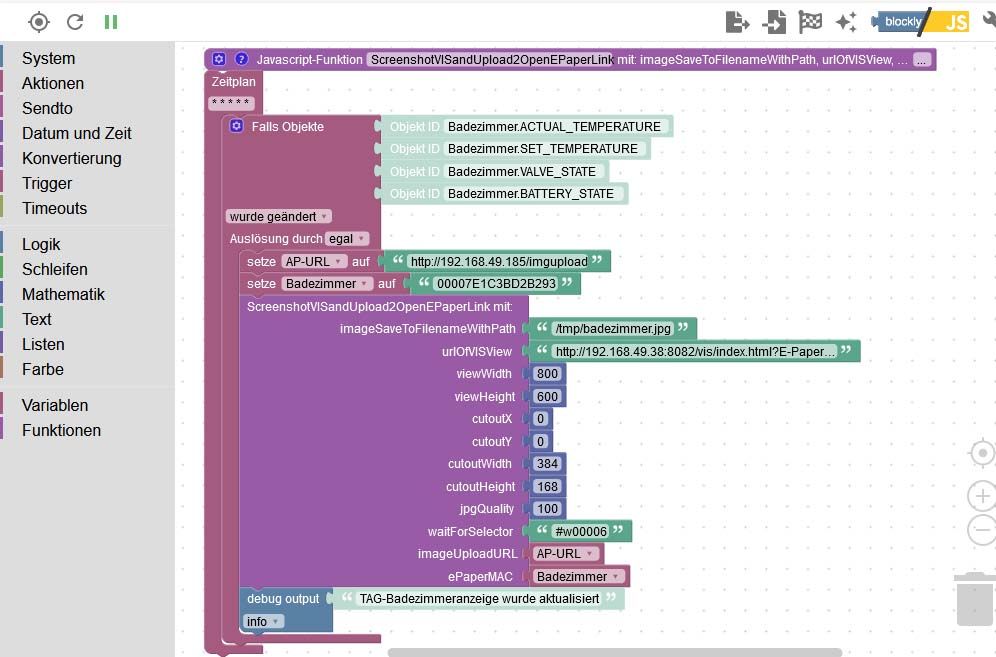
Hier ist das Blockly
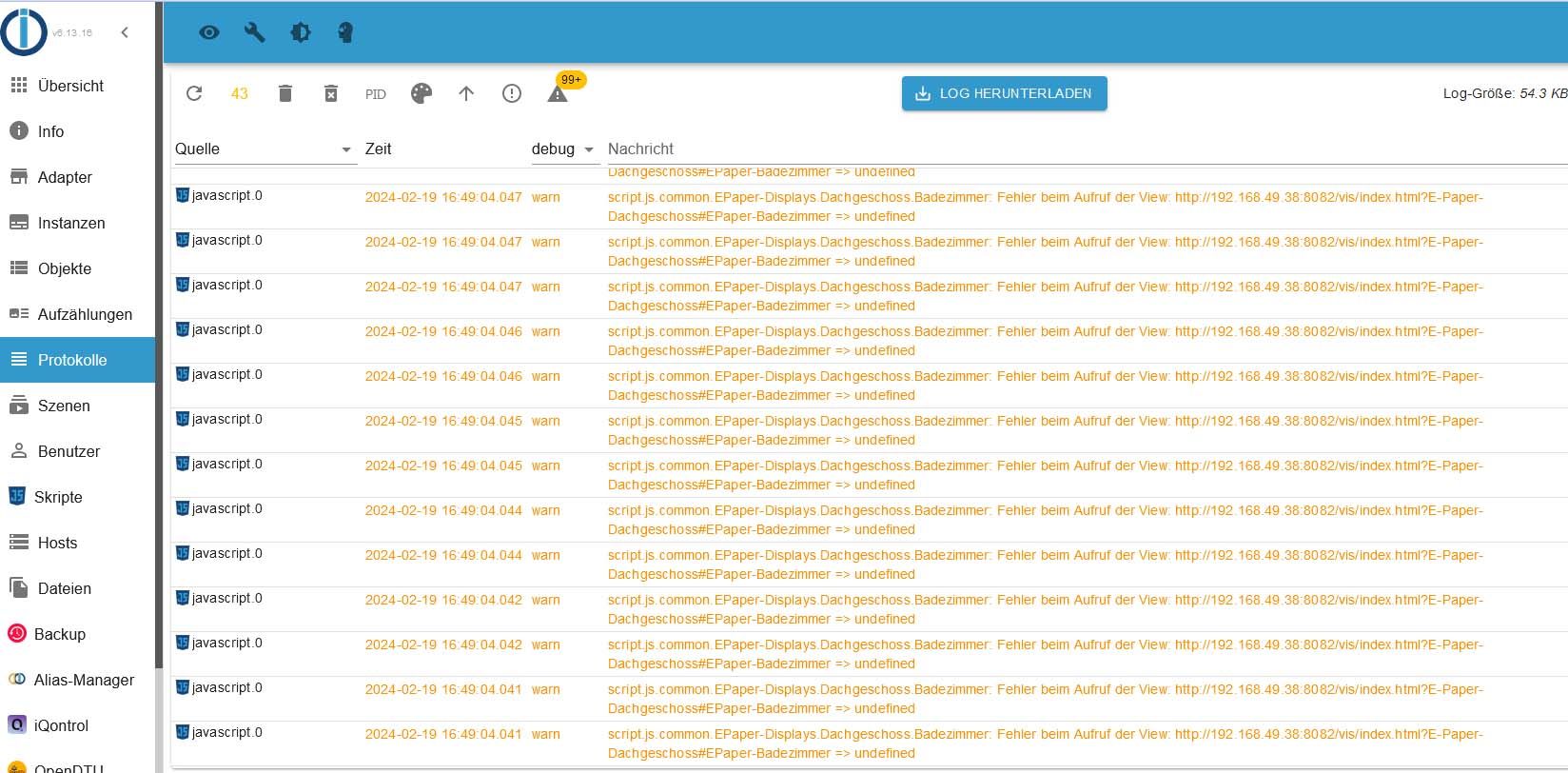
Hier die Log-Einträge
Grüße
Die Natur braucht nicht unseren Schutz, sie braucht unsere Abwesenheit.
-
OK, dann mal hier wieter.
Fehlermeldung im LOG na update von Puppeteer von 0.2.7 auf 0.2.8 trotz Änderung in der Datei main.js
async onReady() {
    this.browser = await import_puppeteer.default.launch({ headless: "new", defaultViewport: null, executablePath: '/usr/bin/chromium', args: ['--no-sandbox', '--disable-setuid-sandbox'] });
    this.subscribeStates("url");
    this.log.info("Ready to take screenshots");
  }
Hier ist das Blockly
Hier die Log-Einträge
Grüße
@beowolf Welches OS liegt darunter? Du nutzt nicht das Chromium was Puppeteer mitbringt mit der Angabe
/usr/bin/chromiumsondern ein selbst installiertes, Puppeteer will aber - vermutlich - das als nodes_modules installiertechromium-bidiverwenden.Ich nehme an wenn du die Zeile auf das Original zurück änderst geht es?
Und ich vermute du hast die geändert um die Sandbox auszuschalten weil du Docker nutzt? -
Alles läuft auf einen Raspberry pi4 mit linux drauf.
Eine chromium Datei liegt in /usr/bin/chromium
Wenn ich es zurück ändere, startet der Puppeteer Adapter nicht. Bleibt rot.
Ich habe ja die Änderung hier her.
-
So, ich habe jetzt mal ioBroker auf meinem neuen PI5 installiert.
Alles upgedatet. Neuer geht nicht.
Im ioBroker nach der neuen Installation NUR mit dem Puppeteer-Adapter installiert.
Und er läuft nicht.
Es kommt diese Meldung
host.raspberrypi 2024-02-21 10:01:06.184 warn Do not restart adapter system.adapter.puppeteer.0 because restart loop detected host.raspberrypi 2024-02-21 10:01:06.184 info Restart adapter system.adapter.puppeteer.0 because enabled host.raspberrypi 2024-02-21 10:01:06.184 error instance system.adapter.puppeteer.0 terminated with code 6 (UNCAUGHT_EXCEPTION) host.raspberrypi 2024-02-21 10:01:06.184 error host.raspberrypi Caught by controller[0]: If you encounter any bugs, please report them to https://github.com/puppeteer/puppeteer/issues/new/choose. host.raspberrypi 2024-02-21 10:01:06.184 error Caught by controller[0]: Consider opting in early by passing `headless: "new"` to `puppeteer.launch()` host.raspberrypi 2024-02-21 10:01:06.184 error Caught by controller[0]: information, please see https://developer.chrome.com/articles/new-headless/. host.raspberrypi 2024-02-21 10:01:06.184 error Caught by controller[0]: for Chrome instead of the old Headless implementation. For more host.raspberrypi 2024-02-21 10:01:06.184 error Caught by controller[0]: In the near feature `headless: true` will default to the new Headless mode host.raspberrypi 2024-02-21 10:01:06.184 error host.raspberrypi Caught by controller[0]: Puppeteer old Headless deprecation warning: host.raspberrypi 2024-02-21 10:01:06.183 error host.raspberrypi Caught by controller[0]: puppeteer.0 2024-02-21 10:01:06.169 info terminating puppeteer.0 2024-02-21 10:01:05.668 warn Terminated (UNCAUGHT_EXCEPTION): Without reason puppeteer.0 2024-02-21 10:01:05.667 info terminating puppeteer.0 2024-02-21 10:01:05.663 error Failed to launch the browser process! undefinedTROUBLESHOOTING: https://pptr.dev/troubleshooting puppeteer.0 2024-02-21 10:01:05.663 error Error: Failed to launch the browser process! undefinedTROUBLESHOOTING: https://pptr.dev/troubleshooting at ChildProcess.onClose (/opt/iobroker/node_modules/@puppeteer/browsers/lib/cjs/launch.js:262:24) at ChildProcess.emit (node:events:529:35) at ChildProcess._handle.onexit (node:internal/child_process:292:12) puppeteer.0 2024-02-21 10:01:05.662 error unhandled promise rejection: Failed to launch the browser process! undefinedTROUBLESHOOTING: https://pptr.dev/troubleshooting puppeteer.0 2024-02-21 10:01:05.662 error Unhandled promise rejection. This error originated either by throwing inside of an async function without a catch block, or by rejecting a promise which was not handled with .catch(). puppeteer.0 2024-02-21 10:01:05.638 info starting. Version 0.2.7 in /opt/iobroker/node_modules/iobroker.puppeteer, node: v18.19.1, js-controller: 5.0.19 -
So, ich habe jetzt mal ioBroker auf meinem neuen PI5 installiert.
Alles upgedatet. Neuer geht nicht.
Im ioBroker nach der neuen Installation NUR mit dem Puppeteer-Adapter installiert.
Und er läuft nicht.
Es kommt diese Meldung
host.raspberrypi 2024-02-21 10:01:06.184 warn Do not restart adapter system.adapter.puppeteer.0 because restart loop detected host.raspberrypi 2024-02-21 10:01:06.184 info Restart adapter system.adapter.puppeteer.0 because enabled host.raspberrypi 2024-02-21 10:01:06.184 error instance system.adapter.puppeteer.0 terminated with code 6 (UNCAUGHT_EXCEPTION) host.raspberrypi 2024-02-21 10:01:06.184 error host.raspberrypi Caught by controller[0]: If you encounter any bugs, please report them to https://github.com/puppeteer/puppeteer/issues/new/choose. host.raspberrypi 2024-02-21 10:01:06.184 error Caught by controller[0]: Consider opting in early by passing `headless: "new"` to `puppeteer.launch()` host.raspberrypi 2024-02-21 10:01:06.184 error Caught by controller[0]: information, please see https://developer.chrome.com/articles/new-headless/. host.raspberrypi 2024-02-21 10:01:06.184 error Caught by controller[0]: for Chrome instead of the old Headless implementation. For more host.raspberrypi 2024-02-21 10:01:06.184 error Caught by controller[0]: In the near feature `headless: true` will default to the new Headless mode host.raspberrypi 2024-02-21 10:01:06.184 error host.raspberrypi Caught by controller[0]: Puppeteer old Headless deprecation warning: host.raspberrypi 2024-02-21 10:01:06.183 error host.raspberrypi Caught by controller[0]: puppeteer.0 2024-02-21 10:01:06.169 info terminating puppeteer.0 2024-02-21 10:01:05.668 warn Terminated (UNCAUGHT_EXCEPTION): Without reason puppeteer.0 2024-02-21 10:01:05.667 info terminating puppeteer.0 2024-02-21 10:01:05.663 error Failed to launch the browser process! undefinedTROUBLESHOOTING: https://pptr.dev/troubleshooting puppeteer.0 2024-02-21 10:01:05.663 error Error: Failed to launch the browser process! undefinedTROUBLESHOOTING: https://pptr.dev/troubleshooting at ChildProcess.onClose (/opt/iobroker/node_modules/@puppeteer/browsers/lib/cjs/launch.js:262:24) at ChildProcess.emit (node:events:529:35) at ChildProcess._handle.onexit (node:internal/child_process:292:12) puppeteer.0 2024-02-21 10:01:05.662 error unhandled promise rejection: Failed to launch the browser process! undefinedTROUBLESHOOTING: https://pptr.dev/troubleshooting puppeteer.0 2024-02-21 10:01:05.662 error Unhandled promise rejection. This error originated either by throwing inside of an async function without a catch block, or by rejecting a promise which was not handled with .catch(). puppeteer.0 2024-02-21 10:01:05.638 info starting. Version 0.2.7 in /opt/iobroker/node_modules/iobroker.puppeteer, node: v18.19.1, js-controller: 5.0.19@beowolf sagte in Open EPaper Display - Puppeteer:
und, was passiert, wenn du den aufruf von chrome mit =old startest, wie in der Hilfe dazu angegeben?
-
OK, das mit dem "old" hat funktioniert.
Aber auch nur mit dieser Änderung in der main.js Datei
async onReady() {
    this.browser = await import_puppeteer.default.launch({ headless: "old", defaultViewport: null, executablePath: '/usr/bin/chromium', args: ['--no-sandbox', '--disable-setuid-sandbox'] });
    this.subscribeStates("url");
    this.log.info("Ready to take screenshots");
  }
Jetzt bleibt der Adapter auf grün.
Danke für die schnelle Hilfe.:+1: :+1: :+1:
-
Zu früh gefreut.
Jetzt kommen diese Meldungen.
javascript.0
	2024-02-21 17:19:04.287	warn	script.js.common.EPaper-Displays.Kellergeschoss.Heizung.Heizungsanzeige: Fehler beim Aufruf der View: http://192.168.49.38:8082/vis/index.html?openepaper#Heizung => undefined
javascript.0
	2024-02-21 17:18:39.753	warn	script.js.common.EPaper-Displays.Obergeschoss.Hauswirtschaftsraum: Fehler beim Aufruf der View: http://192.168.49.38:8082/vis/index.html?E-Paper-Obergeschoss#EPaper-HWR => undefined
javascript.0
	2024-02-21 17:18:22.551	warn	script.js.common.EPaper-Displays.Dachgeschoss.Seminarraum: Fehler beim Aufruf der View: http://192.168.49.38:8082/vis/index.html?E-Paper-Dachgeschoss#EPaper-Seminarraum => undefined
Bei diesem Blockly
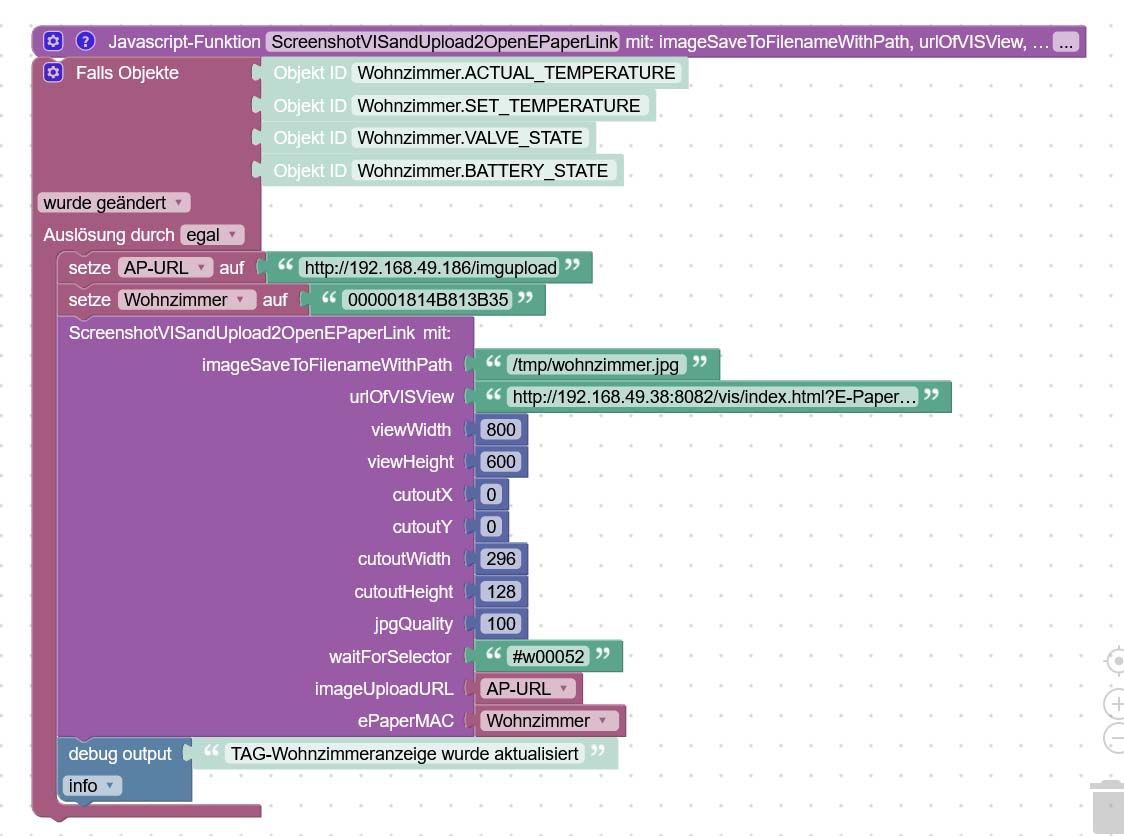
<xml xmlns="https://developers.google.com/blockly/xml"> <variables> <variable id="#6wGK,7)K9MvKS1Y^m7w">imageSaveToFilenameWithPath</variable> <variable id="/34/q/S9,6lBaN0B^0p+">urlOfVISView</variable> <variable id="VtK5T):T+/?(:RTltehP">viewWidth</variable> <variable id="d%Y)z(!gms*2[:-Q?srZ">viewHeight</variable> <variable id="yI1;;SNF[v//PXeFn75c">cutoutX</variable> <variable id="ixza1C+:$RS#_aO(+mTw">cutoutY</variable> <variable id="JHgH!or}TSYU@4ok~:dD">cutoutWidth</variable> <variable id="pui*x3;[n/WA5nodRtex">cutoutHeight</variable> <variable id="{l]%ubA0HMv*]m|`-bQ#">jpgQuality</variable> <variable id="^}k9.{.g,!Q=P%/G;/%p">waitForSelector</variable> <variable id="O}nZ-9?%oQZ/=~9D;8MW">imageUploadURL</variable> <variable id="$iC+L#(86gFYKS_:{d3%">ePaperMAC</variable> <variable id="rhi=.r4Y.hIfC3yoRsIA">AP-URL</variable> <variable id="LtmH{pRY8k?L^i{3%2^~">Wohnzimmer</variable> </variables> <block type="procedures_defcustomnoreturn" id="od4:#LN4MMPOX5Cuwv0G" x="138" y="-13"> <mutation statements="false"> <arg name="imageSaveToFilenameWithPath" varid="#6wGK,7)K9MvKS1Y^m7w"></arg> <arg name="urlOfVISView" varid="/34/q/S9,6lBaN0B^0p+"></arg> <arg name="viewWidth" varid="VtK5T):T+/?(:RTltehP"></arg> <arg name="viewHeight" varid="d%Y)z(!gms*2[:-Q?srZ"></arg> <arg name="cutoutX" varid="yI1;;SNF[v//PXeFn75c"></arg> <arg name="cutoutY" varid="ixza1C+:$RS#_aO(+mTw"></arg> <arg name="cutoutWidth" varid="JHgH!or}TSYU@4ok~:dD"></arg> <arg name="cutoutHeight" varid="pui*x3;[n/WA5nodRtex"></arg> <arg name="jpgQuality" varid="{l]%ubA0HMv*]m|`-bQ#"></arg> <arg name="waitForSelector" varid="^}k9.{.g,!Q=P%/G;/%p"></arg> <arg name="imageUploadURL" varid="O}nZ-9?%oQZ/=~9D;8MW"></arg> <arg name="ePaperMAC" varid="$iC+L#(86gFYKS_:{d3%"></arg> </mutation> <field name="NAME">ScreenshotVISandUpload2OpenEPaperLink</field> <field name="SCRIPT">c2VuZFRvKCdwdXBwZXRlZXIuMCcsICdzY3JlZW5zaG90JywgeyANCiAgICB1cmw6IHVybE9mVklTVmlldywgICAgICAgICAgICAgICAgICAgICAgLyogVVJMIGRlciBXZWJzZWl0ZSBhdXMgd2VsY2hlciBkZXIgU2NyZWVuc2hvdCBlcnN0ZWxsdCB3ZXJkZW4gc29sbCAqLw0KICAgIHBhdGg6IGltYWdlU2F2ZVRvRmlsZW5hbWVXaXRoUGF0aCwgICAgICAvKiBEYXRlaW5hbWUgdW5kIFBmYWQgZsO8ciBsb2thbGVzIFNwZWljaGVybiBkZXMgQmlsZGVzICovDQogICAgd2lkdGg6IHZpZXdXaWR0aCwgICAgICAgICAgICAgICAgICAgICAgIC8qIEJyZWl0ZSBkZXMgdmlydHVlbGxlbiBCcm93c2VyZmVuc3RlcnMgKi8NCiAgICBoZWlnaHQ6IHZpZXdIZWlnaHQsICAgICAgICAgICAgICAgICAgICAgLyogSMO2aGUgZGVzIHZpcnR1ZWxsZW4gQnJvd3NlcmZlbnN0ZXJzICovDQogICAgcXVhbGl0eToganBnUXVhbGl0eSwgICAgICAgICAgICAgICAgICAgIC8qIFF1YWxpdMOkdCBkZXMgSlBHLCBzb2xsdGUgaW1tZXIgMTAwIHNlaW4gKi8NCg0KICAgIHdhaXRPcHRpb246IHsNCiAgICAgICAgd2FpdEZvclNlbGVjdG9yOiB3YWl0Rm9yU2VsZWN0b3IsICAgLyogV2FydGV0IGZvciBkZW0gU2NyZWVuc2hvdCBiaXMgZGllc2VzIE9iamVrdCBzaWNodGJhciBpc3QgKi8NCiAgICAgICAgd2FpdEZvclRpbWVvdXQ6IDEwMDAwICAgICAgICAgICAgICAgLyogVGltZW91dCwgc29sYW5nZSB3aXJkIGF1ZiBkYXMgT2JqZWt0IGdld2FydGV0ICovDQogICAgfSwNCg0KICAgIGZ1bGxQYWdlOiBmYWxzZSwgICAgICAgICAgICAgICAgICAgICAgICAvKiBUcnVlIHfDvHJkZSBkaWUgZ2FuemUgU2VpdGUgU25hcHNob3RlbiB1bmQgZGllIGNsaXAtQW53ZWlzdW5nZW4gaWdub3JpZXJlbiAqLw0KDQogICAgY2xpcDogeyAgICAgICAgIA0KICAgICAgICB4OiBjdXRvdXRYLCAgICAgICAgICAgICAgICAgICAgICAgICAvKiBLb29yZGluYXRlIFggYW4gZGVyIGRlciBBdXNzY2huaXR0IGJlZ2lubmVuIHNvbGwgKi8NCiAgICAgICAgeTogY3V0b3V0WSwgICAgICAgICAgICAgICAgICAgICAgICAgLyogS29vcmRpbmF0ZSBZIGFuIGRlciBkZXIgQXVzc2Nobml0dCBiZWdpbm5lbiBzb2xsICovDQogICAgICAgIHdpZHRoOiBjdXRvdXRXaWR0aCwgICAgICAgICAgICAgICAgIC8qIEJyZWl0ZSBkZXMgQXVzc2Nobml0dGVzICovDQogICAgICAgIGhlaWdodDogY3V0b3V0SGVpZ2h0ICAgICAgICAgICAgICAgIC8qIEjDtmhlIGRlcyBBdXNzY2huaXR0ZXMgKi8NCiAgICAgIH0NCn0sIG9iaiA9PiB7DQogICAgICBpZiAob2JqLmVycm9yKSB7DQogICAgICAgIGNvbnNvbGUud2FybigiRmVobGVyIGJlaW0gQXVmcnVmIGRlciBWaWV3OiAiICsgdXJsT2ZWSVNWaWV3ICsgIiA9PiAiICsgb2JqLmVycm9yLm1lc3NhZ2UpOw0KICAgICAgfSBlbHNlIHsNCiAgICAgICAgICAvKiBpbiBvYmoucmVzdWx0IHNpbmQgZGllIEJpbsOkcmRhdGVuIGRlcyBCaWxkZXMgKi8NCiAgICAgICAgdmFyIHJlcXVlc3QgPSByZXF1aXJlKCdyZXF1ZXN0Jyk7DQogICAgICAgIHZhciBvcHRpb25zID0gew0KICAgICAgICAgICAgdXJsOiBpbWFnZVVwbG9hZFVSTCwNCiAgICAgICAgICAgIG1ldGhvZDogJ1BPU1QnLA0KICAgICAgICAgICAgZm9ybURhdGE6IHsgDQogICAgICAgICAgICAgICAgImRpdGhlciI6ICIwIiwgDQogICAgICAgICAgICAgICAgIm1hYyI6IGVQYXBlck1BQywNCiAgICAgICAgICAgICAgICAiaW1hZ2UiOiBvYmoucmVzdWx0IH0sDQogICAgICAgIH07DQogICAgICAgIC8qIHVuZCBkaWUgVVJMIGF1ZnJ1ZmVuOiAqLw0KICAgICAgICByZXF1ZXN0KG9wdGlvbnMsZnVuY3Rpb24gKGVycm9yLCByZXNwb25zZSwgYm9keSl7DQogICAgICAgICAgICAvL2xvZygiTG9naW4tQW50d29ydDogIiArIEpTT04uc3RyaW5naWZ5KHJlc3BvbnNlKSk7DQogICAgICAgICAgICAvL2NvbnNvbGUud2FybigiSW1hZ2VVcGxvYWQ6ICIgKyBKU09OLnN0cmluZ2lmeShyZXNwb25zZSkpOw0KICAgICAgICAgICAgY29uc29sZS5sb2coIkltYWdlOiIgKyBpbWFnZVNhdmVUb0ZpbGVuYW1lV2l0aFBhdGggKyAiID0+IEltYWdlVXBsb2FkU3RhdHVzQ29kZTogIiArIHJlc3BvbnNlLnN0YXR1c0NvZGUpOw0KICAgICAgICAgICAgLyoNCiAgICAgICAgICAgIGlmKHBhcnNlSW50KGJvZHkuZXJyb3JfY29kZSk9PTApIHsNCiAgICAgICAgICAgICAgICAvLyBuaXgNCiAgICAgICAgICAgICAgICB9IGVsc2Ugew0KICAgICAgICAgICAgICAgIC8vIHdpZWRlciBuaXgNCiAgICAgICAgICAgIH0NCiAgICAgICAgICAgICovDQogICAgICAgIH0pOw0KICAgICAgfQ0KfSk7DQo=</field> <comment pinned="false" h="80" w="160">Beschreibe diese Funktion …</comment> </block> <block type="on_ext" id="JKXn.h;3vC`f:OW42AC:" x="138" y="13"> <mutation xmlns="http://www.w3.org/1999/xhtml" items="4"></mutation> <field name="CONDITION">ne</field> <field name="ACK_CONDITION"></field> <value name="OID0"> <shadow type="field_oid" id="2[)gbd6DWFVFnX}G[(EC"> <field name="oid">hm-rpc.0.OEQ1248163.4.ACTUAL_TEMPERATURE</field> </shadow> </value> <value name="OID1"> <shadow type="field_oid" id="sj|;_wFBXtfS+Yl_zT|6"> <field name="oid">hm-rpc.0.OEQ1248163.4.SET_TEMPERATURE</field> </shadow> </value> <value name="OID2"> <shadow type="field_oid" id="~3HYOS]U0T^B#3iL+OX]"> <field name="oid">hm-rpc.0.OEQ1248163.4.VALVE_STATE</field> </shadow> </value> <value name="OID3"> <shadow type="field_oid" id="*{gdp{Lw%gcdf9n;f~v."> <field name="oid">hm-rpc.0.OEQ1248163.4.BATTERY_STATE</field> </shadow> </value> <statement name="STATEMENT"> <block type="variables_set" id="_#_fs%Kcfjp1C?gCKDT1"> <field name="VAR" id="rhi=.r4Y.hIfC3yoRsIA">AP-URL</field> <value name="VALUE"> <block type="text" id="+l/L.V(WVELt{nzG1sMl"> <field name="TEXT">http://192.168.49.186/imgupload</field> </block> </value> <next> <block type="variables_set" id="i8~V6knJldbHLWdHYkeU"> <field name="VAR" id="LtmH{pRY8k?L^i{3%2^~">Wohnzimmer</field> <value name="VALUE"> <block type="text" id="L6w1~I6/$PuN8iz@6rVZ"> <field name="TEXT">000001814B813B35</field> </block> </value> <next> <block type="procedures_callcustomnoreturn" id="0nQ0@(q^Ki^qi0,9R;J2"> <mutation name="ScreenshotVISandUpload2OpenEPaperLink"> <arg name="imageSaveToFilenameWithPath"></arg> <arg name="urlOfVISView"></arg> <arg name="viewWidth"></arg> <arg name="viewHeight"></arg> <arg name="cutoutX"></arg> <arg name="cutoutY"></arg> <arg name="cutoutWidth"></arg> <arg name="cutoutHeight"></arg> <arg name="jpgQuality"></arg> <arg name="waitForSelector"></arg> <arg name="imageUploadURL"></arg> <arg name="ePaperMAC"></arg> </mutation> <value name="ARG0"> <block type="text" id="|{r-M(tWVgp?p^G!3-W0"> <field name="TEXT">/tmp/wohnzimmer.jpg</field> </block> </value> <value name="ARG1"> <block type="text" id="*hw_+vHE0WnkLr0CRV8/"> <field name="TEXT">http://192.168.49.38:8082/vis/index.html?E-Paper-Obergeschoss#EPaper-Wohnzimmer</field> </block> </value> <value name="ARG2"> <block type="math_number" id="yhNC-+wg^qQSvoYLW%Aa"> <field name="NUM">800</field> </block> </value> <value name="ARG3"> <block type="math_number" id="{%*mqb.r,;_8*VThfrsf"> <field name="NUM">600</field> </block> </value> <value name="ARG4"> <block type="math_number" id="mg#W`=iLeMy{e`A6/b2R"> <field name="NUM">0</field> </block> </value> <value name="ARG5"> <block type="math_number" id="IXuOm%/dmLb7v~I$8*.f"> <field name="NUM">0</field> </block> </value> <value name="ARG6"> <block type="math_number" id="r2qX^fde=*rB9_:2/W$u"> <field name="NUM">296</field> </block> </value> <value name="ARG7"> <block type="math_number" id="$k;hZ0hajjf1ot[*!5vn"> <field name="NUM">128</field> </block> </value> <value name="ARG8"> <block type="math_number" id="?*EMShBY,yo;R|6:44G}"> <field name="NUM">100</field> </block> </value> <value name="ARG9"> <block type="text" id="J{+9jVAK!K)3S#tR{32M"> <field name="TEXT">#w00052</field> </block> </value> <value name="ARG10"> <block type="variables_get" id="Zc1)TBn?Oph/-$0Wr=t$"> <field name="VAR" id="rhi=.r4Y.hIfC3yoRsIA">AP-URL</field> </block> </value> <value name="ARG11"> <block type="variables_get" id="k)x^4wfzdRD||QkJ9dz$"> <field name="VAR" id="LtmH{pRY8k?L^i{3%2^~">Wohnzimmer</field> </block> </value> <next> <block type="debug" id="2L@u~1`Ydt?8kNiCL-xe"> <field name="Severity">log</field> <value name="TEXT"> <shadow type="text" id="j%D-azTOZ5.4fBg2E[uQ"> <field name="TEXT">TAG-Wohnzimmeranzeige wurde aktualisiert</field> </shadow> </value> </block> </next> </block> </next> </block> </next> </block> </statement> </block> </xml> -
OK, das mit dem "old" hat funktioniert.
Aber auch nur mit dieser Änderung in der main.js Datei
async onReady() {
    this.browser = await import_puppeteer.default.launch({ headless: "old", defaultViewport: null, executablePath: '/usr/bin/chromium', args: ['--no-sandbox', '--disable-setuid-sandbox'] });
    this.subscribeStates("url");
    this.log.info("Ready to take screenshots");
  }
Jetzt bleibt der Adapter auf grün.
Danke für die schnelle Hilfe.:+1: :+1: :+1:
Setz mal das timeout etwas höher.. ich nutze dieses Script nicht, aber ich hatte einen ähnlichen Effekt…
-
Ich habe das jetzt von 10000 auf 20000 gesetzt.
Die Meldungen kommen trotzdem. Ist das zu wenig?
Anscheinend findet er die view nicht
http://192.168.49.38:8082/vis/index.html?openepaper#HeizungIst die wirklich da? Mal im Browser eingeben..
-
Wenn ich hier mal einhaken darf, es passt zum Titel, aber nicht zum ersten gemeldeten Problem.
Ich habe jetzt auch meinen Adapter (V4) und spiele damit herum. Auf einem Test-ioBroker in einem LXC von Proxmox.Gibt es etwas auf das man beim Puppetier (V0.2.8) speziell beachten muss. Ich verwende ihn aus den mormalen Installation ohne Änderungen um folgende View anzuzeigen:
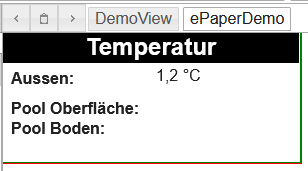
Das gerenderte Bild ist allerdings:
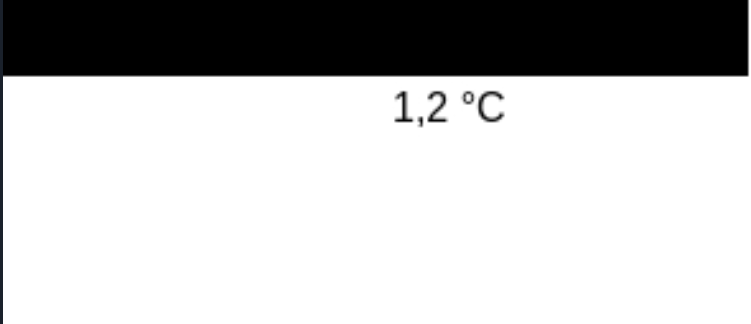
Der Text, der nicht angezeigt wird steht in einem normalen basic-text Widget.
-
Wenn ich hier mal einhaken darf, es passt zum Titel, aber nicht zum ersten gemeldeten Problem.
Ich habe jetzt auch meinen Adapter (V4) und spiele damit herum. Auf einem Test-ioBroker in einem LXC von Proxmox.Gibt es etwas auf das man beim Puppetier (V0.2.8) speziell beachten muss. Ich verwende ihn aus den mormalen Installation ohne Änderungen um folgende View anzuzeigen:
Das gerenderte Bild ist allerdings:
Der Text, der nicht angezeigt wird steht in einem normalen basic-text Widget.
@diwoma
OK, ich kann mir selbst antworten:Das waren Text-Elemente, die auf ein Value gemappt werden mussten. Für die Überschrift sollte ich das Widget basic-html verwenden.
Wie heißt es so schön ? "Si te tacuisses ..." bzw, auf mich gemünzt:
Hätte ich vorher weiter versucht, hätte ich die Frage nicht stellen müssen.

724
Online32.6k
Users82.2k
Topics1.3m
Posts