




[SOLVED] Going to Cloud ...net - steps for ?
-
I'm here after years again and now Id like to try the possibility of accessing IOB (the Admin, VIS runtime and VIS editor) through the Cloud. Unfortunately nothing changed here much with regards to the quality and consistency of information how setup things. Therefore Id like to ask for help in this forum.
What I understood so far (but even this was not easy) I need :- to create an account on iobroker.net
- to create "App key" (creating on the iobroker.net under my account)
- to create Licence for VIS (not at same place as the Appkey, but under tab Pricing/Community Licences)
- to install the VIS-2 adapter
- to install Cloud adapter
- to install or to have available a Web adapter
The intended web access to the Admin and VIS environments I should then get through the iobroker.net after loging-in and then under the tab "Applications" (back you go by clicking in the upper right corner - Profile).
What I reached for so far:
I somehow succeeded to get the VIS 2 Runtime icon on the iobroker.net Applications desktop. Even that was not straightforward. To get the Licence for VIS I had to fill-in some small form on the iobroker.net for what l also needed some "UUID". Ithowever was not explained there what it is and where to get it from. In the end I found it in the settings of the installed instance of VIS. From here I got it and pasted in-to the form. Then I got the License key (maybe you will not get it directly after filling the form, Im not sure, but it will be under the tab "Licences" in your account on iobroker.net). This key I copied and went back to IOB to the settings of instance of VIS and pasted it into the field Licences. Uff. In the settings of adapter Cloud I had to select "iobroker.net" under Server and to select "web" under Web instance. After that under tab Applications the icon of VIS runtime appeared. Great!What I'm totally not capable to finish: - to get the Admin icon (and the VIS Editor) here.
Maybe its connected to the fact that I don't know where to put-in the "AppKey".
In the description of the Cloud adapter there are following few sentences just at the beginning: "APP-KEY. To use cloud adapter you should first get the APP-Key on https://iobroker.net.
This is application key that the user can get on https://iobroker.net site. Please get the key there and enter it here."
Well, the last sentence sounds to me like some verses, not instruction. Where I shall enter the key??? (If Cloud was meant by "here" then Cloud settings don't have any field where to put it in).
Under the tab App keys there is another message: "To access your ioBroker instance remotely, you must create the app-key and copy it into the configuration dialog of iobroker.cloud adapter." Well this tells something similar but I still don't see any such field in the Cloud settings (and I have not met any other "configuration dialog" there).Please correct my previous steps and potentially add some other for me to get cloud access to the Admin and VIS Editor.
-
Hallo zusammen,
ich bin neu in der iobroker-Welt und habe vor wenigen Wochen mal alles über meine Synology per Docker installiert. Es funktioniert auch soweit alles, so dass ich mich an den (zunächst kostenfreien) Fernzugriff gewagt habe.
Die Einstellungen sind ja recht simpel (App-Key erzeugen, in Cloud eintragen, Web-Instanz wählen) und ich hatte auch meine Anwendungen gesehen und nutzen können.
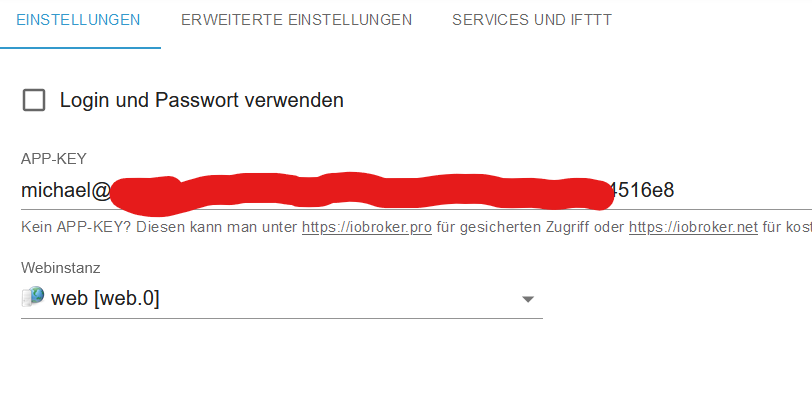

Seit ein paar Tagen jedoch bleibt die Seite "Anwendungen" leer.

Sowohl die Cloud-Instanz als auch iobroker.net zeigen eine funktionierende Verbindung.
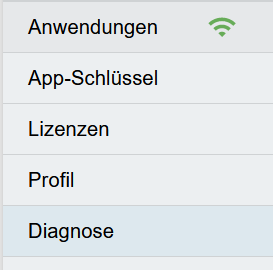

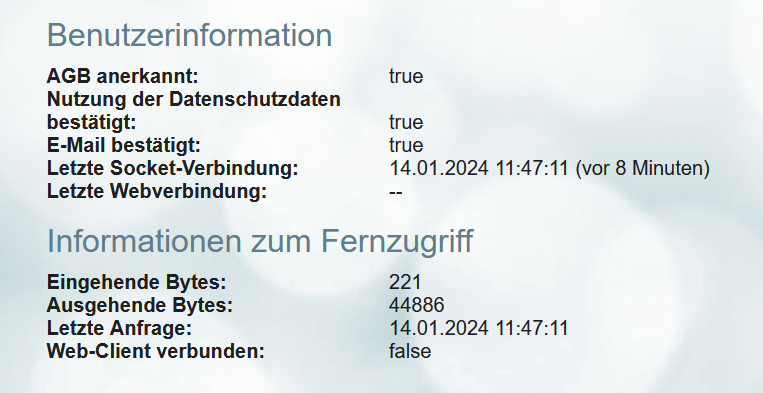
Nur bei der Diagnose steht bei "Web-Client verbunden" ein "false". Ich kann mir aber nicht erklären, warum.
Im Voraus vielen Dank für eure Hilfe!
Gruß
Michael!@flatmike Hallo, es kommt mir vor dass Ihr Problem ganz aehnlich zu meinem ist. Koennen Sie bitte folgendes ansehen ? https://forum.iobroker.net/topic/72406/going-to-cloud-net-steps-for
(An meiner Cloud Oberflache sehe ich zugrif zu VIS runtime, Ich sehe aber nicht die Ikone zum IOB Admin und nicht Ikone zum VIS editor. ) Ich habe keine Loesung aber im Fall dass es um gleiche Problem geht kann es wahrsheinlich helfen dass wir shchon zwei waeren .
(Enschuldigung fuer meine schlechte Deutsche Sprache) -
@cjoe sorry for not responding to your question in the English section
according to this scheme
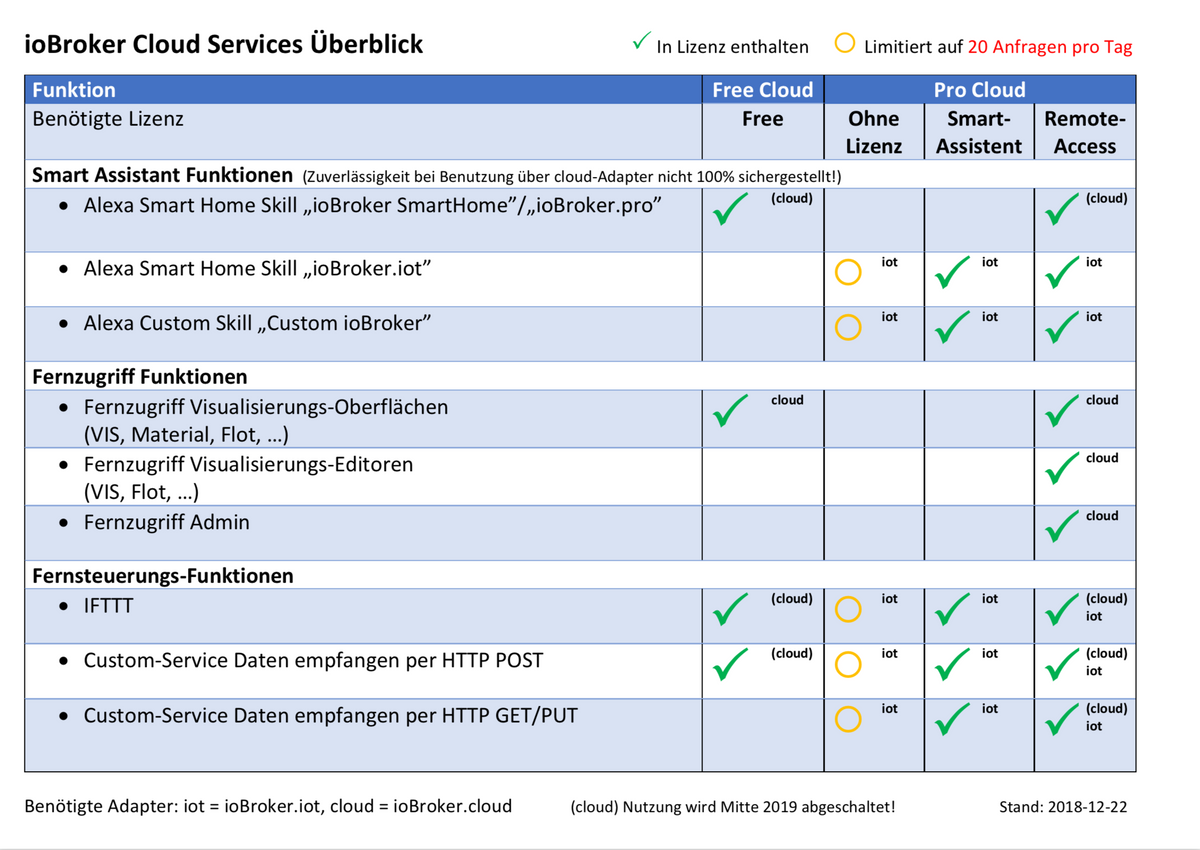
the admin and the editor is only available in the iobroker.pro
-
@cjoe sorry for not responding to your question in the English section
according to this scheme
the admin and the editor is only available in the iobroker.pro
-
@cjoe sagte in iobroker.net Verbindung geht, Anwendungen nicht sichtbar:
havent seen this table,
you'll find it here
https://www.iobroker.net/#de/documentation/cloud/iot.mdAn I will move this to your own thread :-)
-
I'm here after years again and now Id like to try the possibility of accessing IOB (the Admin, VIS runtime and VIS editor) through the Cloud. Unfortunately nothing changed here much with regards to the quality and consistency of information how setup things. Therefore Id like to ask for help in this forum.
What I understood so far (but even this was not easy) I need :- to create an account on iobroker.net
- to create "App key" (creating on the iobroker.net under my account)
- to create Licence for VIS (not at same place as the Appkey, but under tab Pricing/Community Licences)
- to install the VIS-2 adapter
- to install Cloud adapter
- to install or to have available a Web adapter
The intended web access to the Admin and VIS environments I should then get through the iobroker.net after loging-in and then under the tab "Applications" (back you go by clicking in the upper right corner - Profile).
What I reached for so far:
I somehow succeeded to get the VIS 2 Runtime icon on the iobroker.net Applications desktop. Even that was not straightforward. To get the Licence for VIS I had to fill-in some small form on the iobroker.net for what l also needed some "UUID". Ithowever was not explained there what it is and where to get it from. In the end I found it in the settings of the installed instance of VIS. From here I got it and pasted in-to the form. Then I got the License key (maybe you will not get it directly after filling the form, Im not sure, but it will be under the tab "Licences" in your account on iobroker.net). This key I copied and went back to IOB to the settings of instance of VIS and pasted it into the field Licences. Uff. In the settings of adapter Cloud I had to select "iobroker.net" under Server and to select "web" under Web instance. After that under tab Applications the icon of VIS runtime appeared. Great!What I'm totally not capable to finish: - to get the Admin icon (and the VIS Editor) here.
Maybe its connected to the fact that I don't know where to put-in the "AppKey".
In the description of the Cloud adapter there are following few sentences just at the beginning: "APP-KEY. To use cloud adapter you should first get the APP-Key on https://iobroker.net.
This is application key that the user can get on https://iobroker.net site. Please get the key there and enter it here."
Well, the last sentence sounds to me like some verses, not instruction. Where I shall enter the key??? (If Cloud was meant by "here" then Cloud settings don't have any field where to put it in).
Under the tab App keys there is another message: "To access your ioBroker instance remotely, you must create the app-key and copy it into the configuration dialog of iobroker.cloud adapter." Well this tells something similar but I still don't see any such field in the Cloud settings (and I have not met any other "configuration dialog" there).Please correct my previous steps and potentially add some other for me to get cloud access to the Admin and VIS Editor.
@cjoe Well I just got info from @homoran that the .net free version of Cloud is only for the VIS runtime . It it is not for access to Admin nor for the VIS editor. I probably wrongly understood some descriptions of the services. My fault. So this topic can be CLOSED or even deleted.
EDIT :) In the meantime whe I was writing this Homoran moved the info here so my last message is totally duplicate -
@cjoe Well I just got info from @homoran that the .net free version of Cloud is only for the VIS runtime . It it is not for access to Admin nor for the VIS editor. I probably wrongly understood some descriptions of the services. My fault. So this topic can be CLOSED or even deleted.
EDIT :) In the meantime whe I was writing this Homoran moved the info here so my last message is totally duplicate@cjoe sagte in Going to Cloud ...net - steps for ?:
So this topic can be CLOSED or even deleted.
you can edit your initial post, move to the title and type a [solved] at the start.
Hey! Du scheinst an dieser Unterhaltung interessiert zu sein, hast aber noch kein Konto.
Hast du es satt, bei jedem Besuch durch die gleichen Beiträge zu scrollen? Wenn du dich für ein Konto anmeldest, kommst du immer genau dorthin zurück, wo du zuvor warst, und kannst dich über neue Antworten benachrichtigen lassen (entweder per E-Mail oder Push-Benachrichtigung). Du kannst auch Lesezeichen speichern und Beiträge positiv bewerten, um anderen Community-Mitgliedern deine Wertschätzung zu zeigen.
Mit deinem Input könnte dieser Beitrag noch besser werden 💗
Registrieren AnmeldenSupport us
360
Online33.0k
Benutzer83.6k
Themen1.3m
Beiträge