




JS / connection-status der linkeddevices anzeigen
-
Hi,
nachdem ich immer nur mitlese, mal was sinnvoll zu Teilendes:
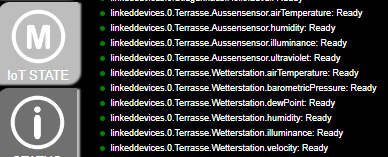
Falls jemand auch linkeddevices verwendet und gerne in VIS eine Übersicht hätte ob irgendwelche verlinkten Geräte aus zwave2, sonoff oder shelly Probleme machen, kann gerne mein Script verwenden.Der Output sieht dann so aus:
var StatusHTMLzwave = 'javascript.0.zwave2NodeStatus'; var StatusHTMLshelly = 'javascript.0.shellyNodeStatus'; var StatusHTMLsonoff = 'javascript.0.sonoffNodeStatus'; var StatusHTMLlinkeddevices = 'javascript.0.linkeddeviceNodeStatus'; createState(StatusHTMLzwave, false, { read: true, write: true, type: 'string', name: 'Status aller IoT Sensoren/Aktoren als HTML', desc: 'Status aller IoT Sensoren/Aktoren als HTML' }); createState(StatusHTMLshelly, false, { read: true, write: true, type: 'string', name: 'Status aller IoT Sensoren/Aktoren als HTML', desc: 'Status aller IoT Sensoren/Aktoren als HTML' }); createState(StatusHTMLsonoff, false, { read: true, write: true, type: 'string', name: 'Status aller IoT Sensoren/Aktoren als HTML', desc: 'Status aller IoT Sensoren/Aktoren als HTML' }); createState(StatusHTMLlinkeddevices, false, { read: true, write: true, type: 'string', name: 'Status aller IoT Sensoren/Aktoren als HTML', desc: 'Status aller IoT Sensoren/Aktoren als HTML' }); function checkIoT(){ /////////////////////ZWAVE // Get a list of all nodes under the Z-Wave2 root var nodes = $('zwave2.0.*.ready'); // Initialize the HTML string let itemListHTML = '<h1>Z-Wave2 Node Status</h1>'; nodes.each(function (id, i) { const nodeReady = getState(id); // Determine the circle color based on the "ready" state const circleClass = nodeReady.val ? 'green' : 'red'; // Add the item to the HTML list itemListHTML += ` <div class="item"> <div class="circle ${circleClass}"></div> <span>${id}: ${nodeReady.val ? 'Ready' : 'Not Ready'}</span> </div> `; }); // Create or update an HTML state in ioBroker to display the list setState(StatusHTMLzwave, itemListHTML, true); /////////////////////SONOFF // Get a list of all nodes under the Z-Wave2 root nodes = $('sonoff.0.*.alive'); // Initialize the HTML string itemListHTML = '<h1>SONOFF Node Status</h1>'; nodes.each(function (id, i) { const nodeReady = getState(id); // Determine the circle color based on the "ready" state const circleClass = nodeReady.val ? 'green' : 'red'; // Add the item to the HTML list itemListHTML += ` <div class="item"> <div class="circle ${circleClass}"></div> <span>${id}: ${nodeReady.val ? 'Ready' : 'Not Ready'}</span> </div> `; }); // Create or update an HTML state in ioBroker to display the list setState(StatusHTMLsonoff, itemListHTML, true); /////////////////////SHELLY // Get a list of all nodes under the Z-Wave2 root nodes = $('shelly.0.*.online'); // Initialize the HTML string itemListHTML = '<h1>SHELLY Node Status</h1>'; nodes.each(function (id, i) { const nodeReady = getState(id); // Determine the circle color based on the "ready" state const circleClass = nodeReady.val ? 'green' : 'red'; // Add the item to the HTML list itemListHTML += ` <div class="item"> <div class="circle ${circleClass}"></div> <span>${id}: ${nodeReady.val ? 'Ready' : 'Not Ready'}</span> </div> `; }); // Create or update an HTML state in ioBroker to display the list setState(StatusHTMLshelly, itemListHTML, true); /////////////////////LINKED DEVICES nodes = $('linkeddevices.0.*'); // Initialize the HTML string itemListHTML = ''; nodes.each(function (id, i) { var dPoint = getObject(id,"true"); if (dPoint && dPoint.common) { var settings = dPoint.common.custom; //check if it is a linkeddevice var dpCustom = false; if(settings) if(settings['linkeddevices.0']) if(settings['linkeddevices.0'].enabled) dpCustom = settings['linkeddevices.0'].enabled; if(dpCustom) { //explode the parentid var parentid = settings['linkeddevices.0'].parentId ? settings['linkeddevices.0'].parentId : ""; if(parentid == "") return; const parts = parentid.split('.'); if (parts.length >= 3) { //extract the parentState const parentState = parts.slice(0, 3).join('.'); if(parts[0] == 'zwave2') { const nodeReady = getState(parentState + '.ready'); // Determine the circle color based on the "ready" state const circleClass = nodeReady.val ? 'green' : 'red'; // Add the item to the HTML list itemListHTML += ` <div class="item"> <div class="circle ${circleClass}"></div> <span>${id}: ${nodeReady.val ? 'Ready' : 'Not Ready'}</span> </div> `; } } } } }); // Create or update an HTML state in ioBroker to display the list setState(StatusHTMLlinkeddevices, itemListHTML, true); } checkIoT(); schedule('* * * * *',checkIoT); -
Hi,
nachdem ich immer nur mitlese, mal was sinnvoll zu Teilendes:
Falls jemand auch linkeddevices verwendet und gerne in VIS eine Übersicht hätte ob irgendwelche verlinkten Geräte aus zwave2, sonoff oder shelly Probleme machen, kann gerne mein Script verwenden.Der Output sieht dann so aus:
var StatusHTMLzwave = 'javascript.0.zwave2NodeStatus'; var StatusHTMLshelly = 'javascript.0.shellyNodeStatus'; var StatusHTMLsonoff = 'javascript.0.sonoffNodeStatus'; var StatusHTMLlinkeddevices = 'javascript.0.linkeddeviceNodeStatus'; createState(StatusHTMLzwave, false, { read: true, write: true, type: 'string', name: 'Status aller IoT Sensoren/Aktoren als HTML', desc: 'Status aller IoT Sensoren/Aktoren als HTML' }); createState(StatusHTMLshelly, false, { read: true, write: true, type: 'string', name: 'Status aller IoT Sensoren/Aktoren als HTML', desc: 'Status aller IoT Sensoren/Aktoren als HTML' }); createState(StatusHTMLsonoff, false, { read: true, write: true, type: 'string', name: 'Status aller IoT Sensoren/Aktoren als HTML', desc: 'Status aller IoT Sensoren/Aktoren als HTML' }); createState(StatusHTMLlinkeddevices, false, { read: true, write: true, type: 'string', name: 'Status aller IoT Sensoren/Aktoren als HTML', desc: 'Status aller IoT Sensoren/Aktoren als HTML' }); function checkIoT(){ /////////////////////ZWAVE // Get a list of all nodes under the Z-Wave2 root var nodes = $('zwave2.0.*.ready'); // Initialize the HTML string let itemListHTML = '<h1>Z-Wave2 Node Status</h1>'; nodes.each(function (id, i) { const nodeReady = getState(id); // Determine the circle color based on the "ready" state const circleClass = nodeReady.val ? 'green' : 'red'; // Add the item to the HTML list itemListHTML += ` <div class="item"> <div class="circle ${circleClass}"></div> <span>${id}: ${nodeReady.val ? 'Ready' : 'Not Ready'}</span> </div> `; }); // Create or update an HTML state in ioBroker to display the list setState(StatusHTMLzwave, itemListHTML, true); /////////////////////SONOFF // Get a list of all nodes under the Z-Wave2 root nodes = $('sonoff.0.*.alive'); // Initialize the HTML string itemListHTML = '<h1>SONOFF Node Status</h1>'; nodes.each(function (id, i) { const nodeReady = getState(id); // Determine the circle color based on the "ready" state const circleClass = nodeReady.val ? 'green' : 'red'; // Add the item to the HTML list itemListHTML += ` <div class="item"> <div class="circle ${circleClass}"></div> <span>${id}: ${nodeReady.val ? 'Ready' : 'Not Ready'}</span> </div> `; }); // Create or update an HTML state in ioBroker to display the list setState(StatusHTMLsonoff, itemListHTML, true); /////////////////////SHELLY // Get a list of all nodes under the Z-Wave2 root nodes = $('shelly.0.*.online'); // Initialize the HTML string itemListHTML = '<h1>SHELLY Node Status</h1>'; nodes.each(function (id, i) { const nodeReady = getState(id); // Determine the circle color based on the "ready" state const circleClass = nodeReady.val ? 'green' : 'red'; // Add the item to the HTML list itemListHTML += ` <div class="item"> <div class="circle ${circleClass}"></div> <span>${id}: ${nodeReady.val ? 'Ready' : 'Not Ready'}</span> </div> `; }); // Create or update an HTML state in ioBroker to display the list setState(StatusHTMLshelly, itemListHTML, true); /////////////////////LINKED DEVICES nodes = $('linkeddevices.0.*'); // Initialize the HTML string itemListHTML = ''; nodes.each(function (id, i) { var dPoint = getObject(id,"true"); if (dPoint && dPoint.common) { var settings = dPoint.common.custom; //check if it is a linkeddevice var dpCustom = false; if(settings) if(settings['linkeddevices.0']) if(settings['linkeddevices.0'].enabled) dpCustom = settings['linkeddevices.0'].enabled; if(dpCustom) { //explode the parentid var parentid = settings['linkeddevices.0'].parentId ? settings['linkeddevices.0'].parentId : ""; if(parentid == "") return; const parts = parentid.split('.'); if (parts.length >= 3) { //extract the parentState const parentState = parts.slice(0, 3).join('.'); if(parts[0] == 'zwave2') { const nodeReady = getState(parentState + '.ready'); // Determine the circle color based on the "ready" state const circleClass = nodeReady.val ? 'green' : 'red'; // Add the item to the HTML list itemListHTML += ` <div class="item"> <div class="circle ${circleClass}"></div> <span>${id}: ${nodeReady.val ? 'Ready' : 'Not Ready'}</span> </div> `; } } } } }); // Create or update an HTML state in ioBroker to display the list setState(StatusHTMLlinkeddevices, itemListHTML, true); } checkIoT(); schedule('* * * * *',checkIoT);@roland-ambrosch ich will dir keinen dämpfer verpassen aber.. es gibt einen adapter der das auch mach..
device-watcher
-
@roland-ambrosch ich will dir keinen dämpfer verpassen aber.. es gibt einen adapter der das auch mach..
device-watcher
@arteck ah! Sehe ich mir an 😀

Hey! Du scheinst an dieser Unterhaltung interessiert zu sein, hast aber noch kein Konto.
Hast du es satt, bei jedem Besuch durch die gleichen Beiträge zu scrollen? Wenn du dich für ein Konto anmeldest, kommst du immer genau dorthin zurück, wo du zuvor warst, und kannst dich über neue Antworten benachrichtigen lassen (entweder per E-Mail oder Push-Benachrichtigung). Du kannst auch Lesezeichen speichern und Beiträge positiv bewerten, um anderen Community-Mitgliedern deine Wertschätzung zu zeigen.
Mit deinem Input könnte dieser Beitrag noch besser werden 💗
Registrieren AnmeldenSupport us
384
Online33.0k
Benutzer83.5k
Themen1.3m
Beiträge