



Skip to content
  • Home
  • Recent
  • Tags
  • 0 Unread 0
  • Categories
  • Unreplied
  • Popular
  • GitHub
  • Docu
  • Hilfe
Skins
  • Light
  • Brite
  • Cerulean
  • Cosmo
  • Flatly
  • Journal
  • Litera
  • Lumen
  • Lux
  • Materia
  • Minty
  • Morph
  • Pulse
  • Sandstone
  • Simplex
  • Sketchy
  • Spacelab
  • United
  • Yeti
  • Zephyr
  • Dark
  • Cyborg
  • Darkly
  • Quartz
  • Slate
  • Solar
  • Superhero
  • Vapor

  • Default (No Skin)
  • No Skin
Collapse
ioBroker Logo

Community Forum

donate donate
  1. ioBroker Community Home
  2. Deutsch
  3. ioBroker Allgemein
  4. Iobroker Oberfläche langsam. Störmeldungen

NEWS

  • Monatsrückblick Januar/Februar 2026 ist online!
    BluefoxB
    Bluefox
    17
    1
    388

  • Jahresrückblick 2025 – unser neuer Blogbeitrag ist online! ✨
    BluefoxB
    Bluefox
    17
    1
    4.9k

  • Neuer Blogbeitrag: Monatsrückblick - Dezember 2025 🎄
    BluefoxB
    Bluefox
    13
    1
    1.3k

Iobroker Oberfläche langsam. Störmeldungen

Scheduled Pinned Locked Moved ioBroker Allgemein
adminerrorproblem
24 Posts 8 Posters 2.5k Views 4 Watching
  • Oldest to Newest
  • Newest to Oldest
  • Most Votes
Reply
  • Reply as topic
Log in to reply
This topic has been deleted. Only users with topic management privileges can see it.
  • HomoranH Homoran

    @tourer4778
    Hast du trotzdem ein full Raspbian mit Desktop installiert, statt der lite Version?

    T Offline
    T Offline
    tourer4778
    wrote on last edited by
    #21

    @homoran
    Das kann sein, ich weiß es nicht mehr genau.
    Schluckt das so viel mehr Leistung?

    Thomas BraunT 1 Reply Last reply
    0
    • T tourer4778

      @homoran
      Das kann sein, ich weiß es nicht mehr genau.
      Schluckt das so viel mehr Leistung?

      Thomas BraunT Online
      Thomas BraunT Online
      Thomas Braun
      Most Active
      wrote on last edited by Thomas Braun
      #22

      @tourer4778

      sudo apt update
      sudo apt full-upgrade 
      sudo systemctl set-default multi-user target
      sudo reboot
      

      Dann nochmal

      iob diag
      

      Linux-Werkzeugkasten:
      https://forum.iobroker.net/topic/42952/der-kleine-iobroker-linux-werkzeugkasten
      NodeJS Fixer Skript:
      https://forum.iobroker.net/topic/68035/iob-node-fix-skript
      iob_diag: curl -sLf -o diag.sh https://iobroker.net/diag.sh && bash diag.sh

      T 2 Replies Last reply
      0
      • Thomas BraunT Thomas Braun

        @tourer4778

        sudo apt update
        sudo apt full-upgrade 
        sudo systemctl set-default multi-user target
        sudo reboot
        

        Dann nochmal

        iob diag
        
        T Offline
        T Offline
        tourer4778
        wrote on last edited by
        #23

        @thomas-braun sagte in Iobroker Oberfläche langsam. Störmeldungen:

        iob diag

        Danke, hat funktioniert. Werde jetzt mal beobachten ...
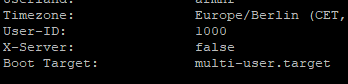
        64143d09-d8b9-4bde-a735-146831b37781-grafik.png


        Copy text starting here:

        ======================= SUMMARY =======================
                                v.2023-10-10
        
        
           Static hostname: raspberrypi
                 Icon name: computer
          Operating System: Raspbian GNU/Linux 11 (bullseye)
                    Kernel: Linux 6.1.21-v8+
              Architecture: arm64
        
        Installation:           native
        Kernel:                 aarch64
        Userland:               armhf
        Timezone:               Europe/Berlin (CET, +0100)
        User-ID:                1000
        X-Server:               false
        Boot Target:            multi-user.target
        
        Pending OS-Updates:     0
        Pending iob updates:    4
        
        Nodejs-Installation:    /usr/bin/nodejs         v18.19.0
                                /usr/bin/node           v18.19.0
                                /usr/bin/npm            10.2.3
                                /usr/bin/npx            10.2.3
                                /usr/bin/corepack       0.22.0
        
        Recommended versions are nodejs 18.19.0 and npm 10.2.3
        Your nodejs installation is correct
        
        MEMORY:
                       total        used        free      shared  buff/cache   available
        Mem:            7.8G        1.9G        4.9G        0.0K        970M        5.8G
        Swap:            99M          0B         99M
        Total:          7.9G        1.9G        5.0G
        
        Active iob-Instances:   37
        Active repo(s): stable
        
        ioBroker Core:          js-controller           5.0.17
                                admin                   6.12.0
        
        ioBroker Status:        iobroker is running on this host.
        
        
        Objects type: jsonl
        States  type: jsonl
        
        Status admin and web instance:
        + system.adapter.admin.0                  : admin                 : raspberrypi                              -  enabled, port: 8081, bind: 0.0.0.0, run as: admin
        + system.adapter.web.0                    : web                   : raspberrypi                              -  enabled, port: 8082, bind: 0.0.0.0, run as: admin
        
        Objects:                14724
        States:                 13024
        
        Size of iob-Database:
        
        23M     /opt/iobroker/iobroker-data/objects.jsonl
        9.0M    /opt/iobroker/iobroker-data/objects.json.migrated
        9.0M    /opt/iobroker/iobroker-data/objects.json.bak.migrated
        4.6M    /opt/iobroker/iobroker-data/states.jsonl
        680K    /opt/iobroker/iobroker-data/states.json.migrated
        680K    /opt/iobroker/iobroker-data/states.json.bak.migrated
        0       /opt/iobroker/iobroker-data/states.json.broken


        =================== END OF SUMMARY ====================
        

        === Mark text until here for copying ===

        1 Reply Last reply
        0
        • Thomas BraunT Thomas Braun

          @tourer4778

          sudo apt update
          sudo apt full-upgrade 
          sudo systemctl set-default multi-user target
          sudo reboot
          

          Dann nochmal

          iob diag
          
          T Offline
          T Offline
          tourer4778
          wrote on last edited by
          #24

          Danke, mein System läuft schon wesentlich besser.

          1 Reply Last reply
          0
          Reply
          • Reply as topic
          Log in to reply
          • Oldest to Newest
          • Newest to Oldest
          • Most Votes


          Support us

          ioBroker
          Community Adapters
          Donate
          FAQ Cloud / IOT
          HowTo: Node.js-Update
          HowTo: Backup/Restore
          Downloads
          BLOG

          727

          Online

          32.7k

          Users

          82.5k

          Topics

          1.3m

          Posts
          Community
          Impressum | Datenschutz-Bestimmungen | Nutzungsbedingungen | Einwilligungseinstellungen
          ioBroker Community 2014-2025
          logo
          • Login

          • Don't have an account? Register

          • Login or register to search.
          • First post
            Last post
          0
          • Home
          • Recent
          • Tags
          • Unread 0
          • Categories
          • Unreplied
          • Popular
          • GitHub
          • Docu
          • Hilfe