




Alexa2 3.26.x
-
@thomas-braun kann man damit was anfangen?
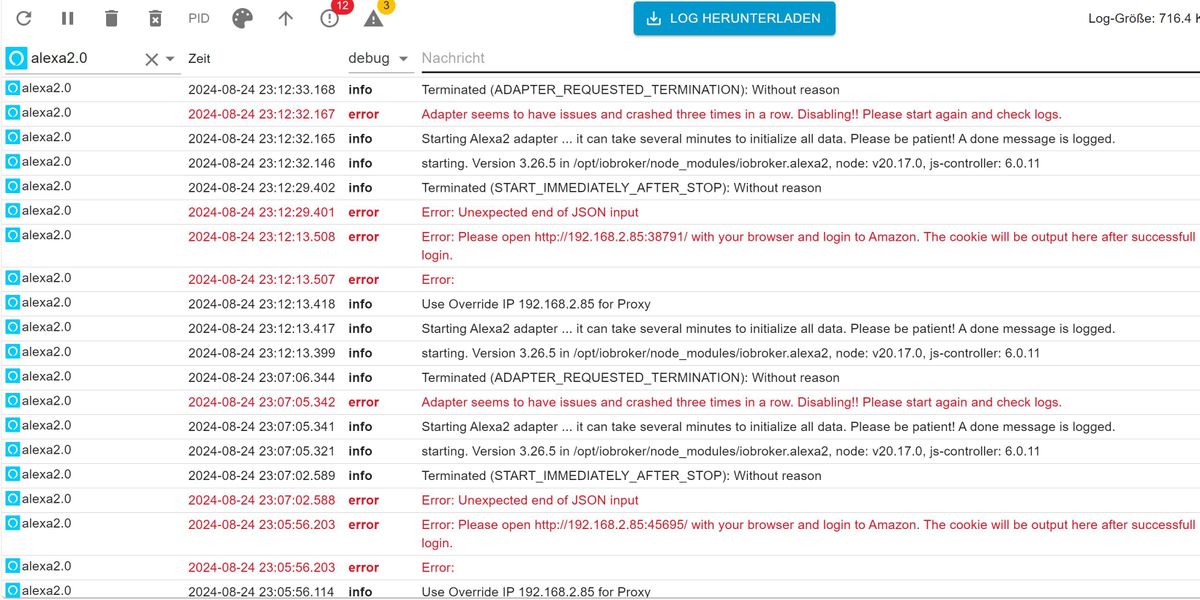
Nein. Mit Bildchen kann ich nix anfangen.
Text als Text in CodeTags hier einfügen. -
@thomas-braun kann man damit was anfangen?
-
@ofbeqnpolkkl6mby5e13 hab unter Proxy-Einstellungen jetzt mal den Port fest auf 38790 eingestellt. Adapter neu gestartet und dann nochmal über diesen Login Link bei amazon eingeloggt aber nix.
Welches Log braucht ihr denn? Also wo muss ich drauf drücken?
-
@ofbeqnpolkkl6mby5e13 hab unter Proxy-Einstellungen jetzt mal den Port fest auf 38790 eingestellt. Adapter neu gestartet und dann nochmal über diesen Login Link bei amazon eingeloggt aber nix.
Welches Log braucht ihr denn? Also wo muss ich drauf drücken?
-
@thomas-braun habs mal versucht:
2024-08-24 23:46:36.892 - info: alexa2.0 (310) starting. Version 3.26.5 in /opt/iobroker/node_modules/iobroker.alexa2, node: v20.17.0, js-controller: 6.0.11 2024-08-24 23:46:36.916 - info: alexa2.0 (310) Starting Alexa2 adapter ... it can take several minutes to initialize all data. Please be patient! A done message is logged. 2024-08-24 23:46:36.917 - info: alexa2.0 (310) Use Override IP 192.168.2.85 for Proxy 2024-08-24 23:46:37.015 - error: alexa2.0 (310) Error: 2024-08-24 23:46:37.016 - error: alexa2.0 (310) Error: Please open http://192.168.2.85:38790/ with your browser and login to Amazon. The cookie will be output here after successfull login. 2024-08-24 23:46:37.771 - info: hmip.0 (295) hmip adapter connected and ready 2024-08-24 23:46:37.777 - error: weatherunderground.0 (280) no observations in response from https://api.weather.com/v3/wx/observations/current?apiKey=e1f10a1e78da46f5b10a1e78da96f525&geocode=0%2C0&units=m&language=de&format=json 2024-08-24 23:46:37.806 - error: weatherunderground.0 (280) WUnderground reported an error: --/{"code":"ERR_INVALID_URL","input":""} 2024-08-24 23:46:37.808 - error: weatherunderground.0 (280) No current observation data found in response 2024-08-24 23:46:38.022 - error: weatherunderground.0 (280) No forecast data found in response 2024-08-24 23:46:40.031 - info: weatherunderground.0 (280) Terminated (NO_ERROR): Without reason 2024-08-24 23:46:40.051 - info: host.raspberrypi4 instance system.adapter.discovery.0 in version "5.0.0" started with pid 325 2024-08-24 23:46:40.578 - info: host.raspberrypi4 instance system.adapter.weatherunderground.0 terminated with code 0 (NO_ERROR) 2024-08-24 23:46:40.787 - info: discovery.0 (325) starting. Version 5.0.0 in /opt/iobroker/node_modules/iobroker.discovery, node: v20.17.0, js-controller: 6.0.11 2024-08-24 23:46:44.019 - info: host.raspberrypi4 instance system.adapter.web.0 in version "6.3.0" started with pid 352 2024-08-24 23:46:44.850 - info: web.0 (352) starting. Version 6.3.0 in /opt/iobroker/node_modules/iobroker.web, node: v20.17.0, js-controller: 6.0.11 2024-08-24 23:46:44.915 - info: web.0 (352) socket.io server listening on port 8082 2024-08-24 23:46:44.917 - info: web.0 (352) http server listening on port 8082 2024-08-24 23:46:48.006 - info: host.raspberrypi4 instance system.adapter.vis-2.0 in version "2.9.64" started with pid 367 2024-08-24 23:46:48.812 - info: vis-2.0 (367) starting. Version 2.9.64 in /opt/iobroker/node_modules/iobroker.vis-2, node: v20.17.0, js-controller: 6.0.11 2024-08-24 23:46:48.836 - error: vis-2.0 (367) No license found for vis-2. Please get one on https://iobroker.net ! 2024-08-24 23:46:52.051 - info: host.raspberrypi4 instance system.adapter.socketio.0 in version "6.7.1" started with pid 382 2024-08-24 23:46:52.832 - info: socketio.0 (382) starting. Version 6.7.1 in /opt/iobroker/node_modules/iobroker.socketio, node: v20.17.0, js-controller: 6.0.11 2024-08-24 23:46:52.857 - info: socketio.0 (382) socket.io server listening on port 8084 2024-08-24 23:46:56.054 - info: host.raspberrypi4 instance system.adapter.ws.0 in version "2.6.2" started with pid 403 2024-08-24 23:46:56.870 - info: ws.0 (403) starting. Version 2.6.2 in /opt/iobroker/node_modules/iobroker.ws, node: v20.17.0, js-controller: 6.0.11 2024-08-24 23:46:56.981 - error: ws.0 (403) port 8084 already in use 2024-08-24 23:46:56.982 - info: ws.0 (403) Terminated (ADAPTER_REQUESTED_TERMINATION): Without reason 2024-08-24 23:46:57.490 - info: ws.0 (403) terminating http server on port 8084 2024-08-24 23:46:57.502 - info: host.raspberrypi4 instance system.adapter.ws.0 terminated by request of the instance itself and will not be restarted, before user restarts it. 2024-08-24 23:46:57.502 - info: host.raspberrypi4 Do not restart adapter system.adapter.ws.0 because desired by instance 2024-08-24 23:47:00.013 - info: host.raspberrypi4 instance system.adapter.tradfri.0 in version "3.1.3" started with pid 430 2024-08-24 23:47:00.775 - info: tradfri.0 (430) starting. Version 3.1.3 in /opt/iobroker/node_modules/iobroker.tradfri, node: v20.17.0, js-controller: 6.0.11 2024-08-24 23:47:00.870 - info: tradfri.0 (430) Discovering the gateway automatically... 2024-08-24 23:47:00.944 - info: tradfri.0 (430) Found gateway gw-b072bf27b5f5 at 192.168.2.136 2024-08-24 23:47:01.141 - info: tradfri.0 (430) got all devices: [65548,65551,65553,65546,65556,65554,65558,65559,65549,65541,65540,65537,65550,65557] 2024-08-24 23:47:01.192 - warn: tradfri.0 (430) found unknown property with key 15019 2024-08-24 23:47:01.192 - warn: tradfri.0 (430) object was: {"3":{"0":"IKEA of Sweden","1":"TRADFRI SHORTCUT Button","2":"","3":"24.4.6","6":3,"7":4550,"8":0,"9":90},"5750":0,"9001":"TRADFRI SHORTCUT Button","9002":1625985939,"9003":65551,"9019":1,"9020":1724496436,"9054":0,"15009":[{"9003":0}],"15019":{"9039":224728,"9250":[{"9251":1,"9252":[{"9253":1,"9254":1,"9255":224728},{"9253":2,"9254":1,"9255":224730},{"9253":3,"9254":1,"9255":224729}]}]}} 2024-08-24 23:47:01.197 - warn: tradfri.0 (430) found unknown property with key 15019 2024-08-24 23:47:01.197 - warn: tradfri.0 (430) object was: {"3":{"0":"IKEA of Sweden","1":"TRADFRI SHORTCUT Button","2":"","3":"24.4.6","6":3,"7":4550,"8":0,"9":90},"5750":0,"9001":"Shortcut-Taste 2","9002":1666879445,"9003":65553,"9019":1,"9020":1724508036,"9054":0,"15009":[{"9003":0}],"15019":{"9039":224731,"9250":[{"9251":1,"9252":[{"9253":1,"9254":1,"9255":224731},{"9253":2,"9254":0,"9255":0},{"9253":3,"9254":1,"9255":224732}]}]}} 2024-08-24 23:47:01.221 - info: tradfri.0 (430) received all devices 2024-08-24 23:47:01.225 - info: tradfri.0 (430) got all groups: [165545,165538,165541,165537,165539,165544,165542] 2024-08-24 23:47:01.386 - info: tradfri.0 (430) got all scenes in group 165537: [224706,224707,224708,224709] 2024-08-24 23:47:01.397 - info: tradfri.0 (430) got all scenes in group 165538: [224714,224715,224716,224717] 2024-08-24 23:47:01.417 - info: tradfri.0 (430) got all scenes in group 165539: [224718,224728,224729,224730,224731,224732,224733] 2024-08-24 23:47:01.437 - info: tradfri.0 (430) got all scenes in group 165541: [] 2024-08-24 23:47:01.459 - info: tradfri.0 (430) got all scenes in group 165542: [] 2024-08-24 23:47:01.481 - info: tradfri.0 (430) got all scenes in group 165544: [] 2024-08-24 23:47:01.491 - info: tradfri.0 (430) got all scenes in group 165545: [] 2024-08-24 23:47:01.508 - info: tradfri.0 (430) updating possible scenes for group 165537: ["224706"] 2024-08-24 23:47:01.525 - info: tradfri.0 (430) updating possible scenes for group 165537: ["224706","224707"] 2024-08-24 23:47:01.542 - info: tradfri.0 (430) updating possible scenes for group 165537: ["224706","224707","224708"] 2024-08-24 23:47:01.574 - info: tradfri.0 (430) updating possible scenes for group 165537: ["224706","224707","224708","224709"] 2024-08-24 23:47:01.589 - info: tradfri.0 (430) updating possible scenes for group 165538: ["224714"] 2024-08-24 23:47:01.604 - info: tradfri.0 (430) updating possible scenes for group 165538: ["224714","224715"] 2024-08-24 23:47:01.620 - info: tradfri.0 (430) updating possible scenes for group 165538: ["224714","224715","224716"] 2024-08-24 23:47:01.633 - info: tradfri.0 (430) updating possible scenes for group 165538: ["224714","224715","224716","224717"] 2024-08-24 23:47:01.651 - info: tradfri.0 (430) updating possible scenes for group 165539: ["224718"] 2024-08-24 23:47:01.681 - info: tradfri.0 (430) updating possible scenes for group 165539: ["224718","224728"] 2024-08-24 23:47:01.688 - info: tradfri.0 (430) updating possible scenes for group 165539: ["224718","224728","224729"] 2024-08-24 23:47:01.696 - info: tradfri.0 (430) updating possible scenes for group 165539: ["224718","224728","224729","224730"] 2024-08-24 23:47:01.716 - info: tradfri.0 (430) updating possible scenes for group 165539: ["224718","224728","224729","224730","224731"] 2024-08-24 23:47:01.728 - info: tradfri.0 (430) updating possible scenes for group 165539: ["224718","224728","224729","224730","224731","224732"] 2024-08-24 23:47:01.741 - info: tradfri.0 (430) received all groups and scenes 2024-08-24 23:47:01.742 - info: tradfri.0 (430) updating possible scenes for group 165539: ["224718","224728","224729","224730","224731","224732","224733"] 2024-08-24 23:48:20.309 - info: admin.0 (158) failed connection to socket.io from ::ffff:192.168.2.75: Passport was not initialized 2024-08-24 23:48:25.085 - info: admin.0 (158) ==> Connected system.user.admin from ::ffff:192.168.2.75 2024-08-24 23:48:33.632 - info: admin.0 (158) ==> Connected system.user.admin from ::ffff:192.168.2.75 2024-08-24 23:48:47.914 - error: alexa2.0 (310) Error: Unexpected end of JSON input 2024-08-24 23:48:47.915 - info: alexa2.0 (310) Terminated (START_IMMEDIATELY_AFTER_STOP): Without reason 2024-08-24 23:48:48.448 - info: host.raspberrypi4 instance system.adapter.alexa2.0 terminated with code 156 (START_IMMEDIATELY_AFTER_STOP) 2024-08-24 23:48:48.449 - info: host.raspberrypi4 Restart adapter system.adapter.alexa2.0 because enabled 2024-08-24 23:48:49.814 - info: host.raspberrypi4 instance system.adapter.alexa2.0 in version "3.26.5" started with pid 547 2024-08-24 23:48:50.618 - info: alexa2.0 (547) starting. Version 3.26.5 in /opt/iobroker/node_modules/iobroker.alexa2, node: v20.17.0, js-controller: 6.0.11 2024-08-24 23:48:50.637 - info: alexa2.0 (547) Starting Alexa2 adapter ... it can take several minutes to initialize all data. Please be patient! A done message is logged. 2024-08-24 23:48:50.643 - error: alexa2.0 (547) Adapter seems to have issues and crashed three times in a row. Disabling!! Please start again and check logs. 2024-08-24 23:48:51.644 - info: alexa2.0 (547) Terminated (ADAPTER_REQUESTED_TERMINATION): Without reason 2024-08-24 23:48:52.164 - info: host.raspberrypi4 instance system.adapter.alexa2.0 terminated by request of the instance itself and will not be restarted, before user restarts it. 2024-08-24 23:48:52.164 - info: host.raspberrypi4 Do not restart adapter system.adapter.alexa2.0 because desired by instance 2024-08-24 23:49:25.150 - info: admin.0 (158) <== Disconnect system.user.admin from ::ffff:192.168.2.75 -
@thomas-braun habs mal versucht:
2024-08-24 23:46:36.892 - info: alexa2.0 (310) starting. Version 3.26.5 in /opt/iobroker/node_modules/iobroker.alexa2, node: v20.17.0, js-controller: 6.0.11 2024-08-24 23:46:36.916 - info: alexa2.0 (310) Starting Alexa2 adapter ... it can take several minutes to initialize all data. Please be patient! A done message is logged. 2024-08-24 23:46:36.917 - info: alexa2.0 (310) Use Override IP 192.168.2.85 for Proxy 2024-08-24 23:46:37.015 - error: alexa2.0 (310) Error: 2024-08-24 23:46:37.016 - error: alexa2.0 (310) Error: Please open http://192.168.2.85:38790/ with your browser and login to Amazon. The cookie will be output here after successfull login. 2024-08-24 23:46:37.771 - info: hmip.0 (295) hmip adapter connected and ready 2024-08-24 23:46:37.777 - error: weatherunderground.0 (280) no observations in response from https://api.weather.com/v3/wx/observations/current?apiKey=e1f10a1e78da46f5b10a1e78da96f525&geocode=0%2C0&units=m&language=de&format=json 2024-08-24 23:46:37.806 - error: weatherunderground.0 (280) WUnderground reported an error: --/{"code":"ERR_INVALID_URL","input":""} 2024-08-24 23:46:37.808 - error: weatherunderground.0 (280) No current observation data found in response 2024-08-24 23:46:38.022 - error: weatherunderground.0 (280) No forecast data found in response 2024-08-24 23:46:40.031 - info: weatherunderground.0 (280) Terminated (NO_ERROR): Without reason 2024-08-24 23:46:40.051 - info: host.raspberrypi4 instance system.adapter.discovery.0 in version "5.0.0" started with pid 325 2024-08-24 23:46:40.578 - info: host.raspberrypi4 instance system.adapter.weatherunderground.0 terminated with code 0 (NO_ERROR) 2024-08-24 23:46:40.787 - info: discovery.0 (325) starting. Version 5.0.0 in /opt/iobroker/node_modules/iobroker.discovery, node: v20.17.0, js-controller: 6.0.11 2024-08-24 23:46:44.019 - info: host.raspberrypi4 instance system.adapter.web.0 in version "6.3.0" started with pid 352 2024-08-24 23:46:44.850 - info: web.0 (352) starting. Version 6.3.0 in /opt/iobroker/node_modules/iobroker.web, node: v20.17.0, js-controller: 6.0.11 2024-08-24 23:46:44.915 - info: web.0 (352) socket.io server listening on port 8082 2024-08-24 23:46:44.917 - info: web.0 (352) http server listening on port 8082 2024-08-24 23:46:48.006 - info: host.raspberrypi4 instance system.adapter.vis-2.0 in version "2.9.64" started with pid 367 2024-08-24 23:46:48.812 - info: vis-2.0 (367) starting. Version 2.9.64 in /opt/iobroker/node_modules/iobroker.vis-2, node: v20.17.0, js-controller: 6.0.11 2024-08-24 23:46:48.836 - error: vis-2.0 (367) No license found for vis-2. Please get one on https://iobroker.net ! 2024-08-24 23:46:52.051 - info: host.raspberrypi4 instance system.adapter.socketio.0 in version "6.7.1" started with pid 382 2024-08-24 23:46:52.832 - info: socketio.0 (382) starting. Version 6.7.1 in /opt/iobroker/node_modules/iobroker.socketio, node: v20.17.0, js-controller: 6.0.11 2024-08-24 23:46:52.857 - info: socketio.0 (382) socket.io server listening on port 8084 2024-08-24 23:46:56.054 - info: host.raspberrypi4 instance system.adapter.ws.0 in version "2.6.2" started with pid 403 2024-08-24 23:46:56.870 - info: ws.0 (403) starting. Version 2.6.2 in /opt/iobroker/node_modules/iobroker.ws, node: v20.17.0, js-controller: 6.0.11 2024-08-24 23:46:56.981 - error: ws.0 (403) port 8084 already in use 2024-08-24 23:46:56.982 - info: ws.0 (403) Terminated (ADAPTER_REQUESTED_TERMINATION): Without reason 2024-08-24 23:46:57.490 - info: ws.0 (403) terminating http server on port 8084 2024-08-24 23:46:57.502 - info: host.raspberrypi4 instance system.adapter.ws.0 terminated by request of the instance itself and will not be restarted, before user restarts it. 2024-08-24 23:46:57.502 - info: host.raspberrypi4 Do not restart adapter system.adapter.ws.0 because desired by instance 2024-08-24 23:47:00.013 - info: host.raspberrypi4 instance system.adapter.tradfri.0 in version "3.1.3" started with pid 430 2024-08-24 23:47:00.775 - info: tradfri.0 (430) starting. Version 3.1.3 in /opt/iobroker/node_modules/iobroker.tradfri, node: v20.17.0, js-controller: 6.0.11 2024-08-24 23:47:00.870 - info: tradfri.0 (430) Discovering the gateway automatically... 2024-08-24 23:47:00.944 - info: tradfri.0 (430) Found gateway gw-b072bf27b5f5 at 192.168.2.136 2024-08-24 23:47:01.141 - info: tradfri.0 (430) got all devices: [65548,65551,65553,65546,65556,65554,65558,65559,65549,65541,65540,65537,65550,65557] 2024-08-24 23:47:01.192 - warn: tradfri.0 (430) found unknown property with key 15019 2024-08-24 23:47:01.192 - warn: tradfri.0 (430) object was: {"3":{"0":"IKEA of Sweden","1":"TRADFRI SHORTCUT Button","2":"","3":"24.4.6","6":3,"7":4550,"8":0,"9":90},"5750":0,"9001":"TRADFRI SHORTCUT Button","9002":1625985939,"9003":65551,"9019":1,"9020":1724496436,"9054":0,"15009":[{"9003":0}],"15019":{"9039":224728,"9250":[{"9251":1,"9252":[{"9253":1,"9254":1,"9255":224728},{"9253":2,"9254":1,"9255":224730},{"9253":3,"9254":1,"9255":224729}]}]}} 2024-08-24 23:47:01.197 - warn: tradfri.0 (430) found unknown property with key 15019 2024-08-24 23:47:01.197 - warn: tradfri.0 (430) object was: {"3":{"0":"IKEA of Sweden","1":"TRADFRI SHORTCUT Button","2":"","3":"24.4.6","6":3,"7":4550,"8":0,"9":90},"5750":0,"9001":"Shortcut-Taste 2","9002":1666879445,"9003":65553,"9019":1,"9020":1724508036,"9054":0,"15009":[{"9003":0}],"15019":{"9039":224731,"9250":[{"9251":1,"9252":[{"9253":1,"9254":1,"9255":224731},{"9253":2,"9254":0,"9255":0},{"9253":3,"9254":1,"9255":224732}]}]}} 2024-08-24 23:47:01.221 - info: tradfri.0 (430) received all devices 2024-08-24 23:47:01.225 - info: tradfri.0 (430) got all groups: [165545,165538,165541,165537,165539,165544,165542] 2024-08-24 23:47:01.386 - info: tradfri.0 (430) got all scenes in group 165537: [224706,224707,224708,224709] 2024-08-24 23:47:01.397 - info: tradfri.0 (430) got all scenes in group 165538: [224714,224715,224716,224717] 2024-08-24 23:47:01.417 - info: tradfri.0 (430) got all scenes in group 165539: [224718,224728,224729,224730,224731,224732,224733] 2024-08-24 23:47:01.437 - info: tradfri.0 (430) got all scenes in group 165541: [] 2024-08-24 23:47:01.459 - info: tradfri.0 (430) got all scenes in group 165542: [] 2024-08-24 23:47:01.481 - info: tradfri.0 (430) got all scenes in group 165544: [] 2024-08-24 23:47:01.491 - info: tradfri.0 (430) got all scenes in group 165545: [] 2024-08-24 23:47:01.508 - info: tradfri.0 (430) updating possible scenes for group 165537: ["224706"] 2024-08-24 23:47:01.525 - info: tradfri.0 (430) updating possible scenes for group 165537: ["224706","224707"] 2024-08-24 23:47:01.542 - info: tradfri.0 (430) updating possible scenes for group 165537: ["224706","224707","224708"] 2024-08-24 23:47:01.574 - info: tradfri.0 (430) updating possible scenes for group 165537: ["224706","224707","224708","224709"] 2024-08-24 23:47:01.589 - info: tradfri.0 (430) updating possible scenes for group 165538: ["224714"] 2024-08-24 23:47:01.604 - info: tradfri.0 (430) updating possible scenes for group 165538: ["224714","224715"] 2024-08-24 23:47:01.620 - info: tradfri.0 (430) updating possible scenes for group 165538: ["224714","224715","224716"] 2024-08-24 23:47:01.633 - info: tradfri.0 (430) updating possible scenes for group 165538: ["224714","224715","224716","224717"] 2024-08-24 23:47:01.651 - info: tradfri.0 (430) updating possible scenes for group 165539: ["224718"] 2024-08-24 23:47:01.681 - info: tradfri.0 (430) updating possible scenes for group 165539: ["224718","224728"] 2024-08-24 23:47:01.688 - info: tradfri.0 (430) updating possible scenes for group 165539: ["224718","224728","224729"] 2024-08-24 23:47:01.696 - info: tradfri.0 (430) updating possible scenes for group 165539: ["224718","224728","224729","224730"] 2024-08-24 23:47:01.716 - info: tradfri.0 (430) updating possible scenes for group 165539: ["224718","224728","224729","224730","224731"] 2024-08-24 23:47:01.728 - info: tradfri.0 (430) updating possible scenes for group 165539: ["224718","224728","224729","224730","224731","224732"] 2024-08-24 23:47:01.741 - info: tradfri.0 (430) received all groups and scenes 2024-08-24 23:47:01.742 - info: tradfri.0 (430) updating possible scenes for group 165539: ["224718","224728","224729","224730","224731","224732","224733"] 2024-08-24 23:48:20.309 - info: admin.0 (158) failed connection to socket.io from ::ffff:192.168.2.75: Passport was not initialized 2024-08-24 23:48:25.085 - info: admin.0 (158) ==> Connected system.user.admin from ::ffff:192.168.2.75 2024-08-24 23:48:33.632 - info: admin.0 (158) ==> Connected system.user.admin from ::ffff:192.168.2.75 2024-08-24 23:48:47.914 - error: alexa2.0 (310) Error: Unexpected end of JSON input 2024-08-24 23:48:47.915 - info: alexa2.0 (310) Terminated (START_IMMEDIATELY_AFTER_STOP): Without reason 2024-08-24 23:48:48.448 - info: host.raspberrypi4 instance system.adapter.alexa2.0 terminated with code 156 (START_IMMEDIATELY_AFTER_STOP) 2024-08-24 23:48:48.449 - info: host.raspberrypi4 Restart adapter system.adapter.alexa2.0 because enabled 2024-08-24 23:48:49.814 - info: host.raspberrypi4 instance system.adapter.alexa2.0 in version "3.26.5" started with pid 547 2024-08-24 23:48:50.618 - info: alexa2.0 (547) starting. Version 3.26.5 in /opt/iobroker/node_modules/iobroker.alexa2, node: v20.17.0, js-controller: 6.0.11 2024-08-24 23:48:50.637 - info: alexa2.0 (547) Starting Alexa2 adapter ... it can take several minutes to initialize all data. Please be patient! A done message is logged. 2024-08-24 23:48:50.643 - error: alexa2.0 (547) Adapter seems to have issues and crashed three times in a row. Disabling!! Please start again and check logs. 2024-08-24 23:48:51.644 - info: alexa2.0 (547) Terminated (ADAPTER_REQUESTED_TERMINATION): Without reason 2024-08-24 23:48:52.164 - info: host.raspberrypi4 instance system.adapter.alexa2.0 terminated by request of the instance itself and will not be restarted, before user restarts it. 2024-08-24 23:48:52.164 - info: host.raspberrypi4 Do not restart adapter system.adapter.alexa2.0 because desired by instance 2024-08-24 23:49:25.150 - info: admin.0 (158) <== Disconnect system.user.admin from ::ffff:192.168.2.75@automatist2 sagte in Alexa2 3.26.x:
Was ist denn mit den anderen Adaptern los?
Lass da erstmal Ruhe einkehren. -
@automatist2 sagte in Alexa2 3.26.x:
Was ist denn mit den anderen Adaptern los?
Lass da erstmal Ruhe einkehren.@thomas-braun hab mal 2 Adapter die ich aktuell nicht nutze deinstalliert und nochmal bei Amazon eingeloggt:
2024-08-25 00:57:01.604 - warn: web.0 (352) setTimeout called, but adapter is shutting down 2024-08-25 00:57:01.611 - info: host.raspberrypi4 iobroker Adapter "system.adapter.web.0" restarted. 2024-08-25 00:57:01.613 - info: host.raspberrypi4 stopInstance system.adapter.web.0 send kill signal 2024-08-25 00:57:01.616 - info: web.0 (352) Got terminate signal TERMINATE_YOURSELF 2024-08-25 00:57:01.658 - info: host.raspberrypi4 stopInstance system.adapter.web.0 send kill signal 2024-08-25 00:57:02.105 - info: web.0 (352) terminating 2024-08-25 00:57:02.106 - info: web.0 (352) Terminated (ADAPTER_REQUESTED_TERMINATION): Without reason 2024-08-25 00:57:02.614 - info: host.raspberrypi4 stopInstance timeout system.adapter.web.0 killing pid 352 2024-08-25 00:57:02.624 - info: host.raspberrypi4 instance system.adapter.web.0 terminated with code 11 (ADAPTER_REQUESTED_TERMINATION) 2024-08-25 00:57:02.626 - info: host.raspberrypi4 iobroker exit 0 2024-08-25 00:57:05.987 - info: host.raspberrypi4 instance system.adapter.web.0 in version "6.3.0" started with pid 3910 2024-08-25 00:57:06.810 - info: web.0 (3910) starting. Version 6.3.0 in /opt/iobroker/node_modules/iobroker.web, node: v20.17.0, js-controller: 6.0.11 2024-08-25 00:57:06.874 - info: web.0 (3910) socket.io server listening on port 8082 2024-08-25 00:57:06.877 - info: web.0 (3910) http server listening on port 8082 2024-08-25 00:57:22.162 - info: host.raspberrypi4 iobroker del telegram 2024-08-25 00:57:22.918 - info: host.raspberrypi4 iobroker Delete adapter "telegram" 2024-08-25 00:57:22.923 - info: host.raspberrypi4 iobroker host.raspberrypi4 Counted 1 instances of telegram 2024-08-25 00:57:22.935 - info: host.raspberrypi4 iobroker host.raspberrypi4 Counted 2 meta of telegram 2024-08-25 00:57:22.936 - info: host.raspberrypi4 iobroker host.raspberrypi4 Counted 1 adapter for telegram 2024-08-25 00:57:22.942 - info: host.raspberrypi4 iobroker host.raspberrypi4 Counted 1 channels of telegram 2024-08-25 00:57:22.946 - info: host.raspberrypi4 iobroker host.raspberrypi4 Counted 18 states of telegram 2024-08-25 00:57:22.950 - info: host.raspberrypi4 iobroker host.raspberrypi4 Counted 14 states of system.adapter.telegram 2024-08-25 00:57:22.952 - info: host.raspberrypi4 iobroker host.raspberrypi4 Counted 2 states (io.telegram.*) from states 2024-08-25 00:57:22.959 - info: host.raspberrypi4 iobroker host.raspberrypi4 Counted 1 states (system.adapter.telegram.*) from states 2024-08-25 00:57:23.561 - info: host.raspberrypi4 iobroker host.raspberrypi4 file telegram.admin deleted 2024-08-25 00:57:23.565 - info: host.raspberrypi4 iobroker host.raspberrypi4 object telegram deleted 2024-08-25 00:57:23.568 - info: host.raspberrypi4 iobroker host.raspberrypi4 object telegram.admin deleted 2024-08-25 00:57:23.569 - info: host.raspberrypi4 iobroker host.raspberrypi4 Deleting 38 object(s). 2024-08-25 00:57:23.614 - info: host.raspberrypi4 iobroker host.raspberrypi4 Deleting 3 state(s). 2024-08-25 00:57:23.659 - info: host.raspberrypi4 object deleted system.adapter.telegram.0 2024-08-25 00:57:25.515 - info: host.raspberrypi4 iobroker removed 77 packages in 2s 2024-08-25 00:57:25.516 - info: host.raspberrypi4 iobroker 119 packages are looking for funding run `npm fund` for details 2024-08-25 00:57:26.533 - info: host.raspberrypi4 iobroker exit 0 2024-08-25 00:58:48.235 - info: admin.0 (158) ==> Connected system.user.admin from ::ffff:192.168.2.170 2024-08-25 00:58:53.263 - info: admin.0 (158) <== Disconnect system.user.admin from ::ffff:192.168.2.170 2024-08-25 00:58:57.955 - info: host.raspberrypi4 instance system.adapter.alexa2.0 in version "3.26.5" started with pid 4055 2024-08-25 00:58:58.750 - info: alexa2.0 (4055) starting. Version 3.26.5 in /opt/iobroker/node_modules/iobroker.alexa2, node: v20.17.0, js-controller: 6.0.11 2024-08-25 00:58:58.769 - info: alexa2.0 (4055) Starting Alexa2 adapter ... it can take several minutes to initialize all data. Please be patient! A done message is logged. 2024-08-25 00:58:58.770 - info: alexa2.0 (4055) Use Override IP 192.168.2.85 for Proxy 2024-08-25 00:58:58.860 - error: alexa2.0 (4055) Error: 2024-08-25 00:58:58.860 - error: alexa2.0 (4055) Error: Please open http://192.168.2.85:38790/ with your browser and login to Amazon. The cookie will be output here after successfull login. 2024-08-25 00:59:05.384 - info: admin.0 (158) ==> Connected system.user.admin from ::ffff:192.168.2.170 2024-08-25 01:00:13.243 - error: alexa2.0 (4055) Error: Unexpected end of JSON input 2024-08-25 01:00:13.245 - info: alexa2.0 (4055) Terminated (START_IMMEDIATELY_AFTER_STOP): Without reason 2024-08-25 01:00:13.771 - info: host.raspberrypi4 instance system.adapter.alexa2.0 terminated with code 156 (START_IMMEDIATELY_AFTER_STOP) 2024-08-25 01:00:13.772 - info: host.raspberrypi4 Restart adapter system.adapter.alexa2.0 because enabled 2024-08-25 01:00:15.177 - info: host.raspberrypi4 instance system.adapter.alexa2.0 in version "3.26.5" started with pid 4130 2024-08-25 01:00:15.964 - info: alexa2.0 (4130) starting. Version 3.26.5 in /opt/iobroker/node_modules/iobroker.alexa2, node: v20.17.0, js-controller: 6.0.11 2024-08-25 01:00:15.983 - info: alexa2.0 (4130) Starting Alexa2 adapter ... it can take several minutes to initialize all data. Please be patient! A done message is logged. 2024-08-25 01:00:15.986 - error: alexa2.0 (4130) Adapter seems to have issues and crashed three times in a row. Disabling!! Please start again and check logs. 2024-08-25 01:00:16.987 - info: alexa2.0 (4130) Terminated (ADAPTER_REQUESTED_TERMINATION): Without reason 2024-08-25 01:00:17.505 - info: host.raspberrypi4 instance system.adapter.alexa2.0 terminated by request of the instance itself and will not be restarted, before user restarts it. 2024-08-25 01:00:17.505 - info: host.raspberrypi4 Do not restart adapter system.adapter.alexa2.0 because desired by instance 2024-08-25 01:00:28.314 - info: admin.0 (158) <== Disconnect system.user.admin from ::ffff:192.168.2.170 -
@thomas-braun hab mal 2 Adapter die ich aktuell nicht nutze deinstalliert und nochmal bei Amazon eingeloggt:
2024-08-25 00:57:01.604 - warn: web.0 (352) setTimeout called, but adapter is shutting down 2024-08-25 00:57:01.611 - info: host.raspberrypi4 iobroker Adapter "system.adapter.web.0" restarted. 2024-08-25 00:57:01.613 - info: host.raspberrypi4 stopInstance system.adapter.web.0 send kill signal 2024-08-25 00:57:01.616 - info: web.0 (352) Got terminate signal TERMINATE_YOURSELF 2024-08-25 00:57:01.658 - info: host.raspberrypi4 stopInstance system.adapter.web.0 send kill signal 2024-08-25 00:57:02.105 - info: web.0 (352) terminating 2024-08-25 00:57:02.106 - info: web.0 (352) Terminated (ADAPTER_REQUESTED_TERMINATION): Without reason 2024-08-25 00:57:02.614 - info: host.raspberrypi4 stopInstance timeout system.adapter.web.0 killing pid 352 2024-08-25 00:57:02.624 - info: host.raspberrypi4 instance system.adapter.web.0 terminated with code 11 (ADAPTER_REQUESTED_TERMINATION) 2024-08-25 00:57:02.626 - info: host.raspberrypi4 iobroker exit 0 2024-08-25 00:57:05.987 - info: host.raspberrypi4 instance system.adapter.web.0 in version "6.3.0" started with pid 3910 2024-08-25 00:57:06.810 - info: web.0 (3910) starting. Version 6.3.0 in /opt/iobroker/node_modules/iobroker.web, node: v20.17.0, js-controller: 6.0.11 2024-08-25 00:57:06.874 - info: web.0 (3910) socket.io server listening on port 8082 2024-08-25 00:57:06.877 - info: web.0 (3910) http server listening on port 8082 2024-08-25 00:57:22.162 - info: host.raspberrypi4 iobroker del telegram 2024-08-25 00:57:22.918 - info: host.raspberrypi4 iobroker Delete adapter "telegram" 2024-08-25 00:57:22.923 - info: host.raspberrypi4 iobroker host.raspberrypi4 Counted 1 instances of telegram 2024-08-25 00:57:22.935 - info: host.raspberrypi4 iobroker host.raspberrypi4 Counted 2 meta of telegram 2024-08-25 00:57:22.936 - info: host.raspberrypi4 iobroker host.raspberrypi4 Counted 1 adapter for telegram 2024-08-25 00:57:22.942 - info: host.raspberrypi4 iobroker host.raspberrypi4 Counted 1 channels of telegram 2024-08-25 00:57:22.946 - info: host.raspberrypi4 iobroker host.raspberrypi4 Counted 18 states of telegram 2024-08-25 00:57:22.950 - info: host.raspberrypi4 iobroker host.raspberrypi4 Counted 14 states of system.adapter.telegram 2024-08-25 00:57:22.952 - info: host.raspberrypi4 iobroker host.raspberrypi4 Counted 2 states (io.telegram.*) from states 2024-08-25 00:57:22.959 - info: host.raspberrypi4 iobroker host.raspberrypi4 Counted 1 states (system.adapter.telegram.*) from states 2024-08-25 00:57:23.561 - info: host.raspberrypi4 iobroker host.raspberrypi4 file telegram.admin deleted 2024-08-25 00:57:23.565 - info: host.raspberrypi4 iobroker host.raspberrypi4 object telegram deleted 2024-08-25 00:57:23.568 - info: host.raspberrypi4 iobroker host.raspberrypi4 object telegram.admin deleted 2024-08-25 00:57:23.569 - info: host.raspberrypi4 iobroker host.raspberrypi4 Deleting 38 object(s). 2024-08-25 00:57:23.614 - info: host.raspberrypi4 iobroker host.raspberrypi4 Deleting 3 state(s). 2024-08-25 00:57:23.659 - info: host.raspberrypi4 object deleted system.adapter.telegram.0 2024-08-25 00:57:25.515 - info: host.raspberrypi4 iobroker removed 77 packages in 2s 2024-08-25 00:57:25.516 - info: host.raspberrypi4 iobroker 119 packages are looking for funding run `npm fund` for details 2024-08-25 00:57:26.533 - info: host.raspberrypi4 iobroker exit 0 2024-08-25 00:58:48.235 - info: admin.0 (158) ==> Connected system.user.admin from ::ffff:192.168.2.170 2024-08-25 00:58:53.263 - info: admin.0 (158) <== Disconnect system.user.admin from ::ffff:192.168.2.170 2024-08-25 00:58:57.955 - info: host.raspberrypi4 instance system.adapter.alexa2.0 in version "3.26.5" started with pid 4055 2024-08-25 00:58:58.750 - info: alexa2.0 (4055) starting. Version 3.26.5 in /opt/iobroker/node_modules/iobroker.alexa2, node: v20.17.0, js-controller: 6.0.11 2024-08-25 00:58:58.769 - info: alexa2.0 (4055) Starting Alexa2 adapter ... it can take several minutes to initialize all data. Please be patient! A done message is logged. 2024-08-25 00:58:58.770 - info: alexa2.0 (4055) Use Override IP 192.168.2.85 for Proxy 2024-08-25 00:58:58.860 - error: alexa2.0 (4055) Error: 2024-08-25 00:58:58.860 - error: alexa2.0 (4055) Error: Please open http://192.168.2.85:38790/ with your browser and login to Amazon. The cookie will be output here after successfull login. 2024-08-25 00:59:05.384 - info: admin.0 (158) ==> Connected system.user.admin from ::ffff:192.168.2.170 2024-08-25 01:00:13.243 - error: alexa2.0 (4055) Error: Unexpected end of JSON input 2024-08-25 01:00:13.245 - info: alexa2.0 (4055) Terminated (START_IMMEDIATELY_AFTER_STOP): Without reason 2024-08-25 01:00:13.771 - info: host.raspberrypi4 instance system.adapter.alexa2.0 terminated with code 156 (START_IMMEDIATELY_AFTER_STOP) 2024-08-25 01:00:13.772 - info: host.raspberrypi4 Restart adapter system.adapter.alexa2.0 because enabled 2024-08-25 01:00:15.177 - info: host.raspberrypi4 instance system.adapter.alexa2.0 in version "3.26.5" started with pid 4130 2024-08-25 01:00:15.964 - info: alexa2.0 (4130) starting. Version 3.26.5 in /opt/iobroker/node_modules/iobroker.alexa2, node: v20.17.0, js-controller: 6.0.11 2024-08-25 01:00:15.983 - info: alexa2.0 (4130) Starting Alexa2 adapter ... it can take several minutes to initialize all data. Please be patient! A done message is logged. 2024-08-25 01:00:15.986 - error: alexa2.0 (4130) Adapter seems to have issues and crashed three times in a row. Disabling!! Please start again and check logs. 2024-08-25 01:00:16.987 - info: alexa2.0 (4130) Terminated (ADAPTER_REQUESTED_TERMINATION): Without reason 2024-08-25 01:00:17.505 - info: host.raspberrypi4 instance system.adapter.alexa2.0 terminated by request of the instance itself and will not be restarted, before user restarts it. 2024-08-25 01:00:17.505 - info: host.raspberrypi4 Do not restart adapter system.adapter.alexa2.0 because desired by instance 2024-08-25 01:00:28.314 - info: admin.0 (158) <== Disconnect system.user.admin from ::ffff:192.168.2.170Warum machst Du nicht das, was im Log zum x.Mal steht?
Please open http://192.168.2.85:38790/ with your browser and login to Amazon. The cookie will be output here after successfull login -
Gibt es einen Datenpunkt der den Status vom Mikrofon anzeigt?
Man kann ja per Hardwaretaste am Gerät aktivieren oder deaktivieren.@spike2
Nein gibt es nicht.
Von Amazon ist ja keinerlei Zugriff aufs Micro per Software gewollt.
Für uns Smart Home bastler sicher doof, aber im Bezug auf Sicherheit (zumindest was eine Steuerung abgeht) aber schon verständlich. :relieved: -
Hallo zusammen,
ich habe seit gestern Probleme mit meinem Alexa Adapter.
Lief problemlos und aus heiterem Himmel "Verbunden mit Gerät oder Dienst" ein gelbes Ausrufezeichen.
Adatper neu gestartet, in den Logs kam der Hinweis ein neues Cookie zu erstellen.
Also Seite aufgerufen, eingeloggt, in der AlexaApp genehmigt. Dann kam der Hinweis "Cookie erstellt, Browser schließen" oder so ähnlich.
Und dann gingen im Adapter alle 3 Lampen auf rot und im Log steht:Starting Alexa2 adapter ... it can take several minutes to initialize all data. Please be patient! A done message is logged. Adapter seems to have issues and crashed three times in a row. Disabling!! Please start again and check logs. Terminated (ADAPTER_REQUESTED_TERMINATION): Without reasonWenn ich im Adapter das AmazonCookie zurücksetzte, sind wieder "Verbunden mit Host" und "Lebenszeichen" grün, sobald ich das Cookie setze alle 3 rot.
Hat noch jemand das Problem, oder liegt es an mir?
Gruß
Tom
-
Hallo zusammen,
ich habe seit gestern Probleme mit meinem Alexa Adapter.
Lief problemlos und aus heiterem Himmel "Verbunden mit Gerät oder Dienst" ein gelbes Ausrufezeichen.
Adatper neu gestartet, in den Logs kam der Hinweis ein neues Cookie zu erstellen.
Also Seite aufgerufen, eingeloggt, in der AlexaApp genehmigt. Dann kam der Hinweis "Cookie erstellt, Browser schließen" oder so ähnlich.
Und dann gingen im Adapter alle 3 Lampen auf rot und im Log steht:Starting Alexa2 adapter ... it can take several minutes to initialize all data. Please be patient! A done message is logged. Adapter seems to have issues and crashed three times in a row. Disabling!! Please start again and check logs. Terminated (ADAPTER_REQUESTED_TERMINATION): Without reasonWenn ich im Adapter das AmazonCookie zurücksetzte, sind wieder "Verbunden mit Host" und "Lebenszeichen" grün, sobald ich das Cookie setze alle 3 rot.
Hat noch jemand das Problem, oder liegt es an mir?
Gruß
Tom
-
Hallo zusammen,
ich habe seit gestern Probleme mit meinem Alexa Adapter.
Lief problemlos und aus heiterem Himmel "Verbunden mit Gerät oder Dienst" ein gelbes Ausrufezeichen.
Adatper neu gestartet, in den Logs kam der Hinweis ein neues Cookie zu erstellen.
Also Seite aufgerufen, eingeloggt, in der AlexaApp genehmigt. Dann kam der Hinweis "Cookie erstellt, Browser schließen" oder so ähnlich.
Und dann gingen im Adapter alle 3 Lampen auf rot und im Log steht:Starting Alexa2 adapter ... it can take several minutes to initialize all data. Please be patient! A done message is logged. Adapter seems to have issues and crashed three times in a row. Disabling!! Please start again and check logs. Terminated (ADAPTER_REQUESTED_TERMINATION): Without reasonWenn ich im Adapter das AmazonCookie zurücksetzte, sind wieder "Verbunden mit Host" und "Lebenszeichen" grün, sobald ich das Cookie setze alle 3 rot.
Hat noch jemand das Problem, oder liegt es an mir?
Gruß
Tom
-
Ich habe jetzt den Adapter nochmal neu gestartet und jetzt läuft er wieder, ohne ein neues Cookie zu erstellen.
Keine Ahnung warum, vorher mit zwei Rechnern das selbe Problem.
Danke dass du mir helfen wolltest.Gruß
-
Hi,
die Alexa2 3.26.0 kommt jetzt zeitnah nach npm und ins Latest Repo. Im Vergleich zu den früheren Versionen bringt Sie einen Unterschied: Ich habe entschieden das es das beste ist wenn Ihr konfigurieren könnt ob Aktivitäten/History automatisch abgefragt werden soll oder nicht. Viele brauen es ggf gar nicht und so sparen wir Anfragen an die Amazon Systeme und es gibt weniger Probleme.
Daher bitte nur dann aktivieren wenn es gebraucht wird !Auch die von Euch die der Meinung sind Sie brauchen es bitte mal selbst hinterfragen:
Wenn es nur darum geht mitzubekommen das eine Routine ausgelöst wurde ... der aktuelle ideale Standardweg um das Triggern von Routinen mitzubekommen sollte über den iot Adapter und virtuelle Geräte, die Ihr einfach in der Routine schaltet, gehen. Legt pro Routine ein virtuelles Gerät an und es ist eindeutig. Eure Skripte können dann weiterhin auf eine Aktualisierung dieser Geräte reagieren!Ingo
-
-
Virtuelles Gerät, indem man einen on/of state in dem ioT Adapter zu den Alexa Geräten hinzufügt?
-
Wie bekommt man dann mit, von welcher Alexa der Befehl kam?
@ben1983
1.) Verstehe die Frage nicht
2.) gar nicht ... das unterstützt Amazon bei den Smart Home Skills nichtBeitrag hat geholfen? Votet rechts unten im Beitrag :-) https://paypal.me/Apollon77 / https://github.com/sponsors/Apollon77
- Debug-Log für Instanz einschalten? Admin -> Instanzen -> Expertenmodus -> Instanz aufklappen - Loglevel ändern
- Logfiles auf Platte /opt/iobroker/log/… nutzen, Admin schneidet Zeilen ab
-
-
@ben1983
1.) Verstehe die Frage nicht
2.) gar nicht ... das unterstützt Amazon bei den Smart Home Skills nicht-
na legt man imioT Adapter einfach ein Gerät an, welches man dann mittels dem Skill schaltet, oder wie?
-
mit dem Alexa2 Adapter ging das aber mal ganz gut, da die Routine des entsprechenden Geräts geschaltet wurde.
-
-
-
na legt man imioT Adapter einfach ein Gerät an, welches man dann mittels dem Skill schaltet, oder wie?
-
mit dem Alexa2 Adapter ging das aber mal ganz gut, da die Routine des entsprechenden Geräts geschaltet wurde.
- Es ist nicht virtuell. Du legst den Datenpunkt aus deinem Gerät (Rollo, Schalter oder sonst was) im IOT Adapter mit entsprechender Funktion (Typ) an und kannst dann über Gerätesuche in der App diese finden. Deine Alexa spricht dann direkt mit dem IOT Adapter der es weiterleitet zum Datenpunkt und diesen dann steuert/abfragt.
1.b Es hat nichts mit dem Alexa Adapter hier zu tun. - Unter History im Alexa adapter im Datenpunkt Name.
-






Support us
546
Online32.7k
Users82.5k
Topics1.3m
Posts