



Skip to content
  • Home
  • Recent
  • Tags
  • 0 Unread 0
  • Categories
  • Unreplied
  • Popular
  • GitHub
  • Docu
  • Hilfe
Skins
  • Light
  • Brite
  • Cerulean
  • Cosmo
  • Flatly
  • Journal
  • Litera
  • Lumen
  • Lux
  • Materia
  • Minty
  • Morph
  • Pulse
  • Sandstone
  • Simplex
  • Sketchy
  • Spacelab
  • United
  • Yeti
  • Zephyr
  • Dark
  • Cyborg
  • Darkly
  • Quartz
  • Slate
  • Solar
  • Superhero
  • Vapor

  • Default (No Skin)
  • No Skin
Collapse
ioBroker Logo

Community Forum

donate donate
  1. ioBroker Community Home
  2. English
  3. Visualization
  4. Selecting default view in VIS

NEWS

  • Neuer Blogbeitrag: Monatsrückblick - Dezember 2025 🎄
    BluefoxB
    Bluefox
    9
    1
    82

  • Weihnachtsangebot 2025! 🎄
    BluefoxB
    Bluefox
    24
    1
    1.4k

  • UPDATE 31.10.: Amazon Alexa - ioBroker Skill läuft aus ?
    apollon77A
    apollon77
    48
    3
    9.3k

Selecting default view in VIS

Scheduled Pinned Locked Moved Visualization
vis
4 Posts 2 Posters 971 Views 1 Watching
  • Oldest to Newest
  • Newest to Oldest
  • Most Votes
Reply
  • Reply as topic
Log in to reply
This topic has been deleted. Only users with topic management privileges can see it.
  • A Offline
    A Offline
    ap2017
    wrote on last edited by
    #1

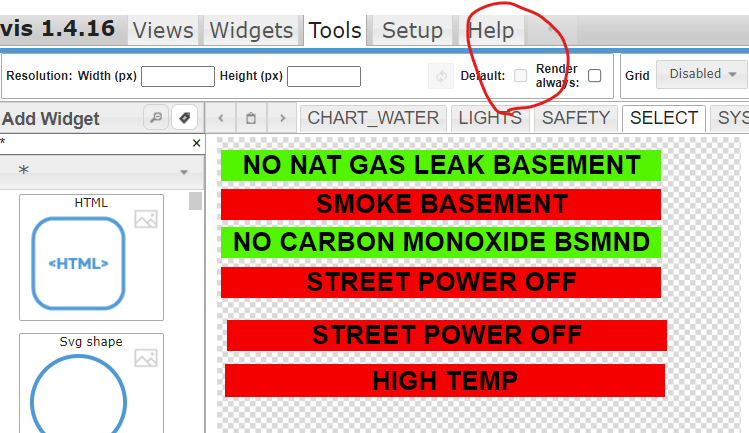
    I am not able to select default view in VIS, the check box on VIS development Tools tab is grayed out. No other view is selected default. When real-time starts, it shows the first view in alphabetical order.
    681e6869-1916-43d8-9ade-a882e1e960e0-image.png

    HomoranH 1 Reply Last reply
    0
    • A ap2017

      I am not able to select default view in VIS, the check box on VIS development Tools tab is grayed out. No other view is selected default. When real-time starts, it shows the first view in alphabetical order.

      681e6869-1916-43d8-9ade-a882e1e960e0-image.png

      HomoranH Do not disturb
      HomoranH Do not disturb
      Homoran
      Global Moderator Administrators
      wrote on last edited by
      #2

      @ap2017 may be!! the missing resolution.

      The default view is always bound to a resolution.
      So you can select several default viewswith different resolutions, and the one with the most similar to the front end's resolution will be opened.

      kein Support per PN! - Fragen im Forum stellen - es gibt fast nichts, was nicht auch für andere interessant ist.

      Benutzt das Voting rechts unten im Beitrag wenn er euch geholfen hat.

      der Installationsfixer: curl -fsL https://iobroker.net/fix.sh | bash -

      A 1 Reply Last reply
      0
      • HomoranH Homoran

        @ap2017 may be!! the missing resolution.

        The default view is always bound to a resolution.
        So you can select several default viewswith different resolutions, and the one with the most similar to the front end's resolution will be opened.

        A Offline
        A Offline
        ap2017
        wrote on last edited by ap2017
        #3

        @homoran What if I have several views with same resolution? How to set default? What do you call front end? In my case I would like to monitor real time views on Android phone, is it considered front end?

        HomoranH 1 Reply Last reply
        0
        • A ap2017

          @homoran What if I have several views with same resolution? How to set default? What do you call front end? In my case I would like to monitor real time views on Android phone, is it considered front end?

          HomoranH Do not disturb
          HomoranH Do not disturb
          Homoran
          Global Moderator Administrators
          wrote on last edited by Homoran
          #4

          @ap2017 sagte in Selecting default view in VIS:

          What if I have several views with same resolution? How to set default

          then you should set only one to default.

          @ap2017 sagte in Selecting default view in VIS:

          is it considered front end?

          yes.

          if you have different front ends (mobiles, tablets, pc) with different resolutions, you can use different views as default for each. But you don't have to.

          1920x1080 7s not the same as 1080x1920!
          so you can switch default views by turning your phone.

          therefore I guess that the missing resolution in config maybe the reason, that you cannot select the default checkbox

          kein Support per PN! - Fragen im Forum stellen - es gibt fast nichts, was nicht auch für andere interessant ist.

          Benutzt das Voting rechts unten im Beitrag wenn er euch geholfen hat.

          der Installationsfixer: curl -fsL https://iobroker.net/fix.sh | bash -

          1 Reply Last reply
          0
          Reply
          • Reply as topic
          Log in to reply
          • Oldest to Newest
          • Newest to Oldest
          • Most Votes


          Support us

          ioBroker
          Community Adapters
          Donate

          772

          Online

          32.5k

          Users

          81.7k

          Topics

          1.3m

          Posts
          Community
          Impressum | Datenschutz-Bestimmungen | Nutzungsbedingungen | Einwilligungseinstellungen
          ioBroker Community 2014-2025
          logo
          • Login

          • Don't have an account? Register

          • Login or register to search.
          • First post
            Last post
          0
          • Home
          • Recent
          • Tags
          • Unread 0
          • Categories
          • Unreplied
          • Popular
          • GitHub
          • Docu
          • Hilfe