



Skip to content
  • Home
  • Recent
  • Tags
  • 0 Unread 0
  • Categories
  • Unreplied
  • Popular
  • GitHub
  • Docu
  • Hilfe
Skins
  • Light
  • Brite
  • Cerulean
  • Cosmo
  • Flatly
  • Journal
  • Litera
  • Lumen
  • Lux
  • Materia
  • Minty
  • Morph
  • Pulse
  • Sandstone
  • Simplex
  • Sketchy
  • Spacelab
  • United
  • Yeti
  • Zephyr
  • Dark
  • Cyborg
  • Darkly
  • Quartz
  • Slate
  • Solar
  • Superhero
  • Vapor

  • Default (No Skin)
  • No Skin
Collapse
ioBroker Logo

Community Forum

donate donate
  1. ioBroker Community Home
  2. Deutsch
  3. Skripten / Logik
  4. JavaScript
  5. MQTT Json

NEWS

  • Neuer Blogbeitrag: Monatsrückblick - Dezember 2025 🎄
    BluefoxB
    Bluefox
    5
    1
    33

  • Weihnachtsangebot 2025! 🎄
    BluefoxB
    Bluefox
    24
    1
    1.4k

  • UPDATE 31.10.: Amazon Alexa - ioBroker Skill läuft aus ?
    apollon77A
    apollon77
    48
    3
    9.3k

MQTT Json

Scheduled Pinned Locked Moved JavaScript
9 Posts 3 Posters 676 Views 2 Watching
  • Oldest to Newest
  • Newest to Oldest
  • Most Votes
Reply
  • Reply as topic
Log in to reply
This topic has been deleted. Only users with topic management privileges can see it.
  • R Offline
    R Offline
    ralf2201
    wrote on last edited by
    #1

    Hallo,

    habe eine Scriptvorlage auf meine Bedürfnisse angepasst, mache aber irgend einen Fehler.
    Ich hätte jetzt erwartet, dass mir das Script die Datenpunkte unter "alias.0.tasmota" anlegt. Leider klappt das nicht.

    Die Daten kommen über einen IR Lesekopf am Stromzähler über Tasmota.
    Kann mir jemand sagen was ich hier falsch mache?

    const JSPath = "alias.0"                              // JS- Pfad
    const parsedStatesPath   = JSPath + ".tasmota"         // Pfad fuer geparste States
    const zigbee2mqttJsonPath = "mqtt.0.tele.tasmota_192_168_50_134_strom.SENSOR"           //Pfad fuer zigbee2mqtt Json Objekte
    let IDs = [];
     
     
    $("[id=" + zigbee2mqttJsonPath + ".*]").each(function (id) {
        IDs.push(id)
    })
    on({id: IDs, change: "ne"}, function (obj) {
        let JsonObj = JSON.parse(obj.state.val)
        Object.keys(JsonObj).forEach(function(key){
            if (getState(obj.id.replace(zigbee2mqttJsonPath, parsedStatesPath)).notExist){
                createState(obj.id.replace(zigbee2mqttJsonPath, parsedStatesPath) + '.' + key, JsonObj[key], {read: true, write: true, type: typeof(JsonObj[key]), name: '' , desc: ''},function(){
                    setState(obj.id.replace(zigbee2mqttJsonPath, parsedStatesPath) + '.' + key, JsonObj[key])
            })
            }else {
                setState(obj.id.replace(zigbee2mqttJsonPath, parsedStatesPath) + '.' + key, JsonObj[key])
            };
        })
    })
    
    
    paul53P T 2 Replies Last reply
    0
    • R ralf2201

      Hallo,

      habe eine Scriptvorlage auf meine Bedürfnisse angepasst, mache aber irgend einen Fehler.
      Ich hätte jetzt erwartet, dass mir das Script die Datenpunkte unter "alias.0.tasmota" anlegt. Leider klappt das nicht.

      Die Daten kommen über einen IR Lesekopf am Stromzähler über Tasmota.
      Kann mir jemand sagen was ich hier falsch mache?

      const JSPath = "alias.0"                              // JS- Pfad
      const parsedStatesPath   = JSPath + ".tasmota"         // Pfad fuer geparste States
      const zigbee2mqttJsonPath = "mqtt.0.tele.tasmota_192_168_50_134_strom.SENSOR"           //Pfad fuer zigbee2mqtt Json Objekte
      let IDs = [];
       
       
      $("[id=" + zigbee2mqttJsonPath + ".*]").each(function (id) {
          IDs.push(id)
      })
      on({id: IDs, change: "ne"}, function (obj) {
          let JsonObj = JSON.parse(obj.state.val)
          Object.keys(JsonObj).forEach(function(key){
              if (getState(obj.id.replace(zigbee2mqttJsonPath, parsedStatesPath)).notExist){
                  createState(obj.id.replace(zigbee2mqttJsonPath, parsedStatesPath) + '.' + key, JsonObj[key], {read: true, write: true, type: typeof(JsonObj[key]), name: '' , desc: ''},function(){
                      setState(obj.id.replace(zigbee2mqttJsonPath, parsedStatesPath) + '.' + key, JsonObj[key])
              })
              }else {
                  setState(obj.id.replace(zigbee2mqttJsonPath, parsedStatesPath) + '.' + key, JsonObj[key])
              };
          })
      })
      
      
      paul53P Offline
      paul53P Offline
      paul53
      wrote on last edited by
      #2

      @ralf2201
      Unter "alias.0" kann man keine Datenpunkte mittels createState() erstellen, sondern nur unter "0_userdata.0" und unter "javascript.N".

      Bitte verzichtet auf Chat-Nachrichten, denn die Handhabung ist grauenhaft !
      Produktiv: RPi 2 mit S.USV, HM-MOD-RPI und SLC-USB-Stick mit root fs

      1 Reply Last reply
      0
      • R Offline
        R Offline
        ralf2201
        wrote on last edited by ralf2201
        #3

        Danke hab ich auf "0_userdata.0" geändert aber der Datenpunkt wird leider nicht angelegt.

        Das Log sagt folgendes.

        
        javascript.0
        2023-06-26 16:34:10.527	info	script.js.common.Skript_5: registered 0 subscriptions, 0 schedules, 0 messages, 0 logs and 0 file subscriptions
        
        paul53P 1 Reply Last reply
        0
        • R ralf2201

          Danke hab ich auf "0_userdata.0" geändert aber der Datenpunkt wird leider nicht angelegt.

          Das Log sagt folgendes.

          
          javascript.0
          2023-06-26 16:34:10.527	info	script.js.common.Skript_5: registered 0 subscriptions, 0 schedules, 0 messages, 0 logs and 0 file subscriptions
          
          paul53P Offline
          paul53P Offline
          paul53
          wrote on last edited by
          #4

          @ralf2201 sagte: registered 0 subscriptions

          "SENSOR" ist ein Verzeichnis unter dem es Datenpunkte gibt?
          Das Skript ist hoffentlich nicht unter der Gruppe "global" erstellt?

          Bitte verzichtet auf Chat-Nachrichten, denn die Handhabung ist grauenhaft !
          Produktiv: RPi 2 mit S.USV, HM-MOD-RPI und SLC-USB-Stick mit root fs

          1 Reply Last reply
          0
          • R Offline
            R Offline
            ralf2201
            wrote on last edited by
            #5

            Das Script liegt unter "common".

            Der String sieht so aus.

            {"Time":"2023-06-26T16:05:50","E320":{"Total_out":5096.790,"Total_in":3976.460,"Power_in":-6219.000,"Meter_Number":"0a014c475a0003804049"}}

            6104ee9d-21b9-4a23-a3c3-ae3b04c72872-image.png

            paul53P 1 Reply Last reply
            0
            • R ralf2201

              Das Script liegt unter "common".

              Der String sieht so aus.

              {"Time":"2023-06-26T16:05:50","E320":{"Total_out":5096.790,"Total_in":3976.460,"Power_in":-6219.000,"Meter_Number":"0a014c475a0003804049"}}

              6104ee9d-21b9-4a23-a3c3-ae3b04c72872-image.png

              paul53P Offline
              paul53P Offline
              paul53
              wrote on last edited by
              #6

              @ralf2201
              "SENSOR" ist der Datenpunkt. Dann funktioniert der Selektor mit ".*" am Ende nicht.
              Mache es besser so:

              on(zigbee2mqttJsonPath, function(obj) {
              

              Bitte verzichtet auf Chat-Nachrichten, denn die Handhabung ist grauenhaft !
              Produktiv: RPi 2 mit S.USV, HM-MOD-RPI und SLC-USB-Stick mit root fs

              1 Reply Last reply
              0
              • R ralf2201

                Hallo,

                habe eine Scriptvorlage auf meine Bedürfnisse angepasst, mache aber irgend einen Fehler.
                Ich hätte jetzt erwartet, dass mir das Script die Datenpunkte unter "alias.0.tasmota" anlegt. Leider klappt das nicht.

                Die Daten kommen über einen IR Lesekopf am Stromzähler über Tasmota.
                Kann mir jemand sagen was ich hier falsch mache?

                const JSPath = "alias.0"                              // JS- Pfad
                const parsedStatesPath   = JSPath + ".tasmota"         // Pfad fuer geparste States
                const zigbee2mqttJsonPath = "mqtt.0.tele.tasmota_192_168_50_134_strom.SENSOR"           //Pfad fuer zigbee2mqtt Json Objekte
                let IDs = [];
                 
                 
                $("[id=" + zigbee2mqttJsonPath + ".*]").each(function (id) {
                    IDs.push(id)
                })
                on({id: IDs, change: "ne"}, function (obj) {
                    let JsonObj = JSON.parse(obj.state.val)
                    Object.keys(JsonObj).forEach(function(key){
                        if (getState(obj.id.replace(zigbee2mqttJsonPath, parsedStatesPath)).notExist){
                            createState(obj.id.replace(zigbee2mqttJsonPath, parsedStatesPath) + '.' + key, JsonObj[key], {read: true, write: true, type: typeof(JsonObj[key]), name: '' , desc: ''},function(){
                                setState(obj.id.replace(zigbee2mqttJsonPath, parsedStatesPath) + '.' + key, JsonObj[key])
                        })
                        }else {
                            setState(obj.id.replace(zigbee2mqttJsonPath, parsedStatesPath) + '.' + key, JsonObj[key])
                        };
                    })
                })
                
                
                T Offline
                T Offline
                TT-Tom
                wrote on last edited by
                #7

                @ralf2201

                nur mal gefragt: kommen deine Daten über MQTT - Adapter als JSON?

                wäre das vielleicht eine Variante ohne Script

                Gruß Tom
                https://github.com/tt-tom17
                Wenn meine Hilfe erfolgreich war, benutze bitte das Voting unten rechts im Beitrag

                NSPanel Script Wiki
                https://github.com/joBr99/nspanel-lovelace-ui/wiki

                NSPanel Adapter Wiki
                https://github.com/ticaki/ioBroker.nspanel-lovelace-ui/wiki

                paul53P 1 Reply Last reply
                0
                • T TT-Tom

                  @ralf2201

                  nur mal gefragt: kommen deine Daten über MQTT - Adapter als JSON?

                  wäre das vielleicht eine Variante ohne Script
                  paul53P Offline
                  paul53P Offline
                  paul53
                  wrote on last edited by paul53
                  #8

                  @tt-tom sagte: ohne Script

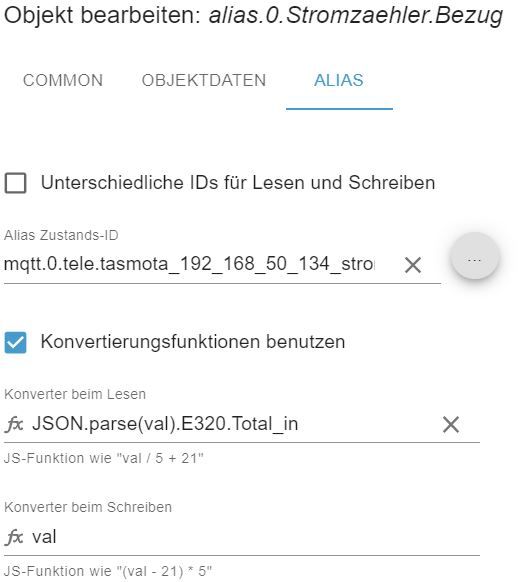
                  Ich würde unter "alias.0" manuell 3 Datenpunkte mit Lesekonvertierung erstellen.

                  • JSON.parse(val).E320.Total_out
                  • JSON.parse(val).E320.Total_in
                  • JSON.parse(val).E320.Power_in

                  Beispiel: Energie-Bezug

                  Alias_MQTT_Bezug.JPG

                  Bitte verzichtet auf Chat-Nachrichten, denn die Handhabung ist grauenhaft !
                  Produktiv: RPi 2 mit S.USV, HM-MOD-RPI und SLC-USB-Stick mit root fs

                  1 Reply Last reply
                  0
                  • R Offline
                    R Offline
                    ralf2201
                    wrote on last edited by
                    #9

                    Danke, so hat es jetzt auf Anhieb funktioniert. Jetzt werde ich mit dem Script noch etwas tüfteln.

                    1 Reply Last reply
                    0
                    Reply
                    • Reply as topic
                    Log in to reply
                    • Oldest to Newest
                    • Newest to Oldest
                    • Most Votes


                    Support us

                    ioBroker
                    Community Adapters
                    Donate

                    621

                    Online

                    32.5k

                    Users

                    81.7k

                    Topics

                    1.3m

                    Posts
                    Community
                    Impressum | Datenschutz-Bestimmungen | Nutzungsbedingungen | Einwilligungseinstellungen
                    ioBroker Community 2014-2025
                    logo
                    • Login

                    • Don't have an account? Register

                    • Login or register to search.
                    • First post
                      Last post
                    0
                    • Home
                    • Recent
                    • Tags
                    • Unread 0
                    • Categories
                    • Unreplied
                    • Popular
                    • GitHub
                    • Docu
                    • Hilfe