Skip to content
  • Home
  • Recent
  • Tags
  • 0 Unread 0
  • Categories
  • Unreplied
  • Popular
  • GitHub
  • Docu
  • Hilfe
Skins
  • Light
  • Brite
  • Cerulean
  • Cosmo
  • Flatly
  • Journal
  • Litera
  • Lumen
  • Lux
  • Materia
  • Minty
  • Morph
  • Pulse
  • Sandstone
  • Simplex
  • Sketchy
  • Spacelab
  • United
  • Yeti
  • Zephyr
  • Dark
  • Cyborg
  • Darkly
  • Quartz
  • Slate
  • Solar
  • Superhero
  • Vapor

  • Default (No Skin)
  • No Skin
Collapse
ioBroker Logo

Community Forum

donate donate
  1. ioBroker Community Home
  2. Deutsch
  3. ioBroker Allgemein
  4. BackItUp - InfluxDB2 - Grafana

NEWS

  • Jahresrückblick 2025 – unser neuer Blogbeitrag ist online! ✨
    BluefoxB
    Bluefox
    17
    1
    2.0k

  • Neuer Blogbeitrag: Monatsrückblick - Dezember 2025 🎄
    BluefoxB
    Bluefox
    13
    1
    922

  • Weihnachtsangebot 2025! 🎄
    BluefoxB
    Bluefox
    25
    1
    2.2k

BackItUp - InfluxDB2 - Grafana

Scheduled Pinned Locked Moved ioBroker Allgemein
62 Posts 7 Posters 6.2k Views 5 Watching
  • Oldest to Newest
  • Newest to Oldest
  • Most Votes
Reply
  • Reply as topic
Log in to reply
This topic has been deleted. Only users with topic management privileges can see it.
  • FriedhofsblondF Friedhofsblond

    @thomas-braun
    naja, habe erst eine frische Debian-neinst minimal installiert.
    Dann den OMV6 drauf zu Administration des Servers.
    Da wird viel über installscripts gemacht - ich denke da kommt das her.
    (ehrlich gesagt brauch ich das eigentlich nicht im IObroker kann man ja auch viel über die Kiste sehen)
    Muß ich halt den kram wie IP-Netzwerkeingabe manuell machen.
    Dann nochmal anfangen.
    Soll ich influxdb 2.1 (wie in der Docu von Backitup) oder die neue 2.7 installieren?
    Grafana die OSS-Version war wohl auch nicht richtig oder?

    simatecS Online
    simatecS Online
    simatec
    Developer Most Active
    wrote on last edited by
    #11

    @friedhofsblond sagte in BackItUp - InfluxDB2 - Grafana:

    Soll ich influxdb 2.1 (wie in der Docu von Backitup) oder die neue 2.7 installieren?
    Grafana die OSS-Version war wohl auch nicht richtig oder?

    Die Versionen sind egal... Backitup unterscheidet da nicht
    Bei dir fehlt influx-cli und zu Grafana kann ich nix sagen, da du keinen Log dazu gepostet hast

    • Besuche meine Github Seite
    • Beitrag hat geholfen oder willst du mich unterstützen
    • HowTo Restore ioBroker
    FriedhofsblondF 1 Reply Last reply
    0
    • FriedhofsblondF Friedhofsblond

      @thomas-braun sagte in BackItUp - InfluxDB2 - Grafana:

      mmer die aktuelle Version aus deinem Paketmanager. Dazu muss der aber halt funktionieren.

      OK, aber meist muß man doch erst die Quelle manuell hinzufügen - liegen doch nicht von Hause aus im Debian - oder?

      Thomas BraunT Online
      Thomas BraunT Online
      Thomas Braun
      Most Active
      wrote on last edited by
      #12

      @friedhofsblond

      Richtig. Hier finden sich ein paar der gängigsten Repos inkl. der Schlüssel usw.:

      https://forum.iobroker.net/topic/59231/phantastische-repositories-und-wo-sie-zu-finden-sind

      Linux-Werkzeugkasten:
      https://forum.iobroker.net/topic/42952/der-kleine-iobroker-linux-werkzeugkasten
      NodeJS Fixer Skript:
      https://forum.iobroker.net/topic/68035/iob-node-fix-skript
      iob_diag: curl -sLf -o diag.sh https://iobroker.net/diag.sh && bash diag.sh

      1 Reply Last reply
      0
      • simatecS simatec

        @friedhofsblond sagte in BackItUp - InfluxDB2 - Grafana:

        Soll ich influxdb 2.1 (wie in der Docu von Backitup) oder die neue 2.7 installieren?
        Grafana die OSS-Version war wohl auch nicht richtig oder?

        Die Versionen sind egal... Backitup unterscheidet da nicht
        Bei dir fehlt influx-cli und zu Grafana kann ich nix sagen, da du keinen Log dazu gepostet hast

        FriedhofsblondF Offline
        FriedhofsblondF Offline
        Friedhofsblond
        wrote on last edited by Friedhofsblond
        #13

        @simatec
        in den zwei Kästen und sind nochmal die Versionen Influx und Grafana.
        oben.
        version.PNG
        In der Grafana-Version sieht man aber das API-Schlüssel Menü nicht.
        Hier ein Grafana vom Solaranzeiger 9.4.7:
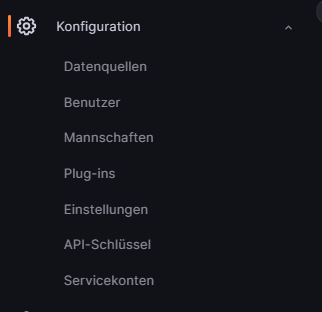
        solar.PNG

        Hier das was ich installiert habe 9.5.2:
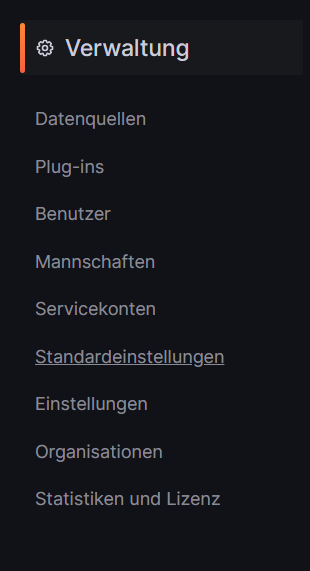
        grafa-oss.PNG

        simatecS ? 2 Replies Last reply
        0
        • FriedhofsblondF Friedhofsblond

          @simatec
          in den zwei Kästen und sind nochmal die Versionen Influx und Grafana.
          oben.
          version.PNG
          In der Grafana-Version sieht man aber das API-Schlüssel Menü nicht.
          Hier ein Grafana vom Solaranzeiger 9.4.7:
          solar.PNG

          Hier das was ich installiert habe 9.5.2:
          grafa-oss.PNG

          simatecS Online
          simatecS Online
          simatec
          Developer Most Active
          wrote on last edited by
          #14

          @friedhofsblond Du benötigst einen Service Account mit die Rolle "Admin"
          Dort wird dann der Token generiert.
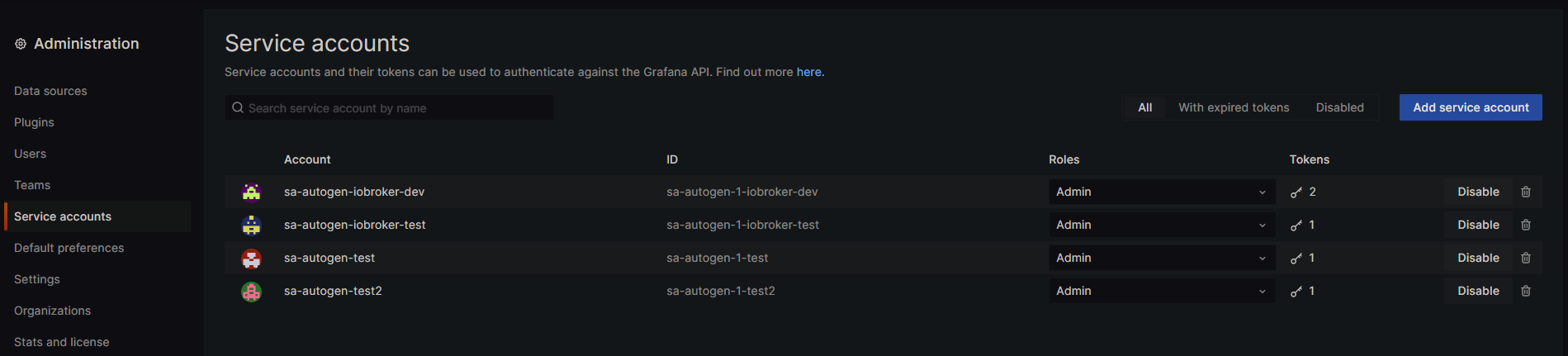
          9a153a70-b6b2-4623-a9a4-949d06cf9a90-image.png

          influxdb-cli fehlt bei dir... Das musst du installieren.
          Steht in der Doku von Backitup beschrieben

          • Besuche meine Github Seite
          • Beitrag hat geholfen oder willst du mich unterstützen
          • HowTo Restore ioBroker
          1 Reply Last reply
          0
          • FriedhofsblondF Friedhofsblond

            @simatec
            in den zwei Kästen und sind nochmal die Versionen Influx und Grafana.
            oben.
            version.PNG
            In der Grafana-Version sieht man aber das API-Schlüssel Menü nicht.
            Hier ein Grafana vom Solaranzeiger 9.4.7:
            solar.PNG

            Hier das was ich installiert habe 9.5.2:
            grafa-oss.PNG

            ? Offline
            ? Offline
            A Former User
            wrote on last edited by A Former User
            #15

            @friedhofsblond sagte in BackItUp - InfluxDB2 - Grafana:

            @simatec
            in den zwei Kästen und sind nochmal die Versionen Influx und Grafana.
            oben.
            version.PNG
            In der Grafana-Version sieht man aber das API-Schlüssel Menü nicht.
            Hier ein Grafana vom Solaranzeiger 9.4.7:
            solar.PNG

            Hier das was ich installiert habe 9.5.2:
            grafa-oss.PNG

            Moin,

            in der aktuellen Version findest Du das hier
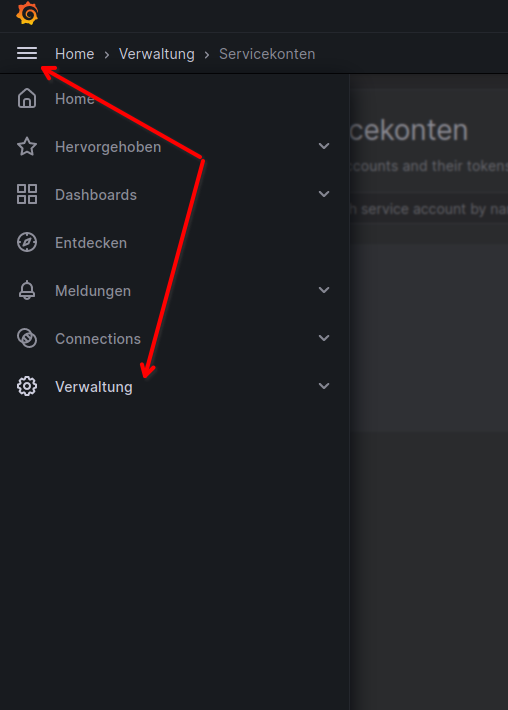
            cda2e408-3076-4287-88b4-10a5a0740528-grafik.png
            464351c2-fa3d-438a-969f-d1557c77ba8f-grafik.png
            febc4ed6-1f9d-402c-85f5-6c881cd9bfba-grafik.png

            Wozu erschließt sich mir nicht, denn ich kann auch ohne das meine Panels/Dashboards anschauen, oder ist das für den BackitUp adapter, den kenne ich nicht, da bei mir alles in LXC Containern läuft und ich die Backupe :)

            Im zweiten Bild gibt es noch den Link zur Beschreibung https://grafana.com/docs/grafana/latest/administration/service-accounts/

            VG
            Bernd

            FriedhofsblondF 1 Reply Last reply
            0
            • ? A Former User

              @friedhofsblond sagte in BackItUp - InfluxDB2 - Grafana:

              @simatec
              in den zwei Kästen und sind nochmal die Versionen Influx und Grafana.
              oben.
              version.PNG
              In der Grafana-Version sieht man aber das API-Schlüssel Menü nicht.
              Hier ein Grafana vom Solaranzeiger 9.4.7:
              solar.PNG

              Hier das was ich installiert habe 9.5.2:
              grafa-oss.PNG

              Moin,

              in der aktuellen Version findest Du das hier
              cda2e408-3076-4287-88b4-10a5a0740528-grafik.png
              464351c2-fa3d-438a-969f-d1557c77ba8f-grafik.png
              febc4ed6-1f9d-402c-85f5-6c881cd9bfba-grafik.png

              Wozu erschließt sich mir nicht, denn ich kann auch ohne das meine Panels/Dashboards anschauen, oder ist das für den BackitUp adapter, den kenne ich nicht, da bei mir alles in LXC Containern läuft und ich die Backupe :)

              Im zweiten Bild gibt es noch den Link zur Beschreibung https://grafana.com/docs/grafana/latest/administration/service-accounts/

              VG
              Bernd

              FriedhofsblondF Offline
              FriedhofsblondF Offline
              Friedhofsblond
              wrote on last edited by Friedhofsblond
              #16

              @dp20eic
              da gehts schon wieder los.
              1:1 von influx kopiert. - warum kann ich die Datei nicht entpacken?
              Die Datei liegt jetzt im homeverzeichnis von Superuser
              Sorry ich alt :thinking_face:

              superuser@debian:~$ wget https://dl.influxdata.com/influxdb/releases/influxdb2-client-2.7.3-linux-amd64.tar.gz
              --2023-06-06 11:47:57--  https://dl.influxdata.com/influxdb/releases/influxdb2-client-2.7.3-linux-amd64.tar.gz
              Auflösen des Hostnamens dl.influxdata.com (dl.influxdata.com)… 13.224.189.83, 13.224.189.2, 13.224.189.72, ...
              Verbindungsaufbau zu dl.influxdata.com (dl.influxdata.com)|13.224.189.83|:443 … verbunden.
              HTTP-Anforderung gesendet, auf Antwort wird gewartet … 200 OK
              Länge: 11454321 (11M) [application/x-tar]
              Wird in »influxdb2-client-2.7.3-linux-amd64.tar.gz« gespeichert.
              
              influxdb2-client-2.7.3-linux-amd64.t 100%[====================================================================>]  10,92M  47,9MB/s    in 0,2s
              
              2023-06-06 11:47:58 (47,9 MB/s) - »influxdb2-client-2.7.3-linux-amd64.tar.gz« gespeichert [11454321/11454321]
              
              superuser@debian:~$ tar xvzf path/to/influxdb2-client-2.7.3-linux-amd64.tar.gz
              tar (child): path/to/influxdb2-client-2.7.3-linux-amd64.tar.gz: Funktion open fehlgeschlagen: Datei oder Verzeichnis nicht gefunden
              tar (child): Error is not recoverable: exiting now
              tar: Child returned status 2
              tar: Error is not recoverable: exiting now
              superuser@debian:~$
              
              Thomas BraunT ? 3 Replies Last reply
              0
              • FriedhofsblondF Friedhofsblond

                @dp20eic
                da gehts schon wieder los.
                1:1 von influx kopiert. - warum kann ich die Datei nicht entpacken?
                Die Datei liegt jetzt im homeverzeichnis von Superuser
                Sorry ich alt :thinking_face:

                superuser@debian:~$ wget https://dl.influxdata.com/influxdb/releases/influxdb2-client-2.7.3-linux-amd64.tar.gz
                --2023-06-06 11:47:57--  https://dl.influxdata.com/influxdb/releases/influxdb2-client-2.7.3-linux-amd64.tar.gz
                Auflösen des Hostnamens dl.influxdata.com (dl.influxdata.com)… 13.224.189.83, 13.224.189.2, 13.224.189.72, ...
                Verbindungsaufbau zu dl.influxdata.com (dl.influxdata.com)|13.224.189.83|:443 … verbunden.
                HTTP-Anforderung gesendet, auf Antwort wird gewartet … 200 OK
                Länge: 11454321 (11M) [application/x-tar]
                Wird in »influxdb2-client-2.7.3-linux-amd64.tar.gz« gespeichert.
                
                influxdb2-client-2.7.3-linux-amd64.t 100%[====================================================================>]  10,92M  47,9MB/s    in 0,2s
                
                2023-06-06 11:47:58 (47,9 MB/s) - »influxdb2-client-2.7.3-linux-amd64.tar.gz« gespeichert [11454321/11454321]
                
                superuser@debian:~$ tar xvzf path/to/influxdb2-client-2.7.3-linux-amd64.tar.gz
                tar (child): path/to/influxdb2-client-2.7.3-linux-amd64.tar.gz: Funktion open fehlgeschlagen: Datei oder Verzeichnis nicht gefunden
                tar (child): Error is not recoverable: exiting now
                tar: Child returned status 2
                tar: Error is not recoverable: exiting now
                superuser@debian:~$
                
                Thomas BraunT Online
                Thomas BraunT Online
                Thomas Braun
                Most Active
                wrote on last edited by Thomas Braun
                #17

                @friedhofsblond sagte in BackItUp - InfluxDB2 - Grafana:

                1:1 von influx kopiert. - warum kann ich die Datei nicht entpacken?
                Die Datei liegt jetzt im homeverzeichnis von Superuser

                Weil man das nicht so macht.
                Man verwendet seinen Paketmanager, man verwendet seinen Paketmanager, man verwendet seinen Paketmanager, man verwendet seinen Paketmanager, man verwendet seinen Paketmanager, man verwendet seinen Paketmanager, man verwendet seinen Paketmanager, man verwendet seinen Paketmanager, man verwendet seinen Paketmanager, man verwendet seinen Paketmanager, man verwendet seinen Paketmanager, man verwendet seinen Paketmanager!

                Jedenfalls wenn man den nicht zuvor schon irgendwie kaputtgefummelt hat.

                Linux-Werkzeugkasten:
                https://forum.iobroker.net/topic/42952/der-kleine-iobroker-linux-werkzeugkasten
                NodeJS Fixer Skript:
                https://forum.iobroker.net/topic/68035/iob-node-fix-skript
                iob_diag: curl -sLf -o diag.sh https://iobroker.net/diag.sh && bash diag.sh

                1 Reply Last reply
                1
                • FriedhofsblondF Friedhofsblond

                  @dp20eic
                  da gehts schon wieder los.
                  1:1 von influx kopiert. - warum kann ich die Datei nicht entpacken?
                  Die Datei liegt jetzt im homeverzeichnis von Superuser
                  Sorry ich alt :thinking_face:

                  superuser@debian:~$ wget https://dl.influxdata.com/influxdb/releases/influxdb2-client-2.7.3-linux-amd64.tar.gz
                  --2023-06-06 11:47:57--  https://dl.influxdata.com/influxdb/releases/influxdb2-client-2.7.3-linux-amd64.tar.gz
                  Auflösen des Hostnamens dl.influxdata.com (dl.influxdata.com)… 13.224.189.83, 13.224.189.2, 13.224.189.72, ...
                  Verbindungsaufbau zu dl.influxdata.com (dl.influxdata.com)|13.224.189.83|:443 … verbunden.
                  HTTP-Anforderung gesendet, auf Antwort wird gewartet … 200 OK
                  Länge: 11454321 (11M) [application/x-tar]
                  Wird in »influxdb2-client-2.7.3-linux-amd64.tar.gz« gespeichert.
                  
                  influxdb2-client-2.7.3-linux-amd64.t 100%[====================================================================>]  10,92M  47,9MB/s    in 0,2s
                  
                  2023-06-06 11:47:58 (47,9 MB/s) - »influxdb2-client-2.7.3-linux-amd64.tar.gz« gespeichert [11454321/11454321]
                  
                  superuser@debian:~$ tar xvzf path/to/influxdb2-client-2.7.3-linux-amd64.tar.gz
                  tar (child): path/to/influxdb2-client-2.7.3-linux-amd64.tar.gz: Funktion open fehlgeschlagen: Datei oder Verzeichnis nicht gefunden
                  tar (child): Error is not recoverable: exiting now
                  tar: Child returned status 2
                  tar: Error is not recoverable: exiting now
                  superuser@debian:~$
                  
                  ? Offline
                  ? Offline
                  A Former User
                  wrote on last edited by
                  #18

                  @friedhofsblond sagte in BackItUp - InfluxDB2 - Grafana:

                  1:1 von influx kopiert. - warum kann ich die Datei nicht entpacken?

                  Moin,

                  wieso entpacken, @Thomas-Braun sagte doch, Du sollst das aus/vom Repository installieren.

                  Und wenn man dann schon etwas von einer Web-Seite kopiert, dann muss man das auch lesen, denn den Pfad path/to/ gibt es unter Linux nicht, außer Du hast ihn Dir angelegt.

                  tar xvzf path/to/influxdb2-client-2.7.3-linux-amd64.tar.gz
                  

                  Aber das ist alles Kokolores, wenn Deine Repos korrekt sind und funktionieren, dann

                  sudo apt install influxdb2-cli
                  

                  VG
                  Bernd

                  P.S.: @Thomas-Braunwar schneller :)

                  1 Reply Last reply
                  0
                  • FriedhofsblondF Friedhofsblond

                    @dp20eic
                    da gehts schon wieder los.
                    1:1 von influx kopiert. - warum kann ich die Datei nicht entpacken?
                    Die Datei liegt jetzt im homeverzeichnis von Superuser
                    Sorry ich alt :thinking_face:

                    superuser@debian:~$ wget https://dl.influxdata.com/influxdb/releases/influxdb2-client-2.7.3-linux-amd64.tar.gz
                    --2023-06-06 11:47:57--  https://dl.influxdata.com/influxdb/releases/influxdb2-client-2.7.3-linux-amd64.tar.gz
                    Auflösen des Hostnamens dl.influxdata.com (dl.influxdata.com)… 13.224.189.83, 13.224.189.2, 13.224.189.72, ...
                    Verbindungsaufbau zu dl.influxdata.com (dl.influxdata.com)|13.224.189.83|:443 … verbunden.
                    HTTP-Anforderung gesendet, auf Antwort wird gewartet … 200 OK
                    Länge: 11454321 (11M) [application/x-tar]
                    Wird in »influxdb2-client-2.7.3-linux-amd64.tar.gz« gespeichert.
                    
                    influxdb2-client-2.7.3-linux-amd64.t 100%[====================================================================>]  10,92M  47,9MB/s    in 0,2s
                    
                    2023-06-06 11:47:58 (47,9 MB/s) - »influxdb2-client-2.7.3-linux-amd64.tar.gz« gespeichert [11454321/11454321]
                    
                    superuser@debian:~$ tar xvzf path/to/influxdb2-client-2.7.3-linux-amd64.tar.gz
                    tar (child): path/to/influxdb2-client-2.7.3-linux-amd64.tar.gz: Funktion open fehlgeschlagen: Datei oder Verzeichnis nicht gefunden
                    tar (child): Error is not recoverable: exiting now
                    tar: Child returned status 2
                    tar: Error is not recoverable: exiting now
                    superuser@debian:~$
                    
                    Thomas BraunT Online
                    Thomas BraunT Online
                    Thomas Braun
                    Most Active
                    wrote on last edited by
                    #19

                    @friedhofsblond

                    Auf die Ausgaben zu

                    cat /etc/apt/sources.list
                    cat /etc/apt/sources.list.d/*
                    

                    warte ich immer noch, da könnte man vielleicht sehen warum apt kaputt ist und wo es da klemmt.

                    Linux-Werkzeugkasten:
                    https://forum.iobroker.net/topic/42952/der-kleine-iobroker-linux-werkzeugkasten
                    NodeJS Fixer Skript:
                    https://forum.iobroker.net/topic/68035/iob-node-fix-skript
                    iob_diag: curl -sLf -o diag.sh https://iobroker.net/diag.sh && bash diag.sh

                    FriedhofsblondF 1 Reply Last reply
                    0
                    • Thomas BraunT Thomas Braun

                      @friedhofsblond

                      Auf die Ausgaben zu

                      cat /etc/apt/sources.list
                      cat /etc/apt/sources.list.d/*
                      

                      warte ich immer noch, da könnte man vielleicht sehen warum apt kaputt ist und wo es da klemmt.

                      FriedhofsblondF Offline
                      FriedhofsblondF Offline
                      Friedhofsblond
                      wrote on last edited by Friedhofsblond
                      #20

                      @thomas-braun
                      so meine Lieben ;)
                      Ich bin doch schon wieder auf einem frischen System.
                      (habe verschiedene abgespeicherte Images die ich via Acronis komlett widerherstellen kann)
                      Also ganz frisches Debian 11 - minimal ohne Desktop - also alles per Console.
                      Alles strikt nach Docu abgearbeitet.
                      So wie es z.B. hier steht:
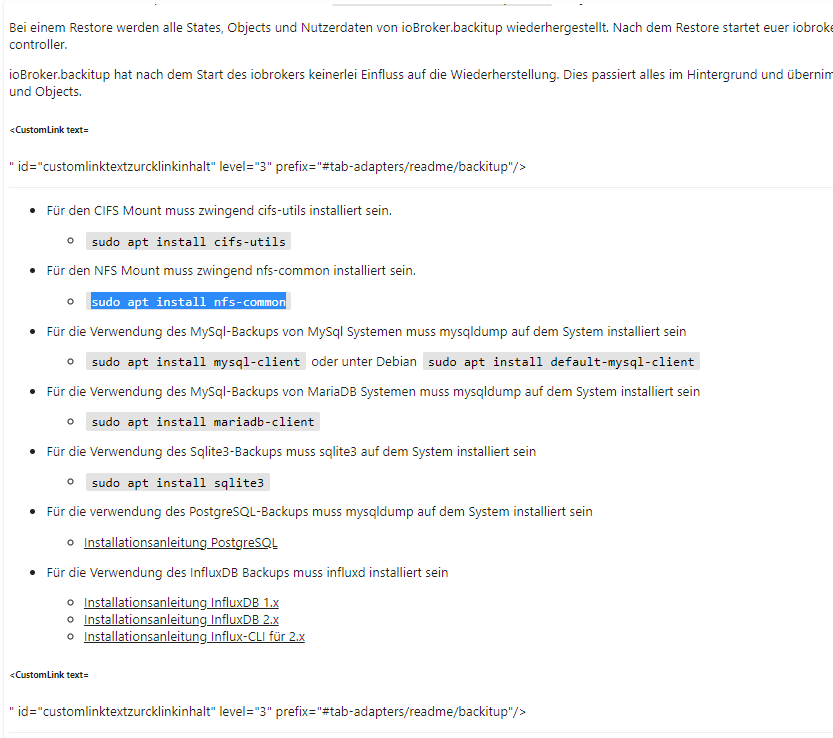
                      iobback.PNG

                      influxdb2
                      influxdb-cli

                      Sorry ich bin ein alter Copy-Paste Arbeiter und muß mir das "Zeugs" zusammensuchen.
                      Habt Mitleid ...

                      Auf die Ausgaben zu:

                      Linux debian 5.10.0-23-amd64 #1 SMP Debian 5.10.179-1 (2023-05-12) x86_64
                      
                      The programs included with the Debian GNU/Linux system are free software;
                      the exact distribution terms for each program are described in the
                      individual files in /usr/share/doc/*/copyright.
                      
                      Debian GNU/Linux comes with ABSOLUTELY NO WARRANTY, to the extent
                      permitted by applicable law.
                      Last login: Tue Jun  6 11:46:10 2023 from 192.168.115.175
                      superuser@debian:~$ cat /etc/apt/sources.list
                      # deb cdrom:[Debian GNU/Linux 11.7.0 _Bullseye_ - Unofficial amd64 NETINST with                                                                      firmware 20230429-11:49]/ bullseye contrib main non-free
                      
                      #deb cdrom:[Debian GNU/Linux 11.7.0 _Bullseye_ - Unofficial amd64 NETINST with f                                                                     irmware 20230429-11:49]/ bullseye contrib main non-free
                      
                      deb http://deb.debian.org/debian/ bullseye main non-free contrib
                      deb-src http://deb.debian.org/debian/ bullseye main non-free contrib
                      
                      deb http://security.debian.org/debian-security bullseye-security main contrib no                                                                     n-free
                      deb-src http://security.debian.org/debian-security bullseye-security main contri                                                                     b non-free
                      
                      # bullseye-updates, to get updates before a point release is made;
                      # see https://www.debian.org/doc/manuals/debian-reference/ch02.en.html#_updates_                                                                     and_backports
                      deb http://deb.debian.org/debian/ bullseye-updates main contrib non-free
                      deb-src http://deb.debian.org/debian/ bullseye-updates main contrib non-free
                      
                      # This system was installed using small removable media
                      # (e.g. netinst, live or single CD). The matching "deb cdrom"
                      # entries were disabled at the end of the installation process.
                      # For information about how to configure apt package sources,
                      # see the sources.list(5) manual.
                      
                      
                      superuser@debian:~$ cat /etc/apt/sources.list.d/*
                      deb [signed-by=/usr/share/keyrings/nodesource.gpg] https://deb.nodesource.com/node_18.x bullseye main
                      deb-src [signed-by=/usr/share/keyrings/nodesource.gpg] https://deb.nodesource.com/node_18.x bullseye main
                      
                      
                      Thomas BraunT ? 2 Replies Last reply
                      0
                      • FriedhofsblondF Friedhofsblond

                        @thomas-braun
                        so meine Lieben ;)
                        Ich bin doch schon wieder auf einem frischen System.
                        (habe verschiedene abgespeicherte Images die ich via Acronis komlett widerherstellen kann)
                        Also ganz frisches Debian 11 - minimal ohne Desktop - also alles per Console.
                        Alles strikt nach Docu abgearbeitet.
                        So wie es z.B. hier steht:

                        iobback.PNG

                        influxdb2
                        influxdb-cli

                        Sorry ich bin ein alter Copy-Paste Arbeiter und muß mir das "Zeugs" zusammensuchen.
                        Habt Mitleid ...

                        Auf die Ausgaben zu:

                        Linux debian 5.10.0-23-amd64 #1 SMP Debian 5.10.179-1 (2023-05-12) x86_64
                        
                        The programs included with the Debian GNU/Linux system are free software;
                        the exact distribution terms for each program are described in the
                        individual files in /usr/share/doc/*/copyright.
                        
                        Debian GNU/Linux comes with ABSOLUTELY NO WARRANTY, to the extent
                        permitted by applicable law.
                        Last login: Tue Jun  6 11:46:10 2023 from 192.168.115.175
                        superuser@debian:~$ cat /etc/apt/sources.list
                        # deb cdrom:[Debian GNU/Linux 11.7.0 _Bullseye_ - Unofficial amd64 NETINST with                                                                      firmware 20230429-11:49]/ bullseye contrib main non-free
                        
                        #deb cdrom:[Debian GNU/Linux 11.7.0 _Bullseye_ - Unofficial amd64 NETINST with f                                                                     irmware 20230429-11:49]/ bullseye contrib main non-free
                        
                        deb http://deb.debian.org/debian/ bullseye main non-free contrib
                        deb-src http://deb.debian.org/debian/ bullseye main non-free contrib
                        
                        deb http://security.debian.org/debian-security bullseye-security main contrib no                                                                     n-free
                        deb-src http://security.debian.org/debian-security bullseye-security main contri                                                                     b non-free
                        
                        # bullseye-updates, to get updates before a point release is made;
                        # see https://www.debian.org/doc/manuals/debian-reference/ch02.en.html#_updates_                                                                     and_backports
                        deb http://deb.debian.org/debian/ bullseye-updates main contrib non-free
                        deb-src http://deb.debian.org/debian/ bullseye-updates main contrib non-free
                        
                        # This system was installed using small removable media
                        # (e.g. netinst, live or single CD). The matching "deb cdrom"
                        # entries were disabled at the end of the installation process.
                        # For information about how to configure apt package sources,
                        # see the sources.list(5) manual.
                        
                        
                        superuser@debian:~$ cat /etc/apt/sources.list.d/*
                        deb [signed-by=/usr/share/keyrings/nodesource.gpg] https://deb.nodesource.com/node_18.x bullseye main
                        deb-src [signed-by=/usr/share/keyrings/nodesource.gpg] https://deb.nodesource.com/node_18.x bullseye main
                        
                        
                        Thomas BraunT Online
                        Thomas BraunT Online
                        Thomas Braun
                        Most Active
                        wrote on last edited by
                        #21

                        @friedhofsblond

                        Also doch wieder am Paketmanager vorbei?
                        Die Anleitung von influx ist für ein reines Debian falsch/sehr ungünstig.

                        sudo apt update
                        apt policy influxdb*
                        

                        sagt?

                        Linux-Werkzeugkasten:
                        https://forum.iobroker.net/topic/42952/der-kleine-iobroker-linux-werkzeugkasten
                        NodeJS Fixer Skript:
                        https://forum.iobroker.net/topic/68035/iob-node-fix-skript
                        iob_diag: curl -sLf -o diag.sh https://iobroker.net/diag.sh && bash diag.sh

                        1 Reply Last reply
                        0
                        • FriedhofsblondF Friedhofsblond

                          @thomas-braun
                          so meine Lieben ;)
                          Ich bin doch schon wieder auf einem frischen System.
                          (habe verschiedene abgespeicherte Images die ich via Acronis komlett widerherstellen kann)
                          Also ganz frisches Debian 11 - minimal ohne Desktop - also alles per Console.
                          Alles strikt nach Docu abgearbeitet.
                          So wie es z.B. hier steht:

                          iobback.PNG

                          influxdb2
                          influxdb-cli

                          Sorry ich bin ein alter Copy-Paste Arbeiter und muß mir das "Zeugs" zusammensuchen.
                          Habt Mitleid ...

                          Auf die Ausgaben zu:

                          Linux debian 5.10.0-23-amd64 #1 SMP Debian 5.10.179-1 (2023-05-12) x86_64
                          
                          The programs included with the Debian GNU/Linux system are free software;
                          the exact distribution terms for each program are described in the
                          individual files in /usr/share/doc/*/copyright.
                          
                          Debian GNU/Linux comes with ABSOLUTELY NO WARRANTY, to the extent
                          permitted by applicable law.
                          Last login: Tue Jun  6 11:46:10 2023 from 192.168.115.175
                          superuser@debian:~$ cat /etc/apt/sources.list
                          # deb cdrom:[Debian GNU/Linux 11.7.0 _Bullseye_ - Unofficial amd64 NETINST with                                                                      firmware 20230429-11:49]/ bullseye contrib main non-free
                          
                          #deb cdrom:[Debian GNU/Linux 11.7.0 _Bullseye_ - Unofficial amd64 NETINST with f                                                                     irmware 20230429-11:49]/ bullseye contrib main non-free
                          
                          deb http://deb.debian.org/debian/ bullseye main non-free contrib
                          deb-src http://deb.debian.org/debian/ bullseye main non-free contrib
                          
                          deb http://security.debian.org/debian-security bullseye-security main contrib no                                                                     n-free
                          deb-src http://security.debian.org/debian-security bullseye-security main contri                                                                     b non-free
                          
                          # bullseye-updates, to get updates before a point release is made;
                          # see https://www.debian.org/doc/manuals/debian-reference/ch02.en.html#_updates_                                                                     and_backports
                          deb http://deb.debian.org/debian/ bullseye-updates main contrib non-free
                          deb-src http://deb.debian.org/debian/ bullseye-updates main contrib non-free
                          
                          # This system was installed using small removable media
                          # (e.g. netinst, live or single CD). The matching "deb cdrom"
                          # entries were disabled at the end of the installation process.
                          # For information about how to configure apt package sources,
                          # see the sources.list(5) manual.
                          
                          
                          superuser@debian:~$ cat /etc/apt/sources.list.d/*
                          deb [signed-by=/usr/share/keyrings/nodesource.gpg] https://deb.nodesource.com/node_18.x bullseye main
                          deb-src [signed-by=/usr/share/keyrings/nodesource.gpg] https://deb.nodesource.com/node_18.x bullseye main
                          
                          
                          ? Offline
                          ? Offline
                          A Former User
                          wrote on last edited by A Former User
                          #22

                          @friedhofsblond sagte in BackItUp - InfluxDB2 - Grafana:

                          influxdb2
                          influxdb-cli

                          Moin,

                          wie @Thomas-Braun schon schrieb ist das nicht korrekt. Wenn Du es richtig installieren möchtest, musst Du dir leider die alte Doku aus influxDB V.2.0 nehmen.
                          https://docs.influxdata.com/influxdb/v2.0/install/?t=Linux

                          Dann verstehe ich nicht, was Du alles aus dem Bildchen, das Du gepostet hast, gemacht hast, etwas auch den anderen Kram installiert wie mariadb-client usw.?

                          VG
                          Bernd

                          Marc BergM FriedhofsblondF 2 Replies Last reply
                          0
                          • ? A Former User

                            @friedhofsblond sagte in BackItUp - InfluxDB2 - Grafana:

                            influxdb2
                            influxdb-cli

                            Moin,

                            wie @Thomas-Braun schon schrieb ist das nicht korrekt. Wenn Du es richtig installieren möchtest, musst Du dir leider die alte Doku aus influxDB V.2.0 nehmen.
                            https://docs.influxdata.com/influxdb/v2.0/install/?t=Linux

                            Dann verstehe ich nicht, was Du alles aus dem Bildchen, das Du gepostet hast, gemacht hast, etwas auch den anderen Kram installiert wie mariadb-client usw.?

                            VG
                            Bernd

                            Marc BergM Offline
                            Marc BergM Offline
                            Marc Berg
                            Most Active
                            wrote on last edited by
                            #23

                            @dp20eic sagte in BackItUp - InfluxDB2 - Grafana:

                            Wenn Du es richtig installieren möchtest, musst Du dir leider die alte Doku aus influxDB V.2.0 nehmen.
                            https://docs.influxdata.com/influxdb/v2.0/install/?t=Linux

                            Unter diesem Link ist aber auch nicht die Installation per Paketmanager beschrieben, oder?

                            NUC10I3+Ubuntu+Docker+ioBroker+influxDB2+Node Red+EMQX+Grafana

                            Pi-hole, Traefik, Checkmk, Conbee II+Zigbee2MQTT, ESPSomfy-RTS, LoRaWAN, Arduino, KiCad

                            Benutzt das Voting im Beitrag, wenn er euch geholfen hat.

                            ? 1 Reply Last reply
                            0
                            • ? A Former User

                              @friedhofsblond sagte in BackItUp - InfluxDB2 - Grafana:

                              influxdb2
                              influxdb-cli

                              Moin,

                              wie @Thomas-Braun schon schrieb ist das nicht korrekt. Wenn Du es richtig installieren möchtest, musst Du dir leider die alte Doku aus influxDB V.2.0 nehmen.
                              https://docs.influxdata.com/influxdb/v2.0/install/?t=Linux

                              Dann verstehe ich nicht, was Du alles aus dem Bildchen, das Du gepostet hast, gemacht hast, etwas auch den anderen Kram installiert wie mariadb-client usw.?

                              VG
                              Bernd

                              FriedhofsblondF Offline
                              FriedhofsblondF Offline
                              Friedhofsblond
                              wrote on last edited by Friedhofsblond
                              #24

                              @dp20eic
                              das war oben noch von der alten Installation.
                              Da hatte ich OMV6 noch zusätzlich mit drauf.
                              ab hier ists neu:
                              https://forum.iobroker.net/topic/65972/backitup-influxdb2-grafana/20?_=1686063421690

                              OK dann nochmal zurück auf "0" - ich melde mich :neutral_face:

                              Thomas BraunT 1 Reply Last reply
                              0
                              • FriedhofsblondF Friedhofsblond

                                @dp20eic
                                das war oben noch von der alten Installation.
                                Da hatte ich OMV6 noch zusätzlich mit drauf.
                                ab hier ists neu:
                                https://forum.iobroker.net/topic/65972/backitup-influxdb2-grafana/20?_=1686063421690

                                OK dann nochmal zurück auf "0" - ich melde mich :neutral_face:

                                Thomas BraunT Online
                                Thomas BraunT Online
                                Thomas Braun
                                Most Active
                                wrote on last edited by
                                #25

                                @friedhofsblond

                                Die Repos zu Grafana wie auch Influx finden sich Copy&Paste fertig hier:

                                https://forum.iobroker.net/topic/59231/phantastische-repositories-und-wo-sie-zu-finden-sind

                                Linux-Werkzeugkasten:
                                https://forum.iobroker.net/topic/42952/der-kleine-iobroker-linux-werkzeugkasten
                                NodeJS Fixer Skript:
                                https://forum.iobroker.net/topic/68035/iob-node-fix-skript
                                iob_diag: curl -sLf -o diag.sh https://iobroker.net/diag.sh && bash diag.sh

                                FriedhofsblondF 1 Reply Last reply
                                0
                                • Marc BergM Marc Berg

                                  @dp20eic sagte in BackItUp - InfluxDB2 - Grafana:

                                  Wenn Du es richtig installieren möchtest, musst Du dir leider die alte Doku aus influxDB V.2.0 nehmen.
                                  https://docs.influxdata.com/influxdb/v2.0/install/?t=Linux

                                  Unter diesem Link ist aber auch nicht die Installation per Paketmanager beschrieben, oder?

                                  ? Offline
                                  ? Offline
                                  A Former User
                                  wrote on last edited by
                                  #26

                                  @marc-berg sagte in BackItUp - InfluxDB2 - Grafana:

                                  @dp20eic sagte in BackItUp - InfluxDB2 - Grafana:

                                  Wenn Du es richtig installieren möchtest, musst Du dir leider die alte Doku aus influxDB V.2.0 nehmen.
                                  https://docs.influxdata.com/influxdb/v2.0/install/?t=Linux

                                  Unter diesem Link ist aber auch nicht die Installation per Paketmanager beschrieben, oder?

                                  Moin,

                                  yup, mein Fehler, dachte, dass das noch die alte Beschreibung ist.

                                  VG
                                  Bernd

                                  1 Reply Last reply
                                  0
                                  • Thomas BraunT Thomas Braun

                                    @friedhofsblond

                                    Die Repos zu Grafana wie auch Influx finden sich Copy&Paste fertig hier:

                                    https://forum.iobroker.net/topic/59231/phantastische-repositories-und-wo-sie-zu-finden-sind

                                    FriedhofsblondF Offline
                                    FriedhofsblondF Offline
                                    Friedhofsblond
                                    wrote on last edited by
                                    #27

                                    @thomas-braun
                                    also mit diesenLinks funktioniert auch nicht alles:

                                    wget -q -O /usr/share/keyrings/grafana.key https://apt.grafana.com/gpg.key /usr/share/keyrings/grafana.key: Keine Berechtigung
                                    

                                    dann bei Influxdb2 werden ja nur die links zu den Repositories hinzugefügt.
                                    Wie gehts dann weiter mit der Install??

                                    ? Thomas BraunT 2 Replies Last reply
                                    0
                                    • FriedhofsblondF Friedhofsblond

                                      @thomas-braun
                                      also mit diesenLinks funktioniert auch nicht alles:

                                      wget -q -O /usr/share/keyrings/grafana.key https://apt.grafana.com/gpg.key /usr/share/keyrings/grafana.key: Keine Berechtigung
                                      

                                      dann bei Influxdb2 werden ja nur die links zu den Repositories hinzugefügt.
                                      Wie gehts dann weiter mit der Install??

                                      ? Offline
                                      ? Offline
                                      A Former User
                                      wrote on last edited by
                                      #28

                                      @friedhofsblond sagte in BackItUp - InfluxDB2 - Grafana:

                                      @thomas-braun
                                      also mit diesenLinks funktioniert auch nicht alles:

                                      wget -q -O /usr/share/keyrings/grafana.key https://apt.grafana.com/gpg.key /usr/share/keyrings/grafana.key: Keine Berechtigung
                                      

                                      dann bei Influxdb2 werden ja nur die links zu den Repositories hinzugefügt.
                                      Wie gehts dann weiter mit der Install??

                                      Moin,

                                      Da ist etwas beim Kopieren/einfügen kaputt gegangen

                                      1) sudo apt-get install -y apt-transport-https
                                      2) sudo apt-get install -y software-properties-common wget
                                      3) wget -q -O /usr/share/keyrings/grafana.key https://apt.grafana.com/gpg.key
                                      4) echo "deb [signed-by=/usr/share/keyrings/grafana.key] https://apt.grafana.com stable main" | sudo tee /etc/apt/sources.list.d/grafana.list
                                      

                                      Das sind jeweils einzelne Kommandos, also erst 1, dann 2 usw.

                                      VG
                                      Bernd

                                      Thomas BraunT 1 Reply Last reply
                                      0
                                      • FriedhofsblondF Friedhofsblond

                                        @thomas-braun
                                        also mit diesenLinks funktioniert auch nicht alles:

                                        wget -q -O /usr/share/keyrings/grafana.key https://apt.grafana.com/gpg.key /usr/share/keyrings/grafana.key: Keine Berechtigung
                                        

                                        dann bei Influxdb2 werden ja nur die links zu den Repositories hinzugefügt.
                                        Wie gehts dann weiter mit der Install??

                                        Thomas BraunT Online
                                        Thomas BraunT Online
                                        Thomas Braun
                                        Most Active
                                        wrote on last edited by
                                        #29

                                        @friedhofsblond sagte in BackItUp - InfluxDB2 - Grafana:

                                        Wie gehts dann weiter mit der Install??

                                        Dann wie üblich bei deinem Betriebssystem.

                                        sudo apt update
                                        sudo apt install GEWÜNSCHTES_PAKET
                                        

                                        Vermutlich also influxdb2 influxdb2-client und grafana

                                        Linux-Werkzeugkasten:
                                        https://forum.iobroker.net/topic/42952/der-kleine-iobroker-linux-werkzeugkasten
                                        NodeJS Fixer Skript:
                                        https://forum.iobroker.net/topic/68035/iob-node-fix-skript
                                        iob_diag: curl -sLf -o diag.sh https://iobroker.net/diag.sh && bash diag.sh

                                        1 Reply Last reply
                                        0
                                        • ? A Former User

                                          @friedhofsblond sagte in BackItUp - InfluxDB2 - Grafana:

                                          @thomas-braun
                                          also mit diesenLinks funktioniert auch nicht alles:

                                          wget -q -O /usr/share/keyrings/grafana.key https://apt.grafana.com/gpg.key /usr/share/keyrings/grafana.key: Keine Berechtigung
                                          

                                          dann bei Influxdb2 werden ja nur die links zu den Repositories hinzugefügt.
                                          Wie gehts dann weiter mit der Install??

                                          Moin,

                                          Da ist etwas beim Kopieren/einfügen kaputt gegangen

                                          1) sudo apt-get install -y apt-transport-https
                                          2) sudo apt-get install -y software-properties-common wget
                                          3) wget -q -O /usr/share/keyrings/grafana.key https://apt.grafana.com/gpg.key
                                          4) echo "deb [signed-by=/usr/share/keyrings/grafana.key] https://apt.grafana.com stable main" | sudo tee /etc/apt/sources.list.d/grafana.list
                                          

                                          Das sind jeweils einzelne Kommandos, also erst 1, dann 2 usw.

                                          VG
                                          Bernd

                                          Thomas BraunT Online
                                          Thomas BraunT Online
                                          Thomas Braun
                                          Most Active
                                          wrote on last edited by
                                          #30

                                          @dp20eic

                                          Ich hab gerade gesehen, da fehlt ein sudo in Zeile 3.
                                          Muss also

                                          sudo wget -q -O /usr/share/keyrings/grafana.key https://apt.grafana.com/gpg.key
                                          

                                          lauten.

                                          Linux-Werkzeugkasten:
                                          https://forum.iobroker.net/topic/42952/der-kleine-iobroker-linux-werkzeugkasten
                                          NodeJS Fixer Skript:
                                          https://forum.iobroker.net/topic/68035/iob-node-fix-skript
                                          iob_diag: curl -sLf -o diag.sh https://iobroker.net/diag.sh && bash diag.sh

                                          1 Reply Last reply
                                          0
                                          Reply
                                          • Reply as topic
                                          Log in to reply
                                          • Oldest to Newest
                                          • Newest to Oldest
                                          • Most Votes


                                          Support us

                                          ioBroker
                                          Community Adapters
                                          Donate
                                          FAQ Cloud / IOT
                                          HowTo: Node.js-Update
                                          HowTo: Backup/Restore
                                          Downloads
                                          BLOG

                                          724

                                          Online

                                          32.6k

                                          Users

                                          82.2k

                                          Topics

                                          1.3m

                                          Posts
                                          Community
                                          Impressum | Datenschutz-Bestimmungen | Nutzungsbedingungen | Einwilligungseinstellungen
                                          ioBroker Community 2014-2025
                                          logo
                                          • Login

                                          • Don't have an account? Register

                                          • Login or register to search.
                                          • First post
                                            Last post
                                          0
                                          • Home
                                          • Recent
                                          • Tags
                                          • Unread 0
                                          • Categories
                                          • Unreplied
                                          • Popular
                                          • GitHub
                                          • Docu
                                          • Hilfe