Skip to content
  • Home
  • Recent
  • Tags
  • 0 Unread 0
  • Categories
  • Unreplied
  • Popular
  • GitHub
  • Docu
  • Hilfe
Skins
  • Light
  • Brite
  • Cerulean
  • Cosmo
  • Flatly
  • Journal
  • Litera
  • Lumen
  • Lux
  • Materia
  • Minty
  • Morph
  • Pulse
  • Sandstone
  • Simplex
  • Sketchy
  • Spacelab
  • United
  • Yeti
  • Zephyr
  • Dark
  • Cyborg
  • Darkly
  • Quartz
  • Slate
  • Solar
  • Superhero
  • Vapor

  • Default (No Skin)
  • No Skin
Collapse
ioBroker Logo

Community Forum

donate donate
  1. ioBroker Community Home
  2. Deutsch
  3. ioBroker Allgemein
  4. [gelöst] Brauche Hilfe beim NSPanel mit Tasmota
NEWS

  • Monatsrückblick Januar/Februar 2026 ist online!
    BluefoxB
    Bluefox
    18
    1
    720

  • Jahresrückblick 2025 – unser neuer Blogbeitrag ist online! ✨
    BluefoxB
    Bluefox
    18
    1
    5.9k

  • Neuer Blogbeitrag: Monatsrückblick - Dezember 2025 🎄
    BluefoxB
    Bluefox
    13
    1
    1.5k

[gelöst] Brauche Hilfe beim NSPanel mit Tasmota
Scheduled Pinned Locked Moved ioBroker Allgemein
nspanel mqtt sonoff
104 Posts 5 Posters 12.4k Views 4 Watching
  • Oldest to Newest
  • Newest to Oldest
  • Most Votes
Reply
  • Reply as topic
Log in to reply
This topic has been deleted. Only users with topic management privileges can see it.
  • GregorSG GregorS

    @tt-tom
    ja, einzelne Teile aus dem Video (Wetter) bis zum Punkt Geräteauswahl (Habe ich nicht).

    T Offline
    T Offline
    TT-Tom
    wrote on last edited by
    #67

    @gregors nimm bitte noch mal das Originalscript und setze es ein. bin langsam mit dem Latein am Ende.

    Gruß Tom
    https://github.com/tt-tom17
    Wenn meine Hilfe erfolgreich war, benutze bitte das Voting unten rechts im Beitrag

    NSPanel Script Wiki
    https://github.com/joBr99/nspanel-lovelace-ui/wiki

    NSPanel Adapter Wiki
    https://github.com/ticaki/ioBroker.nspanel-lovelace-ui/wiki

    GregorSG 1 Reply Last reply
    0
    • T TT-Tom

      @gregors nimm bitte noch mal das Originalscript und setze es ein. bin langsam mit dem Latein am Ende.

      GregorSG Online
      GregorSG Online
      GregorS
      wrote on last edited by
      #68

      @tt-tom
      Von hier?
      https://raw.githubusercontent.com/joBr99/nspanel-lovelace-ui/main/ioBroker/NsPanelTs.ts

      INTEL NUC i7, Sonoff, hmIP, AVM, Jeelink, T-Link, Alexa, Saia-Burgess, uvm.

      T 1 Reply Last reply
      0
      • GregorSG GregorS

        @tt-tom
        Von hier?
        https://raw.githubusercontent.com/joBr99/nspanel-lovelace-ui/main/ioBroker/NsPanelTs.ts

        T Offline
        T Offline
        TT-Tom
        wrote on last edited by
        #69

        @gregors ja von der Github Seite.

        Gruß Tom
        https://github.com/tt-tom17
        Wenn meine Hilfe erfolgreich war, benutze bitte das Voting unten rechts im Beitrag

        NSPanel Script Wiki
        https://github.com/joBr99/nspanel-lovelace-ui/wiki

        NSPanel Adapter Wiki
        https://github.com/ticaki/ioBroker.nspanel-lovelace-ui/wiki

        GregorSG 1 Reply Last reply
        0
        • T TT-Tom

          @gregors ja von der Github Seite.

          GregorSG Online
          GregorSG Online
          GregorS
          wrote on last edited by
          #70

          @tt-tom

          Habe ich gemacht und nur

          export const config: Config = {
             panelRecvTopic: 'mqtt.1.SmartHome.NSPanel_1.tele.RESULT',       // Bitte anpassen
             panelSendTopic: 'mqtt.1.SmartHome.NSPanel_1.cmnd.CustomSend',   // Bitte anpassen
          

          angepasst.
          Gleiche Ergebnis.

          Ich werde morgen mal das Display zurück setzten und es nochmal komplett von vorne Stück für Stück installieren und parametrieren.
          mqtt.1 und userdaten.0/NSPanel werde ich vorher löschen.

          INTEL NUC i7, Sonoff, hmIP, AVM, Jeelink, T-Link, Alexa, Saia-Burgess, uvm.

          T 1 Reply Last reply
          0
          • GregorSG GregorS

            @tt-tom

            Habe ich gemacht und nur

            export const config: Config = {
               panelRecvTopic: 'mqtt.1.SmartHome.NSPanel_1.tele.RESULT',       // Bitte anpassen
               panelSendTopic: 'mqtt.1.SmartHome.NSPanel_1.cmnd.CustomSend',   // Bitte anpassen
            

            angepasst.
            Gleiche Ergebnis.

            Ich werde morgen mal das Display zurück setzten und es nochmal komplett von vorne Stück für Stück installieren und parametrieren.
            mqtt.1 und userdaten.0/NSPanel werde ich vorher löschen.

            T Offline
            T Offline
            TT-Tom
            wrote on last edited by
            #71

            @gregors sagte in Brauche Hilfe beim NSPanel mit Tasmota:

            ch werde morgen mal das Display zurück setzten und es nochmal komplett von vorne Stück für Stück installieren und parametrieren.
            mqtt.1 und userdaten.0/NSPanel werde ich vorher löschen.

            denke auch an den Alias Pfad. nutze das Wiki, dort ist alles step by step

            Wiki

            Gruß Tom
            https://github.com/tt-tom17
            Wenn meine Hilfe erfolgreich war, benutze bitte das Voting unten rechts im Beitrag

            NSPanel Script Wiki
            https://github.com/joBr99/nspanel-lovelace-ui/wiki

            NSPanel Adapter Wiki
            https://github.com/ticaki/ioBroker.nspanel-lovelace-ui/wiki

            GregorSG 1 Reply Last reply
            0
            • T TT-Tom

              @gregors sagte in Brauche Hilfe beim NSPanel mit Tasmota:

              ch werde morgen mal das Display zurück setzten und es nochmal komplett von vorne Stück für Stück installieren und parametrieren.
              mqtt.1 und userdaten.0/NSPanel werde ich vorher löschen.

              denke auch an den Alias Pfad. nutze das Wiki, dort ist alles step by step

              Wiki

              GregorSG Online
              GregorSG Online
              GregorS
              wrote on last edited by
              #72

              @tt-tom
              Werde ich machen.
              Gebe dann Bescheid

              INTEL NUC i7, Sonoff, hmIP, AVM, Jeelink, T-Link, Alexa, Saia-Burgess, uvm.

              T 1 Reply Last reply
              0
              • GregorSG GregorS

                @tt-tom
                Werde ich machen.
                Gebe dann Bescheid

                T Offline
                T Offline
                TT-Tom
                wrote on last edited by
                #73

                @gregors okay viel Erfolg

                Gruß Tom
                https://github.com/tt-tom17
                Wenn meine Hilfe erfolgreich war, benutze bitte das Voting unten rechts im Beitrag

                NSPanel Script Wiki
                https://github.com/joBr99/nspanel-lovelace-ui/wiki

                NSPanel Adapter Wiki
                https://github.com/ticaki/ioBroker.nspanel-lovelace-ui/wiki

                GregorSG 1 Reply Last reply
                0
                • T TT-Tom

                  @gregors okay viel Erfolg

                  GregorSG Online
                  GregorSG Online
                  GregorS
                  wrote on last edited by
                  #74

                  @tt-tom

                  Habe das NSPanel anhand der Wiki komplett neu durchkonfiguriert.
                  Bis zum Punkt 9, "Ab jetzt sollte der Startup-Screen „Waiting for Connection“ in den Sreensaver wechseln und minütlich die Uhrzeit an den Screensaver übertragen"

                  Es dreht sich nur. Keine Änderung gegenüber früher.

                  Aber dann ist mir was aufgefallen.
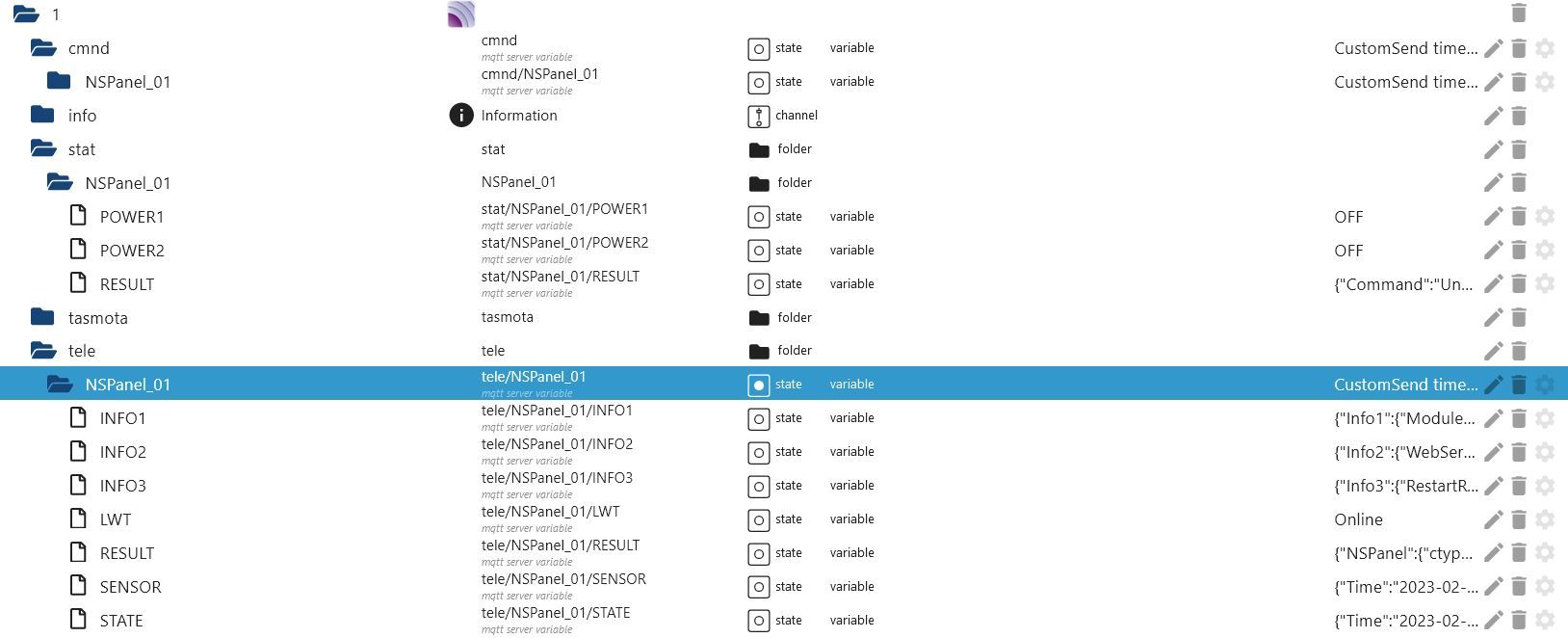
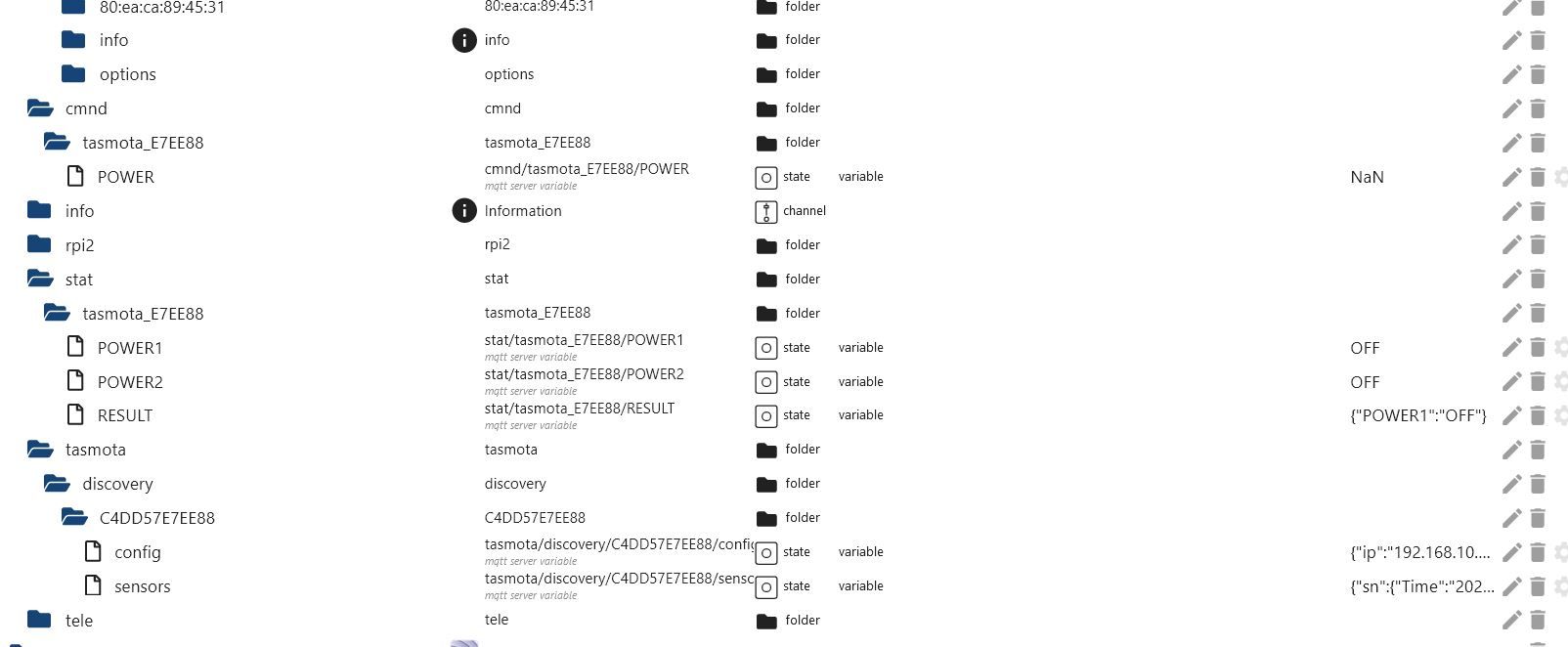
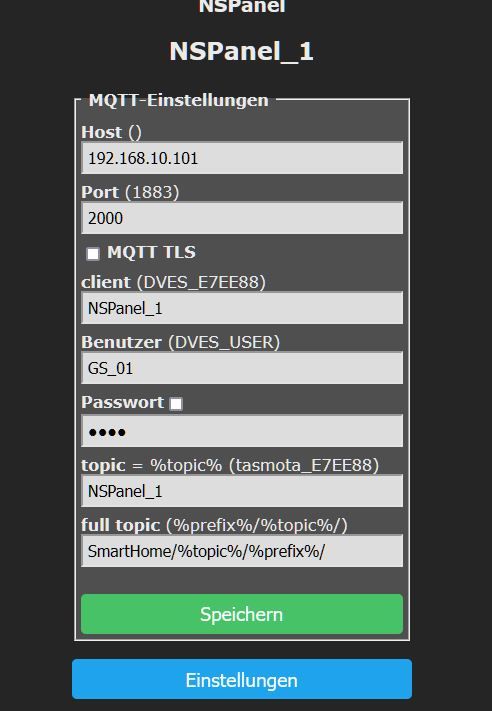
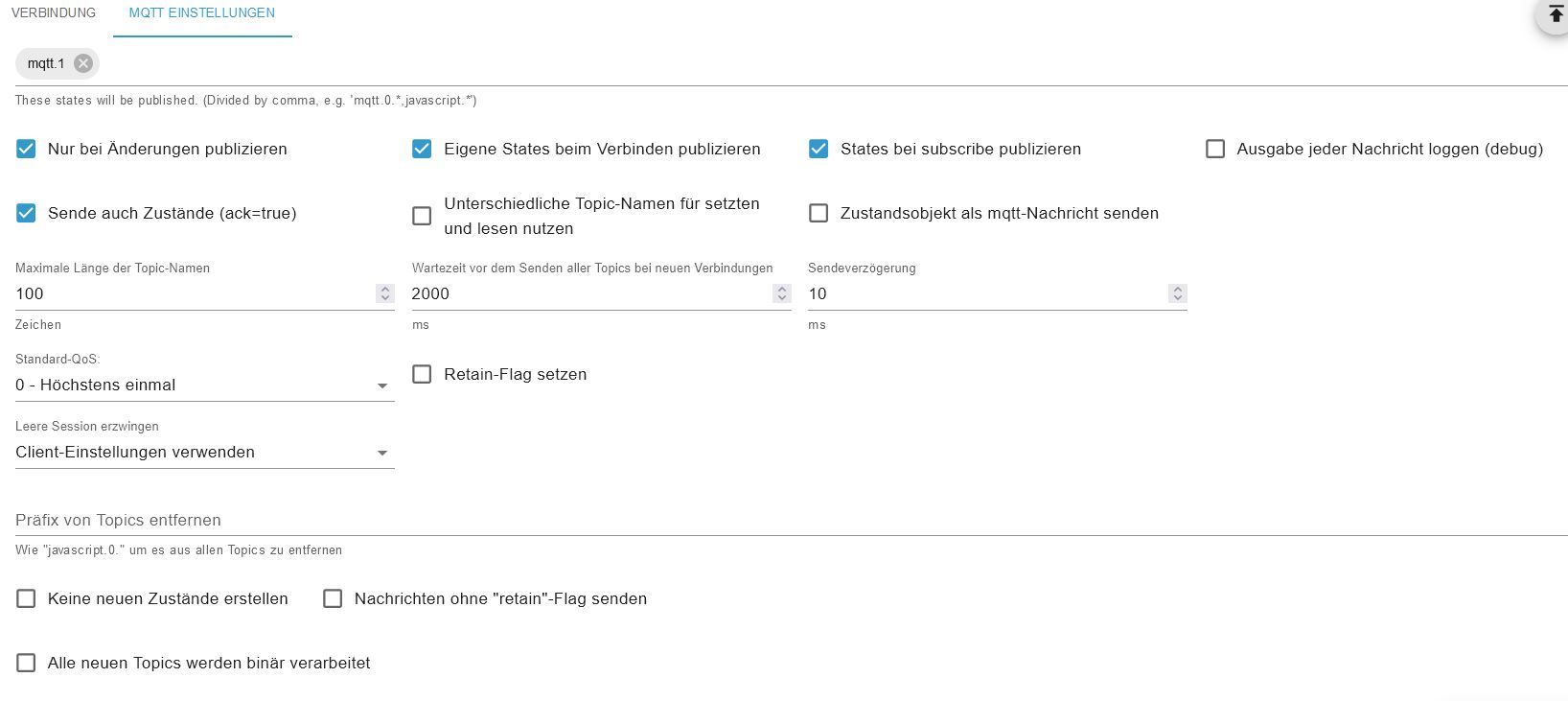
                  Ich nutze für das NSPanel mqtt.1 mit dem Port 2000.
                  Unter mqtt.1 hat er mir die Verzeichnisse angelegt und auch das CustomSend (via MQTT Explorer).

                  Unter mqtt.0 (hat Port 6064) hat er mir ebenfalls Verzeichnisse angelegt.
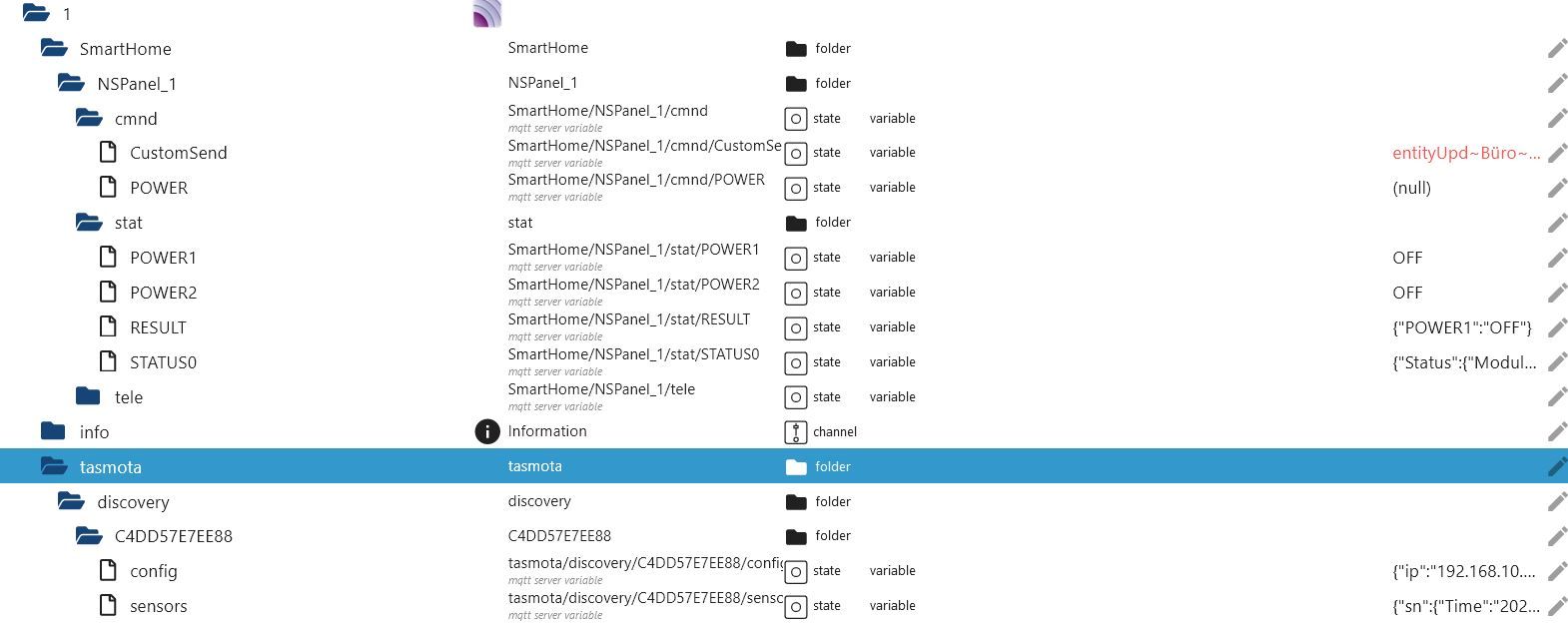
                  a1.JPG
                  Hier mqtt.1

                  a2.JPG
                  Hier mqtt.0

                  a3.JPG

                  INTEL NUC i7, Sonoff, hmIP, AVM, Jeelink, T-Link, Alexa, Saia-Burgess, uvm.

                  T 1 Reply Last reply
                  0
                  • GregorSG GregorS

                    @tt-tom

                    Habe das NSPanel anhand der Wiki komplett neu durchkonfiguriert.
                    Bis zum Punkt 9, "Ab jetzt sollte der Startup-Screen „Waiting for Connection“ in den Sreensaver wechseln und minütlich die Uhrzeit an den Screensaver übertragen"

                    Es dreht sich nur. Keine Änderung gegenüber früher.

                    Aber dann ist mir was aufgefallen.
                    Ich nutze für das NSPanel mqtt.1 mit dem Port 2000.
                    Unter mqtt.1 hat er mir die Verzeichnisse angelegt und auch das CustomSend (via MQTT Explorer).

                    Unter mqtt.0 (hat Port 6064) hat er mir ebenfalls Verzeichnisse angelegt.

                    a1.JPG
                    Hier mqtt.1

                    a2.JPG
                    Hier mqtt.0

                    a3.JPG

                    T Offline
                    T Offline
                    TT-Tom
                    wrote on last edited by TT-Tom
                    #75

                    @gregors

                    Warum hast du die Ports jetzt geändert?? Auf was für ein System läuft der iobroker?

                    Hast du beim Start Meldung im Protokoll?

                    Sind alle Objekte angelegt. 0_userdata.0 und alias?

                    Gruß Tom
                    https://github.com/tt-tom17
                    Wenn meine Hilfe erfolgreich war, benutze bitte das Voting unten rechts im Beitrag

                    NSPanel Script Wiki
                    https://github.com/joBr99/nspanel-lovelace-ui/wiki

                    NSPanel Adapter Wiki
                    https://github.com/ticaki/ioBroker.nspanel-lovelace-ui/wiki

                    GregorSG 1 Reply Last reply
                    0
                    • T TT-Tom

                      @gregors

                      Warum hast du die Ports jetzt geändert?? Auf was für ein System läuft der iobroker?

                      Hast du beim Start Meldung im Protokoll?

                      Sind alle Objekte angelegt. 0_userdata.0 und alias?

                      GregorSG Online
                      GregorSG Online
                      GregorS
                      wrote on last edited by GregorS
                      #76

                      @tt-tom
                      Wollte diesmal weit weg vom Port 1883.
                      Unter userdata.0 sind die Objekte angelegt, Alias habe ich keine.
                      Habe nach Punkt 9 aufgehört, da der Hinweis "Waiting for content" immer noch da war und nicht wie beschrieben die Zeit angezeigt wurde.
                      Welchen Start meinst du? ioBroker oder NSPanel?
                      Ich habe ioBroker in einer VM unter Proxmox laufen

                      INTEL NUC i7, Sonoff, hmIP, AVM, Jeelink, T-Link, Alexa, Saia-Burgess, uvm.

                      T 1 Reply Last reply
                      0
                      • GregorSG GregorS

                        @tt-tom
                        Wollte diesmal weit weg vom Port 1883.
                        Unter userdata.0 sind die Objekte angelegt, Alias habe ich keine.
                        Habe nach Punkt 9 aufgehört, da der Hinweis "Waiting for content" immer noch da war und nicht wie beschrieben die Zeit angezeigt wurde.
                        Welchen Start meinst du? ioBroker oder NSPanel?
                        Ich habe ioBroker in einer VM unter Proxmox laufen

                        T Offline
                        T Offline
                        TT-Tom
                        wrote on last edited by
                        #77

                        @gregors

                        Mit Proxmox kenne ich mich nicht aus. Ist der Port richtig freigegeben?

                        Wenn du das Script startest, bekommst du da Meldungen im Protokoll?
                        Was mich wundert ist das die 0_userdata da sind, aber alias nicht. Hast du auch beide vor dem Start des Script gelöscht?

                        Poste bitte nochmal den aktuellen Inhalt von CustomSend.

                        Gruß Tom
                        https://github.com/tt-tom17
                        Wenn meine Hilfe erfolgreich war, benutze bitte das Voting unten rechts im Beitrag

                        NSPanel Script Wiki
                        https://github.com/joBr99/nspanel-lovelace-ui/wiki

                        NSPanel Adapter Wiki
                        https://github.com/ticaki/ioBroker.nspanel-lovelace-ui/wiki

                        GregorSG 1 Reply Last reply
                        0
                        • T TT-Tom

                          @gregors

                          Mit Proxmox kenne ich mich nicht aus. Ist der Port richtig freigegeben?

                          Wenn du das Script startest, bekommst du da Meldungen im Protokoll?
                          Was mich wundert ist das die 0_userdata da sind, aber alias nicht. Hast du auch beide vor dem Start des Script gelöscht?

                          Poste bitte nochmal den aktuellen Inhalt von CustomSend.

                          GregorSG Online
                          GregorSG Online
                          GregorS
                          wrote on last edited by
                          #78

                          @tt-tom
                          Es kommt kein Fehler beim start des Scriptes

                          mqtt.1
                          	2023-02-18 19:16:51.076	info	Client [NSPanel_1] publishOnSubscribe send all known states
                          mqtt.1
                          	2023-02-18 19:16:51.076	info	Client [NSPanel_1] publishOnSubscribe send all known states
                          mqtt.1
                          	2023-02-18 19:16:51.075	info	Client [NSPanel_1] publishOnSubscribe send all known states
                          mqtt.1
                          	2023-02-18 19:16:50.876	info	Client [NSPanel_1] subscribes on "cmnd/NSPanel_1_fb/#" with regex /^mqtt\.1\.cmnd\.NSPanel_1_fb(\..*)?/
                          mqtt.1
                          	2023-02-18 19:16:50.876	info	Client [NSPanel_1] subscribes on "cmnd/NSPanel_1_fb/#" with regex /^cmnd\.NSPanel_1_fb(\..*)?/
                          mqtt.1
                          	2023-02-18 19:16:50.876	info	Client [NSPanel_1] subscribes on "SmartHome/tasmotas/cmnd/#" with regex /^mqtt\.1\.SmartHome\.tasmotas\.cmnd(\..*)?/
                          mqtt.1
                          	2023-02-18 19:16:50.875	info	Client [NSPanel_1] subscribes on "SmartHome/tasmotas/cmnd/#" with regex /^SmartHome\.tasmotas\.cmnd(\..*)?/
                          mqtt.1
                          	2023-02-18 19:16:50.875	info	Client [NSPanel_1] subscribes on "SmartHome/NSPanel_1/cmnd/#" with regex /^mqtt\.1\.SmartHome\.NSPanel_1\.cmnd(\..*)?/
                          mqtt.1
                          	2023-02-18 19:16:50.875	info	Client [NSPanel_1] subscribes on "SmartHome/NSPanel_1/cmnd/#" with regex /^SmartHome\.NSPanel_1\.cmnd(\..*)?/
                          mqtt.1
                          	2023-02-18 19:16:50.814	info	Client [NSPanel_1] reconnected. Old secret 1676669581168_8048. New secret 1676744210814_6955
                          

                          Alias werden doch angelegt. Habe ich irgendwie übersehen - Sorry.
                          Habe ich wie auch die userdata-Einträge vorher gelöscht.

                          Ports brauche ich nicht freigeben.
                          Habe an mqtt.0 einen fernen Rasp, der mir Daten übermittelt.

                          In CustomSend wird kurz die Uhrzeit aktualisiert, dannach erscheint wieder in rot

                          entityUpd~Büro~button~bPrev~~65535~~~button~bNext~~65535~~~delete~~~~~~delete~~~~~~delete~~~~~~delete~~~~~
                          
                          export const config: Config = {
                              panelRecvTopic: 'mqtt.1.SmartHome.NSPanel_1.tele.RESULT',       // Bitte anpassen
                              panelSendTopic: 'mqtt.1.SmartHome.NSPanel_1.cmnd.CustomSend',   // Bitte anpassen
                          

                          INTEL NUC i7, Sonoff, hmIP, AVM, Jeelink, T-Link, Alexa, Saia-Burgess, uvm.

                          T 1 Reply Last reply
                          0
                          • GregorSG GregorS

                            @tt-tom
                            Es kommt kein Fehler beim start des Scriptes

                            mqtt.1
                            	2023-02-18 19:16:51.076	info	Client [NSPanel_1] publishOnSubscribe send all known states
                            mqtt.1
                            	2023-02-18 19:16:51.076	info	Client [NSPanel_1] publishOnSubscribe send all known states
                            mqtt.1
                            	2023-02-18 19:16:51.075	info	Client [NSPanel_1] publishOnSubscribe send all known states
                            mqtt.1
                            	2023-02-18 19:16:50.876	info	Client [NSPanel_1] subscribes on "cmnd/NSPanel_1_fb/#" with regex /^mqtt\.1\.cmnd\.NSPanel_1_fb(\..*)?/
                            mqtt.1
                            	2023-02-18 19:16:50.876	info	Client [NSPanel_1] subscribes on "cmnd/NSPanel_1_fb/#" with regex /^cmnd\.NSPanel_1_fb(\..*)?/
                            mqtt.1
                            	2023-02-18 19:16:50.876	info	Client [NSPanel_1] subscribes on "SmartHome/tasmotas/cmnd/#" with regex /^mqtt\.1\.SmartHome\.tasmotas\.cmnd(\..*)?/
                            mqtt.1
                            	2023-02-18 19:16:50.875	info	Client [NSPanel_1] subscribes on "SmartHome/tasmotas/cmnd/#" with regex /^SmartHome\.tasmotas\.cmnd(\..*)?/
                            mqtt.1
                            	2023-02-18 19:16:50.875	info	Client [NSPanel_1] subscribes on "SmartHome/NSPanel_1/cmnd/#" with regex /^mqtt\.1\.SmartHome\.NSPanel_1\.cmnd(\..*)?/
                            mqtt.1
                            	2023-02-18 19:16:50.875	info	Client [NSPanel_1] subscribes on "SmartHome/NSPanel_1/cmnd/#" with regex /^SmartHome\.NSPanel_1\.cmnd(\..*)?/
                            mqtt.1
                            	2023-02-18 19:16:50.814	info	Client [NSPanel_1] reconnected. Old secret 1676669581168_8048. New secret 1676744210814_6955
                            

                            Alias werden doch angelegt. Habe ich irgendwie übersehen - Sorry.
                            Habe ich wie auch die userdata-Einträge vorher gelöscht.

                            Ports brauche ich nicht freigeben.
                            Habe an mqtt.0 einen fernen Rasp, der mir Daten übermittelt.

                            In CustomSend wird kurz die Uhrzeit aktualisiert, dannach erscheint wieder in rot

                            entityUpd~Büro~button~bPrev~~65535~~~button~bNext~~65535~~~delete~~~~~~delete~~~~~~delete~~~~~~delete~~~~~
                            
                            export const config: Config = {
                                panelRecvTopic: 'mqtt.1.SmartHome.NSPanel_1.tele.RESULT',       // Bitte anpassen
                                panelSendTopic: 'mqtt.1.SmartHome.NSPanel_1.cmnd.CustomSend',   // Bitte anpassen
                            
                            T Offline
                            T Offline
                            TT-Tom
                            wrote on last edited by
                            #79

                            @gregors

                            Okay dann wird das Problem hier sein.

                            
                            entityUpd~Büro~button~bPrev~~65535~~~button~bNext~~65535~~~delete~~~~~~delete~~~~~~delete~~~~~~delete~~~~~


                            Hast du eine Seite die Büro heißt?
                            Zeige bitte mal die Auflistung deiner Seiten.

                            @Armilar
                            Wenn ich den Payload richtig verstehe will er auf die Seite Büro updaten, kannst du dir das erklären.

                            Gruß Tom
                            https://github.com/tt-tom17
                            Wenn meine Hilfe erfolgreich war, benutze bitte das Voting unten rechts im Beitrag

                            NSPanel Script Wiki
                            https://github.com/joBr99/nspanel-lovelace-ui/wiki

                            NSPanel Adapter Wiki
                            https://github.com/ticaki/ioBroker.nspanel-lovelace-ui/wiki

                            GregorSG 1 Reply Last reply
                            0
                            • T TT-Tom

                              @gregors

                              Okay dann wird das Problem hier sein.

                              
                              entityUpd~Büro~button~bPrev~~65535~~~button~bNext~~65535~~~delete~~~~~~delete~~~~~~delete~~~~~~delete~~~~~


                              Hast du eine Seite die Büro heißt?
                              Zeige bitte mal die Auflistung deiner Seiten.

                              @Armilar
                              Wenn ich den Payload richtig verstehe will er auf die Seite Büro updaten, kannst du dir das erklären.

                              GregorSG Online
                              GregorSG Online
                              GregorS
                              wrote on last edited by
                              #80

                              @tt-tom

                              Ich habe keine Seite die Büro heißt.
                              Im Script gibt es folgenden Teil:

                              let Buero_Seite_1 = <PageEntities>
                              {
                                  'type': 'cardEntities',
                                  'heading': 'Büro',
                                  'useColor': true,
                                  'items': [
                                      <PageItem>{ id: 'alias.0.NSPanel_1.Schreibtischlampe', interpolateColor: true},
                                      <PageItem>{ id: 'alias.0.NSPanel_1.Deckenbeleuchtung', interpolateColor: true},
                                      <PageItem>{ id: 'alias.0.NSPanel_1.Testlampe2', name: 'Filamentlampe', minValueBrightness: 0, maxValueBrightness: 70, interpolateColor: true},
                                      <PageItem>{ id: 'alias.0.NSPanel_1.Luftreiniger', icon: 'power', icon2: 'power',offColor: MSRed, onColor: MSGreen}
                              

                              Ich hab bis auf den Wetterdienst, panelRecvTopic und panelSendTopic keine Änderungen am Script vorgenommen.

                              INTEL NUC i7, Sonoff, hmIP, AVM, Jeelink, T-Link, Alexa, Saia-Burgess, uvm.

                              T 1 Reply Last reply
                              0
                              • GregorSG GregorS

                                @tt-tom

                                Ich habe keine Seite die Büro heißt.
                                Im Script gibt es folgenden Teil:

                                let Buero_Seite_1 = <PageEntities>
                                {
                                    'type': 'cardEntities',
                                    'heading': 'Büro',
                                    'useColor': true,
                                    'items': [
                                        <PageItem>{ id: 'alias.0.NSPanel_1.Schreibtischlampe', interpolateColor: true},
                                        <PageItem>{ id: 'alias.0.NSPanel_1.Deckenbeleuchtung', interpolateColor: true},
                                        <PageItem>{ id: 'alias.0.NSPanel_1.Testlampe2', name: 'Filamentlampe', minValueBrightness: 0, maxValueBrightness: 70, interpolateColor: true},
                                        <PageItem>{ id: 'alias.0.NSPanel_1.Luftreiniger', icon: 'power', icon2: 'power',offColor: MSRed, onColor: MSGreen}
                                

                                Ich hab bis auf den Wetterdienst, panelRecvTopic und panelSendTopic keine Änderungen am Script vorgenommen.

                                T Offline
                                T Offline
                                TT-Tom
                                wrote on last edited by
                                #81

                                @GregorS
                                Okay dann musst du noch die beiden Stellen anpassen. Der MQTT Pfad muss stimmen.

                                
                                 // Indikator Icons im oberen Teil des Screensavers
                                    // Mit 3.9.0 neue Parameter - Bitte anpassen - siehe auch Wiki
                                    mrIcon1ScreensaverEntity: { ScreensaverEntity: 'mqtt.0.SmartHome.NSPanel_1.stat.POWER1', 
                                                                ScreensaverEntityIconOn: 'lightbulb',                           //Rename
                                                                ScreensaverEntityIconOff: null, 
                                                                ScreensaverEntityValue: null,                                   //New
                                                                ScreensaverEntityValueDecimalPlace : 0,                         //New
                                                                ScreensaverEntityValueUnit: null,                               //New
                                                                ScreensaverEntityOnColor: On, 
                                                                ScreensaverEntityOffColor: HMIOff },
                                    mrIcon2ScreensaverEntity: { ScreensaverEntity: 'mqtt.0.SmartHome.NSPanel_1.stat.POWER2', 
                                                                ScreensaverEntityIconOn: 'heat-wave',
                                                                ScreensaverEntityIconOff: null, 
                                                                ScreensaverEntityValue: NSPanel_Path + 'Sensor.ANALOG.Temperature',
                                                                ScreensaverEntityValueDecimalPlace : 1,
                                                                ScreensaverEntityValueUnit: '°', 
                                                                ScreensaverEntityOnColor: MSRed, 
                                                                ScreensaverEntityOffColor: Yellow },


                                Gruß Tom
                                https://github.com/tt-tom17
                                Wenn meine Hilfe erfolgreich war, benutze bitte das Voting unten rechts im Beitrag

                                NSPanel Script Wiki
                                https://github.com/joBr99/nspanel-lovelace-ui/wiki

                                NSPanel Adapter Wiki
                                https://github.com/ticaki/ioBroker.nspanel-lovelace-ui/wiki

                                GregorSG 1 Reply Last reply
                                0
                                • T TT-Tom

                                  @GregorS
                                  Okay dann musst du noch die beiden Stellen anpassen. Der MQTT Pfad muss stimmen.

                                  
                                   // Indikator Icons im oberen Teil des Screensavers
                                      // Mit 3.9.0 neue Parameter - Bitte anpassen - siehe auch Wiki
                                      mrIcon1ScreensaverEntity: { ScreensaverEntity: 'mqtt.0.SmartHome.NSPanel_1.stat.POWER1', 
                                                                  ScreensaverEntityIconOn: 'lightbulb',                           //Rename
                                                                  ScreensaverEntityIconOff: null, 
                                                                  ScreensaverEntityValue: null,                                   //New
                                                                  ScreensaverEntityValueDecimalPlace : 0,                         //New
                                                                  ScreensaverEntityValueUnit: null,                               //New
                                                                  ScreensaverEntityOnColor: On, 
                                                                  ScreensaverEntityOffColor: HMIOff },
                                      mrIcon2ScreensaverEntity: { ScreensaverEntity: 'mqtt.0.SmartHome.NSPanel_1.stat.POWER2', 
                                                                  ScreensaverEntityIconOn: 'heat-wave',
                                                                  ScreensaverEntityIconOff: null, 
                                                                  ScreensaverEntityValue: NSPanel_Path + 'Sensor.ANALOG.Temperature',
                                                                  ScreensaverEntityValueDecimalPlace : 1,
                                                                  ScreensaverEntityValueUnit: '°', 
                                                                  ScreensaverEntityOnColor: MSRed, 
                                                                  ScreensaverEntityOffColor: Yellow },
                                  
                                  
                                  GregorSG Online
                                  GregorSG Online
                                  GregorS
                                  wrote on last edited by
                                  #82

                                  @tt-tom

                                  Habe ich aktualisiert.
                                  Keine Änderung.

                                  entityUpd~Büro~button~bPrev~~65535~~~button~bNext~~65535~~~delete~~~~~~delete~~~~~~delete~~~~~~delete~~~~~
                                  

                                  Frage:
                                  Wie kommen Infos aus dem NSPanel in mqtt.0 mit dem Port 6064?

                                  INTEL NUC i7, Sonoff, hmIP, AVM, Jeelink, T-Link, Alexa, Saia-Burgess, uvm.

                                  T 1 Reply Last reply
                                  0
                                  • GregorSG GregorS

                                    @tt-tom

                                    Habe ich aktualisiert.
                                    Keine Änderung.

                                    entityUpd~Büro~button~bPrev~~65535~~~button~bNext~~65535~~~delete~~~~~~delete~~~~~~delete~~~~~~delete~~~~~
                                    

                                    Frage:
                                    Wie kommen Infos aus dem NSPanel in mqtt.0 mit dem Port 6064?

                                    T Offline
                                    T Offline
                                    TT-Tom
                                    wrote on last edited by
                                    #83

                                    @gregors

                                    Gute Frage, ohne dein System richtig zu kennen, kann ich dir das auch nicht sagen. Wenn du die Einträge löschst, kommen sie dann wieder?

                                    Im Script bitte mal die Page Auflistung wie folgt anpassen.

                                    
                                    pages: [
                                    	   // Buero_Seite_1,          //Beispiel-Seite
                                                //WLED,                   //Beispiel-Seite
                                               // Radiosender,            //Beispiel-Seite
                                               // SensorGrid,             //Beispiel-Seite
                                                //CardLChartExample,      //Beispiel-Seite
                                                //CardChartExample,       //Beispiel-Seite
                                                //CardPowerExample,       //Beispiel-Seite
                                                //SqueezeboxRPC,          //Beispiel-Seite
                                                //Sonos,                  //Beispiel-Seite
                                                //SpotifyPremium,         //Beispiel-Seite
                                                //Alexa,                  //Beispiel-Seite
                                               // Buero_Seite_2,          //Beispiel-Seite
                                               // Buero_Klimaanlage,      //Beispiel-Seite 
                                               // Button_1,               //Beispiel-Seite
                                               // Test_Licht1,            //Beispiel-Seite
                                               // Test_Licht2,            //Beispiel-Seite
                                               // Test_Funktionen,        //Beispiel-Seite    
                                               // Fenster_1,              //Beispiel-Seite
                                               // Subpages_1,             //Beispiel-Seite
                                               // Buero_Themostat,        //Beispiel-Seite
                                               // Buero_Alarm,            //Beispiel-Seite
                                    	    
                                                NSPanel_Service         //Auto-Alias Service Page
                                        ],
                                        subPages: [
                                    	     //   Abfall,                                 //Beispiel-Unterseite
                                                //    WLAN,                                   //Beispiel-Unterseite
                                    	    
                                                    NSPanel_Infos,                          //Auto-Alias Service Page
                                                        NSPanel_Wifi_Info_1,                //Auto-Alias Service Page
                                                        NSPanel_Wifi_Info_2,                //Auto-Alias Service Page
                                                        NSPanel_Sensoren,                   //Auto-Alias Service Page
                                                        NSPanel_Hardware,                   //Auto-Alias Service Page
                                                    NSPanel_Einstellungen,                  //Auto-Alias Service Page
                                                        NSPanel_Screensaver,                //Auto-Alias Service Page
                                                            NSPanel_ScreensaverDimmode,     //Auto-Alias Service Page
                                                            NSPanel_ScreensaverOther,       //Auto-Alias Service Page
                                                            NSPanel_Weather,                //Auto-Alias Service Page
                                                            NSPanel_Dateformat,             //Auto-Alias Service Page
                                                            NSPanel_Indicators,             //Auto-Alias Service Page
                                                            NSPanel_Relays,                 //Auto-Alias Service Page
                                                    NSPanel_Firmware,                       //Auto-Alias Service Page
                                                        NSPanel_FirmwareTasmota,            //Auto-Alias Service Page
                                                        NSPanel_FirmwareBerry,              //Auto-Alias Service Page
                                                        NSPanel_FirmwareNextion,            //Auto-Alias Service Page
                                        ],
                                        button1Page: null,   //Beispiel-Seite auf Button 1, wenn Rule2 definiert - Wenn nicht definiert --> button1Page: null, 
                                        button2Page: null   //Beispiel-Seite auf Button 2, wenn Rule2 definiert - Wenn nicht definiert --> button1Page: null,
                                    };


                                    Gruß Tom
                                    https://github.com/tt-tom17
                                    Wenn meine Hilfe erfolgreich war, benutze bitte das Voting unten rechts im Beitrag

                                    NSPanel Script Wiki
                                    https://github.com/joBr99/nspanel-lovelace-ui/wiki

                                    NSPanel Adapter Wiki
                                    https://github.com/ticaki/ioBroker.nspanel-lovelace-ui/wiki

                                    GregorSG 1 Reply Last reply
                                    0
                                    • T TT-Tom

                                      @gregors

                                      Gute Frage, ohne dein System richtig zu kennen, kann ich dir das auch nicht sagen. Wenn du die Einträge löschst, kommen sie dann wieder?

                                      Im Script bitte mal die Page Auflistung wie folgt anpassen.

                                      
                                      pages: [
                                      	   // Buero_Seite_1,          //Beispiel-Seite
                                                  //WLED,                   //Beispiel-Seite
                                                 // Radiosender,            //Beispiel-Seite
                                                 // SensorGrid,             //Beispiel-Seite
                                                  //CardLChartExample,      //Beispiel-Seite
                                                  //CardChartExample,       //Beispiel-Seite
                                                  //CardPowerExample,       //Beispiel-Seite
                                                  //SqueezeboxRPC,          //Beispiel-Seite
                                                  //Sonos,                  //Beispiel-Seite
                                                  //SpotifyPremium,         //Beispiel-Seite
                                                  //Alexa,                  //Beispiel-Seite
                                                 // Buero_Seite_2,          //Beispiel-Seite
                                                 // Buero_Klimaanlage,      //Beispiel-Seite 
                                                 // Button_1,               //Beispiel-Seite
                                                 // Test_Licht1,            //Beispiel-Seite
                                                 // Test_Licht2,            //Beispiel-Seite
                                                 // Test_Funktionen,        //Beispiel-Seite    
                                                 // Fenster_1,              //Beispiel-Seite
                                                 // Subpages_1,             //Beispiel-Seite
                                                 // Buero_Themostat,        //Beispiel-Seite
                                                 // Buero_Alarm,            //Beispiel-Seite
                                      	    
                                                  NSPanel_Service         //Auto-Alias Service Page
                                          ],
                                          subPages: [
                                      	     //   Abfall,                                 //Beispiel-Unterseite
                                                  //    WLAN,                                   //Beispiel-Unterseite
                                      	    
                                                      NSPanel_Infos,                          //Auto-Alias Service Page
                                                          NSPanel_Wifi_Info_1,                //Auto-Alias Service Page
                                                          NSPanel_Wifi_Info_2,                //Auto-Alias Service Page
                                                          NSPanel_Sensoren,                   //Auto-Alias Service Page
                                                          NSPanel_Hardware,                   //Auto-Alias Service Page
                                                      NSPanel_Einstellungen,                  //Auto-Alias Service Page
                                                          NSPanel_Screensaver,                //Auto-Alias Service Page
                                                              NSPanel_ScreensaverDimmode,     //Auto-Alias Service Page
                                                              NSPanel_ScreensaverOther,       //Auto-Alias Service Page
                                                              NSPanel_Weather,                //Auto-Alias Service Page
                                                              NSPanel_Dateformat,             //Auto-Alias Service Page
                                                              NSPanel_Indicators,             //Auto-Alias Service Page
                                                              NSPanel_Relays,                 //Auto-Alias Service Page
                                                      NSPanel_Firmware,                       //Auto-Alias Service Page
                                                          NSPanel_FirmwareTasmota,            //Auto-Alias Service Page
                                                          NSPanel_FirmwareBerry,              //Auto-Alias Service Page
                                                          NSPanel_FirmwareNextion,            //Auto-Alias Service Page
                                          ],
                                          button1Page: null,   //Beispiel-Seite auf Button 1, wenn Rule2 definiert - Wenn nicht definiert --> button1Page: null, 
                                          button2Page: null   //Beispiel-Seite auf Button 2, wenn Rule2 definiert - Wenn nicht definiert --> button1Page: null,
                                      };
                                      
                                      
                                      GregorSG Online
                                      GregorSG Online
                                      GregorS
                                      wrote on last edited by
                                      #84

                                      @tt-tom

                                      Habe ich abgeändert.
                                      Jetzt steht in CustomSend

                                      entityUpd~NSPanel Service~button~bPrev~~65535~~~button~bNext~~65535~~~button~navigate.NSPanel_Infos~~38060~Infos~mehr...~button~navigate.NSPanel_Einstellungen~~38060~Einstellungen~mehr...~button~navigate.NSPanel_Firmware~~38060~Firmware~mehr...~button~alias.0.NSPanel.1.Config.rebootNSPanel~~32495~Reboot NSPanel~Start
                                      

                                      Objekte in mqtt.0 werden immer wieder neu angelegt

                                      INTEL NUC i7, Sonoff, hmIP, AVM, Jeelink, T-Link, Alexa, Saia-Burgess, uvm.

                                      T 1 Reply Last reply
                                      0
                                      • GregorSG GregorS

                                        @tt-tom

                                        Habe ich abgeändert.
                                        Jetzt steht in CustomSend

                                        entityUpd~NSPanel Service~button~bPrev~~65535~~~button~bNext~~65535~~~button~navigate.NSPanel_Infos~~38060~Infos~mehr...~button~navigate.NSPanel_Einstellungen~~38060~Einstellungen~mehr...~button~navigate.NSPanel_Firmware~~38060~Firmware~mehr...~button~alias.0.NSPanel.1.Config.rebootNSPanel~~32495~Reboot NSPanel~Start
                                        

                                        Objekte in mqtt.0 werden immer wieder neu angelegt

                                        T Offline
                                        T Offline
                                        TT-Tom
                                        wrote on last edited by
                                        #85

                                        @gregors

                                        Also das Script, sendet die richtigen Daten. Sie kommen aber im Panel nicht an. Irgend etwas stimmt dann mit der MQTT Verbindung nicht. Kannst du mal die Instanz 0 mal stoppen?

                                        Bleibt die Struktur in MQTT.0 mit den Daten gleich oder haben sich die Verzeichnisse geändert?

                                        Gruß Tom
                                        https://github.com/tt-tom17
                                        Wenn meine Hilfe erfolgreich war, benutze bitte das Voting unten rechts im Beitrag

                                        NSPanel Script Wiki
                                        https://github.com/joBr99/nspanel-lovelace-ui/wiki

                                        NSPanel Adapter Wiki
                                        https://github.com/ticaki/ioBroker.nspanel-lovelace-ui/wiki

                                        GregorSG 1 Reply Last reply
                                        0
                                        • T TT-Tom

                                          @gregors

                                          Also das Script, sendet die richtigen Daten. Sie kommen aber im Panel nicht an. Irgend etwas stimmt dann mit der MQTT Verbindung nicht. Kannst du mal die Instanz 0 mal stoppen?

                                          Bleibt die Struktur in MQTT.0 mit den Daten gleich oder haben sich die Verzeichnisse geändert?

                                          GregorSG Online
                                          GregorSG Online
                                          GregorS
                                          wrote on last edited by GregorS
                                          #86

                                          @tt-tom

                                          mqtt.0 ist gestoppt.
                                          Die Datenstruktur in mqtt.0 ist immer dieselbe.
                                          Ich bekomme von dem Rasp nur 16 Werte von Sensoren.
                                          Werte sind auch plausibel.
                                          Nach dem löschen der Objekte vom NSPanel im mqtt.0 habe ich nun folgende fehler im Log

                                          mqtt.0
                                          	2023-02-18 22:18:06.934	warn	State "mqtt.0.tasmota.discovery.C4DD57E7EE88.sensors" has no existing object, this might lead to an error in future versions
                                          mqtt.0
                                          	2023-02-18 22:18:06.898	warn	State "mqtt.0.tasmota.discovery.C4DD57E7EE88.config" has no existing object, this might lead to an error in future versions
                                          mqtt.0
                                          	2023-02-18 22:18:06.897	warn	State "mqtt.0.tele.tasmota_E7EE88.SENSOR" has no existing object, this might lead to an error in future versions
                                          mqtt.0
                                          	2023-02-18 22:18:06.897	warn	State "mqtt.0.tele.tasmota_E7EE88.STATE" has no existing object, this might lead to an error in future versions
                                          mqtt.0
                                          	2023-02-18 22:18:06.897	warn	State "mqtt.0.tele.tasmota_E7EE88.RESULT" has no existing object, this might lead to an error in future versions
                                          mqtt.0
                                          	2023-02-18 22:18:06.896	warn	State "mqtt.0.stat.tasmota_E7EE88.POWER2" has no existing object, this might lead to an error in future versions
                                          mqtt.0
                                          	2023-02-18 22:18:06.896	warn	State "mqtt.0.stat.tasmota_E7EE88.POWER1" has no existing object, this might lead to an error in future versions
                                          mqtt.0
                                          	2023-02-18 22:18:06.896	warn	State "mqtt.0.stat.tasmota_E7EE88.RESULT" has no existing object, this might lead to an error in future versions
                                          mqtt.0
                                          	2023-02-18 22:18:06.890	warn	State "mqtt.0.tele.tasmota_E7EE88.INFO3" has no existing object, this might lead to an error in future versions
                                          mqtt.0
                                          	2023-02-18 22:18:06.890	warn	State "mqtt.0.tele.tasmota_E7EE88.INFO2" has no existing object, this might lead to an error in future versions
                                          mqtt.0
                                          	2023-02-18 22:18:06.889	warn	State "mqtt.0.tele.tasmota_E7EE88.INFO1" has no existing object, this might lead to an error in future versions
                                          mqtt.0
                                          	2023-02-18 22:18:06.888	warn	State "mqtt.0.cmnd.tasmota_E7EE88.POWER" has no existing object, this might lead to an error in future versions
                                          mqtt.0
                                          	2023-02-18 22:18:06.814	warn	State "mqtt.0.tele.tasmota_E7EE88.LWT" has no existing object, this might lead to an error in future versions
                                          mqtt.0
                                          	2023-02-18 22:15:06.375	warn	State "mqtt.0.tasmota.discovery.C4DD57E7EE88.sensors" has no existing object, this might lead to an error in future versions
                                          mqtt.0
                                          	2023-02-18 22:15:06.373	warn	State "mqtt.0.tasmota.discovery.C4DD57E7EE88.config" has no existing object, this might lead to an error in future versions
                                          mqtt.0
                                          	2023-02-18 22:15:06.372	warn	State "mqtt.0.tele.tasmota_E7EE88.SENSOR" has no existing object, this might lead to an error in future versions
                                          mqtt.0
                                          	2023-02-18 22:15:06.372	warn	State "mqtt.0.tele.tasmota_E7EE88.STATE" has no existing object, this might lead to an error in future versions
                                          mqtt.0
                                          	2023-02-18 22:15:06.372	warn	State "mqtt.0.tele.tasmota_E7EE88.RESULT" has no existing object, this might lead to an error in future versions
                                          mqtt.0
                                          	2023-02-18 22:15:06.371	warn	State "mqtt.0.stat.tasmota_E7EE88.POWER2" has no existing object, this might lead to an error in future versions
                                          mqtt.0
                                          	2023-02-18 22:15:06.371	warn	State "mqtt.0.stat.tasmota_E7EE88.POWER1" has no existing object, this might lead to an error in future versions
                                          mqtt.0
                                          	2023-02-18 22:15:06.371	warn	State "mqtt.0.stat.tasmota_E7EE88.RESULT" has no existing object, this might lead to an error in future versions
                                          mqtt.0
                                          	2023-02-18 22:15:06.370	warn	State "mqtt.0.tele.tasmota_E7EE88.INFO3" has no existing object, this might lead to an error in future versions
                                          mqtt.0
                                          	2023-02-18 22:15:06.370	warn	State "mqtt.0.tele.tasmota_E7EE88.INFO2" has no existing object, this might lead to an error in future versions
                                          mqtt.0
                                          	2023-02-18 22:15:06.370	warn	State "mqtt.0.tele.tasmota_E7EE88.INFO1" has no existing object, this might lead to an error in future versions
                                          mqtt.0
                                          	2023-02-18 22:15:06.367	warn	State "mqtt.0.cmnd.tasmota_E7EE88.POWER" has no existing object, this might lead to an error in future versions
                                          mqtt.0
                                          	2023-02-18 22:15:06.366	warn	State "mqtt.0.tele.tasmota_E7EE88.LWT" has no existing object, this might lead to an error in future versions
                                          mqtt.0
                                          	2023-02-18 22:12:06.394	warn	State "mqtt.0.tasmota.discovery.C4DD57E7EE88.sensors" has no existing object, this might lead to an error in future versions
                                          mqtt.0
                                          	2023-02-18 22:12:06.394	warn	State "mqtt.0.tasmota.discovery.C4DD57E7EE88.config" has no existing object, this might lead to an error in future versions
                                          mqtt.0
                                          	2023-02-18 22:12:06.394	warn	State "mqtt.0.tele.tasmota_E7EE88.SENSOR" has no existing object, this might lead to an error in future versions
                                          mqtt.0
                                          	2023-02-18 22:12:06.394	warn	State "mqtt.0.tele.tasmota_E7EE88.STATE" has no existing object, this might lead to an error in future versions
                                          mqtt.0
                                          	2023-02-18 22:12:06.394	warn	State "mqtt.0.tele.tasmota_E7EE88.RESULT" has no existing object, this might lead to an error in future versions
                                          mqtt.0
                                          	2023-02-18 22:12:06.393	warn	State "mqtt.0.stat.tasmota_E7EE88.POWER2" has no existing object, this might lead to an error in future versions
                                          mqtt.0
                                          	2023-02-18 22:12:06.393	warn	State "mqtt.0.stat.tasmota_E7EE88.POWER1" has no existing object, this might lead to an error in future versions
                                          mqtt.0
                                          	2023-02-18 22:12:06.393	warn	State "mqtt.0.stat.tasmota_E7EE88.RESULT" has no existing object, this might lead to an error in future versions
                                          mqtt.0
                                          	2023-02-18 22:12:06.392	warn	State "mqtt.0.tele.tasmota_E7EE88.INFO3" has no existing object, this might lead to an error in future versions
                                          mqtt.0
                                          	2023-02-18 22:12:06.392	warn	State "mqtt.0.tele.tasmota_E7EE88.INFO2" has no existing object, this might lead to an error in future versions
                                          mqtt.0
                                          	2023-02-18 22:12:06.392	warn	State "mqtt.0.tele.tasmota_E7EE88.INFO1" has no existing object, this might lead to an error in future versions
                                          mqtt.0
                                          	2023-02-18 22:12:06.392	warn	State "mqtt.0.cmnd.tasmota_E7EE88.POWER" has no existing object, this might lead to an error in future versions
                                          mqtt.0
                                          	2023-02-18 22:12:06.391	warn	State "mqtt.0.tele.tasmota_E7EE88.LWT" has no existing object, this might lead to an error in future versions
                                          mqtt.0
                                          	2023-02-18 22:09:06.439	warn	State "mqtt.0.tasmota.discovery.C4DD57E7EE88.sensors" has no existing object, this might lead to an error in future versions
                                          mqtt.0
                                          	2023-02-18 22:09:06.438	warn	State "mqtt.0.tasmota.discovery.C4DD57E7EE88.config" has no existing object, this might lead to an error in future versions
                                          mqtt.0
                                          	2023-02-18 22:09:06.414	warn	State "mqtt.0.tele.tasmota_E7EE88.SENSOR" has no existing object, this might lead to an error in future versions
                                          mqtt.0
                                          	2023-02-18 22:09:06.414	warn	State "mqtt.0.tele.tasmota_E7EE88.STATE" has no existing object, this might lead to an error in future versions
                                          mqtt.0
                                          	2023-02-18 22:09:06.414	warn	State "mqtt.0.tele.tasmota_E7EE88.RESULT" has no existing object, this might lead to an error in future versions
                                          mqtt.0
                                          	2023-02-18 22:09:06.413	warn	State "mqtt.0.stat.tasmota_E7EE88.POWER2" has no existing object, this might lead to an error in future versions
                                          mqtt.0
                                          	2023-02-18 22:09:06.413	warn	State "mqtt.0.stat.tasmota_E7EE88.POWER1" has no existing object, this might lead to an error in future versions
                                          mqtt.0
                                          	2023-02-18 22:09:06.413	warn	State "mqtt.0.stat.tasmota_E7EE88.RESULT" has no existing object, this might lead to an error in future versions
                                          mqtt.0
                                          	2023-02-18 22:09:06.412	warn	State "mqtt.0.tele.tasmota_E7EE88.INFO3" has no existing object, this might lead to an error in future versions
                                          mqtt.0
                                          	2023-02-18 22:09:06.412	warn	State "mqtt.0.tele.tasmota_E7EE88.INFO2" has no existing object, this might lead to an error in future versions
                                          mqtt.0
                                          	2023-02-18 22:09:06.372	warn	State "mqtt.0.tele.tasmota_E7EE88.INFO1" has no existing object, this might lead to an error in future versions
                                          mqtt.0
                                          	2023-02-18 22:09:06.371	warn	State "mqtt.0.cmnd.tasmota_E7EE88.POWER" has no existing object, this might lead to an error in future versions
                                          mqtt.0
                                          	2023-02-18 22:09:06.370	warn	State "mqtt.0.tele.tasmota_E7EE88.LWT" has no existing object, this might lead to an error in future versions
                                          

                                          Habe das Script mal neu gestartet.

                                          Ich bekomme aber vom NSPanel die Informationen von den Relais sauber rüber.
                                          INTEL NUC i7, Sonoff, hmIP, AVM, Jeelink, T-Link, Alexa, Saia-Burgess, uvm.

                                          T 1 Reply Last reply
                                          0

                                          Hello! It looks like you're interested in this conversation, but you don't have an account yet.

                                          Getting fed up of having to scroll through the same posts each visit? When you register for an account, you'll always come back to exactly where you were before, and choose to be notified of new replies (either via email, or push notification). You'll also be able to save bookmarks and upvote posts to show your appreciation to other community members.

                                          With your input, this post could be even better 💗

                                          Register Login
                                          Reply
                                          • Reply as topic
                                          Log in to reply
                                          • Oldest to Newest
                                          • Newest to Oldest
                                          • Most Votes


                                          Support us

                                          ioBroker
                                          Community Adapters
                                          Donate
                                          FAQ Cloud / IOT
                                          HowTo: Node.js-Update
                                          HowTo: Backup/Restore
                                          Downloads
                                          BLOG

                                          540

                                          Online

                                          32.7k

                                          Users

                                          82.6k

                                          Topics

                                          1.3m

                                          Posts
                                          Community
                                          Impressum | Datenschutz-Bestimmungen | Nutzungsbedingungen | Einwilligungseinstellungen
                                          ioBroker Community 2014-2025
                                          logo
                                          • Login

                                          • Don't have an account? Register

                                          • Login or register to search.
                                          • First post
                                            Last post
                                          0
                                          • Home
                                          • Recent
                                          • Tags
                                          • Unread 0
                                          • Categories
                                          • Unreplied
                                          • Popular
                                          • GitHub
                                          • Docu
                                          • Hilfe