




Unterstützung gesucht bei Zigbee Stick CC2531 (gelöst)
-
Hallo zusammen
Ich habe ein kleines Problem und wäre froh, wenn mir einer von euch Erfahrenen User helfen könntet.
Wie im Beitrag https://forum.iobroker.net/topic/62661/zigbee-anfänger-neuling/7?_=1675587691755 erwähnt, habe ich ein folgendes Problem.
Ich habe alle Schritte wie im Video sind beschrieben und scheitere dann am Starten des Containers nach den anpassungen im Log:
mount_entry: 2410 No such file or directory - Failed to mount "usb-Texas_Instruments_TI_CC2531_USB_CDC___0X00124B001CDD3CA3-if00" on "/usr/lib/x86_64-linux-gnu/lxc/rootfs/dev/serial/by-id/"
lxc_setup: 4375 Failed to setup mount entries
do_start: 1275 Failed to setup container "250"
sync_wait: 34 An error occurred in another process (expected sequence number 3)
__lxc_start: 2074 Failed to spawn container "250"
startup for container '250' failed
Wer kennt sich damit gut aus und würde helfen?
Gruss Stefan
-
@stefu87_ch Und wieso jetzt nochmal ein neues Thema wo in dem anderen doch schon diskutiert wird?
@wendy2702 Da kann mir niemand weiter helfen, und da ist es das Einsteigerforum. Ich denke nur, in diesem Forum sind vlt die Leute mehr aktiv, und kennen sich besser aus.
Ich habe nur von mir aus gedacht, da ich nicht in jede Kategorie rein schaue.
Model : AMD Ryzen 7 8745HS w/ Radeon 780M Graphics
Cores: 1 × 8 = 8 cores
Threads: 16
mit Proxmox
LXC Container mit Iobroker -
@wendy2702 Da kann mir niemand weiter helfen, und da ist es das Einsteigerforum. Ich denke nur, in diesem Forum sind vlt die Leute mehr aktiv, und kennen sich besser aus.
Ich habe nur von mir aus gedacht, da ich nicht in jede Kategorie rein schaue.
@stefu87_ch Hm,
Mir schleierhaft wie du zu der Aussage kommst das dir dort keiner Helfen kann. Erfahrene User haben dir dort bereits geantwortet.
Scheinbar ist deine Erwartungshaltung eine Antwort innerhalb weniger Minuten zu bekommen.
Mal die Suche bemüht?
https://forum.iobroker.net/topic/52297/anleitung-proxmox-lxc-usb-geräte-durchreichen?_=1675587483566
Bitte keine Fragen per PN, die gehören ins Forum!
Benutzt das Voting rechts unten im Beitrag wenn er euch geholfen hat.
-
@stefu87_ch Hm,
Mir schleierhaft wie du zu der Aussage kommst das dir dort keiner Helfen kann. Erfahrene User haben dir dort bereits geantwortet.
Scheinbar ist deine Erwartungshaltung eine Antwort innerhalb weniger Minuten zu bekommen.
Mal die Suche bemüht?
https://forum.iobroker.net/topic/52297/anleitung-proxmox-lxc-usb-geräte-durchreichen?_=1675587483566
@wendy2702 Ich habe schon diverse unterschiedliche Schritte durchgeführt. Die über die Iobroker Hilfe und auch über Youtube Videos.
Ich warte jetzt mal ein paar Tage und dann sehe ich, ob doch jemand helfen kann, wenn es ja schon zu viel verlangt ist, nach ein paar Stunden nach weiterer Hilfe zu fragen.Model : AMD Ryzen 7 8745HS w/ Radeon 780M Graphics
Cores: 1 × 8 = 8 cores
Threads: 16
mit Proxmox
LXC Container mit Iobroker -
@wendy2702 Ich habe schon diverse unterschiedliche Schritte durchgeführt. Die über die Iobroker Hilfe und auch über Youtube Videos.
Ich warte jetzt mal ein paar Tage und dann sehe ich, ob doch jemand helfen kann, wenn es ja schon zu viel verlangt ist, nach ein paar Stunden nach weiterer Hilfe zu fragen.@stefu87_ch Schritte die weder hier noch im anderen Thread dokumentiert sind.
Woher sollen wir wissen was genau du alles gemacht hast?
Nach dem Link den ich gesendet habe ist es ja scheinbar einigen Leuten gelungen erfolgreich den USB Stick durchzureichen.
Welche anderen Links/Videos du bemüht hast weiss hier keiner.
Im anderen Thread steht:
@stefu87_ch sagte in Zigbee Anfänger/Neuling:
Irgendwie stimmt bei meiner Installation was nicht, aber wurde heute Morgen neu aufgesetzt.
Was wurde neu aufgesetzt?
Wie ist der aktuelle Stand?
Welche Datei wurde wie modifiziert?
Welche Proxmox Version?
Wie sind die Einstellungen des Containers?Und, der richtige und bessere Weg wäre gewesen in dem anderen Thread nachzufragen. Dann rutscht der in der Sichtbarkeit wieder nach oben.
Bitte keine Fragen per PN, die gehören ins Forum!
Benutzt das Voting rechts unten im Beitrag wenn er euch geholfen hat.
-
@stefu87_ch Schritte die weder hier noch im anderen Thread dokumentiert sind.
Woher sollen wir wissen was genau du alles gemacht hast?
Nach dem Link den ich gesendet habe ist es ja scheinbar einigen Leuten gelungen erfolgreich den USB Stick durchzureichen.
Welche anderen Links/Videos du bemüht hast weiss hier keiner.
Im anderen Thread steht:
@stefu87_ch sagte in Zigbee Anfänger/Neuling:
Irgendwie stimmt bei meiner Installation was nicht, aber wurde heute Morgen neu aufgesetzt.
Was wurde neu aufgesetzt?
Wie ist der aktuelle Stand?
Welche Datei wurde wie modifiziert?
Welche Proxmox Version?
Wie sind die Einstellungen des Containers?Und, der richtige und bessere Weg wäre gewesen in dem anderen Thread nachzufragen. Dann rutscht der in der Sichtbarkeit wieder nach oben.
@wendy2702 sagte in Unterstützung gesucht bei Zigbee Stick CC2531:
Ich habe jetzt nochmals Schritt für Schritt nach der Anleitung : https://github.com/ioBroker/ioBroker.docs/blob/master/docs/de/install/proxmox.md#proxmox---lxc-linux-containers---usb-geräte-durchreichen versucht.
Beim Schritt 3 sollte es wenn alles klappt, mit dem Befehl ls -l /dev den Stick anzeigen, dies macht er leider nicht.admin@Iobroker:~$ lsusb Bus 002 Device 001: ID 1d6b:0003 Linux Foundation 3.0 root hub Bus 001 Device 004: ID 8087:0a2b Intel Corp. Bluetooth wireless interface Bus 001 Device 003: ID 051d:0002 American Power Conversion Uninterruptible Power Supply Bus 001 Device 002: ID 0451:16a8 Texas Instruments, Inc. CC2531 ZigBee Bus 001 Device 001: ID 1d6b:0002 Linux Foundation 2.0 root hub admin@Iobroker:~$ ls -l /dev total 0 drwxr-xr-x 3 root root 60 Feb 4 16:58 bus crw--w---- 1 root tty 136, 0 Feb 4 16:58 console lrwxrwxrwx 1 root root 11 Feb 4 16:58 core -> /proc/kcore lrwxrwxrwx 1 root root 13 Feb 4 16:58 fd -> /proc/self/fd crw-rw-rw- 1 nobody nogroup 1, 7 Aug 7 15:25 full lrwxrwxrwx 1 root root 12 Feb 4 16:58 initctl -> /run/initctl lrwxrwxrwx 1 root root 28 Feb 4 16:58 log -> /run/systemd/journal/dev-log drwxrwxrwt 2 nobody nogroup 40 Feb 4 16:58 mqueue crw-rw-rw- 1 nobody nogroup 1, 3 Aug 7 15:25 null crw-rw-rw- 1 root root 5, 2 Feb 5 2023 ptmx drwxr-xr-x 2 root root 0 Feb 4 16:58 pts crw-rw-rw- 1 nobody nogroup 1, 8 Aug 7 15:25 random drwxrwxrwt 2 root root 40 Feb 4 16:58 shm lrwxrwxrwx 1 root root 15 Feb 4 16:58 stderr -> /proc/self/fd/2 lrwxrwxrwx 1 root root 15 Feb 4 16:58 stdin -> /proc/self/fd/0 lrwxrwxrwx 1 root root 15 Feb 4 16:58 stdout -> /proc/self/fd/1 crw-rw-rw- 1 nobody nogroup 5, 0 Feb 5 10:16 tty crw------- 1 admin tty 136, 1 Feb 5 2023 tty1 crw--w---- 1 root tty 136, 2 Feb 4 16:58 tty2 crw--w---- 1 root tty 136, 3 Feb 4 16:58 tty3 crw--w---- 1 root tty 136, 4 Feb 4 16:58 tty4 ---------- 1 root root 0 Feb 4 16:58 ttyUSB0 crw-rw-rw- 1 nobody nogroup 1, 9 Aug 7 15:25 urandom crw-rw-rw- 1 nobody nogroup 1, 5 Aug 7 15:25 zeroDer Zigbee Stick sollte unter ttyAMC0 erkannt werden.
Was wurde neu aufgesetzt?
Komplette Proxmox Installation und dann Backup des LXC Containers geladen.Wie ist der aktuelle Stand?
Alles wird regelmässig auf Update überprüft.Welche Proxmox Version?
Proxmox Version 7.3-3Wie sind die Einstellungen des Containers?
Welche Informationen möchtest du da haben?Model : AMD Ryzen 7 8745HS w/ Radeon 780M Graphics
Cores: 1 × 8 = 8 cores
Threads: 16
mit Proxmox
LXC Container mit Iobroker -
@wendy2702 sagte in Unterstützung gesucht bei Zigbee Stick CC2531:
Ich habe jetzt nochmals Schritt für Schritt nach der Anleitung : https://github.com/ioBroker/ioBroker.docs/blob/master/docs/de/install/proxmox.md#proxmox---lxc-linux-containers---usb-geräte-durchreichen versucht.
Beim Schritt 3 sollte es wenn alles klappt, mit dem Befehl ls -l /dev den Stick anzeigen, dies macht er leider nicht.admin@Iobroker:~$ lsusb Bus 002 Device 001: ID 1d6b:0003 Linux Foundation 3.0 root hub Bus 001 Device 004: ID 8087:0a2b Intel Corp. Bluetooth wireless interface Bus 001 Device 003: ID 051d:0002 American Power Conversion Uninterruptible Power Supply Bus 001 Device 002: ID 0451:16a8 Texas Instruments, Inc. CC2531 ZigBee Bus 001 Device 001: ID 1d6b:0002 Linux Foundation 2.0 root hub admin@Iobroker:~$ ls -l /dev total 0 drwxr-xr-x 3 root root 60 Feb 4 16:58 bus crw--w---- 1 root tty 136, 0 Feb 4 16:58 console lrwxrwxrwx 1 root root 11 Feb 4 16:58 core -> /proc/kcore lrwxrwxrwx 1 root root 13 Feb 4 16:58 fd -> /proc/self/fd crw-rw-rw- 1 nobody nogroup 1, 7 Aug 7 15:25 full lrwxrwxrwx 1 root root 12 Feb 4 16:58 initctl -> /run/initctl lrwxrwxrwx 1 root root 28 Feb 4 16:58 log -> /run/systemd/journal/dev-log drwxrwxrwt 2 nobody nogroup 40 Feb 4 16:58 mqueue crw-rw-rw- 1 nobody nogroup 1, 3 Aug 7 15:25 null crw-rw-rw- 1 root root 5, 2 Feb 5 2023 ptmx drwxr-xr-x 2 root root 0 Feb 4 16:58 pts crw-rw-rw- 1 nobody nogroup 1, 8 Aug 7 15:25 random drwxrwxrwt 2 root root 40 Feb 4 16:58 shm lrwxrwxrwx 1 root root 15 Feb 4 16:58 stderr -> /proc/self/fd/2 lrwxrwxrwx 1 root root 15 Feb 4 16:58 stdin -> /proc/self/fd/0 lrwxrwxrwx 1 root root 15 Feb 4 16:58 stdout -> /proc/self/fd/1 crw-rw-rw- 1 nobody nogroup 5, 0 Feb 5 10:16 tty crw------- 1 admin tty 136, 1 Feb 5 2023 tty1 crw--w---- 1 root tty 136, 2 Feb 4 16:58 tty2 crw--w---- 1 root tty 136, 3 Feb 4 16:58 tty3 crw--w---- 1 root tty 136, 4 Feb 4 16:58 tty4 ---------- 1 root root 0 Feb 4 16:58 ttyUSB0 crw-rw-rw- 1 nobody nogroup 1, 9 Aug 7 15:25 urandom crw-rw-rw- 1 nobody nogroup 1, 5 Aug 7 15:25 zeroDer Zigbee Stick sollte unter ttyAMC0 erkannt werden.
Was wurde neu aufgesetzt?
Komplette Proxmox Installation und dann Backup des LXC Containers geladen.Wie ist der aktuelle Stand?
Alles wird regelmässig auf Update überprüft.Welche Proxmox Version?
Proxmox Version 7.3-3Wie sind die Einstellungen des Containers?
Welche Informationen möchtest du da haben?@stefu87_ch Zeig doch mal die Screenshots und eingaben von Schritt 1-3.
und vor allem den Inhalt der Conf Datei des Containers.
Bitte keine Fragen per PN, die gehören ins Forum!
Benutzt das Voting rechts unten im Beitrag wenn er euch geholfen hat.
-
@stefu87_ch Zeig doch mal die Screenshots und eingaben von Schritt 1-3.
und vor allem den Inhalt der Conf Datei des Containers.
@wendy2702
Schritt 1:root@pve:~# lsusb Bus 002 Device 001: ID 1d6b:0003 Linux Foundation 3.0 root hub Bus 001 Device 004: ID 8087:0a2b Intel Corp. Bluetooth wireless interface Bus 001 Device 003: ID 051d:0002 American Power Conversion Uninterruptible Power Supply Bus 001 Device 002: ID 0451:16a8 Texas Instruments, Inc. CC2531 ZigBee Bus 001 Device 001: ID 1d6b:0002 Linux Foundation 2.0 root hub root@pve:~# ls -l /dev/bus/usb/001/002 crw-rw-r-- 1 root users 189, 1 Aug 7 15:25 /dev/bus/usb/001/002 root@pve:~# ls /dev/serial/by-id/ usb-Texas_Instruments_TI_CC2531_USB_CDC___0X00124B001CDD3CA3-if00 root@pve:~# ls -l /dev/ttyACM* crw-rw-rw- 1 root dialout 166, 0 Aug 7 15:25 /dev/ttyACM0Schritt 2:
root@pve:~# cd /etc/pve/lxc
root@pve:/etc/pve/lxc#

root@pve:/etc/pve/lxc# ls
250.conf  250.conf.backup  251.conf  252.conf

root@pve:/etc/pve/lxc# cp 250.conf 250.conf.backup
root@pve:/etc/pve/lxc# nano 250.conf
root@pve:/etc/pve/lxc# chmod o+rw /dev/ttyACM*
root@pve:/etc/pve/lxc# pct stop 250
root@pve:/etc/pve/lxc# pct start 250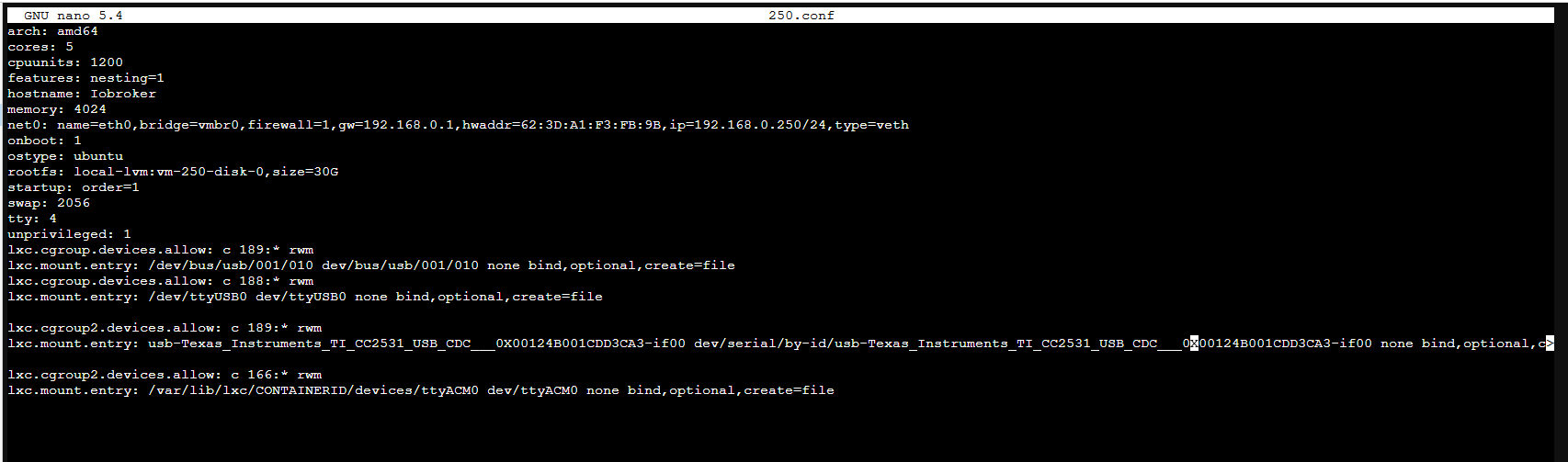
Schritt 3:
admin@Iobroker:~$ lsusb
Bus 002 Device 001: ID 1d6b:0003 Linux Foundation 3.0 root hub
Bus 001 Device 004: ID 8087:0a2b Intel Corp. Bluetooth wireless interface
Bus 001 Device 003: ID 051d:0002 American Power Conversion Uninterruptible Power Supply
Bus 001 Device 002: ID 0451:16a8 Texas Instruments, Inc. CC2531 ZigBee
Bus 001 Device 001: ID 1d6b:0002 Linux Foundation 2.0 root hub
admin@Iobroker:~$ ls -l /dev
total 0
drwxr-xr-x 3 root   root        60 Feb  5 11:39 bus
crw--w---- 1 root   tty     136, 0 Feb  5 11:39 console
lrwxrwxrwx 1 root   root        11 Feb  5 11:39 core -> /proc/kcore
lrwxrwxrwx 1 root   root        13 Feb  5 11:39 fd -> /proc/self/fd
crw-rw-rw- 1 nobody nogroup   1, 7 Aug  7 15:25 full
lrwxrwxrwx 1 root   root        12 Feb  5 11:39 initctl -> /run/initctl
lrwxrwxrwx 1 root   root        28 Feb  5 11:39 log -> /run/systemd/journal/dev-log
drwxrwxrwt 2 nobody nogroup     40 Feb  5 11:39 mqueue
crw-rw-rw- 1 nobody nogroup   1, 3 Aug  7 15:25 null
crw-rw-rw- 1 root   root      5, 2 Feb  5 11:47 ptmx
drwxr-xr-x 2 root   root         0 Feb  5 11:39 pts
crw-rw-rw- 1 nobody nogroup   1, 8 Aug  7 15:25 random
drwxr-xr-x 3 root   root        60 Feb  5 11:39 serial
drwxrwxrwt 2 root   root        40 Feb  5 11:39 shm
lrwxrwxrwx 1 root   root        15 Feb  5 11:39 stderr -> /proc/self/fd/2
lrwxrwxrwx 1 root   root        15 Feb  5 11:39 stdin -> /proc/self/fd/0
lrwxrwxrwx 1 root   root        15 Feb  5 11:39 stdout -> /proc/self/fd/1
crw-rw-rw- 1 nobody nogroup   5, 0 Feb  5 10:16 tty
crw------- 1 admin  tty     136, 1 Feb  5 11:47 tty1
crw--w---- 1 root   tty     136, 2 Feb  5 11:39 tty2
crw--w---- 1 root   tty     136, 3 Feb  5 11:39 tty3
crw--w---- 1 root   tty     136, 4 Feb  5 11:39 tty4
crw-rw-rw- 1 nobody nogroup 166, 0 Feb  5 11:45 ttyACM0
---------- 1 root   root         0 Feb  5 11:39 ttyUSB0
crw-rw-rw- 1 nobody nogroup   1, 9 Aug  7 15:25 urandom
crw-rw-rw- 1 nobody nogroup   1, 5 Aug  7 15:25 zero
Jetzt nach dem ich alles nochmals durchgeführt habe, erscheint mir jetzt der Anschluss mit den richtigen Rechten.
Jetzt muss ich nur noch den Zigbee Adapter unter Iobroker verbinden können. Der hängt noch.
Model : AMD Ryzen 7 8745HS w/ Radeon 780M Graphics
Cores: 1 × 8 = 8 cores
Threads: 16
mit Proxmox
LXC Container mit Iobroker -
@wendy2702
Schritt 1:root@pve:~# lsusb Bus 002 Device 001: ID 1d6b:0003 Linux Foundation 3.0 root hub Bus 001 Device 004: ID 8087:0a2b Intel Corp. Bluetooth wireless interface Bus 001 Device 003: ID 051d:0002 American Power Conversion Uninterruptible Power Supply Bus 001 Device 002: ID 0451:16a8 Texas Instruments, Inc. CC2531 ZigBee Bus 001 Device 001: ID 1d6b:0002 Linux Foundation 2.0 root hub root@pve:~# ls -l /dev/bus/usb/001/002 crw-rw-r-- 1 root users 189, 1 Aug 7 15:25 /dev/bus/usb/001/002 root@pve:~# ls /dev/serial/by-id/ usb-Texas_Instruments_TI_CC2531_USB_CDC___0X00124B001CDD3CA3-if00 root@pve:~# ls -l /dev/ttyACM* crw-rw-rw- 1 root dialout 166, 0 Aug 7 15:25 /dev/ttyACM0Schritt 2:
root@pve:~# cd /etc/pve/lxc
root@pve:/etc/pve/lxc#

root@pve:/etc/pve/lxc# ls
250.conf  250.conf.backup  251.conf  252.conf

root@pve:/etc/pve/lxc# cp 250.conf 250.conf.backup
root@pve:/etc/pve/lxc# nano 250.conf
root@pve:/etc/pve/lxc# chmod o+rw /dev/ttyACM*
root@pve:/etc/pve/lxc# pct stop 250
root@pve:/etc/pve/lxc# pct start 250
Schritt 3:
admin@Iobroker:~$ lsusb
Bus 002 Device 001: ID 1d6b:0003 Linux Foundation 3.0 root hub
Bus 001 Device 004: ID 8087:0a2b Intel Corp. Bluetooth wireless interface
Bus 001 Device 003: ID 051d:0002 American Power Conversion Uninterruptible Power Supply
Bus 001 Device 002: ID 0451:16a8 Texas Instruments, Inc. CC2531 ZigBee
Bus 001 Device 001: ID 1d6b:0002 Linux Foundation 2.0 root hub
admin@Iobroker:~$ ls -l /dev
total 0
drwxr-xr-x 3 root   root        60 Feb  5 11:39 bus
crw--w---- 1 root   tty     136, 0 Feb  5 11:39 console
lrwxrwxrwx 1 root   root        11 Feb  5 11:39 core -> /proc/kcore
lrwxrwxrwx 1 root   root        13 Feb  5 11:39 fd -> /proc/self/fd
crw-rw-rw- 1 nobody nogroup   1, 7 Aug  7 15:25 full
lrwxrwxrwx 1 root   root        12 Feb  5 11:39 initctl -> /run/initctl
lrwxrwxrwx 1 root   root        28 Feb  5 11:39 log -> /run/systemd/journal/dev-log
drwxrwxrwt 2 nobody nogroup     40 Feb  5 11:39 mqueue
crw-rw-rw- 1 nobody nogroup   1, 3 Aug  7 15:25 null
crw-rw-rw- 1 root   root      5, 2 Feb  5 11:47 ptmx
drwxr-xr-x 2 root   root         0 Feb  5 11:39 pts
crw-rw-rw- 1 nobody nogroup   1, 8 Aug  7 15:25 random
drwxr-xr-x 3 root   root        60 Feb  5 11:39 serial
drwxrwxrwt 2 root   root        40 Feb  5 11:39 shm
lrwxrwxrwx 1 root   root        15 Feb  5 11:39 stderr -> /proc/self/fd/2
lrwxrwxrwx 1 root   root        15 Feb  5 11:39 stdin -> /proc/self/fd/0
lrwxrwxrwx 1 root   root        15 Feb  5 11:39 stdout -> /proc/self/fd/1
crw-rw-rw- 1 nobody nogroup   5, 0 Feb  5 10:16 tty
crw------- 1 admin  tty     136, 1 Feb  5 11:47 tty1
crw--w---- 1 root   tty     136, 2 Feb  5 11:39 tty2
crw--w---- 1 root   tty     136, 3 Feb  5 11:39 tty3
crw--w---- 1 root   tty     136, 4 Feb  5 11:39 tty4
crw-rw-rw- 1 nobody nogroup 166, 0 Feb  5 11:45 ttyACM0
---------- 1 root   root         0 Feb  5 11:39 ttyUSB0
crw-rw-rw- 1 nobody nogroup   1, 9 Aug  7 15:25 urandom
crw-rw-rw- 1 nobody nogroup   1, 5 Aug  7 15:25 zero
Jetzt nach dem ich alles nochmals durchgeführt habe, erscheint mir jetzt der Anschluss mit den richtigen Rechten.
Jetzt muss ich nur noch den Zigbee Adapter unter Iobroker verbinden können. Der hängt noch.
-
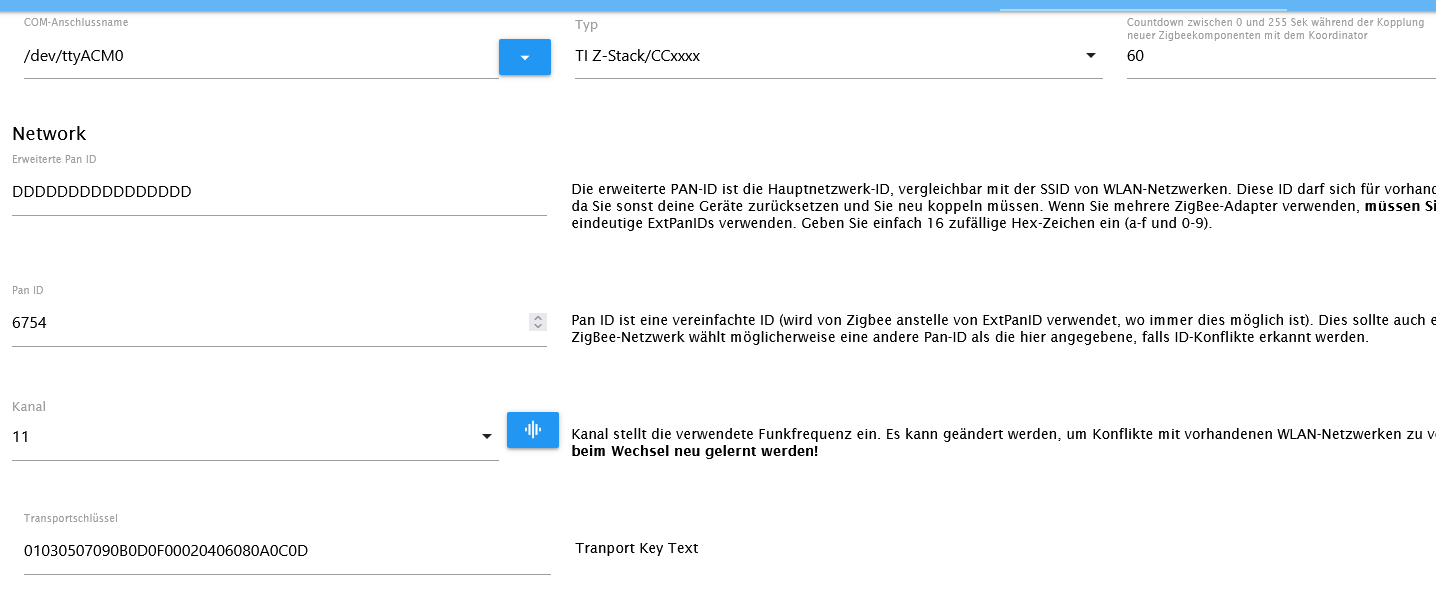
2023-02-05 11:59:32.296 - error: zigbee.0 (4721) Configuration is not consistent with adapter state/backup!
2023-02-05 11:59:32.296 - error: zigbee.0 (4721) - PAN ID: configured=6754, adapter=1213
2023-02-05 11:59:32.297 - error: zigbee.0 (4721) - Extended PAN ID: configured=00124b001cdd3ca3, adapter=00124b001cdd3ca3
2023-02-05 11:59:32.297 - error: zigbee.0 (4721) - Network Key: configured=01030507090b0d0f00020406080a0c0d, adapter=01030507090b0d0f00020406080a0c0d
2023-02-05 11:59:32.297 - error: zigbee.0 (4721) - Channel List: configured=11, adapter=11
2023-02-05 11:59:32.297 - error: zigbee.0 (4721) Please update configuration to prevent further issues.
2023-02-05 11:59:32.298 - error: zigbee.0 (4721) If you wish to re-commission your network, please remove coordinator backup at /opt/iobroker/iobroker-data/zigbee_0/nvbackup.json.
2023-02-05 11:59:32.298 - error: zigbee.0 (4721) Re-commissioning your network will require re-pairing of all devices!
2023-02-05 11:59:32.347 - error: zigbee.0 (4721) Starting zigbee-herdsman problem : "startup failed - configuration-adapter mismatch - see logs above for more information"
2023-02-05 11:59:32.347 - error: zigbee.0 (4721) Failed to start Zigbee
2023-02-05 11:59:32.347 - error: zigbee.0 (4721) Error herdsman start
Einstellung Adapter:
Model : AMD Ryzen 7 8745HS w/ Radeon 780M Graphics
Cores: 1 × 8 = 8 cores
Threads: 16
mit Proxmox
LXC Container mit Iobroker -
2023-02-05 11:59:32.296 - error: zigbee.0 (4721) Configuration is not consistent with adapter state/backup!
2023-02-05 11:59:32.296 - error: zigbee.0 (4721) - PAN ID: configured=6754, adapter=1213
2023-02-05 11:59:32.297 - error: zigbee.0 (4721) - Extended PAN ID: configured=00124b001cdd3ca3, adapter=00124b001cdd3ca3
2023-02-05 11:59:32.297 - error: zigbee.0 (4721) - Network Key: configured=01030507090b0d0f00020406080a0c0d, adapter=01030507090b0d0f00020406080a0c0d
2023-02-05 11:59:32.297 - error: zigbee.0 (4721) - Channel List: configured=11, adapter=11
2023-02-05 11:59:32.297 - error: zigbee.0 (4721) Please update configuration to prevent further issues.
2023-02-05 11:59:32.298 - error: zigbee.0 (4721) If you wish to re-commission your network, please remove coordinator backup at /opt/iobroker/iobroker-data/zigbee_0/nvbackup.json.
2023-02-05 11:59:32.298 - error: zigbee.0 (4721) Re-commissioning your network will require re-pairing of all devices!
2023-02-05 11:59:32.347 - error: zigbee.0 (4721) Starting zigbee-herdsman problem : "startup failed - configuration-adapter mismatch - see logs above for more information"
2023-02-05 11:59:32.347 - error: zigbee.0 (4721) Failed to start Zigbee
2023-02-05 11:59:32.347 - error: zigbee.0 (4721) Error herdsman start
Einstellung Adapter:
Im Log steht im Detail drin
- was nicht passt (Pan ID passt nicht zusammen)
- was du tun kannst um es zu beheben (Korrekte PAN ID einstellen oder Datei "/opt/iobroker/iobroker-data/zigbee_0/nvbackup.json" löschen.
A.
ioBroker auf RPi4 - Hardware soweit wie möglich via Zigbee.
"Shit don't work" ist keine Fehlermeldung, sondern ein Fluch. -
Im Log steht im Detail drin
- was nicht passt (Pan ID passt nicht zusammen)
- was du tun kannst um es zu beheben (Korrekte PAN ID einstellen oder Datei "/opt/iobroker/iobroker-data/zigbee_0/nvbackup.json" löschen.
A.
@asgothian Vielen Dank für die tolle und Hilfreiche Unterstützung. Jetzt ist er grün und online.
@wendy2702 auch dir Danke für deine Geduld und Unterstützung.




Hey! Du scheinst an dieser Unterhaltung interessiert zu sein, hast aber noch kein Konto.
Hast du es satt, bei jedem Besuch durch die gleichen Beiträge zu scrollen? Wenn du dich für ein Konto anmeldest, kommst du immer genau dorthin zurück, wo du zuvor warst, und kannst dich über neue Antworten benachrichtigen lassen (entweder per E-Mail oder Push-Benachrichtigung). Du kannst auch Lesezeichen speichern und Beiträge positiv bewerten, um anderen Community-Mitgliedern deine Wertschätzung zu zeigen.
Mit deinem Input könnte dieser Beitrag noch besser werden 💗
Registrieren AnmeldenSupport us
186
Online33.0k
Benutzer83.5k
Themen1.3m
Beiträge