




Pythonaufrufe per Blockly
-
Hallo,
wie kann ich die Eingabe von einem Python3 Aufruf nebst Eingabe in der Shell in Blockly per exce simulieren?
Hintergrund: Durch die Nutzung von der Geckolib (https://github.com/gazoodle/geckolib) kann ich meinen Whirlpool steuern. Über die Kommandozeile / Geckoshell klappt das. Nun möchte ich das am liebsten per Blockly triggern. Zur Not ginge auch ein JS-Script. Wobei ch das noch nie selbst geschrieben habe.
Mein erfolgloses Blockly sieht so aus:
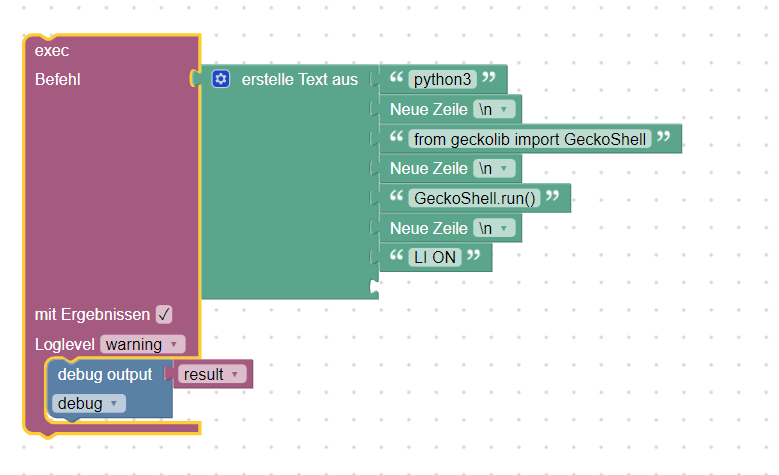
Hier die Logausgabe:
javascript.0 (20560) script.js.common.Draussen.Wellis_Whirlpool.Spa_Test: exec: python3 from geckolib import GeckoShell GeckoShell.run() LI ONAber es passiert nix am Whirlpool.
So sieht der Aufruf in der Konsole aus:
pi@raspberrypi-iob:~ $ python3
Python 3.7.3 (default, Jan 22 2021, 20:04:44)
[GCC 8.3.0] on linux
Type "help", "copyright", "credits" or "license" for more information.from geckolib import GeckoShell
GeckoShell.run()<Disclaimer> ----------------------------- USE AT YOUR OWN RISK ----------------------------- This code will allow you to make changes to your spa configuration that is outside of what the app, top panel and side panel settings allow. I've not tested every setting and it might be that you prevent your spa pack from operating as it used to do. I strongly suggest dumping the configuration values with the "config" command and recording them somewhere safe. </Disclaimer>Starting discovery process...Found 1 spas
Connecting to spaWellnessat 192.168.0.167 ... connected!
Heater: Temperature 37.5°C, SetPoint 37.5°C, Real SetPoint 37.5°C, Operation Idle
Pump 2: OFF
Pump 1: OFF
Waterfall: ON
Lights: OFF
WaterCare: Waiting...
Smart Winter Mode:Risk: NO
Circulating Pump: ON
Ozone: OFF
Smart Winter Mode:Active: False
Filter Status:Clean: True
Filter Status:Purge: False
Economy Mode: False
Welcome to the Gecko shell. Type help or ? to list commands. -
Hallo,
wie kann ich die Eingabe von einem Python3 Aufruf nebst Eingabe in der Shell in Blockly per exce simulieren?
Hintergrund: Durch die Nutzung von der Geckolib (https://github.com/gazoodle/geckolib) kann ich meinen Whirlpool steuern. Über die Kommandozeile / Geckoshell klappt das. Nun möchte ich das am liebsten per Blockly triggern. Zur Not ginge auch ein JS-Script. Wobei ch das noch nie selbst geschrieben habe.
Mein erfolgloses Blockly sieht so aus:
Hier die Logausgabe:
javascript.0 (20560) script.js.common.Draussen.Wellis_Whirlpool.Spa_Test: exec: python3 from geckolib import GeckoShell GeckoShell.run() LI ONAber es passiert nix am Whirlpool.
So sieht der Aufruf in der Konsole aus:
pi@raspberrypi-iob:~ $ python3
Python 3.7.3 (default, Jan 22 2021, 20:04:44)
[GCC 8.3.0] on linux
Type "help", "copyright", "credits" or "license" for more information.from geckolib import GeckoShell
GeckoShell.run()<Disclaimer> ----------------------------- USE AT YOUR OWN RISK ----------------------------- This code will allow you to make changes to your spa configuration that is outside of what the app, top panel and side panel settings allow. I've not tested every setting and it might be that you prevent your spa pack from operating as it used to do. I strongly suggest dumping the configuration values with the "config" command and recording them somewhere safe. </Disclaimer>Starting discovery process...Found 1 spas
Connecting to spaWellnessat 192.168.0.167 ... connected!
Heater: Temperature 37.5°C, SetPoint 37.5°C, Real SetPoint 37.5°C, Operation Idle
Pump 2: OFF
Pump 1: OFF
Waterfall: ON
Lights: OFF
WaterCare: Waiting...
Smart Winter Mode:Risk: NO
Circulating Pump: ON
Ozone: OFF
Smart Winter Mode:Active: False
Filter Status:Clean: True
Filter Status:Purge: False
Economy Mode: False
Welcome to the Gecko shell. Type help or ? to list commands.@tklein sagte in Pythonaufrufe per Blockly:
GeckoShell.run()
Nicht schön,
aber ein Versuch ists mal Wert:funktioniert leider nicht !!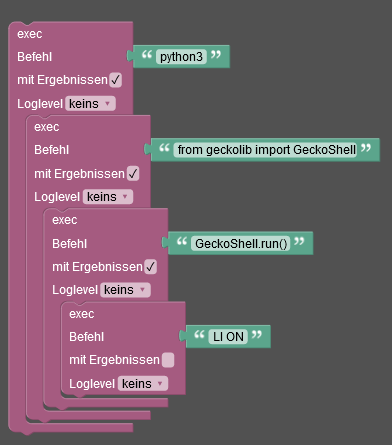
Lehrling seit 1975 !!!
Beitrag geholfen ? dann gerne ein upvote rechts unten im Beitrag klicken ;)
https://forum.iobroker.net/topic/51555/hinweise-f%C3%BCr-gute-forenbeitr%C3%A4ge -
@tklein sagte in Pythonaufrufe per Blockly:
GeckoShell.run()
Nicht schön,
aber ein Versuch ists mal Wert:funktioniert leider nicht !!@djmarc75 So funktioniert das nicht. So wird jeder einzelne Befehl von /bin/sh ausgeführt.
Am einfachsten ist es ein python Script anzulegen und das auszuführen
🧑🎓 Autor des beliebten ioBroker-Master-Kurses
🎥 Tutorials rund um das Thema DIY-Smart-Home: https://haus-automatisierung.com/
📚 Meine inoffizielle ioBroker Dokumentation -
@djmarc75 So funktioniert das nicht. So wird jeder einzelne Befehl von /bin/sh ausgeführt.
Am einfachsten ist es ein python Script anzulegen und das auszuführen
@haus-automatisierung sagte in Pythonaufrufe per Blockly:
So funktioniert das nicht. So wird jeder einzelne Befehl von /bin/sh ausgeführt.
Da hast Du Recht - Denkfehler von mir !
-
@djmarc75 So funktioniert das nicht. So wird jeder einzelne Befehl von /bin/sh ausgeführt.
Am einfachsten ist es ein python Script anzulegen und das auszuführen
danke für den hinweis,
dann bekomme ich folgendes:
pi@raspberrypi-iob:~/wellis $ python test.py
  File "test.py", line 5
    LI ON
        ^
Hier der Dateiinhalt:
from geckolib import GeckoShell
GeckoShell.run()
LI ON
Falls das läuft, kann ich ja die Geräte (Licht, Pumpe 1 etc) sowie die Schaltaktion (an/aus/tempwert) bestimmt als parameter beim aufruf mit übergeben
-
danke für den hinweis,
dann bekomme ich folgendes:
pi@raspberrypi-iob:~/wellis $ python test.py
  File "test.py", line 5
    LI ON
        ^
Hier der Dateiinhalt:
from geckolib import GeckoShell
GeckoShell.run()
LI ON
Falls das läuft, kann ich ja die Geräte (Licht, Pumpe 1 etc) sowie die Schaltaktion (an/aus/tempwert) bestimmt als parameter beim aufruf mit übergeben
wenn ich das "LI ON" auskommentiere, wird etwas ausgeführt. Ein sleep hat auch nix gebracht.
Skript:
import sys
import time

# test argv by commandline
print(sys.argv[1])
time.sleep(1)
print(sys.argv[2])


#call of python
from geckolib import GeckoShell
GeckoShell.run()
time.sleep(8)
#print("LI ON")
#LI ON
Ausgabe bei Aufruf:
pi@raspberrypi-iob:~/wellis $ python3 test.py aber hallo
aber
hallo


        <Disclaimer>
        ----------------------------- USE AT YOUR OWN RISK -----------------------------

        This code will allow you to make changes to your spa configuration that is
        outside of what the app, top panel and side panel settings allow. I've not
        tested every setting and it might be that you prevent your spa pack from
        operating as it used to do.

        I strongly suggest dumping the configuration values with the "config" command
        and recording them somewhere safe.

        </Disclaimer>


Starting discovery process...Found 1 spas
Connecting to spa `Wellness` at 192.168.0.167 ... connected!
Heater: Temperature 37.5°C, SetPoint 37.5°C, Real SetPoint 37.5°C, Operation Idle
Pump 1: OFF
Pump 2: OFF
Waterfall: OFF
Lights: HI
WaterCare: Waiting...
Smart Winter Mode:Risk: NO
Circulating Pump: OFF
Ozone: OFF
Smart Winter Mode:Active: False
Filter Status:Clean: False
Filter Status:Purge: False
Economy Mode: False
Welcome to the Gecko shell. Type help or ? to list commands.

Wellness$
Evtl weil ich da in einer Shell (Wellness) in der Pythonshell drin bin?
-
wenn ich das "LI ON" auskommentiere, wird etwas ausgeführt. Ein sleep hat auch nix gebracht.
Skript:
import sys
import time

# test argv by commandline
print(sys.argv[1])
time.sleep(1)
print(sys.argv[2])


#call of python
from geckolib import GeckoShell
GeckoShell.run()
time.sleep(8)
#print("LI ON")
#LI ON
Ausgabe bei Aufruf:
pi@raspberrypi-iob:~/wellis $ python3 test.py aber hallo
aber
hallo


        <Disclaimer>
        ----------------------------- USE AT YOUR OWN RISK -----------------------------

        This code will allow you to make changes to your spa configuration that is
        outside of what the app, top panel and side panel settings allow. I've not
        tested every setting and it might be that you prevent your spa pack from
        operating as it used to do.

        I strongly suggest dumping the configuration values with the "config" command
        and recording them somewhere safe.

        </Disclaimer>


Starting discovery process...Found 1 spas
Connecting to spa `Wellness` at 192.168.0.167 ... connected!
Heater: Temperature 37.5°C, SetPoint 37.5°C, Real SetPoint 37.5°C, Operation Idle
Pump 1: OFF
Pump 2: OFF
Waterfall: OFF
Lights: HI
WaterCare: Waiting...
Smart Winter Mode:Risk: NO
Circulating Pump: OFF
Ozone: OFF
Smart Winter Mode:Active: False
Filter Status:Clean: False
Filter Status:Purge: False
Economy Mode: False
Welcome to the Gecko shell. Type help or ? to list commands.

Wellness$
Evtl weil ich da in einer Shell (Wellness) in der Pythonshell drin bin?
@tklein
Das funktioniert so nicht.
Gibt es da nur die interaktive Shell?
Kein echter Shell Befehl an den man dann Parameter dran hängen kann?Du könntest mal folgendes probieren
python test.py < „LI ON“Die beiden Anführungsstriche bitte umwandeln in normale . das Handy macht mir daraus immer die lexikalischen
-
@tklein
Das funktioniert so nicht.
Gibt es da nur die interaktive Shell?
Kein echter Shell Befehl an den man dann Parameter dran hängen kann?Du könntest mal folgendes probieren
python test.py < „LI ON“Die beiden Anführungsstriche bitte umwandeln in normale . das Handy macht mir daraus immer die lexikalischen
@oliverio said in Pythonaufrufe per Blockly:
@tklein
Das funktioniert so nicht.
Gibt es da nur die interaktive Shell?
Kein echter Shell Befehl an den man dann Parameter dran hängen kann?Du könntest mal folgendes probieren
python test.py < „LI ON“Die beiden Anführungsstriche bitte umwandeln in normale . das Handy macht mir daraus immer die lexikalischen
klappt auch leider nicht:
pi@raspberrypi-iob:~/wellis $ python3 test.py < "LI ON" -bash: LI ON: No such file or directory -
@oliverio said in Pythonaufrufe per Blockly:
@tklein
Das funktioniert so nicht.
Gibt es da nur die interaktive Shell?
Kein echter Shell Befehl an den man dann Parameter dran hängen kann?Du könntest mal folgendes probieren
python test.py < „LI ON“Die beiden Anführungsstriche bitte umwandeln in normale . das Handy macht mir daraus immer die lexikalischen
klappt auch leider nicht:
pi@raspberrypi-iob:~/wellis $ python3 test.py < "LI ON"
-bash: LI ON: No such file or directory



Hey! Du scheinst an dieser Unterhaltung interessiert zu sein, hast aber noch kein Konto.
Hast du es satt, bei jedem Besuch durch die gleichen Beiträge zu scrollen? Wenn du dich für ein Konto anmeldest, kommst du immer genau dorthin zurück, wo du zuvor warst, und kannst dich über neue Antworten benachrichtigen lassen (entweder per E-Mail oder Push-Benachrichtigung). Du kannst auch Lesezeichen speichern und Beiträge positiv bewerten, um anderen Community-Mitgliedern deine Wertschätzung zu zeigen.
Mit deinem Input könnte dieser Beitrag noch besser werden 💗
Registrieren AnmeldenSupport us
217
Online33.0k
Benutzer83.5k
Themen1.3m
Beiträge