
NEWS




Check if an element contains a class in JavaScript?
-
Hi
I'm not a big fan of dynamic programming languages, although I've written a lot of JavaScript code. I never quite understood the concept of prototype-based programming; does anyone know how it works?
I was working on a JavaScript project with the source checking if an element contains a class.
I'm currently doing this:code_text var test = document.getElementById("test"); var testClass = test.className; switch (testClass) { case "class1": test.innerHTML = "I have class1"; break; case "class2": test.innerHTML = "I have class2"; break; case "class3": test.innerHTML = "I have class3"; break; case "class4": test.innerHTML = "I have class4"; break; default: test.innerHTML = ""; } <div id="test" class="class1"></div>The problem is when I change the HTML code to...
<div id="test" class="class1 class5"></div>
There is no longer an exact match, so I get the standard output of nothing (""). But I still want the output to be I have class1 because <div> still contains class .class1 .
Can someone help me -
Hi
I'm not a big fan of dynamic programming languages, although I've written a lot of JavaScript code. I never quite understood the concept of prototype-based programming; does anyone know how it works?
I was working on a JavaScript project with the source checking if an element contains a class.
I'm currently doing this:code_text var test = document.getElementById("test"); var testClass = test.className; switch (testClass) { case "class1": test.innerHTML = "I have class1"; break; case "class2": test.innerHTML = "I have class2"; break; case "class3": test.innerHTML = "I have class3"; break; case "class4": test.innerHTML = "I have class4"; break; default: test.innerHTML = ""; } <div id="test" class="class1"></div>The problem is when I change the HTML code to...
<div id="test" class="class1 class5"></div>
There is no longer an exact match, so I get the standard output of nothing (""). But I still want the output to be I have class1 because <div> still contains class .class1 .
Can someone help me@roshan-sharma
I have tried this in a standard html widget:
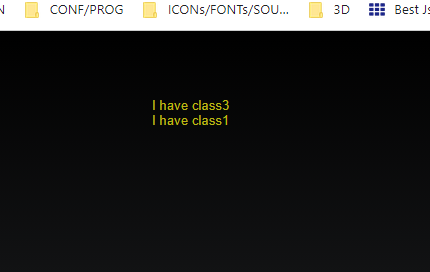
<div id="test" class="class1 class3"></div>

<script>
var test = document.getElementById("test");
var testClass = test.className;
console.log(test.className);
console.log(test.getAttribute('class'));


switch (testClass) {
  case "class1":
    test.innerHTML = "I have class1";
    break;
  case "class2":
    test.innerHTML = "I have class2";
    break;
  case "class3":
    test.innerHTML = "I have class3";
    break;
  case "class4":
    test.innerHTML = "I have class4";
    break;
  default:
    test.innerHTML = "";
}

if (test.classList.contains("class3")) {console.log("with class3");
                                        test.innerHTML = "I have class3";}
if (test.classList.contains("class1")) {console.log("with class1");
                                        test.innerHTML += "<br> I have class1";}


</script>
the result is:
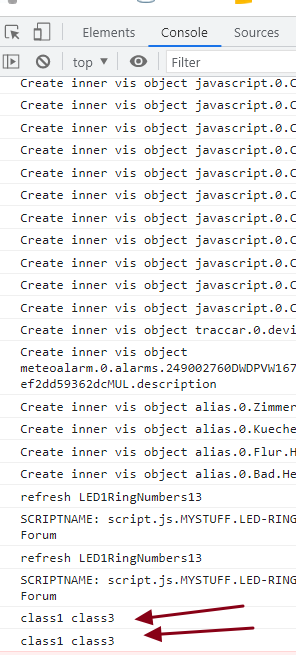
the problem is the switch command !
-
Hi
I'm not a big fan of dynamic programming languages, although I've written a lot of JavaScript code. I never quite understood the concept of prototype-based programming; does anyone know how it works?
I was working on a JavaScript project with the source checking if an element contains a class.
I'm currently doing this:code_text var test = document.getElementById("test"); var testClass = test.className; switch (testClass) { case "class1": test.innerHTML = "I have class1"; break; case "class2": test.innerHTML = "I have class2"; break; case "class3": test.innerHTML = "I have class3"; break; case "class4": test.innerHTML = "I have class4"; break; default: test.innerHTML = ""; } <div id="test" class="class1"></div>The problem is when I change the HTML code to...
<div id="test" class="class1 class5"></div>
There is no longer an exact match, so I get the standard output of nothing (""). But I still want the output to be I have class1 because <div> still contains class .class1 .
Can someone help me@roshan-sharma
better is to use jquery
https://api.jquery.com/hasclass/
var test = $("#test");
if ($(test).hasClass("class1")) {
   $(test).html("I have class1");
}
if ($(test).hasClass("class2")) {
   $(test).html("I have class2");
}
jquery is in vis already loaded


Support us
935
Online32.5k
Benutzer81.6k
Themen1.3m
Beiträge