Skip to content
  • Home
  • Recent
  • Tags
  • 0 Unread 0
  • Categories
  • Unreplied
  • Popular
  • GitHub
  • Docu
  • Hilfe
Skins
  • Light
  • Brite
  • Cerulean
  • Cosmo
  • Flatly
  • Journal
  • Litera
  • Lumen
  • Lux
  • Materia
  • Minty
  • Morph
  • Pulse
  • Sandstone
  • Simplex
  • Sketchy
  • Spacelab
  • United
  • Yeti
  • Zephyr
  • Dark
  • Cyborg
  • Darkly
  • Quartz
  • Slate
  • Solar
  • Superhero
  • Vapor

  • Default (No Skin)
  • No Skin
Collapse
ioBroker Logo

Community Forum

donate donate
  1. ioBroker Community Home
  2. Deutsch
  3. Cloud Dienste
  4. Mit Alexa xy anstatt Hue steuern

NEWS

  • Weihnachtsangebot 2025! 🎄
    BluefoxB
    Bluefox
    20
    1
    763

  • UPDATE 31.10.: Amazon Alexa - ioBroker Skill läuft aus ?
    apollon77A
    apollon77
    48
    3
    9.0k

  • Monatsrückblick – September 2025
    BluefoxB
    Bluefox
    13
    1
    2.3k

Mit Alexa xy anstatt Hue steuern

Scheduled Pinned Locked Moved Cloud Dienste
alexaiot
29 Posts 2 Posters 2.1k Views 3 Watching
  • Oldest to Newest
  • Newest to Oldest
  • Most Votes
Reply
  • Reply as topic
Log in to reply
This topic has been deleted. Only users with topic management privileges can see it.
  • D danny_v1

    @armilar ja das stimmt, hab ihn auch im Skript adapter ausgewählt.

    Habe es auch mal bei einem anderen RGB Licht getestet da ist genau das gleiche verhalten.

    ArmilarA Offline
    ArmilarA Offline
    Armilar
    Most Active Forum Testing
    wrote on last edited by Armilar
    #21

    @danny_v1

    Oder kann es sein, dass der Colormode nicht schnell genug umschaltet (macht der eigentlich automatisch zwischen ct, hs und xy)?

    9f56a56f-44dd-4b7c-a0dc-9041c860e9c3-image.png

    Dann sollten wir das noch einbauen:

    on({id: 'deconz.0.Lights.27.hue', change: "ne"}, async function (obj) {
        console.log(obj.state.val);
        let rgb = hsv2rgb(obj.state.val,0,1);
        let xy = rgb_to_cie(rgb[0],rgb[1],rgb[2])
        setState("deconz.0.Lights.27.colormode", "xy");
        setState("deconz.0.Lights.27.xy", xy);
    });
    

    Installationsanleitung, Tipps, Alias-Definitionen, FAQ für das Sonoff NSPanel mit lovelace UI unter ioBroker
    https://github.com/joBr99/nspanel-lovelace-ui/wiki

    Benutzt das Voting rechts unten im Beitrag wenn er euch geholfen hat.

    D 1 Reply Last reply
    0
    • ArmilarA Armilar

      @danny_v1

      Oder kann es sein, dass der Colormode nicht schnell genug umschaltet (macht der eigentlich automatisch zwischen ct, hs und xy)?

      9f56a56f-44dd-4b7c-a0dc-9041c860e9c3-image.png

      Dann sollten wir das noch einbauen:

      on({id: 'deconz.0.Lights.27.hue', change: "ne"}, async function (obj) {
          console.log(obj.state.val);
          let rgb = hsv2rgb(obj.state.val,0,1);
          let xy = rgb_to_cie(rgb[0],rgb[1],rgb[2])
          setState("deconz.0.Lights.27.colormode", "xy");
          setState("deconz.0.Lights.27.xy", xy);
      });
      
      D Offline
      D Offline
      danny_v1
      wrote on last edited by
      #22

      @armilar
      So ich habe jetzt mal unter userdata zwei Datenpunkte zum Testen angelegt einen HUE und einen CIE um einen Fehler beim Adapter auszuschließen.

      Das Verhalten bleibt immer noch so, es wird immer nur der Wert [0.3227,0.329] geschrieben.

      on({id: '0_userdata.0.HUE', change: "ne"}, async function (obj) {
          console.log(obj.state.val);
          let rgb = hsv2rgb(obj.state.val,0,1);
          let xy = rgb_to_cie(rgb[0],rgb[1],rgb[2])
          setState("0_userdata.0.CIE", xy);
      });
      
      ArmilarA 1 Reply Last reply
      0
      • D danny_v1

        @armilar
        So ich habe jetzt mal unter userdata zwei Datenpunkte zum Testen angelegt einen HUE und einen CIE um einen Fehler beim Adapter auszuschließen.

        Das Verhalten bleibt immer noch so, es wird immer nur der Wert [0.3227,0.329] geschrieben.

        on({id: '0_userdata.0.HUE', change: "ne"}, async function (obj) {
            console.log(obj.state.val);
            let rgb = hsv2rgb(obj.state.val,0,1);
            let xy = rgb_to_cie(rgb[0],rgb[1],rgb[2])
            setState("0_userdata.0.CIE", xy);
        });
        
        ArmilarA Offline
        ArmilarA Offline
        Armilar
        Most Active Forum Testing
        wrote on last edited by
        #23

        @danny_v1

        d56c2399-d648-48b5-b507-81225b8157c6-image.png

        Kann ich so nicht bestätigen...

        Installationsanleitung, Tipps, Alias-Definitionen, FAQ für das Sonoff NSPanel mit lovelace UI unter ioBroker
        https://github.com/joBr99/nspanel-lovelace-ui/wiki

        Benutzt das Voting rechts unten im Beitrag wenn er euch geholfen hat.

        D 1 Reply Last reply
        0
        • ArmilarA Armilar

          @danny_v1

          d56c2399-d648-48b5-b507-81225b8157c6-image.png

          Kann ich so nicht bestätigen...

          D Offline
          D Offline
          danny_v1
          wrote on last edited by
          #24

          @armilar Da passierte bei mir gar nichts

          hier ist noch mal das komplette Skript:

          function rgb_to_cie(red, green, blue)
          {
             //Apply a gamma correction to the RGB values, which makes the color more vivid and more the like the color displayed on the screen of your device
             let vred   = (red > 0.04045) ? Math.pow((red + 0.055) / (1.0 + 0.055), 2.4) : (red / 12.92);
             let vgreen = (green > 0.04045) ? Math.pow((green + 0.055) / (1.0 + 0.055), 2.4) : (green / 12.92);
             let vblue  = (blue > 0.04045) ? Math.pow((blue + 0.055) / (1.0 + 0.055), 2.4) : (blue / 12.92); 
           
             //RGB values to XYZ using the Wide RGB D65 conversion formula
             let X = vred * 0.664511 + vgreen * 0.154324 + vblue * 0.162028;
             let Y = vred * 0.283881 + vgreen * 0.668433 + vblue * 0.047685;
             let Z = vred * 0.000088 + vgreen * 0.072310 + vblue * 0.986039;
           
             //Calculate the xy values from the XYZ values
             let ciex = (X / (X + Y + Z)).toFixed(4);
             let ciey = (Y / (X + Y + Z)).toFixed(4);
             let cie  = "[" + ciex + "," + ciey + "]"
             
             return cie;
          }
           
          function hsv2rgb(hue, saturation, value) {
              hue /= 60;
              let chroma = value * saturation;
              let x = chroma * (1 - Math.abs((hue % 2) - 1));
              let rgb = hue <= 1 ? [chroma, x, 0] :
                  hue <= 2 ? [x, chroma, 0] :
                      hue <= 3 ? [0, chroma, x] :
                          hue <= 4 ? [0, x, chroma] :
                              hue <= 5 ? [x, 0, chroma] :
                                  [chroma, 0, x];
           
              return rgb.map(v => (v + value - chroma) * 255);
          }
          
          on({id: '0_userdata.0.HUE', change: "ne"}, async function (obj) {
              console.log(obj.state.val);
              let rgb = hsv2rgb(obj.state.val,0,1);
              let xy = rgb_to_cie(rgb[0],rgb[1],rgb[2])
              console.log('HUE :'+ obj.state.val + ' -- XY:' +xy);
              setState("0_userdata.0.CIE", xy);
          });


          ArmilarA 1 Reply Last reply
          0
          • D danny_v1

            @armilar Da passierte bei mir gar nichts

            hier ist noch mal das komplette Skript:

            function rgb_to_cie(red, green, blue)
            {
               //Apply a gamma correction to the RGB values, which makes the color more vivid and more the like the color displayed on the screen of your device
               let vred   = (red > 0.04045) ? Math.pow((red + 0.055) / (1.0 + 0.055), 2.4) : (red / 12.92);
               let vgreen = (green > 0.04045) ? Math.pow((green + 0.055) / (1.0 + 0.055), 2.4) : (green / 12.92);
               let vblue  = (blue > 0.04045) ? Math.pow((blue + 0.055) / (1.0 + 0.055), 2.4) : (blue / 12.92); 
             
               //RGB values to XYZ using the Wide RGB D65 conversion formula
               let X = vred * 0.664511 + vgreen * 0.154324 + vblue * 0.162028;
               let Y = vred * 0.283881 + vgreen * 0.668433 + vblue * 0.047685;
               let Z = vred * 0.000088 + vgreen * 0.072310 + vblue * 0.986039;
             
               //Calculate the xy values from the XYZ values
               let ciex = (X / (X + Y + Z)).toFixed(4);
               let ciey = (Y / (X + Y + Z)).toFixed(4);
               let cie  = "[" + ciex + "," + ciey + "]"
               
               return cie;
            }
             
            function hsv2rgb(hue, saturation, value) {
                hue /= 60;
                let chroma = value * saturation;
                let x = chroma * (1 - Math.abs((hue % 2) - 1));
                let rgb = hue <= 1 ? [chroma, x, 0] :
                    hue <= 2 ? [x, chroma, 0] :
                        hue <= 3 ? [0, chroma, x] :
                            hue <= 4 ? [0, x, chroma] :
                                hue <= 5 ? [x, 0, chroma] :
                                    [chroma, 0, x];
             
                return rgb.map(v => (v + value - chroma) * 255);
            }
            
            on({id: '0_userdata.0.HUE', change: "ne"}, async function (obj) {
                console.log(obj.state.val);
                let rgb = hsv2rgb(obj.state.val,0,1);
                let xy = rgb_to_cie(rgb[0],rgb[1],rgb[2])
                console.log('HUE :'+ obj.state.val + ' -- XY:' +xy);
                setState("0_userdata.0.CIE", xy);
            });


            ArmilarA Offline
            ArmilarA Offline
            Armilar
            Most Active Forum Testing
            wrote on last edited by
            #25

            @danny_v1

            Nimm das... Ist noch mal auf sat = 1

            function rgb_to_cie(red, green, blue)
            {
               //Apply a gamma correction to the RGB values, which makes the color more vivid and more the like the color displayed on the screen of your device
               let vred   = (red > 0.04045) ? Math.pow((red + 0.055) / (1.0 + 0.055), 2.4) : (red / 12.92);
               let vgreen = (green > 0.04045) ? Math.pow((green + 0.055) / (1.0 + 0.055), 2.4) : (green / 12.92);
               let vblue  = (blue > 0.04045) ? Math.pow((blue + 0.055) / (1.0 + 0.055), 2.4) : (blue / 12.92); 
             
               //RGB values to XYZ using the Wide RGB D65 conversion formula
               let X = vred * 0.664511 + vgreen * 0.154324 + vblue * 0.162028;
               let Y = vred * 0.283881 + vgreen * 0.668433 + vblue * 0.047685;
               let Z = vred * 0.000088 + vgreen * 0.072310 + vblue * 0.986039;
             
               //Calculate the xy values from the XYZ values
               let ciex = (X / (X + Y + Z)).toFixed(4);
               let ciey = (Y / (X + Y + Z)).toFixed(4);
               let cie  = "[" + ciex + "," + ciey + "]"
               
               return cie;
            }
             
            function hsv2rgb(hue, saturation, value) {
                hue /= 60;
                let chroma = value * saturation;
                let x = chroma * (1 - Math.abs((hue % 2) - 1));
                let rgb = hue <= 1 ? [chroma, x, 0] :
                    hue <= 2 ? [x, chroma, 0] :
                        hue <= 3 ? [0, chroma, x] :
                            hue <= 4 ? [0, x, chroma] :
                                hue <= 5 ? [x, 0, chroma] :
                                    [chroma, 0, x];
             
                return rgb.map(v => (v + value - chroma) * 255);
            }
             
            on({id: '0_userdata.0.HUE', change: "ne"}, async function (obj) {
                let rgb = hsv2rgb(obj.state.val,1,1);
                let xy = rgb_to_cie(rgb[0],rgb[1],rgb[2])
                console.log('HUE :'+ obj.state.val + ' -- XY:' +xy);
                setState("0_userdata.0.CIE", xy);
            });
            

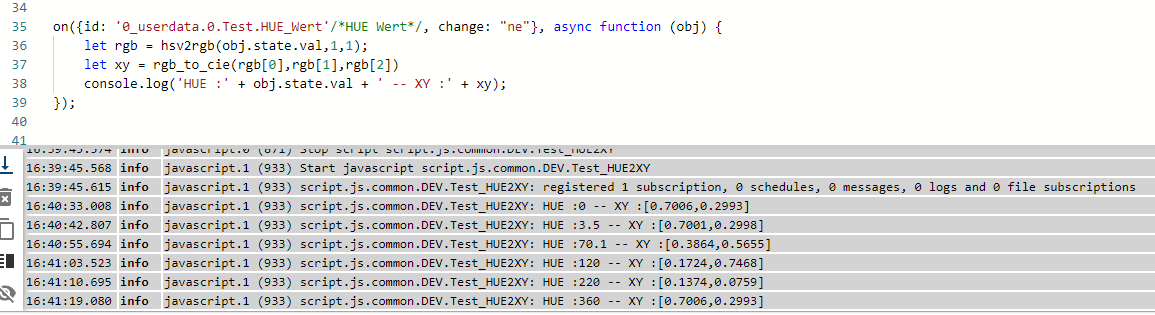
            Hier der Test in den Datenpunkten: HUE (number) / CIE (string)

            a9dbd339-6bef-4b4e-ba97-991c3fc7ea0d-image.png

            e2b81b93-8325-481a-b1b5-fcf305c14b8c-image.png

            7f34ad10-0cb8-4f77-8dbc-684f97309186-image.png

            Installationsanleitung, Tipps, Alias-Definitionen, FAQ für das Sonoff NSPanel mit lovelace UI unter ioBroker
            https://github.com/joBr99/nspanel-lovelace-ui/wiki

            Benutzt das Voting rechts unten im Beitrag wenn er euch geholfen hat.

            D 1 Reply Last reply
            0
            • ArmilarA Armilar

              @danny_v1

              Nimm das... Ist noch mal auf sat = 1

              function rgb_to_cie(red, green, blue)
              {
                 //Apply a gamma correction to the RGB values, which makes the color more vivid and more the like the color displayed on the screen of your device
                 let vred   = (red > 0.04045) ? Math.pow((red + 0.055) / (1.0 + 0.055), 2.4) : (red / 12.92);
                 let vgreen = (green > 0.04045) ? Math.pow((green + 0.055) / (1.0 + 0.055), 2.4) : (green / 12.92);
                 let vblue  = (blue > 0.04045) ? Math.pow((blue + 0.055) / (1.0 + 0.055), 2.4) : (blue / 12.92); 
               
                 //RGB values to XYZ using the Wide RGB D65 conversion formula
                 let X = vred * 0.664511 + vgreen * 0.154324 + vblue * 0.162028;
                 let Y = vred * 0.283881 + vgreen * 0.668433 + vblue * 0.047685;
                 let Z = vred * 0.000088 + vgreen * 0.072310 + vblue * 0.986039;
               
                 //Calculate the xy values from the XYZ values
                 let ciex = (X / (X + Y + Z)).toFixed(4);
                 let ciey = (Y / (X + Y + Z)).toFixed(4);
                 let cie  = "[" + ciex + "," + ciey + "]"
                 
                 return cie;
              }
               
              function hsv2rgb(hue, saturation, value) {
                  hue /= 60;
                  let chroma = value * saturation;
                  let x = chroma * (1 - Math.abs((hue % 2) - 1));
                  let rgb = hue <= 1 ? [chroma, x, 0] :
                      hue <= 2 ? [x, chroma, 0] :
                          hue <= 3 ? [0, chroma, x] :
                              hue <= 4 ? [0, x, chroma] :
                                  hue <= 5 ? [x, 0, chroma] :
                                      [chroma, 0, x];
               
                  return rgb.map(v => (v + value - chroma) * 255);
              }
               
              on({id: '0_userdata.0.HUE', change: "ne"}, async function (obj) {
                  let rgb = hsv2rgb(obj.state.val,1,1);
                  let xy = rgb_to_cie(rgb[0],rgb[1],rgb[2])
                  console.log('HUE :'+ obj.state.val + ' -- XY:' +xy);
                  setState("0_userdata.0.CIE", xy);
              });
              

              Hier der Test in den Datenpunkten: HUE (number) / CIE (string)

              a9dbd339-6bef-4b4e-ba97-991c3fc7ea0d-image.png

              e2b81b93-8325-481a-b1b5-fcf305c14b8c-image.png

              7f34ad10-0cb8-4f77-8dbc-684f97309186-image.png

              D Offline
              D Offline
              danny_v1
              wrote on last edited by
              #26

              @armilar super auf jetzt gehts! Werd dann mal mit den richtigen Datenpunkten testen.

              Danke dir für die Mühe!!!

              ArmilarA 1 Reply Last reply
              0
              • D danny_v1

                @armilar super auf jetzt gehts! Werd dann mal mit den richtigen Datenpunkten testen.

                Danke dir für die Mühe!!!

                ArmilarA Offline
                ArmilarA Offline
                Armilar
                Most Active Forum Testing
                wrote on last edited by
                #27

                @danny_v1 Die sollten ja nicht so unterschiedlich sein. Interessiert mich aber dennoch ob es geklappt hat.

                Gerne :blush:

                Installationsanleitung, Tipps, Alias-Definitionen, FAQ für das Sonoff NSPanel mit lovelace UI unter ioBroker
                https://github.com/joBr99/nspanel-lovelace-ui/wiki

                Benutzt das Voting rechts unten im Beitrag wenn er euch geholfen hat.

                D 1 Reply Last reply
                0
                • ArmilarA Armilar

                  @danny_v1 Die sollten ja nicht so unterschiedlich sein. Interessiert mich aber dennoch ob es geklappt hat.

                  Gerne :blush:

                  D Offline
                  D Offline
                  danny_v1
                  wrote on last edited by
                  #28

                  @armilar Ja habs getestet und es funktioniert!
                  nur dauert das über den hue adapter von Alexa aus ewig bis der hue Wert geschrieben wird. Aber ansonsten ist jetzt alles perfekt! Werd versuchen die Lampe über deconz in die Alexa zu bekommen dann gehts auch wieder schneller!

                  Echt super support von dir, ist nicht selbstverständlich.

                  ArmilarA 1 Reply Last reply
                  0
                  • D danny_v1

                    @armilar Ja habs getestet und es funktioniert!
                    nur dauert das über den hue adapter von Alexa aus ewig bis der hue Wert geschrieben wird. Aber ansonsten ist jetzt alles perfekt! Werd versuchen die Lampe über deconz in die Alexa zu bekommen dann gehts auch wieder schneller!

                    Echt super support von dir, ist nicht selbstverständlich.

                    ArmilarA Offline
                    ArmilarA Offline
                    Armilar
                    Most Active Forum Testing
                    wrote on last edited by
                    #29

                    @danny_v1 :+1: :blush:

                    Installationsanleitung, Tipps, Alias-Definitionen, FAQ für das Sonoff NSPanel mit lovelace UI unter ioBroker
                    https://github.com/joBr99/nspanel-lovelace-ui/wiki

                    Benutzt das Voting rechts unten im Beitrag wenn er euch geholfen hat.

                    1 Reply Last reply
                    0
                    Reply
                    • Reply as topic
                    Log in to reply
                    • Oldest to Newest
                    • Newest to Oldest
                    • Most Votes


                    Support us

                    ioBroker
                    Community Adapters
                    Donate
                    FAQ Cloud / IOT
                    HowTo: Node.js-Update
                    HowTo: Backup/Restore
                    Downloads
                    BLOG

                    858

                    Online

                    32.5k

                    Users

                    81.6k

                    Topics

                    1.3m

                    Posts
                    Community
                    Impressum | Datenschutz-Bestimmungen | Nutzungsbedingungen | Einwilligungseinstellungen
                    ioBroker Community 2014-2025
                    logo
                    • Login

                    • Don't have an account? Register

                    • Login or register to search.
                    • First post
                      Last post
                    0
                    • Home
                    • Recent
                    • Tags
                    • Unread 0
                    • Categories
                    • Unreplied
                    • Popular
                    • GitHub
                    • Docu
                    • Hilfe