Weiter zum Inhalt
  • Home
  • Aktuell
  • Tags
  • 0 Ungelesen 0
  • Kategorien
  • Unreplied
  • Beliebt
  • GitHub
  • Docu
  • Hilfe
Skins
  • Hell
  • Brite
  • Cerulean
  • Cosmo
  • Flatly
  • Journal
  • Litera
  • Lumen
  • Lux
  • Materia
  • Minty
  • Morph
  • Pulse
  • Sandstone
  • Simplex
  • Sketchy
  • Spacelab
  • United
  • Yeti
  • Zephyr
  • Dunkel
  • Cyborg
  • Darkly
  • Quartz
  • Slate
  • Solar
  • Superhero
  • Vapor

  • Standard: (Kein Skin)
  • Kein Skin
Einklappen
ioBroker Logo

Community Forum

donate donate
  1. ioBroker Community Home
  2. Deutsch
  3. Visualisierung
  4. Neuinstallation und VIS geht auf Fehler

NEWS

  • Verwendung von KI bitte immer deutlich kennzeichnen
    HomoranH
    Homoran
    5
    1
    59

  • Monatsrückblick Januar/Februar 2026 ist online!
    BluefoxB
    Bluefox
    18
    1
    839

  • Jahresrückblick 2025 – unser neuer Blogbeitrag ist online! ✨
    BluefoxB
    Bluefox
    18
    1
    6.4k

Neuinstallation und VIS geht auf Fehler

Geplant Angeheftet Gesperrt Verschoben Visualisierung
173 Beiträge 5 Kommentatoren 10.2k Aufrufe 5 Beobachtet
  • Älteste zuerst
  • Neuste zuerst
  • Meiste Stimmen
Antworten
  • In einem neuen Thema antworten
Anmelden zum Antworten
Dieses Thema wurde gelöscht. Nur Nutzer mit entsprechenden Rechten können es sehen.
  • HumidorH Offline
    HumidorH Offline
    Humidor
    schrieb am zuletzt editiert von
    #1

    Hallo!
    habe mir ein neues Image auf eine SD mit Raspi gebrannt und dann mit Backup meine Install zurück geholgt. Er installiert nach und nach die Adapter, aber bei VIS hats einen Fehler. Was muss ich da machen?
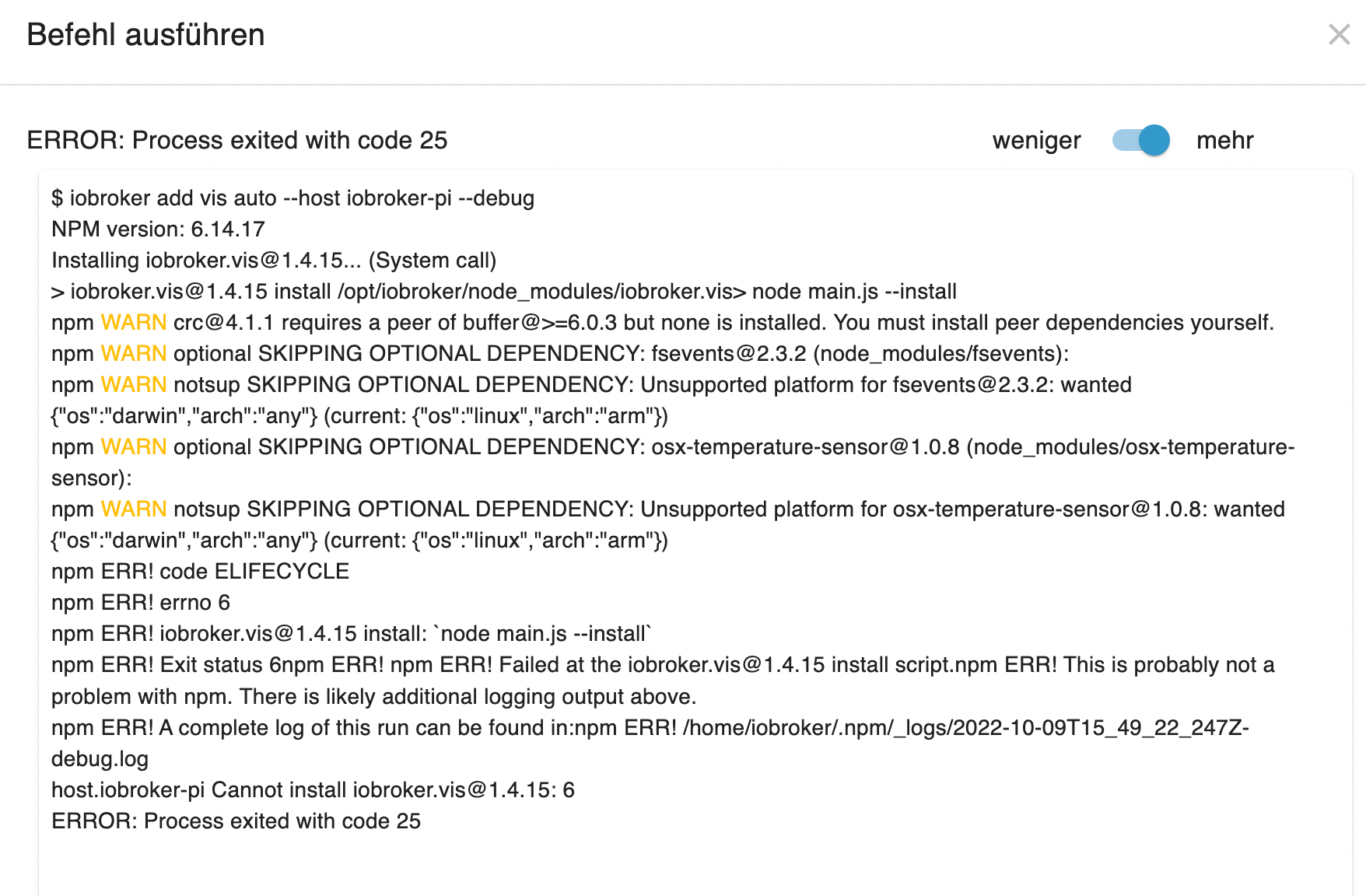
    Bildschirmfoto 2022-10-09 um 17.50.19.png

    BG

    Thomas BraunT 2 Antworten Letzte Antwort
    0
    • HumidorH Humidor

      Hallo!
      habe mir ein neues Image auf eine SD mit Raspi gebrannt und dann mit Backup meine Install zurück geholgt. Er installiert nach und nach die Adapter, aber bei VIS hats einen Fehler. Was muss ich da machen?
      Bildschirmfoto 2022-10-09 um 17.50.19.png

      Thomas BraunT Online
      Thomas BraunT Online
      Thomas Braun
      Most Active
      schrieb am zuletzt editiert von Thomas Braun
      #2

      @humidor

      Warum kein nodejs 16 inkl. npm8 installiert?

      Und vis...
      Ja. Suchfunktion genutzt?

      Linux-Werkzeugkasten:
      https://forum.iobroker.net/topic/42952/der-kleine-iobroker-linux-werkzeugkasten
      NodeJS Fixer Skript:
      https://forum.iobroker.net/topic/68035/iob-node-fix-skript
      iob_diag: curl -sLf -o diag.sh https://iobroker.net/diag.sh && bash diag.sh

      1 Antwort Letzte Antwort
      0
      • HumidorH Offline
        HumidorH Offline
        Humidor
        schrieb am zuletzt editiert von
        #3

        @thomas-braun kA, mit den Versionen bin ich nicht so auf du und du, habs gemacht.
        nun sagt die Installation vom VIS Adapter Code 6, dazu finde ich wieder nix ?

        BG

        Thomas BraunT 1 Antwort Letzte Antwort
        0
        • HumidorH Humidor

          @thomas-braun kA, mit den Versionen bin ich nicht so auf du und du, habs gemacht.
          nun sagt die Installation vom VIS Adapter Code 6, dazu finde ich wieder nix ?

          Thomas BraunT Online
          Thomas BraunT Online
          Thomas Braun
          Most Active
          schrieb am zuletzt editiert von
          #4

          @humidor sagte in Neuinstallation und VIS geht auf Fehler:

          nun sagt die Installation vom VIS Adapter Code 6, dazu finde ich wieder nix ?

          Bitte die exakten Meldungen hier rein, nix nacherzählen.

          Linux-Werkzeugkasten:
          https://forum.iobroker.net/topic/42952/der-kleine-iobroker-linux-werkzeugkasten
          NodeJS Fixer Skript:
          https://forum.iobroker.net/topic/68035/iob-node-fix-skript
          iob_diag: curl -sLf -o diag.sh https://iobroker.net/diag.sh && bash diag.sh

          HumidorH 1 Antwort Letzte Antwort
          0
          • Thomas BraunT Thomas Braun

            @humidor sagte in Neuinstallation und VIS geht auf Fehler:

            nun sagt die Installation vom VIS Adapter Code 6, dazu finde ich wieder nix ?

            Bitte die exakten Meldungen hier rein, nix nacherzählen.

            HumidorH Offline
            HumidorH Offline
            Humidor
            schrieb am zuletzt editiert von
            #5

            @thomas-braun Bildschirmfoto 2022-10-09 um 19.33.45.png

            BG

            Thomas BraunT 1 Antwort Letzte Antwort
            0
            • HumidorH Humidor

              @thomas-braun Bildschirmfoto 2022-10-09 um 19.33.45.png

              Thomas BraunT Online
              Thomas BraunT Online
              Thomas Braun
              Most Active
              schrieb am zuletzt editiert von
              #6

              @humidor

              Wie üblich in CodeTags.

              Linux-Werkzeugkasten:
              https://forum.iobroker.net/topic/42952/der-kleine-iobroker-linux-werkzeugkasten
              NodeJS Fixer Skript:
              https://forum.iobroker.net/topic/68035/iob-node-fix-skript
              iob_diag: curl -sLf -o diag.sh https://iobroker.net/diag.sh && bash diag.sh

              HumidorH 2 Antworten Letzte Antwort
              0
              • Thomas BraunT Thomas Braun

                @humidor

                Wie üblich in CodeTags.

                HumidorH Offline
                HumidorH Offline
                Humidor
                schrieb am zuletzt editiert von
                #7

                @thomas-braun kA was du damit meinst

                BG

                1 Antwort Letzte Antwort
                0
                • Thomas BraunT Thomas Braun

                  @humidor

                  Wie üblich in CodeTags.

                  HumidorH Offline
                  HumidorH Offline
                  Humidor
                  schrieb am zuletzt editiert von Humidor
                  #8

                  @thomas-braun

                  2022-10-09 18:23:22.274 - error: vis.0 (1500) Unhandled promise rejection. This error originated either by throwing inside of an async function without a catch block, or by rejecting a promise which was not handled with .catch().
                  2022-10-09 18:23:22.276 - error: vis.0 (1500) unhandled promise rejection: Not exists
                  2022-10-09 18:23:22.279 - error: vis.0 (1500) Error: Not exists
                  at Object.maybeCallbackWithError (/opt/iobroker/node_modules/@iobroker/js-controller-common/lib/common/tools.js:2973:17)
                  at ObjectsInRedisClient._readFile (/opt/iobroker/node_modules/@iobroker/db-objects-redis/lib/objects/objectsInRedisClient.js:1043:26)
                  at Immediate. (/opt/iobroker/node_modules/@iobroker/db-objects-redis/lib/objects/objectsInRedisClient.js:1092:29)
                  at processImmediate (node:internal/timers:468:21)
                  2022-10-09 18:23:22.280 - error: vis.0 (1500) Not exists
                  2022-10-09 18:23:24.018 - error: host.iobroker-pi iobroker npm-install: host.iobroker-pi Cannot install iobroker.vis@1.4.15: 6
                  2022-10-09 18:23:25.062 - info: host.iobroker-pi iobroker npm-install: exit 25
                  2022-10-09 18:23:25.871 - info: renault.0 (1106) Feature not found for VF1AG000966808321. Ignore charge-history for updates.
                  2022-10-09 18:23:26.063 - warn: host.iobroker-pi startInstance cannot find adapter "vis@1.4.15". Try to install it... 4 attempt
                  2022-10-09 18:23:26.064 - info: host.iobroker-pi iobroker install vis@1.4.15 using installedVersion
                  2022-10-09 18:23:28.865 - info: renault.0 (1106) Feature not found for VF1AG000966808321. Ignore lock-status for updates.
                  2022-10-09 18:23:29.771 - info: renault.0 (1106) Feature not found for VF1AG000966808321. Ignore res-state for updates.
                  2022-10-09 18:23:32.222 - info: host.iobroker-pi iobroker npm-install: NPM version: 8.15.0Installing iobroker.vis@1.4.15... (System call)
                  2022-10-09 18:23:48.413 - error: vis.0 (1667) Unhandled promise rejection. This error originated either by throwing inside of an async function without a catch block, or by rejecting a promise which was not handled with .catch().
                  2022-10-09 18:23:48.416 - error: vis.0 (1667) unhandled promise rejection: Not exists
                  2022-10-09 18:23:48.419 - error: vis.0 (1667) Error: Not exists
                  at Object.maybeCallbackWithError (/opt/iobroker/node_modules/@iobroker/js-controller-common/lib/common/tools.js:2973:17)
                  at ObjectsInRedisClient._readFile (/opt/iobroker/node_modules/@iobroker/db-objects-redis/lib/objects/objectsInRedisClient.js:1043:26)
                  at Immediate. (/opt/iobroker/node_modules/@iobroker/db-objects-redis/lib/objects/objectsInRedisClient.js:1092:29)
                  at processImmediate (node:internal/timers:468:21)
                  2022-10-09 18:23:48.421 - error: vis.0 (1667) Not exists
                  2022-10-09 18:23:50.214 - error: host.iobroker-pi iobroker npm-install: host.iobroker-pi Cannot install iobroker.vis@1.4.15: 6
                  2022-10-09 18:23:51.253 - info: host.iobroker-pi iobroker npm-install: exit 25
                  2022-10-09 18:23:52.254 - error: host.iobroker-pi Cannot download and install adapter "vis@1.4.15". To retry it disable/enable the adapter or restart host. Also check the error messages in the log!
                  2022-10-09 18:25:00.198 - info: javascript.0 (621) script.js.common.go-E_GridOffset: go-E Wolkenzähler hat GridOffset angepasst auf: 1500
                  2022-10-09 18:26:55.644 - info: host.iobroker-pi iobroker add vis auto --host iobroker-pi --debug
                  2022-10-09 18:26:59.888 - info: host.iobroker-pi iobroker NPM version: 8.15.0
                  2022-10-09 18:26:59.890 - info: host.iobroker-pi iobroker Installing iobroker.vis@1.4.15... (System call)
                  2022-10-09 18:27:17.440 - error: vis.0 (1758) Unhandled promise rejection. This error originated either by throwing inside of an async function without a catch block, or by rejecting a promise which was not handled with .catch().
                  2022-10-09 18:27:17.443 - error: vis.0 (1758) unhandled promise rejection: Not exists
                  2022-10-09 18:27:17.446 - error: vis.0 (1758) Error: Not exists
                  at Object.maybeCallbackWithError (/opt/iobroker/node_modules/@iobroker/js-controller-common/lib/common/tools.js:2973:17)
                  at ObjectsInRedisClient._readFile (/opt/iobroker/node_modules/@iobroker/db-objects-redis/lib/objects/objectsInRedisClient.js:1043:26)
                  at Immediate. (/opt/iobroker/node_modules/@iobroker/db-objects-redis/lib/objects/objectsInRedisClient.js:1092:29)
                  at processImmediate (node:internal/timers:468:21)
                  2022-10-09 18:27:17.447 - error: vis.0 (1758) Not exists
                  2022-10-09 18:27:19.253 - info: host.iobroker-pi iobroker npm ERR! code 6
                  2022-10-09 18:27:19.259 - info: host.iobroker-pi iobroker npm ERR! path /opt/iobroker/node_modules/iobroker.vis
                  2022-10-09 18:27:19.265 - info: host.iobroker-pi iobroker npm ERR! command failednpm ERR! command sh /tmp/install-56aeda2a.sh
                  2022-10-09 18:27:19.273 - info: host.iobroker-pi iobroker npm ERR! A complete log of this run can be found in:npm ERR! /home/iobroker/.npm/_logs/2022-10-09T17_27_01_156Z-debug-0.log
                  2022-10-09 18:27:19.306 - error: host.iobroker-pi iobroker host.iobroker-pi Cannot install iobroker.vis@1.4.15: 6
                  2022-10-09 18:27:20.349 - info: host.iobroker-pi iobroker exit 25
                  

                  so oder?
                  https://github.com/ioBroker/ioBroker.vis/issues/502

                  BG

                  Thomas BraunT 1 Antwort Letzte Antwort
                  0
                  • HumidorH Humidor

                    @thomas-braun

                    2022-10-09 18:23:22.274 - error: vis.0 (1500) Unhandled promise rejection. This error originated either by throwing inside of an async function without a catch block, or by rejecting a promise which was not handled with .catch().
                    2022-10-09 18:23:22.276 - error: vis.0 (1500) unhandled promise rejection: Not exists
                    2022-10-09 18:23:22.279 - error: vis.0 (1500) Error: Not exists
                    at Object.maybeCallbackWithError (/opt/iobroker/node_modules/@iobroker/js-controller-common/lib/common/tools.js:2973:17)
                    at ObjectsInRedisClient._readFile (/opt/iobroker/node_modules/@iobroker/db-objects-redis/lib/objects/objectsInRedisClient.js:1043:26)
                    at Immediate. (/opt/iobroker/node_modules/@iobroker/db-objects-redis/lib/objects/objectsInRedisClient.js:1092:29)
                    at processImmediate (node:internal/timers:468:21)
                    2022-10-09 18:23:22.280 - error: vis.0 (1500) Not exists
                    2022-10-09 18:23:24.018 - error: host.iobroker-pi iobroker npm-install: host.iobroker-pi Cannot install iobroker.vis@1.4.15: 6
                    2022-10-09 18:23:25.062 - info: host.iobroker-pi iobroker npm-install: exit 25
                    2022-10-09 18:23:25.871 - info: renault.0 (1106) Feature not found for VF1AG000966808321. Ignore charge-history for updates.
                    2022-10-09 18:23:26.063 - warn: host.iobroker-pi startInstance cannot find adapter "vis@1.4.15". Try to install it... 4 attempt
                    2022-10-09 18:23:26.064 - info: host.iobroker-pi iobroker install vis@1.4.15 using installedVersion
                    2022-10-09 18:23:28.865 - info: renault.0 (1106) Feature not found for VF1AG000966808321. Ignore lock-status for updates.
                    2022-10-09 18:23:29.771 - info: renault.0 (1106) Feature not found for VF1AG000966808321. Ignore res-state for updates.
                    2022-10-09 18:23:32.222 - info: host.iobroker-pi iobroker npm-install: NPM version: 8.15.0Installing iobroker.vis@1.4.15... (System call)
                    2022-10-09 18:23:48.413 - error: vis.0 (1667) Unhandled promise rejection. This error originated either by throwing inside of an async function without a catch block, or by rejecting a promise which was not handled with .catch().
                    2022-10-09 18:23:48.416 - error: vis.0 (1667) unhandled promise rejection: Not exists
                    2022-10-09 18:23:48.419 - error: vis.0 (1667) Error: Not exists
                    at Object.maybeCallbackWithError (/opt/iobroker/node_modules/@iobroker/js-controller-common/lib/common/tools.js:2973:17)
                    at ObjectsInRedisClient._readFile (/opt/iobroker/node_modules/@iobroker/db-objects-redis/lib/objects/objectsInRedisClient.js:1043:26)
                    at Immediate. (/opt/iobroker/node_modules/@iobroker/db-objects-redis/lib/objects/objectsInRedisClient.js:1092:29)
                    at processImmediate (node:internal/timers:468:21)
                    2022-10-09 18:23:48.421 - error: vis.0 (1667) Not exists
                    2022-10-09 18:23:50.214 - error: host.iobroker-pi iobroker npm-install: host.iobroker-pi Cannot install iobroker.vis@1.4.15: 6
                    2022-10-09 18:23:51.253 - info: host.iobroker-pi iobroker npm-install: exit 25
                    2022-10-09 18:23:52.254 - error: host.iobroker-pi Cannot download and install adapter "vis@1.4.15". To retry it disable/enable the adapter or restart host. Also check the error messages in the log!
                    2022-10-09 18:25:00.198 - info: javascript.0 (621) script.js.common.go-E_GridOffset: go-E Wolkenzähler hat GridOffset angepasst auf: 1500
                    2022-10-09 18:26:55.644 - info: host.iobroker-pi iobroker add vis auto --host iobroker-pi --debug
                    2022-10-09 18:26:59.888 - info: host.iobroker-pi iobroker NPM version: 8.15.0
                    2022-10-09 18:26:59.890 - info: host.iobroker-pi iobroker Installing iobroker.vis@1.4.15... (System call)
                    2022-10-09 18:27:17.440 - error: vis.0 (1758) Unhandled promise rejection. This error originated either by throwing inside of an async function without a catch block, or by rejecting a promise which was not handled with .catch().
                    2022-10-09 18:27:17.443 - error: vis.0 (1758) unhandled promise rejection: Not exists
                    2022-10-09 18:27:17.446 - error: vis.0 (1758) Error: Not exists
                    at Object.maybeCallbackWithError (/opt/iobroker/node_modules/@iobroker/js-controller-common/lib/common/tools.js:2973:17)
                    at ObjectsInRedisClient._readFile (/opt/iobroker/node_modules/@iobroker/db-objects-redis/lib/objects/objectsInRedisClient.js:1043:26)
                    at Immediate. (/opt/iobroker/node_modules/@iobroker/db-objects-redis/lib/objects/objectsInRedisClient.js:1092:29)
                    at processImmediate (node:internal/timers:468:21)
                    2022-10-09 18:27:17.447 - error: vis.0 (1758) Not exists
                    2022-10-09 18:27:19.253 - info: host.iobroker-pi iobroker npm ERR! code 6
                    2022-10-09 18:27:19.259 - info: host.iobroker-pi iobroker npm ERR! path /opt/iobroker/node_modules/iobroker.vis
                    2022-10-09 18:27:19.265 - info: host.iobroker-pi iobroker npm ERR! command failednpm ERR! command sh /tmp/install-56aeda2a.sh
                    2022-10-09 18:27:19.273 - info: host.iobroker-pi iobroker npm ERR! A complete log of this run can be found in:npm ERR! /home/iobroker/.npm/_logs/2022-10-09T17_27_01_156Z-debug-0.log
                    2022-10-09 18:27:19.306 - error: host.iobroker-pi iobroker host.iobroker-pi Cannot install iobroker.vis@1.4.15: 6
                    2022-10-09 18:27:20.349 - info: host.iobroker-pi iobroker exit 25
                    

                    so oder?
                    https://github.com/ioBroker/ioBroker.vis/issues/502

                    Thomas BraunT Online
                    Thomas BraunT Online
                    Thomas Braun
                    Most Active
                    schrieb am zuletzt editiert von
                    #9

                    @humidor sagte in Neuinstallation und VIS geht auf Fehler:

                    for i in $(find /opt/iobroker/node_modules -type d -iname ".*-????????" ! -iname ".local-chromium"); do rm -rf ${i%%/}; done 
                    

                    Und installier mal eine der Vorversionen von vis.

                    Linux-Werkzeugkasten:
                    https://forum.iobroker.net/topic/42952/der-kleine-iobroker-linux-werkzeugkasten
                    NodeJS Fixer Skript:
                    https://forum.iobroker.net/topic/68035/iob-node-fix-skript
                    iob_diag: curl -sLf -o diag.sh https://iobroker.net/diag.sh && bash diag.sh

                    HumidorH 1 Antwort Letzte Antwort
                    0
                    • Thomas BraunT Thomas Braun

                      @humidor sagte in Neuinstallation und VIS geht auf Fehler:

                      for i in $(find /opt/iobroker/node_modules -type d -iname ".*-????????" ! -iname ".local-chromium"); do rm -rf ${i%%/}; done 
                      

                      Und installier mal eine der Vorversionen von vis.

                      HumidorH Offline
                      HumidorH Offline
                      Humidor
                      schrieb am zuletzt editiert von
                      #10

                      @thomas-braun verstehe nicht was ich da tun soll
                      den + Button für die Versionen zeigt er mir bei der VIS nicht an

                      BG

                      Thomas BraunT 1 Antwort Letzte Antwort
                      0
                      • HumidorH Humidor

                        @thomas-braun verstehe nicht was ich da tun soll
                        den + Button für die Versionen zeigt er mir bei der VIS nicht an

                        Thomas BraunT Online
                        Thomas BraunT Online
                        Thomas Braun
                        Most Active
                        schrieb am zuletzt editiert von Thomas Braun
                        #11

                        @humidor

                        Im Terminal gibt es auch kein +

                        iobroker upgrade vis@1.4.11 --debug
                        

                        Linux-Werkzeugkasten:
                        https://forum.iobroker.net/topic/42952/der-kleine-iobroker-linux-werkzeugkasten
                        NodeJS Fixer Skript:
                        https://forum.iobroker.net/topic/68035/iob-node-fix-skript
                        iob_diag: curl -sLf -o diag.sh https://iobroker.net/diag.sh && bash diag.sh

                        HumidorH 1 Antwort Letzte Antwort
                        0
                        • Thomas BraunT Thomas Braun

                          @humidor

                          Im Terminal gibt es auch kein +

                          iobroker upgrade vis@1.4.11 --debug
                          
                          HumidorH Offline
                          HumidorH Offline
                          Humidor
                          schrieb am zuletzt editiert von
                          #12

                          @thomas-braun sagte in Neuinstallation und VIS geht auf Fehler:

                          iobroker upgrade vis@1.4.11 --debug

                          This upgrade of "vis" will at least introduce the following changes:
                          ==========================================================================
                          -> 1.4.11:
                          Removed ES6 commands to be supported by older browsers
                          Fixed problem with update of grouped widgets
                          Added web manifest to be able to handle vis as the web app
                          
                          -> 1.4.8:
                          Added support for js-controller 4.x
                          
                          -> 1.4.7:
                          Fixed subscribeOidAtRuntime if called with invalid IDs
                          Added support of license manager
                          ==========================================================================
                          
                          BE CAREFUL: THIS IS A MAJOR UPGRADE, WHICH WILL MOST LIKELY INTRODUCE BREAKING CHANGES!
                          Would you like to upgrade vis from @0.0.0 to @1.4.11 now? [(y)es, (n)o]: y
                          Update vis from @0.0.0 to @1.4.11
                          NPM version: 8.15.0
                          Installing iobroker.vis@1.4.11... (System call)
                          npm ERR! code 6
                          npm ERR! path /opt/iobroker/node_modules/iobroker.vis
                          npm ERR! command failed
                          npm ERR! command sh /tmp/install-1afdc587.sh
                          
                          npm ERR! A complete log of this run can be found in:
                          npm ERR!     /home/iobroker/.npm/_logs/2022-10-09T17_55_17_832Z-debug-0.log
                          host.iobroker-pi Cannot install iobroker.vis@1.4.11: 6


                          BG

                          1 Antwort Letzte Antwort
                          0
                          • Thomas BraunT Online
                            Thomas BraunT Online
                            Thomas Braun
                            Most Active
                            schrieb am zuletzt editiert von
                            #13

                            @humidor sagte in Neuinstallation und VIS geht auf Fehler:

                            /home/iobroker/.npm/_logs/2022-10-09T17_55_17_832Z-debug-0.log

                            Was steht da drin?

                            Linux-Werkzeugkasten:
                            https://forum.iobroker.net/topic/42952/der-kleine-iobroker-linux-werkzeugkasten
                            NodeJS Fixer Skript:
                            https://forum.iobroker.net/topic/68035/iob-node-fix-skript
                            iob_diag: curl -sLf -o diag.sh https://iobroker.net/diag.sh && bash diag.sh

                            HumidorH 1 Antwort Letzte Antwort
                            0
                            • HumidorH Humidor

                              Hallo!
                              habe mir ein neues Image auf eine SD mit Raspi gebrannt und dann mit Backup meine Install zurück geholgt. Er installiert nach und nach die Adapter, aber bei VIS hats einen Fehler. Was muss ich da machen?
                              Bildschirmfoto 2022-10-09 um 17.50.19.png

                              Thomas BraunT Online
                              Thomas BraunT Online
                              Thomas Braun
                              Most Active
                              schrieb am zuletzt editiert von
                              #14

                              @humidor sagte in Neuinstallation und VIS geht auf Fehler:

                              habe mir ein neues Image auf eine SD mit Raspi gebrannt

                              Was für ein Image?

                              Linux-Werkzeugkasten:
                              https://forum.iobroker.net/topic/42952/der-kleine-iobroker-linux-werkzeugkasten
                              NodeJS Fixer Skript:
                              https://forum.iobroker.net/topic/68035/iob-node-fix-skript
                              iob_diag: curl -sLf -o diag.sh https://iobroker.net/diag.sh && bash diag.sh

                              HumidorH 1 Antwort Letzte Antwort
                              0
                              • Thomas BraunT Thomas Braun

                                @humidor sagte in Neuinstallation und VIS geht auf Fehler:

                                /home/iobroker/.npm/_logs/2022-10-09T17_55_17_832Z-debug-0.log

                                Was steht da drin?

                                HumidorH Offline
                                HumidorH Offline
                                Humidor
                                schrieb am zuletzt editiert von Humidor
                                #15

                                @thomas-braun


                                Last login: Sun Oct 9 15:45:50 on ttys000
                                richardnussdorfer@MacBook-Pro-von-Richard ~ % ssh pi@192.168.0.92
                                pi@192.168.0.92's password:
                                Linux iobroker-pi 5.10.103-v7l+ #1529 SMP Tue Mar 8 12:24:00 GMT 2022 armv7l

                                The programs included with the Debian GNU/Linux system are free software;
                                the exact distribution terms for each program are described in the
                                individual files in /usr/share/doc/*/copyright.

                                Debian GNU/Linux comes with ABSOLUTELY NO WARRANTY, to the extent
                                permitted by applicable law.
                                Last login: Sun Oct 9 14:46:06 2022 from 192.168.0.193

                                SSH is enabled and the default password for the 'pi' user has not been changed.
                                This is a security risk - please login as the 'pi' user and type 'passwd' to set a new password.

                                Wi-Fi is currently blocked by rfkill.
                                Use raspi-config to set the country before use.

                                pi@iobroker-pi:~ $ sudo reboot
                                Connection to 192.168.0.92 closed by remote host.
                                Connection to 192.168.0.92 closed.
                                richardnussdorfer@MacBook-Pro-von-Richard ~ % ssh pi@192.168.0.92
                                pi@192.168.0.92's password:
                                Linux iobroker-pi 5.10.103-v7l+ #1529 SMP Tue Mar 8 12:24:00 GMT 2022 armv7l

                                The programs included with the Debian GNU/Linux system are free software;
                                the exact distribution terms for each program are described in the
                                individual files in /usr/share/doc/*/copyright.

                                Debian GNU/Linux comes with ABSOLUTELY NO WARRANTY, to the extent
                                permitted by applicable law.
                                Last login: Sun Oct 9 15:02:28 2022 from 192.168.0.193

                                SSH is enabled and the default password for the 'pi' user has not been changed.
                                This is a security risk - please login as the 'pi' user and type 'passwd' to set a new password.

                                Wi-Fi is currently blocked by rfkill.
                                Use raspi-config to set the country before use.

                                pi@iobroker-pi:~ $ sudo reboot
                                Connection to 192.168.0.92 closed by remote host.
                                Connection to 192.168.0.92 closed.
                                richardnussdorfer@MacBook-Pro-von-Richard ~ % ssh pi@192.168.0.92
                                pi@192.168.0.92's password:
                                Linux iobroker-pi 5.10.103-v7l+ #1529 SMP Tue Mar 8 12:24:00 GMT 2022 armv7l

                                The programs included with the Debian GNU/Linux system are free software;
                                the exact distribution terms for each program are described in the
                                individual files in /usr/share/doc/*/copyright.

                                Debian GNU/Linux comes with ABSOLUTELY NO WARRANTY, to the extent
                                permitted by applicable law.
                                Last login: Sun Oct 9 15:42:15 2022 from 192.168.0.193

                                SSH is enabled and the default password for the 'pi' user has not been changed.
                                This is a security risk - please login as the 'pi' user and type 'passwd' to set a new password.

                                Wi-Fi is currently blocked by rfkill.
                                Use raspi-config to set the country before use.

                                pi@iobroker-pi:~ $ iob stop
                                pi@iobroker-pi:~ $ iob fix
                                library: loaded
                                Library version=2022-06-15

                                ==========================================================================

                                Welcome to the ioBroker installation fixer!
                                Script version: 2022-06-03
                                
                                You might need to enter your password a couple of times.
                                

                                ==========================================================================

                                ==========================================================================
                                Installing prerequisites (1/3)

                                Hit:1 http://archive.raspberrypi.org/debian buster InRelease
                                Hit:2 http://raspbian.raspberrypi.org/raspbian buster InRelease
                                Hit:3 https://deb.nodesource.com/node_12.x buster InRelease
                                Reading package lists... Done
                                Installed gcc-c++

                                ==========================================================================
                                Checking ioBroker user and directory permissions (2/3)

                                Created /etc/sudoers.d/iobroker
                                Fixing directory permissions...

                                ==========================================================================
                                Checking autostart (3/3)

                                Enabling autostart...
                                Autostart enabled!

                                ==========================================================================

                                Your installation was fixed successfully
                                Run iobroker start to start ioBroker again!
                                

                                ==========================================================================

                                pi@iobroker-pi:~ $ iob start
                                pi@iobroker-pi:~ $ iob stop
                                pi@iobroker-pi:~ $ iob start
                                pi@iobroker-pi:~ $ sudo reboot
                                Connection to 192.168.0.92 closed by remote host.
                                Connection to 192.168.0.92 closed.
                                richardnussdorfer@MacBook-Pro-von-Richard ~ % ssh pi@192.168.0.92
                                pi@192.168.0.92's password:
                                Linux iobroker-pi 5.10.103-v7l+ #1529 SMP Tue Mar 8 12:24:00 GMT 2022 armv7l

                                The programs included with the Debian GNU/Linux system are free software;
                                the exact distribution terms for each program are described in the
                                individual files in /usr/share/doc/*/copyright.

                                Debian GNU/Linux comes with ABSOLUTELY NO WARRANTY, to the extent
                                permitted by applicable law.
                                Last login: Sun Oct 9 16:02:22 2022 from 192.168.0.193

                                SSH is enabled and the default password for the 'pi' user has not been changed.
                                This is a security risk - please login as the 'pi' user and type 'passwd' to set a new password.

                                Wi-Fi is currently blocked by rfkill.
                                Use raspi-config to set the country before use.

                                pi@iobroker-pi:~ $ sudo apt update
                                Hit:1 http://archive.raspberrypi.org/debian buster InRelease
                                Hit:2 https://deb.nodesource.com/node_12.x buster InRelease
                                Hit:3 http://raspbian.raspberrypi.org/raspbian buster InRelease
                                Reading package lists... Done
                                Building dependency tree
                                Reading state information... Done
                                All packages are up to date.
                                pi@iobroker-pi:~ $ sudo apt upgrade
                                Reading package lists... Done
                                Building dependency tree
                                Reading state information... Done
                                Calculating upgrade... Done
                                0 upgraded, 0 newly installed, 0 to remove and 0 not upgraded.
                                pi@iobroker-pi:~ $ sudo apt dist-upgradesudo apt dist-upgrade
                                E: Invalid operation dist-upgradesudo
                                pi@iobroker-pi:~ $ sudo apt dist-upgrade
                                Reading package lists... Done
                                Building dependency tree
                                Reading state information... Done
                                Calculating upgrade... Done
                                0 upgraded, 0 newly installed, 0 to remove and 0 not upgraded.
                                pi@iobroker-pi:~ $ curl -fsSL https://deb.nodesource.com/setup_14.x | sudo -E bash -

                                Installing the NodeSource Node.js 14.x repo...

                                Populating apt-get cache...

                                • apt-get update
                                  Hit:1 http://raspbian.raspberrypi.org/raspbian buster InRelease
                                  Hit:2 https://deb.nodesource.com/node_12.x buster InRelease
                                  Hit:3 http://archive.raspberrypi.org/debian buster InRelease
                                  Reading package lists... Done

                                Confirming "buster" is supported...

                                • curl -sLf -o /dev/null 'https://deb.nodesource.com/node_14.x/dists/buster/Release'

                                Adding the NodeSource signing key to your keyring...

                                • curl -s https://deb.nodesource.com/gpgkey/nodesource.gpg.key | gpg --dearmor | tee /usr/share/keyrings/nodesource.gpg >/dev/null
                                  gpg: WARNING: unsafe ownership on homedir '/home/pi/.gnupg'

                                Creating apt sources list file for the NodeSource Node.js 14.x repo...

                                • echo 'deb [signed-by=/usr/share/keyrings/nodesource.gpg] https://deb.nodesource.com/node_14.x buster main' > /etc/apt/sources.list.d/nodesource.list
                                • echo 'deb-src [signed-by=/usr/share/keyrings/nodesource.gpg] https://deb.nodesource.com/node_14.x buster main' >> /etc/apt/sources.list.d/nodesource.list

                                Running apt-get update for you...

                                • apt-get update
                                  Hit:1 http://raspbian.raspberrypi.org/raspbian buster InRelease
                                  Hit:2 http://archive.raspberrypi.org/debian buster InRelease
                                  Get:3 https://deb.nodesource.com/node_14.x buster InRelease [4,584 B]
                                  Get:4 https://deb.nodesource.com/node_14.x buster/main armhf Packages [782 B]
                                  Fetched 5,366 B in 2s (2,988 B/s)
                                  Reading package lists... Done

                                Run sudo apt-get install -y nodejs to install Node.js 14.x and npm

                                You may also need development tools to build native addons:

                                 sudo apt-get install gcc g++ make
                                

                                To install the Yarn package manager, run:

                                 curl -sL https://dl.yarnpkg.com/debian/pubkey.gpg | gpg --dearmor | sudo tee /usr/share/keyrings/yarnkey.gpg >/dev/null
                                 echo "deb [signed-by=/usr/share/keyrings/yarnkey.gpg] https://dl.yarnpkg.com/debian stable main" | sudo tee /etc/apt/sources.list.d/yarn.list
                                 sudo apt-get update && sudo apt-get install yarn
                                

                                pi@iobroker-pi:~ $ sudo apt-get install -y nodejs
                                Reading package lists... Done
                                Building dependency tree
                                Reading state information... Done
                                The following packages will be upgraded:
                                nodejs
                                1 upgraded, 0 newly installed, 0 to remove and 0 not upgraded.
                                Need to get 23.3 MB of archives.
                                After this operation, 31.2 MB of additional disk space will be used.
                                Get:1 https://deb.nodesource.com/node_14.x buster/main armhf nodejs armhf 14.20.1-deb-1nodesource1 [23.3 MB]
                                Fetched 23.3 MB in 3s (7,113 kB/s)
                                apt-listchanges: Reading changelogs...
                                (Reading database ... 52601 files and directories currently installed.)
                                Preparing to unpack .../nodejs_14.20.1-deb-1nodesource1_armhf.deb ...
                                Unpacking nodejs (14.20.1-deb-1nodesource1) over (12.22.12-deb-1nodesource1) ...
                                Setting up nodejs (14.20.1-deb-1nodesource1) ...
                                Processing triggers for man-db (2.8.5-2) ...
                                pi@iobroker-pi:~ $ sudo reboot
                                Connection to 192.168.0.92 closed by remote host.
                                Connection to 192.168.0.92 closed.
                                richardnussdorfer@MacBook-Pro-von-Richard ~ % ssh pi@192.168.0.92
                                pi@192.168.0.92's password:
                                Linux iobroker-pi 5.10.103-v7l+ #1529 SMP Tue Mar 8 12:24:00 GMT 2022 armv7l

                                The programs included with the Debian GNU/Linux system are free software;
                                the exact distribution terms for each program are described in the
                                individual files in /usr/share/doc/*/copyright.

                                Debian GNU/Linux comes with ABSOLUTELY NO WARRANTY, to the extent
                                permitted by applicable law.
                                Last login: Sun Oct 9 16:29:51 2022 from 192.168.0.193

                                SSH is enabled and the default password for the 'pi' user has not been changed.
                                This is a security risk - please login as the 'pi' user and type 'passwd' to set a new password.

                                Wi-Fi is currently blocked by rfkill.
                                Use raspi-config to set the country before use.

                                pi@iobroker-pi:~ $ node -v
                                v14.20.1
                                pi@iobroker-pi:~ $ curl -fsSL https://deb.nodesource.com/setup_16.x | sudo -E bash -

                                Installing the NodeSource Node.js 16.x repo...

                                Populating apt-get cache...

                                • apt-get update
                                  Hit:1 http://raspbian.raspberrypi.org/raspbian buster InRelease
                                  Hit:2 http://archive.raspberrypi.org/debian buster InRelease
                                  Hit:3 https://deb.nodesource.com/node_14.x buster InRelease
                                  Reading package lists... Done

                                Confirming "buster" is supported...

                                • curl -sLf -o /dev/null 'https://deb.nodesource.com/node_16.x/dists/buster/Release'

                                Adding the NodeSource signing key to your keyring...

                                • curl -s https://deb.nodesource.com/gpgkey/nodesource.gpg.key | gpg --dearmor | tee /usr/share/keyrings/nodesource.gpg >/dev/null
                                  gpg: WARNING: unsafe ownership on homedir '/home/pi/.gnupg'

                                Creating apt sources list file for the NodeSource Node.js 16.x repo...

                                • echo 'deb [signed-by=/usr/share/keyrings/nodesource.gpg] https://deb.nodesource.com/node_16.x buster main' > /etc/apt/sources.list.d/nodesource.list
                                • echo 'deb-src [signed-by=/usr/share/keyrings/nodesource.gpg] https://deb.nodesource.com/node_16.x buster main' >> /etc/apt/sources.list.d/nodesource.list

                                Running apt-get update for you...

                                • apt-get update
                                  Hit:1 http://raspbian.raspberrypi.org/raspbian buster InRelease
                                  Hit:2 http://archive.raspberrypi.org/debian buster InRelease
                                  Get:3 https://deb.nodesource.com/node_16.x buster InRelease [4,584 B]
                                  Get:4 https://deb.nodesource.com/node_16.x buster/main armhf Packages [783 B]
                                  Fetched 5,367 B in 1s (4,026 B/s)
                                  Reading package lists... Done

                                Run sudo apt-get install -y nodejs to install Node.js 16.x and npm

                                You may also need development tools to build native addons:

                                 sudo apt-get install gcc g++ make
                                

                                To install the Yarn package manager, run:

                                 curl -sL https://dl.yarnpkg.com/debian/pubkey.gpg | gpg --dearmor | sudo tee /usr/share/keyrings/yarnkey.gpg >/dev/null
                                 echo "deb [signed-by=/usr/share/keyrings/yarnkey.gpg] https://dl.yarnpkg.com/debian stable main" | sudo tee /etc/apt/sources.list.d/yarn.list
                                 sudo apt-get update && sudo apt-get install yarn
                                

                                pi@iobroker-pi:~ $
                                pi@iobroker-pi:~ $ sudo apt-get install -y nodejs

                                Reading package lists... Done
                                Building dependency tree
                                Reading state information... Done
                                The following packages will be upgraded:
                                nodejs
                                1 upgraded, 0 newly installed, 0 to remove and 0 not upgraded.
                                Need to get 24.1 MB of archives.
                                After this operation, 2,072 kB of additional disk space will be used.
                                Get:1 https://deb.nodesource.com/node_16.x buster/main armhf nodejs armhf 16.17.1-deb-1nodesource1 [24.1 MB]
                                Fetched 24.1 MB in 3s (7,256 kB/s)
                                apt-listchanges: Reading changelogs...
                                (Reading database ... 52699 files and directories currently installed.)
                                Preparing to unpack .../nodejs_16.17.1-deb-1nodesource1_armhf.deb ...
                                Unpacking nodejs (16.17.1-deb-1nodesource1) over (14.20.1-deb-1nodesource1) ...
                                Setting up nodejs (16.17.1-deb-1nodesource1) ...
                                Processing triggers for man-db (2.8.5-2) ...
                                pi@iobroker-pi:~ $ sudo reboot

                                Connection to 192.168.0.92 closed by remote host.
                                Connection to 192.168.0.92 closed.
                                richardnussdorfer@MacBook-Pro-von-Richard ~ % ssh pi@192.168.0.92
                                pi@192.168.0.92's password:
                                Linux iobroker-pi 5.10.103-v7l+ #1529 SMP Tue Mar 8 12:24:00 GMT 2022 armv7l

                                The programs included with the Debian GNU/Linux system are free software;
                                the exact distribution terms for each program are described in the
                                individual files in /usr/share/doc/*/copyright.

                                Debian GNU/Linux comes with ABSOLUTELY NO WARRANTY, to the extent
                                permitted by applicable law.
                                Last login: Sun Oct 9 18:06:04 2022 from 192.168.0.193

                                SSH is enabled and the default password for the 'pi' user has not been changed.
                                This is a security risk - please login as the 'pi' user and type 'passwd' to set a new password.

                                Wi-Fi is currently blocked by rfkill.
                                Use raspi-config to set the country before use.

                                pi@iobroker-pi:~ $ curl -sL https://iobroker.net/fix.sh | bash -
                                library: loaded
                                Library version=2022-06-15
                                ioBroker or some processes are still running:
                                io.admin.0
                                io.history.0
                                io.javascript.0
                                io.telegram.0
                                Please stop them first and try again!
                                pi@iobroker-pi:~ $ iobroker stop
                                pi@iobroker-pi:~ $ curl -sL https://iobroker.net/fix.sh | bash -
                                library: loaded
                                Library version=2022-06-15

                                ==========================================================================

                                Welcome to the ioBroker installation fixer!
                                Script version: 2022-06-03
                                
                                You might need to enter your password a couple of times.
                                

                                ==========================================================================

                                ==========================================================================
                                Installing prerequisites (1/3)

                                Hit:1 http://raspbian.raspberrypi.org/raspbian buster InRelease
                                Hit:2 http://archive.raspberrypi.org/debian buster InRelease
                                Hit:3 https://deb.nodesource.com/node_16.x buster InRelease
                                Reading package lists... Done
                                Installed gcc-c++

                                ==========================================================================
                                Checking ioBroker user and directory permissions (2/3)

                                Created /etc/sudoers.d/iobroker
                                Fixing directory permissions...

                                ==========================================================================
                                Checking autostart (3/3)

                                Enabling autostart...
                                Autostart enabled!

                                ==========================================================================

                                Your installation was fixed successfully
                                Run iobroker start to start ioBroker again!
                                

                                ==========================================================================

                                pi@iobroker-pi:~ $ iobroker stop
                                pi@iobroker-pi:~ $ cd /opt/iobroker
                                pi@iobroker-pi:/opt/iobroker $
                                pi@iobroker-pi:/opt/iobroker $
                                pi@iobroker-pi:/opt/iobroker $ sudo npm cache verify

                                ^[[A^[[B
                                Cache verified and compressed (~/.npm/_cacache)
                                Content verified: 1865 (82716378 bytes)
                                Index entries: 2899
                                Finished in 24.574s
                                pi@iobroker-pi:/opt/iobroker $
                                pi@iobroker-pi:/opt/iobroker $
                                pi@iobroker-pi:/opt/iobroker $
                                pi@iobroker-pi:/opt/iobroker $ sudo chown -R iobroker /opt/iobroker
                                pi@iobroker-pi:/opt/iobroker $ sudo apt update -y && sudo apt upgrade -y
                                Get:1 http://raspbian.raspberrypi.org/raspbian buster InRelease [15.0 kB]
                                Hit:2 http://archive.raspberrypi.org/debian buster InRelease
                                Hit:3 https://deb.nodesource.com/node_16.x buster InRelease
                                Fetched 15.0 kB in 1s (12.9 kB/s)
                                Reading package lists... Done
                                Building dependency tree
                                Reading state information... Done
                                All packages are up to date.
                                Reading package lists... Done
                                Building dependency tree
                                Reading state information... Done
                                Calculating upgrade... Done
                                0 upgraded, 0 newly installed, 0 to remove and 0 not upgraded.
                                pi@iobroker-pi:/opt/iobroker $ sudo apt-get purge nodejs -y && sudo apt-get autoremove -y && sudo apt-get autoclean -y
                                Reading package lists... Done
                                Building dependency tree
                                Reading state information... Done
                                The following packages will be REMOVED:
                                nodejs*
                                0 upgraded, 0 newly installed, 1 to remove and 0 not upgraded.
                                After this operation, 119 MB disk space will be freed.
                                (Reading database ... 50868 files and directories currently installed.)
                                Removing nodejs (16.17.1-deb-1nodesource1) ...
                                dpkg: warning: while removing nodejs, directory '/usr/lib/node_modules/npm/node_modules/node-gyp/gyp/pylib/gyp/generator' not empty so not removed
                                Processing triggers for man-db (2.8.5-2) ...
                                Reading package lists... Done
                                Building dependency tree
                                Reading state information... Done
                                0 upgraded, 0 newly installed, 0 to remove and 0 not upgraded.
                                Reading package lists... Done
                                Building dependency tree
                                Reading state information... Done
                                Del nodejs 12.22.12-deb-1nodesource1 [15.9 MB]
                                Del nodejs 14.20.1-deb-1nodesource1 [23.3 MB]
                                pi@iobroker-pi:/opt/iobroker $ sudo curl -sL https://deb.nodesource.com/setup_16.x | sudo bash -

                                Installing the NodeSource Node.js 16.x repo...

                                Populating apt-get cache...

                                • apt-get update
                                  Hit:1 http://archive.raspberrypi.org/debian buster InRelease
                                  Hit:2 http://raspbian.raspberrypi.org/raspbian buster InRelease
                                  Hit:3 https://deb.nodesource.com/node_16.x buster InRelease
                                  Reading package lists... Done

                                Confirming "buster" is supported...

                                • curl -sLf -o /dev/null 'https://deb.nodesource.com/node_16.x/dists/buster/Release'

                                Adding the NodeSource signing key to your keyring...

                                • curl -s https://deb.nodesource.com/gpgkey/nodesource.gpg.key | gpg --dearmor | tee /usr/share/keyrings/nodesource.gpg >/dev/null

                                Creating apt sources list file for the NodeSource Node.js 16.x repo...

                                • echo 'deb [signed-by=/usr/share/keyrings/nodesource.gpg] https://deb.nodesource.com/node_16.x buster main' > /etc/apt/sources.list.d/nodesource.list
                                • echo 'deb-src [signed-by=/usr/share/keyrings/nodesource.gpg] https://deb.nodesource.com/node_16.x buster main' >> /etc/apt/sources.list.d/nodesource.list

                                Running apt-get update for you...

                                • apt-get update
                                  Hit:1 http://archive.raspberrypi.org/debian buster InRelease
                                  Hit:2 http://raspbian.raspberrypi.org/raspbian buster InRelease
                                  Hit:3 https://deb.nodesource.com/node_16.x buster InRelease
                                  Reading package lists... Done

                                Run sudo apt-get install -y nodejs to install Node.js 16.x and npm

                                You may also need development tools to build native addons:

                                 sudo apt-get install gcc g++ make
                                

                                To install the Yarn package manager, run:

                                 curl -sL https://dl.yarnpkg.com/debian/pubkey.gpg | gpg --dearmor | sudo tee /usr/share/keyrings/yarnkey.gpg >/dev/null
                                 echo "deb [signed-by=/usr/share/keyrings/yarnkey.gpg] https://dl.yarnpkg.com/debian stable main" | sudo tee /etc/apt/sources.list.d/yarn.list
                                 sudo apt-get update && sudo apt-get install yarn
                                

                                pi@iobroker-pi:/opt/iobroker $ sudo apt-get install -y nodejs
                                Reading package lists... Done
                                Building dependency tree
                                Reading state information... Done
                                The following NEW packages will be installed:
                                nodejs
                                0 upgraded, 1 newly installed, 0 to remove and 0 not upgraded.
                                Need to get 0 B/24.1 MB of archives.
                                After this operation, 119 MB of additional disk space will be used.
                                Selecting previously unselected package nodejs.
                                (Reading database ... 47737 files and directories currently installed.)
                                Preparing to unpack .../nodejs_16.17.1-deb-1nodesource1_armhf.deb ...
                                Unpacking nodejs (16.17.1-deb-1nodesource1) ...
                                Setting up nodejs (16.17.1-deb-1nodesource1) ...
                                Processing triggers for man-db (2.8.5-2) ...
                                pi@iobroker-pi:/opt/iobroker $ sudo chown -R iobroker /opt/iobroker
                                pi@iobroker-pi:/opt/iobroker $ iobroker stop
                                pi@iobroker-pi:/opt/iobroker $ curl -sL https://iobroker.net/fix.sh | bash -
                                library: loaded
                                Library version=2022-06-15

                                ==========================================================================

                                Welcome to the ioBroker installation fixer!
                                Script version: 2022-06-03
                                
                                You might need to enter your password a couple of times.
                                

                                ==========================================================================

                                ==========================================================================
                                Installing prerequisites (1/3)

                                Hit:1 http://archive.raspberrypi.org/debian buster InRelease
                                Hit:2 http://raspbian.raspberrypi.org/raspbian buster InRelease
                                Hit:3 https://deb.nodesource.com/node_16.x buster InRelease
                                Reading package lists... Done
                                Installed gcc-c++

                                ==========================================================================
                                Checking ioBroker user and directory permissions (2/3)

                                Created /etc/sudoers.d/iobroker
                                Fixing directory permissions...

                                ==========================================================================
                                Checking autostart (3/3)

                                Enabling autostart...
                                Autostart enabled!

                                ==========================================================================

                                Your installation was fixed successfully
                                Run iobroker start to start ioBroker again!
                                

                                ==========================================================================

                                pi@iobroker-pi:/opt/iobroker $ npm install -y iobroker.js-controller --unsafe-perm --production --save --prefix
                                npm WARN invalid config prefix=true set in command line options
                                npm WARN invalid config Must be valid filesystem path
                                npm WARN config production Use --omit=dev instead.
                                npm WARN old lockfile
                                npm WARN old lockfile The package-lock.json file was created with an old version of npm,
                                npm WARN old lockfile so supplemental metadata must be fetched from the registry.
                                npm WARN old lockfile
                                npm WARN old lockfile This is a one-time fix-up, please be patient...
                                npm WARN old lockfile
                                (##################) ⠴ idealTree:iobroker: sill idealTree buildDeps
                                (##################) ⠴ idealTree:iobroker: sill idealTree buildDeps
                                npm WARN skipping integrity check for git dependency ssh://git@github.com/walli545/ioBroker.time-switch.git
                                (##################) ⠏ reify:@types/node: timing reifyNode:node_modules/iobroker.time-switch/node_modules/cron-parser Completed in 158ms

                                added 6 packages, removed 2 packages, and changed 1 package in 3m

                                189 packages are looking for funding
                                run npm fund for details
                                pi@iobroker-pi:/opt/iobroker $
                                pi@iobroker-pi:/opt/iobroker $
                                pi@iobroker-pi:/opt/iobroker $ npm install -y iobroker.js-controller --unsafe-perm --production --save --prefix
                                npm WARN invalid config prefix=true set in command line options
                                npm WARN invalid config Must be valid filesystem path
                                npm WARN config production Use --omit=dev instead.

                                added 1 package, removed 1 package, and changed 1 package in 9s

                                189 packages are looking for funding
                                run npm fund for details
                                pi@iobroker-pi:/opt/iobroker $ npm rebuild

                                rebuilt dependencies successfully
                                pi@iobroker-pi:/opt/iobroker $
                                pi@iobroker-pi:/opt/iobroker $ iobroker update

                                Used repository: Stable (default)
                                Adapter "admin" : 6.2.22 , installed 6.2.22
                                Adapter "alias-manager": 1.2.4 , installed 1.2.6
                                Adapter "backitup" : 2.4.12 , installed 2.4.16
                                Adapter "cloud" : 4.2.2 , installed 4.2.2
                                Adapter "daswetter" : 3.1.3 , installed 3.1.4
                                Adapter "denon" : 1.13.4 , installed 1.13.4
                                Adapter "discovery" : 3.0.5 , installed 3.0.5
                                Adapter "echarts" : 1.0.12 , installed 1.0.12
                                Adapter "fritzdect" : 2.2.3 , installed 2.2.6
                                Adapter "fronius" : 1.1.3 , installed 1.1.3
                                Adapter "fuelpricemonitor": 0.3.0 , installed 0.3.0
                                Adapter "go-e" : 1.0.23 , installed 1.0.25
                                Adapter "habpanel" : 0.5.0 , installed 0.5.0
                                Adapter "harmony" : 1.2.2 , installed 1.2.2
                                Adapter "history" : 2.2.0 , installed 2.2.4
                                Adapter "hs100" : 2.1.2 , installed 2.1.2
                                Adapter "hue" : 3.7.1 , installed 3.7.1
                                Adapter "hue-extended" : 2.0.0 , installed 2.0.0
                                Adapter "icons-icons8" : 0.0.1 , installed 0.0.1
                                Adapter "icons-mfd-png": 1.1.0 , installed 1.1.0
                                Adapter "icons-open-icon-library-png": 0.1.2, installed 0.1.2
                                Adapter "icons-ultimate-png": 1.0.1, installed 1.0.1
                                Adapter "influxdb" : 3.1.8 , installed 3.2.0
                                Adapter "info" : 1.9.19 , installed 1.9.21
                                Adapter "iot" : 1.11.9 , installed 1.12.2
                                Adapter "javascript" : 6.0.3 , installed 6.0.3
                                Controller "js-controller": 4.0.23 , installed 4.0.23
                                Adapter "kecontact" : 1.4.1 , installed 1.4.1
                                Adapter "linktap" : 0.2.1 , installed 0.2.1
                                Adapter "logparser" : 1.1.0 , installed 1.1.0
                                Adapter "modbus" : 5.0.5 , installed 5.0.8
                                Adapter "mqtt" : 4.0.7 , installed 4.0.7
                                Adapter "owntracks" : 1.0.3 , installed 1.0.4
                                Adapter "places" : 1.1.2 , installed 1.1.2
                                Adapter "psa" : 0.0.11 , installed 0.0.11
                                Adapter "renault" : 0.0.14 , installed 0.0.14
                                Adapter "s7" : 1.3.13 , installed 1.3.14
                                Adapter "shelly" : 6.0.0 , installed 6.2.0
                                Adapter "simple-api" : 2.7.0 , installed 2.7.2
                                Adapter "socketio" : 4.2.0 , installed 6.1.9
                                Adapter "sonoff" : 2.5.1 , installed 2.5.1
                                Adapter "synology" : 2.1.9 , installed 2.1.9
                                Adapter "telegram" : 1.14.1 , installed 1.14.1
                                Adapter "virtualpowermeter": 1.4.6, installed 1.4.6
                                Adapter "vis-icontwo" : 0.89.0 , installed 0.89.0
                                Adapter "vis-inventwo" : 3.3.1 , installed 3.3.3
                                Adapter "vis-jqui-mfd" : 1.0.12 , installed 1.0.12
                                Adapter "vis-justgage" : 1.0.2 , installed 1.0.2
                                Adapter "vis-map" : 1.0.4 , installed 1.0.4
                                Adapter "web" : 4.3.0 , installed 5.2.5
                                Adapter "ws" : 1.3.0 , installed 2.1.4
                                Adapter "yahka" : 0.13.1 , installed 0.14.0
                                Adapter "zigbee" : 1.7.5 , installed 1.7.6
                                pi@iobroker-pi:/opt/iobroker $
                                pi@iobroker-pi:/opt/iobroker $ iobroker upgrade self

                                Host "iobroker-pi" is up to date.
                                pi@iobroker-pi:/opt/iobroker $
                                pi@iobroker-pi:/opt/iobroker $ iobroker upgrade

                                All adapters are up to date
                                pi@iobroker-pi:/opt/iobroker $
                                pi@iobroker-pi:/opt/iobroker $ sudo reboot
                                Connection to 192.168.0.92 closed by remote host.
                                Connection to 192.168.0.92 closed.
                                richardnussdorfer@MacBook-Pro-von-Richard ~ % ssh pi@192.168.0.92
                                pi@192.168.0.92's password:
                                Linux iobroker-pi 5.10.103-v7l+ #1529 SMP Tue Mar 8 12:24:00 GMT 2022 armv7l

                                The programs included with the Debian GNU/Linux system are free software;
                                the exact distribution terms for each program are described in the
                                individual files in /usr/share/doc/*/copyright.

                                Debian GNU/Linux comes with ABSOLUTELY NO WARRANTY, to the extent
                                permitted by applicable law.
                                Last login: Sun Oct 9 18:08:03 2022 from 192.168.0.193

                                SSH is enabled and the default password for the 'pi' user has not been changed.
                                This is a security risk - please login as the 'pi' user and type 'passwd' to set a new password.

                                Wi-Fi is currently blocked by rfkill.
                                Use raspi-config to set the country before use.

                                pi@iobroker-pi:~ $ iobroker upgrade vis@1.4.11 --debug

                                This upgrade of "vis" will at least introduce the following changes:

                                -> 1.4.11:
                                Removed ES6 commands to be supported by older browsers
                                Fixed problem with update of grouped widgets
                                Added web manifest to be able to handle vis as the web app

                                -> 1.4.8:
                                Added support for js-controller 4.x

                                -> 1.4.7:
                                Fixed subscribeOidAtRuntime if called with invalid IDs
                                Added support of license manager

                                BE CAREFUL: THIS IS A MAJOR UPGRADE, WHICH WILL MOST LIKELY INTRODUCE BREAKING CHANGES!
                                Would you like to upgrade vis from @0.0.0 to @1.4.11 now? [(y)es, (n)o]: y
                                Update vis from @0.0.0 to @1.4.11
                                NPM version: 8.15.0
                                Installing iobroker.vis@1.4.11... (System call)
                                npm ERR! code 6
                                npm ERR! path /opt/iobroker/node_modules/iobroker.vis
                                npm ERR! command failed
                                npm ERR! command sh /tmp/install-1afdc587.sh

                                npm ERR! A complete log of this run can be found in:
                                npm ERR! /home/iobroker/.npm/_logs/2022-10-09T17_55_17_832Z-debug-0.log
                                host.iobroker-pi Cannot install iobroker.vis@1.4.11: 6
                                pi@iobroker-pi:~ $ cd /home
                                pi@iobroker-pi:/home $ cd iobroker
                                pi@iobroker-pi:/home/iobroker $ cd .npm
                                pi@iobroker-pi:/home/iobroker/.npm $ cd _logs
                                pi@iobroker-pi:/home/iobroker/.npm/_logs $ edit 2022-10-09T17_55_17_832Z-debug-0.log
                                Error: no write permission for file "2022-10-09T17_55_17_832Z-debug-0.log"
                                pi@iobroker-pi:/home/iobroker/.npm/_logs $ ls
                                2022-10-09T17_22_38_366Z-debug-0.log 2022-10-09T17_23_17_003Z-debug-0.log 2022-10-09T17_27_01_156Z-debug-0.log
                                2022-10-09T17_22_49_636Z-debug-0.log 2022-10-09T17_23_30_950Z-debug-0.log 2022-10-09T17_55_16_475Z-debug-0.log
                                2022-10-09T17_22_55_400Z-debug-0.log 2022-10-09T17_23_32_782Z-debug-0.log 2022-10-09T17_55_17_832Z-debug-0.log
                                2022-10-09T17_22_57_971Z-debug-0.log 2022-10-09T17_26_59_780Z-debug-0.log
                                pi@iobroker-pi:/home/iobroker/.npm/_logs $ sudo edit 2022-10-09T17_55_17_832Z-debug-0.log

                                581 timing reifyNode:node_modules/follow-redirects Completed in 140ms
                                582 timing reifyNode:node_modules/iobroker.javascript/node_modules/@types/node Completed in 225ms
                                583 http fetch GET 200 https://registry.npmjs.org/axios/-/axios-0.25.0.tgz 325ms (cache miss)
                                584 timing reifyNode:node_modules/iobroker.vis/node_modules/axios Completed in 357ms
                                585 http fetch GET 200 https://registry.npmjs.org/iobroker.vis/-/iobroker.vis-1.4.11.tgz 2473ms (cache miss)
                                586 timing reifyNode:node_modules/iobroker.vis Completed in 2500ms
                                587 timing reify:unpack Completed in 2501ms
                                588 timing reify:unretire Completed in 6ms
                                589 timing build:queue Completed in 9ms
                                590 info run iobroker.vis@1.4.11 install node_modules/iobroker.vis node main.js --install
                                591 info run iobroker.vis@1.4.11 install { code: 6, signal: null }
                                592 timing reify:rollback:createSparse Completed in 361ms
                                593 timing reify:rollback:retireShallow Completed in 321ms
                                594 timing command:install Completed in 17308ms
                                595 verbose stack Error: command failed
                                595 verbose stack at ChildProcess.<anonymous> (/usr/lib/node_modules/npm/node_modules/@npmcli/promise-spawn/lib/index.js:63:27)
                                595 verbose stack at ChildProcess.emit (node:events:513:28)
                                595 verbose stack at maybeClose (node:internal/child_process:1093:16)
                                595 verbose stack at Process.ChildProcess._handle.onexit (node:internal/child_process:302:5)
                                596 verbose pkgid iobroker.vis@1.4.11
                                597 verbose cwd /opt/iobroker
                                598 verbose Linux 5.10.103-v7l+
                                599 verbose node v16.17.1
                                600 verbose npm v8.15.0
                                601 error code 6
                                602 error path /opt/iobroker/node_modules/iobroker.vis
                                603 error command failed
                                604 error command sh /tmp/install-1afdc587.sh
                                605 verbose exit 6
                                606 timing npm Completed in 17648ms
                                607 verbose unfinished npm timer reify 1665338118161
                                608 verbose unfinished npm timer reify:build 1665338130969
                                609 verbose unfinished npm timer build 1665338130974
                                610 verbose unfinished npm timer build:deps 1665338130975
                                611 verbose unfinished npm timer build:run:install 1665338130985
                                612 verbose unfinished npm timer build:run:install:node_modules/iobroker.vis 1665338130986
                                613 verbose code 6
                                614 error A complete log of this run can be found in:
                                614 error /home/iobroker/.npm/_logs/2022-10-09T17_55_17_832Z-debug-0.log


                                ach, ich krieg das nicht hin den kompletten Inhalt zu kopieren, toller Apple...

                                 (node:internal/child_process:1093:16)
                                595 verbose stack     at Process.ChildProcess._handle.onexit (node:internal/child_process:302:5)
                                596 verbose pkgid iobroker.vis@1.4.11
                                597 verbose cwd /opt/iobroker
                                598 verbose Linux 5.10.103-v7l+
                                599 verbose node v16.17.1
                                600 verbose npm  v8.15.0
                                601 error code 6
                                602 error path /opt/iobroker/node_modules/iobroker.vis
                                603 error command failed
                                604 error command sh /tmp/install-1afdc587.sh
                                605 verbose exit 6
                                606 timing npm Completed in 17648ms
                                607 verbose unfinished npm timer reify 1665338118161
                                608 verbose unfinished npm timer reify:build 1665338130969
                                609 verbose unfinished npm timer build 1665338130974
                                610 verbose unfinished npm timer build:deps 1665338130975
                                611 verbose unfinished npm timer build:run:install 1665338130985
                                612 verbose unfinished npm timer build:run:install:node_modules/iobroker.vis 1665338130986
                                613 verbose code 6
                                614 error A complete log of this run can be found in:
                                614 error     /home/iobroker/.npm/_logs/2022-10-09T17_55_17_832Z-debug-0.log


                                BG

                                1 Antwort Letzte Antwort
                                0
                                • Thomas BraunT Thomas Braun

                                  @humidor sagte in Neuinstallation und VIS geht auf Fehler:

                                  habe mir ein neues Image auf eine SD mit Raspi gebrannt

                                  Was für ein Image?

                                  HumidorH Offline
                                  HumidorH Offline
                                  Humidor
                                  schrieb am zuletzt editiert von
                                  #16

                                  @thomas-braun meine Überlegung mom., nach akt. Websuche. Neu aufsetzten und VIS vor Backup einspielen installieren.

                                  BG

                                  Thomas BraunT crunchipC 2 Antworten Letzte Antwort
                                  0
                                  • HumidorH Humidor

                                    @thomas-braun meine Überlegung mom., nach akt. Websuche. Neu aufsetzten und VIS vor Backup einspielen installieren.

                                    Thomas BraunT Online
                                    Thomas BraunT Online
                                    Thomas Braun
                                    Most Active
                                    schrieb am zuletzt editiert von
                                    #17

                                    @humidor

                                    Und lass die Finger von irgendwelchen Images.

                                    Linux-Werkzeugkasten:
                                    https://forum.iobroker.net/topic/42952/der-kleine-iobroker-linux-werkzeugkasten
                                    NodeJS Fixer Skript:
                                    https://forum.iobroker.net/topic/68035/iob-node-fix-skript
                                    iob_diag: curl -sLf -o diag.sh https://iobroker.net/diag.sh && bash diag.sh

                                    HumidorH 1 Antwort Letzte Antwort
                                    0
                                    • Thomas BraunT Thomas Braun

                                      @humidor

                                      Und lass die Finger von irgendwelchen Images.

                                      HumidorH Offline
                                      HumidorH Offline
                                      Humidor
                                      schrieb am zuletzt editiert von
                                      #18

                                      @thomas-braun irgenwelche? ich nehme das originale iobroker und hole mein Backup zurück, thats it.

                                      BG

                                      Thomas BraunT 1 Antwort Letzte Antwort
                                      0
                                      • HumidorH Humidor

                                        @thomas-braun irgenwelche? ich nehme das originale iobroker und hole mein Backup zurück, thats it.

                                        Thomas BraunT Online
                                        Thomas BraunT Online
                                        Thomas Braun
                                        Most Active
                                        schrieb am zuletzt editiert von
                                        #19

                                        @humidor sagte in Neuinstallation und VIS geht auf Fehler:

                                        das originale iobroker

                                        Es gibt keine (aktuellen) Images mehr.
                                        Die Installation erfolgt über das Installationsskript.

                                        Linux-Werkzeugkasten:
                                        https://forum.iobroker.net/topic/42952/der-kleine-iobroker-linux-werkzeugkasten
                                        NodeJS Fixer Skript:
                                        https://forum.iobroker.net/topic/68035/iob-node-fix-skript
                                        iob_diag: curl -sLf -o diag.sh https://iobroker.net/diag.sh && bash diag.sh

                                        HumidorH 1 Antwort Letzte Antwort
                                        0
                                        • Thomas BraunT Thomas Braun

                                          @humidor sagte in Neuinstallation und VIS geht auf Fehler:

                                          das originale iobroker

                                          Es gibt keine (aktuellen) Images mehr.
                                          Die Installation erfolgt über das Installationsskript.

                                          HumidorH Offline
                                          HumidorH Offline
                                          Humidor
                                          schrieb am zuletzt editiert von
                                          #20

                                          @thomas-braun du meinst das:
                                          https://www.iobroker.net/#de/documentation/install/linux.md

                                          BG

                                          Thomas BraunT 1 Antwort Letzte Antwort
                                          0

                                          Hey! Du scheinst an dieser Unterhaltung interessiert zu sein, hast aber noch kein Konto.

                                          Hast du es satt, bei jedem Besuch durch die gleichen Beiträge zu scrollen? Wenn du dich für ein Konto anmeldest, kommst du immer genau dorthin zurück, wo du zuvor warst, und kannst dich über neue Antworten benachrichtigen lassen (entweder per E-Mail oder Push-Benachrichtigung). Du kannst auch Lesezeichen speichern und Beiträge positiv bewerten, um anderen Community-Mitgliedern deine Wertschätzung zu zeigen.

                                          Mit deinem Input könnte dieser Beitrag noch besser werden 💗

                                          Registrieren Anmelden
                                          Antworten
                                          • In einem neuen Thema antworten
                                          Anmelden zum Antworten
                                          • Älteste zuerst
                                          • Neuste zuerst
                                          • Meiste Stimmen


                                          Support us

                                          ioBroker
                                          Community Adapters
                                          Donate

                                          478

                                          Online

                                          32.8k

                                          Benutzer

                                          82.7k

                                          Themen

                                          1.3m

                                          Beiträge
                                          Community
                                          Impressum | Datenschutz-Bestimmungen | Nutzungsbedingungen | Einwilligungseinstellungen
                                          ioBroker Community 2014-2025
                                          logo
                                          • Anmelden

                                          • Du hast noch kein Konto? Registrieren

                                          • Anmelden oder registrieren, um zu suchen
                                          • Erster Beitrag
                                            Letzter Beitrag
                                          0
                                          • Home
                                          • Aktuell
                                          • Tags
                                          • Ungelesen 0
                                          • Kategorien
                                          • Unreplied
                                          • Beliebt
                                          • GitHub
                                          • Docu
                                          • Hilfe