




Keine Updates mehr möglich
-
Hallo zusammen,
ich suche vergeblich nach einer Lösung. Ich habe das Problem, dass ich keine Adapter mehr updaten bzw. löschen kann. Auch Admin kann ich nicht updaten. Ich bin noch auf 5.4.8.
Habe länger nichts mehr im ioBroker verändert, außer ein wenig die VIS angepasst.
Anbei die Fehlermeldung.
Den Fixer hab ich auch schon drüberlaufen lassen.
Muss ich vielleicht Nodejs und NPM updaten.
Komisch finde ich, dass im Terminal angezeigt wird, ich hätte kein Nodejs installiert. (siehe Code)
Vielleicht hat ja jemand von euch eine Idee.
Vielen Dank im Voraus.root@iobroker:/opt/iobroker# node -v v14.20.0 root@iobroker:/opt/iobroker# npm -v 6.14.17 root@iobroker:/opt/iobroker# nodejs -v Command 'nodejs' not found, but can be installed with: apt install nodejs root@iobroker:/opt/iobroker# apt install nodejs Reading package lists... Done Building dependency tree... Done Reading state information... Done nodejs is already the newest version (14.20.0-deb-1nodesource1). The following packages were automatically installed and are no longer required: gyp javascript-common libauthen-sasl-perl libc-ares2 libclone-perl libdata-dump-perl libencode-locale-perl libfile-basedir-perl libfile-desktopentry-perl libfile-listing-perl libfile-mimeinfo-perl libfont-afm-perl libhtml-form-perl libhtml-format-perl libhtml-parser-perl libhtml-tagset-perl libhtml-tree-perl libhttp-cookies-perl libhttp-daemon-perl libhttp-date-perl libhttp-message-perl libhttp-negotiate-perl libio-html-perl libio-socket-ssl-perl libio-stringy-perl libipc-system-simple-perl libjs-highlight.js libjs-inherits libjs-is-typedarray libjs-psl libjs-typedarray-to-buffer liblwp-mediatypes-perl liblwp-protocol-https-perl libmailtools-perl libnet-dbus-perl libnet-http-perl libnet-smtp-ssl-perl libnet-ssleay-perl libssl-dev libtie-ixhash-perl libtimedate-perl libtry-tiny-perl liburi-perl libuv1-dev libwww-perl libwww-robotrules-perl libx11-protocol-perl libxml-parser-perl libxml-twig-perl libxml-xpathengine-perl node-abbrev node-agent-base node-ajv node-ansi node-ansi-regex node-ansi-styles node-ansistyles node-aproba node-archy node-are-we-there-yet node-asap node-asn1 node-assert-plus node-asynckit node-aws-sign2 node-aws4 node-balanced-match node-bcrypt-pbkdf node-brace-expansion node-builtins node-cacache node-caseless node-chalk node-chownr node-clone node-color-convert node-color-name node-colors node-columnify node-combined-stream node-concat-map node-console-control-strings node-copy-concurrently node-core-util-is node-dashdash node-debug node-defaults node-delayed-stream node-delegates node-depd node-ecc-jsbn node-encoding node-err-code node-escape-string-regexp node-extend node-extsprintf node-fast-deep-equal node-forever-agent node-form-data node-fs-write-stream-atomic node-fs.realpath node-function-bind node-gauge node-getpass node-glob node-graceful-fs node-har-schema node-har-validator node-has-flag node-has-unicode node-hosted-git-info node-http-signature node-https-proxy-agent node-iconv-lite node-iferr node-imurmurhash node-indent-string node-inflight node-inherits node-ini node-ip node-ip-regex node-is-typedarray node-isarray node-isexe node-isstream node-jsbn node-json-parse-better-errors node-json-schema node-json-schema-traverse node-json-stable-stringify node-json-stringify-safe node-jsonify node-jsonparse node-jsonstream node-jsprim node-leven node-lockfile node-lru-cache node-mime node-mime-types node-minimatch node-mkdirp node-move-concurrently node-ms node-mute-stream node-nopt node-normalize-package-data node-npm-bundled node-npm-package-arg node-npmlog node-number-is-nan node-oauth-sign node-object-assign node-once node-opener node-osenv node-p-map node-path-is-absolute node-performance-now node-process-nextick-args node-promise-inflight node-promise-retry node-promzard node-psl node-puka node-punycode node-qs node-read node-read-package-json node-readable-stream node-request node-resolve node-resolve-from node-retry node-rimraf node-run-queue node-safe-buffer node-semver node-set-blocking node-signal-exit node-slash node-spdx-correct node-spdx-exceptions node-spdx-expression-parse node-spdx-license-ids node-sshpk node-ssri node-string-decoder node-string-width node-strip-ansi node-supports-color node-tar node-text-table node-through node-tough-cookie node-tunnel-agent node-tweetnacl node-typedarray-to-buffer node-unique-filename node-universalify node-uri-js node-util-deprecate node-uuid node-validate-npm-package-license node-validate-npm-package-name node-verror node-wcwidth.js node-which node-wide-align node-wrappy node-write-file-atomic node-yallist perl-openssl-defaults xdg-utils Use 'apt autoremove' to remove them. 0 upgraded, 0 newly installed, 0 to remove and 41 not upgraded. root@iobroker:/opt/iobroker#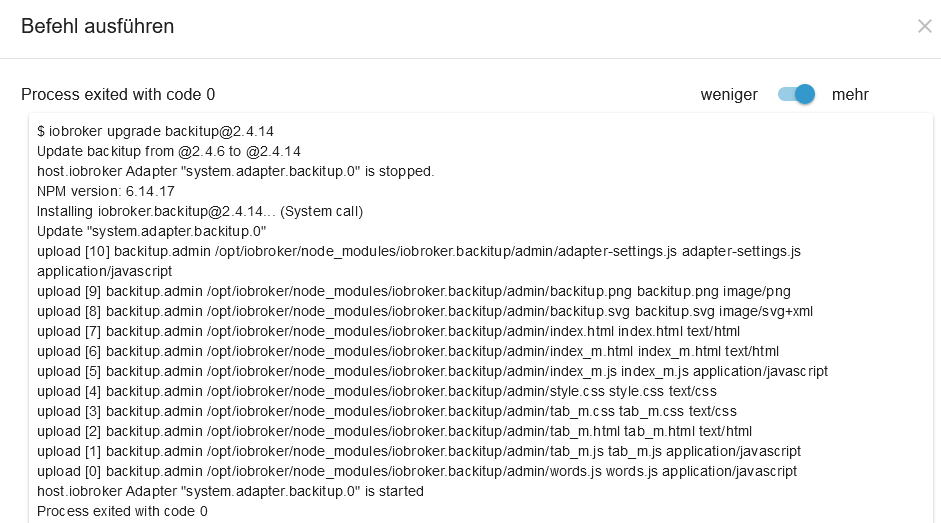
|Hardwaresystem:| Docker|
|Arbeitsspeicher:| 5GB |
|Festplattenart:| SSD |
|Betriebssystem:| Ubuntu |
|Node-Version:| 14.20.0 |
|Nodejs-Version:| ? |
|NPM-Version:| 6.14.17 | -
Hallo zusammen,
ich suche vergeblich nach einer Lösung. Ich habe das Problem, dass ich keine Adapter mehr updaten bzw. löschen kann. Auch Admin kann ich nicht updaten. Ich bin noch auf 5.4.8.
Habe länger nichts mehr im ioBroker verändert, außer ein wenig die VIS angepasst.
Anbei die Fehlermeldung.
Den Fixer hab ich auch schon drüberlaufen lassen.
Muss ich vielleicht Nodejs und NPM updaten.
Komisch finde ich, dass im Terminal angezeigt wird, ich hätte kein Nodejs installiert. (siehe Code)
Vielleicht hat ja jemand von euch eine Idee.
Vielen Dank im Voraus.root@iobroker:/opt/iobroker# node -v v14.20.0 root@iobroker:/opt/iobroker# npm -v 6.14.17 root@iobroker:/opt/iobroker# nodejs -v Command 'nodejs' not found, but can be installed with: apt install nodejs root@iobroker:/opt/iobroker# apt install nodejs Reading package lists... Done Building dependency tree... Done Reading state information... Done nodejs is already the newest version (14.20.0-deb-1nodesource1). The following packages were automatically installed and are no longer required: gyp javascript-common libauthen-sasl-perl libc-ares2 libclone-perl libdata-dump-perl libencode-locale-perl libfile-basedir-perl libfile-desktopentry-perl libfile-listing-perl libfile-mimeinfo-perl libfont-afm-perl libhtml-form-perl libhtml-format-perl libhtml-parser-perl libhtml-tagset-perl libhtml-tree-perl libhttp-cookies-perl libhttp-daemon-perl libhttp-date-perl libhttp-message-perl libhttp-negotiate-perl libio-html-perl libio-socket-ssl-perl libio-stringy-perl libipc-system-simple-perl libjs-highlight.js libjs-inherits libjs-is-typedarray libjs-psl libjs-typedarray-to-buffer liblwp-mediatypes-perl liblwp-protocol-https-perl libmailtools-perl libnet-dbus-perl libnet-http-perl libnet-smtp-ssl-perl libnet-ssleay-perl libssl-dev libtie-ixhash-perl libtimedate-perl libtry-tiny-perl liburi-perl libuv1-dev libwww-perl libwww-robotrules-perl libx11-protocol-perl libxml-parser-perl libxml-twig-perl libxml-xpathengine-perl node-abbrev node-agent-base node-ajv node-ansi node-ansi-regex node-ansi-styles node-ansistyles node-aproba node-archy node-are-we-there-yet node-asap node-asn1 node-assert-plus node-asynckit node-aws-sign2 node-aws4 node-balanced-match node-bcrypt-pbkdf node-brace-expansion node-builtins node-cacache node-caseless node-chalk node-chownr node-clone node-color-convert node-color-name node-colors node-columnify node-combined-stream node-concat-map node-console-control-strings node-copy-concurrently node-core-util-is node-dashdash node-debug node-defaults node-delayed-stream node-delegates node-depd node-ecc-jsbn node-encoding node-err-code node-escape-string-regexp node-extend node-extsprintf node-fast-deep-equal node-forever-agent node-form-data node-fs-write-stream-atomic node-fs.realpath node-function-bind node-gauge node-getpass node-glob node-graceful-fs node-har-schema node-har-validator node-has-flag node-has-unicode node-hosted-git-info node-http-signature node-https-proxy-agent node-iconv-lite node-iferr node-imurmurhash node-indent-string node-inflight node-inherits node-ini node-ip node-ip-regex node-is-typedarray node-isarray node-isexe node-isstream node-jsbn node-json-parse-better-errors node-json-schema node-json-schema-traverse node-json-stable-stringify node-json-stringify-safe node-jsonify node-jsonparse node-jsonstream node-jsprim node-leven node-lockfile node-lru-cache node-mime node-mime-types node-minimatch node-mkdirp node-move-concurrently node-ms node-mute-stream node-nopt node-normalize-package-data node-npm-bundled node-npm-package-arg node-npmlog node-number-is-nan node-oauth-sign node-object-assign node-once node-opener node-osenv node-p-map node-path-is-absolute node-performance-now node-process-nextick-args node-promise-inflight node-promise-retry node-promzard node-psl node-puka node-punycode node-qs node-read node-read-package-json node-readable-stream node-request node-resolve node-resolve-from node-retry node-rimraf node-run-queue node-safe-buffer node-semver node-set-blocking node-signal-exit node-slash node-spdx-correct node-spdx-exceptions node-spdx-expression-parse node-spdx-license-ids node-sshpk node-ssri node-string-decoder node-string-width node-strip-ansi node-supports-color node-tar node-text-table node-through node-tough-cookie node-tunnel-agent node-tweetnacl node-typedarray-to-buffer node-unique-filename node-universalify node-uri-js node-util-deprecate node-uuid node-validate-npm-package-license node-validate-npm-package-name node-verror node-wcwidth.js node-which node-wide-align node-wrappy node-write-file-atomic node-yallist perl-openssl-defaults xdg-utils Use 'apt autoremove' to remove them. 0 upgraded, 0 newly installed, 0 to remove and 41 not upgraded. root@iobroker:/opt/iobroker#|Hardwaresystem:| Docker|
|Arbeitsspeicher:| 5GB |
|Festplattenart:| SSD |
|Betriebssystem:| Ubuntu |
|Node-Version:| 14.20.0 |
|Nodejs-Version:| ? |
|NPM-Version:| 6.14.17 |@kevinz oh oh als root angemeldet ist schon mist, dann fehlt die node-js
Guck mal bei @Thomas-Braun in der Signatur, da steht viel drin, wie du dein System erst einmal reparierst
Gruß Nordischerjung
sonnige Grüße von der Ostsee
-
@kevinz oh oh als root angemeldet ist schon mist, dann fehlt die node-js
Guck mal bei @Thomas-Braun in der Signatur, da steht viel drin, wie du dein System erst einmal reparierst
Darüberhinaus war/ist da nicht die nodesource-Version installiert. Und ein X-Server vermutlich auch.
Komplett zerballert. -
Darüberhinaus war/ist da nicht die nodesource-Version installiert. Und ein X-Server vermutlich auch.
Komplett zerballert.@thomas-braun @Nordischerjung
Hab jetzt laut Tutorial aus der Signatur geschafft alles zu fixen und auf Nodejs16 zu upgraden. Jetzt funktioniert auch wieder alles. Danke euch.root@iobroker:/opt/iobroker# uname -m && type -P nodejs node npm && nodejs -v && node -v && npm -v && iob -v && whoami && groups && pwd && sudo apt update &> /dev/null && sudo apt update && apt policy nodejs x86_64 /usr/bin/nodejs /usr/bin/node /usr/bin/npm v16.17.1 v16.17.1 8.15.0 4.0.23 root root /opt/iobroker root@iobroker:/opt/iobroker# -
@thomas-braun @Nordischerjung
Hab jetzt laut Tutorial aus der Signatur geschafft alles zu fixen und auf Nodejs16 zu upgraden. Jetzt funktioniert auch wieder alles. Danke euch.root@iobroker:/opt/iobroker# uname -m && type -P nodejs node npm && nodejs -v && node -v && npm -v && iob -v && whoami && groups && pwd && sudo apt update &> /dev/null && sudo apt update && apt policy nodejs x86_64 /usr/bin/nodejs /usr/bin/node /usr/bin/npm v16.17.1 v16.17.1 8.15.0 4.0.23 root root /opt/iobroker root@iobroker:/opt/iobroker# -
root@iobroker:/opt/iobroker# apt update Ign:1 http://archive.ubuntu.com/ubuntu hirsute InRelease Ign:2 http://archive.ubuntu.com/ubuntu hirsute-updates InRelease Ign:3 http://archive.ubuntu.com/ubuntu hirsute-security InRelease Hit:4 https://deb.nodesource.com/node_16.x hirsute InRelease Err:5 http://archive.ubuntu.com/ubuntu hirsute Release 404 Not Found [IP: 185.125.190.39 80] Err:6 http://archive.ubuntu.com/ubuntu hirsute-updates Release 404 Not Found [IP: 185.125.190.39 80] Err:7 http://archive.ubuntu.com/ubuntu hirsute-security Release 404 Not Found [IP: 185.125.190.39 80] Reading package lists... Done E: The repository 'http://archive.ubuntu.com/ubuntu hirsute Release' no longer has a Release file. N: Updating from such a repository can't be done securely, and is therefore disabled by default. N: See apt-secure(8) manpage for repository creation and user configuration details. E: The repository 'http://archive.ubuntu.com/ubuntu hirsute-updates Release' no longer has a Release file. N: Updating from such a repository can't be done securely, and is therefore disabled by default. N: See apt-secure(8) manpage for repository creation and user configuration details. E: The repository 'http://archive.ubuntu.com/ubuntu hirsute-security Release' no longer has a Release file. N: Updating from such a repository can't be done securely, and is therefore disabled by default. N: See apt-secure(8) manpage for repository creation and user configuration details. -
root@iobroker:/opt/iobroker# apt update Ign:1 http://archive.ubuntu.com/ubuntu hirsute InRelease Ign:2 http://archive.ubuntu.com/ubuntu hirsute-updates InRelease Ign:3 http://archive.ubuntu.com/ubuntu hirsute-security InRelease Hit:4 https://deb.nodesource.com/node_16.x hirsute InRelease Err:5 http://archive.ubuntu.com/ubuntu hirsute Release 404 Not Found [IP: 185.125.190.39 80] Err:6 http://archive.ubuntu.com/ubuntu hirsute-updates Release 404 Not Found [IP: 185.125.190.39 80] Err:7 http://archive.ubuntu.com/ubuntu hirsute-security Release 404 Not Found [IP: 185.125.190.39 80] Reading package lists... Done E: The repository 'http://archive.ubuntu.com/ubuntu hirsute Release' no longer has a Release file. N: Updating from such a repository can't be done securely, and is therefore disabled by default. N: See apt-secure(8) manpage for repository creation and user configuration details. E: The repository 'http://archive.ubuntu.com/ubuntu hirsute-updates Release' no longer has a Release file. N: Updating from such a repository can't be done securely, and is therefore disabled by default. N: See apt-secure(8) manpage for repository creation and user configuration details. E: The repository 'http://archive.ubuntu.com/ubuntu hirsute-security Release' no longer has a Release file. N: Updating from such a repository can't be done securely, and is therefore disabled by default. N: See apt-secure(8) manpage for repository creation and user configuration details.Ubuntu 'Hirsute Hippo' ist tot, EOL erreicht. Installier da was lebendiges.
Und hampel im neuen System NICHT als root herum!!!!
-
Ubuntu 'Hirsute Hippo' ist tot, EOL erreicht. Installier da was lebendiges.
Und hampel im neuen System NICHT als root herum!!!!
-
@thomas-braun
Was sollte ich deiner Empfehlung nach installieren?Das Original.
Debian 11 / Bullseye

Hey! Du scheinst an dieser Unterhaltung interessiert zu sein, hast aber noch kein Konto.
Hast du es satt, bei jedem Besuch durch die gleichen Beiträge zu scrollen? Wenn du dich für ein Konto anmeldest, kommst du immer genau dorthin zurück, wo du zuvor warst, und kannst dich über neue Antworten benachrichtigen lassen (entweder per E-Mail oder Push-Benachrichtigung). Du kannst auch Lesezeichen speichern und Beiträge positiv bewerten, um anderen Community-Mitgliedern deine Wertschätzung zu zeigen.
Mit deinem Input könnte dieser Beitrag noch besser werden 💗
Registrieren AnmeldenSupport us
502
Online33.0k
Benutzer83.6k
Themen1.3m
Beiträge