




IOB Weboberfläche startet nach Update nicht mehr
-
Systemdata Bitte Ausfüllen Hardwaresystem: Pi3B Arbeitsspeicher: 1GB Festplattenart: SSD Betriebssystem: Ubuntu Node-Version: 16.17.1 Nodejs-Version: 16.17.1 NPM-Version: 8.15.0 Installationsart: Manuell Image genutzt: Nein Ort/Name der Imagedatei: Link Hallo,
ich habe IOB seit ca. 2 Jahren laufen zusammen mit homematic, influxdb und Grafana. Leider ist es bisher schon ca. 3-4 Mal passiert, dass die Weboberfläche von IOB nicht mehr startet.
In diesem Fall war es bei einem Update von js-controller, initiiert über die Weboberfläche. Das Update blieb einfach hängen, nach einem Neustart kam wieder die überaus lästige Fehlermeldung "Server Cannot start inMem-objects on port 9001: Failed to lock DB file "/opt/iobroker/iobroker-data/objects.jsonl"!"Aktuell ist es so, dass Grafana und offensichtlich auch influxdb noch Daten aufzeichnen, die Weboberfläche startet aber nicht mehr.
iob update all
iobroker is running on this host.


Instance "admin.0" is not running
Instance "discovery.0" is running
Instance "backitup.0" is not running
Instance "hm-rega.0" is running
Instance "hm-rpc.0" is running
Instance "hm-rpc.1" is running
Instance "hm-rpc.2" is running
Instance "hm-rpc.3" is running
Instance "influxdb.0" is running
Instance "info.0" is running
Instance "javascript.0" is not running
Instance "net-tools.0" is running
Instance "ping.0" is running
Instance "email.0" is running
Instance "history.0" is running
Instance "devices.0" is not running
Instance "hm-rpc.5" is running
Instance "mqtt.0" is not running
Instance "shelly.0" is running

SYSTEM/memoryLimitMB: 0
SYSTEM/hostname:
SYSTEM/statisticsInterval: 15000
SYSTEM/checkDiskInterval: 300000
SYSTEM/instanceStartInterval: 2000
SYSTEM/compact: false
SYSTEM/allowShellCommands: false
SYSTEM/memLimitWarn: 100
SYSTEM/memLimitError: 50
MULTIHOSTSERVICE/enabled: false
MULTIHOSTSERVICE/secure: true
MULTIHOSTSERVICE/password:
OBJECTS/type: jsonl
OBJECTS/host: 127.0.0.1
OBJECTS/port: 9001
OBJECTS/noFileCache: false
OBJECTS/maxQueue: 1000
OBJECTS/connectTimeout: 30000
OBJECTS/writeFileInterval: 5000
OBJECTS/dataDir: ../../iobroker-data/
OBJECTS/OPTIONS/retry_max_count: 19
OBJECTS/OPTIONS/db: 0
OBJECTS/OPTIONS/family: 0
OBJECTS/OPTIONS/retryStrategy: reconnectCount => {
            if (!ready && initError && ignoreErrors) {
                return new Error('No more tries');
            }
            if (this.stop) {
                return new Error('Client has stopped ... no retries anymore');
            }
            if (ready && reconnectCount >= retry_max_count) {
                return new Error('Stop trying to reconnect');
            }
            // A function that receives an options object as parameter including the retry attempt,
            // the total_retry_time indicating how much time passed since the last time connected,
            // the error why the connection was lost and the number of times_connected in total.
            // If you return a number from this function, the retry will happen exactly after that
            // time in milliseconds. If you return a non-number, no further retry will happen and
            // all offline commands are flushed with errors. Return an error to return that
            // specific error to all offline commands.

            if (!ready) {
                return 300;
            } else {
                return retry_max_delay;
            }
            /*if (options.error.code === 'ECONNREFUSED') {
                // End reconnecting on a specific error and flush all commands with a individual error
                return new Error('The server refused the connection');
            }
            if (options.total_retry_time > 1000 * 60 * 60) {
                // End reconnecting after a specific timeout and flush all commands with a individual error
                return new Error('Retry time exhausted');
            }
            if (options.times_connected > 10) {
                // End reconnecting with built in error
                return undefined;
            }
            // reconnect after
            return Math.max(options.attempt * 100, 3000);*/
        }
OBJECTS/OPTIONS/enableReadyCheck: true
OBJECTS/OPTIONS/host: 127.0.0.1
OBJECTS/OPTIONS/port: 9001
OBJECTS/OPTIONS/autoResubscribe: false
OBJECTS/OPTIONS/connectionName:
OBJECTS/BACKUP/disabled: false
OBJECTS/BACKUP/files: 24
OBJECTS/BACKUP/hours: 48
OBJECTS/BACKUP/period: 120
OBJECTS/BACKUP/path:
STATES/type: jsonl
STATES/host: 127.0.0.1
STATES/port: 9000
STATES/connectTimeout: 20000
STATES/writeFileInterval: 30000
STATES/dataDir: ../../iobroker-data/
STATES/OPTIONS/retry_max_count: 19
STATES/OPTIONS/db: 0
STATES/OPTIONS/family: 0
STATES/OPTIONS/retryStrategy: reconnectCount => {
            if (!ready && initError) {
                return new Error('No more tries');
            }
            if (this.stop) {
                return new Error('Client has stopped ... no retries anymore');
            }
            if (ready && reconnectCount >= retry_max_count) {
                return new Error('Stop trying to reconnect');
            }
            // A function that receives an options object as parameter including the retry attempt,
            // the total_retry_time indicating how much time passed since the last time connected,
            // the error why the connection was lost and the number of times_connected in total.
            // If you return a number from this function, the retry will happen exactly after that
            // time in milliseconds. If you return a non-number, no further retry will happen and
            // all offline commands are flushed with errors. Return an error to return that
            // specific error to all offline commands.

            if (!ready) {
                return 300;
            }
            return retry_max_delay;
            /*if (options.error.code === 'ECONNREFUSED') {
                // End reconnecting on a specific error and flush all commands with a individual error
                return new Error('The server refused the connection');
            }
            if (options.total_retry_time > 1000 * 60 * 60) {
                // End reconnecting after a specific timeout and flush all commands with a individual error
                return new Error('Retry time exhausted');
            }
            if (options.times_connected > 10) {
                // End reconnecting with built in error
                return undefined;
            }
            // reconnect after
            return Math.max(options.attempt * 100, 3000);*/
        }
STATES/OPTIONS/enableReadyCheck: true
STATES/OPTIONS/host: 127.0.0.1
STATES/OPTIONS/port: 9000
STATES/OPTIONS/autoResubscribe: false
STATES/OPTIONS/connectionName:
STATES/BACKUP/disabled: false
STATES/BACKUP/files: 24
STATES/BACKUP/hours: 48
STATES/BACKUP/period: 120
STATES/BACKUP/path:
STATES/maxQueue: 1000
LOG/level: info
LOG/maxDays: 7
LOG/noStdout: true
LOG/TRANSPORT/FILE1/type: file
LOG/TRANSPORT/FILE1/enabled: true
LOG/TRANSPORT/FILE1/filename: log/iobroker
LOG/TRANSPORT/FILE1/fileext: .log
LOG/TRANSPORT/SYSLOG1/type: syslog
LOG/TRANSPORT/SYSLOG1/enabled: false
LOG/TRANSPORT/SYSLOG1/host: localhost
LOG/TRANSPORT/SYSLOG1/protocol: udp4
LOG/TRANSPORT/SYSLOG1/localhost: iobroker
dataDir: ../../iobroker-data/
iob update
Used repository: Stable (default)
Adapter    "admin"        : 6.2.22   , installed 6.2.20 [Updatable]
Adapter    "backitup"     : 2.4.12   , installed 2.4.10 [Updatable]
Adapter    "devices"      : 1.0.12   , installed 1.0.12
Adapter    "discovery"    : 3.0.5    , installed 3.0.5
Adapter    "email"        : 1.1.3    , installed 1.1.3
Adapter    "history"      : 2.2.0    , installed 2.2.0
Adapter    "hm-rega"      : 3.0.40   , installed 3.0.40
Adapter    "hm-rpc"       : 1.15.12  , installed 1.15.12
Adapter    "influxdb"     : 3.1.8    , installed 3.1.8
Adapter    "info"         : 1.9.19   , installed 1.9.19
Adapter    "javascript"   : 6.0.3    , installed 6.0.3
Controller "js-controller": 4.0.23   , installed 4.0.23
Adapter    "mqtt"         : 4.0.7    , installed 4.0.7
Adapter    "net-tools"    : 0.2.0    , installed 0.2.0
Adapter    "ping"         : 1.5.3    , installed 1.5.3
Adapter    "shelly"       : 6.0.0    , installed 6.0.0
ein manuelles Update von admin und backitup laufen nicht durch.
Ich möchte nicht schon wieder IOB neu installieren und mit dem Rückspielen der Sicherung das Problem lösen.
Der allseits bekannte IOB fix Befehl führt nicht zum gewünschten Ergebnis.Wie kann ich die OIB Weboberfläche wieder aktivieren und die beiden adapter aktualisieren?
Vielen Dank
Andreas
-
Systemdata Bitte Ausfüllen Hardwaresystem: Pi3B Arbeitsspeicher: 1GB Festplattenart: SSD Betriebssystem: Ubuntu Node-Version: 16.17.1 Nodejs-Version: 16.17.1 NPM-Version: 8.15.0 Installationsart: Manuell Image genutzt: Nein Ort/Name der Imagedatei: Link Hallo,
ich habe IOB seit ca. 2 Jahren laufen zusammen mit homematic, influxdb und Grafana. Leider ist es bisher schon ca. 3-4 Mal passiert, dass die Weboberfläche von IOB nicht mehr startet.
In diesem Fall war es bei einem Update von js-controller, initiiert über die Weboberfläche. Das Update blieb einfach hängen, nach einem Neustart kam wieder die überaus lästige Fehlermeldung "Server Cannot start inMem-objects on port 9001: Failed to lock DB file "/opt/iobroker/iobroker-data/objects.jsonl"!"Aktuell ist es so, dass Grafana und offensichtlich auch influxdb noch Daten aufzeichnen, die Weboberfläche startet aber nicht mehr.
iob update all
iobroker is running on this host.


Instance "admin.0" is not running
Instance "discovery.0" is running
Instance "backitup.0" is not running
Instance "hm-rega.0" is running
Instance "hm-rpc.0" is running
Instance "hm-rpc.1" is running
Instance "hm-rpc.2" is running
Instance "hm-rpc.3" is running
Instance "influxdb.0" is running
Instance "info.0" is running
Instance "javascript.0" is not running
Instance "net-tools.0" is running
Instance "ping.0" is running
Instance "email.0" is running
Instance "history.0" is running
Instance "devices.0" is not running
Instance "hm-rpc.5" is running
Instance "mqtt.0" is not running
Instance "shelly.0" is running

SYSTEM/memoryLimitMB: 0
SYSTEM/hostname:
SYSTEM/statisticsInterval: 15000
SYSTEM/checkDiskInterval: 300000
SYSTEM/instanceStartInterval: 2000
SYSTEM/compact: false
SYSTEM/allowShellCommands: false
SYSTEM/memLimitWarn: 100
SYSTEM/memLimitError: 50
MULTIHOSTSERVICE/enabled: false
MULTIHOSTSERVICE/secure: true
MULTIHOSTSERVICE/password:
OBJECTS/type: jsonl
OBJECTS/host: 127.0.0.1
OBJECTS/port: 9001
OBJECTS/noFileCache: false
OBJECTS/maxQueue: 1000
OBJECTS/connectTimeout: 30000
OBJECTS/writeFileInterval: 5000
OBJECTS/dataDir: ../../iobroker-data/
OBJECTS/OPTIONS/retry_max_count: 19
OBJECTS/OPTIONS/db: 0
OBJECTS/OPTIONS/family: 0
OBJECTS/OPTIONS/retryStrategy: reconnectCount => {
            if (!ready && initError && ignoreErrors) {
                return new Error('No more tries');
            }
            if (this.stop) {
                return new Error('Client has stopped ... no retries anymore');
            }
            if (ready && reconnectCount >= retry_max_count) {
                return new Error('Stop trying to reconnect');
            }
            // A function that receives an options object as parameter including the retry attempt,
            // the total_retry_time indicating how much time passed since the last time connected,
            // the error why the connection was lost and the number of times_connected in total.
            // If you return a number from this function, the retry will happen exactly after that
            // time in milliseconds. If you return a non-number, no further retry will happen and
            // all offline commands are flushed with errors. Return an error to return that
            // specific error to all offline commands.

            if (!ready) {
                return 300;
            } else {
                return retry_max_delay;
            }
            /*if (options.error.code === 'ECONNREFUSED') {
                // End reconnecting on a specific error and flush all commands with a individual error
                return new Error('The server refused the connection');
            }
            if (options.total_retry_time > 1000 * 60 * 60) {
                // End reconnecting after a specific timeout and flush all commands with a individual error
                return new Error('Retry time exhausted');
            }
            if (options.times_connected > 10) {
                // End reconnecting with built in error
                return undefined;
            }
            // reconnect after
            return Math.max(options.attempt * 100, 3000);*/
        }
OBJECTS/OPTIONS/enableReadyCheck: true
OBJECTS/OPTIONS/host: 127.0.0.1
OBJECTS/OPTIONS/port: 9001
OBJECTS/OPTIONS/autoResubscribe: false
OBJECTS/OPTIONS/connectionName:
OBJECTS/BACKUP/disabled: false
OBJECTS/BACKUP/files: 24
OBJECTS/BACKUP/hours: 48
OBJECTS/BACKUP/period: 120
OBJECTS/BACKUP/path:
STATES/type: jsonl
STATES/host: 127.0.0.1
STATES/port: 9000
STATES/connectTimeout: 20000
STATES/writeFileInterval: 30000
STATES/dataDir: ../../iobroker-data/
STATES/OPTIONS/retry_max_count: 19
STATES/OPTIONS/db: 0
STATES/OPTIONS/family: 0
STATES/OPTIONS/retryStrategy: reconnectCount => {
            if (!ready && initError) {
                return new Error('No more tries');
            }
            if (this.stop) {
                return new Error('Client has stopped ... no retries anymore');
            }
            if (ready && reconnectCount >= retry_max_count) {
                return new Error('Stop trying to reconnect');
            }
            // A function that receives an options object as parameter including the retry attempt,
            // the total_retry_time indicating how much time passed since the last time connected,
            // the error why the connection was lost and the number of times_connected in total.
            // If you return a number from this function, the retry will happen exactly after that
            // time in milliseconds. If you return a non-number, no further retry will happen and
            // all offline commands are flushed with errors. Return an error to return that
            // specific error to all offline commands.

            if (!ready) {
                return 300;
            }
            return retry_max_delay;
            /*if (options.error.code === 'ECONNREFUSED') {
                // End reconnecting on a specific error and flush all commands with a individual error
                return new Error('The server refused the connection');
            }
            if (options.total_retry_time > 1000 * 60 * 60) {
                // End reconnecting after a specific timeout and flush all commands with a individual error
                return new Error('Retry time exhausted');
            }
            if (options.times_connected > 10) {
                // End reconnecting with built in error
                return undefined;
            }
            // reconnect after
            return Math.max(options.attempt * 100, 3000);*/
        }
STATES/OPTIONS/enableReadyCheck: true
STATES/OPTIONS/host: 127.0.0.1
STATES/OPTIONS/port: 9000
STATES/OPTIONS/autoResubscribe: false
STATES/OPTIONS/connectionName:
STATES/BACKUP/disabled: false
STATES/BACKUP/files: 24
STATES/BACKUP/hours: 48
STATES/BACKUP/period: 120
STATES/BACKUP/path:
STATES/maxQueue: 1000
LOG/level: info
LOG/maxDays: 7
LOG/noStdout: true
LOG/TRANSPORT/FILE1/type: file
LOG/TRANSPORT/FILE1/enabled: true
LOG/TRANSPORT/FILE1/filename: log/iobroker
LOG/TRANSPORT/FILE1/fileext: .log
LOG/TRANSPORT/SYSLOG1/type: syslog
LOG/TRANSPORT/SYSLOG1/enabled: false
LOG/TRANSPORT/SYSLOG1/host: localhost
LOG/TRANSPORT/SYSLOG1/protocol: udp4
LOG/TRANSPORT/SYSLOG1/localhost: iobroker
dataDir: ../../iobroker-data/
iob update
Used repository: Stable (default)
Adapter    "admin"        : 6.2.22   , installed 6.2.20 [Updatable]
Adapter    "backitup"     : 2.4.12   , installed 2.4.10 [Updatable]
Adapter    "devices"      : 1.0.12   , installed 1.0.12
Adapter    "discovery"    : 3.0.5    , installed 3.0.5
Adapter    "email"        : 1.1.3    , installed 1.1.3
Adapter    "history"      : 2.2.0    , installed 2.2.0
Adapter    "hm-rega"      : 3.0.40   , installed 3.0.40
Adapter    "hm-rpc"       : 1.15.12  , installed 1.15.12
Adapter    "influxdb"     : 3.1.8    , installed 3.1.8
Adapter    "info"         : 1.9.19   , installed 1.9.19
Adapter    "javascript"   : 6.0.3    , installed 6.0.3
Controller "js-controller": 4.0.23   , installed 4.0.23
Adapter    "mqtt"         : 4.0.7    , installed 4.0.7
Adapter    "net-tools"    : 0.2.0    , installed 0.2.0
Adapter    "ping"         : 1.5.3    , installed 1.5.3
Adapter    "shelly"       : 6.0.0    , installed 6.0.0
ein manuelles Update von admin und backitup laufen nicht durch.
Ich möchte nicht schon wieder IOB neu installieren und mit dem Rückspielen der Sicherung das Problem lösen.
Der allseits bekannte IOB fix Befehl führt nicht zum gewünschten Ergebnis.Wie kann ich die OIB Weboberfläche wieder aktivieren und die beiden adapter aktualisieren?
Vielen Dank
Andreas
@andi_grafa sagte: Weboberfläche wieder aktivieren
iob start admin.0 -
Systemdata Bitte Ausfüllen Hardwaresystem: Pi3B Arbeitsspeicher: 1GB Festplattenart: SSD Betriebssystem: Ubuntu Node-Version: 16.17.1 Nodejs-Version: 16.17.1 NPM-Version: 8.15.0 Installationsart: Manuell Image genutzt: Nein Ort/Name der Imagedatei: Link Hallo,
ich habe IOB seit ca. 2 Jahren laufen zusammen mit homematic, influxdb und Grafana. Leider ist es bisher schon ca. 3-4 Mal passiert, dass die Weboberfläche von IOB nicht mehr startet.
In diesem Fall war es bei einem Update von js-controller, initiiert über die Weboberfläche. Das Update blieb einfach hängen, nach einem Neustart kam wieder die überaus lästige Fehlermeldung "Server Cannot start inMem-objects on port 9001: Failed to lock DB file "/opt/iobroker/iobroker-data/objects.jsonl"!"Aktuell ist es so, dass Grafana und offensichtlich auch influxdb noch Daten aufzeichnen, die Weboberfläche startet aber nicht mehr.
iob update all
iobroker is running on this host.


Instance "admin.0" is not running
Instance "discovery.0" is running
Instance "backitup.0" is not running
Instance "hm-rega.0" is running
Instance "hm-rpc.0" is running
Instance "hm-rpc.1" is running
Instance "hm-rpc.2" is running
Instance "hm-rpc.3" is running
Instance "influxdb.0" is running
Instance "info.0" is running
Instance "javascript.0" is not running
Instance "net-tools.0" is running
Instance "ping.0" is running
Instance "email.0" is running
Instance "history.0" is running
Instance "devices.0" is not running
Instance "hm-rpc.5" is running
Instance "mqtt.0" is not running
Instance "shelly.0" is running

SYSTEM/memoryLimitMB: 0
SYSTEM/hostname:
SYSTEM/statisticsInterval: 15000
SYSTEM/checkDiskInterval: 300000
SYSTEM/instanceStartInterval: 2000
SYSTEM/compact: false
SYSTEM/allowShellCommands: false
SYSTEM/memLimitWarn: 100
SYSTEM/memLimitError: 50
MULTIHOSTSERVICE/enabled: false
MULTIHOSTSERVICE/secure: true
MULTIHOSTSERVICE/password:
OBJECTS/type: jsonl
OBJECTS/host: 127.0.0.1
OBJECTS/port: 9001
OBJECTS/noFileCache: false
OBJECTS/maxQueue: 1000
OBJECTS/connectTimeout: 30000
OBJECTS/writeFileInterval: 5000
OBJECTS/dataDir: ../../iobroker-data/
OBJECTS/OPTIONS/retry_max_count: 19
OBJECTS/OPTIONS/db: 0
OBJECTS/OPTIONS/family: 0
OBJECTS/OPTIONS/retryStrategy: reconnectCount => {
            if (!ready && initError && ignoreErrors) {
                return new Error('No more tries');
            }
            if (this.stop) {
                return new Error('Client has stopped ... no retries anymore');
            }
            if (ready && reconnectCount >= retry_max_count) {
                return new Error('Stop trying to reconnect');
            }
            // A function that receives an options object as parameter including the retry attempt,
            // the total_retry_time indicating how much time passed since the last time connected,
            // the error why the connection was lost and the number of times_connected in total.
            // If you return a number from this function, the retry will happen exactly after that
            // time in milliseconds. If you return a non-number, no further retry will happen and
            // all offline commands are flushed with errors. Return an error to return that
            // specific error to all offline commands.

            if (!ready) {
                return 300;
            } else {
                return retry_max_delay;
            }
            /*if (options.error.code === 'ECONNREFUSED') {
                // End reconnecting on a specific error and flush all commands with a individual error
                return new Error('The server refused the connection');
            }
            if (options.total_retry_time > 1000 * 60 * 60) {
                // End reconnecting after a specific timeout and flush all commands with a individual error
                return new Error('Retry time exhausted');
            }
            if (options.times_connected > 10) {
                // End reconnecting with built in error
                return undefined;
            }
            // reconnect after
            return Math.max(options.attempt * 100, 3000);*/
        }
OBJECTS/OPTIONS/enableReadyCheck: true
OBJECTS/OPTIONS/host: 127.0.0.1
OBJECTS/OPTIONS/port: 9001
OBJECTS/OPTIONS/autoResubscribe: false
OBJECTS/OPTIONS/connectionName:
OBJECTS/BACKUP/disabled: false
OBJECTS/BACKUP/files: 24
OBJECTS/BACKUP/hours: 48
OBJECTS/BACKUP/period: 120
OBJECTS/BACKUP/path:
STATES/type: jsonl
STATES/host: 127.0.0.1
STATES/port: 9000
STATES/connectTimeout: 20000
STATES/writeFileInterval: 30000
STATES/dataDir: ../../iobroker-data/
STATES/OPTIONS/retry_max_count: 19
STATES/OPTIONS/db: 0
STATES/OPTIONS/family: 0
STATES/OPTIONS/retryStrategy: reconnectCount => {
            if (!ready && initError) {
                return new Error('No more tries');
            }
            if (this.stop) {
                return new Error('Client has stopped ... no retries anymore');
            }
            if (ready && reconnectCount >= retry_max_count) {
                return new Error('Stop trying to reconnect');
            }
            // A function that receives an options object as parameter including the retry attempt,
            // the total_retry_time indicating how much time passed since the last time connected,
            // the error why the connection was lost and the number of times_connected in total.
            // If you return a number from this function, the retry will happen exactly after that
            // time in milliseconds. If you return a non-number, no further retry will happen and
            // all offline commands are flushed with errors. Return an error to return that
            // specific error to all offline commands.

            if (!ready) {
                return 300;
            }
            return retry_max_delay;
            /*if (options.error.code === 'ECONNREFUSED') {
                // End reconnecting on a specific error and flush all commands with a individual error
                return new Error('The server refused the connection');
            }
            if (options.total_retry_time > 1000 * 60 * 60) {
                // End reconnecting after a specific timeout and flush all commands with a individual error
                return new Error('Retry time exhausted');
            }
            if (options.times_connected > 10) {
                // End reconnecting with built in error
                return undefined;
            }
            // reconnect after
            return Math.max(options.attempt * 100, 3000);*/
        }
STATES/OPTIONS/enableReadyCheck: true
STATES/OPTIONS/host: 127.0.0.1
STATES/OPTIONS/port: 9000
STATES/OPTIONS/autoResubscribe: false
STATES/OPTIONS/connectionName:
STATES/BACKUP/disabled: false
STATES/BACKUP/files: 24
STATES/BACKUP/hours: 48
STATES/BACKUP/period: 120
STATES/BACKUP/path:
STATES/maxQueue: 1000
LOG/level: info
LOG/maxDays: 7
LOG/noStdout: true
LOG/TRANSPORT/FILE1/type: file
LOG/TRANSPORT/FILE1/enabled: true
LOG/TRANSPORT/FILE1/filename: log/iobroker
LOG/TRANSPORT/FILE1/fileext: .log
LOG/TRANSPORT/SYSLOG1/type: syslog
LOG/TRANSPORT/SYSLOG1/enabled: false
LOG/TRANSPORT/SYSLOG1/host: localhost
LOG/TRANSPORT/SYSLOG1/protocol: udp4
LOG/TRANSPORT/SYSLOG1/localhost: iobroker
dataDir: ../../iobroker-data/
iob update
Used repository: Stable (default)
Adapter    "admin"        : 6.2.22   , installed 6.2.20 [Updatable]
Adapter    "backitup"     : 2.4.12   , installed 2.4.10 [Updatable]
Adapter    "devices"      : 1.0.12   , installed 1.0.12
Adapter    "discovery"    : 3.0.5    , installed 3.0.5
Adapter    "email"        : 1.1.3    , installed 1.1.3
Adapter    "history"      : 2.2.0    , installed 2.2.0
Adapter    "hm-rega"      : 3.0.40   , installed 3.0.40
Adapter    "hm-rpc"       : 1.15.12  , installed 1.15.12
Adapter    "influxdb"     : 3.1.8    , installed 3.1.8
Adapter    "info"         : 1.9.19   , installed 1.9.19
Adapter    "javascript"   : 6.0.3    , installed 6.0.3
Controller "js-controller": 4.0.23   , installed 4.0.23
Adapter    "mqtt"         : 4.0.7    , installed 4.0.7
Adapter    "net-tools"    : 0.2.0    , installed 0.2.0
Adapter    "ping"         : 1.5.3    , installed 1.5.3
Adapter    "shelly"       : 6.0.0    , installed 6.0.0
ein manuelles Update von admin und backitup laufen nicht durch.
Ich möchte nicht schon wieder IOB neu installieren und mit dem Rückspielen der Sicherung das Problem lösen.
Der allseits bekannte IOB fix Befehl führt nicht zum gewünschten Ergebnis.Wie kann ich die OIB Weboberfläche wieder aktivieren und die beiden adapter aktualisieren?
Vielen Dank
Andreas
iobroker update iobroker upgrade admin --debug -
Vielen Dank für Eure schnelle hilfe.
IOB update & upgrade und self upgrade hatte ich vorher schon gemacht, da ich dies in diversen Beiträge bereits gelesen habe.
iob start admin.0 hat hier zum Ziel geführt, die Weboberfläche startet wieder. Obwohl ich diverse Neustarts durchgeführt habe, musste wohl dieser Befehjl noch manuell gegeben werden!??
Ein update der beiden Dienste admin und backitup funktioniert aber offensichtlich nicht. Das Update von backitup über die Weboberfläche zeigt folgenden fehler
$ iobroker upgrade backitup@2.4.12

Update backitup from @2.4.10 to @2.4.12

NPM version: 8.15.0

Installing iobroker.backitup@2.4.12... (System call)

host.raspi3B-Home-Mug Cannot install iobroker.backitup@2.4.12: 217

ERROR: Process exited with code 25
vorher hatte auch der manuelle Update von admin über cli auch nicht funktioniert.
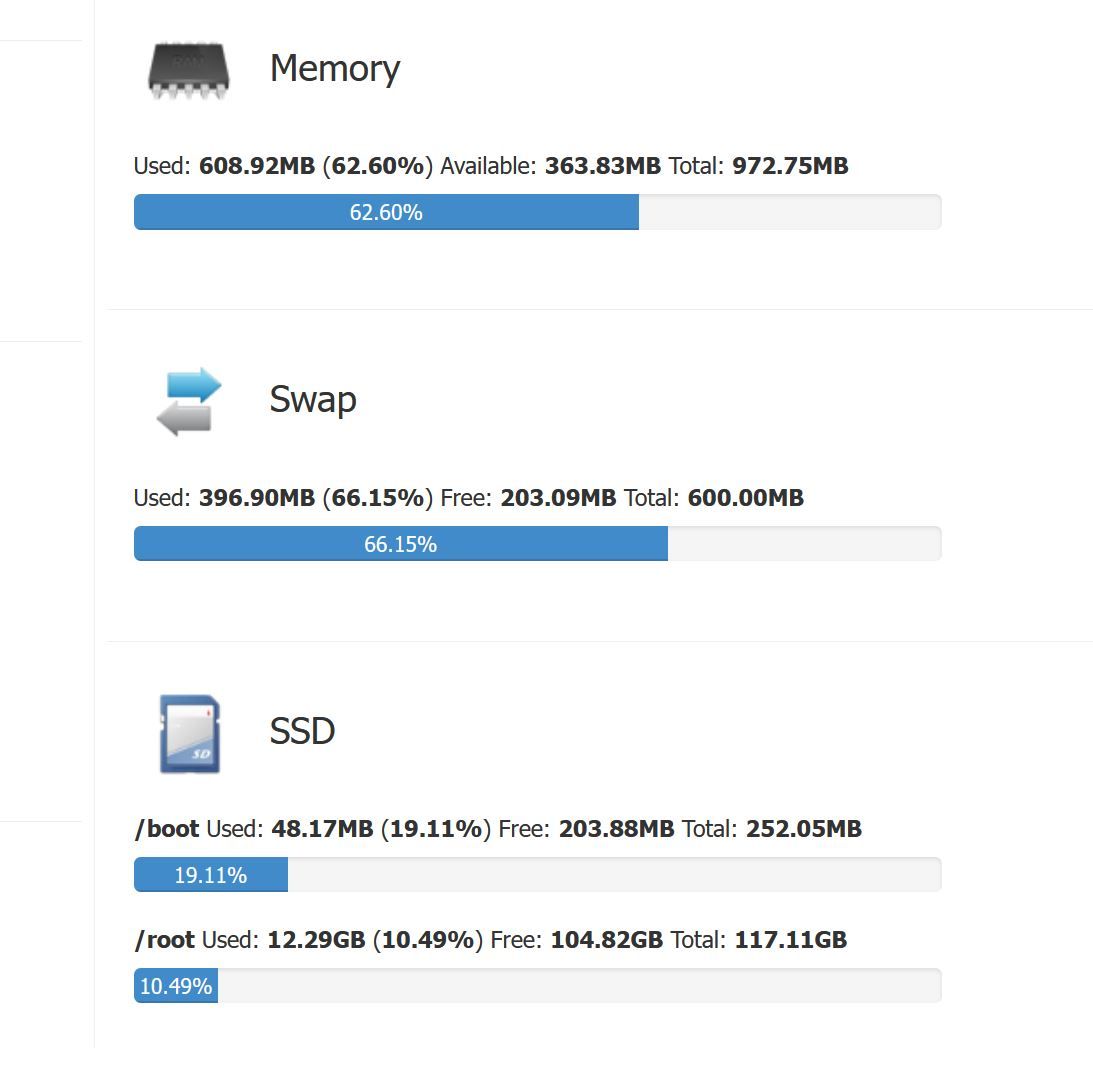
Am Ram sollte es nicht liegen....
pi@raspi3B-Home-Mug:~$ iobroker upgrade admin --debug

This upgrade of "admin" will introduce the following changes:
==========================================================================
-> 6.2.22:
Corrected admin4 adapter settings

-> 6.2.21:
Corrected small JSON config issue
==========================================================================

Would you like to upgrade admin from @6.2.20 to @6.2.22 now? [(y)es, (n)o]: y
Update admin from @6.2.20 to @6.2.22
host.raspi3B-Home-Mug Adapter "system.adapter.admin.0" is stopped.
NPM version: 8.15.0
Installing iobroker.admin@6.2.22... (System call)
npm ERR! code ENOTEMPTY
npm ERR! syscall rename
npm ERR! path /opt/iobroker/node_modules/iobroker.javascript
npm ERR! dest /opt/iobroker/node_modules/.iobroker.javascript-5NZ432mn
npm ERR! errno -39
npm ERR! ENOTEMPTY: directory not empty, rename '/opt/iobroker/node_modules/iobroker.javascript' -> '/opt/iobroker/node_modules/.iobroker.javascript-5NZ432mn'

npm ERR! A complete log of this run can be found in:
npm ERR!     /home/iobroker/.npm/_logs/2022-09-29T18_25_23_648Z-debug-0.log
host.raspi3B-Home-Mug Cannot install iobroker.admin@6.2.22: 217
0 verbose cli /usr/bin/node /usr/bin/npm 1 info using npm@8.15.0 2 info using node@v16.17.1 3 timing npm:load:whichnode Completed in 1ms 4 timing config:load:defaults Completed in 9ms 5 timing config:load:file:/usr/lib/node_modules/npm/npmrc Completed in 4ms 6 timing config:load:builtin Completed in 5ms 7 timing config:load:cli Completed in 12ms 8 timing config:load:env Completed in 1ms 9 timing config:load:file:/opt/iobroker/.npmrc Completed in 6ms 10 timing config:load:project Completed in 14ms 11 timing config:load:file:/home/iobroker/.npmrc Completed in 1ms 12 timing config:load:user Completed in 2ms 13 timing config:load:file:/usr/etc/npmrc Completed in 0ms 14 timing config:load:global Completed in 1ms 15 timing config:load:validate Completed in 1ms 16 timing config:load:credentials Completed in 5ms 17 timing config:load:setEnvs Completed in 6ms 18 timing config:load Completed in 60ms -
Vielen Dank für Eure schnelle hilfe.
IOB update & upgrade und self upgrade hatte ich vorher schon gemacht, da ich dies in diversen Beiträge bereits gelesen habe.
iob start admin.0 hat hier zum Ziel geführt, die Weboberfläche startet wieder. Obwohl ich diverse Neustarts durchgeführt habe, musste wohl dieser Befehjl noch manuell gegeben werden!??
Ein update der beiden Dienste admin und backitup funktioniert aber offensichtlich nicht. Das Update von backitup über die Weboberfläche zeigt folgenden fehler
$ iobroker upgrade backitup@2.4.12

Update backitup from @2.4.10 to @2.4.12

NPM version: 8.15.0

Installing iobroker.backitup@2.4.12... (System call)

host.raspi3B-Home-Mug Cannot install iobroker.backitup@2.4.12: 217

ERROR: Process exited with code 25
vorher hatte auch der manuelle Update von admin über cli auch nicht funktioniert.
Am Ram sollte es nicht liegen....
pi@raspi3B-Home-Mug:~$ iobroker upgrade admin --debug

This upgrade of "admin" will introduce the following changes:
==========================================================================
-> 6.2.22:
Corrected admin4 adapter settings

-> 6.2.21:
Corrected small JSON config issue
==========================================================================

Would you like to upgrade admin from @6.2.20 to @6.2.22 now? [(y)es, (n)o]: y
Update admin from @6.2.20 to @6.2.22
host.raspi3B-Home-Mug Adapter "system.adapter.admin.0" is stopped.
NPM version: 8.15.0
Installing iobroker.admin@6.2.22... (System call)
npm ERR! code ENOTEMPTY
npm ERR! syscall rename
npm ERR! path /opt/iobroker/node_modules/iobroker.javascript
npm ERR! dest /opt/iobroker/node_modules/.iobroker.javascript-5NZ432mn
npm ERR! errno -39
npm ERR! ENOTEMPTY: directory not empty, rename '/opt/iobroker/node_modules/iobroker.javascript' -> '/opt/iobroker/node_modules/.iobroker.javascript-5NZ432mn'

npm ERR! A complete log of this run can be found in:
npm ERR!     /home/iobroker/.npm/_logs/2022-09-29T18_25_23_648Z-debug-0.log
host.raspi3B-Home-Mug Cannot install iobroker.admin@6.2.22: 217
0 verbose cli /usr/bin/node /usr/bin/npm 1 info using npm@8.15.0 2 info using node@v16.17.1 3 timing npm:load:whichnode Completed in 1ms 4 timing config:load:defaults Completed in 9ms 5 timing config:load:file:/usr/lib/node_modules/npm/npmrc Completed in 4ms 6 timing config:load:builtin Completed in 5ms 7 timing config:load:cli Completed in 12ms 8 timing config:load:env Completed in 1ms 9 timing config:load:file:/opt/iobroker/.npmrc Completed in 6ms 10 timing config:load:project Completed in 14ms 11 timing config:load:file:/home/iobroker/.npmrc Completed in 1ms 12 timing config:load:user Completed in 2ms 13 timing config:load:file:/usr/etc/npmrc Completed in 0ms 14 timing config:load:global Completed in 1ms 15 timing config:load:validate Completed in 1ms 16 timing config:load:credentials Completed in 5ms 17 timing config:load:setEnvs Completed in 6ms 18 timing config:load Completed in 60ms@andi_grafa sagte in IOB Weboberfläche startet nach Update nicht mehr:
ERROR: Process exited with code 25
Such mal hier im Forum nach "Error 25" ....
-
Vielen Dank für Eure schnelle hilfe.
IOB update & upgrade und self upgrade hatte ich vorher schon gemacht, da ich dies in diversen Beiträge bereits gelesen habe.
iob start admin.0 hat hier zum Ziel geführt, die Weboberfläche startet wieder. Obwohl ich diverse Neustarts durchgeführt habe, musste wohl dieser Befehjl noch manuell gegeben werden!??
Ein update der beiden Dienste admin und backitup funktioniert aber offensichtlich nicht. Das Update von backitup über die Weboberfläche zeigt folgenden fehler
$ iobroker upgrade backitup@2.4.12

Update backitup from @2.4.10 to @2.4.12

NPM version: 8.15.0

Installing iobroker.backitup@2.4.12... (System call)

host.raspi3B-Home-Mug Cannot install iobroker.backitup@2.4.12: 217

ERROR: Process exited with code 25
vorher hatte auch der manuelle Update von admin über cli auch nicht funktioniert.
Am Ram sollte es nicht liegen....
pi@raspi3B-Home-Mug:~$ iobroker upgrade admin --debug

This upgrade of "admin" will introduce the following changes:
==========================================================================
-> 6.2.22:
Corrected admin4 adapter settings

-> 6.2.21:
Corrected small JSON config issue
==========================================================================

Would you like to upgrade admin from @6.2.20 to @6.2.22 now? [(y)es, (n)o]: y
Update admin from @6.2.20 to @6.2.22
host.raspi3B-Home-Mug Adapter "system.adapter.admin.0" is stopped.
NPM version: 8.15.0
Installing iobroker.admin@6.2.22... (System call)
npm ERR! code ENOTEMPTY
npm ERR! syscall rename
npm ERR! path /opt/iobroker/node_modules/iobroker.javascript
npm ERR! dest /opt/iobroker/node_modules/.iobroker.javascript-5NZ432mn
npm ERR! errno -39
npm ERR! ENOTEMPTY: directory not empty, rename '/opt/iobroker/node_modules/iobroker.javascript' -> '/opt/iobroker/node_modules/.iobroker.javascript-5NZ432mn'

npm ERR! A complete log of this run can be found in:
npm ERR!     /home/iobroker/.npm/_logs/2022-09-29T18_25_23_648Z-debug-0.log
host.raspi3B-Home-Mug Cannot install iobroker.admin@6.2.22: 217
0 verbose cli /usr/bin/node /usr/bin/npm 1 info using npm@8.15.0 2 info using node@v16.17.1 3 timing npm:load:whichnode Completed in 1ms 4 timing config:load:defaults Completed in 9ms 5 timing config:load:file:/usr/lib/node_modules/npm/npmrc Completed in 4ms 6 timing config:load:builtin Completed in 5ms 7 timing config:load:cli Completed in 12ms 8 timing config:load:env Completed in 1ms 9 timing config:load:file:/opt/iobroker/.npmrc Completed in 6ms 10 timing config:load:project Completed in 14ms 11 timing config:load:file:/home/iobroker/.npmrc Completed in 1ms 12 timing config:load:user Completed in 2ms 13 timing config:load:file:/usr/etc/npmrc Completed in 0ms 14 timing config:load:global Completed in 1ms 15 timing config:load:validate Completed in 1ms 16 timing config:load:credentials Completed in 5ms 17 timing config:load:setEnvs Completed in 6ms 18 timing config:load Completed in 60msWeil ich gerade noch in der Zwischenablage habe:
https://forum.iobroker.net/topic/57337/fehler-25-bei-adapter-install-update-mit-npm8
-
Vielen Dank, es läuft wieder!
Eine Spende geht ans Forum!



Hey! Du scheinst an dieser Unterhaltung interessiert zu sein, hast aber noch kein Konto.
Hast du es satt, bei jedem Besuch durch die gleichen Beiträge zu scrollen? Wenn du dich für ein Konto anmeldest, kommst du immer genau dorthin zurück, wo du zuvor warst, und kannst dich über neue Antworten benachrichtigen lassen (entweder per E-Mail oder Push-Benachrichtigung). Du kannst auch Lesezeichen speichern und Beiträge positiv bewerten, um anderen Community-Mitgliedern deine Wertschätzung zu zeigen.
Mit deinem Input könnte dieser Beitrag noch besser werden 💗
Registrieren AnmeldenSupport us
501
Online33.0k
Benutzer83.6k
Themen1.3m
Beiträge