




-
Hallo zusammen,
bei mir ist der Wurm drin und ich komme nicht weiter.
Nach dem Start des influx dienst ist folgendes passiert:root@Datenbanken:~# sudo systemctl start influxdb Job for influxdb.service failed because a timeout was exceeded. See "systemctl status influxdb.service" and "journalctl -xe" for details. root@Datenbanken:~# systemctl status influxdb.service * influxdb.service - InfluxDB is an open-source, distributed, time series datab> Loaded: loaded (/lib/systemd/system/influxdb.service; enabled; vendor pres> Active: activating (start) since Sat 2022-09-24 07:50:32 UTC; 17s ago Docs: https://docs.influxdata.com/influxdb/ Cntrl PID: 659 (influxd-systemd) Tasks: 9 (limit: 8984) Memory: 323.3M CGroup: /system.slice/influxdb.service |-659 /bin/bash -e /usr/lib/influxdb/scripts/influxd-systemd-start> |-660 /usr/bin/influxd -config /etc/influxdb/influxdb.conf `-738 /bin/bash -e /usr/lib/influxdb/scripts/influxd-systemd-start> Sep 24 07:50:49 Datenbanken influxd-systemd-start.sh[660]: ts=2022-09-24T07:50:> Sep 24 07:50:49 Datenbanken influxd-systemd-start.sh[660]: ts=2022-09-24T07:50:> Sep 24 07:50:49 Datenbanken influxd-systemd-start.sh[660]: ts=2022-09-24T07:50:> Sep 24 07:50:49 Datenbanken influxd-systemd-start.sh[660]: ts=2022-09-24T07:50:> Sep 24 07:50:49 Datenbanken influxd-systemd-start.sh[660]: ts=2022-09-24T07:50:> Sep 24 07:50:49 Datenbanken influxd-systemd-start.sh[660]: ts=2022-09-24T07:50:> Sep 24 07:50:49 Datenbanken influxd-systemd-start.sh[660]: ts=2022-09-24T07:50:> Sep 24 07:50:49 Datenbanken influxd-systemd-start.sh[660]: ts=2022-09-24T07:50:> Sep 24 07:50:49 Datenbanken influxd-systemd-start.sh[660]: ts=2022-09-24T07:50:> Sep 24 07:50:49 Datenbanken influxd-systemd-start.sh[660]: ts=2022-09-24T07:50:> Sep 24 07:50:49 Datenbanken influxd-systemd-start.sh[660]: ts=2022-09-24T07:50:> lines 1-23...skipping... * influxdb.service - InfluxDB is an open-source, distributed, time series database Loaded: loaded (/lib/systemd/system/influxdb.service; enabled; vendor preset: enabled) Active: activating (start) since Sat 2022-09-24 07:50:32 UTC; 17s ago Docs: https://docs.influxdata.com/influxdb/ Cntrl PID: 659 (influxd-systemd) Tasks: 9 (limit: 8984) Memory: 323.3M CGroup: /system.slice/influxdb.service |-659 /bin/bash -e /usr/lib/influxdb/scripts/influxd-systemd-start.sh |-660 /usr/bin/influxd -config /etc/influxdb/influxdb.conf `-738 /bin/bash -e /usr/lib/influxdb/scripts/influxd-systemd-start.sh Sep 24 07:50:49 Datenbanken influxd-systemd-start.sh[660]: ts=2022-09-24T07:50:49.803931Z lvl=info msg="Opened shard" log_id=0d7cTYgG000 service=store trace_id=0d7cTZBl000 op_name=tsdb_open index_version=inmem path=/var/lib/influxdb/dat> Sep 24 07:50:49 Datenbanken influxd-systemd-start.sh[660]: ts=2022-09-24T07:50:49.806410Z lvl=info msg="Opened file" log_id=0d7cTYgG000 engine=tsm1 service=filestore path=/var/lib/influxdb/data/Energie/global/1979/000000001-000000001.ts> Sep 24 07:50:49 Datenbanken influxd-systemd-start.sh[660]: ts=2022-09-24T07:50:49.817509Z lvl=info msg="Opened shard" log_id=0d7cTYgG000 service=store trace_id=0d7cTZBl000 op_name=tsdb_open index_version=inmem path=/var/lib/influxdb/dat> Sep 24 07:50:49 Datenbanken influxd-systemd-start.sh[660]: ts=2022-09-24T07:50:49.820308Z lvl=info msg="Opened file" log_id=0d7cTYgG000 engine=tsm1 service=filestore path=/var/lib/influxdb/data/Energie/global/1980/000000001-000000001.ts> Sep 24 07:50:49 Datenbanken influxd-systemd-start.sh[660]: ts=2022-09-24T07:50:49.842413Z lvl=info msg="Opened shard" log_id=0d7cTYgG000 service=store trace_id=0d7cTZBl000 op_name=tsdb_open index_version=inmem path=/var/lib/influxdb/dat> Sep 24 07:50:49 Datenbanken influxd-systemd-start.sh[660]: ts=2022-09-24T07:50:49.845186Z lvl=info msg="Opened file" log_id=0d7cTYgG000 engine=tsm1 service=filestore path=/var/lib/influxdb/data/Energie/global/1981/000000001-000000001.ts> Sep 24 07:50:49 Datenbanken influxd-systemd-start.sh[660]: ts=2022-09-24T07:50:49.863748Z lvl=info msg="Opened shard" log_id=0d7cTYgG000 service=store trace_id=0d7cTZBl000 op_name=tsdb_open index_version=inmem path=/var/lib/influxdb/dat> Sep 24 07:50:49 Datenbanken influxd-systemd-start.sh[660]: ts=2022-09-24T07:50:49.866826Z lvl=info msg="Opened file" log_id=0d7cTYgG000 engine=tsm1 service=filestore path=/var/lib/influxdb/data/Energie/global/1982/000000001-000000001.ts> Sep 24 07:50:49 Datenbanken influxd-systemd-start.sh[660]: ts=2022-09-24T07:50:49.884734Z lvl=info msg="Opened shard" log_id=0d7cTYgG000 service=store trace_id=0d7cTZBl000 op_name=tsdb_open index_version=inmem path=/var/lib/influxdb/dat> Sep 24 07:50:49 Datenbanken influxd-systemd-start.sh[660]: ts=2022-09-24T07:50:49.888390Z lvl=info msg="Opened file" log_id=0d7cTYgG000 engine=tsm1 service=filestore path=/var/lib/influxdb/data/Energie/global/1983/000000001-000000001.ts> Sep 24 07:50:49 Datenbanken influxd-systemd-start.sh[660]: ts=2022-09-24T07:50:49.902821Z lvl=info msg="Opened shard" log_id=0d7cTYgG000 service=store trace_id=0d7cTZBl000 op_name=tsdb_open index_version=inmem path=/var/lib/influxdb/dat> Sep 24 07:50:49 Datenbanken influxd-systemd-start.sh[660]: ts=2022-09-24T07:50:49.906182Z lvl=info msg="Opened file" log_id=0d7cTYgG000 engine=tsm1 service=filestore path=/var/lib/influxdb/data/Energie/global/1984/000000001-000000001.ts> Sep 24 07:50:49 Datenbanken influxd-systemd-start.sh[659]: InfluxDB API unavailable after 18 attempts... Sep 24 07:50:49 Datenbanken influxd-systemd-start.sh[660]: ts=2022-09-24T07:50:49.921470Z lvl=info msg="Opened shard" log_id=0d7cTYgG000 service=store trace_id=0d7cTZBl000 op_name=tsdb_open index_version=inmem path=/var/lib/influxdb/dat> Sep 24 07:50:49 Datenbanken influxd-systemd-start.sh[660]: ts=2022-09-24T07:50:49.925737Z lvl=info msg="Opened file" log_id=0d7cTYgG000 engine=tsm1 service=filestore path=/var/lib/influxdb/data/Energie/global/1985/000000001-000000001.ts> ~Seit dem Start ist die Systemlast sehr hoch. Da läuft nur Influx und Grafana.
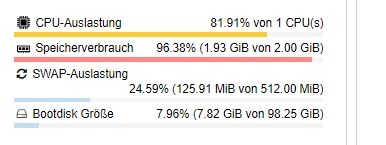
Ich bin schon drauf und dran die Maschine einfach neu einzurichten.
-
Hallo zusammen,
bei mir ist der Wurm drin und ich komme nicht weiter.
Nach dem Start des influx dienst ist folgendes passiert:root@Datenbanken:~# sudo systemctl start influxdb Job for influxdb.service failed because a timeout was exceeded. See "systemctl status influxdb.service" and "journalctl -xe" for details. root@Datenbanken:~# systemctl status influxdb.service * influxdb.service - InfluxDB is an open-source, distributed, time series datab> Loaded: loaded (/lib/systemd/system/influxdb.service; enabled; vendor pres> Active: activating (start) since Sat 2022-09-24 07:50:32 UTC; 17s ago Docs: https://docs.influxdata.com/influxdb/ Cntrl PID: 659 (influxd-systemd) Tasks: 9 (limit: 8984) Memory: 323.3M CGroup: /system.slice/influxdb.service |-659 /bin/bash -e /usr/lib/influxdb/scripts/influxd-systemd-start> |-660 /usr/bin/influxd -config /etc/influxdb/influxdb.conf `-738 /bin/bash -e /usr/lib/influxdb/scripts/influxd-systemd-start> Sep 24 07:50:49 Datenbanken influxd-systemd-start.sh[660]: ts=2022-09-24T07:50:> Sep 24 07:50:49 Datenbanken influxd-systemd-start.sh[660]: ts=2022-09-24T07:50:> Sep 24 07:50:49 Datenbanken influxd-systemd-start.sh[660]: ts=2022-09-24T07:50:> Sep 24 07:50:49 Datenbanken influxd-systemd-start.sh[660]: ts=2022-09-24T07:50:> Sep 24 07:50:49 Datenbanken influxd-systemd-start.sh[660]: ts=2022-09-24T07:50:> Sep 24 07:50:49 Datenbanken influxd-systemd-start.sh[660]: ts=2022-09-24T07:50:> Sep 24 07:50:49 Datenbanken influxd-systemd-start.sh[660]: ts=2022-09-24T07:50:> Sep 24 07:50:49 Datenbanken influxd-systemd-start.sh[660]: ts=2022-09-24T07:50:> Sep 24 07:50:49 Datenbanken influxd-systemd-start.sh[660]: ts=2022-09-24T07:50:> Sep 24 07:50:49 Datenbanken influxd-systemd-start.sh[660]: ts=2022-09-24T07:50:> Sep 24 07:50:49 Datenbanken influxd-systemd-start.sh[660]: ts=2022-09-24T07:50:> lines 1-23...skipping... * influxdb.service - InfluxDB is an open-source, distributed, time series database Loaded: loaded (/lib/systemd/system/influxdb.service; enabled; vendor preset: enabled) Active: activating (start) since Sat 2022-09-24 07:50:32 UTC; 17s ago Docs: https://docs.influxdata.com/influxdb/ Cntrl PID: 659 (influxd-systemd) Tasks: 9 (limit: 8984) Memory: 323.3M CGroup: /system.slice/influxdb.service |-659 /bin/bash -e /usr/lib/influxdb/scripts/influxd-systemd-start.sh |-660 /usr/bin/influxd -config /etc/influxdb/influxdb.conf `-738 /bin/bash -e /usr/lib/influxdb/scripts/influxd-systemd-start.sh Sep 24 07:50:49 Datenbanken influxd-systemd-start.sh[660]: ts=2022-09-24T07:50:49.803931Z lvl=info msg="Opened shard" log_id=0d7cTYgG000 service=store trace_id=0d7cTZBl000 op_name=tsdb_open index_version=inmem path=/var/lib/influxdb/dat> Sep 24 07:50:49 Datenbanken influxd-systemd-start.sh[660]: ts=2022-09-24T07:50:49.806410Z lvl=info msg="Opened file" log_id=0d7cTYgG000 engine=tsm1 service=filestore path=/var/lib/influxdb/data/Energie/global/1979/000000001-000000001.ts> Sep 24 07:50:49 Datenbanken influxd-systemd-start.sh[660]: ts=2022-09-24T07:50:49.817509Z lvl=info msg="Opened shard" log_id=0d7cTYgG000 service=store trace_id=0d7cTZBl000 op_name=tsdb_open index_version=inmem path=/var/lib/influxdb/dat> Sep 24 07:50:49 Datenbanken influxd-systemd-start.sh[660]: ts=2022-09-24T07:50:49.820308Z lvl=info msg="Opened file" log_id=0d7cTYgG000 engine=tsm1 service=filestore path=/var/lib/influxdb/data/Energie/global/1980/000000001-000000001.ts> Sep 24 07:50:49 Datenbanken influxd-systemd-start.sh[660]: ts=2022-09-24T07:50:49.842413Z lvl=info msg="Opened shard" log_id=0d7cTYgG000 service=store trace_id=0d7cTZBl000 op_name=tsdb_open index_version=inmem path=/var/lib/influxdb/dat> Sep 24 07:50:49 Datenbanken influxd-systemd-start.sh[660]: ts=2022-09-24T07:50:49.845186Z lvl=info msg="Opened file" log_id=0d7cTYgG000 engine=tsm1 service=filestore path=/var/lib/influxdb/data/Energie/global/1981/000000001-000000001.ts> Sep 24 07:50:49 Datenbanken influxd-systemd-start.sh[660]: ts=2022-09-24T07:50:49.863748Z lvl=info msg="Opened shard" log_id=0d7cTYgG000 service=store trace_id=0d7cTZBl000 op_name=tsdb_open index_version=inmem path=/var/lib/influxdb/dat> Sep 24 07:50:49 Datenbanken influxd-systemd-start.sh[660]: ts=2022-09-24T07:50:49.866826Z lvl=info msg="Opened file" log_id=0d7cTYgG000 engine=tsm1 service=filestore path=/var/lib/influxdb/data/Energie/global/1982/000000001-000000001.ts> Sep 24 07:50:49 Datenbanken influxd-systemd-start.sh[660]: ts=2022-09-24T07:50:49.884734Z lvl=info msg="Opened shard" log_id=0d7cTYgG000 service=store trace_id=0d7cTZBl000 op_name=tsdb_open index_version=inmem path=/var/lib/influxdb/dat> Sep 24 07:50:49 Datenbanken influxd-systemd-start.sh[660]: ts=2022-09-24T07:50:49.888390Z lvl=info msg="Opened file" log_id=0d7cTYgG000 engine=tsm1 service=filestore path=/var/lib/influxdb/data/Energie/global/1983/000000001-000000001.ts> Sep 24 07:50:49 Datenbanken influxd-systemd-start.sh[660]: ts=2022-09-24T07:50:49.902821Z lvl=info msg="Opened shard" log_id=0d7cTYgG000 service=store trace_id=0d7cTZBl000 op_name=tsdb_open index_version=inmem path=/var/lib/influxdb/dat> Sep 24 07:50:49 Datenbanken influxd-systemd-start.sh[660]: ts=2022-09-24T07:50:49.906182Z lvl=info msg="Opened file" log_id=0d7cTYgG000 engine=tsm1 service=filestore path=/var/lib/influxdb/data/Energie/global/1984/000000001-000000001.ts> Sep 24 07:50:49 Datenbanken influxd-systemd-start.sh[659]: InfluxDB API unavailable after 18 attempts... Sep 24 07:50:49 Datenbanken influxd-systemd-start.sh[660]: ts=2022-09-24T07:50:49.921470Z lvl=info msg="Opened shard" log_id=0d7cTYgG000 service=store trace_id=0d7cTZBl000 op_name=tsdb_open index_version=inmem path=/var/lib/influxdb/dat> Sep 24 07:50:49 Datenbanken influxd-systemd-start.sh[660]: ts=2022-09-24T07:50:49.925737Z lvl=info msg="Opened file" log_id=0d7cTYgG000 engine=tsm1 service=filestore path=/var/lib/influxdb/data/Energie/global/1985/000000001-000000001.ts> ~Seit dem Start ist die Systemlast sehr hoch. Da läuft nur Influx und Grafana.
Ich bin schon drauf und dran die Maschine einfach neu einzurichten.
Stimmt, da ist schon im login prompt der Wurm drin:
root@Datenbanken:~# sudoMacht gar keinen Sinn.
-
Stimmt, da ist schon im login prompt der Wurm drin:
root@Datenbanken:~# sudoMacht gar keinen Sinn.
@thomas-braun ja, das stimmt. Aber das sollte beim Ausführen des Befehls keine Auswirkung haben
-
@thomas-braun ja, das stimmt. Aber das sollte beim Ausführen des Befehls keine Auswirkung haben
@has3nb3inmh
Da nicht. Aber grundsätzlich bei anderen Konstellationen.
Meld dich gar nicht erst als root an! -
@has3nb3inmh
Da nicht. Aber grundsätzlich bei anderen Konstellationen.
Meld dich gar nicht erst als root an!@thomas-braun 👍 ich hoffe ich denk nächstes Mal dran
-
@thomas-braun 👍 ich hoffe ich denk nächstes Mal dran
Was gibt es eigentlich da zu 'dran denken'?
root Login ist verboten! Und in richtigen Installationen auch nur über Umwege möglich. Als Standarduser einloggen. Immer.

Support us
263
Online32.7k
Users82.5k
Topics1.3m
Posts