Skip to content
  • Home
  • Recent
  • Tags
  • 0 Unread 0
  • Categories
  • Unreplied
  • Popular
  • GitHub
  • Docu
  • Hilfe
Skins
  • Light
  • Brite
  • Cerulean
  • Cosmo
  • Flatly
  • Journal
  • Litera
  • Lumen
  • Lux
  • Materia
  • Minty
  • Morph
  • Pulse
  • Sandstone
  • Simplex
  • Sketchy
  • Spacelab
  • United
  • Yeti
  • Zephyr
  • Dark
  • Cyborg
  • Darkly
  • Quartz
  • Slate
  • Solar
  • Superhero
  • Vapor

  • Default (No Skin)
  • No Skin
Collapse
ioBroker Logo

Community Forum

donate donate
  1. ioBroker Community Home
  2. Deutsch
  3. Error/Bug
  4. Absturz beim Update admin Adapter 6.2.14 auf 6.2.17

NEWS

  • Monatsrückblick Januar/Februar 2026 ist online!
    BluefoxB
    Bluefox
    16
    1
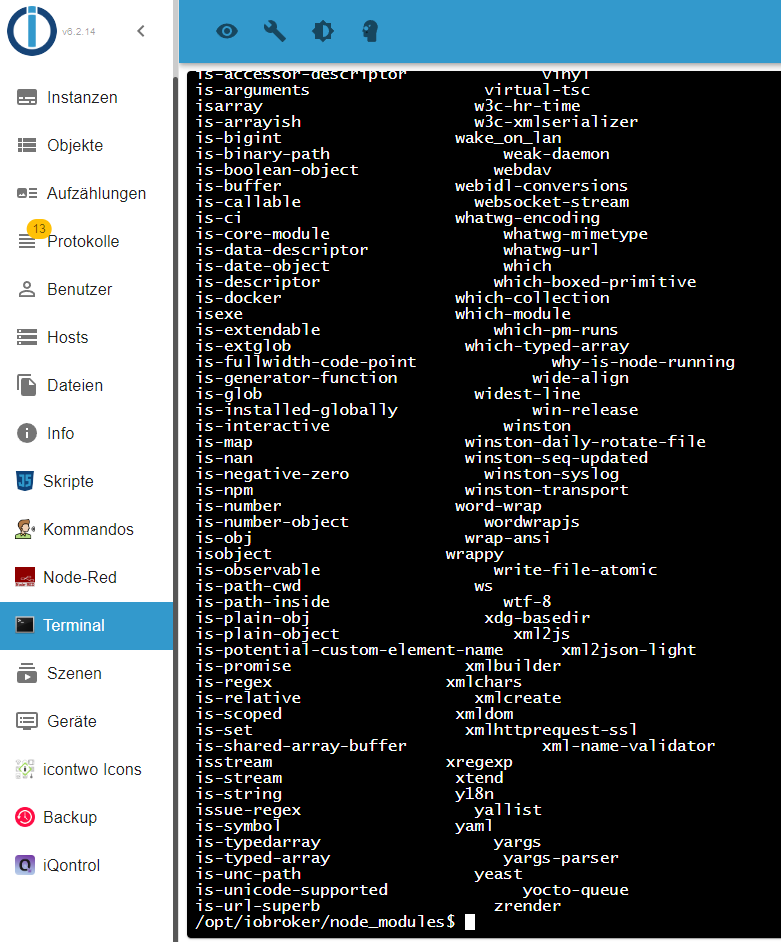
    297

  • Jahresrückblick 2025 – unser neuer Blogbeitrag ist online! ✨
    BluefoxB
    Bluefox
    17
    1
    4.7k

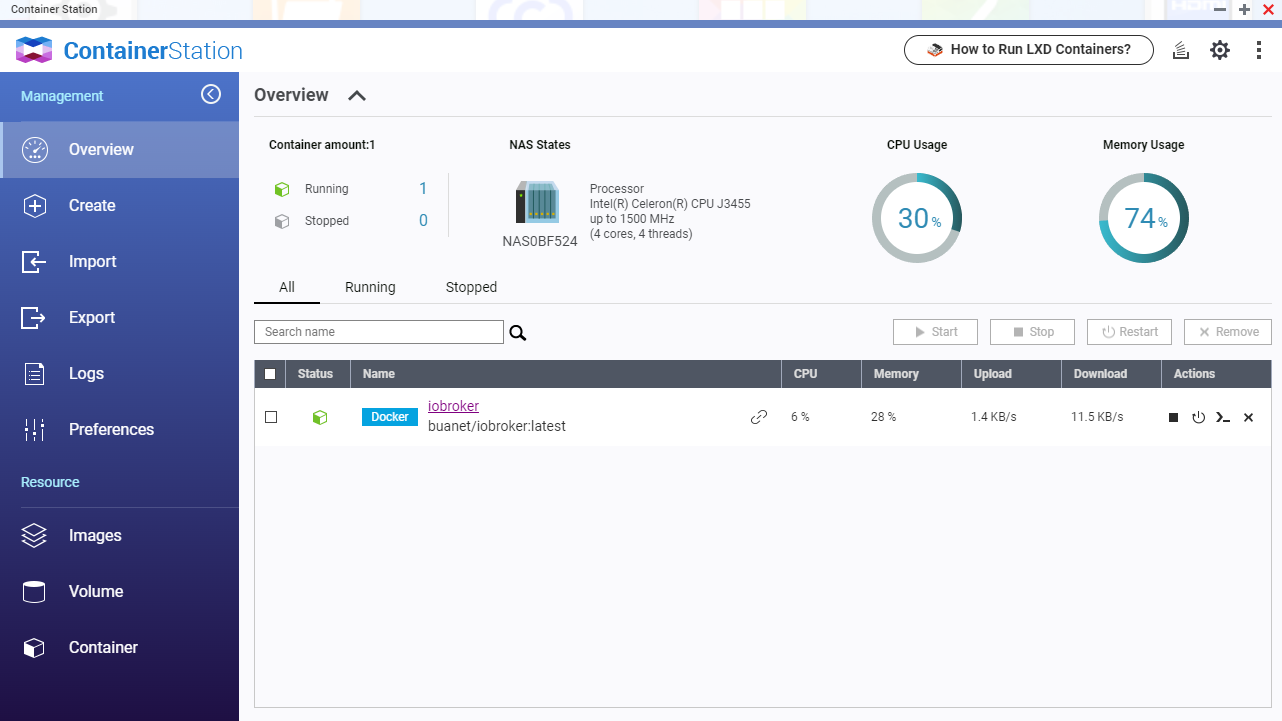
  • Neuer Blogbeitrag: Monatsrückblick - Dezember 2025 🎄
    BluefoxB
    Bluefox
    13
    1
    1.3k

Absturz beim Update admin Adapter 6.2.14 auf 6.2.17

Scheduled Pinned Locked Moved Error/Bug
85 Posts 8 Posters 11.5k Views 10 Watching
  • Oldest to Newest
  • Newest to Oldest
  • Most Votes
Reply
  • Reply as topic
Log in to reply
This topic has been deleted. Only users with topic management privileges can see it.
  • Thomas BraunT Thomas Braun

    @hpiecuch

    rm -rf

    H Offline
    H Offline
    hpiecuch
    wrote on last edited by
    #50

    @thomas-braun said in Absturz beim Update admin Adapter 6.2.14 auf 6.2.17:

    rm -rf

    mit -rf ging es.

    Bekomme jetzt aber folgende Fehlermeldung
    This upgrade of "admin" will introduce the following changes:

    -> 6.2.17:
    Corrected GUI bug on intro tab

    -> 6.2.16:
    Corrected many GUI issues
    Added stable flag for repositories
    Added reset button for repositories
    Improved writeFile function for socket communication

    Would you like to upgrade admin from @6.2.14 to @6.2.17 now? [(y)es, (n)o]: y
    Update admin from @6.2.14 to @6.2.17
    host.iobroker Adapter "system.adapter.admin.0" is stopped.
    NPM version: 8.15.0
    Installing iobroker.admin@6.2.17... (System call)
    npm ERR! code ENOTEMPTY
    npm ERR! syscall rename
    npm ERR! path /opt/iobroker/node_modules/@node-red/editor-api
    npm ERR! dest /opt/iobroker/node_modules/@node-red/.editor-api-Xk7v1FU7
    npm ERR! errno -39
    npm ERR! ENOTEMPTY: directory not empty, rename '/opt/iobroker/node_modules/@node-red/editor-api' -> '/opt/iobroker/node_modules/@node-red/.editor-api-Xk7v1FU7'

    npm ERR! A complete log of this run can be found in:
    npm ERR! /home/iobroker/.npm/_logs/2022-08-20T10_09_45_615Z-debug-0.log
    host.iobroker Cannot install iobroker.admin@6.2.17: 217

    Thomas BraunT GlasfaserG 2 Replies Last reply
    0
    • H hpiecuch

      @thomas-braun said in Absturz beim Update admin Adapter 6.2.14 auf 6.2.17:

      rm -rf

      mit -rf ging es.

      Bekomme jetzt aber folgende Fehlermeldung
      This upgrade of "admin" will introduce the following changes:

      -> 6.2.17:
      Corrected GUI bug on intro tab

      -> 6.2.16:
      Corrected many GUI issues
      Added stable flag for repositories
      Added reset button for repositories
      Improved writeFile function for socket communication

      Would you like to upgrade admin from @6.2.14 to @6.2.17 now? [(y)es, (n)o]: y
      Update admin from @6.2.14 to @6.2.17
      host.iobroker Adapter "system.adapter.admin.0" is stopped.
      NPM version: 8.15.0
      Installing iobroker.admin@6.2.17... (System call)
      npm ERR! code ENOTEMPTY
      npm ERR! syscall rename
      npm ERR! path /opt/iobroker/node_modules/@node-red/editor-api
      npm ERR! dest /opt/iobroker/node_modules/@node-red/.editor-api-Xk7v1FU7
      npm ERR! errno -39
      npm ERR! ENOTEMPTY: directory not empty, rename '/opt/iobroker/node_modules/@node-red/editor-api' -> '/opt/iobroker/node_modules/@node-red/.editor-api-Xk7v1FU7'

      npm ERR! A complete log of this run can be found in:
      npm ERR! /home/iobroker/.npm/_logs/2022-08-20T10_09_45_615Z-debug-0.log
      host.iobroker Cannot install iobroker.admin@6.2.17: 217

      Thomas BraunT Online
      Thomas BraunT Online
      Thomas Braun
      Most Active
      wrote on last edited by
      #51

      @hpiecuch

      Und weiter. Oder mit der for-Schleife arbeiten

      Linux-Werkzeugkasten:
      https://forum.iobroker.net/topic/42952/der-kleine-iobroker-linux-werkzeugkasten
      NodeJS Fixer Skript:
      https://forum.iobroker.net/topic/68035/iob-node-fix-skript
      iob_diag: curl -sLf -o diag.sh https://iobroker.net/diag.sh && bash diag.sh

      H 1 Reply Last reply
      0
      • H hpiecuch

        @glasfaser ich habe nur den iobroker terminal adapter und weeiß nicht wie das geht

        GlasfaserG Offline
        GlasfaserG Offline
        Glasfaser
        wrote on last edited by
        #52

        @hpiecuch sagte in Absturz beim Update admin Adapter 6.2.14 auf 6.2.17:

        und weeiß nicht wie das geht

        ???

        Du kopierst den Text nur hier nur rein !?

        Im Video ist es erklärt ... Zeichen </>

        Synology 918+ 16GB - ioBroker in Docker v9 , VISO auf Trekstor Primebook C13 13,3" , Hikvision Domkameras mit Surveillance Station .. CCU RaspberryMatic in Synology VM .. Zigbee CC2538+CC2592 .. Sonoff .. KNX .. Modbus ..

        1 Reply Last reply
        0
        • H hpiecuch

          @thomas-braun said in Absturz beim Update admin Adapter 6.2.14 auf 6.2.17:

          rm -rf

          mit -rf ging es.

          Bekomme jetzt aber folgende Fehlermeldung
          This upgrade of "admin" will introduce the following changes:

          -> 6.2.17:
          Corrected GUI bug on intro tab

          -> 6.2.16:
          Corrected many GUI issues
          Added stable flag for repositories
          Added reset button for repositories
          Improved writeFile function for socket communication

          Would you like to upgrade admin from @6.2.14 to @6.2.17 now? [(y)es, (n)o]: y
          Update admin from @6.2.14 to @6.2.17
          host.iobroker Adapter "system.adapter.admin.0" is stopped.
          NPM version: 8.15.0
          Installing iobroker.admin@6.2.17... (System call)
          npm ERR! code ENOTEMPTY
          npm ERR! syscall rename
          npm ERR! path /opt/iobroker/node_modules/@node-red/editor-api
          npm ERR! dest /opt/iobroker/node_modules/@node-red/.editor-api-Xk7v1FU7
          npm ERR! errno -39
          npm ERR! ENOTEMPTY: directory not empty, rename '/opt/iobroker/node_modules/@node-red/editor-api' -> '/opt/iobroker/node_modules/@node-red/.editor-api-Xk7v1FU7'

          npm ERR! A complete log of this run can be found in:
          npm ERR! /home/iobroker/.npm/_logs/2022-08-20T10_09_45_615Z-debug-0.log
          host.iobroker Cannot install iobroker.admin@6.2.17: 217

          GlasfaserG Offline
          GlasfaserG Offline
          Glasfaser
          wrote on last edited by
          #53

          @hpiecuch sagte in Absturz beim Update admin Adapter 6.2.14 auf 6.2.17:

          upgrade admin from @6.2.14 to @6.2.17

          Warum bist du im BETA Zweig

          und dann noch wild mit dem Adapter Terminal arbeiten !?

          Synology 918+ 16GB - ioBroker in Docker v9 , VISO auf Trekstor Primebook C13 13,3" , Hikvision Domkameras mit Surveillance Station .. CCU RaspberryMatic in Synology VM .. Zigbee CC2538+CC2592 .. Sonoff .. KNX .. Modbus ..

          1 Reply Last reply
          0
          • Thomas BraunT Thomas Braun

            @hpiecuch

            Und weiter. Oder mit der for-Schleife arbeiten

            H Offline
            H Offline
            hpiecuch
            wrote on last edited by
            #54

            @thomas-braun ok, denn jetzt kommt wieder eine Meldung. Ich probiere es nochmals mit der for-Schleife
            This upgrade of "admin" will introduce the following changes:

            -> 6.2.17:
            Corrected GUI bug on intro tab

            -> 6.2.16:
            Corrected many GUI issues
            Added stable flag for repositories
            Added reset button for repositories
            Improved writeFile function for socket communication

            Would you like to upgrade admin from @6.2.14 to @6.2.17 now? [(y)es, (n)o]: y
            Update admin from @6.2.14 to @6.2.17
            host.iobroker Adapter "system.adapter.admin.0" is stopped.
            NPM version: 8.15.0
            Installing iobroker.admin@6.2.17... (System call)
            npm ERR! code ENOTEMPTY
            npm ERR! syscall rename
            npm ERR! path /opt/iobroker/node_modules/@node-red/editor-client
            npm ERR! dest /opt/iobroker/node_modules/@node-red/.editor-client-FpqhSpDH
            npm ERR! errno -39
            npm ERR! ENOTEMPTY: directory not empty, rename '/opt/iobroker/node_modules/@node-red/editor-client' -> '/opt/iobroker/node_modules/@node-red/.editor-client-FpqhSpDH'

            npm ERR! A complete log of this run can be found in:
            npm ERR! /home/iobroker/.npm/_logs/2022-08-20T10_15_35_964Z-debug-0.log
            host.iobroker Cannot install iobroker.admin@6.2.17: 217

            GlasfaserG 1 Reply Last reply
            0
            • H hpiecuch

              @thomas-braun ok, denn jetzt kommt wieder eine Meldung. Ich probiere es nochmals mit der for-Schleife
              This upgrade of "admin" will introduce the following changes:

              -> 6.2.17:
              Corrected GUI bug on intro tab

              -> 6.2.16:
              Corrected many GUI issues
              Added stable flag for repositories
              Added reset button for repositories
              Improved writeFile function for socket communication

              Would you like to upgrade admin from @6.2.14 to @6.2.17 now? [(y)es, (n)o]: y
              Update admin from @6.2.14 to @6.2.17
              host.iobroker Adapter "system.adapter.admin.0" is stopped.
              NPM version: 8.15.0
              Installing iobroker.admin@6.2.17... (System call)
              npm ERR! code ENOTEMPTY
              npm ERR! syscall rename
              npm ERR! path /opt/iobroker/node_modules/@node-red/editor-client
              npm ERR! dest /opt/iobroker/node_modules/@node-red/.editor-client-FpqhSpDH
              npm ERR! errno -39
              npm ERR! ENOTEMPTY: directory not empty, rename '/opt/iobroker/node_modules/@node-red/editor-client' -> '/opt/iobroker/node_modules/@node-red/.editor-client-FpqhSpDH'

              npm ERR! A complete log of this run can be found in:
              npm ERR! /home/iobroker/.npm/_logs/2022-08-20T10_15_35_964Z-debug-0.log
              host.iobroker Cannot install iobroker.admin@6.2.17: 217

              GlasfaserG Offline
              GlasfaserG Offline
              Glasfaser
              wrote on last edited by
              #55

              @hpiecuch

              Halllo lieber Mit-User

              Bitte deine Ausgabe in Code-Tags !???

              Synology 918+ 16GB - ioBroker in Docker v9 , VISO auf Trekstor Primebook C13 13,3" , Hikvision Domkameras mit Surveillance Station .. CCU RaspberryMatic in Synology VM .. Zigbee CC2538+CC2592 .. Sonoff .. KNX .. Modbus ..

              1 Reply Last reply
              0
              • Thomas BraunT Thomas Braun

                @hpiecuch sagte in Absturz beim Update admin Adapter 6.2.14 auf 6.2.17:

                ich habe nur den iobroker terminal adapter und weeiß nicht wie das geht

                Da liegt doch eine richtige Konsole drunter? Wer nutzt denn den Adapter, wenn man auch direkt im Terminal arbeiten kann?

                H Offline
                H Offline
                hpiecuch
                wrote on last edited by
                #56

                @thomas-braun wo ist denn die Console?
                02cd0ce1-6eab-44fb-a614-eaaeeb708115-image.png

                GlasfaserG 1 Reply Last reply
                0
                • Thomas BraunT Thomas Braun

                  @dampfhammer

                  Nein, alle 'versteckten' Verzeichnisse (beginnen immer mit einem Punkt) und die einen Bindestrich enthalten (und eine kryptische Endung haben).

                  D Offline
                  D Offline
                  Dampfhammer
                  wrote on last edited by
                  #57

                  @thomas-braun

                  Okay durch händisches löschen der Verzeichnisse (ich habe es teilweise auch im Windows Explorer gemacht xD) konnte ich den Admin Adapter wieder zum laufen bringen. Besten Dank dir und @Glasfaser für die Unterstützung.

                  1 Reply Last reply
                  1
                  • H hpiecuch

                    @thomas-braun wo ist denn die Console?
                    02cd0ce1-6eab-44fb-a614-eaaeeb708115-image.png

                    GlasfaserG Offline
                    GlasfaserG Offline
                    Glasfaser
                    wrote on last edited by
                    #58

                    @hpiecuch sagte in Absturz beim Update admin Adapter 6.2.14 auf 6.2.17:

                    wo ist denn die Console?

                    Du hast doch bestimmt nicht damit " Adapter Terminal " dein ioBroker ausfgesetzt !?

                    Bestimmt mit z.B Putty , das meint Thomas .

                    Synology 918+ 16GB - ioBroker in Docker v9 , VISO auf Trekstor Primebook C13 13,3" , Hikvision Domkameras mit Surveillance Station .. CCU RaspberryMatic in Synology VM .. Zigbee CC2538+CC2592 .. Sonoff .. KNX .. Modbus ..

                    H 1 Reply Last reply
                    0
                    • GlasfaserG Glasfaser

                      @hpiecuch sagte in Absturz beim Update admin Adapter 6.2.14 auf 6.2.17:

                      wo ist denn die Console?

                      Du hast doch bestimmt nicht damit " Adapter Terminal " dein ioBroker ausfgesetzt !?

                      Bestimmt mit z.B Putty , das meint Thomas .

                      H Offline
                      H Offline
                      hpiecuch
                      wrote on last edited by
                      #59

                      @glasfaser```
                      ja aber mit putty komme ich nicht in das verzeichnis /opt/iobroker.

                      GlasfaserG 1 Reply Last reply
                      0
                      • H hpiecuch

                        @glasfaser```
                        ja aber mit putty komme ich nicht in das verzeichnis /opt/iobroker.

                        GlasfaserG Offline
                        GlasfaserG Offline
                        Glasfaser
                        wrote on last edited by Glasfaser
                        #60

                        @hpiecuch sagte in Absturz beim Update admin Adapter 6.2.14 auf 6.2.17:

                        nicht in das verzeichnis /opt/iobroker.

                        Zeigen ????

                        So :

                        cd /opt/iobroker
                        

                        Synology 918+ 16GB - ioBroker in Docker v9 , VISO auf Trekstor Primebook C13 13,3" , Hikvision Domkameras mit Surveillance Station .. CCU RaspberryMatic in Synology VM .. Zigbee CC2538+CC2592 .. Sonoff .. KNX .. Modbus ..

                        H 1 Reply Last reply
                        0
                        • GlasfaserG Glasfaser

                          @hpiecuch sagte in Absturz beim Update admin Adapter 6.2.14 auf 6.2.17:

                          nicht in das verzeichnis /opt/iobroker.

                          Zeigen ????

                          So :

                          cd /opt/iobroker
                          
                          H Offline
                          H Offline
                          hpiecuch
                          wrote on last edited by
                          #61

                          @glasfaser ich kann mich da nur auf dem NAS anmelden 192.168.178.71 und nicht auf der iobroker instanz 192.168.178.72 und wenn ich mich auf dem NAS mit Putty anmelde bekomme ich dann folgen Fehlermeldung ```
                          [~] # cd /opt/iobroker
                          -sh: cd: /opt/iobroker: No such file or directory
                          [~] #

                          code_text
                          
                          GlasfaserG 1 Reply Last reply
                          0
                          • H hpiecuch

                            @glasfaser ich kann mich da nur auf dem NAS anmelden 192.168.178.71 und nicht auf der iobroker instanz 192.168.178.72 und wenn ich mich auf dem NAS mit Putty anmelde bekomme ich dann folgen Fehlermeldung ```
                            [~] # cd /opt/iobroker
                            -sh: cd: /opt/iobroker: No such file or directory
                            [~] #

                            code_text
                            
                            GlasfaserG Offline
                            GlasfaserG Offline
                            Glasfaser
                            wrote on last edited by
                            #62

                            @hpiecuch sagte in Absturz beim Update admin Adapter 6.2.14 auf 6.2.17:

                            ich kann mich da nur auf dem NAS anmelden

                            und wo ist ioBroker installiert ... in einem Docker !?
                            Welche NAS!?

                            Synology 918+ 16GB - ioBroker in Docker v9 , VISO auf Trekstor Primebook C13 13,3" , Hikvision Domkameras mit Surveillance Station .. CCU RaspberryMatic in Synology VM .. Zigbee CC2538+CC2592 .. Sonoff .. KNX .. Modbus ..

                            H 1 Reply Last reply
                            0
                            • GlasfaserG Glasfaser

                              @hpiecuch sagte in Absturz beim Update admin Adapter 6.2.14 auf 6.2.17:

                              ich kann mich da nur auf dem NAS anmelden

                              und wo ist ioBroker installiert ... in einem Docker !?
                              Welche NAS!?

                              H Offline
                              H Offline
                              hpiecuch
                              wrote on last edited by
                              #63

                              @glasfaser Ja, in einem Docker auf einem QNAP Nas

                              GlasfaserG 1 Reply Last reply
                              0
                              • H hpiecuch

                                @glasfaser Ja, in einem Docker auf einem QNAP Nas

                                GlasfaserG Offline
                                GlasfaserG Offline
                                Glasfaser
                                wrote on last edited by
                                #64

                                @hpiecuch
                                Dann hast du bestimmt mit Portainer alles eingerichtet "

                                Synology 918+ 16GB - ioBroker in Docker v9 , VISO auf Trekstor Primebook C13 13,3" , Hikvision Domkameras mit Surveillance Station .. CCU RaspberryMatic in Synology VM .. Zigbee CC2538+CC2592 .. Sonoff .. KNX .. Modbus ..

                                H 1 Reply Last reply
                                0
                                • GlasfaserG Glasfaser

                                  @hpiecuch
                                  Dann hast du bestimmt mit Portainer alles eingerichtet "

                                  H Offline
                                  H Offline
                                  hpiecuch
                                  wrote on last edited by
                                  #65

                                  @glasfaser Container
                                  50c87b27-fcba-433e-913f-6917a9992b52-image.png

                                  GlasfaserG 1 Reply Last reply
                                  0
                                  • H hpiecuch

                                    @glasfaser Container
                                    50c87b27-fcba-433e-913f-6917a9992b52-image.png

                                    GlasfaserG Offline
                                    GlasfaserG Offline
                                    Glasfaser
                                    wrote on last edited by
                                    #66

                                    @hpiecuch

                                    Kenne so Qnap nicht ... aber da gibt es bestimmt auch eine Konsole..

                                    Aber egal ... ist jetzt nicht das Thread-Thema.

                                    Lösche alle angemekerten Verzeichnisse mit .

                                    Und nochmal ... warum bist du im Beta-Zweig !?

                                    Synology 918+ 16GB - ioBroker in Docker v9 , VISO auf Trekstor Primebook C13 13,3" , Hikvision Domkameras mit Surveillance Station .. CCU RaspberryMatic in Synology VM .. Zigbee CC2538+CC2592 .. Sonoff .. KNX .. Modbus ..

                                    H 2 Replies Last reply
                                    0
                                    • GlasfaserG Glasfaser

                                      @hpiecuch

                                      Kenne so Qnap nicht ... aber da gibt es bestimmt auch eine Konsole..

                                      Aber egal ... ist jetzt nicht das Thread-Thema.

                                      Lösche alle angemekerten Verzeichnisse mit .

                                      Und nochmal ... warum bist du im Beta-Zweig !?

                                      H Offline
                                      H Offline
                                      hpiecuch
                                      wrote on last edited by
                                      #67

                                      @glasfaser Das weiß ich leider nicht mehr warum ich im Beta-Zweig bin. Die Verzeichnisse sind nun gelöscht und der admin adapter ist auf dem neuesten Stand. Alle anderen Adapter konnte ich nun auch updaten. Nur node-red geht immer noch nicht.
                                      $ ./iobroker upgrade node-red
                                      Update node-red from @3.3.1 to @4.0.0
                                      host.iobroker Adapter "system.adapter.node-red.0" is stopped.
                                      NPM version: 8.15.0
                                      Installing iobroker.node-red@4.0.0... (System call)
                                      ERROR: host.iobroker Cannot install iobroker.node-red@4.0.0: 217
                                      ERROR: process exited with code 25

                                      GlasfaserG Thomas BraunT 2 Replies Last reply
                                      0
                                      • H hpiecuch

                                        @glasfaser Das weiß ich leider nicht mehr warum ich im Beta-Zweig bin. Die Verzeichnisse sind nun gelöscht und der admin adapter ist auf dem neuesten Stand. Alle anderen Adapter konnte ich nun auch updaten. Nur node-red geht immer noch nicht.
                                        $ ./iobroker upgrade node-red
                                        Update node-red from @3.3.1 to @4.0.0
                                        host.iobroker Adapter "system.adapter.node-red.0" is stopped.
                                        NPM version: 8.15.0
                                        Installing iobroker.node-red@4.0.0... (System call)
                                        ERROR: host.iobroker Cannot install iobroker.node-red@4.0.0: 217
                                        ERROR: process exited with code 25

                                        GlasfaserG Offline
                                        GlasfaserG Offline
                                        Glasfaser
                                        wrote on last edited by
                                        #68

                                        @hpiecuch sagte in Absturz beim Update admin Adapter 6.2.14 auf 6.2.17:

                                        Das weiß ich leider nicht mehr warum ich im Beta-Zweig bin.

                                        Dann stelle beim Admin den Verwahrungsort wieder um auf STABLE !

                                        Der wurde von dir mal umgestellt !!

                                        Synology 918+ 16GB - ioBroker in Docker v9 , VISO auf Trekstor Primebook C13 13,3" , Hikvision Domkameras mit Surveillance Station .. CCU RaspberryMatic in Synology VM .. Zigbee CC2538+CC2592 .. Sonoff .. KNX .. Modbus ..

                                        1 Reply Last reply
                                        0
                                        • H hpiecuch

                                          @glasfaser Das weiß ich leider nicht mehr warum ich im Beta-Zweig bin. Die Verzeichnisse sind nun gelöscht und der admin adapter ist auf dem neuesten Stand. Alle anderen Adapter konnte ich nun auch updaten. Nur node-red geht immer noch nicht.
                                          $ ./iobroker upgrade node-red
                                          Update node-red from @3.3.1 to @4.0.0
                                          host.iobroker Adapter "system.adapter.node-red.0" is stopped.
                                          NPM version: 8.15.0
                                          Installing iobroker.node-red@4.0.0... (System call)
                                          ERROR: host.iobroker Cannot install iobroker.node-red@4.0.0: 217
                                          ERROR: process exited with code 25

                                          Thomas BraunT Online
                                          Thomas BraunT Online
                                          Thomas Braun
                                          Most Active
                                          wrote on last edited by
                                          #69

                                          @hpiecuch
                                          Dann geh auf den Stabilen Zweig, da ist node-red 3.3.1 aktuell.

                                          Linux-Werkzeugkasten:
                                          https://forum.iobroker.net/topic/42952/der-kleine-iobroker-linux-werkzeugkasten
                                          NodeJS Fixer Skript:
                                          https://forum.iobroker.net/topic/68035/iob-node-fix-skript
                                          iob_diag: curl -sLf -o diag.sh https://iobroker.net/diag.sh && bash diag.sh

                                          GlasfaserG H 2 Replies Last reply
                                          0
                                          Reply
                                          • Reply as topic
                                          Log in to reply
                                          • Oldest to Newest
                                          • Newest to Oldest
                                          • Most Votes


                                          Support us

                                          ioBroker
                                          Community Adapters
                                          Donate

                                          255

                                          Online

                                          32.7k

                                          Users

                                          82.5k

                                          Topics

                                          1.3m

                                          Posts
                                          Community
                                          Impressum | Datenschutz-Bestimmungen | Nutzungsbedingungen | Einwilligungseinstellungen
                                          ioBroker Community 2014-2025
                                          logo
                                          • Login

                                          • Don't have an account? Register

                                          • Login or register to search.
                                          • First post
                                            Last post
                                          0
                                          • Home
                                          • Recent
                                          • Tags
                                          • Unread 0
                                          • Categories
                                          • Unreplied
                                          • Popular
                                          • GitHub
                                          • Docu
                                          • Hilfe