




ESPHome Shelly Plus 2PM Einbindung
-
Hallo, ich habe einen Shelly Plus 2PM den ich gerne mit ESPHome laufen lassen würde.
Laut ESPHome geht das ja schon.
Ich habe einige ESP8266 mit ESPHome am laufen und das ist mein erster ESP32.
Der original Code von ESPHome zeigt mir Fehler an, wenn ich ihn einbinden möchte.
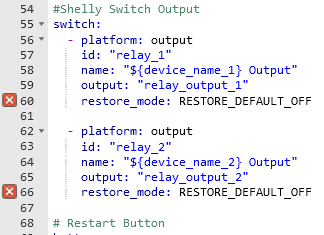
[restore_mode] is an invalid option for [switch.output]. Please check the indentation.Ich habe den Code dann soweit es für mich möglich angepasst, allerdings funktioniert das immer noch nicht, da ich keine Werte bekomme.
esphome:
  name: esp2pm-146
  platformio_options:
    board_build.f_cpu: 160000000L

substitutions:
  device_name_1: "Shelly Plus 2PM Switch 1"
  device_name_2: "Shelly Plus 2PM Switch 2"
  #Home Assistant light bulb to toggle
  bulb_name_1: "light.smart_bulb_1"
  bulb_name_2: "light.smart_bulb_2"

  max_power: "3600.0"
  max_temp: "80.0"

esp32:
  board: esp32doit-devkit-v1
  framework:
    type: esp-idf
    sdkconfig_options:
      CONFIG_FREERTOS_UNICORE: y
      CONFIG_ESP32_DEFAULT_CPU_FREQ_160: y
      CONFIG_ESP32_DEFAULT_CPU_FREQ_MHZ: "160"


logger:
  level: VERY_VERBOSE
api:
ota:

wifi:
  ssid: !secret wifi_ssid
  password: !secret wifi_password
#  fast_connect: true

time:
  - platform: homeassistant


i2c:
  sda: GPIO33
  scl: GPIO25

#Shelly Switch Output
switch:
  - platform: gpio
    name: "${device_name_1} Output"
    pin: GPIO13
    id: "relay_1"
#    output: "relay_output_1"
#    restore_mode: RESTORE_DEFAULT_OFF

  - platform: gpio
    name: "${device_name_2} Output"
    pin: GPIO12
    id: "relay_2"
#    output: "relay_output_2"
#    restore_mode: RESTORE_DEFAULT_OFF

# Restart Button
button:
  - platform: restart
    id: "restart_device"
    name: "${device_name_1} Restart"
    entity_category: 'diagnostic'

#home assistant bulb to switch
text_sensor:
  - platform: homeassistant
    id: 'ha_bulb_1'
    entity_id: "${bulb_name_1}"
    internal: true
  - platform: homeassistant
    id: 'ha_bulb_2'
    entity_id: "${bulb_name_2}"
    internal: true

binary_sensor:
  #Shelly Switch Input 1
  - platform: gpio
    name: "${device_name_1} Input"
    pin: GPIO2
    #small delay to prevent debouncing
    filters:
      - delayed_on_off: 50ms
    # config for state change of input button
    on_state:
        then:
          - if:
              condition:
                and:
                  - wifi.connected:
                  - api.connected:
                  - switch.is_on: "relay_1"
                  - lambda: 'return (id(ha_bulb_1).state == "on" || id(ha_bulb_1).state == "off");'
              # toggle smart light if wifi and api are connected and relay is on
              then:
                - homeassistant.service:
                    service: light.toggle
                    data:
                      entity_id: "${bulb_name_1}"
              else:
                - switch.toggle: "relay_1"

  #Shelly Switch Input 2
  - platform: gpio
    name: "${device_name_2} Input"
    pin: GPIO18
    #small delay to prevent debouncing
    filters:
      - delayed_on_off: 50ms
    # config for state change of input button
    on_state:
        then:
          - if:
              condition:
                and:
                  - wifi.connected:
                  - api.connected:
                  - switch.is_on: "relay_2"
                  - lambda: 'return (id(ha_bulb_2).state == "on" || id(ha_bulb_2).state == "off");'
              # toggle smart light if wifi and api are connected and relay is on
              then:
                - homeassistant.service:
                    service: light.toggle
                    data:
                      entity_id: "${bulb_name_2}"
              else:
                - switch.toggle: "relay_2"

  #reset button on device
  - platform: gpio
    name: "${device_name_1} Button"
    pin:
      number: GPIO27
      inverted: yes
      mode:
        input: true
        pullup: true
    on_press:
      then:
        - button.press: "restart_device"
    filters:
      - delayed_on_off: 5ms
    internal: true

sensor:
  # Uptime sensor.
  - platform: uptime
    name: ${device_name_1} Uptime
    entity_category: 'diagnostic'
    update_interval: 300s

  # WiFi Signal sensor.
  - platform: wifi_signal
    name: ${device_name_1} WiFi Signal
    update_interval: 60s
    entity_category: 'diagnostic'

  #temperature sensor
  - platform: ntc
    sensor: temp_resistance_reading
    name: "${device_name_1} Temperature"
    unit_of_measurement: "°C"
    accuracy_decimals: 1
    icon: "mdi:thermometer"
    entity_category: 'diagnostic'
    calibration:
      #These default values don't seem accurate
      b_constant: 3350
      reference_resistance: 10kOhm
      reference_temperature: 298.15K
      #Alternative calibration values based on IR thermometer reading with case removed
      #- 2.284kOhm -> 48°C
      #- 10.19kOhm -> 17°C
      #- 5.856kOhm -> 25°C
    on_value_range:
      - above: ${max_temp}
        then:
          - switch.turn_off: "relay_1"
          - switch.turn_off: "relay_2"
          - homeassistant.service:
                service: persistent_notification.create
                data:
                  title: "Message from ${device_name_1}, ${device_name_2}"
                data_template:
                  message: "Switch turned off because temperature exceeded ${max_temp}°C"

  - platform: resistance
    id: temp_resistance_reading
    sensor: temp_analog_reading
    configuration: DOWNSTREAM
    resistor: 6kOhm

  - platform: adc
    id: temp_analog_reading
    pin: GPIO37
    attenuation: 11db
    update_interval: 60s

  #power monitoring
  - platform: ade7953
    irq_pin: GPIO36 # Prevent overheating by setting this
    voltage:
      name: ${device_name_1} voltage
      entity_category: 'diagnostic'
    # On the Shelly 2.5 channels are mixed ch1=B ch2=A
    current_a:
      name: ${device_name_2} current
      entity_category: 'diagnostic'
    current_b:
      name: ${device_name_1} current
      entity_category: 'diagnostic'
    active_power_a:
      name: ${device_name_2} power
      id: power_channel_2
      entity_category: 'diagnostic'
      # active_power_a is normal, so don't multiply by -1
      on_value_range:
        - above: ${max_power}
          then:
            - switch.turn_off: "relay_2"
            - homeassistant.service:
                service: persistent_notification.create
                data:
                  title: "Message from ${device_name_2}"
                data_template:
                  message: "Switch turned off because power exceeded ${max_power}W"
    active_power_b:
      name: ${device_name_1} power
      id: power_channel_1
      entity_category: 'diagnostic'
      # active_power_b is inverted, so multiply by -1
      filters:
        - multiply: -1
      on_value_range:
        - above: ${max_power}
          then:
            - switch.turn_off: "relay_1"
            - homeassistant.service:
                service: persistent_notification.create
                data:
                  title: "Message from ${device_name_1}"
                data_template:
                  message: "Switch turned off because power exceeded ${max_power}W"
    update_interval: 30s

status_led:
  pin:
    number: GPIO0
    inverted: true
Desweiteren kann ich den Webserver nicht einbinden. Geht das am ESP32 nicht?
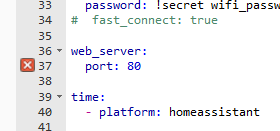
This feature is only available with frameworks ['arduino'].Kann mir jemand weiterhelfen ?
Hey! Du scheinst an dieser Unterhaltung interessiert zu sein, hast aber noch kein Konto.
Hast du es satt, bei jedem Besuch durch die gleichen Beiträge zu scrollen? Wenn du dich für ein Konto anmeldest, kommst du immer genau dorthin zurück, wo du zuvor warst, und kannst dich über neue Antworten benachrichtigen lassen (entweder per E-Mail oder Push-Benachrichtigung). Du kannst auch Lesezeichen speichern und Beiträge positiv bewerten, um anderen Community-Mitgliedern deine Wertschätzung zu zeigen.
Mit deinem Input könnte dieser Beitrag noch besser werden 💗
Registrieren Anmelden327
Online33.0k
Benutzer83.5k
Themen1.3m
Beiträge